

Page 1
BCS 36x8ex Connection to PLC
Supplementary description – Translation of the original
Addendum to user manual 11-A1S4-7D0001
BCS36x8
ex
Series
Type 17-A1S4-*HP*
ATEX / IECEx Zone 1/21
CSA Class I, II, III Division 1
Type B7-A2S4-*HP*
ATEX / IECEx Zone 2/22
CSA Class I, II, III Division 2
Date: 23 April 2019
Proviso: Technical changes reserved. Changes, mistakes and printing errors do
not substantiate any claim to damages.
GmbH
Max-Eyth-Straße 16
97980 Bad Mergentheim,
GERMANY
Phone: +49 (0) 7931 597-0 Support: [email protected]
Fax: +49 (0) 7931 597-119 Download: http://automation.bartec.de
Internet: www.bartec.de
Page 2

BCS 36x8ex Connection to PLC
Table of content
Table of content .............................................................................................................................. 2
1. General information for the connection to PLC ................................................................ 3
2. Connection to PLC ............................................................................................................... 5
3. Sample Project for Siemens-Simatic S7-300 ..................................................................... 5
3.1 Sample project ............................................................................................................ 6
3.2 Hardware Configuration .............................................................................................. 6
3.3 Software Configuration ............................................................................................... 7
3.4 Project tree for necessary modules ............................................................................ 8
3.5 Main [OB1] .................................................................................................................. 9
3.6 Function FC7 / RCV_RS232C .................................................................................... 9
3.7 Instances of the data module .................................................................................... 10
2/10
Technical changes reserved.
04/2019
Page 3

BCS 36x8ex Connection to PLC
1. General information for the connection to PLC
The BARTEC system of the BCS36x8ex series consists of a hand-held scanner (corded or Bluetooth) and an associated
universal supply module(USM) or base statio n.
The hand-held scanner can be connected to a PL C via these associated components.
All used interfaces of the USM (USB, RS232, RS422 and RS485) can be connecte d to a PLC.
There are a number of different manufacturers for PLCs. The connection of a hand-held scanner dep ends on the availability
of an interface to the PLC and the ability of the PLC to process the incoming data. The PLC must support the open ASCII
protocol.
There is no compatibility list existing.
The following must be observed when connecting the handheld scanner to a PLC:
What interfaces are available on the PLC/PLC?
The USM supports the following interfaces.
- USB-SPP (virtual serial interface)
- RS232
- RS422
- RS485
The PLC supports the open ASCII protocol.
What interface parameters are set on the PLC?
All interconnected components must be set to the same parameters. Otherwise, the communication can not work
correctly or not at all.
- Baud Rate
- parity
- Stop Bit
- Data Bit
- Hardware/Software Handshaking
The way of processing the data at the PL C and what has to be set at the sc anner is the responsibility of
the plant operator.
E.g. a serial interface has no intelligence of its ow n and c annot process i ncomi ng data indepen dently. Th is
means that the controller must monitor the serial interface and process incoming data (read/write routine).
Technical changes reserved.
04/2019
3/10
Page 4
BCS 36x8ex Connection to PLC
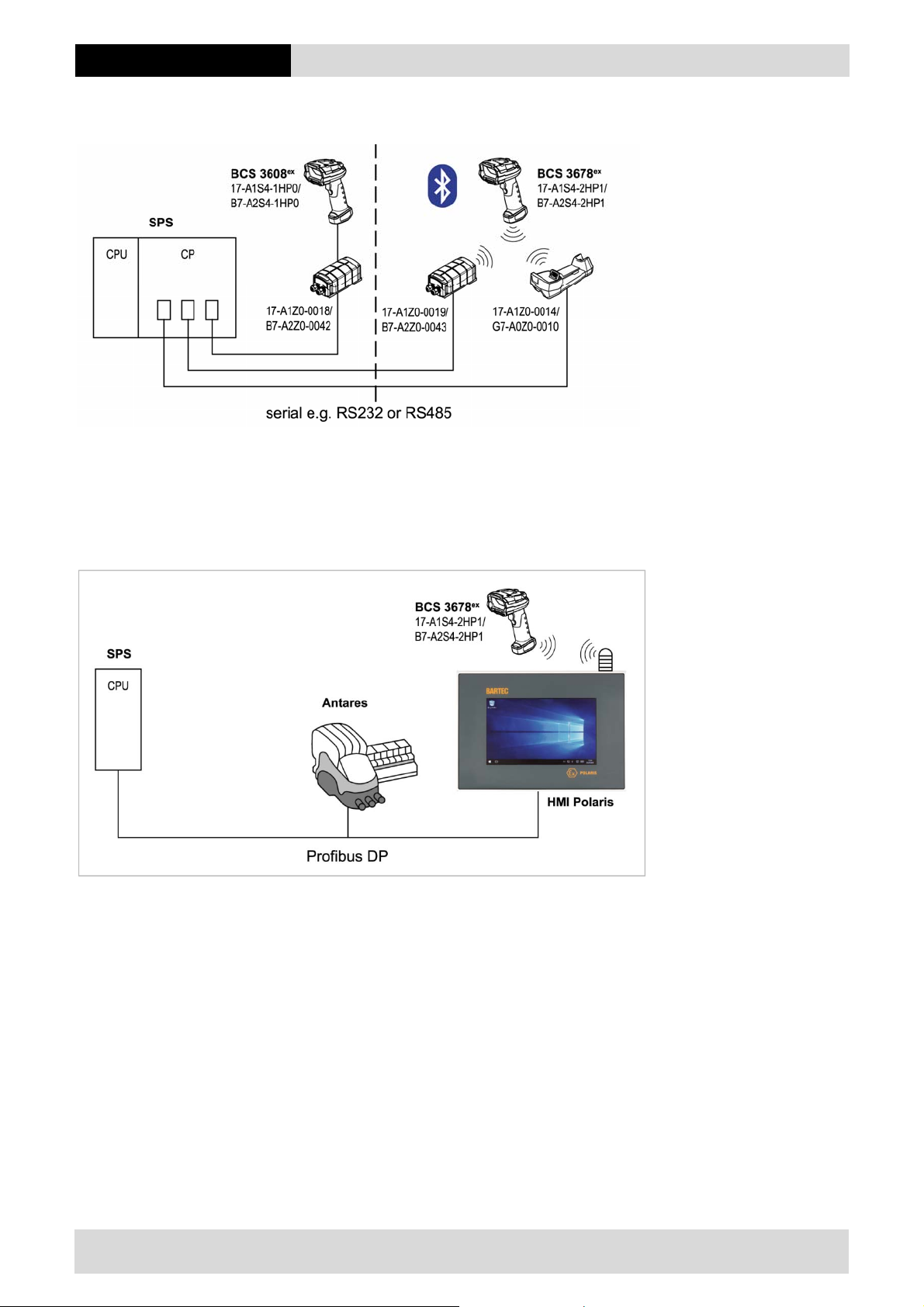
Solution 1: availability on the PLC side
Figure 1 Availability on the PLC side
Communication controller / processor (CP)
Open ASCII driver
Solution 2: availability on the PROFIBUS DP side
Figure 2 Availability on the DP side
PROFIBUS DP converter to serial
or
PROFIBUS compatible terminal equipment such as HMI P olaris with the possibility of connecting the scanner
4/10
Technical changes reserved.
04/2019
Page 5

BCS 36x8ex Connection to PLC
2. Connection to PLC
Compatibility with other components or systems:
BARTEC tested only the components described in chapter 3 of this document.
We expect that communication is in ge neral possible with all other PLC and necessary communication
modules.
Detailed instructions can be found in the descriptions of the respective manufacturers.
BARTEC cannot give any further instructions for the processin g of th e data.
Further processing of the data is the responsibility of the operator.
3. Sample Project for Siemens-Simatic S7-300
A sample project is available for a Siemens-SIMATIC S7-300 with CPU 315-2 PN/DP central processing unit
The project is available as a download on the BARTEC support download page.
http://automation.bartec.de/scannerE.htm
Data Capture
BCS3600ex Hand-Held Scanner Series
Programming
Sample for PLC Siemens SIMATIC S7-300 CPU315 2 PN/DP and CP340
The sample shows what is necessary to establish a connection and what settings are required.
Further information can be found in Siemen s documentation.
https://support.industry.siemens.com/cs/document/99741983/sample-program-(standard-blocks-cp-340-cp-341)zxx21_01_ptp_com_cp34x-zip-for-step-7-(tia-portal)?dti=0&lc=en-DE
Siemens and TIA-Portal are registered trademarks.
Technical changes reserved.
04/2019
5/10
Page 6
BCS 36x8ex Connection to PLC
3.1 Sample project
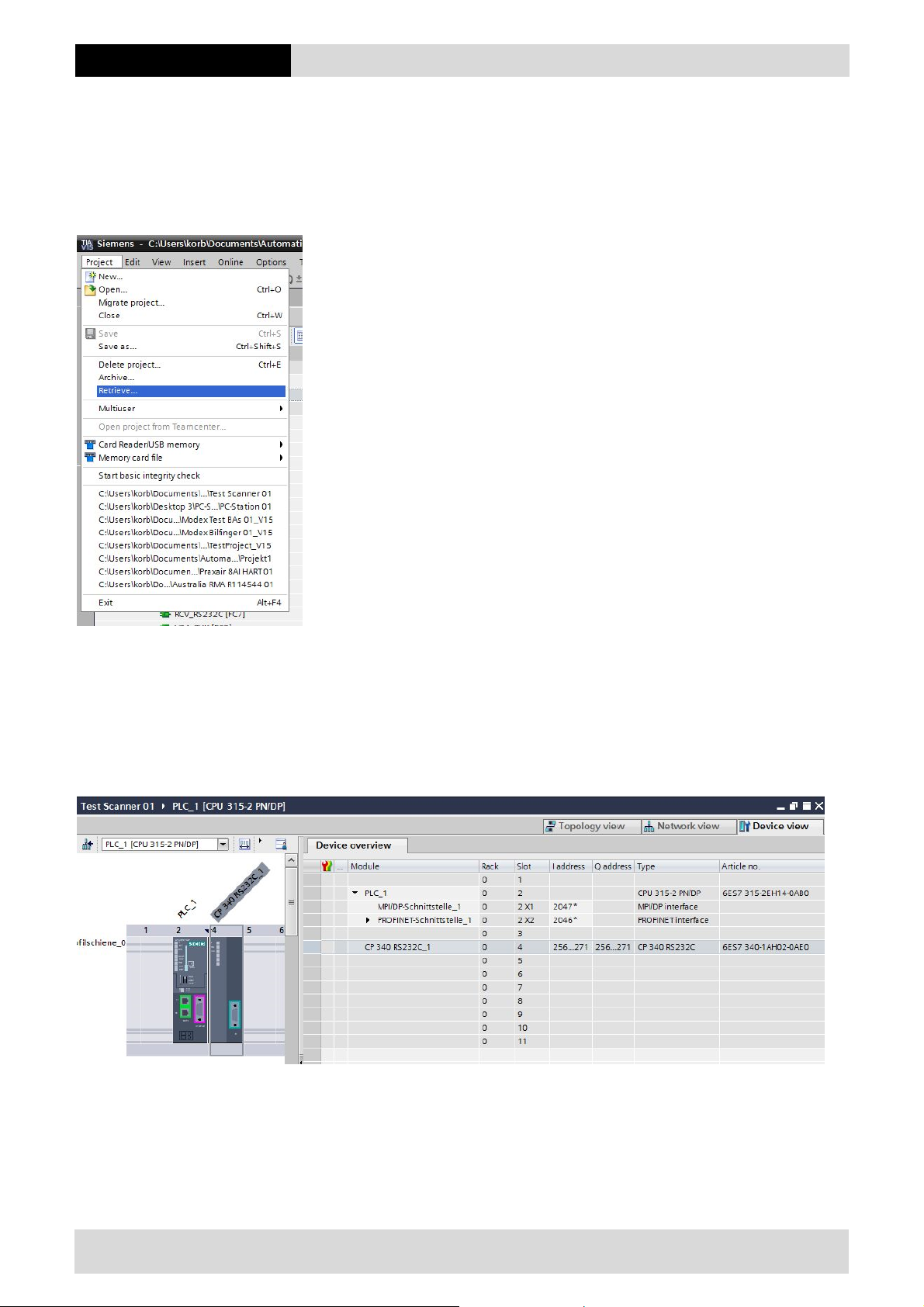
The sample project “Test Scanner 01.zap15” is a zap file.
Can be opened by using the Siemens software, can be found under the TAB “Project” and navigate to “Project” and
“Retrieve”.
3.2 Hardware Configuration
The sample project “Test Scanner 01.zap15” is cre ate d with the following hardware configuration.
Siemens SIMATIC S7-300 central processing unit CPU 315-2 PN/DP
Communication Processor CP340
6/10
Technical changes reserved.
04/2019
Page 7
BCS 36x8ex Connection to PLC
3.3 Software Configuration
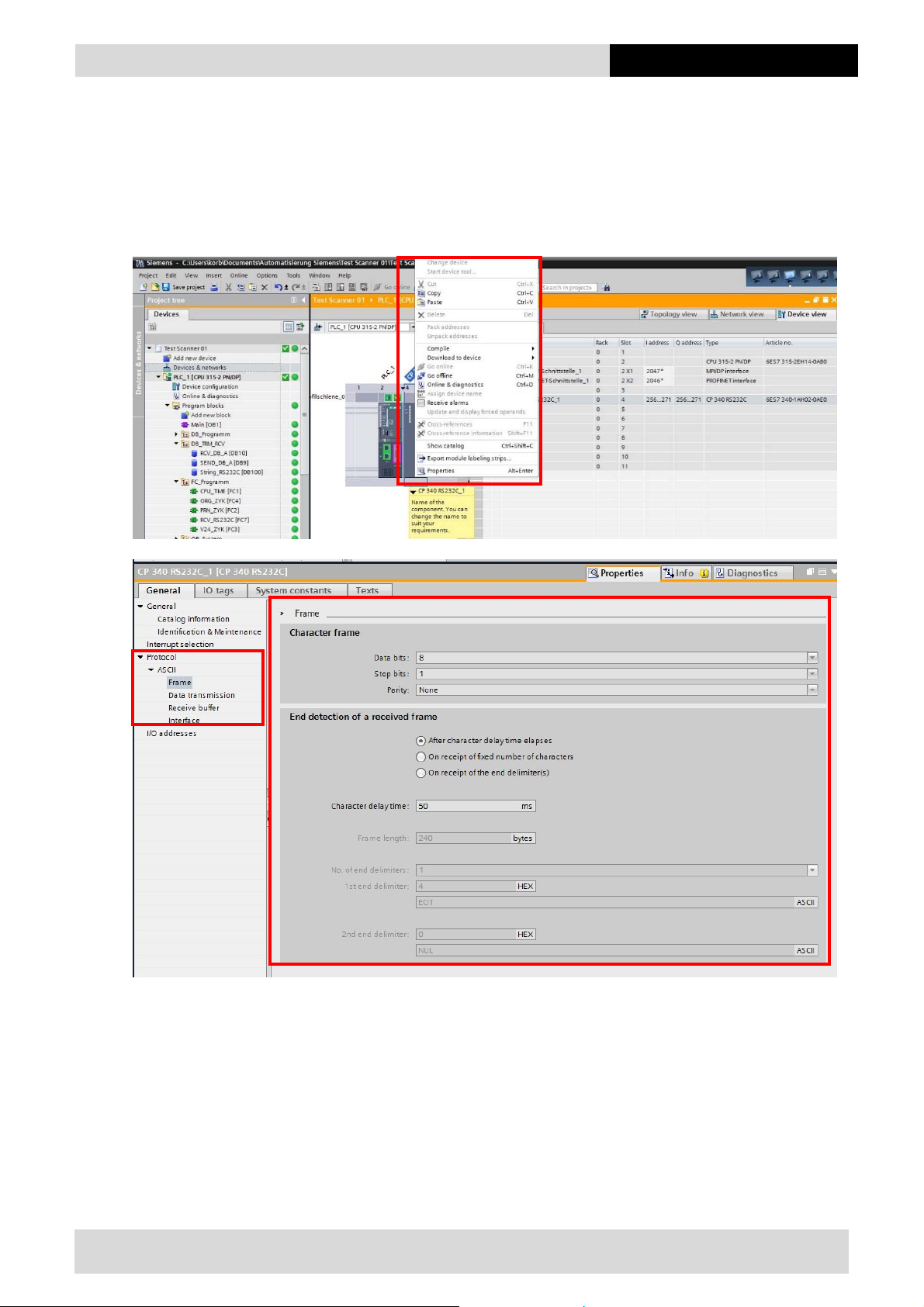
It´s important to know that the serial interface parameters on all connected devices are identical.
Setup:
Right click on the CPU 315-2 PN/DP
Properties
Setup the parameters of the serial interface
Technical changes reserved.
04/2019
7/10
Page 8
BCS 36x8ex Connection to PLC
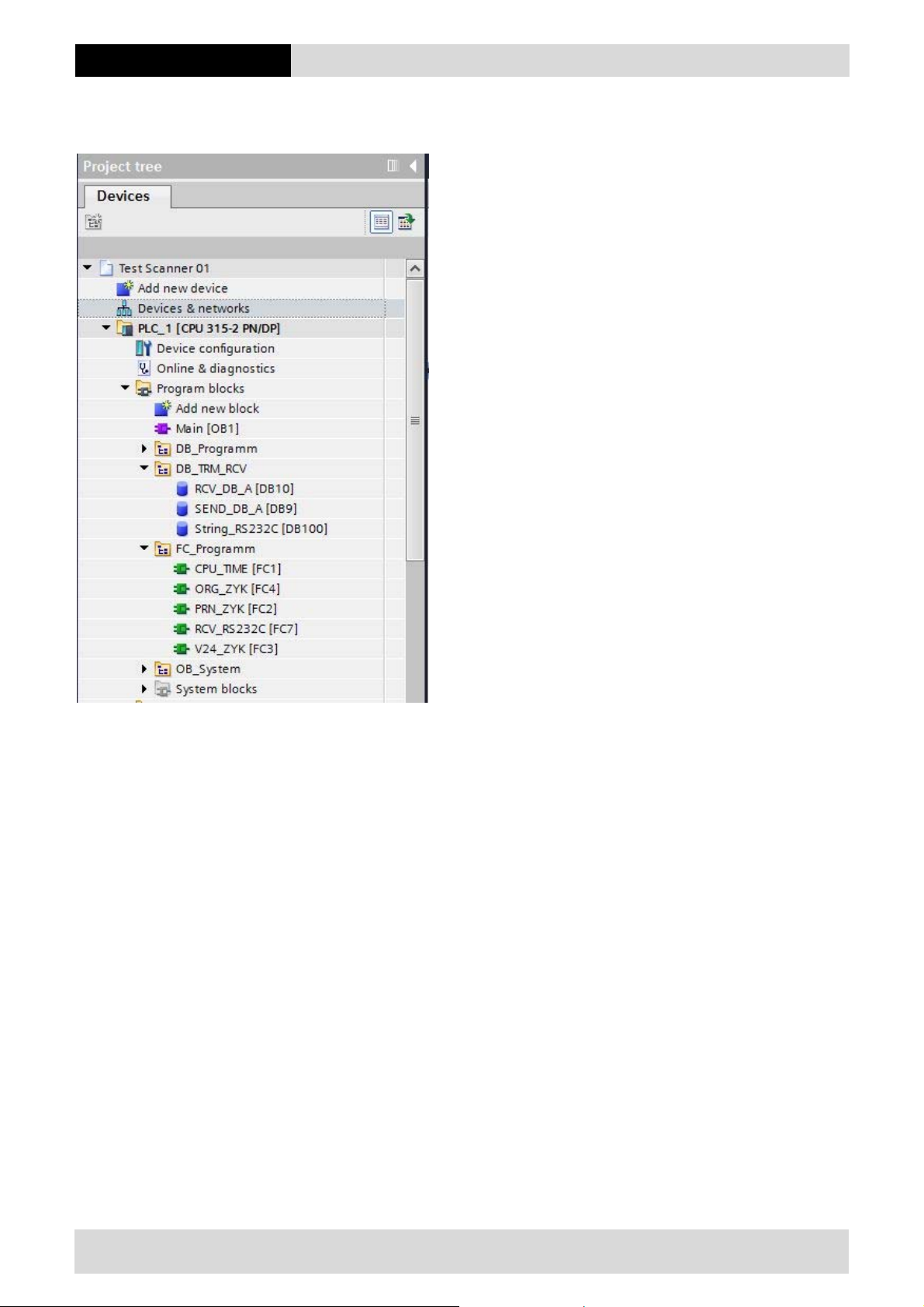
3.4 Project tree for necessary modules
The project tree shows all the necessary modules.
8/10
Technical changes reserved.
04/2019
Page 9
BCS 36x8ex Connection to PLC
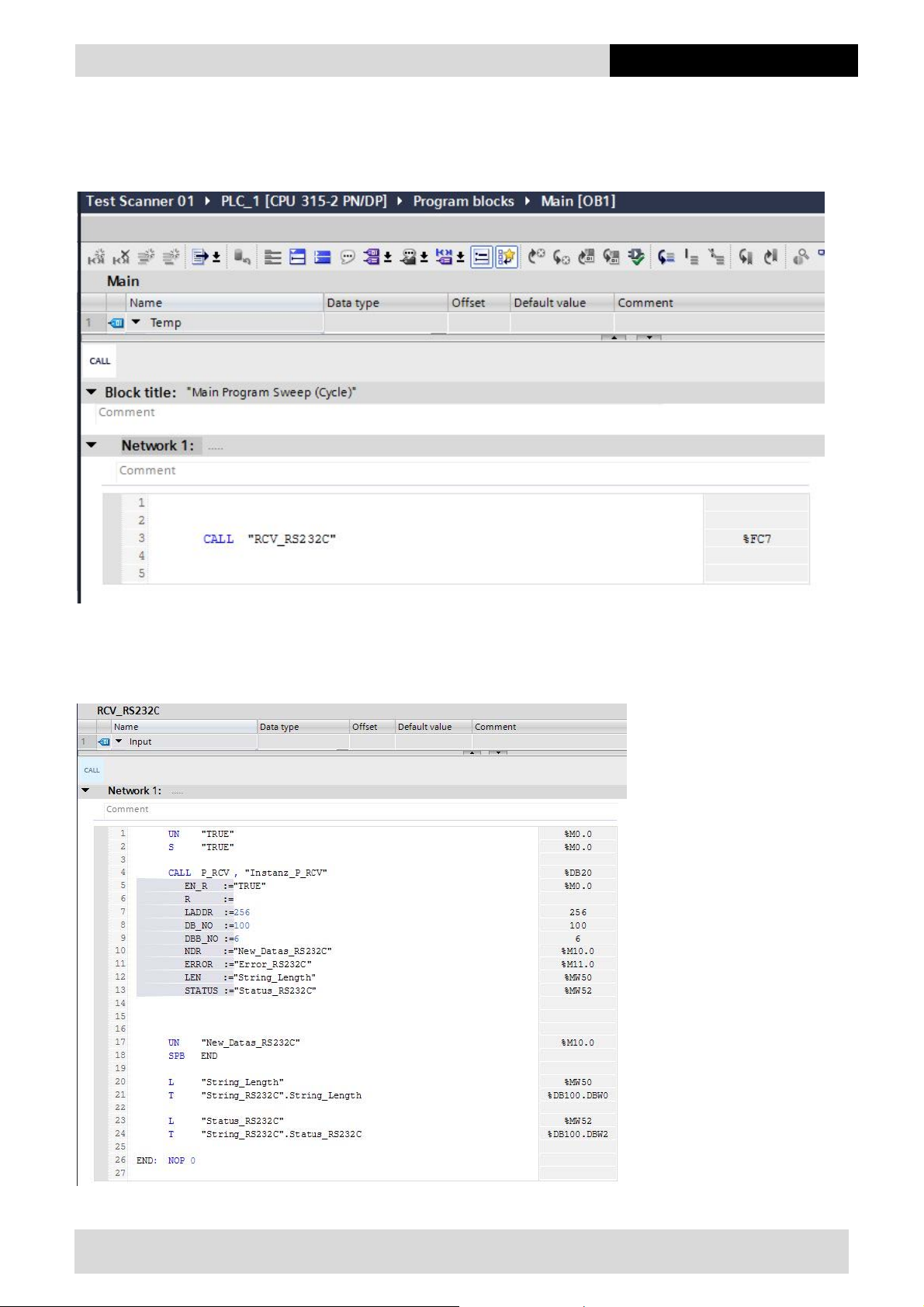
3.5 Main [OB1]
In OB1 with command “call”, the routine for receiving of data is started.
3.6 Function FC7 / RCV_RS232C
The function FC7 control the handling of the data.
Technical changes reserved.
04/2019
9/10
Page 10
BCS 36x8ex Connection to PLC
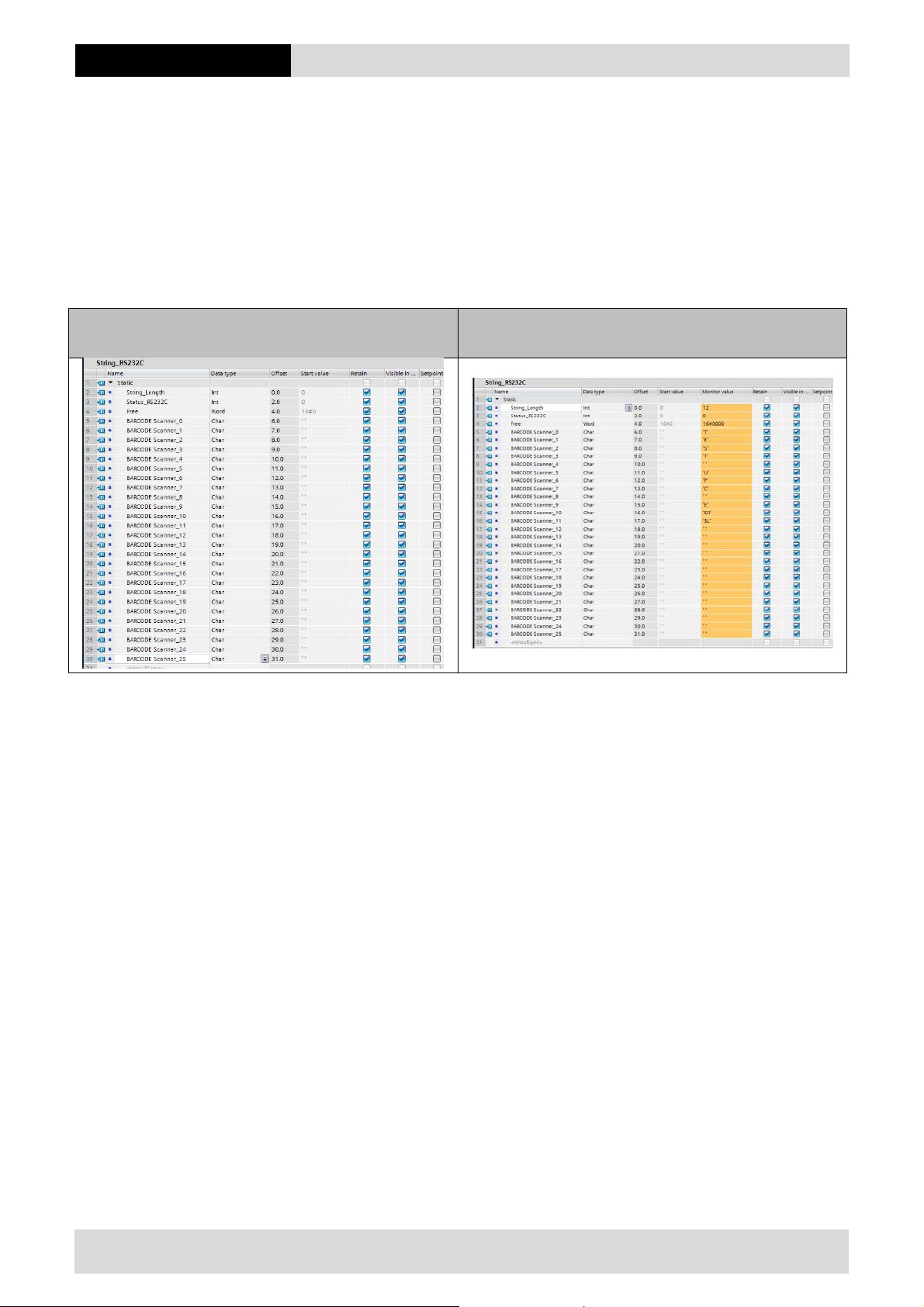
3.7 Instances of the data module
The instance defines the different parameter.
Data length --- Length of incoming barcode data
Status --- Feedback from the module according to Siemens
Barcode Scanner 0-25 --- Data defined as “CHAR”. Length can free defined. In sample 0-25
End of String --- End character. In this sample defined as “$R” (ASCII code “0C”)
The end of string character is not mandatory as long as the length of the data string is known.
Sample instance Sample instance with received data.
Barcode: TEST UPC E
10/10
Technical changes reserved.
04/2019
 Loading...