

Page 1
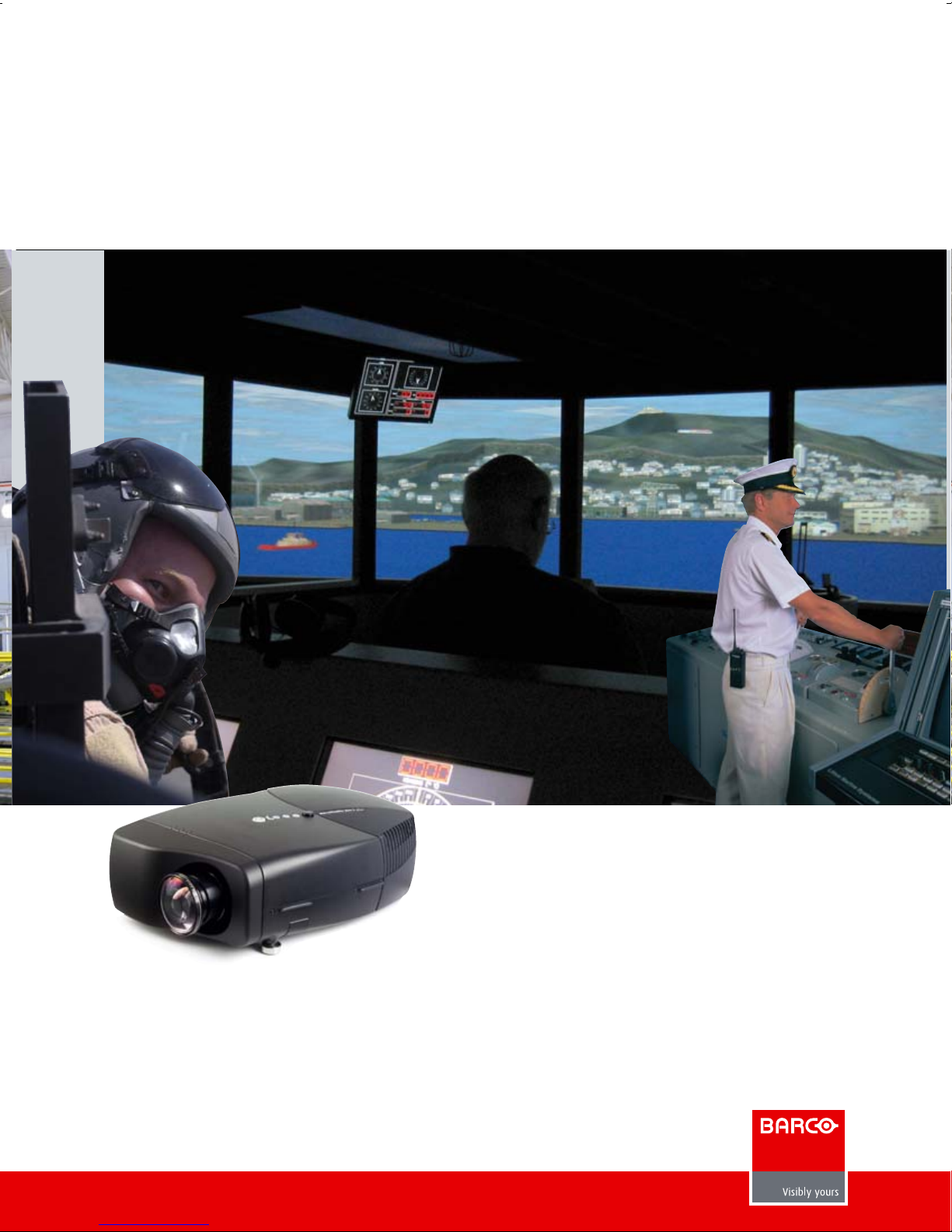
The perfect solution to
multi-channel projection
SIM 5R
Photo courtesy U.S. Air Force
Photo courtesy CSC Defense Mission Engineering and Integration Division
• Single chip DLP™ technology
• SXGA+ resolution (1400 x 1050 pixels)
• High brightness
• Extreme bandwidth 16-bit processing
• Dual lamp redundancy, easy service features
• Unique multi-channel projection features
• Raises training efficiency
• Lowers operation costs
• Reduces maintenance costs
• An easy upgrade path for existing maritime, flight,
driving, gunnery, and ATC training simulators
Page 2
1
2
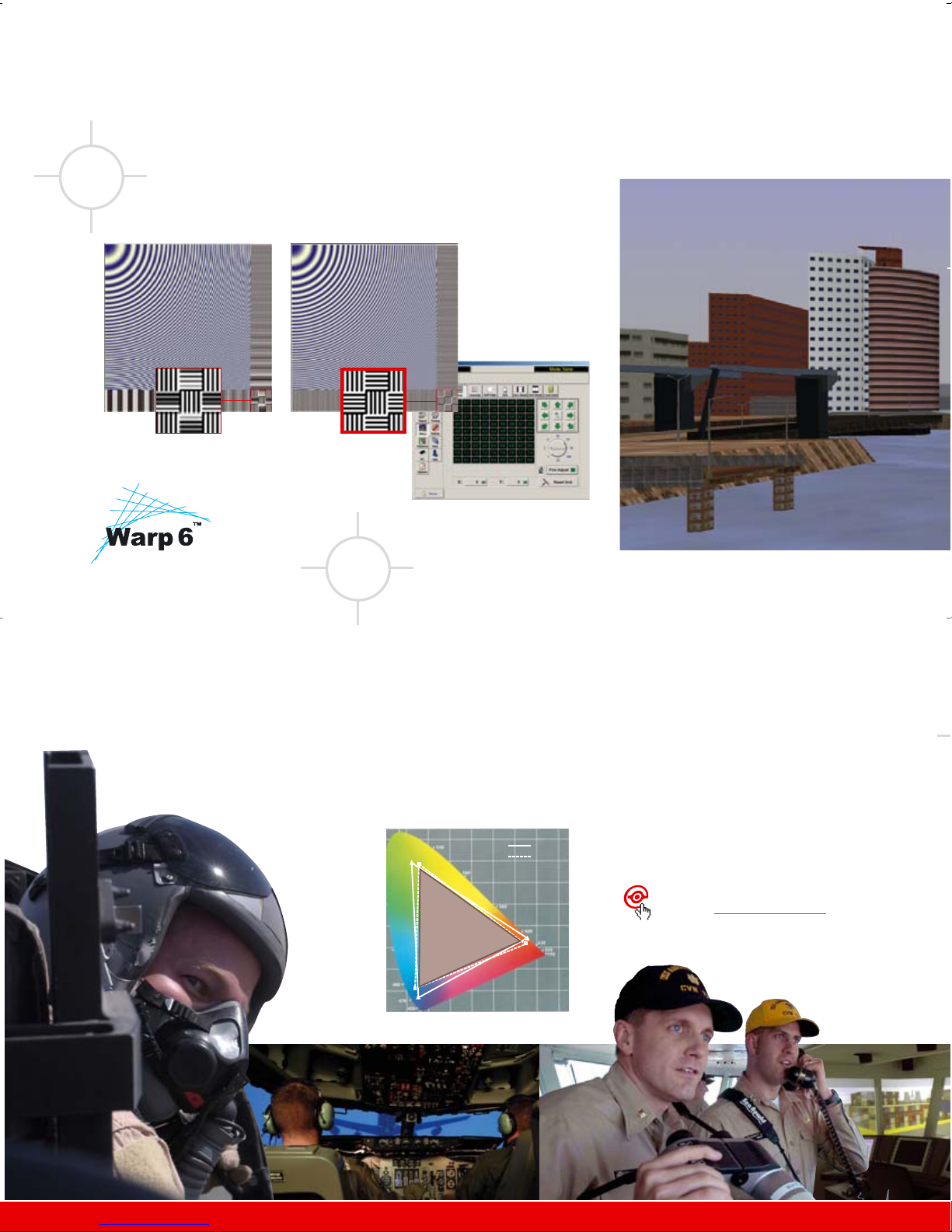
Reshaping multi-channel projection displays
Optimal multi-channel geometry
Inter-channel color matching
Image scaled using generic
bilinear algorithm
Image scaled using
WARP 6™ algorithm
WARP 6™ software interface
Chromatically matched and highlyoptimized optical engines guarantee
color uniformity across channels.
DynaColor
™
Barco’s DynaColor™ algorithm is an
advanced tool for perfect color matching
across all system channels. It allows to
digitally set the primary and secondary
Photo courtesy U.S. NavyPhoto courtesy of U.S. Air Force Photo courtesy WaterPhoto courtesy Link Simulation and Training
More on Barco’s dedicated multi-channel
technologies: www.barco.com/simulation
Advanced
Geometry Distortion
WARP 6™ uses Barco’s proprietary
bi-cubic interpolation. The internal 16-bit
upscaling preserves the finest details in
the images, without introducing any
frame delays or resampling artefacts.
Thanks to the built-in WARP 6™
electronics, the SIM 5R can be used in a
wide variety of curved-screen
applications, ranging from
straightforward cylindrical displays to the
most severe distortions.
color coordinates for all projectors.
These color coordinates are compared in
order to find the common color gamut.
Different DynaColor settings can be
stored in a single projector for advanced
use such as combined mono and stereo
projection.
Dynacolor wipes out color differences, to
let you see the sky as it is meant to be,
wherever you turn your head.
0.8
0.7
0.6
0.5
0.4
0.3
0.2
0.1
0
0 0.1 0.2 0.3 0.4 0.5 0.6 0.7 0.8
DynaColor
common color gamut
ch 1
ch 2
Page 3
3
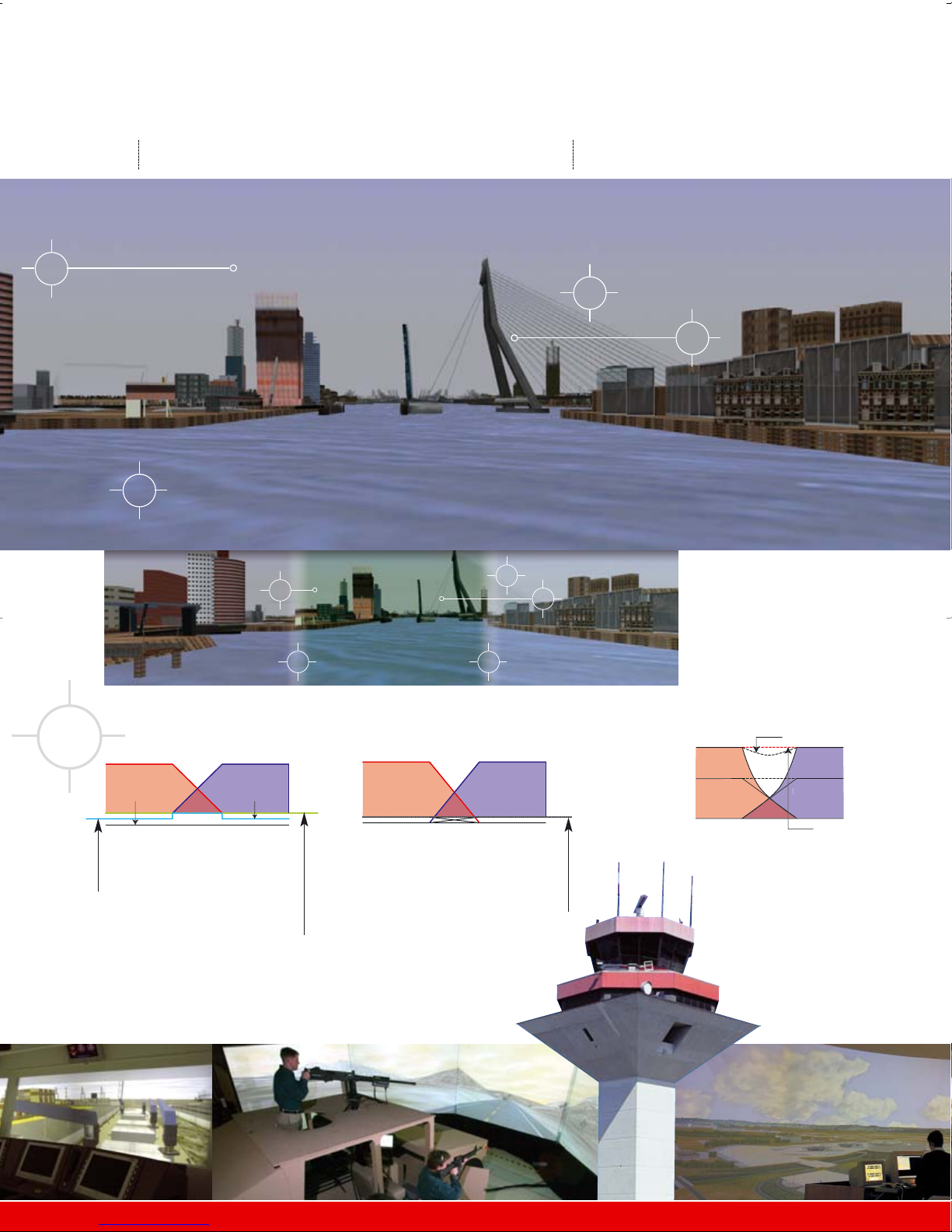
Excellent blending at
high brightness levels
Extra use of the white segment in
the DLP™ color wheel improves
brightness but introduces white
peaking in the overlap zones,
making blends visible.
Barco’s unique gamma compensation
maintains excellent blending at high
brightness levels. Optical Soft-Edge
Blending is not influenced by white
peaking.
Left Right
Barco’s proprietary OSEM optical blending
filters in the lightpath, limiting the black
level in the overlap zone to the separate
images, resulting in seamless images with
invisible blends, even in night scenes.
Barco’s flexible ESEM technology adjusts
edge blending to a uniform black level.
In multi-channel setups, the non-zero black
level of light valve projectors normally
leads to brighter overlap zones, especially
visible in night scenes.
Multi-channel visualization: a challenge in
need of a dedicated display solution.
Ship bridge simulator using simulationdedicated projectors.
Left Right
True black
Projector black
1
t
t
1
4
2
3
3
3
Efficient seamless blending
2
4
White segmen
No white segmen
Page 4
4
5
Uniform brightness and contrast
Accurate images for night and dusk training
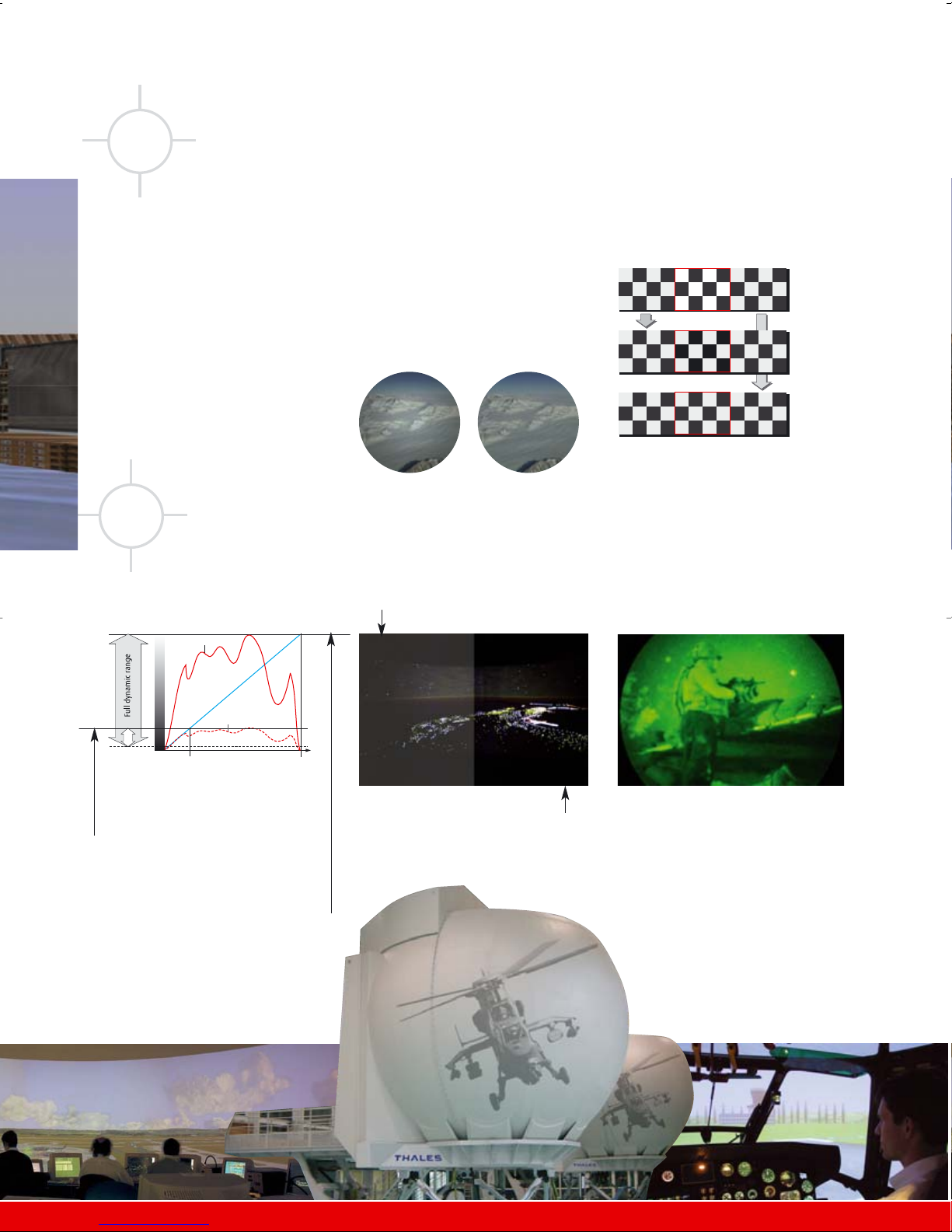
Extended Contrast Ratio (ECR)
Dark night scenes typically deliver video signals
with reduced dynamic range and almost no
contrast.
Barco’s NVGVIEW system add-on enables
users wearing NVG devices to see bright,
properly-defined targets and images for
true training accuracy and realism.
NVGVIEW™ projection
By electronically enhancing these video signals
and dimming to rescale to full dynamic range,
Barco’s ECR greatly improves the contrast ratio
and picture quality.
Constant Light Output (CLO)
An integrated, calibrated light meter
measures and controls the light output.
• New and used lamps can be mixed
• Not all lamps need to be changed at
the same time
The xRACU allows for Linked CLO, so
the brightness of all linked projectors is
monitored and adjusted to the lowest
value.
Contrast level independent from
dimming level. Black level and overlap
zones don’t change when changing
lamp bulbs.
Uniform dimming
• Increased dynamic range (20:1)
• Accurate dark images
• Contrast level independent from
dimming level (black level and
Optical Soft Edge Matching do not
change when changing lamps)
Rescaled video signal
Original video signal of a night scene
64
grayscales
256
grayscales
IMPROVED CONTRAST
REDUCED CONTRAST
Channel with new lamp
After dimming
After CLO
Unbalanced system:
2000:1 contrast
on middle channel only
3-channel system with
new lamp on middle
channel:
non-uniform brightness
and contrast
Balanced Sim 5plus
system:
1000:1 constant contrast
on every channel
Constant contrast dimmer
Typical dimmer:
brighter in the center
of the image
Standard image: weak dynamic range
ECR delivers full dynamic night scenes.
Barco ECR uniform dimming:
maintains image quality
Photo courtesy Thales Training & Simulation
Page 5
6
7
8
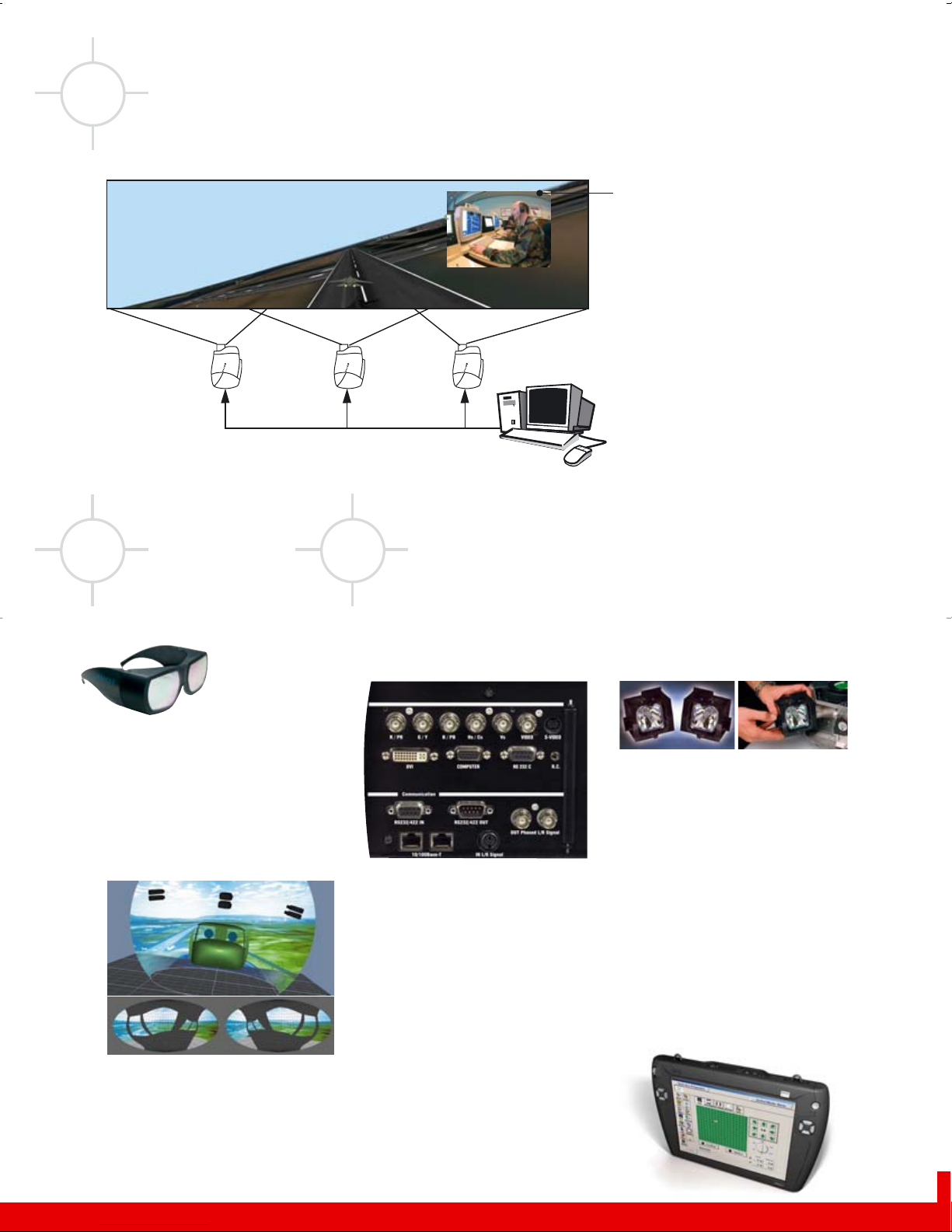
Briefing and debriefing applications
Lower total cost of ownership
Budget-friendly, on-board
input switching
• Multiple inputs eliminate the need for
expensive external switchers:
DVI-D (up to 170 MHz), configurable
5-wire BNC, VGA (D15), optional
composite video and S-video,
• Communication inputs and outputs
include 10/100 BaseT fast Ethernet
(RS232/422)
Dual source visualization (PiP)
Allows you to show a debriefing window
or mission information by means of the
optional video input.
Fast cross-system remote
control
A fast ethernet connection facilitates
central management of several
simulators over LAN, either on PC or
xRACU (Remote Alignment and Conrol
Unit).
L
R
L
R
L
R
i-Blend: 3-channel edgeblended panoramic projection
from a single PC
i-Blend is a built-in proprietary software
that produces three-channel pictures with
blend from a single high-bandwidth PC or
workstation output (>170 MHz).
• Reduced IG costs
• Cheaper license costs
• Reduced complexity
Dual lamp system
Easy lamp replacement
• Maximum light efficiency
• Single lamp eco-mode doubles
maximum lamp lifetime
• Automatic redundancy for optimal
system uptime
• No dismantling or realignment for lamp
replacement
Single off-the-shelf PC graphics output e.g. 3640 x 1050 pixels
Infitec: dual
eyepoint viewing
For dual eyepoint
viewing, two
projectors are used -
one for each viewpoint.
Infitec technology filters the
color spectrum of the image into parts:
one for the position of the left viewer
and another for the position of the
right viewer. Matching filters in the
projector and in the glasses ensure the
correct information goes through to the
corresponding viewer.
Photo courtesy of NADS and the National Highway Traffic Safety AdministrationPhoto courtesy Rheinmetall Defense Electronics
left viewer image - right viewer image
Page 6
www.barco.com/simulation
Barco Simulation division
US Headquarters:
600 Bellbrook Avenue - Xenia, OH 45385-4053
Tel. +1 (937) 372-7579 • Fax +1 (937) 372-8645
email: [email protected]
European Headquarters:
Noordlaan 5, B8520 Kuurne - Belgium
Tel. +32 56 36 82 11 • Fax +32 56 36 86 51
email: [email protected]
Highest level of near-reality
immersive visualization
• Dedicated design based on single-chip, high-resolution
DLP technology (SXGA+) for bright, high-contrast images
• Accurate colors and minimal artefacts thanks to integrated
BrilliantColor technology
• Accurate display of database scenes during night, dusk, and poor
weather conditions with Constant Contrast Dimming Technology
• Integrated bicubic WARP 6™ predistortion for utmost detail on
curved and spheric screens
• Uniform brightness and contrast across channels
• Electronic and Optical soft-edge matching for invisible blend
zones
• DynaColor algorithm for accurate cross-channel color matching
Lower total cost of ownership
• Unique built-in features for a seamless, uniform image over
multiple screens eliminate the need for expensive, external
add-on equipment that often causes disturbing artifacts and
extra maintenance costs
•
Optimized for easy maintenance through automated
uniformity readjustments
after a lamp replacement
• Remote, central, cross-system control over LAN
(e.g. with the optional xRACU)
• Input flexibility through DVI, configurable BNC, VGA,
An easy upgrade path
for existing simulators
• Identical throw distance to CRT projectors (wide range of lenses,
motorized zoom, and brightness adjustment optional)
• Wide range of transversal and vertical lens shift for easy image
adjustment
• Extensive Scheimpflug correction allowing off-axis projection
SIM 5R: highest value for money
SIM 5R
November 2006
Barco’s Presentation & Simulation Division is ISO 9001 certified.
The information and data given are typical for the equipment described.
However any individual item is subject to change without any notice.
The latest version of this product sheet can be found on www.barco.com/simulation
WARP 6, DynaColor, OPTICAL SOFT EDGE MATCH ING, OSEM, EXTENDED CONTRAST RATI O and ECR are trademarks of Barco.
DESIGNED UNDER
ISO
General specifications available on our website. Extensive
specifications for dedicated installations available upon request.
 Loading...