

Page 1
Best Bang For Your Buck
1
HC-05
1. Overview:
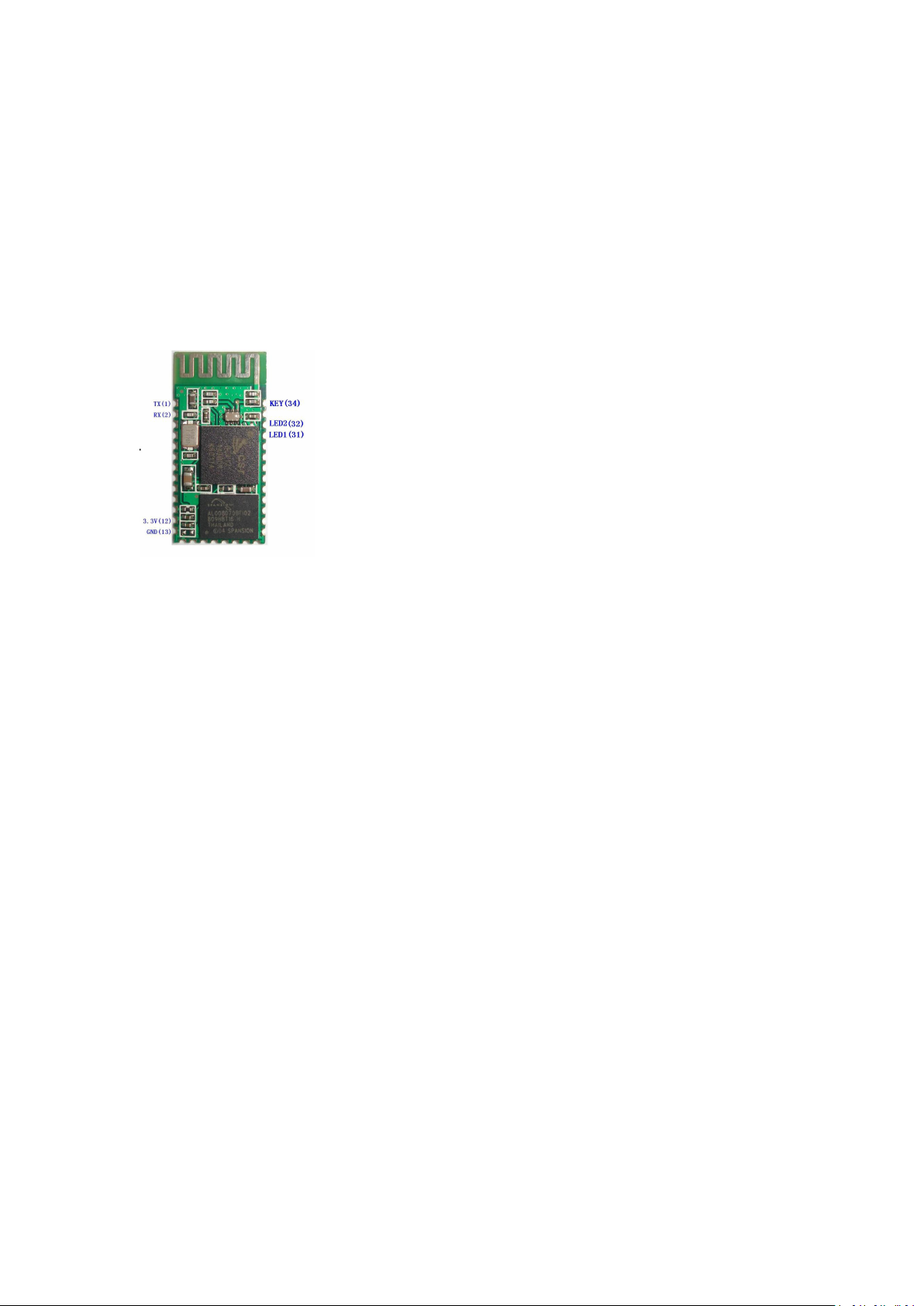
This module supports UART, USB, SPI, PCM, SPDIF and other interfaces, and supports
SPP Bluetooth serial port protocol, which has the advantages of low cost, small size,
low power consumption, high sensitivity of sending and receiving.
2. Feature
Bluetooth V2.0+EDR
Bluetooth Class 2
Built-in PCB RF antenna
Built-in 8Mbit Flash
Support SPI programming interface
Support UART, USB, SPI, PCM and other interfaces
Support master and slave
Support software control master-slave module
3.3V power supply
Passed REACH, ROHS certification
3. Application areas:
Bluetooth car handsfree
Bluetooth GPS
Bluetooth PCMCIA, USB Dongle
Bluetooth wireless data transmission;
Industrial remote control, telemetry;
POS system, wireless keyboard, mouse;
Traffic, underground positioning, alarm;
Automated data acquisition system;
Wireless data transmission; banking system;
Wireless data collection;
Building automation, security, wireless monitoring of equipment room, access
control system;
www.banggood.com
Page 2
Best Bang For Your Buck
2
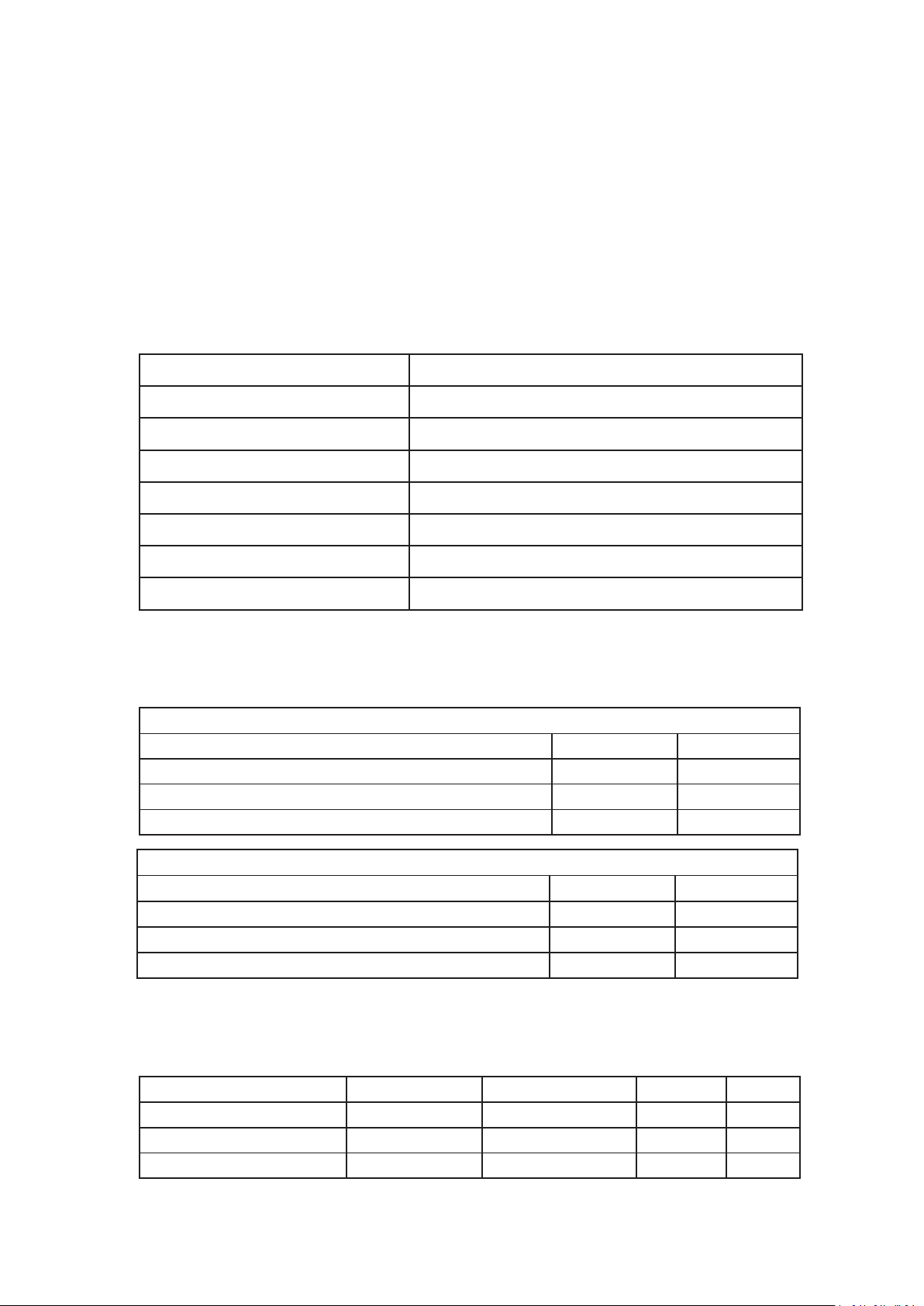
Operating Frequency Band
2.4GHz ISM band
Bluetooth Specification
V2.0+EDR
Output Power Class
Class 2
Operating Voltage
3.3V
Host Interface
USB 1.1/2.0 or UART
Audio Interface
PCM interface
Flash Memory Size
8Mbit
Dimension
27mm (L) x 13 (W) mm x 2mm (H)
Absolute Maximum Ratings
Rating
Min
Max
Storage temperature
-40℃+150
℃
Supply voltage: VBAT
-0.4V
5.6V
Other terminal voltages
VSS-0.4V
VDD+0.4V
Operation Mode
Connection Type
UART Rate(kbps)
Average
Unit
Page scan-115.2
0.42
mA
ACL No traffic
Master
115.2
4.60
mA
ACL With file transfer
Master
115.2
10.3
mA
Recommended Operating Conditions
Operating Condition
Min
Max
Operating temperature range
-40℃
+150℃
Guaranteed RF performance range
(a)
-40℃
+150℃
Supply voltage: VBAT
2.2V
4.2V
(b)
Smart home, industrial control;
Vehicle inspection equipment;
Interactive program voting equipment for television stations;
Government street lamp energy saving equipment
Wireless LED display system
Bluetooth joystick, Bluetooth gamepad
Bluetooth printer
Bluetooth remote control toy
4. Physical characteristics:
5. Electrical characteristics:
6. Power consumption:
www.banggood.com
Page 3
3
ACL 1.28s sniff
Master
38.4
0.37
mA
ACL 1.28s sniff
Slave
38.4
0.42
mA
SCO HV3 30ms sniff
Master
38.4
19.8
mA
SCO HV3 30ms sniff
Slave
38.4
19.0
mA
Standby Host connection
-
38.4
40
µA
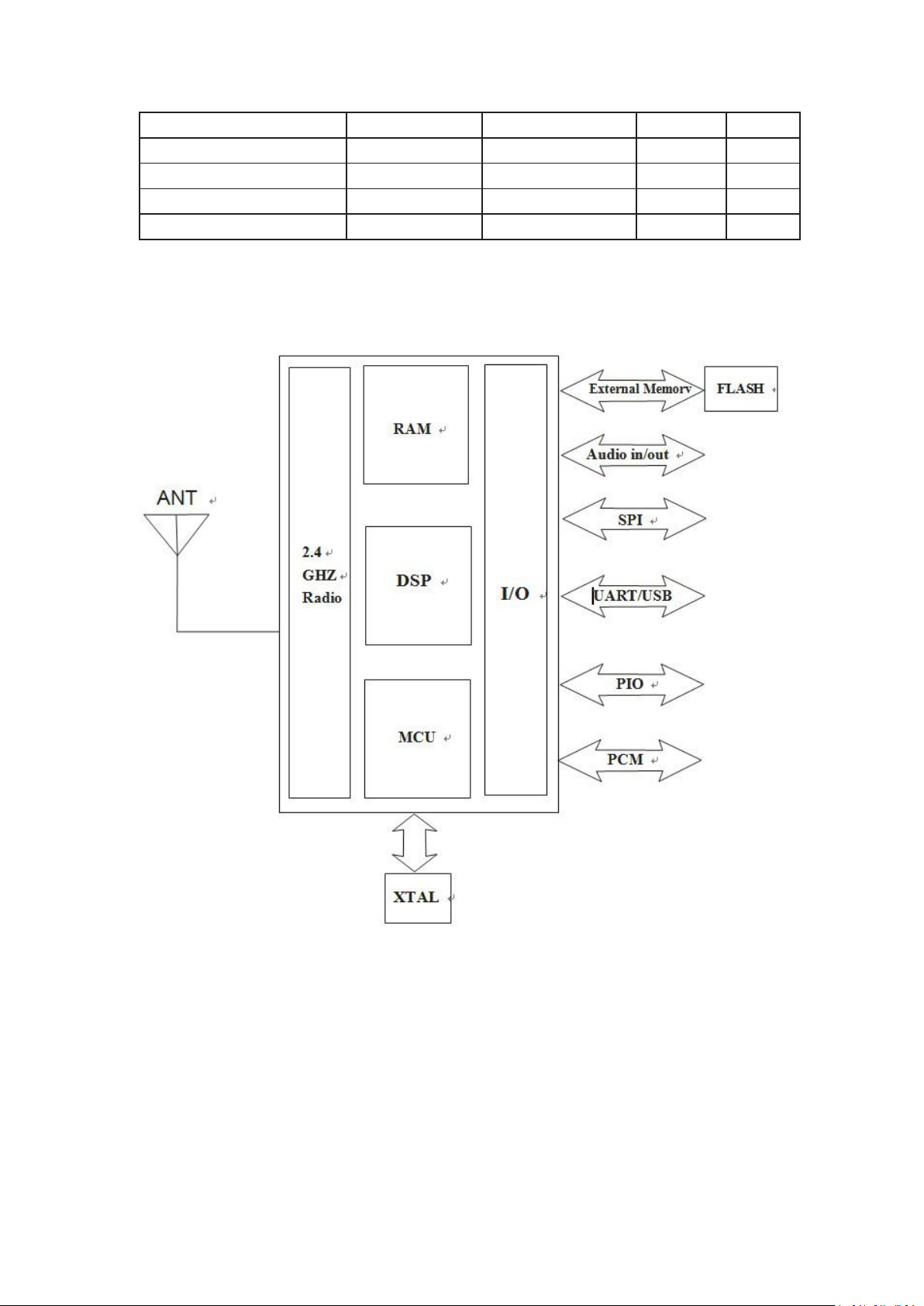
7. Functional block diagram:
Best Bang For Your Buck
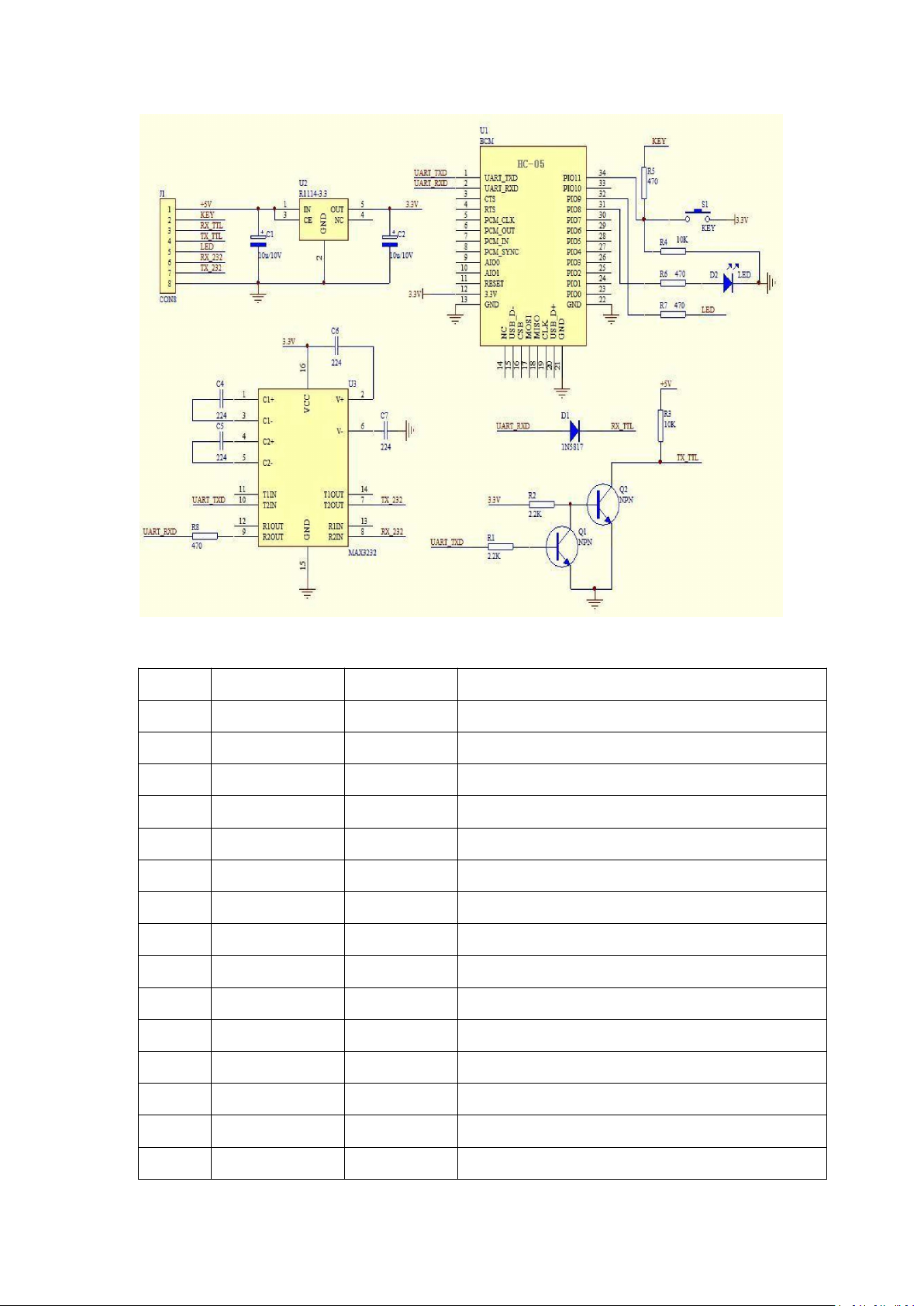
8. Application circuit diagram:
www.banggood.com
Page 4
Best Bang For Your Buck
4
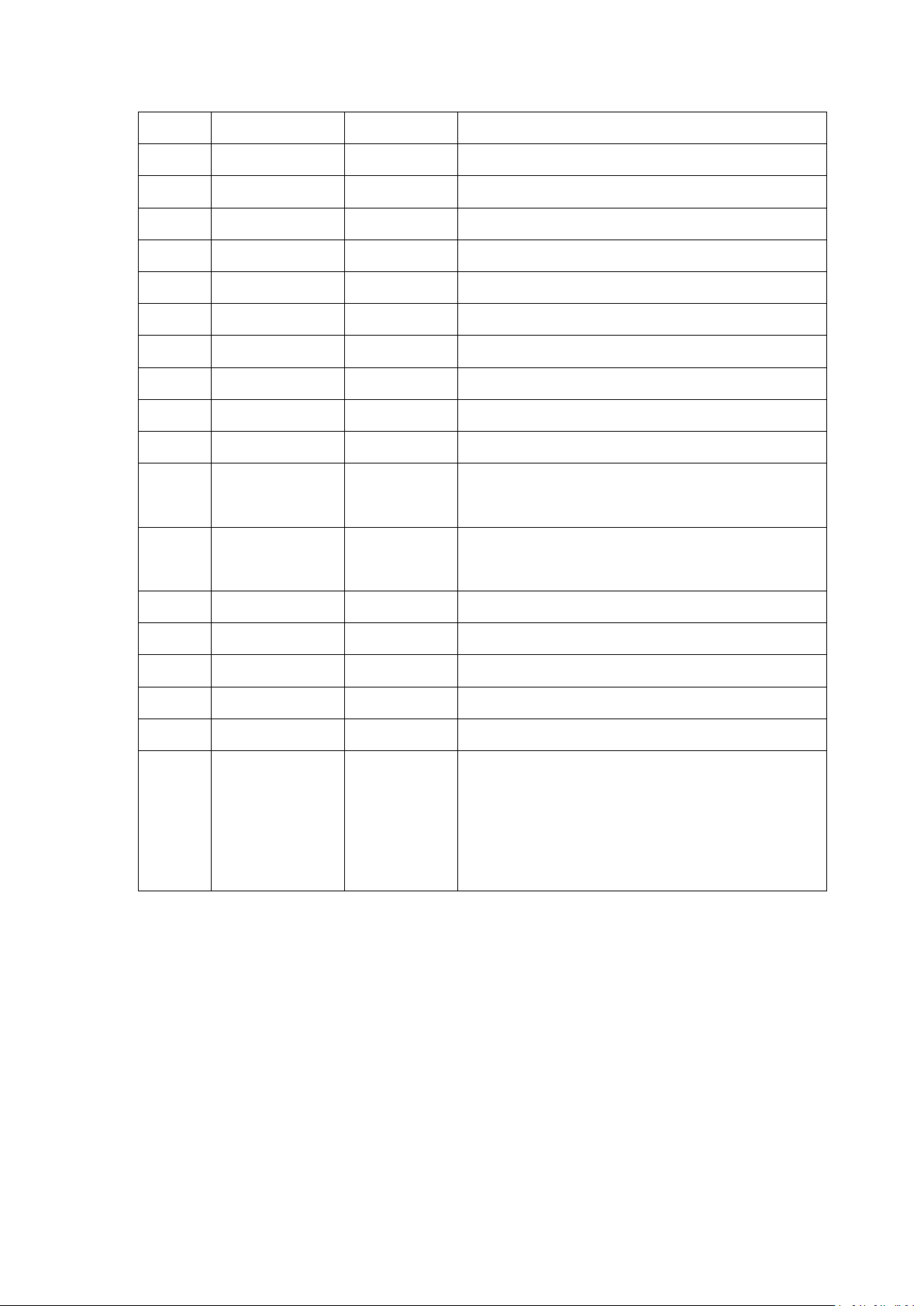
PIN
NAME
TYPE
Function
1
UART-TX
CMOS output
Serial data output
2
UART-RX
CMOS input
Serial data input
3
UART-CTS
CMOS input
Serial port clear send
4
UART-RTS
CMOS output
Serial port request to send
5
PCM-CLK
Two way
PCM clock
6
PCM-OUT
CMOS output
PCM data output
7
PCM-IN
CMOS input
PCM data input
8
PCM-SYNC
Two way
PCM data synchronization
9
AIO(0)
Two way
Programmable analog input and output
10
AIO(1)
Two way
Programmable analog input and output
11
RESETB
CMOS input
Reset/reset button
12
3.3V
power input
+3.3V power supply
13
GND
Ground
Ground
14
NC
Output
NC (please hang)
15
USB-DN
Two way
USB data negative
9. Pin function description:
www.banggood.com
Page 5
Best Bang For Your Buck
5
16
SPI-CSB
CMOS input
SPI chip select
17
SPI-MOSI
CMOS input
SPI data input
18
SPI-MISO
CMOS output
SPI data output
19
SPI-CLK
CMOS input
SPI clock port
20
USB-DP
Two way
USB data is positive
21
GND
Ground
Ground
22
GND
Ground
Ground
23
PIO(0)
Two way
Programmable input/output port (0)
24
PIO(1)
Two way
Programmable input/output port (1)
25
PIO(2)
Two way
Programmable input/output port (2)
26
PIO(3)
Two way
Programmable input/output port (3)
27
PIO(4)
Two way
Programmable input/output port (4)
28
PIO(5)
Two way
Programmable input/output port (5)
29
PIO(6)
Two way
Programmable input/output port (6)
30
PIO(7)
Two way
Programmable input/output port (7)
31
PIO(8)
Output
Status indicator LED port 1
32
PIO(9)
Output
Status indicator LED port 2
33
PIO(10)
Two way
Programmable input/output port (10)
34
PIO(11)
Input
Module state switching pin,
High level -> AT command responds to working
status;
Low level or floating -> Bluetooth normal working
status.
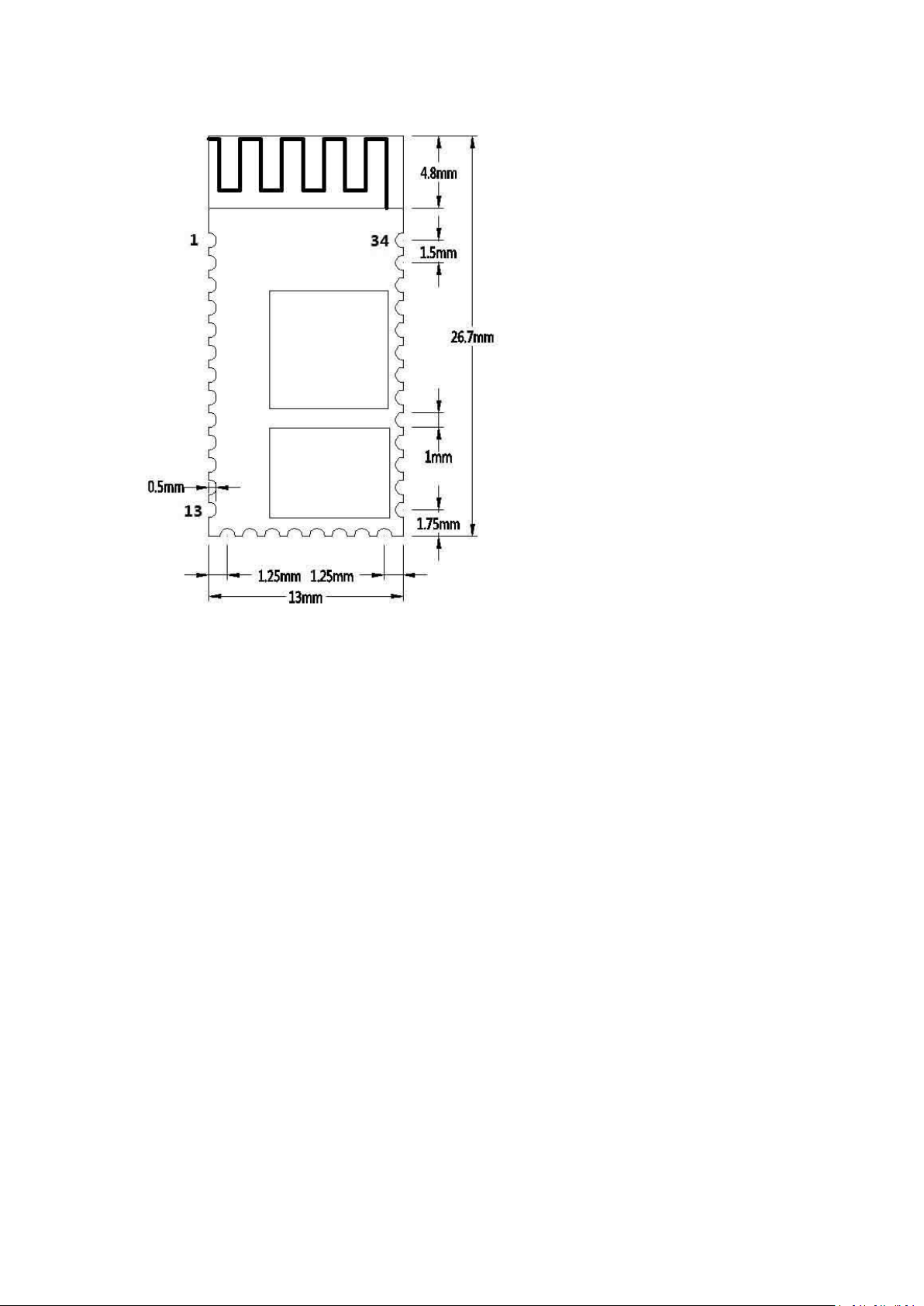
10. Dimensions:
www.banggood.com
Page 6
Best Bang For Your Buck
6
11. Serial port module pin definition:
1. PIO(8) connects to the LED to indicate the working status of the module. The
module flashes after power-on, and the different states flash differently.
2. PIO (9) is connected to the LED to indicate that the module is successfully
connected. After the Bluetooth serial port is successfully connected, the LED is on.
3. PIO (11) module state switching pin, high level --> AT command response working
state, low level or floating --> Bluetooth normal working state.
4. The reset circuit is already on the module and reset when the power is turned
back on.
12. Steps to set the master mode:
1. PIO (11) is set high.
2. Upon power-on, the module enters the AT command response state.
3. HyperTerminal or other serial port tool, set baud rate 38400, data bit 8 bits, stop
bit 1 bit, no parity bit,
No flow control.
4. The serial port sends the character "AT+ROLE=1\r\n" and successfully returns
"OK\r\n", where \r\n is a carriage return line feed.
5. PIO (11) is de-asserted, re-powered, the module is the main module, and the slave
module is automatically searched to establish a connection.
13. LAYOUT considerations
www.banggood.com
Page 7

Best Bang For Your Buck
7
1. BLK-MD-HC-05 Bluetooth module serial port level needs 3.3V, if you connect with
5V level system, you need to add level conversion chip.
2. Bluetooth signals are greatly affected by the surrounding, such as trees, metal,
walls and other obstacles will absorb or shield the Bluetooth signal, so it is not
recommended to install in the metal casing.
3. Since the metal will weaken the antenna function, it is recommended that when
the module is given to the Lay board, the ground under the module antenna should
not be laid and routed. It is best to hollow out.
AT instruction set
The BLK-MD-HC-05 embedded Bluetooth serial communication module has two
working modes: command response working mode and automatic connection
working mode. In the automatic connection working mode, the module can be
divided into master, slave and loopback three working roles.
When the module is in the automatic connection working mode, it will automatically
transfer data according to the preset setting; when the module is in the command
response working mode, it can execute all the AT commands described below, and
the user can send various AT commands to the module as modules. Set control
parameters or issue control commands. The dynamic conversion of the module's
operating state can be achieved by controlling the input level of the module's
external pin (PIO11).
The pin definition used by the serial port module:
1. PIO8 is connected to the LED to indicate the working status of the module. The
module flashes after power-on, and the different states flash differently.
2. PIO9 is connected to the LED to indicate that the module is successfully connected.
After the Bluetooth serial port is successfully connected, the LED is on.
3. PIO11 module status switching pin, high level --> AT command response working
status, low level or floating --> Bluetooth routine
State.
4. The reset circuit is already on the module and reset when the power is turned
back on.
Steps to set up as the main module:
1. PIO11 is set high.
2. Upon power-on, the module enters the AT command response state.
3. HyperTerminal or other serial port tool, set baud rate 38400, data bit 8 bits, stop
bit 1 bit, no parity bit,
No flow control.
4. The serial port sends the character "AT+ROLE=1\r\n" and successfully returns
"OK\r\n", where \r\n is a carriage return line feed.
www.banggood.com
Page 8
Best Bang For Your Buck
8
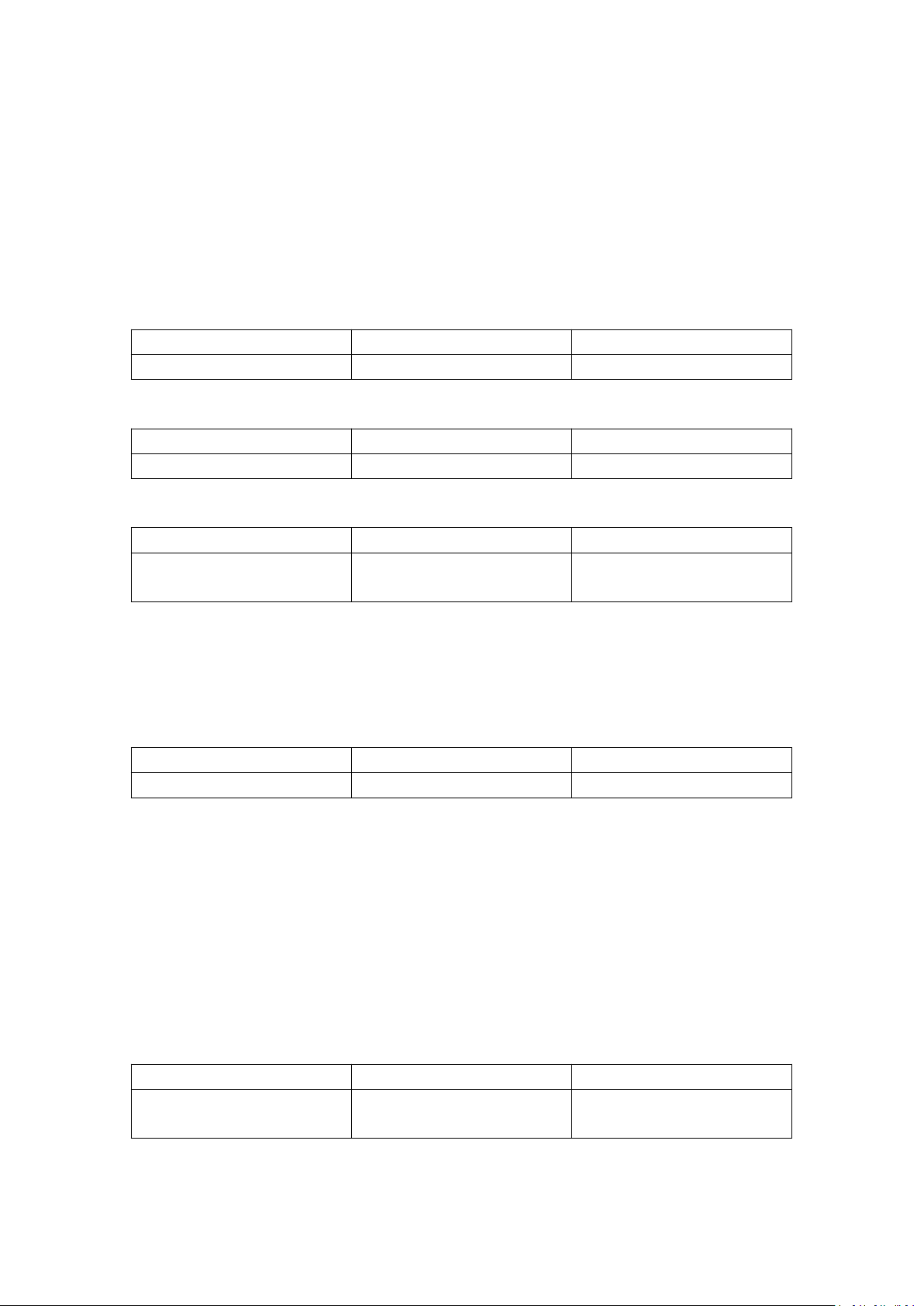
Command
Response
Parameter
ATOK/
Command
Response
Parameter
AT+RESET
OK
/
Command
Response
Parameter
AT+VERSION?
+VERSION:<Param>
OK
Param: Software version
number
Command
Response
Parameter
AT+ORGL
OK
/
Command
Response
Parameter
AT+ADDR?
+ADDR:<Param>
OK
Param: Bluetooth address
5. PIO is set low, power is turned back on, the module is the main module, and the
slave module is automatically searched to establish a connection.
Detailed instructions
(AT commands are not case sensitive and end with carriage return, newline
characters: \r\n)
1. Test instructions:
2. Module reset (restart):
3. Obtain the software version number:
for example:
At+version?\r\n
+VERSION:2.0-20100601
OK
4. Restore default state:
Factory default state:
1. Equipment class: 0
2. Search code: 0x009e8b33
3. Module Job Role: Slave Mode
4. Connection mode: Specify the dedicated Bluetooth device connection mode
5. Serial Port Parameter: Baud Rate - 38400bits/s; Stop Bit: 1 bit; Check Digit: /
6. Pairing code: "1234"
7. Equipment name: "H-C-2010-06-01"
... ...
5. Get module Bluetooth address:
Bluetooth address representation method: NAP: UAP: LAP (hexadecimal)
for example:
www.banggood.com
Page 9

Best Bang For Your Buck
9
Command
Response
Parameter
AT+RNAME? <Param1>
1. +NAME:<Param2>
OK——Success
2. FAIL——Failure
Param1: Remote Bluetooth
device address
Param2: Remote Bluetooth
device address
Command
Response
Parameter
AT+ROLE=<Param>
OK
Param:Parameter takes the
following values:
AT+ ROLE?
+ ROLE:<Param>
Command
Response
Parameter
AT+NAME=<Param>
OK
Param:Bluetooth device name
Default name:"HC-05"
AT+NAME?
1. +NAME:<Param>
OK——Success
2. FAIL——Failure
The module Bluetooth device address is: 12:34:56:ab:cd:ef
At+addr?\r\n
+ADDR:1234:56:abcdef
OK
6. Set/query device name:
E.g:
AT+NAME=HC-05\r\n ——Set the module device name: "HC-05"
OK
AT+NAME="HC-05"\r\n - Set the module device name to "HC-05"
OK
At+name=Beijin\r\n ——Set the module device name: "Beijin"
OK
At+name="Beijin"\r\n - Set the module device name to "Beijin"
OK
At+name?\r\n
+NAME: Bei jin
OK
7. Get the remote Bluetooth device name:
Bluetooth address representation method: NAP: UAP: LAP (hexadecimal)
E.g:
The module Bluetooth device address is: 00:02:72:od:22:24, the device name is:
Bluetooth
At+rname? 0002,72,od2224\r\n
+RNAME: Bluetooth
OK
8. Setup / Query - Module Role:
www.banggood.com
Page 10

Best Bang For Your Buck
10
0 - from the role (Slave)
1 - Master role (Master)
2 - Loopback role
(Slave-Loop)
Default: 0
OK
Command
Response
Parameter
AT+CLASS=<Param>
OK
Param:Parameter takes the
following values:
Param: Equipment class
The Bluetooth device class is
actually a 32 bit
Parameter, the Parameter is
used to indicate the device
class
Type, and the type of service
supported.
Default: 0
AT+ CLASS?
1. + CLASS:<Param>
OK——Success
2. FAIL——Failure
Command
Response
Parameter
AT+IAC=<Param>
1. OK——Success
2. FAIL——Failure
Param: Query access code
Default: 9e8b33
See Appendix 2 for specific
settings: Query Access Code
Description
AT+ IAC?
+IAC:<Param>
OK
Module role description:
Slave - passive connection;
Slave-Loop - passive connection, receiving remote Bluetooth master data and
returning the data to the remote Bluetooth master as it is;
Master - Query the surrounding SPP Bluetooth slaves and initiate a connection to
establish a transparent data transmission channel between the master and slave
Bluetooth devices.
9. Settings / Query - Device Class:
In order to effectively filter the surrounding Bluetooth devices, quickly query or
query the custom Bluetooth device, the user can set the module to a non-standard
Bluetooth device class, such as: 0x1f1f (hexadecimal).
10. Device / Query - Query Access Code:
The access code is set to GIAC (General Inquire Access Code: 0x9e8b33) general
query access code, which can be used
Discovered or found all Bluetooth devices around; in order to efficiently query or be
queried in many Bluetooth devices around
Customize the Bluetooth device, the user can set the module query access code to a
number other than GIAC and LIAC, such as: 9e8b3f.
Example:
www.banggood.com
Page 11

Best Bang For Your Buck
11
Command
Response
Parameter
AT+INQM=<Param>,<Param2>,
<Param3>
1. OK——Success
2. FAIL——Failure
Param: Query mode
0—inquiry_mode_standard
1——inquiry_mode_rssi
Param2: Maximum number
of Bluetooth device
Responses
Param3: Maximum query
timeout
Timeout range: 1 to 48
(recombination time: 1.28
seconds to 61.44 seconds)
Default: 1, 1, 48
AT+ INQM?
+INQM:<Param>,<Param2>,
<Param3>
OK
Command
Response
Parameter
AT+PSWD=<Param>
OK
Param: Pairing code
Default name:"1234"
AT+ PSWD?
+ PSWD :<Param>
OK
Command
Response
Parameter
AT+UART=<Param>,<Param2>,<Param3>
OK
Param1: baud rate
(bits/s)
The values are as
follows (decimal):
4800
9600
19200
AT+ UART?
+UART=<Param>,<Param2>,
<Param3>
OK
AT+IAC=9e8b3f\r\n
OK
AT+IAC?\r\n
+IAC: 9e8b3f
OK
11. Settings / Query - Query Access Mode:
Example:
AT+INQM=1,9,48\r\n——Query mode setting: with RSSI signal strength indication,
more than 9 Bluetooth devices Response
To terminate the query, set the timeout to 48xl. 28=61.44 seconds.
OK
AT+INQM\r\n
+INQM: 1, 9, 9, 48
OK
12. Settings / Query - Pairing Code:
13. Setup / Query - Serial Parameters:
www.banggood.com
Page 12

Best Bang For Your Buck
12
38400
57600
115200
23400
460800
921600
1382400
Param2: stop bit
0 - 1 bit
1 - 2 digits
Param3: check
digit
0——None
1 - Odd
2——Even
Default setting:
9600, 0, 0
Command
Response
Parameter
AT+CMODE=<Param>
OK
Param:
0 - specify the Bluetooth
address connection mode
(Specify the Bluetooth address
set by the binding Command)
1——any Bluetooth address
connection mode
(not bound by the address set
by the bound Command)
2 - Loopback role
(Slave-Loop)
Default connection mode: 0
AT+ CMODE?
+ CMODE:<Param>
OK
Command
Response
Parameter
AT+BIND=<Param>
OK
Param - Bind Bluetooth
address
AT+ BIND?
+ BIND:<Param>
Example: Set the serial port baud rate: 115200, 2 stop bits, Even check
AT+UART=115200,1,2,\r\n
OK
AT+UART?
+UART: 115200, 1, 2
OK
14. Settings / Query - Connection Mode:
15. Set / Query - Bind Bluetooth Address:
Bluetooth address representation method: NAP: UAP: LAP (hexadecimal)
www.banggood.com
Page 13

Best Bang For Your Buck
13
Default binding Bluetooth
address:
00:00:00:00:00:00
OK
Command
Response
Parameter
AT+POLAR=<Param1>,
<Param1>
OK
Param1: The value is as
follows
0——PI08 output low level
LED
1——PI08 output high level
LED
Param2: The value is as
follows
0——PI09 output low level
indicates connection Success
1——PI09 output high level
indicates connection Success
Default setting: 1,1
AT+ BIND?
+ POLAR=<Param1>,
<Param1>
OK
Command
Response
Parameter
Bluetooth address representation method: NAP: UAP: LAP (hexadecimal)
Binding Command is only valid when the Bluetooth address connection mode is
specified!
for example:
In the specified Bluetooth address connection mode, bind the Bluetooth device
address: 12:34:56:ab:cd:ef
The command and Response are as follows:
AT+BIND=1234,56,abcdef\r\n
OK
AT+BIND?\r\n
+BIND:1234:56:abcdef
OK
16. Setup / Query - LED indicates drive and connection status output polarity:
HC-05 Bluetooth module definition: PI08 output drive LED indicates working status;
PI09 output indicates connection status.
for example:
PI08 output low level LED, PI09 output high level indicates connection Success.
The command and Response are as follows:
AT+POLAR=0,1\r\n
OK
AT+POLAR?\r\n
+POLAR=0,1
OK
17. Set PIO single port output:
www.banggood.com
Page 14

Best Bang For Your Buck
14
AT+PIO=<Param1>,
<Param2>
OK
Param1: PIO port number
(decimal number)
Param2: PIO port output status
0——low level
1 - high level
Command
Response
Parameter
AT+MPIO=<Param>
OK
Param: PIO port serial number
mask combination (decimal
number)
The HC-05 Bluetooth module provides users with PIO port resources: PI00~PI07 and
PI010, which users can use to expand the input.
Output port.
for example:
1. PI010 port output high level
AT+PI0=10,1\r\n
OK
2. PI010 port output high level
AT+PI0=10,0\r\n
OK
18. Set PIO multiport output:
The HC-05 Bluetooth module provides users with PIO port resources: PI00~PI07 and
PI010, which can be used by the user to expand the input. Output port.
PIO port number mask = (1<< port number)
PIO port number mask combination = (PIO port number mask 1 | PIO port number
mask 2 | ⋯ ⋯ )
Such as:
PI02 port mask = (1<<2) =0x004
PI010 port mask = (1<<10)=0x400
PI02 and PI010 port mask combination = (0x004|0x400) = 0x404
for example:
1. PI010 and PI02 port output high level
AT+MPI0=404\r\n
OK
2. PI04 port output high level
AT+PI0=004\r\n
OK
3. PI010 port output high level
AT+PI0=400\r\n
OK
4. All ports output low level
AT+MPI0=0\r\n
OK
www.banggood.com
Page 15

Best Bang For Your Buck
15
Command
Response
Parameter
AT+IPSCAN=<Param1>,
<Param2>,
<Param3>,<Param4>
AT+IPSCAN?
OK
+IPSCAN: <Param1>,
<Param2>,
<Param3>,<Param4>
OK
Param1: Query interval
Param2: Query duration
Param3: paging interval
Param4: paging duration
The above Parameters are all
decimal numbers.
Default: 1024, 512, 1024, 512
Command
Response
Parameter
AT+SNIFF=<Param1>,
<Param2>,
<Param3>,<Param4>
OK
Param1: maximum time
Param2: minimum time
Param3: Try time
Param4: Timeout
The above Parameters are all
decimal numbers.
Default: 0,0,0,0
AT+IPSCAN?
+SNIFF: <Param1> ,
<Param2> ,
<Param3>,<Param4>
Command
Response
Parameter
AT+SENM=<Param>,<Param2>,
1. OK——Success
2. FAIL——Failure
Param: Safe mode, the values are
as follows:
Command
Response
Parameter
AT+MPIO?
+MPIO:<Param>
OK
Param - PIO port value
(16bits)
Param[0]=PI00
Param[1]=PI01
Param[2]=PI02
⋯ ⋯
Param[10]=PI010
Param[11]=PI011
19. Query PIO port input:
The HC-05 Bluetooth module provides users with PIO port resources: PI00~PI07 and
PI010~PI011, which can be used by the user to expand the input and output ports.
20. Settings / Query - Page Scan, Query Scan Parameters:
for example:
At+ipscan=1234,500,1200,250\r\n
OK
At+ipscan?
+IPSCAN: 1234, 500, 1200, 250
21. Settings / Query - SHIFF energy saving parameters:
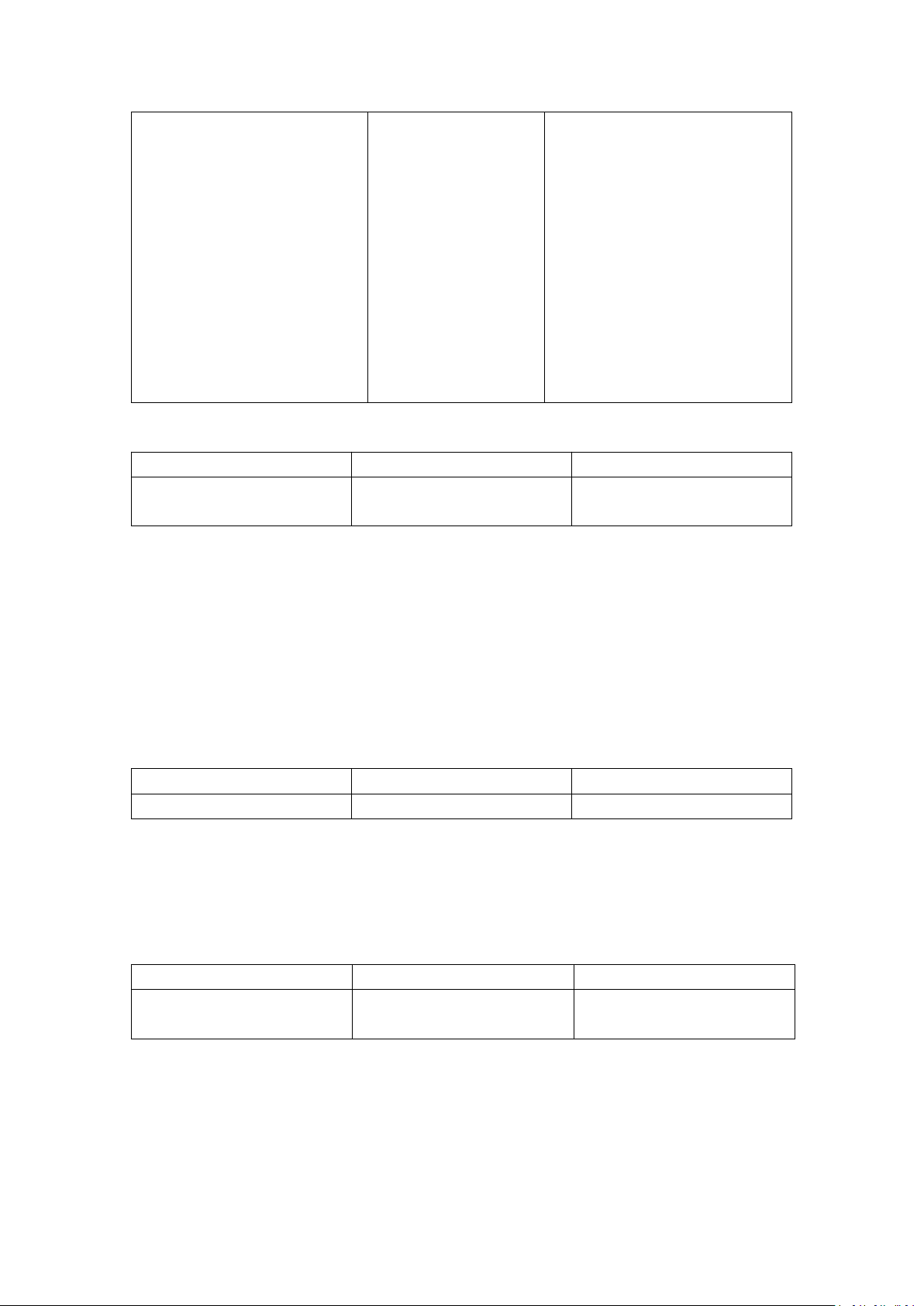
22. Set/Query Security and Encryption Mode:
www.banggood.com
Page 16
Best Bang For Your Buck
16
0--sec_mode0+off
1--sec_mode1+non_secure
2--sec_mode2_service
3--sec_mode3_link
4--sec_mode_unknown
Param2 encryption mode, the
values are as follows:
0--hci_enc_mode_off
1--hci_enc_mode_pt_to_pt
2--hci_enc_mode_pt_to_pt_and_b
cast
Default: 0,0
AT+ SENM?
+
SENM:<Param>,<Para
m2>,
OK
Command
Response
Parameter
AT+PMSAD=<Param>
OK
Param: Bluetooth device
address
Command
Response
Parameter
AT+RMAAD
OK
/
Command
Response
Parameter
AT+FSAD=<Param>
1. OK——Success
2. FAIL——Failure
Param: Bluetooth device
address
23. Remove the specified authentication device from the Bluetooth pairing list:
for example:
Remove the device with the Bluetooth address: 12:34:56:ab:cd:ef from the pairing
list
At+rmsad=1234,56,abcdef\r\n
OK - delete Success
or
At+rmsad=1234,56,abcdef\r\n
FAIL - 12:34:56:ab:cd:ef Bluetooth device does not exist in the pairing list
24. Remove all Authenticated Devices from the Bluetooth pairing list:
for example:
Remove all Bluetooth devices from the pairing list
At+rmaad\r\n
OK
25. Find the specified authentication device from the Bluetooth pairing list:
for example:
Find Bluetooth devices from the pairing list: 12:34:56:ab:cd:ef
At+fsad=1234,56,abcdef\r\n
OK - There is a 12:34:56:ab:cd:ef Bluetooth device in the pairing list.
At+fsad=1234,56,abcde0\r\n
FAIL - There is no 12:34:56:ab:cd:e0 Bluetooth device in the pairing list.
www.banggood.com
Page 17

Best Bang For Your Buck
17
Command
Response
Parameter
AT+ADCN?
+ADCN:<Param>
OK
Param: Number of Bluetooth
devices in the pairing list
Command
Response
Parameter
AT+MRAD?
+ MRAD :<Param>
OK
Param: Recently used
Bluetooth device address
Command
Response
Parameter
AT+STATE?
+ STATE:<Param>
OK
Param: module working status
The return value is as follows:
"INITIALIZED"--initial state
"READY" - ready state
"PAIRABLE" - pairable status
"PAIRED" - pairing status
"INQUIRING" - query status
"CONNECTING" - the
connection status
"CONNECTED" - connection
status
"DISCONNECTED" -
disconnected state
"NUKNOW" - unknown state
26. Obtain the number of authenticated devices in the Bluetooth pairing list:
for example:
At+adcn?
+ADCN: 0 - no Bluetooth device in the pairing trust list
OK
27. Obtain the most recently used Authenticated Device:
for example:
At+mrad?
+MRAD: 0:0:0 - no trusted Bluetooth devices have been used recently
OK
28. Get the working status of the Bluetooth module:
for example:
At+state?
+STATE:INITIALIZED - Initialization state
www.banggood.com
Page 18
Best Bang For Your Buck
18
Command
Response
Parameter
AT+INIT
1. OK——Success
2. FAIL——Failure
/
Command
Response
Parameter
AT+INQ
+INQ: <Param1>, <Param2>,
<Param3>,
⋯⋯
OK
Param1: Bluetooth address
Param2: device class
Param3: RSSI signal strength
OK
29. Initialize the SPP specification library:
30. Query Bluetooth devices:
Example 1:
At+init\r\n - Initialize the SPP library (cannot be initialized repeatedly)
OK
At+iac=9e8b33\r\n - Query the Bluetooth device of any access code
OK
At+class=0\r\n - query various Bluetooth device classes
At+inqm=1,9,48\r\n ——Query mode: with RSSI signal strength indication, more than
9 Bluetooth devices Response will terminate the query, set the super
The time is 48x1.28=61.44 seconds.
At+inq\r\n - Query peripheral Bluetooth devices
+INQ: 2:72:D2224,3E0104,FFBC
+INQ: 1234:56:0,1F1F,FFC1
+INQ:1234:56:0,1F1F,FFC0
+INQ: 1234:56:0,1F1F,FFC1
+INQ: 2:72:D2224,3F0104,FFAD
+INQ: 1234:56:0,1F1F, FFBE
+INQ: 1234:56:0,1F1F, FFC2
+INQ: 1234:56:0,1F1F, FFBE
+INQ: 2:72:D2224,3F0104,FFBC
OK
Example 2:
At+iac=9e8b33\r\n - Query the Bluetooth device of any access code
OK
At+class=1f1f\r\n - Query the Bluetooth device with device class 0x1f1f
OK
At+inqm=1,9,48\r\n ——Query mode: with RSSI signal strength indication, more than
9 Bluetooth devices Response will terminate the query, set the super
The time is 48x1.28=61.44 seconds.
At+inq\r\n - Filter. Query peripheral Bluetooth devices
+INQ: 1234:56:0,1F1F, FFC2
www.banggood.com
Page 19

Best Bang For Your Buck
19
Command
Response
Parameter
AT+INQC
OK
/
Command
Response
Parameter
AT+PAIR=<Param1>,<Param2>
1. OK——Success
2. FAIL——Failure
Param1: Remote device
Bluetooth address
Param2: Connection timeout
(seconds)
Command
Response
Parameter
AT+LINK=<Param>
1. OK——Success
2. FAIL——Failure
Param: Remote device
Bluetooth address
+INQ: 1234:56:0,1F1F,FFC1
+INQ: 1234:56:0,1F1F,FFC1
+INQ: 1234:56:0,1F1F,FFC1
+INQ: 1234:56:0,1F1F, FFC2
+INQ: 1234:56:0,1F1F,FFC1
+INQ: 1234:56:0,1F1F,FFC1
+INQ:1234:56:0,1F1F,FFC0
+INQ: 1234:56:0,1F1F, FFC2
OK
Example 3:
At+iac=9e8b3f\r\n ——Query the Bluetooth device with access code 0x9e8b3f
OK
At+class=1f1f\r\n - Query the Bluetooth device with device class 0x1f1f
OK
At+inqm=1,1,20\r\n ——Query mode: with RSSI signal strength indication, more than
1 Bluetooth device Response will terminate the query, set the super
The time is 20x1.28=25.6 seconds.
At+inq\r\n - Filter. Query peripheral Bluetooth devices
+INQ:1234:56:ABCDEF,1F1F,FFC2
OK
31. Cancel the inquiry of Bluetooth devices:
32. Device pairing:
for example:
Paired with a remote Bluetooth device: 12:34:56:ab:cd:ef, the maximum pairing
timeout is 20 seconds.
At+pai=1234,56,abcdef,20\r\n
OK
33. Equipment connection:
for example:
Establish a connection with the remote Bluetooth device: 12:34:56:ab:cd:ef
www.banggood.com
Page 20
Best Bang For Your Buck
20
Command
Response
Parameter
AT+DISC
1. +DISC:SUCCESS - Disconnect Success
OK
2. +DISC: LINK_LOSS - connection lost
OK
3. +DISC: NO_SLC - no SLC connection
OK
4. +DISC: TIMEOUT - disconnect timeout
OK
5. +DISC:ERROR - disconnect error
OK
/
Command
Response
Parameter
AT+ENSNIFF=<Param>
OK
Param: Device Bluetooth
address
Command
Response
Parameter
AT+EXSNIFF=<Param>
OK
Param: Device Bluetooth
address
error_code (hexadecimal number)
Comment
0
AT command error
1
Command result is the default value
2
PSKEY write error
3
Device name is too long (more than 32 bytes)
4
Device name length is zero
5
Bluetooth address: NAP is too long
6
Bluetooth address: UAP is too long
7
Bluetooth address: LAP is too long
8
PIO sequence number mask length is zero
9
Countless PIO serial numbers
At+fsad=1234,56,abcdef\r\n——Query whether the Bluetooth device
12:34:56:ab:cd:ef is in the pairing list
OK
At+link=1234,56,abcdef\r\n——Query the Bluetooth device 12:34:56:ab:cd:ef in the
pairing list, you can connect directly without query.
OK
34. Disconnect:
35. Enter the energy saving mode:
36. Exit the energy saving mode:
Appendix 1: ATCommand Error Code Description
Error code return form - ERROR: (error_code)
www.banggood.com
Page 21

Best Bang For Your Buck
21
A
Device class length is zero
B
Device class number is too long
C
Query access code length is zero
D
The query access code number is too long
E
Invalid query access code
F
Pairing code length is zero
10
Pairing code is too long (more than 16 bytes)
11
Module role is invalid
12
Invalid baud rate
13
Invalid stop bit
14
Check digit is invalid
15
No authentication device exists in the pairing
list
16
SPP library is not initialized
17
SPP library repeated initialization
18
Invalid query mode
19
Query timeout too large
1A
Bluetooth address is zero
1B
Invalid security mode
1C
Invalid encryption mode
Appendix 2: Device Class Description
The Class of Device/Service(COD)is a 32 bifs number that of 3 field specifies the
service supported by the device. Another field spcifies the minor device class, which
descrbes the device type in more detail
The Class of Device /Service (CoD) field has a variable format. The format is
indicated using the ’within the CoD .The length of the Format Type field is variable
and ends with two bits different from’11’.The version field starts at the least
significant bit of the CoD and may extend upwards. In the ’format#1’ of the CoD
(format Type field =00), 11 bits are assigned as a bit –mask(mulfiple bits can be
set) each bit corresponding to a high level generic category of service class.
Currently 7 categories are defined. These are primarily of a’ public service’
nature. The remaining 11 bits are used to indicate device type category and other
device-specific characteristics. Any reserved but otherwise unassigned bits, such
as in the Major Service Class field, should be to 0.
Figure 1.2: The Class of Device/Service field (format type). Please note the krder
in which the octets are sent on the air and stored in memory. Bit number 0 is sent
first on the air .
1. MAJOR SERVICE CLASSES
Bit no Major Service Class
13 Limited Discoverable Mode [Ref #1]
14 (reserved)
15 (reserved)
16 Positioning(Location identification)
www.banggood.com
Page 22

Best Bang For Your Buck
22
17 Networking (LAN,Ad hoc, ⋯ )
18 Rendering (Printing ,Speaker,⋯
19 Capturing (Scanner,Misrophone,⋯
20 0bject Transfer (v-Inbox, v-Folder,⋯
21 Audio (Speaker,Microphone,Headset service,⋯
22 Telephony (Cordless telephony, Modem, Headset service,⋯
23 Imformation (WEB-server, WAP- server,⋯
TABLE 1.2:MAJOR SERVICE CLASSES
[Ref #1 As defined in See Generic Access Profile,Bluetooth SIG]
2. MAJOR DEVICE CLASSES
The Major Class segment is the highest level of granularity for defining a Bluetooth
Device. The main function of a device is used to determine the major Class grouping.
There are 32 different possible major classes. The assignment of this Major Class
field is defined in Table1.3.
1 2 1 1 1 0 9 8 Major Device Class
0 0 0 0 0 Miscel laneous [Ref #2]
0 0 0 0 1 Computer (desktop, notebook,PDA, organizers,⋯
0 0 0 1 0 Phone (cellular ,cordless ,payphone,modem,⋯
0 0 0 1 1 LAN/Network Access point
0 0 1 0 0 Audio/Video (headset,speaker,stereo, video display, vcr ⋯
0 0 1 0 1 Periphereal (mouse, joystick, keyboards.⋯
0 0 1 1 0 Imaging (printing, scanner, camera, display,⋯
1 1 1 1 1 Uncategorized, specific device code not specified
X X X X All other values reserved
TABLE 1.3: MAJOE DEVICE CLASSES
[Ref #2:Used where a more specific Major Device Class is not suited (but only as
specifiedas in this document) .Devices that do not have a major class assigned can
use the all-1 code until’ classified’]
3. THE MINOR DEVICE CLASS FIELD
The’ Minor Device Class field’ (bits 7 to 2 in the CoD ), are to be interpreted
only in the context of the Major Device Class (but interpreted of the Service Class
field). Thus the meaning of the bits may change, depending on the value of the ’
Major Device Class field’. When the Minor Device Class field indicates a device
class ,then the primary decvice class should be reported, e. g . a cellular phone
that can work as a cordless handset should
4. MINOR DEVICE CLASS FIELD–COMPUTER MAJOR CLASS
Minor Device Class
7 6 5 4 3 2 bit no of CoD
0 0 0 0 0 0 Uncategorized,code for device nof assigned
0 0 0 0 0 1 Desktop workstation
0 0 0 0 1 0 Server-class computer
0 0 0 0 1 1 Laptop
0 0 0 1 0 0 Handheld PC/PDA(clam shell)
0 0 0 1 0 1 Palm sized PC/PDA
www.banggood.com
Page 23

Best Bang For Your Buck
23
0 0 0 1 1 0 Wearable computer (Watch sized)
X X X X X X All other values reserved
TABLE 1.4: SUB DEVICE CLASS FIELD FOR THE’ COMPUTER ’MAJOR CLASS
5. MINOR DEVICE CLASS FIELD – PHONE MAJOR CLASS
Minor Device Class
7 6 5 4 3 2 bit no of CoD
0 0 0 0 0 0 Uncategorized,code for device not assigned
000001 Cellular
0 0 0 0 1 0 Cordless
0 0 0 0 1 1 Smart phone
0 0 0 1 0 0 Wired modem or voice gateway
0 0 0 1 0 1 Common ISDN Access
0 0 0 1 1 0 Sim Card Reader
X X X X X X All other values reserved
TABLE1.5: SUB DEVICE CLASSES FOR THE’PHONE’ MAJOR CLASS
6. MINOR DEVICE CLASS FIELD –LAN/NETWORK ACCESS POINE MAJOR CLASS
Minor Device Class
7 6 5 bit no of CoD
0 0 0 Fully available
0 0 1 1 – 17% utilized
0 1 0 1 7 - 33% utilized
0 1 1 3 3 – 50% utilized
1 0 0 5 0 – 67% utilized
1 0 1 6 7 – 83% utilized
1 1 0 8 3 – 99% utilized
1 1 1 No service available [REF #3]
XXX All other values reserved
TABLE1.6: THE LAN/NETWORK ACCESS POINE LOAD FACTOR FIELD
[Ref #3:"Device is fully utilized and cannot accept additional connections at this
time, please retry later"]
The exact loading formula is not standardized. It is up to each LAN/Network Access
Point implementation to determine what internal conditions to report as a
utilization of communication requirement is that the box .As a recommendation, a
client that locates multiple LAN/Network Access Points should attempt to connect
to the one reporting the lowest load.
Minor Device Class
4 3 2 bit no of CoD
0 0 0 Uncategorized (use this value if no other apply )
XXX All other values reserved
TABLE1.7:RESERVED SUB-FIELD FOR THE LAN/NETWORK ACCESS POINE
7. MINOR DEVICE CLASS FIELD – AUDIO/VIDEO MAJOR CLASS
Minor Device Class
7 6 5 4 3 2 bit no of CoD
0 0 0 0 0 0 Uncategorized,code not assigned
www.banggood.com
Page 24

Best Bang For Your Buck
24
0 0 0 0 0 1 Device conforms to the Headset profile
000010 Hands-free
0 0 0 0 1 1 (Reserved )
0 0 0 1 0 0 Microphone
0 0 0 1 0 1 Loudspeaker
0 0 0 1 1 0 Headphones
0 0 0 1 1 1 Portable Audio
0 0 1 0 0 0 Car audio
0 0 1 0 0 1 Set-top box
0 0 1 0 1 0 HiFi Audio Device
001011 VCR
0 0 1 1 0 1 Camcorder
0 0 1 1 1 0 Video Monitor
0 0 1 1 1 1 Video Display and Loudspeaker
0 1 0 0 0 0 Video Conferencing
0 1 0 0 0 1 (Reserved)
0 1 0 0 1 0 Gaming/Toy [Ref #4]
X X X X X X All other values reserved
[Ret #4: Only to be used with a Gaming/Toy device that makes audio/video
capabilities
available via Bluetooth]
TABLE 1.8: SUB DEVICES FOR THE ’AUDIO/VIOEO’MAJOR CLASS
8. MINOR DEVICE CLASS FIELD – PERIPHERAL MAJOR CLASS
Minor Device Class
7 6 bit no of CoD
0 1 Keyboard
1 0 Pointing device
1 1 Combo keyboard /pointing device
X X X All other values reserved
TABLE1.9: THE PERIPHERAL MAJOR CLASS KEYBOARD/POINTING DEVICE FIELD
Bits 6 and 7 independantly specify mouse, keyboard or combo mouse/keyboard
devices.
These may be combined with the lower bits in a multifunctional decice.
Minor Device Class
5 4 3 2 bit no of CoD
0 0 0 0 Uncategorized device
0 0 0 1 Gamepd
0 0 1 1 Remote control
0 1 0 0 Sensing device
0 1 0 1 Digitizer tablet
X X X X All other values reserved
TABLE1.10: RESERVED SUB-FIELD FOR THE DEVICE TYPE
9. MINOR DEVICE CLASS FIELD – IMAGING MAJOR CLASS
Minor Device Class
www.banggood.com
Page 25

Best Bang For Your Buck
25
7 6 5 4 bit no of CoD
X X X 1 Display
X X 1 X Camera
X 1 X X Scanner
1 X X X Printer
X X X X All other values reserved
TABLE 1.11: THE TMAGING MAJOR CLASS BITS 7 TO 7
Bits 4 to 7 independent ly specify bi splay, camera, scanner or printer. These may
be combined in a multifunctional device.
Minor Device Class
3 2 bit no of CoD
0 0 Uncategorized, default
X X All other values reserved
TABLE 1. 12: THE IMAGING MAJOR CLASS BITS 2 AND 3
Bits 2 and 3 are reserved
Appendix 3: The Inquiry Access Codes
The General-and Device-Specific Inquiry Access Codes (DIACs)
The Inquiry Access Code is the first level of filtering when finding Bluetooth
The main purpose of defining multiple IACs is to limit the number of
Reply that are received when scanning devices within range.
0. 0x9E8B33 -- General/Unlimited Inquiry Access Code (GIAC)
1. 0x9E8B00 - Limited Dedicated Inquiry Access Code (LIAC)
2. 0x9E8B01 ~ 0x9E8B32 RESERVED FOR FUTURE USE
3. 0x9E8B34 ~ 0x9E8B3F RESERVED FOR FUTURE USE
The Limited Inquiry Access Code(LIAC)is only intended to be used for limited time
Periods in scenarios where both are have been explicitly caused to enter this state,
Usually by user action. For further explanation of the use of the LIAC, please refer
To the Generic Access Profile.
In contrast it is allowed to be continuously scanning for the General Inquiry Access
Code (GIAC) and respond whenever inquired.
www.banggood.com
 Loading...