

Page 1
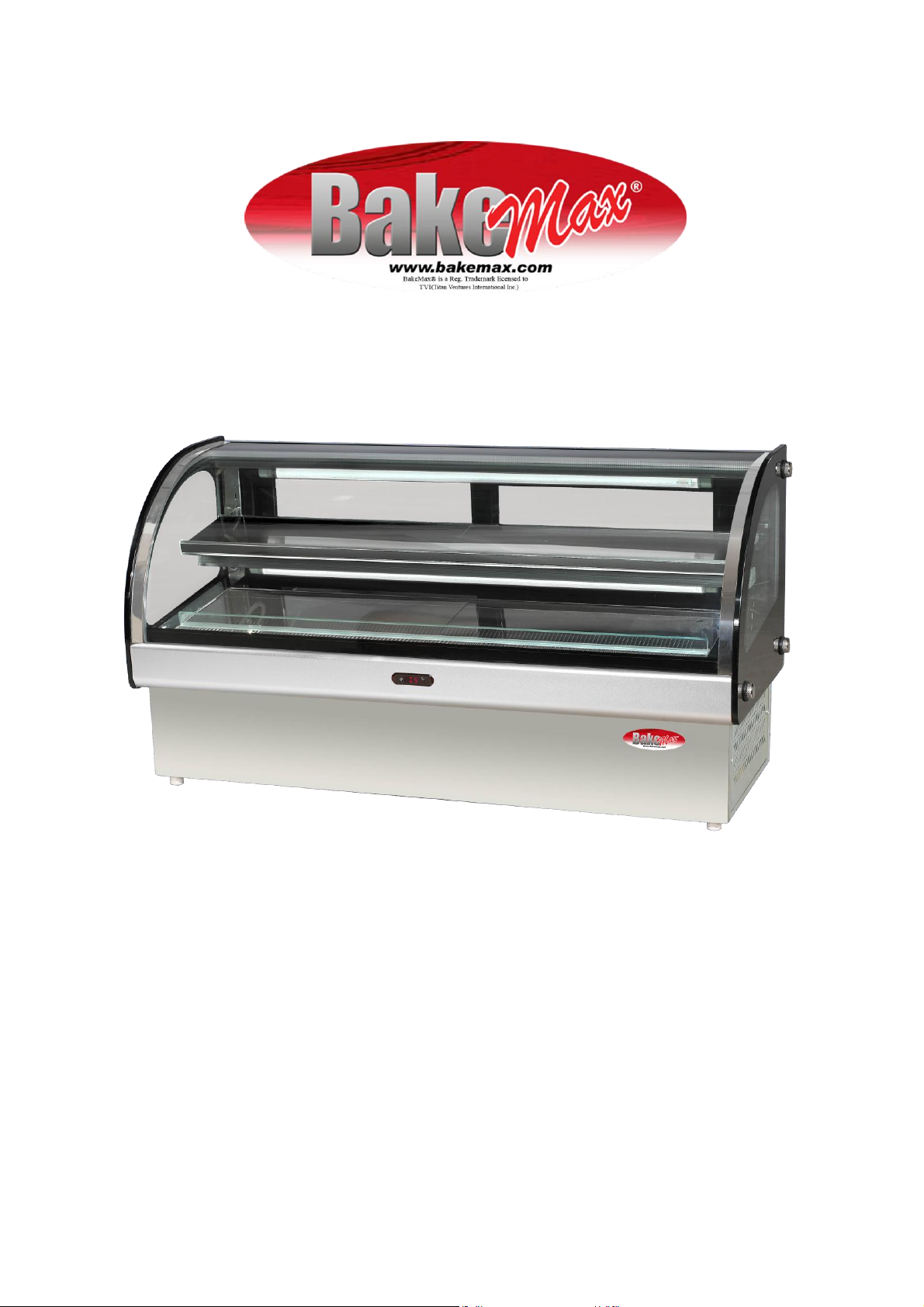
BMCRD01 BMCRD05 BMCRD10
Owners Manual
Page 2

Page 3
Page 4
Thank you for using BakeMax ® Refrigerated Showcase. Please read this manual
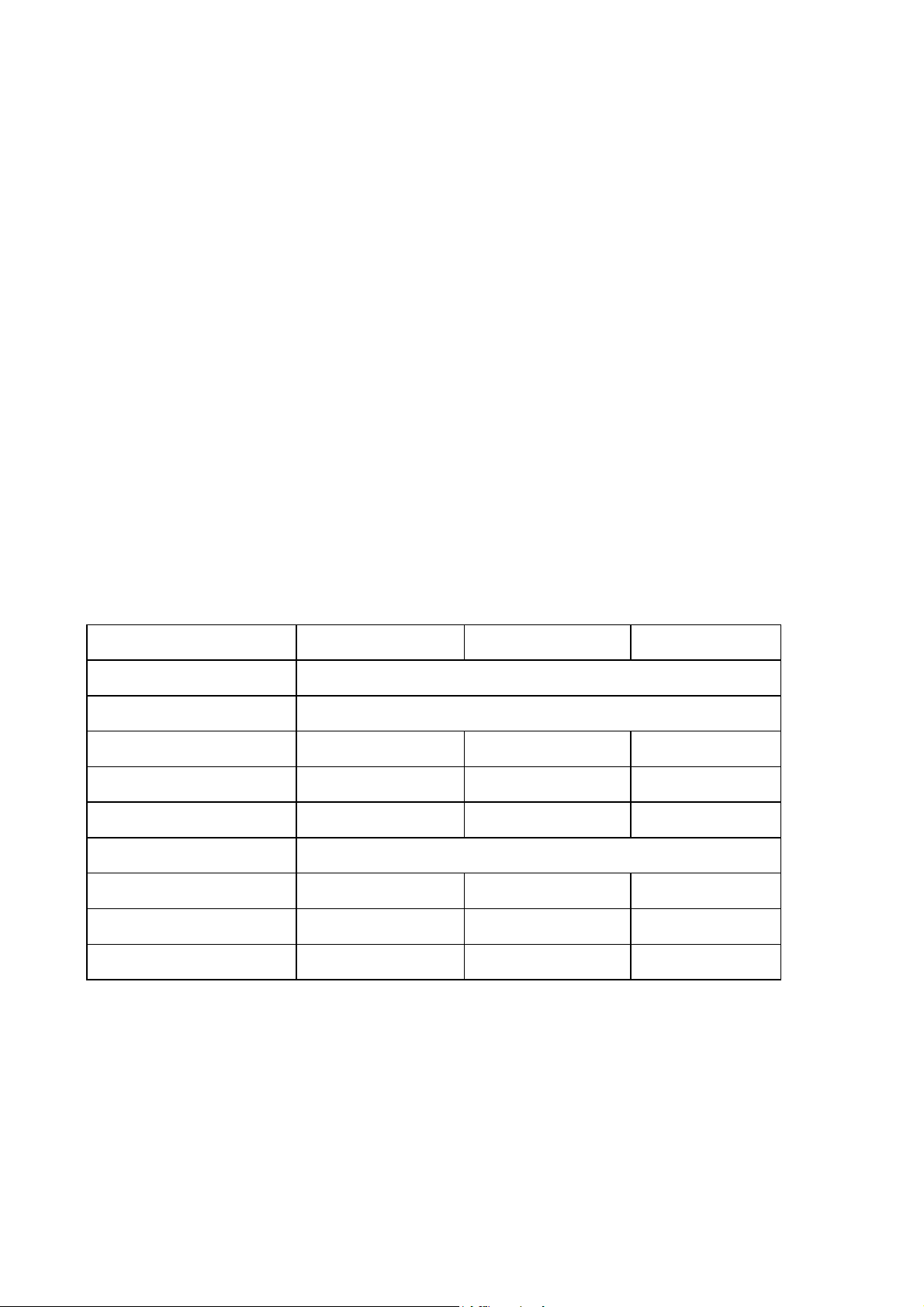
Model
BMCRD01
BMCRD05
BMCRD10
Blended refrigerant name
R22/R134A
Power supply
230V— 50Hz
Rated current
2. 2A
2. 7A
2. 8A
Lights
T5 2X14W
T5 2X21W
T5 2 X28W
Power Input (W)
480
585
620
Storage temperature CO
2-8
Capacity (L)
98
128
168
Dimension (w x d x h) (mn)
9 40 X 4 70 X 69 5
1 24 0X 47 0 X 69 5
1 54 0X 47 0 X 69 5
Net Weight (Kg)
87
98
112
carefully before using.
I. OUTLINE OF THE PRODUCT
This series of cake display cabinet is safe, reliable and has excellent functions.
The transparent glass at the front side is curved glass which gives your customer
an overall better view of the product. It also has an attractive look, wider display
space and great performance. Heating/defrosting system is installed in the front
glass and makes the front glass clearer and reduces any sort of frost or fogging of
the glass.
II. TECHNICAL PARAMETER
Page 5

III. CAUTIONS OF SAFETY
1. The cabinet should be placed in an environment where air is circulated, shade is provided from
direct sunshine, and a regularly controlled temperature environment.
2. The spacing of the bench top display cabinet and materiel around should be longer than
40cm.
3. The voltage of supply power must be within 10% more or less than the parameter of the name
plate on the machine. If the voltage is not stable, please add a power stabilizer about 5 times as
the total power input, otherwise it will burn out the compressor and reduce the life of machine.
Please put the plug on a fixed socket with power switch and fuse to ensure the safe operation.
4. Never use fuel, easy-exploding or corrosive things near the cabinet.
5. The gradient angle of the cabinet should not exceed 45° when you move or transport it.
6. The environment should be dry and away from heat sources.
7. This appliance is not intended for use by persons (including children)with reduced physical,
sensory or mental capabilities, or lack of experience and knowledge, unless they have been
given supervision or instruction concerning use of the appliance by a person responsible for their
safety.
8. Children should be supervised to ensure that they do not play with the appliance.
Page 6
IV. HOW TO OPERATE
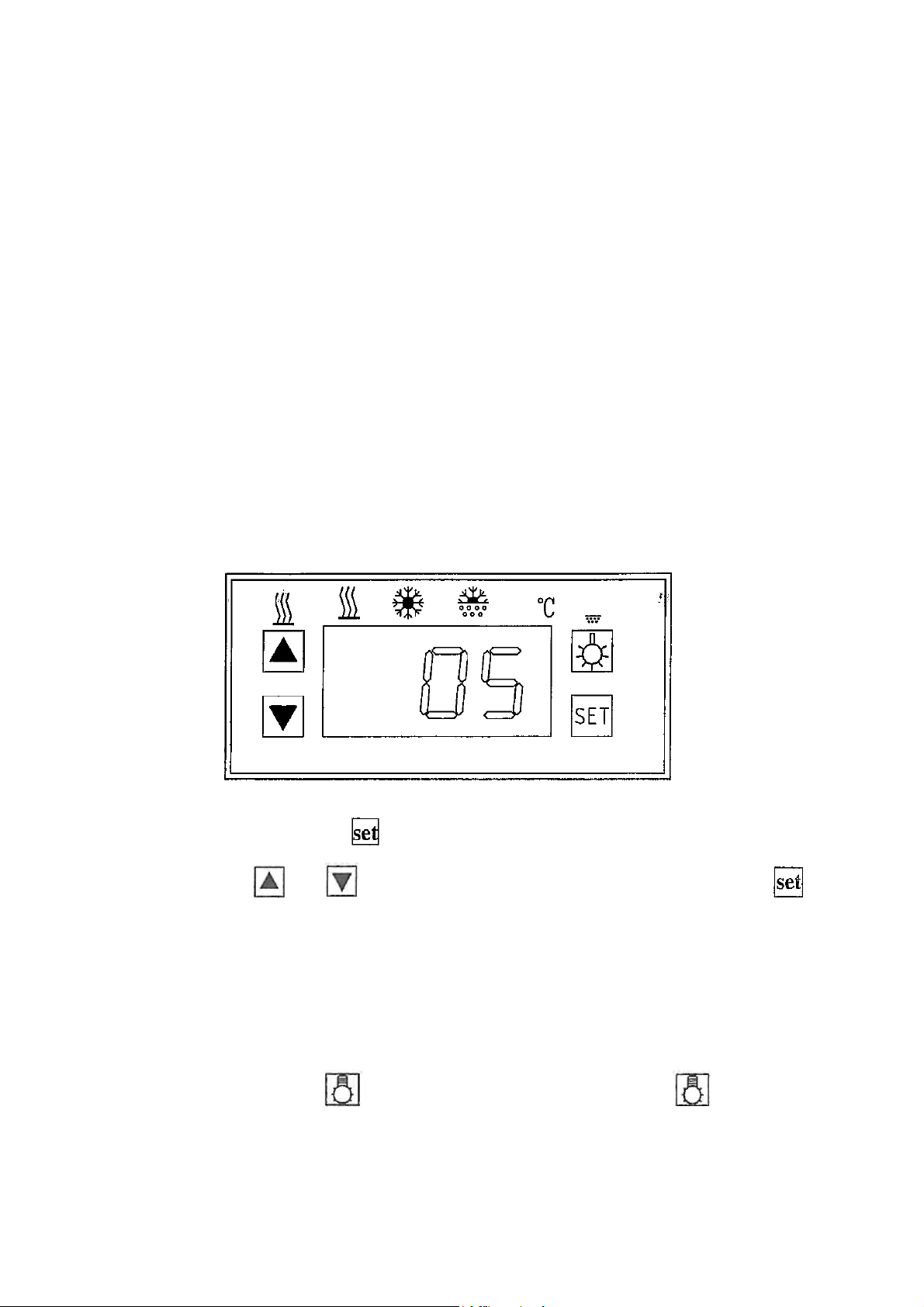
1. An electronic thermostat is used in the BakeMax® Refrigerated Showcase series cabinet.
When you insert the plug into the socket, the thermostat will automatically show the
temperature inside the cabinet; if the temperature inside the cabinet is higher than the desired
temperature, after a delay or a few minutes the compressor begins to work; if the temperature is
lower than the desire temperature, compressor will stop; during the state of refrigerating,
refrigerator light shines; otherwise it is out.
2. Before the cabinet is sold to user, the manufacturer has set the thermostat, user need not to
adjust concerned parameter; if user need to adjust it, please do as follow:
A) Temperature setting: Press
flashed. Press
button again the set temperature value will be stored and the current temperature will be
showed. If you don't press any other key, it will return showing current temperature within 10
seconds.
B) Illumination: Press
button again, it goes out.
or
button, the temperature value will be displayed and
button, the temperature value will be modified. Press
button, light in the cabinet shines; press
Page 7

C) Glass heating: Press
is illuminated; press button again, heating stops, heat signal lamp puts out.
button, curved glass start defrosting, heating signal lamp
D) Manual defrosting: press
defrosting.
3. If there are some unknown items on the thermostat, such as improper English on the panel or
customer has some questions, please call BakeMax®.
4. The food should be lightly laid in the cabinet to prevent from destroying the glass.
5. Please use a soft cloth for cleaning to prevent from damaging the surface.
6. Don't let unqualified persons repair pr remove any casings or wires from this series of product
to avoid damaging the unit.
button for six seconds, it begins to defrost or stops
7. The food laid on the shelf should be arranged equably, each shelf could load 10KG at most.
8. Prevent from tipping, emphatic and shaking sharply when move the unit.
9. Don't put the food over the grille from which wind flows in/out as this will affect normal work of
the unit.
10. For economy and keeping stability of temperature, please lessen your times for opening and
closing the door.
11. If the cabinet has not been used for a long time, please check the whole wire connection
carefully before you use it again.
Page 8

V.SERVICE AND MAINTENANCE
1. Check the power supply before you use the cabinet.
2. Keep the cabinet clean inside and outside, make regular cleanout, wipe up when there is water
or condensation inside.
3. Strictly prohibited to use any acid, alkalescent articles or inappropriate cleaners such as
alcohol and gas to clean. Use litmus less scour to scrub away and cloth to wipe up if it is too dirty.
4. The fins of condenser will have dirt after the cabinet is running for some time and it will
influence the performance. Please clean the condenser every two months.
5. The installation of the refrigerant condensing unit must only be made by
the manufacture's service personnel or similarly skilled person.
6. If the supply cord is damaged, it must be replaced by the manufacturer, its service agent or
similarly qualified persons in order to avoid a hazard.
7. If the light has fault, please replace it with the same model and power as the parameter on the
nameplate which is stuck on the lampshade.
Page 9
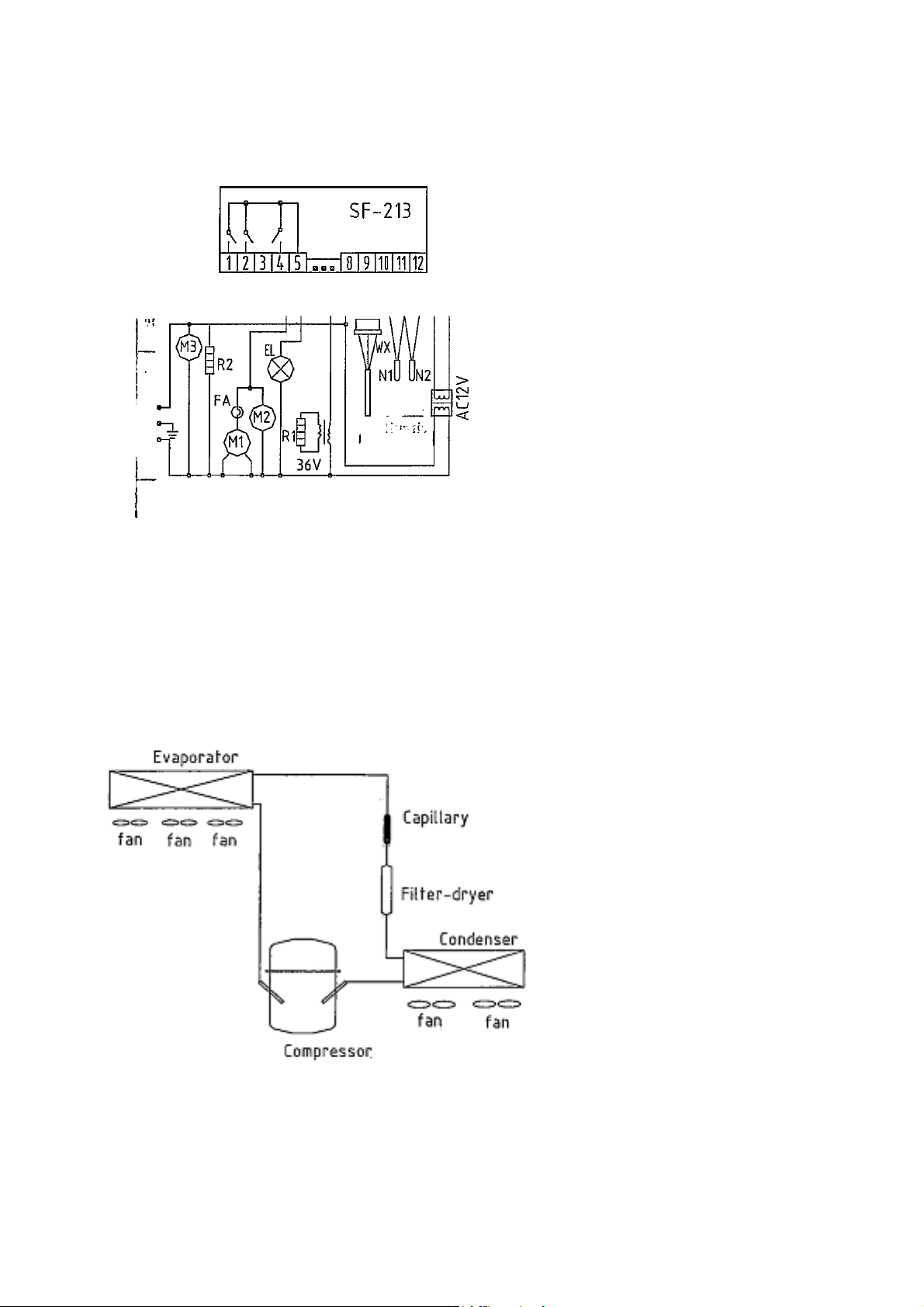
VI.CIRCUIT DIAGRAM
Circuit Diagram of cake display cabinet
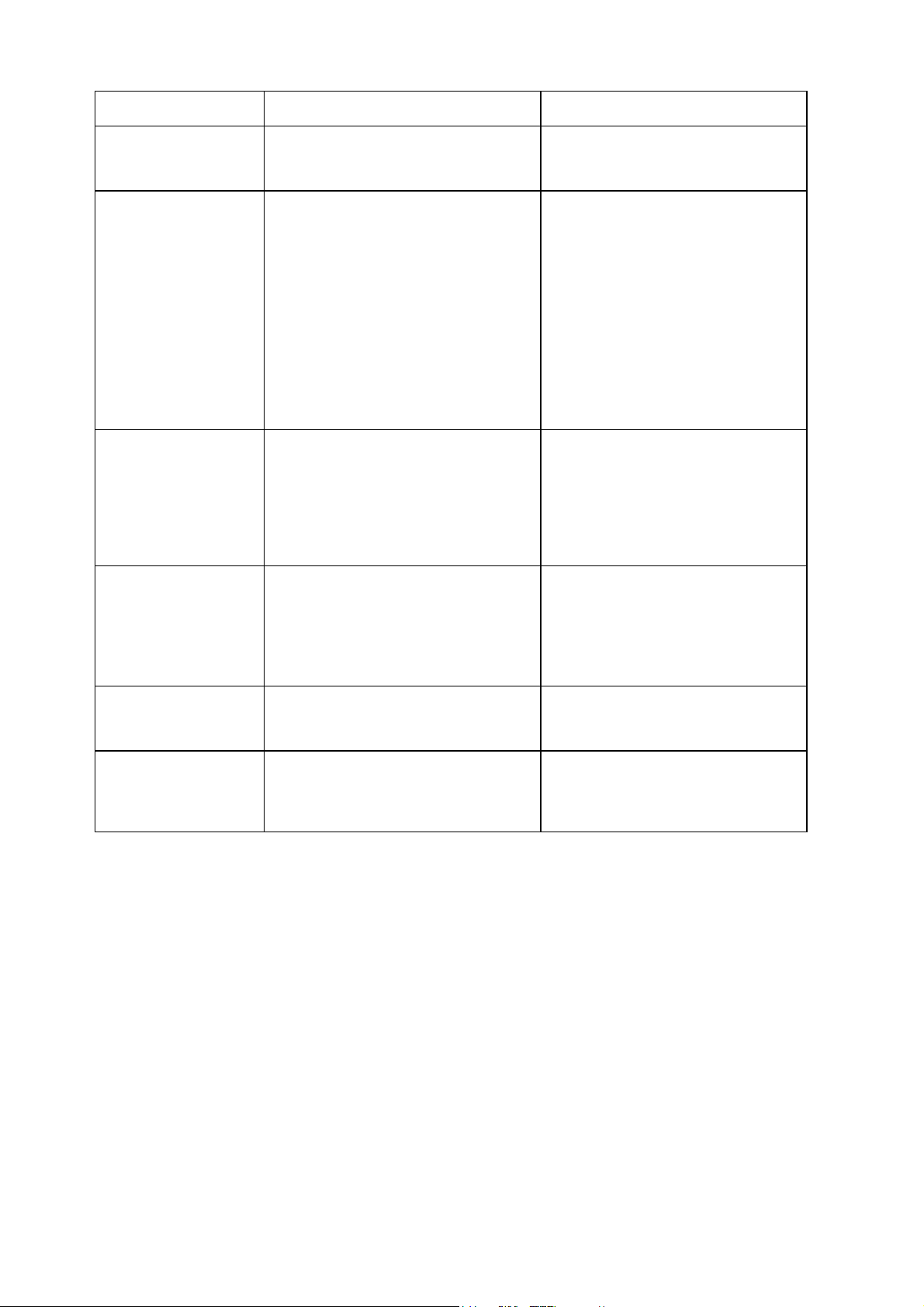
VII.WORKING PRINCIPLE DIAGRAM
SF-213 Thermostat
N1 Defrosting sensor
N2 Controller sensor
WX Temperature display
EL Light
R1 Heat wire for glass
R2 Heat wir for door frame M3
Evaporator fan
M2 Condenser fan
FA Over-Load protector
M1 Comperssor
Page 10
VIII. TROUBLESHOOTING
Fault
Analysis
Solution
•No power supply
©Poor contact between socket and
plug
•Repair or replace them
•compressor does not
work
•Thermostat fault ©Thermostat is not
set well ©Thermostat's contact is poor
•plug of starter is loose •Compressor
fault •Starter or capacitor fault
•Replace it
•Set thermostat
•Insert the connector tightly
•Insert the plug tightly
•Replace it
•Repair or replace it
•Compressor runs
continuously,
temperature in the
cabinet cannot fall
down
•Environment temperature is too
high, and thermostat's temperature set
is too low •Too many stain on
condenser •Too thick frost on
evaporator
•Set the thermostat properly •Clean
condenser in time •Defrost in
time, adjust defrosting cycle,
increase the defrosting time
•condenser's fan does
not run
•Fan's capacitor fault
•Fan motor's bearing lack oil
Fan motor coil damaged
•Replace it •Fill oil Replace it
•Compressor start -stop
too frequently
•Compressor coil short circuit
•Measure it use universal meter,
replace the compressor
• Light does not shine
• Light faults
• Circuit contact is bad
•Replace it
•Measure it, replace it
Page 11
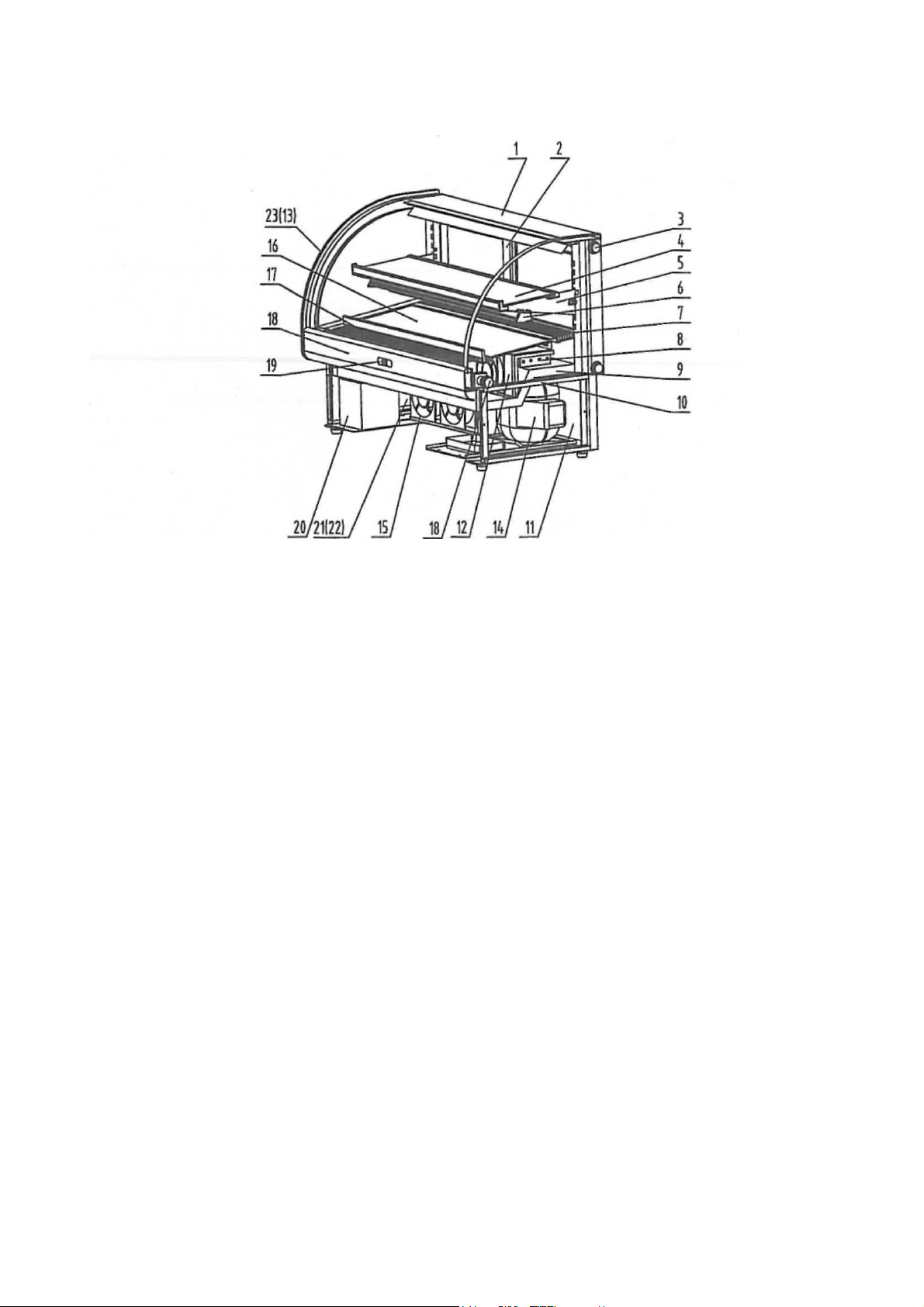
IX. STRUCTURE DIAGRAM OF CAKE DISPLAY CABINET
1. Front curved glass
2. Sliding door
3. Locked bolt
4. Shelf
5. Supporting bar
6. Fluorescent lamp unit
7. Exit of wind
8. Evaporator
9. Body
10. Frame Of Base
11. Back panel of Base
12. Evaporator Fan
13. Side Glass (left)
14. Compressor and Condenser
15. Condensing Fan
16. Lower Shelf
17. Inlet of Wind
18. Front trim Panel
19. Thermostat
20. Transformer
21. Left panel of the base
22. Right Panel of the base
23. Side glass (right)
For any questions of concerns please contact BakeMax Head Office:
Toll Free: 1.800.565.2253 Phone: 1.506.858.8990
Fax: 1.506.859.6929
http://www.bakemax.com
Page 12

 Loading...