

Page 1
Ayub Yaqoob Engineering Company Pvt. Ltd.
-Believe You Can, & You’re Halfway There!
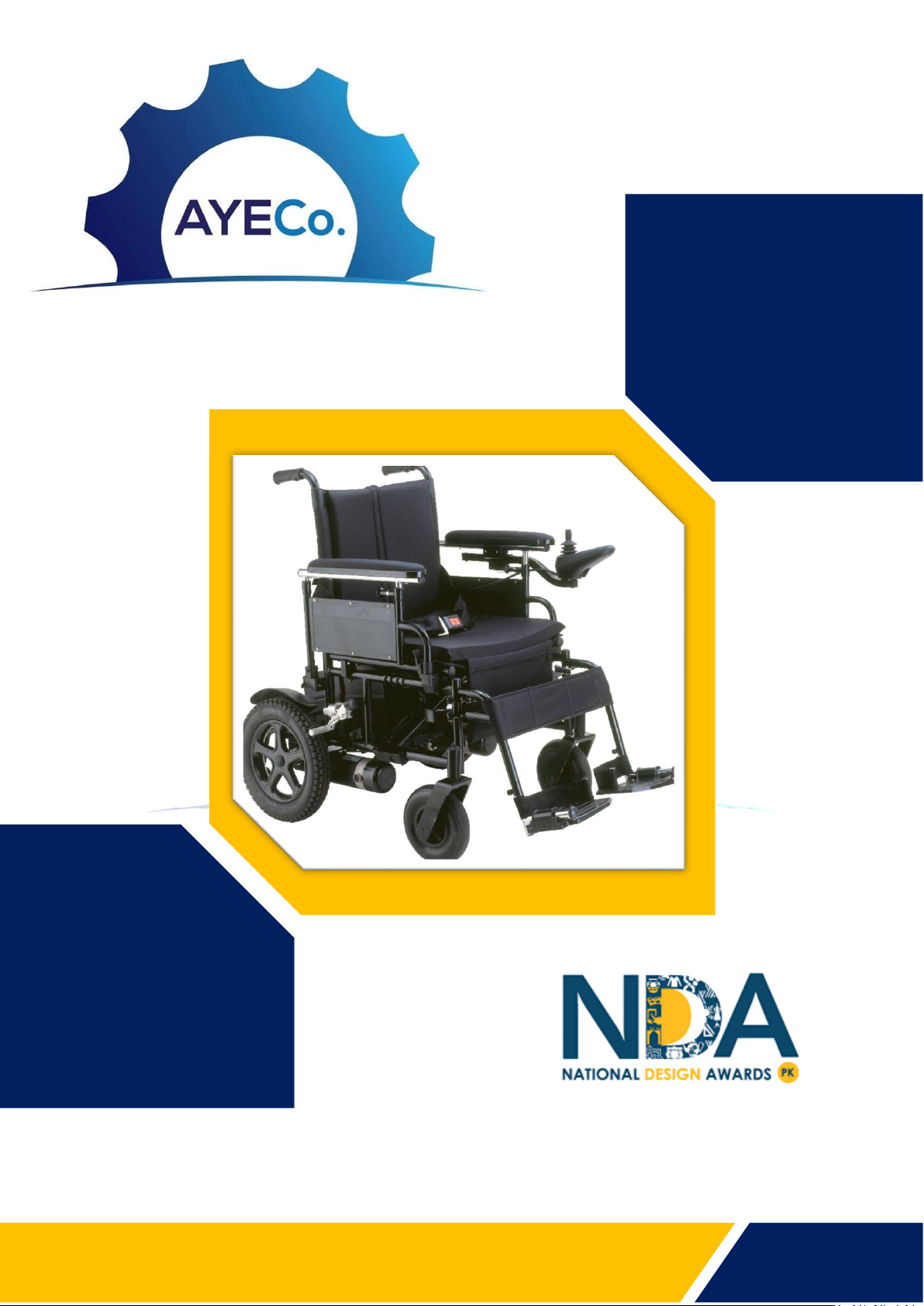
GoBee User Manual
Product of the Year 2018
Page 2

Chapter 1
OVERTURE
Electrical wheelchair
To Users:
This electrical driven wheelchair is composed of vehicle frame,
wheels, seat, handrails, storage battery, motor and controller,
etc.
This product is designed to help disabled and the old, or the
weak ones move within a certain distance (not allowed driving
on high ways).
Your safety is critical for Ayub Yaqoob Engineering Company
(Pvt.) Limited. Therefore, please carefully read this user
manual before using the wheelchair, which is of great
importance to your safe operation.
Product Introduction:
1. This product is designed for user’s simple operation.
2. The reducer with dual back drivers is used to ensure the stability and reliability of driving.
3. Advanced controller and easy operation system.
4. Seat design complying with human engineering provide user with enough coziness.
5. The whole wheelchair could be folded and the pedals could be dismantled, easy for package, delivery
and storage in household.
Parameter
Model
GoBee 1.0
Total Width
17”
Speed
3-9 Km/h
Total Height
36”
Range
20Km
Total length
34”
Battery
24V
Front tire size
8”
Motor
200W (each)
Driver tire size
12”
Controller
Design from UK(VR2)
Dynamic stability
Upslope: 8o
Downslope:8o
Charger
Power: 220V/110V
50 Hz Output Voltage:
24V
Climbing obstacle
capability
≥40mm
Operational
environment
-15oC~50oC
Structure
Folding
www.ayecogroup.com
GoBee is motorized with the use of
rechargeable batteries & give
freedom to people who may have
difficulty using a manual
wheelchair.
DO YOU KNOW?
Page 3
Chapter 1
OVERTURE
Electrical wheelchair
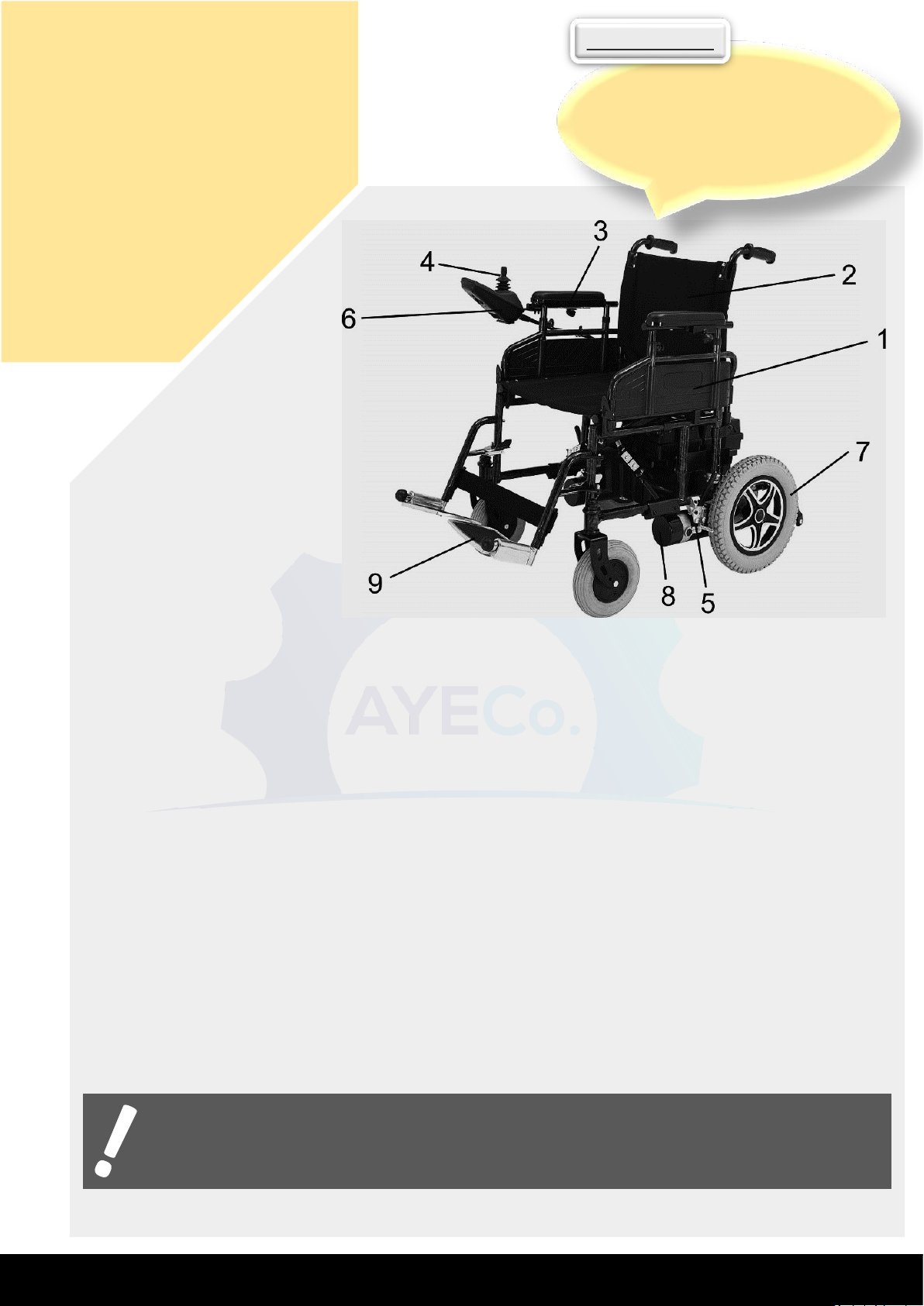
SPECIFICATIONS:
1. Flip-Up side panels
2. Backrest
3. Height Adjustable Armrest
4. Joystick
5. Parking Brake Lever
6. Controller
7. Rear Wheel (Drive wheel)
8. Drive Motor
9. Adjustable Footrest
Never stand on the footrests when entering or leaving the Smart Wheelchair.
Ensure that both parking brakes are applied, fold the footrests upward and enter the Smart
Wheelchair from the front. When you are seated, fold the footrest plates back down to
the normal position.
To adjust the armrest height, pull out the spring-loaded plunger on the side panel and pull
or push the armrest upward or downward until the plunger engages in the respective hole
of the vertical guide rail to give the required armrest position.
Once seated and satisfied that the footrests are correctly adjusted, check to see that the
controller is in a convenient position so that you can reach it easily and safely. To adjust
the controller forward or rearward, loosen star knob and retighten after adjustment.
If your smart wheelchair begins to move in an unexpected manner, immediately
release the joystick. Unless the joystick is damaged, this action should stop your
smart wheelchair.
www.ayecogroup.com
Unlike manual wheelchairs, GoBee
do not require upper arm strength
to move forward.
DO YOU KNOW?
Page 4

Chapter 2
ACCESSORIES
Using Guidance for Controller
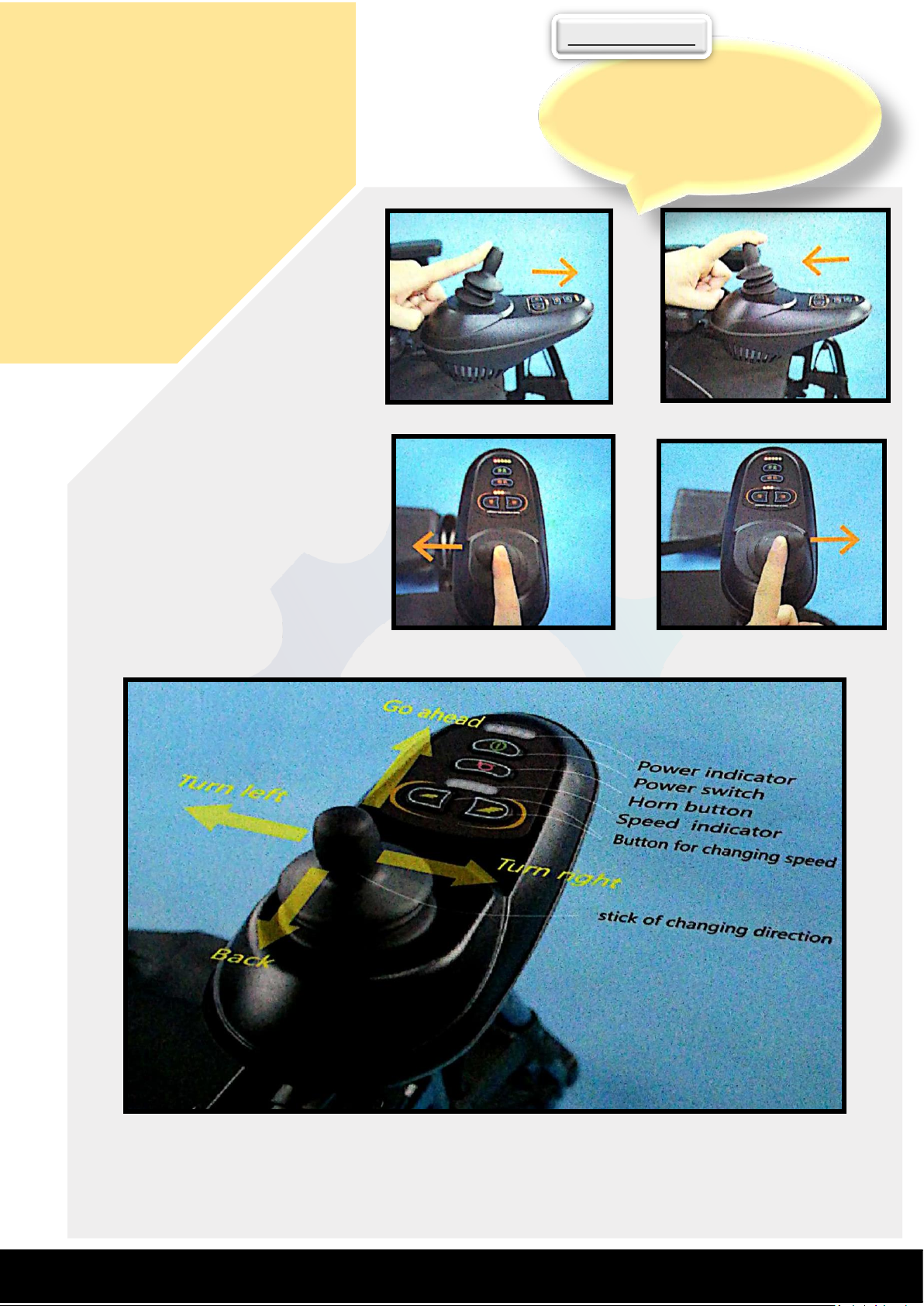
1. Power Button
Press the button and the power is on. Then press the button for
another time, the power is off.
2. Operational Rocker Guidance
Forward: Push the operational rocker forward and the wheelchair will move forward. The
wheelchair speed will be faster as the pushing extent. Slowly release operational rocker, the
wheelchair speed will be reduced.
Leftward: Push the operational rocker leftward and the wheelchair will move to the left. The larger
the pushing force, the faster the wheelchair speed.
Rightward: Push the operational rocker rightward and the wheelchair will move to the right. The
larger the pushing force, the faster the wheelchair speed.
Backward: Pull the operational rocker backward, the wheelchair will move backward. The larger
the pulling force, the faster the wheelchair speed.
Braking: Totally release the rocker which then will reset. Then the wheelchair will brake and stop.
3. Higher Speed and Lower Speed Adjusting Button
Speed of 5 levels is available. Press the slower speed once, and the speed will be reduced by one
level. Press the higher speed once and the speed will be increased by one level.
4. Speed Display Meter
There are five scales in the display meter, representing the respective adjusted speed state.
5. Horn Button
Press the button the buzzer will buzz. Release the button, the buzzer stop buzzing.
6. LED Light of 5 scales for Charge Volume Display
When battery is fully charged, the 5 scale light is on.
When only 2-scale light is on, it is advisable to charge the wheelchair, which is better for the
battery duration.
www.ayecogroup.com
Manual wheelchairs may not be a
suitable option for someone who
requires more help with mobility
than they could achieve with a
manual wheelchair.
DO YOU KNOW?
Page 5
Chapter 2
ACCESSORIES
Push Forward to Move Forward.
Push Backward to Move Back.
Push Left to Move Left.
Push Right to Move Right.
When only 1-scale light is on, it
warns that battery is under low
charge condition. In this event, it is
not allowed to use the wheelchair
continuously; otherwise, the
battery will keep discharging and be
damaged.
Which direction you push it, the wheelchair will go there it will brake when you don't
touch it.
www.ayecogroup.com
People using manual wheelchairs
may have difficulty on hills and
ramps since it requires more
strength to climb them.
DO YOU KNOW?
Page 6

Chapter 2
ACCESSORIES
II. Main Parts Fitting
1. Installing Controller
Insert the fixing rod of controller into square tube. Then adjust
controller to position proper to user and rotate the bolt to fix it in
place.
Below the controller and used for charging battery.
Ill. Storage Battery and Charging
1. About Storage Battery
Please do not recharge the battery when it is fully charged.
It is not allowed to fully discharge the battery with proper discharge rate of and no higher
than 80%.
If the battery is not frequently used, please do not charge the battery repeatedly. It is
advisable to charge the battery every two months.
Please charge the battery as soon as after it is used. It is forbidden to store the battery
under low charge condition.
It is prohibited to get the battery in conditions like fire, water, over temperature (45oC),
huge vibration, collision or short circuit.
Do not charge the battery for a long time (over 20 hours).
2. About Charging
After application, please carefully check the battery charge volume displayed in LED
(electrical controller display) to determine if charging is needed.
Please use the exclusively-used charger supplied by our company.
How to charge the battery? The two charging pots supplied in this wheelchair could be
used at your discretion.
Insert the output end of charger into the charging pot of electrical controller and the input
end is plugged into municipal AC power socket charging indication light will be on with red
light and orange light respectively.
Please check the charging indication light to determine whether the battery is fully
charged. When the orange light turns to green, it means the charging process is over.
www.ayecogroup.com
Electric wheelchair users do not tire
from use like someone in a manual
wheelchair might after a long
period of use.
DO YOU KNOW?
Page 7

Chapter 3
SAFETY
Please read this chapter as carefully as possible before your first-time
using of this wheelchair to fully understand all the information in order
to drive this wheelchair safely, comfortably and freely, which is
important to you. If you have any question, please contact the nearest
dealer.
Attentions Before Operation
1. Get familiar with local traffic rules.
2. This wheelchair belongs to non-motor vehicle, being designed especially for the old or
disabled. No driving license is needed in accordance with traffic law, but driver of this
wheelchair should observe the same traffic rules that are applied to pedestrians. Please
drive this wheelchair in pedestrian lane or bike lane.
i. Get familiar with all the traffic signals marks used for pedestrians.
ii. Do not turn direction or cross road suddenly when driving on road.
3. If possible, please find a person familiar with this wheelchair to accompany you to ensure
your safety during first on-road operation.
4. Do not drive the wheelchair after you drink, are exhausted or are not consciously clear
to guarantee your safety.
5. Please confirm that the operator of this wheelchair is not suffered from any mental
disease or other diseases that may attack during driving and result in the driver's
incompetence of driving the vehicle safely.
6. If you are taking medicine, please confirm from your doctor that if such medicine will
have adverse influence on your ability to operate the wheelchair.
7. Check the vehicle condition to confirm if the brake and various properties are normal, if
the seat is locked and lift the charge volume is enough.
8. Do not remove anti-tilting wheel.
9. Do not refit this wheelchair without the authorization of our company.
! Warnings:
Never expose the electrical system of this vehicle to humid environment (such as rain, snow or
fog), do not wash this vehicle with water, which will damage the electrical system. If the
wheelchair is wet, it could only be used after being dried and confirmed for good condition.
Do not drive the wheelchair under hostile weather conditions, such as rain, snow' fog, strong
wind, temperature lower than -20 C or higher than 40 C. The electrical system may be damaged
under those conditions to cause failures in control.
Do no drive the wheelchair on desert, beach, muddy road, road with pooled water, iced road,
too smooth road or saline and alkaline land to prevent the driving property of this vehicle.
www.ayecogroup.com
People using electric wheelchairs
have more free use of their hands
and arms. A person using a manual
wheelchair has to stop moving in
order to be able to use their hands.
DO YOU KNOW?
Page 8
I
Chapter 3
SAFETY
II. Practice
Find an open area such as a park and have an assistant to help
you practice until you have confidence operating this vehicle.
Make sure that the power is off before getting in or out
of the seat. Set the speed control button according to
your driving ability.
We recommend that you keep the speed control at the
slowest position until you are familiar with the driving
characteristics of this vehicle.
First, practice moving forward.
Be sure to set the speed to the lowest setting.
Practice moving in reverse. Note that for any speed
control setting, the vehicle moves more slowly in
reverse than forward.
III. Attentions during Operation
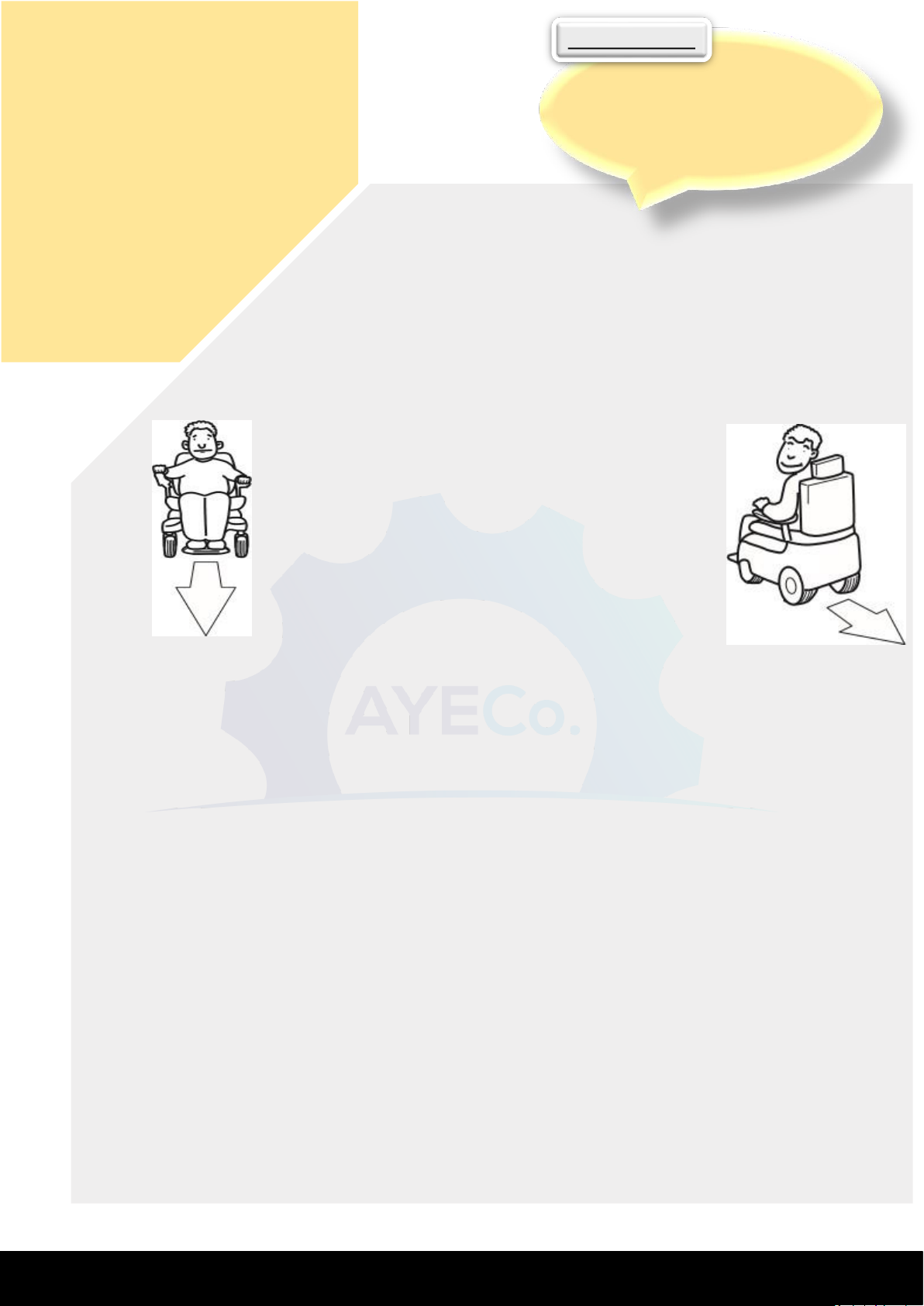
1. This wheelchair is designed with only one seat not allowing for taking passengers.
2. This wheelchair is not intended to be used for moving or loading cargos.
3. The operator should sit on the seat and grip the handle for operation.
4. Do not drive in a zigzag manner, take a sudden turn at high speed or incline your body to
prevent wheelchair inclination to one side.
5. Please high concentrate and drive slowly on uneven or soft road (such as grassland), when
making a turn, on streets with a lot of traffic, in shopping centers or parks.
6. Do not use wireless communication devices such as mobile phone during driving. These devices
could only be used when you stop the wheelchair in a safe place and cut off the power supply.
7. When moving backward, pay attention to road conditions and pedestrians at a slow speed.
8. Drive at a slow speed when getting out of door or elevator. It is not permitted to sit on the
wheelchair on escalator.
9. Keep highly concentrated, fasten the safety belt and drive straightly at a slow speed when
driving uphill or downhill. It is not permit to drive the wheelchair across slopes exceeding the
limit of this vehicle.
10. Do not cross the slope exceeding 50at a high speed.
11. Do not cross over obstacles or steps higher than 4cm, which may impede the wheelchair from
moving forward. At this condition, release operational handle immediately.
12. Do not cross any gap wider than 10cm. Drive the wheelchair straightly when crossing gap less
than 10 cm in width.
www.ayecogroup.com
There are a variety of styles to
choose from that support your
feet. Most footrests are swing
away and removable in order to
make transfers easy.
DO YOU KNOW?
Page 9
Chapter 3
SAFETY
13. Follow traffic rules when driving through cross street and do not run
a red light. When passing railway, please stop to observe the
surrounding conditions, and then drive across the railway slowly in a
direction perpendicular to tracks to avoid dropping into the gap
between different sleepers.
14. Do not frequently lock or unlock the electrical door. Do not frequently
start or stop the wheelchair.
15. Do not lend your wheelchair to anyone who is not familiar with or has
never used this vehicle. Do not let children play with electrical door
lock or operational handle.
16. Do not use this vehicle with too much load (higher than 100KG).
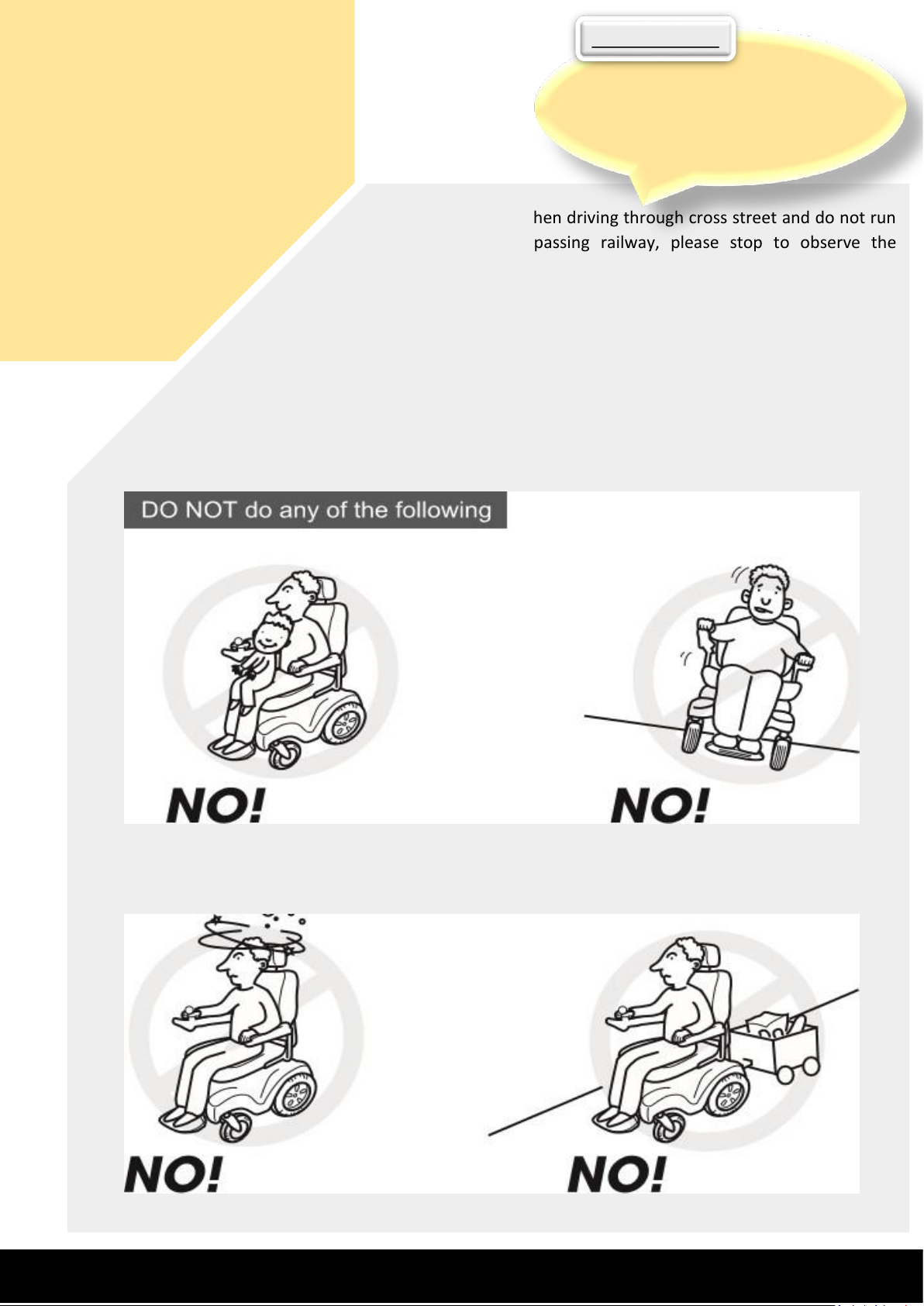
Do not carry any passengers
Do not drive across a slope
Do not Drink & Drive
Do not tow a trailer
www.ayecogroup.com
GoBee is convenient and allows you to
drive it in any direction you wish to
achieve independence and control of
your wheelchair.
DO YOU KNOW?
Page 10
Chapter 3
SAFETY
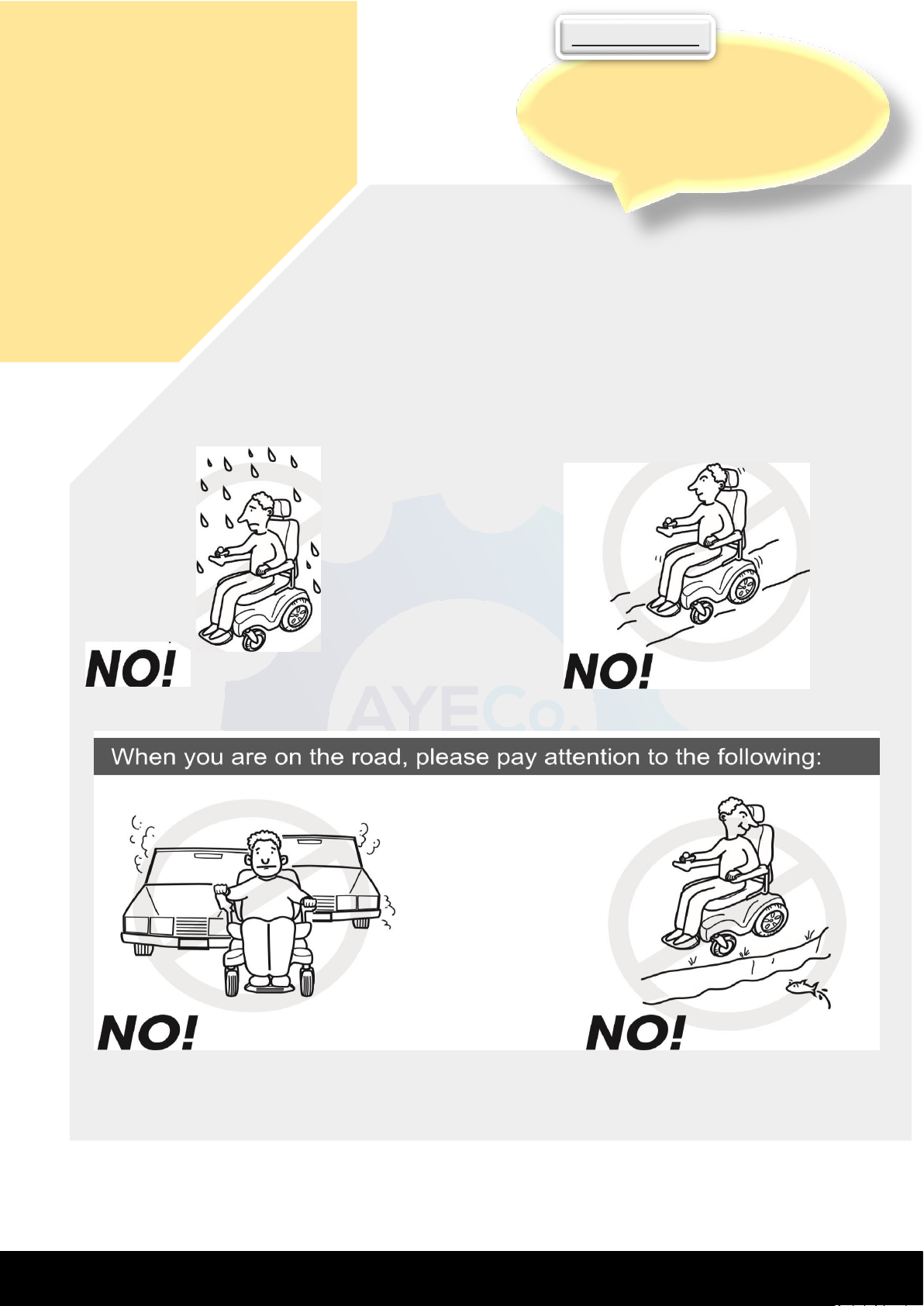
Do not drive on main road
Do not drive across a slope
If Possible, do not drive in Rain
Do not drive on uneven roads
! Warning:
When you release the operation handle during driving and
the handle has returned to the central position, but the
wheelchair does not stop, please lock the electrical door as
soon as possible and contact the nearest dealer.
www.ayecogroup.com
Removable seats are one of the most
popular accessories that wheelchair
users cherish. It provides added
comfort and stability.
DO YOU KNOW?
Page 11

Chapter 3
SAFETY
Ill. Attentions after Operation
1. Lock the electrical door when there is nobody in the wheelchair
2. If you are not going to use the wheelchair for over 48 hours, please
disconnect the battery wiring. (Note: removing power source
socket could disconnect battery wiring)
IV. How to Drive this Wheelchair
1. The driver should fasten safety belt after sitting on the seat.
2. Press the starting button and then the 5-scale charge volume display will be on or twinkles
slowly.
3. Push the rocker slowly forward until you hear the sound of electromagnetic brake. At this time,
the wheelchair should move forward. Similarly, push or pull the rocker
backward/leftward/rightward, the wheelchair will move backward/leftward/rightward.
4. Adjust the speed scale button to regulate driving speed according to road condition,
surrounding conditions and personal preference.
5. When you want to stop, release the operational rocker and it will turn to central position. Then
you could hear electromagnetic sound soon, it means that the wheelchair is braking steadily.
6. Pay attention to surrounding conditions when moving backward. Slowly pull the rocker
backward and the wheelchair will move backward.
www.ayecogroup.com
GoBee back and lower seat is made
out of highest quality Parachute.
DO YOU KNOW?
Page 12

Chapter 4
ATTRIBUTES &
ASSURANCE
In order to safeguard your interest and obtain good after-sale service
from our company, please carefully read this chapter.
l. Guarantee Content, Parts and Terms
Guarantee Content
If you purchase our wheelchair from designated dealer or directly
from our company, use the wheelchair according to this manual and
repair the wheelchair in designated repairing site within quality
guarantee period, so our company promise different guarantee
services to different parts due to the faults arising from materials or
manufacturing process.
II. Parts under Guarantee and Terms From shipping date
1. Main wheelchair frame: Repairing service free of charge within 06 Month
2. Controller: Repairing service free of charge within 06 Month
3. Other consumable goods (such as tire, handle sleeve, seat, cushion, etc.) are not under the
coverage. And consumers shall bear the loss caused by these parts.
III. The quality guarantee does not cover the quality problems caused
by following factors
1. Not obeying manual instruction or caused by other human factors.
2. The wheelchair is not repaired in the designated repairing site.
3. Over the guarantee term.
4. The parts used are not manufactured by our company.
5. The wheelchair is refitted without the permit of our company.
6. Overload (higher than 100Kg)
7. Factors like typhoon, water disaster, fire, earthquake and war, etc.
www.ayecogroup.com
There are a variety of tires you can choose
from. You may want to choose tires that
are durable and possibly don’t require too
much maintenance. These tires are filled
with polyurethane and are puncture proof
and hassle-free.
DO YOU KNOW?
 Loading...