

Page 1

INSTALLATIONGUIDE
AXISQ7920Chassis
ENGLISH
Page 2

LegalConsiderations
Videoandaudiosurveillancecanberegulatedbylawsthat
varyfromcountrytocountry.Checkthelawsinyourlocal
regionbeforeusingthisproductforsurveillancepurposes.
Liability
Everycarehasbeentakeninthepreparationofthis
document.PleaseinformyourlocalAxisofceofany
inaccuraciesoromissions.AxisCommunicationsABcannot
beheldresponsibleforanytechnicalortypographicalerrors
andreservestherighttomakechangestotheproductand
manualswithoutpriornotice.AxisCommunicationsAB
makesnowarrantyofanykindwithregardtothematerial
containedwithinthisdocument,including,butnotlimited
to,theimpliedwarrantiesofmerchantabilityandtnessfor
aparticularpurpose.AxisCommunicationsABshallnot
beliablenorresponsibleforincidentalorconsequential
damagesinconnectionwiththefurnishing,performance
oruseofthismaterial.Thisproductisonlytobeusedfor
itsintendedpurpose.
IntellectualPropertyRights
AxisABhasintellectualpropertyrightsrelatingto
technologyembodiedintheproductdescribedinthis
document.Inparticular,andwithoutlimitation,these
intellectualpropertyrightsmayincludeoneormoreofthe
patentslistedathttp://www.axis.com/patent.htmandone
ormoreadditionalpatentsorpendingpatentapplications
intheUSandothercountries.
EquipmentModications
Thisequipmentmustbeinstalledandusedin
strictaccordancewiththeinstructionsgiveninthe
userdocumentation.Thisequipmentcontainsno
user-serviceablecomponents.Unauthorizedequipment
changesormodicationswillinvalidateallapplicable
regulatorycerticationsandapprovals.
TrademarkAcknowledgments
AXISCOMMUNICATIONS,AXIS,ETRAX,ARTPECandVAPIX
areregisteredtrademarksortrademarkapplicationsofAxis
ABinvariousjurisdictions.Allothercompanynamesand
productsaretrademarksorregisteredtrademarksoftheir
respectivecompanies.
Apple,Boa,Apache,Bonjour,Ethernet,InternetExplorer,
Linux,Microsoft,Mozilla,Real,SMPTE,QuickTime,UNIX,
Windows,WindowsVistaandWWWareregistered
trademarksoftherespectiveholders.Javaandall
Java-basedtrademarksandlogosaretrademarksor
registeredtrademarksofOracleand/oritsafliates.
UPnP
TM
isacerticationmarkoftheUPnP
TM
Implementers
Corporation.
Support
Shouldyourequireanytechnicalassistance,pleasecontact
yourAxisreseller.Ifyourquestionscannotbeanswered
immediately,yourresellerwillforwardyourqueriesthrough
theappropriatechannelstoensurearapidresponse.Ifyou
areconnectedtotheInternet,youcan:
•downloaduserdocumentationandsoftwareupdates
•ndanswerstoresolvedproblemsintheFAQdatabase.
Searchbyproduct,category,orphrase
•reportproblemstoAxissupportstaffbylogginginto
yourprivatesupportarea
•chatwithAxissupportstaff(selectedcountriesonly)
•visitAxisSupportatwww.axis.com/techsup/
LearnMore!
VisitAxislearningcenterwww.axis.com/academy/for
usefultrainings,webinars,tutorialsandguides.
RegulatoryInformation
Europe
ThisproductcomplieswiththeapplicableCEmarking
directivesandharmonizedstandards:
•ElectromagneticCompatibility(EMC)Directive
2004/108/EC.SeeElectromagneticCompatibility
(EMC),onpage2.
•LowVoltage(LVD)Directive2006/95/EC.SeeSafety,
onpage3.
•RestrictionsofHazardousSubstances(RoHS)Directive
2011/65/EU.SeeDisposalandRecycling,onpage3.
Acopyoftheoriginaldeclarationofconformitymaybe
obtainedfromAxisCommunicationsAB.SeeContact
Information,onpage3.
ElectromagneticCompatibility(EMC)
Thisequipmenthasbeendesignedandtestedtofulll
applicablestandardsfor:
•Radiofrequencyemissionwheninstalledaccordingto
theinstructionsandusedinitsintendedenvironment.
•Immunitytoelectricalandelectromagneticphenomena
wheninstalledaccordingtotheinstructionsandused
initsintendedenvironment.
USA
Usinganunshieldednetworkcable(UTP)–Thisequipment
hasbeentestedusinganunshieldednetworkcable(UTP)
andfoundtocomplywiththelimitsforaClassAdigital
device,pursuanttopart15oftheFCCRules.Theselimits
aredesignedtoprovidereasonableprotectionagainst
harmfulinterferencewhentheequipmentisoperatedina
commercialenvironment.Thisequipmentgenerates,uses,
andcanradiateradiofrequencyenergyand,ifnotinstalled
andusedinaccordancewiththeinstructionmanual,may
causeharmfulinterferencetoradiocommunications.
Operationofthisequipmentinaresidentialareaislikelyto
causeharmfulinterferenceinwhichcasetheuserwillbe
requiredtocorrecttheinterferenceathisownexpense.
Usingashieldednetworkcable(STP)–Thisequipment
hasalsobeentestedusingashieldednetworkcable(STP)
andfoundtocomplywiththelimitsforaClassBdigital
device,pursuanttopart15oftheFCCRules.Theselimits
aredesignedtoprovidereasonableprotectionagainst
harmfulinterferenceinaresidentialinstallation.This
equipmentgenerates,usesandcanradiateradiofrequency
energyand,ifnotinstalledandusedinaccordancewith
theinstructions,maycauseharmfulinterferencetoradio
communications.However,thereisnoguaranteethat
interferencewillnotoccurinaparticularinstallation.If
thisequipmentdoescauseharmfulinterferencetoradioor
televisionreception,whichcanbedeterminedbyturning
theequipmentoffandon,theuserisencouragedtotryto
correcttheinterferencebyoneormoreofthefollowing
measures:
•Reorientorrelocatethereceivingantenna.
•Increasetheseparationbetweentheequipmentand
receiver.
•Connecttheequipmentintoanoutletonacircuit
differentfromthattowhichthereceiverisconnected.
•Consultthedealeroranexperiencedradio/TV
technicianforhelp.
Canada
ThisClassBdigitalapparatuscomplieswithCanadian
ICES-003.
Europe
ThisdigitalequipmentfulllstherequirementsforRF
emissionaccordingtotheClassBlimitofEN55022.
Page 3
Thisproductfulllstherequirementsforemissionsand
immunityaccordingtoEN50121-4andIEC62236-4
railwayapplications.
Thisproductfulllstherequirementsforimmunity
accordingtoEN61000-6-1residential,commercialand
light-industrialenvironments.
Thisproductfulllstherequirementsforimmunity
accordingtoEN61000-6-2industrialenvironments.
Thisproductfulllstherequirementsforimmunity
accordingtoEN55024ofceandcommercialenvironments
Australia/NewZealand
ThisdigitalequipmentfulllstherequirementsforRF
emissionaccordingtotheClassBlimitofAS/NZSCISPR22.
Japan
この装置は、クラスB情報技術装置です。この装
置は、家庭環境で使用することを目的としていま
すが、この装置がラジオやテレビジョン受信機に
近接して使用されると、受信障害を引き起こすこ
とがあります。取扱説明書に従って正しい取り扱
いをして下さい。
Korea
이기기는가정용(B급)전자파적합기기로서주로
가정에서사용하는것을목적으로하며,모든지
역에서사용할수있습니다.
FreeRTOS
Thesoftwareinthisproductisbasedon
FreeRTOSversion7.2.0.Seewww.freertos.orgfor
moreinformation.
SourcecodeforthisversionofFreeRTOScanbeprovided
fromAxisCommunicationsABuponrequest.
Safety
ThisproductcomplieswithIEC/EN/UL60950-1,Safetyof
InformationTechnologyEquipment.
DisposalandRecycling
Whenthisproducthasreachedtheendofitsusefullife,
disposeofitaccordingtolocalrawsandregulations.For
informationaboutyournearestdesignatedcollectionpoint,
contactyourlocalauthorityresponsibleforwastedisposal.
Inaccordancewithlocallegislation,penaltiesmaybe
applicableforincorrectdisposalofthiswaste.
Europe
Thissymbolmeansthattheproductshallnotbe
disposedoftogetherwithhouseholdorcommercialwaste.
Directive2012/19/EUonwasteelectricalandelectronic
equipment(WEEE)isapplicableintheEuropeanUnion
memberstates.Topreventpotentialharmtohumanhealth
andtheenvironment,theproductmustbedisposedofin
anapprovedandenvironmentallysaferecyclingprocess.
Forinformationaboutyournearestdesignatedcollection
point,contactyourlocalauthorityresponsibleforwaste
disposal.Businessesshouldcontacttheproductsupplierfor
informationabouthowtodisposeofthisproductcorrectly.
Thisproductcomplieswiththerequirementsof
Directive2011/65/EUontherestrictionoftheuseof
certainhazardoussubstancesinelectricalandelectronic
equipment(RoHS).
China
Thisproductcomplieswiththerequirementsofthe
legislativeactAdministrationontheControlofPollution
CausedbyElectronicInformationProducts(ACPEIP).
ContactInformation
AxisCommunicationsAB
Emdalavägen14
22369Lund
Sweden
Tel:+46462721800
Fax:+4646136130
www.axis.com
Page 4

Page 5
AXISQ7920Chassis
SafetyInformation
ReadthroughthisInstallationGuidecarefullybeforeinstallingtheproduct.KeeptheInstallation
Guideforfuturereference.
HazardLevels
DANGER
Indicatesahazardoussituationwhich,ifnotavoided,willresultin
deathorseriousinjury.
WARNING
Indicatesahazardoussituationwhich,ifnotavoided,couldresult
indeathorseriousinjury.
CAUTION
Indicatesahazardoussituationwhich,ifnotavoided,couldresult
inminorormoderateinjury.
NOTICE NOTICE
NOTICE
Indicatesasituationwhich,ifnotavoided,couldresultindamage
toproperty.
OtherMessageLevels
ImportantIndicatessignicantinformationwhichisessentialfortheproduct
tofunctioncorrectly.
NoteIndicatesusefulinformationwhichhelpsingettingthemostout
oftheproduct.
5
ENGLISH
Page 6

AXISQ7920Chassis
SafetyInstructions
NOTICE NOTICE
NOTICE
•TheAxisproductshallbeusedincompliancewithlocallawsandregulations.
•TousetheAxisproductoutdoors,orinsimilarenvironments,itshallbeinstalledinan
approvedoutdoorhousing.
•StoretheAxisproductinadryandventilatedenvironment.
•AvoidexposingtheAxisproducttovibration,shocksorheavypressure.
•Donotinstalltheproductonunstableorvibratingbrackets,surfacesorwalls.
•UseonlyapplicabletoolswheninstallingtheAxisproduct.Excessiveforcecouldcause
damagetotheproduct.
•Donotusechemicals,causticagents,oraerosolcleaners.Useadampclothforcleaning.
•Useonlyaccessoriesthatcomplywithtechnicalspecicationoftheproduct.Thesecanbe
providedbyAxisorathirdparty.
•UseonlysparepartsprovidedbyorrecommendedbyAxis.
•Donotattempttorepairtheproductbyyourself.ContactAxissupportoryourAxis
resellerforservicematters
Transportation
NOTICE NOTICE
NOTICE
•WhentransportingtheAxisproduct,usetheoriginalpackagingorequivalenttoprevent
damagetotheproduct.
6
Page 7

AXISQ7920Chassis
InstallationGuide
ThisinstallationGuideprovidesinstructionsforinstallingAXISQ7920Chassisonyournetwork.
InstallationSteps
1.Makesurethepackagecontents,toolsandothermaterialsnecessaryfortheinstallation
areinorder.Seepage7.
2.Studythehardwareoverview.Seepage8.
3.Installthehardware.Seepage10.
PackageContents
•Videoencoderchassis
-AXISQ7920
•Coverplates
-11–portfrontpanelcover
-62–portfrontpanelcovers
•2ACpowercords
-Europe
-UK
-US,CanadaandJapan
-Australia
-Switzerland
-Denmark
-SouthKorea
-Argentina
•Terminalconnectors
-2814–pinterminalconnectors
-142–pinterminalconnectors
•Printedmaterials
-AXISQ7920ChassisInstallationGuide(thisdocument)
•Includedaccessories
-4feets
7
ENGLISH
Page 8
AXISQ7920Chassis
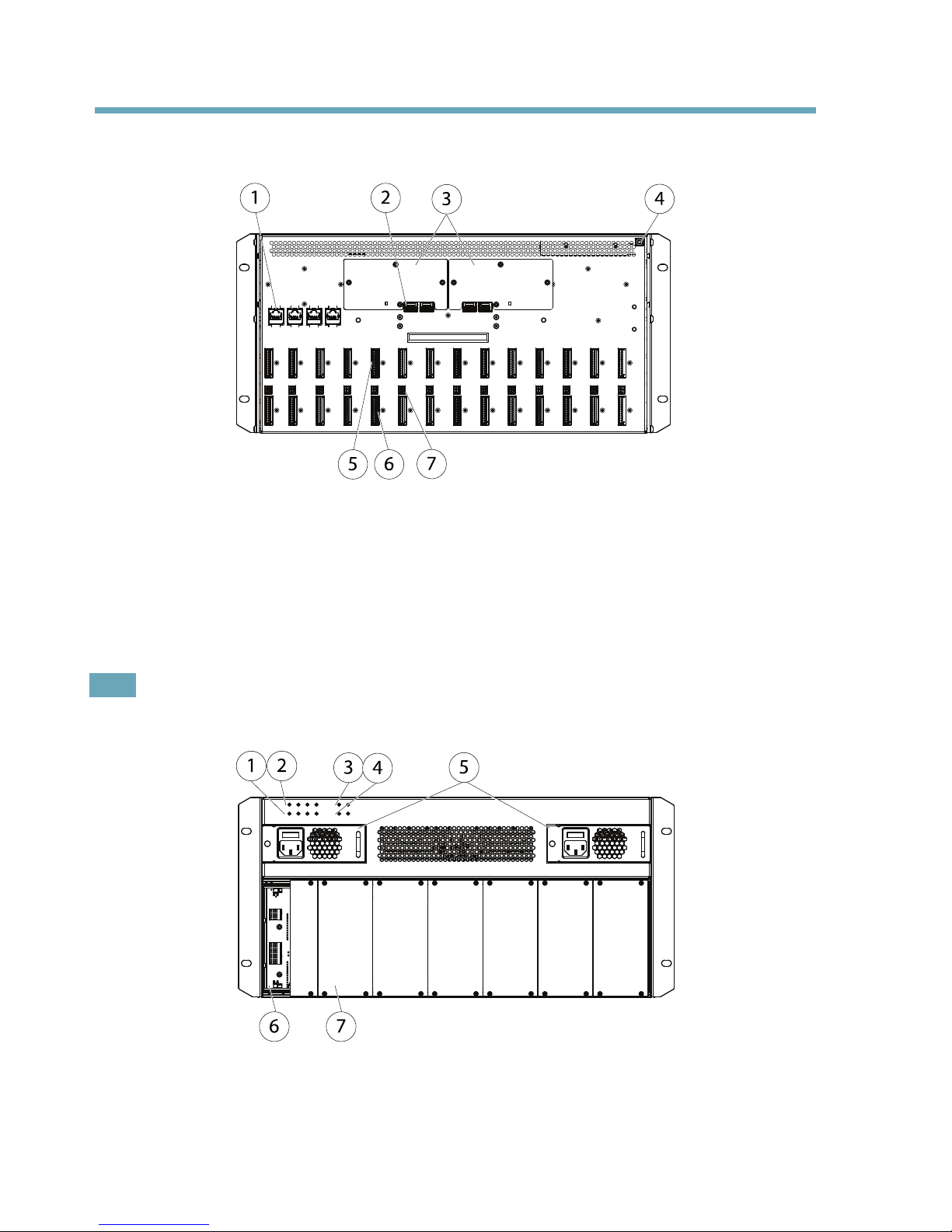
HardwareOverview
1 2
3
5 6
4
7
1
Networkconnector1–4RJ45
2
Networkport1–4SFP
3
Fantraycover
4
Groundingscrew
5
I/Oterminalconnector
6
RS-485connector
7
Powerin/outconnector
Note
SFPmodulesarenotincludedinthedeliveryofAXISQ7920.
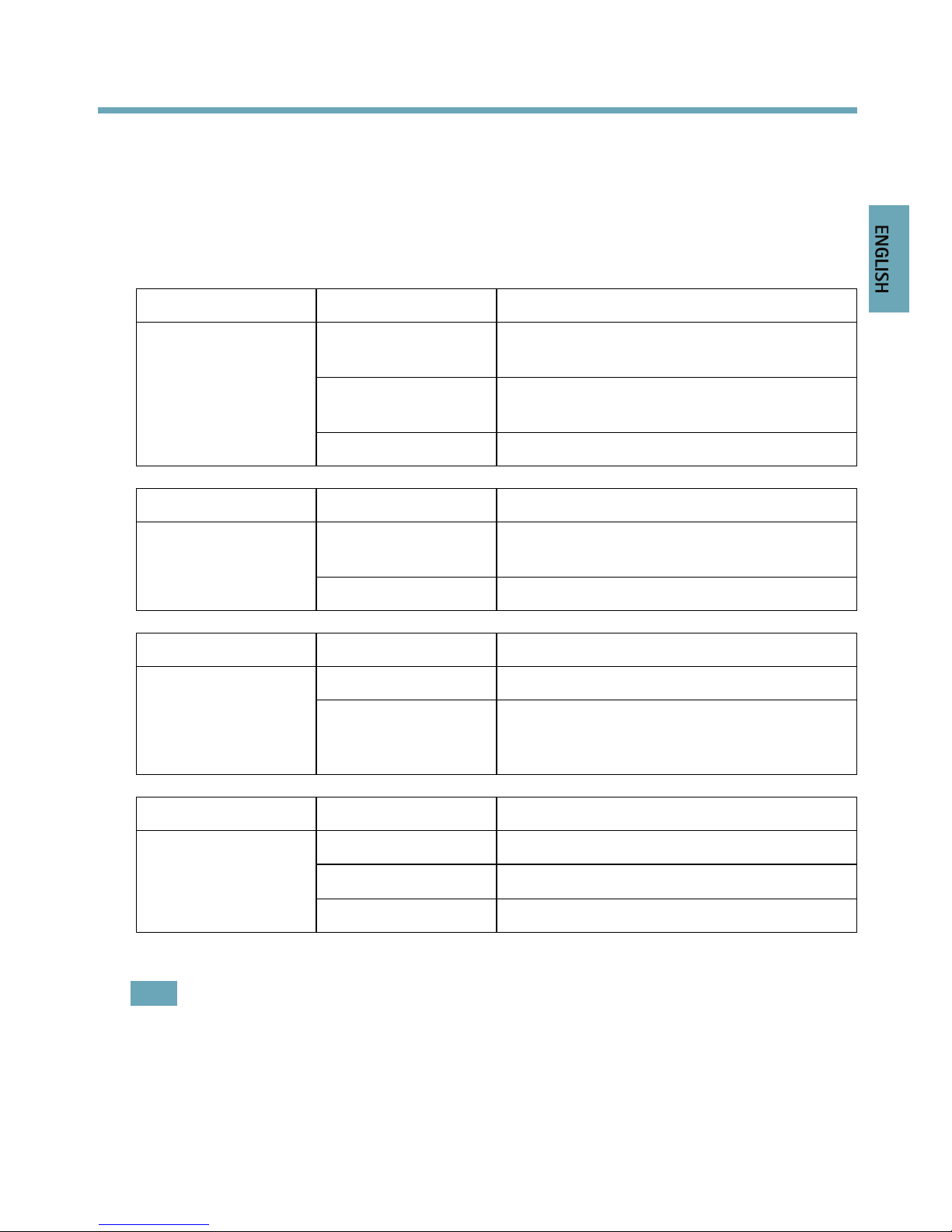
1 2
3
4
5
6 7
1
NetworkLED1–4SFP
2
NetworkLED1–4RJ45
3
PSULED1–2
8
Page 9
AXISQ7920Chassis
4
FanLED1–2
5
Powersupply1–2(PSU1andPSU2)
6
Slot1
7
Frontpanelcover
LEDindicators
LED
Color
Indication
Green
Steadyforaconnectionto1000Mbit/s
network.Flashesfornetworkactivity.
Amber
steadyforaconnectionto10/100Mbit/s
network.Flashesfornetworkactivity.
NetworkRJ451–4
UnlitNonetworkconnection.
LED
Color
Indication
Green
Steadyforaconnectionto1000Mbit/s
network.Flashesfornetworkactivity.
NetworkSFP1–4
UnlitNonetworkconnection.
LED
Color
Indication
GreenPSU1andPSU2areconnectedandturnedon. PSU1–2
Red
IndicatesafaultinPSU1orPSU2.Italso
indicatesifPSU1orPSU2aredisconnectedor
turnedoff.
LED
Color
Indication
Green
Bothfansareworking.
Flashesgreen/red
Indicatesafaultinonefan.
FanLED1–2
RedIndicatesfaultsinbothfans.
Note
Incaseofafaultypowersupply,replaceitwithanewone.SeeReplacingapowersupply,
onpage14
Incaseofafaultyfanreplacethefantraywithanewone.SeeReplacingafantray,
onpage14
9
ENGLISH
Page 10
AXISQ7920Chassis
Specications
OperatingConditions
TheAXISQ7920isintendedforindooruseonly.
ProductTemperatureHumidity
AXISQ79200°Cto45°C
(32°Fto113°F
10-85%RH(non-condensing)
PowerConsumption
Product
AC
AXISQ7920100–240VAC,max365W
InstalltheHardware
GeneralPlacementRequirements
•Powersourcewithin1.8meters.
•Theremustbeaminimumof5cmfreespaceonthebottom,front,rearandonboth
sidesoftheAXISQ7920toensureadequateventilation.
•DonotstackotherunitsorobjectsdirectlyontopoftheAXISQ7920.Themounting
bracketsarenotdesignedtosupportmorethan1unit.
•Noexcessivedust.
ConnectPower
TheAXISQ7920hastwoOn/Offswitches.ToswitchoffpowertotheAXISQ7920bothpower
suppliesmustbeswitchedoff.
BeforeswitchingonpowertotheAXISQ7920,makesuretheunitisproperlygroundedbyusing
thegroundingscrew.
EnsurethatthecorrectACpowercordforyourregionisused.
10
Page 11
AXISQ7920Chassis
WARNING
•Topreventtheriskofelectricalshockwhenincontactwiththeunitcasing,only
earthed/groundedpowercordsshouldbeusedtopowertheAXISQ7920.
•Protectionagainstovercurrents,shortcircuitsandearthfaultsshouldbeprovidedin
thebuildinginstallation.
•Ifaforeignobjectisaccidentlydroppedintothevideoencoderchassis,alwaysdisconnect
powerbeforeattemptingtoremovetheobject.
Axisvideoencoderblades
S/N—(SerialNumber)isidenticaltotheunitsMAC/Ethernetaddress.
P/N—istheproductsmodelnumber.
BusConnector—ThisisthephysicalinterfacetotheI/Oterminalconnectoronthechassis.
MountingAxisvideoencoderblades
TheAXISQ7920canaccommodate14Axisvideoencoderblades.Theslotsforthesearenumbered
1–14fromlefttoright.Thereare4slotgroupsinAXISQ7920.Slot1–4,slot5–7,slot8–11
andslot11–14
Therstbladeshouldbeinsertedinslot1.Afterthatallslotscanbeusedwithoutanyfurther
regulations.SeeOptimizingPerformance,onpage15forinformationofhowtooptimizethe
performanceoftheAXISQ7920.
InordertogetfullfunctionalityfromAXISQ7920thebladeinslot1shouldbeanAXISQ7436,
AXISQ7404,AXISQ7414,AXISP7224ornewer.
FollowthesestepstomountanAxisvideoencoderbladeintheAXISQ7920:
1.Removethefrontpanelcoverfromtheslotintowhichthevideoencoderbladewillbe
mounted.
2.Slidethevideoencoderintoplace,usingtheguidesasanaid.
3.Fixthevideoencoderinplace,usingthescrewsfromthefrontpanelcover.
TheAXISQ7920supportshot-swapofvideoencoderblades.Abladecanberemovedand/or
insertedwithouttheneedofswitchofftheAXISQ7920.
NOTICE NOTICE
NOTICE
Frontpanelcoversshouldbeusedonallemptyslots.
11
ENGLISH
Page 12
AXISQ7920Chassis
Unitconnectors
RearConnectors
Networkconnector:StandardRJ45connector,designedfor10/100/1000Mbps.
Networkconnector:StandardSFPconnector,designedfor1000Mbps.
RS-485connector:UsuallyusedforconnectingPanTiltZoomdevices.
PowerIn/OutConnectors:12VDC100mAout.Thisconnectorcouldbeusedtosupplypowerto
externalunits.
I/OTerminalConnectors:Providesthephysicalinterfaceforupto12I/Os.
ChassisID
ChassisID0–15:SetsachassisID.Usedinmultichassisinstallations.
ChassisIDA-P:Currentlynotused.
Pinassignments
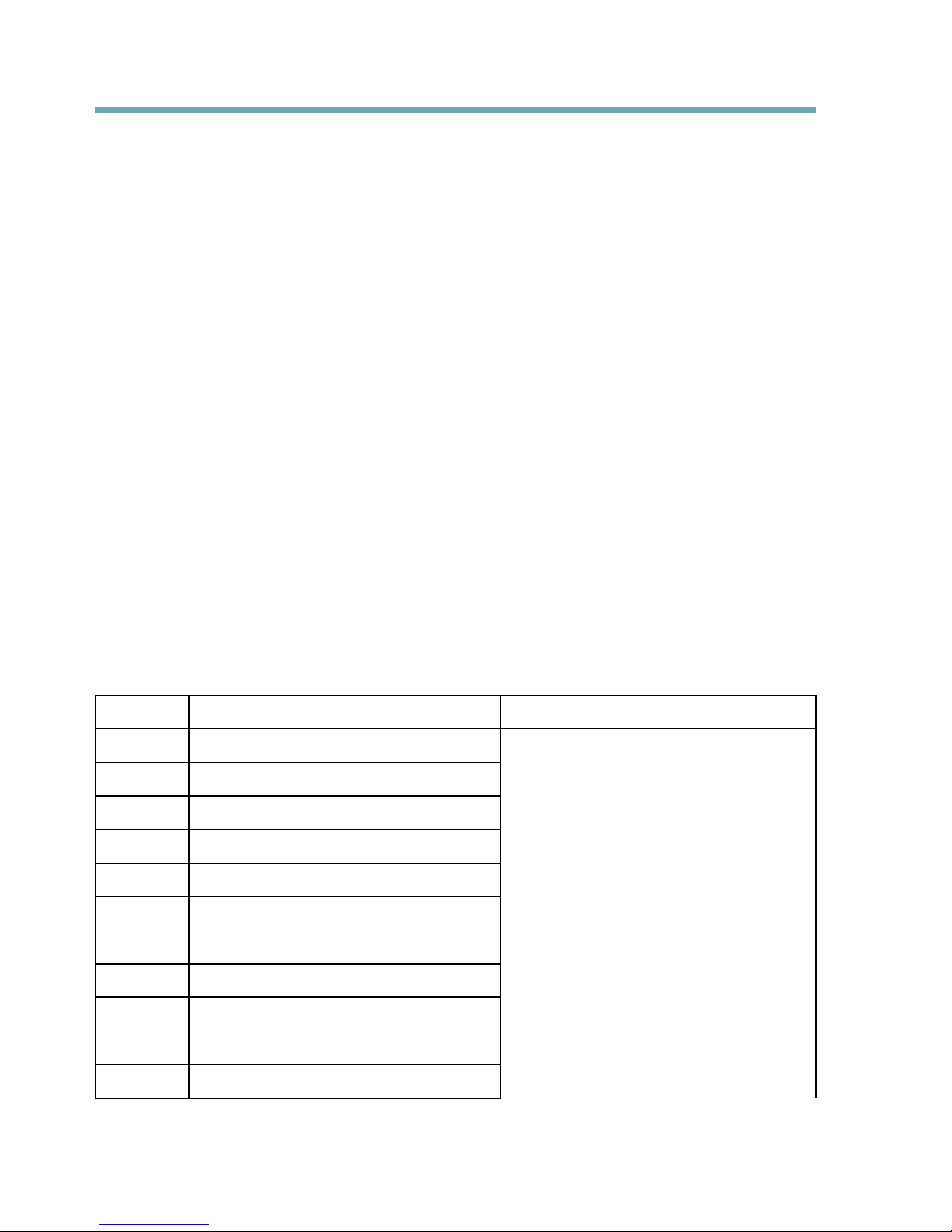
PinAssignmentsforRS485Connector-AXISQ7900andAXISQ7920
Chassis
PinFunctionDescription
1
Channel1,RS485A
2
Channel1,RS485B
3
Channel2,RS485A
4
Channel2,RS485B
5
Channel3,RS485A
6
Channel3,RS485B
7
Channel4,RS485A
8
Channel4,RS485B
9
Channel5,RS485A
10
Channel5,RS485B
11
Channel6,RS485A
Ahalf-duplexRS485interfacefor
controllingauxiliaryequipmentsuchas
PTZdevices.
12
Page 13
AXISQ7920Chassis
12
Channel6,RS485B
ThistableisfortheAXISQ7436blade.IfusinganotherbladeinAXISQ7920seetheInstallation
Guideforthespecicproduct.
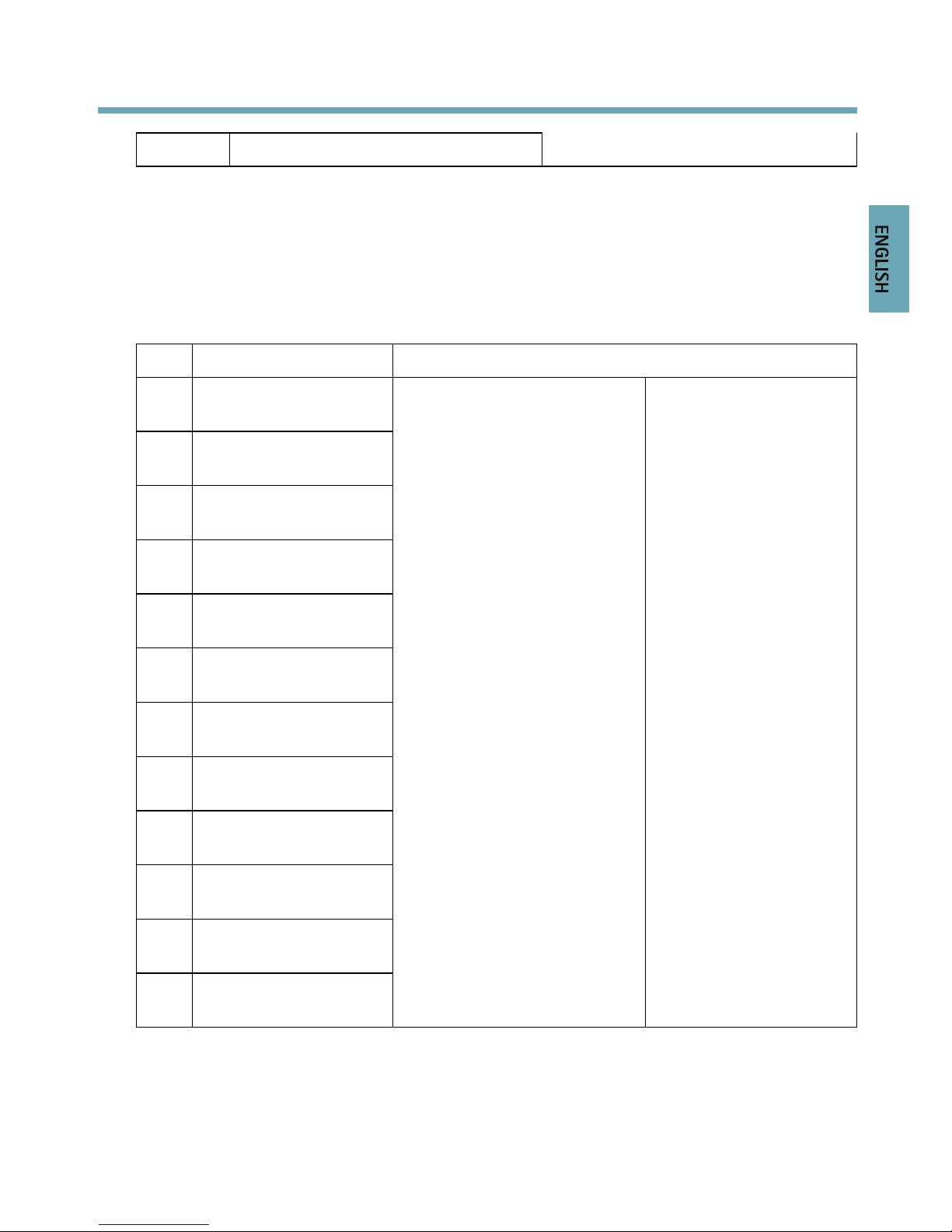
PinassignmentsfortheI/OConnectoroftheAXISQ7900andAXISQ7920
Chassis
PinFunctionDescription
1
Channel1,Congurable
I/O1
2
Channel2,Congurable
I/O1
3
Channel3,Congurable
I/O1
4
Channel4,Congurable
I/O1
5
Channel5,Congurable
I/O1
6
Channel6,Congurable
I/O1
7
Channel1,Congurable
I/O2
8
Channel2,Congurable
I/O2
9
Channel3,Congurable
I/O2
10
Channel4,Congurable
I/O2
11
Channel5,Congurable
I/O2
12
Channel6,Congurable
I/O2
Digitalinput-ConnecttoGND
toactivate,orleaveoating(or
unconnected)todeactivate.
Digitaloutput-Usesanopen
drainNFETtransistorwiththe
sourceconnectedtoGND.If
usedwithanexternalrelay,
adiodemustbeconnected
inparallelwiththeload,for
protectionagainstvoltage
transients.
Mininput=–40VDC
Maxinput=+40VDC
Maxload=100mA
Maxvoltage=+40VDC
(tothetransistor)
ThistableisfortheAXISQ7436blade.IfusinganotherbladeintheAXISQ7920,seethe
InstallationGuideforthespecicproduct.
13
ENGLISH
Page 14
AXISQ7920Chassis
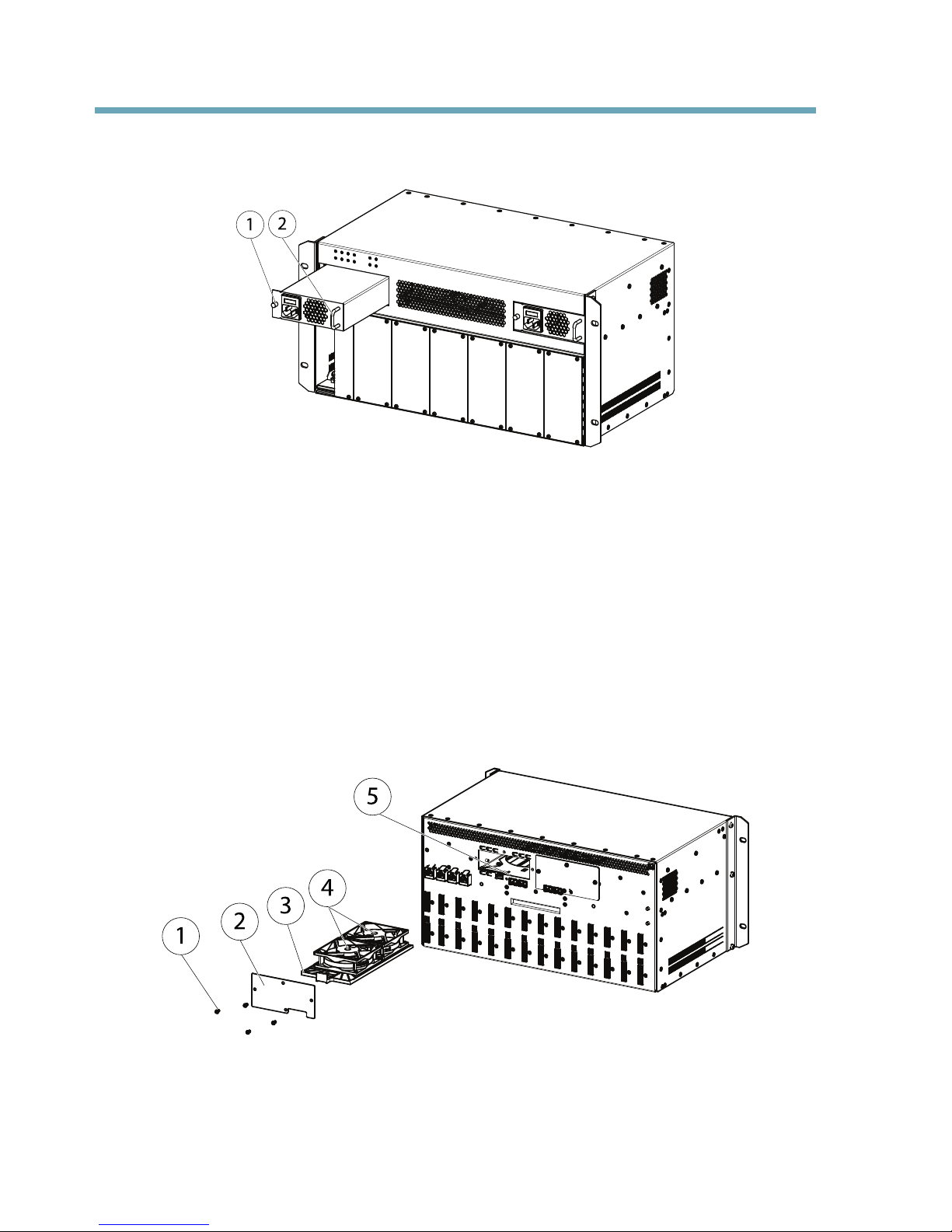
Replacingapowersupply
1
2
1
Screw
2
Handle
1.Turnoffthepowersupplythatneedstobereplaced.
2.Loosenthescrewlocatedontheleftsideofthepowersupplyandremovethepower
supplyusingthehandle.
3.Insertanewpowersupplyandretightenthescrew.
TheAXISQ7920supportshot-swapofaPSU.APSUcanberemovedand/orinsertedwithoutthe
needofswitchofftheAXISQ7920.
Replacingafantray
1
2
3
4
5
1
Screwsx4
2
Lidfan
3
Fantray
14
Page 15

AXISQ7920Chassis
4
Fans
5
Fanpowerconnectorsx2
Followthesestepstoreplaceafantray.
1.Removethefantraycover.
2.Disconnectthefansfromthepowerconnectors.
3.Gentlypulloutthefantray.
4.Insertanewfantray.
5.Connectthefanstothepowerconnectors.
6.Mountthefantraycover
TheAXISQ7920supportshot-swapofafantray.Afantraycanberemovedand/orinserted
withouttheneedofswitchofftheAXISQ7920.
OptimizingPerformance
FirmwareUpgrade
TheAXISQ7920hasanautomatedbuilt-infunctionforrmwareupgrade.Ifabladethatisinserted
inslot1intheAXISQ7920containsanewerrmwarethanthecurrentoneinAXISQ7920.The
AXISQ7920willautomaticallybeupgradedtothenewrmwareversion.Theupgrademaytakeup
tooneminutetoaccomplish.
NetworkRedundancy
ThenetworkredundancyinAXISQ7920iscontrolledbysoftwareandrequiresthatatleasttwo
networkconnectors(eitherRJ45orSFP)areconnected.TherearefouruplinkgroupsinAXISQ7920,
eachwithaSFPandaRJ45connector.TheSFPconnectorhaspriorityovertheRJ45connector.
IncaseofamalfunctioninaconnectiontheAXISQ7920willcheckforaconnectioninthe
sameuplinkgrouporifneededcheckforaconnectioninanotheruplinkgroupuntilanetwork
connectioncanbeestablished.
Hot-swap
TheAXISQ7920supportshot-swapofblades,fantrayandPSU.Theycanberemovedand/or
insertedwithoutaffectingoperationoftheAXISQ7920.
RackMonitoringDaemon
Inordertousetherackmonitoringdaemonfunction,thebladeinsertedinslot1mustbean
AXISQ7436,AXISQ7404,AXISQ7414,AXISP7224ornewer.
15
ENGLISH
Page 16

AXISQ7920Chassis
Maximumnetworkoutput
InordertooptimizethenetworkperformanceoftheAXISQ7920activateasmanyuplinkgroupsas
possible(eitherRJ45orSFP).Spreadthebladesevenlyamongtheslotgroups.
Foreveryslotgroupactivatedanuplinkgroupshouldbeactivated.Seebelowfortheconnection
betweenslotgroupsanduplinkgroups.
Slotgroup1:Slot1–4.Uplinkgroup1
Slotgroup2:Slot5–7.Uplinkgroup2
Slotgroup3:Slot8–10.Uplinkgroup3
Slotgroup4:Slot11–14.Uplinkgroup4
Thetablebelowprovidesanexampleofhowthebladescanbeevenlyinsertedina4,6,8and
10bladesinstallation.
Numberof
blades
4
6810
Slot1
XXXX
Slot2
XXX
Slot3
X
Slot4
Slot5
XX
Slot6
XXX
Slot7
X
Slot8
XX
Slot9
XXX
Slot10
X
Slot11
X
Slot12
XXX
Slot13
XX
Slot14
XX
16
Page 17

AXISQ7920Chassis
WarrantyInformation
ForinformationaboutAxis’productwarrantyandtheretorelatedinformation,see
www.axis.com/warranty/
17
ENGLISH
Page 18

InstallationGuide
Ver.M1.13
AXISQ7920Chassis
Date:June2013
©AxisCommunicationsAB,2013
PartNo.51772
 Loading...