

Page 1

Smart Switch
Model: PC069
www.axaet.com
Notice:
Please be sure to read user manual carefully before installation.
The manufacturer is not responsible for any product damage cau
sed by irregular operation not in accordance with instructions.
Page 2

Special Notice:
1. Installation when powered on is prohibited. Be sure to wire stri
ctly according to wiring sketch map.
2. The total load of the switch should be below 1000W.
3. The junction box is "86" standard type.
4. If the first touching test is done when the glass panel was take
n down, please power off first after the test. Fix the switch and cl
ose the glass panel, and then power it on again.
Page 3
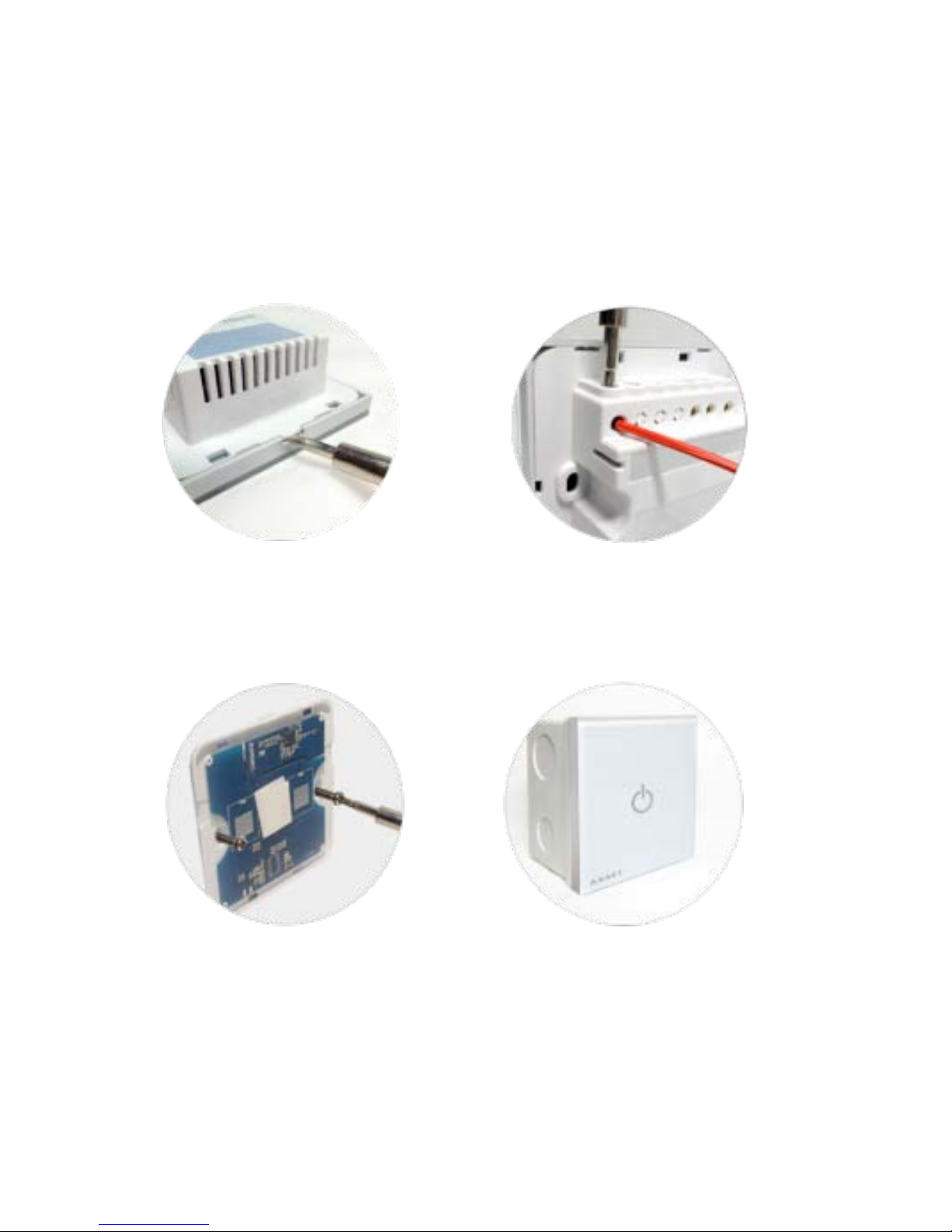
Installation diagram
Open the screwdriver follows the instructions to wire and tighten the screws
Use two screws to fix Cover t he glass panel, power on
Page 4
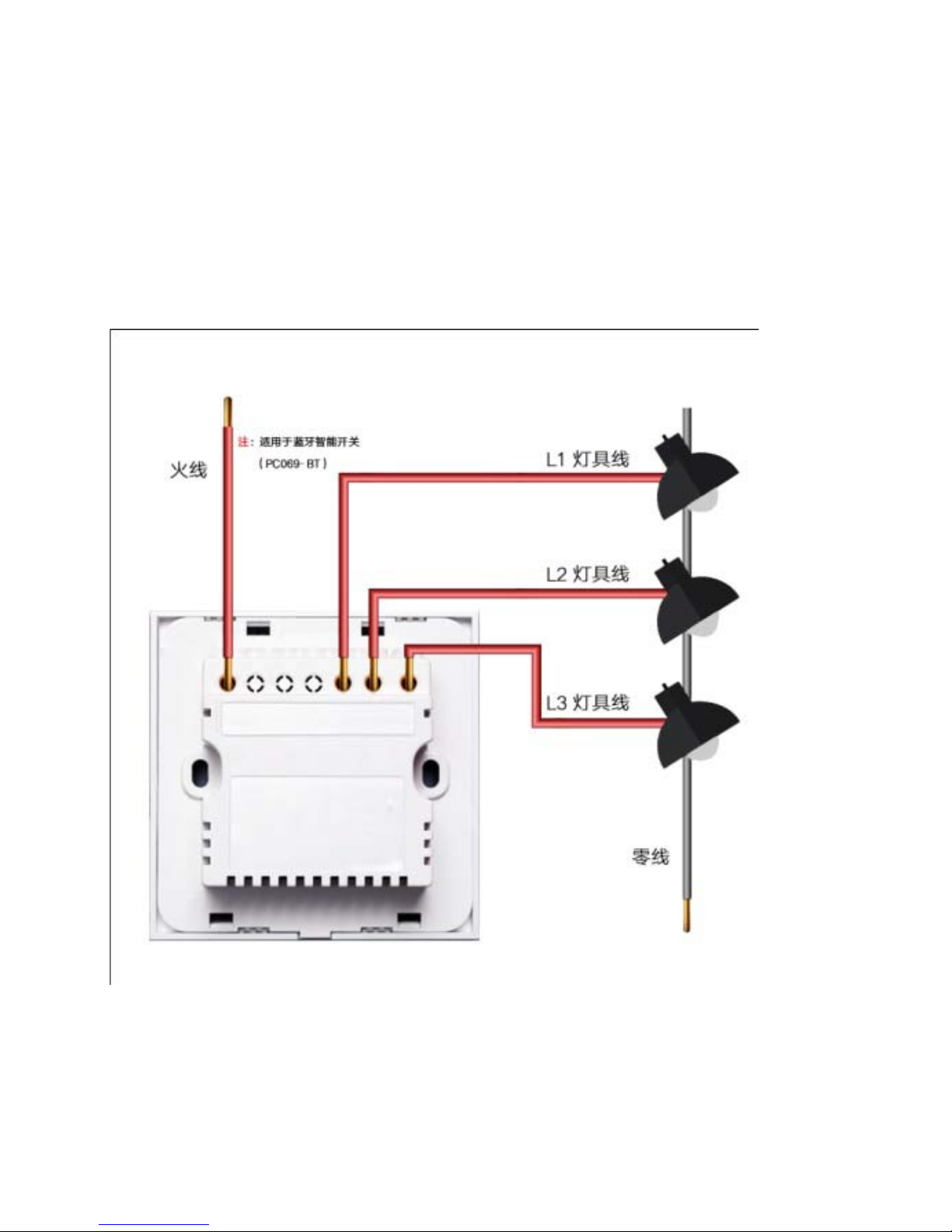
Switch wiring diagram
Page 5
Mobile APP download ins tallation instructions
Scan QR code to downl oa d
IOS Android
Page 6
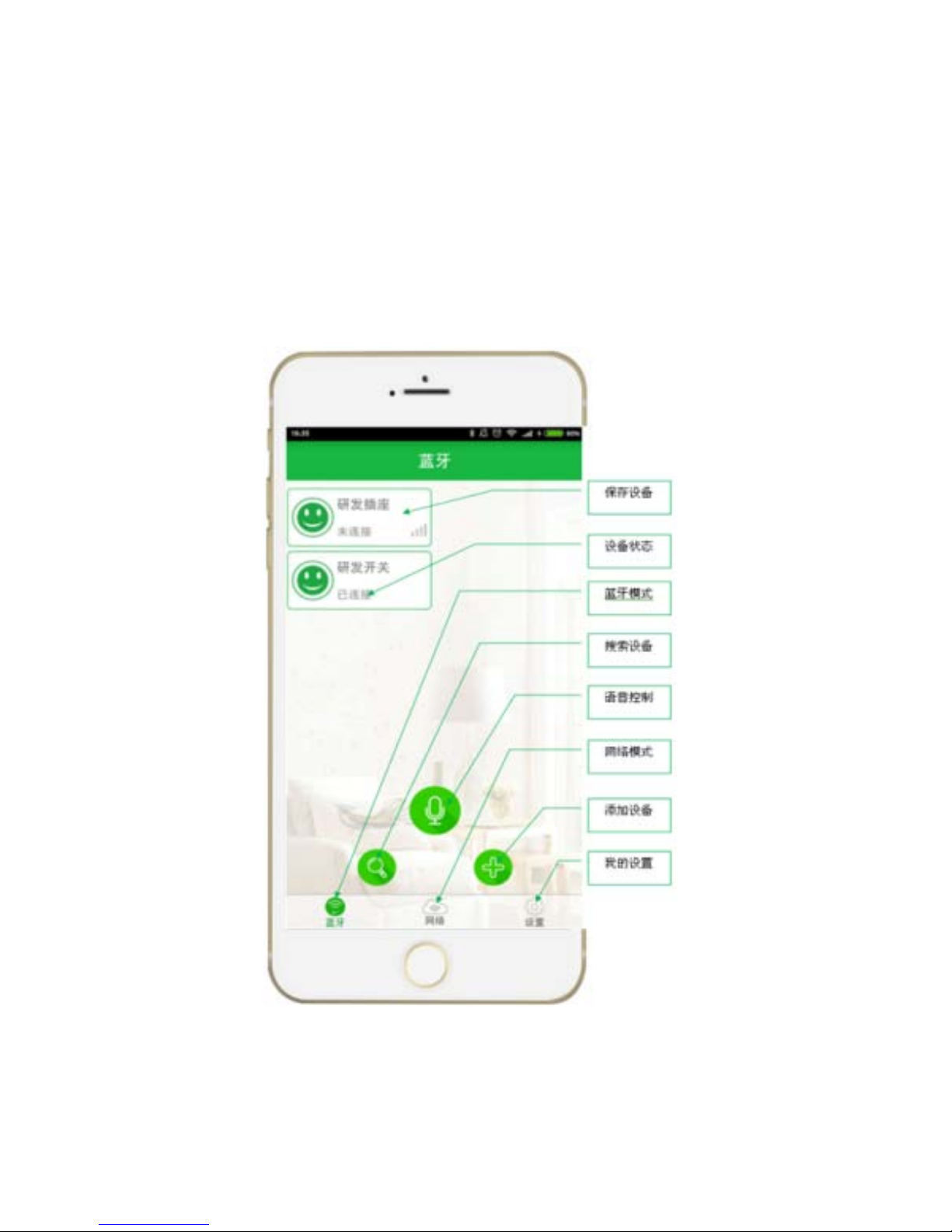
AHomeMai n Interface Function Int roduction
Page 7

Switch conn ect i o n instructions
Use the Bluetooth version of the switch, need to bind th e device
connection switch.
Bind the device steps:
Step 1: Open the Bluetooth function on your phone, log in to
AHome, select "Bluetooth Mode", click the "Add Device" button
on the interface to enter the binding device interface.
Step 2: Click the device to be bound, pop-up verification code
input box, enter the 6-digit binding password (default 123456),
click "OK" to bind successfully.
Page 8

Note:
When searching for a device connection switch, the distance
should not exceed 1 meter.
Only up to two mobile phone binding devices, when third-party
mobile phone wants to bind, bound mobile phone must be
unbinded.
Page 9
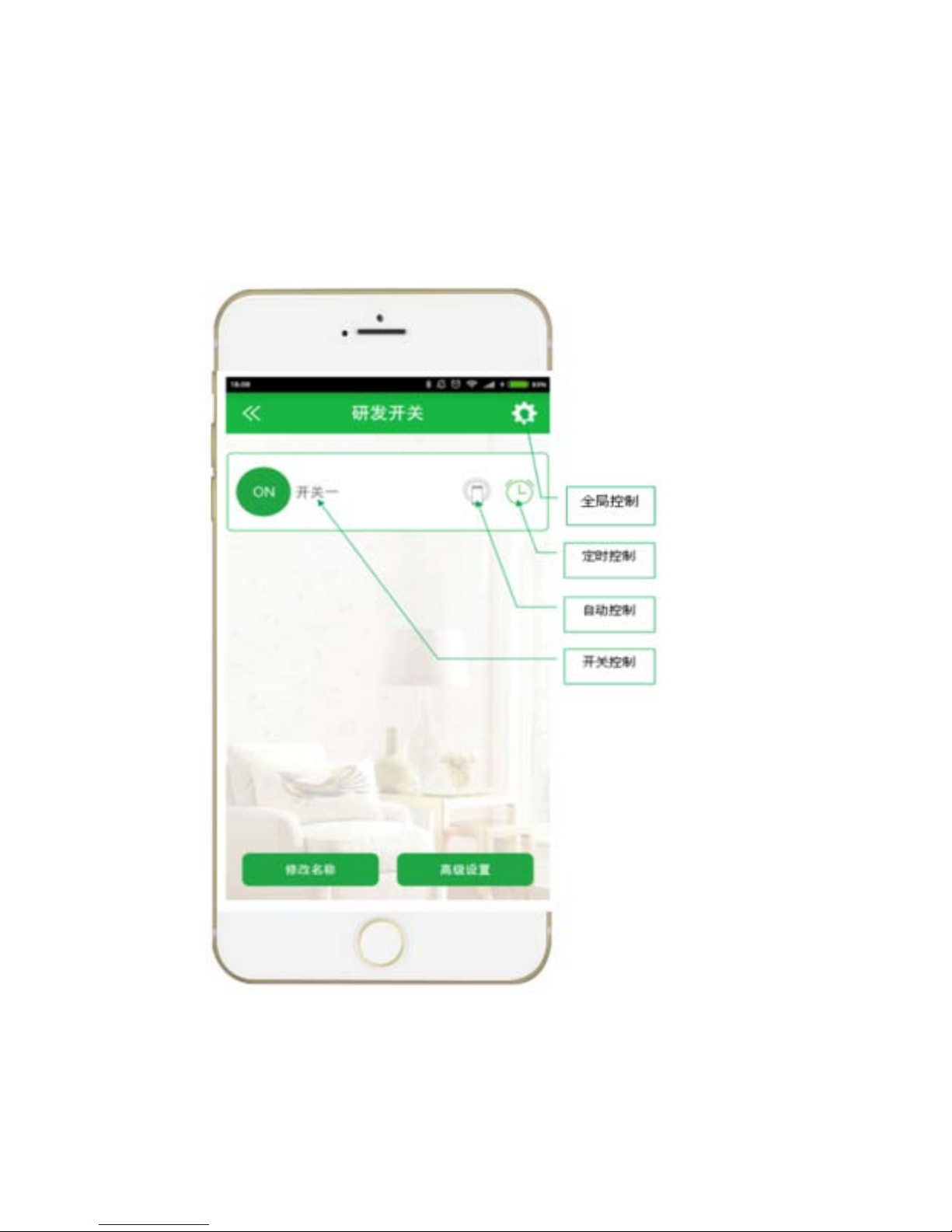
Switch contr ol i ns tructions
Page 10

Switch Control
Click “Device Image” or the name area to control on/off of the
device.
Timing Control
After setting the timing group, the device will be switched
on/switched off at fixed time under offline and online condition.
Page 11

Voice Control
Voice control, through set the switch name, the name of each
switch and the keyword, can call the switch on / off.
Overall Control Auto Control
On the contr ol interface, you can make One-Key Control or set
Two-Way Three-Way switch device.
Auto Control(Limited t o Bluetooth device only)
Open Auto Control function, the device will be on automatically
when connected, and when disconnected the device will be off
automatically.
Page 12
Rotation control (Limited to Bluetooth device only)
Turn on the rotation control function, return to the main page, turn
the phone to the horizontal scr een, and then turn it to the vertical
screen will turn off all the switch
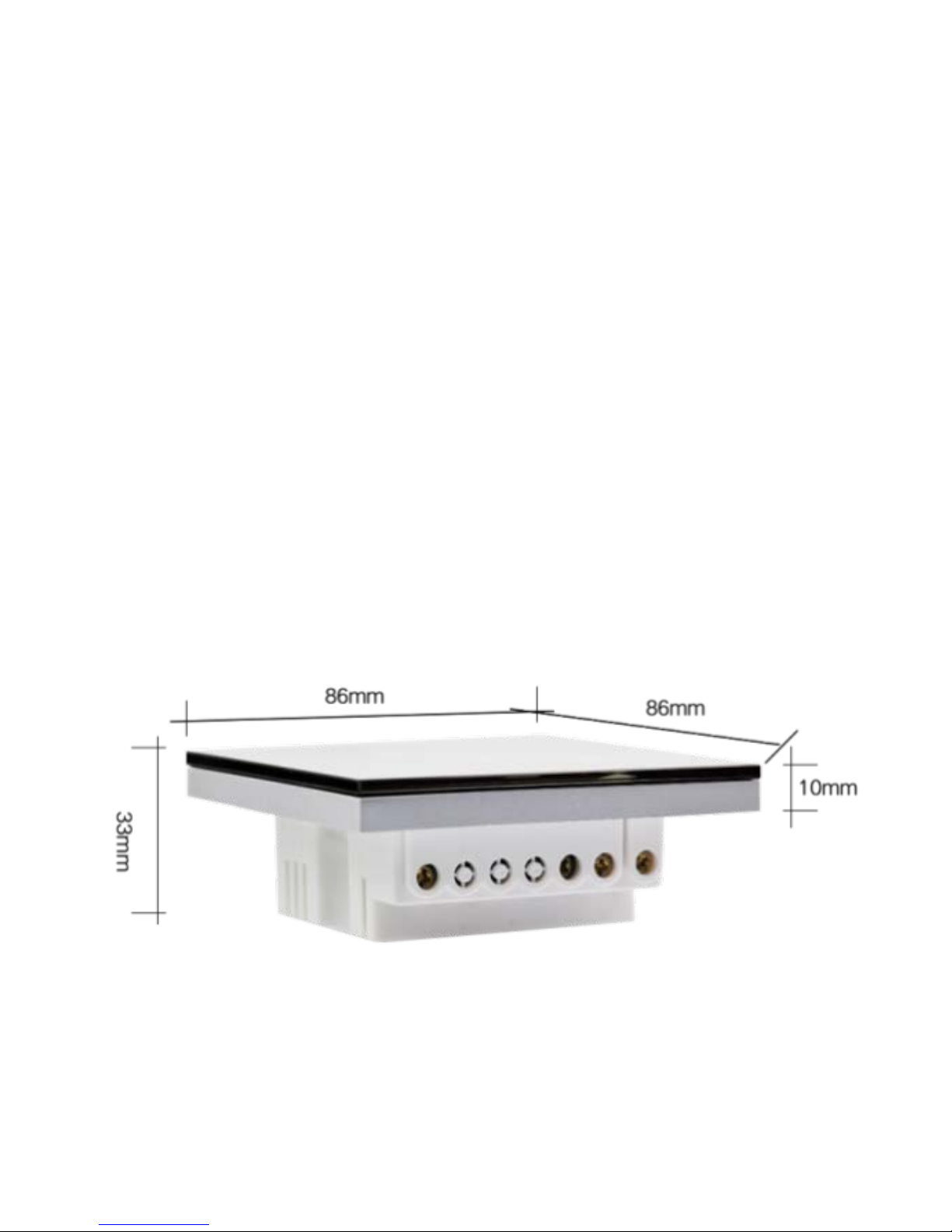
Size
Size:86mm*86mm*33mm
Page 13

FCC statement
This device complies with Part 15 of the FCC rules. Operation is
subject to the following two conditions: 1) this device may not
cause harmful interference, and 2) this device must accept any
interference received, including interference that may cause
undesired operation.
Note: This equipment has been tested and found to com ply with
the limits for a Class B digital device, pursuant to part 15 of the
FCC Rules. These limits are designed to provide reasonable
protection against harmful interference in a residential
installation.
This equipment gen erates uses and can radiate radio frequenc y
energy and, if not installed and used in accordance with the
instructions, may cause harmful interference to radio
communications. However, there is no guarantee that
interference will not occur in particular installation. If this
equipment does ca use harmful i nterference to radio or tel evision
reception, which c an be determin ed by turning the eq uipment off
Page 14

and on, the user i s encouraged to try to correct th e interference
by one or more of the following measures:
--Reorient or relocate the receiving antenna.
--Increase the separation between the equipment and receiver.
--Connect the equi pment into an outlet on a circuit different from
that to which the receiver is connected.
--Consult the dealer or an experienced radio/TV technician for
help.
Changes or modifications not expressly approved by the party
responsible for compliance could void the user’s authority to
operate the equipment.
FCC Radiation Exposure Statement
This device complies with FCC RF radiation exposure limits set
forth for an uncontrolled environment. This transmitter must not
be co-located or operating in co njunction with any other ante nna
or transmitter.
 Loading...