

Page 1
Page 2
Artikel:
F1x DGA
Autor:
Awron GmbH
Version:
V1.0
Datum:
31.12.2013
2Seite:
Modell support S.3
Product description S.5
System components S.6
Operating concenpt S.13
key functions S.13
Sprint function S.15
Quarter mile function S.16
Software update S.18
Purchased parts package S.19
Technical data S.20
Table of contents
Table of contentsF1xDGA
Page 3
Article:
F13DGA
Author:
Awron GmbH
Version:
V1.0
Date:
10.03.2014
3Page:
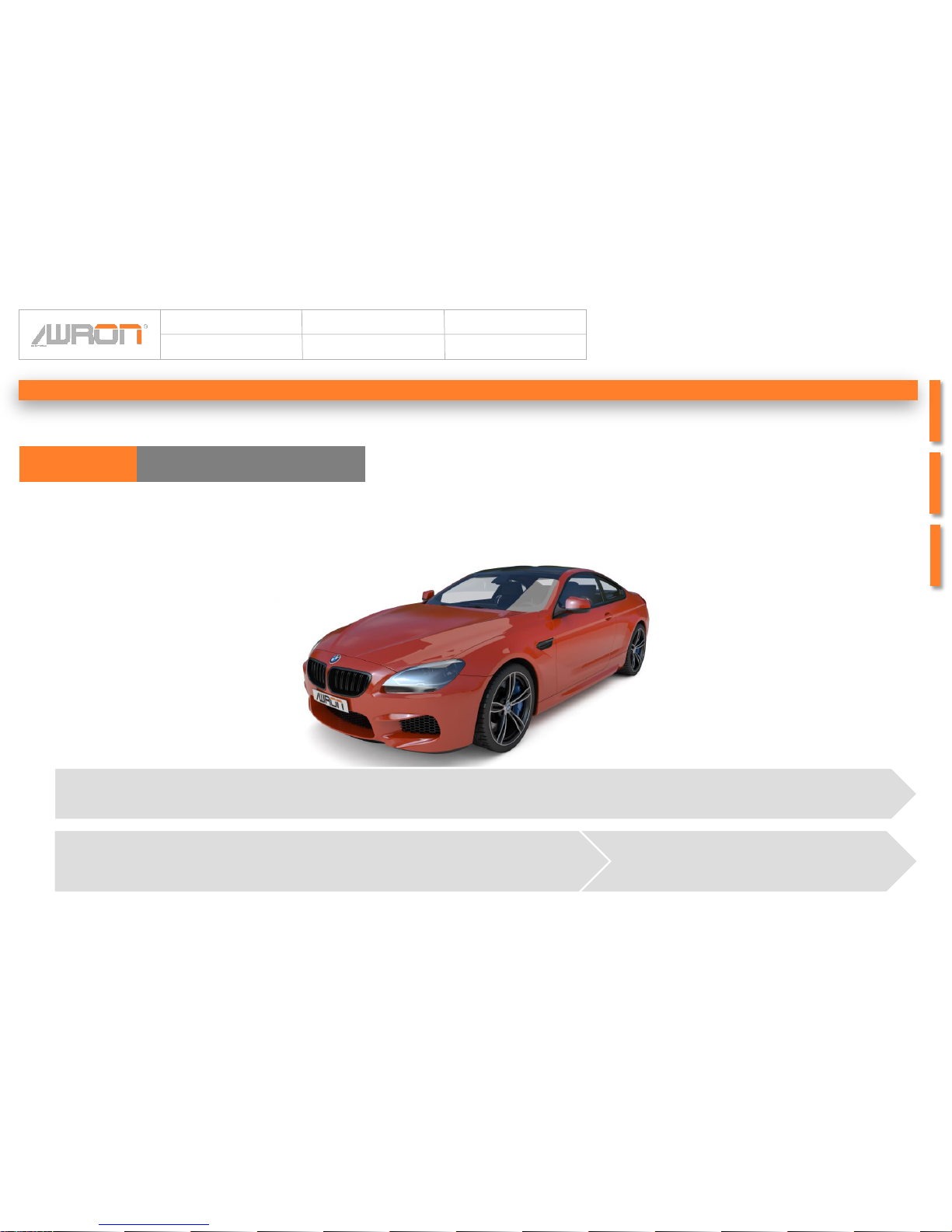
All models with following engines are supported: Turbo- Gasoline engine
F13- M6
Modell support
6 F-SeriesF13DGA
Page 4
Article:
F13DGA
Author:
Awron GmbH
Version:
V1.0
Date:
10.03.2014
4Page:
Messwertdatenanzeige:
• Boost pressure
• Tourque
• Performance
• Leistungsdiagramm
• Lateral and Longitudinal accelaration
• Sprint
• Quarter of a mile
• Lambda values and exhaust gas temperature
• Rail pressure and fuel pressure
• Maximum values
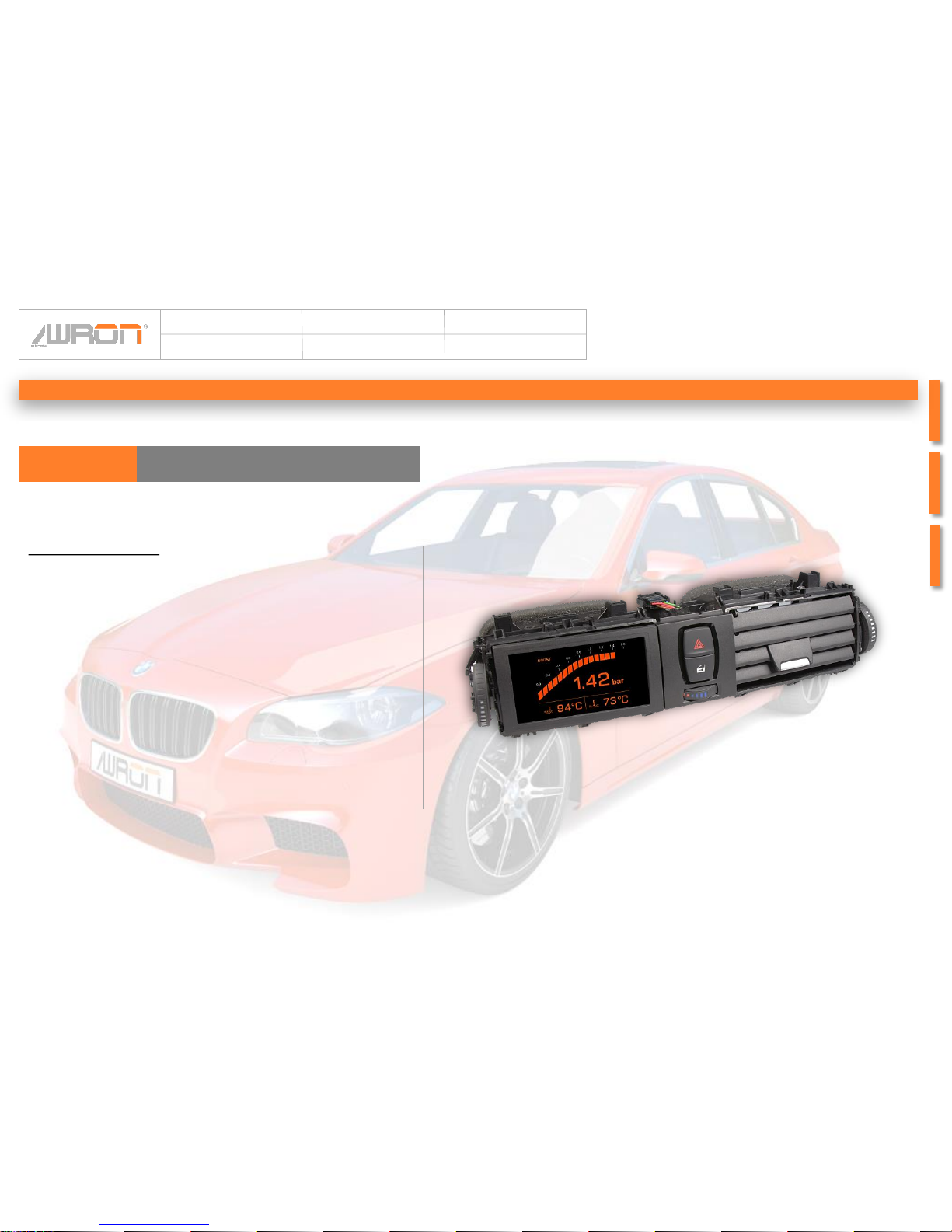
Visually, the display fits perfectly into the Interior.
The monitor, which is equipped with latest OLED
technology is incorporated into the existing
ventilation shaft. Thus, no external holders are
necessary, and you have a good view of the
displays while driving.
To operate the Displaysystem, you just have to use
the steering wheel buttons. Thus, control of the
vehicle by the driver is always maintained.
Product desriptionF13DGA
Product description
Page 5
Article:
F13DGA
Author:
Awron GmbH
Version:
V1.0
Date:
10.03.2014
5Page:
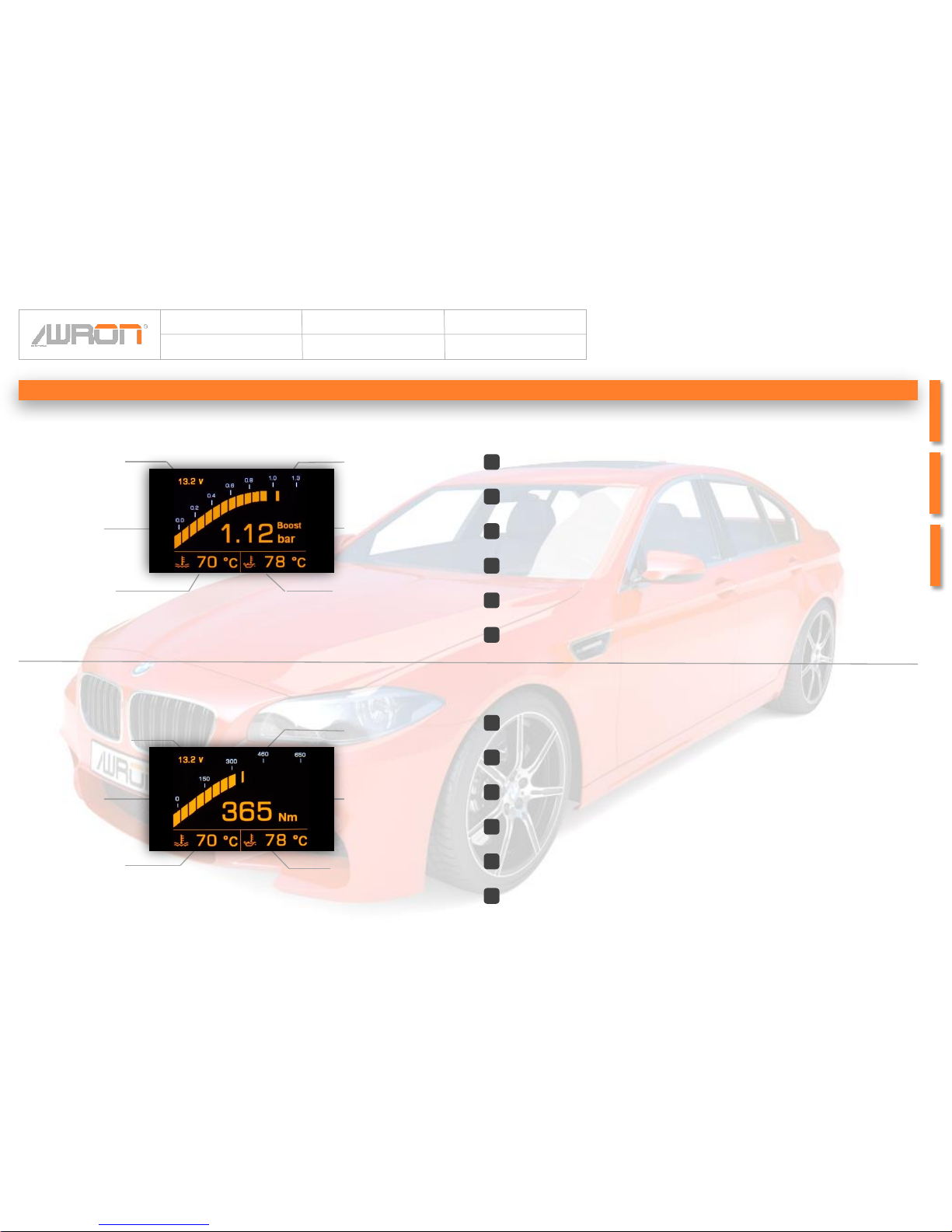
3 Peek holder bar
4 Boost pressure
6 Oil temperature
3 Peek holder bar
6 Oil temperature
1 Battery voltage
2 Torque bar
5 Cooling water
temperature
Boost pressure
display
Torque display
System components
4 Torque
1 Battery voltage
2 Boost pressure bar
5 Cooling water
temperature
2
Graphically represents the boost pressure, between 0 and 1.35 bar, and is
equipped with a towing pointer
Holds the early maximum of loading pressure for 2 seconds
Indicates the charging pressure digital, between 0 and 1.35 bar
1
Indicates the current battery voltage
Specifies the current cooling temperature in °C
3
4
5
6
2
Graphically represents the torque between 0 and 650 Newton Mertes, and is
equipped with a towing pointer
Holds the early maximum of loading pressure for 2 seconds
Indicates digital torque between 0 and 650 Newton metres
1
Indicates the current battery voltage
Specifies the current cooling temperature in °C
3
4
5
6
Specifies the actual oil temperature between - 40 °C and 150 °C
Specifies the actual oil temperature between - 40 °C and 150 °C
Page 6
Article:
F13DGA
Author:
Awron GmbH
Version:
V1.0
Date:
10.03.2014
6Page:
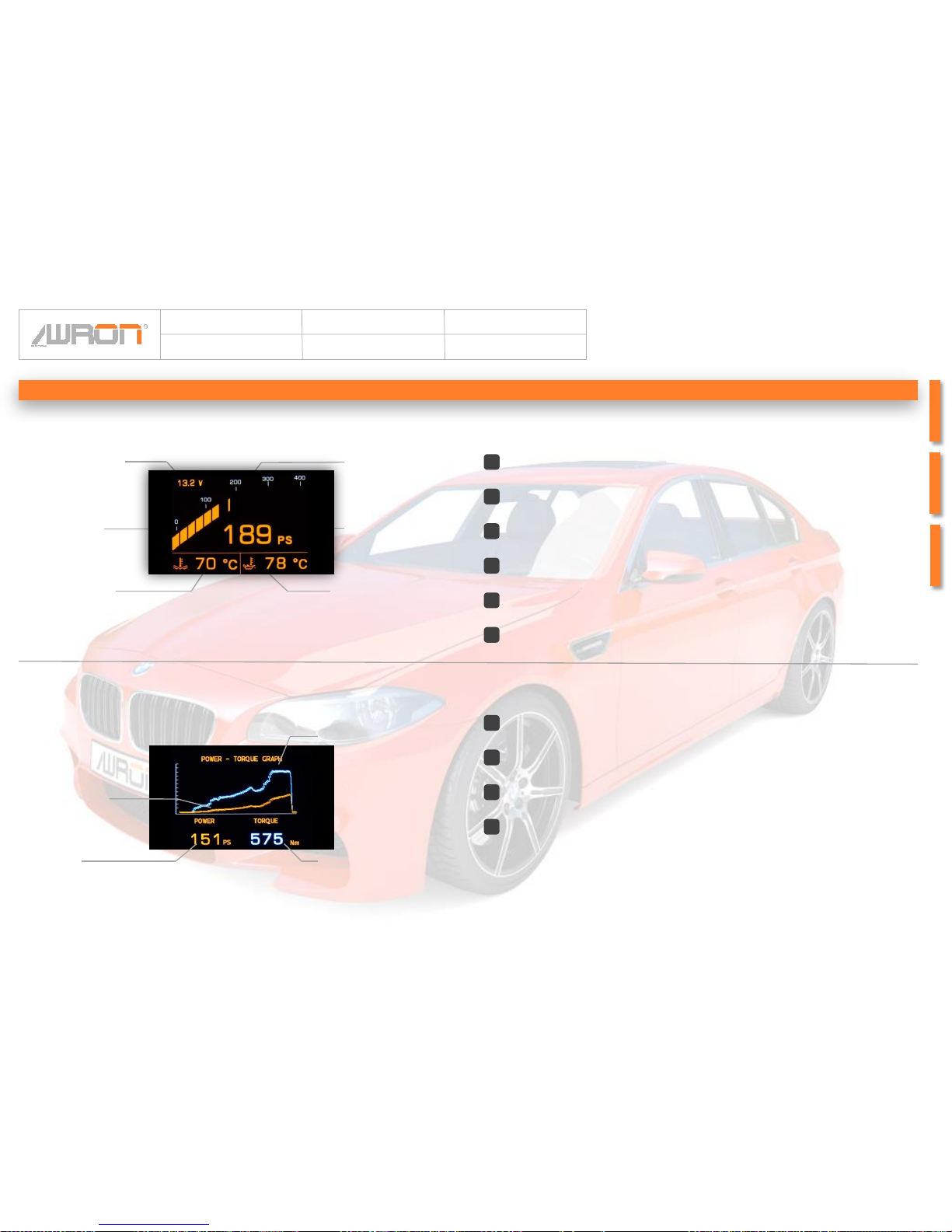
Represents the power between 0 and 400 PS and is equipped with a peek holder
bar
Holds the early maximum of loading pressure for 2 seconds
Specifies the power digital between 0 to 400 PS
Indicates the current battery voltage
Specifies the current cooling temperature in °C
Performance display
2
1
3
4
5
6
System components
3 Peek holder bar
4 Power
6 Oil temperature
1 Battery voltage
2 Power bar
5 Cooling water
temperature
3 Torque graph
4 Torque
1 Power
2 Power
Performace chart
Specifies the power digital between 0 and 500 hp; the provisional maximum
value is kept
Graphically represents the torque
Specifies the torque digital between 0 an 600 Nm; the provisional maximum
value is kept
Graphically represents the power
2
1
3
4
Specifies the actual oil temperature between - 40 °C and 150 °C
Page 7
Article:
F13DGA
Author:
Awron GmbH
Version:
V1.0
Date:
10.03.2014
7Page:
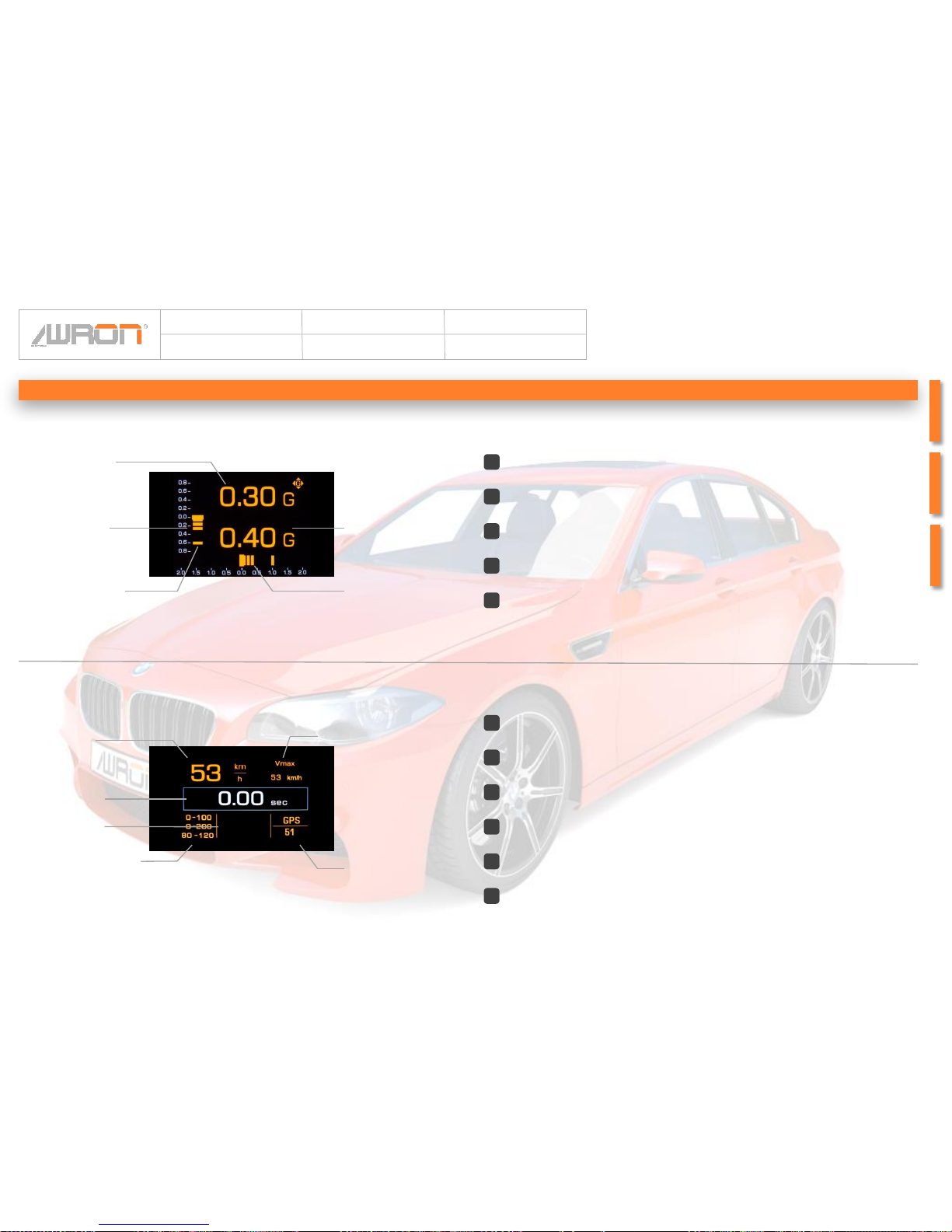
Systemkomponenten
2 Stopwatch
3 max. Speed
1 Speed
4 Sprintzeiten
Sprint display
Specifies the time depending on the current speed
Indicates the ever reached maximum speed in km/h
Specifies the best Sprint time from 0 to 100 km/h or 0-200 km/h
Specifies currently speed in km/h according to the speedometer
Specifies the GPS- Speed (only displayed if original BMW navigation device is
installed)
2
1
3
4
5
5 GPS- Speed
6 Elastizitätsmessung
Displays the elasticity of the engine, in the range of 80 km/h to 120 km/h,
6
Graphically represents the longitudinal acceleration, between 0,8G backwards
and 0,8G forwards and is equipped with a drag indicator
(G= 9,81 m/s2)
Hold for 2 seconds the provisional maximum of longitudinal acceleration
Specifies the lateral acceleration in G (G= 9,81 m/s2)
Specifies the longitudinal acceleration in G (G= 9,81 m/s2)
Graphically represents the lateral acceleration between 2,0G to the left and 2,0G
to the right, and is equipped with a towing pointer (G= 9,81 m/s2)
Lateral and
Longitudinal
accerlaration
2
1
4
5
3
4 Lateral accelaration
5 Lateral accelaration
1 Longitudinal
acceleration
2 Longitudinal
acceleration bar
3 Peek holder bar
Page 8
Article:
F13DGA
Author:
Awron GmbH
Version:
V1.0
Date:
10.03.2014
8Page:
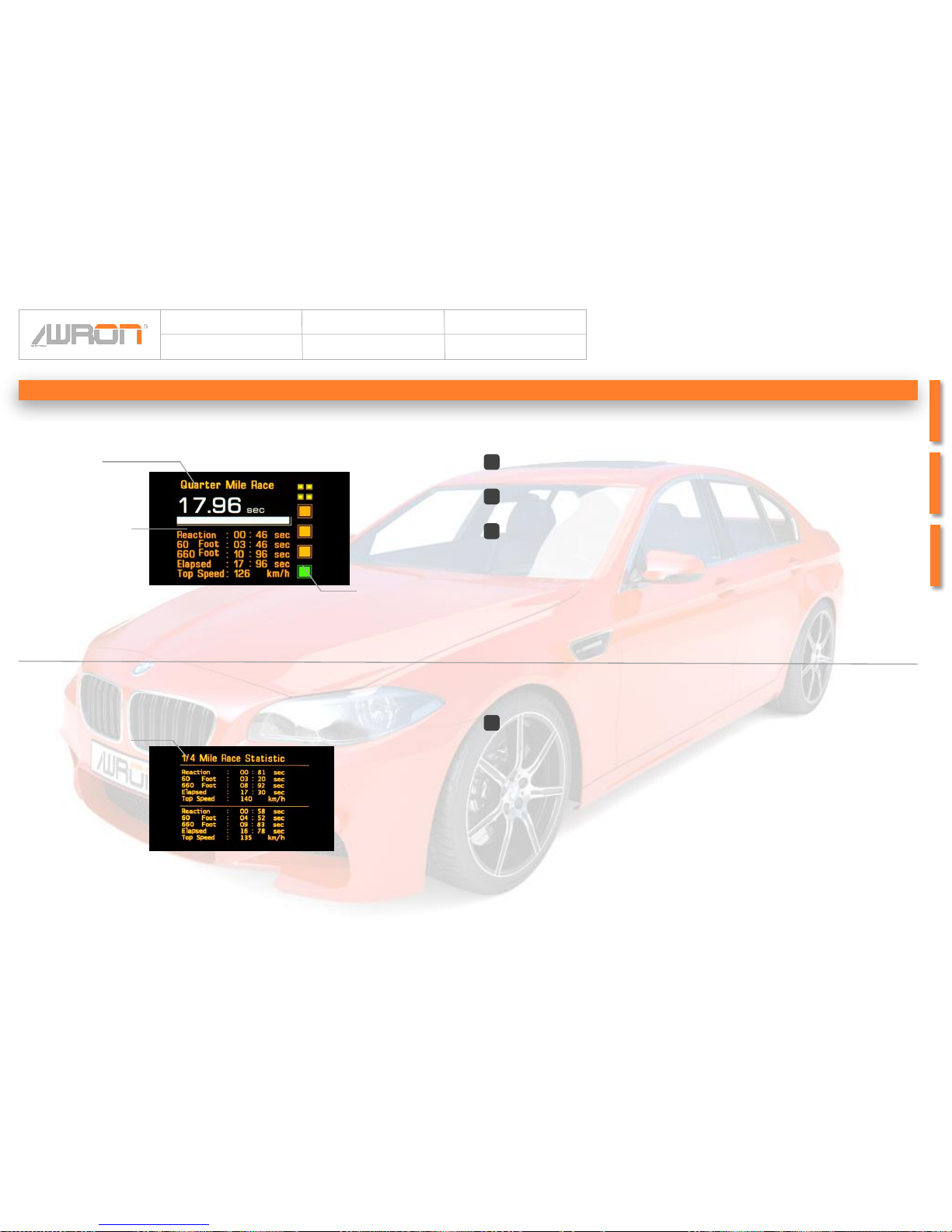
Quarter mile -
Display
Systemkomponenten
Specifies the maximum value of the quarter mile race; When the switch off the
ignition deletes these values
1
Quarter mile-
Maximum values
1 Maximum values
3 Light countdown
1 Stopwatch
2 Maximum values
2
Shows the maximum values of the last ride; the values are overwritten at the
next race
Light countdown to the start of the quarter mile race
1
Measures the time up to reach the quarter mile
3
Page 9
Article:
F13DGA
Author:
Awron GmbH
Version:
V1.0
Date:
10.03.2014
9Page:
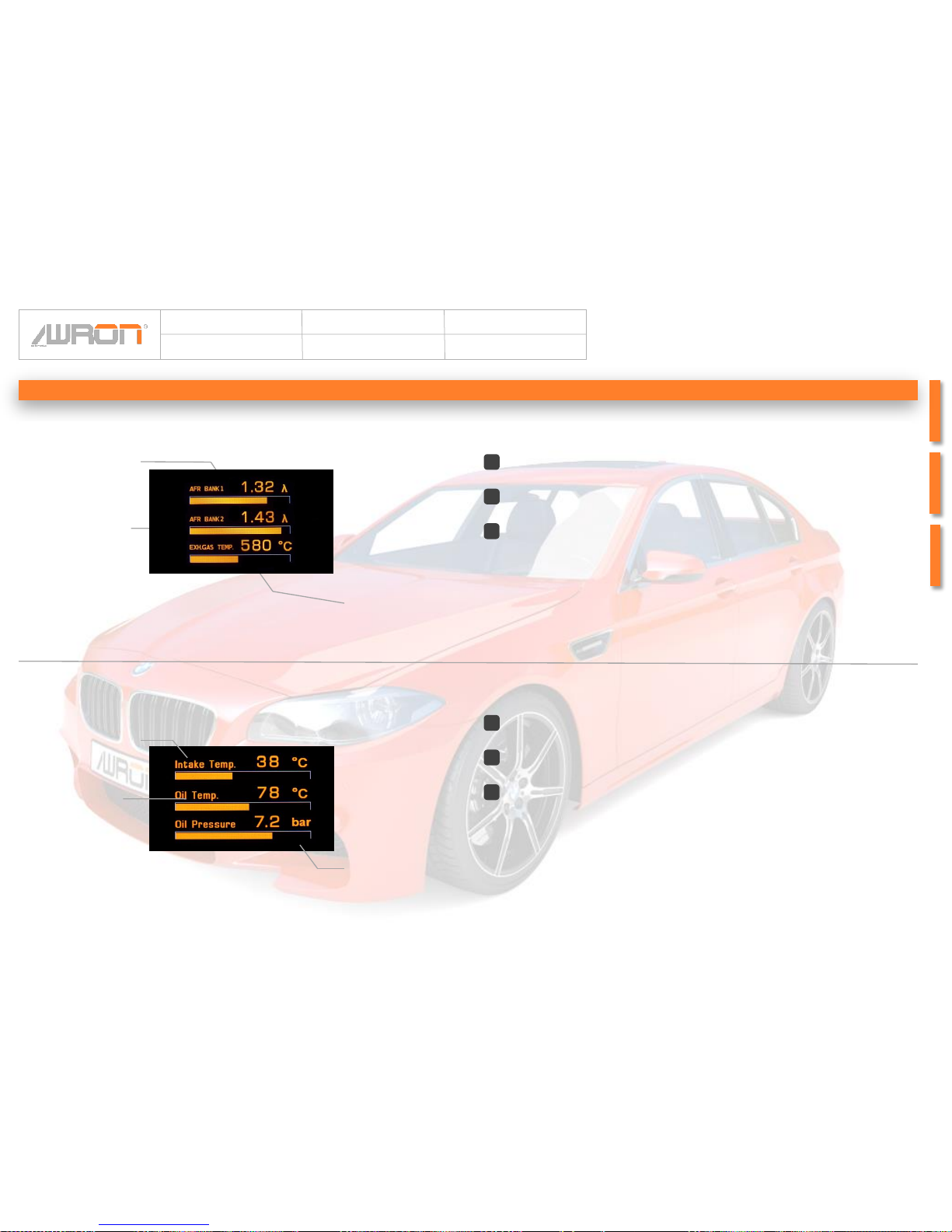
Specifies the current exhaust gas temperature between 0 ° C and 130 ° C
Specifies the current value of wideband oxygen sensor Bank 1; measures the
residual oxygen content in the exhaust gas; λ > 1 = lean mixture; λ < 1 = oily
mixture; Range is between 0.65 and 2.5
Wideband oxygen
and exhaust
temperature
2
1
3
Systemkomponenten
3 Waste gas
temperature
1 wideband
oxygensensor Bank 1
2 wideband
oxygensensor Bank 2
2 Oil temperature
1 Intake temperature
Intake temperature, oil
temperature and oil
pressure
(only for gasoline engines)
Specifies the current oil temperature from 0 to 130 °C
Shows the current oil pressure from 0 to 5 bar
Specifies the intake temperautre from 0 bis 130 °C
2
1
3
3 Oil pressure
Specifies the current value of wideband oxygen sensor Bank 2; measures the
residual oxygen content in the exhaust gas; λ > 1 = lean mixture; λ < 1 = oily
mixture; Range is between 0.65 and 2.5
Page 10
Article:
F13DGA
Author:
Awron GmbH
Version:
V1.0
Date:
10.03.2014
10Page:
Systemkomponenten
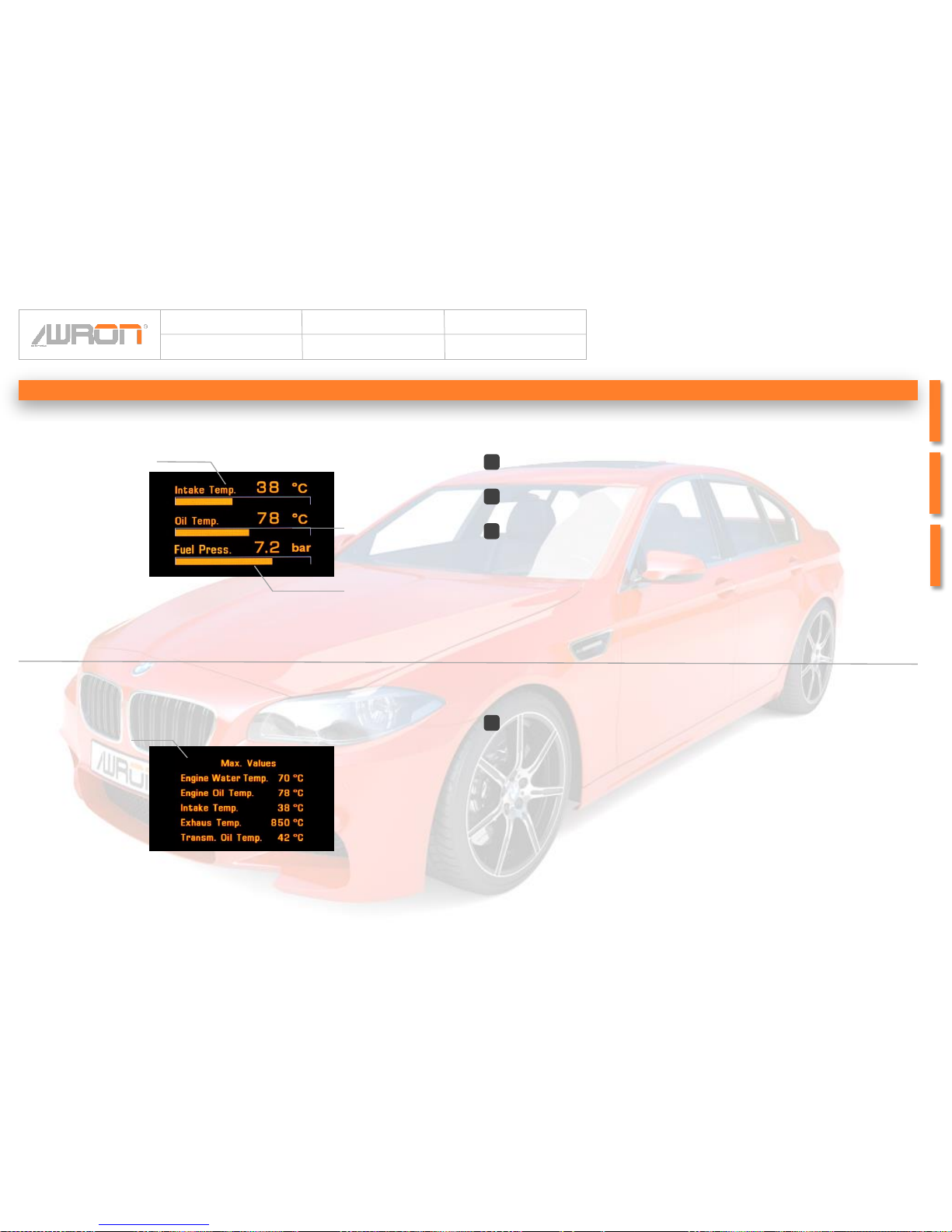
Intake temperature, oil
temperature, fuell pressure
(only for diesel engines)
2 Oil temperature
3 Fuel pressure
1 Intake temperature
2
Specifies the current oil temperature from 0 to 130 °C
Specifies the current fuel pressure from 0 to 10 bar
1
Specifies the intake temperautre from 0 bis 130 °C
3
Maximum values
Page 1
Specifies the maximum value of the current drive; When the switch off the
ignition deletes these values
1
1 Maximum values
Page 11
Article:
F13DGA
Author:
Awron GmbH
Version:
V1.0
Date:
10.03.2014
11Page:
Systemkomponenten
1
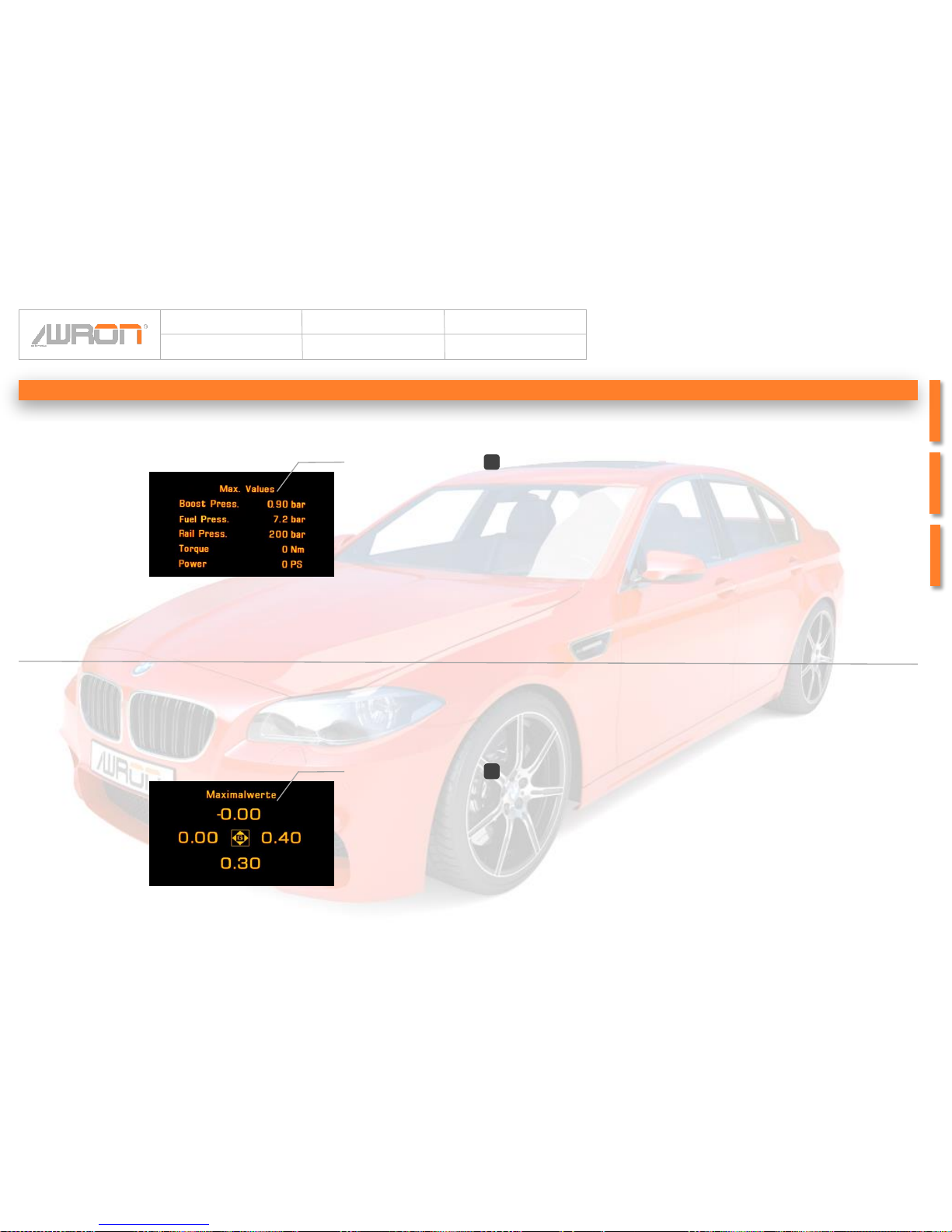
Specifies the maximum value of the current drive; When the switch off the
ignition deletes these values
Maximum values Page 2
(only for diesel engines)
1 Maximum values
1
Shows the maximum values of reached longitudinal and lateral acceleration of
the current drive; when the switch off the ignition deletes these values
Maximum values Page 3
1 Maximum values
Page 12
Article:
F13DGA
Author:
Awron GmbH
Version:
V1.0
Date:
10.03.2014
12Page:
Systemkomponenten
1
Switch off display
1 Switch off display
During the brief wait about 2 seconds, the display turns off; by pressing the
wheel button it is possible to turn the display back
Page 13
Article:
F13DGA
Author:
Awron GmbH
Version:
V1.0
Date:
10.03.2014
13Page:
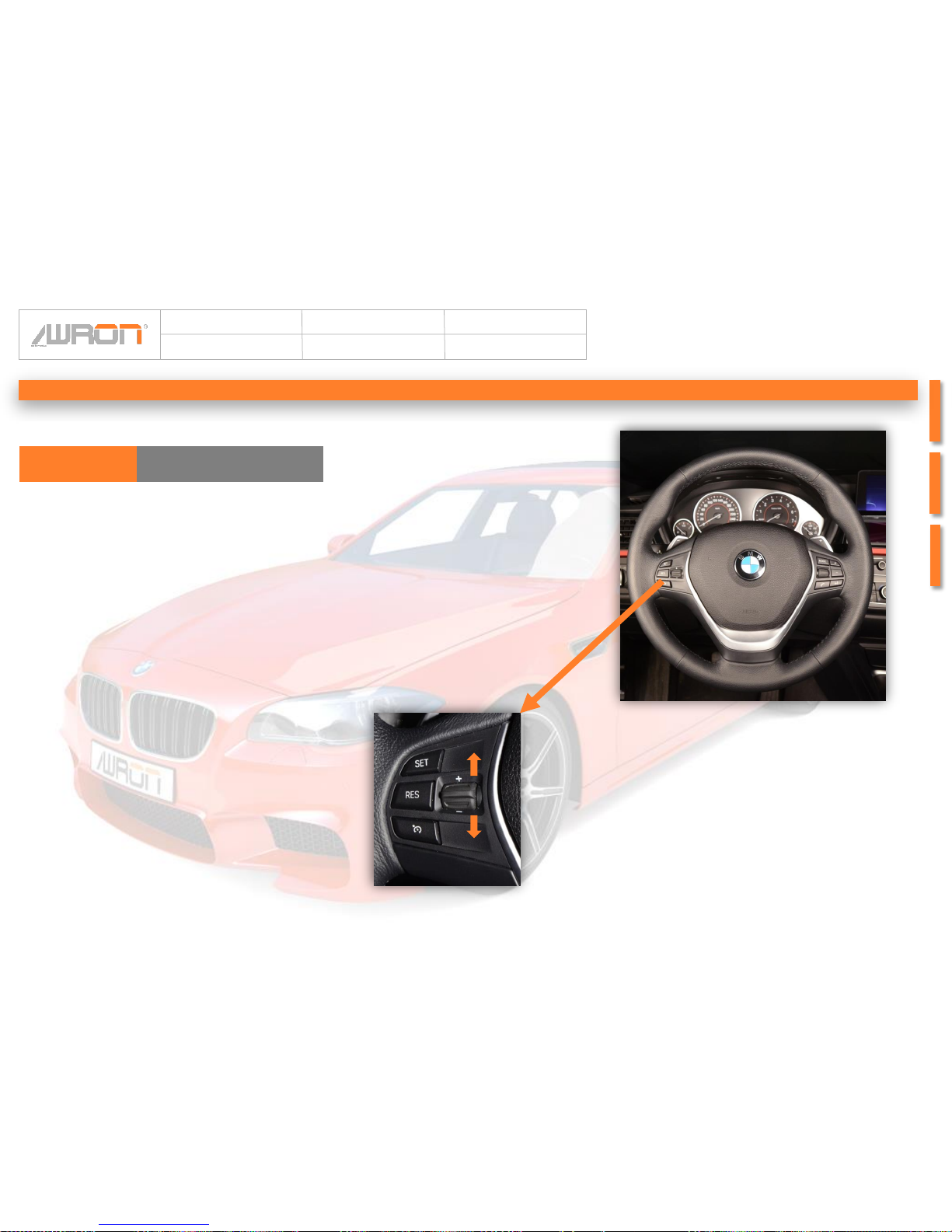
The display F1xDGA is operated above the already
existing rocker switch on the steering wheel of
speed control. If the cruise control is switched off,
you can switch back and forth between the
individual system components.
When the cruise control is on, the display remains
in the last active screen and the rocker switch
assumes their original function. This allows an easy
handling and ensures the control of the vehicle by
the driver.
Changing of system components:
To switch between the individual system
components suffice a light tap on the rocker switch
up or down. This allows a scroll forwards and
backwards.
To enter the settings menu, press the rocker switch
fully upwards and hold this position for 2 seconds
(see next page).
Operating concenpt
Key functionsF13DGA
Page 14
Article:
F13DGA
Author:
Awron GmbH
Version:
V1.0
Date:
10.03.2014
14Page:
Operating concenpt
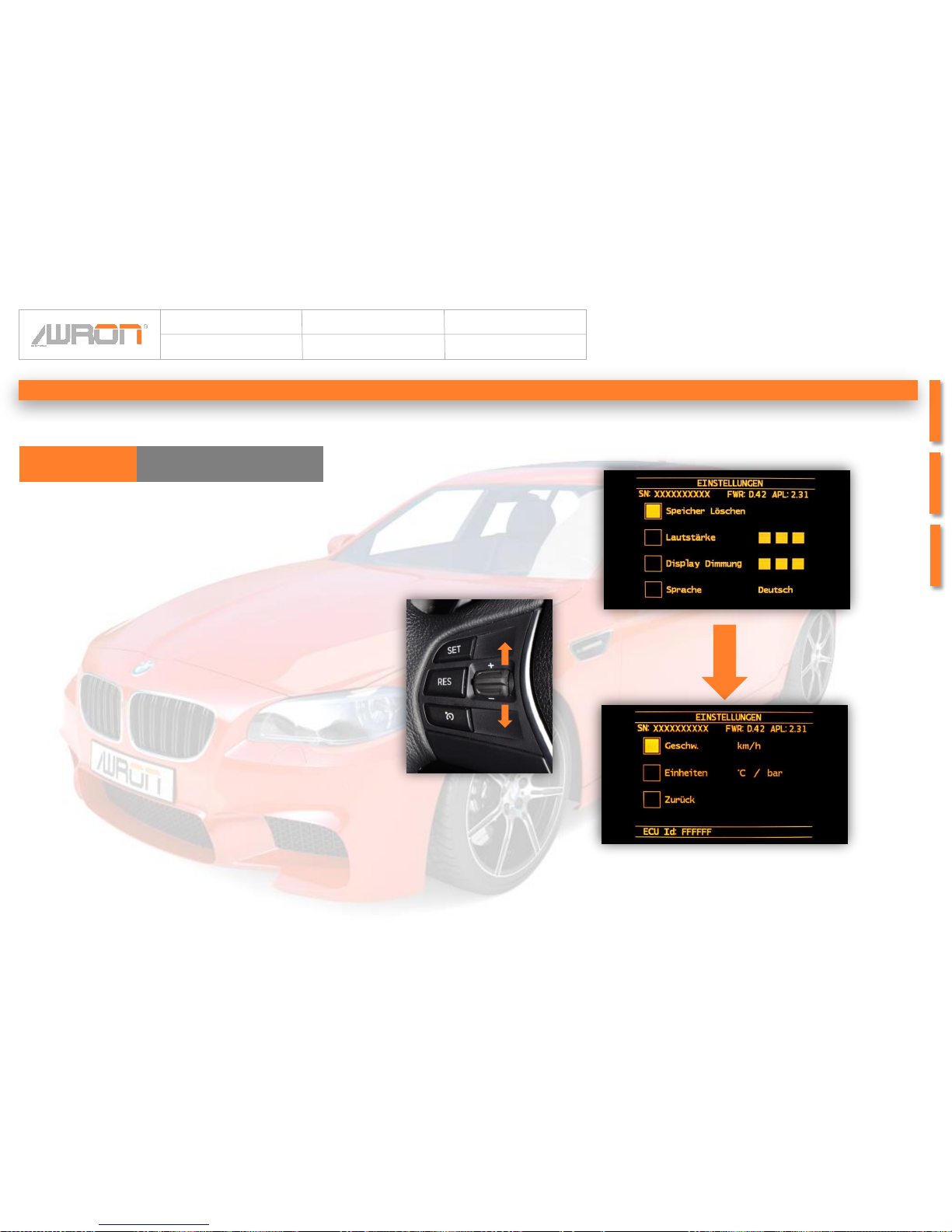
To change settings, move the rocker switch to
bottom until one has arrived at the desired setting.
Move the rocker switch above to confirm or to
change the setting.(E.g. switching from km/h to
mph).
Move the rocker switch on “Back” to exit the setting
menu, and confirm again.
Change options:
• Volume
• Dimming
• German to Englisch
• km/h to mph
• °C / bar to °F / psi
F13DGA Key function
Page 15
Article:
F13DGA
Author:
Awron GmbH
Version:
V1.0
Date:
10.03.2014
15Page:
Sprint function
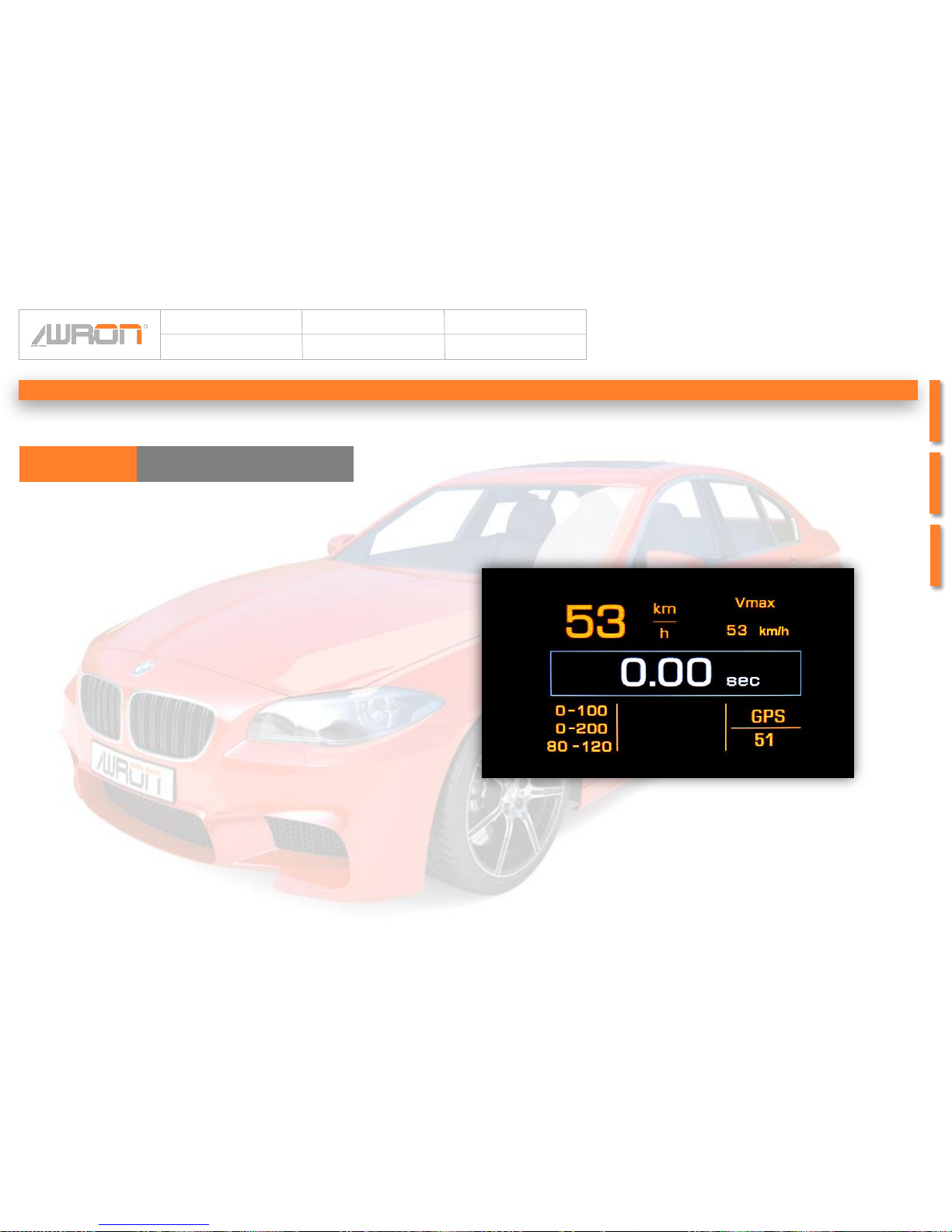
The sprint display is operated only by the driving style of the
driver. So they are not any external buttons for the operation
necessary.
In the stand is the stopwatch, as well as the speed to 0.
As soon as the driver accelerated the timing begins.
For the first measurement, from 0 to 100 km/h, the driver will
have 15 seconds. If the driver is not able to accelerate to 100
km/h, the measurement stops and the timer goes back to 0.
Is the driver able to accelererate to 100 km/h, the second
measurement from 0 to 200 km/h begins.
For this speed the driver has 10 more seconds, so 25 seconds
to speed up to 200 km/h.
In addition conducted an elasticity measurement between 80
km/h and 120 km/h. The time reached at full throttle are
indicative of the elasticity of the motor.
The maximum achieved times are stored and displayed at the
bottom of the display. As well the reached maximum speed is
shown in the upper right area of the screen.
These stored maximum values are automatically replaced by
new highs. If an original BMW navigation system is installed,
the current GPS-speed is represented in the lower-right corner
of the screen.
To clear the peak values, only the option “Memory delete”
must be selected in the Setup menu.
Operating concenpt
F13DGA
Page 16
Article:
F13DGA
Author:
Awron GmbH
Version:
V1.0
Date:
10.03.2014
16Page:
¼ mile
660 Foot
660 Foot
60 Foot Timer 660 Foot Timer ¼ mile timer
Preparation time
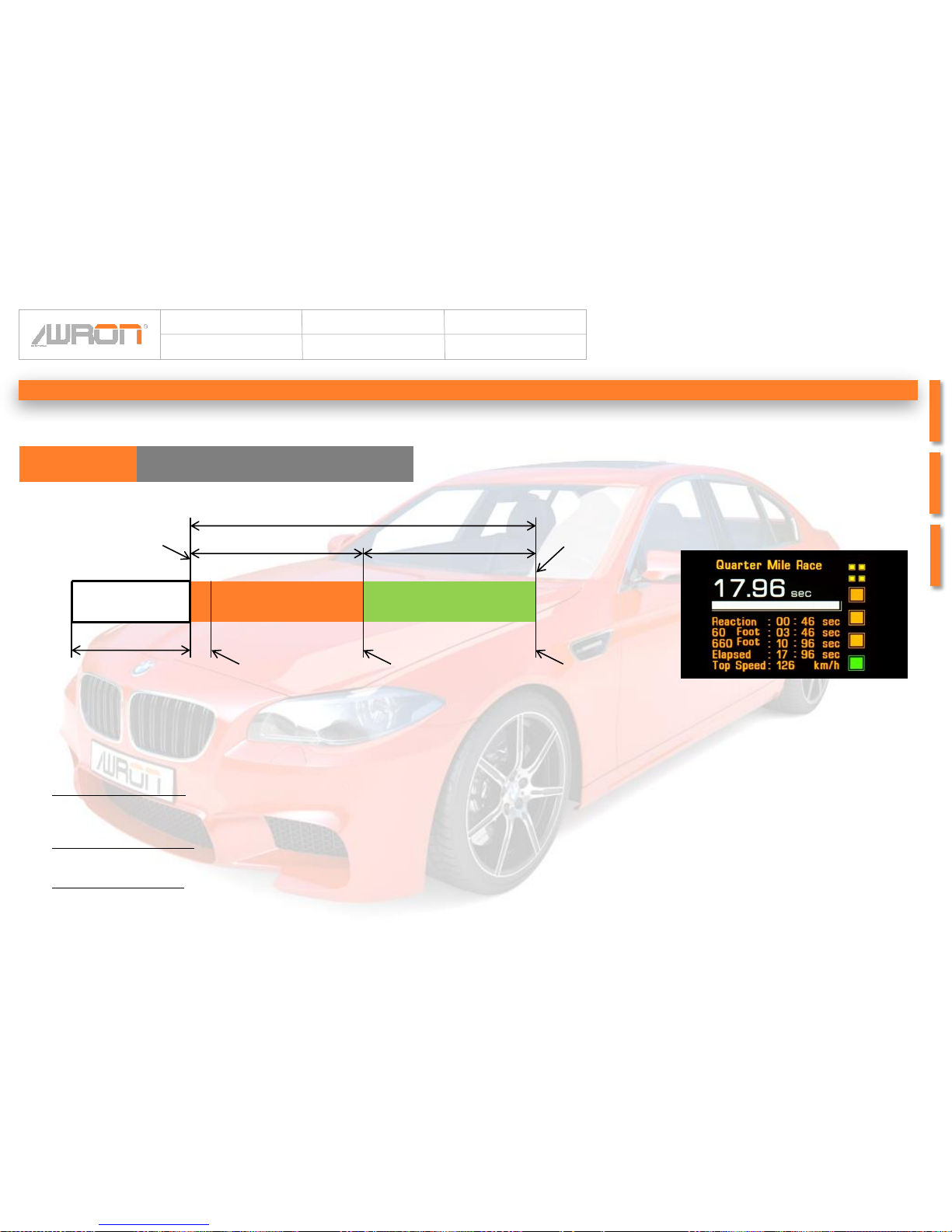
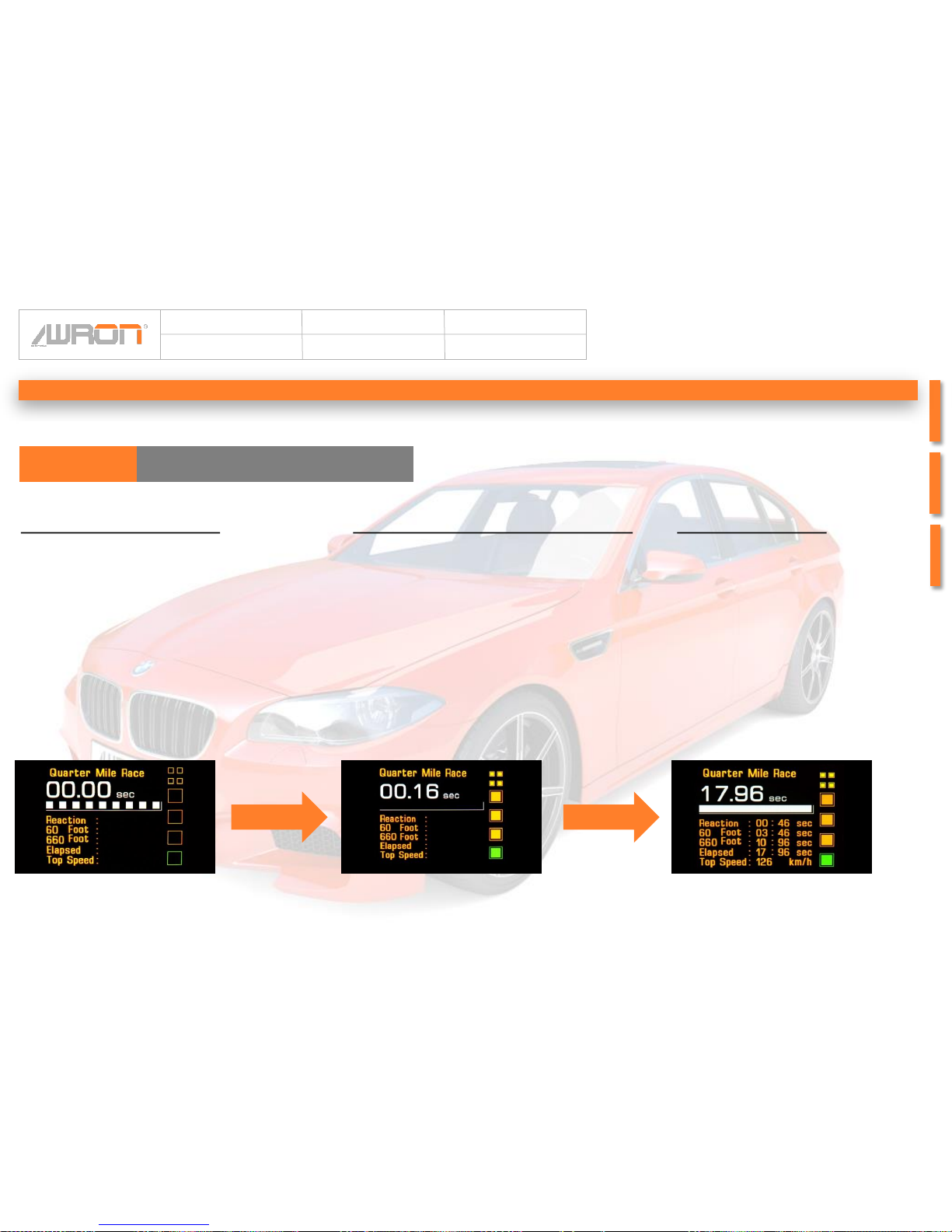
The quarter mile display of F1xDGA serves the riders to perform a drag racing with exact measurements. Due to a short
preparation time of 10 seconds, the driver can prepare for the race. The traffic light in the right pane indicates the start time. In
the light of the last green signal timing begins.
60 Foot timing (18.2 m)
Measures the time it takes the car to cross the first 60 feet of the track
Shows you how well the car launches, which affects your elapsed times.
660 Foot timer (201,2 m)
- Measures elapsed time at the halfway point of a quarter – mile track.
¼ mile timer (402.4 m)
- Measures the time it takes the car to cross the whole ¼ mile
- Measures the ever reached top speed
Reaction time
measurement
Measurement speed
Quarter mile displayF13DGA
Operating concenpt
Page 17
Article:
F13DGA
Author:
Awron GmbH
Version:
V1.0
Date:
10.03.2014
17Page:
the quarter mile screen can be
operated not through additional
buttons, but by the speed of the
vehicle by the driver.
The preparation time is
indicated by the white bars,
which gradually disappear.
Then follow the traffic light countdown.
The small yellow upper lights
signal the driver that he is just
before the start of the race.
Within 0.5 seconds the light
switches the 3 orange lights one
by one, and finally the Green
start signal added. When the
light turns green, the driver has
3 seconds to start to the race,
otherwise the measurement will
be canceled.
The stored path is symbolized
by a white bar witch current
with.
The measured times are shown
one after the other, and
persisted until the start of the
new measurement.
Preparation phase Traffic lights - countdown Measurement
Quarter mile displayF13DGA
Operating concenpt
Page 18
Article:
F13DGA
Author:
Awron GmbH
Version:
V1.0
Date:
10.03.2014
18Page:
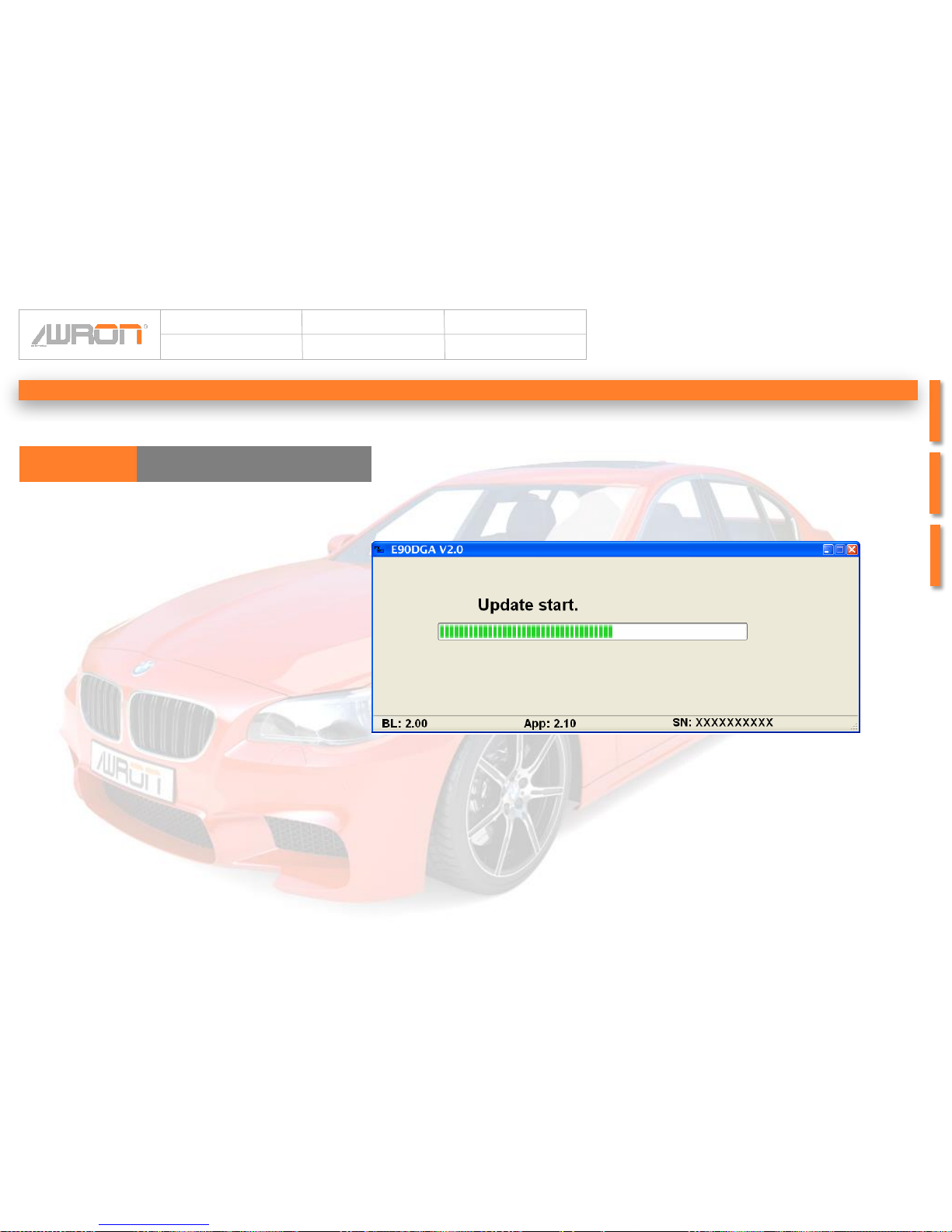
Software updates are available for the operating
systems Windows XP and Windows 7.
Required software is available for download at
Awron.de. Then the computer has to be connected
with the display system via USB and the required
driver software installs itself automatically.
The software file must only be opened, and the
update starts automatically.
Operating concenpt
F13DGA Software update
Page 19
Article:
F13DGA
Author:
Awron GmbH
Version:
V1.0
Date:
10.03.2014
19Page:
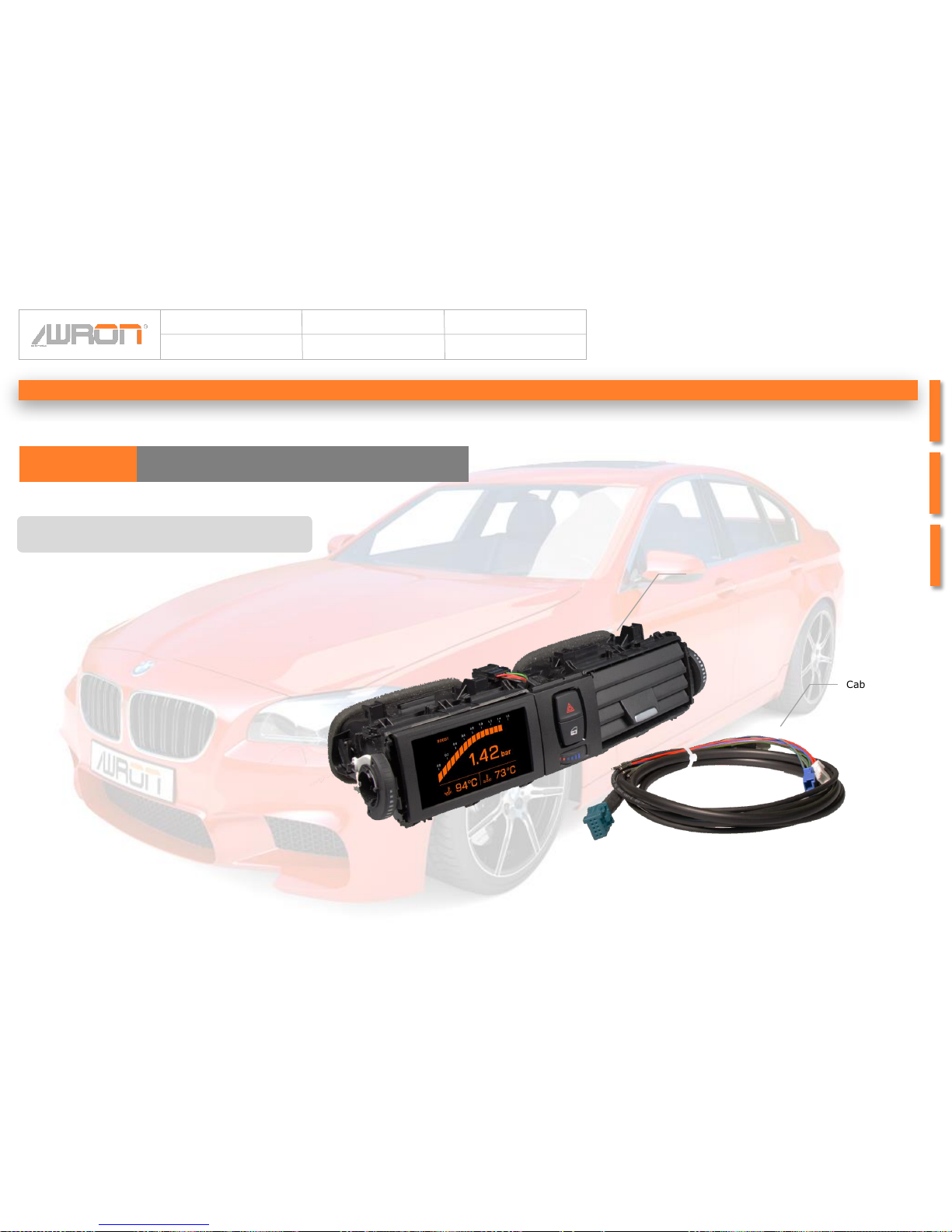
This purchased parts package ensures an assembly
true the motto of „plug and play“.
The wiring harness is connected directly to the can
bus, which ensures a precise data transmission.
Purchased parts package
Purchased parts packageF13DGA
Purchased parts package
•Display system
•Cable harness incl. USB connection
•Operating instructions
Display system
Cabel harness
Page 20
Article:
F13DGA
Author:
Awron GmbH
Version:
V1.0
Date:
10.03.2014
20Page:
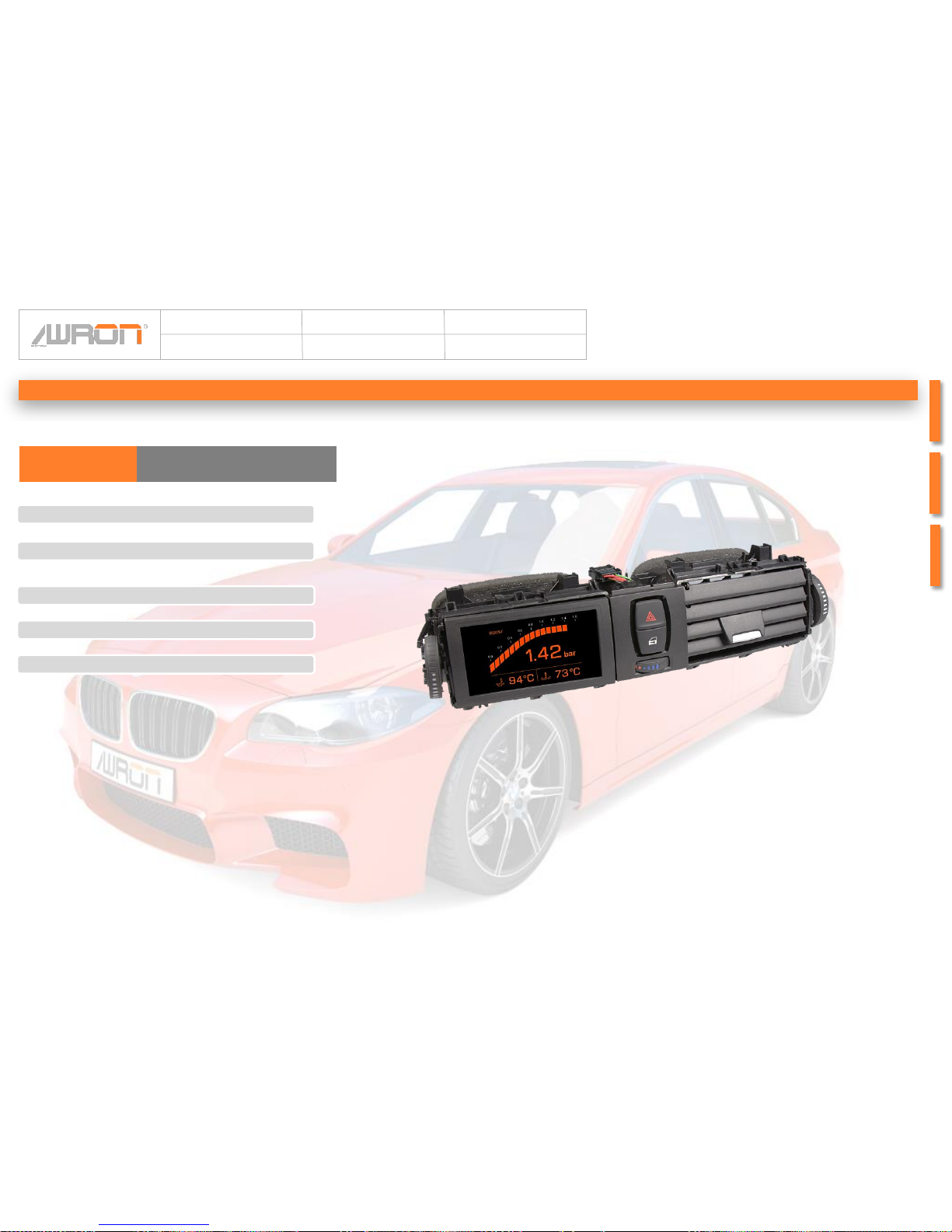
Display
•OLED display 320 x 240
Cutting point
• CAN – Bus 500 KBit
• USB cutting point for Software update
Case
•Plastic, original BMW air grille
Size (length x width x depth)
• 310 mm x 80 mm x 120 mm
Weight
• 300g
Technical data
Technical dataF13DGA
 Loading...