

Page 1
REV 1.5.0 - Copyright by Dipl.-Ing. Janus Piwek, Ingenieurbüro Piwek
AWILCO-MULTIPLEX
Yderholmvej 64
DK-4623 Ll. Skensved
Tel.: +45 5656 5400
Fax: +45 5656 5405
[email protected]
www.awilco-multiplex.dk
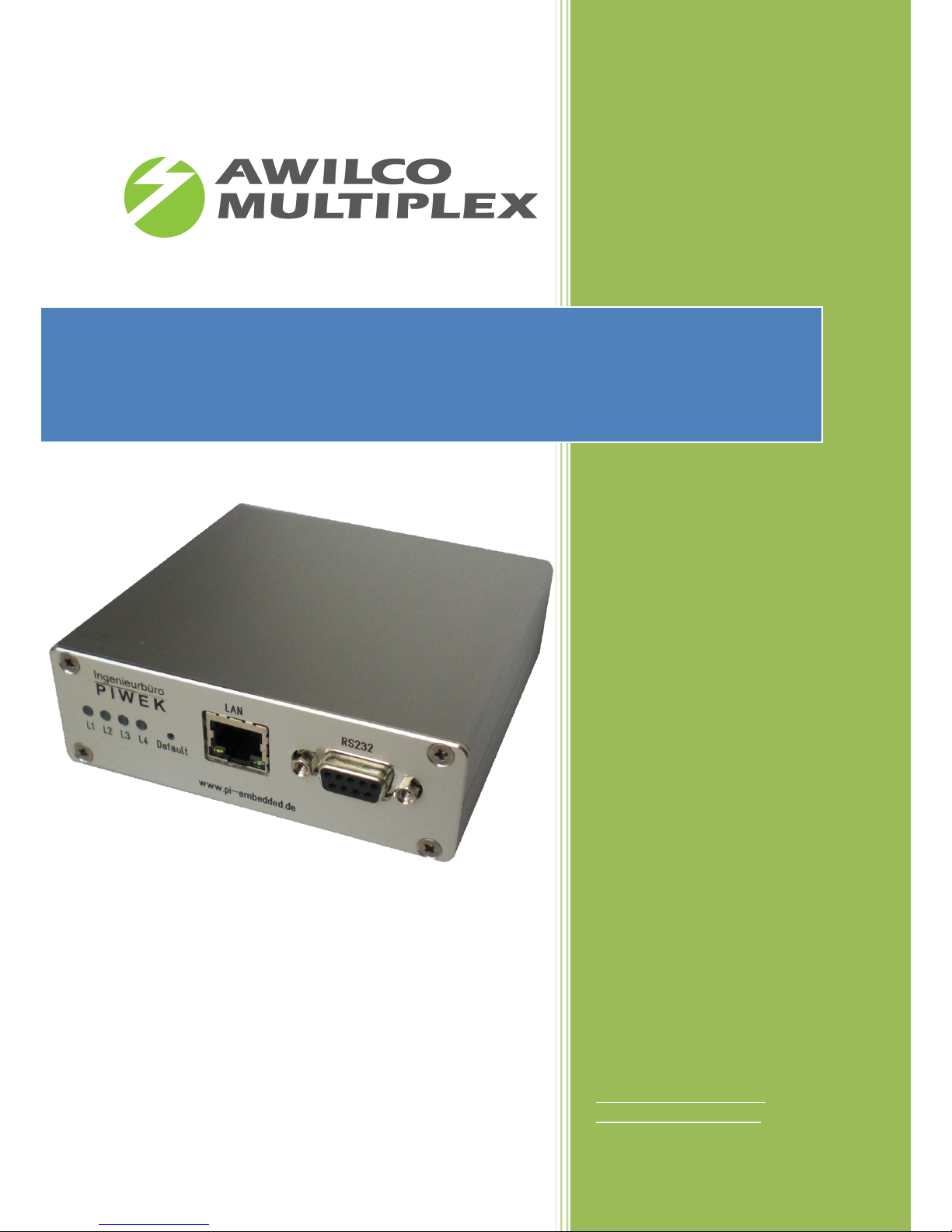
IP-EFOY-GATEWAY
Technical Overview - EN
Page 2

AWILCO-MULTIPLEX ApS | Yderholmvej 64 | DK-4623 Ll. Skensved | Phone: +45 5656 5400 | Fax: +45 5656 5405
[email protected] | www.awilco-multiplex.dk
1 Introduction .............................................................................................................................................. 4
2 Firmware update description .................................................................................................................... 5
2.1 V0.8.3 ............................................................................................................................................... 5
2.2 V0.7.1 ............................................................................................................................................... 5
2.3 V0.6.7 ............................................................................................................................................... 5
3 Technical Data ........................................................................................................................................... 6
4 IP Configuration ........................................................................................................................................ 7
5 Description Periphery ............................................................................................................................... 8
5.1 Front panel ....................................................................................................................................... 8
5.2 Back panel ........................................................................................................................................ 9
6 Supported Protocols ............................................................................................................................... 10
7 EFOY PRO Compatibility .......................................................................................................................... 10
8 Getting started ........................................................................................................................................ 11
9 Use-Case.................................................................................................................................................. 14
9.1 „Green“ Off-Grid 48V „Power Over Ethernet“ power supply for wireless base stations ............. 14
9.2 Portable EFOY Pro power supply with UMTS-Router for remote control applications .................. 15
9.3 Off grid power supply for wireless internet service provider (3.5 / 5 GHz base stations) .............. 16
10 Description web interface ................................................................................................................... 17
10.1 Web site - General...................................................................................................................... 17
10.2 Web site – IP .............................................................................................................................. 18
10.3 Web site - Security ..................................................................................................................... 19
10.4 Web site - SNMP ........................................................................................................................ 20
10.5 Web site - EFOY Supervisor ........................................................................................................ 20
10.6 Web site - EFOY Setup ................................................................................................................ 23
10.7 Web site - EFOY Status ............................................................................................................... 25
10.8 Web site - EFOY Errors ............................................................................................................... 27
10.9 Web site - Info ............................................................................................................................ 28
10.10 Email Notification Service .......................................................................................................... 30
10.11 TCP-UART-BRIDGE-MODE .......................................................................................................... 33
10.12 Off-the-shelf SNMP based monitoring solution ......................................................................... 34
10.13 SNMP EFOY PRO Fuel Cell Remote Control ................................................................................ 36
Page 3

AWILCO-MULTIPLEX ApS | Yderholmvej 64 | DK-4623 Ll. Skensved | Phone: +45 5656 5400 | Fax: +45 5656 5405
[email protected] | www.awilco-multiplex.dk
List of figures
Figure 1: Front panel .......................................................................................................................................... 8
Figure 2: Back panel ........................................................................................................................................... 9
Figure 3: Schematic Installation ....................................................................................................................... 11
Figure 4: IP-Configuration Menu...................................................................................................................... 12
Figure 5: PC's static IP-Configuration ............................................................................................................... 12
Figure 6: Login IP-EFOY-GATEWAY website ...................................................................................................... 13
Figure 7: IP-Configuration IP-EFOY-GATEWAY .................................................................................................. 13
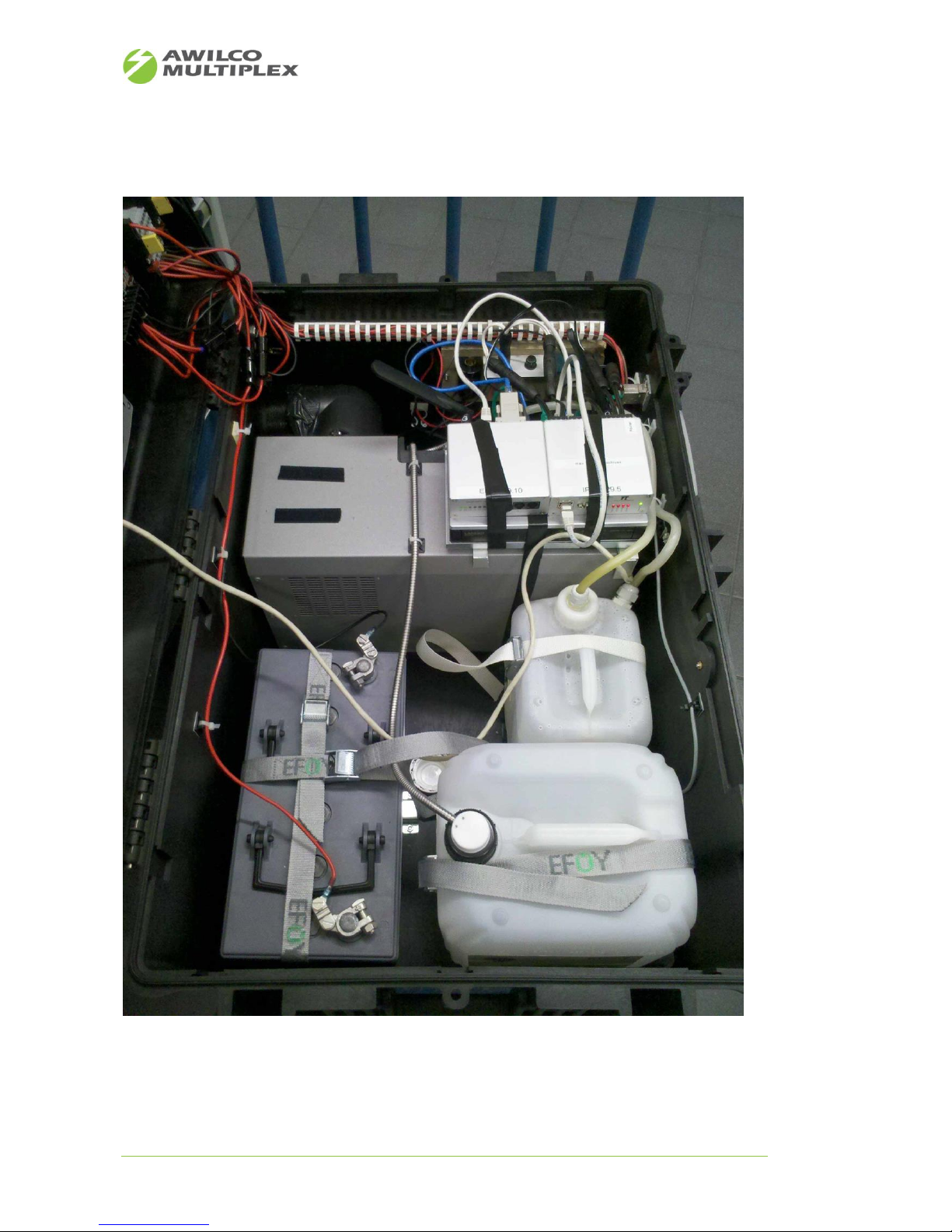
Figure 8: Green Power Supply.......................................................................................................................... 14
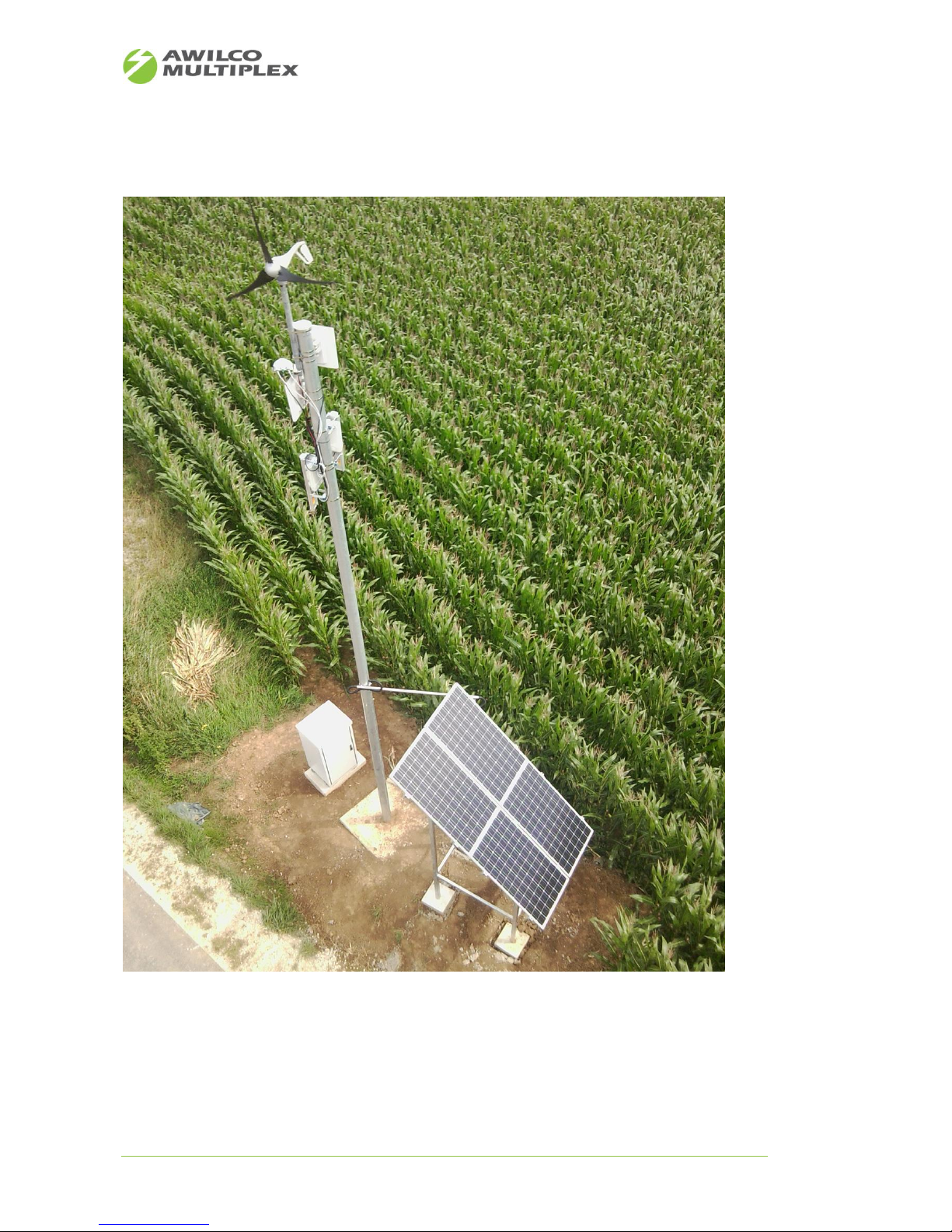
Figure 9: Fuel cell power supply for portable applications .............................................................................. 15
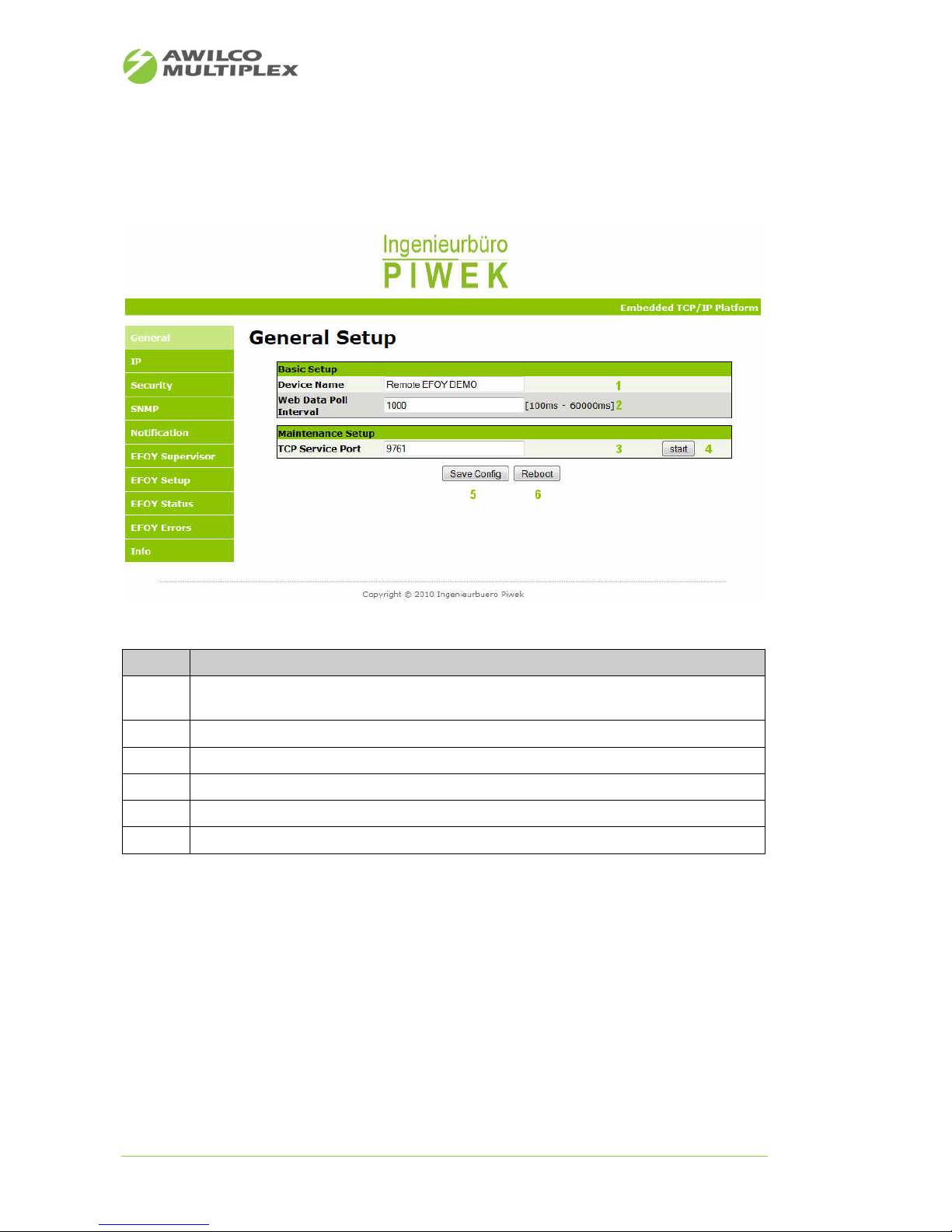
Figure 10: Pilot project - Off grid power supply for internet service provider ................................................. 16
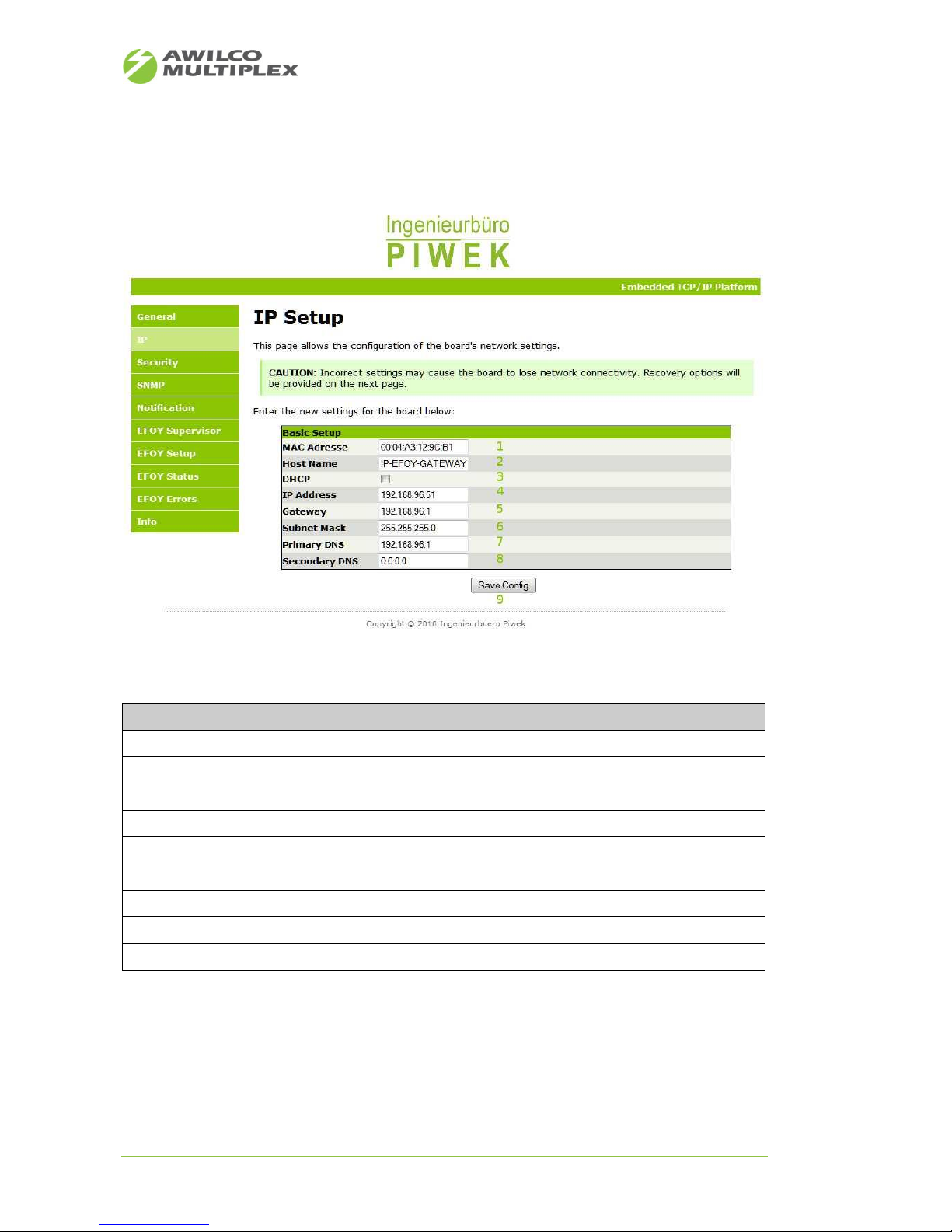
Figure 11: Web site - General .......................................................................................................................... 17
Figure 12: Web site - IP .................................................................................................................................... 18
Figure 13: Web site - Security .......................................................................................................................... 19
Figure 14: Web site - SNMP ............................................................................................................................. 20
Figure 15: Web site - 1st generation EFOY Supervisor ..................................................................................... 21
Figure 16: Web site -2nd generation EFOY Supervisor .................................................................................... 21
Figure 17: Web site – 1st generation EFOY Setup ............................................................................................ 23
Figure 18: Web site – 2nd generation EFOY Setup ........................................................................................... 24
Figure 19: Web site - EFOY Status .................................................................................................................... 25
Figure 20: Web site - EFOY Errors .................................................................................................................... 27
Figure 21: Web site – 1st generation EFOY Info ............................................................................................... 28
Figure 22: Web site – 2nd generation EFOY Info .............................................................................................. 28
Figure 23: Website email notification .............................................................................................................. 30
Figure 24: Email delivered successfully ............................................................................................................ 31
Figure 25: Email not delivered successfully ..................................................................................................... 31
Figure 26: Email Client ..................................................................................................................................... 32
Figure 27: TCP-UART-BRIDGE-MODUS ............................................................................................................. 33
Figure 28: Tactical Network Map ..................................................................................................................... 34
Figure 29: Live EFOY PRO graphs overview ...................................................................................................... 35
Figure 30: SNMP Chart ..................................................................................................................................... 36
Page 4

AWILCO-MULTIPLEX ApS | Yderholmvej 64 | DK-4623 Ll. Skensved | Phone: +45 5656 5400 | Fax: +45 5656 5405
[email protected] | www.awilco-multiplex.dk
List of tables
Table 1: Electrical Data ....................................................................................................................................... 6
Table 2: Mechanical Data ................................................................................................................................... 6
Table 3: Environment conditions ....................................................................................................................... 6
Table 4: IP default settings ................................................................................................................................. 7
Table 5: Description front panel ........................................................................................................................ 8
Table 6: Description front panel ........................................................................................................................ 9
Table 7: TCP/UDP Protocols ............................................................................................................................. 10
Table 8: Protocol RS232 ................................................................................................................................... 10
Table 9: EFOY PRO compatibility ...................................................................................................................... 10
Table 10: Description web site - General ......................................................................................................... 17
Table 11: Description web site - IP ................................................................................................................... 18
Table 12: Description web site - Security ......................................................................................................... 19
Table 13: Description web site – SNMP ........................................................................................................... 20
Table 14: Description web site - EFOY Supervisor ............................................................................................ 22
Table 15: Description web site - EFOY Setup ................................................................................................... 24
Table 16: Description web site - EFOY Status ................................................................................................... 25
Table 17: Description web site - EFOY Errors ................................................................................................... 27
Table 18: Description web site - Info ................................................................................................................ 29
Table 19: Notification event ............................................................................................................................. 30
Table 20: Configuration fields Email notification ............................................................................................. 31
Table 21: Description event protocol ............................................................................................................... 32
1 Introduction
The IP-EFOY-GATEWAY serves for remote control of a single SFC EFOY PRO fuel cell over the TCP/IP protocol.
At this the entire fuel cell parameter defined by the SFC EFOY PRO technical data sheet are readout continuously over the RS232 interface. These data sets are provided to the customer for control application in different formats.
• SNMP
• XML
• HTML web site
• Email
• TCP-UART-Bridge-Mode (direct EFOY Pro remote command line interface terminal)
• TCP socket services can be developed on request
Furthermore, the IP-EFOY-GATEWAY gives the customer the opportunity to set up/reconfigure the EFOY PRO
fuel cell either within a local area network or over the internet by using the web site. There is no need for
further software installation.
The customer benefits from a simple and intuitive web menu navigation to preconfigure the fuel cell ex ante
or in a live running system.
However, the greatest benefit of the IP-EFOY-GATEWAY solution is that it makes it possible to give your
EFOY PRO fuel cell an IP address and that it can be integrated in a given IP network very quickly without any
limitations. From now on statically scheduled service tours are minimized and can be coordinated much
better since EFOY PRO fuel cell's parameter/states may be retrieved from each location and 24 hours a day.
Page 5

AWILCO-MULTIPLEX ApS | Yderholmvej 64 | DK-4623 Ll. Skensved | Phone: +45 5656 5400 | Fax: +45 5656 5405
[email protected] | www.awilco-multiplex.dk
2 Firmware update description
2.1 V0.8.3
• Firmware supports now SFC EFOY PRO 800/800 DUO and 2400/2400DUO
• Dynamic web data update interval on the web site can be adapted
2.2 V0.7.1
• Firmware supports now SFC EFOY PRO v11.10 with CONFIG command adaptation, but also back-
ward compatibility is assured
2.3 V0.6.7
• As default setting the IP-Address is bound over DHCP
• Additional EFOY data fields are read-out and displayed on the web site
◦ Service fluid level
◦ Temperature stack, fuel cell, heat exchanger
◦ Connected fuel cell type (EFOY PRO 600 … 2200 XT)
◦ Warranted operating hours (in charge mode) for the particular fuel cell
• Email Notification Report
◦ If service fluid level <10%
◦ If warranted operating hours (in charge mode) reached
Page 6

AWILCO-MULTIPLEX ApS | Yderholmvej 64 | DK-4623 Ll. Skensved | Phone: +45 5656 5400 | Fax: +45 5656 5405
[email protected] | www.awilco-multiplex.dk
3 Technical Data
Data
Range
Comment
Power consumption
~1W
Input voltage range
8V - 42V
• Allowed with 12V/24V batteries
• Power supply on terminal block and over EFOY
PRO data interface as well
Ethernet
• 10/100BASE-T IEEE802.2 compatibility
RS232 (1 port)
• Communication EFOY PRO with 9600 Baud
Table 1: Electrical Data
Data
Range
Comment
Housing size (W x H x D)
105 mm x 33 mm x 102 mm
Housing material
Aluminium(silver anodised)
Weight
330g
Options
Table 2: Mechanical Data
Data
Range
Comment
Ambient temperature
-25 °C … +70 °C
Table 3: Environment conditions
Page 7

AWILCO-MULTIPLEX ApS | Yderholmvej 64 | DK-4623 Ll. Skensved | Phone: +45 5656 5400 | Fax: +45 5656 5405
[email protected] | www.awilco-multiplex.dk
4 IP Configuration
The following 5 shows the default settings of the IP-EFOY-GATEWAY.
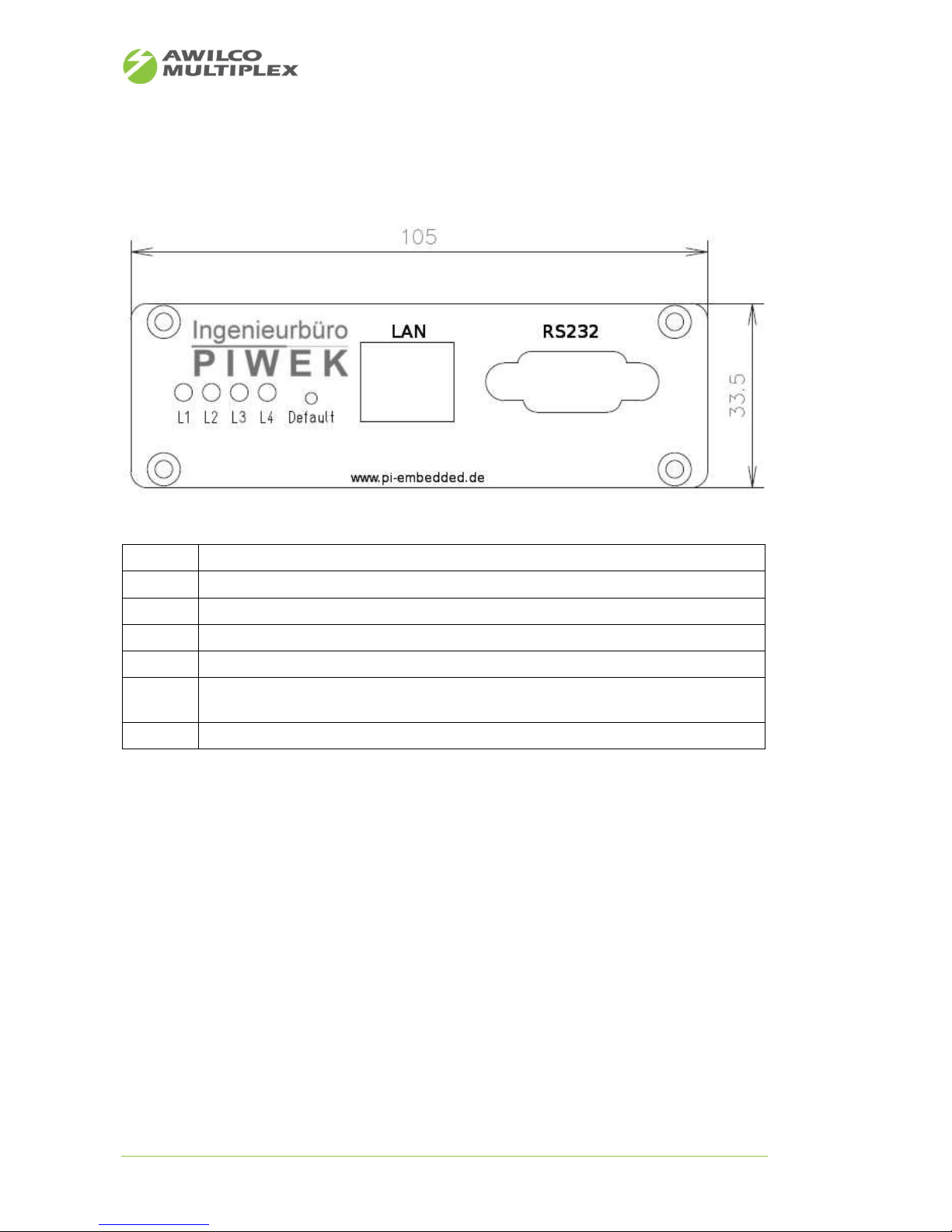
By pressing the „Default“ switch button 5 seconds (see Figure 1) you can restore the default setting.
DHCP
Enabled since firmware version v0.6.7
IP address
192.168.96.210
Subnet mask
255.255.255.0
Gateway
192.168.96.1
Primary DNS
192.168.96.1
Secondary DNS
0.0.0.0
Table 4: IP default settings
Page 8
AWILCO-MULTIPLEX ApS | Yderholmvej 64 | DK-4623 Ll. Skensved | Phone: +45 5656 5400 | Fax: +45 5656 5405
[email protected] | www.awilco-multiplex.dk
5 Description Periphery
5.1 Front panel
L1
Power supply on
L2
1Hz heart beat, system
L3
Data communication EFOY Pro ↔ IP-EFOY-GATEWAY
L4
Not used
Default
Switch button must be pressed > 5 seconds, to restore default setting
RS232
Communication IP-EFOY-GATEWAY ↔ EFOY PRO
• just use with appropriate adaptor (available on request in Cabel-Kit)
LAN
Ethernet 10/100BASE-T (cables available on request in Cabel-Kit)
Table 5: Description front panel
Figure 1: Front panel
Page 9
AWILCO-MULTIPLEX ApS | Yderholmvej 64 | DK-4623 Ll. Skensved | Phone: +45 5656 5400 | Fax: +45 5656 5405
[email protected] | www.awilco-multiplex.dk
5.2 Back panel
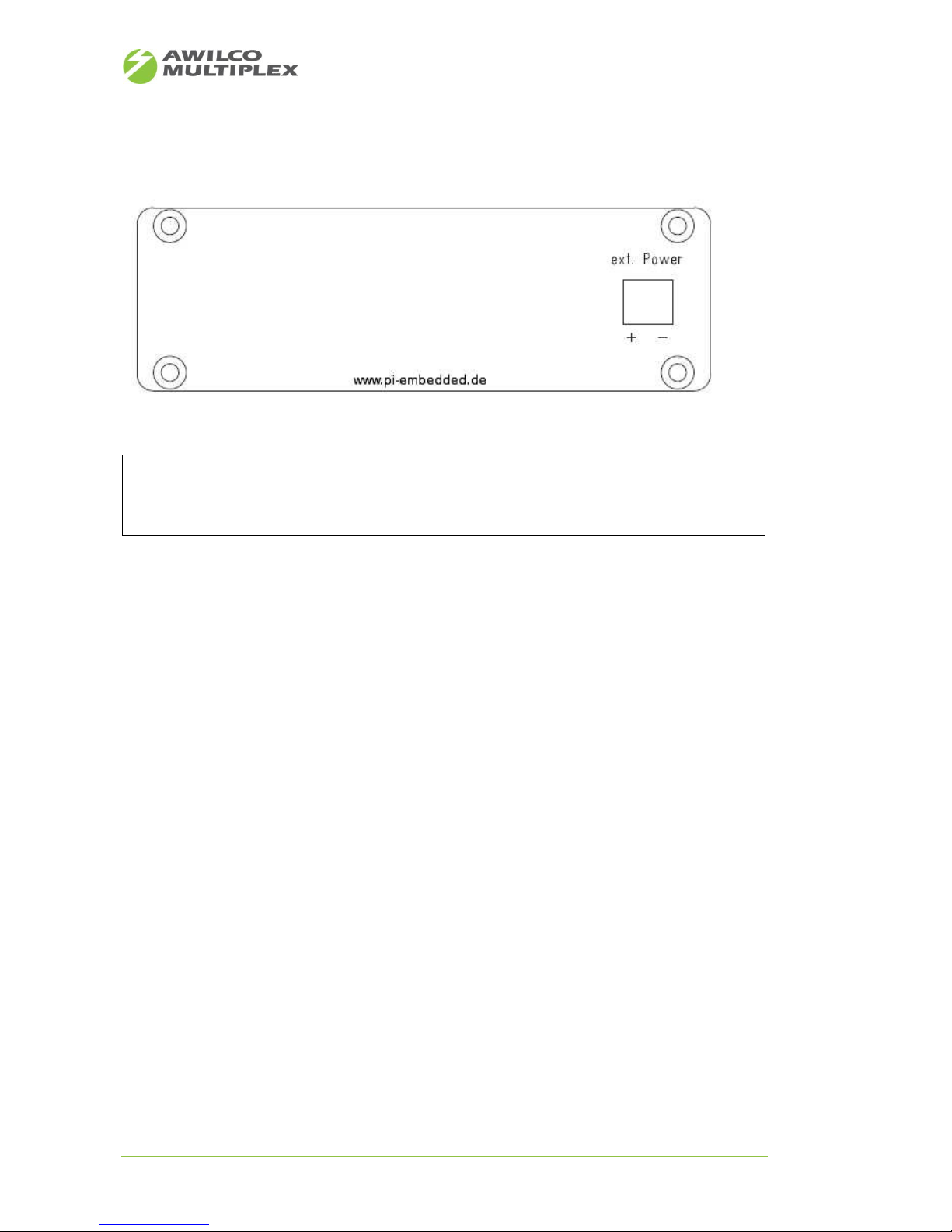
Ext. Power
External power supply 8-42V
• Inverse-polarity protection
• TVS Diode >54V
• Power supply filter
Table 6: Description front panel
Figure 2: Back panel
Page 10
AWILCO-MULTIPLEX ApS | Yderholmvej 64 | DK-4623 Ll. Skensved | Phone: +45 5656 5400 | Fax: +45 5656 5405
[email protected] | www.awilco-multiplex.dk
6 Supported Protocols
Protocol
Comment
HTTP
• Configuration
• Fuel cell states
DCHP Client
• Automatic IP configuration
SNMP v2c
• Remote control EFOY PRO
SMTP
• Email notification service
Protocol stack EFOY PRO
• Communication with EFOY PRO over RS232
TCP-UART-BRIGE-MODE
• Remote communication with EFOY PRO over terminal command line
interface
Socket Server Service
• Optional on request
Table 7: TCP/UDP Protocols
Protocol
Comment
Protocol stack EFOY PRO
• Communication with EFOY PRO over RS232
Table 8: Protocol RS232
7 EFOY PRO Compatibility
Fuel Cell
Comment
EFOY PRO
600/1600/2200/2200 XT
• Compatible with EFOY PRO versions equal or greater than QB date
2011-03-24
EFOY PRO 800/2400/DUO
• Compatible with EFOY PRO versions equal QB date 2012-11-11
Table 9: EFOY PRO compatibility
Page 11
AWILCO-MULTIPLEX ApS | Yderholmvej 64 | DK-4623 Ll. Skensved | Phone: +45 5656 5400 | Fax: +45 5656 5405
[email protected] | www.awilco-multiplex.dk
8 Getting started
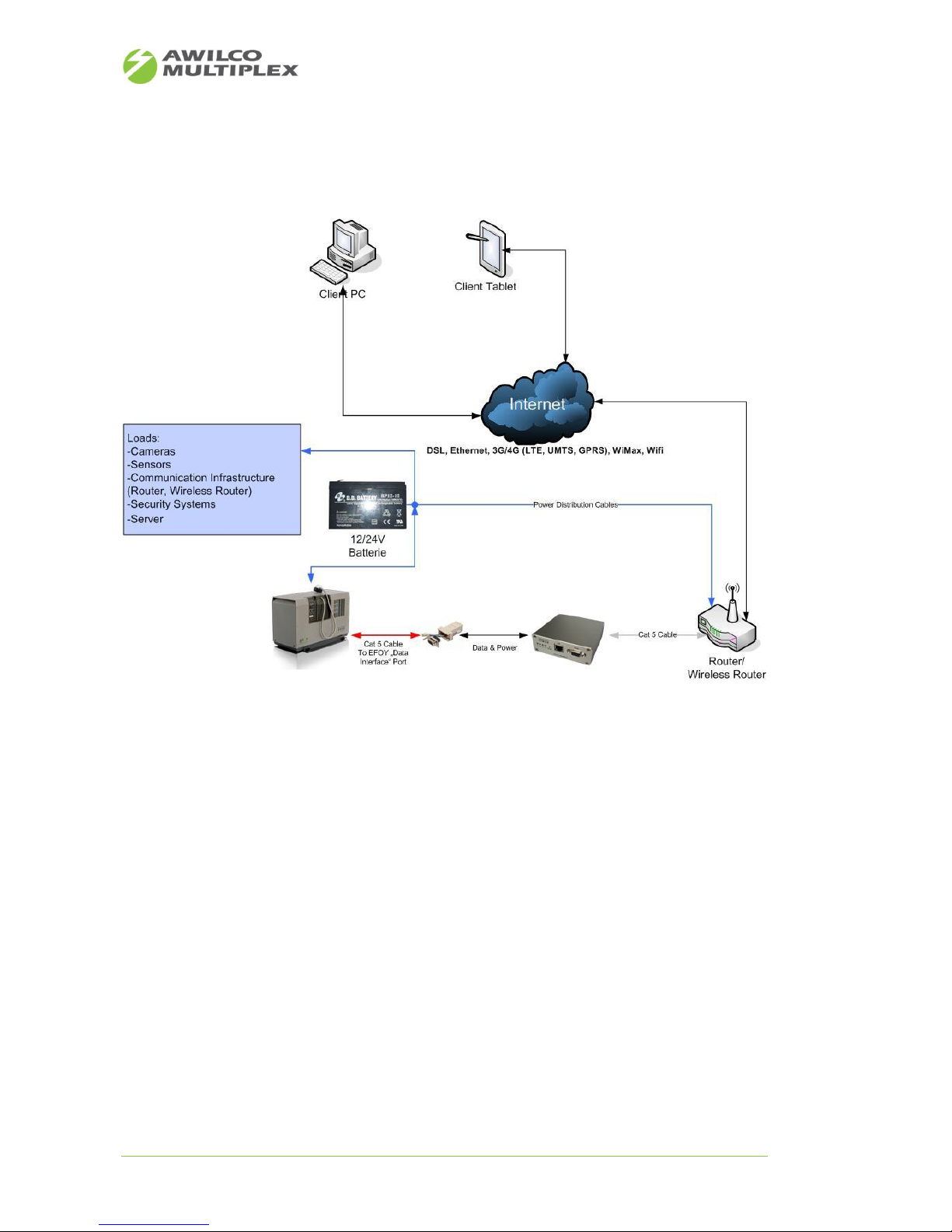
Figure 3 depicts schematically the cabling diagram of the IP-EFOY-GATEWAY to other communication devices
and EFOY PRO periphery.
Figure 3: Schematic Installation
Page 12
AWILCO-MULTIPLEX ApS | Yderholmvej 64 | DK-4623 Ll. Skensved | Phone: +45 5656 5400 | Fax: +45 5656 5405
[email protected] | www.awilco-multiplex.dk
As a start please follow the following steps to set up the network configuration properly. The IP-EFOYGATEWAY's default IP-Address is “192.168.96.210”.
Use your browser on initial installation or after a default reset to access IP-EFOY-GATEWAY's web server.
First you have to set up network settings to be conform with your local network.
1. Connect the IP-EFOY-GATEWAY RJ-45 interface labelled with “ETH” with the grey cable to your PC's
network interface
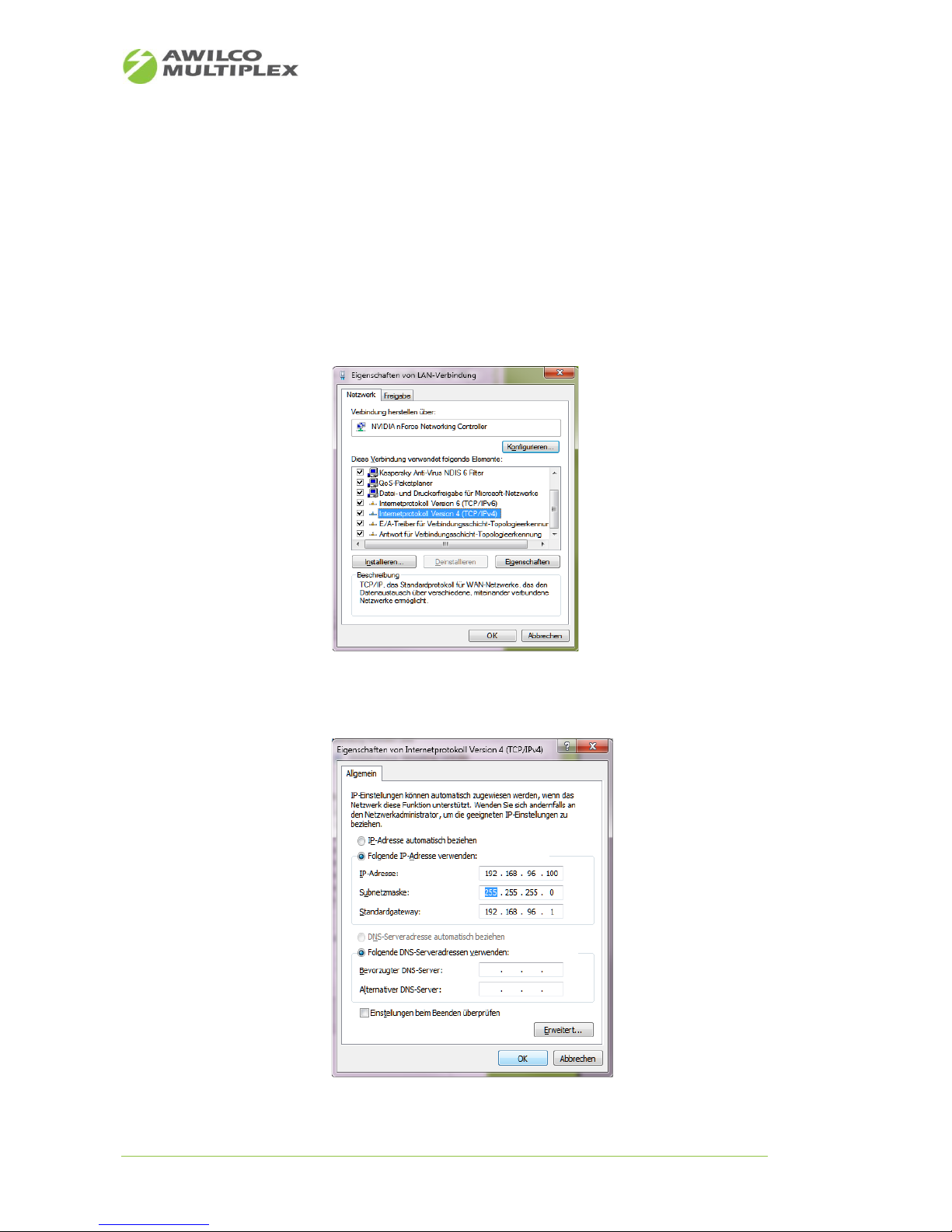
2. Reconfigure the IP configuration under menu “Internet protocol version 4” of your PC's network
interface and then press “properties” (see Figure 4)
3. Choose the following IP configuration for your PC (see Figure 5).
Figure 4: IP-Configuration Menu
Figure 5: PC's static IP-Configuration
Page 13
AWILCO-MULTIPLEX ApS | Yderholmvej 64 | DK-4623 Ll. Skensved | Phone: +45 5656 5400 | Fax: +45 5656 5405
[email protected] | www.awilco-multiplex.dk
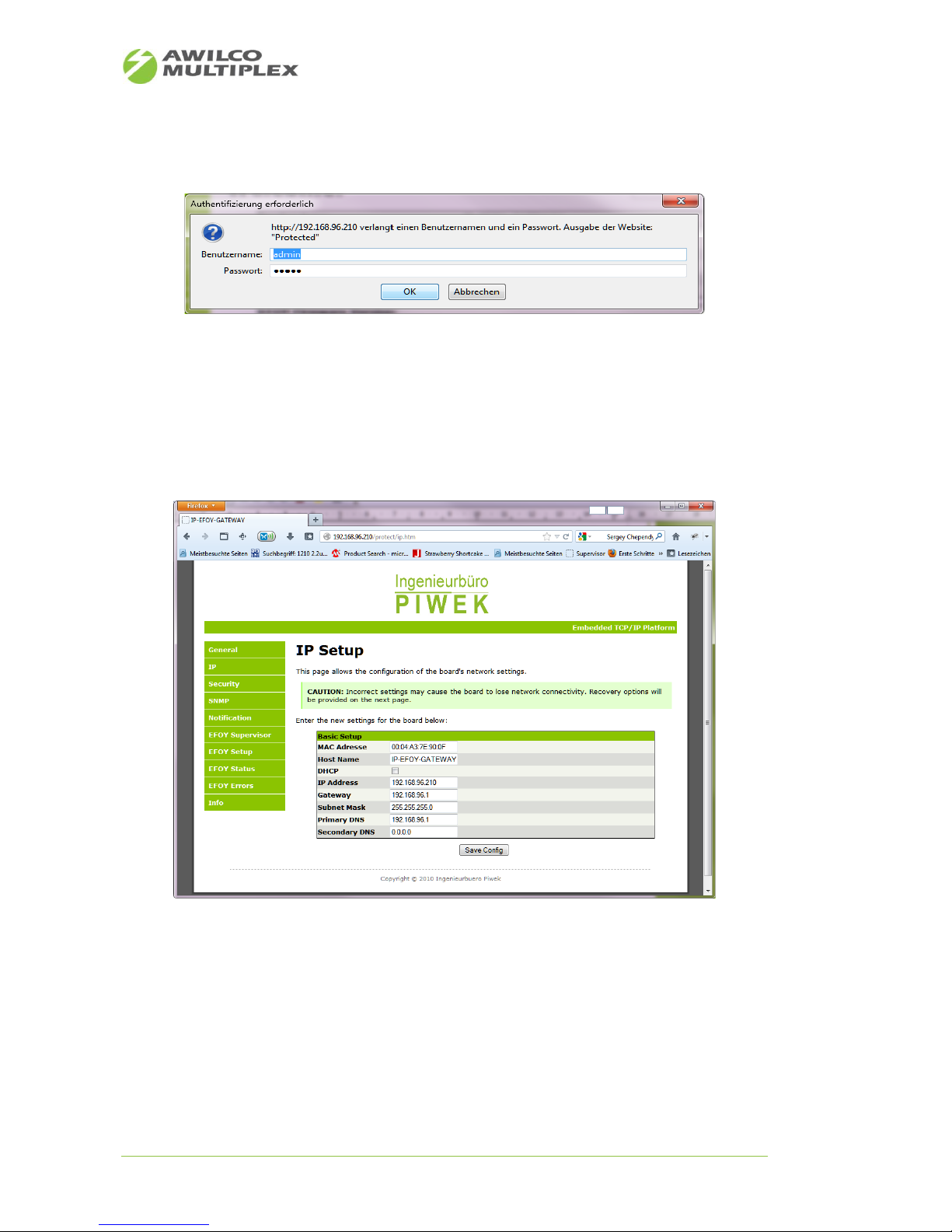
4. Open the browser and enter the default IP address of the IP-EFOY-GATEWAY (see Figure 7).
5. Choose menu item “IP” on the left of the website and enter the default login and password co m-
bination (see Figure 6 - Default user name: “admin” and default password: “00000”)
6. Afterwards choose new static IP-Configuration for your given network (see Figure 7). If you set the
“DHCP” check box, the IP-Configuration may be accomplished by a DHCP server in the local network automatically.
7. Now you may disconnect the network cable from your PC and reconnect it to a router or wireless
router.
8. Now please open your browser again and enter the IP-EFOY-GATEWAY's IP-Address previously con-
figured under item 6
9. Now you should have access to the web server over your local network
Figure 7: IP-Konfiguration IP-EFOY-GATEWAY
Figure 6: Login IP-EFOY-GATEWAY website
Page 14
AWILCO-MULTIPLEX ApS | Yderholmvej 64 | DK-4623 Ll. Skensved | Phone: +45 5656 5400 | Fax: +45 5656 5405
[email protected] | www.awilco-multiplex.dk
9 Use-Case
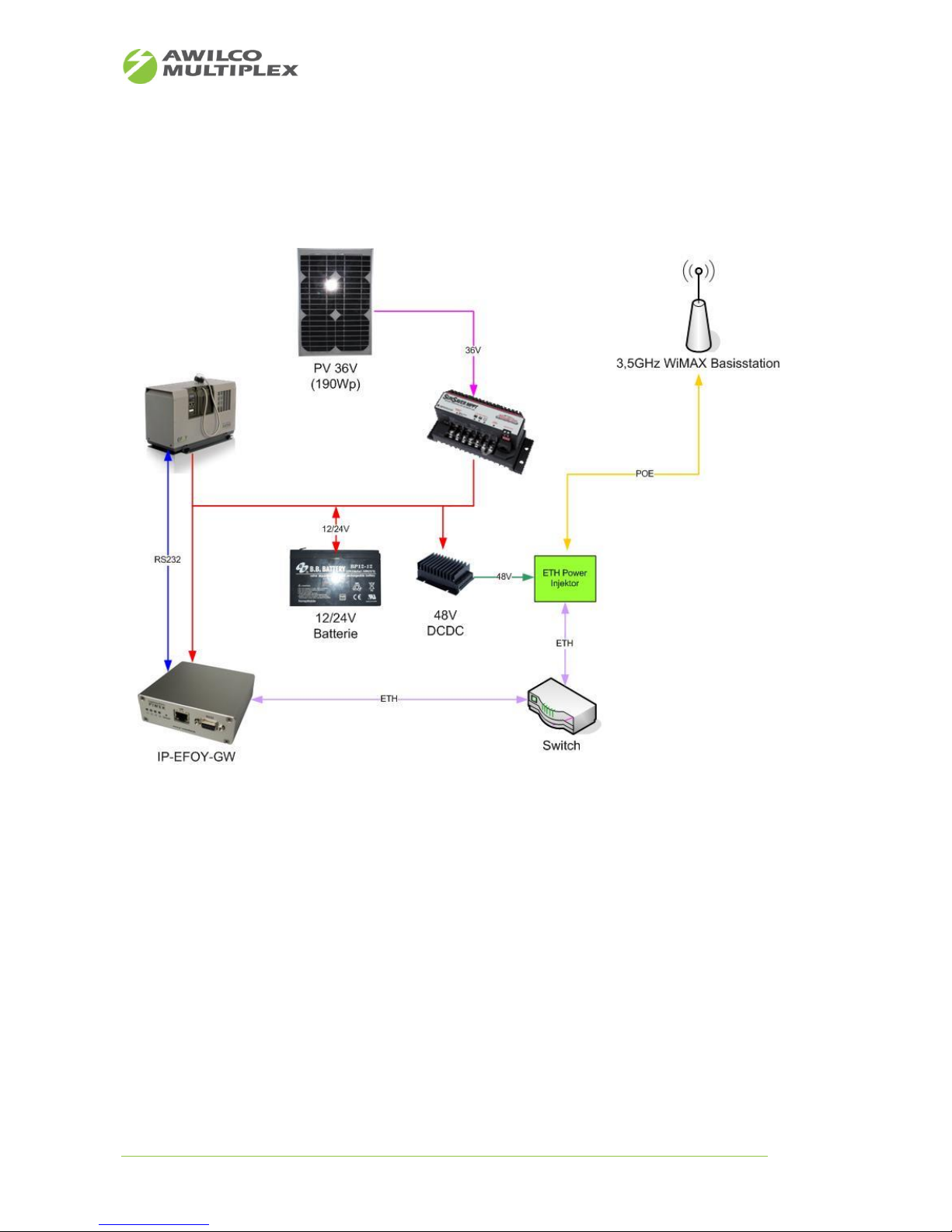
9.1 „Green“ Off-Grid 48V „Power Over Ethernet“ power supply for wireless base
stations
Figure 8: Green Power Supply
Page 15
AWILCO-MULTIPLEX ApS | Yderholmvej 64 | DK-4623 Ll. Skensved | Phone: +45 5656 5400 | Fax: +45 5656 5405
[email protected] | www.awilco-multiplex.dk
9.2 Portable EFOY Pro power supply with UMTS-Router for remote control
applications
Figure 9: Fuel cell power supply for portable applications
Page 16
AWILCO-MULTIPLEX ApS | Yderholmvej 64 | DK-4623 Ll. Skensved | Phone: +45 5656 5400 | Fax: +45 5656 5405
[email protected] | www.awilco-multiplex.dk
9.3 Off grid power supply for wireless internet service provider (3.5 / 5 GHz base
stations)
Figure 10: Pilot project - Off grid power supply for internet service provider
Page 17
AWILCO-MULTIPLEX ApS | Yderholmvej 64 | DK-4623 Ll. Skensved | Phone: +45 5656 5400 | Fax: +45 5656 5405
[email protected] | www.awilco-multiplex.dk
10 Description web interface
10.1 Web site - General
Note
Description
1
• Device name
• name will be used by the email notification service
2
• Web data poll interval for dynamic data on web site in milliseconds
3
• Port for TCP-UART-BRIDGE-MODE (1024-65535)
4
• Start/Stop TCP-UART-BRIDGE-MODE
5
• Save settings
6
• IP-EFOY-GATEWAY restart
Table 10: Description web site - General
Abbildung 1: Webseite - General
Figure 11: Web site - General
Page 18
AWILCO-MULTIPLEX ApS | Yderholmvej 64 | DK-4623 Ll. Skensved | Phone: +45 5656 5400 | Fax: +45 5656 5405
[email protected] | www.awilco-multiplex.dk
10.2 Web site – IP
Note
Description
1
• MAC address IP-EFOY-GATEWAY
2
• Host name IP-EFOY-GATEWAY
3
• DHCP client service enabled/disabled
4
• IP address IP-EFOY-GATEWAY (automatic bound via DHCP)
5
• Gateway in LAN (automatic bound via DHCP)
6
• Subnet mask (automatic bound via DHCP)
7
• Primary DNS Server (automatic bound via DHCP)
8
• Secondary DNS Server (automatic bound via DHCP)
9
• Save settings
Table 11: Description web site – IP
Figure 12: Web site - IP
Page 19
AWILCO-MULTIPLEX ApS | Yderholmvej 64 | DK-4623 Ll. Skensved | Phone: +45 5656 5400 | Fax: +45 5656 5405
[email protected] | www.awilco-multiplex.dk
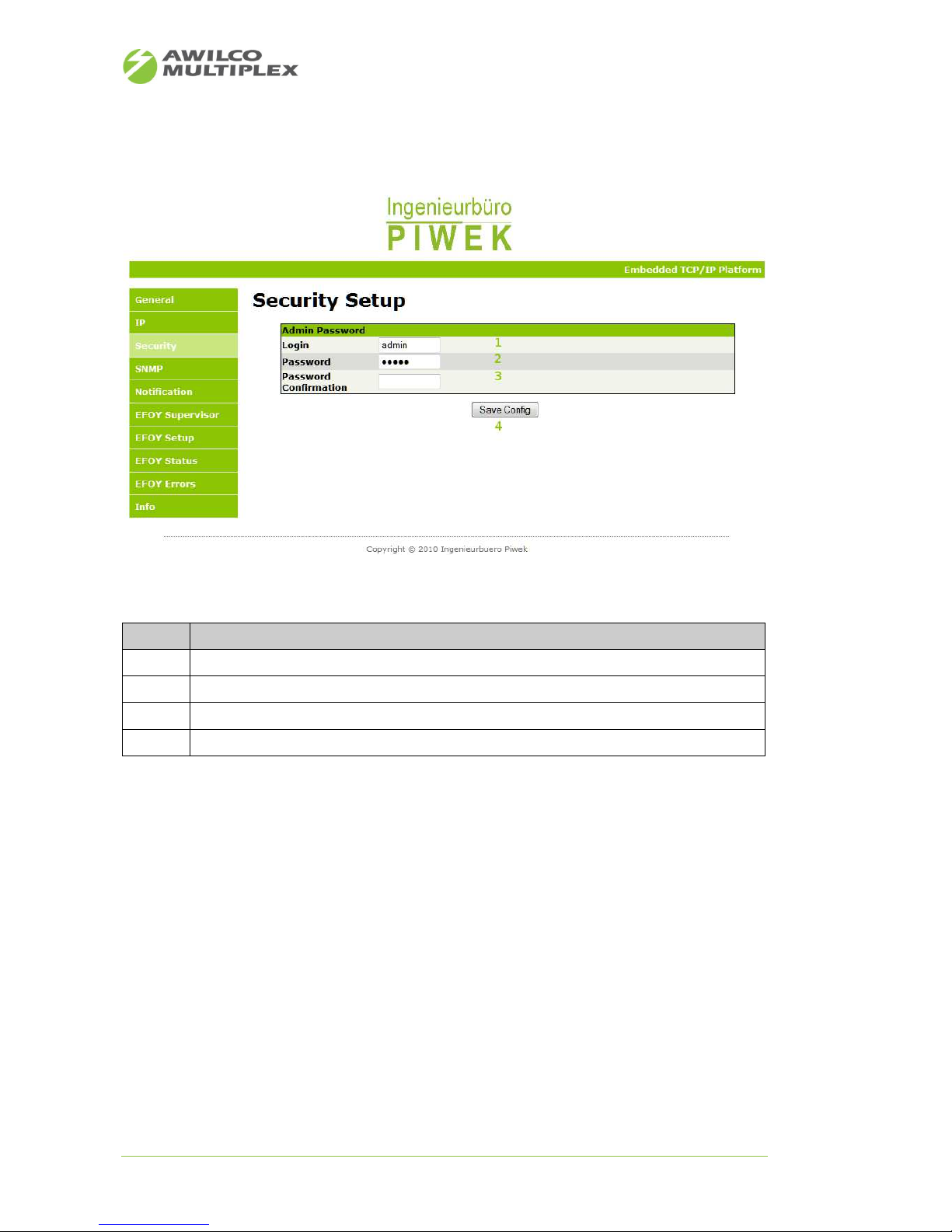
10.3 Web site - Security
Note
Description
1
• User name
2
• Password(maximum 9 signs)
3
• Password confirmation
4
• Save settings
Table 12: Description web site – Security
Figure 13: Web site - Security
Page 20
AWILCO-MULTIPLEX ApS | Yderholmvej 64 | DK-4623 Ll. Skensved | Phone: +45 5656 5400 | Fax: +45 5656 5405
[email protected] | www.awilco-multiplex.dk
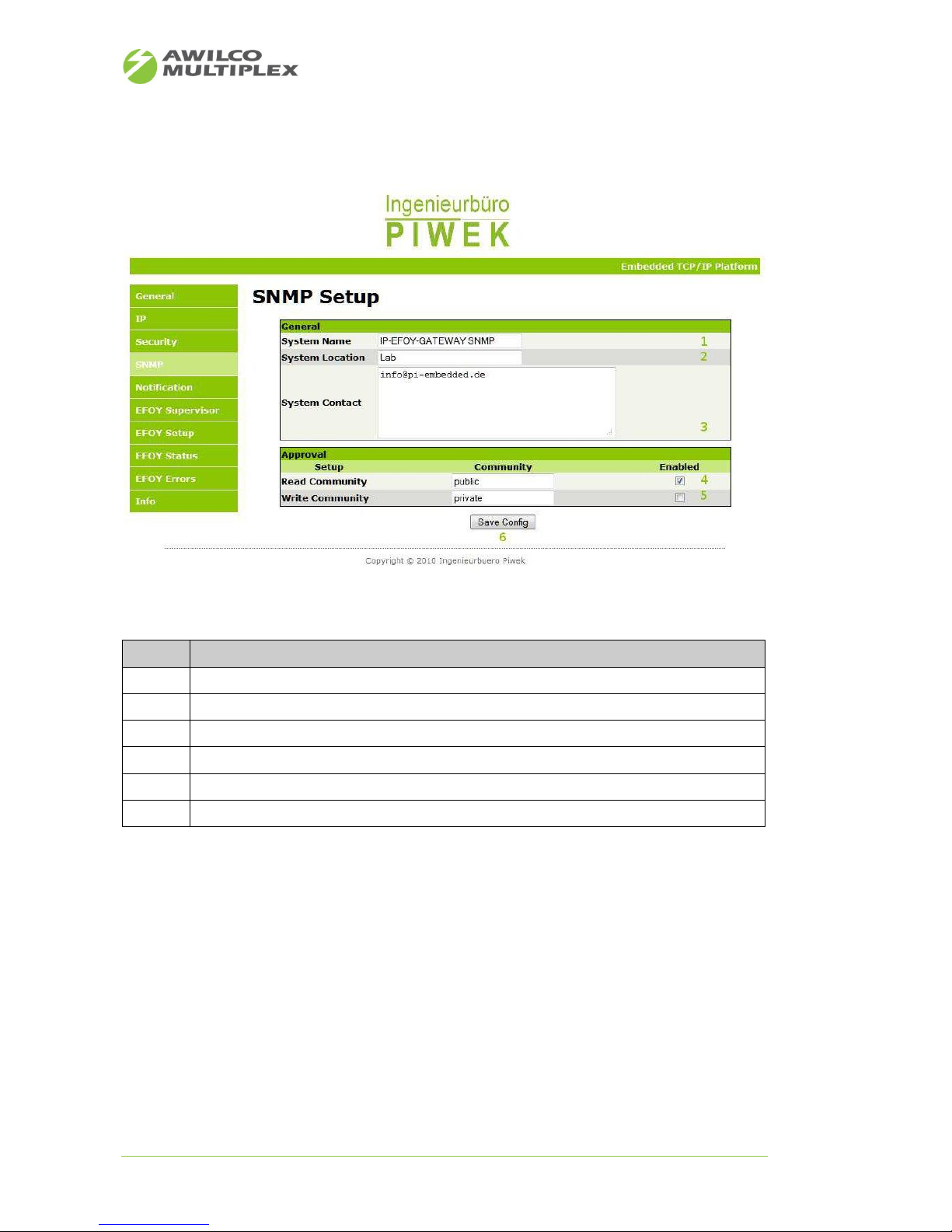
10.4 Web site - SNMP
Note
Description
1
• System name (may be readout via SNMP default OID)
2
• System location (may be readout via SNMP default OID)
3
• System contact (may be readout via SNMP default OID)
4
• Community name for read SNMP values (OIDs)
5
• Community Name for write SNMP values (OIDs) currently not used
6
• Save settings
Table 13: Description web site – SNMP
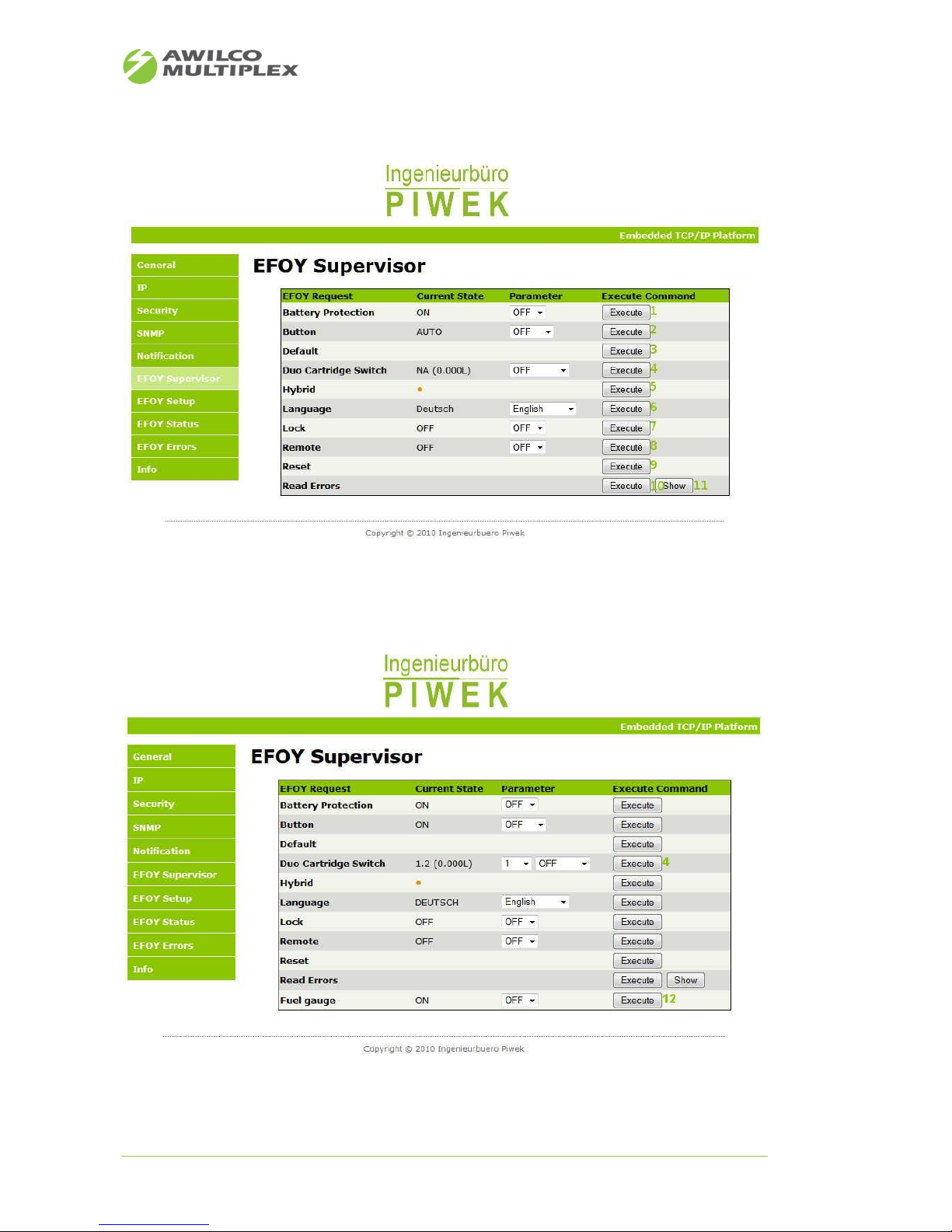
10.5 Web site - EFOY Supervisor
The EFOY Supervisor overview gives the customer further configuration and remote control opportunities as
well. Some options differ from 1st to 2nd EFOY PRO generation.
• EFOY PRO restart
• EFOY PRO default settings
• EFOY PRO display language
• EFOY PRO error list
Figure 14: Web site - SNMP
Page 21
AWILCO-MULTIPLEX ApS | Yderholmvej 64 | DK-4623 Ll. Skensved | Phone: +45 5656 5400 | Fax: +45 5656 5405
[email protected] | www.awilco-multiplex.dk
Figure 15: Web site - 1st generation EFOY Supervisor
Figure 16: Web site - 2
nd
generation EFOY Supervisor
Page 22

AWILCO-MULTIPLEX ApS | Yderholmvej 64 | DK-4623 Ll. Skensved | Phone: +45 5656 5400 | Fax: +45 5656 5405
[email protected] | www.awilco-multiplex.dk
Note
Description
1
• Battery protection – nevertheless the EFOY will charge the battery if the battery voltage fall
below the configured voltage and the EFOY operating mode is set to “OFF”, to prevent deep
discharge
2
• Selection of EFOY operating mode
3
• Set default settings
4
• Switch duo cartridge switch (different options for 1
st
and 2nd EFOY PRO generation)
5
• Switch to hybrid mode
6
• Language selection for EFOY control panel
7
• lock configuration via control panel
8
• Switch to remote mode
9
• Restart EFOY
10
• Read EFOY Errors
11
• Display EFOY errors on web site (link to EFOY Errors menu item)
12
• Fuel gauge (just supported by 2
nd
EFOY PRO generation)
Table 14: Description web site - EFOY Supervisor
Page 23
AWILCO-MULTIPLEX ApS | Yderholmvej 64 | DK-4623 Ll. Skensved | Phone: +45 5656 5400 | Fax: +45 5656 5405
[email protected] | www.awilco-multiplex.dk
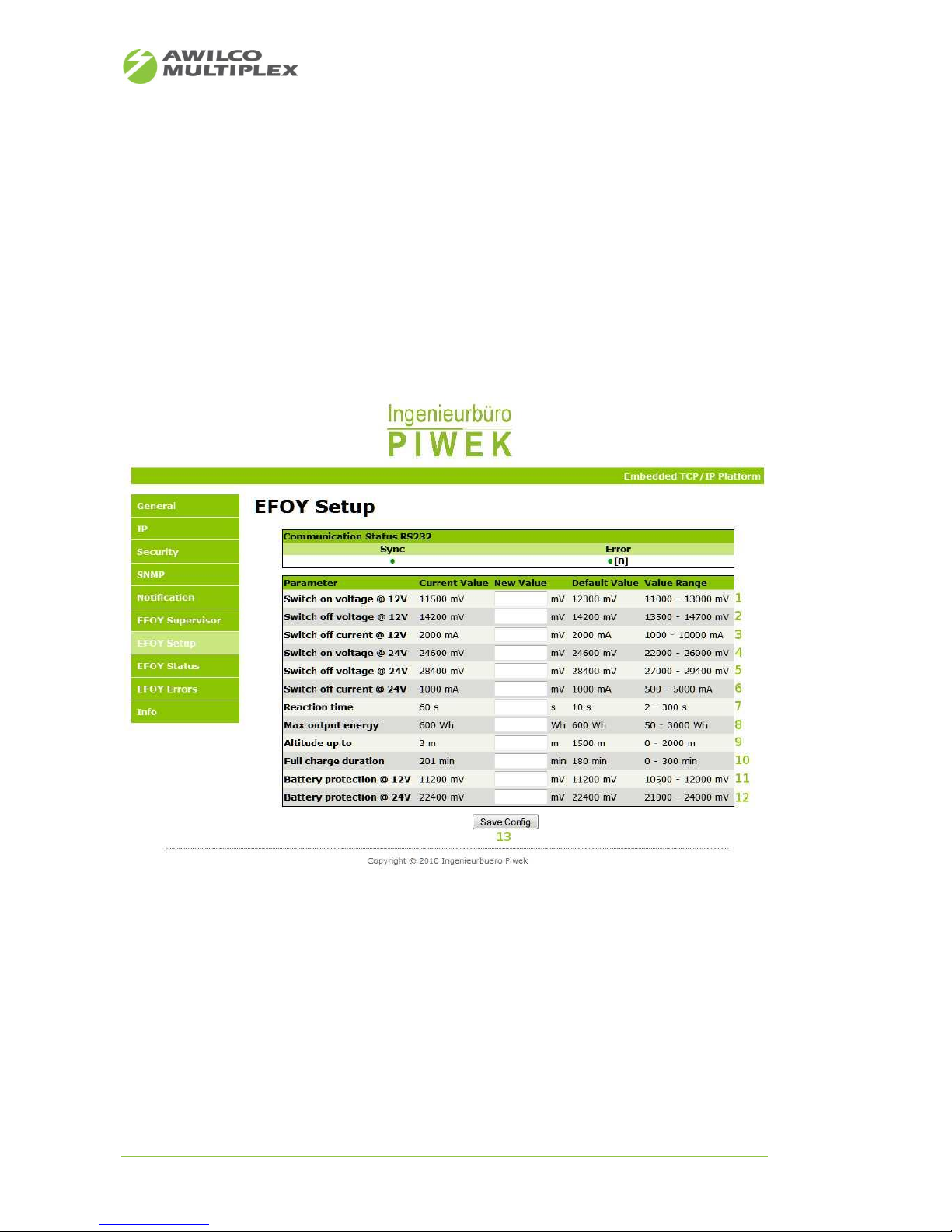
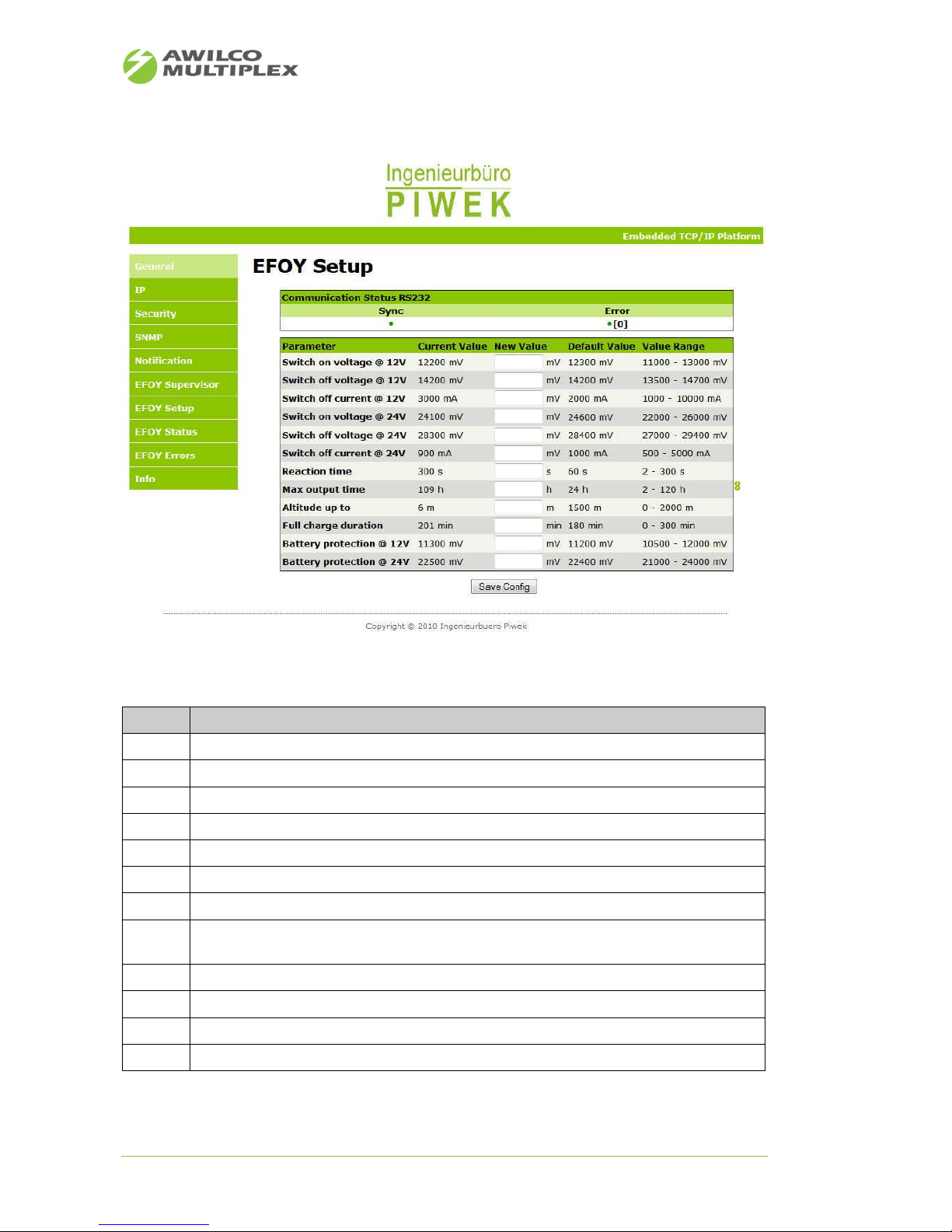
10.6 Web site - EFOY Setup
The EFOY setup overview makes it possible to set up EFOY PRO fuel cell's configuration. The entire configu-
ration is described analogue to the EFOY “Config” request. Some options differ from 1st to 2nd EFOY PRO
generation.
The table is arranged as follows:
• The first column shows the given parameter
• The second column shows the current parameter value
• The third column shows an empty text box, to update the parameter value
• The fourth column shows the default parameter value
• The fifth column shows the accepted parameter value range
Figure 17: Web site – 1
st
generation EFOY Setup
Page 24
AWILCO-MULTIPLEX ApS | Yderholmvej 64 | DK-4623 Ll. Skensved | Phone: +45 5656 5400 | Fax: +45 5656 5405
[email protected] | www.awilco-multiplex.dk
Note
Description
1
• EFOY switch on voltage for 12V systems in mV
2
• EFOY switch off voltage for 12V systems in mV
3
• EFOY switch off voltage 12V systems in mA
4
• EFOY switch on voltage for 24V systems in mV
5
• EFOY switch off voltage for 24V systems in mV
6
• EFOY switch off voltage 24V systems in mA
7
• Reaction time in seconds
8
• Maximum EFOY output energy in Wh (for 1
st
EFOY PRO generation)
• Maximum output time in hours (for 2
nd
EFOY PRO generation)
9
• Altitude above Null in meter
10
• Maximum charge time duration in minutes
11
• Battery deep discharge threshold for 12V systems in mV
12
• Battery deep discharge threshold for 24V systems in mV
Table 15: Description web site - EFOY Setup
Figure 18: Web site – 2
nd
generation EFOY Setup
Page 25
AWILCO-MULTIPLEX ApS | Yderholmvej 64 | DK-4623 Ll. Skensved | Phone: +45 5656 5400 | Fax: +45 5656 5405
[email protected] | www.awilco-multiplex.dk
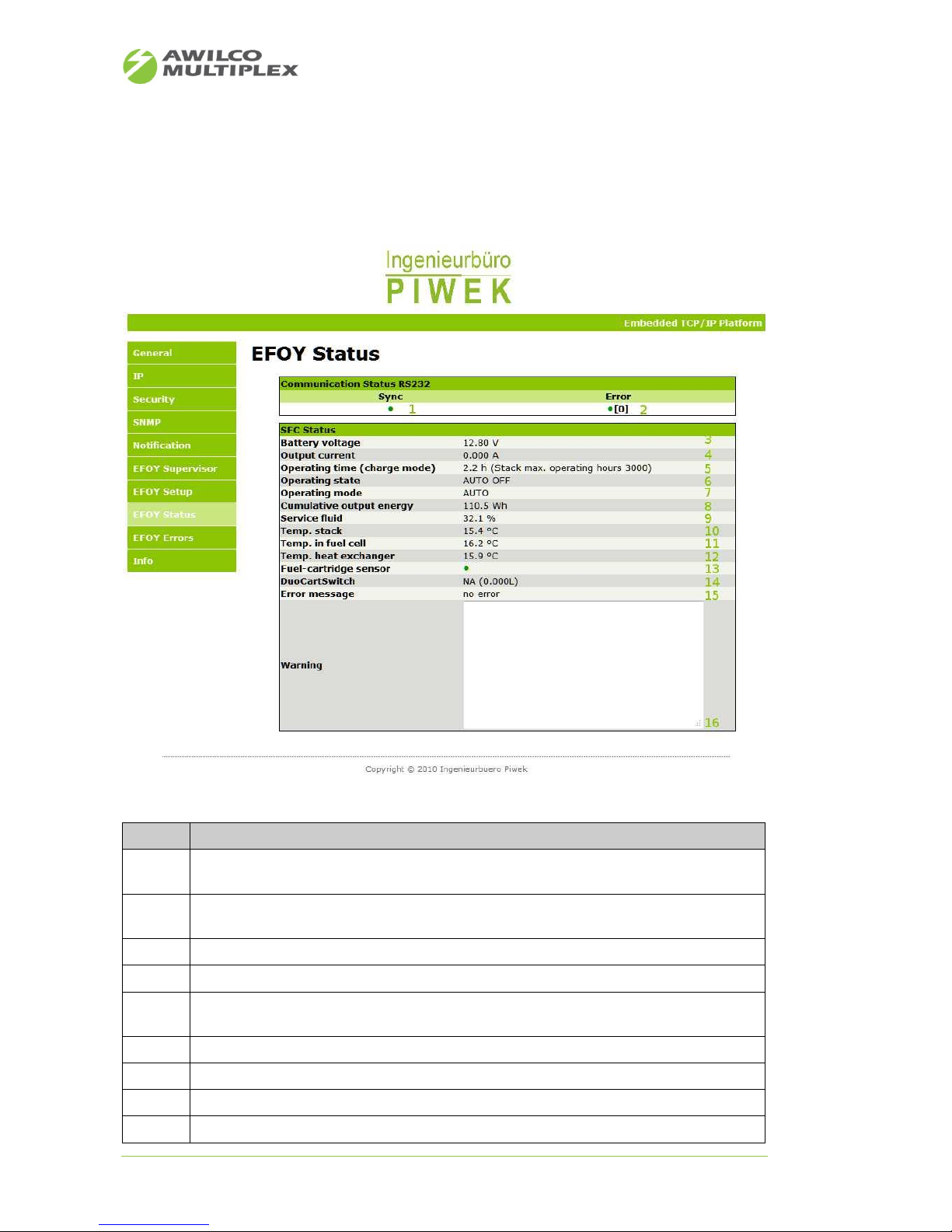
10.7 Web site - EFOY Status
The EFOY Status overview makes it possible to see the configuration of the EFOY PRO fuel cell. All values are
updated dynamically and are displayed at a glance.
Note
Description
1
• Green = IP-EFOY-GATEWAY synchronized with EFOY
• Red = IP-EFOY-GATEWAY not synchronized with EFOY
2
• Green = IP-EFOY-GATEWAY no errors on processing EFOY data
• Red = IP-EFOY-GATEWAY errors on processing EFOY data
3
• Current EFOY battery voltage in V
4
• Current EFOY charging current in A
5
• EFOY operating hours in charge mode with additional specification of warranted operating
hours for the given EFOY fuel cell
6
• Current EFOY operating state
7
• Set EFOY operating mode
8
• Cumulative output energy
9
• Service fluid level
Figure 19: Web site - EFOY Status
Page 26
AWILCO-MULTIPLEX ApS | Yderholmvej 64 | DK-4623 Ll. Skensved | Phone: +45 5656 5400 | Fax: +45 5656 5405
[email protected] | www.awilco-multiplex.dk
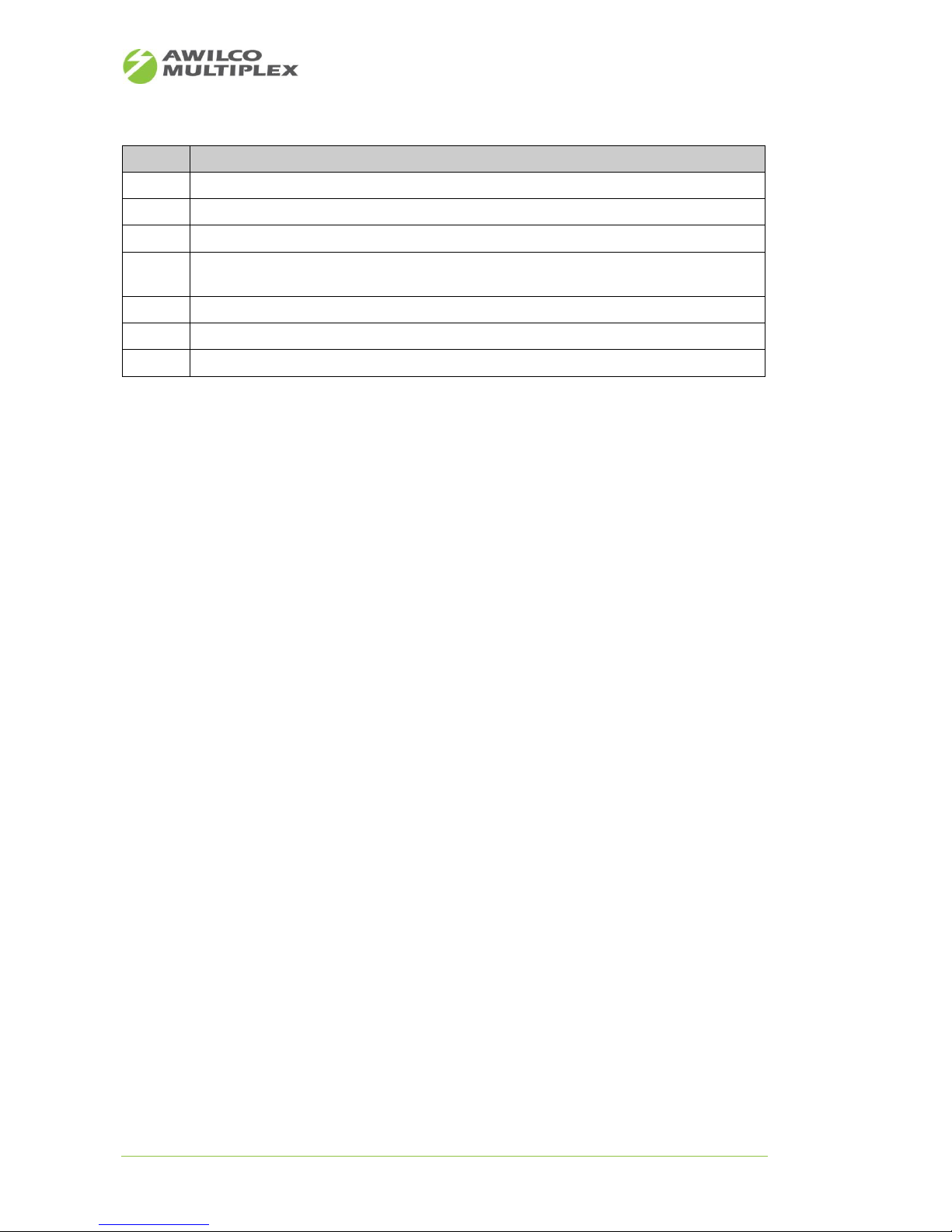
Note
Description
10
• Temperature at the stack
11
• Temperature in the fuel cell
12
• Temperature at the heat exchanger
13
• Green = methanol level above sensor threshold or no sensor connected
• Red = methanol level below sensor threshold
14
• DuoCartSwitch state
15
• EFOY error message
16
• EFOY warning message
Table 16: Description web site - EFOY Status
Page 27
AWILCO-MULTIPLEX ApS | Yderholmvej 64 | DK-4623 Ll. Skensved | Phone: +45 5656 5400 | Fax: +45 5656 5405
[email protected] | www.awilco-multiplex.dk
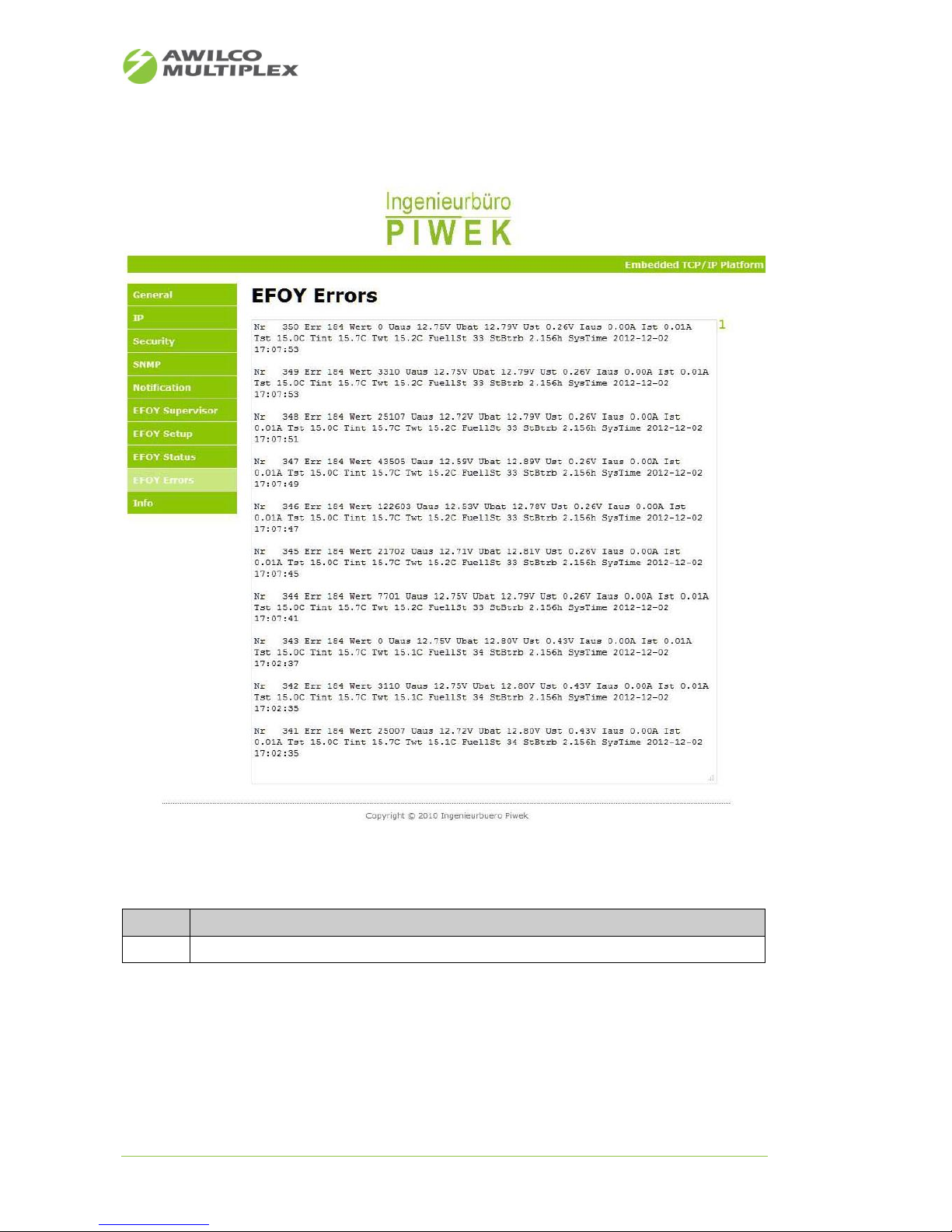
10.8 Web site - EFOY Errors
Note
Description
1
EFOY error listing
Table 17: Description web site - EFOY Errors
Figure 20: Web site - EFOY Errors
Page 28
AWILCO-MULTIPLEX ApS | Yderholmvej 64 | DK-4623 Ll. Skensved | Phone: +45 5656 5400 | Fax: +45 5656 5405
[email protected] | www.awilco-multiplex.dk
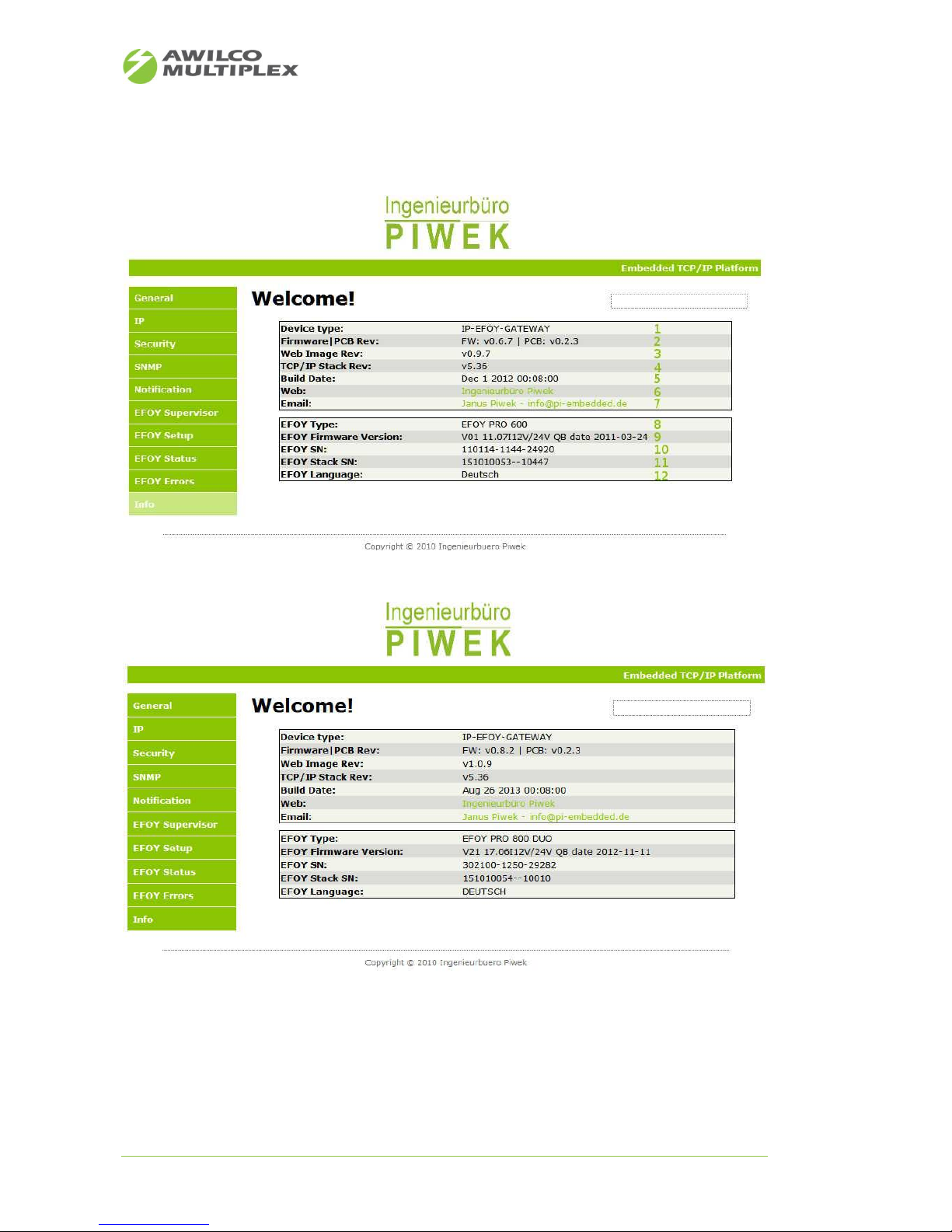
10.9 Web site - Info
Figure 21: Web site – 1st generation EFOY Info
Figure 22: Web site – 2nd generation EFOY Info
Page 29

AWILCO-MULTIPLEX ApS | Yderholmvej 64 | DK-4623 Ll. Skensved | Phone: +45 5656 5400 | Fax: +45 5656 5405
[email protected] | www.awilco-multiplex.dk
Note
Description
1
• Device type IP-EFOY-GATEWAY
2
• Version firmware and hardware
3
• Version web site image
4
• Version TCP/IP Stack
5
• Compile date
6
• Link Web site Ingenieurbuero Piwek
7
• Link Email to Ingenieurbuero Piwek
8
• Connected EFOY will be determined automatically
9
• Firmware Version EFOY
10
• Serial no. EFOY
11
• Serial no. EFOY Stack
12
• Language selected in control panel
Table 18: Description web site – Info
Page 30
AWILCO-MULTIPLEX ApS | Yderholmvej 64 | DK-4623 Ll. Skensved | Phone: +45 5656 5400 | Fax: +45 5656 5405
[email protected] | www.awilco-multiplex.dk
10.10 Email Notification Service
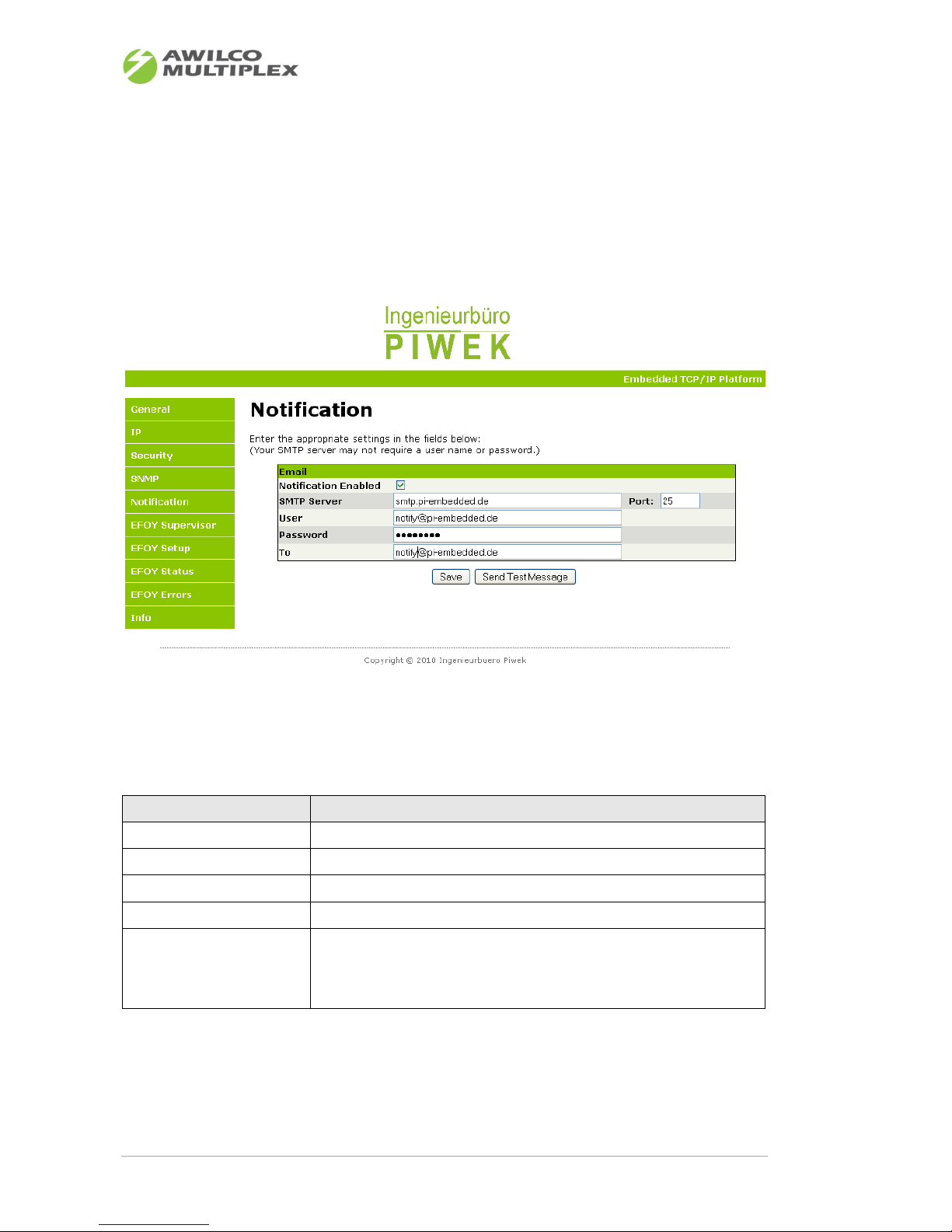
From firmware versions v0.6.1 on, the IP-EFOY-GATEWAY supports an email notification service to deliver
EFOY PRO events and warnings to an email address. From now on service personnel get real-time email fault
reports on their smart phone or email account. The service is set up the easy way over the website menu
“Notification” (see Figure 22). The user just needs to have a valid email address and an email account login
for the email server.
The following EFOY PRO events are delivered to the preconfigured email recipient via an email fault report
(see 20).
EFOY PRO Parameter
Event description
Operating State
If error or off
Cartridge sensor
If cartridge below sensor level
Warning
if Warning message in memory
Service Fluid
If level <19%
Warranted operating hours
If warranted operating hours reached
• EFOY PRO 600 -2200 → 3000 h
• EFOY PRO 2200XT → 4500 h
• EFOY PRO 800/2400 → 4500 h
Table 19: Notification event
Figure 23: Website email notification
Page 31
AWILCO-MULTIPLEX ApS | Yderholmvej 64 | DK-4623 Ll. Skensved | Phone: +45 5656 5400 | Fax: +45 5656 5405
[email protected] | www.awilco-multiplex.dk
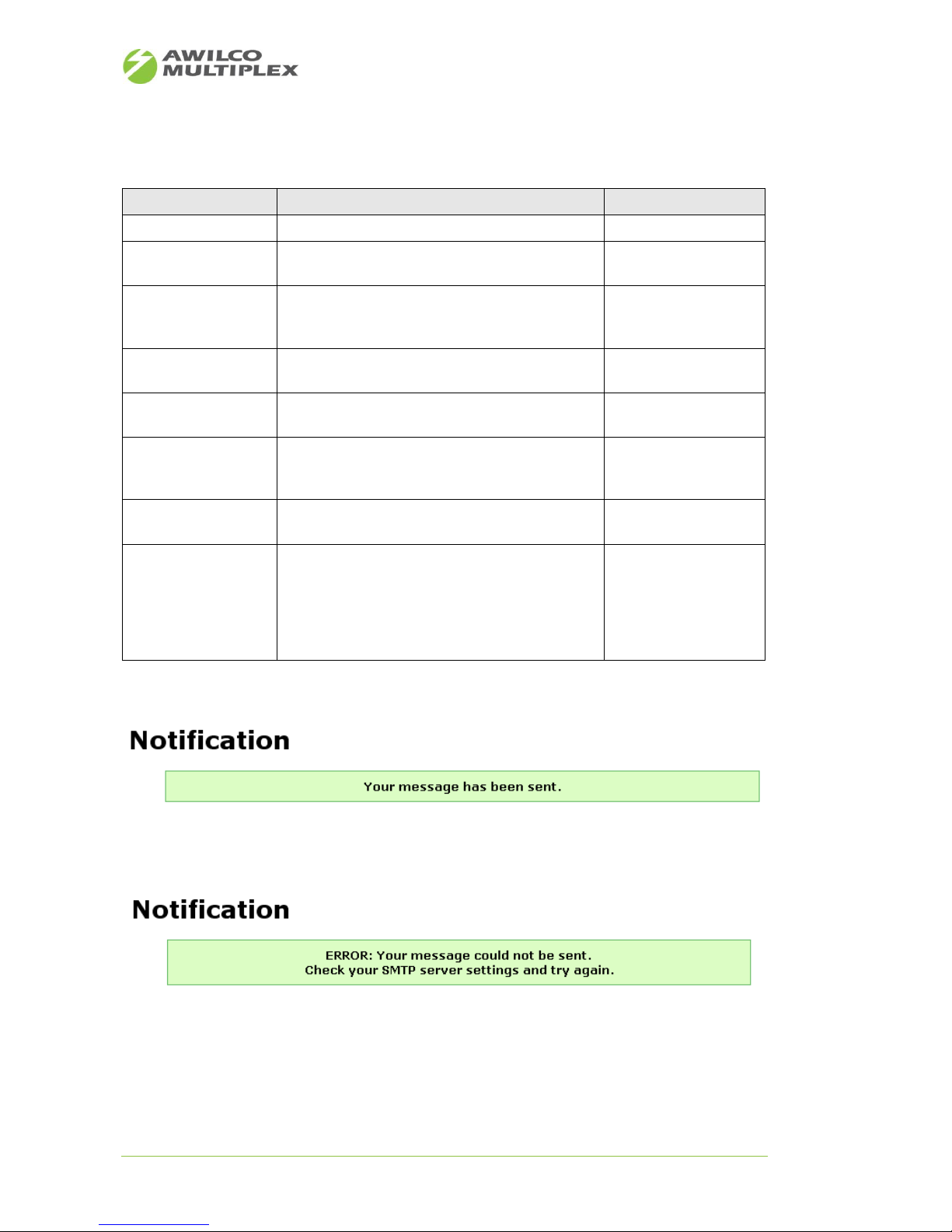
In the following 21 the email notification configuration is described.
Field name
Description
Option
Notification Enabled
Enables the email notification service
mandatory
SMTP Server
SMTP server used for email delivery. Please consult
your administrator or email provider.
mandatory
Port
Port number of the SMTP server. Please consult your
administrator or email provider. By default port 25
should be set
mandatory
User
User name of the SMTP servers.
Please consult your administrator or email provider.
optional
Password
Password of the SMTP servers.
Please consult your administrator or email provider.
optional
To
Email address of the recipient. The right email format
is checked on pressing save button. If it is incorrect,
an pop-up window shows an error message.
mandatory
Save
Saves the configuration. Please use this button after
finishing the email configuration.
optional
Send Test Message
After saving the configuration, you can generate a
test email message by pressing this button. Use this
way to check if emails are delivered correctly to the
configured recipient. The head of the website shows
a message if the email was delivered or not. (see
Figure 24 and Figure 25)
optional
Table 20: Configuration fields Email notification
Figure 24: Email delivered successfully
Figure 25: Email not delivered successfully
Page 32
AWILCO-MULTIPLEX ApS | Yderholmvej 64 | DK-4623 Ll. Skensved | Phone: +45 5656 5400 | Fax: +45 5656 5405
[email protected] | www.awilco-multiplex.dk
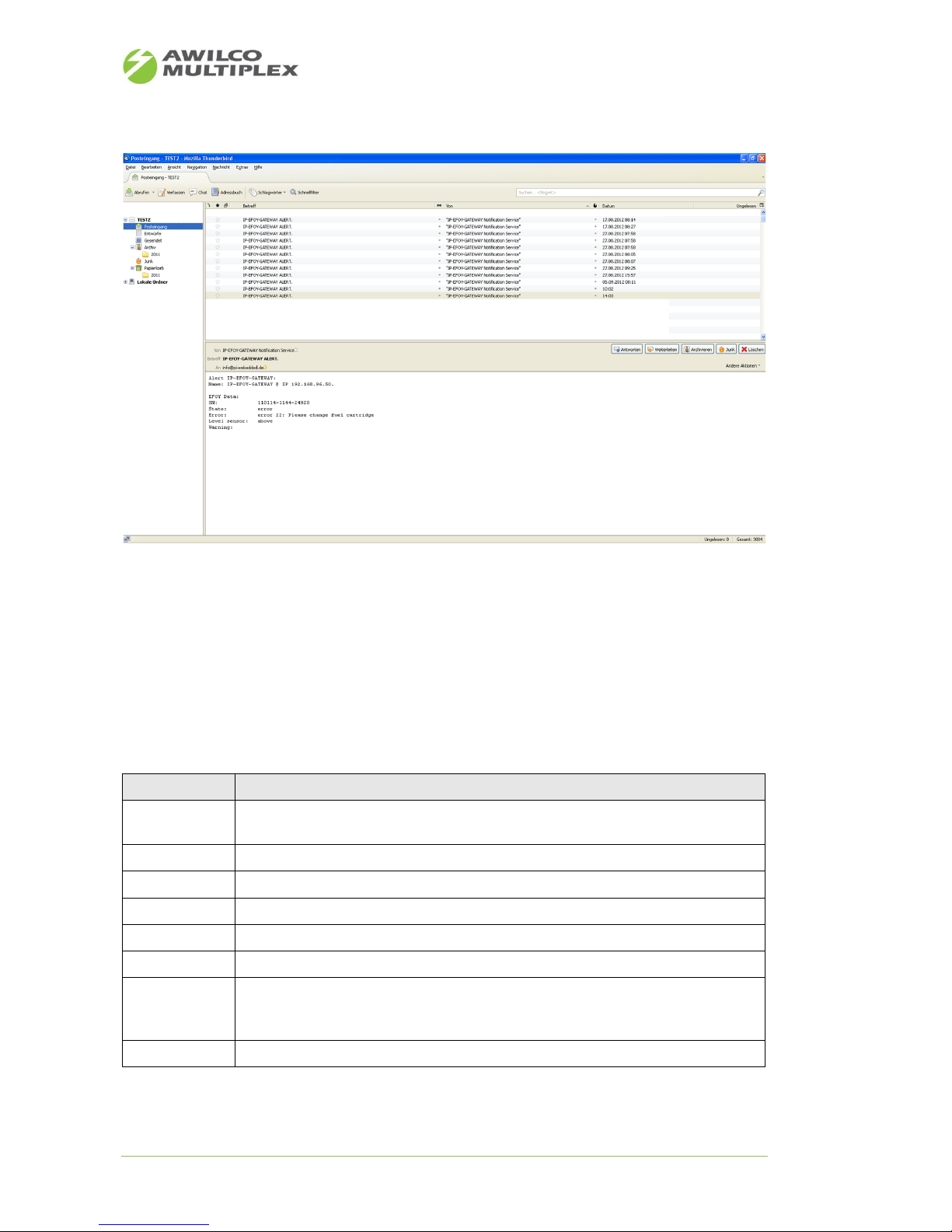
Emails of the IP-EFOY-GATEWAY can be fetched with a default email client software like Microsoft Outlook,
Mozilla Thunderbird (see 22) or a Smart-Phone.
Figure 27 depicts all fetched fault report emails in the area marked with „1“. Area „2“ shows the delivered
IP-EFOY-GATEWAY emails with the fault report in more detail. 22 illustrates the email fields and the single
rows of the fault report.
Email subject: IP-EFOY-GATEWAY ALERT.
Email from: IP-EFOY-GATEWAY Notification Service
Field name
Description
Name
Shows the name of the IP-EFOY-GATEWAY configured via the website menu „General“
and the corresponding IP address.
SN
Serial number EFOY PRO
State
Operating State EFOY PRO
Op. Hours
Operating hours and warranted operating hours in charge mode
Service Fluid
Service fluid level in %
Error
Error message EFOY PRO, if failure occurs. Otherwise filled with „no error“
Level sensor
State of the methanol cartridge sensor. If no methanol cartridge sensor is connected,
this field is filled with „above“. If it is connected and the fuel cell runs out of methanol,
the field is filled with „below“, otherwise with „above“.
Warning
Warning message EFOY PRO, if a warning is occurred, otherwise this field is empty.
Table 21: Description event protocol
Figure 26: Email Client
Page 33
AWILCO-MULTIPLEX ApS | Yderholmvej 64 | DK-4623 Ll. Skensved | Phone: +45 5656 5400 | Fax: +45 5656 5405
[email protected] | www.awilco-multiplex.dk
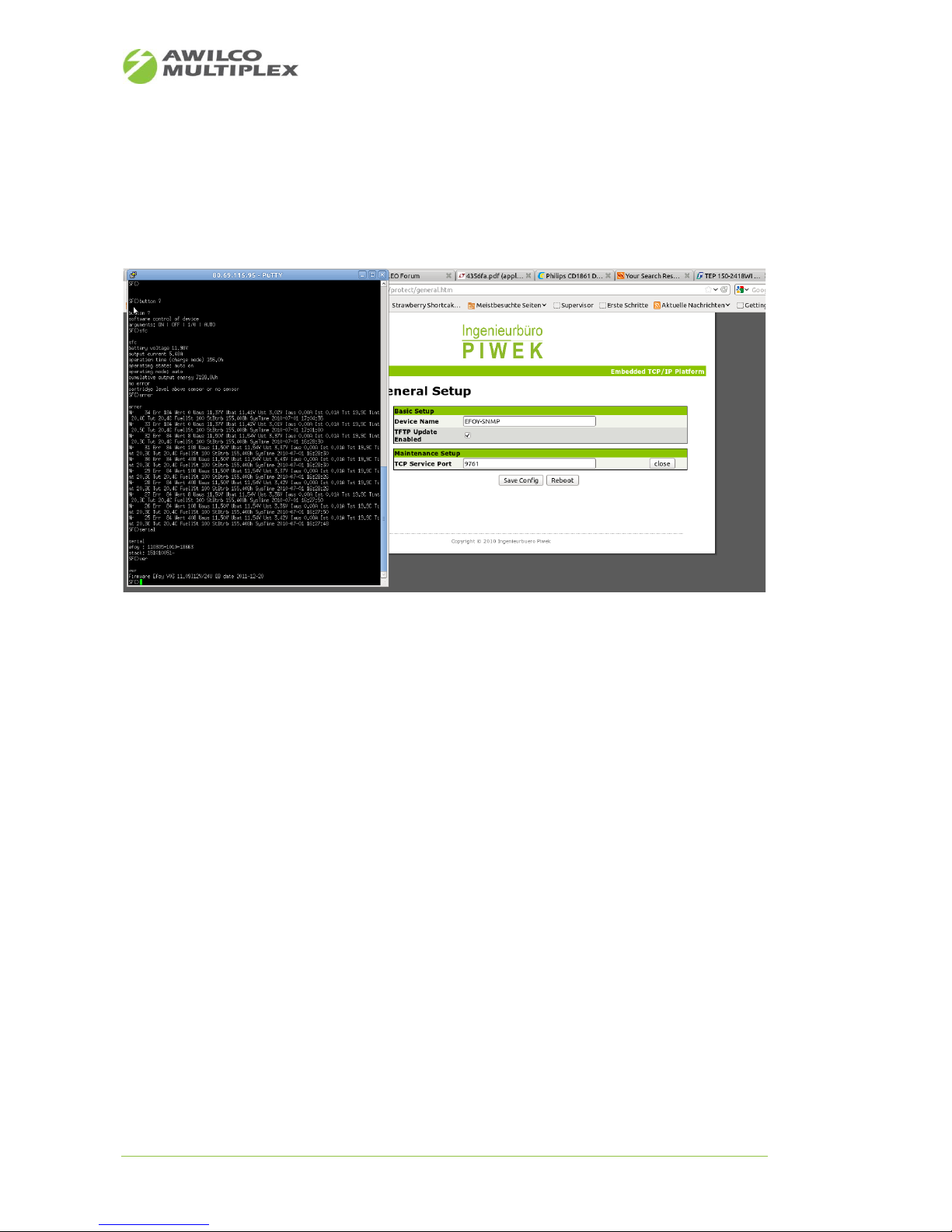
10.11 TCP-UART-BRIDGE-MODE
Remote control over a command line interface is also possible. Figure 26 depicts the opportunity how to
establish a remote connection to the IP-EFOY-GATEWAY over terminal software like Hyper term, Tera term.
To use this option, a service (TCP Service Port) has to be started first over the web interface.
Figure 27: TCP-UART-BRIDGE-MODUS
Page 34
AWILCO-MULTIPLEX ApS | Yderholmvej 64 | DK-4623 Ll. Skensved | Phone: +45 5656 5400 | Fax: +45 5656 5405
[email protected] | www.awilco-multiplex.dk
10.12 Off-the-shelf SNMP based monitoring solution
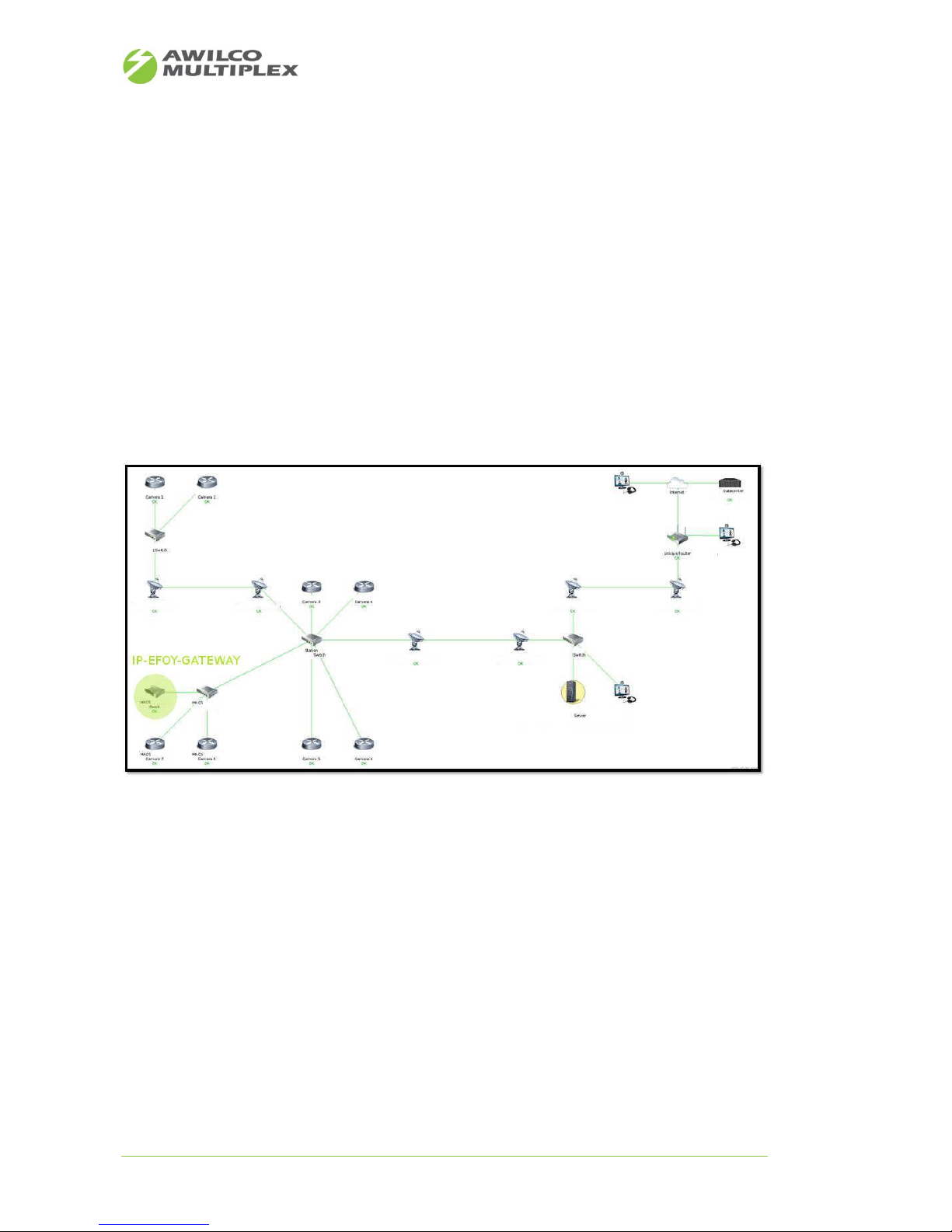
Figure 27 shows customer's IP-EFOY-GATEWAY implementation using an SNMP based monitoring solution.
Doing so it is possible to manage all EFOY PRO installations at a glance. This solution is especially intended to
be used by „blue light“ organizations, telecommunication provider, surveillance provider, as all critical IP
data can be secured by the customer himself. So the customer doesn't rely on any third party portal solutions and security can be assured on demand.
The following network map shows a rough overview of the entire network infrastructure. I.e. the monitoring
solution is not only intended to be used for IP-EFOY-GATEWAYs, also all other network equipment e.g. cameras, router, switch, server... can be monitored, in general all devices having an IP address and of course all
products deployed by Ingenieurbüro Piwek.
If an EFOY PRO is in error state, or running out of methanol, the IP-EFOY-GATEWAY on the tactical map lights
up red. The operator is now able to react very quickly within few minutes.
Figure 28: Tactical Network Map
Page 35
AWILCO-MULTIPLEX ApS | Yderholmvej 64 | DK-4623 Ll. Skensved | Phone: +45 5656 5400 | Fax: +45 5656 5405
[email protected] | www.awilco-multiplex.dk
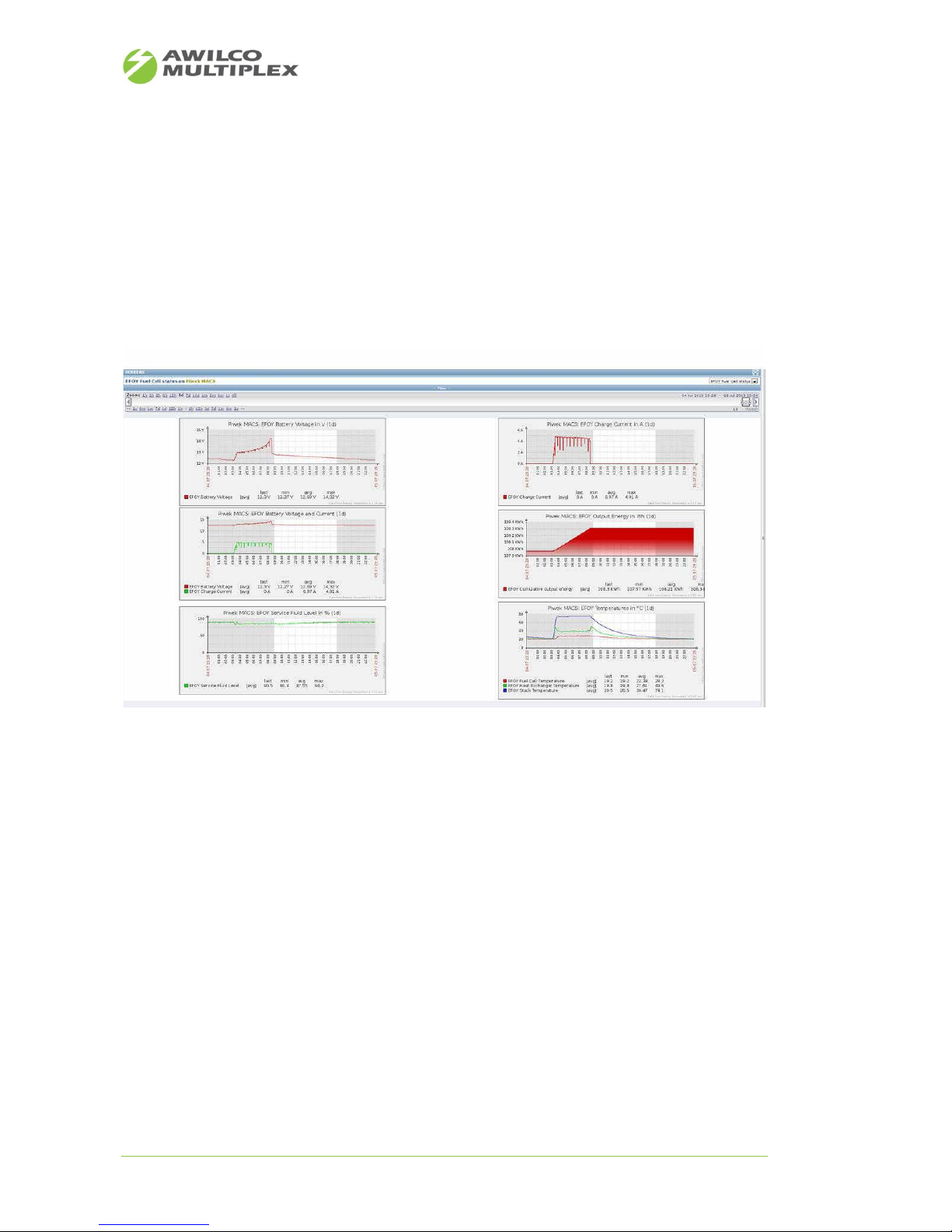
Figure 29 shows additional EFOY PRO information in graphical charts. So you can see the entire fuel cell
behaviour over time.
• Battery voltage
• Charging current
• Fluid level
• Output energy
• Temperatures stack, heat exchanger, fuel cell
Customer's feedback:
Here’s the host screen showing the voltage/current, output energy, service fluids and temperature levels.
In addition to these, we also read out the Cartridge Sensor and Error Messages. Based on the results we get
via SNMP we added triggers for those. So whenever the fuel cell is in error or when the fuel drops below the
sensor level, we get notified per e-mail.
Also, on the tactical map, the IP-EFOY-GATEWAY icon will light up and show the error. By doing so, our personnel can see which fuel cell is in error, what the cause is and what equipment is depending on the fuel cell.
And because we are graphing everything, we can estimate the time before the fuel levels are reaching critical conditions, as we have visual trends for the energy usage of our systems. So we even know how much
time we have to remedy the situation and we can predict maintenance rounds to change the fuel cartridges.
And it also helps us to calculate Service Level Agreements.
We are currently trying out that monitoring software in a special project for the Railroad, Railway Police and
local Police for Crowd Management purposes.
Figure 29: Live EFOY PRO graphs overview
Page 36
AWILCO-MULTIPLEX ApS | Yderholmvej 64 | DK-4623 Ll. Skensved | Phone: +45 5656 5400 | Fax: +45 5656 5405
[email protected] | www.awilco-multiplex.dk
10.13 SNMP EFOY PRO Fuel Cell Remote Control
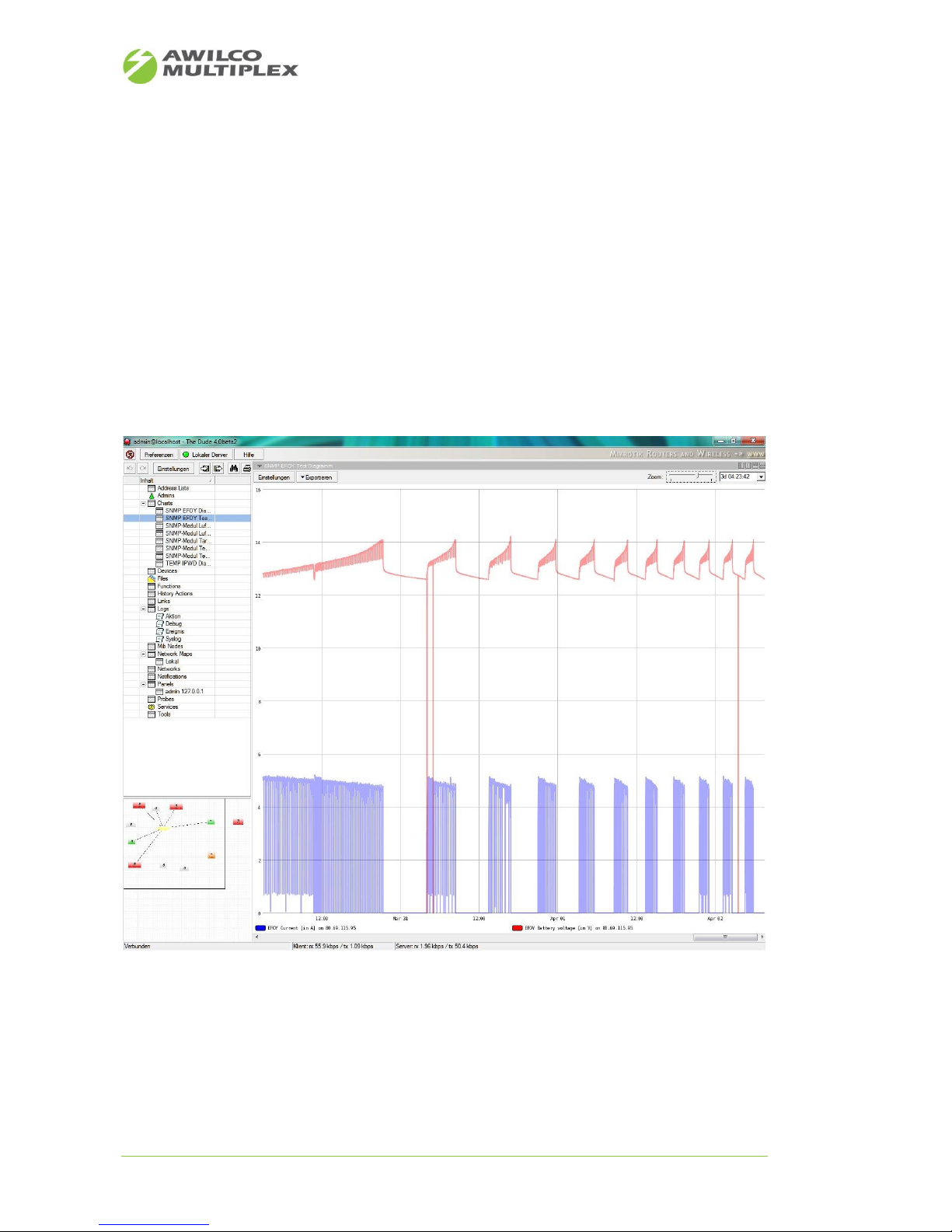
Due to SNMP V2C network protocol support of the IP-EFOY-GATEWAY, the system is capable of providing a
given set of variables called OIDs, reflecting the EFOY PRO fuel cell's state, to the customers network ma nagement system. Figure 30 shows a chart logged with a free network management system „The Dude“ over
SNMP protocol. At this the blue curve reflects the EFOY PRO battery charging current and red curve reflects
the EFOY PRO battery voltage. Furthermore it shows the charging/discharging intervals over the time in a
detailed manner. Just due to this information the customer is able to react to any events coming up very
quickly. In many network management systems events can be triggered
• If the battery voltage falls below a threshold or if the EFOY PRO runs out of methanol, a SMS or Email is
sent to a service engineer
• If the EFOY PRO operating time exceeds 5000 hours, send an message to a service engineer for EFOY PRO
maintenance
Figure 30: SNMP Chart
 Loading...