

Page 1
USER MANUAL
500VA-5000VA
Automatic Voltage Regulator
Page 2
Page 3
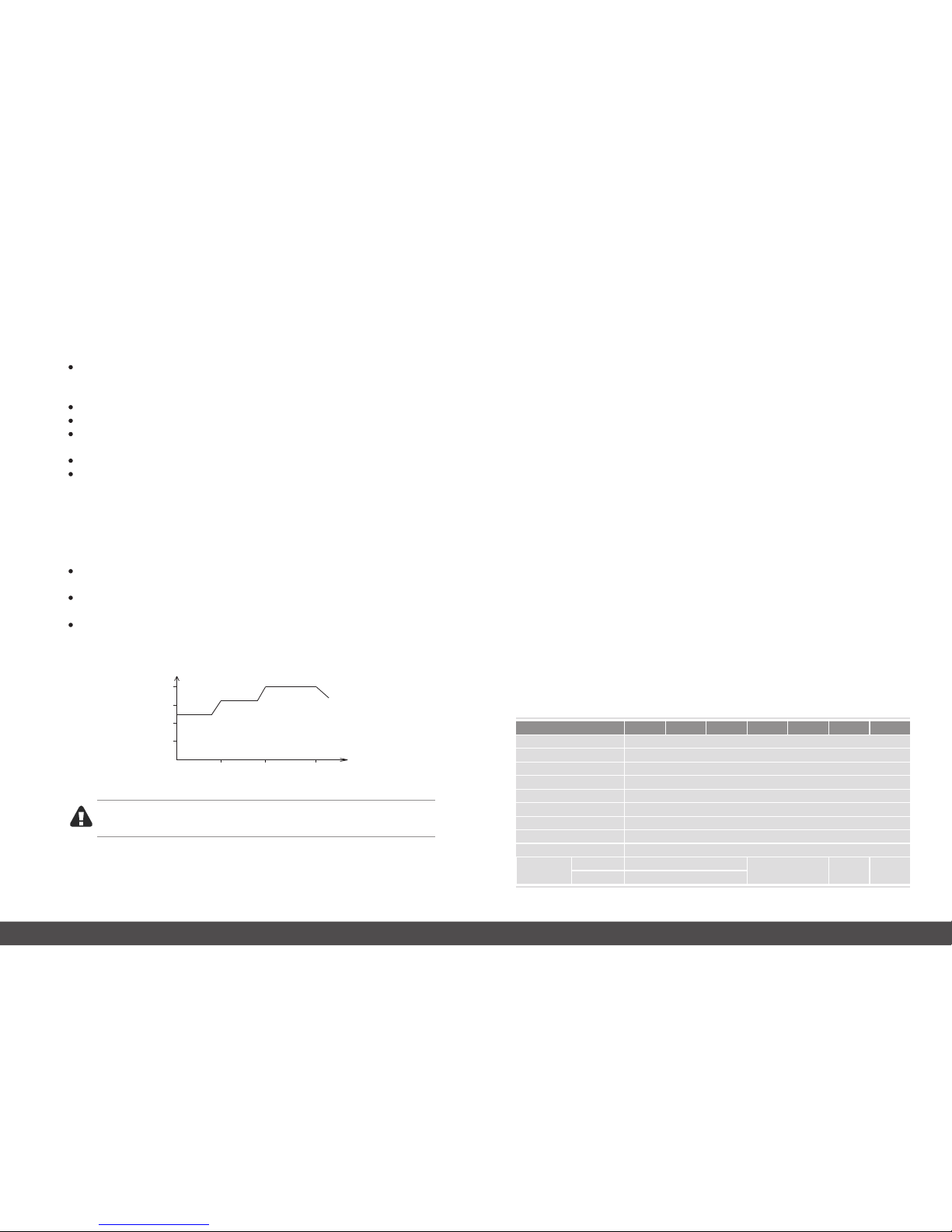
Wit hin ra nge o f rate d volt age ± 25 50/60Hz, the e quipment pro vid e 100 pow er
out put ; i f b eyo nd the ran ge, th e o utp ut pow er sho uld be in ac cor dan ce wit h t he
fol low ing di agr am:
% %
01/02
1 Safety Cautions
Please com ply with the follow ing instruc tions to make sure safety using
Keep the equipment in adequate ventilatio n and clean environment (minim um 100mm
away f rom th e wall). Du ring using the e quipment, it is normal that the case surface
tempera ture reach arou nd 50℃.
There is voltage output for AVR when switch on; There is no voltage output when switch off.
Do not open the cover in case getting an electric shoc k.
Do not p lace any liq uid co nta ine r on the to p of the eq uip men t in case of equi pme nt
dam aged or dang er of el ect ric sh ock .
Do not use under overload in case of any danger.
Do not store or use the equipment in the following environmen t:
①
② The place where temperature is abnormally high or low(above 40℃ or below -10℃),
or humidity is high (above 90%);
③ The palce under sunshine or the place close to the heater instrument;
④ The palce which has strenuous vibration;
⑤ The place where the children can reach easily.
The place which has flammable gas, corrosive things or a lot of dust;
If t he re i s f ir e, p le as e u se p ow de r fir e ex ti ng ui sh e r. It is d an ger ou s to u se fl ui d
ex ti ng ui she r.
Place receptacles nea r by the equipment, in case of emer gent states nee ded to unplug
and cut off the power.
100 %
75%
50%
25%
P (%)
145 175 260
U(v)
Inp ut vol tag e and ou tpu t pow er cur ve
Warning!
The equipm ent must proper ly grounded .
All stabilizers have time-delay output function, press the time-delay button on the front
panel (choose 180sec/6sec), meanwhile the time-delay indicator light will illuminate, here
the AVR is in protection states without output, it can provent electromotor, refrigeratory
and compressor etc. from being damaged due to frequent on and off.
2.2 Automatic protection function
The equipment inside has Integrated automati c protector, it make real-time monitoring of
the output voltage and completely protect the load. When the output voltage <18 0V or>
255V, the stabilizer will cut off the output automatically, meanwhile the “high/low”
indicator light on the front panel wi ll illuminate , it protects the load from electrical sa fety.
When the mains recovers to be normal, the equipment will automatically output according
to user's time-delay setting.
2.3 Overload/overheat protection
When an eq uipm ent wor ks for a long te rm under overl oad, hi gh volt age/ lo w volta ge, it
will cause dam age. Therefo re this p rodu ct has a spe cial circuit design for ov erhe at,
overcurre nt pro tect ion. W hen th e prod uct in ner te mpera ture i s high er tha n the se ttle d
stan dard va lue, i t will automatica lly cu t off the power a nd tur n off, it wil l prol ong using
life of th e stabi lize r.
2.4 Frequency adaptive
The equi pment ad opts adva nced mic ro-co mputer contro led syst em, it will au tomat icall y
track t he mains freq uency 5 0HZ or 6 0HZ, a utoma tical ly adj ust dat as col lecti on sys tem,
adapt the s ystem frequ ency requirement and f ullfi ll the volt age re gulat ion to meet the
outpu t requir ement .
2.1 Time-delay output function
2 Features
3 Specifications
Model
Input volta ge
Output voltage
P.F.
Short circuit protect ion
Efficiency
Temperature
Humidi ty
Panel display
Commun ication
100/11 0/120/220/230 /240 -35%, +20 -45 +20 option)% ( %, %
100/11 0/120/220/230 /240±8%
PF=0.6
fuse breake r / breaker
>98 %
0 ~ 40℃ ℃
10 ~ 90% %
LED/LE D+Meter /LCD
RS232/ USB (option )
Dimens ion
(W*H*D )
Metal case
Plasti c case
500VA 800VA 1000VA 1500VA 2000VA 3000VA 5000VA
140*20 0*285
125*15 5*265
100*16 0*225
140*20 0*285
210*21 0*300 220*220*35 0
Note: Input /outpu t voltage/frequenc y can be customer-designed acc ording to custo mers' need.
Page 4
03/04
4 Product Introduction
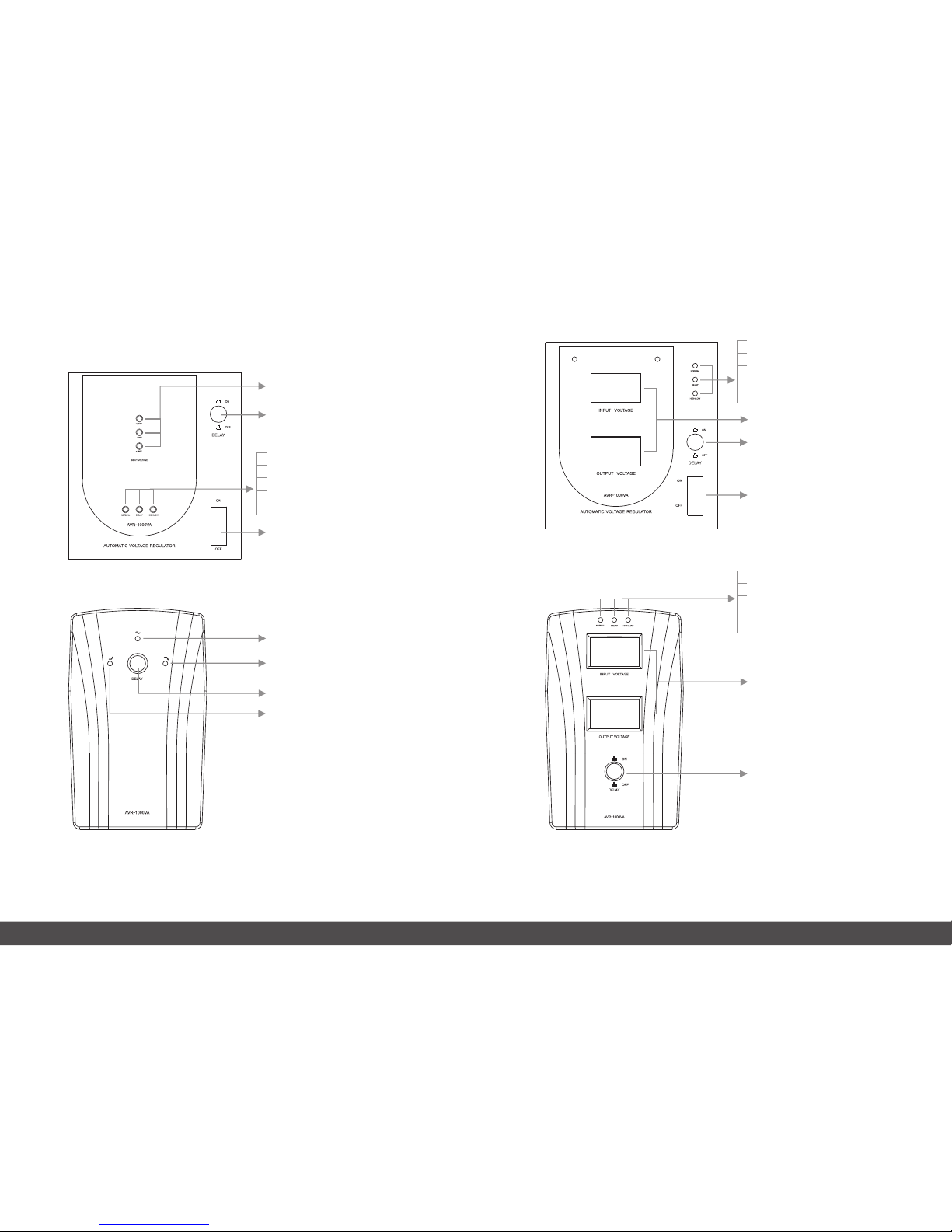
4.1 LED display:
Input volta ge indicato r
Time-d elay selecto r
Input switc h
Working stat es indicatio n:
Green LED: Workin g normal;
Orange LED: Tim e-delay stat e;
Red LED light long: Inpu t overvoltag e/
under-volta ge;
Red LED flash: Syste m protection or faul t;
Normal Mode
Buck Mode
Time-d elay selecto r
Boost Mode
4.2 Meter display
Working stat es indicatio n:
Green LED: Workin g normal;
Orange LED: Tim e-delay stat e;
Red LED light long: Inpu t overvoltag e/
under-volta ge;
Red LED flash: Syste m protection or faul t;
Time-d elay selecto r
Input switc h
Input/O utput volta ge indicato r
Working stat es indicatio n:
Green LED: Workin g normal;
Orange LED: Tim e-delay stat e;
Red LED light long: Inpu t overvoltag e/
under-volta ge;
Red LED flash: Syste m protection or faul t;
Input/O utput volta ge indicato r
Time-d elay selecto r
Page 5
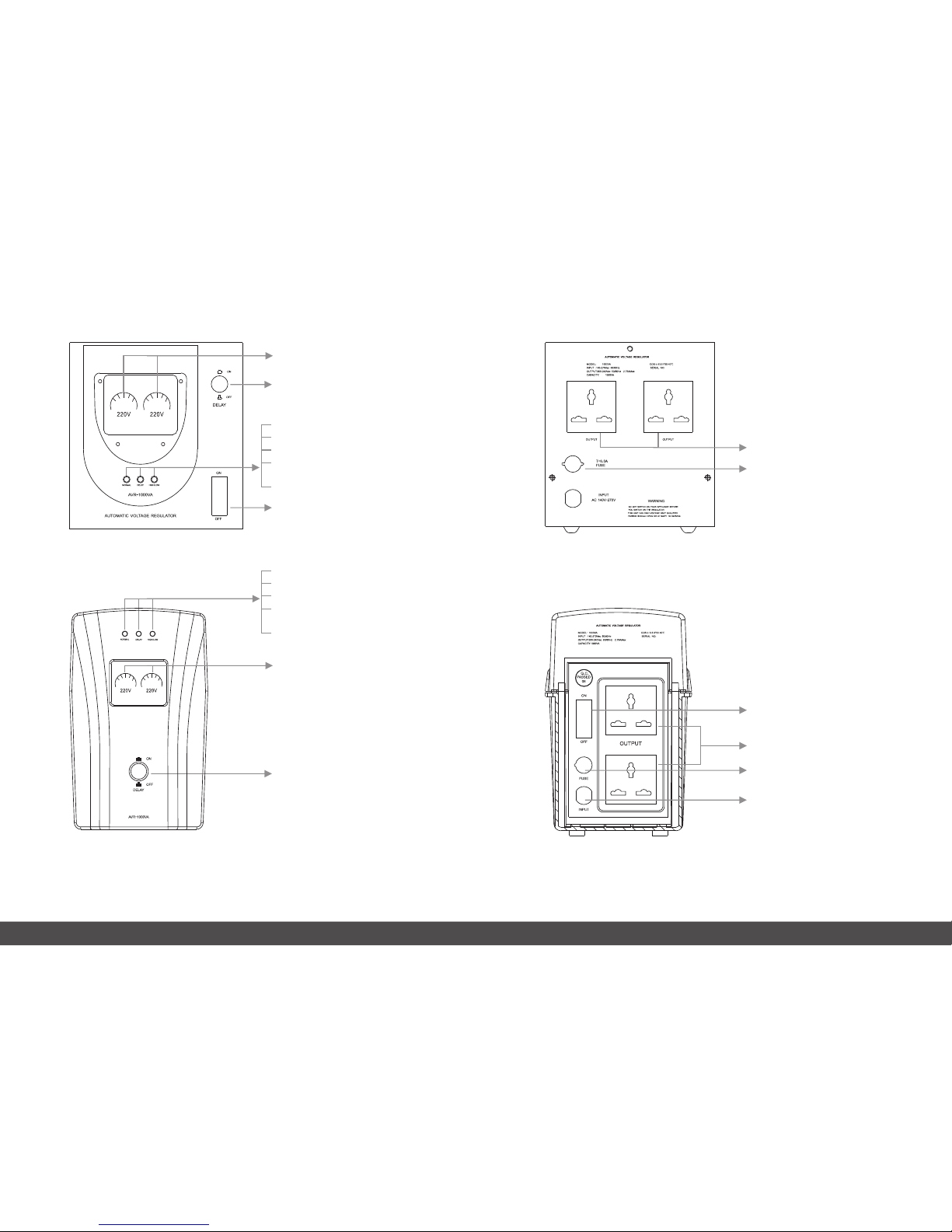
4.4 Socket-type rear panel
05/06
Working stat es indicatio n:
Green LED: Workin g normal;
Orange LED: Tim e-delay stat e;
Red LED light long: Inpu t overvoltag e/
under-volta ge;
Red LED flash: Syste m protection or faul t;
Time-d elay selecto r
Input switc h
Working stat es indicatio n:
Green LED: Workin g normal;
Orange LED: Tim e-delay stat e;
Red LED light long: Inpu t overvoltag e/
under-volta ge;
Red LED flash: Syste m protection or faul t;
Input/O utput volta ge indicato r
Time-d elay selecto r
4.3 LCD display
Input/O utput volta ge indicato r
AVR
AVR
Output sock ets
Input fuse
Input cable
Output sock ets
Input switc h
Input fuse
Page 6
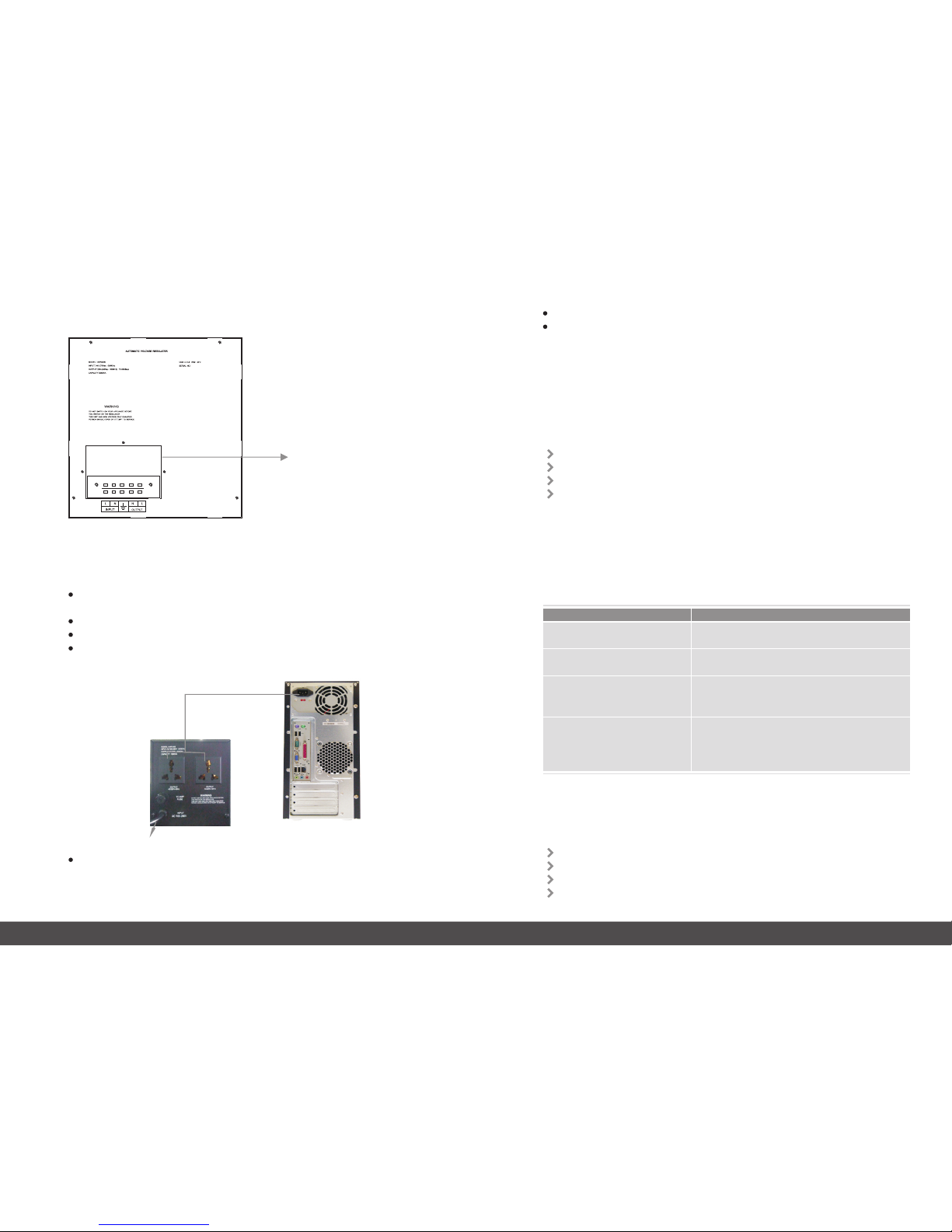
Shut down the load ( such as host computer, fans etc.), and remove their cables from
the mains outlet;
Place the equi pment prope rly ( refer to Safety Cautions);
Connec t the cable of the load with the O/P sockets or terminals bloc k of the AVR;
Connec t the I/P cable(or term inals block) of the AVR with The Mains outlet(or electric al
source junction box). (Make sure the N / L / G connected properly);
07/08
4.5 Terminals-type rear panel
Input/O utput termi nals
5 Installation and Application
Input cable
Provide pow er to the Load
Daily star t-up: make panel swi tch “ON”, AVR will provide with an normal output;
Daily off: make pan el switch “Off ”, AVR will be turned off;
6 Maintenance
6.1 Preventive maintenance
whic h can guarante e the equ ipme nt real iabl ity and perfor mance in a long ter m. Ple ase
make th e follo wing inspe ctio ns mont hly:
Make sure the blowh ole not be blocked.
Check whet her there is too much dust on the surfac e.
Check whet her the input or output cab le is fixed and still insul ated.
Make sure the produ ct not be damped.
6.2 Abnormal states handling
If th er e is a fa ilu re , ple as e ask t he en gi neer fo r hel p to av oi d any f urt he r dam ag e or
unn ec essar y cost.
If th e equ ip men t wor ks abno rma ll y, plea se do sel f-test a s fol low ing sol uti ons. If stil l
can n ot fi x the p roble m, pl ease as k the d ist ribut e or ma nuf actur er fo r hel p.
Plunged into the Mains, Select the time -delay output tim e (3 seconds/ 1 80 secon ds),
and make switch “ON”, then AVR start up .The time-del ay indicator (Orange LED) will
illuminate, the output will count down (3 seconds/ 180 seconds), and users can turn on
the load after the green indicator illumin ate;
State
Solution
Whethe r start-up norm ally?
Whethe r the input power or fuse work s normally ?
The equipm ent is under time- delay stat e,
please wai t 6secs/18 0secs.
Input volt age is beyond of AVR's stan dard range
(highe r or lower), pleas e check the input volt age
and use the equip ment till the inpu t voltage is norma l.
LED/LC D meters show noth ing
after star t-up
No output, Tim e-dela y indicator
illumi nate
There is Mains , but the Equipmen t
don't have out put; high/l ow voltage
indica tor illumi nate
The equipm ent output vol tage is overhig h/overl ow;
please shu t down the equipme nt first and resta rt.
It problem sti ll exist, plea se send it to the professi onals
for mainta inance
The Mains is norm al; high/lo w
voltag e indicator il luminat e
7 Packing list
Equipment: 1PC
User manual: 1pc
Fuse: 1pc
Others: according to customer’s requirement.
 Loading...