

Page 1

pg. 1
AVProEdge ~ 2222 E52nd Street N Sioux Falls, SD 57104~ 1.877.886.5112 ~ +1.605.274.6055 ~ [email protected]
User)Manual
AC-DA28-AUHD)
Page 2

AC-DA28-AUHD)
Introduction
AC-DA28-AUHD is an 18GBPS, full bandwidth HDMI2.0a (HDR)
with HDCP2.2 eight-way HDMI splitter. Functionally, distributes the two
input HDMI signals to eight HDMI outputs (two switchable zones).
AC-DA28-AUHD has the ability of pre-emphasis and equalization.
Multiple cascaded AC-DA28-AUHD achieves long distance transmission
of HDMI signal of more than 15 meters even in 4K (HDR) resolution.
The outstanding and proprietary clock jitter cleaner enable this splitter to
out preform the competition when in cascading mode no matter the signal is
4K or 1080P.
AC-DA28-AUHD offers solutions for usage as a component of digital
HDMI distributions and entertainment systems also UHDTV/4K retail and
general show sites. Use in conjunction with UHDTV, UHD Projector, STB,
UHD-BD, UHD Media Player and in environment where noise, space and
security are concerns. Fits perfectly in data center control rooms,
information distribution premises, conference and presentation rooms,
school educational facilities and corporate training environments.
pg. 2
AVProEdge ~ 2222 E52nd Street N Sioux Falls, SD 57104~ 1.877.886.5112 ~ +1.605.274.6055 ~ [email protected]
Page 3

Contents
Introduction.............................................................................................................2
Product Overview and Features.............................................................................. 4
Warnings ................................................................................................................ 5
Package Contents ., Connections & Operations...................................................... 6
Front Panel Description........................................................................................... 7
Back Panel and Top Panel Description ................................................................. 8
Connection Diagram........................................................................................... 9
Network and Web Interface Switching................................................................ 10
EDID Settings..................................................................................................11-12
Web Interface System Settings and RS232 Commands................................13-14
RS232 Connection Diagram.................................................................................15
Specification..........................................................................................................16
Maintenance and Service Info.. ............................................................................17
AC-DA28-AUHD)
pg. 3
AVProEdge ~ 2222 E52nd Street N Sioux Falls, SD 57104~ 1.877.886.5112 ~ +1.605.274.6055 ~ [email protected]
Support And Warranty Information.......................................................................18
Page 4

■ Product Overview ( Model Number: AC-DA2
8-AUHD)
■
Features
l Easy to Use: Install in seconds, no need
for setting.
l Distribution: Two HDMI inputs, two switchable output zones.
l Supports up to 18GBPS with resolutions of 4K60(YUV444), 4K30, 1080p,
1080i, 720p and other standard Video formats, PAL and NTSC.
l Full HDR Support (HDR 10 & 12 Bit)
l Dolby Vision, HDR10 (10+) and HLG Support
l HDCP 2.2 (and all earlier versions supported)
l LAN Web GUI Control and full API
l Remote Status Monitoring
l Advanced EDID Management
l Digital Toslink Out
l Locking Power Connector
l HDMI 2.0
(a/b) w/ HDR.
l Cascadable
l Mounting ears are included for easy fixation on wall, furniture or ceiling.
? Notice
AVProEdge reserve
s the right to make changes in the hardware, packaging and any
accompanying documentation without prior written notice.
AC-DA28-AUHD)
pg. 4
AVProEdge ~ 2222 E52nd Street N Sioux Falls, SD 57104~ 1.877.886.5112 ~ +1.605.274.6055 ~ [email protected]
Page 5
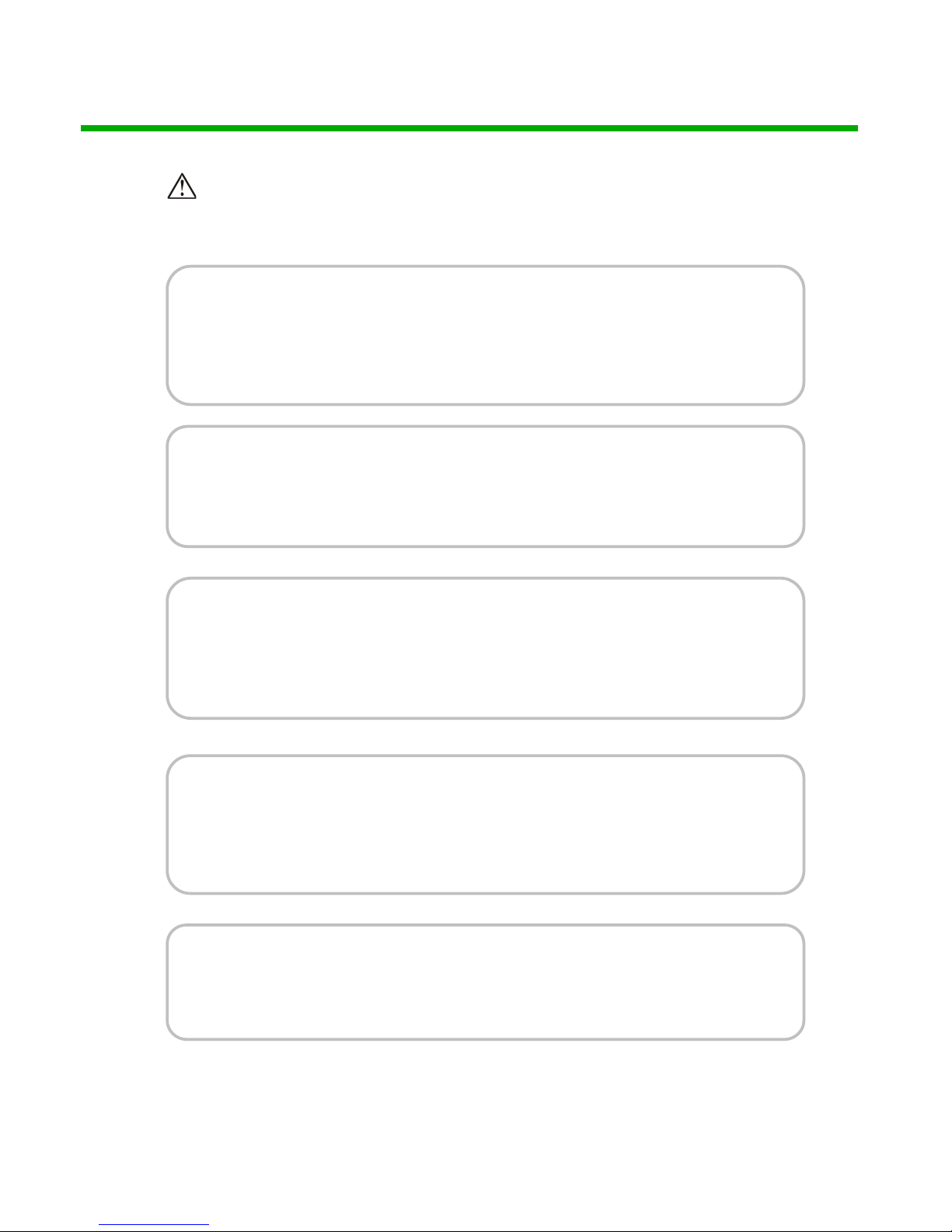
Warning
To red uce the ri sk of fire , electric shock or product damage:
1. Do not expose this apparatus
to rain, moisture, dripping or
splashing and that no objects
filled with liquids, such as vases,
shall be placed on the apparatus.
6. Clean this apparatus
only with dry cloth.
2. Do not install or place this unit
in a bookcase, built-in cabinet or
in another confined space.
Ensure the unit is well ventilated.
3. To pr e ve n t r is k o f e le ct ri c
shock or fire hazard due to
overheating, do not obstruct
the unit’s ventilation openings
with newspapers, tablecloths,
curtains, and similar items.
4. Do not install near any heat
sources such as radiators, heat
registers, stoves, or other
apparatus (including amplifiers)
that produce heat.
5. Do not place sources of naked
flames, such as lighted candles,
on the unit.
7. Unplug this apparatus
during lightning storms or
when unused for long
periods of time.
8. Protect the power cord
from being walked on or
pinched particularly at
plugs.
9. Only use attachments /
accessories specified by
the manufacturer.
10. Refer all servicing to
qualified service
personnel.
AC-DA28-AUHD)
pg. 5
AVProEdge ~ 2222 E52nd Street N Sioux Falls, SD 57104~ 1.877.886.5112 ~ +1.605.274.6055 ~ [email protected]
Page 6

■
Package Contents
① Main unit. P/N: AC-DA28-AUHD
② 12V 2A Locking Power Supply (100-240V
input).
③ Mounting Ears
■
Connections and Operations
1) Connect the HDMI input s
ource into
AC
-DA28
-AUHD
2) Connect
the HDMI output equipment (Displays) into AC-DA28-AUHD
3) Insert the DC side of 12V power supply into AC-DA28-AUHD and then
connect the AC side of the Power supply into the wall outlet.
4) Plugging in the unit automatically powers up the device.
& NOTE: Insert / Extract cables gently.
AC-DA28-AUHD)
pg. 6
AVProEdge ~ 2222 E52nd Street N Sioux Falls, SD 57104~ 1.877.886.5112 ~ +1.605.274.6055 ~ [email protected]
Page 7

■
Panel Descriptions
Front Panel
Activity Display (Front):
a) When Power is applied all lights flash BLUE and the machine begins
to function. If no devices are plugged in, you can verify power by
looking at the zone A/B buttons on the right side of the unit, they
should be lit up blue.
b) When the INPUT device is plugged in, the INPUT light stays SOLID
BLUE.
c) When a sink (display) is plugged into an OUTPUT, the OUTPUT light
will go SOLID.
AC-DA28-AUHD)
pg. 7
AVProEdge ~ 2222 E52nd Street N Sioux Falls, SD 57104~ 1.877.886.5112 ~ +1.605.274.6055 ~ [email protected]
Page 8

Back Panel
· Power input
· HDMI inputs (x2)
· HDMI outputs (x8)
· IR, RS-232 and LAN Control Options (Micro USB on side)
· Balanced Analog Out, for extractable 2Ch Audio
· Toslink Audio Port - Supports PCM, LPCM (up to 7CH), Dolby Digital, Dolby Digital Plus, DTS,
DTS-HD, DTS Master Audio, which is ideal for multi-channel audio systems and older AVRs that do
not support 18Gbps.
Device Top Cover
Device cover is labeled with functionality diagram, instructions for front panel
switching and scaling options.
AC-DA28-AUHD)
pg. 8
AVProEdge ~ 2222 E52nd Street N Sioux Falls, SD 57104~ 1.877.886.5112 ~ +1.605.274.6055 ~ [email protected]
Page 9

AC-DA28-AUHD)
pg. 9
AVProEdge ~ 2222 E52nd Street N Sioux Falls, SD 57104~ 1.877.886.5112 ~ +1.605.274.6055 ~ [email protected]
Page 10

AC-DA28-AUHD)
pg. 10
AVProEdge ~ 2222 E52nd Street N Sioux Falls, SD 57104~ 1.877.886.5112 ~ +1.605.274.6055 ~ [email protected]
Quick Network Connect to Web Interface:
Use the following steps to quickly and immediately connect to the matrix switch:
1. Connect the LAN port into an active router port.
2. On most networks you can simply type the Default IP address into any web browser. The Default IP
Address is 192.168.1.239.
Web Interface: Switching
Use this page to switch between inputs and outputs from the web interface.
Page 11
AC-DA28-AUHD)
pg. 11
AVProEdge ~ 2222 E52nd Street N Sioux Falls, SD 57104~ 1.877.886.5112 ~ +1.605.274.6055 ~ [email protected]
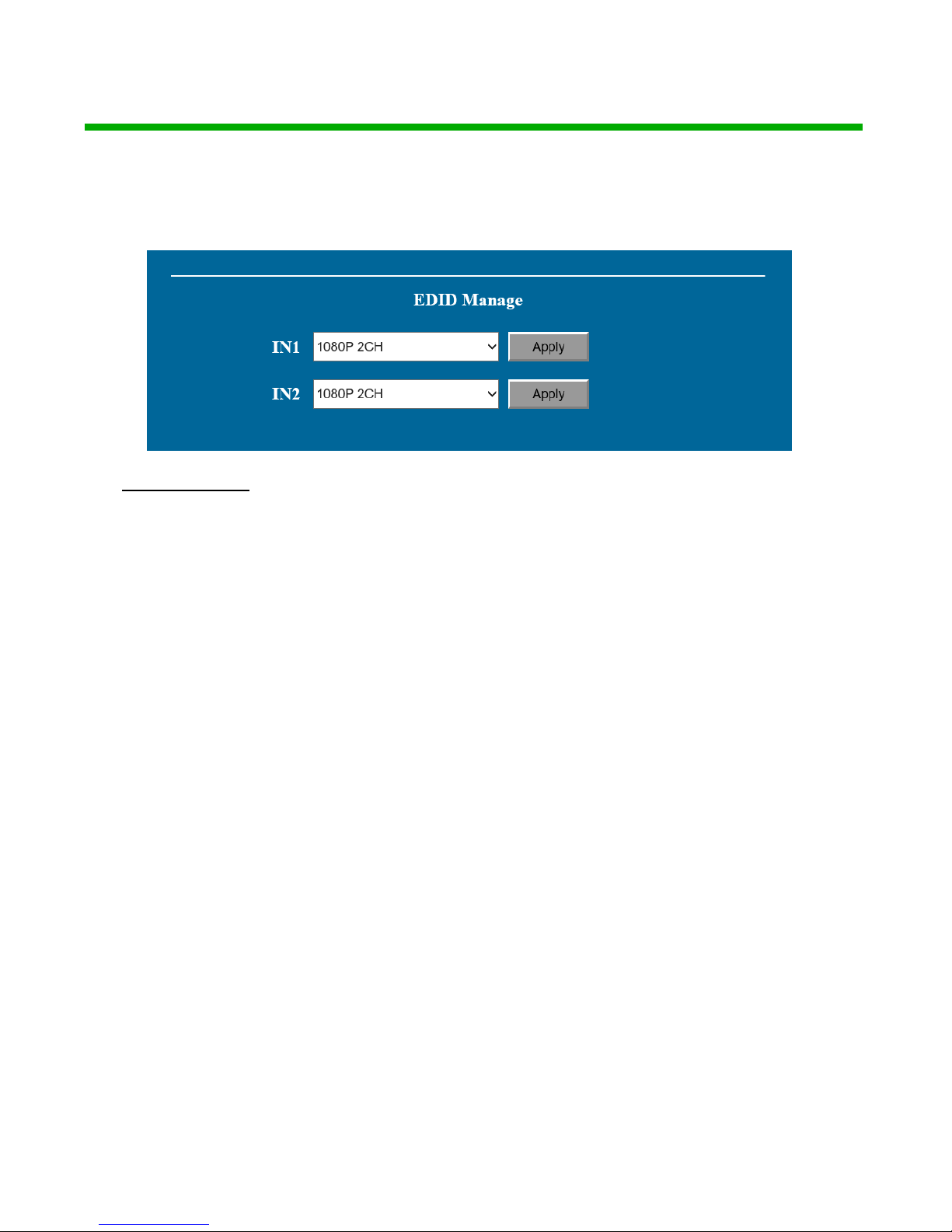
EDID Settings: The AC-DA28-AUHD uses the web interface for EDID management. The
default EDID out of the box is 0:1080P 2Ch. Custom EDID settings are below.
EDID Settings:
00: 1080P_2CH(PCM)
01: 1080P_6CH
02: 1080P_8CH
03: 1080P_3D_2CH(PCM)
04: 1080P_3D_6CH
05: 1080P_3D_8CH
06: 4K30Hz_3D_2CH(PCM)
07: 4K30Hz_3D_6CH
08: 4K30Hz_3D_8CH
09: 4K60Hz(Y420)_3D_2CH(PCM)
10: 4K60Hz(Y420)_3D_6CH
11: 4K60Hz(Y420)_3D_8CH
12: 4K60Hz_3D_2CH(PCM)
13: 4K60Hz_3D_6CH
14: 4K60Hz_3D_8CH
15: 1080P_2CH(PCM)_HDR
16: 1080P_6CH_HDR
17: 1080P_8CH_HDR
18: 1080P_3D_2CH(PCM)_HDR
19: 1080P_3D_6CH_HDR
20: 1080P_3D_8CH_HDR
21: 4K30Hz_3D_2CH(PCM)_HDR
22: 4K30Hz_3D_6CH_HDR
23: 4K30Hz_3D_8CH_HDR
24: 4K60Hz(Y420)_3D_2CH(PCM)_HDR
25: 4K60Hz(Y420)_3D_6CH_HDR
26: 4K60Hz(Y420)_3D_8CH_HDR
27: 4K60Hz_3D_2CH(PCM)_HDR
28: 4K60Hz_3D_6CH_HDR
29: 4K60Hz_3D_8CH_HDR
30: USER 1EDID (NOTE 1)
31: COPY FROM OUT1
32: COPY FROM OUT2
33: COPY FROM OUT3
34: COPY FROM OUT4
35: COPY FROM OUT5
36: COPY FROM OUT6
37: COPY FROM OUT7
38: COPY FROM OUT8
Page 12
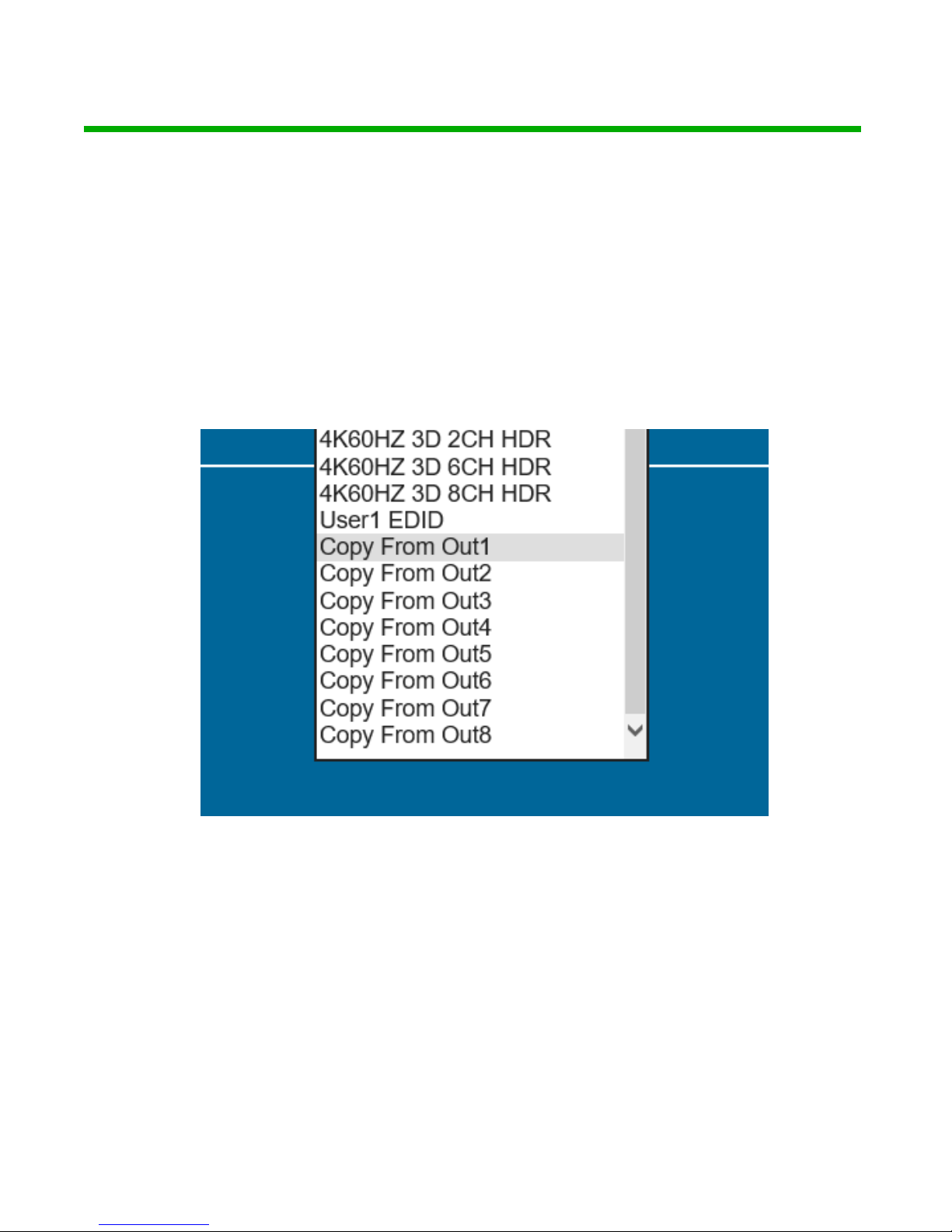
EDID Setting Cont. (Notes):
Note1: *You can copy the EDID from any output and apply it to any input.
Select "Copy EDID from Output x" (x=1-8) then click Apply. This will copy
the EDID from the display and apply it to the selected input. This new EDID
will be stored as "USER EDID 1".
AC-DA28-AUHD)
pg. 12
AVProEdge ~ 2222 E52nd Street N Sioux Falls, SD 57104~ 1.877.886.5112 ~ +1.605.274.6055 ~ [email protected]
Page 13

AC-DA28-AUHD)
pg. 13
AVProEdge ~ 2222 E52nd Street N Sioux Falls, SD 57104~ 1.877.886.5112 ~ +1.605.274.6055 ~ [email protected]
Web Interface: System Settings
IP Settings:
Set network settings such as:
•
Static IP
•
Subnet Mask
•
Router IP
•
TCP Port
•
Enable DHCP
Port Alias Settings:
Rename inputs and outputs for easy management. Each custom name is limited to
eight (8) characters.
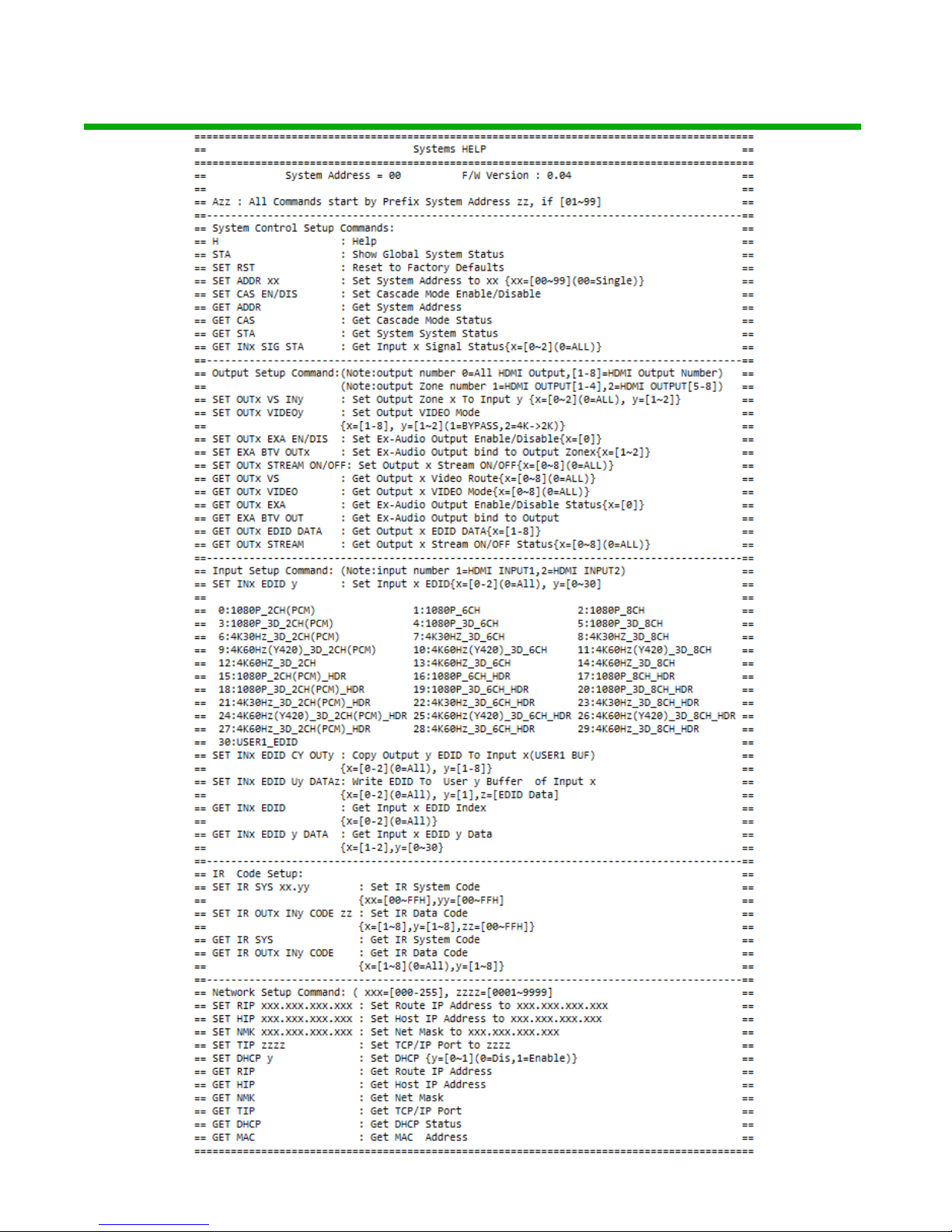
RS-232 and TCP/IP Commands:
The AC-DA28-AUHD can be controlled with either RS-232 or TCP/IP commands. Certain switching or format
configurations can only be done using these commands. We recommend using either the MyUART (RS-232 free) or Hercules (TCP/IP - free) apps as they are very easy to use for sending commands to the machine.
MyUart is availble for download on our website https://www.avproedge.com/drivers.html
For TCP/IP control commands use Telnet Port 23.
For RS-232, use a null modem serial cable adapter and set the serial communications to: 57600,n,8,1 (baud:
57600, no parity, 8 data bits and 1 stop bit) with no handshaking.
Please add a return (Enter key) after each command when using direct commands..
The unified command list (ASCII) is listed on the next page.
Page 14
AC-DA28-AUHD)
pg. 14
AVProEdge ~ 2222 E52nd Street N Sioux Falls, SD 57104~ 1.877.886.5112 ~ +1.605.274.6055 ~ [email protected]
Page 15

AC-DA28-AUHD)
pg. 15
AVProEdge ~ 2222 E52nd Street N Sioux Falls, SD 57104~ 1.877.886.5112 ~ +1.605.274.6055 ~ [email protected]
Page 16

AC-DA28-AUHD)
pg. 16
AVProEdge ~ 2222 E52nd Street N Sioux Falls, SD 57104~ 1.877.886.5112 ~ +1.605.274.6055 ~ [email protected]
Specifications:
Page 17

• Use the power supplies provided. If an alternate supply is required, check
voltage, polarity and that it has sufficient power to supply the device it is
connected to.
• Do not operate these products outside the specified temperature and
humidity range given in the above specifications.
• Ensure there is adequate ventilation to allow this product to operate
efficiently.
• Repair of the equipment should only be carried out by qualified
professionals as these products contain sensitive components that may
be damaged by any mistreatment.
• Only use this product in a dry environment. Do not allow any liquids or
harmful chemicals to come into contact with these products.
• Clean this unit with a soft, dry cloth. Never use alcohol, paint thinner or
benzene to clean this unit.
Maintenance
To ensure reliable operation of this product as well as protecting the
safety of any person using or handling this device while powered, please
observe the following instructions.
pg. 17
AVProEdge ~ 2222 E52nd Street N Sioux Falls, SD 57104~ 1.877.886.5112 ~ +1.605.274.6055 ~ support@avproedge.com
• The DC power supply cord or AC adaptor has been damaged
• Objects or liquids have gotten into the unit
• The unit has been exposed to rain
• The unit does not operate normally or exhibits a marked change
in
performance
• The unit has been dropped or the housing damaged
Damage Requiring Service
The unit should be serviced by qualified service personnel if:
Page 18

Support
Should you experience any problems while using this product, first, refer to the
Troubleshooting section of this manual before contacting Technical Support.
When calling, the following information should be provided:
pg. 18
AVProEdge ~ 2222 E52nd Street N Sioux Falls, SD 57104~ 1.877.886.5112 ~ +1.605.274.6055 ~ support@avproedge.com
• Product name and model number
• Product serial number
• Details of the issue and any conditions under which the issue is
occurring
Warranty
If your product does not work properly because of a defect in materials or
workmanship, AVProEdge (referred to as “the warrantor”) will, for the length of
the period indicated as below, (Parts/Labor (10) Years), which starts with the
date of original purchase (“Limited Warranty period”), at its option either (a)
repair your product with new or refurbished parts, or (b) replace it with a new or
a refurbished product. The decision to repair or replace will be made by the
warrantor. During the “Labor” Limited Warranty period there will be no charge
for labor. During the “Parts” warranty period, there will be no charge for parts.
You must mail-in your product during the warranty period. This Limited
Warranty is extended only to the original purchaser and only covers product
purchased as new. A purchase receipt or other proof of original purchase date
is required for Limited Warranty service.
This warranty extends to products purchased directly from AVPro or an
authorized dealer. AVPro is not liable to honor this warranty if the product has
been used in any application other than that for which it was intended, has
been subjected to misuse, accidental damage, modification or improper
installation procedures, unauthorized repairs or is outside of the warranty
period. Please direct any questions or issues you may have to your local dealer
before contacting AVPro.
Page 19

_____________________________________________
_____________________________________________
_____________________________________________
_____________________________________________
_____________________________________________
_____________________________________________
_____________________________________________
_____________________________________________
_____________________________________________
_____________________________________________
_____________________________________________
_____________________________________________
_____________________________________________
_____________________________________________
_____________________________________________
_____________________________________________
_____________________________________________
_____________________________________________
_____________________________________________
_____________________________________________
_____________________________________________
_____________________________________________
_____________________________________________
_____________________________________________
_____________________________________________
_____________________________________________
_____________________________________________
pg. 19
AVProEdge ~ 2222 E52nd Street N Sioux Falls, SD 57104~ 1.877.886.5112 ~ +1.605.274.6055 ~ support@avproedge.com
Page 20

_____________________________________________
_____________________________________________
_____________________________________________
_____________________________________________
_____________________________________________
_____________________________________________
_____________________________________________
_____________________________________________
_____________________________________________
_____________________________________________
_____________________________________________
_____________________________________________
_____________________________________________
_____________________________________________
_____________________________________________
_____________________________________________
_____________________________________________
_____________________________________________
_____________________________________________
_____________________________________________
_____________________________________________
_____________________________________________
_____________________________________________
_____________________________________________
_____________________________________________
_____________________________________________
_____________________________________________
pg. 20
AVProEdge ~ 2222 E52nd Street N Sioux Falls, SD 57104~ 1.877.886.5112 ~ +1.605.274.6055 ~ support@avproedge.com
Page 21
Thank you for choosing AVProEdge!
Please contact us with any questions. We are
happy to be of service!
AVP
roEdge
2222 E 52nd Street N ~ Sioux Falls, SD 57104
1-877-886-5112 ~ 605-274-6055
pg. 21
AVProEdge ~ 2222 E52nd Street N Sioux Falls, SD 57104~ 1.877.886.5112 ~ +1.605.274.6055 ~ support@avproedge.com
 Loading...