

Page 1
VF
I
PD51 Console Assembly Instructions
PD51 Console
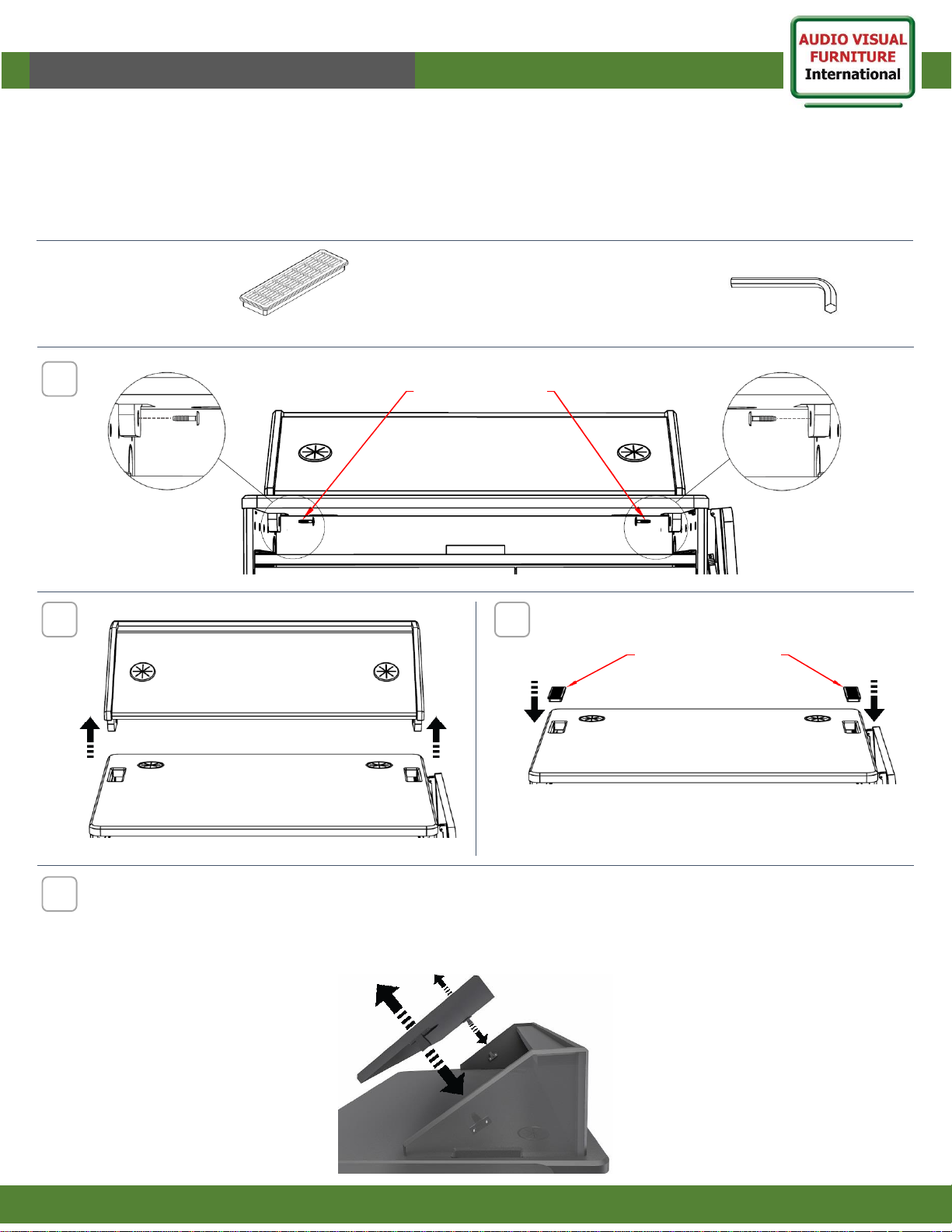
This document shows how to dismount and mount the console from the PD51 Mobile Station. As well as how to remove
the front console panel from a wedge position.
Note: If you cannot understand these instructions or are concerned about safety of the installation contact a qualified
contractor or contact AVFI at 1-877-834-3876
1
www.video-furn.com
288 Don Hillock Drive |Aurora |Ontario|L4G 0G9 | 1.877.834.3876
Tools required
1
To remove front console panel, pull firm and evenly by holding the panel from the grommet holes. The
fasteners will unlock.
Push in the same manner to reattach the panel.
Note: Panel can also be removed by pushing up from the inside if there are special cuts or if devices cover the grommet holes.
4
2
4mm Hex Allen key
Supplied Hardware
Vent grill (2)
Remove bolts
from both sides
Lift and remove console
3
Reverse the procedure to mount back the console
Insert vent grills
into the slots
 Loading...