

Page 1
English language / Idioma Español
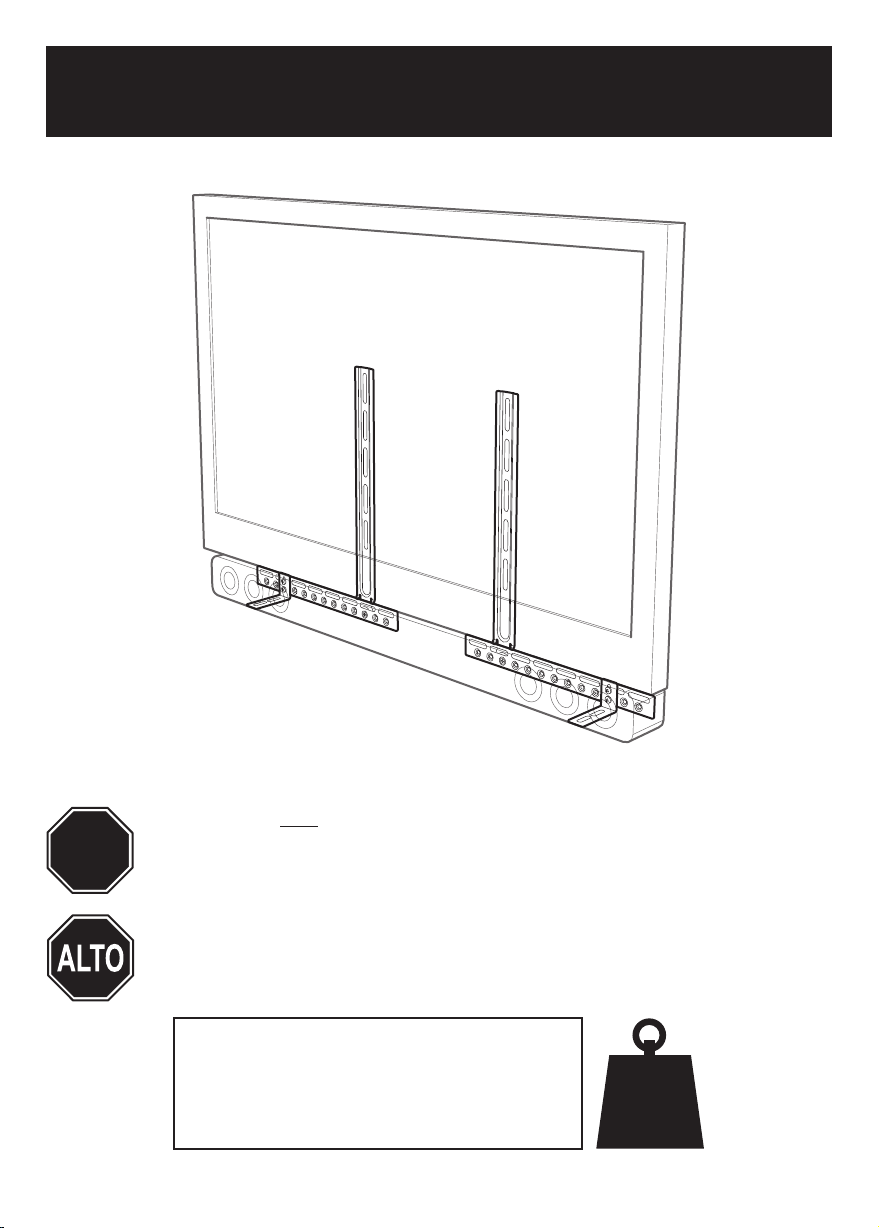
EAK90-E
Leaflet No. / No. de folleto 464314 rev 00
Read through ALL instructions before commencing installation.
STOP
AVF Incorporated. 3187 Cornerstone Drive, Eastvale, CA 91752, USA
If you have any questions about this product or issues with installation
contact the customer services help line before returning this product to
the store.
Lea todas las instrucciones antes de comenzar la instalación.
Si tiene alguna pregunta sobre el producto o problemas con la
instalación. llame a la línea de servicio al consumidor antes de
devolverlo.
CUSTOMER SERVICES HELP LINE NUMBER:
NÚMERO DE SERVICIO DE ATENCIÓN AL CLIENTE:
1-800 667 0808 (USA)
www.avfgroup.com
10kg
22lbs
Page 2
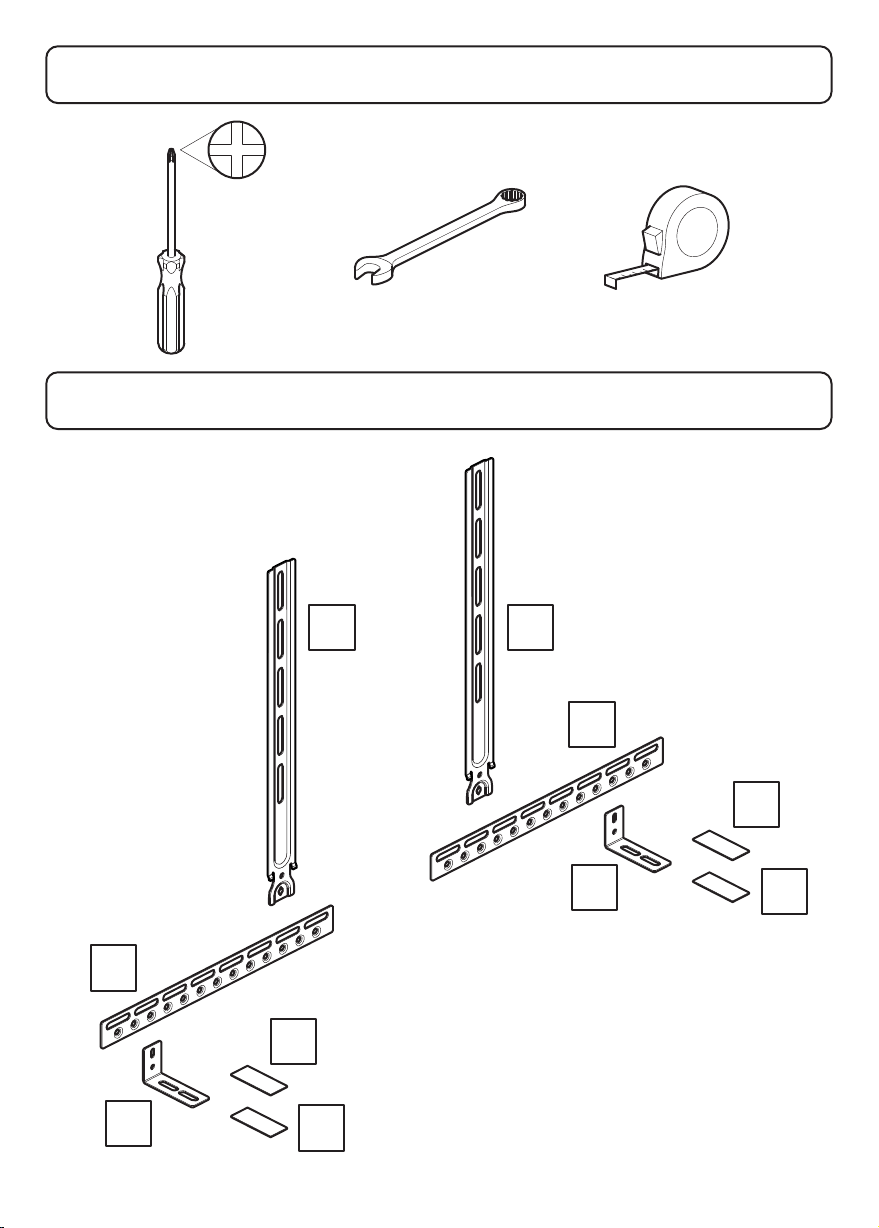
Tools Recommended
Herramientas recomendadas
Boxed Parts
Piezas en la Caja
B
C
D
E
A
A
B
C
D
E
Page 3
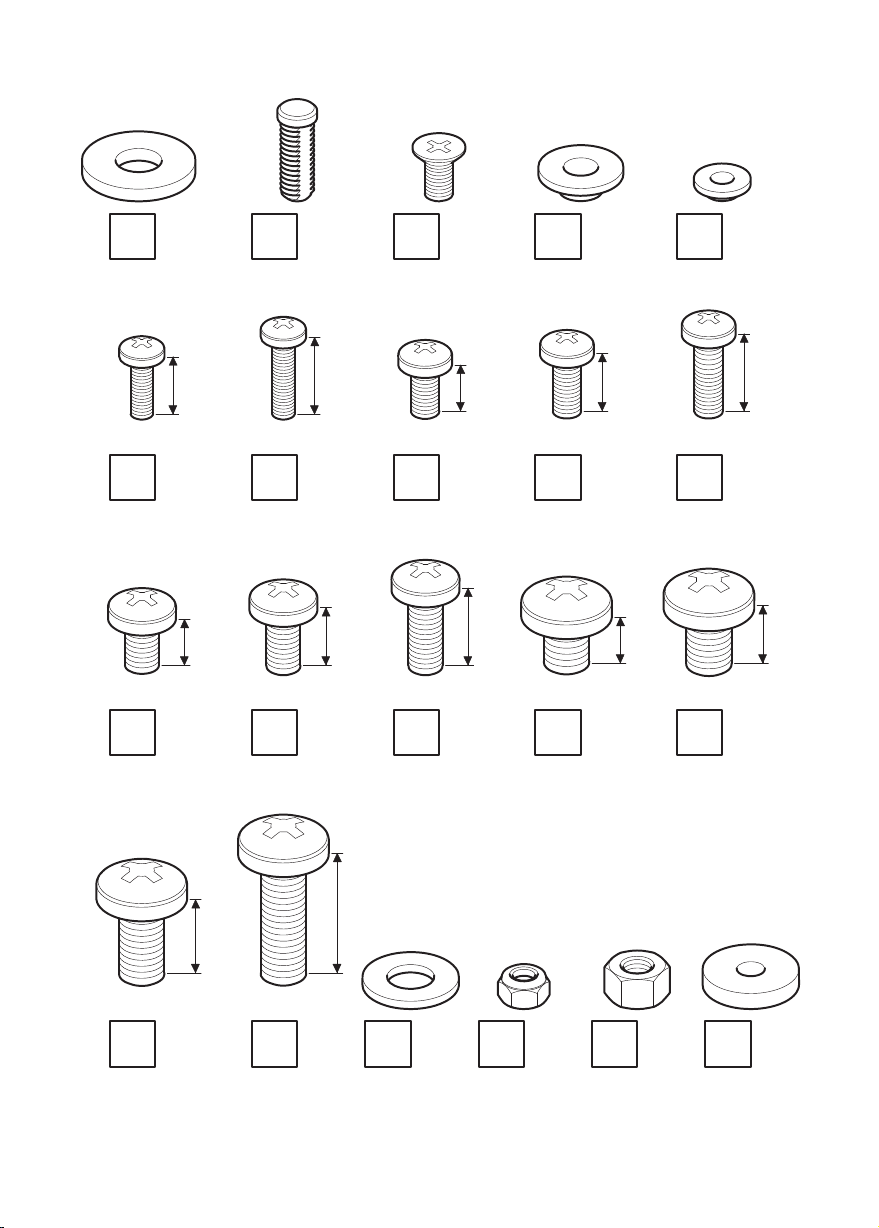
F
x2
G
x2
H
x2
I1
x6
I2
x4
M4
J1
M6
J6
x2
x2
12mm
10mm
16mm
M4
J2
M6
J7
x2
x2
16mm
12mm
25mm
M5
J3
M6
J8
x2
x2
10mm
16mm
M5
J4
M8
J9
x4
x2
12mm
10mm
M5
J5
M8
J10
16mm
x2
12mm
x2
M8
J11
x2
M8
J12
x2
K
x2
L
x4
M
x2
N
x2
Page 4
Introduction
Introducción
Before you begin please take time to read through this introduction and instructions to
familiarise yourself with the product and to also help you select the best way to attach
your Soundbar. This instruction manual covers many different configurations and is very
comprehensive. Please do not be put off by this as you will only need to follow a few steps.
This introduction gives you a basic idea as to what steps are involved in mounting your
Soundbar to your TV.
Antes de comenzar, tómese el tiempo de leer esta introducción y las instrucciones para
que se familiarice con el producto y también para que le ayuden a seleccionar la mejor
manera de fijar la barra de sonido. Este manual de instrucciones abarca diversas
configuraciones y es muy completo. No desanime por esto, ya que sólo tendrá que
seguir unos pocos pasos.
Esta introducción le da una idea básica sobre qué pasos son necesarios para montar la
barra de sonido al televisor.
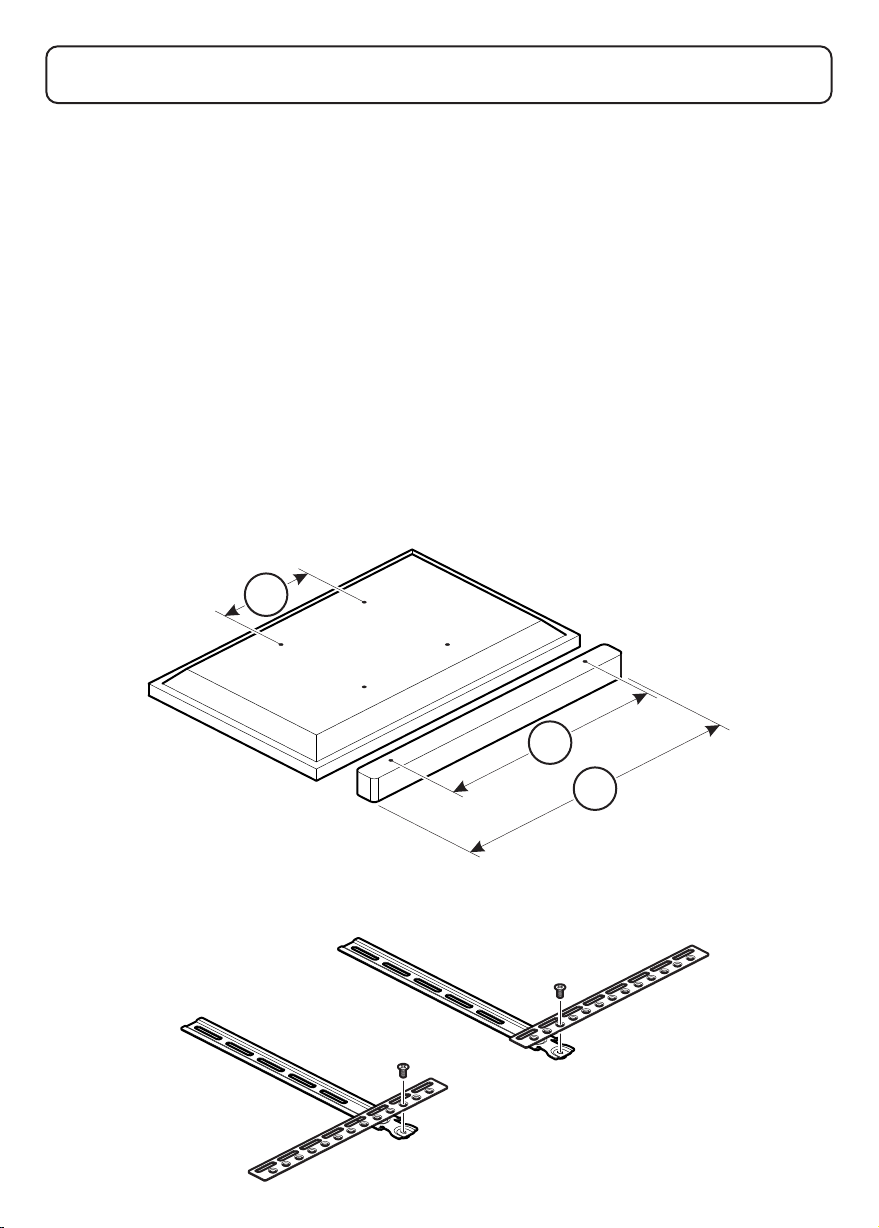
Measure your TV and Soundbar fixing holes
Mida los orificios de fijación del televisor y de la barra de sonido
X1
X2
X3
Prepare the Soundbar Mount Bracket
Prepare el soporte de montaje de la barra de sonido
Page 5
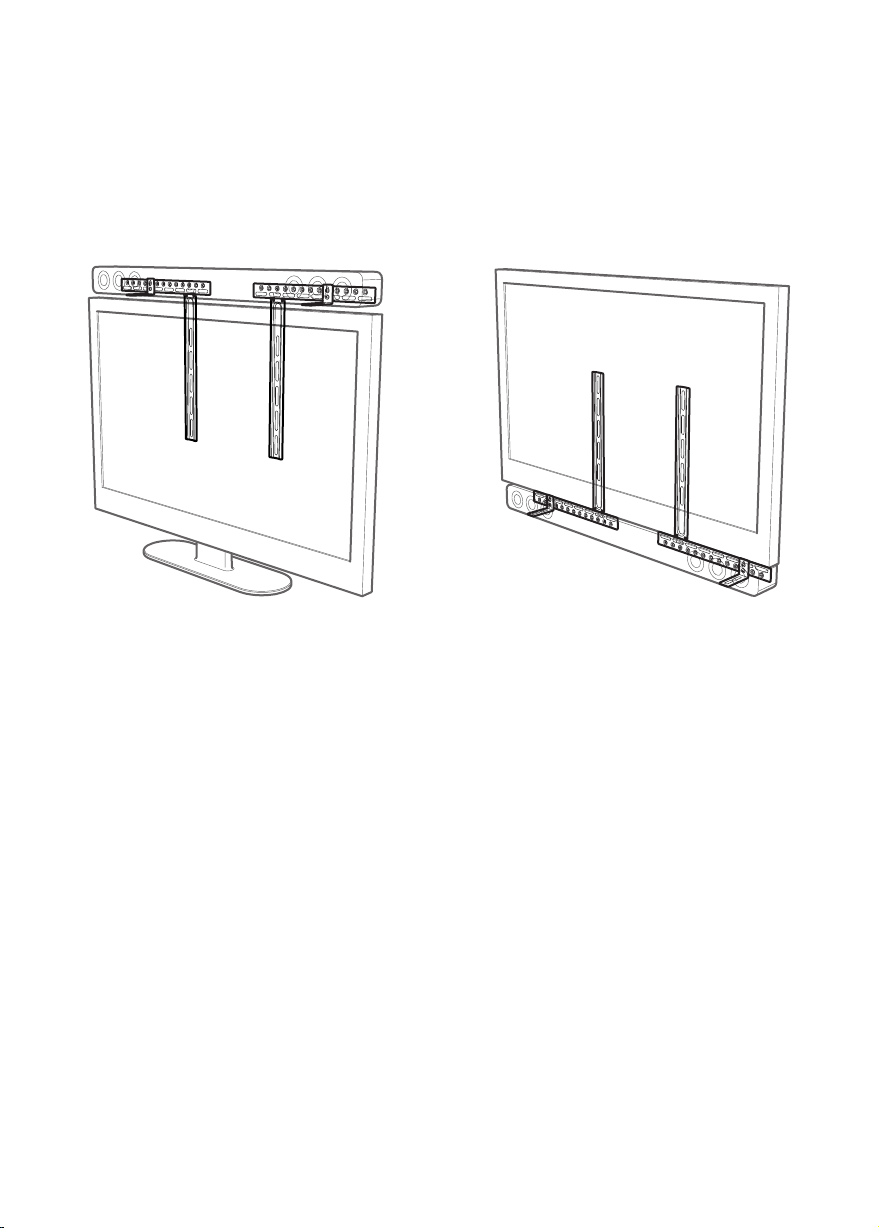
Mounting Above or Below?
¿Montarla encima o debajo?
Before you start to mount your Soundbar to your TV you will need to decide if you are
going to mount your Soundbar above your TV or below your TV.
Antes de empezar a montar la barra de sonido a su televisor tendrá que decidir si va a
montarla encima o debajo del televisor.
Mounting Above Follow steps 3 to 8
Para montarla encima, siga los pasos 3 a 8
You will then need to attach the Soundbar to your TV. See below for a description of the different
fixing methods available.
Luego tendrá que fijar la barra de sonido al televisor. Vea a continuación una descripción de los
diferentes métodos de fijación disponibles.
Screwing to the Back of the Soundbar
Use this method if you have no clashes with the TV and Soundbar fixing holes.
Atornillar a la parte posterior de la barra de sonido
Utilice este método si no existen conflictos con los orificios de fijación del televisor y de la barra
de sonido.
Screwing to the Bottom of the Soundbar
Use this method if you have no clashes with the TV and Soundbar fixing holes.
Atornillar a la parte inferior de la barra de sonido
Utilice este método si no existen conflictos con los orificios de fijación del televisor y de la barra
de sonido.
Attaching the Soundbar with Hook and Loop
Use this method if your Soundbar has no fixing holes or if there are clashes.
Fijar la barra de sonido con almohadillas de velcro
Utilice este método si su barra de sonido no tiene orificios de fijación o si existen conflictos.
Attaching the Soundbar with Manufacturers Bracket
Use this method if a Bracket is supplied by the Manufacturer. You will also find more
information in the Manufacturers instructions.
Fijar la barra de sonido con el soporte del fabricante
Utilice este método si el fabricante suministra un soporte. También encontrará más información en
las instrucciones del fabricante.
Attaching the Soundbar with Keyhole Pin
Use this method if your Soundbar has Keyhole fixing holes.
Fijar la barra de sonido con pasador de alineación
Utilice este método si su barra de sonido tiene orificios de fijación de alineación.
Mounting Below Please go to step 9
Para montarla debajo, vaya al paso 9
Page 6
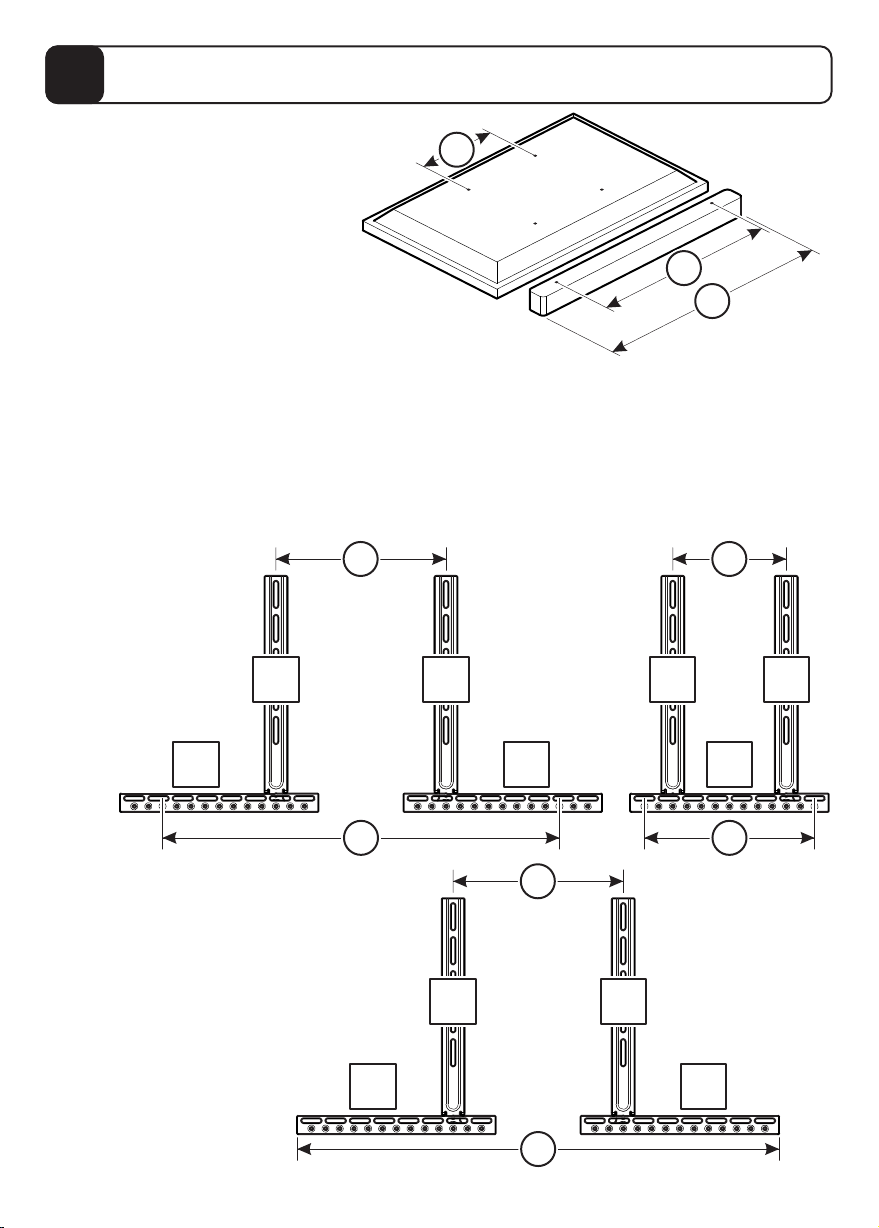
Measure your TV and Soundbar fixing holes
1
Mida los orificios de fijación del televisor y de la barra de sonido
Measure the width of the fixing holes on the
back of your TV (X1) and the back or bottom
of your Soundbar (X2) or the length of your
Soundbar (X3) if it has no fixing holes.
Mida el ancho de los orificios de
fijación en la parte posterior del
televisor (X1) y la parte posterior o
inferior de la barra de sonido (X2) o la
longitud de la barra de sonido (X3) si no
tiene orificios de fijación.
If your TV fixing holes and Soundbar fixing holes are equal
you will not be able to screw directly to the back or bottom of
your Soundbar. In this case you will need to use a different method for attaching.
Si los orificios de fijación del televisor y los orificios de fijación de la barra de sonido son iguales,
no podrá atornillar directamente a la parte posterior o inferior de la barra de sonido. En este caso,
tendrá que utilizar un método diferente para fijarla.
Before you attach horizontal bracket B to vertical bracket A use measurements X1 and X2
or X1 and X3 to decide the best configuration. Please see below for examples.
Antes de fijar el soporte horizontal B al soporte vertical A, utilice las medidas X1 y X2 o X1 y X3
para decidir la mejor configuración. Consulte a continuación algunos ejemplos.
X1
X2
X3
Examples show soundbar
with fixing holes.
Los siguientes ejemplos
muestran la barra de
sonido con orificios
de fijación.
A A A A
X1 X1
300mm 200mm
B B B
X2
700mm
Example shows soundbar with no fixing holes.
Los siguientes ejemplos muestran la barra de
sonido sin orificios de fijación.
B B
X1
300mm
X2
300mm
AA
X3
800mm
Page 7
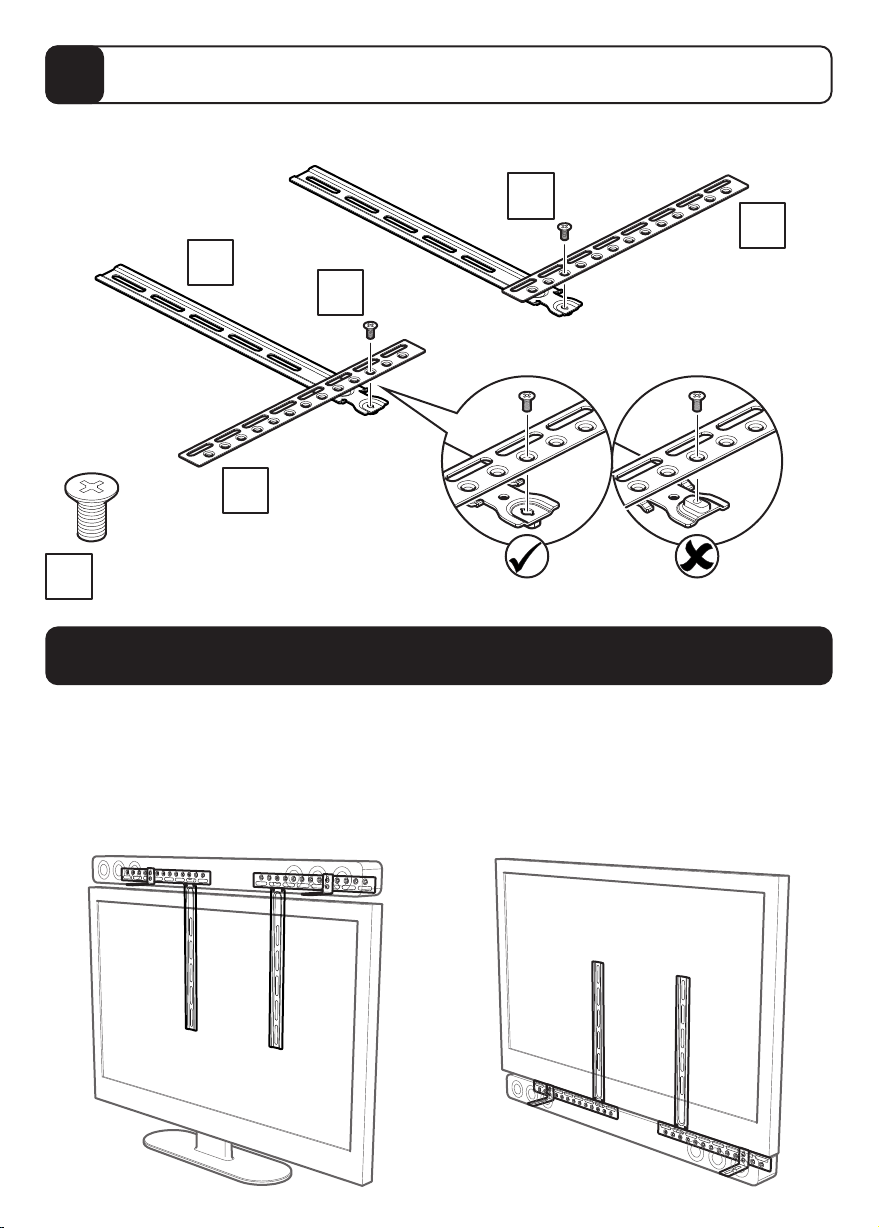
Prepare the Soundbar Mount Bracket
2
Prepare el soporte de montaje de la barra de sonido
Use measurements X1 & X2 or X3 from Step 1
Utilice las medidas X1 y X2 o X3 del paso 1
A
H
B
x2
H
H
B
Mounting Above or Below?
¿Montarla encima o debajo?
Before you start to mount your Soundbar to your TV you will need to decide if you are going to
mount your Soundbar above your TV or below your TV.
Antes de empezar a montar la barra de sonido a su televisor tendrá que decidir si va a montarla
encima o debajo del televisor.
Mounting Above Follow steps 3 to 8
Para montarla encima, siga los pasos 3 a 8
Mounting Below Please go to step 9
Para montarla debajo, vaya al paso 9
Page 8
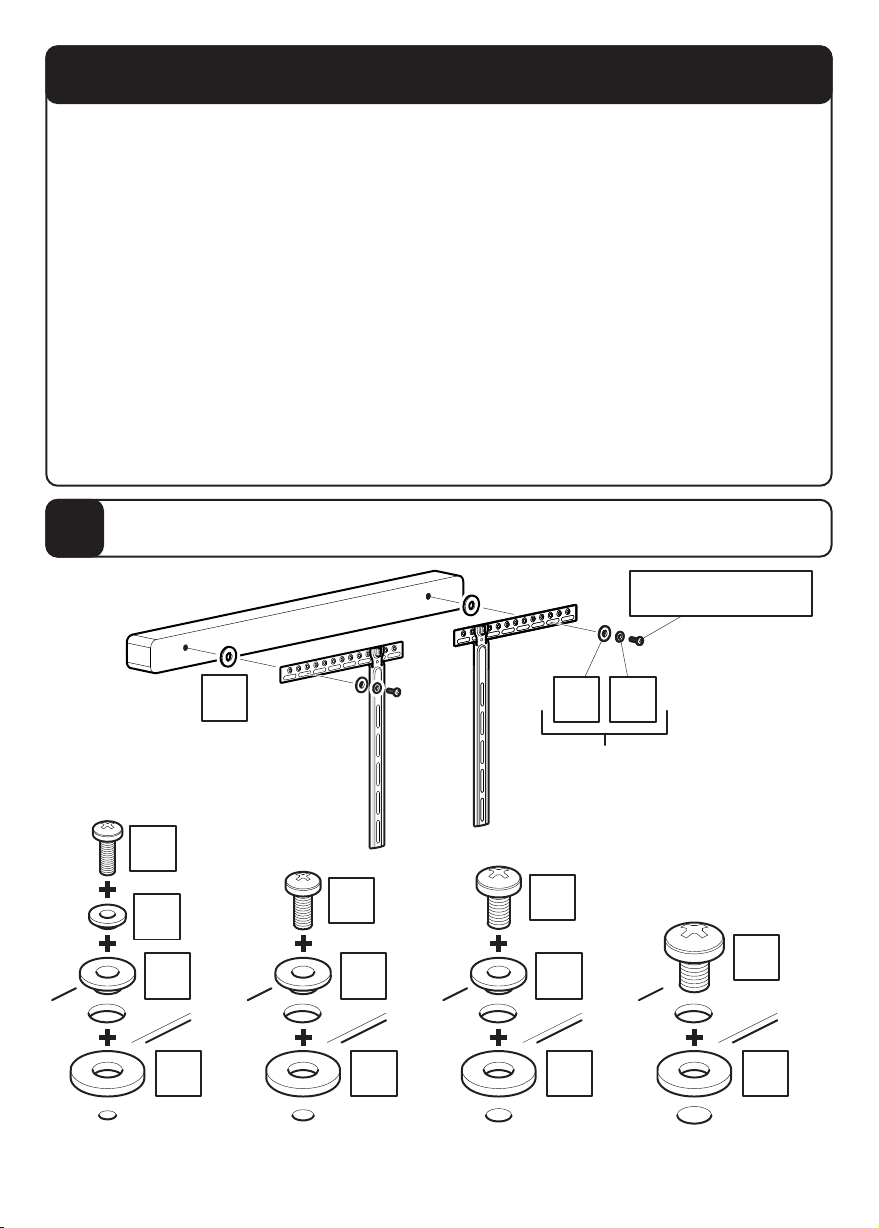
Mounting Above
Cómo montarla encima
You only need to follow one of steps 3 to 7 if you have chosen to have your Soundbar mounted
Please select your method of attaching your Soundbar to your TV and follow the appropriate steps.
Screwing to the Back of the Soundbar
Screwing to the Bottom of the Soundbar
Attaching the Soundbar with Hook and Loop
Attaching the Soundbar with Manufacturers Bracket
Attaching the Soundbar with Keyhole Pin
Sólo tiene que seguir uno de los pasos del 3 al 7 si ha elegido montar la barra de sonido encima
Seleccione el método para fijar la barra de sonido al televisor y siga los pasos adecuados.
Atornillar a la parte posterior de la barra de sonido
Atornillar a la parte inferior de la barra de sonido
Fijar la barra de sonido con almohadillas de velcro
Fijar la barra de sonido con el soporte del fabricante
Fijar la barra de sonido con pasador de alineación
above your TV.
- Step 3
- Step 4
- Step 5
- Step 6
- Step 7
del televisor.
- Paso 3
- Paso 4
- Paso 5
- Paso 6
- Paso 7
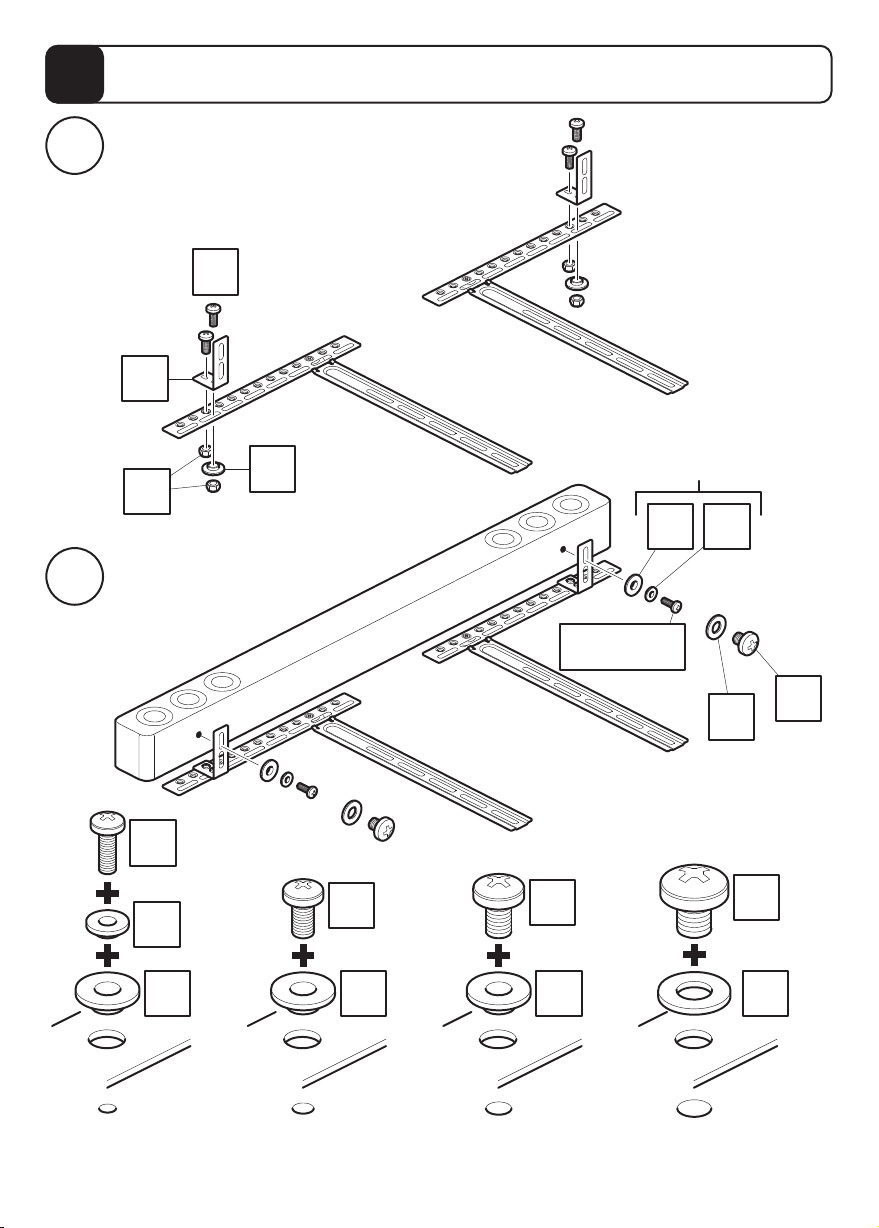
Screwing to the Back of the Soundbar
3
Atornillar a la parte posterior de la barra de sonido
J1/J4/J7/J10
F
x2
J1
x2
x2
I2
x2
I1
x2
F
Attach the brackets to the back of your Soundbar using suitable screw and reducer combinations.
Coloque los soportes a la parte posterior de la barra de sonido usando la combinación adecuada
de tornillo y reductor.
J4
I1
F
x2
x2
I1 I2
Screw diameter
dependant
Depende del diámetro
de tornillo
x2
J7
x2
I1
x2
F
J10
F
x2
x2
Page 9
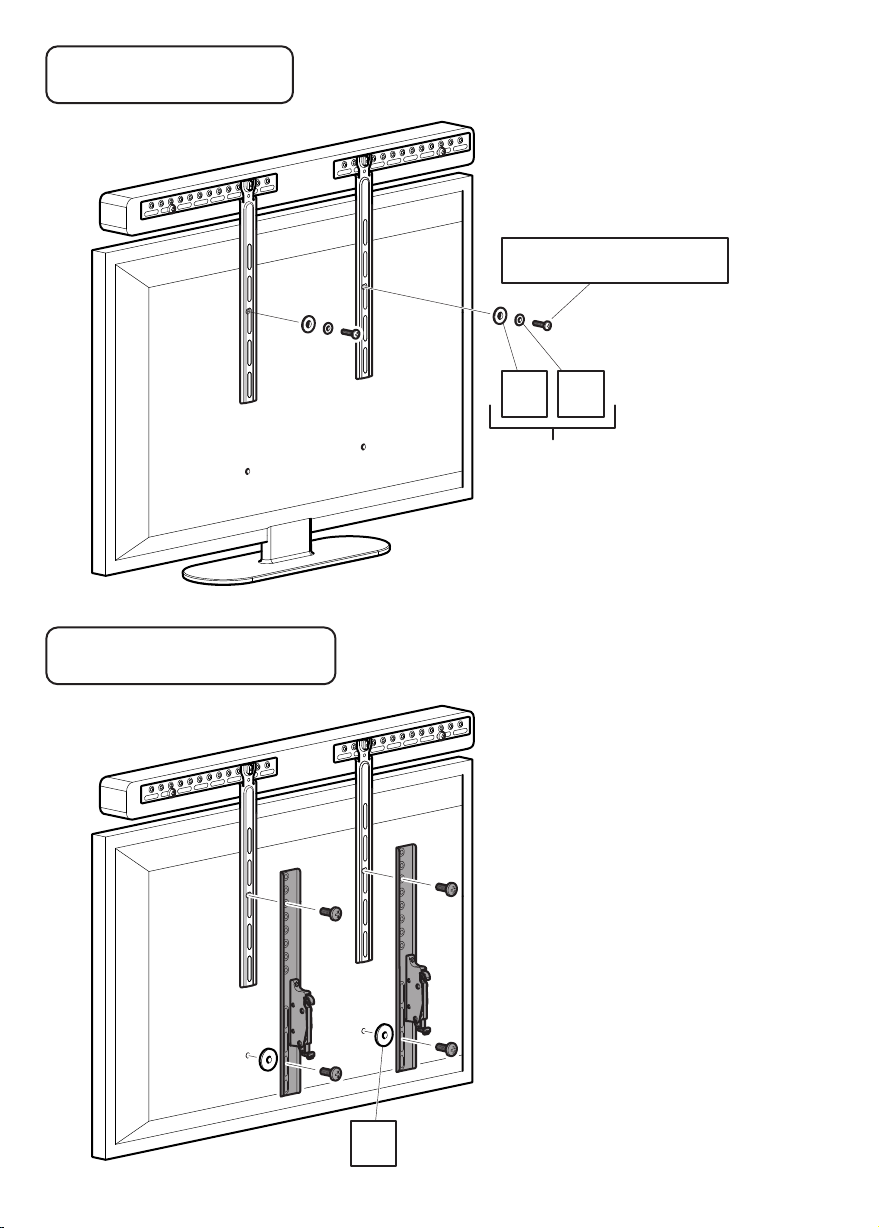
Free Standing TV
Soporte de pie para TV
If you are attaching your Soundbar
to a free standing TV please use this
step in conjunction with step 8
Si va a conectar su barra de sonido a
un soporte de pie para televisor, por
favor utilice este paso junto con el
paso 8.
J2/J5/J8/J11/J12
I2I1
Screw diameter
dependant
Depende del
diámetro de tornillo
Wall Mounted TV
TV montada a la pared
N
If you are attaching your Soundbar
to a wall mounted TV please use this
step in conjunction with the instructions
provided with your TV wall mount.
Si va a conectar la barra de sonido a
una TV montada en la pared por favor
utilice este paso junto con las
instrucciones suministradas con su
soporte de pared para TV.
The brackets and the screws
shown in grey are only an example.
These are supplied by the TV
wall mount manufacturer.
Los soportes y los tornillos que se
muestran en gris son sólo un ejemplo.
Estos son suministrados por el
fabricante del soporte de pared
del televisor.
Page 10
Screwing to the Bottom of the Soundbar
4
Atornillar a la parte inferior de la barra de sonido
Attaching Shelf Brackets
i
Fijar los soportes del estante
J4
C
I1
L
Attaching Soundbar
ii
Fijar la barra de sonido
Screw diameter dependant
Depende del
diámetro de tornillo
I1 I2
J1/J3/J6
J9
K
x2
J1
x2
x2
x2
x2
I2
x2
I1
Attach the brackets to the bottom of your Soundbar using suitable screw and reducer combinations.
Coloque los soportes usando la combinación adecuada de
tornillo y reductor.
a la parte inferior de la barra de sonido
J3
I1
x2
J6
I1
x2
J9
K
x2
Page 11
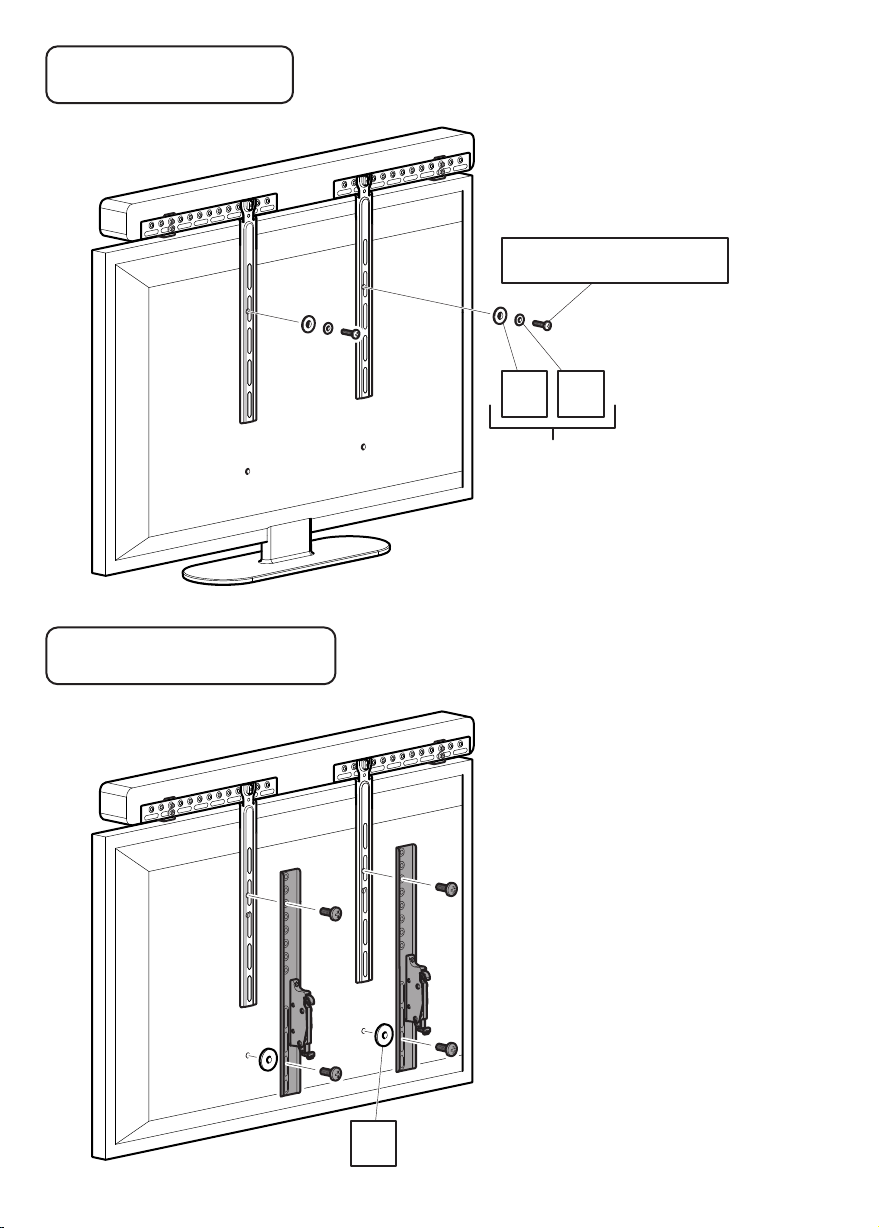
Free Standing TV
Soporte de pie para TV
If you are attaching your Soundbar
to a free standing TV please use this
step in conjunction with step 8
Si va a conectar su barra de sonido a
un soporte de pie para televisor, por
favor utilice este paso junto con el
paso 8.
J2/J5/J8/J11/J12
I1 I2
Screw diameter
dependant
Depende del
diámetro de tornillo
Wall Mounted TV
TV montada a la pared
N
If you are attaching your Soundbar
to a wall mounted TV please use this
step in conjunction with the instructions
provided with your TV wall mount.
Si va a conectar la barra de sonido a
una TV montada en la pared por favor
utilice este paso junto con las
instrucciones suministradas con su
soporte de pared para TV.
The brackets and the screws
shown in grey are only an example.
These are supplied by the TV
wall mount manufacturer.
Los soportes y los tornillos que se
muestran en gris son sólo un ejemplo.
Estos son suministrados por el
fabricante del soporte de pared
del televisor.
Page 12
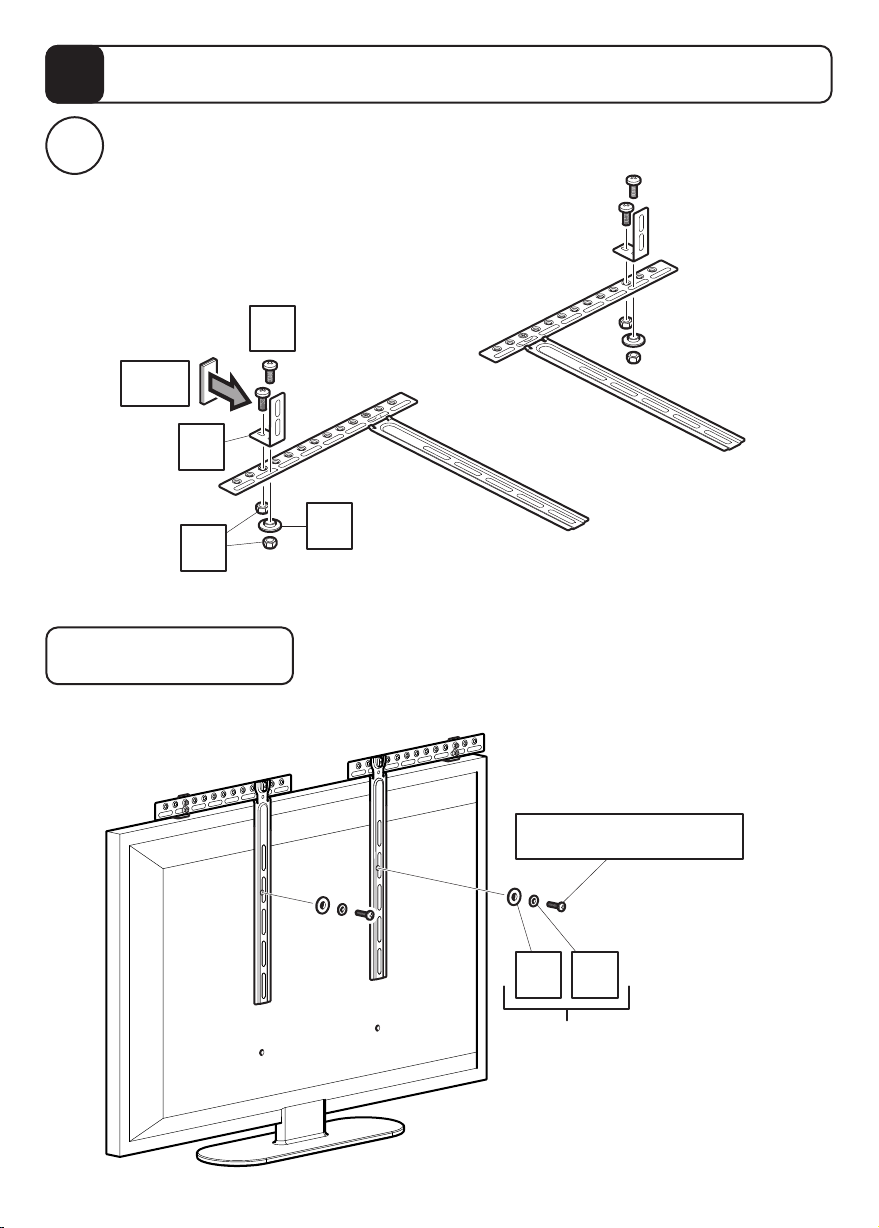
Attaching the Soundbar with Hook and Loop
5
Fijar la barra de sonido con almohadillas de velcro
Attaching Shelf Brackets and Hook and Loop Pads
i
Fijar los soportes del estante y las almohadillas de velcro
J4
D/E
C
I1
L
Free Standing TV
Soporte de pie para TV
If you are attaching your Soundbar
to a free standing TV please use this
step in conjunction with step 8
Si va a conectar su barra de sonido a
un soporte de pie para televisor, por
favor utilice este paso junto con el
paso 8.
J2/J5/J8/J11/J12
I1 I2
Screw diameter
dependant
Depende del
diámetro de tornillo
Page 13
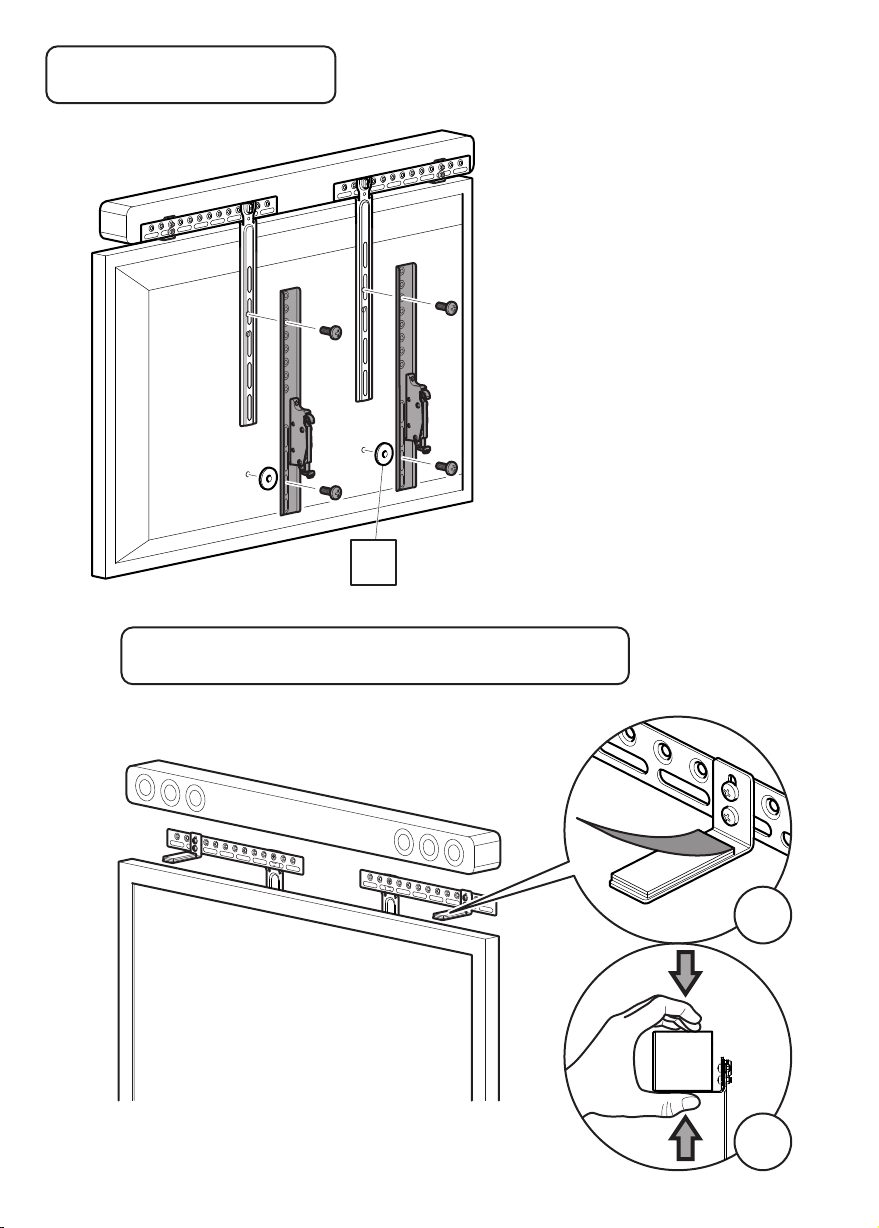
Wall Mounted TV
TV montada a la pared
N
If you are attaching your Soundbar
to a wall mounted TV please use this
step in conjunction with the instructions
provided with your TV wall mount.
Si va a conectar la barra de sonido a
una TV montada en la pared por favor
utilice este paso junto con las
instrucciones suministradas con su
soporte de pared para TV.
The brackets and the screws
shown in grey are only an example.
These are supplied by the TV
wall mount manufacturer.
Los soportes y los tornillos que se
muestran en gris son sólo un ejemplo.
Estos son suministrados por el
fabricante del soporte de pared
del televisor.
Free Standing TV or Wall Mounted TV
Soporte de pie para TV o soporte de pared para TV
This step is for Free Standing or Wall Mounted Method
Este paso es para el método de soporte de pie
o soporte de pared
i
ii
Page 14
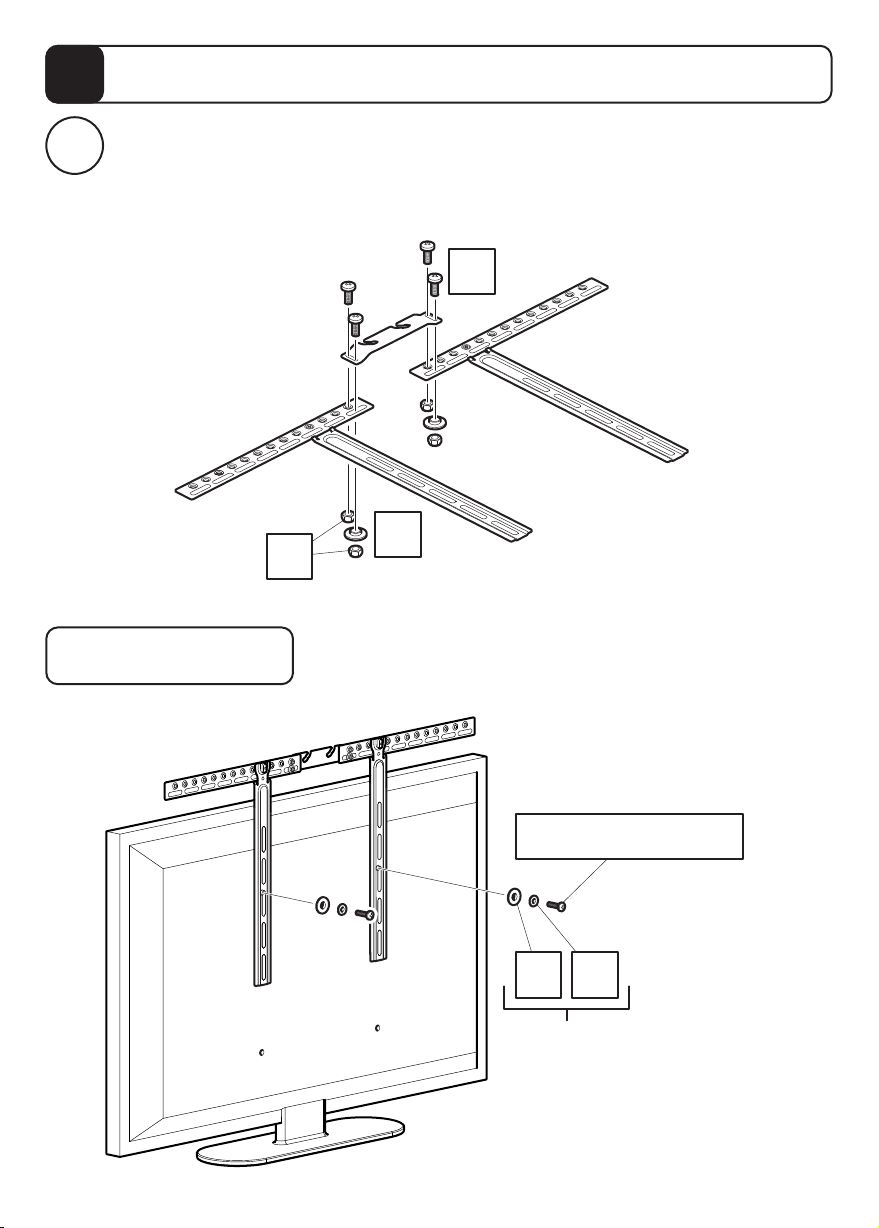
Attaching the Soundbar with Manufacturers Bracket
6
Fijar la barra de sonido con el soporte del fabricante
Attaching manufacturers bracket. Please note this bracket is not included.
The image below shows an example of a bracket.
i
Fijar el soporte del fabricante. Tenga en cuenta que este soporte no está incluido.
La imagen que aparece a continuación muestra un ejemplo de un soporte.
J4
I1
L
Free Standing TV
Soporte de pie para TV
If you are attaching your Soundbar
to a free standing TV please use this
step in conjunction with step 8
Si va a conectar su barra de sonido a
un soporte de pie para televisor, por
favor utilice este paso junto con el
paso 8.
J2/J5/J8/J11/J12
I1 I2
Screw diameter
dependant
Depende del
diámetro de tornillo
Page 15
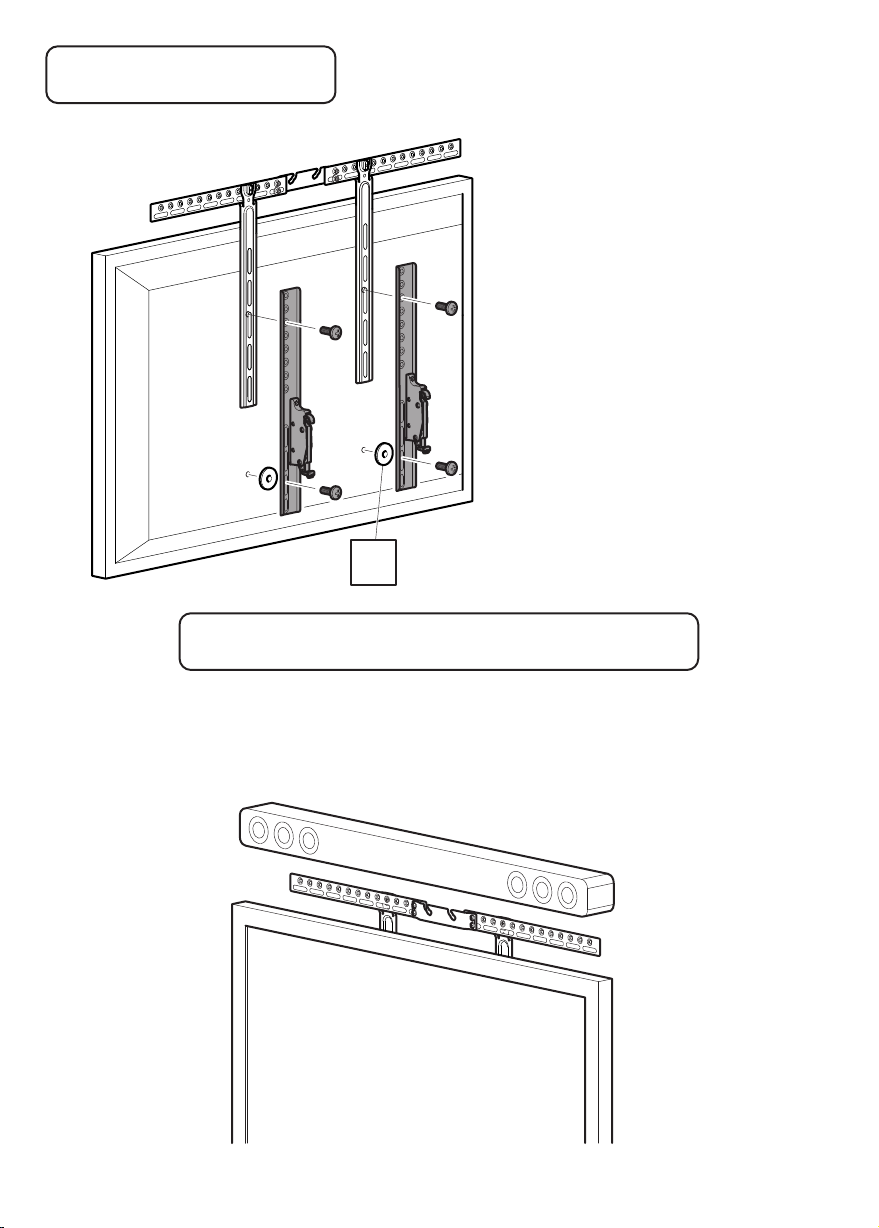
Wall Mounted TV
TV montada a la pared
Free Standing TV or Wall Mounted TV
Soporte de pie para TV o soporte de pared para TV
This step is for Free Standing or Wall Mounted TV
Este paso es para el método de soporte de pie o soporte de pared
Attach your Soundbar as per the manufacturers instructions
Fije la barra de sonido según las instrucciones del fabricante
N
If you are attaching your Soundbar
to a wall mounted TV please use this
step in conjunction with the instructions
provided with your TV wall mount.
Si va a conectar la barra de sonido a
una TV montada en la pared por favor
utilice este paso junto con las
instrucciones suministradas con su
soporte de pared para TV.
The brackets and the screws
shown in grey are only an example.
These are supplied by the TV
wall mount manufacturer.
Los soportes y los tornillos que se
muestran en gris son sólo un ejemplo.
Estos son suministrados por el
fabricante del soporte de pared
del televisor.
Page 16
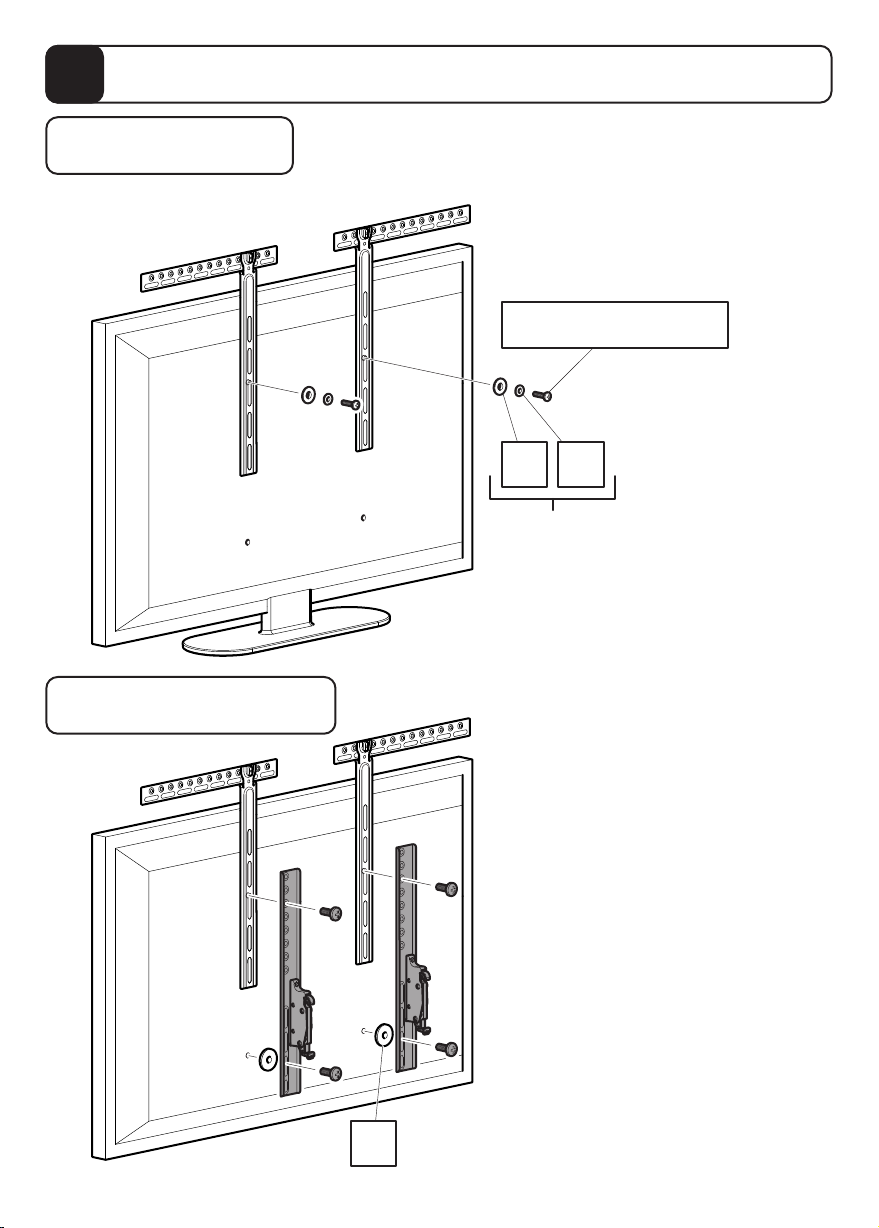
Attaching to Soundbar with Keyhole Pin
7
Fijar la barra de sonido con pasador de alineación
Free Standing TV
Soporte de pie para TV
Wall Mounted TV
TV montada a la pared
If you are attaching your Soundbar
to a free standing TV please use this
step in conjunction with step 8
Si va a conectar su barra de sonido a
un soporte de pie para televisor, por
favor utilice este paso junto con el
paso 8.
J2/J5/J8/J11/J12
I1 I2
Screw diameter
dependant
Depende del
diámetro de tornillo
If you are attaching your Soundbar
to a wall mounted TV please use this
step in conjunction with the instructions
provided with your TV wall mount.
N
Si va a conectar la barra de sonido a
una TV montada en la pared por favor
utilice este paso junto con las
instrucciones suministradas con su
soporte de pared para TV.
The brackets and the screws
shown in grey are only an example.
These are supplied by the TV
wall mount manufacturer.
Los soportes y los tornillos que se
muestran en gris son sólo un ejemplo.
Estos son suministrados por el
fabricante del soporte de pared
del televisor.
Page 17
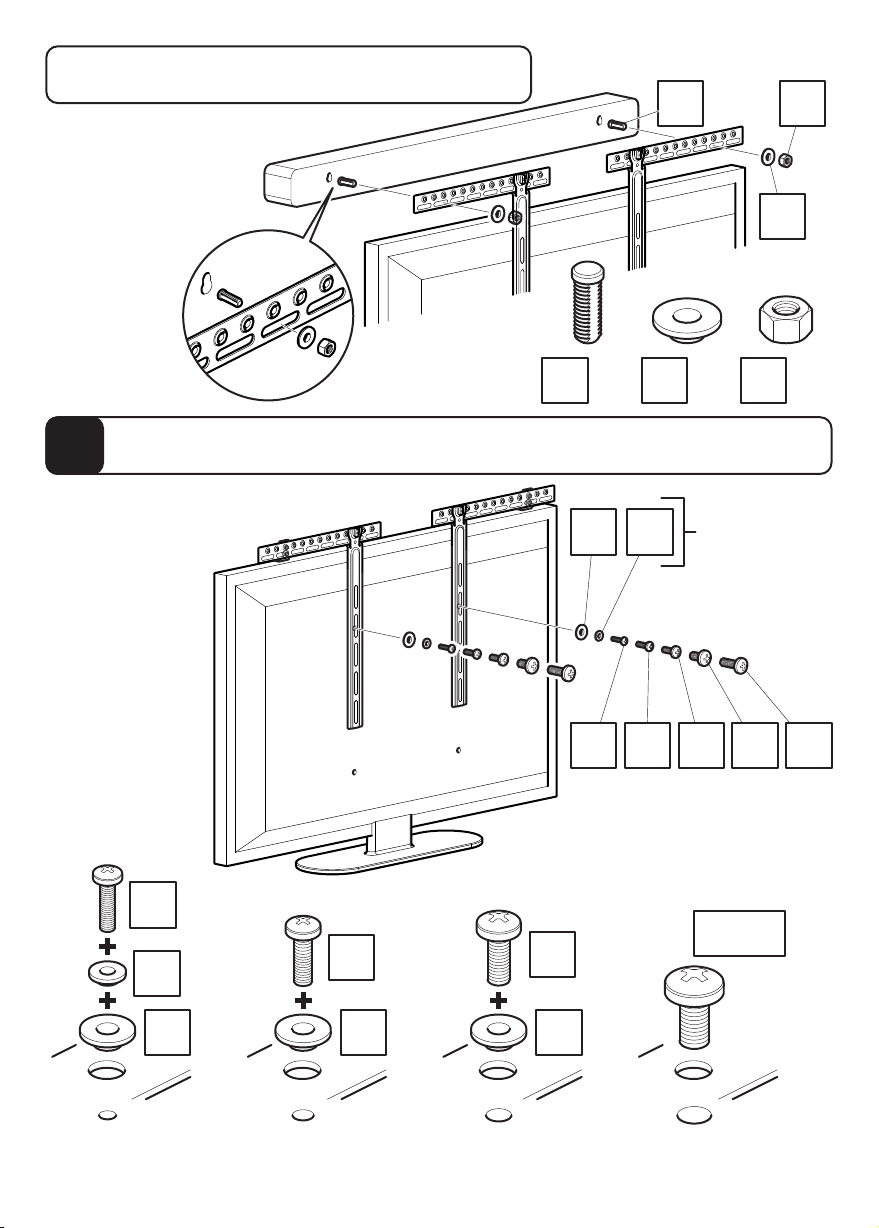
Free Standing TV or Wall Mounted TV
Soporte de pie para TV o soporte de pared para TV
This step is for Free Standing
or Wall Mounted Method
Este paso es para el
método de soporte de
pie o soporte de pared
MG
I1
Attaching Soundbar Bracket to TV
8
Colocación del soporte para la barra de sonido a la TV
You will only need
to use this step if
you are attaching
your Soundbar to
a free standing TV
Usted sólo tendrá
que utilizar este
paso si va a
conectar la barra
de sonido a un
soporte de pie
para TV
J2
I2
x2
x2
J5
x2
G
I1 I2
x2
I1
x2
Screw
diameter
dependant
Depende del
diámetro
de tornillo
J2 J5 J8 J11 J12
J11/J12
J8
x2
M
x2
x2
x2
I1
Attach the brackets to the back of your TV using suitable screw and reducer combinations.
Coloque los soportes a la parte posterior de su TV usando la combinación adecuada de
tornillo y reductor.
I1
x2
I1
x2
Page 18
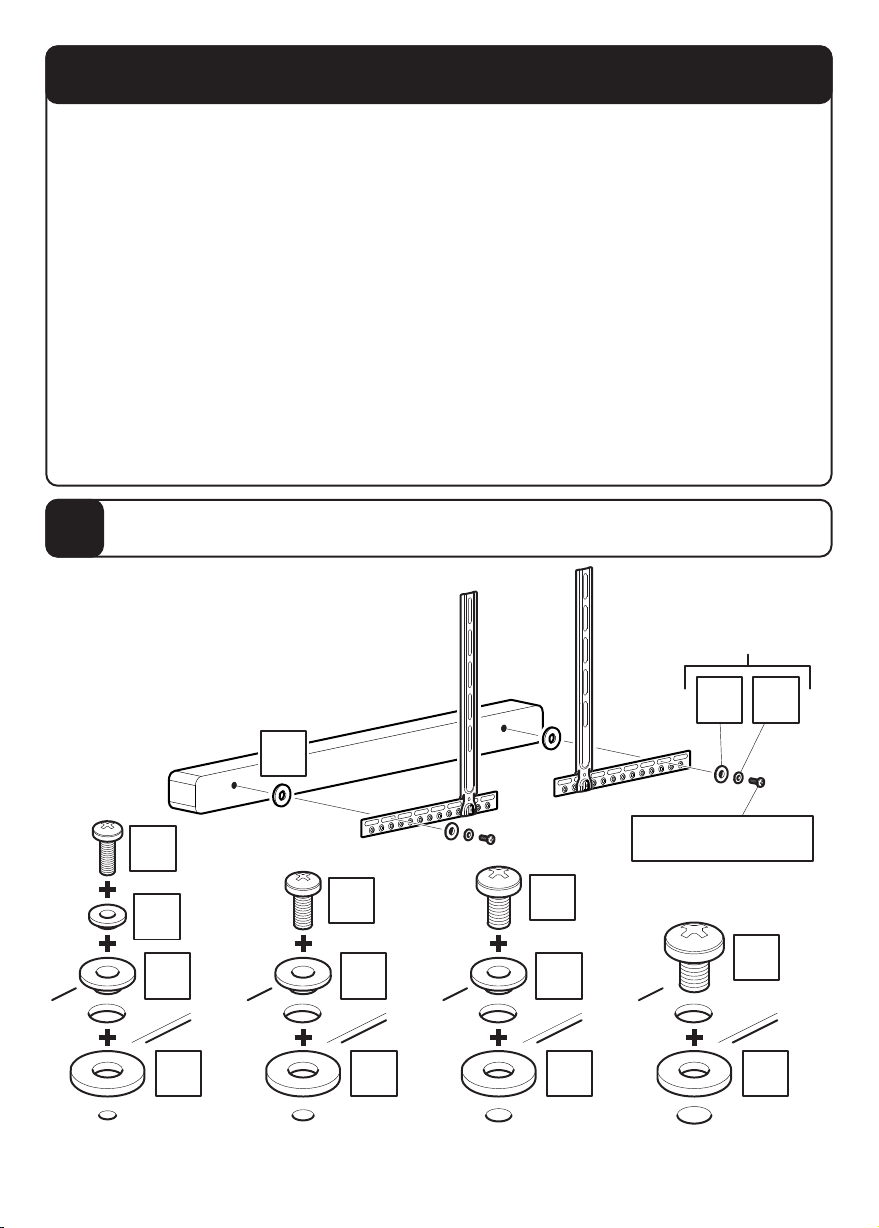
Mounting Below
Cómo montarla debajo
You only need to follow one of steps 9 to 13 if you have chosen to have your Soundbar mounted
Please select your method of attaching your Soundbar to your TV and follow the appropriate steps.
Screwing to the Back of the Soundbar
Screwing to the Bottom of the Soundbar
Attaching the Soundbar with Hook and Loop
Attaching the Soundbar with Manufacturers Bracket
Attaching the Soundbar with Keyhole Pin
Sólo tiene que seguir uno de los pasos del 9 al 13 si ha elegido montar la barra de sonido
Seleccione el método para fijar la barra de sonido al televisor y siga los pasos adecuados.
Atornillar a la parte posterior de la barra de sonido
Atornillar a la parte inferior de la barra de sonido
Fijar la barra de sonido con almohadillas de velcro
Fijar la barra de sonido con el soporte del fabricante
Fijar la barra de sonido con pasador de alineación
below your TV.
- Step 9
- Step 10
- Step 11
- Step 12
- Step 13
debajo del televisor.
- Paso 9
- Paso 10
- Paso 11
- Paso 12
- Paso 13
Screwing to the Back of the Soundbar
9
Atornillar a la parte posterior de la barra de sonido
Screw diameter
dependant
Depende del diámetro
de tornillo
I1 I2
F
x2
J1
x2
x2
I2
x2
I1
x2
F
Attach the brackets to the back of your Soundbar using suitable screw and reducer combinations.
Coloque los soportes a la parte posterior de la barra de sonido usando la combinación adecuada
de tornillo y reductor
.
J4
I1
F
x2
x2
J7
I1
F
J1/J4/J7/J10
x2
x2
x2
J10
F
x2
x2
Page 19
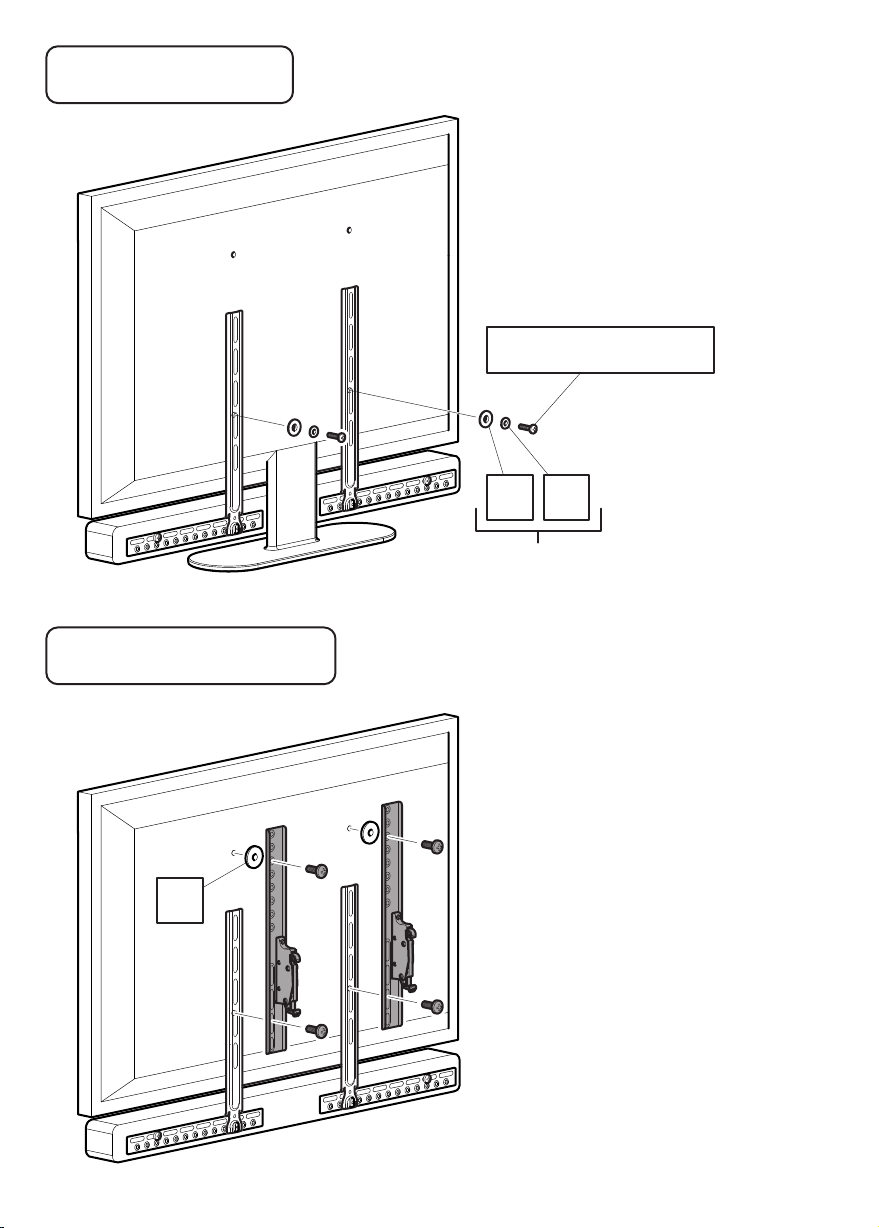
Free Standing TV
Soporte de pie para TV
If you are attaching your Soundbar
to a free standing TV please use this
step in conjunction with step 14
Si va a conectar su barra de sonido a
un soporte de pie para televisor, por
favor utilice este paso junto con el
paso 14.
J2/J5/J8/J11/J12
I1 I2
Screw diameter dependant
Depende del diámetro de tornillo
Wall Mounted TV
TV montada a la pared
N
If you are attaching your Soundbar
to a wall mounted TV please use this
step in conjunction with the instructions
provided with your TV wall mount.
Si va a conectar la barra de sonido a
una TV montada en la pared por favor
utilice este paso junto con las
instrucciones suministradas con su
soporte de pared para TV.
The brackets and the screws
shown in grey are only an example.
These are supplied by the TV
wall mount manufacturer.
Los soportes y los tornillos que se
muestran en gris son sólo un ejemplo.
Estos son suministrados por el
fabricante del soporte de pared
del televisor.
Page 20
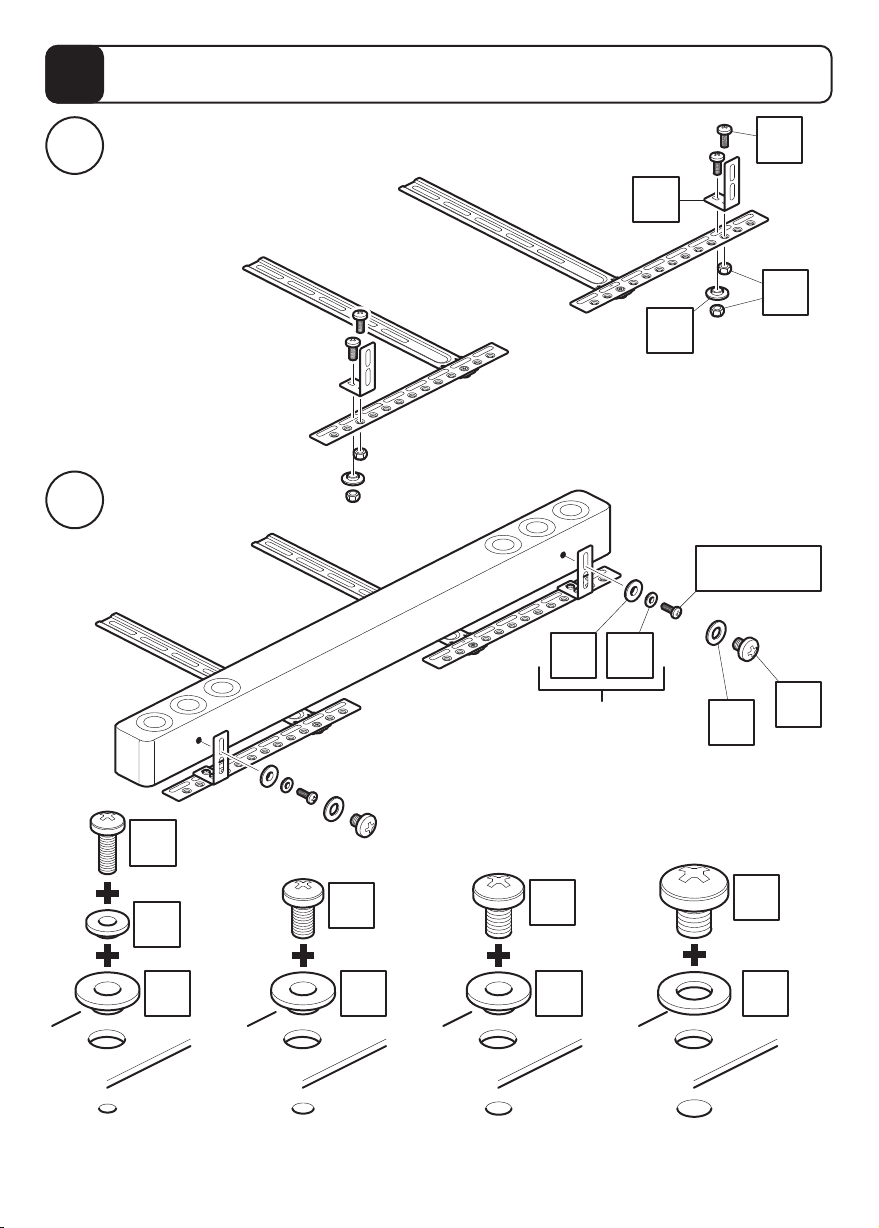
10
Screwing to the Bottom of the Soundbar
Atornillar a la parte inferior de la barra de sonido
Attaching Shelf Brackets
i
Fijar los soportes del estante
Attaching Soundbar
ii
Fijar la barra de sonido
C
I1
I1 I2
Screw diameter
dependant
Depende del diámetro
de tornillo
J4
L
J1/J3/J6
J9
K
x2
J1
x2
x2
x2
x2
I2
x2
I1
Attach the brackets to the bottom of your Soundbar using suitable screw and reducer combinations.
Coloque los soportes usando la combinación adecuada de
tornillo y reductor.
a la parte inferior de la barra de sonido
J3
I1
x2
J6
I1
x2
J9
K
x2
Page 21
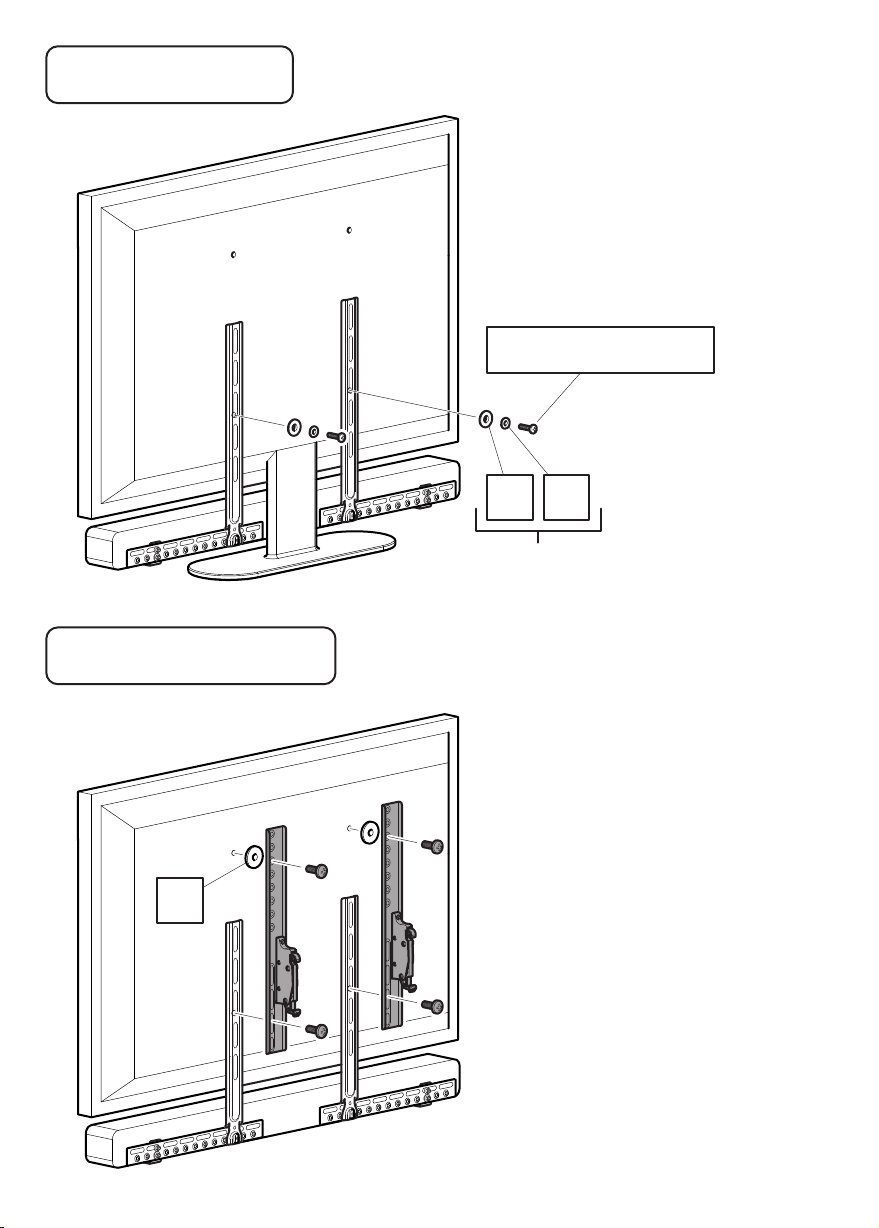
Free Standing TV
Soporte de pie para TV
If you are attaching your Soundbar
to a free standing TV please use this
step in conjunction with step 14
Si va a conectar su barra de sonido a
un soporte de pie para televisor, por
favor utilice este paso junto con el
paso 14.
J2/J5/J8/J11/J12
I2I1
Screw diameter dependant
Depende del diámetro de tornillo
Wall Mounted TV
TV montada a la pared
N
If you are attaching your Soundbar
to a wall mounted TV please use this
step in conjunction with the instructions
provided with your TV wall mount.
Si va a conectar la barra de sonido a
una TV montada en la pared por favor
utilice este paso junto con las
instrucciones suministradas con su
soporte de pared para TV.
The brackets and the screws
shown in grey are only an example.
These are supplied by the TV
wall mount manufacturer.
Los soportes y los tornillos que se
muestran en gris son sólo un ejemplo.
Estos son suministrados por el
fabricante del soporte de pared
del televisor.
Page 22
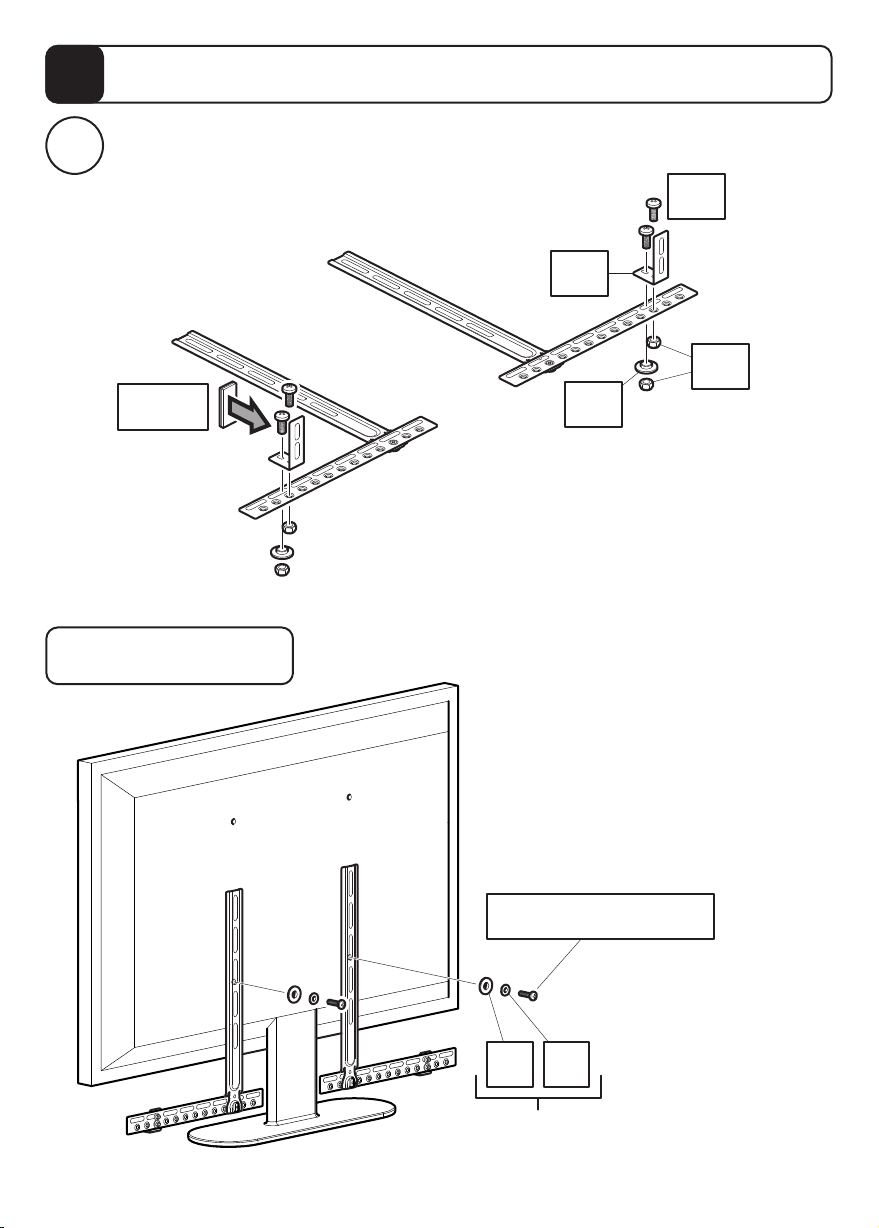
11
i
Attaching the Soundbar with Hook and Loop
Fijar la barra de sonido con almohadillas de velcro
Attaching Shelf Brackets and Hook and Loop Pads
Fijar los soportes del estante y las almohadillas de velcro
SJ4
SC
SL
SD/SE
Free Standing TV
Soporte de pie para TV
SI1
If you are attaching your Soundbar
to a free standing TV please use this
step in conjunction with step 14
Si va a conectar su barra de sonido a
un soporte de pie para televisor, por
favor utilice este paso junto con el
paso 14.
J2/J5/J8/J11/J12
I2I1
Screw diameter dependant
Depende del diámetro de tornillo
Page 23
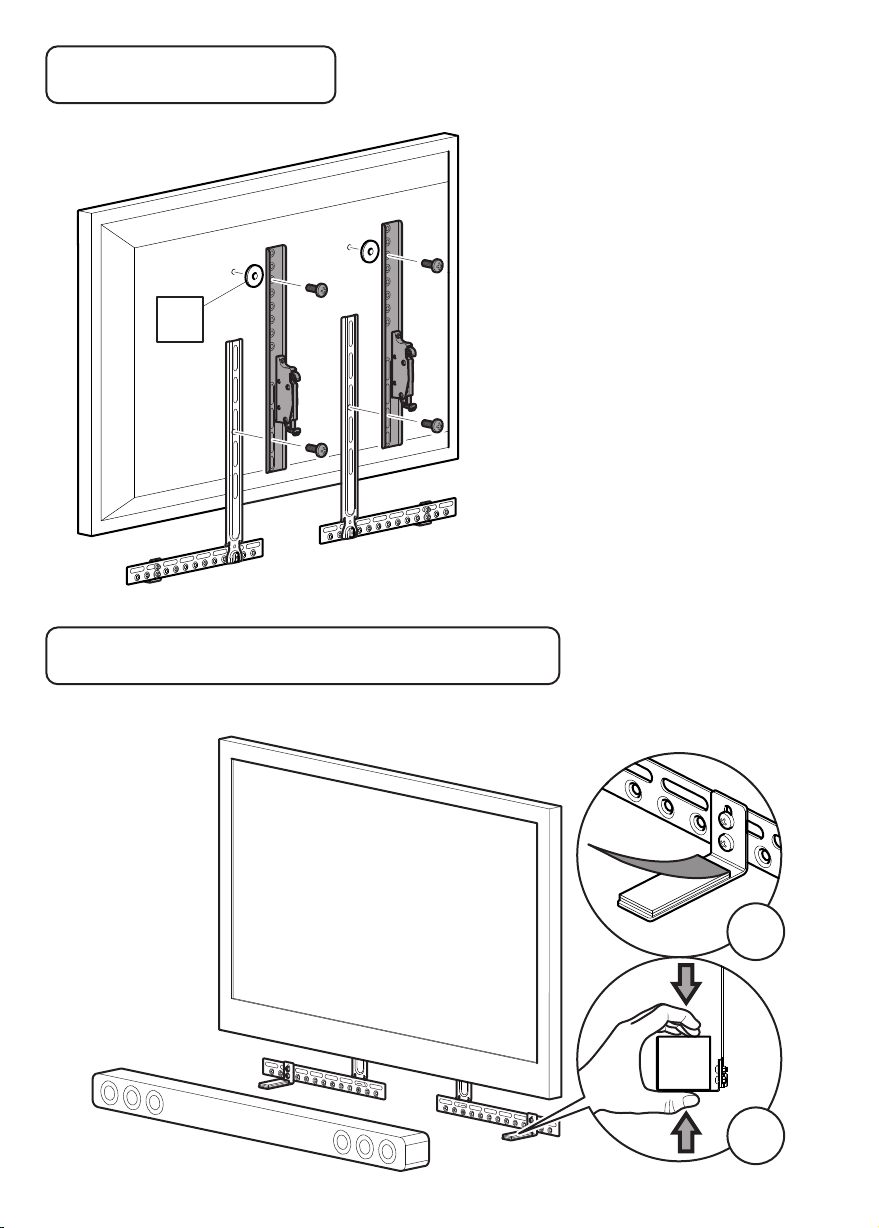
Wall Mounted TV
TV montada a la pared
N
If you are attaching your Soundbar
to a wall mounted TV please use this
step in conjunction with the instructions
provided with your TV wall mount.
Si va a conectar la barra de sonido a
una TV montada en la pared por favor
utilice este paso junto con las
instrucciones suministradas con su
soporte de pared para TV.
The brackets and the screws
shown in grey are only an example.
These are supplied by the TV
wall mount manufacturer.
Los soportes y los tornillos que se
muestran en gris son sólo un ejemplo.
Estos son suministrados por el
fabricante del soporte de pared
del televisor.
Free Standing TV or Wall Mounted TV
Soporte de pie para TV o soporte de pared para TV
This step is for Free Standing
or Wall Mounted Method
Este paso es para el método
de soporte de pie o soporte
de pared
i
ii
Page 24
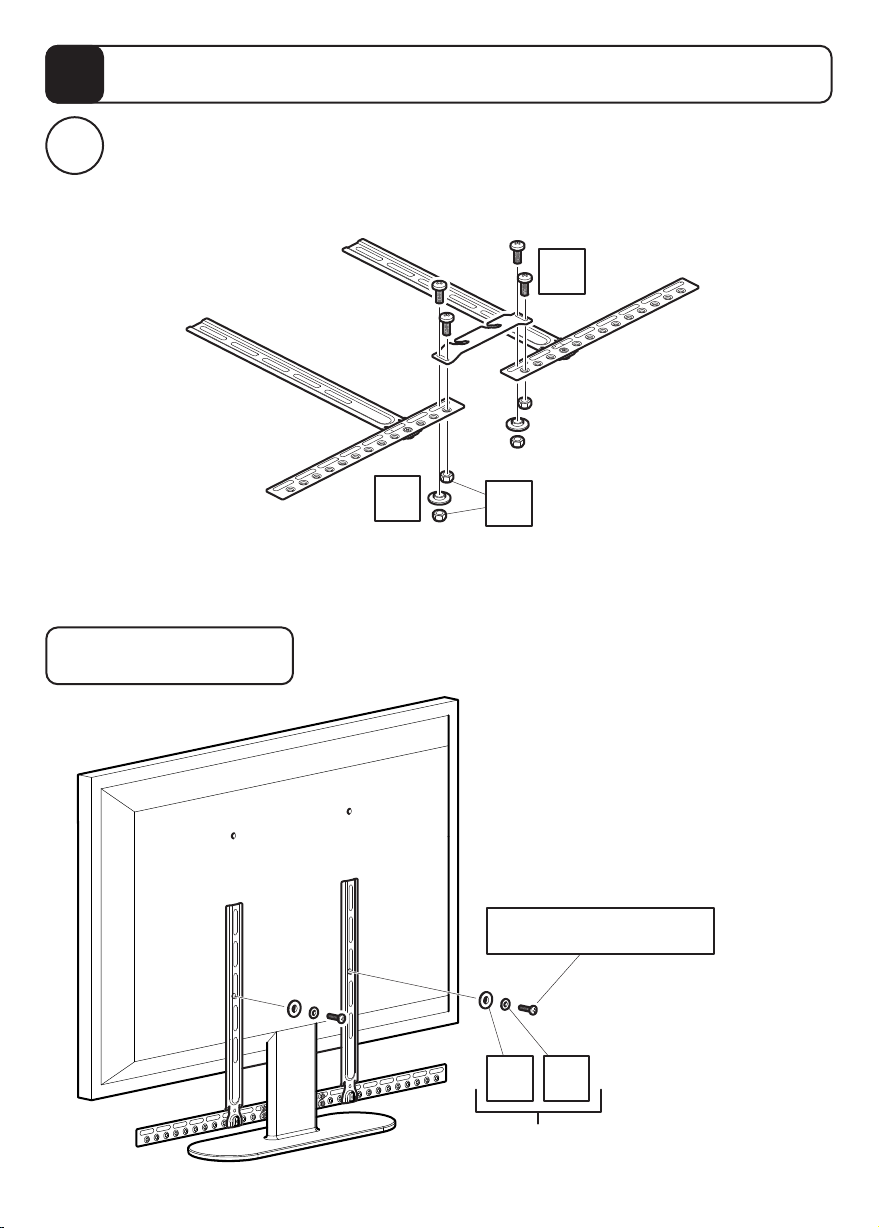
12
i
Attaching the Soundbar with Manufacturers Bracket
Fijar la barra de sonido con el soporte del fabricante
Attaching manufacturers bracket. Please note this bracket is not included.
The image below shows an example of a bracket.
Fijar el soporte del fabricante. Tenga en cuenta que este soporte no está incluido.
La imagen que aparece a continuación muestra un ejemplo de un soporte.
J4
Free Standing TV
Soporte de pie para TV
I1
L
If you are attaching your Soundbar
to a free standing TV please use this
step in conjunction with step 14
Si va a conectar su barra de sonido a
un soporte de pie para televisor, por
favor utilice este paso junto con el
paso 14.
J2/J5/J8/J11/J12
I2I1
Screw diameter dependant
Depende del diámetro de tornillo
Page 25
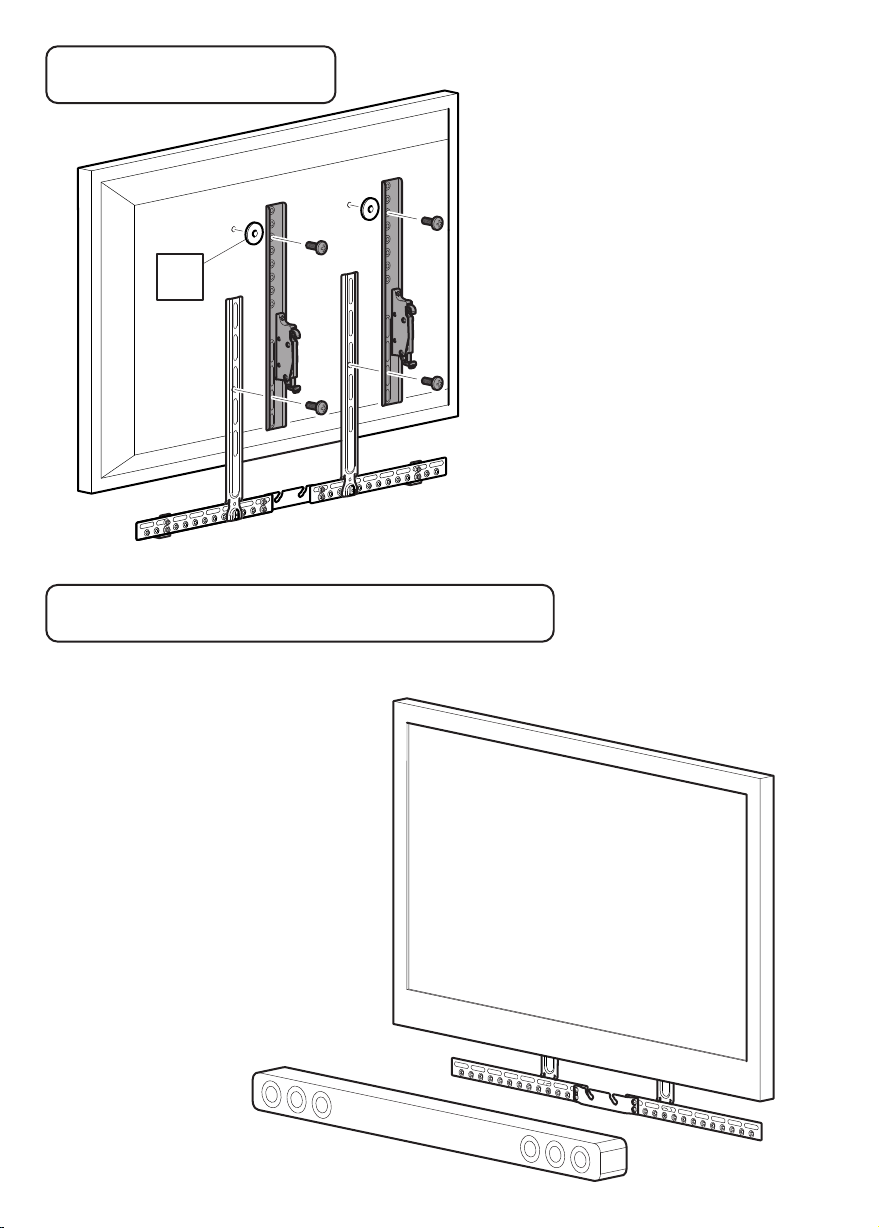
Wall Mounted TV
TV montada a la pared
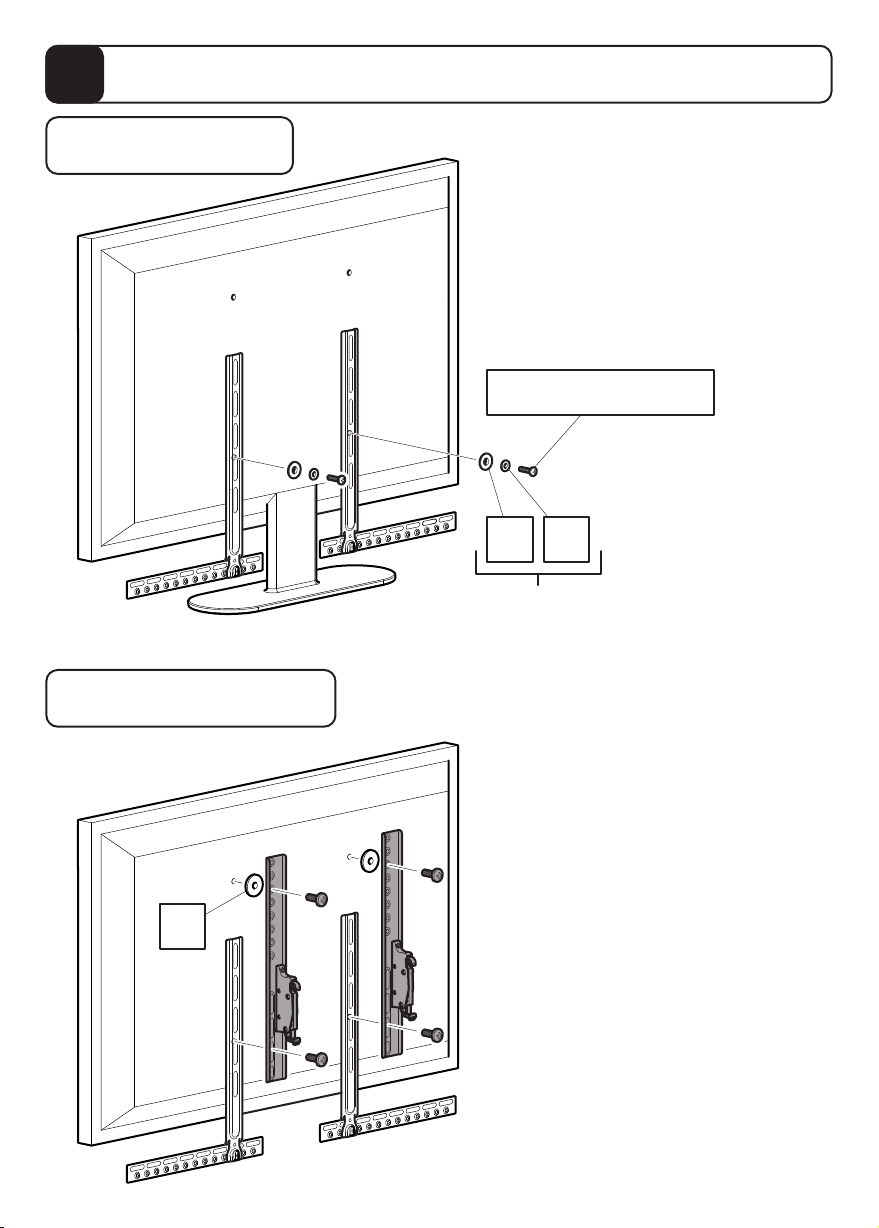
If you are attaching your Soundbar
to a wall mounted TV please use this
step in conjunction with the instructions
provided with your TV wall mount.
Si va a conectar la barra de sonido a
una TV montada en la pared por favor
utilice este paso junto con las
instrucciones suministradas con su
soporte de pared para TV.
N
The brackets and the screws
shown in grey are only an example.
These are supplied by the TV
wall mount manufacturer.
Los soportes y los tornillos que se
muestran en gris son sólo un ejemplo.
Estos son suministrados por el
fabricante del soporte de pared
del televisor.
Free Standing TV or Wall Mounted TV
Soporte de pie para TV o soporte de pared para TV
This step is for Free Standing
or Wall Mounted Method
Este paso es para el método de
soporte de pie o soporte de pared
Attach your Soundbar as per
the manufacturers instructions
Fije la barra de sonido según las
instrucciones del fabricante
Page 26
13
Attaching to Soundbar with Keyhole Pin
Fijar la barra de sonido con pasador de alineación
Free Standing TV
Soporte de pie para TV
Wall Mounted TV
TV montada a la pared
If you are attaching your Soundbar
to a free standing TV please use this
step in conjunction with step 14
Si va a conectar su barra de sonido a
un soporte de pie para televisor, por
favor utilice este paso junto con el
paso 14.
J2/J5/J8/J11/J12
I1 I2
Screw diameter dependant
Depende del diámetro de tornillo
If you are attaching your Soundbar
to a wall mounted TV please use this
step in conjunction with the instructions
provided with your TV wall mount.
N
Si va a conectar la barra de sonido a
una TV montada en la pared por favor
utilice este paso junto con las
instrucciones suministradas con su
soporte de pared para TV.
The brackets and the screws
shown in grey are only an example.
These are supplied by the TV
wall mount manufacturer.
Los soportes y los tornillos que se
muestran en gris son sólo un ejemplo.
Estos son suministrados por el
fabricante del soporte de pared
del televisor.
Page 27
Free Standing TV or Wall Mounted TV
Soporte de pie para TV o soporte de pared para TV
x2
G
This step is for Free Standing
or Wall Mounted Method
Este paso es para el método
de soporte de pie o soporte
de pared
x2
I1
M
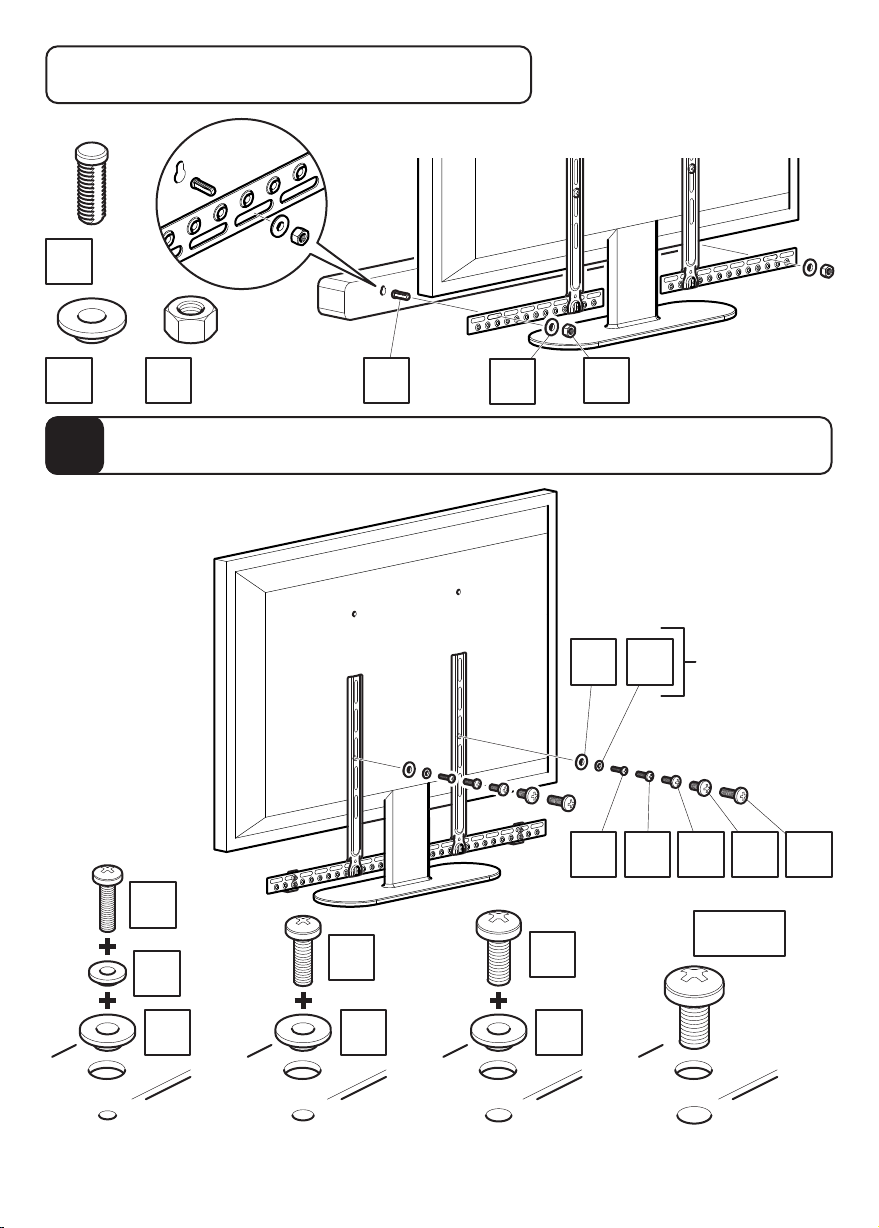
Attaching Soundbar Bracket to TV
14
You will only need
to use this step if
you are attaching
your Soundbar to
a free standing TV
Usted sólo tendrá
que utilizar este
paso si va a
conectar la barra
de sonido a un
soporte de pie
para TV
Colocación del soporte para la barra de sonido a la TV
J2
I2
x2
x2
x2
J5
G
x2
I1
M
Screw
diameter
I1 I2
dependant
Depende del
diámetro
de tornillo
J2 J5 J8 J11 J12
J11/J12
J8
x2
x2
x2
I1
Attach the brackets to the back of your TV using suitable screw and reducer combinations.
Coloque los soportes a la parte posterior de su TV usando la combinación adecuada de
tornillo y reductor.
I1
x2
I1
x2
 Loading...