

Page 1
INTRODUCTION
Thank you for purchasing This super compact PC/Mac-to-TV scan converter displays
PC output to a big screen TV. This section covers the cable connection and touch button control functions.
AVerMedia® AVerKey Lite.
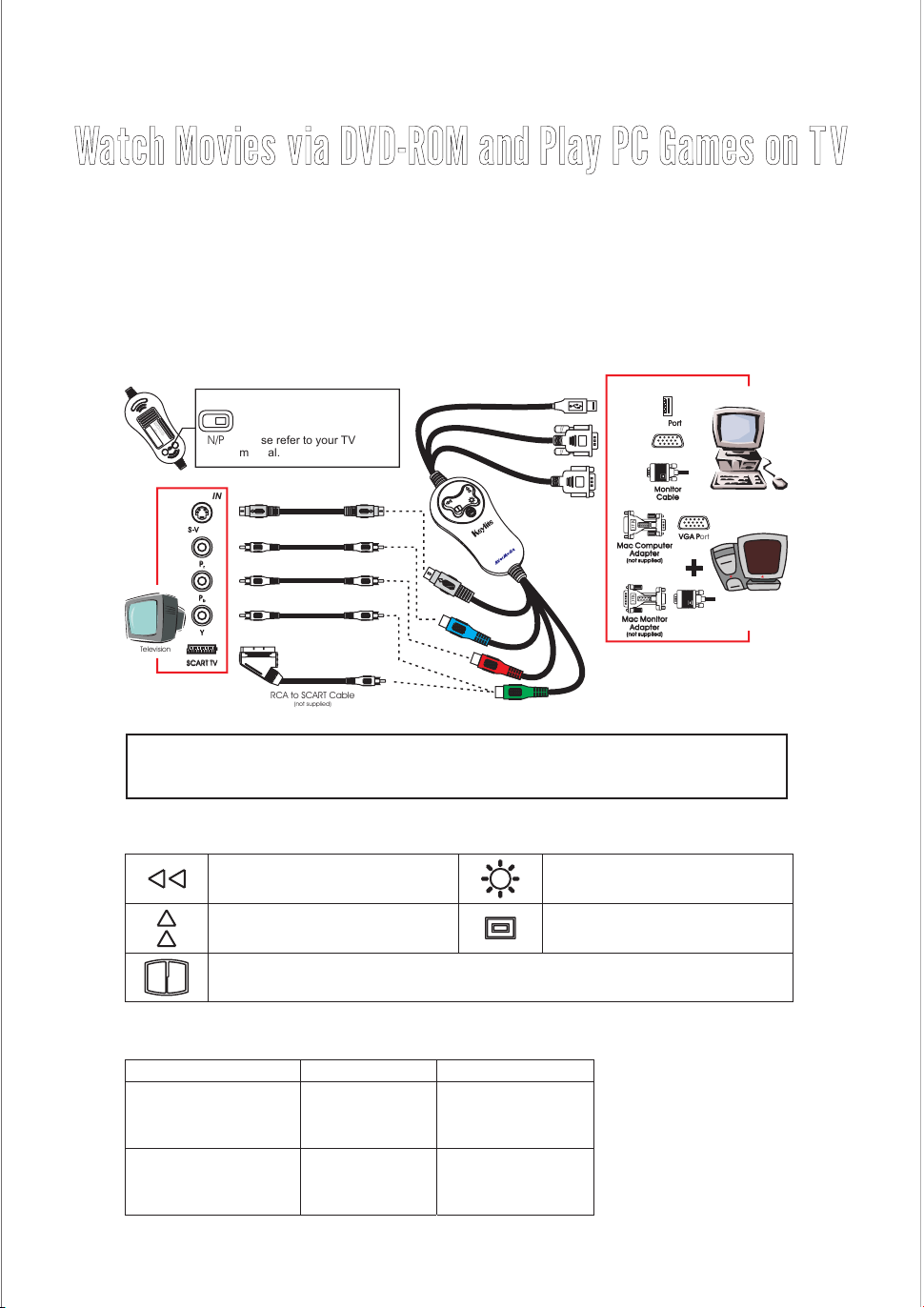
Making the Connection
The figure below clearly shows, which cable should be connected to each port.
Switches the display to PAL or
A
tte
D
O
Wa
ntio
o
N
rra
p
O
n
en
:
T
n
O
ty
e
P
d
v
E
.
o
N
M
id
TH
A
if
D
E
th
E
C
e
IN
A
c
S
T
E!!
a
AIW
se
AN
h
M
a
o
s
d
e
K
be
0
l
N
0
8
e
o
.
n
/P
N
NTSC TV system. If you are
not sure of your TV system,
please refer to your TV
N/P
manual.
IN
S-Video Cable
(not supplied)
RCA Cable
(not supplied)
RCA Cable
(not supplied)
RCA Cable
(not supplied)
RCA to SCART Cable
(not supplied)
Do not connect the S-video and the YP P at the same time.
br
Television
SCART TVSCART TV
WARNING:
S-VIDEO
P
P
Y
r
b
To avoid damaging the unit, operate this unit within a temperature range of
0º to 40ºc (32º~104ºf).
TOUCH BUTTON CONTROLS
The button controls provide easy access to enhance your presentation.
Pan the image to the left.
Pan the image up.
CPU
USB PortUSB Port
VGA PortVGA Port
Monitor
Cable
MAC
Mac Computer
Adapter
(notsupplied)
MAC
Mac Monitor
Adapter
(notsupplied)
VGA PortVGA Port
Monitor
Cable
Computer
Mac
Press to select from 3 brightness level .s
Toggles between overscan, underscan
and full screen modes.
Press to switch from 3 sharpness levels.
SUPPORTED DISPLAY MODES
The reference table below lists the various display resolutions that the can support.AVerKey Lite
Computer/Operating System Display Resolution Refresh Rate
IBM PC 720 x 400
640 x 480
800 x 600
1024 x 768
Macintosh 640 x 480
800 x 600
832 x 624
1024 x 768
© 2002 AVerMedia TECHNOLOGIES, Inc. All rights reserved.AVerMedia and AVerKey are registered trademarks of AVerMedia TECHNOLOGIES, Inc. The
information contained in this documentation is subject to change without notice.
70
60, 70, 72, 75, 85, 100
60, 70, 72, 75, 85, 100
60, 70, 72, 75, 85
67, 117
95
75
75
 Loading...