

Page 1
www.avenview.com
1
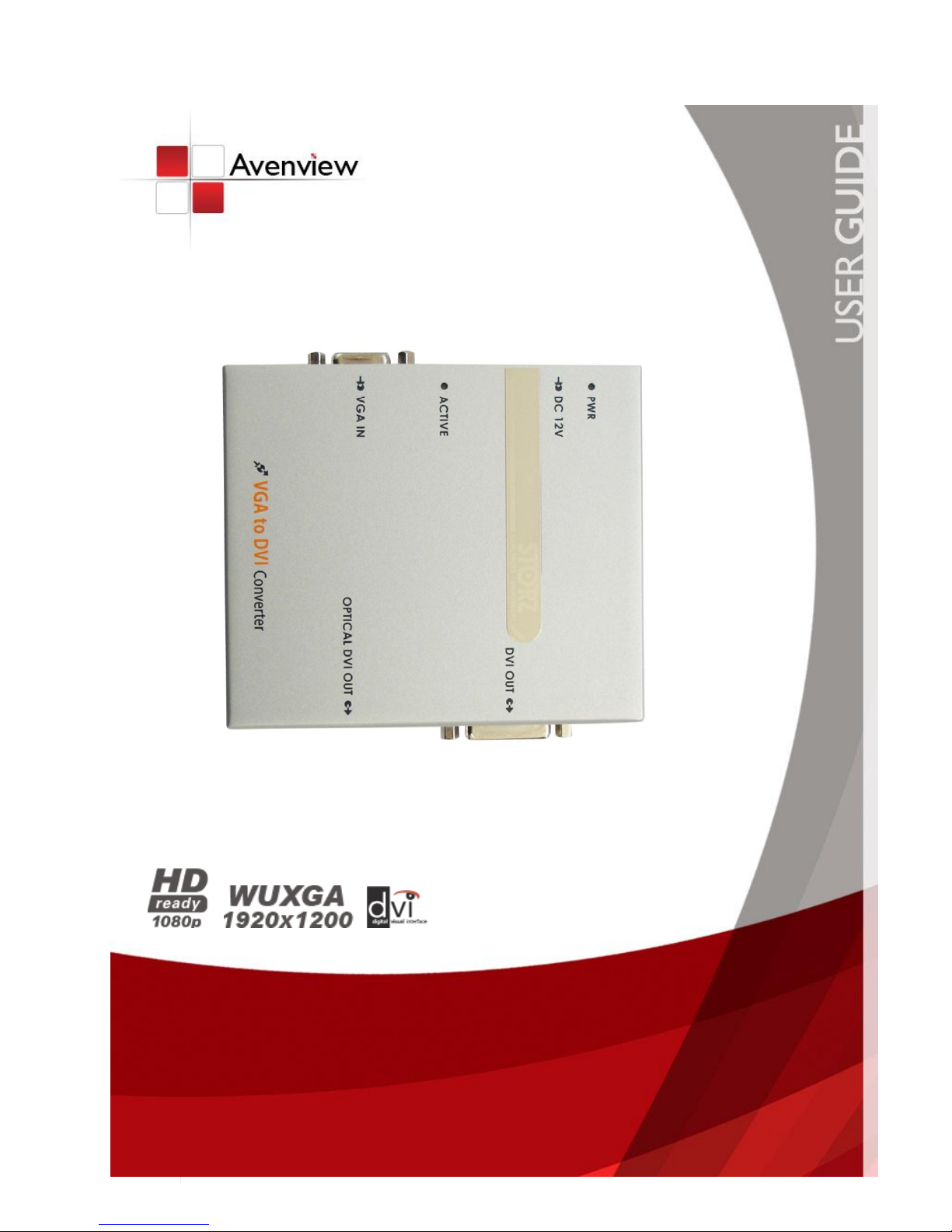
VGA to DVI Extender over Fiber SET
Model #: FO-VGA-DVI
© 2011 Avenview Inc. All rights reserved.
The contents of this document are provided in connection with Avenview Inc. (“Avenview”) products. Avenview makes no representations or warranties with
respect to the accuracy or completeness of the contents of this publication and reserves the right to make changes to specifications and product descriptions at any
time without notice. No license, whether express, implied, or otherwise, to any intellectual property rights is granted by this publication. Except as set forth in
Avenview Standard Terms and Conditions of Sale, Avenview assumes no liability whatsoever, and disclaims any express or implied warranty, relating to its products
including, but not limited to, the implied warranty of merchantability, fitness for a particular purpose, or infringement of any intellectual property right.
Reproduction of this manual, or parts thereof, in any form, without the express written permission of Avenview Inc. is strictly prohibited.
Page 2

www.avenview.com
2
Table of Contents
Section 1: Getting Started ...................................................................................................................... 3
1.1 Important Safeguards ............................................................................................................ 3
1.2 Safety Instructions ................................................................................................................. 3
1.3 Regulatory Notices Federal Communications Commission (FCC) ......................................... 4
1.4 Introduction ........................................................................................................................... 4
1.5 Package Contents ................................................................................................................... 4
1.6 Before Installation.................................................................................................................. 4
1.7 Installation ............................................................................................................................. 5
1.8 Troubleshooting ..................................................................................................................... 6
1.9 Caution ................................................................................................................................... 6
Section 2: Specifications ......................................................................................................................... 7
2.1 Electrical & Optical Specifications ................................................................................................ 8
2.1.1 Electrical Specifications ......................................................................................................... 8
2.1.2 Optical Specifications ............................................................................................................ 8
2.2 Connector PIN Assignment .......................................................................................................... 9
2.2.1 Input Connector .................................................................................................................... 9
2.2.2 Output Connector ............................................................................................................... 10
2.2.3 Optical Cable Information ................................................................................................... 11
Page 3

www.avenview.com
3
Section 1: Getting Started
1.1 Important Safeguards
Please read all of these instructions carefully before you use the device. Save this manual for future
reference.
What the warranty does not cover
Any product, on which the serial number has been defaced, modified or removed.
Damage, deterioration or malfunction resulting from:
Accident, misuse, neglect, fire, water, lightning, or other acts of nature, unauthorized
product modification, or failure to follow instructions supplied with the product.
Repair or attempted repair by anyone not authorized by us.
Any damage of the product due to shipment.
Removal or installation of the product.
Causes external to the product, such as electric power fluctuation or failure.
Use of supplies or parts not meeting our specifications.
Normal wear and tear.
Any other causes which does not relate to a product defect.
Removal, installation, and set-up service charges.
1.2 Safety Instructions
The Avenview FO-VGA-DVI, VGA to DVI Extender over Fiber Optic has been tested for conformity to safety
regulations and requirements, and has been certified for international use. However, like all electronic
equipment’s, the FO-VGA-DVI should be used with care. Read the following safety instructions to protect
yourself from possible injury and to minimize the risk of damage to the unit.
Do not dismantle the housing or modify the module.
Dismantling the housing or modifying the module may result in electrical shock or burn.
Refer all servicing to qualified service personnel.
Do not attempt to service this product yourself as opening or removing housing may expose you to
dangerous voltage or other hazards
Keep the module away from liquids.
Spillage into the housing may result in fire, electrical shock, or equipment damage. If an object or liquid
falls or spills on to the housing, unplug the module immediately.
Have the module checked by a qualified service engineer before using it again.
Do not use liquid or aerosol cleaners to clean this unit. Always unplug the power to the device before
cleaning.
Page 4

www.avenview.com
4
1.3 Regulatory Notices Federal Communications Commission (FCC)
This equipment has been tested and found to comply with Part 15 of the FCC rules. These limits are designed
to provide reasonable protection against harmful interference in a residential installation.
Any changes or modifications made to this equipment may void the user’s authority to operate this
equipment.
1.4 Introduction
Avenview FO-VGA-DVI, VGA to DVI Extender over Fiber SET lets you extend VGA signal and convert it to DVI up
to 500 meters (1650 feet) at 1920 x 1200 away from host by TMDS analog signal transmission with only 1 SC
Type fiber optic cable. VGA to DVI Extender over Fiber SET includes both VGA to DVI Converter / Extender and
Receiver.
- High Speed and long distance transmission by SC type Multi-Mode 1 fiber
- Automatically detects the input signal and SOG (Sync on Green)
- DVI 1.0 compliant
- Standard VGA plug on Transmitter, DVI plug on Receiver and SC Fiber connector
- R, G, B, Clock signal is transmitted by 1 Multi-Mode optical Fiber
- Supports up to WUXGA (1920 x 1200) resolution
- External power supply
1.5 Package Contents
Before you start the installation of FO-VGA-DVI, please check the package contents.
- FO-VGA-DVI x 1
- FO-DVI-1000M-EMI-R x 1
- Power Adapter +12V x 1
User’s Manual x 1
1.6 Before Installation
Put the product in an even and stable location. If the product falls down or drops, it may cause an
injury or malfunction.
Don’t place the product in too high temperature (over 50°C), too low temperature (under 0°C) or high
humidity.
Use the DC power adapter with correct specifications. If inappropriate power supply is used then it
may cause a fire.
Do not twist or pull by force ends of the optical cable. It can cause malfunction.
Page 5

www.avenview.com
5
1.7 Installation
The FO-VGA-DVI Transmitter should be connected to the computer’s VGA Port and the Receiver
(FO-DVI-1000M-EMI-R) should be connected the DVI Port of the digital display device. Avenview FO-VGA-DVI
and FO-DVI-1000M-EMI-R Receiver is designed to be used with SC type standard optical cable (Multi-Mode
optical fiber: 50/125, 62.5/125um).
1. Connect FO-VGA-DVI Transmitter to the VGA Source and FO-DVI-1000M-EMI-R Receiver to the
Display.
2. Connect the optical fiber between Transmitter and Receiver.
3. Power on Display
4. Connect DC power to the Receiver
5. Restart the computer or VGA Source.
Page 6

www.avenview.com
6
1.8 Troubleshooting
General Troubleshooting
Problem
Possible Solution
No Image
Check if the PC Power is on
Check if connection to the computer and the monitor are
correct.
Turn the PC Power off and on again.
Screen Defects Appear
This product supports up to WUXGA resolution.
Check the maximum resolution range of the graphics card.
1.9 Caution
1. Do not put heavy object on top of the FO-VGA-DVI. It may cause product malfunction.
2. Put the product on even and stable location. If the product falls down or dropped, it may get
damaged.
3. Keep away from high temperature (over 50°C), low temperature (under 0°C) or high humidity. It may
cause a fire and injury by electrical shock.
4. Use DC power adapter with correct specification. Otherwise it may cause fire.
5. Do not twist or pull by force either ends of the optical cable. It can cause malfunction. Minimum
bending diameter is 75mm.
6. Use the multimode (50/125um, 62.5/125um) optical fiber.
Page 7
www.avenview.com
7
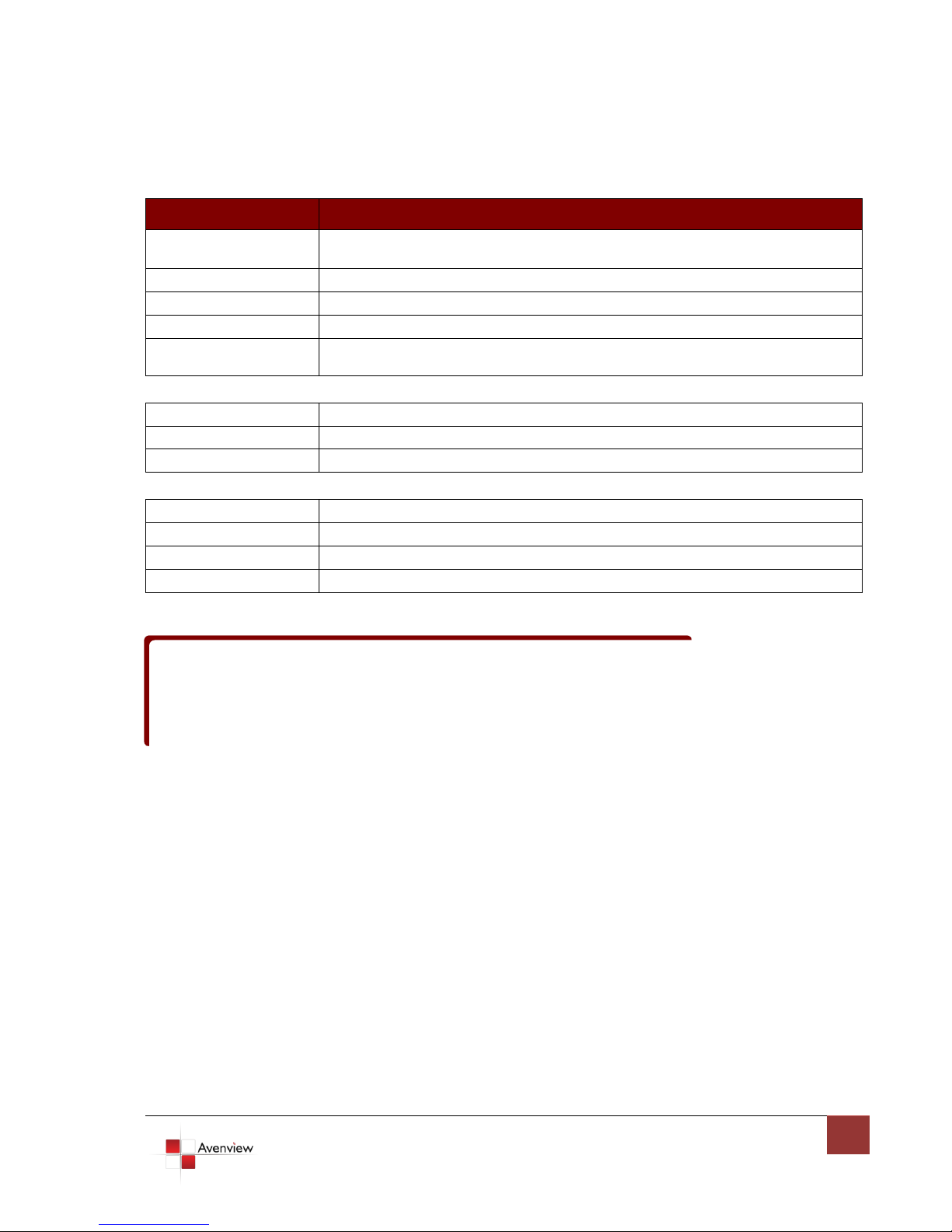
Section 2: Specifications
Item
Description
Input Signal
PC: up to 1920x1200@60Hz (165MHz)
TV (HD): up to 1080p 60Hz
Input Connector
VGA D-Sub (15pin)
Output Connector
SC Type Fiber Optic, DVI-I
Power
DC +12V 1.5A
Supported Resolution
and Distance
WUXGA 1920 x 1200 @ 500 meters (1650 feet)
Optical
Optical Source
850nm VCSEL
O/E Converter
PIN Photo Diode
Fiber Type
50/125 or 62.5/125 SC Multi-Mode Fiber, SC Fiber
Environmental
Operation
0˚ to +50˚C Degree
Storage
-20˚ to +70˚C Degree
Relative Humidity
10 ~ 80%
Power Supply
-=03 ~ 12V
Stresses greater than those listed under “Environmental Ratings” may cause permanent damage to the
device. This is a stress rating only and functional operation of the device at these
or any other conditions above those indicated in the operations section for extended periods of time may
affect reliability.
Page 8
www.avenview.com
8
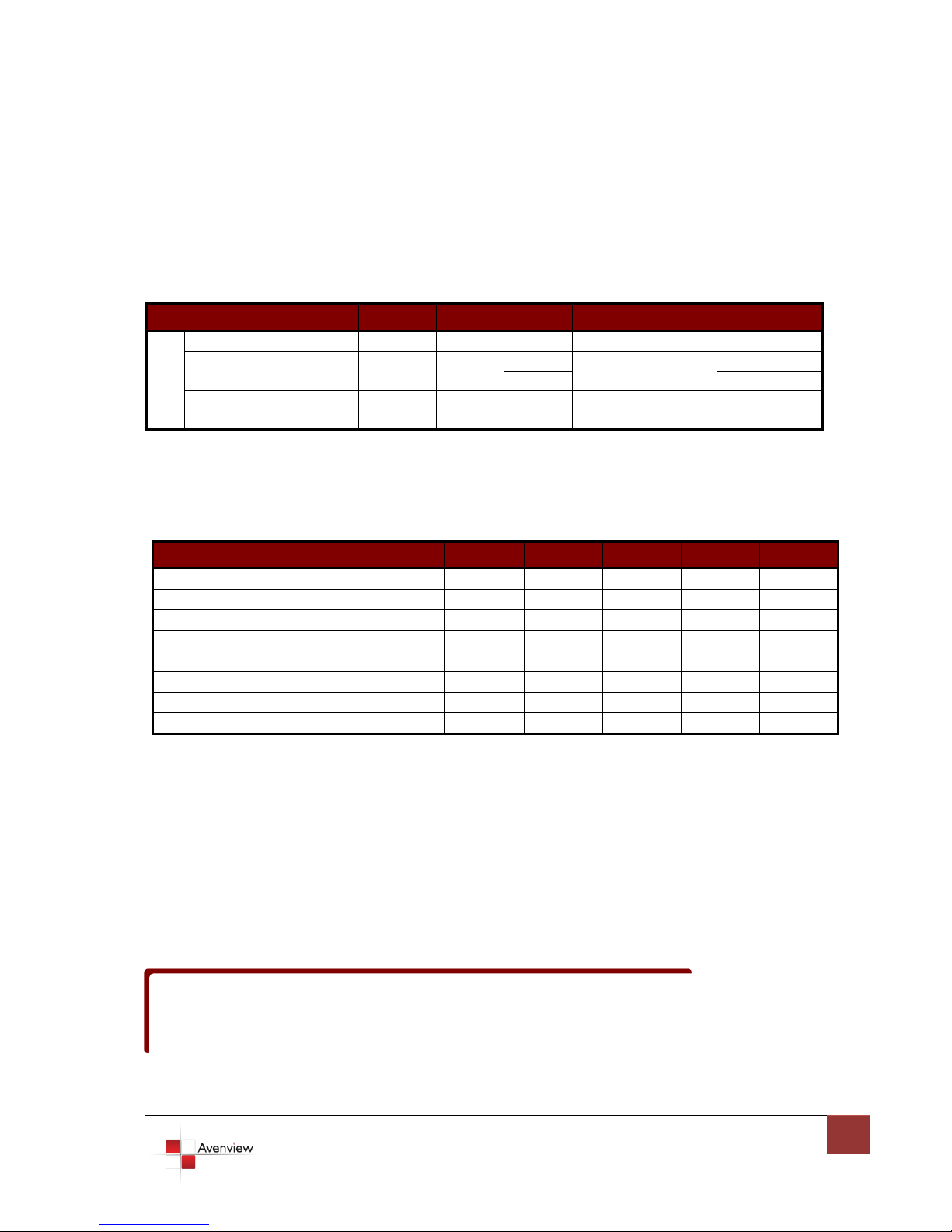
2.1 Electrical & Optical Specifications
Parameter
Symbol
Min
Type
Max
Units
Condition
P
O
W
E
R
Supply Voltage
Vcc
+ 12 V
Supply Current
Icc
70
mA
Standby
400
Working
Power Dissipation
Po
0.84
W
Standby
4.8
Working
Parameter (per Channel)
Symbol
Min
Typ
Max
Units
Optical Power1
Pout
-3.0
0.0 dBm
Optical Modulation Amplitude
-6.25
dBm
Center Wavelength – Lane 0
771.5
778
784.5
nm
Center Wavelength – Lane 1
793.5
800
806.5
nm
Center Wavelength – Lane 2
818.5
825
831.5
nm
Center Wavelength – Lane 3
843.5
850
856.5
nm
Optical Rise/Fall Time2 (P1TX4B-SX4V-01)
200 Ps
RMS Spectral Width
0.5 nm
Transmitter module of FO-VGA-DVI includes VCSEL (Vertical Surface Emitting Laser Diode) with 850
connected to Transmitter with optical instrument.
2.1.1 Electrical Specifications
2.1.2 Optical Specifications
nm invisible laser radiation.
DO NOT view directly at laser module of Transmitter or the end of the other side of optical cable
Page 9
www.avenview.com
9
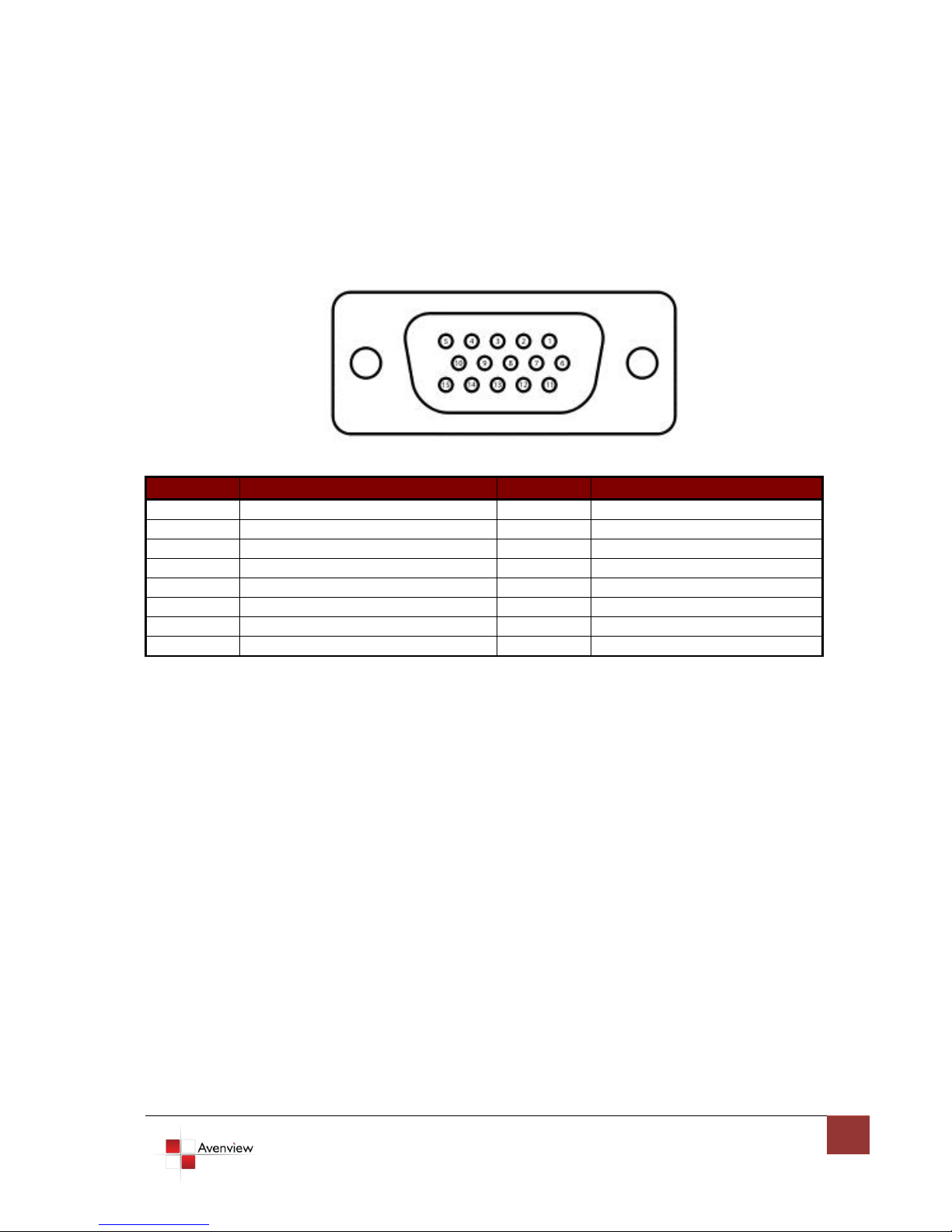
2.2 Connector PIN Assignment
Pin
Signal Assignment
Pin
Signal Assignment
1
Red
9
N/C
2
Green
10
Ground 3 Blue
11
Ground
4
Ground
12
SDA 5 Ground
13
H Sync
6
Red Ground
14
V Sync
7
Green Ground
15
SCL
8
Blue Ground
2.2.1 Input Connector
Page 10
www.avenview.com
10
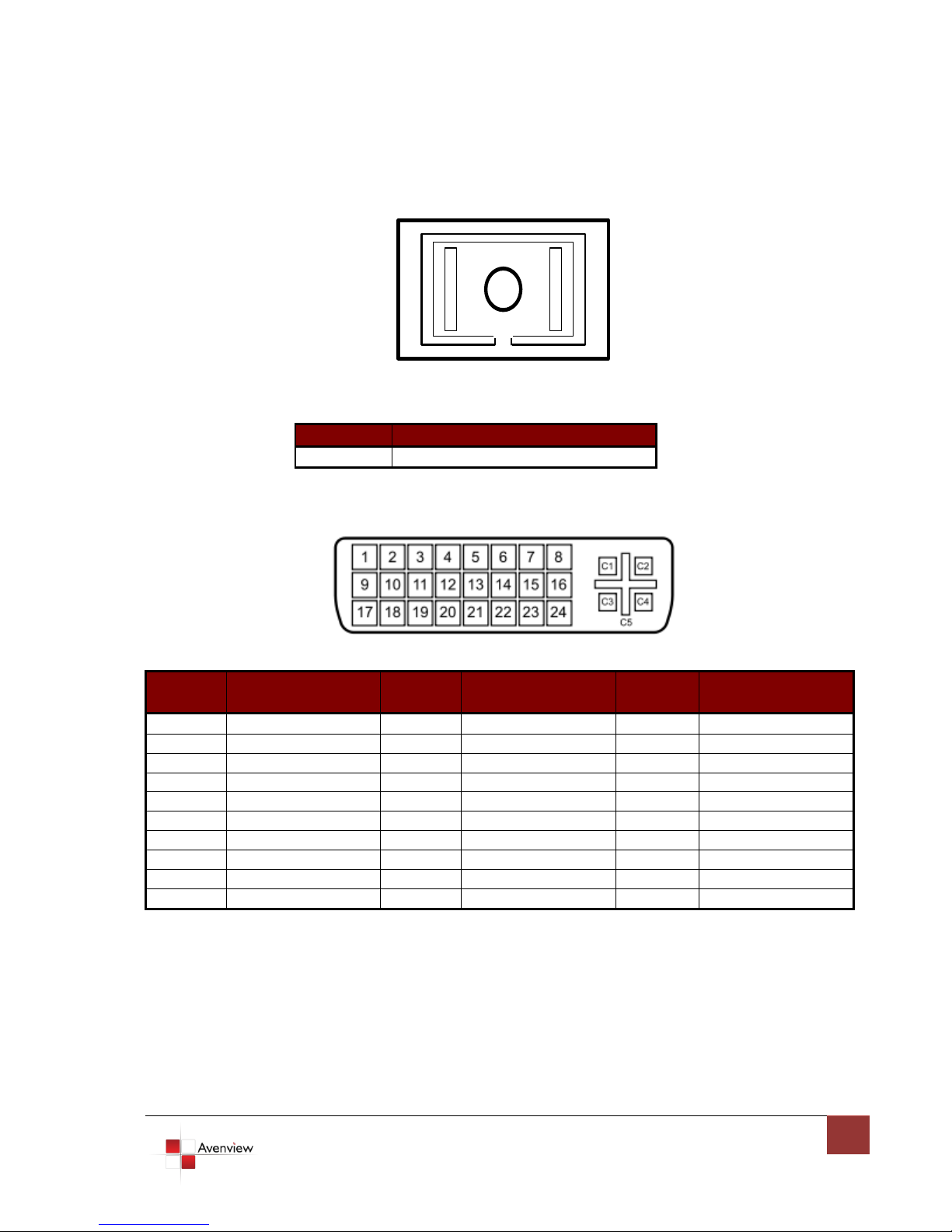
2.2.2 Output Connector
Pin
Signal Assignment
1
T.M.D.S. optical output
Pin
Signal
Assignment
Pin
Signal
Assignment
Pin
Signal
Assignment
1
CH 2-
9
CH 1-
17
CH 0-
2
CH 2+
10
CH 1+
18
CH 0+
3
CH2 Ground
11
CH1 Ground
19
CH0 Ground
4
N/C
12
N/C
20
N/C 5 N/C
13
N/C
21
N/C 6 N/C
14
+5V
22
CLK Ground
7
N/C
15
Ground
23
CLK+
8
N/C
16
N/C
24
CLK-
C1
Ground
C2
Ground
C3
Ground
C4
Ground
C5
Ground
Page 11
www.avenview.com
11
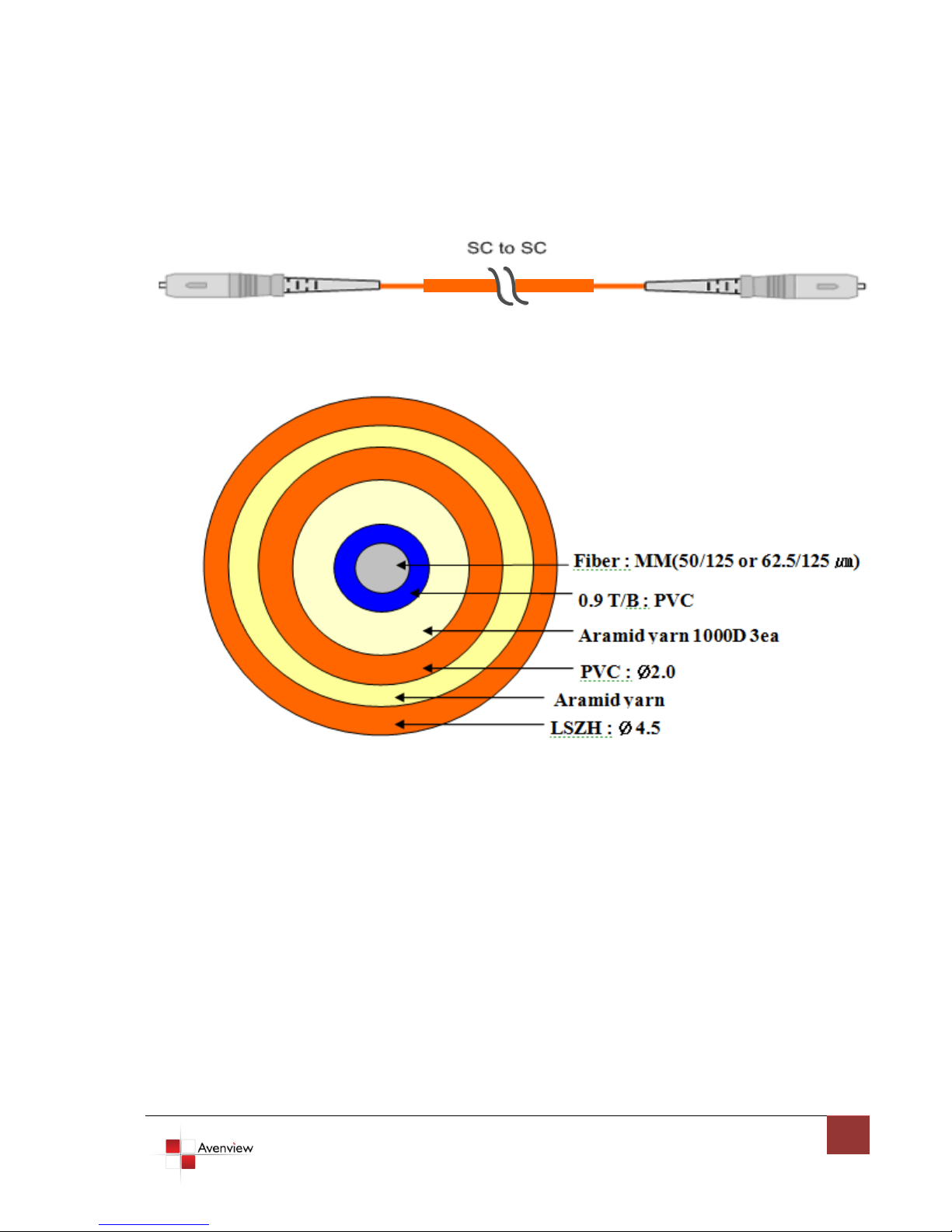
2.2.3 Optical Cable Information
Page 12

www.avenview.com
12
Disclaimer
While every precaution has been taken in the preparation of this document, Avenview Inc. assumes no liability with respect to the
operation or use of Avenview hardware, software or other products and documentation described herein, for any act or omission of
Avenview concerning such products or this documentation, for any interruption of service, loss or interruption of business, loss of
anticipatory profits, or for punitive, incidental or consequential damages in connection with the furnishing, performance, or use of the
Avenview hardware, software, or other products and documentation provided herein.
Avenview Inc. reserves the right to make changes without further notice to a product or system described herein to improve reliability,
function or design. With respect to Avenview products which this document relates, Avenview disclaims all express or implied warranties
regarding such products, including but not limited to, the implied warranties of merchantability, fitness for a particular purpose, and
non-infringement.
 Loading...