

Page 1

Avedro, Inc.
KXL System
Operator’s Manual
ML-00002 Revision R
Copyright 2018 All Rights Reserved
Printed in U.S.A.
Page 2
Patents, Trademarks, Copyrights
The KXL System may be covered by one or more pat ent appl i cati o ns issued or
pending in the United States and worldwide.
“KXL” and the Avedro logo design are registered trademarks or trademarks of
Avedro, Inc. All software and documentation is subject to Avedro, Inc. copyrights.
All rights reserved 2018.
Microsoft and Windows are registered trademarks and trademarks, respectively,
of Microsoft Corporation. Any other trademarks or service marks contained
within this manual are the property of their respective owners.
For more information, contact: Your Local Avedro-authorized distributor
Avedro, Inc.
201 Jones Road
Waltham, MA 02451
Authorized Representative
EMERGO EUROPE
Prinsessegracht 20
2514 AP, The Hague
The Netherlands
Phone: +31.70.345.8570
Fax: +31.70.346.7299
0086
Page 3

Table of Contents
Chapter:
1 Foreword .................................................................................................... 1-3
1.1 Intended Use of Manual ................................................................................. 1-3
1.2 Intended Use / Indications for Use................................................................. 1-3
1.3 Design Change Disclaimer ............................................................................ 1-3
1.4 Reproduction Disclaimer ............................................................................... 1-3
1.5 User Operation Assistance Statement ............................................................ 1-3
1.6 Contraindications, Warnings and Cautions.................................................... 1-4
1.6.1 Contraindications ............................................................................... 1-4
1.6.2 Warnings ............................................................................................ 1-4
1.6.3 Electrical Safety Warnings ................................................................. 1-4
1.7 Patient Safety ................................................................................................. 1-5
1.8 Additional Safety Considerations .................................................................. 1-6
1.9 FCC Compliance Notice ................................................................................ 1-6
2 Introduction ............................................................................................... 2-1
2.1 System Overview ........................................................................................... 2-1
2.1.1 Major Components ............................................................................. 2-2
3 System Operation ...................................................................................... 3-1
3.1 Charging the KXL Battery ............................................................................. 3-1
3.2 Touchpad/Keyboard Use ............................................................................... 3-1
3.3 UV Energy (Dose) ......................................................................................... 3-3
3.4 Preparing the System ..................................................................................... 3-3
3.5 Important Steps before Turning on the System ............................................. 3-3
3.6 Powering Up the System ................................................................................ 3-4
3.7 Set Riboflavin Induction Period..................................................................... 3-5
3.8 Select Treatment Mode .................................................................................. 3-5
3.8.1 Continuous UV Treatment Mode ....................................................... 3-5
3.8.2 Pulsed UV Exposure .......................................................................... 3-7
3.9 Starting Treatment ......................................................................................... 3-9
3.9.1 Single-use disposables...................................................................... 3-10
3.9.2 Multi-use disposables ....................................................................... 3-11
3.9.3 RFID card controlled limits.............................................................. 3-12
3.9.4 Sync Alignment Remote .................................................................. 3-13
3.10 Preparing the Patient .................................................................................... 3-15
3.11 Initiating Treatment ..................................................................................... 3-17
3.12 Monitoring Treatment .................................................................................. 3-18
3.13 Stopping a Treatment ................................................................................... 3-18
3.14 Treatment Complete..................................................................................... 3-19
3.15 Pausing or Canceling a Treatment ............................................................... 3-20
3.16 Powering Down the System ......................................................................... 3-22
KXL System Operator’s Manual,
Rev R
iii
Page 4

3.17 Using the Device Settings Menu.................................................................. 3-23
3.17.1 Advanced Settings .......................................................................... 3-23
3.17.2 Editing System Language............................................................... 3-24
3.17.3 Editing Alignment Crosshairs Intensity ......................................... 3-24
3.17.4 Editing System Volume ................................................................. 3-24
3.17.5 Copying Treatment Data to USB ................................................... 3-25
3.17.6 Editing Default Treatment Parameters Screen ............................... 3-26
4 Maintenance / Service ............................................................................... 4-1
4.1 Installation Policy .......................................................................................... 4-1
4.2 Customer Maintenance .................................................................................. 4-1
4.3 Warranty Information .................................................................................... 4-1
4.4 Service Contract Information ......................................................................... 4-1
4.5 Per Patient Disposables .................................................................................. 4-1
4.6 Trouble Shooting ........................................................................................... 4-2
4.7 Directions for Sterilization or Disinfection.................................................... 4-3
4.8 Cleaning the System ...................................................................................... 4-3
4.9 Cleaning the Aperture .................................................................................... 4-3
4.10 Articulating Arm Adjustment ........................................................................ 4-3
4.11 Moving the System ........................................................................................ 4-3
4.12 Storing the System ......................................................................................... 4-4
4.13 Software ......................................................................................................... 4-4
4.14 Identifying Risks Associated with Disposing of Waste Products .................. 4-4
4.15 Performing a Visible Check ........................................................................... 4-4
5 Equipment Classification ......................................................................... 5-1
6 Symbol Library ......................................................................................... 6-1
7 Specifications ............................................................................................. 7-1
KXL System Operator’s Manual,
Rev R
iv
Page 5

Table of Figures
Figure 2-1. Overview Illustration of System ..................................................................................................
Figure 2-2. System Illustrations with Callouts .......................................................................................... 2-3
Figure 2-3. Wireless Remote .................................................................................................................... 2-3
Figure 2-4. KXL Label ................................................................................................................................ 2-4
Figure 2-5. UV emitting Label ................................................................................................................... 2-4
Figure 2-6. Laser Classification Label ........................................................................................................ 2-4
Figure 3-1. Power Switch ......................................................................................................................... 3-4
Figure 3-2. Startup Screen ........................................................................................................................ 3-4
Figure 3-3. Induction Period Screen ......................................................................................................... 3-5
Figure 3-4. Select Continuous Treatment Mode Screen ............................................................................ 3-6
Figure 3-5. Continuous Treatment Parameters Screen ............................................................................. 3-6
Figure 3-6. Confirm Continuous Treatment Parameters Screen ................................................................ 3-7
Figure 3-7. Select Pulsed Treatment Mode Screen ................................................................................... 3-7
Figure 3-8. Pulsed Treatment Parameters Screen ..................................................................................... 3-8
Figure 3-9. Set UV Pulse Cycle Times Screen ............................................................................................ 3-8
Figure 3-10. Confirm Pulsed Treatment Parameters Screen ..................................................................... 3-9
Figure 3-11. Reading Disposables ............................................................................................................ 3-10
Figure 3-12. Reading Tag Screen ............................................................................................................. 3-10
Figure 3-13. Treatments Remaining ........................................................................................................ 3-11
Figure 3-14. Final Treatment ................................................................................................................... 3-11
Figure 3-15. No Treatments Remaining ................................................................................................... 3-12
Figure 3-16. Invalid Treatment Parameters ............................................................................................. 3-12
Figure 3-17. System Setup Status ............................................................................................................ 3-13
Figure 3-18. Prepare Patient Screen ........................................................................................................ 3-15
Figure 3-19. Align Crosshairs during induction ........................................................................................ 3-15
Figure 3-20. Remote Functions ................................................................................................................ 3-16
Figure 3-21. Red Crosshairs X & Y Axes, Green Dot Z Axis Alignment ...................................................... 3-16
Figure 3-22. Red Crosshairs X & Y Axes, Red Crosshairs Z Axis Alignment ............................................... 3-17
Figure 3-23. Induction Complete ............................................................................................................. 3-17
Figure 3-24. Treatment Screen ................................................................................................................ 3-18
Figure 3-25. Treatment Paused Screen .................................................................................................... 3-18
Figure 3-26. Treatment Complete Screen ................................................................................................ 3-19
Figure 3-27. Initial Confirm Cancel Session Screen .................................................................................. 3-20
Figure 3-29. Cancel Treatment ................................................................................................................ 3-21
Figure 3-30. Partial Treatment Information............................................................................................. 3-21
Figure 3-32. Power Off Position .............................................................................................................. 3-22
Figure 3-33. KXL System Plug .................................................................................................................. 3-23
Figure 3-34. Device Settings Menu .......................................................................................................... 3-23
Figure 3-35. Edit System Language .......................................................................................................... 3-24
Figure 3-36. Edit Alignment Crosshairs Intensity ..................................................................................... 3-24
Figure 3-37. Edit Volume ......................................................................................................................... 3-25
Figure 3-38. Device Settings Transfer to USB ........................................................................................... 3-25
Figure 3-39. Select Default Treatment Mode .......................................................................................... 3-26
Figure 3-40. Edit Default Treatment Parameters (Continuous & Pulsed) ................................................. 3-27
Figure 3-41. Edit Default UV Pulse Parameters (Pulsed Only) .................................................................. 3-27
Figure 4-1 Alignment Remote Sync Lost ................................................................................................... 4-2
KXL System Operator’ s Manual,
Rev R
1-1
Page 6

Chapter 1: Foreword
Figure 4-2 Moving System Configuration ................................................................................................. 4-4
KXL System Operator’s Manual,
Rev R
1-2
Page 7

Chapter 1: Foreword
1 Foreword
1.1 Intended Use of Manual
This manual is designed to serve the operators of the Avedro, Inc. KXL System. All operating
instructions, product illustrations, screen graphics, troubleshooting/error messages, and other
relevant information are contained in this manual. It is the operator’s responsibility to ensure that
all safety instructions in this manual are applied strictly.
1.2 Intended Use / Indications for Use
The KXL System delivers a uniform, metered dose of UVA light to a targeted treatment area for the
intended use of illuminating the cornea during corneal cross-linking procedures stabilizing cornea
which have been weakened by disease or by refractive surgery.
1.3 Design Change Discl aimer
• Due to design changes and product improvements, information in this manual is subject to
change without notice. Avedro, Inc. (hereafter called “Avedro”) reserves the right to
change product design at any time without notice, which may subsequently affect the
contents of this manual.
• Avedro assumes no responsibility for any errors that may appear in this manual. Avedro
will make every reasonable effort to ensure that this manual is up to date and corresponds
with the shipped KXL System.
• The computer display screens depicted in this manual are representative only. Depending
on the software version of the system, minor differences may appear between the actual
computer displays and those shown in this manual.
• All patient data appearing in this document, including the sample screen graphics, are
fictitious and representative only. No patient’s confidentiality has been violated, with or
without permission.
1.4 Reproduction Disclaimer
Neither this manual nor any part of it may be reproduced, photocopied, or electronically transmitted
in any way without the advanced written permission of Avedro, Inc.
1.5 User Operation Assistance Statement
Should you experience any difficulty in running your KXL System, please contact your local
Avedro authorized represen tat ive.
KXL System Operator’s Manual,
Rev R
1-3
Page 8
Chapter 1: Foreword
1.6 Contraindications, Warnings and Cautions
1.6.1 Contraindications
This section describes situations in which the device should not be used because the risk of use
clearly outweighs any possible benefit. Conditions that may contraindicate the use of the device
include:
• Corneal thickness, with epithelium, of less than < 375 microns.
• Corneal melting disorders
• Aphakic patients
• Pseudophakic patients without UV blocking lens implanted
• Pregnant and nursing women
• Children
1.6.2 Warnings
Physicians should evaluate the potential benefits in patients with the following conditions:
• Herpes simplex, herpes zoster keratitis, recurrent corneal erosion, corneal dystrophy
• Epithelial healing disorders
1.6.3 Electrical Safety Warnings
For Equipment Classifications please refer to chapter 5.0 Equipment Classifications
WARNING: To avoid the risk of shock this equipment must only be
connected to a supply mains with protective earth.
Even with the power cord removed, there is the potential for an electrical
shock from the 12VDC internal power source.
The system is designed for continuous operation using the external
connector or its internal rechargeable battery.
WARNING: This equipment is operated with hazardous voltages that can
shock, burn, or cause death. To reduce the possibility of electrical shock,
and inadvertent UVA exposure do not remove any fixed panels. Ensure
that all service to the system, beyond what is described in this manual,
including to the rechargeable battery, is performed only by qualified
Avedro service personnel.
WARNING: Remove the wall plug and turn off the power switch before
servicing or cleaning (disinfecting) the equipment.
KXL System Operator’s Manual,
Rev R
1-4
Page 9
Chapter 1: Foreword
Never pull cords to remove the power cord from the outlet. Grasp the
power cord plug and pull it from the outlet to disconnect.
WARNING: Do not operate the equipment with a damaged power cord.
WARNING: Position the power cord so that it cannot be tripped over,
walked on, rolled over, crimped, bent, pinched, or accidentally pulled from
the wall outlet.
WARNING: Do not use the instrument near water and be careful not to
spill liquids on any part of it.
WARNING: The USB port can only be used when the system is not in
treatment mode, do not connect to the USB during treatment.
WARNING: Do not operate t h e KX L System in the presence of flammable
mixtures or anesthetics.
WARNING: Never look directly into the UV light beam. Never direct the
beam towards a person except for therapeutic purposes.
WARNING: The remote contains replaceable batteries; if system is not
going to be used for an extended period of time remove the batteries.
WARNING: No modification of this equipment is allowed.
1.7 Patient Safety
• The treatment should take place in a quiet and relaxed atmosphere in order not to distract
the attention of the patient. The patient should lie on a table or patient's chair. The patient’s
head should rest comfortably in a headrest. It is imperative that the table or patient’s chair
or the system not be moved during the treatment procedure.
CAUTION: The KXL System is a medical device. It may be operated, therefore, only in
health care facilities or medical areas under the supervision of medically trained personnel.
KXL System Operator’s Manual,
Rev R
1-5
Page 10

Chapter 1: Foreword
1.8 Additional Safety Considerations
• Any modification of the system's external light beam by means of optical elements is
strictly prohibited.
• Plastic instrumentation suc h as speculums or eye shields may be damaged when impacted
by the UV beam, possibly resulting in product degradation. Therefore, only Avedro
recommended accessories or stainless steel surgical instruments should be used.
• Smooth metallic surfaces can reflect despite the effort to blank them. Therefore, only laser
grade instruments should be used.
1.9 FCC Compliance Notice
This equipment has been tested and found to comply with the limits for a Class B digital device,
pursuant to Part 15 of the FCC Rules. These lim its are desig ned to prov ide reas on ab le protec ti on
against harmful interference in a residential environment. This equipment generates, uses, and can
radiate radio frequency energy and, if not installed and used in accordance with the instruction
manual, may cause harmful interference to radio communications. However, there is no guarantee
that interference will not occur in a particular installation. If this equipment does cause harmful
interference to radio or television reception, which can be determined by turning the equipment off
and on, the user is encouraged to try to correct the interference by one or more of the following
measures:
• Reorient or relocate the receiving antenna.
• Increase the separation between the equipment and receiver.
• Connect the equipment into an electrical outlet on a circuit different from that to which the
receiver is connected.
• Consult Avedro Customer Service for help.
Properly shielded and grounded cables and connectors must be used in order to meet FCC emission
limits. Proper cables and connectors are available from Avedro. Avedro is not responsible for any
radio or television interference caused by unauthorized changes or modifications to this equipment.
Unauthorized changes or modifications could void the user's authority to operate the equipment.
KXL System Operator’s Manual,
Rev R
1-6
Page 11

2 Introduction
2.1 System Overvi ew
The KXL System is an electronic medical device which delivers ultraviolet light (365 nm
wavelength) in a circular pattern onto the cornea after a solution of Riboflavin has been applied.
Irradiating the Riboflavin creates singlet oxygen, which forms intermolecular bonds in corneal
collagen, stiffening the cornea through cross-linking. UV flux and irradiation time (that is,
fluence) at the cornea are controlled by an onboard computer system.
The Optics Head houses the UVA irradiation mechanism. The LED is preset by the manufacturer
to emit UVA radiation at a wavelength of 365 nm at an intensity of 3 mW/cm
A fixed aperture mounted in the UVA irradiation beam path is used to produce a uniform circular
area of irradiation at the treatment plane with an approximate diameter of 9 mm. Alignment lasers
are used to aid the user in focusing the beam on the patient’s cornea. Fine alignment of the UV
beam through observation of the alignment lasers is controlled through a wireless remote and an
internal drive system. Treatment power is selectable by the user from 3 mW/cm
in 1 mW/cm2 increments. Total Energy is selectable in 0.1 J/cm2 increments on the user interface.
However, actual limits to power and energy are controlled by the RFID treatment card.
The KXL is a portable system with an articulating arm to allow movement of the system for
alignment of the UV Beam to the patient’s cornea. An internal battery powers the system; the
battery is recharged by a system internal charger from any standard AC outlet. The treatment
parameters (Riboflavin Induction Period, Total UV Energy, UV Power and UV Pulse Cycle
Times) are selected through the user interface touch screen computer.
The KXL System is used in conjunction with a Riboflavin solution and an RFID card.
2
to 45 mW/cm2.
2
to 45 mW/cm
2
KXL System Operator’ s Manual,
Rev R
2-1
Page 12
Chapter 2: Introduction
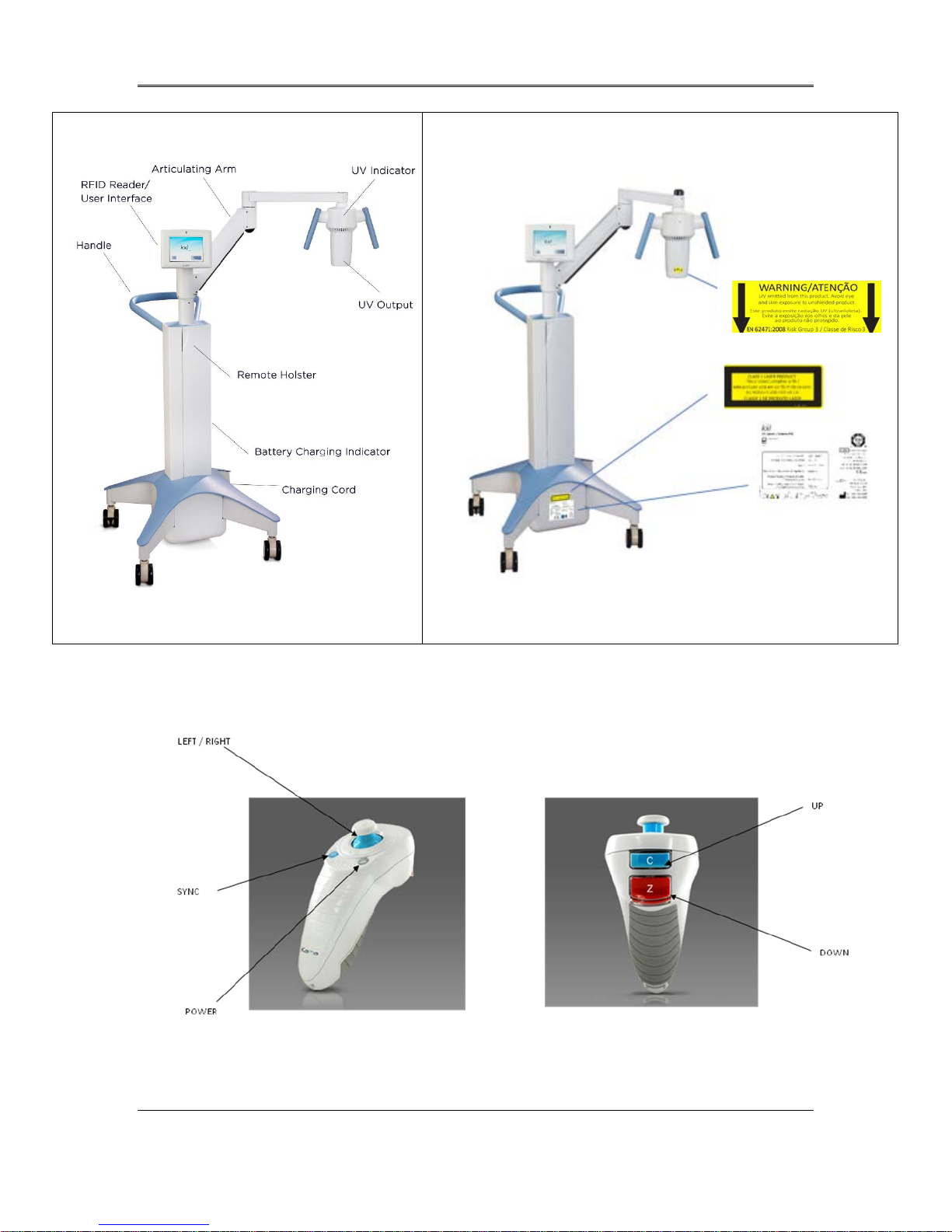
2.1.1 Major Components
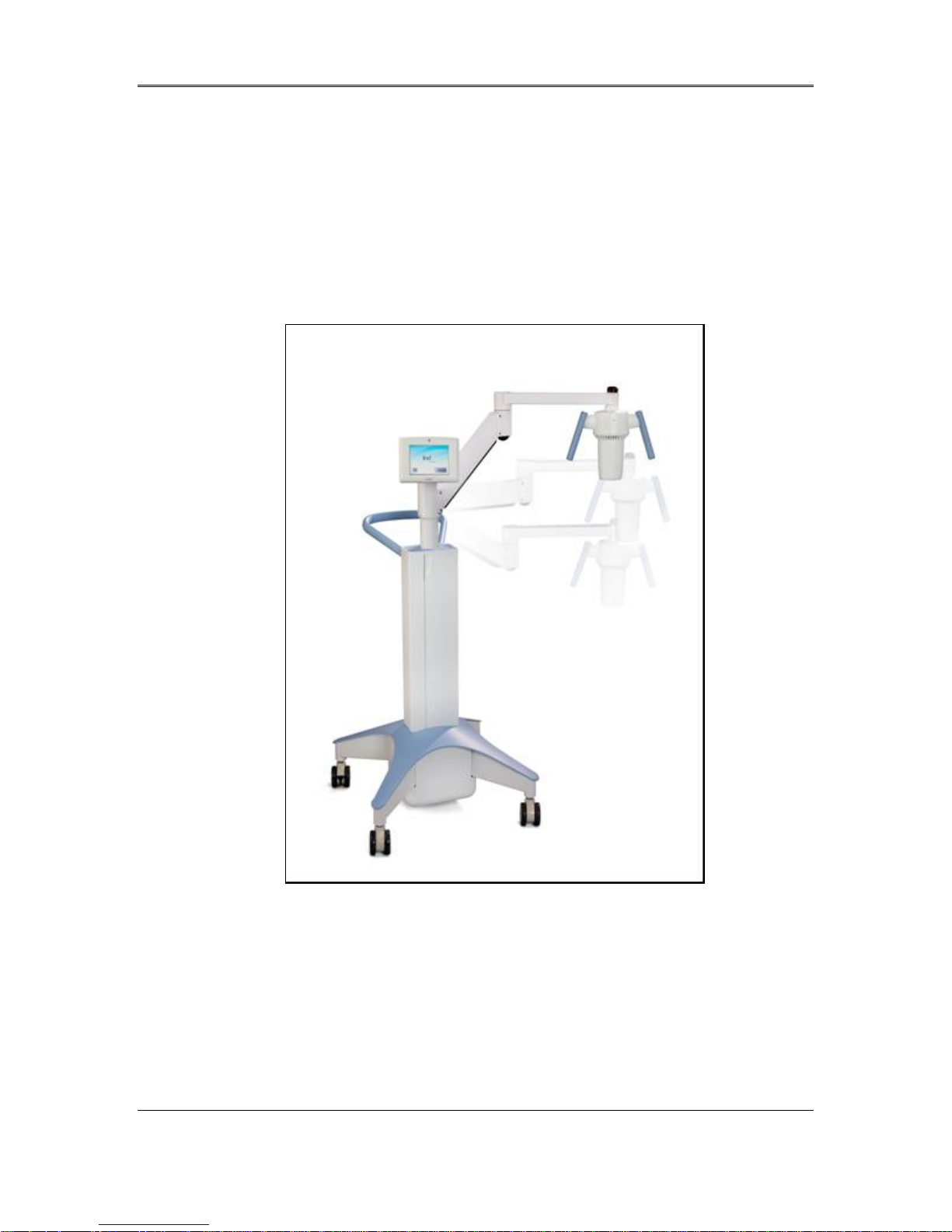
The major components of the KXL System include the following:
• Optics Head with UV source
• KXL console with user interface
• Wireless remote control ( with rep lac eab le batter ies )
• KXL Accelerated Crosslinking Treatment Kit (disposable supplied sepa ra te ly )
KXL System Operator’s Manual,
Rev R
2-2
Figure 2-1. Overview Illustration of
System
Page 13
Chapter 2: Introduction
Figure 2-2. System Illustrations with Callouts
Figure 2-3. Wireless Remote
KXL System Operator’s Manual,
Rev R
2-3
Page 14
Chapter 2: Introduction
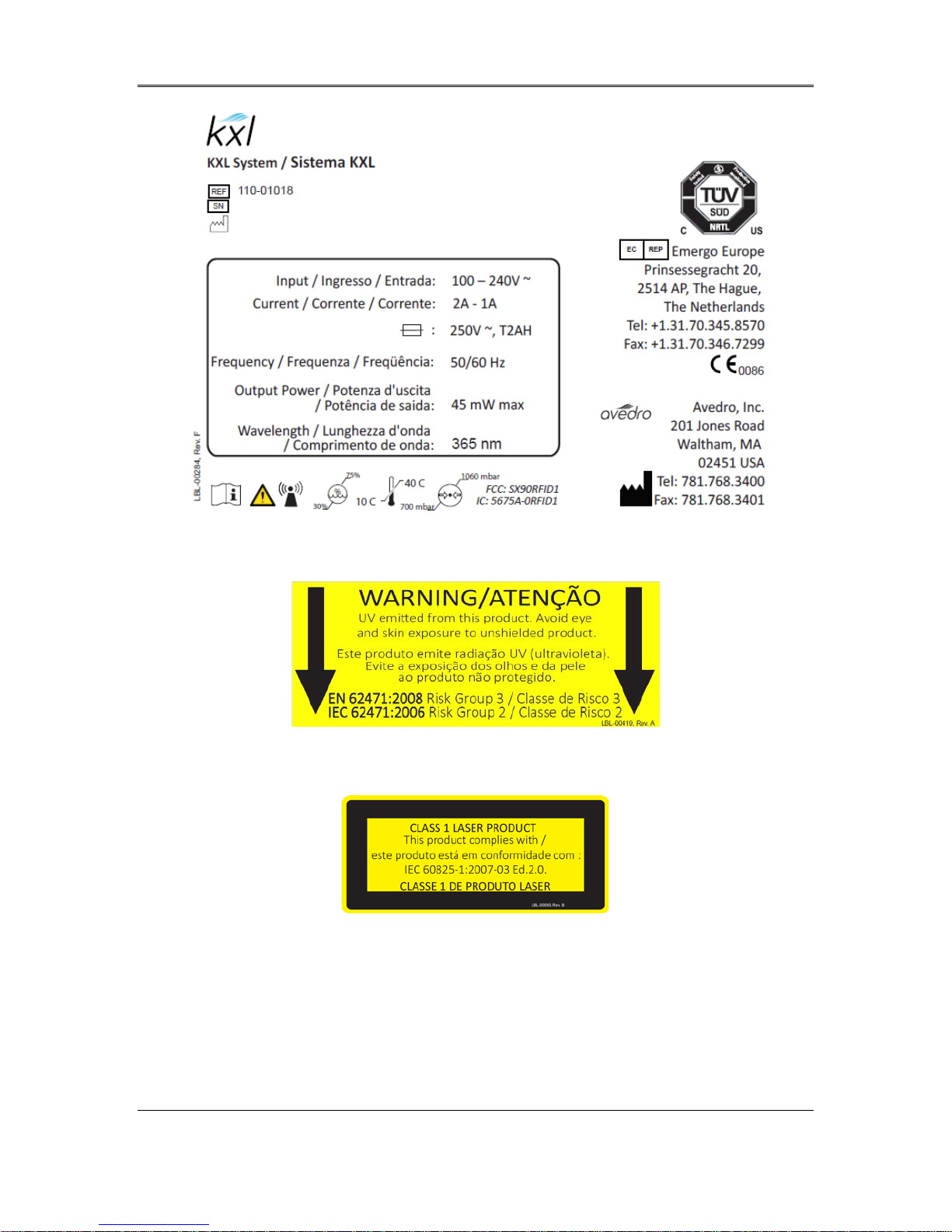
Figure 2-4. KXL Label
Figure 2-5. UV emitting Label
Figure 2-6. Laser Classification Label
KXL System Operator’s Manual,
Rev R
2-4
Page 15
Touchpad Key
Icon
Description/Function
3 System Operation
3.1 Charging the KXL Battery
NOTE: Prior to initial use, the internal battery pack of the KXL must be charged
overnight.
• In order to maintain battery charge, it is recommended that the KXL be connected to a
grounded supply mains at the end of each business day or when not in use.
• The charging status of the battery is identified by the color of the light located on the
column of the KXL.
o Orange – low, charging
o Yellow – charging
o Green – fully charged
NOTE: if the battery does not appear to be charging or retaining its charge,
please contact your local Avedro Service Representative.
NOTE: the KXL battery should last for 16 hours during normal operation. The system
software will notify the user when the battery needs to be charged. The KXL system
prohibits a treatment if there is insufficient battery power to perform a treatment. (See
chapter 4 Maintenance for more information on troubleshooting battery problems.)
3.2 Touchpad/Keyboard Use
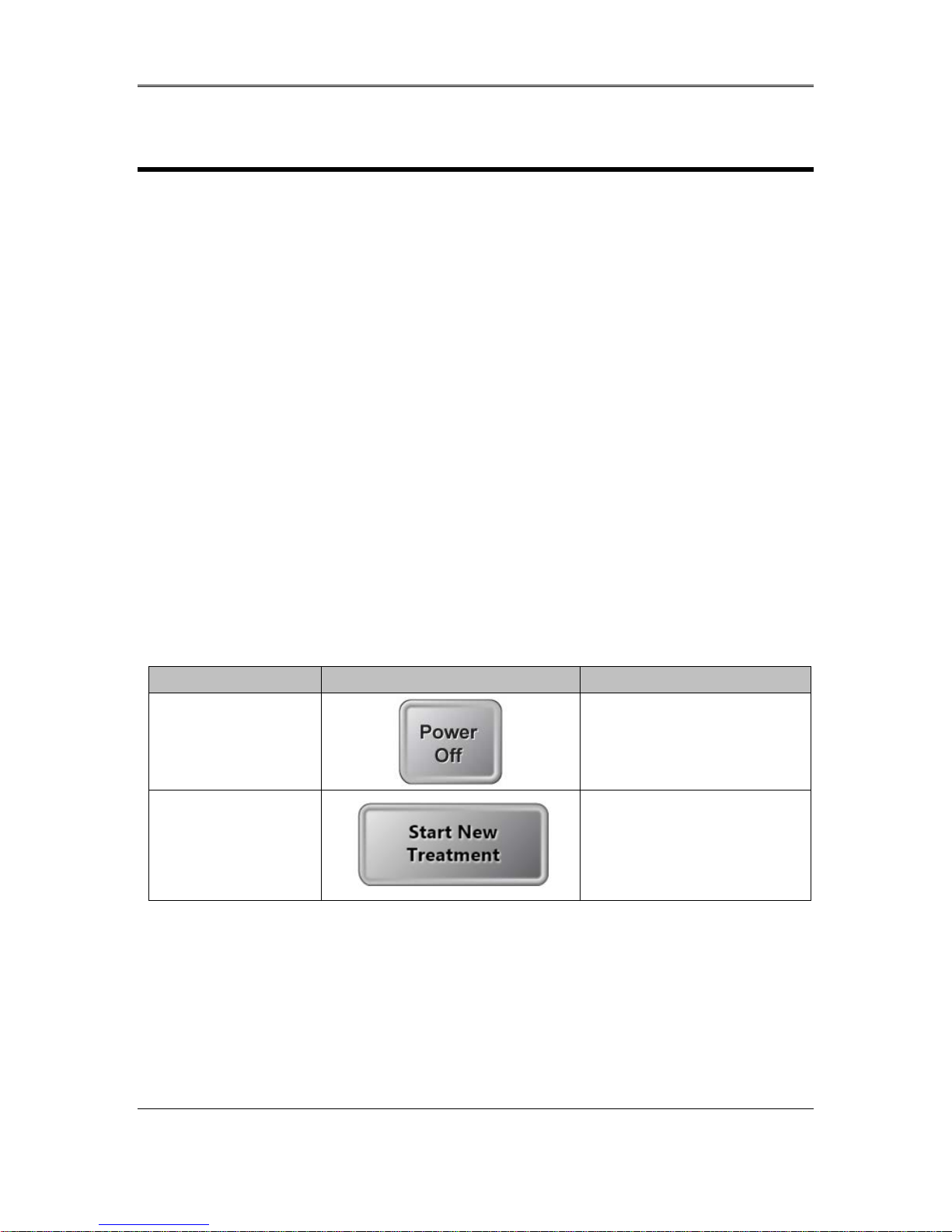
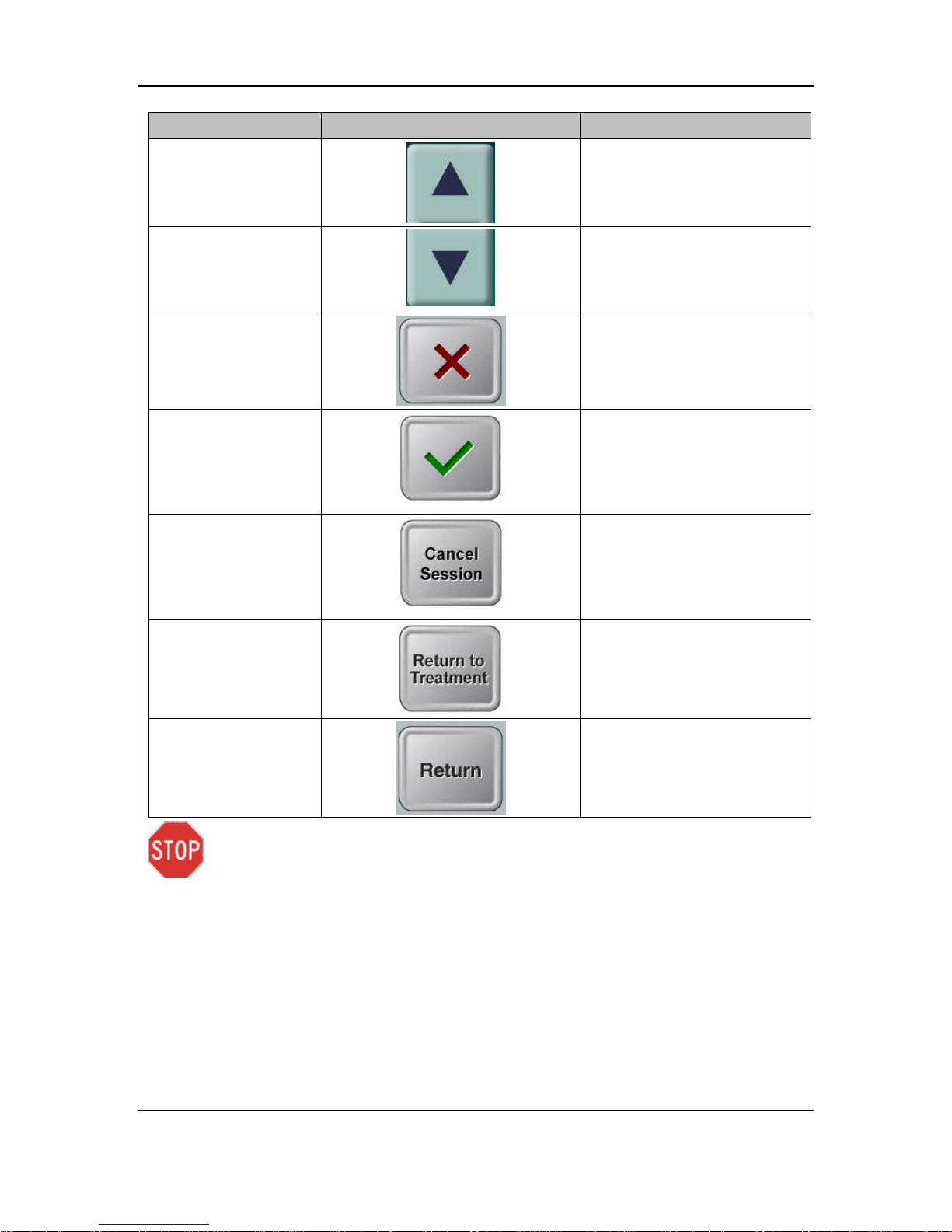
The table below identifies and describes important touchpad keys and icons unique to KXL
System operation. Chapter 2 identifies and describes the system’s major components.
Power Off button
(Initial screen)
Start New
Treatment button
(Initial screen)
Turns OFF electric power to
the personal computer.
Start s a clinical treatment
protocol so the physician
can treat patients.
KXL System Operator’ s Manual,
Rev R
3-1
Page 16
Chapter 3: System Operation
Touchpad Key Icon Description/Function
UP arrow
(various Clinical
Protocol screens)
DOWN arrow
(various Clinical
Protocol screens)
X button
(various Device
Settings screens)
Checkmark button
(various Clinical
Protocol screens
and Device Settings
screen)
Cancel Session
button
(various Clinical
Protocol screens)
Increases the value of the
current field.
Decreases the value of the
current field.
Cancels all the entries on a
particular screen and
returns to the previous
screen.
Directs the system to
accept the current screen
entries and to proceed to
the next step.
Cancels a treatment
session for a particular
patient. A prompt is then
displayed to confirm your
decision.
Return to Treatment
button
(Confirm Cancel
Session screen)
Return button
(various Device
Settings screen)
CAUTION: Only qualifi e d and experienced personnel shall operate the KXL System.
Cancels the Cancel
Session command and
returns to the Treatment
screen.
Returns to the Device
Settings menu.
KXL System Operator’s Manual,
Rev R
3-2
Page 17

Chapter 3: System Operation
3.3 UV Energy (Dose)
• The UV Energy (Dose) is the product of the UV Power (Intensity) and the UV Irradiation
Time. The UV Energy and UV Power are adjustable and the calculated UV Irradiation
Time is displayed.
• The system tracks UV Energy, UV Power, UV Irradiation Time and Total Treatment
Time during the treatment.
• There are two UV treatment modes available, Continuous and Pulsed.
• Continuous Mode: UV output is constant for the duration of the UV treatment.
Continuous Mode Parameters:
Induction Period: 1 second – 30 minutes
UV Energy*: 1 – 10.7 J/cm
UV Power: 3 – 45 mW/cm
* The user may select UV Energy in 0.1 J/cm
controlled by the RFID card.
• Pulsed Mode: UV output turns ON and OFF at user selected intervals.
Pulsed Mode Parameters:
Induction Period: 1 second – 30 minutes
UV Energy*: 1 – 10.7 J/cm
UV Power: 15 – 45 mW/cm
UV ON Time: 1.0 – 4.0 Seconds
UV OFF Time: 1.0 – 4.0 Seconds
* The user may select UV Energy in 0.1 J/cm
controlled by the RFID card.
Please reference Riboflavin Instructions for Use (IFU) for formulation information.
3.4 Preparing the System
2
2
2
increments. The energy range is
2
2
2
increments. The energy range is
• Position the KXL System adjacent to the treatment table or chair. Lock the casters to
secure the device’s position.
• Make sure the system is turned ON.
• Check glass window of beam aperture for dust and dirt. See sections 4.8 and 4.9 for
cleaning instructions.
3.5 Important Steps before Turning on the
System
• The user is responsible for assuring that the KXL System is functioning properly and is in
good-working condition before starting a treatment.
KXL System Operator’s Manual,
Rev R
3-3
Page 18
Chapter 3: System Operation
• To ensure the system is functioning properly, consider the following mandatory points:
o Inspect the device, accessories, and connecting cables for visible damage.
o Take local regulations for use of portable electro-optical medical devices into
consideration.
3.6 Powering Up the Syst em
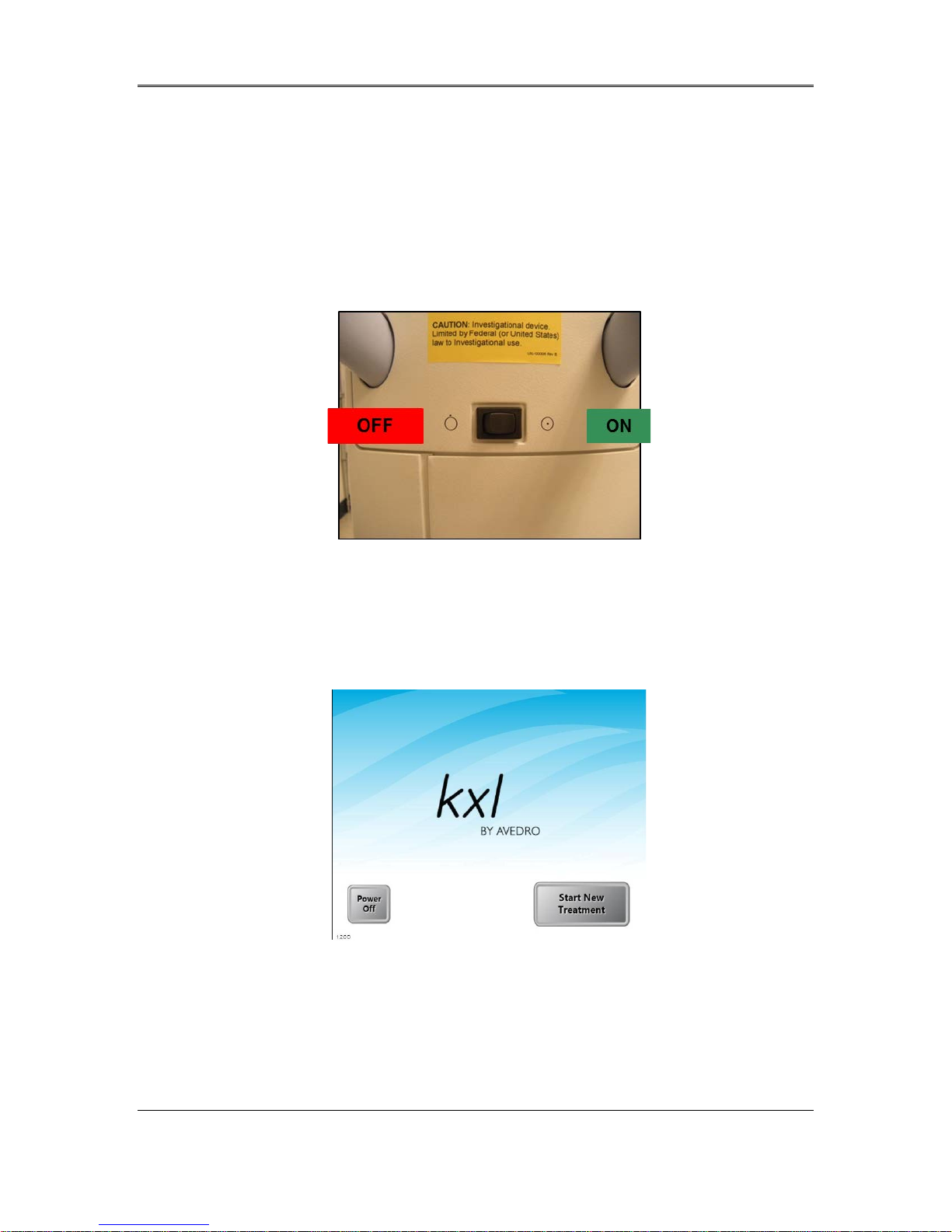
• Turn ON the single power switch on the front of the KXL console. This switch turns on
all the system components.
Figure 3-1. Power Switch
• The KXL System begins a power-up sequence, loading the operating system and all
configuration and reference files.
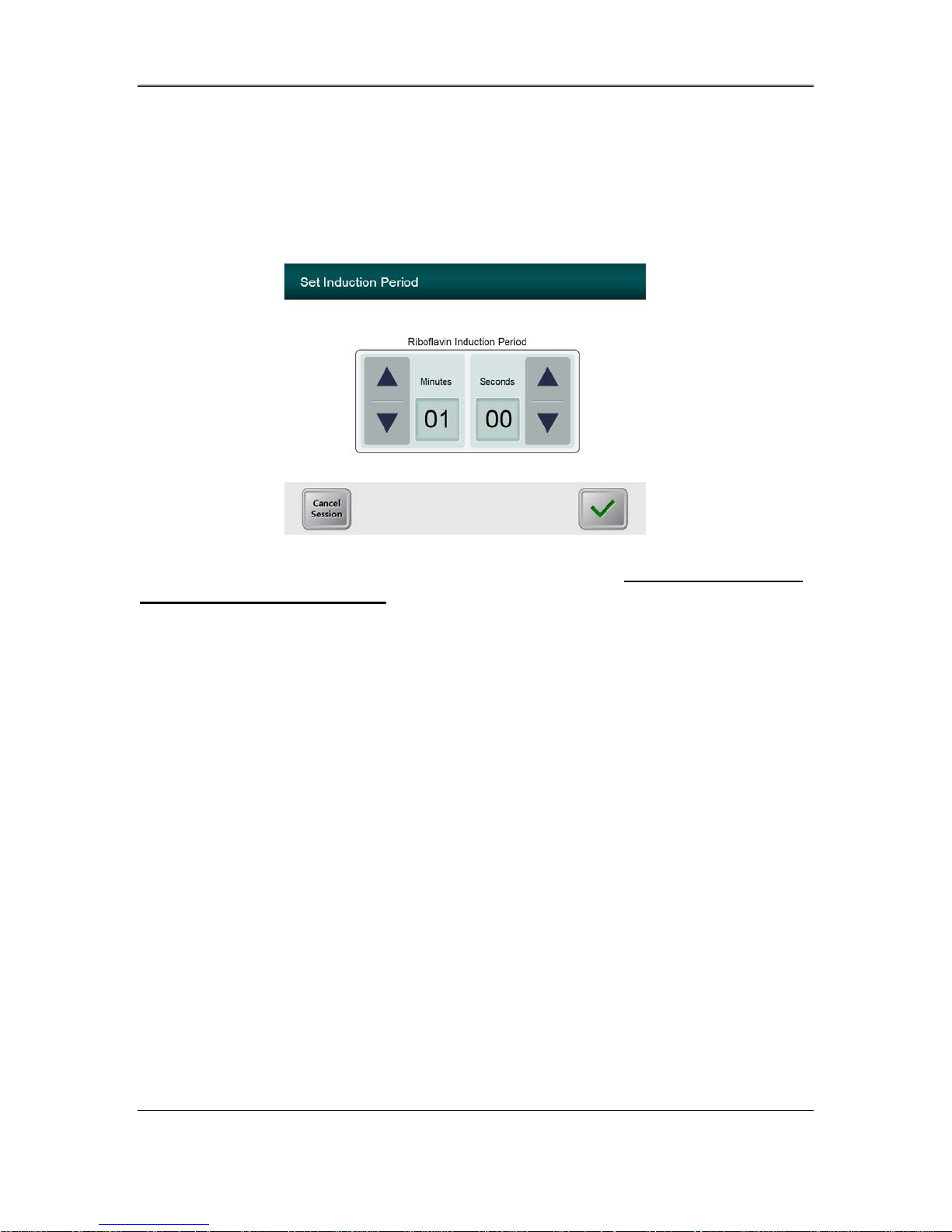
Figure 3-2. Startup Screen
• To begin patient treatment, press the Start New Treatment button.
• Please see section 3.16 for Power Down sequence instructions.
NOTE: If there is a Start-up error, please note any error messages and contact your
distributor or Customer Service immediately.
KXL System Operator’s Manual,
Rev R
3-4
Page 19
Chapter 3: System Operation
3.7 Set Riboflavin Induction Period
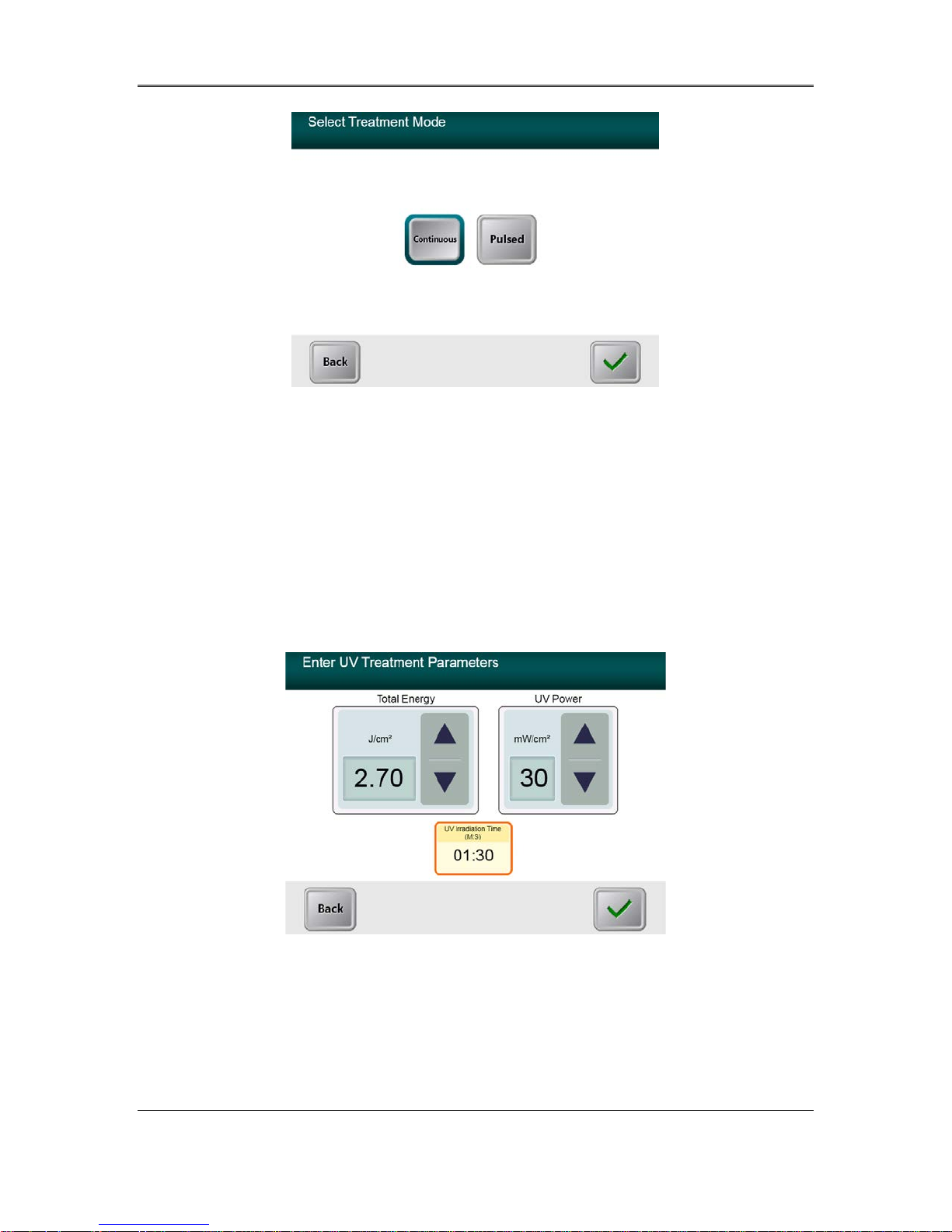
• Specify the desired Riboflavin Induction Period (1 sec – 30 min).
• When finished entering parameters, press the Checkmark button.
Figure 3-3. Induction Period Screen
NOTE: Default treatment parameters will auto-populate user selectable fields but
are adjustable. Defaults settings can be changed (see section 3.16.5, Editing Default
Treatment Parameters S creen ).
3.8 Select Treatment Mode
There are two UV treatment modes available, Continuous and Pulsed.
• Continuous Mode: The UV output is constant for the duration of the UV treatment.
• Pulsed Mode: The UV output turns ON and OFF at user selected intervals.
3.8.1 Continuous UV Treatment Mode
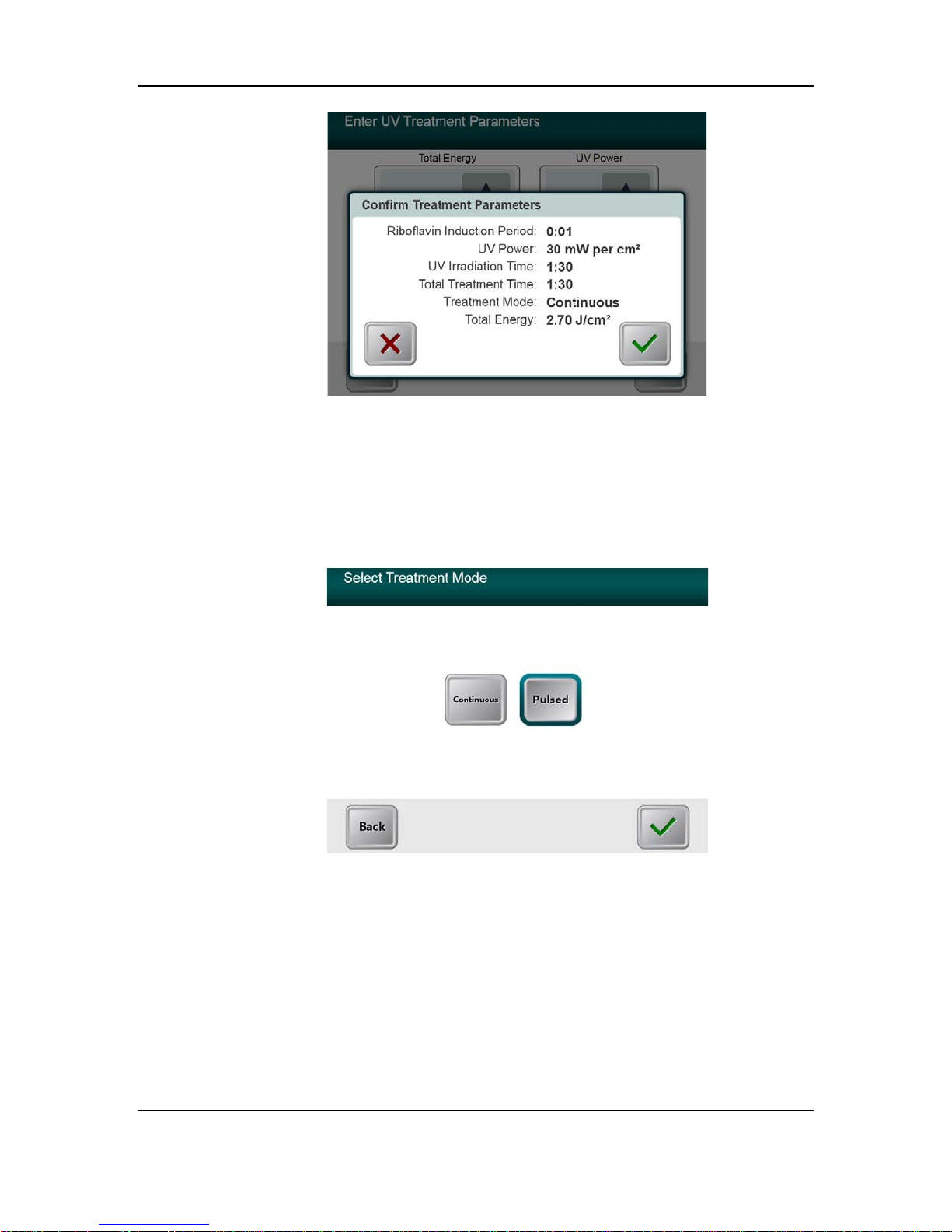
• Select Continuous treatment mode.
• When finished entering parameters, press the Checkmark button.
KXL System Operator’s Manual,
Rev R
3-5
Page 20
Chapter 3: System Operation
Figure 3-4. Select Continuous Treatment Mode Screen
• Enter the desired UV treatment parameters:
o Total Energy*
2
o UV Power (3 – 45 mW/cm
)
NOTE: UV irradiation time is automati cally calcul ate d and displayed in the orange box.
2
* The user may select UV Energy in 0.1 J/cm
increments. The energy range is
controlled by the RFID card.
• When finished entering treatm ent parameters, press the Checkmark button.
Figure 3-5. Continuous Treatment Parameters Screen
• Confirm the specified treatment parameters by pressing the Checkmark; if the treatment
parameters are not correct press the X and then re-enter the desired treatment parameters.
KXL System Operator’s Manual,
Rev R
3-6
Page 21
Chapter 3: System Operation
Figure 3-6. Confirm Continuous Treatment Parameters Screen
3.8.2 Pulsed UV Exposur e
• Select Pulsed treatment mode
• When finished entering parameters, press the Checkmark button.
Figure 3-7. Select Pulsed Treatment Mode Screen
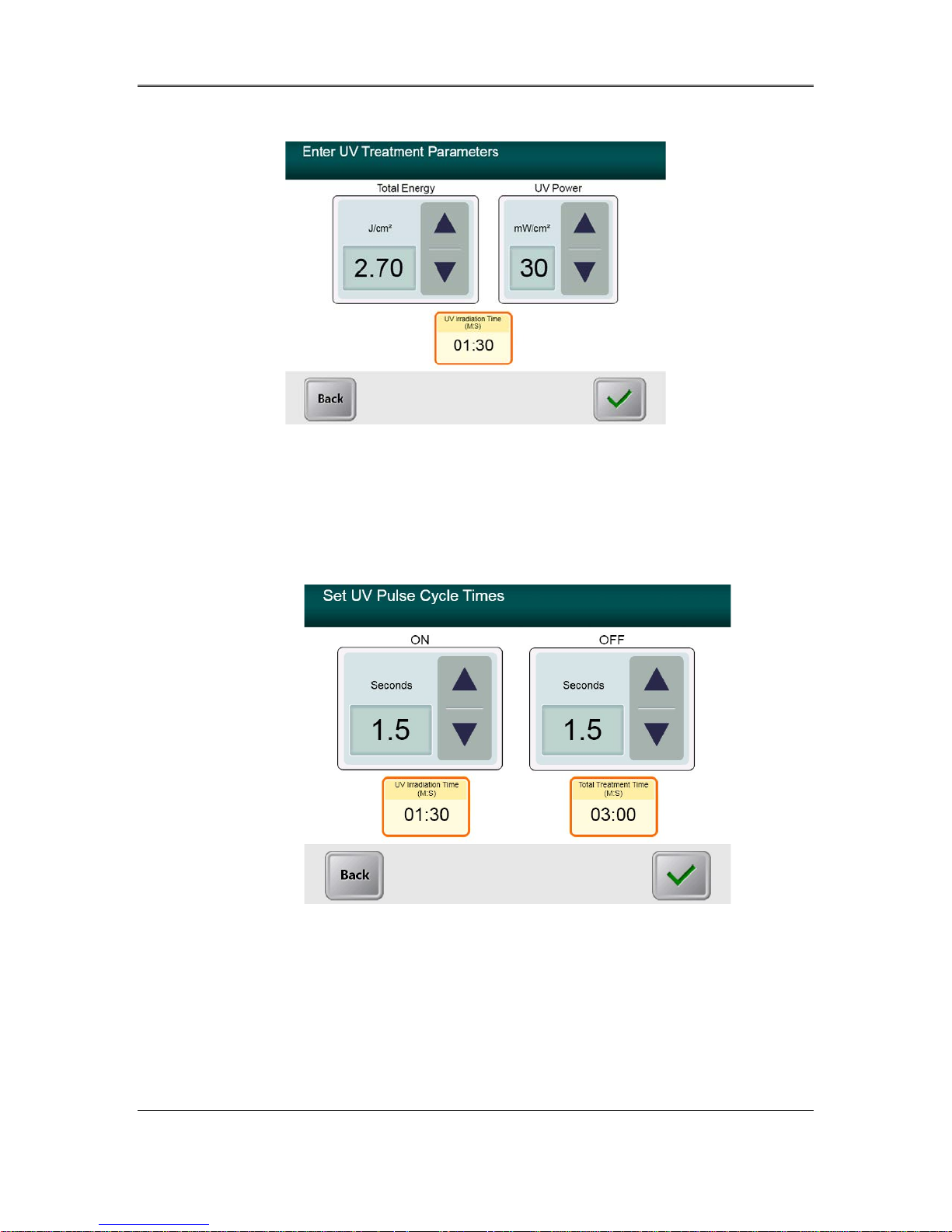
• Enter the desired UV treatment parameters:
o Total Energy*
2
o UV Power (15 – 45 mW/cm
)
o NOTE: UV irradiation time is au tomatically calculated and displayed in the orange
box.
* The user may select UV Energ y in 0.1 J/cm
controlled by the RFID card.
2
increments. The energy range is
KXL System Operator’s Manual,
Rev R
3-7
Page 22
Chapter 3: System Operation
• When finished entering treatm ent parameters, press the Checkmark button.
Figure 3-8. Pulsed Treatment Parameters Screen
• Select the desired times in which the UV is cycled ON and OFF
• When finished entering treatm ent parameters, press the Checkmark button.
Figure 3-9. Set UV Pulse Cycle Times Screen
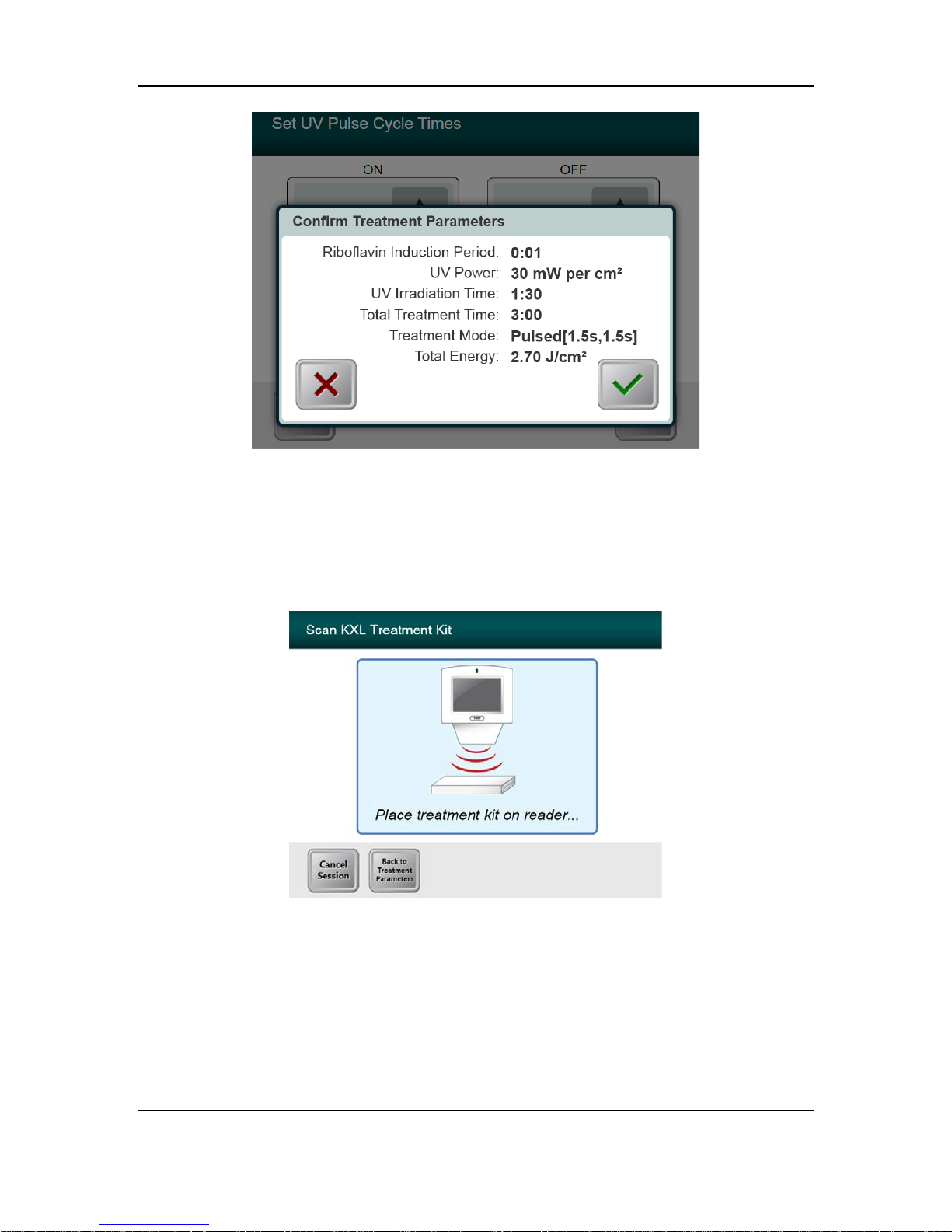
• Confirm the specified treatment parameters by pressing the Checkmark; if the treatment
parameters are not correct press the X and then re-enter the desired treatment parameters.
KXL System Operator’s Manual,
Rev R
3-8
Page 23
Chapter 3: System Operation
Figure 3-10. Confirm Pulsed Treatment Parameters Screen
3.9 Starting Treatment
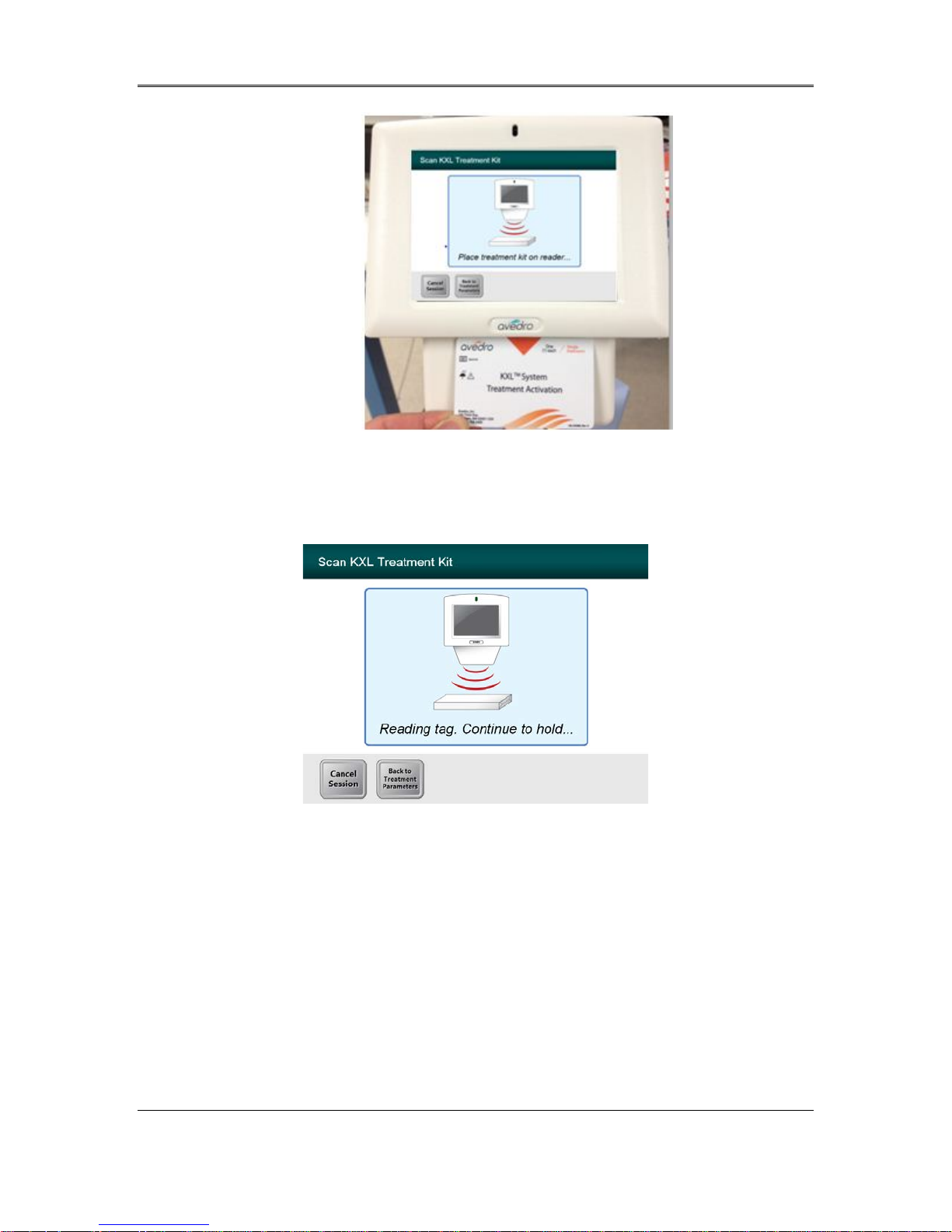
• Place the activation card on the RFID reader and hold in place until the system emits
a beep.
KXL System Operator’s Manual,
Rev R
3-9
Page 24
Chapter 3: System Operation
Figure 3-11. Reading Disposable s
3.9.1 Single-use dis posables
• Hold until read is complete and discard tag or activation card.
KXL System Operator’s Manual,
Rev R
3-10
Figure 3-12. Reading Tag Screen
Page 25
Chapter 3: System Operation
3.9.2 Multi-use disposables
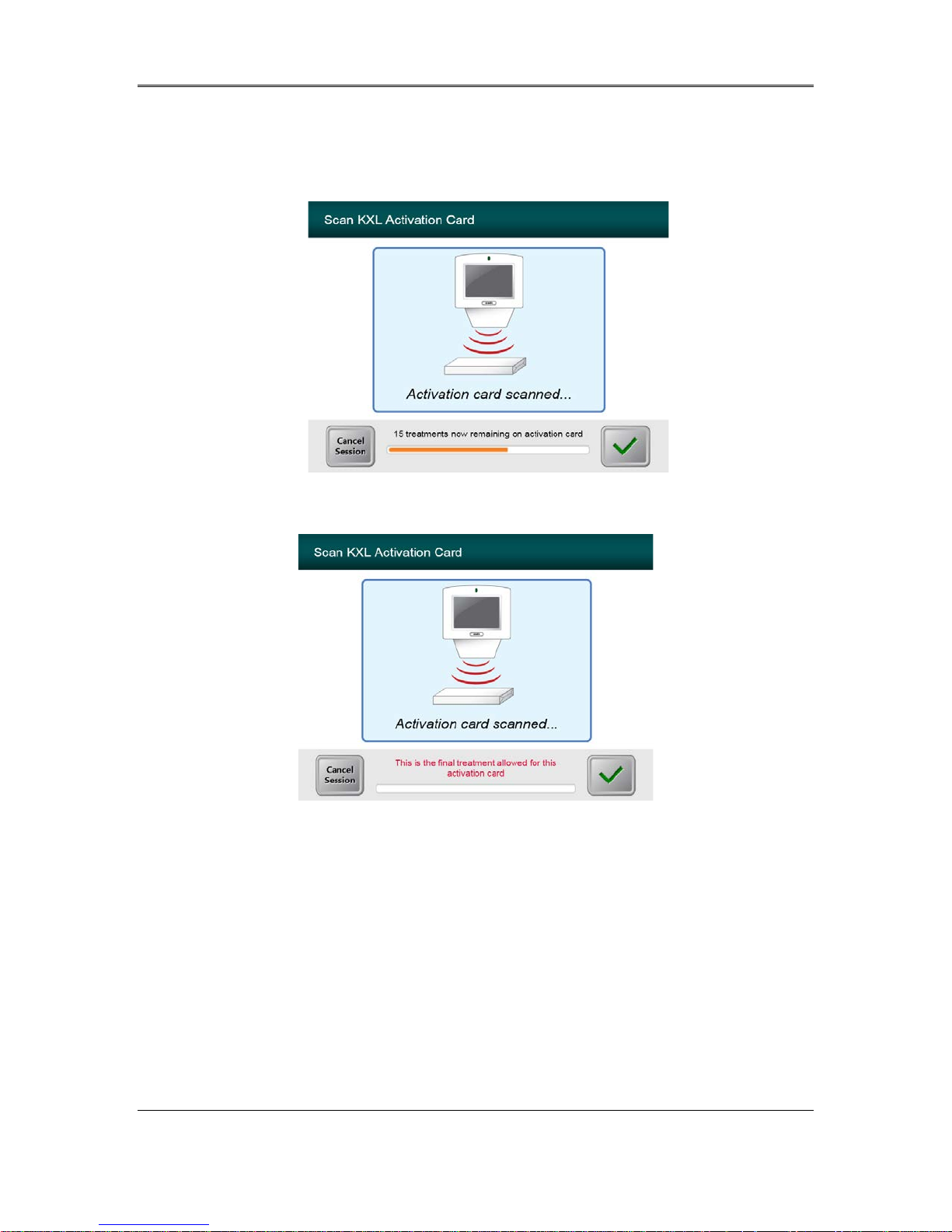
• Once a multi-use activ ation card has been scan ned , the disp lay will show the number
of treatments remaining on the card.
Figure 3-13. Treatments Remaining
Figure 3-14. Final Treatment
KXL System Operator’s Manual,
Rev R
3-11
Page 26
Chapter 3: System Operation
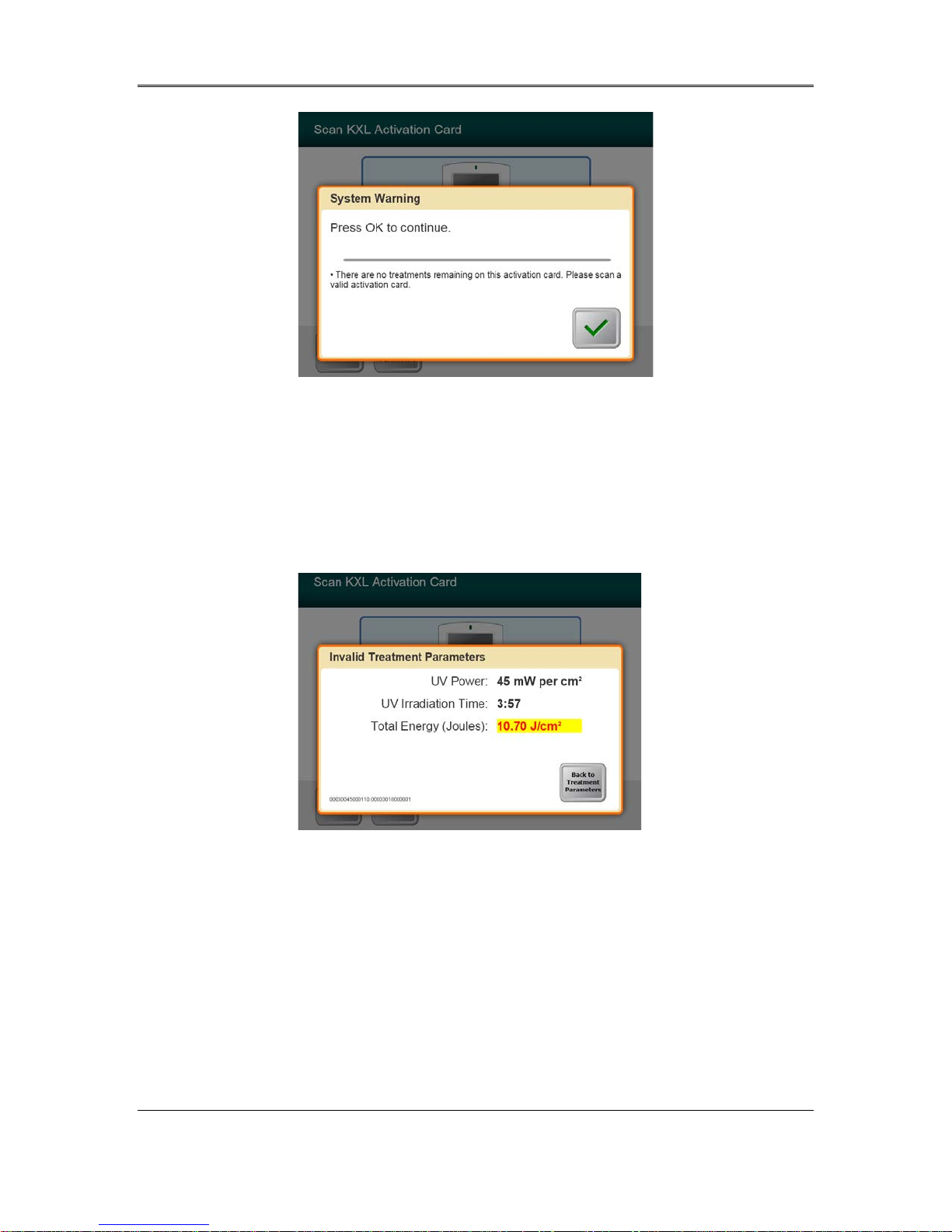
Figure 3-15. No Treatments Remaining
3.9.3 RFID card controlle d limits
• If the user has previously programmed an UV Energy r a n ge that is outside the
allowable value(s) controlled by the RFID card the following message will appear.
Figure 3-16. Invalid Treatment Parameters
• Press Back to Treatment Parameters to enter the appr o pria te parameter.
KXL System Operator’s Manual,
Rev R
3-12
Page 27
Chapter 3: System Operation
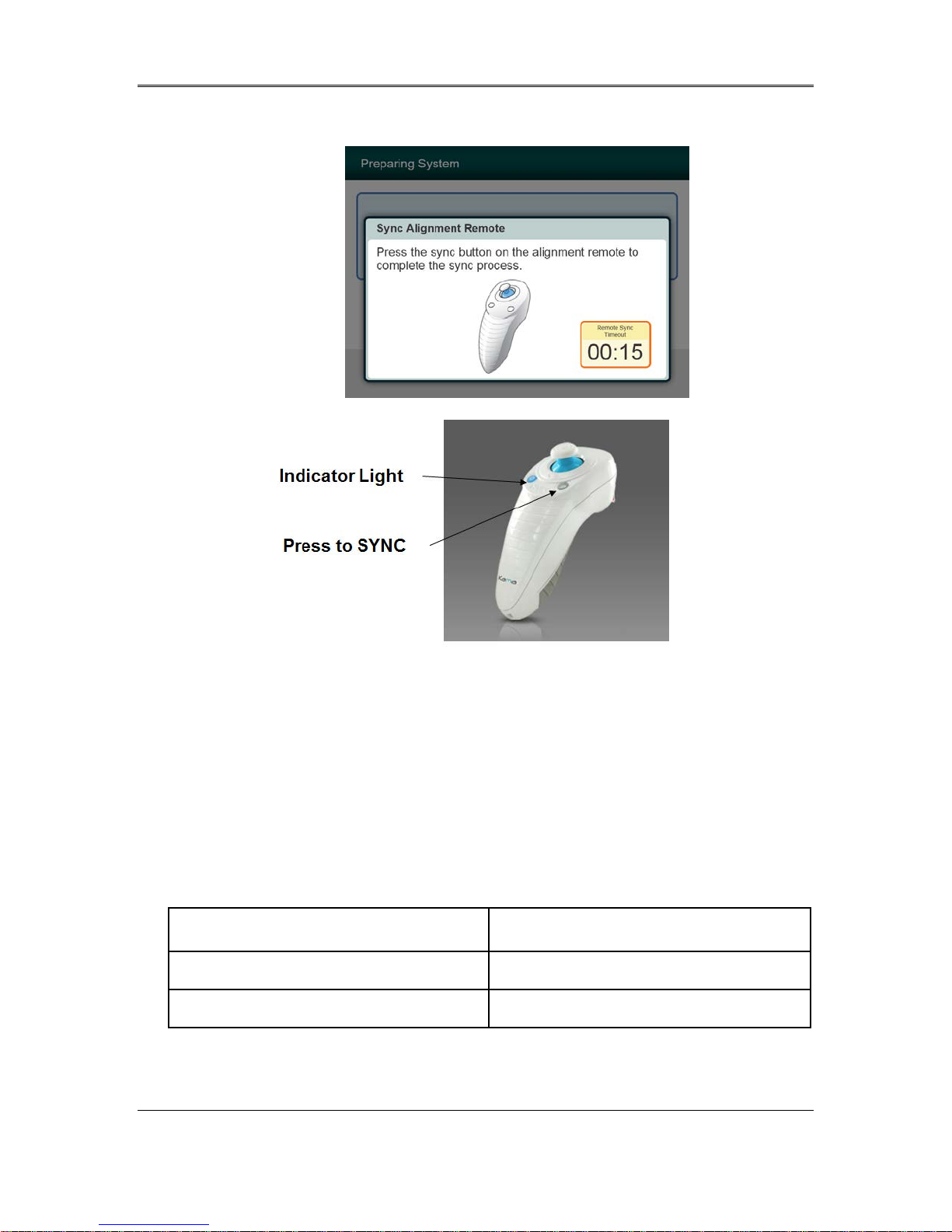
3.9.4 Sync Alignment Remote
Figure 3-17. System Setup Status
A Sync Alignment Remote window will appear before transitioning to the “Prepare for
•
Treatment” window.
•
Press the “S” button on the remote to synchronize the remote. This is required for every
procedure.
Note: Pressing the Sync button is necessary even though the window
o
prompting the Sync disappears.
Indicator Light Status Meaning
ON (Solid Blue) Synchroniz ed with s ys te m
OFF Lost synchro niz at io n wi th s yst em
KXL System Operator’s Manual,
Rev R
3-13
Page 28

Chapter 3: System Operation
NOTE: The KXL system performs an internal self-test prior to each treatment to verify
proper UVA calibration. The internal self-test uses a redundant set of optical sensors to
ensure that accurate levels of UVA will be delivered for each treatment. If the internal
self-test fails, an error message will be generated and the treatment cannot proceed. If
this occurs, contact your distributor or Customer Service immediately.
KXL System Operator’s Manual,
Rev R
3-14
Page 29
Chapter 3: System Operation
3.10 Preparing the Patient
• Ensure that the patient is lying flat or reclined on a patient table or chair. His or her
head should rest in a headrest.
• Adjust the table or chair and headrest so that the patient can rest comfortably for the
duration of the treatment without head movement.
• Apply a lid speculum and optional drapes using standard clinical technique.
• Apply Riboflavin to the area of treatment in accordance with the Riboflavin
Instructions for Use (IFU).
CAUTION: Riboflavin (vitamin B2) is not a part of the KXL System described in this
manual. For details of component use, please refer to the component’s Directions for
Use.
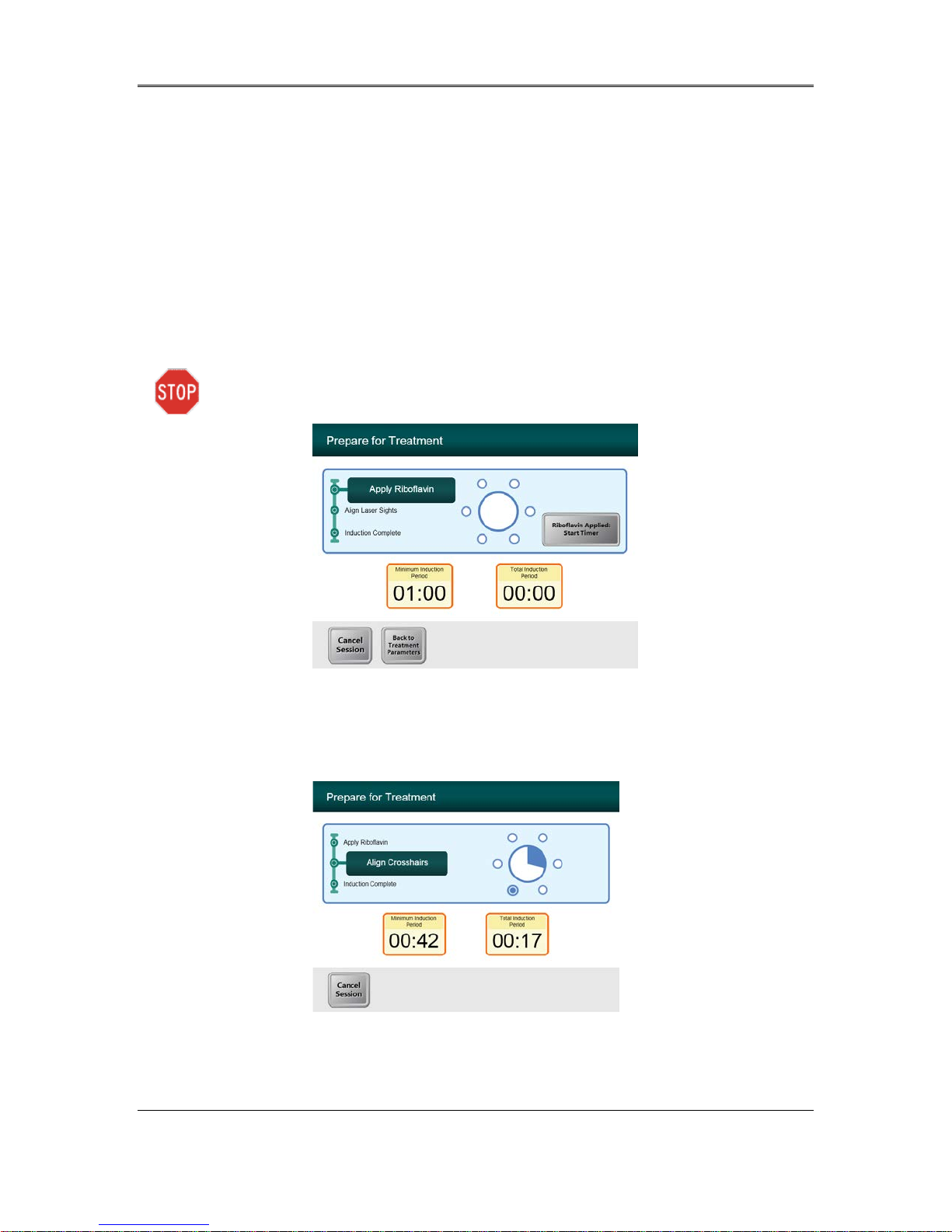
Figure 3-18. Prepare Patient Screen
NOTE: Once the Riboflavin is applied to the eye, Start the induction by pressing the
“Riboflavin Applied: Start Timer” button.
Figure 3-19. Align Crosshairs during induction
KXL System Operator’s Manual,
Rev R
3-15
Page 30
Chapter 3: System Operation
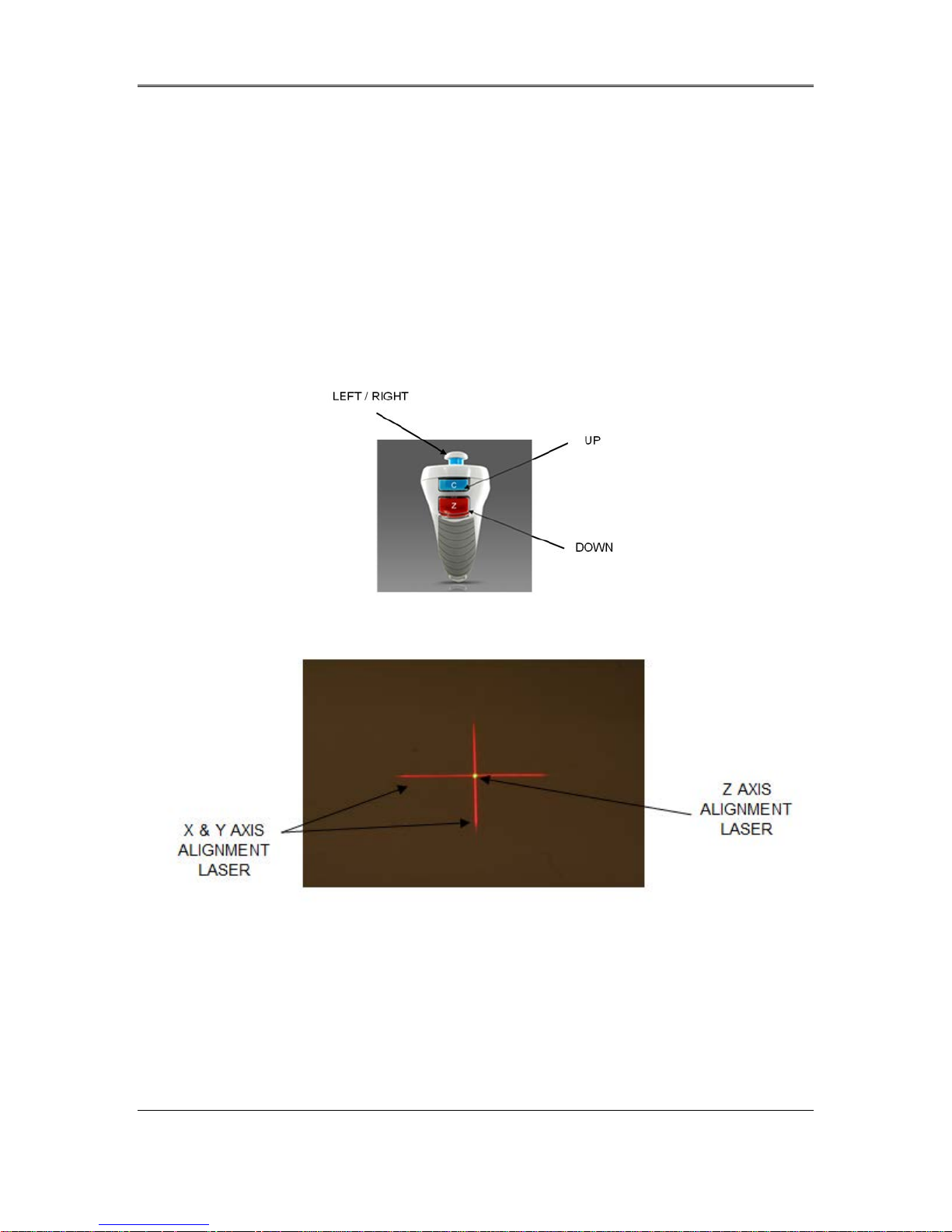
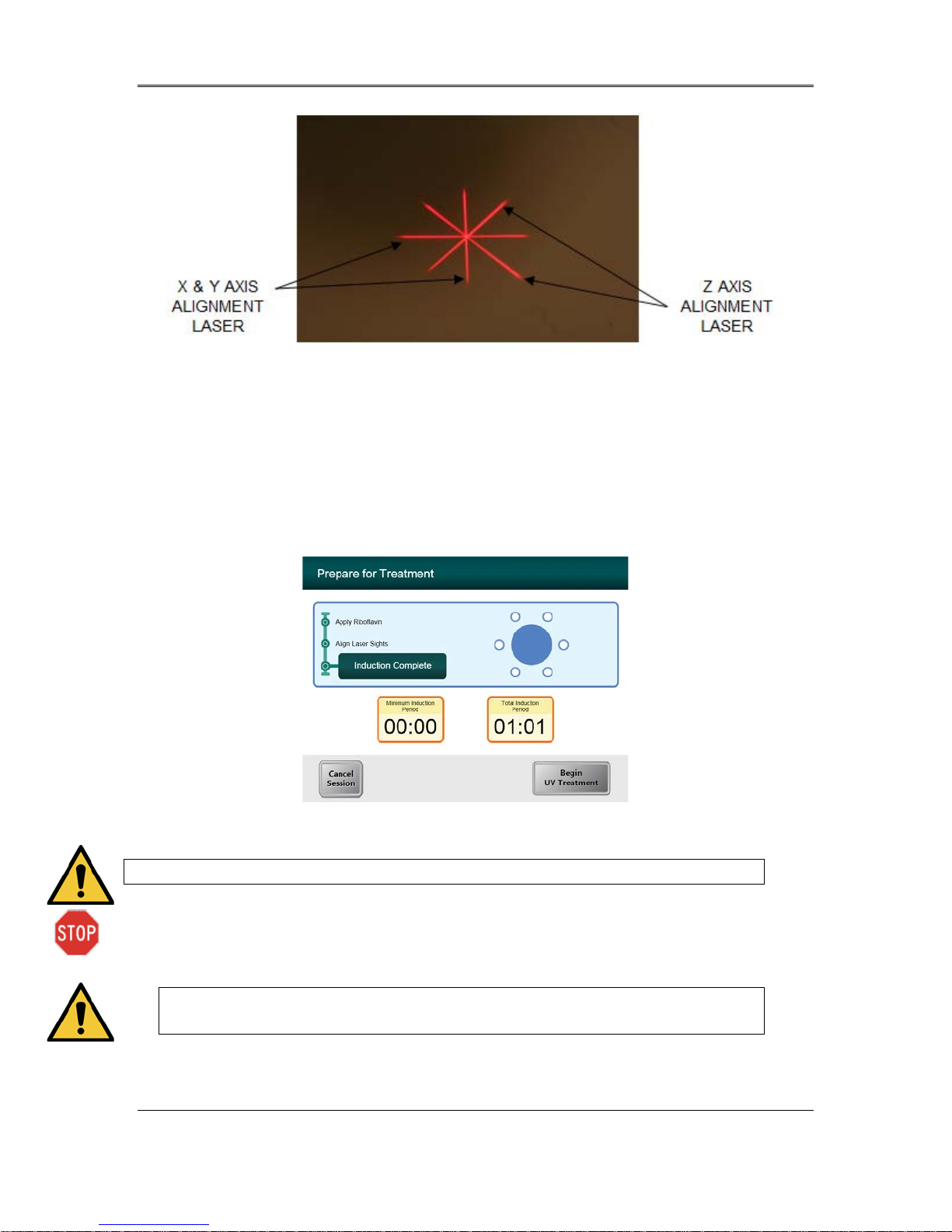
• KXL has two alignment lasers.
o Red crosshair for X and Y axis positioning.
o Green dot or a second Red crosshair for Z axis positioning.
• Note: For correct alignment when using the Remote, the Avedro logo on optics head
should face the user
• Manually move the Optics head back and forth and left and right until the X/Y axes’ Red
crosshairs are aligned to the center of the pupil.
• Manually move the Optics head up and down to align the Z axis green dot or second red
crosshair to the center of the first red crosshair.
• Fine tune the alignment as needed using the wireless remote.
Figure 3-20. Remote Functions
Figure 3-21. Red Crosshairs X & Y Axes, Green Dot Z Axis
Alignment
KXL System Operator’s Manual,
Rev R
3-16
Page 31
Chapter 3: System Operation
Figure 3-22. Red Crosshairs X & Y Axes, Red Crosshairs Z Axis
Alignment
3.11 Initiating Tre atment
• When the Induction Time is complete, the “Begin UV Treatment” button will appear.
Press the “Begin UV Treatment” button to ini t ia t e tre a tment.
Figure 3-23. Induction Complete
WARNING: Start treatments only after the photosensitizer is applied.
CAUTION: UV light is emitted when the Avedro logo on the optical head changes color from blue to
green.
WARNING: Make sure that the KXL System and the patient’s table or
chair are secured and not moved after alignment and during treatment.
KXL System Operator’s Manual,
Rev R
3-17
Page 32
Chapter 3: System Operation
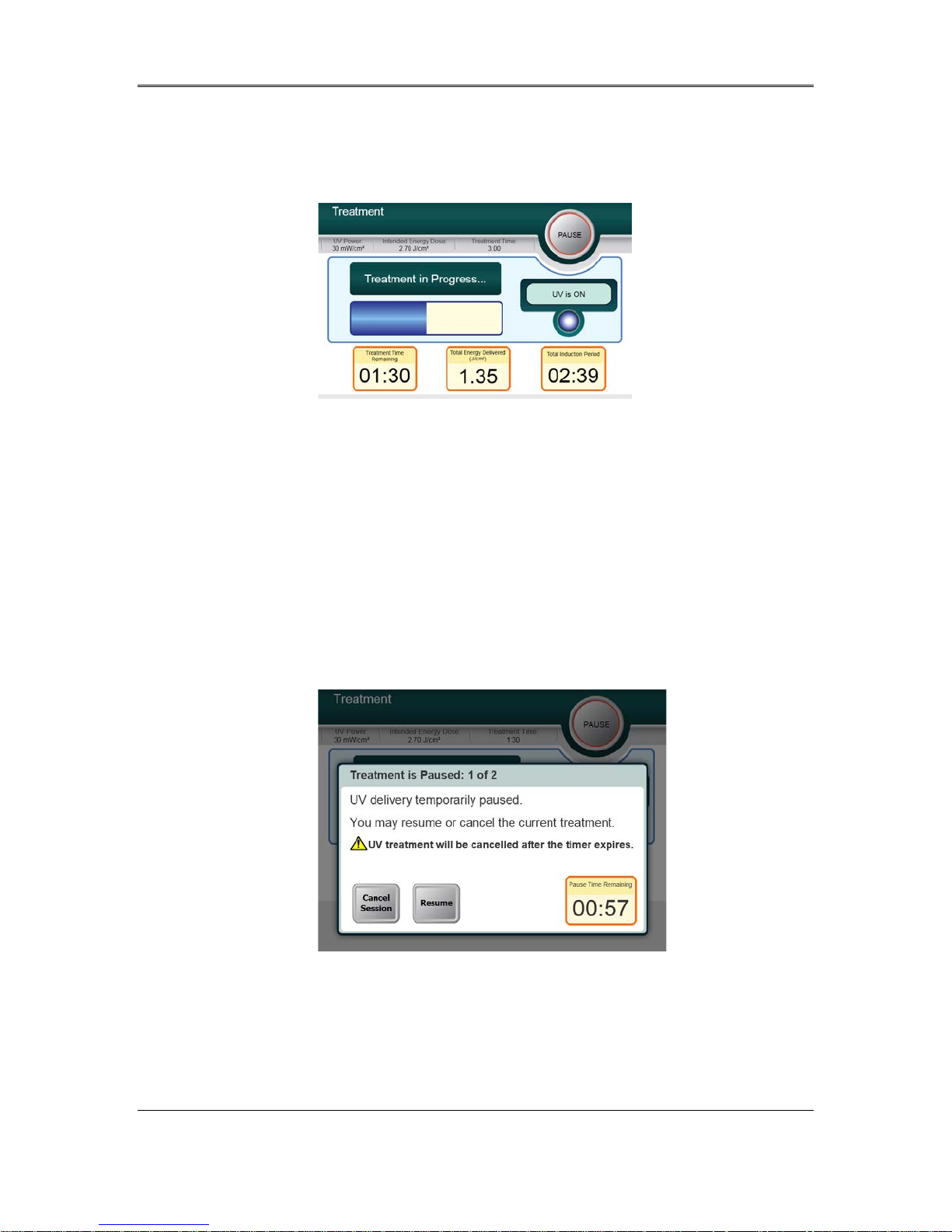
3.12 Monitoring Treatment
• Check continuously that the area of interest on the cornea is illuminated with the UVA
light and adjust as necessary using the wireless remote.
Figure 3-24. Treatment Screen
NOTE: When using Pulsed Treatment mode, UVA light will not be visible during the
OFF periods. The User Interface will not change to “UV is OFF” during these cycles.
• The patient should fixate on the red X & Y alignment crosshair thro ug hout the treatment.
• Patients should remain still during the treatment.
3.13 Stopping a Trea tment
• The treatment stops automatically after the user-programmed timer expires.
• The user may decide to stop or interrupt the treatment. In such case, the UV light can be
switched OFF by pushing the Pause button. This can b e done two tim es at most (see
section 3.15).
Figure 3-25. Treatment Paused Screen
• To cancel or resume treatment press appropriately. See section 3.16 for powering down
after cancellation.
KXL System Operator’s Manual,
Rev R
3-18
Page 33
Chapter 3: System Operation
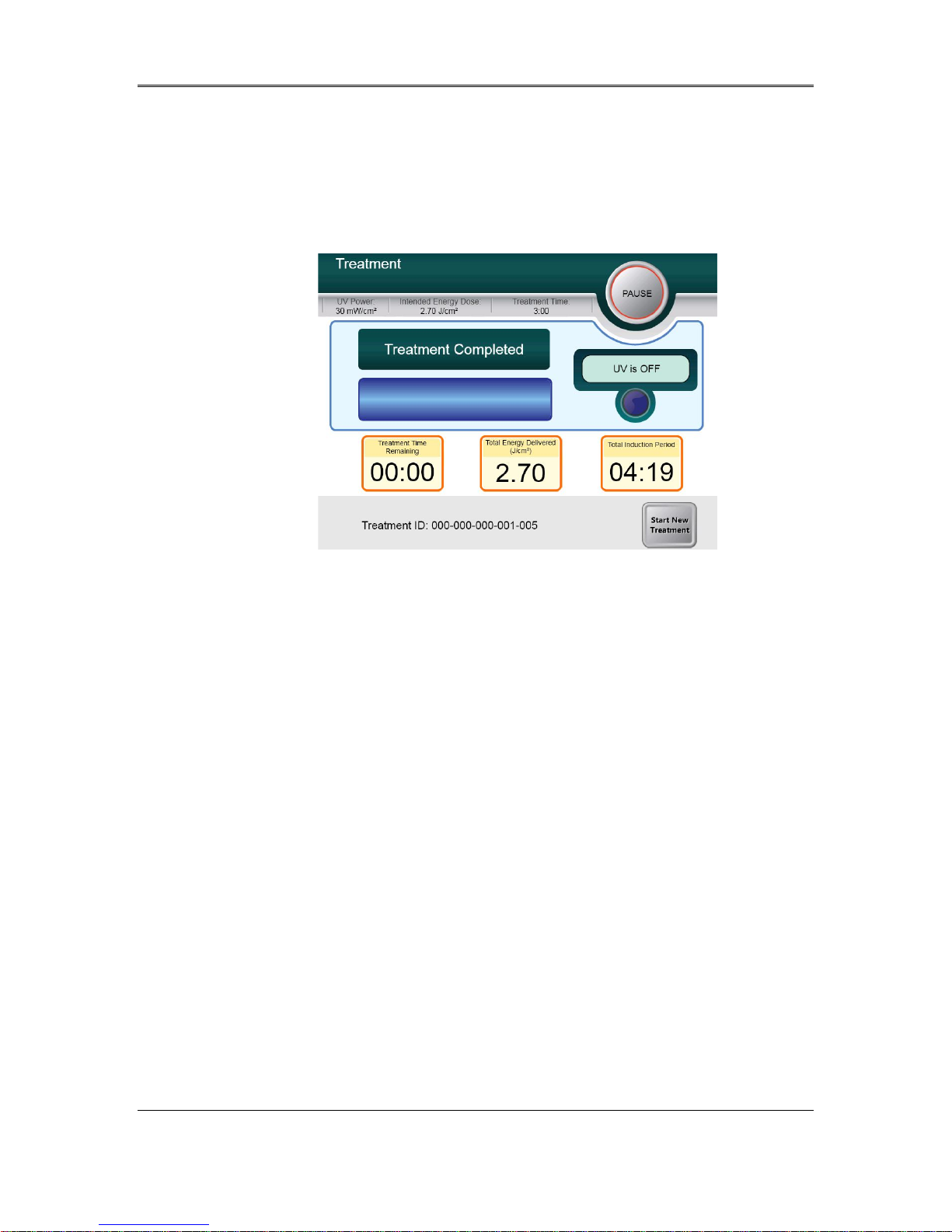
3.14 Treatment Complete
• At the completion of a treatment the Total Treatment Parameters will be displayed and
the screen will show Treatment complete. Press Start New Treatment to initiate next
treatment.
Figure 3-26. Treatment Complete Screen
• To exit treatment and / or start a new treatment press Start New Treatment.
• If treatments are complete Power OFF the system using the “Power Off” button on the
Main Screen.
• Carefully remove the device from the patient area.
• Apply antibiotic ointment on the cornea and then cover cornea with a bandage contact
lens.
• Remove speculum.
• Give post-op medication using a regimen similar to after photorefractive keratectomy
(PRK): pain medication, steroids, antibiotics.
KXL System Operator’s Manual,
Rev R
3-19
Page 34
Chapter 3: System Operation
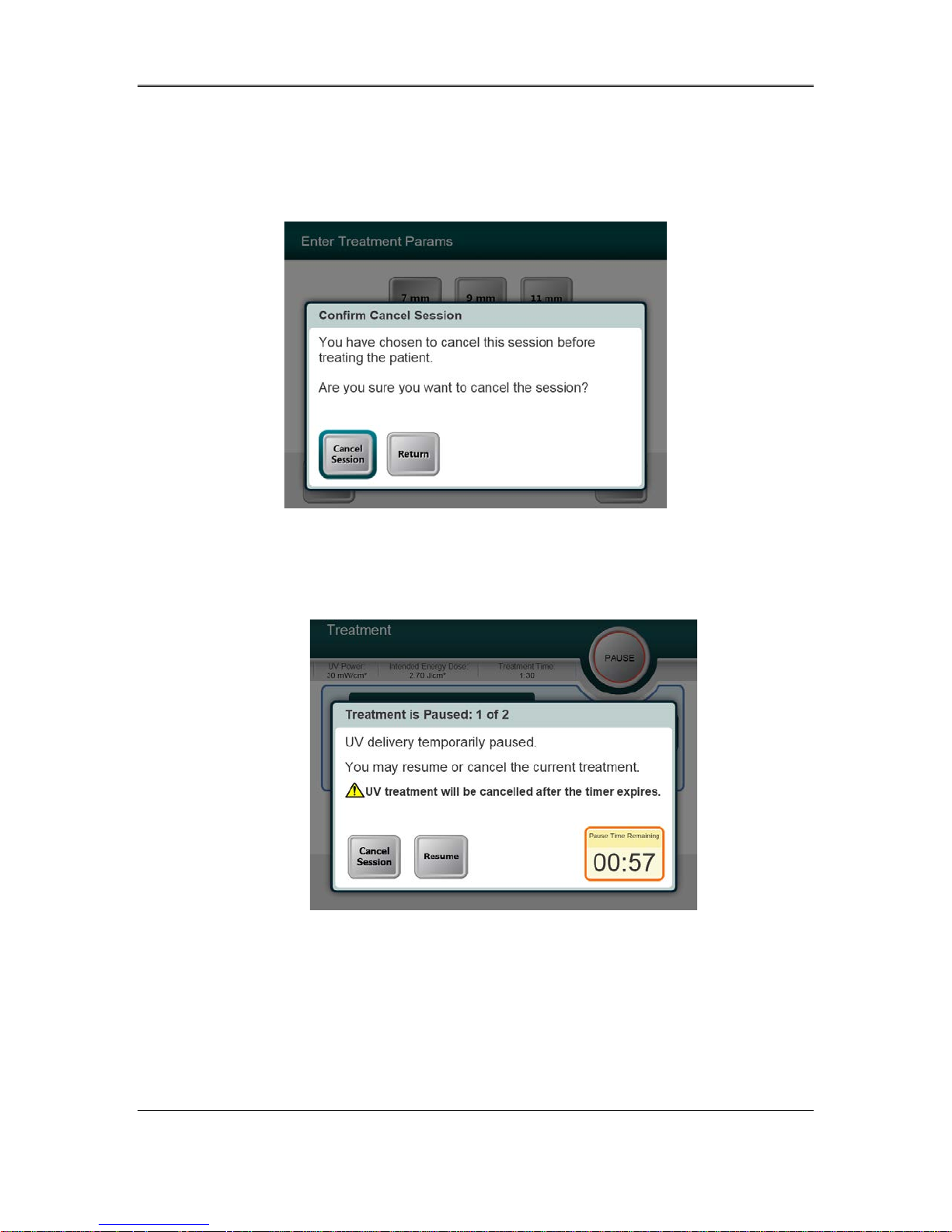
3.15 Pausing or Cancel ing a Treatment
Session can be Paused during UV treatment or Canceled both before and during UV treatment.
If the session is cancelled before treatment, the screen displays with Confirm Cancel Session.
Figure 3-27. Initial Confirm Cancel Session Screen
• To cancel session press Cancel Session.
• The session can also be Paused during UV treatment. The Pause is limited to two Pauses
each lasting two minutes long with a timer starting when the Pause button is initiated.
Figure 3-28. Pausing Treatment
• If the session is Paused, the treatment can either be Resumed by selecting the Resume
button, or Cancelled by selecting the Cancel Session button.
• If the session is not Resumed within the two-minute Pause time, the treatment will
automatically be Cancelled when the timer runs down.
• If the session is resumed, treatment can continue.
KXL System Operator’s Manual,
Rev R
3-20
Page 35
Chapter 3: System Operation
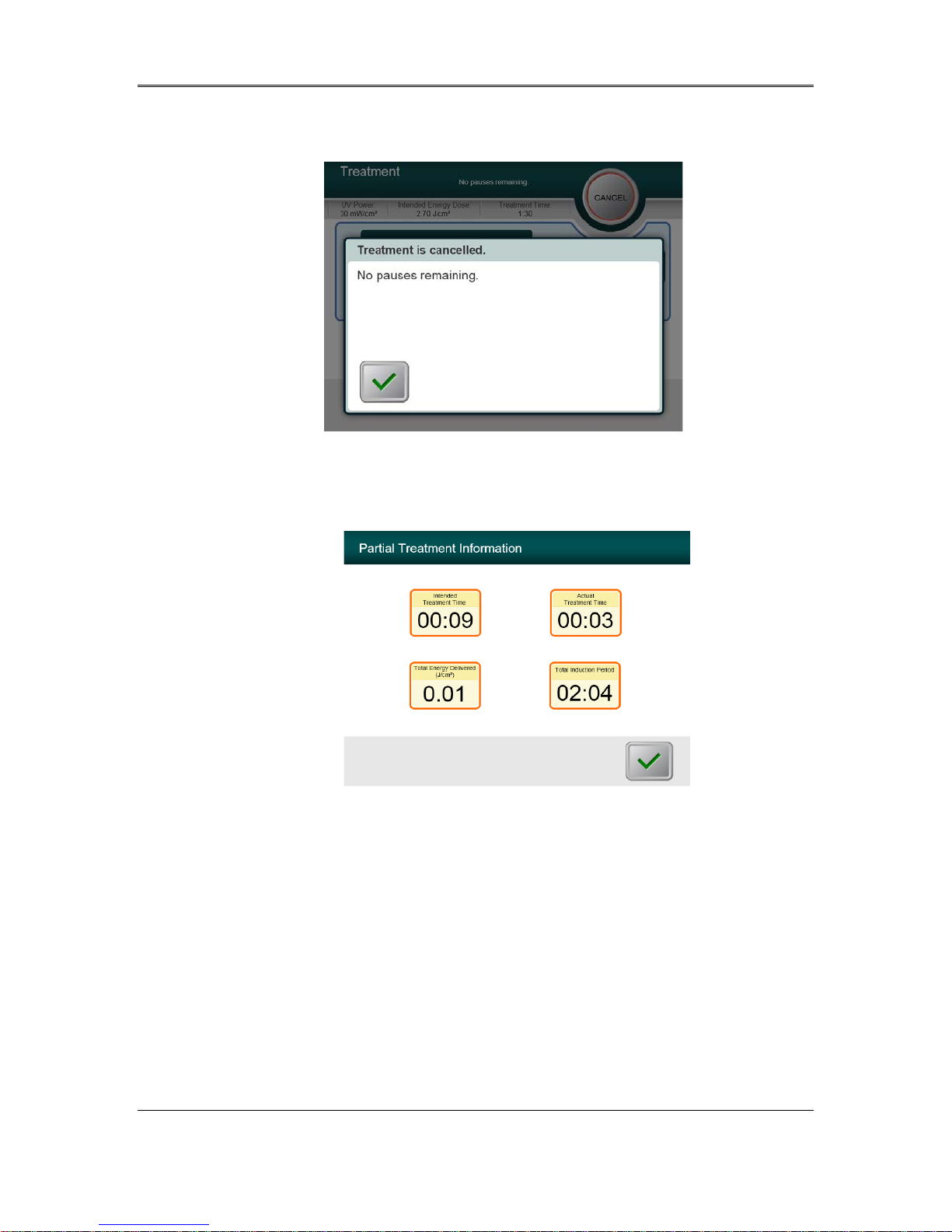
• Pauses can only be used two times after which treatments can be Canceled by selecting
the Cancel button.
Figure 3-29. Cancel Treatment
• The screen displays Partial Treatment Information
Figure 3-30. Partial Treatment Information
KXL System Operator’s Manual,
Rev R
3-21
Page 36
Chapter 3: System Operation
3.16 Powering Down the System
It is recommended that the KXL System be plugged into an electrical outlet when not in use or
when stored.
In order to maintain battery charge, it is recommended that the KXL be connected to a grounded
supply mains at the end of each business day or when not in use.
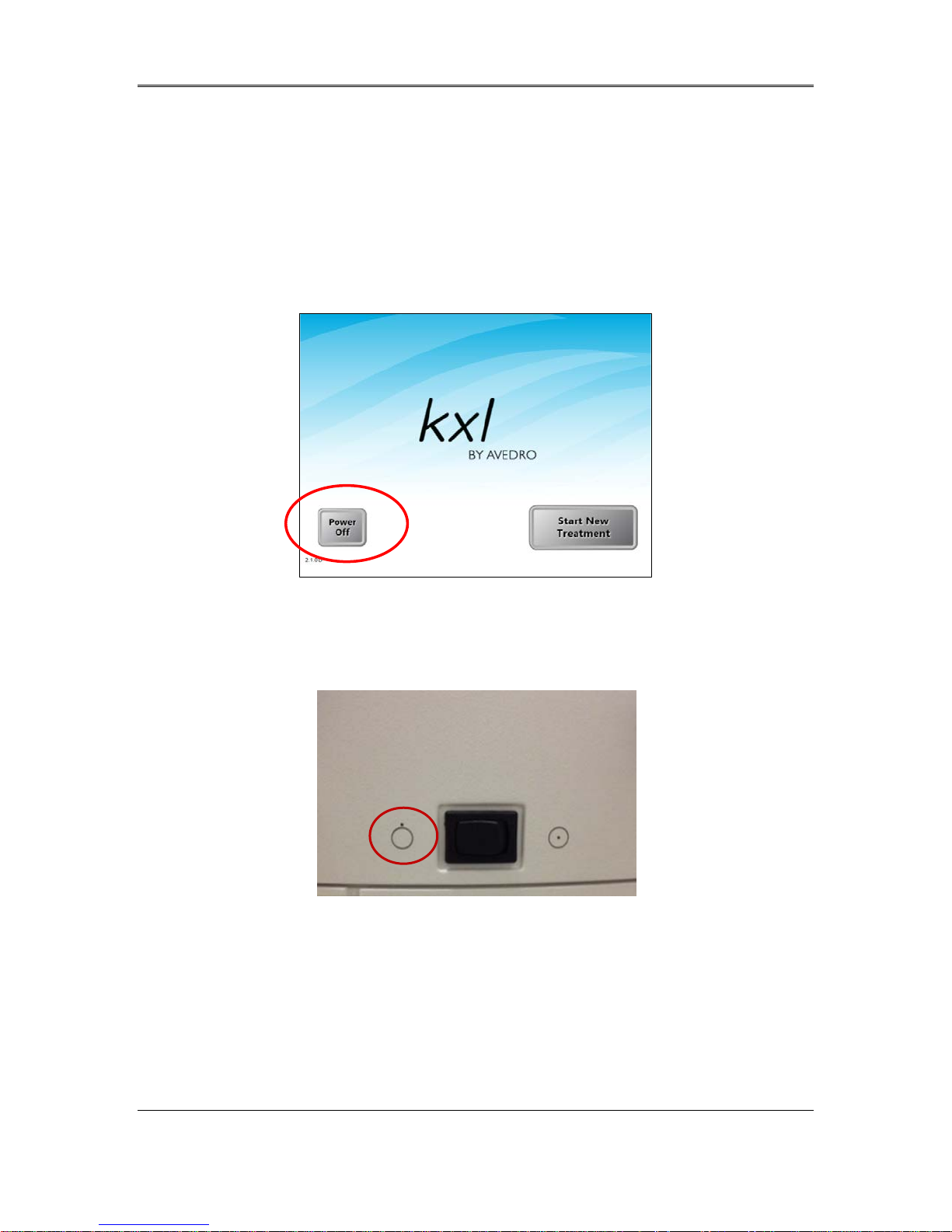
Figure 3-31. Power Off
• Press the “Power Off” on the touch screen monitor.
• Wait for the software to shut down - the screen will be blank.
Figure 3-32. Power Off Position
• After the screen is blank and software shuts down, turn the system power switch to the
“Off” position.
KXL System Operator’s Manual,
Rev R
3-22
Page 37
Chapter 3: System Operation
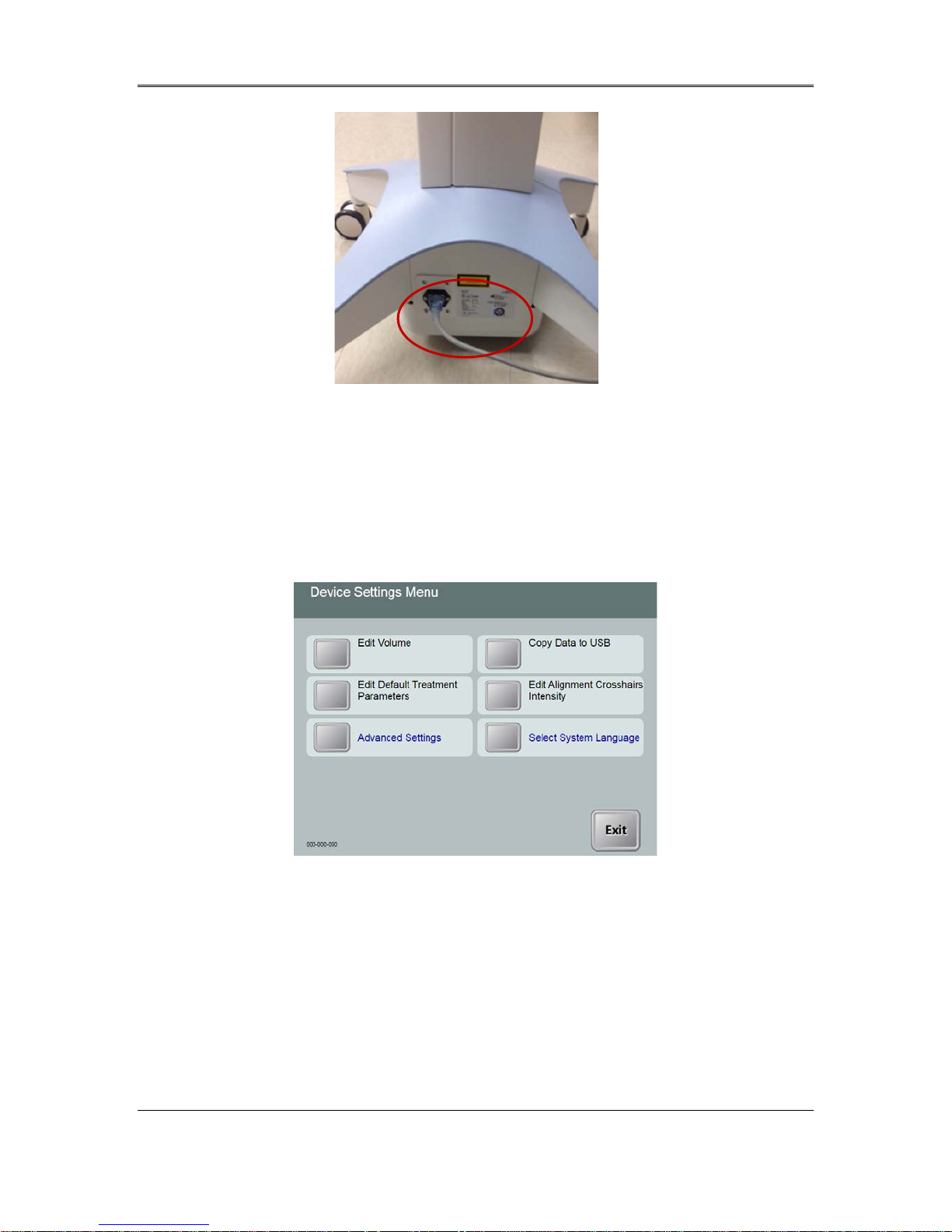
Figure 3-33. KXL System Plug
• Plug the KXL System in to an electrical outlet until next use.
3.17 Using the Device Sett ings Menu
• With the Initialization screen (New Patient Start) displayed, press and hold the KXL on
the touch screen.
Figure 3-34. Device Settings Menu
3.17.1 Advanced Settings
• Advanced Settings are only available to Avedro and Service personnel with a KXL
Advanced Settings acc ess card. If selected the user will be prompted to scan an acce ss card.
KXL System Operator’s Manual,
Rev R
3-23
Page 38
Chapter 3: System Operation
3.17.2 Editing System Language
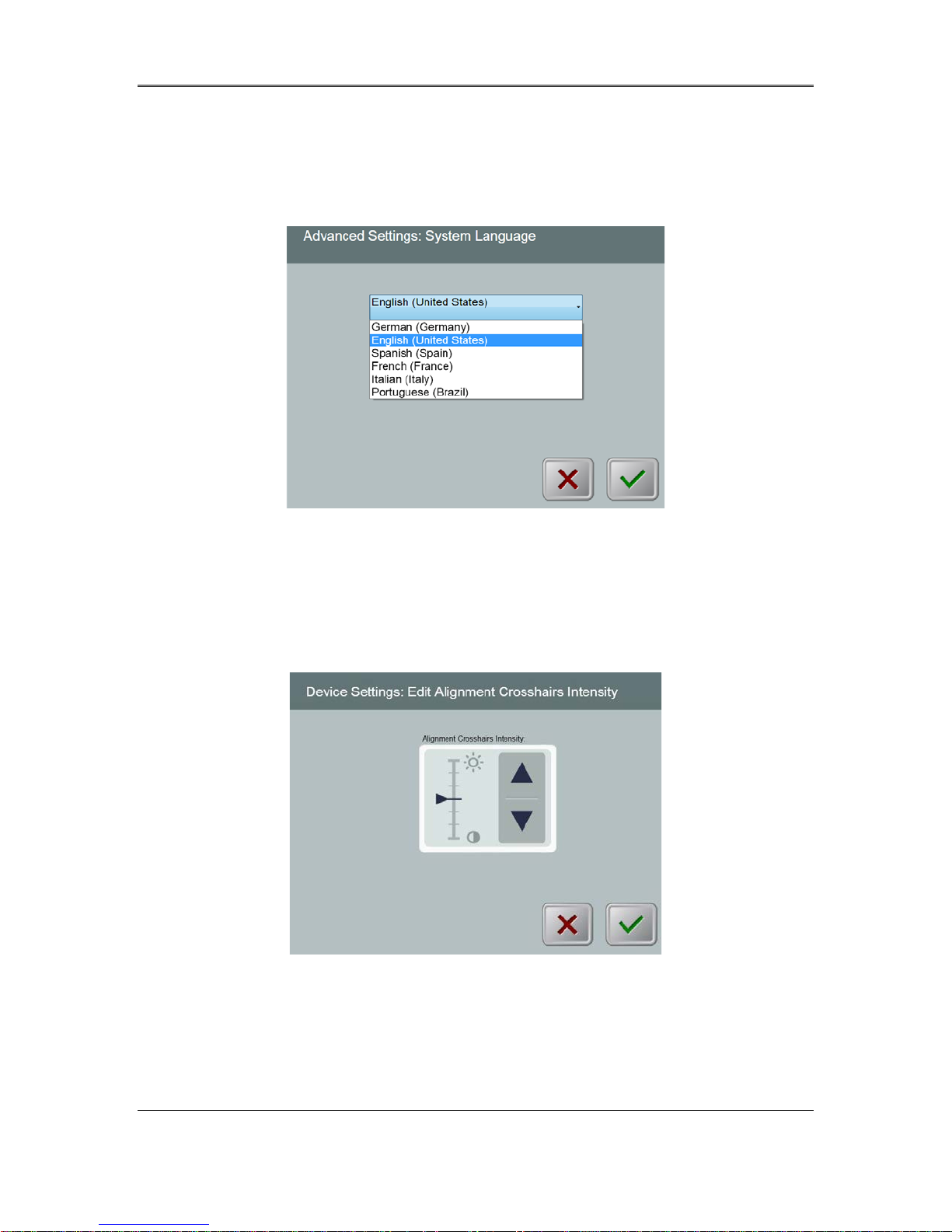
• The System Language option allows a user to select the language of the Graphical User
Interface.
• Select the desired language from the dropdown menu.
Figure 3-35. Edit System Language
3.17.3 Editing Alignment Cros s ha irs Intensity
• The Alignment Crosshairs Intensity option allows a user to edit the brightness of the
alignment crosshairs.
• Select the Edit Alignment Crossha irs Inten si ty button on the Device Settings menu.
Figure 3-36. Edit Alignment Crosshairs Intensity
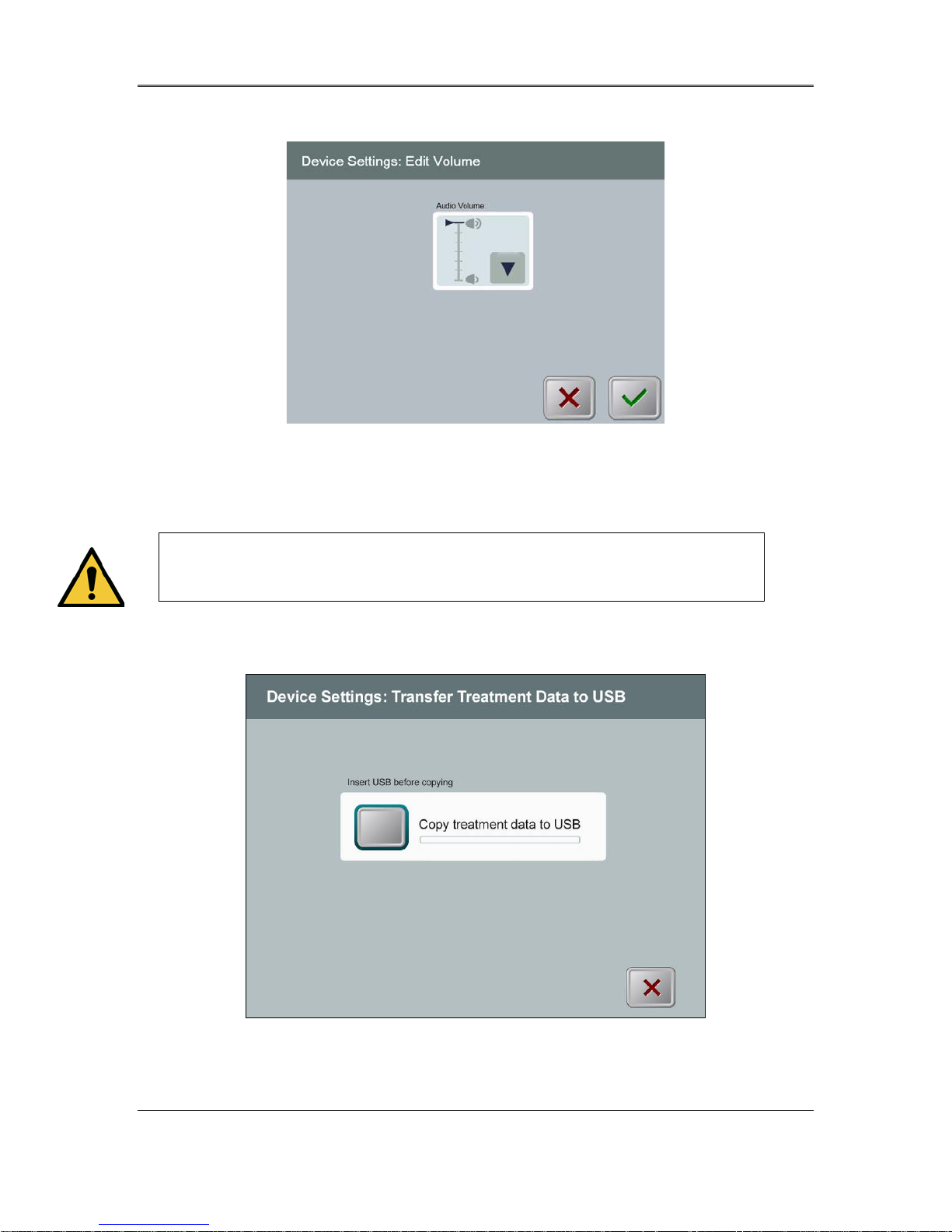
3.17.4 Editing System Volume
• The Edit Volume option allows a user with the appropriate security level to edit the
system volume level.
KXL System Operator’s Manual,
Rev R
3-24
Page 39
Chapter 3: System Operation
• Select the Edit Volume button on the Device Settings menu.
Figure 3-37. Edit Volume
3.17.5 Copying Treatment Data t o USB
WARNING: The USB port can only be used when the system is not in
treatment mode do not have items connected to the USB during
treatment.
• Select the Copy Treatment Data to USB button on the Device Settings menu.
Figure 3-38. Device Settings Transfer to USB
KXL System Operator’s Manual,
Rev R
3-25
Page 40
Chapter 3: System Operation
• Insert a USB device to a USB port and then press the Copy treatment data to USB
button. The system begins transferring the treatment data and shows a progress bar of the
transfer process as shown in the screen below.
• Once complete press the Return button. The system will return you to the Device
Settings menu.
3.17.6 Editing Default Treatment Parameters Screen
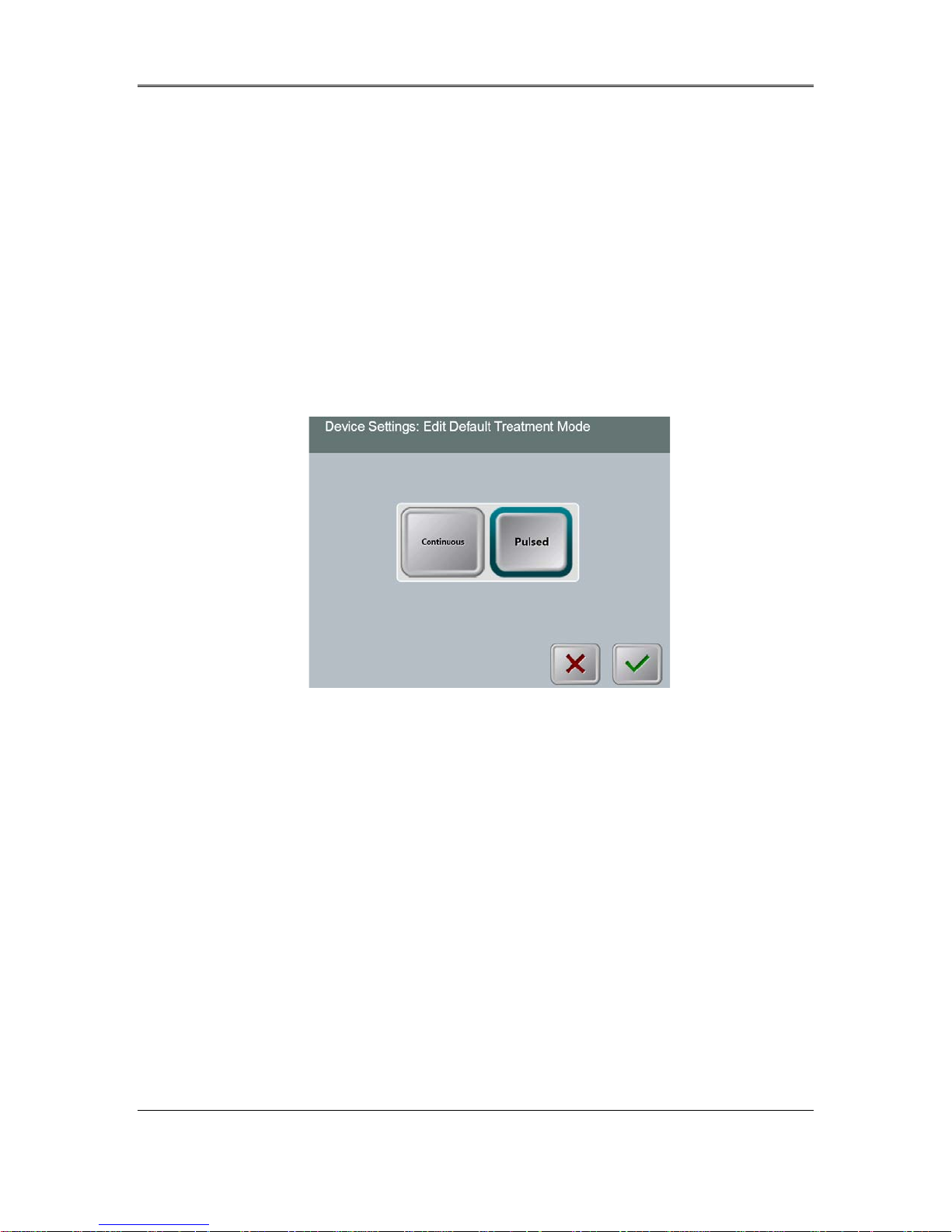
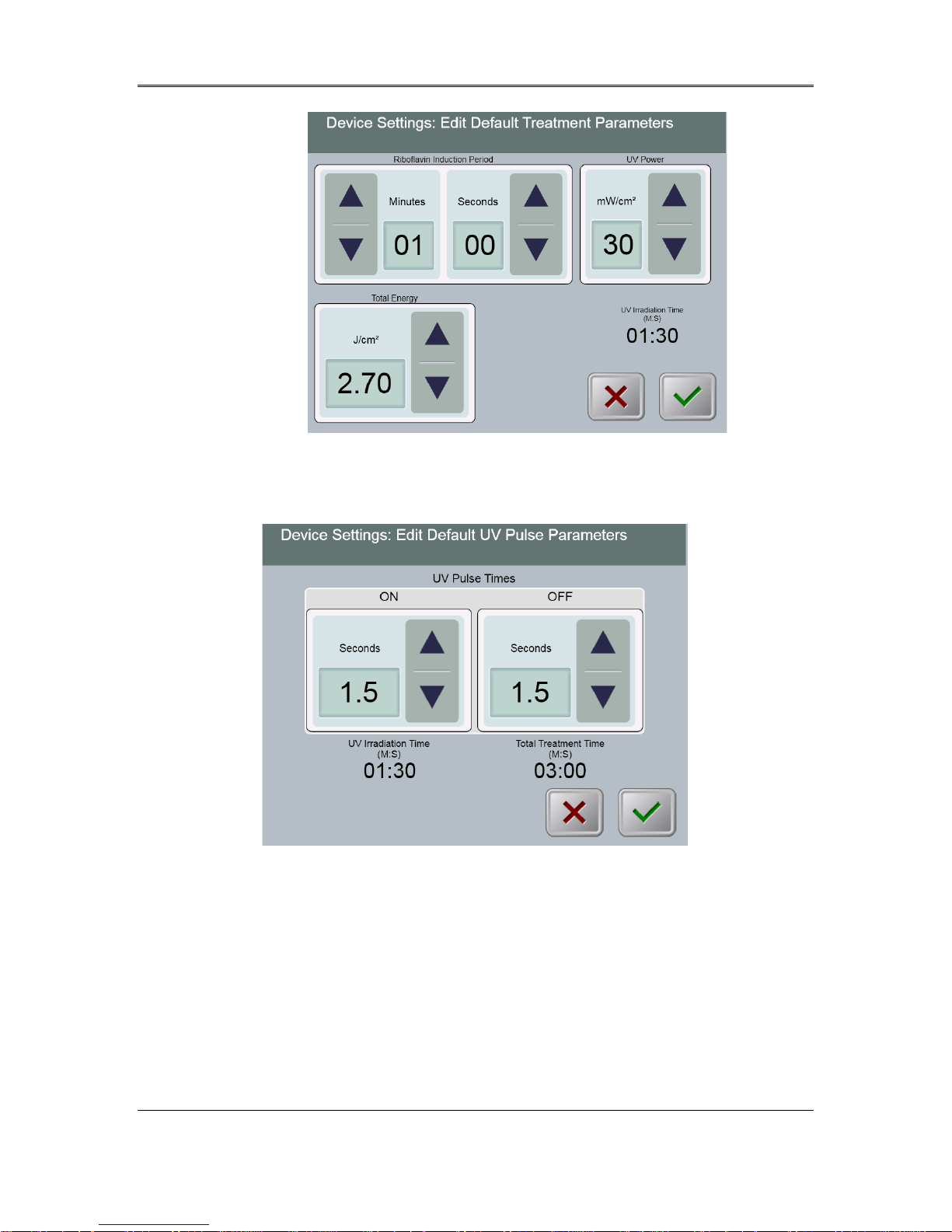
• The Edit Default Treatment Parameters option allows a user to set the default treatment
parameters that are displayed on entry to the Set Induction Time and Set UV Parameters
screens.
Figure 3-39. Select Default Treatment Mode
• Press the Checkmark button to continue.
KXL System Operator’s Manual,
Rev R
3-26
Page 41
Chapter 3: System Operation
Figure 3-40. Edit Default Treatment Parameters (Continuous &
Pulsed)
Figure 3-41. Edit Default UV Pulse Parameters (Pulsed Only)
• When finished entering treatm ent parameters, press the Checkmark button.
KXL System Operator’s Manual,
Rev R
3-27
Page 42

Chapter 3: System Operation
This page is left blank intentionally.
KXL System Operator’s Manual,
Rev R
3-28
Page 43

4 Maintenance / Service
By definition, “maintenanc e” refe rs to those non-technical procedures an everyday operator must
perform to keep the system working properly. The word “service,” by contrast, refers to tasks that
are intended to be performed only by a qualified service representative.
4.1 Installation Policy
• For each new KXL System customer, an Avedro trained or authorized personnel provides
a full initial installation and start-up of the system. Following initial installation and once
the system is operating properly, this Avedro representative may also provide basic
training to a designated operator about the basic operation of the KXL System.
• Consequently, this manual does not include any specific instructions relating to
installatio n or se t-up of the system. Per your service agreement, any further hardware
adjustment, other than what is specified for normal operation, should be performed by, or
with the guidance of, an Avedro-authorized distributor.
4.2 Customer Maintenance
• In general, there is no customer maintenance req u ired f or The KXL Sy stem. All technical
maintenance or service will be performed by a qualified service representative while
under service contract. If you have trouble with your system, refer to the troubleshooting
section below or call your local Avedro Representative.
4.3 Warranty Information
• A Warranty is supplied separately with the purchasing information.
4.4 Service Contract Information
• A service contract is available on all KXL Systems. The contract provides for regularly
scheduled maintenance and field upgrades. It also provides for any non-scheduled service
calls that may be necessary.
4.5 Per Patient Disposables
• Per Patient Disposables can be ordered from Avedro or your Avedro-authorized
distributor. Use only Avedro products or Avedro-approved products with your KXL
System. Avedro shall not be liable for damage to or malfunction of the system, which it
deems, was caused by the use of unauthorized materials.
KXL System Operator’ s Manual,
Rev R
4-1
Page 44
Chapter 4: Maintenance / Service
4.6 Trouble Shooting
• The KXL System checks its status at start-up automatically. If the status is incorrect, the
software prevents the operator from initiating treatments.
Wireless Remote
• The KXL System uses a r e mote control with replaceable batteries. If the batteries run low
the system will lose its connection with the remote.
o I f light on the remote does not turn on or goes off, the remote’s batteries may need
to be changed. Replace the batteries prior to initiating a treatment.
o If replacing the batteries does not allow the system to synchronize contact your
local Avedro Service Representative.
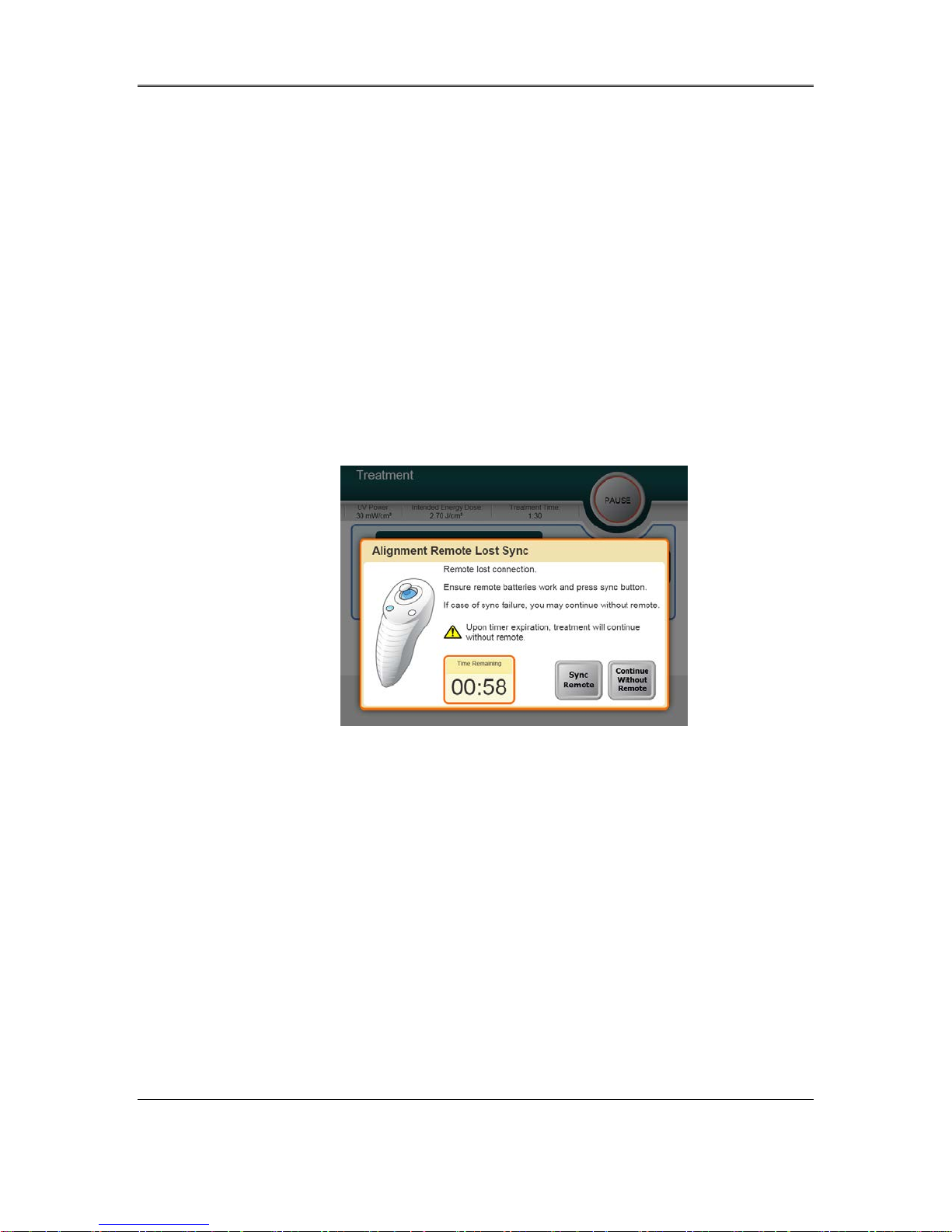
o I f the remote loses syn c during a treatm ent, a message w ill display to aler t user that
Alignment Remote Sync has been lost. User will have two minutes to sync the
remote after checking batteries before the timer r uns out and t reatment resumes
without remote.
Figure 4-1 Alignment Remote Sync Lost
o If the remote loses sync during a treatment, the KXL head can be manually
manipulated for manual alignment.
Internal Rechargeable Ba ttery
• The KXL system is supplied with a rechargeable battery, if the system does not appear to
be turning on ensure that the battery is charged by plugging it into an outlet and checking
the charging indicator on the column of the system. If the light is orange or yellow the
system is charging, if it is green it is fully charged.
o If the indicator is green or yellow and the system still does not turn on contact
your local Avedro service representative.
o If the indicator is orange wait until it turns yellow or green and try turning the
system on, if it still does not turn on or the indicator does go yellow or green
within 8 hours contact your local Avedro service representative.
KXL System Operator’s Manual,
Rev R
4-2
Page 45

Chapter 4: Maintenance/Service
4.7 Directions for Sterilization or Disinfection
• No components of the KXL System are designed to be sterilized by the operator. External
cleaning and disinfection ONLY is recommended. For disinfection purposes, use only
isopropyl alcohol spray or preparations. Use small amounts of liquid and soft fiber-free
wipes.
4.8 Cleaning the System
• Use a soft damp cloth to clean the system.
• The exterior of the KXL System can be cleaned using a lint-fre e cl oth dampened with
isopropyl alcohol.
• DO NOT submerse the system in liquid or pour liquid onto the system.
CAUTION: Remove the po wer supply cord f rom the main o utlet and t urn off the power
switch prior to any cleaning procedure.
CAUTION: The glass windo w of the beam aperture must not under any circumstances
be in contact with any aggressive cleaning agents.
• While cleaning the surfa ces of the devic e, ensure that c leaning fluid s do not seep in side the
device, as this leakage can damage the device.
• Use a lint-free cloth dampened with isopropyl alcohol to clean the remote control.
4.9 Cleaning the Aperture
• Check the beam apertu r e ro u tin e ly pr ior to tre atment.
• Use special camera lens wipes or compressed air to remove dust and particles from the
glass surface of the aperture.
4.10 Articulating Arm Adjustment
If the articulating arm does not hold the Optical Head in a fix vertical position contact your
local Avedro service representative.
4.11 Moving the System
• The KXL is designed as a movable system within an office environment. If it ever proves
necessary to transport or ship the KXL System, for any reason, contact your local Avedro
representative. Packing and transporting the system should be performed only by Avedro
trained and authorized personnel.
• Prior to moving the KXL System from one room to another, the monitor should be
moved sideways and the optics head should be positioned clos e to th e ca r t han dle with
the elbow protruding at the back. The system can then be easily pushed by the cart handle
through the door frame.
KXL System Operator’s Manual,
Rev R
4-3
Page 46
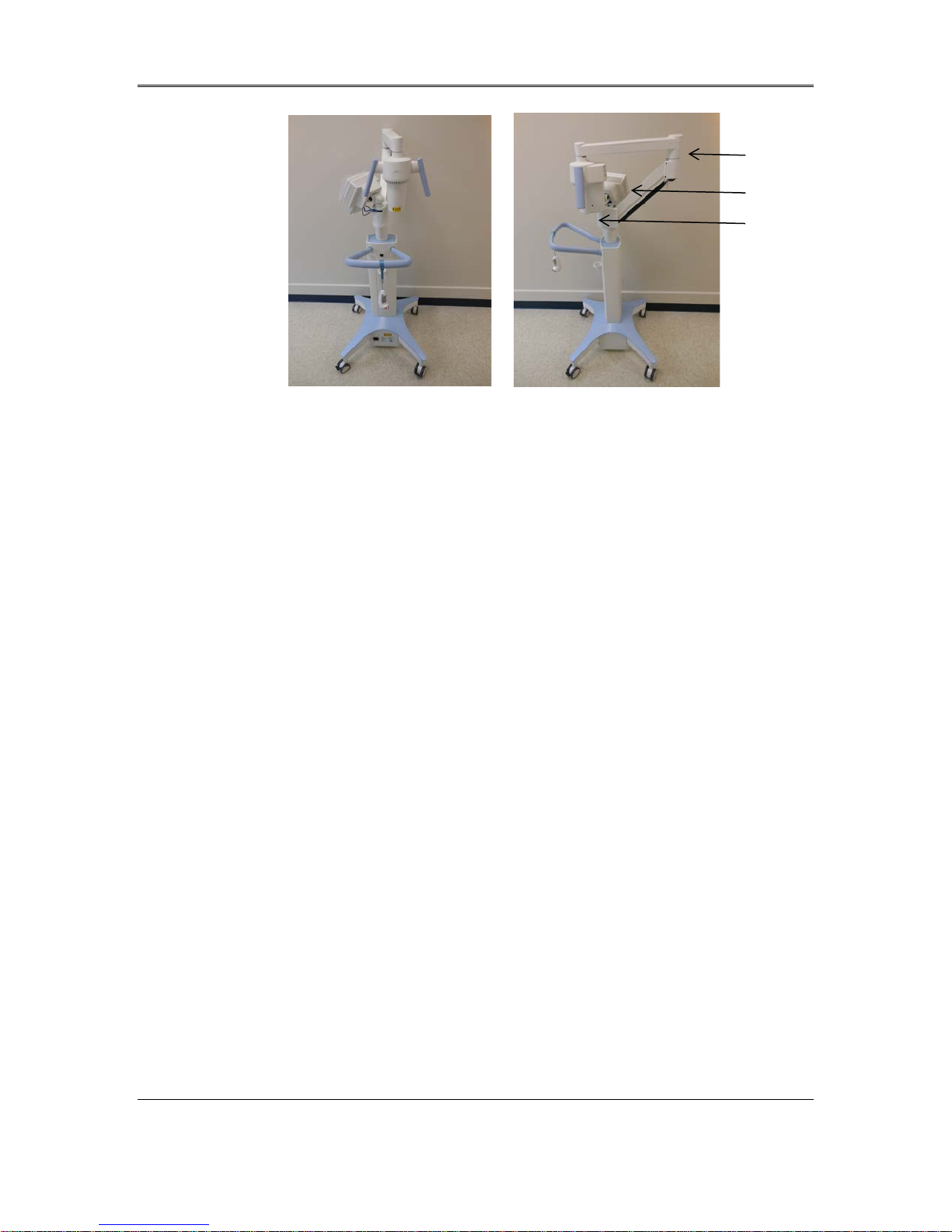
Chapter 4: Maintenance / Service
Figure 4-2 Moving System Configuration
4.12 Storing the System
• Follow all the storage temperature and humidity range specifications as listed in the
Specifications chapter 7.0.
Elbow at the back
UI monitor to the side
UV optical head near
handle
• Close all panels on the system to prevent dust and moisture from entering; this is
mandatory.
• Turn OFF all the components and the main power supply as well. Disconnect the power
cord physically from its electrical outlet.
• Remove the batteries from the wireless remote.
• Cover the touch screen LCD display and keyboard with its original cover or packaging to
prevent any damage.
• Do not disassemble any part of the system as this could cause misalignment or damage.
• If systems are left unused for more than 6 months, the system battery should be charged.
See Section 3.1 for charging instructions.
4.13 Software
• Should the software become corrupted and fail to work correctly at some point, call your
local Avedro service representative. Software updates will only be carried out by Avedro
service representatives.
4.14 Identifying Risks Associated with Disposing
of Waste Products
• When disposing of waste products, follow all applicable local regulations.
4.15 Performing a Visi ble Check
• Check all components of the device routinely for damage or malfunction prior to each
treatment.
KXL System Operator’s Manual,
Rev R
4-4
Page 47

Chapter 4: Maintenance/Service
• Do not use a damaged or malfunctioning device. Use of such devices may harm the user
and/or patient.
KXL System Operator’s Manual,
Rev R
4-5
Page 48

Page 49

5 Equipment Classification
According to EN60601-1 Medical Devi ce Elect ri cal Standa rd
o Protection against electrical shock
Class 1 (external electrical power source)
Internally powered equipment (internal battery operation)
o Degree of protection against electric shock
Not classified, equipment not provided with applied part
Ingress protection: IP20
o Method of sterilization or disinfection
Disinfect-able device
o Degree of protection for use in the presence of a flammable as aesthetic mixture
No protection
o Use conditions
Continuous service
According to FCC Part 15, EN55011 and EN60601-1-2
o Class B
According to EN60825-1 Safety of laser productions
o Alignment lasers are Class 1 Laser Product
According to EN62471 Photobiological safety of lamps and lamp systems
o UVA LED is Risk Group 1
According to Annex II.3 of Directive 93/42/EEC
o Class IIa
KXL System Operator’ s Manual,
Rev R
5-1
Page 50

Page 51
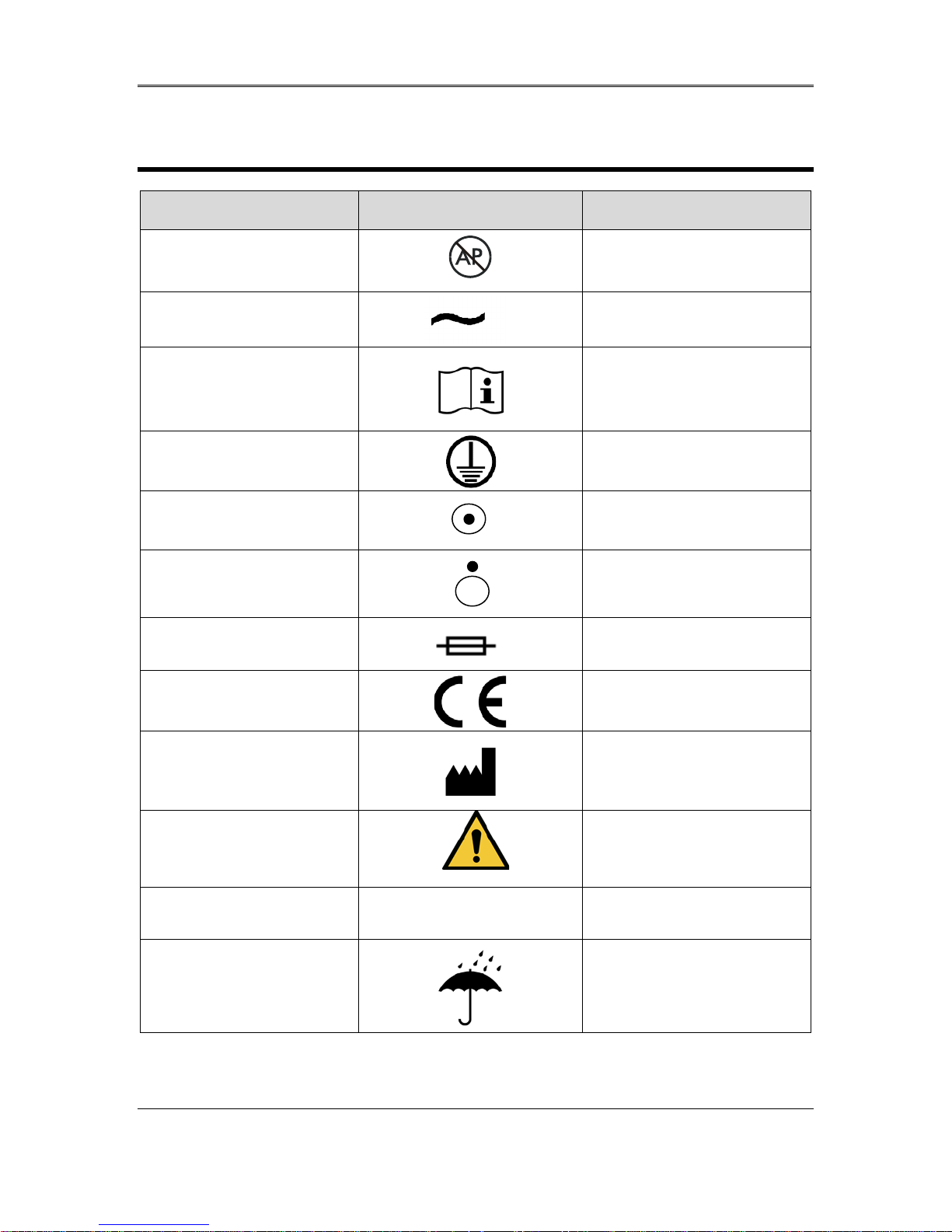
6 Symbol Library
Text Symbol Symbol Illustration Definition
1. No AP symbol in
presence of flammable
anesthetics
2. AC symbol
3. “I” in a book
4. Ground symbol in circle
5. Power Switch
6. Power Switch
7. Fuse symbol
8. CE Mark
Danger, Risk of Explosion. Not
for use
Alternating current
Attention: Consult
ACCOMPANYING
DOCUMENTS
Protected earth (ground)
ON
OFF
Fuse
Conformity mark
9. Manufacturer
10. ! in a Triangle
11. Net Weight (kgs)
Gross Weight (kgs)
12. Umbrella with raindrops
Name and address of the
manufacturer
Caution specific warning in
operators manual
NW
Weight
GW
Keep Dry: Store protected
from moisture (symbol is with
or without rain drops)
KXL System Operator’ s Manual,
Rev R
6-1
Page 52
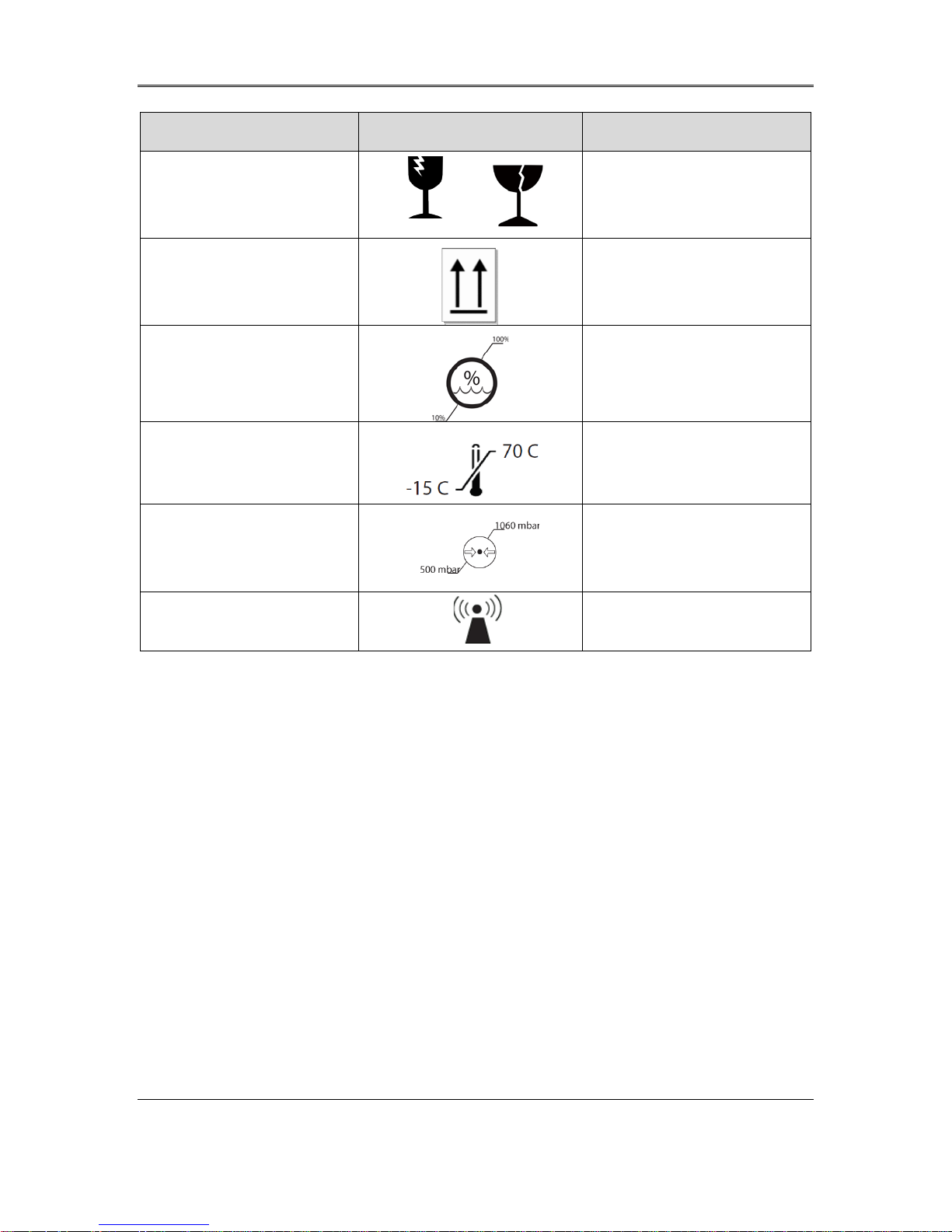
Chapter 6: Symbol Library
Text Symbol Symbol Illustration Definition
13. Wine glass with crack on
it
14. Two up arro ws
15. Percentage sign over
wave with limit s
16. Temperature limits
17. Pressure limits
18. Signal emitted
Contents are fragile, handle
with care
or
Keep arrows on carton
pointing up
Humidity limits (percentages
on either side of symbol are
the acceptable range for
humidity)
Temperature
storage/operating limits
Atmospheric pressure limits
(storage / operating)
RF transmitted through device
KXL System Operator’s Manual,
Rev R
6-2
Page 53
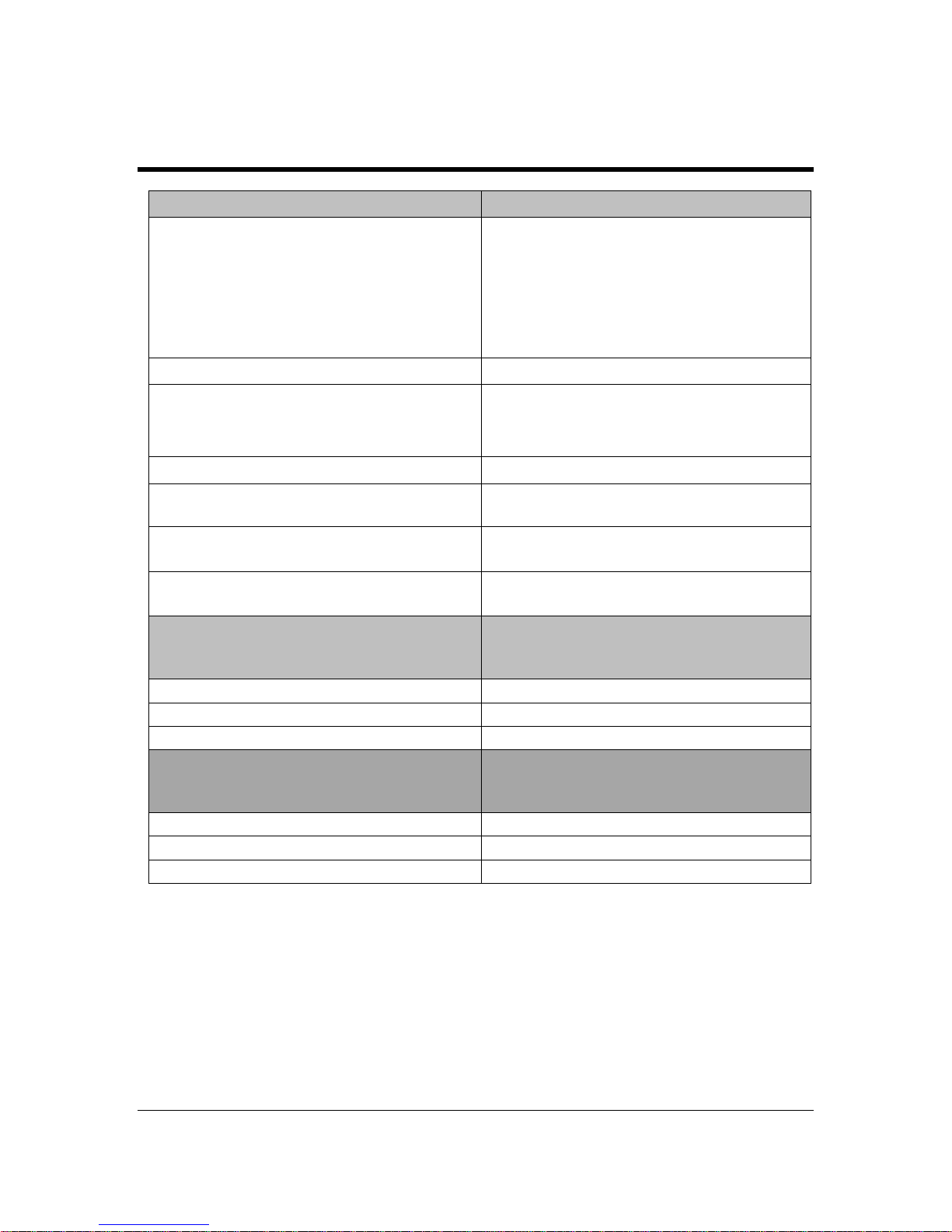
Specification
Description
Electrical
User accessible Fuses
External Interfaces
USB 2.0
Physical Dimensions
No larger than 60 x 60 x 150 cm3 (Length
x Width x Height)
Weight (crated system)
NW 45 Kg
GW 120 Kg
Battery Life
(normal operating conditions)
16 hours
Environmental Operating Conditions
The system operates under the following
condensation).
Ambient temperature
+10 to +40 ºC
Relative humidity
30% to 75% , non-condensing
Atmospheric pressure
700 to 1060 mbar
Transport and Storage Conditions
The instrument withstands the following
damage or performance deterioration.
Ambient temperature
-15 to +70 ºC
Relative humidity
10% to 100% non-condensing
Atmospheric pressure
500 to 1060 mbar
7 Specifications
Battery Powered: 12V 35 Ah SLA
Line voltages 100 – 240 volts AC
Current 2A – 1A
Single Phase
RMS, 50/60 Hz
Remote 2x AAA batteries
250 V~ T2AH
Energy Delivery UV Radiation
3 – 45 mW/cm
365 nm
2
atmospheric conditions (no
transport and storage condit ions without
KXL System Operator ’s Manual,
Rev R
7-1
 Loading...