

Page 1

WEB08S-TA
USER MANUAL
TCP/IP Ethernet
HTTP WEB CLIENT
RFID READER
For
Attendance
21st Nov, 2012
AVEA International Company Limited
(http://avea.cc)
Page 2

1
Table of Contents
Table of Contents ......................................................................................................................... 1
WEB08S-TA TCP/IP Ethernet HTTP Web Client RFID Reader for Attendance ........................ 3
1. SETUP THE READER .................................................................................................................. 4
1.1 DEFAULT SETTINGS ................................................................................................................... 4
1.2 RESET WEB08S-TA TO DEFAULT .............................................................................................. 4
1.3 FORCE DHCP MODE .................................................................................................................. 4
2. INSTALLATION ............................................................................................................................ 6
2.1 POWER REQUIREMENTS ............................................................................................................ 6
2.1.1 Terminal Block ........................................................................................................................ 6
2.1.2 Power from Cat-5/e Ethernet cable ........................................................................................ 6
2.2 EXTERNAL RELAY CONTROL ..................................................................................................... 7
2.3 CONTACT SWITCH ..................................................................................................................... 8
2.4 SLAVE READER ......................................................................................................................... 8
2.5 MECHANICAL DIMENSIONS ....................................................................................................... 9
2.6 BATTERY ................................................................................................................................... 9
3. SOFTWARE ................................................................................................................................. 10
3.1 REQUESTS TO HTTP SERVER ................................................................................................... 10
3.1.1 \avea.php ............................................................................................................................... 10
3.1.2 $date and $time ..................................................................................................................... 10
3.1.3 $id .......................................................................................................................................... 10
3.1.4 $code ..................................................................................................................................... 11
3.1.5 $cmd ...................................................................................................................................... 11
3.1.6 $type ...................................................................................................................................... 11
3.1.7 $mode .................................................................................................................................... 11
3.1.8 $ver ........................................................................................................................................ 12
3.1.9 $contact ................................................................................................................................. 12
3.1.10 $recno .................................................................................................................................. 12
3.1.11 $rdate and $rtime ................................................................................................................ 12
3.1.12 $sid ...................................................................................................................................... 12
3.1.13 $deviceid ............................................................................................................................. 12
3.2 RESPONSES FROM HTTP SERVER ............................................................................................ 13
3.2.1 HB=xxxx ................................................................................................................................ 13
3.2.2 BEEP=x ................................................................................................................................ 13
3.2.3 CK=YYYY-MM-DD HH:MM:SS ........................................................................................... 13
WEB08S-TA Web Client Attendance RFID reader
Page 3

2
3.2.4 GRNT=xx .............................................................................................................................. 14
3.2.5 DENY .................................................................................................................................... 14
3.2.6 ROOT=xxxxxxxx ................................................................................................................... 14
3.2.7 EXT=x ................................................................................................................................... 14
3.2.8 DHCP=x ............................................................................................................................... 15
3.2.9 IP=xxx.xxx.xxx.xxx ................................................................................................................ 15
3.2.10 GW=xxx.xxx.xxx.xxx ........................................................................................................... 15
3.2.11 NM=xxx.xxx.xxx.xxx ............................................................................................................ 15
3.2.12 WS=xxx.xxx.xxx.xxx ............................................................................................................ 16
3.2.13 PT=xxxxx ............................................................................................................................ 16
3.2.14 RLY=x ................................................................................................................................. 16
3.2.15 REC_DEL=xxxx .................................................................................................................. 16
3.2.16 SID=xxxxxxxx ...................................................................................................................... 16
4. PHP CODE EXAMPLE .............................................................................................................. 17
WEB08S-TA Web Client Attendance RFID reader
Page 4
3
WEB08S-TA TCP/IP Ethernet HTTP Web Client RFID Reader
for Attendance
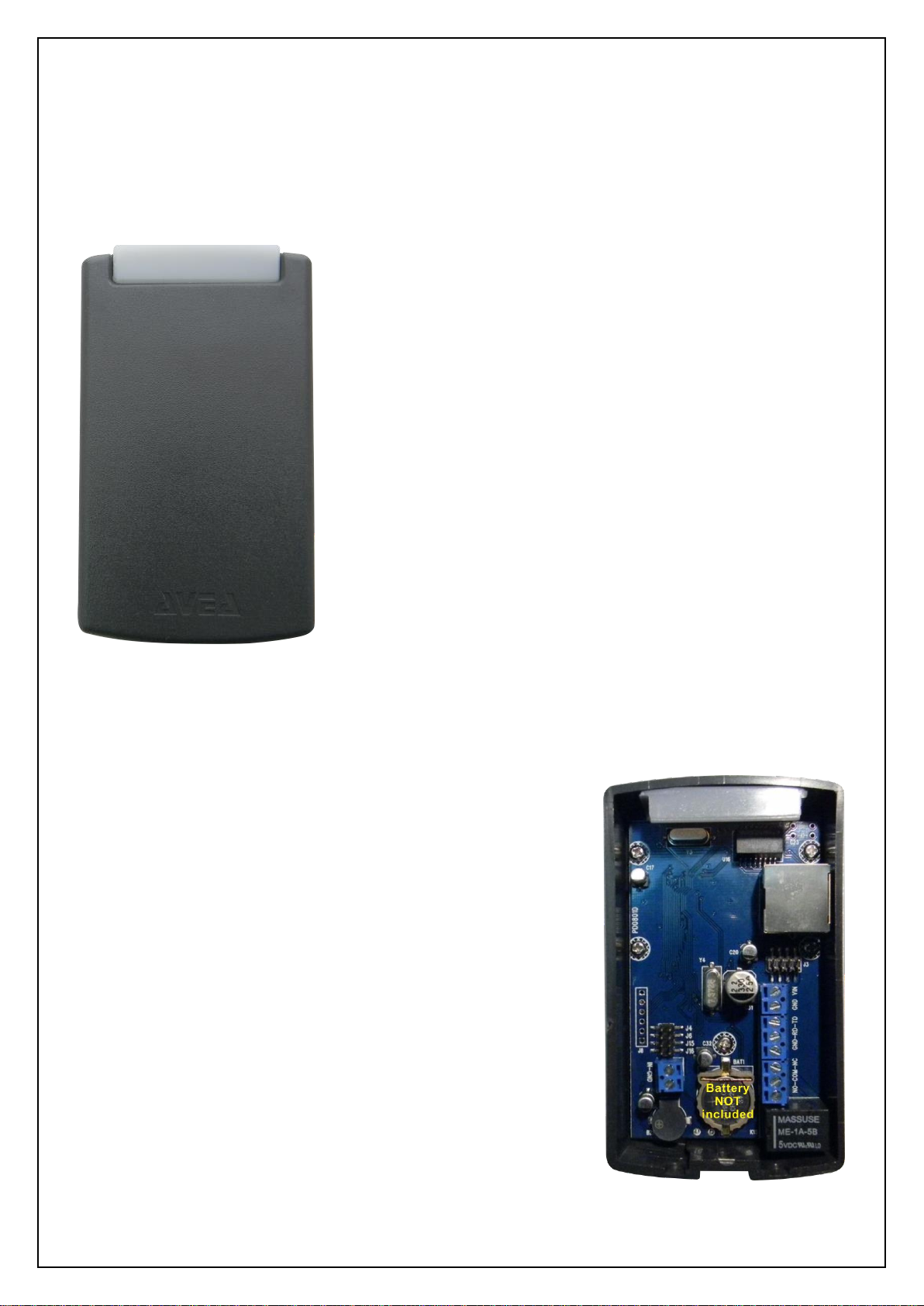
WEB08S-TA is a TCP/IP Ethernet based RFID reader for
125KHz RFID cards. Battery backed real-time clock and
memory is included.
It is implemented as a HTTP web client. Various page
extension is selectable, like .php, .asp, .cfm, .pl, .htm, .html
and .aspx. So various HTTP server systems (e.g. IIS and ASP
from Microsoft; Apache with PHP enabled and mySQL
database server from Unix/Linux), a complete and powerful
time attendance system can easily be implemented.
Since the real-time clock is battery backed, even the power is
lost the clock is still running properly.
When cards are presented, the transaction information is
stored inside the memory of the reader. Whenever there is network connection and the server
is running, those records will be sent to the server. Upon confirmation by the server, the
records will be deleted accordingly.
The memory is capable to store up to 1000 records. The
memory is retained even power is lost. Whenever a card is
presented to the reader, the record is stored with a short beep
sound for the acknowledgement of the record stored. When
the memory is used up, a long beep sound will be made. The
oldest record will be deleted in order to store the newest
record.
WEB08S-TA Web Client Attendance RFID reader
Page 5
4
Parameter
Description
Default
IP
IP address of the reader itself
192.168.1.234
GW
Gateway IP address
192.168.1.1
NM
Netmask
255.255.255.0
WS
HTTP server IP address
192.168.1.1
PT
HTTP server port number
80
EXT
Page extension
php
1. Setup the reader
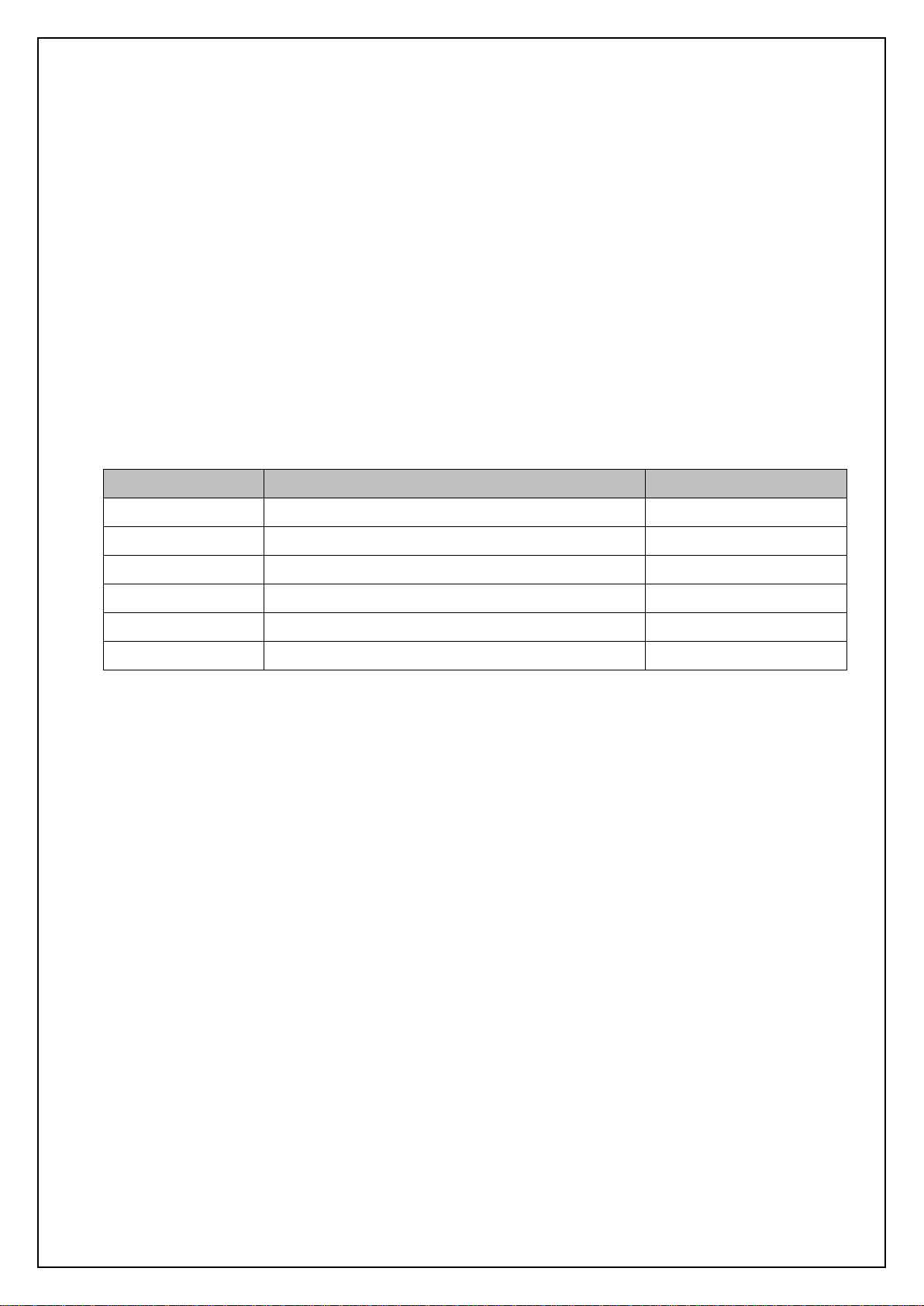
In order to work properly, WEB08S-TA must be configured correctly. For normal condition,
the blue LED is blinking. While relay is engaged, the red LED with be lighted up
simultaneously.
1.1 Default Settings
The default configurations of the WEB08S-TA is listed as follows:
1.2 Reset WEB08S-TA to default
Before power up, put a jumper cap over J4. When power on, the settings of WEB08S-TA
will be cleared and set to the default condition. It must be removed for normal operation.
1.3 Force DHCP mode
When a jumper cap put over J6. DHCP mode will be forced for automatic configuration of
the WEB08S-TA. The DHCP server must be configured to response the options
www-server, i.e. option 72.
WEB08S-TA Web Client Attendance RFID reader
Page 6

5
Example of dhcpd.conf:
#example of dhcpd.conf for web08s
ddns-update-style ad-hoc;
subnet 192.168.1.0 netmask 255.255.255.0 {
# --- default gateway
option routers 192.168.1.1; # default gateway
option subnet-mask 255.255.255.0; # netmask
option www-server 192.168.1.123; # it must setup to the web server’s IP
range dynamic-bootp 192.168.1.10 192.168.1.99;
default-lease-time 300;
max-lease-time 3600;
}
WEB08S-TA Web Client Attendance RFID reader
Page 7
6
2. Installation
In order to work properly, WEB08S-TA must have stable power supply, a 10-baseT
Ethernet connection, an optional slave reader and an optional electric strike or magnetic
lock.
2.1 Power Requirements
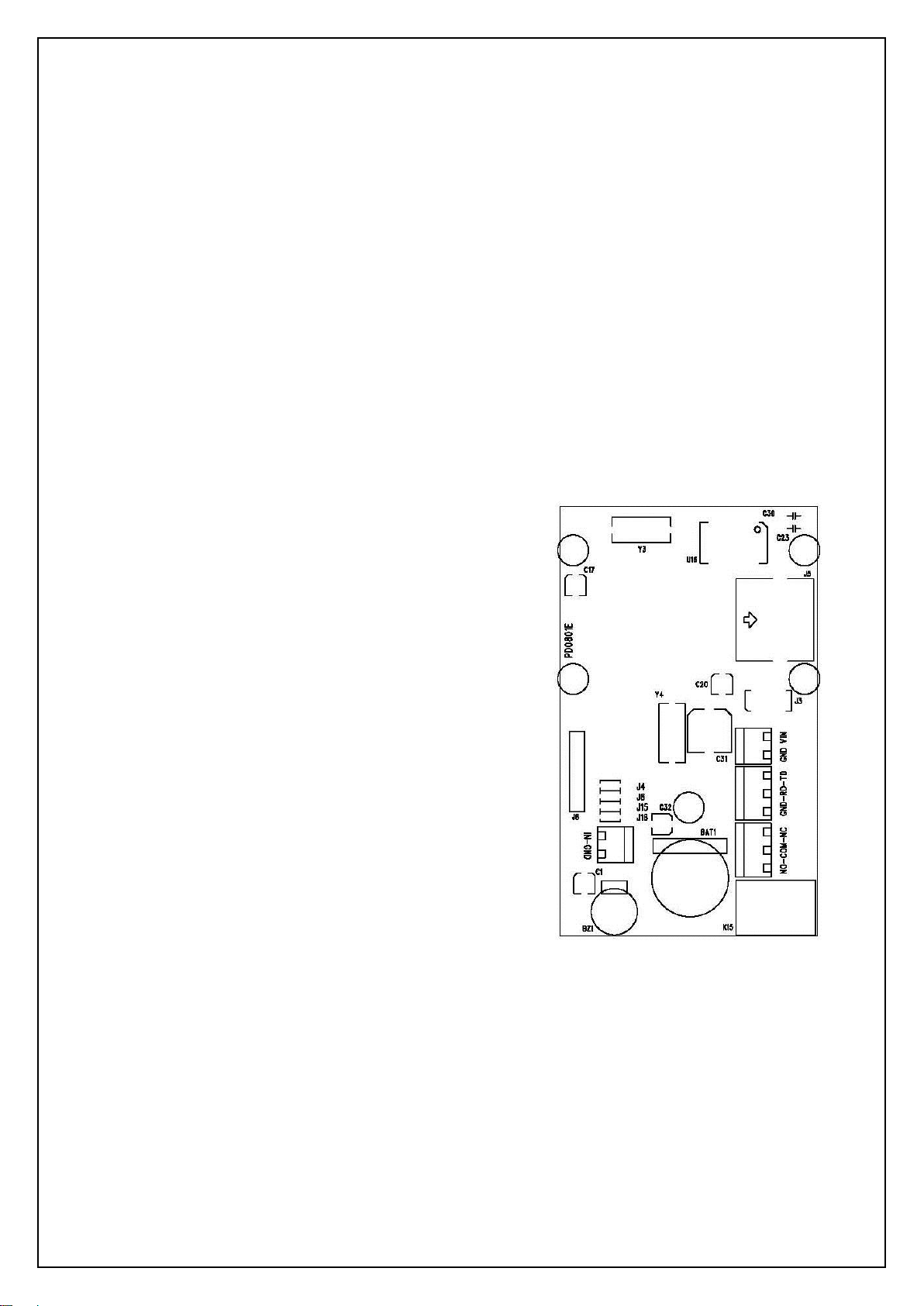
WEB08S-TA requires 9 to 12V DC 500mA for normal operation. There are two ways to
supply the power to the reader:
2.1.1 Terminal Block
Apply the power to the terminal block, with
positive terminal to VIN and negative terminal to
GND (ground).
2.1.2 Power from Cat-5/e Ethernet
cable
Apply the power through the Ethernet cable on
the RJ45 connector. Pin 7 and 8 is connected to GND (ground), and Pin 4 and 5 is
connected to VIN. Meanwhile, jump block J3 must be shorted out by four two-pin
jumper cap.
WEB08S-TA Web Client Attendance RFID reader
Page 8
7
2.2 External Relay Control
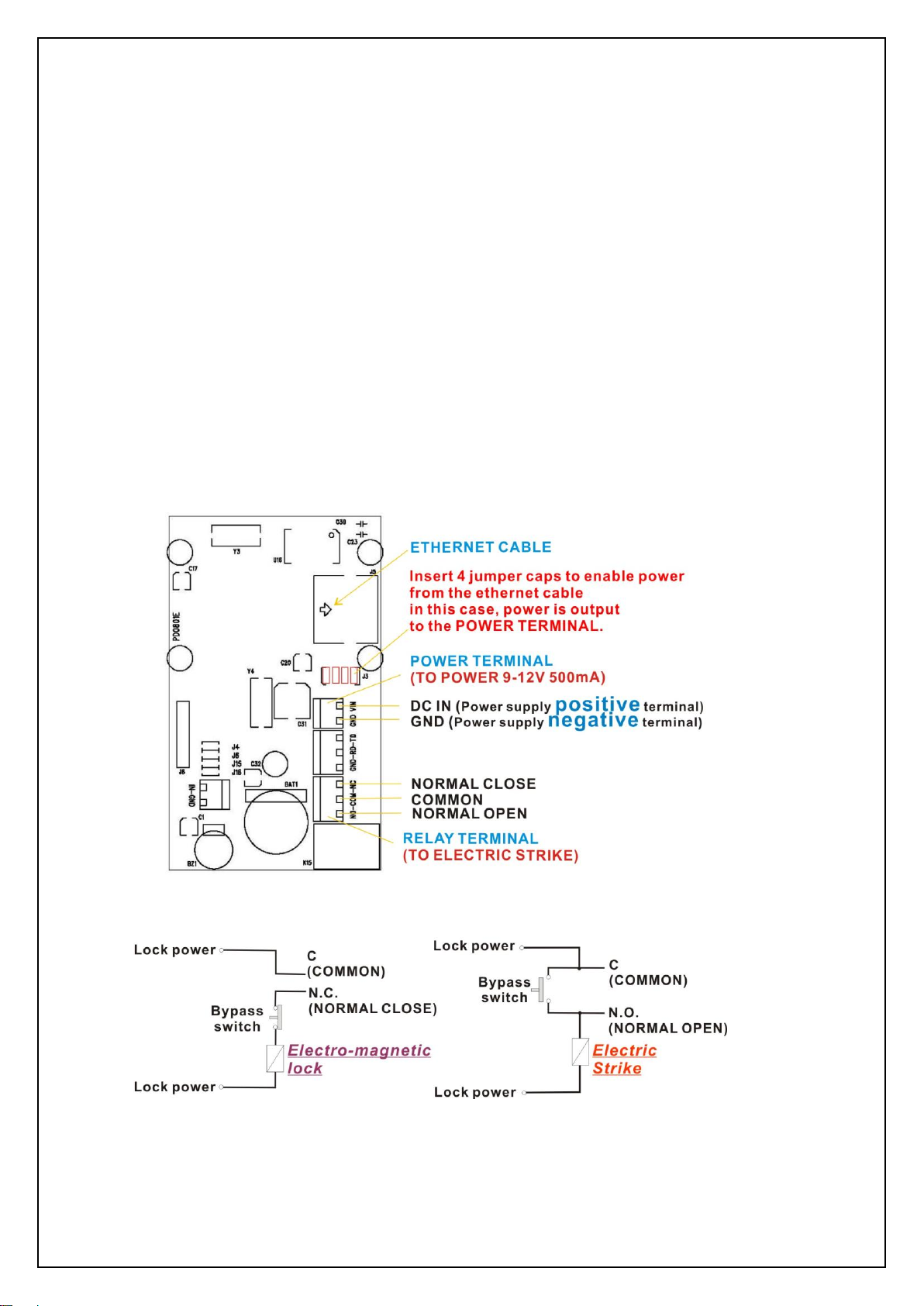
WEB08S-TA is built-in with a controllable relay output on the terminal block J9, where:
NC - normal close, it is connected to C normally.
C - common, it will connects to either NO or NC, but not both.
NO - normal open, it is open circuit normally.
The maximum switching voltage of the relay is 120VAC or 60VDC, and the maximum
switching current is 2A.It can be used to connect to the bypass switch of an electric
strike for door access controlling. Overloading the maximum ratings may cause
damages to the reader permanently and cannot be repaired anymore.
WEB08S-TA Web Client Attendance RFID reader
Page 9
8
2.3 Contact Switch
WEB08S-TA allows a external contact switch (i.e. a push button) to be connected to the
IN-GND terminals. The changes of its status (i.e. shorted or opened), will post
corresponding messages to the web server.
2.4 Slave Reader
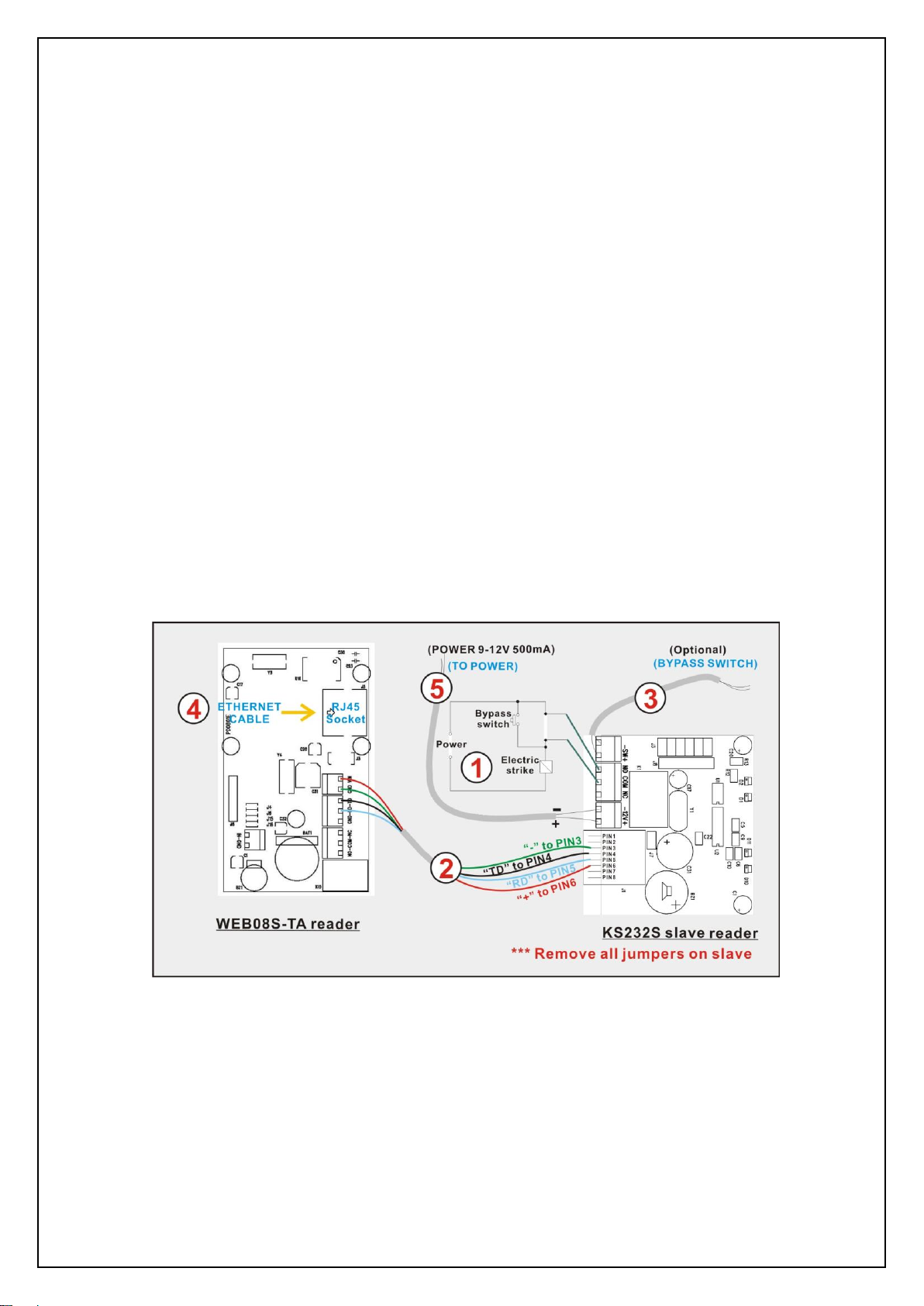
WEB08S-TA allows a slave reader (MODEL NO: KS232S) to work together and the host
software can identify the actions is come from the WEB08S-TA or the slave reader by
check the variable $type. The following is the connection diagram assuming the
WEB08S-TA is installed outside the premises while the slave reader is installed inside the
premises.
Remarks:
1. Connection to the electric strike.
2. Connection from the slave reader to WEB08S-TA which consists of 4 wires, power ‘+’
and ‘-‘, and data signals RD and TD.
3. Connection to an internal bypass switch.
WEB08S-TA Web Client Attendance RFID reader
Page 10
9
4. Connection to Ethernet network.
5. Connection to power supply for WEB08S-TA and the slave reader.
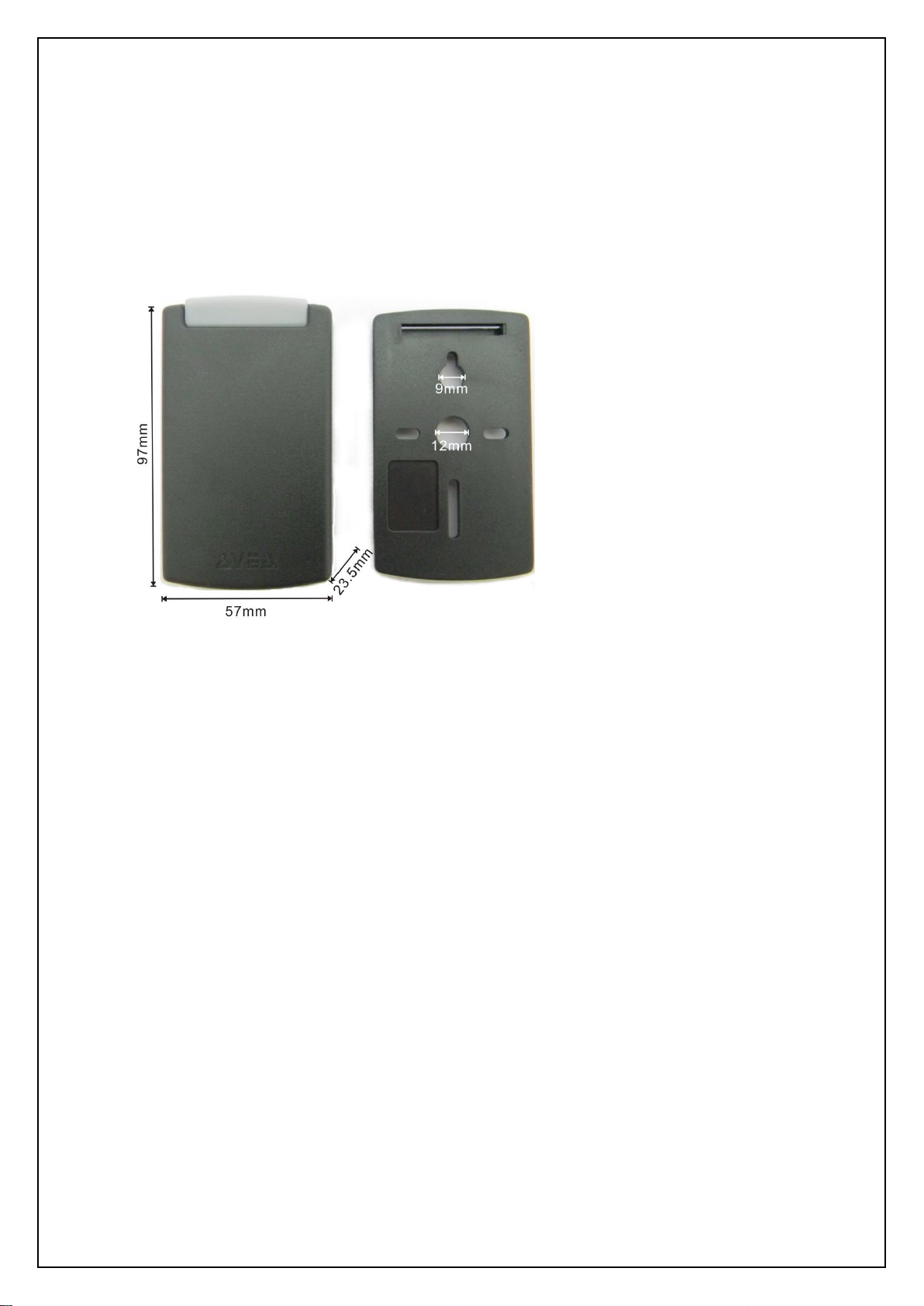
2.5 Mechanical Dimensions
Height: 97mm
Width: 57mm
Depth: 24mm
2.6 Battery
A CR1220 lithium cell battery is required for the normal operation of the real-time clock. It
is not included in the package. Customer needs to purchase by themselves.
WEB08S-TA Web Client Attendance RFID reader
Page 11

10
3. Software
WEB08S-TA is a HTTP client with PHP enabled. It will send PHP URL requests to the
HTTP server with the various parameters. And it accepts responses from the HTTP
server to perform various actions on the reader.
3.1 Requests to HTTP server
The followings are the variables presented to the PHP. User can access it
correspondingly.
3.1.1 \avea.php
The reader send a GET request to access a fixed web page of the HTTP server:
avea.php located on the root of the website. The file extension is user selectable, e.g.
avea.asp, avea.cfm avea.pl, avea.htm and avea.html. But it is server changeable to any
numeric filename located on the root.
3.1.2 $date and $time
Hold the date and time of that request. The format of date is YYYY-MM-DD, e.g.
2007/01/23 means 23rd Jan 2007. The format of time is HH:MM:SS where HH is hour,
MM is minute and SS is second.
3.1.3 $id
It is the IP address of the reader, e.g. 192.168.1.234. It must be set to different value for
each reader in order to function properly.
WEB08S-TA Web Client Attendance RFID reader
Page 12

11
3.1.4 $code
It is the unique code number of the ID card presented to the reader.
3.1.5 $cmd
It holds the action that was taken on the reader.
I. $cmd=PU, it is sent once after the reader is just power up.
II. $cmd=REC, it is sent with an ID card is read on the reader. The card number is
stored in $code.
III. $cmd=HB, it is sent when the programmed heartbeat rate is reach. The default
heartbeat rate is 300 seconds.
IV. $cmd=SW, it is sent once when contact switch is just shorted or opened.
V. $cmd=PG, it is sent when the reader is being pinged.
3.1.6 $type
It defines the action is coming from the WEB08S-TA or the slave reader.
I. $type=m, the action is coming from the WEB08S-TA.
II. $type=s, the action is coming from the slave reader.
3.1.7 $mode
For WEB08S-TA, $mode=TA1. So it can be used to identify the reader.
WEB08S-TA Web Client Attendance RFID reader
Page 13

12
3.1.8 $ver
It is the firmware revision. Currently it is 1.5.
3.1.9 $contact
It is used with $cmd=SW to indicate the state of the contact switch. If the switch is opened,
$contact=OPEN. If the switch is closed, $contact=CLOSE.
3.1.10 $recno
Hold the reference number of the record in decimal format. The server must response
this parameter in order to acknowledge the record and confirm the deletion of that record.
3.1.11 $rdate and $rtime
Hold the date and time of the stored record. The format of date is YYYY-MM-DD, e.g.
2007/01/23 means 23rd Jan 2007. The format of time is HH:MM:SS where HH is hour,
MM is minute and SS is second.
3.1.12 $sid
This is the value set by the SID response.
3.1.13 $deviceid
This is the unique id of the reader.
WEB08S-TA Web Client Attendance RFID reader
Page 14

13
3.2 Responses from HTTP server
After sending request, WEB08S-TA will wait for a response from the HTTP server. It
looks for the starting flag <AVEA> and the ending flag </AVEA>. Then it interprets the
strings in between. There must be no space between the keywords and parameters.
The maximum size of the response packet should be less than 600 bytes.
The following responses are supported:
3.2.1 HB=xxxx
Set the heartbeat rate of the reader in seconds. It is a fixed length format in decimal
value. Example:
HB=0300 set the reader send a heartbeat request to the HTTP server once in 300
seconds.
HB=0000 to disable the heartbeat request.
3.2.2 BEEP=x
Make a beep sound on the reader. It is a fixed length format. Example:
BEEP=1 make a short beep.
BEEP=0 make a long beep.
3.2.3 CK=YYYY-MM-DD HH:MM:SS
Set the clock of the reader. The year must be in 2000 to 2099. It is a fixed length format
in decimal values. Example:
CK=2007-01-23 12:34:56 set the clock to 23rd Jan 2007, pm12:34:56.
WEB08S-TA Web Client Attendance RFID reader
Page 15

14
3.2.4 GRNT=xx
Value of x
File extension
0
.php
1
.asp
2
.cfm
3
.pl
4
.htm
5
.html
6
.aspx
Set the reader to a grant access state, i.e. to engage the relay from NO state to NC
state for xx seconds and return to NO state. Meanwhile a LED will be turn on and off
simultaneously. It is a fixed length format in decimal value. Example:
GRNT=03 set the relay to NC state and LED on for three seconds and return to
NO state and LED off.
3.2.5 DENY
Set the reader to a deny access state, i.e. to make sure the relay is in NO state.
3.2.6 ROOT=xxxxxxxx
This will change the root page to be access by the reader. It is a fixed length format in
decimal value. For example: ROOT=00024689, this will make the reader to access the
page /24689.php rather than the default /avea.php. By setting ROOT=00000000 will
reset to access the default page.
3.2.7 EXT=x
This will change the root page’s file extension to be access by the reader. It is a fixed
length format.
WEB08S-TA Web Client Attendance RFID reader
Page 16

15
3.2.8 DHCP=x
This will control DHCP feature of the reader. If DHCP=1, DHCP is enabled. If DHCP=0,
DHCP is disabled. If enabled, it will send requests to DHCP server to acquire the
following items:
- host IP
- netmask
- default gateway
- www-server IP
3.2.9 IP=xxx.xxx.xxx.xxx
This is a fixed length command and values are in decimal. It will change the IP address
of the reader. Example:
IP=192.168.001.234
3.2.10 GW=xxx.xxx.xxx.xxx
This is a fixed length command and values are in decimal. It will change the default
router of the reader. Example:
GW=192.168.001.002
3.2.11 NM=xxx.xxx.xxx.xxx
This is a fixed length command and values are in decimal. It will change the netmask of
the reader. Example:
NM=255.255.255.000
WEB08S-TA Web Client Attendance RFID reader
Page 17

16
3.2.12 WS=xxx.xxx.xxx.xxx
This is a fixed length command and values are in decimal. It will change the web server
IP address to be accessed by the reader. Example:
WS=192.168.001.001
3.2.13 PT=xxxxx
This is a fixed length command and values are in decimal. It will change the port
number to be used to access the web server in decimal. Example:
PT=00080
3.2.14 RLY=x
This is a fixed length command and values are in decimal. If RLY=1, the relay will be
turned on. If RLY=0, the relay will be turned off. The state of relay will be affected by the
subsequence commands.
3.2.15 REC_DEL=xxxx
This is a fixed length command and xxxx is a 16bit hexadecimal value. This will
acknowledge the reception of the record. Once the reader get this response, it will
delete that record accordingly and cannot be recovered.
3.2.16 SID=xxxxxxxx
This is a fixed length command and values are in hexadecimal value. It is a non-volatile
value and will not changed after power removed.
WEB08S-TA Web Client Attendance RFID reader
Page 18

17
4. PHP Code Example
The following is an self explainable example of PHP script located on the HTTP server.
The filename is \avea.php.
<html>
<body>
<?php
// setup variables
$cmd=$_GET[“cmd”];
$mode=$_GET[“mode”];
$now=time(); // stamp the current time
$st=date('Y-m-d H:i:s',$now); // set the datetime string to correct format
$mycard=359452; // replaced by your card number
$rtime=$date . $time; // access the date and time of the reader
$remote_open=1;
echo "<AVEA>"; // starting flag
switch ($cmd) {
case "PU": // power up
echo "CK=$st"; // set clock
if ($mode==ID2) { // for web08s only
echo “DHCP=1”; // turn on the DHCP feature
}
break;
case "REC": // stored record
$code=$_GET[“code”];
$rectime=$_GET[“rtime”];
$recdate=$_GET[“rdate”];
//
// you can write you own code here, i.e. store the record into database
//
// the following will acknowledge the reception of the record
echo "REC_DEL="; printf("%04X",$_GET["recno"]);
break;
WEB08S-TA Web Client Attendance RFID reader
Page 19

18
case "HB": // heartbeat
echo "CK=$st"; // set clock
break;
case "PG": // being pinged
if ($_GET[“contact”]==”CLOSE”) {
echo "GRNT=01"; // grant access
}
break;
case "SW": // being pinged
if (remote_open==1) {
echo "GRNT=01"; // grant access
}
break;
}
echo "</AVEA>"; // ending flag
?>
</body>
</html>
WEB08S-TA Web Client Attendance RFID reader
 Loading...