

Page 1

Part No. E20173816A0R
ERS-AT270-A2
Fanless Intel® Atom™ N270 Rugged Embedded System
with Intel® 945GSE + ICH7-M Chipset
Quick Reference Guide
1st Ed – 11 April 2012
Page 2

ERS-AT270-A2
2 ERS-AT270-A2 Quick Reference Guide
FCC Statement
THIS DEVICE COMPLIES WITH PART 15 FCC RULES. OPERATION IS
SUBJECT TO THE FOLLOWING TWO CONDITIONS:
(1) THIS DEVICE MAY NOT CAUSE HARMFUL INTERFERENCE.
(2) THIS DEVICE MUST ACCEPT ANY INTERFERENCE RECEIVED INCLUDING
INTERFERENCE THAT MAY CAUSE UNDESIRED OPERATION.
THIS EQUIPMENT HAS BEEN TESTED AND FOUND TO COMPLY WITH THE LIMITS
FOR A CLASS "A" DIGITAL DEVICE, PURSUANT TO PART 15 OF THE FCC RULES.
THESE LIMITS ARE DESIGNED TO PROVIDE REASONABLE PROTECTION AGAINST
HARMFUL INTERFERENCE WHEN THE EQUIPMENT IS OPERATED IN A
COMMERCIAL ENVIRONMENT. THIS EQUIPMENT GENERATES, USES, AND CAN
RADIATE RADIO FREQUENCY ENERGY AND, IF NOT INSTATLLED AND USED IN
ACCORDANCE WITH THE INSTRUCTION MANUAL, MAY CAUSE HARMFUL
INTERFERENCE TO RADIO COMMUNICATIONS.
OPERATION OF THIS EQUIPMENT IN A RESIDENTIAL AREA IS LIKELY TO CAUSE
HARMFUL INTERFERENCE IN WHICH CASE THE USER WILL BE REQUIRED TO
CORRECT THE INTERFERENCE AT HIS OWN EXPENSE.
Copyright Notice
Copyright 2012 Avalue Technology Inc., ALL RIGHTS RESERVED.
No part of this document may be reproduced, copied, translated, or transmitted in any form
or by any means, electronic or mechanical, for any purpose, without the prior written
permission of the original manufacturer.
Trademark Acknowledgement
Brand and product names are trademarks or registered trademarks of their respective
owners.
A Message to the Customer
Avalue Customer Services
Each and every Avalue’s product is built to the most exacting specifications to ensure
reliable performance in the harsh and demanding conditions typical of industrial
environments. Whether your new Avalue device is destined for the laboratory or the factory
floor, you can be assured that your product will provide the reliability and ease of operation
for which the name Avalue has come to be known.
Page 3

Quick Reference Guide
ERS-AT270-A2 Quick Reference Guide
3
Your satisfaction is our primary concern. Here is a guide to Avalue’s customer services. To
ensure you get the full benefit of our services, please follow the instructions below carefully.
Technical Support
We want you to get the maximum performance from your products. So if you run into
technical difficulties, we are here to help. For the most frequently asked questions, you can
easily find answers in your product documentation. These answers are normally a lot more
detailed than the ones we can give over the phone. So please consult the user’s manual
first.
To receive the latest version of the user’s manual; please visit our Web site at:
http://www.avalue.com.tw/
Headquarters and Branch
Avalue USA
Avalue Technology Inc.
7F, 228, Lian-cheng Road, Chung Ho City, Taipei,
Taiwan
Tel:+886-2-8226-2345
Fax: +886-2-8226-2777
Information:[email protected]
Service: [email protected]
Avalue Technology Inc.
9 Timber Lane, Marlboro, NJ 07746-1443
Tel: (732) 414-6500
Fax: (732) 414-6501
Information: [email protected]
Service: [email protected]
BCM Advanced Research
Avalue Europe
BCM Advanced Research
an Avalue Company
7 Marconi, Irvine, CA92618
Tel: +1-949-470-1888
Fax: +1-949-470-0971
Information: [email protected]
Web: www.bcmcom.com
Avalue Europe A/S
Moelledalen 22C, 3140
Aalsgaarde, Denmark
Tel: +45-7025-0310
Fax:+45-4975-5026
Information: [email protected]
Service: [email protected]
Avalue China
Avalue Japan
Avalue Technology Inc.
Room 805, Building 9,No.99 Tianzhou Rd.,
Caohejing Development Area,
Xuhui District, Shanghai
Tel: +86-21-5169-3609
Fax:+86-21-5445-3266
Information: [email protected]
Service: [email protected]
Avalue Technology Inc.
2F keduka-Bldg, 2-27-3 Taito,
Taito-Ku, Tokyo 110-0016 Japan
Tel: +81-3-5807-2321
Fax: +81-3-5807-2322
Information: [email protected]
Service: [email protected]
Page 4

ERS-AT270-A2
4 ERS-AT270-A2 Quick Reference Guide
Contents
1. Getting Started ............................................................................................................ 5
1.1 Safety Precautions ................................................................................................ 5
1.2 Packing List ........................................................................................................... 5
1.3 System Specifications ........................................................................................... 6
1.4 System Overview ................................................................................................... 8
1.4.1 Front & Top View ......................................................................................................................... 8
1.4.2 Rear View ..................................................................................................................................... 9
1.5 System Dimensions ............................................................................................. 10
1.5.1 Top /Front& Rear ....................................................................................................................... 10
2. Hardware Configuration ........................................................................................... 11
2.1 Jumper and Connector Setting, Driver and BIOS Installing ................................. 11
2.2 Installing Mounting Bracket (Optional) ................................................................. 12
Page 5
Quick Reference Guide
ERS-AT270-A2 Quick Reference Guide
5
1. Getting Started
1.1 Safety Precautions
Warning!
Always completely disconnect the power cord from your
chassis whenever you work with the hardware. Do not
make connections while the power is on. Sensitive
electronic components can be damaged by sudden power
surges. Only experienced electronics personnel should
open the PC chassis.
Caution!
Always ground yourself to remove any static charge before
touching the CPU card. Modern electronic devices are very
sensitive to static electric charges. As a safety precaution,
use a grounding wrist strap at all times. Place all electronic
components in a static-dissipative surface or static-shielded
bag when they are not in the chassis.
1.2 Packing List
1 x ERS-AT270-A2 Fanless Intel® Atom™ N270 Rugged Embedded
System with Intel® 945GSE + ICH7-M Chipset
1 x Quick Reference Guide
1 x DVD-ROM contains the followings:
— User’s Manual (this manual in PDF file)
— Ethernet driver and utilities
— VGA drivers and utilities
— Audio drivers and utilities
Other major components include the followings:
— 4 x screw for HDD/SDD fixing
— 4 x rubber
— 1 x Table mount kit
Page 6
ERS-AT270-A2
6 ERS-AT270-A2 Quick Reference Guide
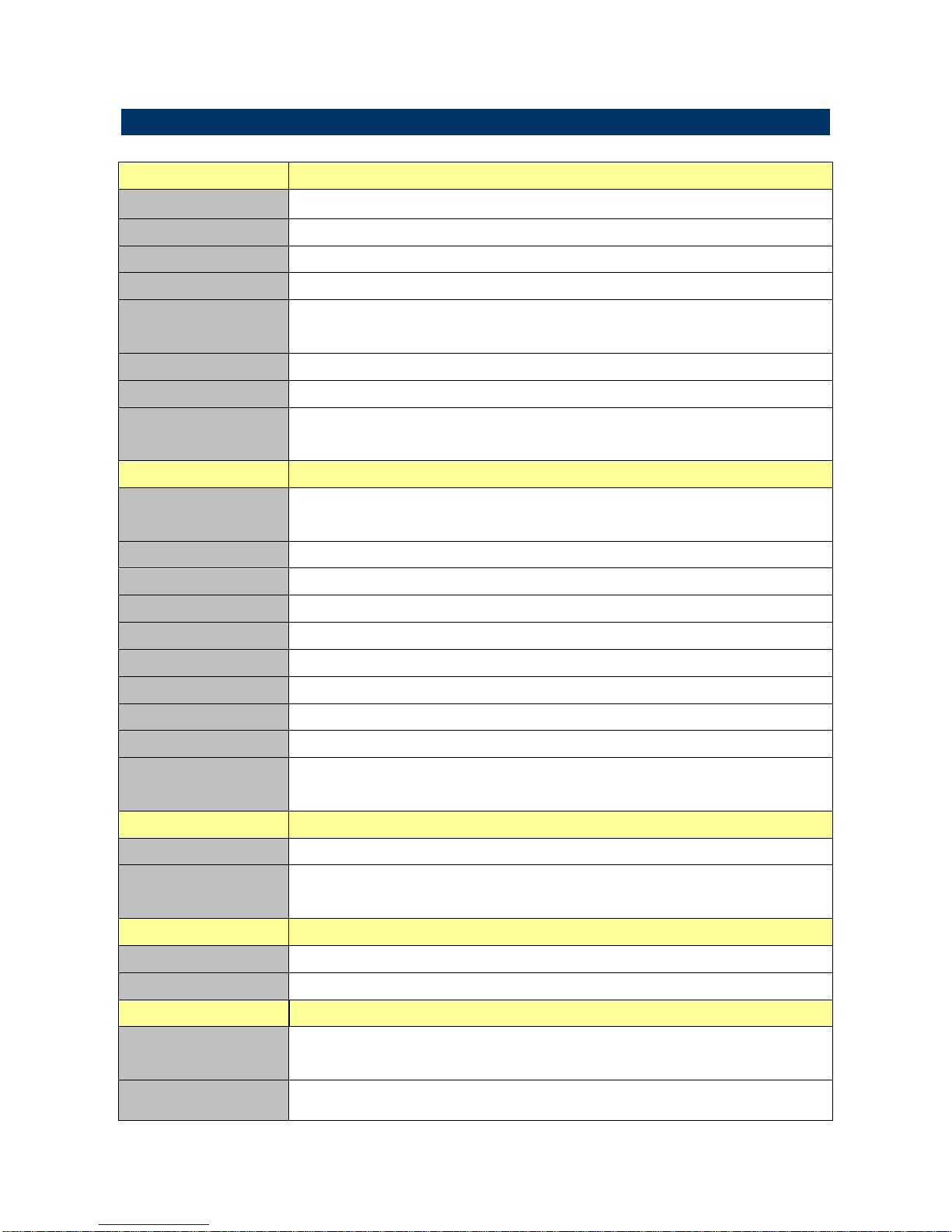
1.3 System Specifications
System
CPU
Onboard Intel® Atom™ N270 1.6GHz CPU
BIOS
Award 4MBit Flash BIOS
System Chipset
Intel® 945GSE/ ICH7-M
I/O Chip
ITE 8712F/KX + Fintek F81216DG
System Memory
One 200-pin SODIMM Supports Up to 2GB DDR2 533
SDRAM
SSD
One CompactFlash Type I/II Socket
Watchdog Timer
Reset: 1sec. ~ 255min. and 1sec. or 1min./step
H/W Status
Monitor
Monitoring System Temperature, Voltage, and
Cooling Fan Status
External I/O
COM Port
12 x DB-9 (11 x RS-232, 1 x RS-232/422/485)
COM1~6 by EPI-945GSE, COM 7~12 by LPC Module
LPT Port
1 x DB25 (by LPC Module)
LAN Port
2 x RJ-45
VGA Port
1 x DB-15 VGA
LVDS
1 x 18-bit LVDS (as DVI conn. type), LVDS +3.3V
Audio Port
Mic-in and Line-out
USB Port
4 x USB 2.0
SSD
1 x CompactFlash Type I/II Socket
Digital I/O
1 x 8-bit GPI; 1 x 8-bit GPO. Conn. DB-9
Indicate LED
Onboard : 1 x Power ; 1 x HDD
Chassis: 1 x Power ; 1 x HDD
Display
Chipset
Intel® 945GSE Integrated
Resolution
CRT Mode: 2048 x 1536 @ 60Hz
LVDS : 1600 x 1200 @ 75Hz
Audio
Audio Chipset
Realtek ALC655 supports 5.1-CH HD Audio
Audio Interface
Mic-in and Line-out
Ethernet
LAN Chip
Dual Realtek RTL8111C Gigabit Ethernet, Supports
Wake on LAN
Ethernet Interface
10/100/1000 Base-Tx Fast Ethernet Compatible
Page 7
Quick Reference Guide
ERS-AT270-A2 Quick Reference Guide
7
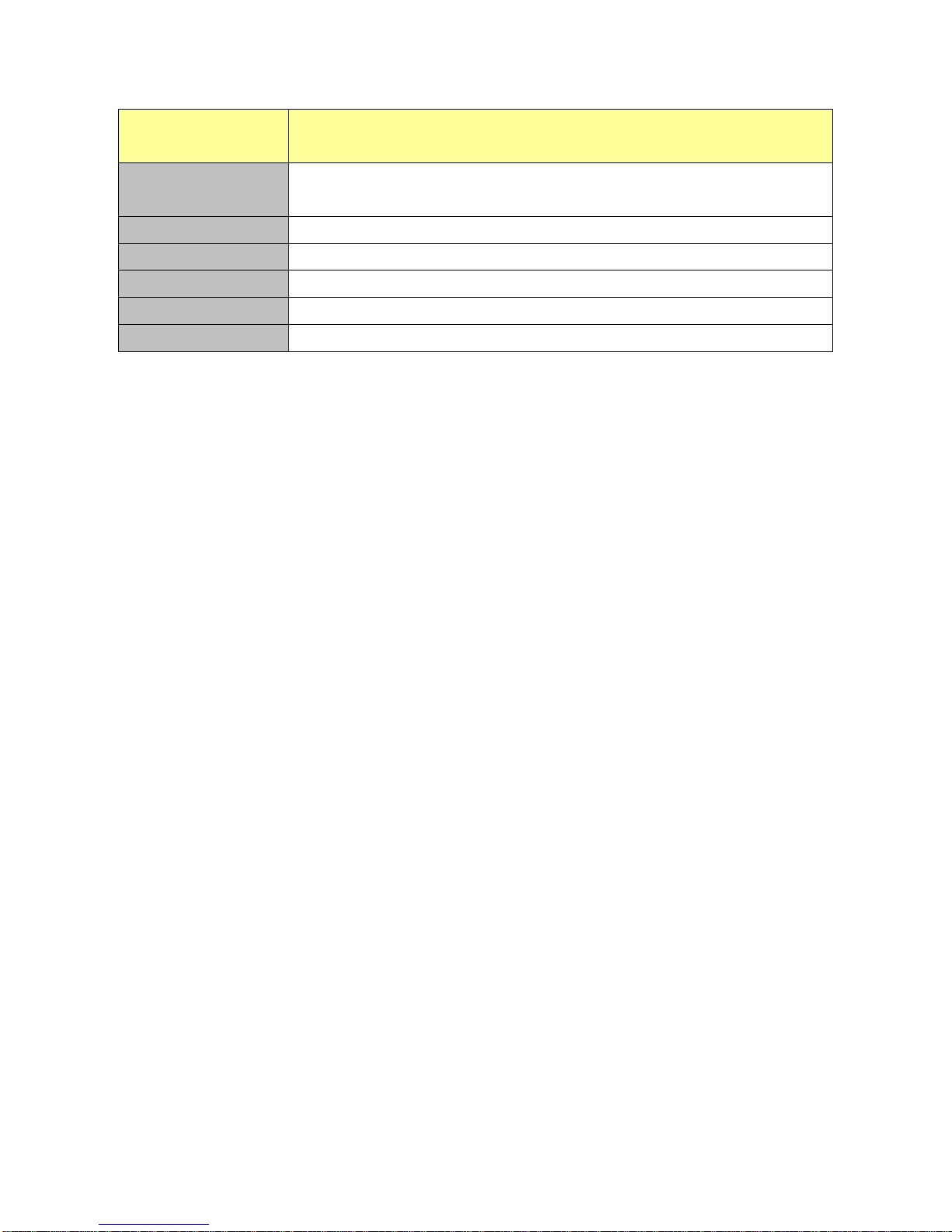
Mechanical &
Environmental
Power Requirement
1 x DC-in (+9 ~ 32V/ 2-pin Phoenix Type DC Jack)
1 x DC-out (+12V/ 2-pin Phoenix Type DC Jack)
Power Type
Single Power AT
Operating Temp.
0 ~ 50°C (HDD/ CF), Ambient w/ Air Flow
Storage Temp.
-20 ~ 75°C (-4 ~ 167°F)
Operating Humidity
0%~90% Relative Humidity, Non-condensing
Size (W x H x D)
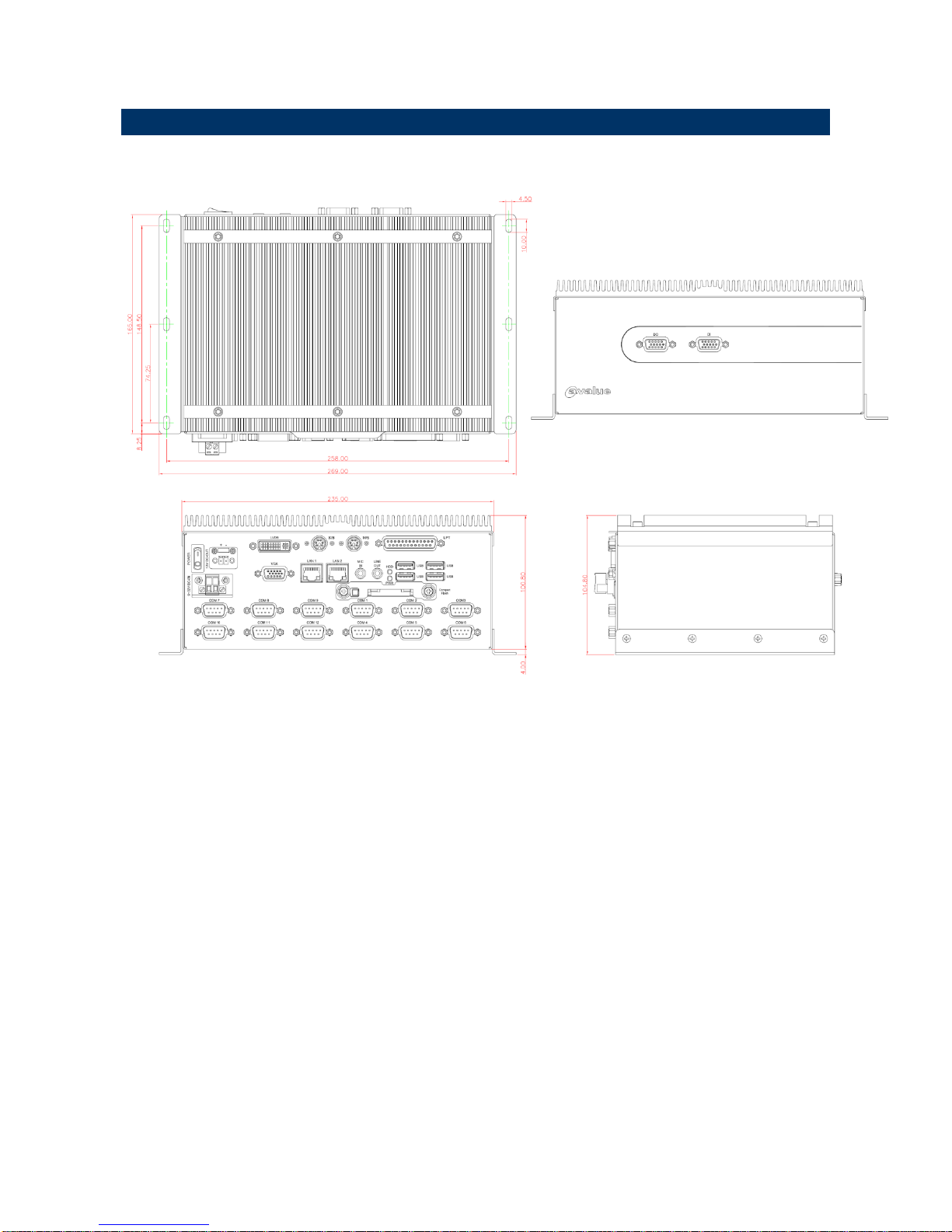
235 x 100.8 x 165mm
Page 8
ERS-AT270-A2
8 ERS-AT270-A2 Quick Reference Guide
1.4 System Overview
1.4.1 Front & Top View
Page 9
Quick Reference Guide
ERS-AT270-A2 Quick Reference Guide
9
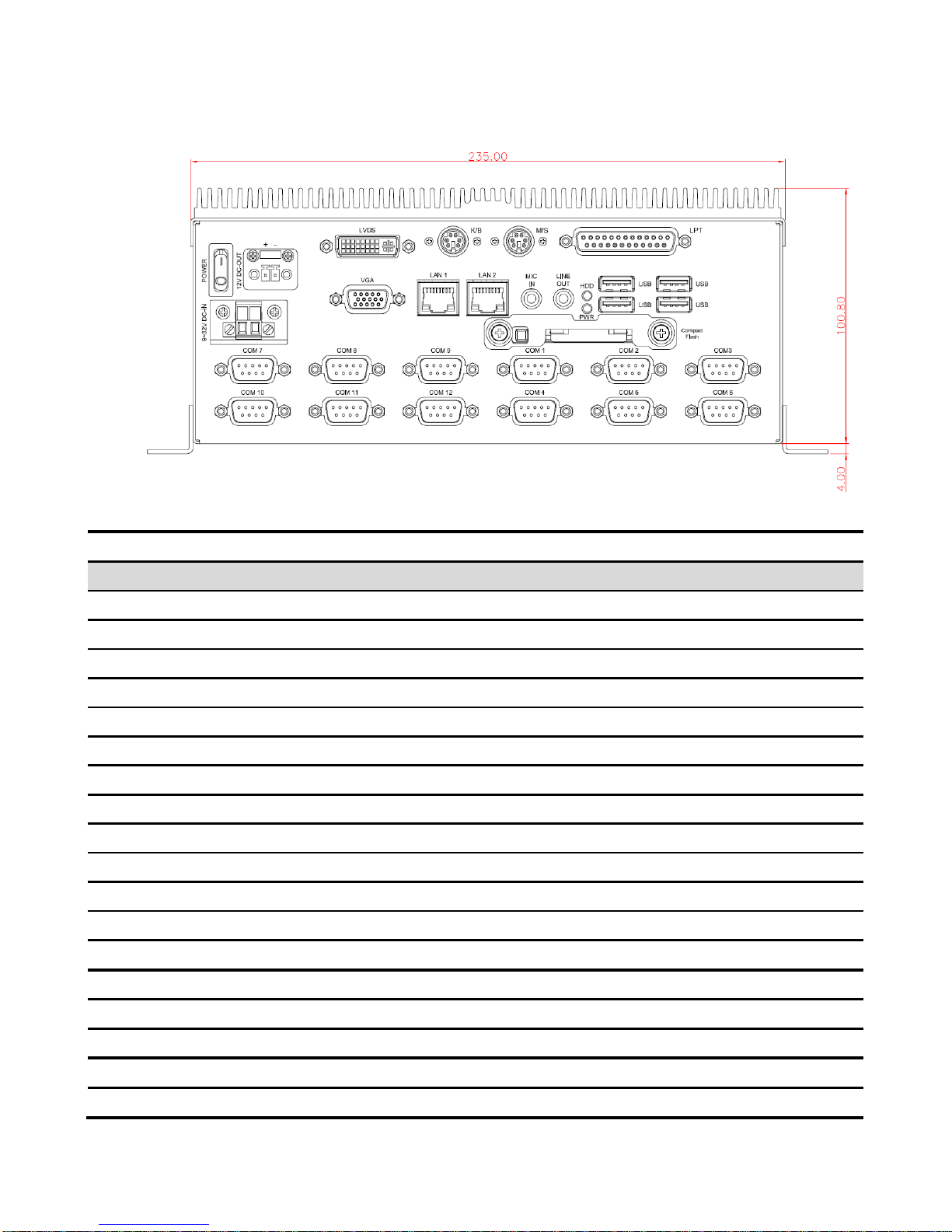
1.4.2 Rear View
Connectors
Label
Function
Note
COM1~12
Serial port connector 1~12
COMPACT FLASH
CF card connector
9-32V DC-IN
Power-in connector
HDD
HDD indicator
LAN1&2
2 x Ethernet connector
LINE OUT
Line-out audio jack
MIC IN
Mic-in audio jack
PWR
System power indicator
USB1~4
USB connector 1~4
VGA
CRT connector
LPT
LPT connector
M/S
Mouse connector
K/B
Keyboard connector
LVDS
External LVDS connector
POWER
System power switch
12V DC-OUT
Power-in connector
DO
DO connector
DI
DI connector
Page 10
ERS-AT270-A2
10 ERS-AT270-A2 Quick Reference Guide
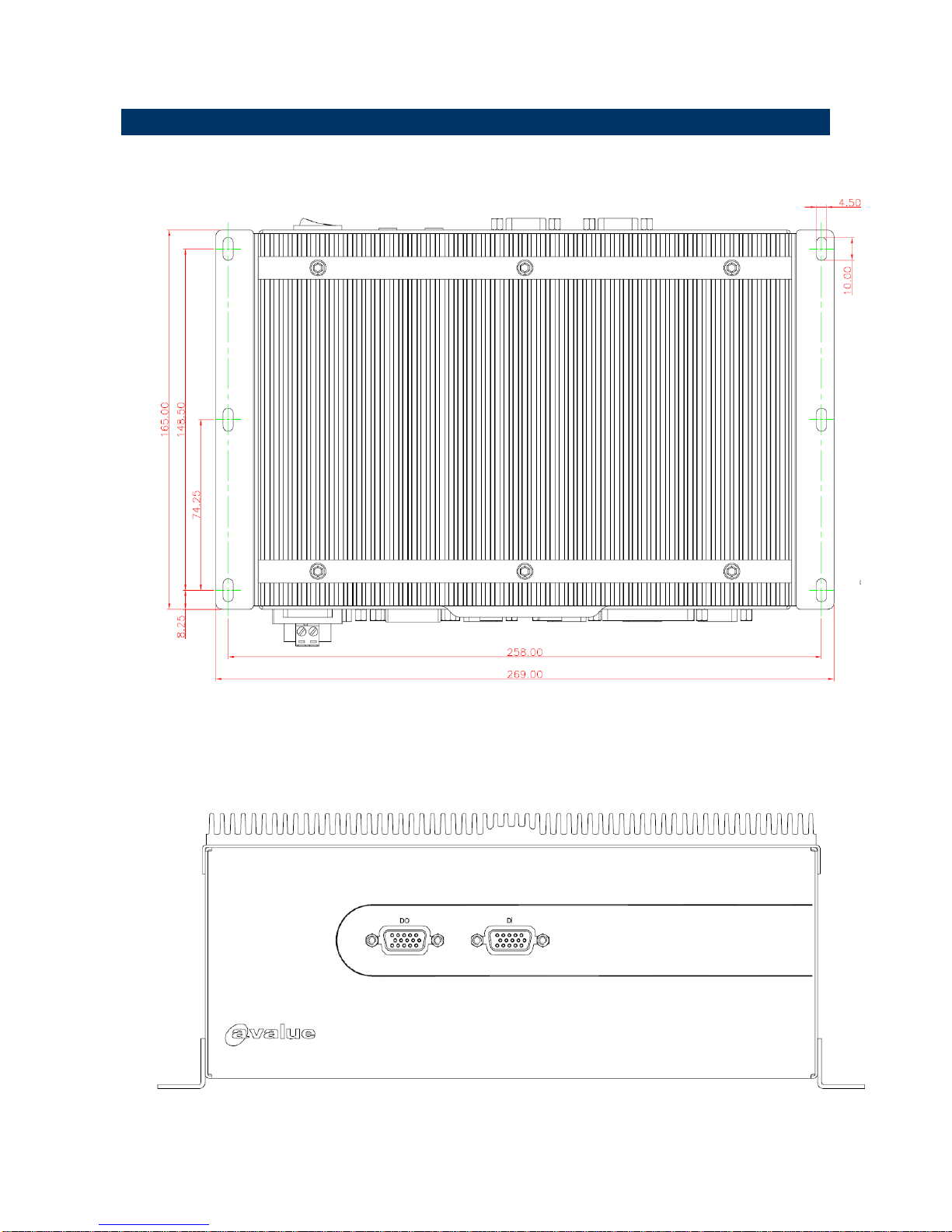
1.5 System Dimensions
1.5.1 Top /Front& Rear
(Unit: mm)
Page 11

Quick Reference Guide
ERS-AT270-A2 Quick Reference Guide
11
2. Hardware
Configuration
2.1 Jumper and Connector Setting, Driver and BIOS
Installing
Please refer to EPI-945GSE Quick Installation Guide or User’s Manual for
advanced information.
Note: If you need more information, please visit our website:
http://www.avalue.com.tw
Page 12
ERS-AT270-A2
12 ERS-AT270-A2 Quick Reference Guide
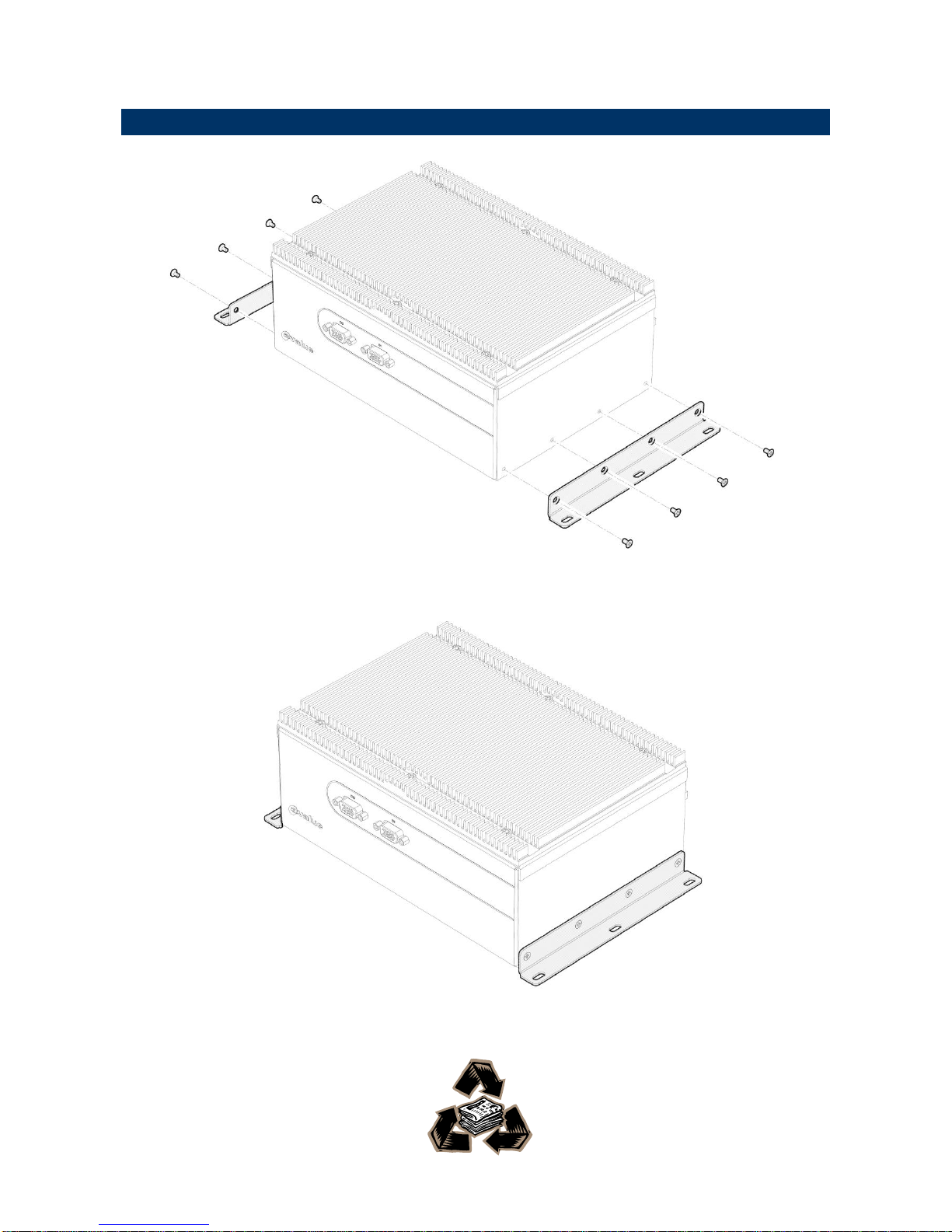
2.2 Installing Mounting Bracket (Optional)
Step 1. Fasten 8 screws on both sides of ERS Rugged Embedded System.
.
 Loading...