

Page 1
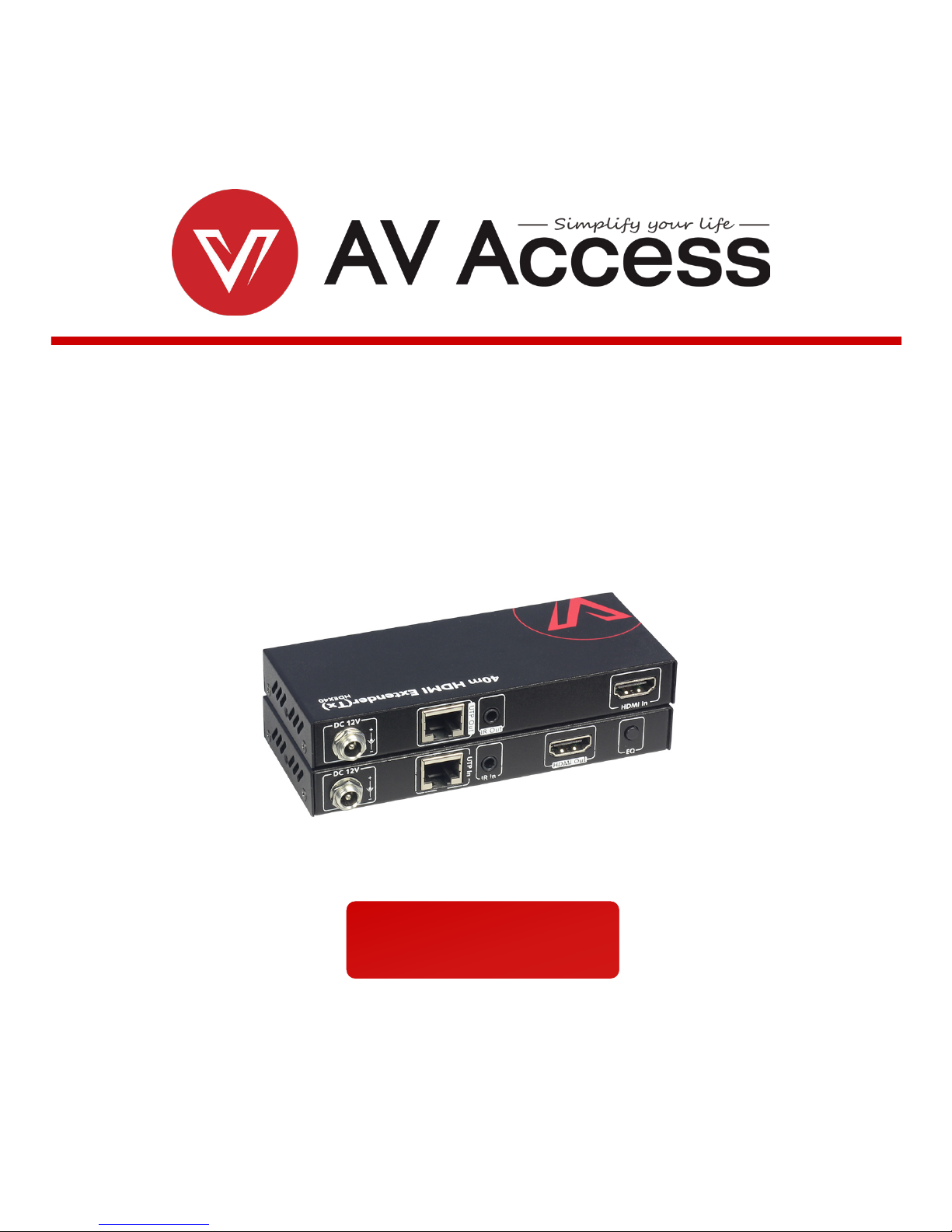
HDEX40
40m HDMI Extender
User Manual
Page 2

Disclaimers
The information in this manual has been carefully checked and is
believed to be accurate. AV Access Technology Limited assumes no
responsibility for any infringements of patents or other rights of third
parties which may result from its use.
AV Access Technology Limited assumes no responsibility for any
inaccuracies that may be contained in this document. AV Access
Technology Limited also makes no commitment to update or to keep
current the information contained in this document.
AV Access Technology Limited reserves the right to make
improvements to this document and/or product at any time and
without notice.
Copyright
Copy, Reproduce, Distribute and/or Edit of this document or part of it
as well as utilization of its contents and communication thereof to
others without express authorization are prohibited. Offenders will be
held liable for payment of damages. All rights created by patent grant
or registration of a utility model or design patent are reserved.
Copyright ©2017 AV Access Technology Limited All rights reserved.
Trademarks Notice
All products or service names mentioned in this document may be
trademarks of the companies with which they are associated.
Contact Us
Business inquiry: [email protected]
Technical problems: [email protected]
Page 3

Important Safety Instructions
Do not expose this device to rain, moisture, dripping or splashing.
No objects filled with liquids, such as vases, shall be placed on the
device.
Do not install or place this unit in a bookcase, built-in cabinet, or in
another confined space. Ensure the unit is well ventilated.
To prevent risk of electric shock or fire hazard due to overheating,
do not obstruct the unit’s ventilation openings with newspapers,
tablecloths, curtains, or similar items.
Do not install near any heat sources such as radiators, heat
registers, stoves, or other devices (including amplifiers) that
produce heat.
Do not place sources of naked flames, such as lighted candles, on
the unit.
Clean this device only with dry cloth.
Unplug this device during lightning storms or when unused for
long periods of time.
Protect the power cord from being walked on or pinched,
particularly at plugs.
Only use attachments / accessories specified by the manufacturer.
Refer all servicing to qualified service personnel.
Page 4

Overview
Table of Contents
Overview ............................................................................................................... 2
Package Contents .................................................................................................................. 3
Panel .......................................................................................................................................... 4
Installation Instructions ....................................................................................... 6
Trouble Shooting .................................................................................................. 7
Specification ......................................................................................................... 9
Warranty ............................................................................................................. 10
www.avaccess.com 1
Page 5

Overview
Overview
HDEX40 is a 40m Ultra-slim HDMI extender which offers the extension of full HD
video, audio and one-way IR control up to 40m/130ft along a single Cat5e/6a
cable.
With a feature set including transmission of uncompressed HD video
1080p@60Hz with 24bit color, 2ch audio and one-way IR control, it offers the
added benefit of an incredibly low-profile and ease of installation.
The receiver offers manual EQ settings to fine-tune transmissions by distance for
optimal signal delivery to the display.
Threaded bushings on the 12V DC power connections allow use of both standard
and locking DC power plugs.LED indicators for power supply to units and signal
status to show established connection between connected devices.
Simple and cost-effective HDMI Extender
Transmits 1080P/60Hz 2ch up to 40 meters over Cat5e/Cat6a
HDMI 1.3b and HDCP compliance
Independent HDMI equalization button to adjust high quality picture
One-way IR pass through
Built-in ESD: ±8kV (air-gap discharge) & ±4kV (contact discharge)
Built-in Surge protection: Voltage ± 1kV
Compact size for easy installation
www.avaccess.com 2
Page 6

Overview
Package Contents
Before you start the installation of the product, please check the package
contents:
1 x Transmitter
1 x Receiver
2 x Power Supply (DC 12V 0.5A)
1 x IR Emitter
1 x IR Receiver (30-50KHz)
2 x Mounting Brackets with screws (Pair)
1 x User manual
www.avaccess.com 3
Page 7
Overview
Panel
Front Panel
Transmitter/Receiver
No.
Name
Description
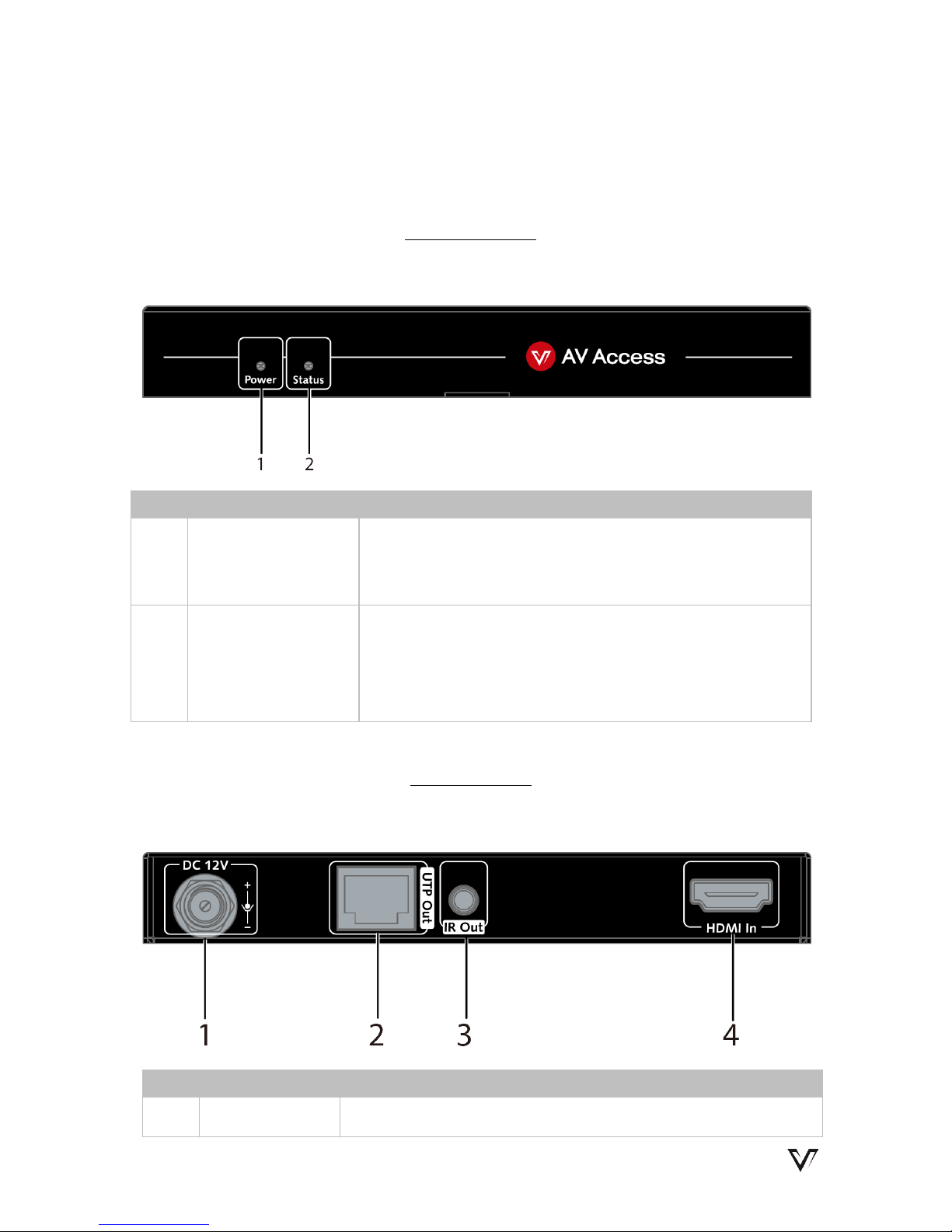
1 Power LED
On: The device is powered on.
Off: The device is powered off.
2 Status LED
On: HDMI signal is transmitting successfully.
Blinking/Off: HDMI signal is not transmitting
successfully.
Rear Panel
Transmitter
No.
Name
Description
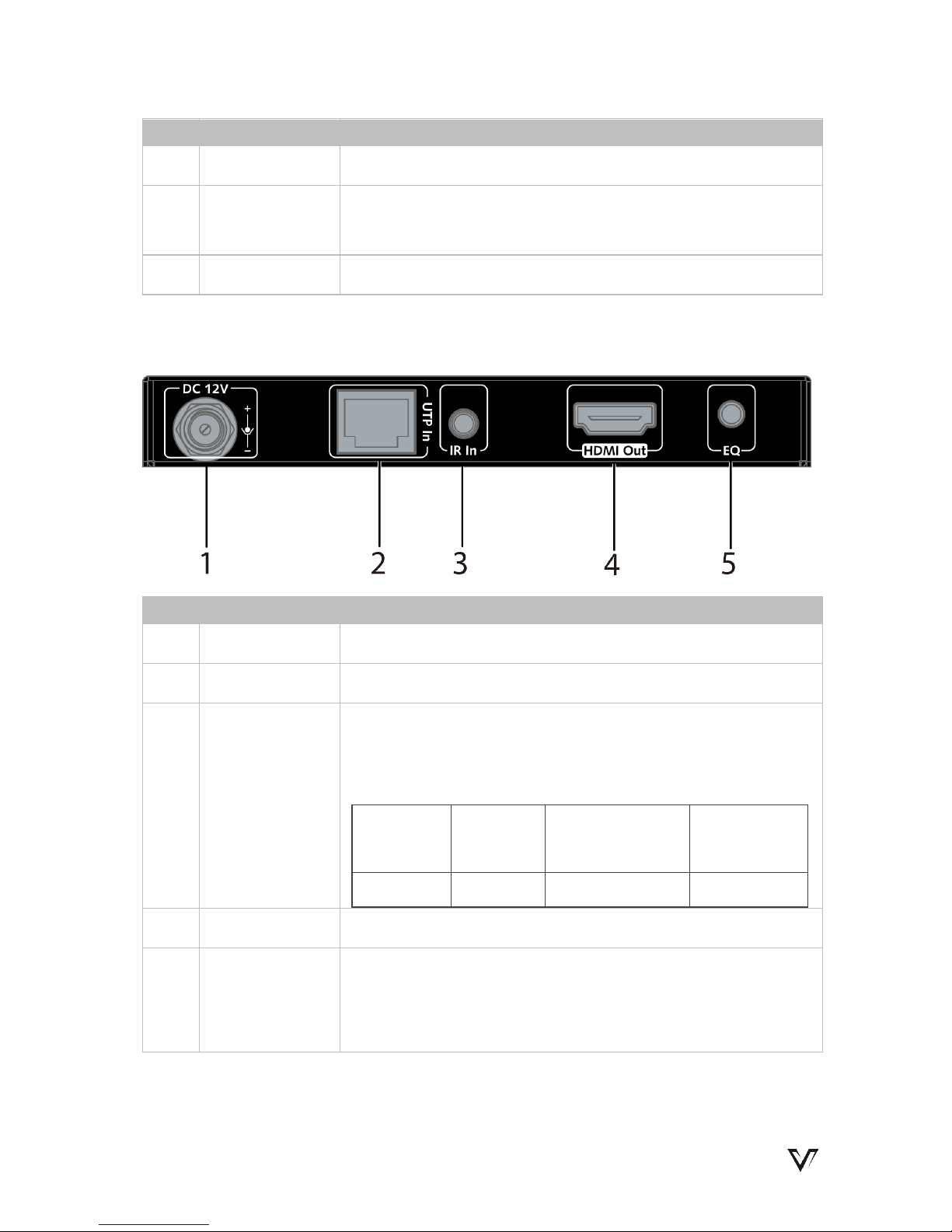
1 DC 12V DC 12V 0.5A power supply input
www.avaccess.com 4
Page 8
Overview
No.
Name
Description
2 UTP Out Connects to the receiver
3 IR Out
Connects to an IR emitter cable. Secure the IR emitter on
the IR receiving sensor of source device with adhesive.
4 HDMI In Connects to an HDMI source
Receiver
No.
Name
Description
1 DC 12V DC 12V 0.5A power supply input
2 UTP In Connects to the transmitter
3 IR In
Connects to an IR receiver cable. Secure the IR receiver
with adhesive.
Note: The IR receiver enabled angle and distance:
Enabled
Angel
0° 30°(Horizontal) 15°(Vertical)
Distance
8m(Max) 4.5m(Max) 3m(Max)
4 HDMI Out Connects to an HDMI sink
5 EQ
Video Quality Equalization.
After connection, if the video quality is low, press this
button to equalize.
www.avaccess.com 5
Page 9
Installation Instructions
Installation Instructions
www.avaccess.com 6
Page 10

Trouble Shooting
Trouble Shooting
Five Steps of Regular Troubleshooting Routine
1. Power: Please make sure all devices are powered on. (source, extender,
display devices)
2. Indicator: Please make sure LED indicators of transmitter and receiver are
normal according to user manual.
3. Devices: Please make sure picture can be shown normally when connecting
source to display devices directly.
4. Compatibility: Please test other source and display devices to determine
whether it is a compatibility issue.
5. Cable: Plug in and out HDMI/CatX cable or try another HDMI/CatX cable;
Cat 5e/6/6a/7 cable is recommended, do not use Cat 5 cable;
Please make sure CatX cable is less than 130ft for 1080p resolution;
Please make sure the two connectors of one CatX cable are same standard
(EIA/TIA 568B).
Typical questions
1. How to deal with video flash or cut off during the installation?
Indicators should be solid on. If not, please check if the power adapter is
well connected.
Check the cable refer to above Step 5.
Press the EQ button repeatedly, make sure the device match a suitable
EQ value.
2. How to deal with a weak or not working IR signal?
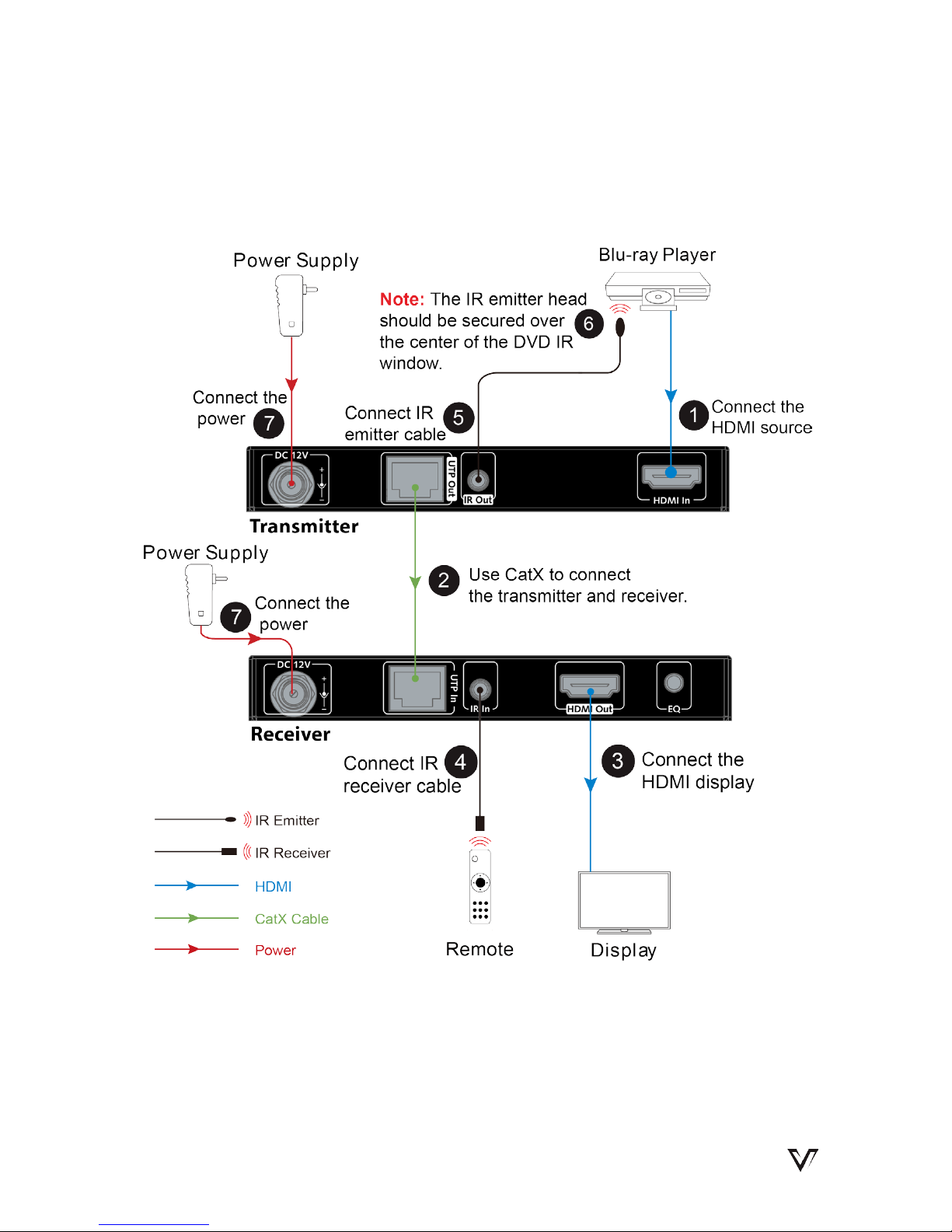
Make sure the IR cables are correctly installed according to the diagram
above.
Check if the IR emitter head is secured over the center of the device IR
www.avaccess.com 7
Page 11
Trouble Shooting
receiver window. The best position may vary depending on the device,
please refer to the device user manual. If the signal is weak, please try
adjusting the position.
Pay attention to the control angle and distance as below: The control
signal will be better when your controller is pointed at the IR receiver
head directly.
Enabled Angle 0° 30°(Horizontal) 15°(Vertical)
Distance
8m(Max) 4.5m(Max) 3m(Max)
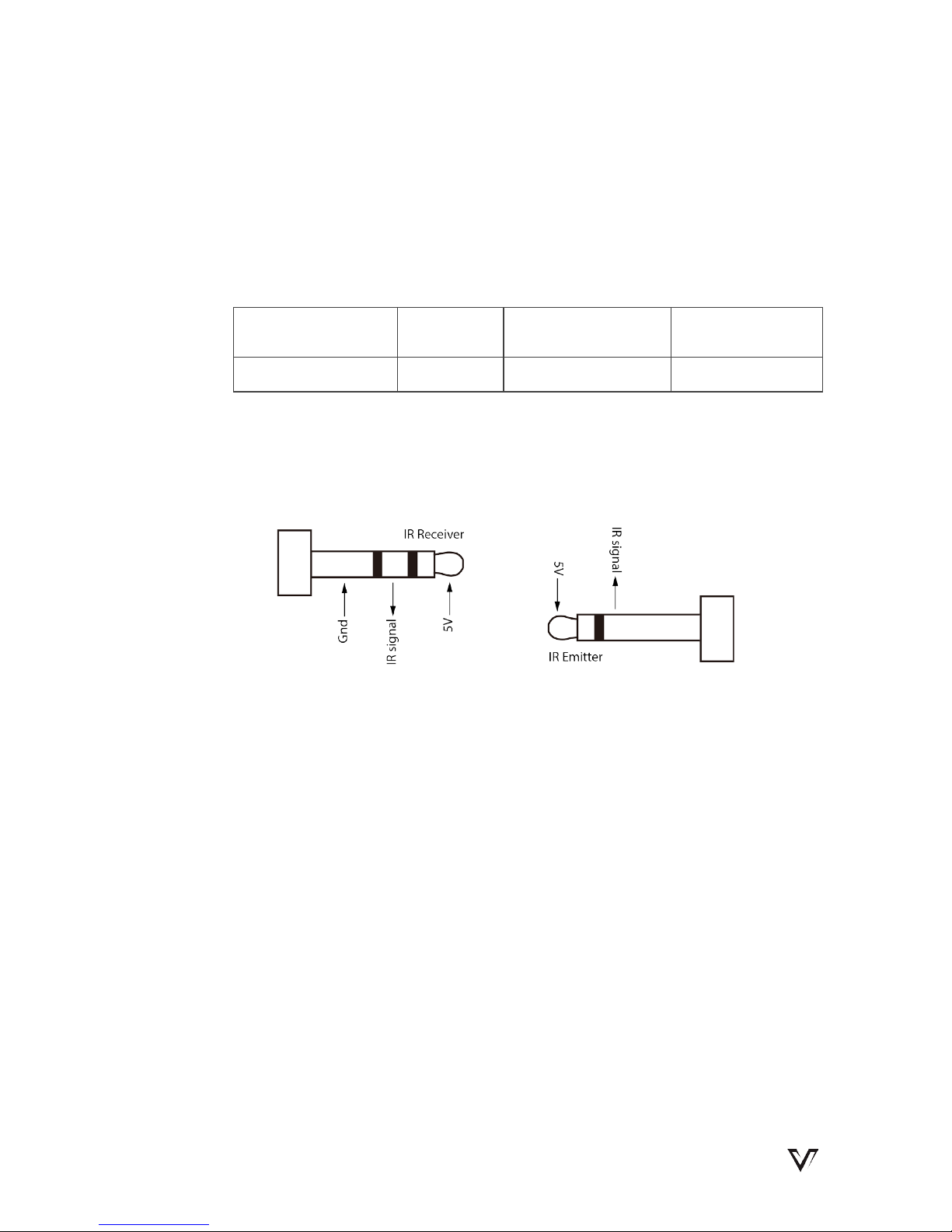
3. How can I make the IR work with third party control devices?
Please make sure the third party device follows our pin definition as
below:
You can purchase a AV Access universal IR cable that will be compliant
with any third party device.(Amazon ASIN: "B01MYX46IC")
www.avaccess.com 8
Page 12
Specification
Specification
Technical
Video Signal Type HDMI 1.3b
Input/Output Resolution Support
VESA:
640x480@60Hz, 800x600@60Hz,
1024x768@60Hz, 1280x768@60Hz,
1280x800@60Hz, 1280x960@60Hz,
1280x1024@60Hz, 1360x768@60Hz,
1366x768@60Hz,1400x1050@60Hz,
1440x900@60Hz, 1600x900@60Hz,
1600x1200@60Hz, 1680x1050@60Hz;
1920x1080@60Hz, 1920x1200@60Hz
SMPTE:
1080p@30/50/60Hz, 1080i@50/60Hz,
720p@50/60Hz, 576p
Audio Format
Stereo
General
Operating Temperature 0°C to 45°C (32°F to 113°F)
Storage Temperature -20°C to 70°C (-4°F to 158°F)
Humidity 10% to 90%, non-condensing
ESD Protection
±8kV(Air-gap discharge)/
±4kV(Contact discharge)
Surge Protection
Voltage: ±1 kV
Power Consumption (Maximum) ≤3.7W (Pair)
Device Dimensions (W x H x D) 126mm × 17mm × 54mm
Product Weight
Transmitter: 0.16kg
Receiver: 0.16kg
www.avaccess.com 9
Page 13

Warranty
Warranty
Products are backed by a limited 3-year parts and labor warranty. For
the following cases AV Access Technology Limited shall charge for the
service(s) claimed for the product if the product is still remediable and
the warranty card becomes unenforceable or inapplicable.
1. The original serial number (specified by AV Access Technology
Limited) labeled on the product has been removed, erased,
replaced, defaced or is illegible.
2. The warranty has expired.
3. The defects are caused by the fact that the product is repaired,
dismantled or altered by anyone that is not from an AV Access
Technology Limited authorized service partner. The defects are
caused by the fact that the product is used or handled
improperly, roughly or not as instructed in the applicable User
Guide.
4. The defects are caused by any force majeure including but not
limited to accidents, fire, earthquake, lightning, tsunami and war.
5. The service, configuration and gifts promised by salesman only
but not covered by normal contract.
6. AV Access Technology Limited preserves the right for
interpretation of these cases above and to make changes to
them at any time without notice.
Thank you for choosing products from AV Access.
www.avaccess.com 10
Page 14

AV Access Technology Limited
V1.0.4
 Loading...