

Page 1

RAT WIRELESS HAND
CONTROL MANUAL
Broadcast Developments Limited
t/a Autoscript Ltd
Unit 2
Heathlands Close
Twickenham, Middlesex
TW1 4BP
UK
Page 2
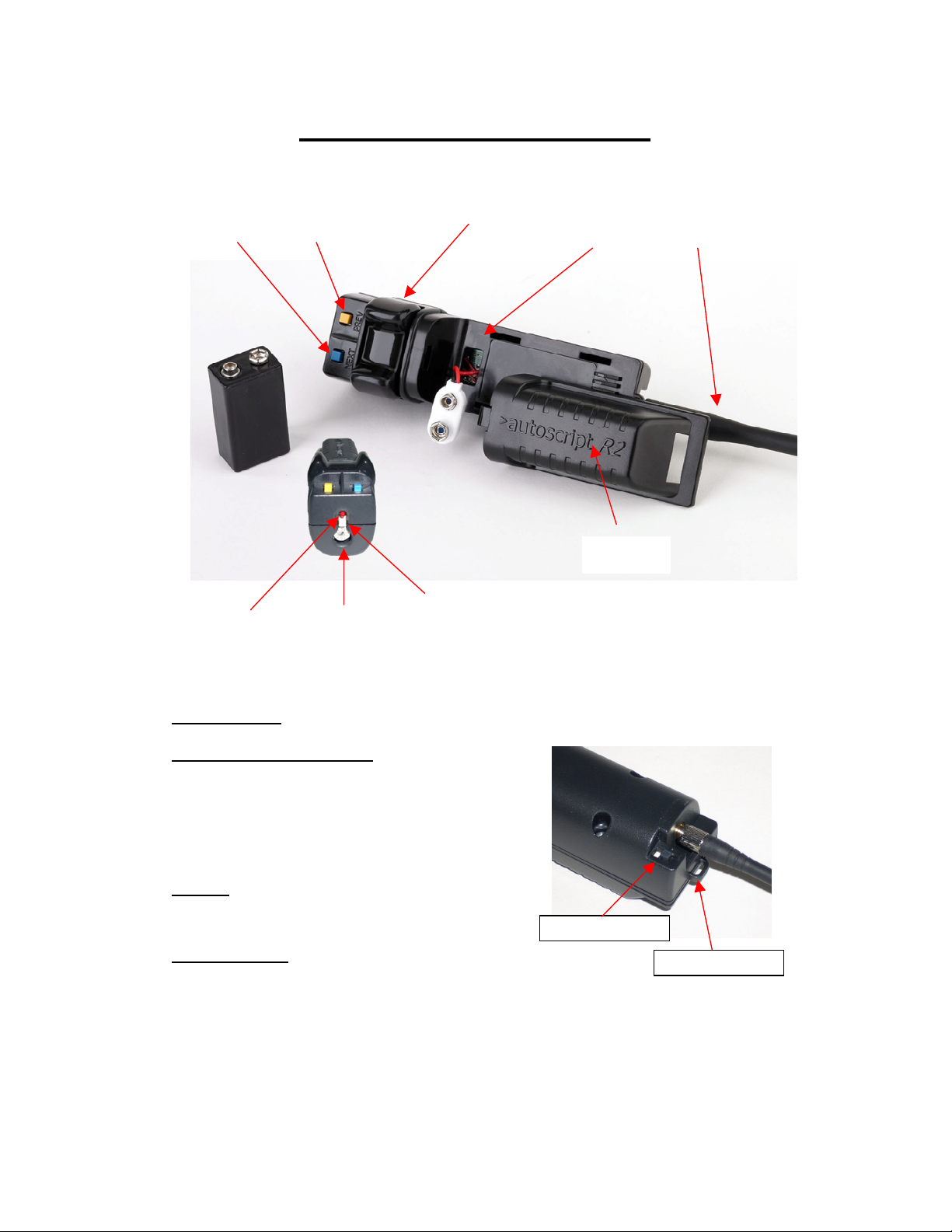
FUNCTION BUTTON
LANYARD FIXING
RF Hand Control (RAT)
SCRIPT/PAGE SCRIPT/PAGE
SPEED CONTROL FWD/REV
NEXT PREV BATTERY AERIAL/ANTENNA
BATTERY
COVER
LOW BATTERY FREQUENCY
LED
SELECTOR
OPERATION:
INSTALLATION OF BATTERY
Slide battery cover off
Attach a PP9 9V battery to terminals
Slide battery into hand control compartment
Tuck in excess cable
Slide battery cover back onto hand control
AERIAL:
Screw aerial onto thread at rear of unit
ON/OFF SWITCH
Slide switch to Red for On
Slide switch to Blue for Off
On/Off switch
Page 3

LANYARD:
Attach lanyard to lug at rear of unit if required.
SELECT FREQUENCY:
Select the required RF frequency. This must match the frequency that is set on the receiver
unit. Where multiple radio hand controls and receivers are used the frequencies should be
separated by one unused frequency to minimise the possibility of crosstalk. Valid channels
are 0 to D selectable on the frequency selector switch. These correspond to 902.3625 MHz
for channel 0 to 902.6875 Mhz for channel D (25 KHz channel spacing). The unit should be
switched off and back on for the new frequency selection to be updated. Positions E and F of
the switch are not used.
BUTTON FUNCTIONS:
Yellow
– Page/Story Previous will take the prompter text back by one Page/Story. If
prompting is enabled and the autoscript text is somewhere within a story, the first press will
take you to the top of the current Page/Story, subsequent presses will take the prompt text
back by Page/Story.
Blue
– Page/Story Next will take the prompter text forward by one Page/Story for each press.
Yellow/Blue
White
the facility has been installed, control devices through a GPI, General Purpose Interface.
SCROLL CONTROL:
The Rocker scroll control is a sensitive and discreet scroll speed control designed to operate
with minimum movement. The further the control is moved the faster the prompter text will
scroll. The factory default for the rocker is to scroll the prompter text forward when moved to
the left and back when moved to the right. The control will automatically return to a null point
between Forward and Reverse if the unit is put down.
LOW BATTERY LED:
When the battery voltage drops to below 6.2 volts, the LED will start flashing whenever the
scroll control operated or one of the buttons is pressed.
together will return the prompter text to the overall top of the script.
– Function/GPI can either be programmed through WinPlus for various functions, or, if
Page 4

FCC STATEMENT:
This equipment has been tested and found to comply with the limits for a Class B digital
device, pursuant to part 15 of the FCC Rules. These limits are designed to provide
reasonable protection against harmful interference in a residential installation. This
equipment generates, uses and can radiate radio frequency energy and, if not installed and
used in accordance with the instructions, may cause harmful interference to radio
communications. However, there is no guarantee that interference will not occur in a
particular installation.
If this equipment does cause harmful interference to radio or television reception, which can
be determined by turning the equipment off and on, the user is encouraged to try to correct
the interference by one or more of the following measures:
--Reorient or relocate the receiving antenna.
--Increase the separation between the equipment and receiver.
--Connect the equipment into an outlet on a circuit different from that to which the receiver is
connected.
--Consult the dealer or an experienced radio/TV technician for help.
This device complies with Part 15 of the FCC Rules. Operation is subject to the following two
conditions: (1) this device might not cause harmful interference, and (2) this device must
accept any interference received, including interference that might cause undesired operation.
IMPORTANT
Changes or modifications not expressly approved by Autoscript Ltd could void the user's
authority to operate the equipment.
 Loading...