

Page 1

DOMINATOR
Light-duty Commercial Rolling Door Opener
®
EasyRoller
Instruction Manual
(Instruction d’Installation)
Conforms to UL 325
Certified to CSA
C22.2 No.247
Doc # 160402_01
Part # 87035
Released 28/05/19
FOR LIGHT-DUTY COMMERCIAL DOOR USE ONLY
Page 2

WARNING!: It is vital for the safety of persons to follow all
instructions. Failure to comply with the installation instructions
and the safety warnings may result in serious personal injury
and/or property and remote control opener damage. Please
save these instructions for future reference.
ELECTROCUTION!: To reduce the risk of electric shock, this
equipment has a grounding type plug that has a third (grounding)
pin. This plug will only fit into a grounding type outlet. If the
plug does not fit into the outlet, contact a qualified electrician
to install the proper outlet. Do not change the plug in any way.
This operator is not equipped for permanent wiring. Contact a
qualified electrician to install a suitable receptacle if one is not
available.
AVERTISSEMENT! pour la sécurité des usagers, il est
essentiel de suivre toutes les instructions. Le non- respect des
instructions d’installation et des avertissements de sécurité peut
causer de graves blessures et/ou endommager l’appareil et la
télécommande. Conservez ces instructions en lieu sûr.
AVERTISSEMENT! Pour réduire les risques d'électrocution,
cet appareil est équipé d’une fiche avec broche de mise à la
terre. Cette fiche ne peut être branchée que dans une prise
avec mise à la terre. S’il n’est pas possible de la brancher dans
la prise, faites poser une prise appropriée par un électricien
qualifié. Ne pas modifier la fiche.
Ce matériel est pas équipé pour le câblage permanent. En
l'absence de réceptacle approprié, contactez un électricien
qualifié pour en installer un.
Page 3

CONTENTS
Rolling Garage Door Operator
© Copyright 2018
1. Safety Information 4
2. System Specifications 6
3. Kit Contents 7
4. Setup Requirements 7
4.1 Tools Required 7
4.2 The Opener: 8
4.3 Unsuitable Door Types 8
4.4 Sideroom 8
5. Operator Safety & Security 9
5.1 Your Door CAN NOT be used by the opener when: 9
5.2 Your Door CAN be used when: 9
5.3 To Disengage the Opener: 9
5.4 To Re-Engage the Opener: 9
6. Installation Instructions 10
6.1. Door Preparation 11
6.2. Fit the Weight Bar 11
6.2.1 If the door has a handle: 11
6.2.2 If the door does not have a handle: 11
6.3. Pinning the Door 12
6.4 Proping the Door 12
6.5. Mounting the Opener 13
6.5.1 Raising the Door: 13
6.5.2 Mounting the Opener: 13
6.6 Safety Beam Installation 14
6.6.1 Safety Infra-Red Beam Kit (P/N 62047) 14
6.6.2 Assembling the Mounting Bracket 14
6.6.3 PE Assist Alignment 14
6.7. Setting the Travel Limits 15
6.7.1 Initial Preparation: 15
6.7.2 Set the Limit Positions: 15
6.7.3 Resetting the Door Limit Positions 15
6.7.4 Setting the PET Mode position 15
6.7.5 Reset all Factory Defaults 15
6.8 Testing & Setting Safety Obstruction Force 16
6.8.1 Testing the Close Cycle 16
6.8.2 Testing the Open Cycle 16
6.8.3 To Increase Force Pressure 16
6.8.4 To Decrease Force Pressure 16
6.8.5 To Recall Factory Set Force 16
6.9 Accessories 17
6.9.1 Terminal Block 17
6.9.2 Installation of Wall Mounted Transmitter 17
6.10 Coding Transmitters 18
6.10.1 Setting Transmitters Codes 18
6.10.2 To Erase Programmed Codes 18
6.10 Coding Transmitters 19
6.11 Auto-Close 20
6.11.1 Safety Beams 20
6.11.2 Auto Close Option 20
6.12 Attach Warning Labels 21
7. Operation Instructions 22
7.1 How to Use Your Operator 23
7.1.1 To Operate the opener: 23
7.1.2 Replacing the Battery: 3V Lithium Battery CR2032. 23
7.2 User Operating Controls 24
7.3. Door Status Indicators 24
8. User Maintenance Instruction 25
8.1 Door Maintenance 25
8.2 If You Need a Service Call 25
9. Troubleshooting 26
10. Customer Agreement & Warranty 27
Dominator EasyRoller Instruction Manual
Diamond PD Power Drive : Instruction Manual
3
Page 4

1. Safety Information
WARNING!
• This operator should be installed in accordance with relevant US and
Canada Standards.
• To reduce the risk of injury to persons – Use this operator
only with a rolling door. The drive must not be used with a door
incorporating a wicket door, unless the drive cannot be operated with
the wicket door open.
• All warning signs and placards must be installed where visible in the
area of the door.
• This operator is a plug in domestic appliance and is designed for
indoor use only. It must be installed in a dry position that is protected
from the weather.
• Door must have Safety Beams fitted.
• Activate the operator only when the garage door is in full view, free of
obstructions and with the operator properly adjusted.
• The network device allows for operation of the door when not in lineof-sight of the door and operator. Therefore the door may operate
unexpectedly, therefore do not allow anything to stay in or near the
path of the door.
• Watch the moving door and keep people away until the door is
completely opened or closed.
Please read these important safety rules
These safety alert symbols indicate a personal
safety or property damage instruction exists.
READ THESE INSTRUCTIONS CAREFULLY.
This automatic garage door operator is designed and tested
to offer safe service provided it is installed and operated
in strict accordance with the following safety rules. Failure
to comply with the installation instructions and the safety
warnings may result in death, serious personal injury and/or
property damage.
CAUTION:
• If your garage has no pedestrian entrance door, an emergency
access device should be installed. This accessory allows manual
operation of the garage door from outside in case of power failure.
• Keep the garage door balanced. Sticking or binding doors must be
repaired. Garage doors, door springs, brackets and their hardware
are under extreme tension and can cause serious personal injury.
Do not attempt any garage door adjustment. Do not use if repair
or adjustment is needed. Call for professional garage door service.
ELECTROCUTION:
• Installation and wiring must be in compliance with your local building
and electrical codes.
• This operator is not equipped for permanent wiring. Contact a
qualified electrician to install a suitable receptacle if one is not
available.
• To reduce the risk of electric shock, this equipment has a grounding
type plug that has a third (grounding) pin. This plug will only fit into
a grounding type outlet. If the plug does not fit into outlet, contact
a qualified electrician to install the proper outlet. Do not change the
plug in any way.
• If the power cord is damaged, it must be replaced by the manufacturer,
its service agent or a similarly qualified person in order to avoid a
hazard.
• Connect the power cord only to properly earthed mains. If an
extension lead must be used, make sure it is a 3-core lead and
approved to 7 amp capacity.
• This unit is not user serviceable. Unplug the power cord before
removing the cover. Ensure that the power cord is attached clear of
all moving parts. Ignoring these instructions can cause electric shock.
• Position the Garage Door Operator so that the power plug is
accessible when inserted into the power outlet.
• Install the wall transmitter in a location where the garage door is
visible, but out of the reach of children at a height of at least 5 feet
(1.53m).
• To avoid serious personal injury from entanglement, remove all
unnecessary ropes or chains and disable any equipment such as
locks which are not needed for powered operation.
• Do not wear rings, watches or loose clothing while installing or
servicing a garage door operator.
• Ensure ladder is the correct type for the job and is on flat ground.
We recommend the user has 3 points of contact while on ladder.
• Activate the operator only when the garage door is in full view,
free of obstructions and with the operator properly adjusted.
• The operator is not intended for use by young children or infirm
persons without supervision.
• Keep transmitters away from children.
• Do not allow children to play with door controls.
4
Dominator EasyRoller Instruction Manual
Page 5

1. Sécurité
© Copyright 2018
AVERTISSEMENT!
• Cet appareil doit être installé conformément aux normes US et
canadiennes en vigueur.
• Pour réduire les risques d’accident, n’utiliser cet appareil qu’avec
une porte de garage enroulable. Ce moteur ne doit pas être utilisé
avec une porte de garage avec portillon, à moins que le moteur ne
puisse fonctionner quand le portillon est ouvert.
• Toutes les étiquettes et les panneaux de mise en grade doivent être
installés à un endroit visible près de la porte.
• Placez l’étiquette avertissant du risque de se faire piéger sur le mur
à proximité de l’émetteur, en vue de la porte.
• Cet appareil est un accessoire domestique conçu pour être utilisé
uniquement à l'intérieur. Il doit être installé au sec et à l'abri des
intempéries.
• La porte doit être équipée de faisceaux de sécurité.
• Activez l'appareil uniquement lorsque la porte du garage est à la vue,
exempte d'obstacles et avec l'appareil bien réglé.
• La télécommande radio permet d’actionner la porte lorsque
l’utilisateur est hors de la ligne de vue de la porte et de l’appareil. En
conséquence, la porte risque de s’ouvrir ou se fermer inopinément et
vous devez éviter de laisser des objets sur sa course ou à proximité.
• Suivez la porte pendant l'ouverture ou la fermeture, et veillez à
ce que personne ne se trouve à proximité tant qu'elle n'est pas
complètement ouverte ou fermée.
Lisez attentivement ces règles de
sécurité.
Ces pictogrammes indiquent une consigne
de sécurité pour les personnes ou les biens.
LISEZ CES INSTRUCTIONS ATTENTIVEMENT.
Cette commande automatique pour porte de garage est
conçue et testée pour fonctionner en toute sécurité. Pour
ce faire, elle doit être installée et utilisée dans le strict
respect des règles de sécurité suivantes. Le non-respect des
instructions d'installation et des avertissements présent un
risque de mort, de blessure grave et/ou de préjudice pour
les biens.
PRUDENCE:
• Si votre garage ne comporte pas de porte pour piétons, il convient
d'installer un dispositif d'accès d'urgence. Cet accessoire permet
d'actionner la porte de garage manuellement de l'extérieur en cas
de panne d'électricité.
• Veillez à ce que la porte du garage soit bien équilibrée. Si une
porte reste «collée» ou qu'elle «accroche», elle doit être réparée.
Les portes de garage, les ressorts de porte, les pattes de fixation
et les éléments matériels sont soumis à une tension extrême et
peuvent blesser gravement. Ne tentez pas de régler la porte de
garage par vous-même. Ne l'utilisez pas si une réparation ou un
réglage est nécessaire. Faites appel à un technicien spécialisé.
ÉLECTROCUTION:
• L'installation et le câblage doivent être effectués conformément aux
codes de la construction et de l'électricité en vigueur.
• Cet appareil n'est pas équipé pour un câblage permanent. En
l'absence de réceptacle, contactez un électricien qualifié pour en
installer un.
• Pour réduire le risque d'électrocution, cet équipement est pourvu
d'une prise avec broche de mise à la terre. Celle-ci ne peut être
branchée que dans une prise compatible. Sinon, demandez à un
électricien qualifié d'installer une prise de courant adéquate. Ne la
remplacez pas vous-même.
• Si le cordon électrique est abîmé, il doit être remplacé par le fabricant,
son SAV agréé ou un technicien qualifié.
• Branchez le cordon électrique uniquement à une prise secteur
dûment reliée à la terre. Si vous devez utiliser une rallonge, assurezvous qu'elle est tripolaire et d'une capacité de 7ampères.
• Cet appareil n'est pas réparable par l'utilisateur. Avant de retirer
le capot, débranchez le cordon électrique. Assurez-vous qu'il ne
risque pas d'entrer en contact avec des pièces en mouvement. Le
non-respect de ces instructions peut avoir une électrocution pour
conséquence.
• Positionnez le dispositif de commande de manière à ce que la
prise de courant soit accessible lorsqu'elle est branchée.
• Installez l'émetteur mural à un emplacement où la porte du garage
est visible, mais hors de portée des enfants, à une hauteur d'au
moins 1,50m.
• Rangez cordes et chaînes pour éviter de vous blesser, et désactivez
les serrures et autres équipements qui ne sont pas nécessaires
pour une utilisation sous tension.
• Pendant l'installation ou la réparation d'un dispositif de commande
de porte de garage, retirez bijoux et montre, et attachez vos
vêtements.
• Utilisez un escabeau adéquat et stable. Lorsque l'utilisateur se
tient sur un escabeau, il est conseillé de veiller à ce que les points
de contact soient au nombre de trois.
• Activez l'appareil uniquement lorsque la porte du garage est à la
vue, exempte d'obstacles et avec l'appareil bien réglé.
• L'appareil ne doit pas être utilisé sans supervision par de jeunes
enfants ou des personnes infirmes.
• Les émetteurs doivent rester hors de portée des enfants.
• N'autorisez pas les enfants à jouer avec les commandes de porte.
Dominator EasyRoller Instruction Manual
Diamond PD Power Drive : Instruction Manual
5
Page 6

2. System Specifications
Technical Specifications Dominator EasyRoller
Power supply 120Va.c. 60Hz
Type of door:
Maximum Door Weight:
Maximum Door Area:
Door must be well balanced and able to be operated by
hand, as per warranty conditions and standard UL 325
Minimum sideroom 1 1/2”
Nominal force 200N (44lb)
Receiver type Multi-frequency UHF FM
Receiver code storage capacity 64 X 4-button Transmitters
Coding System TrioCode
Coding type Non-linear encryption algorithm
Number of code combinations Over 100 billion random codes
Transmitter battery CR2032 (3 Volts)
Courtesy light LED (Light Emitting Diodes)
Rolling Sheet Door
242lb
2
178ft
TM
128 Type
®
Network connectivity Network compatible,
(requires optional Smart Phone Control Kit)
Type of entrapment protection Photo Electric Beam
Note: Intermittent operations may occur in areas which experience very strong winds. The strong wind puts extra pressure on the door and tracks which
may in turn intermittently trigger the safety obstruction detection system.
6
Dominator EasyRoller Instruction Manual
Page 7

3. Kit Contents
Screwdrivers
Adjustable End Wrench
Sockets and Wrench
Pencil
Rope
Drill
Towel
Self-tapping Screws and Washers
(M10 x 32mm)
Stepladder
Door Stand
or suitable prop
© Copyright 2018
9
1
2
3
4
1. Dominator EasyRoller drive unit
2. 2 x Locking Bar Covers
3. Power Drive 2 x TB-6V1Transmitters
4. Wall Mount Transmitter
5. 1 x Weight Bar
6. 1 x Wired Safety Beam kit with brackets and screws
7
6
Fastner Bag
7. 2 x Nilock Nut
8. 2 x 3/16 x 1/2 flat washers
9. 2 x Pan Head Screw M4 x 50mm
5
8
Fig. 3.1
4. Setup Requirements
4.1 Tools Required
Dominator EasyRoller Instruction Manual
Diamond PD Power Drive : Instruction Manual
7
Page 8

4. Setup Requirements
4.2 The Opener:
a. MUST BE installed in a dry position, protected from weather. (Moisture or corrosion not covered by Warranty)
b. Is factory set for RIGHT HAND SIDE installation (from inside garage), but capable of LEFT HAND SIDE installation. Fig 4.2.1
c. REQUIRES properly earthed 3 pin single phase power within an arms length of door and at a suitable height
d. Requires a MINIMUM SIDEROOM of 40mm from the edge of the door to the inside of the door bracket and 85mm to the wall.
e. CAN NOT be installed on a Door Axle Diameter that exceeds 35mm.
40mm
85mm
LEFT HAND SIDE RIGHT HAND SIDE
40mm
85mm
Fig. 4.2.1
WARNING! This operator is not equipped for permanent
wiring. Contact a qualified electrician to install a suitable
receptacle if one is not available.
AVERTISSEMENT! Ce dispositif d’ouverture n’est pas conçu
pour un câblage permanent. En l’absence de réceptacle
approprié, contactez un électricien qualifié pour en installer
un.
4.3 Unsuitable Door Types
The drive must not be used with a door incorporating a wicket door, unless
the drive cannot be operated with the wicket door open. The fitting of an
opener to doors with removable mullions is not recommended.
4.4 Sideroom
The minimum sideroom required from the edge of the door curtain is 40mm
to the inside of the door bracket, and 85mm to the wall. If a Battery Backup is
to be fitted, at least 135mm to the bracket is required.
Therefore the recommended sideroom from the edge of the door curtain
is 135mm to the inside of the door bracket, and 175mm to the wall as per
Fig 4.4.1.
8
Dominator EasyRoller Instruction Manual
CAUTION: Do not connect opener to power source
until instructed to do so.
ATTENTION: Ne branchez pas l’ouvre-porte avant d’y
être autorisé par la notice.
85
40
Minimum Side room Recommended Side room
175
135
Fig. 4.4.1
Page 9

5. Operator Safety & Security
5.1 Your Door CAN NOT be used by the opener when:
a. There is a locking device installed.
b. There is a power failure.
5.2 Your Door CAN be used when:
a. There is an emergency, by disengaging the opener.
b. There is a power failure, by disengaging the opener.
5.3 To Disengage the Opener:
a. It is recommended to do so with the door in the closed position.
b. Pull down on the manual release cord, until you hear a click.
c. Move the door manually.
CAUTION: When the opener is manually disengaged, the door
is no longer locked. To lock the door manually, re-engage the
opener after the door is closed.
ATTENTION: Ne pas utiliser la poignée de chaîne pour ouvrir
la porte. Le non-respect de cette consigne peut provoquer des
blessures graves.
5.4 To Re-Engage the Opener:
a. Check the door has not been locked by a locking device.
b. Pull down on the manual release cord, until you hear a click.
c. The door will now operate from the opener.
WARNING! Please test the manual release mechanism to
ensure that the manual release is easy to operate. No more
than 44lb (20kg) of force should be required to disengage
the door using the manual release cord. If excessive force is
required reset the close limit position (Section 6.7.3 Resetting
Door Limits).
AVERTISSEMENT! Tester le dispositif de déclenchement
manuel afin de s’assurer que le système se désengage
facilement. Ne pas exercer une force de plus de 44lb (20kg)
pour désengager la porte en tirant sur le cordon. Si la force à
appliquer est excessive, il faudra re-paramétrer le réglage de
fin de course.
MANUAL RELEASE
WARNING! When operating the manual
release (while the door is open) the door
may fall rapidly due to weak or broken
springs, or due to being improperly
balanced.
Do not disengage the operator to manual
operation with children/persons or any
objects including motor vehicles within
the doorway.
IN THE EVENT THE DOOR BECOMES OBSTRUCTED
DETACH DOOR FROM OPERATOR AS FOLLOWS:
1.
TO DISENGAGE:
PULL HANDLE DOWN & RELEASE
SI LA PORTE EST BLOQUÉE, DÉTACHEZ-LA DU
DISPOSITIF DE COMMANDE EN PROCÉDANT
COMME SUIT :
1.
2.
AVERTISSEMENT : Lorsque vous utilisez
le déclenchement manuel (alors que la
porte est ouverte), la porte peut tomber
rapidement si les ressorts sont fatigués
ou brisés, ou parce qu'elle est mal
équilibrée.
NE PAS désengager l’opérateur en mode
manuel lorsque des enfants/personnes,
ou des objets tels que des véhicules à
moteur, sont dans le passage.
© Copyright 2018
POUR DÉBLOQUER:
TIRER VERS LE BAS ET RELACHER
TO RE-ENGAGE: REPEAT ACTION
2.
POUR LA RÉENGAGER:
RÉPÉTER LE MOUVEMENT
PULL
HANDLE
TIRER LA POIGNEE
DÉBLOCAGE MANUEL
Fig. 5.1
Dominator EasyRoller Instruction Manual
Diamond PD Power Drive : Instruction Manual
9
Page 10

6. Installation Instructions
IMPORTANT INSTALLATION INSTRUCTIONS.
WARNING - To reduce the risk of severe injury or death:
(1) READ AND FOLLOW ALL INSTALLATION INSTRUCTIONS.
(2) Install only on a properly operating and balanced sheet door. An improperly balanced door has the potential to inflict severe
injury. Have a qualified service person make repairs to cables, spring assemblies, and other hardware before installing the
opener.
(3) Remove all pull ropes and remove or make inoperative, all locks connected to the sheet door before installing opener.
(4) Where possible, install the door opener 2.14m (7 feet) or more above the floor. For products having an emergency release,
mount the emergency release 1.83m (6 feet) above the floor and avoiding contact with vehicles to avoid accidental release.
(5) Do NOT connect the opener door operator to source of power until instructed to do so.
(6) Locate the control button:
(7) Install the Entrapment Warning Label next to the control button in a prominent location.
(8) After installing the opener, the door must reverse within 2 seconds when it contacts a 1 1/2 -inch high object (or a 2 by 4 board
(9) For products having a manual release, instruct the end user on the operation of the manual release.
(i) within sight of door,
(ii) at a minimum height of 1.53m (5 feet) above floors, landings, steps or any other adjacent walking surface so small
children are
not able to reach it, and
(iii) away from all moving parts of the door.
laid flat) on the floor.
IMPORTANT - NOTICE D’INSTALLATION.
AVERTISSMENT - POUR RÉDUIRE LES RISQUES DE BLESSURES GRAVES OU DE MORT:
(1) LISEZ CETTE NOTICE ET CONFORMEZ-VOUS AUX INSTRUCTIONS.
(2) NE POSEZ CET OUVRE-PORTE QUE SUR UNE PORTE DE GARAGE CORRECTEMENT ÉQUILIBRÉE. UNE PORTE MAL
ÉQUILIBRÉE PEUT CAUSER DES BLESSURES GRAVES. CONFIEZ LA RÉPARATION DES CÂBLES, DES RESSORTS ET DE
TOUT AUTRE ÉLÉMENT À UN TECHNICIEN QUALIFIÉ AVANT D’ENTREPRENDRE L’INSTALLATION.
(3) ENLEVEZ LES CORDES ET ENLEVEZ OU NEUTRALISEZ TOUT DISPOSITIF DE VERROUILLAGE SOLIDAIRE DE LA PORTE
DE GARAGE AVANT L’INSTALLATION.
(4) DANS LA MESURE DU POSSIBLE, INSTALLEZ L’OUVRE-PORTE À AU MOINS 2.14M (7 PI) DU SOL. POSEZ LE DISPOSITIF
DE DÉSACCOUPLEMENT D’URGENCE À AU MOINS 1.83M (6 PI) DU SOL EN ÉVITANT LE CONTACT AVEC DES
VÉHICULES POUR ÉVITER TOUT DÉCLENCHEMENT ACCIDENTEL.
(5) NE BRANCHEZ PAS L’OUVRE-PORTE AVANT D’Y ÉTRE AUTORISÉ PAR LA NOTICE.
(6) INSTALLEZ LE BOUTON DE COMMANDE:
(i) À UN ENDROIT QUE L’ON PEUT VOIR DE L’EMBRASURE DE LA PORTE;
(ii) À UNE HAUTEUR MINIMALE DE 1.53M (5 PI) DU SOL - AFIN QUE LES JEUNES ENFANTS NE PUISSENT PAS
L’ATTEINDRE,
(iii) À L'ÉCART DES PIECES MOBILES DE LA PORTE.
(7) APPOSEZ L’ÉTIQUETTE DE MISE EN GARDE RELATIVE AU DANGER DE HAPPEMENT À PROXIMITÉ DE BOUTON DE
COMMANDE ET L’ÉTIQUETTE RELATIVE AU RÉGLAGE DE LA COMMANDE À UN EMPLACEMENT EN ÉVIDENCE - PAR
EXEMPLE SUR LA PAROI INTÉRIEURE DE LA PORTE DE GARAGE OU SELON LES INSTRUCTIONS DE LA NOTICE
D’INSTALLATION.
(8) UNE FOIS L’OUVRE-PORTE INSTALLÉ, LE SENS DE LA COURSE DOIT S’INVERSER LORSQUE LA PORTE ENTRE EN
CONTACT
POS
(9) Pour les produits munis d’un dispositif de desaccouplement manual, indiquez a l’utilisateur final la procedure d’utilisation du
dispositif.
AVEC UN OBJET D’UNE HAUTEUR DE 38 MM (1 ½ PO) (OU UN MADRIER DE 2 X 4 PO DE SECTION, À PLAT)
É SUR LE SOL.
IMPORTANT - WIRING INSTRUCTIONS:
a. The following wiring instructions
(i) “This operator in not equipped for permanent wiring. Contact licensed electrician to install a suitable receptable if one is not
available.” and
“Cet operateur est pas equipe pour le cablage permenant. Contactez un electricien qualifie pour installer un receipient approprie si
l’on est pas disponible.”
(ii) “TO REDUCE THE RISK OF ELECTRIC SHOCK, THIS EQUIPMENT HAS A GROUNDING TYPE PLUG THAT HAS A THIRD
(GROUNDING) PIN. THIS PLUG WILL ONLY FIT INTO A GROUNDING TYPE OUTLET. IF THE PLUG DOES NOT FIT INTO THE
10
OUTLET, CONTACT A QUALIFIED ELECTRICIAN TO INSTALL THE PROPER OUTLET. DO NOT CHANGE THE PLUG IN ANY WAY.”
POUR RÉDUIRE LES RISQUES D’ÉLECTROCUTION, CET APPAREIL EST ÉQUIPÉ D’UNE FICHE AVEC BROCHE DE MISE À LA TERRE. CETTE FICHE
Dominator EasyRoller Instruction Manual
NE PEUT ÊTRE BRANCHÉE QUE DANS UNE PRISE AVEC MISE À LA TERRE. S’IL N’EST PAS POSSIBLE DE LA BRANCHER DANS LA PRISE, FAITES
POSER UNE PRISE APPROPRIÉE PAR UN ÉLECTRICIEN QUALIFIÉ. NE PAS MODIFIER LA FICHE
Page 11

© Copyright 2018
6.1. Door Preparation
6.1.1 Prepare the Door:
a. Clean the guides if there is any oil or wax present using a suitable white spirit. The only lubricant suitable for use on door guides is silicon spray.
DO NOT use WD-40, RP-7, petroleum grease, or similar.
b. Remove the locking bars or disable the lock.
2
c. Install the locking bar covers
operates. (Fig 6.1)
d. Affix the supplied warning labels where they are clearly visible on the inside of the door.
if there are locking bar holes in the guides. This ensures fingers cannot be placed in the holes while the door
2
Fig. 6.1.1
6.2. Fit the Weight Bar
6.2.1 If the door has a handle a weight bar must be fitted to ensure the door doesn’t balloon during operation:
a. Remove the door handle
5
b. Fit the weight bar
M4 Nilock Hex nut
6.2.2 If the door does not have a handle:
a. Locate the centre of the door at the bottom rail.
b. Place the weight bar at this point and mark the two positions where the fasteners will go
c. Drill the two 4.5mm holes in the door and fit the weight bar
8
and the two (2) M4 Nilock Hex nut 7.
d. Check that the door is still balanced and smooth. If not, then the door may require servicing.
9
and refit the handle using the two (2) M4x50mm Pan Head Screw 9 and the two (2) Flat Washer 8 and the two (2)
7
. (Fig 6.2)
5
using the two (2) M4x50mm Pan Head Screw 9 and the two (2) Flat Washer
5
5
7
9
8
7
8
Fig. 6.2.1
WITH HANDLE WITHOUT HANDLE
Dominator EasyRoller Instruction Manual
Diamond PD Power Drive : Instruction Manual
11
Page 12

6.3. Pinning the Door
6.3.1 Pinning the Door to the drum:
NOTE: Pinning of the door is mandatory and is primarily required in order for the inherent
entrapment protection to function properly. Pinning the door’s curtain to its drum maintains
security when the opener is closed. If the curtain is not pinned the door can be partially opened
manually. (Fig 6.3.1)
a. Fully close the door.
b. Mark a minimum of two (2) drill holes on the drum to each end of the door. (Fig 6.3.2)
c. Drill holes using 3.2mm (
d. Fit M10 x 32mm screws and washers (not supplied) to each of the four (4) holes. This screw
should be positioned as low as possible in the grove, but make sure that it does not alter the
curtain’s normal lead in to the guide.
1
/8”) drill bit.
Screw into the
low part of grove
Without locking bars
door can be lifted
BALLOONING
DOOR
Not pinned and
without locking bars
door can be lifted
PINNED DOORFREE DOOR
Door secure and will
not lift
6.4 Proping the Door
WARNING! Do not allow children/persons
around the door and prop.
Serious personal injury and/or property damage
can result from failure to follow this warning.
6.4.1 Prepare the Door:
a. At the end opposite to where the opener will be fitted, check that the U-bolt which
holds the door axle to the bracket is tightened securely.
AVERTISSEMENT! Il est interdit de passer sous la porte
ou de passer à proximité du support placé sous la porte.
Le non-respect de cette consigne peut entrainer des
blessures graves ou des dommages matériels.
Fig. 6.3.1
Pin Points
Fig. 6.3.2
WARNING! The U-bolt must be done up tightly to ensure the stored energy in
the springs cannot be unexpectedly released.
AVERTISSEMENT! Bien serrer la fixation en U de manière à contenir l’énergie
du ressort sous tension.
b. Open the door completely and tie rope around the door roll. Do not tie the rope too
tight as damage to the curtain may ensue. This will stop the door unrolling when taken
off the bracket
c. At the end where the opener is to be fitted, support the door with a door stand or
suitable prop. Place a towel between the door and the prop to protect the door from
damage.
WARNING! Make sure the prop is
snug under the door and is stable.
d. At the end where the opener will be fitted use a pencil to mark the position of the
U-bolt in the door bracket and the position of the door bracket on the wall to assist in
12
Dominator EasyRoller Instruction Manual
reassembling.
AVERTISSEMENT! Vérifier que le
support est positionné correctement
sous la porte et ne risque pas de
tomber.
Towel
Door stand
or prop
Fig. 6.4.1
U-bolts
Door bracket
Page 13

6.5. Mounting the Opener
6.5.1 Raising the Door:
a. When in position, remove the U-bolt (or bolts) and saddle from the
door bracket.
b. Lift the door up and away from the wall until clear of the door
bracket, before lowering the door to rest on the door stand or
prop. (Fig 6.5.1)
NOTE: If there is limited ceiling space to lift the door, the door bracket
may have to be removed. If this is required, when refitting the door
bracket , use the reference marks on the wall for correct position and
ensure that it is secure to the wall and will support the door.
NOTE: For tight sideroom installations the door may have to be taken
down.
6.5.2 Mounting the Opener:
a. Remove the opener from the box.
b. Check the drive gear rotates freely, by pulling the string handle
down (there will be a click) to disengage opener. Then move the
forks from side to side by hand.
c. Slide the opener over the door axle and into the drum of the door
as shown in Fig 6.5.2.
d. Push the opener in as far as possible (without interfering with the
curtain) SO ONE OF THE DOOR DRUM’S WHEEL SPOKES IS
BETWEEN THE OPENER’S DRIVE FORKS.
e. Raise the door off the door stand or suitable prop.
f. Lift up and over the door bracket and use your reference marks on
the door bracket to position the door.
g. Refit the U-bolt and nuts and tighten (Fig 6.5.3).
h. Remove the safety rope and door stand or prop.
i. Connect the power cort to a suitable powerpoint, but DO NOT
SWITCH ON.
j. Secure the power cord away from any moving object (e.g the
door) with the cable clip supplied.
k. With the opener still disengaged, pull the door up and down to
make sure it runs freely.
NOTE: After Installation, ensure that parts do not extend over public
footpaths or roads.
Slide opener
over door
axle
Lift door
up, away
from wall
and down
onto prop
Pull string
down to
disengage
opener
© Copyright 2018
Fig. 6.5.1
Fig. 6.5.2
Tighten
U-bolts
Dominator EasyRoller Instruction Manual
Diamond PD Power Drive : Instruction Manual
Fig. 6.5.3
13
Page 14

6.6 Safety Beam Installation
RED
BLACK
RED
BLACK
RED
BLACK
BLACK
CAUTION: The Safety Beam must be installed and connected
before the travel limits are set.
ATTENTION: Le faisceau de sécurité doit être installé et
connecté avant de définir les fins de course.
6.6.1 Safety Infra-Red Beam Kit (P/N 62047)
A Safety Beam extends across the door opening. This Safety Beam is
designed to detect an obstruction while the door is closing and to send a
signal to the door operator to reverse or stop the door movement. Install
the Safety Beam indoor only.
6.6.2 Assembling the Mounting Bracket
a. Place the round screw 3 through the Bracket 5. Attatch the
Safety Beam Transmitter (TX) using four (4) M3 x 5 Taptite screws
(Fig. 6.6.1).
2
b. Connect the mounting bracket
8
onto the round screw 3. Secure the adjustment bracket
nut
6
to the mounting bracket 2 using two (2) screws 3 and nuts
7
.
to the Bracket 5 using the wing
c. Repeat steps (a) and (b) to assemble the Safety Beam Receiver (RX).
d. Locate the Safety Beam in a strategic location in the door opening.
We recommend that the sensor is placed no higher than 6” and no
lower than 5”above the floor level. The mounting surface should be
rigid.
4
1
3
5
3
6
4
7
8
2
Fig.6.6.1
6.6.3 PE Assist Alignment
a. Wire the PE Beams as per Wiring Diargram (Fig. 6.6.2).
b. Power up the operator with the Safety Beam connected. The green
LED of the transmitter should be ON to indicate that power is present.
c. If the receiver is connected properly and the red LED is flashing and
operator is beeping (only in limit set mode) while the green LED of
the transmitter is ON, the transmitter and/or receiver are not aligned.
d. Make horizontal and/or vertical adjustment on the transmitter and/
or receiver until the red LED of the receiver turns steady on and
operator stops beeping, indicating alignment (Fig. 6.6.3).
e. Blocking the safety beam with an object will cause operator to beep,
confirming the Safety beam is functioning correctly.
WARNING: When the Safety Beam is fitted, the doorway
must be clear of all obstructions and persons at all times.
Incorrect location of the safety beams may not give
safety protection at all times. Check to make sure that
the height of the beam gives maximum protection.
AVERTISSEMENT: Lorsque le faisceau de sécurité est
en place, le passage doit être dégagé en permanence.
Si le faisceau est mal placé, la sécurité ne peut pas être
assurée correctement. Assurez-vous que la hauteur du
faisceau assure une protection maximale.
OSC
AUX
OV
SB2
Fig.6.6.2
SB1OVV+
WARNING: Connect the Safety Beam as per diagram in
Fig 6.6.2. Tampering with the Safety Beam could result in
Fig 6.6.3
serious personal injury and/or property damage and will
void the warranty.
AVERTISSEMENT: Raccordez le faisceau de sécurité
conformément au schéma Fig. 6.2.2. Saboter le faisceau de
sécurité présente un risque de blessure corporelle grave
14
et/ou de dommages matériels, et annule la garantie.
Dominator EasyRoller Instruction Manual
Page 15
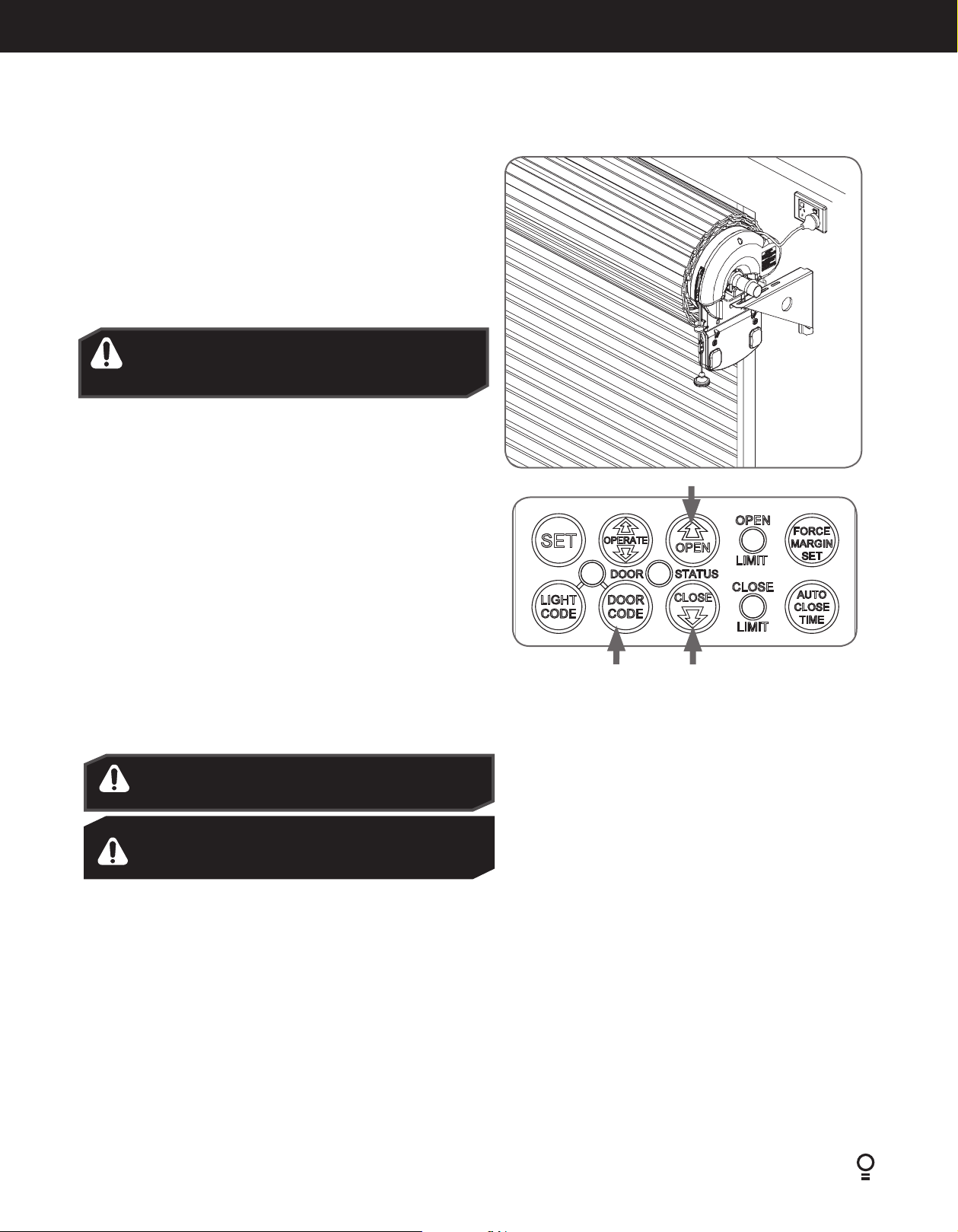
6.7. Setting the Travel Limits
6.7.1 Initial Preparation:
a. Move the door to the half way position.
b. Engage the opener by pulling down on the manual release string until
a click sounds (Fig.6.7.1).
c. Remove the clear button cover from the unit.
d. Switch power on to the opener. The red CLOSE LIMIT LED will be
flashing.
e. Press and hold the CLOSE button - the door should start closing.
NOTE: If the door opens, release the CLOSE button and press the OPERATE
button once to change the motor’s direction.
WARNING! In setting the close limit position, do not
force the door into the floor with excessive force, as
this can interfere with the ease of operation of the
manual release mechanism.
6.7.2 Set the Limit Positions:
The Limit Positions can vary due to site conditions, such as uneven ground.
When setting the Close limits, ensure the position is when the door makes
first contact with the ground. Alternatively for the Open limits the position
should be at the height of the garage opening.
© Copyright 2018
Fig.6.7.1
Pull string
down to
engage
opener
a. Press and hold CLOSE button until the door reaches your desired
close limit position. The rubber strip at the bottom of the door should
form a good seal with the ground.
b. Release the CLOSE button when the door is near the desired closed
position. Single presses of the CLOSE button will inch the door closer
to the ground.
c. If the door overshoots press the OPEN button to move the door in the
open direction.
d. When the door is at the desired close position, press the SET button,
the OPEN LIMIT LED will now flash.
e. Press and hold the OPEN button until the door reaches your desired
open limit position. Single presses of the OPEN button will inch the
door open.
f. If the door overshoots press the CLOSE button to move the door in
the close direction.
g. When the door is at the desired open position, press the SET button.
WARNING! The door will automatically close, open and
close again after the next step. Ensure that nothing is in
the door’s path.
AVERTISSEMENT! La porte va se fermer puis s’ouvrir
automatiquement, avant de se fermer. S’assurer que rien
ne bloque l’ouverture ou la fermeture de la porte.
h. The door will now automatically close and open to calculate the safety
obstruction settings.
6.7.3 Resetting the Door Limit Positions
Limit positions can be deleted by:
a. Press and hold CLOSE button for six (6) seconds until the CLOSE
LIMIT LED flashes quickly.
b. Release the CLOSE button.
NOTE: If no action is taken within 30 seconds, the opener will return to
normal operating mode and restore the original settings.
Fig.6.7.2
6.7.4 Setting the PET Mode position
When activated, PET mode drives the door to a preset position from the
close position, therefore allowing a pet or parcel to go under the door.
a. Drive and stop the door at the deisred PET mode open position
by pressing the transmitter button coded for Open/Stop/Close
operation.
b. Press and hold the OPEN button on the opener for six (6) seconds
until the OPEN and CLOSE LED’s are lit to record the new PET
position.
c. Release the OPEN button.
6.7.5 Reset all Factory Defaults
a. Turn power to the opener off.
b. Press and hold the SET Button.
c. Turn power on while holding the SETbutton. Continue to hold
until all LED’s are off.
d. This will NOT erase transmitter codes stored in memory.
c. Follow steps a - f in Set the Limits Poisitions to set new limit positions.
Dominator EasyRoller Instruction Manual
Diamond PD Power Drive : Instruction Manual
15
Page 16

6.8 Testing & Setting Safety Obstruction Force
6.8.1 Testing the Close Cycle
a. Press the OPERATE button to open the door (Fig.6.8.1).
b. Place an object approximately 1-1/2”(38mm) high (or a 2”x 4” board laid
flat) on the floor under center of garage door opening (Fig.6.8.2).
c. Press the OPERATE button to close the door.
d. When door contacts the object, the door must stop (within 2 seconds) and
reverse to open position.
If the door does not properly reverse.
• Check the “close” limit position. It should not have reached its “close” limit
before hitting board.
• If the door STOPS but does not reverse, decrease FORCE (refer to Section
6.8.4).
6.8.2 Testing the Open Cycle
a. Press the OPERATE button to close the door (Fig.6.8.1).
b. Press again to open the door. When the door is reaching half of the opening
distance, grab the bottom rail of the door firmly, the door should stop.
If the door does not stop when opening, the force may be excessive and need
adjusting, refer to Step 6.8.4.
IMPORTANT WARNING! If the door is closing and is unable
to re-open when obstructed, discontinue use. Do not use a
door with faulty obstruction sensing. Repair fault and re-test
before using.
AVERTISSEMENT IMPORTANT! Si la porte est en train de se
refermer et ne peut pas être rouverte, arrêtez de l’utiliser.
N’utilisez pas une porte dont les détecteurs d’obstacles sont
défectueux. Réparez-les et refaites un essai.
CAUTION: Take care when testing the safety
obstruction force. Excessive force may cause serious
personal injury and/or property damage can result
from failure to follow this warning.
ATTENTION: Testez la résistance aux obstacles avec
précaution. Une force excessive présente un risque
de blessure corporelle grave et/ou d’endommager le
matériel si vous ne respectez pas cet avertissement.
Fig.6.8.1
Fig.6.8.2
2”x 4” board
Adjusting Safety Obstruction Force
The safety obstruction force is calculated automatically and set in memory on the
operator. It is usually not necessary to adjust the safety obstruction force. The only
time the force may need to be increased is due to environmental conditions, for
example, windy or dusty areas, and areas with extreme temperature changes.
WARNING! Risk of entrapment. After adjusting either the
force or limits of travel, retest the door opener. The door
MUST reverses on contact with a 1-1/2-inch high object (or a
2 by 4 board laid flat) at the center of doorway on the floor.
AVERTISSEMENT! Risque de pincement. Après avoir réglé
la force ou les fins de course, refaites un essai du système
d’ouverture de porte. La porte doit OBLIGATOIREMENT
inverser sa course en cas de contact avec un objet de 25 à
40 mm (1-1/2’’) (ou une planche de 5 x 10 cm posée à plat) au
milieu du passage.
6.8.3 To Increase Force Pressure
a. Press and hold the FORCE MARGIN SET button (Fig 6.8.3).
b. While holding down the FORCE MARGIN SET button, press the Plus (+)
button. Each press increases the force margin.
c. The Open Limit LED will flash each time the plus button is pressed to
indicate an increase in force.
d. If the Open Limit LED flashes continuously when the plus button is being
pressed, this indicates that the maximum force pressure setting has been
reached.
e. Test the force again as per Section 6.5.1 and 6.5.2 above.
Fig.6.8.3
6.8.4 To Decrease Force Pressure
a. Press and hold the FORCE MARGIN SET button (Fig
6.8.3).
b. While holding down the FORCE MARGIN SET button,
press the Minus (-) Button. Each press decreases the force
margin. The Close Limit LED will flash each time the minus
button is pressed.
c. If the Close Limit LED flashes continuously when the minus
button is being pressed, this indicates that the minimum
force pressure setting has been reached.
d. Test the force again as per Step 6.8.1 and 6.8.2 above.
6.8.5 To Recall Factory Set Force
a. While holding down the FORCE MARGIN SET button,
press the SET button (Fig 6.8.2) for two seconds.
b. Release both buttons. The default setting should now be
recalled.
16
Dominator EasyRoller Instruction Manual
Page 17

6.9 Accessories
6.9.1 Terminal Block
A variety of wired accessory items can be connected to the terminal block J7
such as Safety Beam, Electric Key Switch and more (Fig. 6.9.1).
Terminal connections from top down are as follows:
1. V+ (+35V/+24V);
2. EB1 (Safety Beam input, mandatory);
3. 0V (0V for Safety Beam);
4. EB2 (Safety Beam input);
5. 0V (Common ground for accessories and Safety Beam);
6. OSC (Open/Stop/Close trigger)
7. AUX OUT (Auxiliary output trigger)
V+
EB1
OV
EB2
0V
OSC
AUX
© Copyright 2018
Fig.6.9.1
6.9.2 Installation of Wall Mounted Transmitter
Refer to the below warning before installing the wall transmitter (Fig 6.9.2).
To set the transmitter codes refer to Section 6.10.1.
IMPORTANT WARNING
LOCATE THE WALL MOUNTED REMOTE CONTROL:
(1) WITHIN SIGHT OF DOOR.
(2) AT MINIMUM HEIGHT OF 5 FEET ABOVE FLOORS,
LANDINGS, STEPS OR OTHER ADJACENT WALKING
SURFACE SO SHALL CHILDREN ARE NOT ABLE TO
REACH IT, AND
(3) AWAY FROM MOVING PARTS OF THE DOOR.
(4) PLACE THE ATTACHED ENTRAPMENT WARNING LABEL
ON WALL NEXT TO WALL MOUNTED TRANSMITTER.
USE AN ADDITIONAL MECHANICAL MEANS (PLATE,
BOARD, ETC.), WHICH CAN SECURE THE LABELS
TO SURFACES TO WHICH THE ADHESIVE WILL NOT
ADHERE.
(5) DO NOT REMOVE OR PAINT OVER THIS LABEL.
Fig.6.9.2
IMPORTANT
PLACEZ LA TÉLÉCOMMANDE MURALE:
(1) EN VUE DE LA PORTE.
(2) À UNE HAUTEUR D'AU MOINS 1,50M (5PIEDS) AU-
DESSUS DU SOL, DU PERRON, DES MARCHES, ETC.
AFIN QUE LES PETITS ENFANTS NE PUISSENT PAS
L'ATTEINDRE,
(3) ET À DISTANCE DES ÉLÉMENTS MOBILES DE LA PORTE.
(4) PLACEZ L'ÉTIQUETTE AVERTISSANT DU RISQUE
DE SE FAIRE PIÉGER SUR LE MUR À PROXIMITÉ DE
L'ÉMETTEUR. UTILISEZ UN SUPPORT PHYSIQUE
SUPPLÉMENTAIRE (PLAQUE, PANNEAU, ETC.)
PERMETTANT DE FIXER LES ÉTIQUETTES SI ELLES
N'ADHÈRENT PAS À LA SURFACE DU MUR.
(5) CETTE ÉTIQUETTE NE DOIT PAS ÊTRE RETIRÉE NI
PEINTE.
Dominator EasyRoller Instruction Manual
Diamond PD Power Drive : Instruction Manual
17
Page 18

6.10 Coding Transmitters
6.10.1 Setting Transmitters Codes
The opener can only operated from remote control transmitters that
have been programmed into its memory. Up to 64 codes can be stored
in the memory.
a. Press and hold the DOOR CODE button (Fig 6.10.1).
b. Press Button 1 on the transmitter for two seconds. Release and
pause for two seconds. Press the Button 1 again for two seconds.
c. Release the DOOR CODE button. The transmitter button is now
coded, press to test.
Function DOOR CODE
Button presses
Vacation Mode twice (2) Opener will beep 2 times on second press
Enable AUX Output three (3) Opener will beep 3 times on third press
PET (pedestrian) Mode four (4) Opener will beep 4 times on the fourth press
Courtesy Light Press & hold LIGHT CODE and code as per 6.6.1.
6.10.2 To Erase Programmed Codes
If the DOOR CODE button is pressed and held on for 6 seconds, the LED will
blink rapidly for one second to indicate that all programmed codes have been
erased (Fig 6.10.2).
OPENER
Press DOOR CODE
button once
Select one of the four
buttons that you wish
to use to control the
door
Fig.6.10.1
WARNING! The manufacturer is not responsible for any radio
or TV interference caused by unauthorized modifications to
this equipment. Such modifications could void the user’s
authority to operate the equipment.
AVERTISSEMENT! Le fabricant n’est pas responsable des
éventuelles interférences avec la réception de la radio ou de
la TV due à une modification de cet équipement effectuée
sans autorisation. De telles modifications peuvent invalider
le droit à utiliser l’équipement.
Fig.6.10.2
18
Dominator EasyRoller Instruction Manual
Page 19

© Copyright 2018
6.10 Coding Transmitters
TRANSMITTERS COMPLIANCE STATEMENT
TRANSMITTERS COMPLY WITH ALL UNITED STATES AND CANADIAN LEGAL REQUIREMENTS AS OF THE DATE OF
MANUFACTURE. TO COMPLY WITH FCC PART 15 AND OR RSS 210 OF INDUSTRY CANADA (IC) RULES, ADJUSTMENT OR
MODIFICATIONS OF THIS RECEIVER AND / OR TRANSMITTER ARE PROHIBITED, EXCEPT FOR CHANGING THE CODE
SETTING OR REPLACING THE BATTERY. THERE ARE NO OTHER USER SERVICEABLE PARTS. TESTED TO COMPLY WITH FCC
STANDARD FOR HOME OR OFFICE USE. OPERATION IS SUBJECT TO THE FOLLOWING TWO CONDITIONS:
(1) THIS DEVICE MAY NOT CAUSE HARMFUL INTERFERENCE, AND
(2) THIS DEVICE MUST ACCEPT ANY INTERFERENCE RECEIVED, INCLUDING INTERFERENCE THAT MAY CAUSE UNDESIRED
OPERATION.
NOTE: THIS EQUIPMENT HAS BEEN TESTED AND FOUND TO COMPLY WITH THE LIMITS FOR A CLASS B DIGITAL DEVICE,
PURSUANT TO PART 15 OF THE FCC RULES. THESE LIMITS ARE DESIGNED TO PROVIDE REASONABLE PROTECTION
AGAINST HARMFUL INTERFERENCE IN A RESIDENTIAL INSTALLATION. THIS EQUIPMENT GENERATES, USES AND CAN
RADIATE RADIO FREQUENCY ENERGY AND, IF NOT INSTALLED AND USED IN ACCORDANCE WITH THE INSTRUCTIONS,
MAY CAUSE HARMFUL INTERFERENCE TO RADIO COMMUNICATIONS. HOWEVER, THERE IS NO GUARANTEE THAT
INTERFERENCE WILL NOT OCCUR IN A PARTICULAR INSTALLATION. IF THIS EQUIPMENT DOES CAUSE HARMFUL
INTERFERENCE TO RADIO OR TELEVISION RECEPTION, WHICH CAN BE DETERMINED BY TURNING THE EQUIPMENT OFF
AND ON, THE USER IS ENCOURAGE TO TRY TO CORRECT THE INTERFERENCE BY ONE OR MORE OF THE FOLLOWING
MEASURES:
REORIENT OR RELOCATE THE RECEIVING ANTENNA
INCREASE THE SEPARATION BETWEEN THE EQUIPMENT AND RECEIVER
CONNECT THE EQUIPMENT INTO AN OUTLET ON A CIRCUIT DIFFERENT FROM THAT TO WHICH THE RECEIVER IS
CONNECTED. CONSULT YOUR LOCAL DEALER OR AN EXPERIENCED RADIO/TV TECHNICIAN FOR HELP.
DÉCLARATION DE CONFORMITÉ DE L'ÉMETTEUR
LES ÉMETTEURS SONT CONFORMES À TOUTES LES EXIGENCES LÉGALES DES ÉTATS-UNIS ET DU CANADA À LA DATE
DE FABRICATION. POUR RESPECTER LES DISPOSITIONS DE LA FCC (PARTIE15) ET/OU RSS201 D'INDUSTRY CANADA
(IC), LES RÉGLAGES OU MODIFICATIONS DE CE RÉCEPTEUR ET/OU ÉMETTEUR SONT INTERDITS, À L'EXCEPTION DU
CHANGEMENT DE CODE OU DU REMPLACEMENT DE LA BATTERIE. AUCUNE AUTRE PIÈCE NE PEUT ÊTRE RÉPARÉE PAR
L'UTILISATEUR. CONFORMITÉ À LA NORME FCC TESTÉE POUR UN USAGE DOMESTIQUE OU DE BUREAU. L'UTILISATION
EST SOUMISE AUX DEUX CONDITIONS SUIVANTES:
(1) CET APPAREIL NE DOIT PAS CAUSER D'INTERFÉRENCES;
(2) CET APPAREIL DOIT ACCEPTER TOUTE INTERFÉRENCE EXTÉRIEURE, Y COMPRIS CELLES QUI SONT SUSCEPTIBLES DE
PROVOQUER UN DYSFONCTIONNEMENT.
REMARQUE: CET ÉQUIPEMENT A ÉTÉ TESTÉ ET DÉCLARÉ CONFORME AUX LIMITATIONS APPLICABLES À UN APPAREIL
NUMÉRIQUE DE CLASSE B, CONFORMÉMENT AUX DISPOSITIONS DE LA PARTIE 15 DES RÈGLES DE LA FCC. CES
LIMITATIONS VISENT À ASSURER UNE PROTECTION SUFFISANTE CONTRE LES INTERFÉRENCES DANS UNE INSTALLATION
RÉSIDENTIELLE. CET ÉQUIPEMENT DÉGAGE, UTILISE ET PEUT DIFFUSER DES ONDES RADIO. S'IL N'EST PAS INSTALLÉ
ET UTILISÉ CONFORMÉMENT AUX INSTRUCTIONS, LES INTERFÉRENCES PEUVENT PERTURBER LES COMMUNICATIONS
RADIO. IL N'Y A TOUTEFOIS AUCUNE GARANTIE QUE DES INTERFÉRENCES NE SE PRODUIRONT PAS DANS UNE
INSTALLATION DONNÉE. SI CET ÉQUIPEMENT VIENT À CAUSER DES INTERFÉRENCES AVEC LA RÉCEPTION DE LA RADIO
OU DE LA TÉLÉVISION, CE QUI PEUT ÊTRE DÉTERMINÉ EN L'ÉTEIGNANT ET EN LE RALLUMANT, L'UTILISATEUR EST INVITÉ
À Y REMÉDIER EN PRENANT UNE OU PLUSIEURS DES MESURES SUIVANTES:
RÉORIENTER OU DÉPLACER L'ANTENNE DE RÉCEPTION;
ÉLOIGNER L'ÉQUIPEMENT DU RÉCEPTEUR;
BRANCHER L'ÉQUIPEMENT DANS UNE PRISE DE COURANT D'UN CIRCUIT ÉLECTRIQUE DIFFÉRENT.
LE CAS ÉCHÉANT, CONSULTEZ VOTRE REVENDEUR OU UN TECHNICIEN RADIO/TV EXPÉRIMENTÉ.
Dominator EasyRoller Instruction Manual
Diamond PD Power Drive : Instruction Manual
19
Page 20

6.11 Auto-Close
6.11.1 Safety Beams
A Safety Beam Kit may be fitted to this opener. When this option is fitted, the operation of this device is such that if an object (i.e car, child etc) blocks
the Infra-Red beam, then the garage door opener will not close the door automatically. If the Safety Beam is fitted but not operating correctly, then the
door once opened automatically, will not close automatically.
6.11.2 Auto Close Option
Auto-Close mode is a function that automatically closes the door a preset time after the Safety Beams recognise that a vehicle has left the garage. The
Auto-Close timer only starts after the Safety Beam’s path is broken. If the safety beam path is not broken, the door will remain open until the path is
broken. If the opener incurs a physical obstruction (i.e. not from the Safety Beams) while closing the door, it will re-open and not Auto-Close until the
Safety Beam’s path is broken again.
To enable the Auto-Close function:
a. Hold down the AUTO CLOSE TIME button.
b. While holding in the AUTO CLOSE TIME button, press the PLUS (+)
button - each press will add one second to the Auto-Close delay.
c. To decrease the delay time Hold down the AUTO CLOSE TIME button
and press the MINUS (-) button - each press will deduct one second
from the Auto-Close delay.
d. Press the Operate button or transmitter to open the door. When the
door is fully opened the Open Limit LED will flash to indicate that
Auto-Close mode is operational.
e. Break the Safety Beam’s path momentarily to initialise Auto-Close. When
the door reaches the fully opened position, the door will pause for the
set Auto-Close time and then close.
WARNING! It is compulsory to have Safety
Beams installed when using Auto-Close mode.
Fig.6.11.1
AVERTISSEMENT! Le faisceau de sécurité
doit être installé lorsque vous utilisez le mode
Auto-Close.
20
Dominator EasyRoller Instruction Manual
Page 21
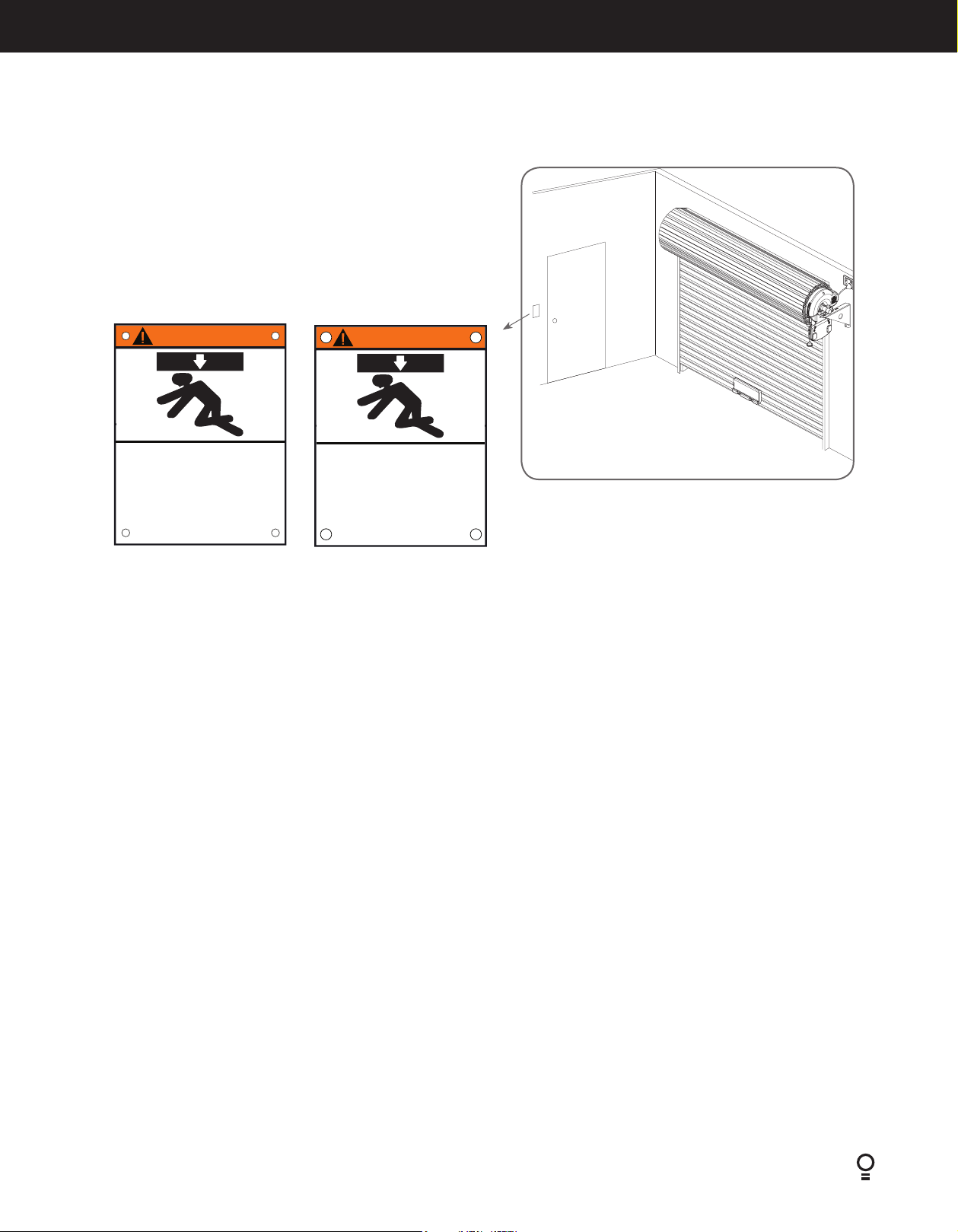
6.12 Attach Warning Labels
6.12.1 Placement of Warning labels
• Attach the entrapment warning label on the wall near the door control
with tacks or staples at a minimum hright of 5 feet above floors, landings,
steps or other adjacent walking surface so shall children are not able to
reach it.
• DO NOT REMOVE OR PAINT OVER THIS PLACARD.
• NE PAS ENLEVER CETTE ÉTIQUETTE NI LA COUVRIR DE
PANNEAU
© Copyright 2018
WARNING
Moving Door Can Cause
Serious Injury or Death
Keep Clear! Door May Move at any Time Without
Do Not Let Children Operate the Door or Play
Keep Door in Sight at all Times When Door is Moving
Prior Warning
in the Door Area
AVERTISSEMENT
La porte en mouvement peut
causer des blessures graves
Restez à l’écart de la porte. Celle-ci peut être active
Gardez la porte en vue en tout temps lorsqu’elle est
ou la mort
à n’importe quel moment sans avertissement.
Ne laissez pas les enfants manœuver la porte ou
jouer dans la zone de la porte
en mouvement
Fig.6.11.1
Dominator EasyRoller Instruction Manual
Diamond PD Power Drive : Instruction Manual
21
Page 22

7. Operation Instructions
IMPORTANT SAFETY INSTRUCTIONS
WARNING! TO REDUCE THE RISK OF SEVERE INJURY OR DEATH:
(1) READ AND FOLLOW ALL INSTALLATION INSTRUCTIONS.
(2) NEVER LET CHILDREN OPERATE OR PLAY WITH DOOR CONTROLS. KEEP THE REMOTE CONTROL AWAY FROM
CHILDREN.
(3) ALWAYS KEEP THE MOVING DOOR IN SIGHT AND AWAY FROM PEOPLE AND OBJECTS UNTIL IT IS COMPLETELY
CLOSED. NO ONE SHOULD CROSS THE PATH OF THE MOVING DOOR.
(4) NEVER GO UNDER A STOPPED, PARTIALLY OPEN DOOR.
(5) TEST DOOR OPENER MONTHLY. THE GARAGE DOOR MUST REVERSE ON CONTACT WITH A 1-1/2-INCH HIGH OBJECT
(OR A 2 BY 4 BOARD LAID FLAT) ON THE FLOOR. AFTER ADJUSTING EITHER THE FORCE OR THE LIMIT OF TRAVEL,
RETEST THE DOOR OPENER. FAILURE TO ADJUST THE OPENER PROPERLY INCREASES THE RISK OF SEVERE INJURY OR
DEATH.
(6) FOR PRODUCTS HAVING AN EMERGENCY RELEASE, WHEN POSSIBLE, USE THE EMERGENCY RELEASE ONLY WHEN
THE DOOR IS CLOSED. USE CAUTION WHEN USING THIS RELEASE WITH THE DOOR OPEN. WEAK OR BROKEN
SPRINGS ARE CAPABLE OF INCREASING THE RATE OF DOOR CLOSURE AND INCREASING THE RISK OF SEVERE INJURY
OR DEATH.
(7) KEEP GARAGE DOORS PROPERLY BALANCED. SEE OWNER’S MANUAL. AN IMPROPERLY BALANCED DOOR
INCREASES THE RISK OF SEVERE INJURY OR DEATH. HAVE A QUALIFIED SERVICE PERSON MAKE REPAIRS TO CABLES,
SPRING ASSEMBLIES, AND OTHER HARDWARE.
(8) SAVE THESE INSTRUCTIONS.
AVERTISSEMENT!
POUR RÉDUIRE LE RISQUE DE BLESSURES GRAVES, VOIRE DE MORT:
(1) LISEZ ATTENTIVEMENT TOUTES LES INSTRUCTIONS D’INSTALLATION.
(2) NE LAISSEZ JAMAIS LES ENFANTS UTILISER LES COMMANDES DE LA PORTE OU JOUER AVEC. LA TÉLÉCOMMANDE
DOIT RESTER HORS DE PORTÉE DES ENFANTS.
(3) GARDEZ TOUJOURS LA PORTE EN MOUVEMENT DANS VOTRE LIGNE DE VISION, ET VEILLEZ À CE QU’ELLE RESTE
ENTIÈREMENT DÉGAGÉE JUSQU’À SA FERMETURE COMPLÈTE. PERSONNE NE DOIT SE TENIR DANS LE PASSAGE
PENDANT QUE LA PORTE EST EN MOUVEMENT.
(4) NE STATIONNEZ JAMAIS SOUS UNE PORTE PARTIELLEMENT OUVERTE.
(5) TESTEZ LE DISPOSITIF D’OUVERTURE UNE FOIS PAR MOIS. LA PORTE DOIT OBLIGATOIREMENT INVERSER SA COURSE
EN CAS DE CONTACT AVEC UN OBJET DE 25 À 40MM (1-1/2’’) (OU UNE PLANCHE DE 5X10 CM [2X4’’]POSÉE À PLAT)
AU MILIEU DU PASSAGE. APRÈS AVOIR RÉGLÉ LA FORCE OU LA LIMITE DE COURSE, REFAITES UN ESSAI DU SYSTÈME
D’OUVERTURE DE PORTE. LE DISPOSITIF D’OUVERTURE DOIT ÊTRE BIEN RÉGLÉ AFIN DE RÉDUIRE LE RISQUE DE
BLESSURES GRAVES, VOIRE DE MORT.
(6) DANS LE CAS DES PRODUITS ÉQUIPÉS D’UN DÉBLOCAGE D’URGENCE, UTILISEZ-LE DANS LA MESURE DU POSSIBLE
UNIQUEMENT QUAND LA PORTE EST FERMÉE. SOYEZ PRUDENT SI VOUS ACTIONNEZ CE DISPOSITIF DE DÉBLOCAGE
ALORS QUE LA PORTE EST OUVERTE. DES RESSORTS FAIBLES OU CASSÉS RISQUENT D’ACCÉLÉRER LA FERMETURE DE
LA PORTE ET DE CAUSER DES BLESSURES GRAVES, VOIRE DE PRÉSENTER UN DANGER DE MORT.
(7) LES PORTES DE GARAGE DOIVENT TOUJOURS ÊTRE CORRECTEMENT ÉQUILIBRÉES. REPORTEZ-VOUS AU
MANUEL. UNE PORTE MAL ÉQUILIBRÉE PRÉSENTE UN DANGER DE BLESSURES GRAVES, VOIRE DE MORT. LES
RÉPARATIONS DES CÂBLES, DES ASSEMBLAGES À RESSORT ET AUTRES ÉLÉMENTS MATÉRIELS DOIVENT ÊTRE
EFFECTUÉES PAR UN TECHNICIEN QUALIFIÉ.
(8) CONSERVEZ CES INSTRUCTIONS EN LIEU SÛR.
22
Dominator EasyRoller Instruction Manual
Page 23

7.1 How to Use Your Operator
For maximum efficiency of your operator, your garage door must be
in good operating condition.
An annual service of your garage door by door professional is
recommended.
© Copyright 2018
CAUTION: Activate the operator only when the door is
in full view, free of obstructions and with the operator
properly adjusted. No one should enter or leave the
garage while the door is in motion. Do not allow children
to play near the door.
ATTENTION: Activez le dispositif de commande
uniquement lorsque la porte est en pleine vue, dégagée
et avec le dispositif correctement réglé. Personne ne
doit entrer ou sortir du garage pendant que la porte est
en mouvement. Ne pas laisser les enfants jouer près de
la porte.
7.1.1 To Operate the opener:
a. Press the programmed transmitter button until your door begins to move
(usually 2 seconds). Make sure you can see the door when you use the
transmitter (Fig 7.1.1).
b. If you are in a vehicle you should aim the transmitter through your
windscreen as shown.
c. Check that the door is fully open or closed before you drive in or away.
d. If you press the transmitter whilst the door is moving the door will stop.
The next press of the transmitter will move the door in the opposite
direction.
7.1.2 Replacing the Battery: 3V Lithium Battery CR2032.
a. To test the battery is working, press and hold a transmitter button. Check
Light Status table to determine if battery needs replacing
Light Status Battery Status
Solid OK
Flashing Requires replacement
No light Requires replacement
b. Remove screw from back of cover.
c. Use screw driver to separate the transmitter casing to expose circuit
board.
d. Use a non-metallic object (e.g. pen) to remove the battery.
(Fig. 7.1.2).
WARNING! This operator has a grounding type plug and
there are no user serviceable parts inside this operator.
AVERTISSEMENT! Ce dispositif de commande est
pourvu d’une broche de mise à la terre et ne comporte
aucune pièce réparable par l’utilisateur.
Fig.7.1.1
Fig.7.1.2
REPLACE WITH BATTERY CR2032
Dominator EasyRoller Instruction Manual
Diamond PD Power Drive : Instruction Manual
23
Page 24

7.2 User Operating Controls
Button Function
1. OPERATE Opens/stops/closes the door
2. CODING LED (Red) Flashes when a code is being stored or when the transmitter button is pressed
3. LIGHT CODE (White) Is used for storing or erasing the transmitter button (code) you wish to use to switch the courtesy light on
the opener on or off.
4. DOOR CODE (Blue) Is used for storing or erasing transmitter buttons for door operation
5. OPEN LED (Green) Illuminates and flashes as the door opens and remains on when the open limit position has been reached.
6. DOOR STATUS LED (Yellow) Illuminates when Service is due.
7. CLOSE LED (Red) Illuminates and flashes as the door opens closes, and remains on when the close limit position has been
reached.
01
05
02
06
03
04
07
7.3. Door Status Indicators
Door Status Indicators
Open On
Close On
Opening Flashing
Closing Flashing
Door travel stopped Flashing Flashing
Door obstructed when opening Flashing Beeps while door is moving
OPEN LED (green) CLOSE LED (red) Beeper
Door obstructed when closing Flashing Beeps while door is moving
Opener overloaded Alternating flashes Alternating flashes
Door in open position with
Auto-Close mode selected
Mains power interrupted Rapid flashes
24
Dominator EasyRoller Instruction Manual
One second flashes
Page 25

8. User Maintenance Instruction
© Copyright 2018
WARNING! Run the Safety Testing procedures
MONTHLY in Section 6.8 to ensure garage door is
fit for use.
AVERTISSEMENT! Appliquez les procédures de
test de la section 6.8 UNE FOIS PAR MOIS pour
vous assurer que la porte est en état de marche.
8.1 Door Maintenance
A poorly maintained door could cause fatal / serious injuries or damage
to property.
a. Frequently examine the door, particularly the cables, springs and
mountings for signs of wear, damage or imbalance. DO NOT USE
if repair or adjustment is needed since a fault in the installation or
an incorrectly balanced door may cause injury.
b. Fasteners: Check all screws, nuts and bolts to ensure they are
secure.
c. Spring Tension: It is natural for springs to lose tension. Should the
door become hard to operate or completely inoperative, contact a
door professional.
d. Guide Tracks: Clean the internal sections of the guide tracks every
3 - 6 months with a cloth dampened with mineral turps or
methylated spirits.
8.2 If You Need a Service Call
If the opener needs a service please call the dealer who installed the garage
door opener (their contact details are usually on a sticker on the back of your
garage door).
BEFORE CALLING you should have the following information to assist in
providing the appropriate service:
CAUTION: Frequently examine the installation, in particular
cables, springs and mountings, for signs of wear, damage or
imbalance. DO NOT USE if repair or adjustment is needed
since a fault in the installation or an incorrectly balanced
door may cause injury.
Adjustments should only be carried out by experienced
persons, as this function can be dangerous if not performed
under strict safety procedures.
ATTENTION: Examinez fréquemment l’installation, en
particulier les câbles, les ressorts et les supports, afin de
déceler les éventuels signes d’usure, de dommage ou de
déséquilibre. NE PAS utiliser si la réparation ou un réglage
est nécessaire, car un défaut dans l’installation ou une
porte mal équilibrée peut causer des blessures.
Les réglages ajustements ne doivent être effectués que par
des techniciens expérimentés, car cette fonction peut être
dangereuse si elle n’est pas effectuée dans le strict respect
des procédures de sécurité.
WARNING! Failure to maintain your garage door may void
the warranty on your garage door operator.
AVERTISSEMENT! L’absence d’entretien votre porte
de garage peut annuler la garantie de votre dispositif
d’ouverture.
1. Has anything happened since the opener last operated OK, e.g. a
storm, a jolt to the door etc.?
2. What is the current light status on the opener?
3. Manually disengage the door (Section 5).
How easy is it to manually open and close the door?
4. What model is the opener? (Model no. information is located at the rear
of the opener)
5. Who installed the opener? (Dealer details should be on a sticker on the
back of your garage door)
6. When was it installed? (If known)
Dominator EasyRoller Instruction Manual
25
Diamond PD Power Drive : Instruction Manual
Page 26

9. Troubleshooting
Symptom Possible cause Remedy
The opener does not work
from the transmitter
One transmitter works but
the other/s do not
Motor is running but chain is
not moving
The transmitter range varies
or is restricted
Garage door in poor condition e.g. springs
may be broken
The opener does not have power
The battery in the transmitter is flat
Transmitter does not contain
TrioCode
The opener has been put into “Vacation
Mode”
The transmitter button is not programmed to
operate the door.
Door Code LED is flashing yet the opener is
not working.
Faulty transmitter
Flat battery
Damage motor assembly Contact your dealer for support.
Variations are normal depending on
conditions e.g. temperature or external
interference
The battery life is exhausted
Position of the transmitter in the motor
vehicle
TM
128 Technology
Check the door’s operation
Plug a device of similar voltage (e.g. a hairdryer) into the power
point and check that it is OK
Replace the battery
Check that the transmitter has grey buttons and the model
number on the back displays V2. Contact dealer for support if
otherwise.
Turn off “Vacation Mode”
(Section 11.4)
Code in the transmitter
Ensure the correct button on the transmitter is being pressed.
Replace transmitter
Replace battery
Make sure you can see the door when you use the transmitter.
Check the battery status by pressing a button (flashing or no light
requires battery to be changed)
Aim the transmitter through the windscreen.
The Courtesy light does not
work
The door reverses for no
apparent reason
Auto Close not working Safety Beam or wiring faulty Repair Safety Beam or replace wiring.
The door stops or moves
very slowly under battery
(Optional Battery Back Up
Accessory)
The SERVICE LED has
started to flash and is
beeping numerous times
The Open (Green) LED and
Close (Red) LED are flashing
alternatively
The Open (Green) LED
continues to flash
The Close (Red) LED
continues to flash
26
Dominator EasyRoller Instruction Manual
LED has failed Change LED.
This may occur occasionally from
environmental conditions such as areas that
are windy, dusty or have extreme temperature
changes.
If Safety beams are installed they may be
partially obstructed.
The batteries may have little OR no charge Connect mains power and leave the batteries to charge. The
A Fault has been detected. The fault will
be active each time an attempt is made to
operate the door.
Opener is overloaded Check the doors operation by disengaging the motor and
Door obstructed when opening Clear away any obstructions and test door opens correctly. (If door
Door obstructed when closing
Limits may be cleared
Ensure the door runs smoothly before increasing the force
pressure.
Ensure the beam path is not obstructed. Check the Alignment.
Re-align optics. See Safety Beam instructions.
batteries may take 24 to 48 hours to reach their maximum charge
capacity.
Record opener function (How many beeps?) then press the SET
button once to reset the opener. If the fault continues to be
tripped contact your dealer for support.
ensuring the door runs smoothly. If necessary make door
adjustments or contact your door professional.
is damaged, contact your door professionl).
Clear away any obstructions and test door closes correctly. (If door
is damaged, contact your door professional).
Remove all power sources (including the battery backup). Wait till
all lights are out (10-15 secs), then reconnect power. If Red LED is
flashing, limits are not set. Reset Limits.
Page 27

© Copyright 2018
10. Customer Agreement & Warranty
PLEASE READ THIS AGREEMENT CAREFULLY TO ENSURE THAT YOU UNDERSTAND EACH PROVISION. THIS AGREEMENT REQUIRES THE USE OF
ARBITRATION ON AN INDIVIDUAL BASIS TO RESOLVE DISPUTES, RATHER THAN JURY TRIALS OR CLASS ACTIONS, AND ALSO LIMITS THE REMEDIES
AVAILABLE TO YOU IN THE EVENT OF A DISPUTE.
This Agreement, the product manual, Limited Warranty terms below, terms and conditions, and terms of service for garage door opener products, features, and
applications (“Products”) not otherwise described herein that are posted on applicable ATA websites or devices, and any documents expressly referred to herein or
therein, make up the complete agreement between you and ATA and supersede any and all prior agreements and understandings related to the subject matter of this
Agreement.
WARRANTY PERIOD
MOTOR & PARTS 5 years / 10,000 cycles
which ever occurs first
ACCESSORIES
(
e.g Safety Beams)
CONSUMABLES
(e.g Batteries in remote control
transmitters and light bulbs and fuses)
This Warranty is to be read in conjuction with the owner’s copy of the installation instruction
manual.
LIMITED WARRANTY
1. The product will operate properly providing you comply with the
instructions concerning installation, operation, and maintenance and
testing. Failure to act in accordance with those instructions may void all or
part of this limited warranty.
2. The warranty periods for different parts of this product are set out in the
table above. If during the relevant warranty period, this product appears
to contain a defect in a component covered by this limited warranty, call
your Retailer, who will advise you how to disassemble it and to send in
a suitably secured packaging, pre-paid and insured, to a service center.
Please include a brief description of the problem and a dated proof-ofpurchase receipt.
3. If ATA confirms the product is defective and covered by this limited
warranty, ATA will be repair or replace it (at ATA’s sole option) and return
it to you, at no cost to you. Defective parts will be repaired or replaced
with new or factory-rebuilt parts at ATAs sole option. (You are responsible
for any costs incurred in removing and/or reinstalling the product or any
component).
4. THIS WARRANTY EXCLUDES DAMAGE RESULTING FROM:
(A) NORMAL WEAR AND TEAR;
(B) ACCIDENTAL DELIBERATE OR NEGLIGENT DAMAGE OR DAMAGE
CAUSE BY INSECTS;
(C) BLOWN FUSES, ELECTRICAL SURGES, POWER SURGES OR POWER
SPIKES;
(D) THEFT, FIRE, FLOOD, RAIN, WATER, LIGHTNING, STORMS OR ANY
OTHER ACTS OF GOD;
(E) ANY INSTALLATION, CONFIGURATION OR USE OF THE PRODUCT
CONTRARY TO THE INSTRUCTIONS SUPPLIED WITH THE
PRODUCT;
(F) MAXIMUM CONTINUOUS OPERATING TIME EXCEEDING 1
MINUTE IN 10;
(G) THE OPERATING FORCE EXCEEDING 33LBS (150 NEWTON) WHEN
MOVING THE DOOR MANUALLY TO THE OPEN OR CLOSED
POSITION (THE DOOR THAT THE PRODUCT IS USED WITH SHOULD
BE BALANCED IN SUCH A WAY THAT THE USER IS ABLE TO OPEN
OR CLOSE THE DOOR MANUALLY USING A FORCE NOT GREATER
THAN 150 NEWTON (33 LBS), OTHER THAN TO INITIALLY CAUSE
THE DOOR TO START MOVING, WHICH MAY REQUIRE FORCE IN
EXCESS OF THAT SPECIFIED IN THIS PARAGRAPH) ;
(H) DOOR SURFACE AREA AND/OR WEIGHT EXCEEDING 92FT2 AND
595LBS RESPECTIVELY;
(I) THE DOOR USED WITH THE PRODUCT NOT BEING IN SAFE
WORKING ORDER AND CONDITION;
(j) REPAIRS WHICH ARE NOT AUTHORIZED BY ATA;
(K) ANY UNAUTHORIZED MODIFICATION TO THE PRODUCT OR
ACTS OR OMISSIONS OF ANY PERSON (INCLUDING SERVICE
PROVIDERS APPROVED BY ATA) OTHER THAN ATA;
(L) FAULTY OR UNSUITABLE WIRING IN THE BUILDING IN WHICH THE
PRODUCT IS INSTALLED;
(M) ANY COST OR EXPENSE RELATING TO THE RECALL OF THE
PRODUCT;
(N) INSTALLATION OF A RESIDENTIAL GARAGE DOOR OPENER IN
A COMMERCIAL OR INDUSTRIAL PREMISES OR IN A DWELLING
1 Year
Not covered
TERMS RELATING TO THE USE AND LIMITATIONS OF SERVICE
1. WHAT ARE THE LIMITATIONS ON SERVICE AND LIABILITY?
2. INTELLECTUAL PROPERTY.
OTHER THAN A SINGLE-FAMILY DWELLING;
(O) RADIO OR ELECTRICAL INTERFERENCE; OR LACK OF AVAILABILITY
OR
(I) DOOR SURFACE AREA AND/OR WEIGHT EXCEEDING 92FT
AND 595LBS RESPECTIVELY;
(II) THE DOOR USED WITH THE PRODUCT NOT BEING IN SAFE
5. This Warranty is not transferable.
6. No additional warranty will apply for Products repaired during the relevant
7. For all Products repaired outside the warranty period charges may apply
8. Where the Product is sold by any person other than ATA, except for the
9. LIMITATION ON LIABILITY AND DAMAGES EXCLUSION - EXCEPT
10. ANY IMPLIED WARRANTIES THAT MAY BE IMPOSED BY LAW
Unless prohibited by law, the following limitations of liability apply. Service may
be interrupted, delayed, or otherwise limited for a variety of reasons, including
environmental conditions, unavailability of radio frequency channels, system
capacity, priority access by National Security and Emergency Preparedness
personnel in the event of a disaster or emergency, coordination with other
systems, equipment modifications and repairs, and problems with the facilities
of interconnecting carriers.
Additional hardware, software, subscription, credit or debit card, Internet
access from your compatible PC and/or special network connection may
be required and you are solely responsible for arranging for or obtaining all
such requirements. Some solutions may require third party products and/or
services, which are subject to any applicable third party terms and conditions
and may require separate purchase from and/or agreement with the third
party provider. ATA is not responsible for any consequential damages caused
in any way by the preceding hardware, software or other items/requirements
for which you are responsible.
Not all Services are available for purchase or use in all sales channels, in all
areas or with all devices. ATA is not responsible for loss or disclosure of any
sensitive information you transmit. ATA is not responsible for nonproprietary
services or their effects on devices.
You must respect the intellectual property rights of ATA, our third-party content providers,
WORKING ORDER AND CONDITION
warranty period.
and a six (6) month warranty that the Product will be free of any defects in
material and workmanship will apply from the date of return of the Product
to you.
warranty set out above, such person has no authority from ATA to give any
warranty or guarantee on ATA’s behalf in addition to the warranty set out
above.
AS EXPRESSLY PROVIDED IN THIS LIMITED WARRANTY AND THE
USER TERMS, ATA MAKES NO REPRESENTATIONS, GUARANTEES,
CONDITIONS OR WARRANTIES, EITHER EXPRESS OR IMPLIED.
ANY OTHER STANDARDS OF PERFORMANCE, GUARANTEES,
CONDITIONS AND WARRANTIES ARE HEREBY EXPRESSLY
EXCLUDED AND DISCLAIMED TO THE FULLEST EXTENT PERMITTED
BY LAW. THIS DISCLAIMER AND EXCLUSION SHALL APPLY EVEN
IF THE EXPRESS LIMITED WARRANTY CONTAINED IN THE LIMITED
WARRANTY AND USER TERMS FAILS OF ITS ESSENTIAL PURPOSE.
SHALL BE LIMITED TO THE DURATION OF THE LIMITED WARRANTY
ABOVE. OTHERWISE THE REPAIR, REPLACEMENT, OR REFUND AS
PROVIDED UNDER SUCH EXPRESS LIMITED WARRANTY IS PROVIDED
IN LIEU OF ALL OTHER WARRANTIES, EXPRESS OR IMPLIED. TO THE
FULLEST EXTENT THESE DAMAGES MAY BE DISCLAIMED BY LAW,
ATA WILL IN NO EVENT BE LIABLE, WHETHER IN CONTRACT OR TORT
OR ANY OTHER LEGAL THEORY, INCLUDING WITHOUT LIMITATION
STRICT LIABILITY, GROSS NEGLIGENCE OR NEGLIGENCE, FOR ANY
DAMAGES IN EXCESS OF THE PURCHASE PRICE OF THE PRODUCT OR
FOR ANY DIRECT, INDIRECT, INCIDENTAL, SPECIAL, CONSEQUENTIAL
OR PUNITIVE DAMAGES OF ANY KIND REGARDLESS OF WHETHER
ATA WAS ADVISED OR THE POSSIBILITIES OF SUCH DAMAGES. ATA
IS NOT LIABLE FOR ANY CLAIM MADE BY A THIRD PARTY OR MADE
BY YOU FOR A THIRD PARTY.
Dominator EasyRoller Instruction Manual
Diamond PD Power Drive : Instruction Manual
2
27
Page 28

and any other owner of intellectual property whose protected property may appear
on any website and/or dialogue box controlled by ATA or accessed through the ATA’s
websites. Except for material in the public domain, all material displayed in association
with the Product is protected by copyright or trademarks. Except for personal, noncommercial use, this material may not be copied, downloaded, redistributed, modified
or otherwise exploited, in whole or in part, without the permission of the owner. The
ATA trademarks and logos are the exclusive property of ATA.
3. SEVERABILITY
If any provision of this Agreement is found to be unenforceable by a court or
agency of competent jurisdiction, the remaining provisions will remain in full
force and effect. The foregoing does not apply to the prohibition against class
or representative actions that is part of the arbitration clause; if that prohibition
is found to be unenforceable, the arbitration clause (but only the arbitration
clause) shall be null and void.
4. GOVERNING LAW
In the event of a dispute between you and ATA, Texas law, whether in
litigation or arbitration, shall govern that dispute and the interpretation of this
Agreement, except to the extent that such law is preempted by or inconsistent
with applicable federal law.
5. LANGUAGE
The original version of this Agreement is in the English language. Any
discrepancy or conflicts between the English version and any other language
version will be resolved with reference to and by interpreting the English
version.
HOW DO I RESOLVE DISPUTES WITH ATA?
1. DISPUTE RESOLUTION BY BINDING ARBITRATION
PLEASE READ THIS CAREFULLY. IT AFFECTS YOUR RIGHTS.
Most customer concerns can be resolved quickly and to the customer’s
satisfaction by calling our customer service department at (817)-873-5076. In
the unlikely event that ATA’s customer service department is unable to resolve
a complaint you may have to your satisfaction (or if ATA has not been able to
resolve a dispute it has with you after attempting to do so informally), we each
agree to resolve these disputes through binding arbitration or small claims
court instead of courts of general jurisdiction. Arbitration is more informal
than a lawsuit in court. Arbitration uses a neutral arbitrator instead of a judge
or jury, allows for more limited discovery than in court, and is subject to very
limited review by courts. Arbitrators can award the same damages and relief
that a court can award. Any arbitration under this Agreement will take place
on an individual basis; class arbitrations and class actions are not permitted.
2. ARBITRATION AGREEMENT
1. You and ATA agree to arbitrate all disputes and claims between us. This
agreement to arbitrate is intended to be broadly interpreted. It includes,
but is not limited to:
•claims arising out of or relating to any aspect of the relationship between
us, whether based in contract, tort, statute, fraud, misrepresentation or
any other legal theory; and
•claims that may arise after the termination of this Agreement.
References to “ATA,” “you,” and “us” include our respective subsidiaries,
affiliates, agents, employees, predecessors in interest, successors and
assigns, as well as all authorized or unauthorized users or beneficiaries
of services or Products under this or prior Agreements between us. This
arbitration agreement does not preclude you from bringing issues to the
attention of federal, state, or local agencies. You agree that, by entering
into this Agreement, you and ATA are each waiving the right to a trial by
jury or to participate in a class action. Notwithstanding the foregoing,
either party may bring an individual action in small claims court.] This
Agreement evidences a transaction in interstate commerce, and the
Federal Arbitration Act governs the interpretation and enforcement of
this provision. This arbitration agreement shall survive termination of this
Agreement.
2. A party who intends to seek arbitration must first send to the other, by
certified mail, a written Notice of Dispute (“Notice”). The Notice to ATA
should be addressed to: Office for Dispute Resolution, ATA,Vineyard
Centre II, 1452 Hughes Road, Grapevine, Texas 76051 (“Notice Address”).
The Notice must: (a) describe the nature and basis of the claim or dispute;
and (b) set forth the specific relief sought (“Demand”). If ATA and you do
not reach an agreement to resolve the claim within 30 days after the Notice
is received, you or ATA may commence an arbitration proceeding. During
the arbitration, the amount of any settlement offer made by ATA or you
shall not be disclosed to the arbitrator until after the arbitrator determines
the amount, if any, to which you or ATA is entitled. You may download or
copy a form Notice and a form to initiate arbitration at www.ata-america.
com.
3. The arbitration will be governed by the Commercial Arbitration Rules
and the Supplementary Procedures for Consumer Related Disputes
(collectively, “AAA Rules”) of the American Arbitration Association
(“AAA”), as modified by this Agreement, and will be administered by the
AAA. The AAA Rules are available online at adr.org, by calling the AAA
28
Dominator EasyRoller Instruction Manual
at 1-800-778-7879, or by writing to the Notice Address. (You may obtain
information that is designed for non-lawyers about the arbitration process
at att.com/arbitration-information.) The arbitrator is bound by the terms of
this Agreement. All issues are for the arbitrator to decide, except that issues
relating to the scope and enforceability of the arbitration provision are for
the court to decide. Unless ATA and you agree otherwise, any arbitration
hearings will take place in Texas]. If your claim is for $10,000 or less, we agree
that you may choose whether the arbitration will be conducted solely on the
basis of documents submitted to the arbitrator, through a telephonic hearing,
or by an in-person hearing as established by the AAA Rules.
4. The arbitrator may award declaratory or injunctive relief only in favor of the
individual party seeking relief and only to the extent necessary to provide
relief warranted by that party’s individual claim. YOU AND ATA AGREE THAT
EACH MAY BRING CLAIMS AGAINST THE OTHER ONLY IN YOUR OR ITS
INDIVIDUAL CAPACITY, AND NOT AS A PLAINTIFF OR CLASS MEMBER
IN ANY PURPORTED CLASS OR REPRESENTATIVE PROCEEDING. Further,
unless both you and ATA agree otherwise, the arbitrator may not consolidate
more than one person’s claims, and may not otherwise preside over any form
of a representative or class proceeding. If this specific provision is found to
be unenforceable, then the entirety of this arbitration provision shall be null
and void.
TERMS AND CONDITIONS OF USE FOR CONTROL KIT BUNDLE
(OPTIONAL)
Your use of the Control Kit is conditional on your acceptance and compliance
with the terms, conditions, notices and disclaimers contained in, or referred to
in, this document (the Terms) and the User Manual. By using the Control Kit, you
agree to accept and be bound by the Terms. If you do not agree to the Terms,
you have a right to return the Control Kit, unused and in the same conditions as
which you bought it, within 14 days of purchase and seek a refund.
1. General
(a) Automatic Technology (Australia) Pty Ltd (Automatic Technology) is the
provider of the Smart Hub (Smart Hub), products that are supplied by
Automatic Technology and which are compatible with the Smart Hub
(Compatible Products) and smartphone apps that are compatible with the
Smart Hub (Compatible Apps), including the Control-A-Door App.
(b) The Terms govern the relationship between you and Automatic
Technology regarding your use of the Smart Hub, Compatible Products
and Compatible Apps (collectively, the Control Kit). A link or copy of the
Terms was provided to you at the time you purchased and/or downloaded
components of the Control Kit.
(c) In order to operate, the Smart Hub requires a connection with one or more
Compatible Products, which are available for purchase separately. The
Smart Hub and any Compatible Products must be installed in accordance
with the applicable installation instructions for those devices. The Smart
Hub may also be connected to the Compatible Apps, which are available
for download from the Apple iTunes or App Store and the Google Play
Store.
(d) The services provided by the Control Kit (Services) are the control,
monitoring and operation of Compatible Products. Automatic Technology
reserves the right to modify the Services at any time.
(e) In order to use the Services, you must create a user account using a
Compatible App and register your Compatible App with the Smart Hub
(together, your Account).
(f) You may only use the Control Kit, the Services and/or your Account
(collectively, the Control Kit Bundle) for the purposes permitted by the
Terms (Authorized Purpose).
(g) You are only authorized to use the Control Kit Bundle to register, install,
access or operate a Smart Hub in the United States and Canada.
2. Use of the Control Kit Bundle
(a) You must:
(i) comply with all applicable laws when using the Control Kit Bundle
and must not use the Control Kit Bundle to engage in any illegal
conduct or activity;
(ii) not rent, lease, sell, trade, gift, bequeath or otherwise transfer an
Account to anyone (unless you are the administration user for an
Account and are setting up another user on that Account);
(iii) not access or use an Account which has been rented, leased, sold,
traded, gifted, bequeathed, or otherwise transferred from the
Account creator (except where an Account administration user is
setting you up to be a user on that Account); and / or
(iv) comply with all warnings, cautions and instructions Automatic
Technology publishes relating to the Control Kit Bundle. You should
consult the Automatic Technology website regularly to access any
updated information that Automatic Technology may publish from
time to time.
(b) Automatic Technology, its related corporate entities and their respective
directors, officers and employees shall not be responsible for any
Page 29

© Copyright 2018
eventualities arising from any failure to comply with the requirements in
paragraph (a) above.
(c) You are solely responsible for any data or network charges incurred
using the Control Kit Bundle.
(d) You must comply with any applicable third party terms of agreement
which are displayed to you, or otherwise brought to your attention, in
the course of downloading or registering to use any part of the Control
Kit Bundle.
3. Security of the Control Kit
(a) You are responsible for maintaining the security of your login password,
and must not disclose your password to any other person, or otherwise
allow any other person to access your Account.
(b) You must protect the Control Kit Bundle and any personal information
stored on the Control Kit Bundle from misuse, interference and loss as
well as unauthorized access, modification or disclosure.
(C) WHILE AUTOMATIC TECHNOLOGY HAS USED REASONABLE
EFFORTS TO ENSURE THE CONTROL KIT BUNDLE IS SECURE,
AUTOMATIC TECHNOLOGY AND ITS RELATED CORPORATE
ENTITIES MAKE NO REPRESENTATIONS AND, TO THE MAXIMUM
EXTENT PERMITTED BY LAW, EXCLUDE ALL WARRANTIES AS TO
THE SECURITY OF THE CONTROL KIT BUNDLE FROM ANY THIRD
PARTY INTERFERENCE AND TAKE NO RESPONSIBILITY FOR ANY
ERROR, OMISSION OR DEFECT IN SUCH SECURITY.
(d) In the event you become aware of or suspect any breach of security,
including without limitation any loss, theft or unauthorized disclosure of
your password, you must immediately notify Automatic Technology and
modify your password.
4. License to use the Smart Hub
Automatic Technology grants to you a revocable, non-exclusive, nontransferable license to use the Control Kit Bundle provided that you agree
to comply with the following license conditions:
(a) you will only use the Control Kit Bundle in a manner which is permitted
by:
(i) the Terms;
(ii) in the case of a Compatible App downloaded and used on an
iPhone, iPad or similar such Apple device, the Apple iTunes Store
Terms and Conditions provided at http://www.apple.com/legal/
internet-services/itunes/au/terms.html; and
(iii) in the case of a Compatible App downloaded and used on an
Android phone, the Google Play Store Terms of Service provided
at https://play.google.com/intl/en_au/about/play-terms.html;
(b) you will not:
(i) use exploits, automation software, hacks or any software designed
to modify, disrupt, overburden or interfere with use and enjoyment
of the Control Kit Bundle;
(ii) institute, assist or become involved in any type of attack, including
without limitation distribution of a virus or denial of service attacks
using the Control Kit Bundle;
(iii) attempt to gain unauthorised access to Control Kit Bundles
registered to others or to servers or networks connected to the
Control Kit Bundles by any means other than the user interface
provided by Automatic Technology;
(iv) use any unauthorised third party software that accesses, intercepts
or otherwise collects information from or through the Control
Kit Bundle or that is in transit from or to the components of the
Control Kit Bundles, including any software that reads areas of
random access memory (RAM) or streams of network traffic used
by the Control Kit Bundle;
(v) use, facilitate, create, or maintain any unauthorised connection
to the Control Kit Bundle, including any connection to any
unauthorised server that emulates the Control Kit Bundle, or any
connection which uses programs, tools, or software not expressly
approved by Automatic Technology;
(vi) reverse engineer, decompile, disassemble, decipher or otherwise
attempt to derive the source code for any software or other
intellectual property used to provide the Control Kit Bundle;
(vii) copy, modify or distribute rights or content from the Control Kit
Bundle; or
(viii) otherwise use the Control Kit Bundle for a purpose other than the
Authorized Purpose.
5. Suspension and Termination of Account and Smart Hub Services
(a) Automatic Technology may limit, suspend, terminate, modify or delete
an Account or prohibit access to Automatic Technology services
(including the Control Kit Bundle) if you are, or Automatic Technology
suspects that you are, failing to comply with the Terms.
(b) Automatic Technology provides you with support for the Control Kit
Bundle in its sole discretion. Automatic Technology reserves the right
to stop supporting the Control Kit Bundle at any time. You will be given
at least one month prior notice of when Automatic Technology will
cease supporting the Control Kit Bundle. At the end of that notice
period your license to use the Control Kit Bundle will be automatically
terminated.
(c) You may discontinue your use of the Control Kit Bundle for any reason
at any time.
6. Intellectual Property and Ownership
The Control Kit Bundle is protected by intellectual property rights.
Unless indicated to the contrary, all right, title and interest in and to the
intellectual property in relation to the Control Kit Bundle is and will remain
the exclusive property of Automatic Technology and/or its related bodies
corporate, including without limitation:
(a) all copyright subsisting in the information, text, materials, graphics,
software, names, logos and trade marks contained on the Control Kit
Bundle; and
(b) the trade marks contained on the Control Kit Bundle. Where a mark
is indicated as a registered mark it is registered in Australia, the
United States and/ or Canada and may also be registered in other
jurisdictions.
Nothing contained in the Control Kit Bundle is to be construed as a licence
or any right to use any intellectual property in relation to the Control Kit
Bundle, other than as expressly set out in these terms and conditions,
without the express written permission of Automatic Technology.
7. Privacy and Personal Information
(a) When using the Control Kit Bundle, you are solely responsible for
compliance with any legislation applicable to personal information,
including legislation concerning the collection, use, disclosure, quality,
security, retention, access, identification and transfer of such personal
information. B & D does not collect or store personal information
relating to your use of the Control Kit Bundle (unless you are provided
with express notice from B & D informing you of collection and
handling of personal information).
(b) You must not use any information which would identify you or your
address when registering a username, Smart Hub name, Compatible
Product name, password, email or security question or answer to create
and/or use an Account. Using identifying information compromises
your security. To the extent that your email address contains personal
information, such as your name and where you work, this information
may be accessible to our third party cloud service providers.
(c) B & D expressly excludes any liability for losses which arise as a result
of your use of identifying information to create and/or use an Account.
(d) The encryption applied to the Control Kit Bundle means that B & D
does not have any access to the registration data transmitted through
this system. B & D does, however collect and provide to its data
analytics service providers de-identified and aggregate information
relating to use of the Compatible Apps for research and reporting
purposes.
(e) Our Privacy Policy describes how we collect and use your personal
information and how you can access, seek correction of, or complain
about our handling of personal information. B & D is a member of the
DuluxGroup and is covered by the DuluxGroup privacy policy. You
can access this privacy policy here: http://www.duluxgroup.com.au/
Privacy-Policy/Privacy-Policy/default.aspx
8. Terms and Conditions of Google and/or Apple
(a) These Terms are concluded between you and Automatic Technology
only. Neither Apple or Google have any obligation to provide any
maintenance or support services with respect to the Compatible Apps.
(b) By using the Compatible Apps, you agree that Apple, Google and
their respective subsidiaries will have the right (and will be deemed to
have accepted the right) to enforce these Terms against you as a third
party beneficiary to these Terms.
(c) B & D, and neither Apple or Google, will be responsible, subject to
the Terms, for addressing any claims instigated by you relating to the
Compatible Apps, including, but not limited to:
(i) product liability claims;
(ii) any claim that a Compatible App fails to conform to any
applicable legal or regulatory requirement; and
(iii) claims arising under consumer protection or similar legislation.
(d) In the event of any third party claim that a Compatible App or your
possession and use of a Compatible App infringes that third party’s
intellectual property rights:
(i) Automatic Technology will be solely responsible for the
investigation, defence, settlement and discharge of any such
intellectual property infringement claim; and
(ii) neither Apple or Google will have responsibility for such
investigation, defence, settlement and discharge of any such
intellectual property infringement claim.
Dominator EasyRoller Instruction Manual
Diamond PD Power Drive : Instruction Manual
29
Page 30

(e) By using the Compatible Apps, you represent and warrant that:
(i) you are not located in a country that is subject to a U.S. Government
embargo, or that has been designated by the U.S. Government as a
‘terrorist supporting’ country; and
(ii) you are not listed on any U.S. Government list of prohibited or
restricted parties.
9. INDEMNITY, DISCLAIMER OF WARRANTIES AND LIMITATION OF
LIABILITY
(A) AUTOMATIC TECHNOLOGY ENDEAVORS TO ENSURE THAT THE
CONTROL KIT BUNDLE IS RELIABLE, AND TRIES TO ENSURE THAT
ANY DISRUPTION TO THE ACCESS AND USE OF THE CONTROL KIT
BUNDLE IS RESTORED WITHIN A REASONABLE TIMEFRAME WHERE
POSSIBLE. HOWEVER, AUTOMATIC TECHNOLOGY, ITS RELATED
BODIES CORPORATE AND THEIR RESPECTIVE EMPLOYEES MAKE NO
REPRESENTATIONS AND, TO THE MAXIMUM EXTENT PERMITTED
BY LAW, EXCLUDE ALL WARRANTIES AS TO THE PERFORMANCE,
QUALITY, COMPLETENESS, RELIABILITY, SECURITY, TIMELINESS OR
ACCURACY OF THE CONTROL KIT BUNDLE (WHERE APPLICABLE).
(B) B & D, ITS RELATED CORPORATE ENTITIES AND THEIR RESPECTIVE
DIRECTORS, OFFICERS AND EMPLOYEES WILL HAVE NO LIABILITY
OR RESPONSIBILITY FOR:
(I) ANY ERROR, OMISSION OR DEFECT IN THE CONTROL KIT
BUNDLE; OR
(II) ANY EVENTUALITIES ARISING FROM THE USE OF, OR
RELIANCE ON, THE CONTROL KIT BUNDLE,EXCEPT WHERE
SUCH LIABILITY IS CAUSED BY THE NEGLIGENCE OR OTHER
FAULT OF AUTOMATIC TECHNOLOGY OR ITS RELATED
CORPORATE ENTITIES.
(C) TO THE MAXIMUM EXTENT PERMITTED BY LAW, AUTOMATIC
TECHNOLOGY AND ITS RELATED CORPORATE ENTITIES:
(I) DISCLAIM ANY LIABILITY TO ANY PERSON ARISING OUT
OF ANY ACTION OR FAILURE TO ACT BY THAT PERSON
OR ANY THIRD PARTY, IN ACCESSING, USING OR RELYING
ON THE CONTROL KIT BUNDLE (EXCEPT WHERE SUCH
LIABILITY IS CAUSED BY THE NEGLIGENCE OR OTHER FAULT
OF AUTOMATIC TECHNOLOGY OR ITS RELATED BODIES
CORPORATE); AND
(II) EXCLUDE ALL CONDITIONS, GUARANTEES, WARRANTIES AND
LIABILITY IN RELATION TO THE CONTROL KIT BUNDLE OR
YOUR USE OF THE CONTROL KIT BUNDLE WHETHER BASED IN
STATUTE, COMMON LAW OR OTHERWISE.
(D) IF A STATUTORY CONDITION, WARRANTY OR GUARANTEE APPLIES
IN YOUR jURISDICTION WHICH CANNOT BE EXCLUDED THEN, TO
THE MAXIMUM EXTENT PERMITTED BY LAW, ALL LIABILITY FOR
THE BREACH OF ANY NON-EXCLUDABLE CONDITION, WARRANTY
OR GUARANTEE IS LIMITED TO THE SUPPLY OF THE RELEVANT
SERVICES AGAIN OR PAYMENT OF THE COST OF HAVING THE
SERVICES SUPPLIED AGAIN.
(E) SUBjECT TO PARAGRAPHS (C) AND (D) AND TO ANY REMEDIES
AVAILABLE TO YOU UNDER ANY NON-EXCLUDABLE STATUTORY
GUARANTEES AND UNDER ANY NON-EXCLUDABLE INDEMNITY
PROVIDED BY LOCAL LAW:
(I) YOU EXPRESSLY AGREE THAT YOUR USE OF THE CONTROL KIT
BUNDLE IS AT YOUR SOLE RISK;
(II) AUTOMATIC TECHNOLOGY AND ITS RELATED BODIES
CORPORATE WILL HAVE NO RESPONSIBILITY OR LIABILITY IN
RELATION TO:
• ANY INDIRECT, INCIDENTAL, SPECIAL OR CONSEQUENTIAL
DAMAGES; OR
• ANY PERSONAL INjURY, ILLNESS OR DEATH (EXCEPT WHERE
SUCH LIABILITY IS CAUSED BY THE NEGLIGENCE OR OTHER
FAULT OF AUTOMATIC TECHNOLOGY OR ITS RELATED
BODIES CORPORATE); OR
• LOSS OF PROFITS, LOSS OF REVENUE, LOSS OF CONTRACT,
DAMAGE TO REPUTATION OR GOODWILL, INCREASED COST
OF WORKINGS, DAMAGE TO SOFTWARE OR HARDWARE,
LOSS OF USE, DATA CORRUPTION OR LOSS OF DATA ARISING
FROM YOUR USE OF OR ACCESS TO THE CONTROL KIT
BUNDLE;
(III) AUTOMATIC TECHNOLOGY AND ITS RELATED BODIES
CORPORATE DO NOT WARRANT THAT FUNCTIONS OF THE
CONTROL KIT BUNDLE WILL BE SECURE, UNINTERRUPTED
OR ERROR FREE, THAT DEFECTS WILL BE CORRECTED
OR THAT THE CONTROL KIT BUNDLE WILL BE FREE OF
VIRUSES, WORMS, BUGS, OR OTHER CODE THAT MANIFESTS
CONTAMINATING OR DESTRUCTIVE PROPERTIES;
(IV) YOU AGREE TO INDEMNIFY AUTOMATIC TECHNOLOGY,
ITS RELATED BODIES CORPORATE AND EACH OF THEIR
RESPECTIVE DIRECTORS, OFFICERS, EMPLOYEES AND AGENTS
AGAINST ANY ACTION, CLAIM, LOSS, DAMAGE, COST OR
EXPENSE WHICH ANY OF THEM SUFFER OR INCUR WHICH
ARISES FROM OR OTHERWISE IN CONNECTION WITH YOUR
USE OF THE CONTROL KIT BUNDLE (EXCEPT WHERE SUCH
LIABILITY IS CAUSED BY THE NEGLIGENCE OR OTHER FAULT
OF AUTOMATIC TECHNOLOGY OR ITS RELATED BODIES
CORPORATE); AND
(V) YOU AGREE THAT YOU WILL NOT BE ENTITLED TO
COMPENSATION BASED ON ANY OF THE ISSUES REFERRED
TO IN ITEMS ABOVE OTHER THAN AS EXPLICITLY PROVIDED IN
THESE TERMS.
10. Interpretation
In these Terms, the words ‘including’, ‘for example’, ‘such as’ or other similar
expressions (in any form) are not words of limitation.
11. Survival
The following clauses of these Terms survive termination of service in relation
to the Control Kit Bundle or discontinuance of use of the Control Kit Bundle:
clauses 2, 5, 6, 7, 8, 9, 10, 11 and 13.
12. Severability
You and Automatic Technology agree that if any portion of these Terms
are found to be illegal or unenforceable, in whole or in part by any court of
competent jurisdiction, such provision will be ineffective solely to the extent
of such determination of invalidity without affecting the remaining provisions
of these Terms, which will continue to be in full force and effect.
13. Governing Law
These Terms are governed by and interpreted in accordance with the laws
applicable in the State of Texas. You hereby agree to submit all disputes
arising out of your use of the Control Kit Bundle or concerning these Terms
to the jurisdiction of the courts of Texas, including any disputes arising out of
claims you have made against any of Automatic Technology, its related bodies
corporate, or their respective directors, officers, employees and agents
30
Dominator EasyRoller Instruction Manual
Page 31

© Copyright 2018
Dominator EasyRoller Instruction Manual
Diamond PD Power Drive : Instruction Manual
31
Page 32

Automatic Technology America
VIneyard Centre II, 1452 Hughes Road, Grapevine, Texas 76051, United States of America
P: +1 817 873 5076 W: www.ata-america.com
 Loading...