

Page 1
www.autoleaders.gr
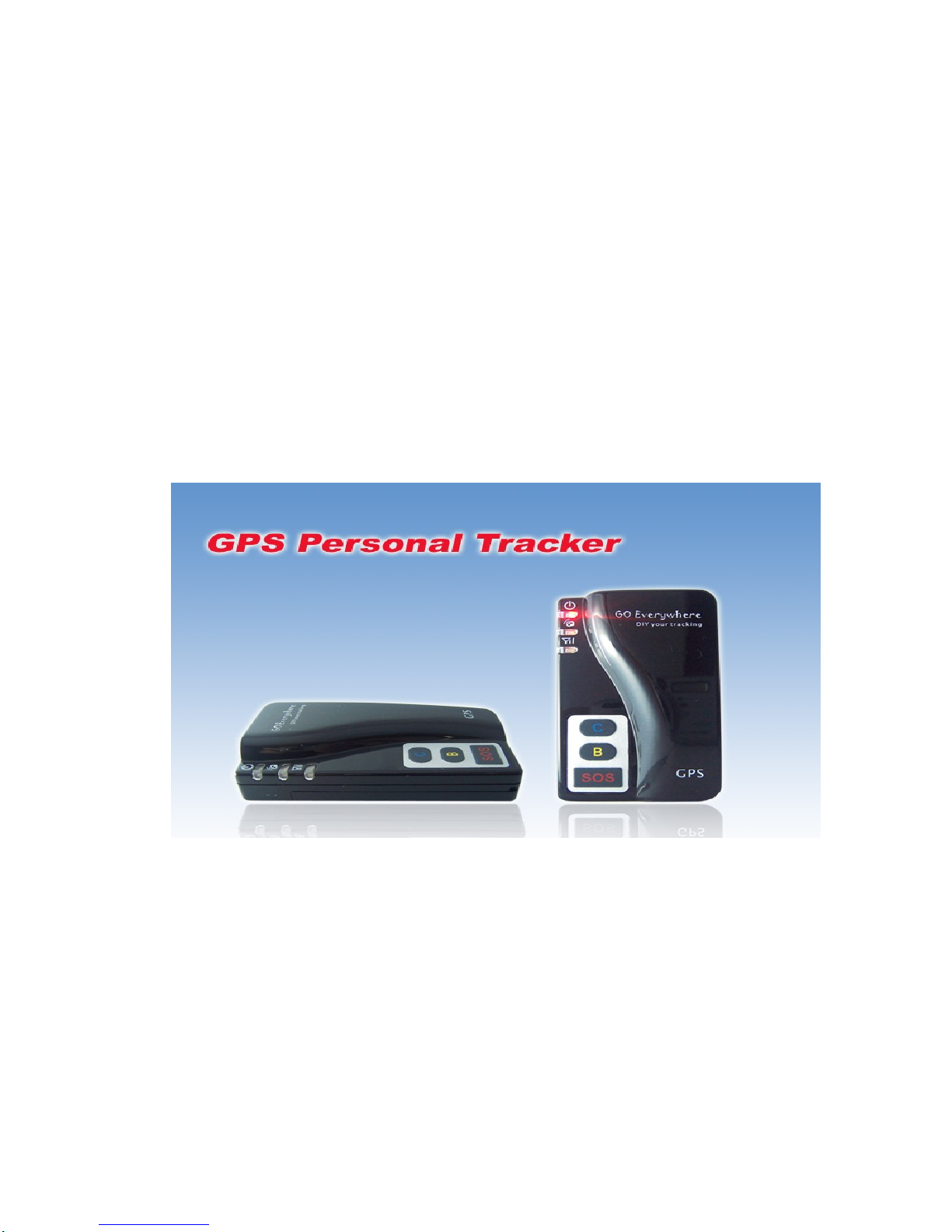
GPS Personal Tracker
PT 60
P
Operating Instruction
Page 2

1. Introduction...................................................................................................................................3
2. Feature:.........................................................................................................................................3
3. Specification.................................................................................................................................4
4. Hardware description..................................................................................................................5
5. Get Started....................................................................................................................................6
5.1 Accessories.........................................................................................................................6
5.2 Charge battery....................................................................................................................6
5.3 Buy SIM card.......................................................................................................................7
5.4 Install SIM card...................................................................................................................7
6. Operation......................................................................................................................................7
6.1 Turn On / Turn Off..............................................................................................................7
6.2 Apply for one position service...........................................................................................7
6.3 Set a time interval for tracking report function...............................................................8
6.4 Stop continuous tracking report function.........................................................................8
6.5 Set preset phone number for SOS key...........................................................................8
6.6 Make a SOS help ...............................................................................................................9
6.7 Cancel a SOS call..............................................................................................................9
6.8 Dial the preset phone number by Call B or Call C.........................................................9
6.9 Receive one coming call ...................................................................................................9
7. Display location on map ...........................................................................................................10
7.1 Download Google earth software from http://earth.google.com/...............................10
7.2 Start the Google Earth software.....................................................................................10
7.3 You can get the latitude & longitude data by sending “W+Password+, +000” SMS
command Code to the GPS Tracker PT60...............................................................................10
8. More Professional SMS Instruction........................................................................................10
9. SMS Instruction Example:........................................................................................................13
10. GPRS communication setting.........................................................................................14
11. Caution:..............................................................................................................................15
12. Trouble shooting...............................................................................................................15
Page 3
1. Introduction
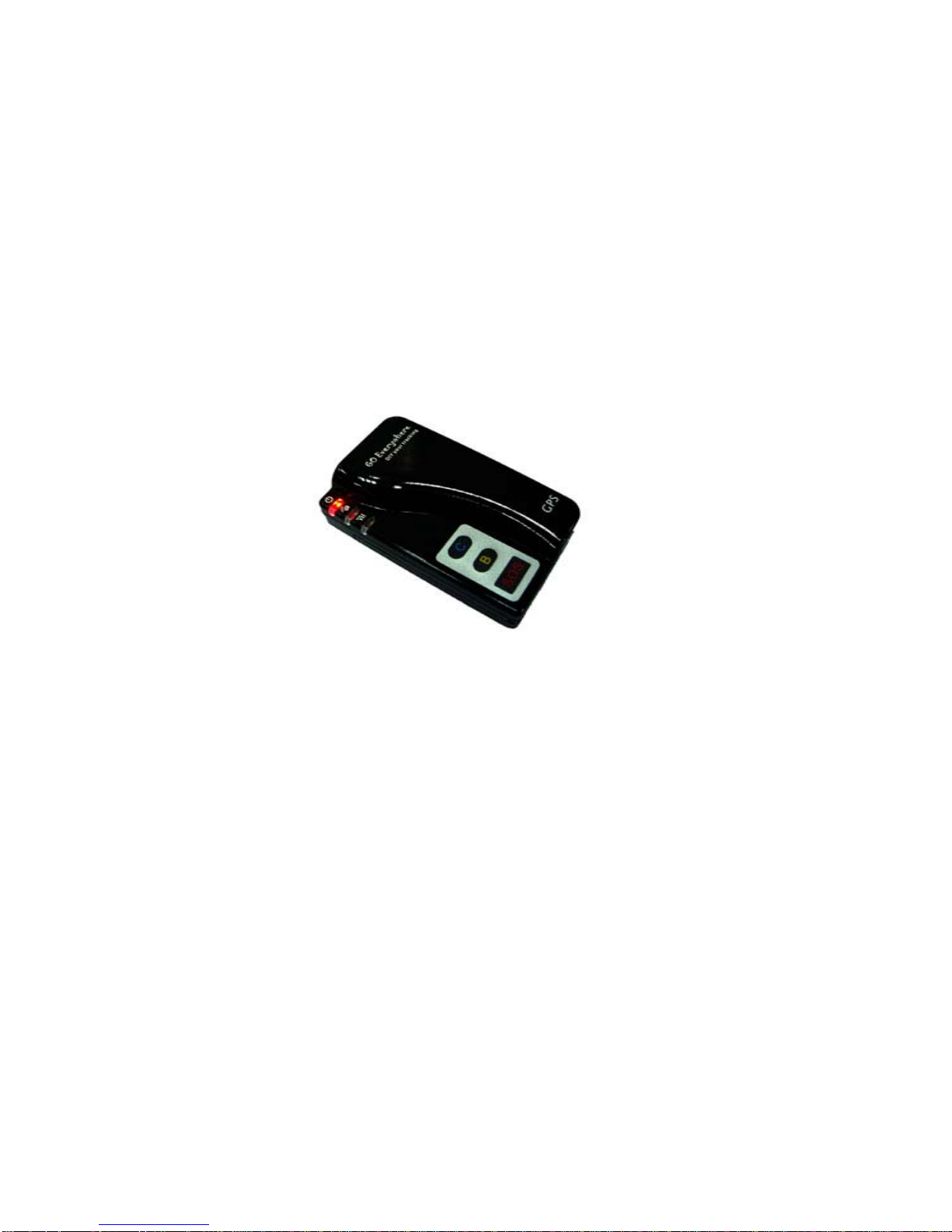
PT60 is a personal remote position device with built-in GPS and GSM/GPRS modules. It
is a compact size, high accuracy remote location tracking device. Based on GPS satellite, it
provides accurate position information under dynamic conditions.
Personal remote position device transmit the longitude and latitude coordinate to
authorized cell phone.
You can use these features for protecting and searching children and old persons.
Further, you can use it as a security purpose and other purpose which needs remote
positioning such as asset protection and animal tracking.
2. Feature:
Built-in GPS personal locator.
GSM /SMS communication or GPRS TCP/UDP connection .
Works worldwide! Support 3-frequency GSM 900/1800/1900 MHZ And 4-frequency
GSM 850/900/1800/1900 MHZ.(Optional)
High sensitivity, new technology and latest GPS SiRF-Star III chipset!
Compact size, and smaller than one name card. Easy to hide
Very Low power consumption
Fast Signal Acquisition
Support single location and continuous tracking
Support location triggered by tracker
Support location triggered by authorized cell phone
Support alarm and remote monitor
Support quick dialing buttons for 3 preset phone numbers
Support voice monitoring function
Support Bi-Direction conversation without ear microphone
Support removable internal battery
Support check location by SMS and GPRS
Support automatically saving power
Monitors can track the person without interfering him,
Page 4

LIVE! Real-Time tracking!
Locate the locator holder by the mobile phone via SMS (SMS system).
SOS button send out exact location for immediate rescue/action.
Geo-fencing to restrict movement to a defined radius.
No monthly service charges to be paid to the call center
3. Specification
Hardware
GSM module embedded GSM 900/1800/1900Mhz
embedded GSM 850/900/1800/1900Mhz (Optional)
GPS Chipset latest GPS SiRF-Star III chipset
GPS Sensitivity -158Db
GPS Frequency L1, 1575.42 MHz
C/A Code 1.023 MHz chip rate
Channels 20 channel all-in-view tracking
Position Accuracy 10 meters, 2D RMS
Velocity Accuracy 0.1 m/s
Time Accuracy 1 us synchronized to GPS time
Default datum WGS-84
Reacquisition 0.1 sec., average
Hot start 1 sec., average
Warm start 38 sec., average
Cold start 42 sec., aver age
Altitude Limit 18,000 meters (60,000 feet) max.
Velocity Limit
Acceleration Limit Less than 4g
Jerk Limit 20 m/sec
515 meters/second (1000 knots) max.
Other
Page 5
Operating
temperature
Humidity
Dimension 76 mm × 44mm × 20 mm (13mm)
Voltage Rechargeable and replaceable 950 mAh battery (3.7V), 5V for
Charging connector DC 5V (USB port)
Standby time Over 50 hours
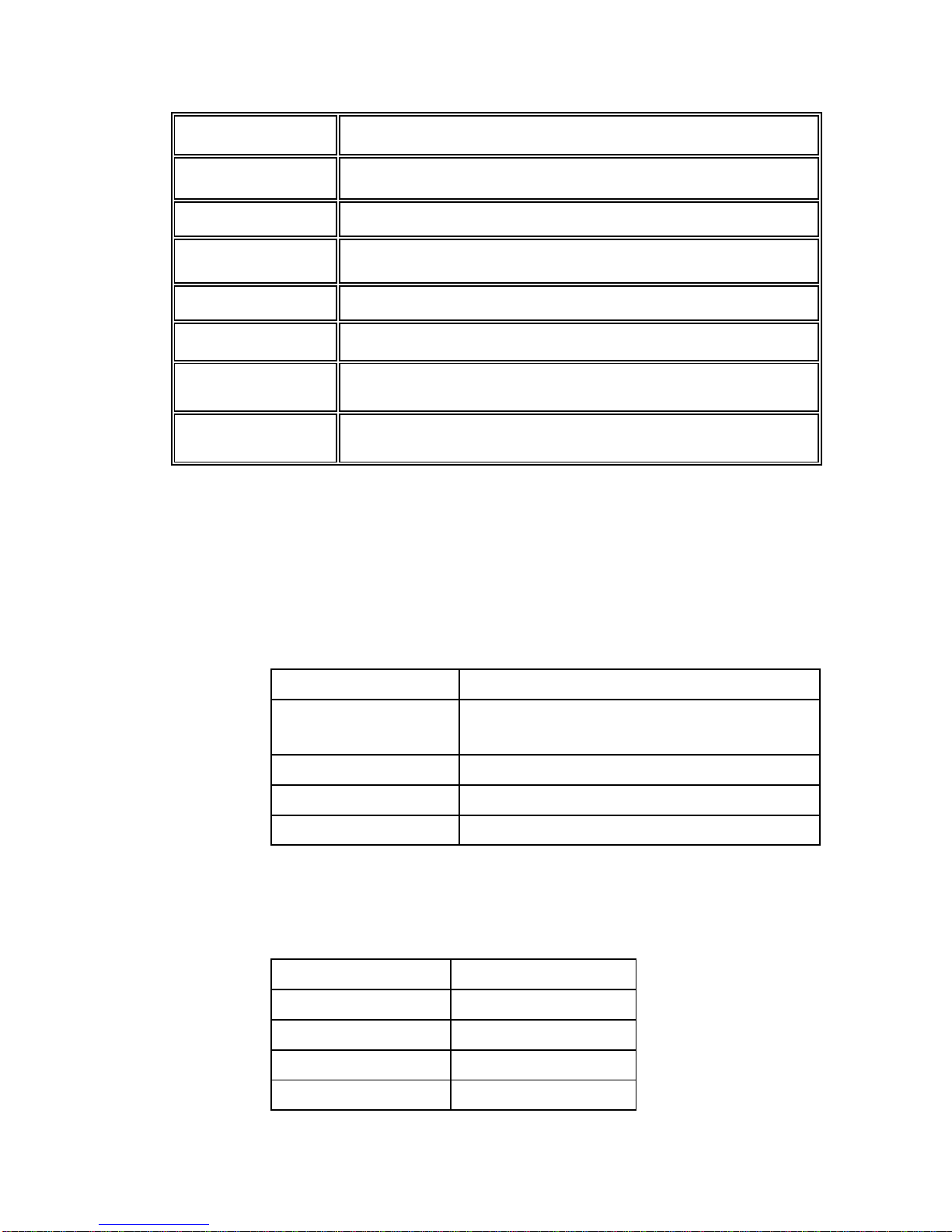
LED 3 LEDs showing Power, GPS and GSM status, And other
KEY SOS Emergency key, quick dial key B , quick dial key C , power
-25° to 65° C
5% to 95% Non-condensing
charging input.
operation status.
key
4. Hardware description
Red LED --- indicate power state:
State Meaning
Constant dark The power is too low to work or Charging was
Light 0.1s dark 0.1s The power is not enough
Constant Lighting Charging
Light 1s dark 2s Working
Blue LED -- indicate the GPS signal state:
State Meaning
Constant Lighting One key be pressed
Light 0.1s dark 0.1s Initial
completed.
Light 0.1s dark 2.9s GPS receiver work well
Light 1s dark 2s No GPS signal
Page 6

Green LED -- indicate the GSM signal state:
State Meaning
Constant Lighting One call is coming
Light 0.1s dark 0.1s Initial
Light 0.1s dark 2.9s GSM receiver work well
Light 1s dark 2s No GSM signal
Button Function description
Button Meaning
Power
button
SOS
button
Call B
button
Call C
button
5. Get Started
5.1 Accessories
1. PT60 x 1
2. USB charged cable x 1
3. Wall charger x 1
4. Car charger x 1
5.2 Charge battery
Before you use the PT60, you must FULLY charge the battery by USB cable at
least 2 hours under the power-off condition.
Charger state indicates:
Turn on/Turn off. Please see 6.1 for details for more details.
You can assign a phone number to the SOS button .When this
button is pressed, PT60 will send it’s location information to the
preset phone number by SMS ,at the same time, PT60 will dial
the preset phone number.
You can assign a phone number to the Quick Call B
button .when this button is pressed, PT60 will dial the preset
phone number.
You can assign a phone number to the Quick Call C
button .when this button is pressed, PT60 will dial the preset
phone number.
Page 7

Red light is On, it indicates that it is in charging.
Red light is Off, it indicates that charge completes.
5.3 Buy SIM card
Buy SIM card from local telecommunication service provider.
(Note: Please make sure that your SIM card support SMS function and have
enough deposit.)
5.4 Install SIM card
6. Operation
6.1 Turn On / Turn Off
Turn on:
When the device is off, press the power button and wait for about 8
seconds .It will enter standby mode .It is suggested that you be an outer place
where it can receive the better GPS signal when you turn on the device.
Turn off:
When the device is on ,press the button and wait for 8 seconds .When the
LEDs go out ,it indicates that the device is in off for sure.
Tips: How to get better GPS signal:
1. Working outdoor, PT60 can get better GPS signal;
2. The front side of PT60 should be placed toward sky.
6.2 Apply for one position service
No matter where you are, when you want to know the position of your tracker, send
a SMS or make a telephone call to PT60, it will report its location back to you by
SMS.
Edit a message as following format, send it to PT60:
Format: W+Password+, +000
( init password is : 000000)
For example: W000000,000
PT60 will send back one SMS, including the position information
Position Data means:
Longitude = 114 degree - 04 cent - 57.74 second
Latitude = 22 degree - 32 cent - 40.05 second
Tips: Apply for one position service by another easier way:
Page 8

(a) Dial PT60 by your mobile phone
(b) After listening the ring of PT60 for 10~20 seconds, hang off the phone
(c) After 20 second, your mobile phone will receive the Position SMS.
6.3 Set a time interval for tracking report function
Tracking report function can be turned on or off according to the requirements of
the user .Tracking function will continually report tracker’s position until it get stop
command. In this continuous tracking mode, PT60 will send one position message
at a preset time interval.
(It says that PT60 will send one position message at every time interval.)
Step1: Edit a message as following format, send it to PT60:
----- W+Password+,+002,+XXX
(Note: XXX Unit: preset minutes interval, if XXX=000, it is STOP tracking.)
For example: W000000,002,005
(It means that PT60 will send Position Data each 5 minutes.)
Step 2: PT60 will send back one SMS ---Set Time(preset time interval) OK
In this example, the SMS is “Set Time (005 Min) OK”
This SMS means that PT60 is in tracking mode now and preset time interval is 5
minutes.
Step3: PT60 will send back position SMS at present time interval.
In this example, the SMS will send back position data at every 5 minutes. The
target phone will receive the Position Data each 5 minutes.
Position Data means:
Longitude = 114 degree - 04 cent - 57.74 second
Latitude = 22 degree - 32 cent - 40.05 second
Note:
If SMS shows:
Longitude = 000 degree - 00 cent - 00 second
Latitude = 00 degree - 00 cent - 00 second
It means that GPS signal is too weak to work well.
6.4 Stop continuous tracking report function
This function is used to turn off tracking report function.
Edit a message as following format, send it to PT60:
Format: W+passwaord+,+002+,+000
For example : W000000,002,000
PT60 will send back one SMS-----Stop Timer OK. This message means tracking
report function is turned off.
6.5 Set preset phone number for SOS key.
Page 9

This function is used to set what telephone number will be dialed when press SOS
key.
Step1. Edit a message as following format , send it to PT60
W+password+,+003+,+3+,+1+,+ area number +telephone number
For example: “W000000,003,3,1,008613628888444”
Step2. About ten seconds later, PT60 will send back one SMS----Set Tel
OK/003,3,1,008613628888444. This message means the preset phone number for
SOS key is OK.
step3. Press the SOS button, PT60 will send one Alarm SMS to “0086
13628888444”, and then dial “0086 13628888444”.
Note:
1) After SOS button is pressed, you can call and talk with another people by
ear microphone
2) Press the Call Key B, you can hang up the call or cancel the SOS call
3) After press the SOS key, PT60 does not go into normal state until you
press Call key B to cancel the SOS call
4) About area number
In different countries, the area number may be different .Please contact
with your telecommunication provider to get the area number.
6.6 Make a SOS help
This function is especially useful in emergency. When SOS key is pressed, PT60
will in SOS state and 2 following SMS will be sent to the preset phone number:
SOS Alarm and the Position info. At the same time, PT60 will dial preset telephone
number. When the telephone is picked up, 2 Way communication starts.
Once the SOS button is pressed, a SOS help is made.
6.7 Cancel a SOS call
In SOS state, press Call B key to hang up the phone, exit SOS state and return
normal state.
6.8 Dial the preset phone number by Call B or Call C
Press the Call B button/ Call C button once, PT60 will call the preset phone number
of Call B/Call C, then you can talk with another people.
If you want to end talking, you can hang up the calling by pressing the Call B
button.
6.9 Receive one coming call
When one call is coming, a ring will be made, you can press SOS key to receive the
coming call, then talk with another people directly.
Page 10

If you want to end talking, you can hang up the calling by pressing the Call B
button.
7. Display location on map
7.1 Download Google earth software from http://earth.google.com/
7.2 Start the Google Earth software.
For more information about Google Earth software, please refer to
http://earth.google.com/, or you can start the Internet Explorer and type
"http://maps.google.com" to connect to Google Map website for displaying the
location map.
7.3 You can get latitude & longitude data by sending “W+Password+,
+000” SMS command Code to the GPS Tracker PT60.
Input the latitude and longitude that you receive from SMS and click on search
button. The Google earth will display the location map for you.
You can also visit
Car Navigation Device, input the Position Data.
http://www.gpstracking.cc or use local map software on PDA or
8. More Professional SMS Instruction
****** is user password, and initial password is 000000
SMS Instruction Format Note
1 Request one position W******,000
2 Modify user password W******,001,## #### ****** is old password
###### is new password
3 Set the time internal of
Continuous tracking when
in SMS working mode
4 Set a preset phone number
for SOS button/ Call B
button/
Call C button;
When this button is
pressed, PT60 will dial the
preset
number.
W******,002,XXX
W******,003,F,P,TelNumb
er
XXX(3 digital)
=000,stop
=[1,999] time internal (unit: mins)
F =0, close this function
=1, only send alarm SMS to the preset
number
=2, only Call the preset number
=3, Send alarm SMS ,then Call the
preset number
P =1, Set the preset number for SOS
key
=2, Set the preset number for Call
B
=3, Set the preset number for Call
C
TelNumber: Preset Tel number
(TelNumber must <16 digits )
Page 11

5 Set low power alarm
When PT60 voltage is
lower than the preset
value,
PT60 will send one lower
power alarm SMS to the
SOS preset number.
6 Set over speed alarm
When PT60 speed higher
than the preset value,
PT60 will send a over
speed alarm SMS to the
SOS preset number.
7 Set Geo-fence alarm
When PT60 moves out
preset scope, PT60 will
send one Geo-fence SMS
to the SOS preset number.
W******,004,X X (voltage preset value)
=0 , close
=1, <3.3V send SMS alarm
=2 , <3.4V send SMS alarm
=3 , <3.5V send SMS alarm
(default )
=4 , <3.6V send SMS alarm
=5 , <3.7V send SMS alarm
W******,005,XX XX (the speed preset value)
=00 , close
=[01<XX<20] (unit: 10Km)
W******,006,XX
XX ( preset distance to original
place )
=00 close
=01 30m
=02 50m
=03 100m
=04 200m
=05 300m
=06 500m
=07 1000m
=08 2000m
8 Extend setting
(note: Please use this
instruction carefully)
W******,008,ABCDEFGHI
J###
A=0 , Close position report function
which get position SMS
by Calling PT60
A=1 , Open position report function
which get position SMS
by Calling PT60
B=0, position SMS format be
analyzed in order to read easily.
Page 12

For example:
Longitude = 114 degree - 04 cent
- 57.74 second
Latitude = 22 degree - 32
cent - 40.05 second
B=1, position SMS format is NMEA
0183 Format
For example:
$GPRMC,072414.000,V,3114.3763,N,1
2131.3255,E,0.00,0.00,050805,*0
0
C=0, PT60 do NOT hung up when
one call incoming .
C=1, PT60 hung up after 4~5 rings
when call incoming
D=0, PT60 do NOT send one notice
SMS to SOS preset number
when the PT60 power on
D=1, PT60 do send one notice SMS
to SOS preset number when the
PT60 power on
E=0, PT60 do NOT shut down
automatically when the power
voltage lower than 3V
E=1, PT60 will shut down
automatically when the power
voltage lower than 3V
F=0, PT60 do NOT send the notice
SMS to the SOS preset number
when the GPS signal is weak
F=1, PT60 send the notice SMS to
the SOS preset number when
the GPS signal is weak
G=0, Open 3 LED when PT60
works
G=1, Close 3 LED when PT60
works
H=0, reserved
I=0, Close no power alarm
I=1, Open no power alarm
J=0, Close sound when one call
incoming
J=1, Open sound when one call
incoming
###, end char
Page 13

(default value should be :
ABCDEFG=1011110001 )
GPR Setting
10 Set Tracker ID for PT60 for
GPRS
11 Set APN W******,011,APN APN : APN string
12 Set IP Address &port
number
W******,010,ID ID : the Tracker ID of the tracker, it may
set to telephone number
according the SIM card of PT60
(Tracker ID must be < 14 digits)
W******,012,IP,PORT IP: xxx.xxx.xxx.xxx
PORT: [1,65536]
13 Open/ Close GPRS
function
14 Set time interval of send a
GPRS package
15 Set the function of longest
sleep timer for saving
power.
16 Set monitor number
function
17 Cancel monitor number
function
W******,013,X X=0 close GPRS
X=1 open GPRS
W******,014,XXXXX XXXXX: means times interval,
(Unit: 10s)
The max length of XXXXX is in 5
digits
XXXXX=00001, means time
interval is 10s
W******,026,XX XX=00 close longest time sleep mode
XX=[01<XX<99] (unit: minute)
W******,030,T T is the monitor telephone number,
the length of T is no more than 16
digits
W******,030 Cancel the monitor telephone
number
9. SMS Instruction Example:
(1) Send Instruction “W*****,000”
Meaning: Apply one position, PT60 will reply one position SMS
(2) Send Instruction “W******,002,005”
Meaning: Set the time internal of position refresh, PT60 will replay one position
SMS each 5 minutes in SMS working mode.
(3) Send Instruction “W******,003,3,1,(area number)+13628888444”
Meaning: when SOS button is pressed, PT60 will send one SMS to “13628888444”,
and then dial up “13628888444”. --
(4) Send Instruction “W******,003, 3,2, (area number)+13628888444”
Meaning: When Dial button B is pressed, PT60 will send one SMS to
“13628888444”, and then dial up “ 13628888444”
(5) Send Instruction “W******,003,1,3, (area number)+013628888444”
Page 14

Meaning: When Dial button C is pressed, PT60 will only send one SMS to
“13628888444”.
(6) Send Instruction “W******,005,03”
Meaning: when the speed is up 30 km/h, PT60 will send one Alarm SMS to the mobile
phone linking to SOS alarm
(7) Send Instruction “W******,030, (area number)13628888444”
Meaning: when you call PT60 using the telephone with number 13628888444,
You will monitor the PT60. When you hang up it, the monitor will stop.
10. GPRS communication setting
step1: Make sure that your SIM card in PT60 support GPRS function
Step2: Set tracker ID of PT60 by sending one SMS:
SMS Format: W******,010, Tracker ID
For example: W000000,010,123456
“123456” can be considered to be the device’s name. (Tracker ID must be < 14 digits)
If there are several devices, you can use their Tracker ID to differ from each other.
PT60 will response one SMS to confirm the setting. Like “Set SIM OK/120”
Step3 : Set IP address and Port by send one SMS
SMS Format: W******,012,IP,PORT
IP: xxx.xxx.xxx.xxx
PORT: [1,65536]
Make sure that the IP should be the Extranet IP. If your pc is in Intranet, you must know
your Extranet IP. You may need the help of your network administrator
For example: W000000,012,64.191.21.237,8060
PT60 will response one SMS to check it. Like “Set IP ok /64.191.21.237#8060”
Step4: Set APN
SMS format: W*****,011, APNString
For example: W000000,011, CMNET
PT60 will response one SMS to check it , Like “set APN OK /CMNET”
Page 15

Step5: Set time interval of sending GPRS package
SMS format: W******,014 , XXXXX
( XXXXX:Be sure that the time interval MUST be FIVE digits).
XXXXX: means times interval, (Unit: 10s), the length of XXXXX is in 5 digits,
XXXXX=00001, means time interval is 10s
For example: W000000,014,00003
SMS meaning: Make PT60 send a GPRS package every 30 seconds
PT60 will response one SMS to confirm the setting. Like “set GPRS Timer ok/00003”
Step6: Enable GPRS function
SMS format: W******,013,X
X=0 close GPRS
X=1 open GPRS
For example: W000000, 013, 1
SMS meaning: Make PT60 begin GPRS function.
PT60 will response one SMS to confirm the setting. Like “open tcp ok”
(Note: 1 PT60 default value is GPRS Disable
2 SMS W000000,013,0 is disable GPRS function )
Step7: According to the document of our GTP communication protocols of PT60, the
server can analyze the GPRS data.
11. Caution:
a) This device is not water-proof
b) This device must work with GPRS/GSM network.
c) Make sure enough deposit in the SIM card to avoid any inconvenience.
12. Trouble shooting
If you find some trouble in using PT60, please refer the following:
1) Check GPS signal is normal,
In normal, the blue led should in rapid blink----light for 0.1 second and then dark
for 2.8second in turn
If blue led is not in this correct state, it indicates GPS signal is too weak to get
position info.
Please check following issue:
Page 16

(a) Working outdoor,PT60 can get better GPS signal;
(b) The front side of PT60 should be placed toward sky;
(c)Charging PT60 for 3 hours for the tracker has enough power before usage
2) Check GSM signal is normal
In normal, the green led should in rapid blink ----light for 0.1second and then dark
for 2.8s in turn
If green led is not in this correct state, it indicates GSM communication is wrong.
Please try following issue:
(a) Whether the GSM network is strong enough to make the track unit work. You
can judge it by calling someone thorough your cell phone.
(b) Whether the SIM card is installed correctly or not, try to pull out and insert SIM
card as following picture shows to ensure it; try this operation a few times may
help to ensure correct installation
(c) Whether there is enough deposit in SIM card or not;
(d) Whether your SIM card in PT60 support SMS function or not, (including send
SMS and receive SMS)
(e) Whether SIM card has specific requirement on cell phone or not.
For example whether the SIM card can only use in an appointed cell phone, other
cell phone cannot use the SIM card
(f) Whether SIM card is binding to the specific cell phone or not
Whether SIM card need some authorization when using it
For example, you need type one password when you use the kind of SIM cards
(g) Whether the tracker has enough power to work, we strongly suggest it was
charged at least 3 hours before use it
3) The SMS which is replied by PT60 is including the chars --- “Last ……….”
It indicates the GPS signal is weak.
 Loading...