

Page 1
8GB
16GB
32GB
Installation guide
USERS MANUAL
for models:
DVR5200/DVR5900
DIGITAL VIDEO RECORDER
PROFFESSIONAL AUTOMOTIVE SERIES
1.3 h – 1080p
2.2 h – 720p
2.6 h – 1080p
4.3 h – 720p
5.2 h – 1080p
8.6 h – 720p
STANDARDS
RCA
VIDEO
> Professional installation method
> 1920 × 1080p Full HD resolution, H.264 compression
> Loop-recording to microSD card, max. 32 GB
> PARK-function with a motion sensor
> WDR-function for low-light lming and quality optics
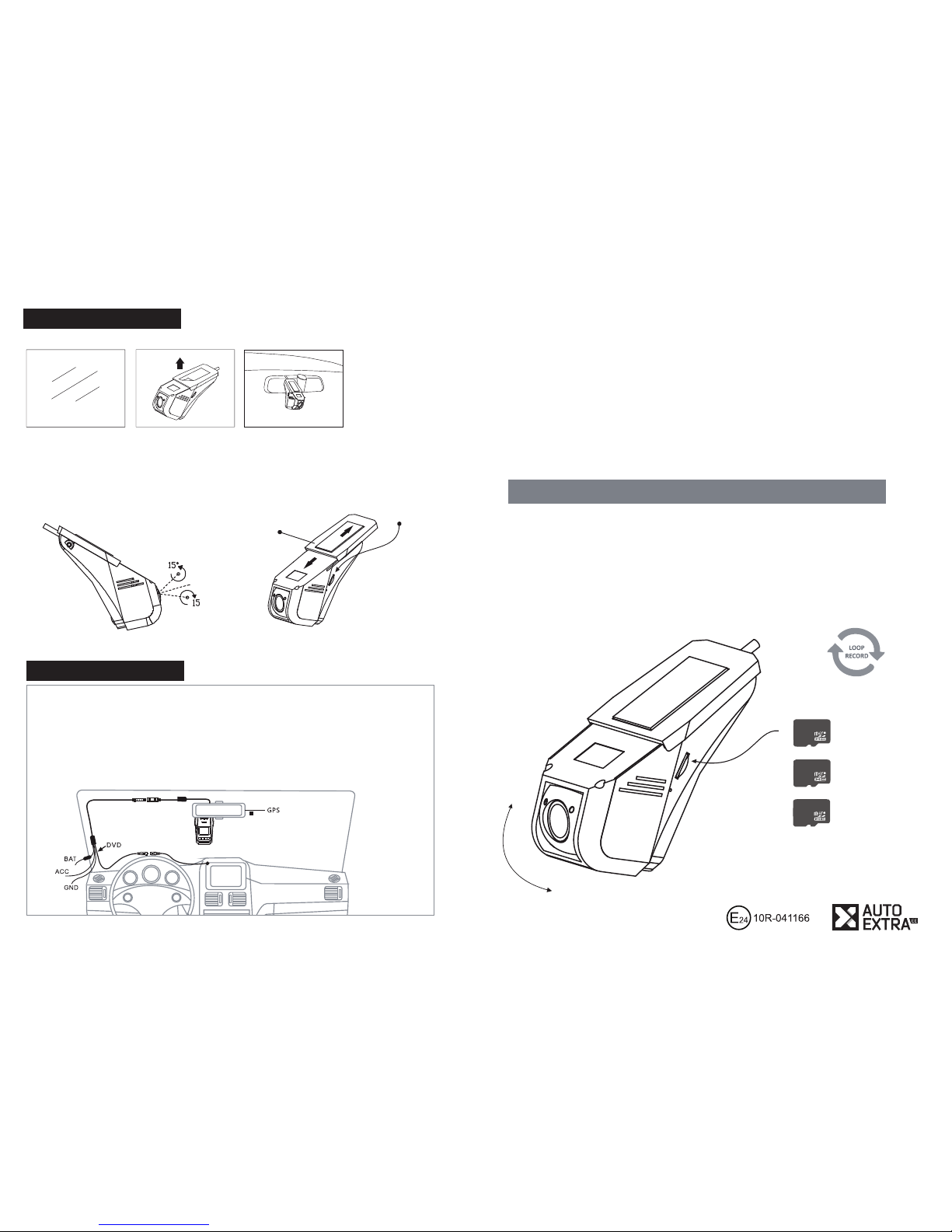
Find a suitable installation
spot and clean the glass
Remove the 3M lm Fix the device on the glass
using a sticker
NB! When choosing the installation spot, guarantee access to the card slot!
microSD
card slot
Mounting foot
Optimise the angle
of the camera
Electrical connections
Yellow: constant power supply +12V
Red: ACC +12V
Black: Mass
Connect the RCA video output with the multimedia centre in the car, or with any display screen
provided with a video input. An interface module is generally required for connecting to the original
display screen. It is possible to connect the device to the rear view camera’s input of the car’s original
screen using an additional relay and a switch.
Page 2
PWR
FORMAT
OK
TIME
Main characteristics
1080p FULL HD RECORDING
The sensor, equipped with quality optics, makes it possible to record video les
in Full HD 1080p @30 FPS as well as 720p @60 FPS; lower resolutions are also supported.
WIDE ANGLE OF VIEW
A combined angle of view of 140° (hor. 105°, ver. 70°) displays a large area, and thanks to quality
optics, distortions are kept to minimum in the whole frame.
AUTOMATIC OVERWRITING OF FILES (LOOP)
Video le recording takes place on the “loop”-principle, i.e. older les are overwritten on an ongoing
basis and the memory card will never be full. By using the FORMAT-function, it possible to delete all
recordings at once.
G-SENSOR
Gravitation sensor detects major shocks and locks the les.
Locked les may take up to 50% of the card’s total volume and they are constantly rewritten.
MOVEMENT SENSOR WITH A 3.5 m RADIUS
If the PARK-function is enabled, recording upon movement detection is possible also when the
ignition is o . The sensor also registers a sudden change in the light.
WDR-FUNCTION
The camera can balance between the darker and overexposed spots in the frame, which
signi cantly increases the picture quality. Exposure time (EV) can also be manually adjusted. In lowlight conditions, exposure time is adjusted automatically.
H.264 COMPRESSION
Thanks to the best compression technology, les are as small as possible, which means that the
memory card can contain more material. The maximum supported memory card is 32 GB.
A COMMON FILE FORMAT
Videos are recorded into MOV-format (MP4), which can be played directly on all common platforms.
PC, iOS, Android.
VIDEO OUTPUT
Analogue input enables displaying the picture (real time from the camera, options menu, replaying
recorded material) on any screen with an RCA-input.
BUILT-IN MICROPHONE AND SPEAKER
Files can be recorded with or without sound. When playing les in the car, you will hear the sound
from the speaker of the device.
LOW POWER CONSUMPTION
When recording, the camera consumes 300 mA, on stand-by 90 mA, 0 mA when turned o .
However, when the camera is left to record using movement detection when the ignition is o
(PARK-function), you need to take into account the load on the car battery.
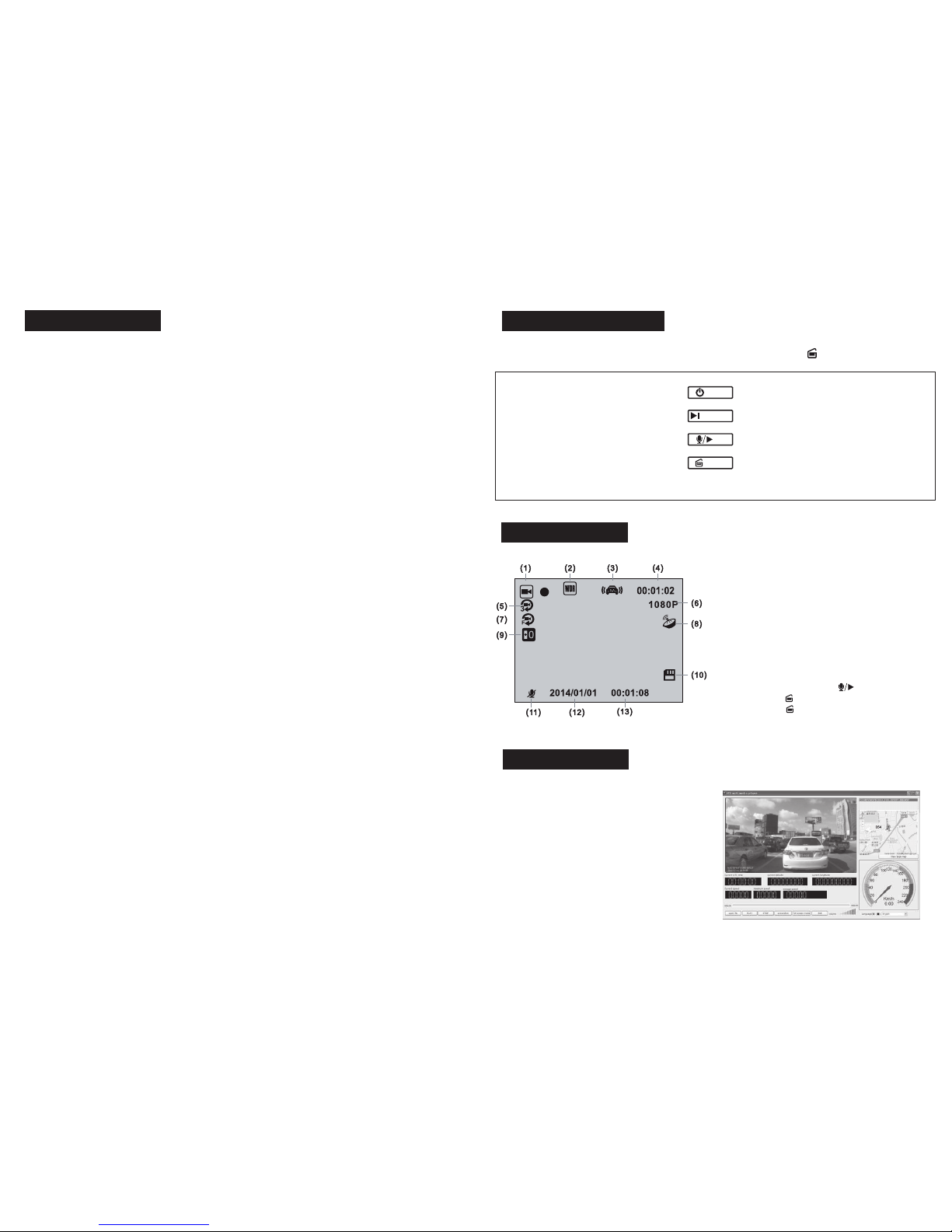
To enter the menu, stop recording by pressing
MOVE UP IN THE MENU
MOVE DOWN IN THE MENU
CONFIRM THE SELECTION
MOVE BACK IN THE MENU
MOVE FORWARD IN THE DATE AND
TIME ADJUSTMENT REGIME
Adjusting the functions
Icons
GPS Player (extra)
LONG PRESS SHUTS DOWN
LONG PRESS ERASES ALL FILES
TO ENTER THE MENU, HOLD
STOP/START THE RECORDING
LONG PRESS – ADJUST DATE AND CLOCK
UP
DOWN
OK
RETURN
(1) Recording
(2) WDR-function on
(3) G-sensor sensitivity
(4) Video length
(5) Clip length setup
(6) Video resolution
(7) Movement sensor
(8) GPS-icon (grey when disconnected, green when
the signal is active)
(9) Exposure time adjustment
(10) SD memory card
(11) Microphone status, hold to mute
(12) Date, hold to change
(13) Time, hold to change
For a connected GPS antenna, you need
software that shows the location of the car on
the map, and movement speed.
The software can be downloaded from
www.autoextra.ee/web/dvr5900/
The GPS software only works with the
Windows operating system. Files can be
played on all operating systems.
 Loading...