

Page 1

QUICK START GUIDE
beamit
Page 2

CONTENTS
Welcome
In the Box
Keys and Parts
Features
Getting Started
Setup: Connecting in TX Mode
Connecting to a TV or Computer
Setup: Pairing in TX Mode
Pairing with a Bluetooth Headphone / Speaker
Multi-point Streaming: Pairing with two Bluetooth Headphones
Setup: Connecting in RX Mode
Connecting to a Home stereo system / Powered speakers
Setup: Pairing in RX Mode
Pairing with a Smartphone / Tablet / Computer
Other Functions
Troubleshooting Tips
Technical Specifications
Product Safety
Safety Instructions
Warranty
2
3
4
5
6
7
9
11
13
14
15
18
20
21
22
Page 3

WELCOME!
Congratulations on your purchase of the auris beamit Wireless Bluetooth®
Audio Transmitter & Receiver!
The following pages explain the features and operations of beamit. Please
take a few moments to read this quick start guide.
Also read all safety instructions before proceeding. The answers to most
set up and performance questions can be found in this guide. If you have
any further questions about the operation or use of this product, please
contact our customer care team for assistance on [email protected]
Overview
beamit is a sleek and compact Bluetooth® audio transmitter that seamlessly
streams Hi-Fi digital audio wirelessly from your TV or wired music system to
your favorite pair of Bluetooth headphones or speakers.
Also it's a Hi-Fi Bluetooth music receiver that streams high quality audio
wirelessly from any Bluetooth enabled smartphone, computer or tablet to
any music system or powered speakers.
Incorporating the high quality aptX® LOW LATENCY audio streaming codec
and digital TOSLINK connection, beamit provides Hi-Fi digital audio streaming
to up to two Bluetooth headphones or speakers simultaneously.
2
IN THE BOX
3.5mm to RCA
Adapter
3.5mm AUX
Audio Cable
Micro - USB
Charging Cable
Sticky Gel
Mounting Strip
Quick
Start Guide
USB Power
Adapter
TOSLINK Optical
Audio Cable
beamit
Wireless Bluetooth® Audio Transmitter & Receiver
QUICK START GUIDE
beam
it
3
Page 4
4
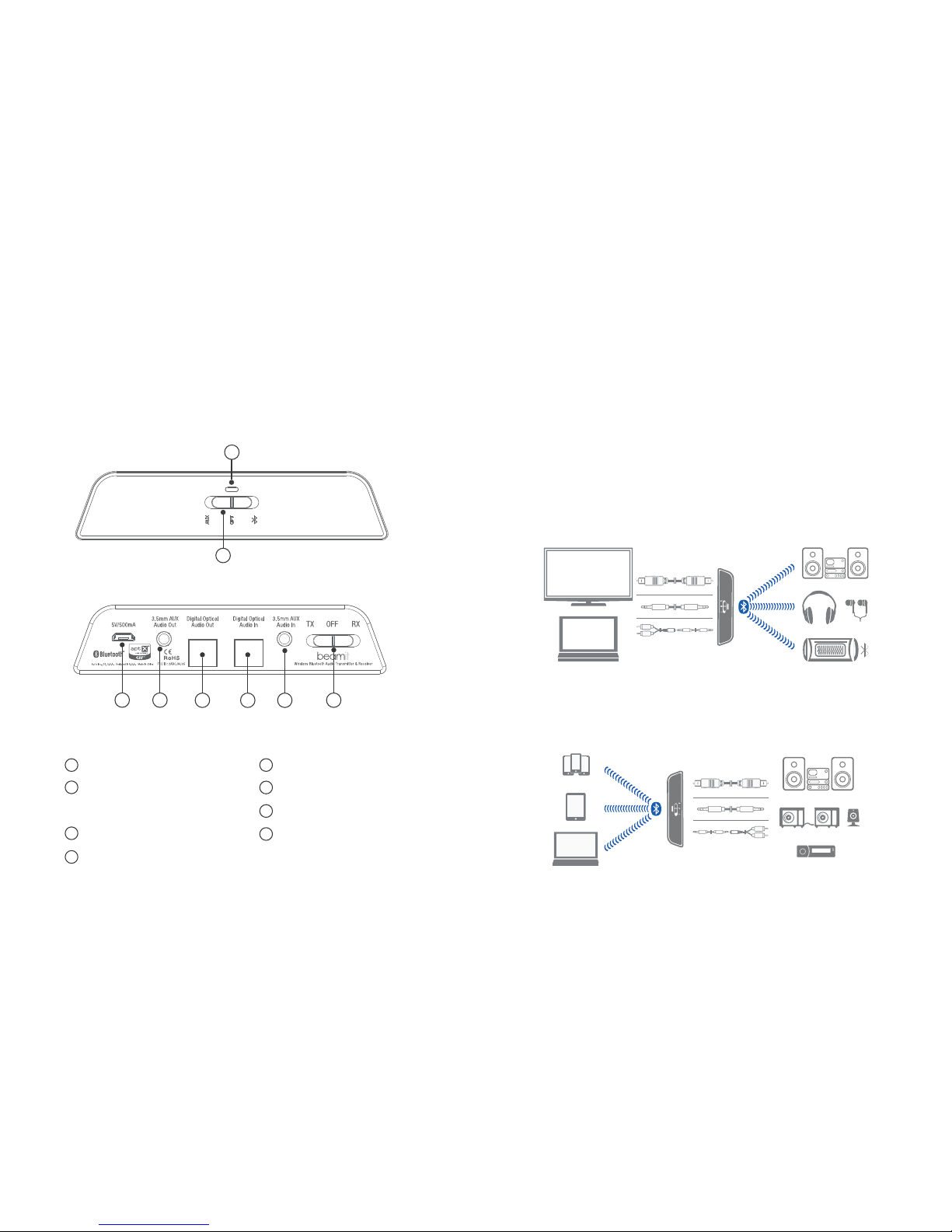
KEYS AND PARTS
Front Panel
Rear Panel
2
1
3
5
LED Indicator
Multifunction Switch (MFS) -
Audio Source Select / Pairing
4
Micro USB power input
3.5mm AUX Audio Out
Toslink Optical Audio Out
6
7
8
Toslink Optical Audio In
3.5mm AUX Audio In
TX / RX toggle and
2
1
3
4 5 6 7
8
Power OFF switch
5
beamit is an audio adapter which can be used in two ways: as a stereo
wireless Transmitter or Receiver, using Bluetooth® wireless technology.
As a Transmitter (TX mode)
In TX mode, beamit can wirelessly stream audio from a non-Bluetooth device
(HDTV / Computer) to any Bluetooth audio receiver that supports the A2DP
Bluetooth profile, such as a Bluetooth headphone, Bluetooth speaker, or
dedicated A2DP receiver.
As a Receiver (RX mode)
In RX mode, beamit enables wireless audio streaming from any Bluetooth
enabled smartphone, computer or tablet to any non-Bluetooth music system
or powered speakers.
FEATURES
HOME AUDIO SYSTEM
SMARTPHONE
TABLET
POWERED SPEAKERS
CAR AUDIO
COMPUTER
TV
COMPUTER
Page 5
GETTING STARTED
The following instructions will help you get started before connecting beamit
to your devices.
Step 1: Stick one side of the included double sided sticky gel mounting strip to
the bottom of beamit. Mount beamit on to the side or top of your TV or audio
system.
Avoid placing beamit behind the TV or any audio device.
Step 2: Plug the included Micro - USB charging cable into the USB power
adapter / any powered USB port** and the charging port on the rear of the unit.
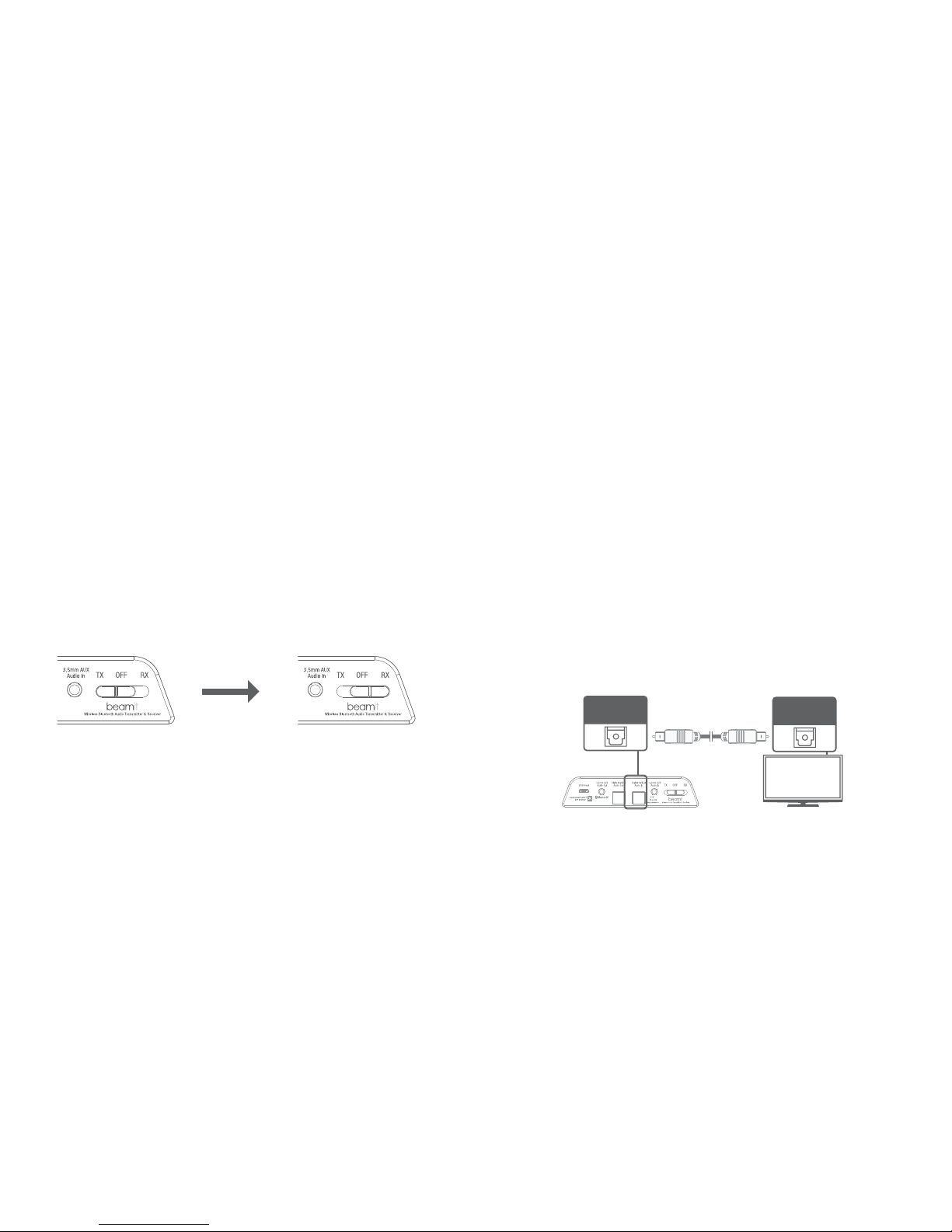
Step 3: Select your choice of mode (TX / RX) by sliding the toggle switch
situated on the rear of beamit. The LED light will start flashing indicating the
unit is swithed “ON”.
To switch off beamit, slide the TX / RX toggle switch to the “OFF” position.
**The USB outputs of some TVs do not provide a stable current. It is
recommended to use a USB power adapter to power beamit.
TX Mode RX Mode
6
SETUP: CONNECTING IN TX MODE
Connecting to a TV or Computer
AUDIO INPUTS are used with TX MODE ONLY – When in TX mode beamit
needs an audio source to transmit. It must be fed an audio signal from a
connected device such as a television, video game system, computer,
mp3 player, etc.
The following instructions will help you connect beamit to your TV or
computer and pair with your Bluetooth headphones, speakers or receivers.
beamit provides three connection options.
Option 1: Digital Optical Audio Out (TOSLINK)
Newer TV’s are usually outfitted with a TOSLINK digital optical connector.
Plug the included fiber optic TOSLINK cable firmly into the “OPTICAL AUDIO
OUT” on the TV and the “OPTICAL AUDIO IN” of beamit.
If you have successfully connected the TOSLINK cable and you are still not
receiving any sound, please make sure that your audio output settings on
your TV or other relevant device are set to PCM.
Auris Inc., DE, U.S.A.
Designed in U.S.A. Made in China
Digital Optical
Audio In
TV
Digital Optical
Audio Out
7
Page 6
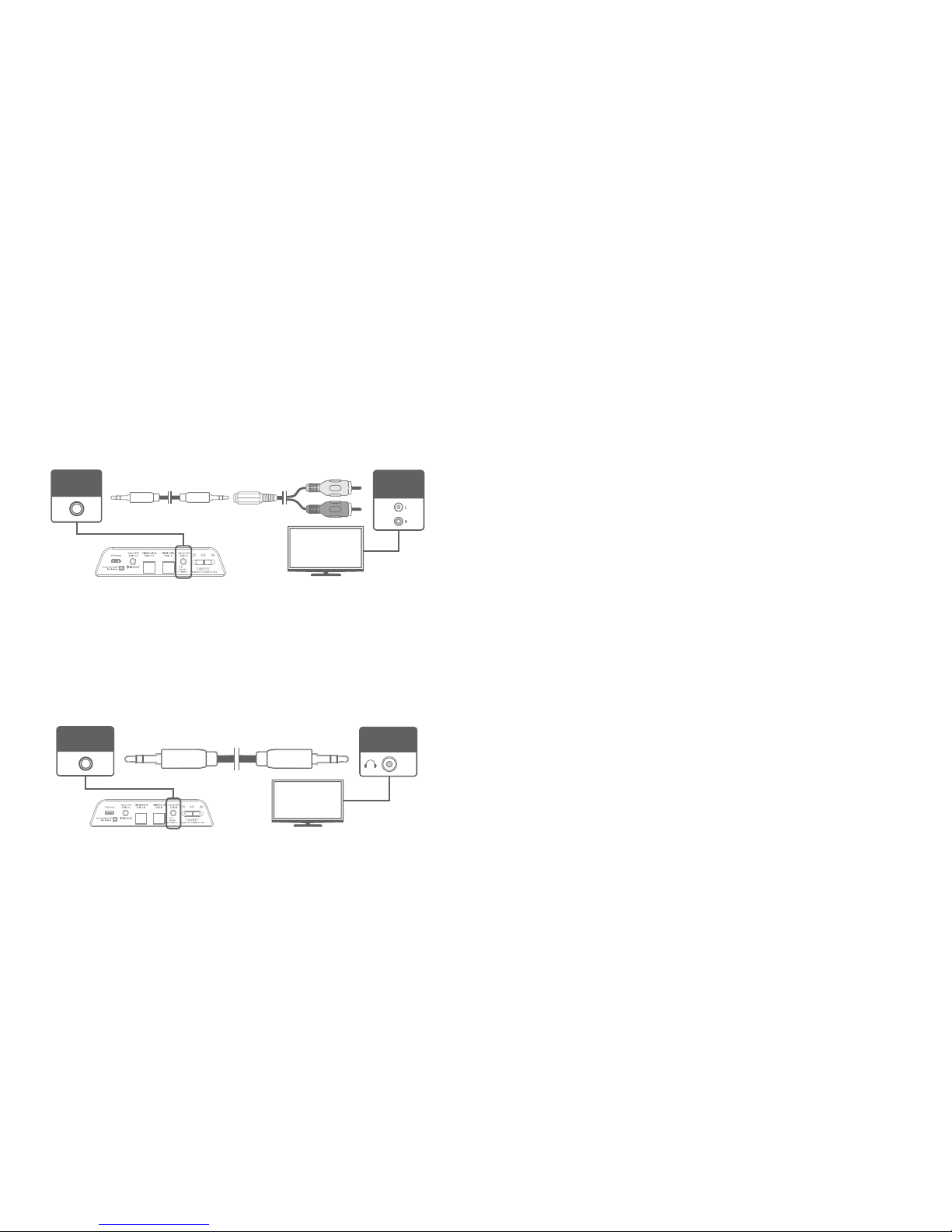
Option 2: RCA Audio Out
Older TVs usually have analog audio output with RCA (Red & White) connectors.
Attach the included RCA adapter to the 3.5mm stereo audio cable. Plug the
connectors of the RCA adapter into the matching-color RCA jacks on the TV
and plug the attached 3.5mm cable into the “3.5mm AUX AUDIO IN” on the
rear of beamit.
Option 3: 3.5mm Headphone jack
Some TVs and most standalone receivers have a headphone jack on the front
or side.
Plug the included 3.5mm stereo audio cable into the headphone jack on the
TV and the “3.5mm AUX AUDIO IN” on beamit.
Auris Inc., DE, U.S.A.
Designed in U.S.A. Made in China
3.5mm AUX
Audio In
RCA
Audio Out
TV
Auris Inc., DE, U.S.A.
Designed in U.S.A. Made in China
3.5mm AUX
Audio In
TV
Headphone
Jack
8
9
Pairing with a Bluetooth Headphone / Speaker
The following instructions will help you in pairing beamit with your Bluetooth
headphone or speakerin Transmit Mode (TX) after connecting beamit to your
TV or computer.
Step 1: Follow the previous instructions and connect beamit to your TV using
the appropriate connector cable.
Step 1: Place your Bluetooth headphone or speaker within 1 meter (3 feet)
range of beamit and set it to pairing mode.
Step 2: With beamit powered on and TX / RX toggle switch set to “TX”, slide
and hold the spring-loaded slider (Multi-Function Switch) all the way to the
right. The blue LED indicator light will blink rapidly to indicate that beamit is
ready to pair. Release the spring-loaded slider.
Step 3: beamit and your bluetooth headphone or speaker have to be in
pairing mode simultaneously in order to pair. beamit will remain in pairing
mode for 30 seconds or until successfully paired. Once paired, the blue light
will turn solid blue.
Step 4: Make sure the proper audio input source is selected on beamit.
Match the corresponding audio input on the back of beamit by selecting
between Optical and AUX mode using the Multi-Function Switch.
Step 5: The sound from your TV will now play through your Bluetooth
headphone or speaker!
SETUP: PAIRING IN TX MODE
Page 7
10
Multi-Point Streaming - Pairing with Two Bluetooth
Headphones
In TX mode, beamit can stream audio to two Bluetooth headphones
simultaneously. A second headphone can be paired after one headphone is
already connected.
Step 1: Connect your first headphone with beamit by following the previous
pairing instructions.
Step 2: Get beamit in pairing mode - slide and hold the the spring-loaded
slider (Multi-Function Switch) till the LED indicator blinks rapidly.
Step 3: Set your second headphone to pairing mode and wait until they
connect.
Step 4: The sound from your TV will now play through both the Bluetooth
headphones simultaneously!
Note: beamit will provide the best possible audio quality and minimize audio
latency only when used with headphones or receivers that support Qualcomm
aptX® Low Latency technology. When streaming to two headphones, if one
of the headphones supports aptX® and the other does not then standard
Bluetooth audio streaming will be used with both headphones.
11
SETUP: CONNECTING IN RX MODE
Connecting to a Home Stereo System or Powered
Speakers
AUDIO OUTPUTS are used with RX MODE ONLY – When in RX mode beamit
is receiving an audio signal and passing that signal from its output to the input
of some type of amplification device like a home stereo, bookshelf speaker,
car audio, etc.
The following instructions will help you connect beamit to your stereo system
or bookshelf speakers and pair with your tablet, computer or smartphone.
beamit provides three connection options.
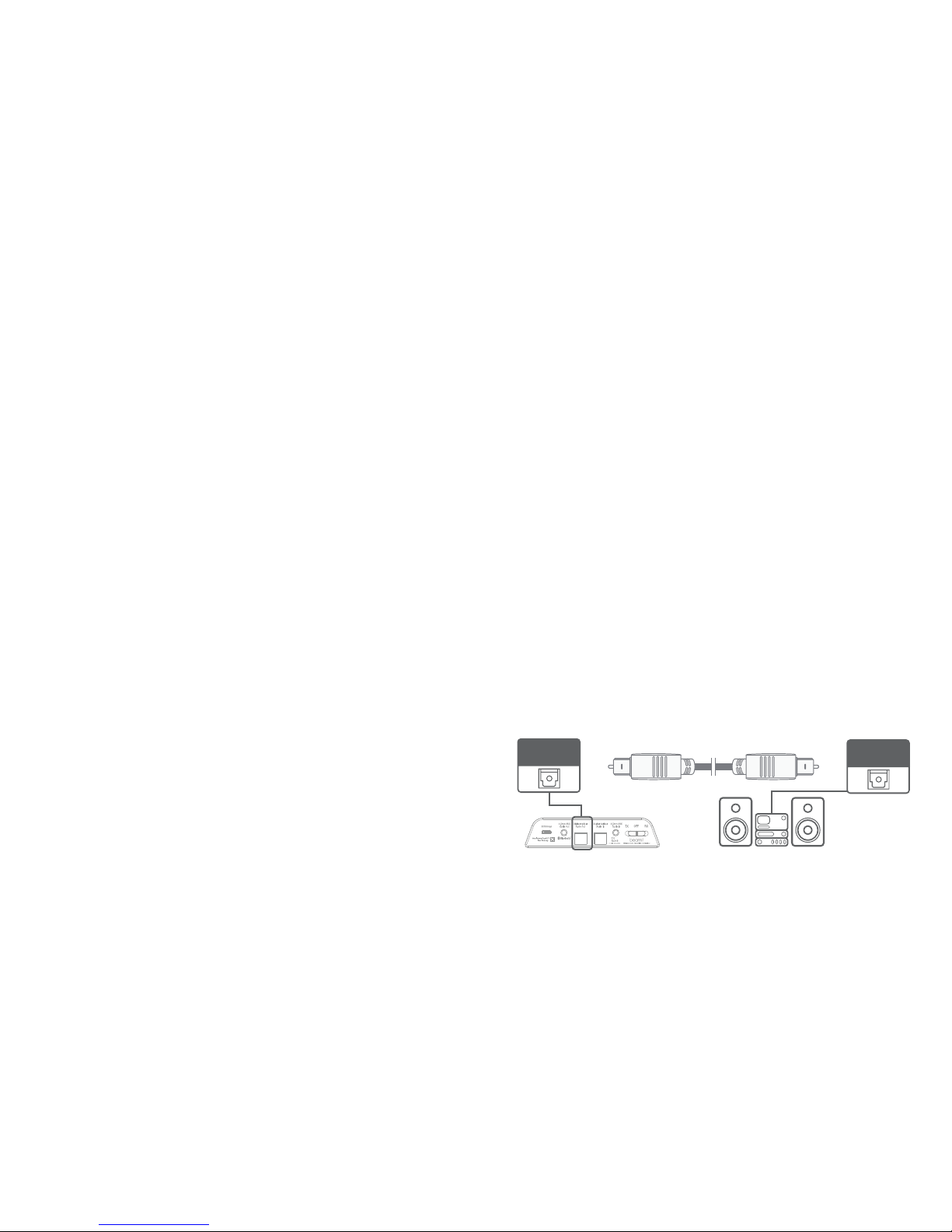
Option 1: Digital Optical Audio In (TOSLINK)
Home theater systems, receivers and newer stereo systems are outfitted
with a TOSLINK digital optical connector.
Plug the included fiber optic TOSLINK cable firmly into the “OPTICAL AUDIO IN”
on the music system and the “OPTICAL AUDIO OUT” of beamit.
Auris Inc., DE, U.S.A.
Designed in U.S.A. Made in China
Digital Optical
Audio Out
Digital Optical
Audio In
Page 8
12
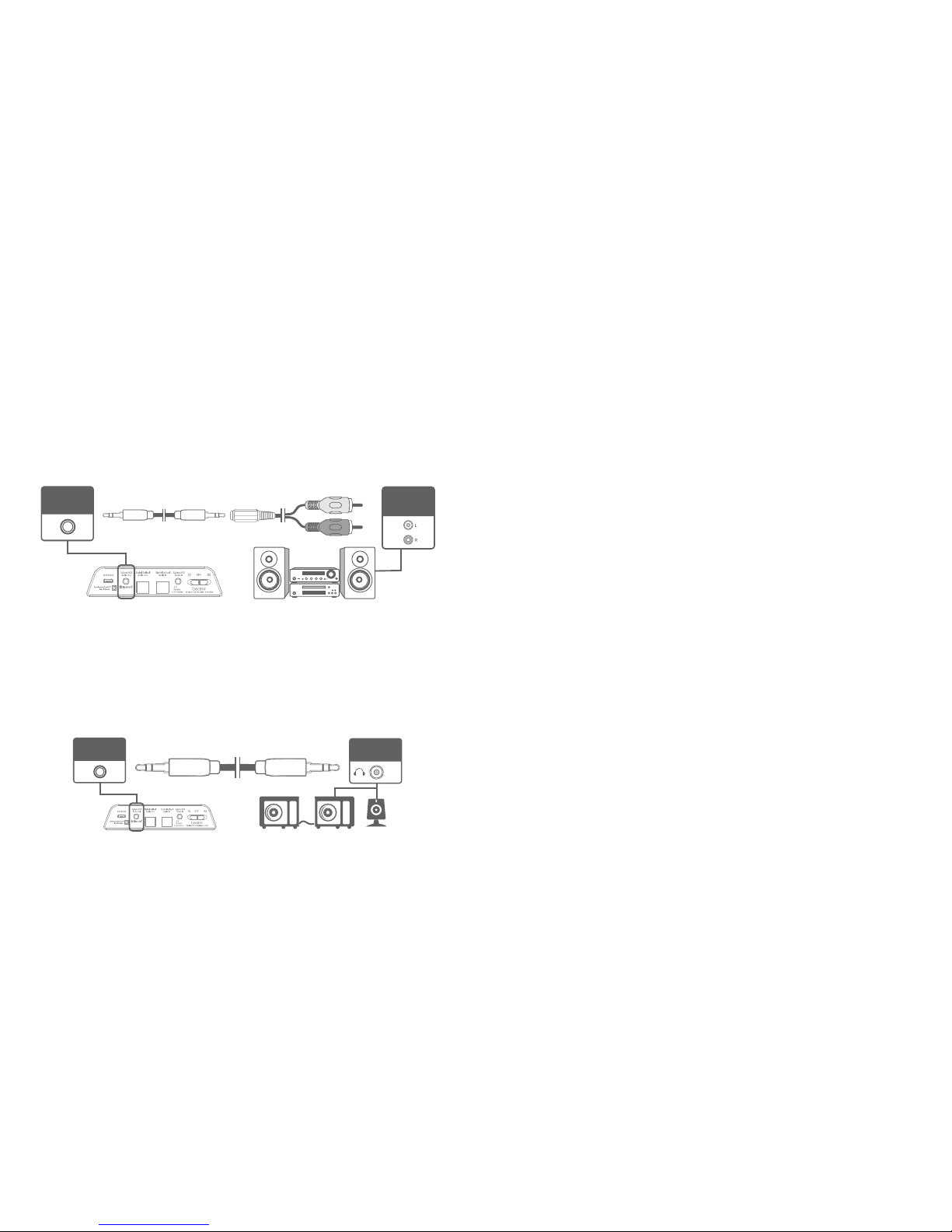
Option 2: RCA (Red & White) Connectors
Older or legacy stereo systems and receivers usually have analog audio
output with RCA (Red & White) connectors.
Attach the included RCA adapter to the 3.5mm stereo audio cable. Plug the
connectors of the RCA adapter into the matching-color RCA jacks on the music
system and plug the attached 3.5mm cable into the “3.5mm AUX AUDIO OUT”
on the rear of beamit.
Option 3: 3.5mm Headphone jack
Most powered or bookshelf speakers have a headphone jack.
Plug the included 3.5mm stereo audio cable into the headphone jack on the
TV and the “3.5mm AUX AUDIO OUT” on beamit.
Auris Inc., DE, U.S.A.
Designed in U.S.A. Made in China
3.5mm AUX
Audio Out
RCA
Audio In
Auris Inc., DE, U.S.A.
Designed in U.S.A. Made in China
3.5mm AUX
Audio Out
Headphone
Jack
Pairing with a Smartphone / Tablet / Computer
The following instructions will help you in pairing beamit with your smartphone,
tablet or computer in Receiver Mode (RX) after connecting beamit to your
home stereo system or powered speakers.
Step 1: Follow the previous instructions and connect beamit to your music
system using the appropriate connector cable.
Step 2: With beamit powered on and the TX/RX toggle switch set to “RX”, slide
and hold the spring-loaded slider (Multi-Function Switch) all the way to the right.
The blue LED indicator light will blink rapidly to indicate that beamit is ready to
pair. Release the spring-loaded slider.
Step 3: Turn ON Bluetooth on your device and go to Bluetooth preferences.
Step 4: Scan listed Bluetooth devices and select “auris beamit” to pair and
connect. Once paired, the LED indicator will turn solid blue.
Step 5: Make sure the proper audio output source is selected on beamit.
Match the corresponding audio output on the back of beamit by selecting
between Optical and AUX mode using the Multi-Function Switch.
Step 6: The music on your smart device will now play through your home
stereo system / speakers!
SETUP: PAIRING IN RX MODE
13
Page 9

OTHER FUNCTIONS
Reconnection
Previously paired bluetooth devices will reconnect to beamit automatically
once turned back on. beamit will not initiate reconnection. If beamit itself is
turned off, it is recommended to turn it back on first before turning on the
paired devices so that it can accept the incoming Bluetooth connection from
the devices.
Adjusting the Volume
beamit, by design, is a passive transmitter or receiver and has no volume
control. User volume level must be adjusted via the input and output sources
connected to beamit.
Volume can be individually adjusted on each set of headphones paired with
beamit using the built-in volume controls on the headphone. With some TVs
and connection options, TV volume may be further raised or lowered to
change the volume of all headphones paired with beamit. In this case, volume
should be maximized on the TV and then adjusted via headphones for best
audio quality.
Factory Reset
In standby mode, slide and hold the spring-loaded slider (Multi-Function Switch)
all the way to the right for approximately 5 seconds until the blue indicator
light begins to blink. Release the spring-loaded switch. The unit will enter
pairing mode and any previously paired devices will be cleared from memory.
14
TROUBLESHOOTING TIPS
beamit is connected but it will not turn on - LED indicator does not light up.
Confirm that the power adapter is connected to beamit with the included USB
cable and plugged into a functioning AC outlet. The blue LED indicator on the
front of the unit will light up when the unit is turned “ON” by setting the TX/RX
toggle switch on the rear of the unit to “TX or RX”.
Unable to pair and connect beamit to my Bluetooth device.
Make sure you are operating beamit in the appropriate Bluetooth mode.
In TX Mode: beamit can only pair with a Bluetooth receiving device such as a
Bluetooth headphone, speaker or receiver. In this mode, ensure that beamit
and the Bluetooth headphone, speaker or receiver are in pairing mode at the
same time and are within 1 meter (3 feet) of each other.
In RX Mode: beamit can only pair with a Bluetooth transmitting device such as
a smartphone, tablet or computer. In this mode, ensure that Bluetooth is turned
‘ON’ on your smartphone, tablet or computer. Make sure that the LED indicator
is blinking and your device and beamit are within 1 meter (3 feet) of each other.
My Bluetooth headphone is connected but there is no audio output.
1. Ensure that your audio source (TV/computer) OUTPUT is properly connected
to beamit audio INPUT. Audio inputs are used with TX MODE only.
2. Check whether the audio input is correctly selected on beamit (AUX OPT).
If AUX is selected, make sure make sure your audio source is connected to the
AUX input. If OPT is selected, make sure your audio source is connected to the
Optical input.
3. Confirm that audio is playing on the TV/computer and the volume is set to
“High” on the TV/computer. Make sure that volume is sufficiently high on your
Bluetooth headphone / speaker.
1515
Page 10

4. If you are using an Optical connection, make sure nothing is connected to
the AUX input of beamit.
Smartphone is connected but cannot hear any sound from my audio system.
1. Ensure that your audio source (Home audio system, stereo speakers, etc.)
INPUT is properly connected to beamit audio OUTPUT. Audio outputs are
used with RX MODE only.
2. Check whether the audio output is correctly selected on beamit (AUX OPT).
If AUX is selected, make sure make sure your audio source is connected to the
AUX output. If OPT is selected, make sure your audio source is connected to the
Optical output.
3. Verify the volume levels on your computer OS and player app.
4. If you are using an Optical connection, make sure nothing is connected to
the AUX output of beamit.
The volume output level is Low.
In TX mode: Adjust the volume both on your Bluetooth headphones / speakers
and on the TV or other connected device as both may control the volume.
In RX mode: Verify the volume levels on your smartphone / computer OS and
player app. Also check the volume levels on your powered speakers or stereo
system.
The sound quality is poor and / or the audio is cutting out.
1. For the most noise-free audio, maximize the volume on your audio source (TV ,
home audio system, pwered speakers, etc.) and adjust volume via the Bluetooth
enabled headphones, speakers or smartphone.
16
2. Make sure you are within range of your Bluetooth-enabled device.
3. Bluetooth devices are susceptible to interference from other Bluetooth
devices, cordless phones, routers, microwave ovens, and wireless devices
operating on the 2.4 GHz band. Eliminate as many potential sources of
interference as possible while using your Bluetooth headphones / speakers.
There is a delay (latency) in audio
1. Bluetooth is a digital wireless signal and there is some latency expected due
to the coding/decoding and compression/decompression steps that must occur.
2. The aptX® and aptX® Low Latency audio codecs supported by beamit are
notable for having lower and much lower latency (smaller delay), respectively,
compared to regular Bluetooth audio.
3. Using beamit with a headphone that supports aptX® or aptX® Low Latency
will minimize audio lag.
4. Some modern TV’s and receivers also have an audio delay option. Make sure
that audio delay is set to 0 to minimize lag.
If you have any further queries please contact us on [email protected]
17
Page 11
18
TECHNICAL SPECIFICATIONS
Bluetooth® Version 4.1 with aptX® Low Latency
Supported Codecs aptX® Low Latency, aptX®, AAC, SBC
Bluetooth® Range Up to 10 meters, 33 feet
Outputs TOSLINK Digital Optical Input & Output
3.5mm AUX Input & Output
Bluetooth® Profiles A2DP
Input Power
Latency
5V DC, 500 mA
40 milliseconds (ms)
Mounting Options Sticky Gel mounting strips
Included Accessories TOSLINK Digital Optical Audio Cable
3.5mm AUX Audio Cable
3.5mm - RCA Adapter
USB-microUSB Charging Cable
USB Power Adapter
Sticky Gel Mounting Strips
Quick Start Guide
~
19
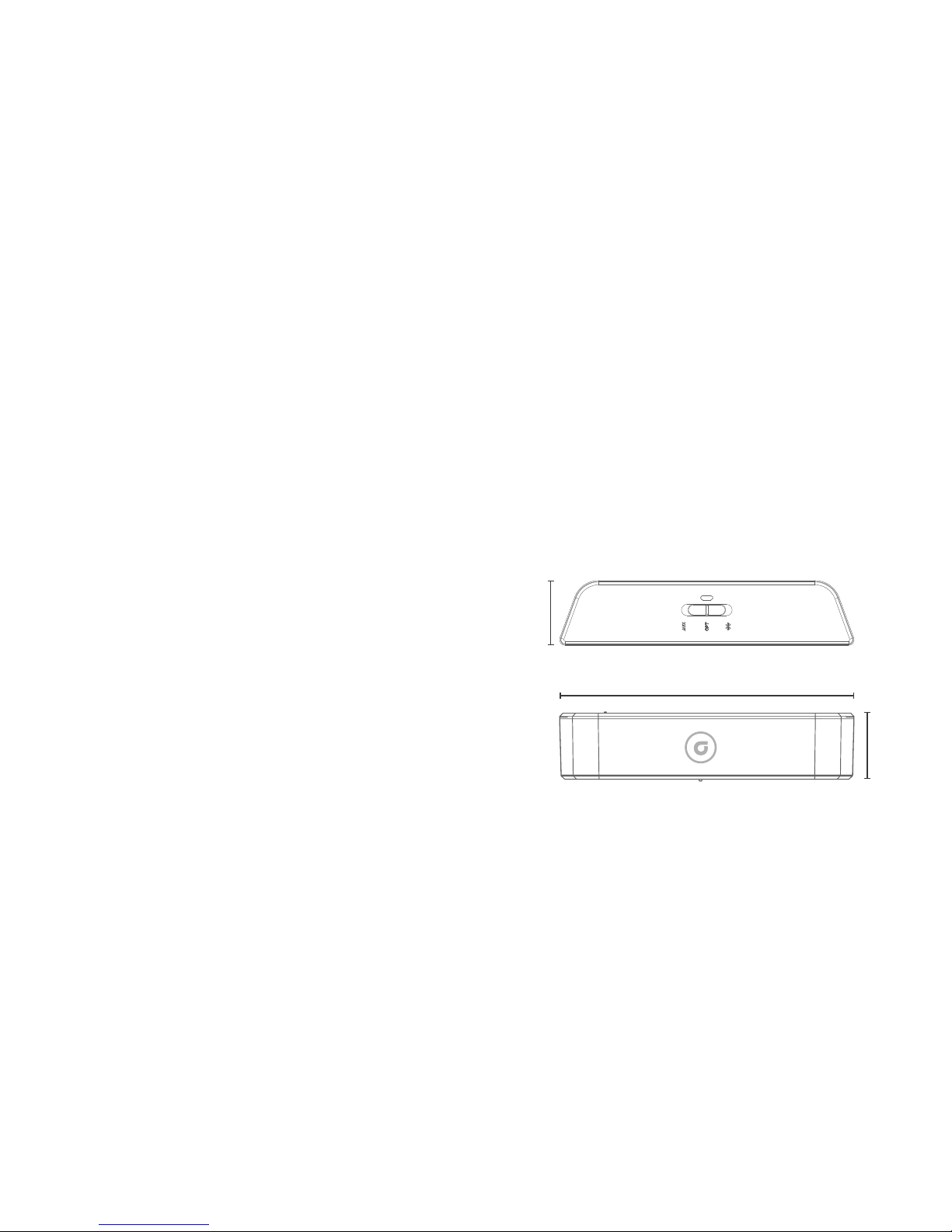
Dimensions Height
0.94 inches (24 mm)
Width 4.30 inches (109 mm)
Depth 1.02 inches (26 mm)
Weight 0.9 ounces (25 grams)
1.02 in (26 mm)
4.3 in (109 mm)
0.94 in (24 mm)
Weight: 0.9 oz (25 g)
Page 12

PRODUCT SAFETY
When used in the directed manner, this unit has been designed and
manufactured to ensure your personal safety. Improper use of this product
can result in potential electrical shock or fire hazards. Please read all safety
and operating instructions carefully before installation and use. Keep these
instructions handy for future reference.
Users of this product are cautioned not to make modifications or changes
that are not approved by Auris, Inc. Doing so may void the compliance of
this product and may result in the loss of the user’s authority to operate
the equipment.
CAUTION: To reduce the risk of electric shock
do not remove cover (or back).
No user-serviceable parts inside.
Refer servicing to qualified service personnel.
CAUTION
RISK OF ELECTRIC SHOCK
DO NOT OPEN
20
Keep product dry to avoid affecting the interior circuitry of the product.
Don’t put the product in direct sunlight or place in hot areas.
High temperature will shorten the life of electronic device.
Don’t expose to extreme temperatures, it may damage the internal
circuit board.
Don’t take the product apart or the warranty will be voided.
Don’t drop the product.
Don’t use chemical or detergent to clean the product.
Due to isolating characteristic of the product, do not use the product at
excessive volume while driving or in any other activity where failure to
hear surrounding sounds could be dangerous.
Using the product at excessive volumes may cause permanent hearing
damage. You can get the most out of your equipment and enjoy great
audio performance even at safe levels.
SAFETY INSTRUCTIONS
21
Page 13

Auris, Inc.
DE 19958, USA
The Bluetooth® word mark and logos are registered
trademarks owned by Bluetooth SIG, Inc. and any
use of such marks by Auris, Inc. is under license.
Other trademarks and trade names are those
of their respective owners.
Qualcomm® aptX™ is a product of Qualcomm Technologies International, Ltd.
Qualcomm is a trademark of Qualcomm Incorporated, registered
in the United States and other countries, used with permission.
aptX is a trademark of Qualcomm Technologies International, Ltd., registered
in the United States and other countries, used with permission.
Designed in the U.S.A. I Made in China.
auris and its logo are registered trademarks of Auris, Inc. All rights reserved.
WARRANTY
Don’t worry. Your auris beamit is covered under our warranty. For warranty
information please visit:
www.theauris.com/warranty
FCC Compliance
This device complies with Part 15 of the FCC Rules. Operation is subject
to the following two conditions:
(1) This device may not cause harmful interference, and
(2) This device must accept any interference received, including interference
that can cause undesired operation.
Any changes or modifications to the device will void the user’s authority to
operate the device.
This device complies with FCC radiation exposure limits set for an
uncontrolled environnment. This device should be installed and operated
with minimum distance of 20cm between the radiator and the body.
FCC ID: 2ABCJAU05
22
Page 14

www.theauris.com
 Loading...