

Page 1
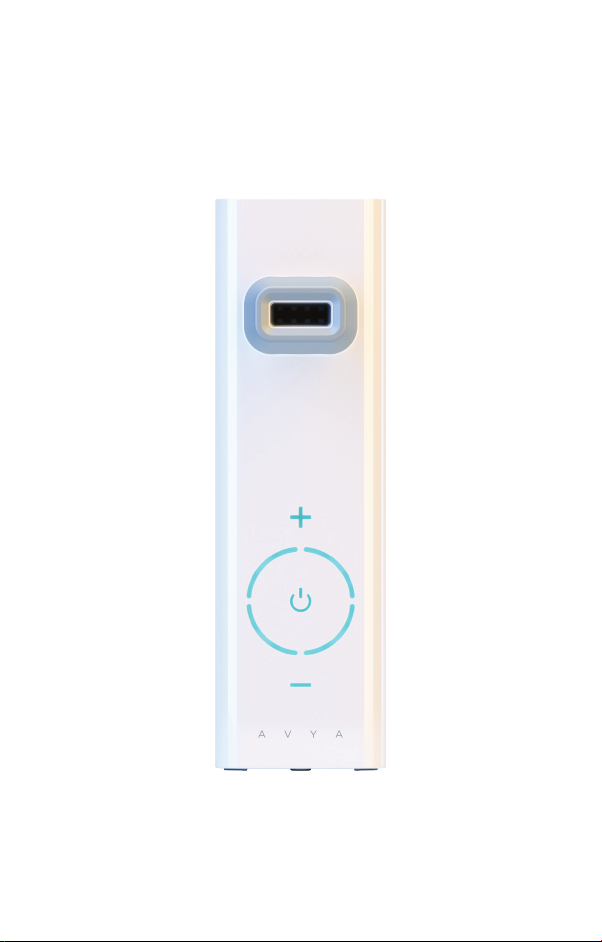
AVYA
STEAM INHALER
USER MANUAL
Page 2

INDICATIONS FOR USE
The Avya is a portable Steam Inhaler designed to deliver
warm and soothing aerosol mist for sinus and respiratory
relief.
Thank You for Purchasing Avya - The World’s Only
Patented, Vibrating Mesh Technology Steam Inhaler.
We’ve created a beautiful, ultra-portable, personal
vaporizer that clears obstruction in the breathing path.
AVYA uses clean nanoparticle steam to go deep into
your nasal, sinus and throat passages to eectively clear
sinuses, and relieve allergy, cold or flu-related symptoms.
You can use AVYA anywhere- at home, at the oce, on
your run, at school, at the park, on vacation. It’s time to
stop the struggle and enjoy better breathing anywhere,
anytime.
This device should be used according to the instructions
and not for any other purpose. Please read instruction
carefully before use.
WARNING AND CAUTION PRECAUTIONS
• Read instructions before using this device.
• Clean Avya before use. (See cleaning instructions)
• Clean Avya at the end of each day of use and store
properly.
• This is a single patient device. Do not allow multiple
patients to use the same device.
• THIS UNIT IS DESIGNED ONLY FOR WATER BASED
SALINE FORMULATIONS. USING ESSENTIAL OILS OR
OTHER LIQUIDS WILL DAMAGE THE DEVICE AND VOID
THE PRODUCT WARRANTY!
• Do not attempt to clean mesh with any foreign objects,
follow cleaning instructions when cleaning the mesh.
• Do not store liquids overnight in unit; this could cause
clogging of the mesh.
• Do not immerse control unit in water, wipe control unit
with damp cloth to clean.
• Avoid dropping the unit, damage to unit could occur.
Page 3
• Keep the device out of the reach of infants and
children. Children should use Avya only under an adult’s
supervision.
• We recommend using Avya with our compatible
aqueous solution.
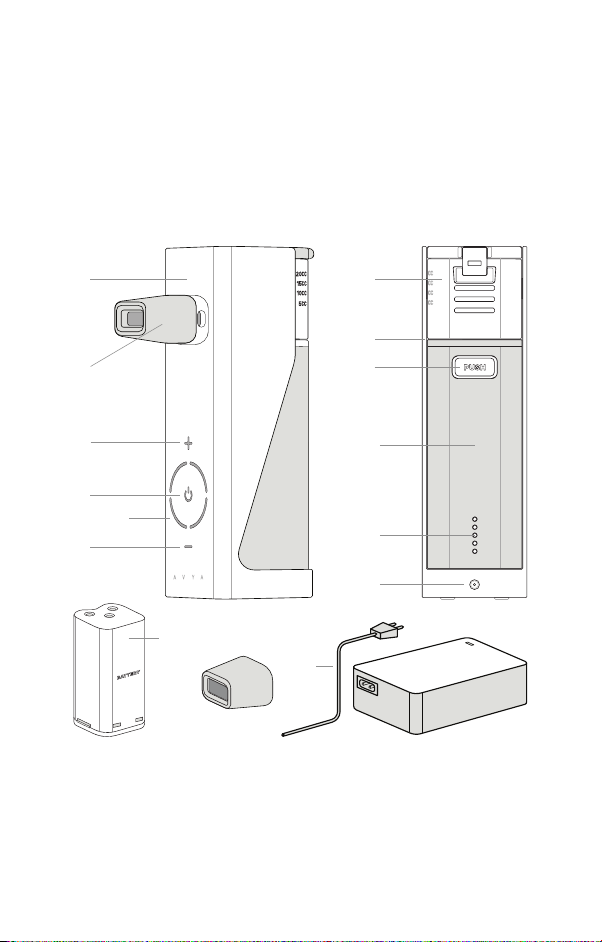
DESCRIPTION OF DEVICE AND
ACCESSORIES
1 7
8
2
9
3
4
5
6
13 14
15
1) Main unit. 2) Mouthpiece. 3) Temperature increase
button. 4) Power On/O button. 5) Temperature
indicator. 6) Temperature decrease button. 7) Water Tank.
8) Contact Electrode. 9) Water Tank release button. 10)
Rubber cover. 11) Battery indicator. 12) DC jack socket. 13)
Battery. 14) Mouthpiece. 15) AC adapter and power cable.
10
11
12
Page 4
INITIAL USE
Before using Avya, the main unit and the accessories should
be cleaned. Refer to Section Cleaning for instructions.
Before use, ensure the device and accessories are at room
temperature.
Please note: The unit comes only 50% pre-charged for
safety of transport.
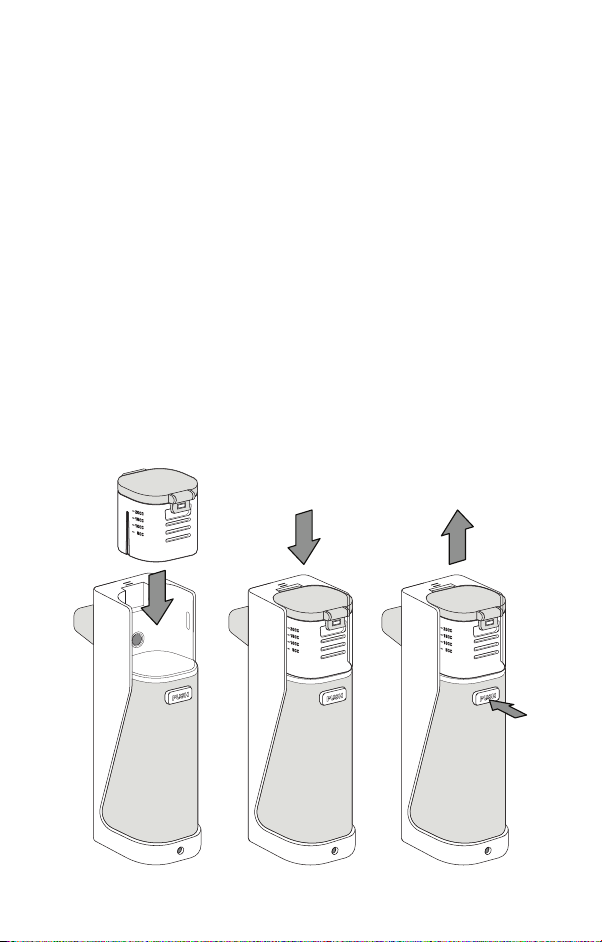
ASSEMBLING THE WATER TANK
Remove the device from the packaging. Connect the
water tank to the Steam Inhaler main unit. Make sure to
connect firmly so that you hear a “click” sound (Fig. 1)
To remove the water tank from the Avya main unit, press
the button and pull water tank upward simultaneously
(Fig. 2)
Fig. 1 Fig. 2
Page 5
INSERTING BATTERY PACK
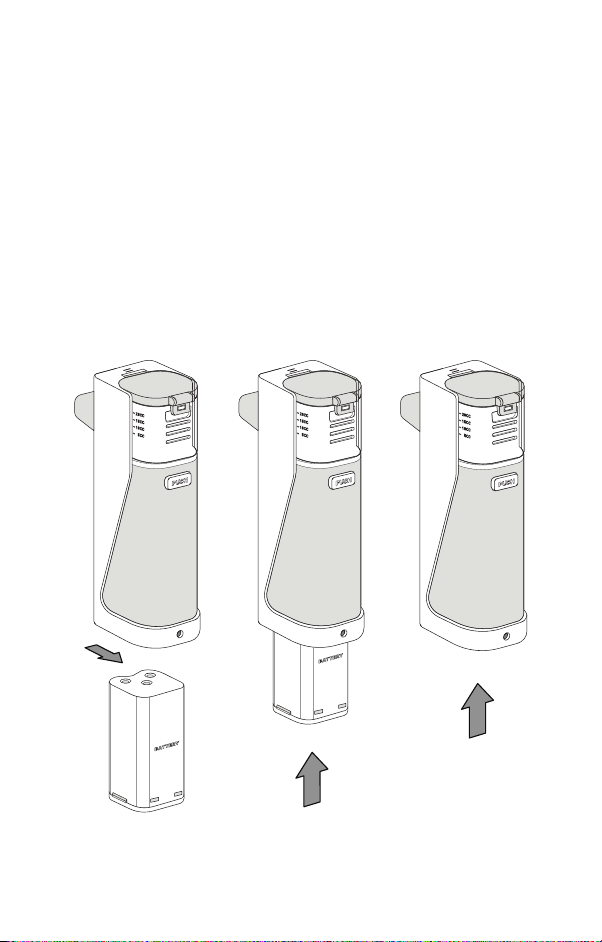
Be sure to insert battery pack as indicated on the inside
door of the battery compartment. With normal use,
a completely charged battery pack will power Avya
for about 2 hours. Complete battery recharge time is
approximately 3 hours.
Ensure that the plastic poles protector is removed from
the battery before inserting it into the device. Insert
battery pack (type 18650 2200mA x 4 units). The battery
pack should be aligned to their respective poles (Fig. 3).
Fig. 3
Ensure the battery pack is tightly fixed to the main device.
Page 6
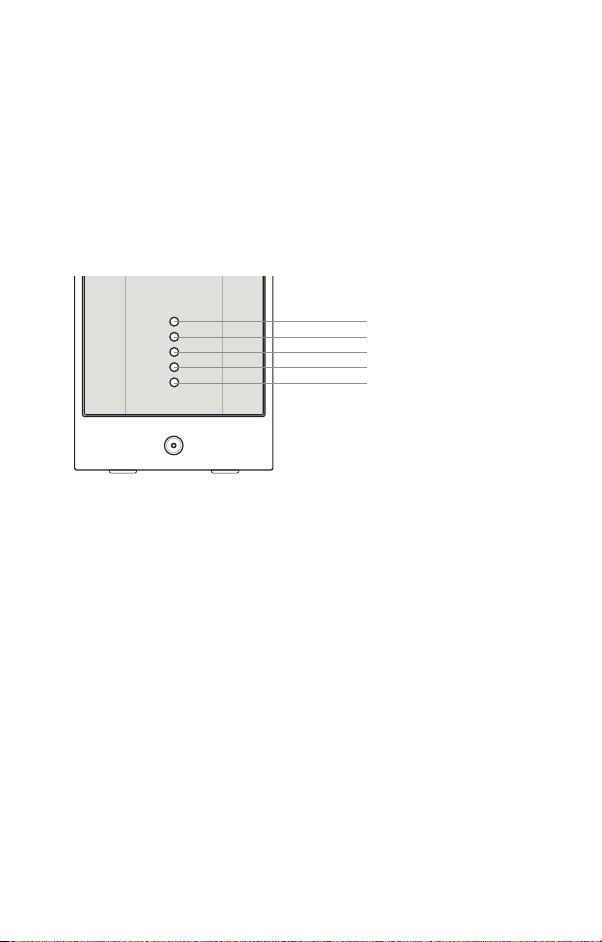
BATTERY RECHARGING AND STATUS
Please recharge the battery only with the supplied AC
adapter. The AC adapter will automatically recharge
the battery pack when plugged into the device. Please
note that the battery pack will stop charging if the unit is
powered ON for use. Always unplug the AC adapter when
the battery pack is fully recharged to maintain the battery
service life.
full power
sucient power
medium power
low power
no power
Note: When the battery is completely exhausted the
power lights will flash 5 times and then power o the
device.
Note: When the battery pack is completely recharged,
the power lights will turn o to indicate unit readiness.
Note: Before using the battery pack, the plastic pole
protector cover on battery pack must be removed.
Note: ONLY use Avya’s supplied battery pack for the
device. Tampering with the battery pack will void the
product warranty. We recommend replacing the battery
pack after one year of regular use.
Always disconnect the AC adapter from the mains
connection and the Avya unit before inserting battery
pack. Check the LED power status of battery pack before
use.
Page 7
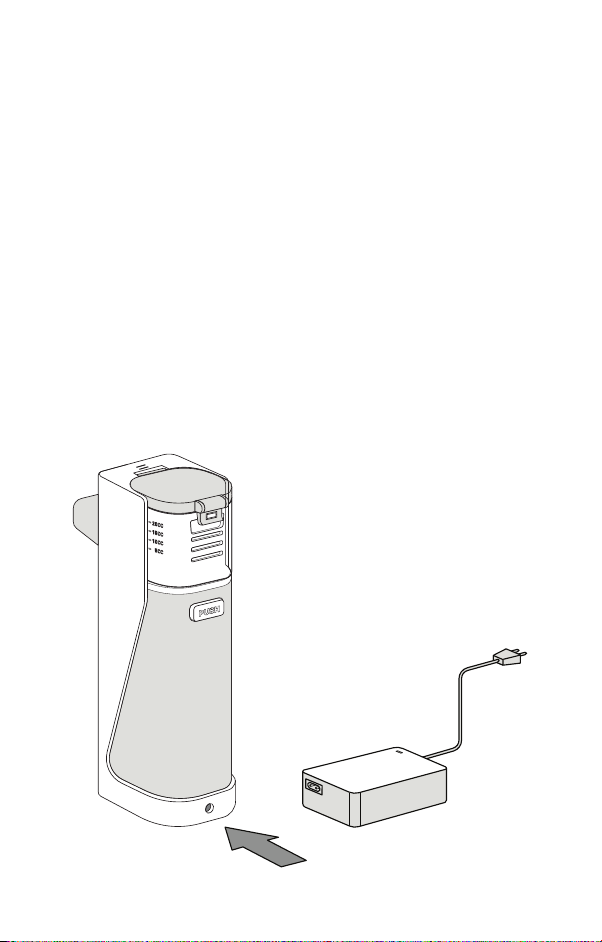
AC ADAPTER OPERATION
Note: Before using the AC Adapter, always check the data
plate on the bottom of Avya device to ensure that the
voltage and current indicated on the unit correspond to
the voltage and current available.
Connect the AC adapter only to the mains voltage listed
on the type plate. Insert the AC adapter connector into
the connector socket provided, and the AC adapter fully
into a suitable socket.
Note: The device can operate without the battery pack
when connected with the AC adapter. Ensure that there is
a socket near to where the device will be used. Ensure that
the mains cable is not a tripping hazard. To disconnect
the Avya Steam Inhaler from the mains after use, switch
o the device first and then remove the AC adapter.
Page 8
DEVICE OPERATION
Note: Before use, ensure the device and accessories are
at room temperature.
Preparing Avya
• For hygienic reasons, it is imperative that Avya and
accompanying accessories are cleaned after every use.
For details, see Section Cleaning.
Filling the Water Tank
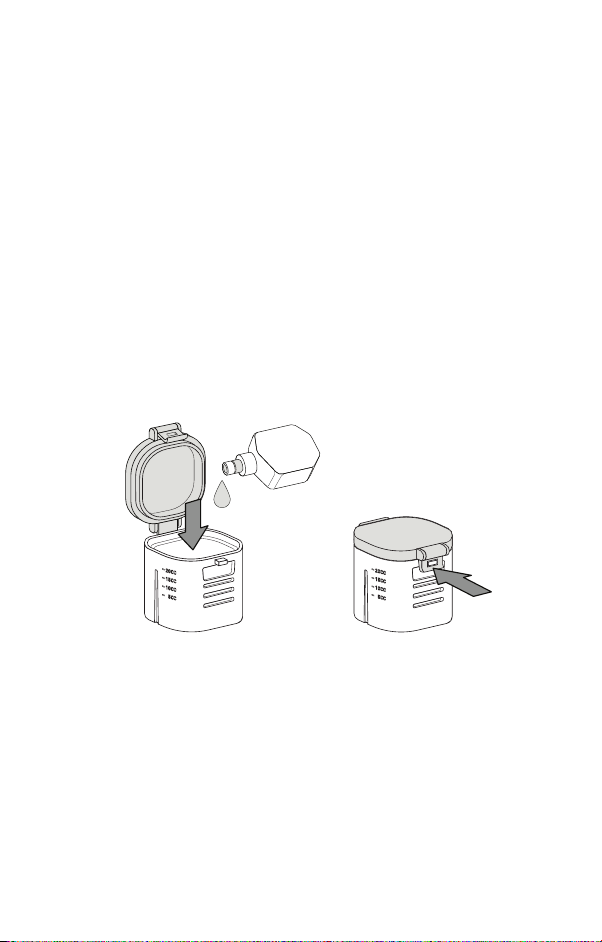
• Open the water tank by lifting the latch.
• Pour Avya Aqueous Solution into the water tank.
• Close the water tank by pressing the latch firmly and
securely back into place (Fig. 4)
Fig. 4
Inhalation with the mouthpiece
• Connect the rubberized mouthpiece to the steam outlet
(Fig. 5)
• Sit upright and hold the device as upright as possible, do
not tilt the device more than 45 degrees in any direction
(Fig. 6)
• Place Avya at a comfortable angle under your nose
• Power the unit by simply touching the power indicator.
• Adjust the temperature control by touching the “+” or
“-“ button, the temperature LED will light up (Fig. 7).
Page 9
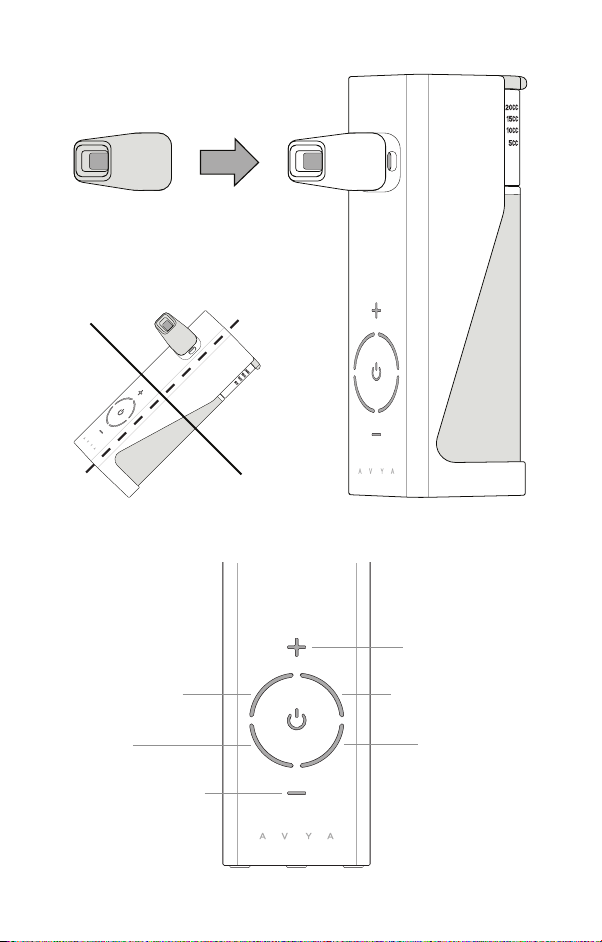
Fig. 5
Fig. 6
<45
Fig. 7
LED indicators
o
Increase temp
LOW ~ 40
COOL
Decrease temp
o
C MEDIUM ~ 45oC
HIGH ~ 55
o
C
Page 10

Note: Please allow at least 5 minutes for the proper
temperature setting to be reached.
Note: At any time during treatment, you can pause and
turn the device o by touching the power button.
• Breathe slowly and deeply in through your nose.
• The device will automatically shut o after 25 minutes
of use or if there is overheating of the heating element
for safety.
Note: Residue may remain inside the mouthpiece or
inside the device due to vapor accumulation. Remove the
rubber cover after each use to release any residual fluid.
Disinfect and clean the device at the end of each day.
To prolong mesh technology component, allow at least 1
hour interval between each treatment.
CLEANING
Note: The Avya Steam Inhaler device and accessories are
intended for multiple use. Before you clean the device,
always switch it o, unplug it and let it cool o. The Avya
main device and the accessories used must be cleaned
after each use.
Cleaning the water tank and vibrating mesh element with
the self clean feature:
• Open the cover of the water tank and discard the
remaining aqueous solution.
• Remove the water tank and rinse thoroughly.
• Insert the water tank in reverse direction (Fig. 8).
• With a liquid dropper, drop 5-6 droplets of water onto
the mesh element (Fig. 9).
• Power on the device. Avya will suction the water in
reverse mode into the water tank and clear out any
residue.
• Power O the device and wipe the water tank dry.
Page 11
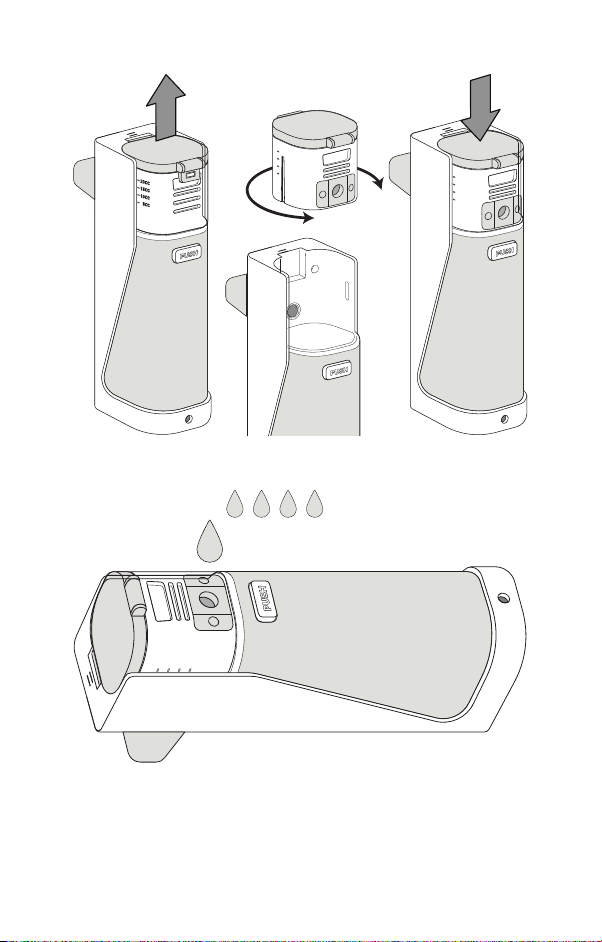
Fig. 8
Fig. 9
Note: NEVER ATTEMPT TO CLEAN THE MESH WITH
ANY FOREIGN OBJECT, THIS COULD DAMAGE THE
MESH AND WATER TANK. The unit will not operate with
a damaged mesh.
Page 12

CLEANING THE ACCESSORIES
Cleaning the accessories: Clean the accessories
(mouthpiece) with diluted soap water and rinse. Allow to
air dry completely
Cleaning Avya main unit: Clean the outside of Avya device
with a cotton cloth dampened with water. Do not allow
water to enter the device.
Cleaning the 4 stainless steel contact poles: Use a cotton
swab dampened with water to clean the stainless steel
contact electrodes on the Avya device (4 poles total - 2
poles on the main body and 2 poles underneath the water
tank).
TROUBLESHOOTING MESH PROBLEMS
With time, the mesh holes may become blocked by
unknown particles. You may notice decrease output of
vapor. To test: Put 6 ml. of water inside the water tank
and power on the unit. If complete atomization time takes
longer than 30 minutes, then the mesh holes are clogged.
Solution A: To clean the mesh holes and unclog the
blocked particles, put a solution of 2 drops of vinegar + 6
ml. of water into the water tank and allow the solution to
vaporize completely. Afterwards, rinse and dry thoroughly
before using it for a treatment.
Solution B: Run the reverse self cleaning procedure with a
solution mix of 2 drops vinegar to 4 drops of water (refer
to the reverse self cleaning instructions),
If the problem persists after checking all possible causes,
please contact an authorized distributor to purchase a
new water tank.
Page 13

TROUBLESHOOTING
Please refer to the table below to troubleshoot any
problems.
Low atomization.
• Check to ensure there is water in tank.
• Make sure water tank is firmly in place.
• Clean mesh as recommended in the instructions.
• Clean electrodes on control unit and water tank.
Power light goes out immediately after powering on.
• Make sure water cup is firmly in place.
• Clean electrodes on control unit and water cup.
Power indicator light does not come on.
• Ensure that the AC adapter is properly connected with
the main device.
• Check to see if battery pack is properly inserted in
control unit.
Power lights on but no atomization.
• Clean mesh as recommended in the instructions.
• Check mesh to see that it is not damaged.
• Clean electrodes on control unit and water tank.
• Check fluid level.
• Re-install the battery pack.
• Tilt unit forward.
Steam Inhaler shuts o during use.
• Make sure water cup is firmly in place.
• Clean electrodes on control unit and water cup.
• Re-install the battery pack.
• The internal temperature is overheating. Turn o the
device and cool it down for 10-20 minutes until the device
is completely cool.
• The treatment period has exceeded 25 minutes. To
activate the device, power the ON/OFF button for
another treatment.
Page 14

Device not heating.
• The battery power is too low.
• Allow 5-10 minutes for the selected temperature to be
reached.
Leakage from outlet of the mouthpiece.
• Open the residual port located on the bottom of the unit
to allow accumulated water to release.
If your Avya Inhaler still does not function properly after
troubleshooting, follow warranty service instructions.
TECHNICAL SPECIFICATIONS
Product Name: Avya Portable Steam Inhaler
Model: SI20
Method of Operation: Vibrating Mesh
Dimensions (LxWxH): Approx. 52.5 x 52 x 126mm
Device weight: **** excluding batteries
Battery Life: Approx. 2 hrs (from 100%)
Recommended Fill: Approx. 20 ml maximum
Atomization rate: Approx. 0.25 ml/min minimum
Oscillation frequency: 100 kHz
Mains connection: 100-240 V ~ , 50-60 Hz;
Power Consumption: **** VA
Operating conditions
Temperature: 50° ~ 104°F 10°C ~ 40°C)
Humidity: 30%-85% R.H. non-condensing
Storage and transport conditions
Temperature: -4°~ 158°F (-20°C ~ +70°C)
Humidity: < 85% R.H. non-condensing
Atmosphere pressure 860hPa~1060hPa
IPx1 Degrees of protection against ingress of water and
access to hazardous parts.
Accessories
Rubberized Mouthpiece, Battery Pack, AC adapter, Carry
bag.
Page 15
WARRANTY AND SERVICE
The Avya Steam Inhaler unit is warranted for one year
from date of purchase against defects in manufacturing.
All warranties are based on normal usage. The warranty
does not cover wearable accessories.
This warranty covers normal usage, failure to adhere to
and/or comply with operation manual instructions will
void all associated warranty obligations under the terms
of this warranty, Conditions for voiding this warranty
include:
• Abuse
• Failure to follow directions
• Misuse
• Improper maintenance
• Ordinary wear
For warranty and service please contact AURA MEDICAL
LLC at 516.253.1063 to speak to a representative or find
us online at www.aura-medical.com/support
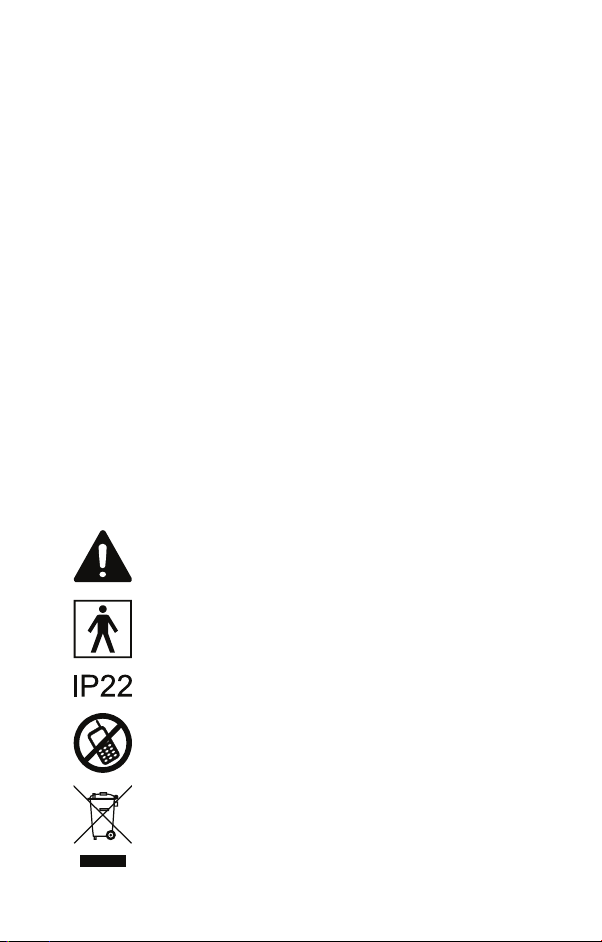
Important /Caution/Note!
Read the instruction manuals.
• BF type applied part
• Not suitable for use in presence of flammable
anesthetic mixture with oxygen or nitrous
oxide.
• IPx22 Classification
• Continuous operation
To avoid atomizer’s abnormal operation
caused by electromagnetic interference
between electrical and electronic equipments,
do not use the device near a cell phone or
microwave oven.
Discard the used product to the recycling
collection point according to local regulations.
Page 16
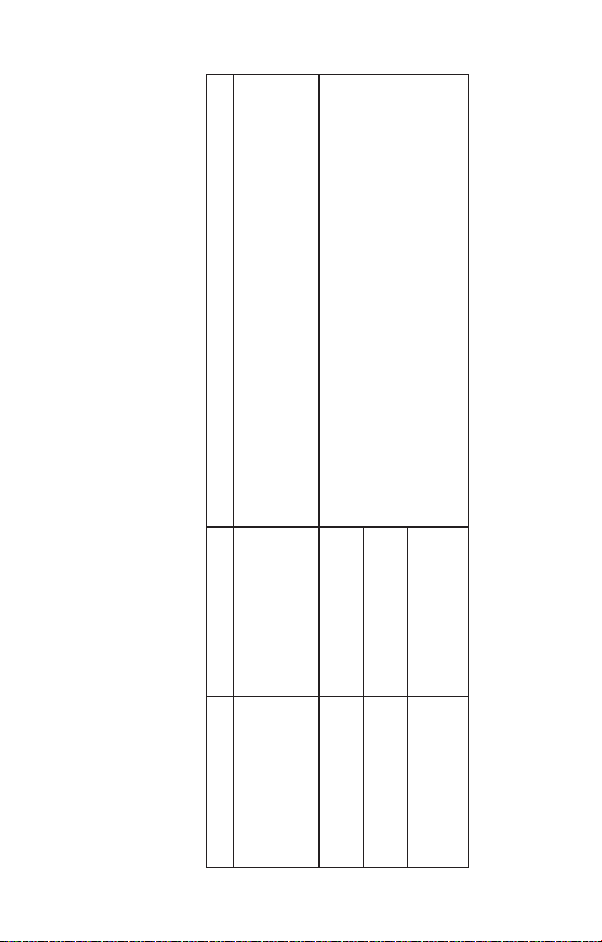
Electromagnetic environment - guidance
The MODEL SI20 uses RF energy only for its internal
function. Therefore, its RF emissions are very low and are
not likely to cause any interference in nearby electronic
Group 1
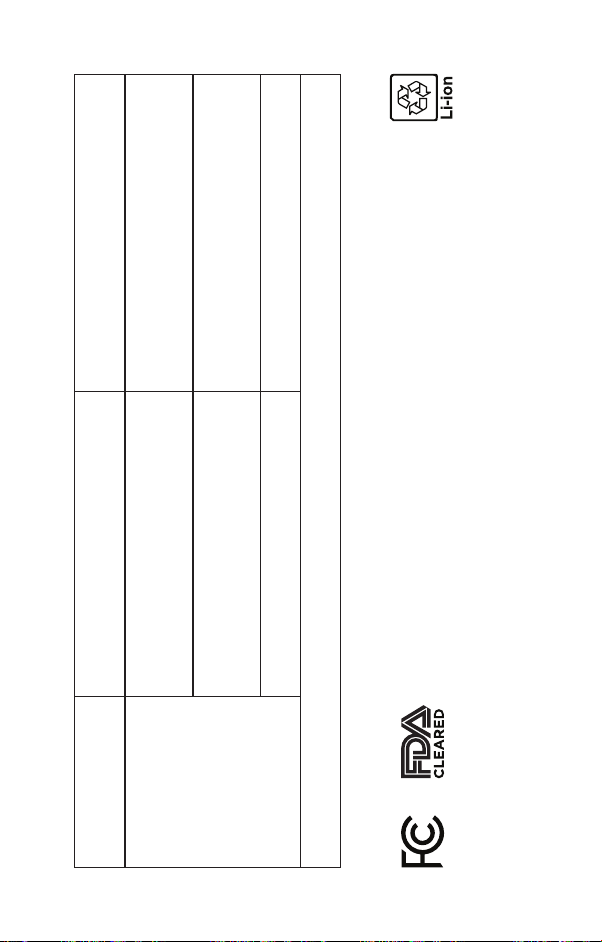
COMPLIANCE
equipment.
The MODEL SI20 is suitable for use in all establishments,
Class B
including domestic establishments and those directly
connected to the public low-voltage power supply network
that supplies buildings used for domestic purposes.
Class A
Complies
ELECTROMAGNETIC COMPATIBILITY
INFORMATION
Guidance and manufacturer’s declaration - electromagnetic emissions.
MODEL SI20 compliance for each EMISSIONS test specified by the standard, e.g. EMISSIONS class and group.
EMISSIONS
CISPR 11
RF emissions
CISPR 11
RF emissions
IEC 61000-3-2
Harmonic emissions
/flicker emissions
Voltage fluctuations
IEC 61000-3-3
Guidance and manufacturer’s declaration - electromagnetic immunity.
MODEL SI20 compliance for each IMMUNITY test specified by the standard, e.g. IMMUNITY test level.
Page 17
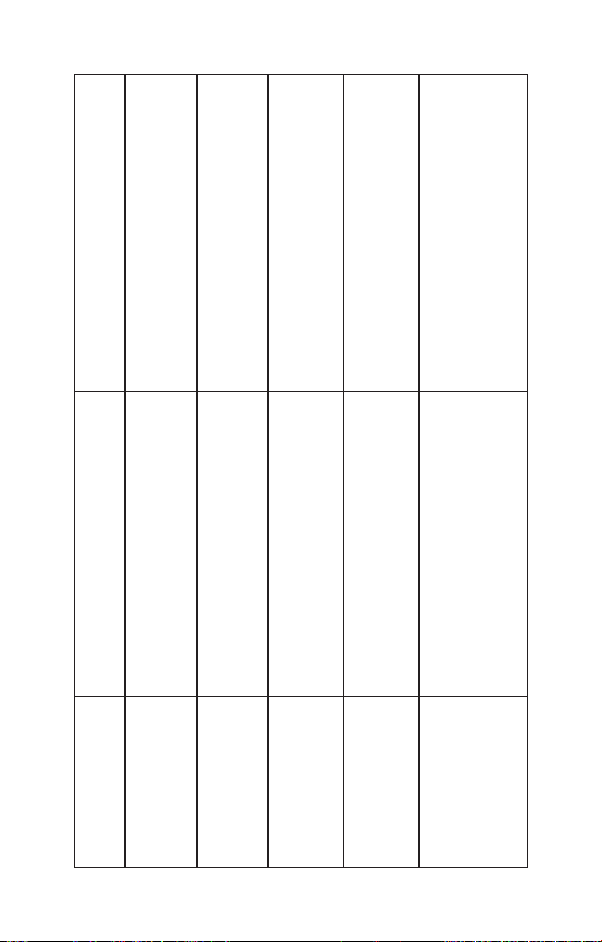
IEC 60601-1-2
Compliance level
±8 kV contact
±2 kV, ±4 kV, ±8 kV, ±15 KV air
10V/m
80MHz-2.7GHz
80% AM at 1kHz
±2 kV
100 kHz repetition frequency
test level
±8 kV contact
±2 kV, ±4 kV, ±8 kV, ±15 KV air
10V/m
80MHz-2.7GHz
80% AM at 1kHz
±2 kV
100 kHz repetition frequency
Immunity Test
Electrostatic
discharge (ESD)
IEC 61000-4-2
Radiated
RF EM fields
IEC 61000-4-3
Electrical fast
transient/burst
±0.5 kV, ±1 kV line-to-line;
±0.5 kV, ±1 kV line-to-line;
IEC 61000-4-4
Surge
3V
0.15MHz-80MHz
6V in ISM and amateur radio bands be-
±0.5 kV, ±1 kV, and ±2 kV
line-to-ground
±0.5 kV, ±1 kV and ±2 kV
line-to-ground
IEC 61000-4-5
tween 0.15MHz and 80MHz, 80% AM at
3V
0.15MHz-80MHz
6V in ISM and amateur radio bands be-
tween 0.15MHz and 80MHz, 80% AM at
Conducted distur-bances induced by
RF fields
IEC 61000-4-6
1kHz
1kHz
Page 18
IEC 60601-1-2
,
o
, 225
o
, 180
o
, 135
o
.
o
Compliance level
, 90
o
, 45
o
, and 315
o
0% UT: 0.5 cycle a)
At 0
270
0% UT: 1 cycle
70% UT: 25/30 cycles
Single phase: at 0o0% UT: 250/300 cycles
,
o
, 225
o
, 180
o
, 135
o
, 90
o
, 45
o
0% UT: 0.5 cycle a)
At 0
.
o
, and 315
o
270
0% UT: 1 cycle
70% UT: 25/30 cycles
Single phase: at 0o0% UT: 250/300 cycles
test level
Immunity Test
Voltage dips, short
interruptions and
voltage variations
on power supply
input lines
IEC 61000-4-11
NOTE: UT is the a.c. mains voltage prior to application of the test level
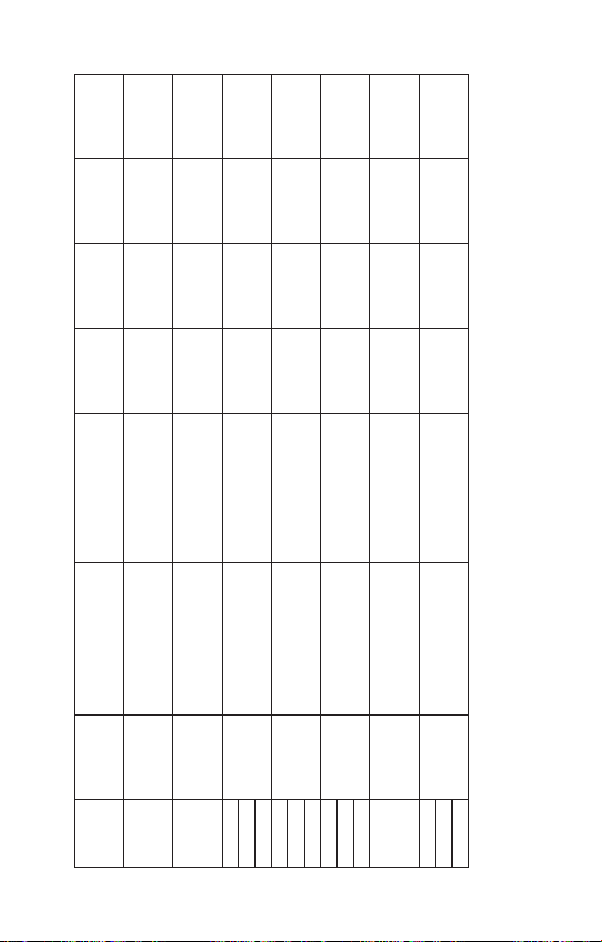
Test specifications for ENCLOSURE PORT IMMUNITY to RF wireless communications equipment or For ME
EQUIPMENT and ME SYSTEMS that are used in the home healthcare environment.
Page 19
level
Compliance
(V/m)
test level
Immunity
(m)
Distance
(W)
Max Power
b)
Modulation
a)
Service
27 27
0.3
Pulse
Modulation
18 Hz
TETRA 400
28 28
0.3
2
FM c)
±5kHz deviation
1 kHz sine
GMRS 460
FRS 460
9 9
0.3
0.2
Pulse
Modulation
217 Hz
Pulse
GSM 800/900;
LTE-Band 13, 17
28 28
28 28
28 28
0.3
0.3
0.3
2
2
2
Modulation
18 Hz
Pulse
Modulation
217 Hz
Pulse
Modulation
217 Hz
TETRA 800; Iden 820;
CDMA 850; LTE 5
GSM 1800-1900;
CDMA 1900; DECT,
LTE 1, 3, 4, 25; UMTS
Bluetooth, WLAN,
802.11 b/g/n;
RFID 2450; LTE 7
Pulse
Modulation
WLAN 802.11 a/n
9 9
0.3
0.2
217 Hz
Band
Test Freq.
(MHz)
(MHz)
380-390 1.8
385
430-470
450
800-960
1700-1990
2400-2570
2450
5100-5800
5240
5500
5785
NOTE: a) For some services, only the uplink frequencies are included. b) The carrier shall be modulated using a 50 %
duty cycle square wave signal. c) As an alternative to FM modulation, 50 % pulse modulation at 18 Hz may be used
because while it does not represent actual modulation, it would be worst case.
704-787
810
745
780
710
1720
870
1845
930
1970
Page 20

Aura Medical LLC © AVYA is a registered
trademark owned by Aura Medical LLC.
All rights reserved.
Engineered and designed in the USA
by Aura Medical LLC.
Assembled in China.
For support or Inquires:
[email protected]
www.aura-medical.com
 Loading...