

Page 1
MA7R Quick Guide
Page 2
20.
21.
22.
23.
24.
25.
26.
27.
28.
29.
30.
31.
32.
20
27
28
29 30 3132
21
22
23
24
25
26
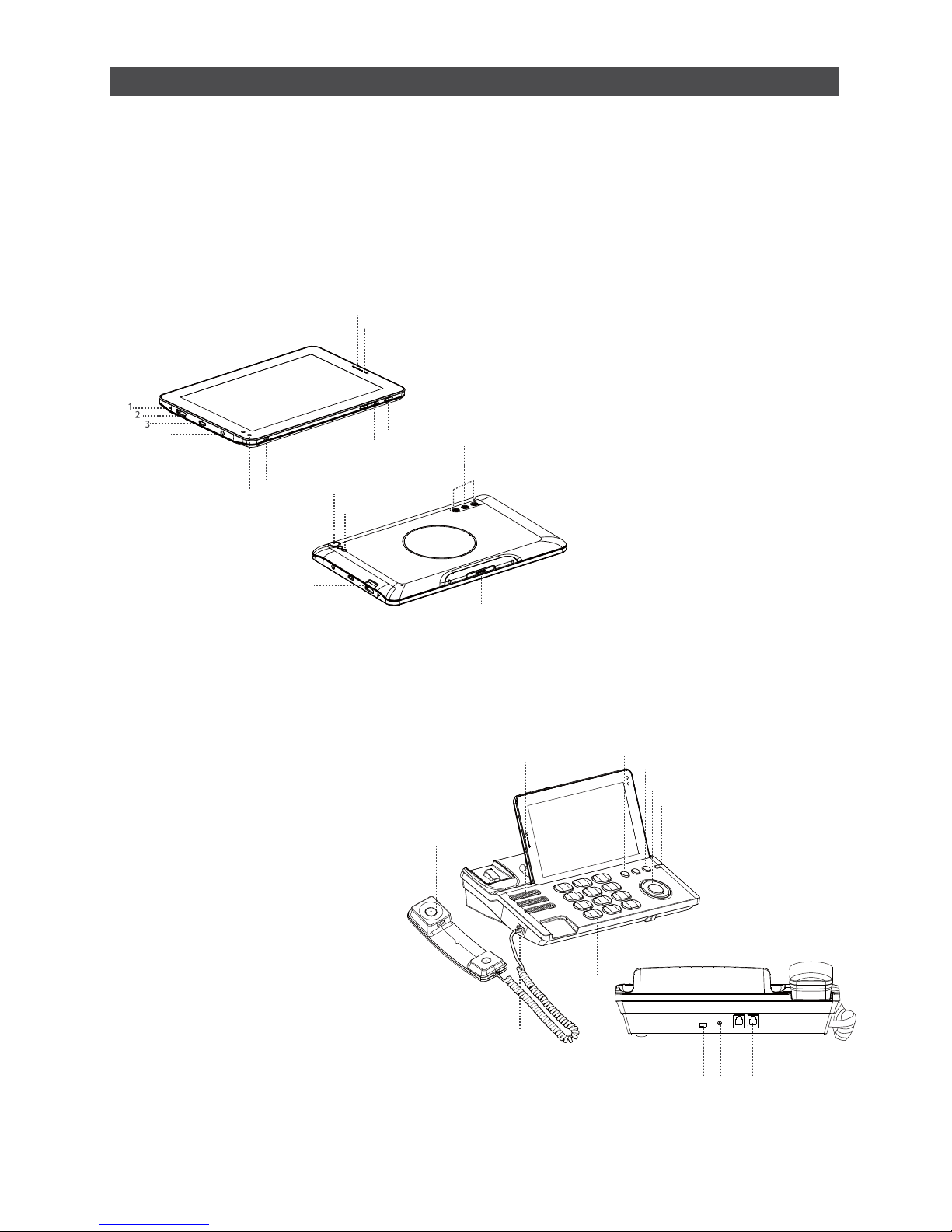
Telephone Receiver/Handset
Speaker(Phone Set)
Flash Key
Pause Key
Redial Key
Hands Free Key
Phone Cord Jack
Numeric Keypad
Ringtones Volume
Direct Current Input Jack
Extension Cord Jack
Landline Jack
Indicator(Incoming Calls)
1.
2.
3.
4.
5.
6.
7.
8.
9.
10.
11.
12.
13.
14.
15.
16.
17.
18.
19.
4
5
6
7
11
12
13
14
15
16
17
18
19
8
9
10
Microphone Tablet
Mini HDMI Port
USB Port
Earphone Jack
IR1(transmit)
IR2(transmit and receive)
IR3(transmit)
Rear Camera
Light Sensor
Proximity Sensor
Rear Camera Flash
Front Camera
Micro SD Card Slot
Dock Connection Interface
Power Button
Volume UP Button
Volume Down Button
Speakers(Tablet)
Tablet Receiver
Register Y our Device
We strongly suggest that you register your device following the directions provided with the product.
This will allow us to notify you when the latest firmware updates are available.
If You Need More Information:
Please refer to the included User Manual for more detailed and in-depth instructions on how to
use this device, as well as answers to frequently asked questions.
Before We Get Started
Page 3
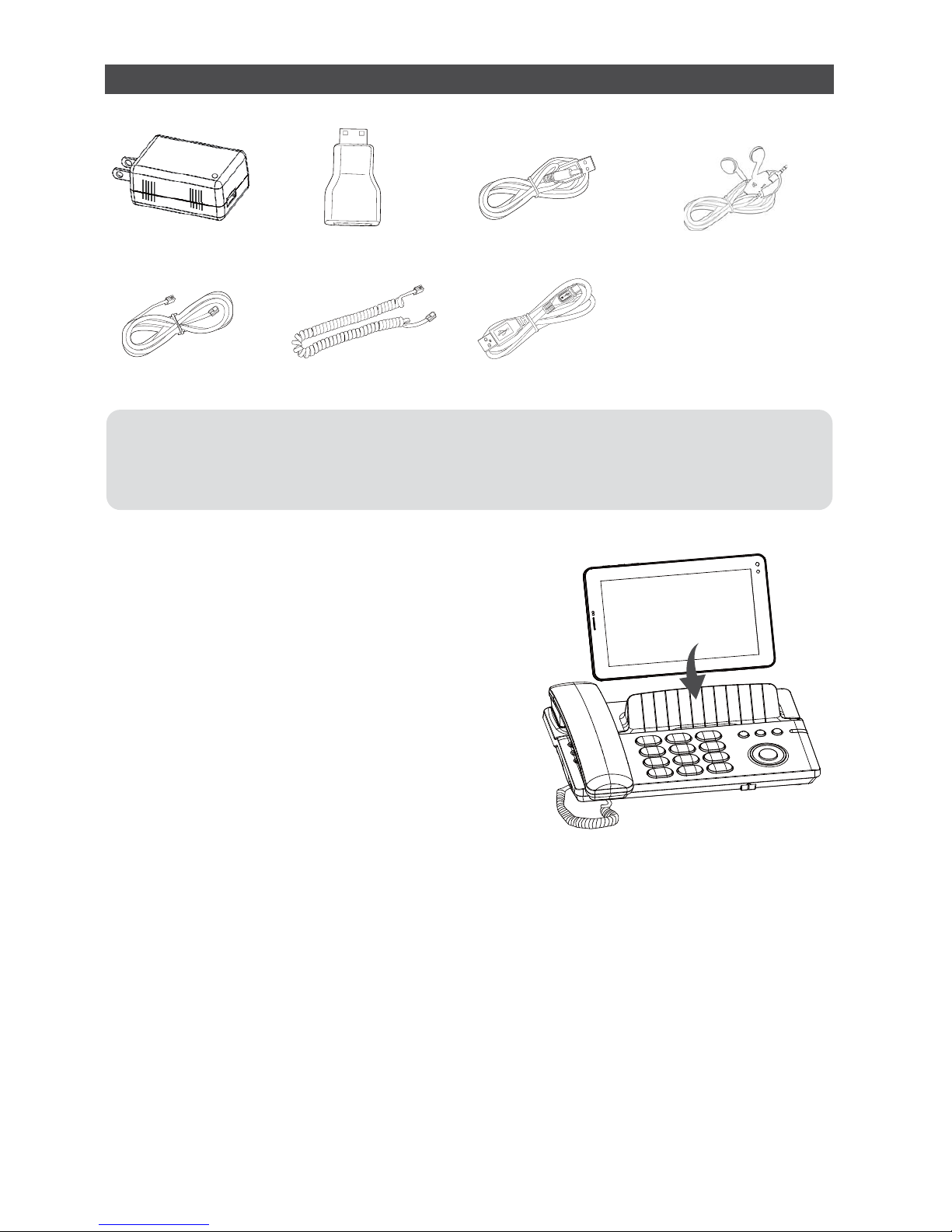
What's in the Box
USB Data Cable
Coiled Phone Cord
Phone Line
HDMI ConverterUSB Charger USB Power Cable DC4.0 Earphone
Ɣ3KRQH+DQGVHW
Ɣ&RLOHG3KRQH&RUG
Ɣ86%3RZHU&DEOH'&
Ɣ USB Data Cable
Ɣ7DEOHW
Ɣ86%&KDUJHU
Ɣ+'0,&RQYHUWHU
Ɣ3KRQH&RUG
Ɣ(DUSKRQH
Ɣ'RFN3KRQH
Assembling Your TELPAD
Please refer to the figure:
Insert the Tablet into Dock. Making sure the interface on the
tablet and the phone set are properly aligned.
1.Connect the DC power adapter and DC power adapter line.
2.Insert the power adapter line into the dock's power line jack.
3.Insert the DC power adapter into the power source/outlet.
4.Insert the phone line into the phone line jack and the unit's phone line socket.
Connecting and Charing the Telephone
Connecting Extensions
Connect the extension phone cord with the phone set into the extension cord jack.
Charging the Tablet Using the Dock
Connect the phone set to a power source. The Tablet will automatically charge once
it is placed on the dock.
Page 4
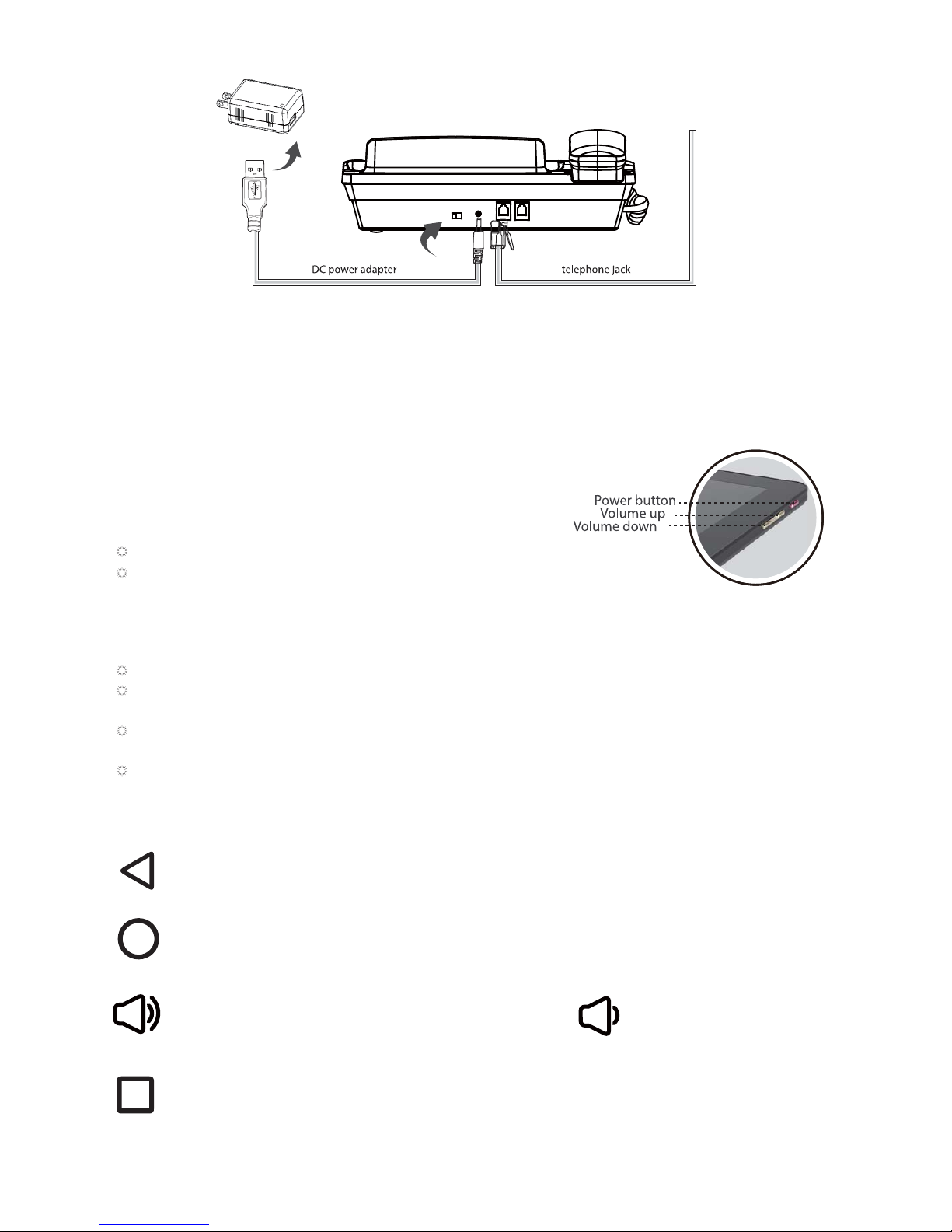
Power Button
Press and hold to tum the Tablet on or off,or to restart Tablet.
Press shortly to lock/unlock the screen.
Using the Physical Keys
USB charger
Charging the Tablet via a Personal Computer
Using the USB Cord, insert the smaller connecting head to the tablet and insert the other connecting
head to the USB port of your personal computer/laptop. The tablet will automatically charge once it
is connected.
Volume Up/Down
When the Tablet is ringing, press any of the volume buttons if you want to mute the ringer.
On the Home screen, press to increase or decrease the ringtone volume, or set the Tablet to
silent mode.
When using other applications, press to control the volume of music, spoken directions, and other
audio sounds.
Press and hold to immediately adjust the ringtone volume to the maximum or minimum.
Touch to return to the previous screen.
Touch to exit from the running application.
If the on-screen keyboard is open, touch to close the keyboard.
Touch to open the Home screen. It will bring you to the first panel of the Home screen.
Volume Up Volume Down
Press to increase sound Press to decrease sound
Using the Touchscreen Keys
Back
Home
Navigation
Touch to open a list of thumbnail images displaying recently operated apps.
Touch the thumbnail image of the app to open it.
Touch and hold and flick off rightward to remove the app from the list.
Page 5

3C
Connect Home: 3G / PSTN / VOIP.
Control Home: 3D IR Remote Controller / Smart Controller
Care Home
Optional Smart Body temperature manager
Quad core 1.6GHz
7” IPS 1024X600
8GB Flash /2GB RAM
Rear 5MP Camera/Front 2MP
Home Control
Control your home theater and other devices
FamChat
Smart Dialer
Using the Touch Screen
Touch
By touching an item, you can select the item or launch it. For example:
Touch the on-screen keyboard to type.
Touch an application icon to launch it.
Touch and Hold
Touching and holding items will activate them. For example:
Touch and hold an application/widget to move it.
Touch and hold on a field and a menu with options will pop up.
Drag
Touch and hold an item, move your finger on the screen to the target position.
Dragging a shortcut icon to the trash will delete it.
Flick, Slide, Swipe
Change screens by flicking, sliding, and swiping your finger on the screen. For example:
Slide your finger to unlock the screen
Flick and/or swipe your finger to scroll the screen or menu, to move from screen to screen,
or to view next object in the gallery.
Pinch
Using two fingers (like your thumb and index finger), pinching inward will cause the screen
to zoom out; pinching outward will cause the screen to zoom in. For example:
Pinch outward to see zoomed in details of a photo in Gallery.
Pinch inward to zoom out and see the whole page of a browser.
TELPAD Mon Ami 7R
Page 6

TV
CABLES DSS
SAT VCR
CD RECEIVER
MUSIC AUDIO
DVD
PROJECTOR
AIRCON
DLNA
knAPPsack
Get a whole range of comprehensive apps and services from the PLDT knAPPsack.
Click on the PLDT knAPPsack icon to get access to Telpad apps like iflix for
thousands of TV series and movies, Spinnr for music streaming, and Disney for fun
and exciting games.
We can support below devices:
Connect the TELPAD and another device (which should have DLNA function) to Wi-Fi first, launch
the DLNA function for both devices, then connect them by DLNA. Video and audio will be played on
the receiver device normally without noise. Meanwhile, you can proceed with other operations on the
TELPAD.
Exclusive Apps for Your TELPAD
Page 7
Home Control
Home Care
A Digital thermometer module can enable your TELPAD for body temperature measurement. You can keep history of your family temperature for a long time.
With Monthly view, you can monitor your average body temperature and keep your body
healthy. Average body temperature of a healthy adult is 36.50-36.80°C. But, average
daytime body temperature of a healthy adult is above 37°C. Cancer patients have low body
temperature, usually less than 36°C. Basal body temperature (BBT) is our lowest temperature during rest, which is usually during the time we're sleeping. This is why, for accurate
fertility charting, BBT should be taken before getting out of bed. Ovulation causes a one
half to one-degree rise in BBT, so monitoring BBT helps provide information on the best
time for conception.
Note: iFever Manager Dongle needed for this function is sold separately.
The TELP AD 3D IR remote control works with devices that are already in your home. It can
control your TV, Cable Box, Radio, DVD player, Blu-Ray DVD Player, DVR, VCR, CD
player, Audio devices, even your Aircon. It supports thousands of supported manufacturer
models and is continuously growing in supported devices. You can also control your home
devices through your Android mobile phone by pairing it with your TELPAD. Lastly, use the
reservation mode of the TELPAD to set specific times for your home devices to automatically turn on and off. Managing your home is made easy with the PLDT HOME Telpad.
Page 8

TELPAD MA7R
Quick Guide
AURA Technology Limited
FLAT 810,8/F STAR HOUSE, 3 SALISBURY ROAD, TSIMSHATSUI, KOWLOON HONGKONG
E-mail:
Support
@auratech.hk
for Android™ Android™ is a trademark of Google Inc. Use of this trademark is subject to
Google Permissions.
 Loading...