

Page 1
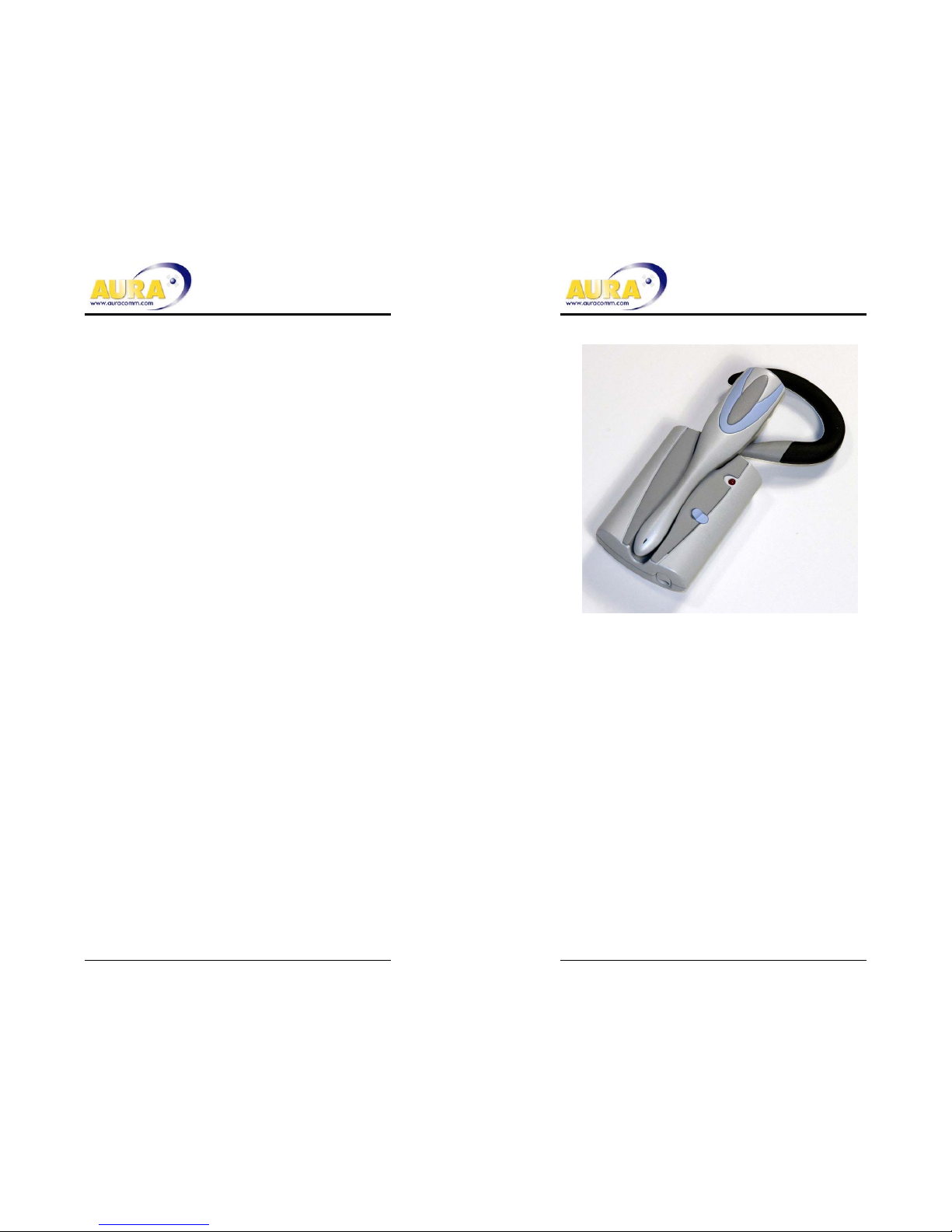
Wireless Headset System
Wireless Headset Model: AD688H
Base unit Model: AD688B
User’s Guide
Page 2
Package Contents
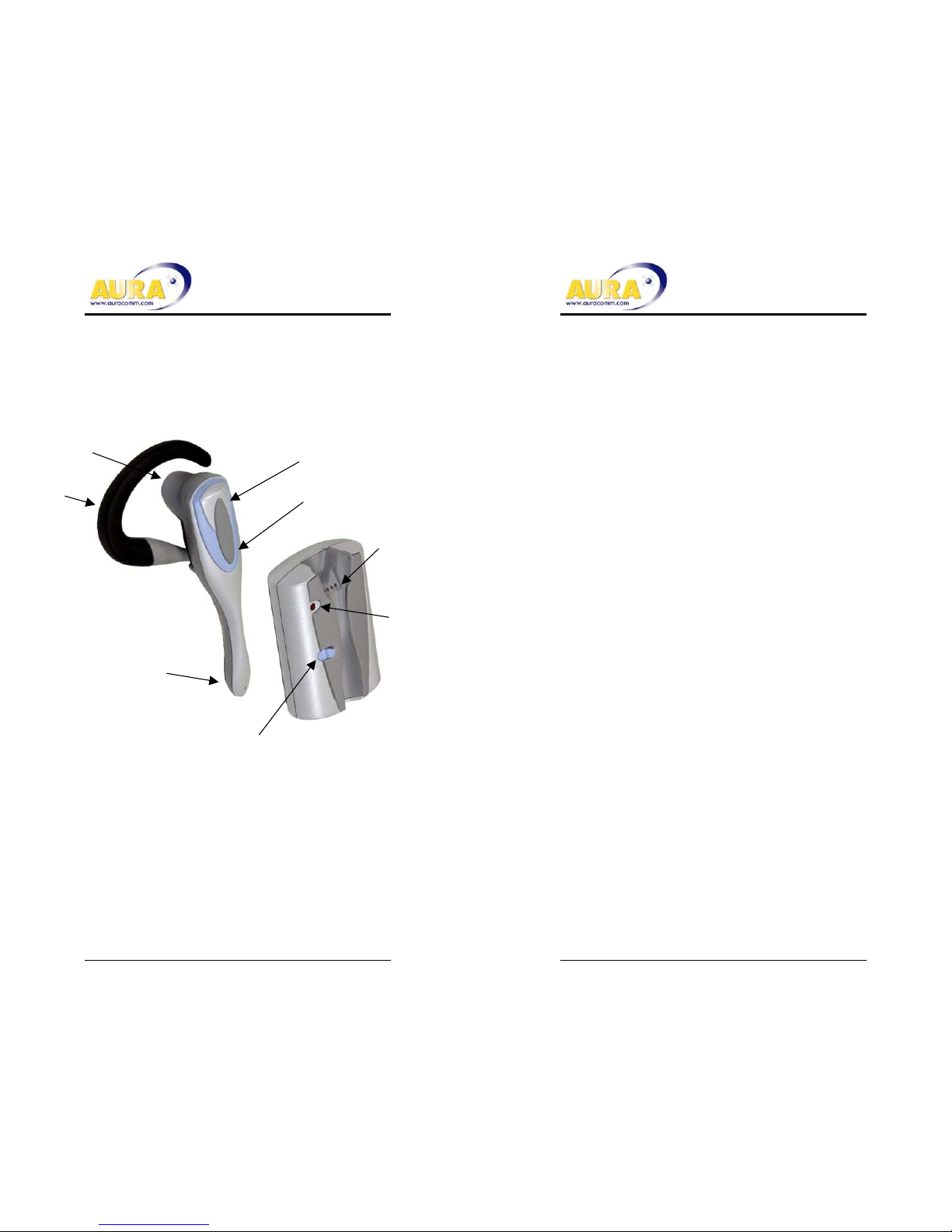
Retainer
hook
Headset release
LED
Docking
Connector
Base Unit
Headset Unit
Volume Button
Flash Button
Noise
Canceling
Microphone
Speaker
Get Ready
• Insert AA battery into Base.
• Dock headset onto base to
charge.
Get Set
• Allow 4 hours for full charge.
• Insert coiled cord into base and
cell phone headset jacks.
Go
• Use your phone and Docker
headset just like a wired headset.
When not in use
• Dock the headset to the base.
• The base will automatically keep
the headset fully charged.
Page 3
Battery Care
• Insert AA Battery
- Battery button end (+) at the flat spring
- Green Light Indicates normal operation
- Red light indicates AA battery is low. Replace
the battery at your earliest convenience.
- Remove spent batteries from the housing to
avoid damage from leakage.
• Docking charges the headset
- Solid light for 5 to 30 seconds while the base
checks the headset battery level.
- Light blinks once every 3 seconds during
charge.
- Light turns off when the headset is fully charged.
Connecting to your phone
• A short coiled cord is provided
• Insert one end into the Docker headset jack
• Insert the other end into the cell phone.
• The light will blink once per second when the
headset is removed from the base.
To suspend headset operation
• Dock the headset to the base
• Hold the Flash button until the LED blinks rapidly
(about 5 times per second)
• Release Flash button
• Headset will turn on for use when removed from the
dock.
Trouble Indicator
• An amber flashing light on the base indicates
trouble. Dock the headset and wait for a blinking
green light
Customize your headset for your convenience.
• Adjust Headset volume with the volume button.
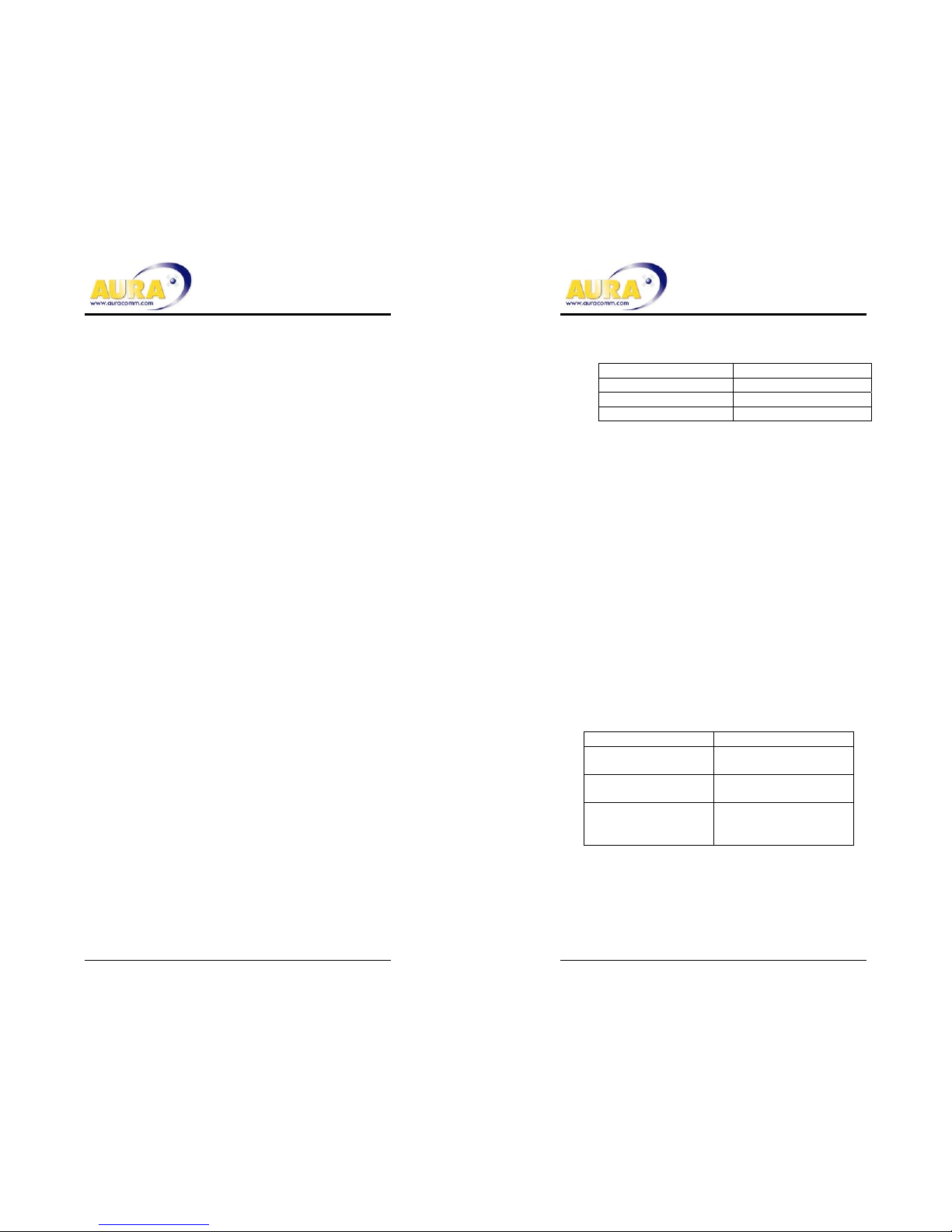
Tone Meaning
1 Beep Volume was changed
2 High Beeps Maximum Volume
2 Low Beeps Minimum Volume
• The headset will retain the volume setting for the
next time you use the phone, but it can be
readjusted any time.
Change the ear you use
• Grasp the hook at the base near the headset post.
• Gently but firmly pull the ear-hook off of the post.
• Turn the ear hook over.
• Push the ear hook back over the post
Flash Button Use
• Your Docker headset will send flash signals to your
phone when the Flash button is pushed.
• Your phone will determine what the Flash button will
initiate. (Refer to your phone’s user Manual.)
• Many phones with voice recognition will be enabled
for voice reception by a flash
Tones Provide Status Information
Tone Meaning
2 quick beeps per
second for 8 seconds
Base and headset are
out of range
3 quick beeps every
45 seconds
Low headset battery
6 quick beeps Headset is shutting
down due to a critically
low battery
Page 4
Specifications
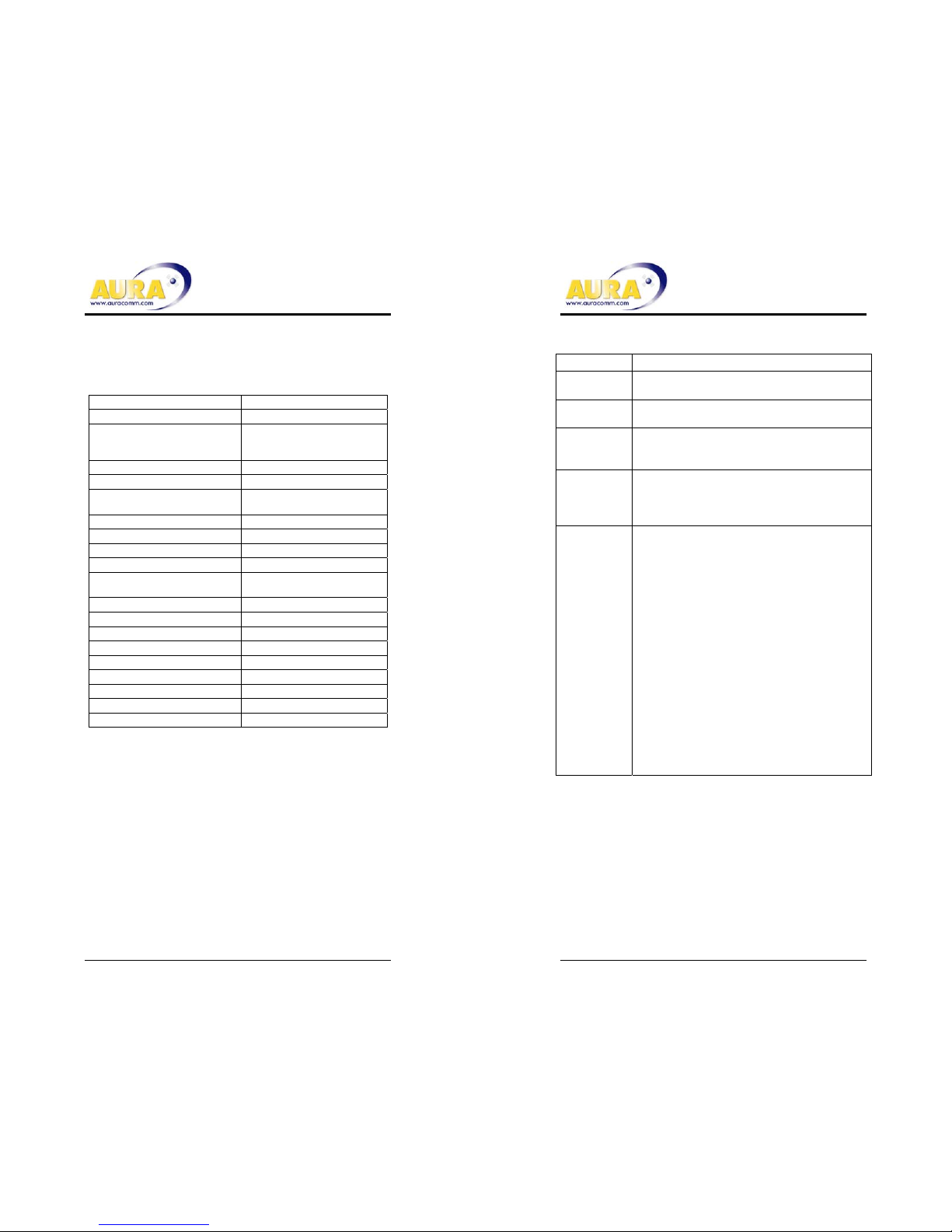
Audio Jack 2.5mm, 3 pin
Adapters Included Yes
Typical Use 3 months
Based on an average of 500
minutes use per month
Range 1.5 Meters
Base Battery AA Alkaline
Headset Battery 40mAH NiMH
chargeable, non-replaceable
Headset Weight 18 grams
Base Weight 50 grams with AA
Headset Dimensions L105 X W21mm
Base Dimensions L64 X W46 X H21mm
Earhook Replaceable
Extra provided
End call (flash) ready Yes
End call tone Yes
Headset volume control Yes
Battery low warning Yes - Tones / LED
Out of range warning Yes - Tones
Charge indicator Yes - LED
Belt attachment Yes
FCC Compliance By manufacturer
Transmission type Magnetic Induction
Troubleshooting
Problem Solution
No Light
No sound
1. Check AA battery orientation
2. Replace AA Battery, Charge Headset
Red light Replace AA battery at your earliest
convenience
Flashing
Orange
Light
Dock the headset and wait up to 30
seconds for normal flashing green light
Phone
does not
respond to
the headset
Coiled cord is not properly connected to
the phone
People say
my voice is
too faint (or
too loud)
Adjust the microphone volume
1. Undock the headset
2. Place a phone call to someone who
will help you set a comfortable level
3. Hold the volume button down until the
light is continuously lit
4. Release the volume button
5. Light will blink 1, 2, 3, times (low
medium or high) to indicate the
current microphone setting.
6. Press and release the volume button
once for each level change to cycle
through the settings.
7. Confirm the best setting with the call
recipient.
8. Wait 15 seconds without pressing any
buttons for the units to return to
normal operation.
Page 5
Safety and Additional Information
• Avoid extreme temperatures, moisture and dust
• Clean only with a soft, dry cloth
• Do not attempt to open the units. There are no user serviceable parts inside. Doing
so will void the warranty
• Keep the headset docked to the base when not in Use
• Replace the AA Base battery when the light turns red.
• Do not bend the housing or microphone boom.
• Check laws and regulations for the use of mobile phones and hands free equipment
in your area
• Always give full attention to driving and pull off the road and park before making or
answering a call if driving conditions so require.
• Your Docker headset operates at 13.56 MHz at power levels typically less than
1/10,000,000 that of your cell phone.
• Do not use your Docker headset near medical equipment without requesting
permission.
• If your are using any personal medical devices e.g. a pace maker or hearing aid,
please refer to the appropriate documentation or the medical equipment
manufacturer.
• Turn off all electronic devices in any area with a potentially explosive or flammable
atmosphere
• Follow directions to suspend operation when instructed by aircraft personnel to turn
off all electronic devices.
• Recharge your headset only at temperatures between 0 and 65 C or battery
damage may occur.
Warranty
Aura Communications warrants that Products delivered hereunder, under normal use,
shall be free of defects in materials and workmanship and comply with the Aura’s
Product Specification for a period of three (3) months from the date of purchase. If,
during this warranty period, any Product is defective, the buyer shall return the unit
with dated proof of purchase to Aura Communications, 187 Ballardvale St., Wilmington
MA, 01887. Aura may at its sole option repair, replace, or credit Buyer the purchase
price of such Product.
AURA MAKES NO OTHER WARRANTIES, EXPRESS OR IMPLIED, WITH RESPECT
TO PRODUCTS OR TO ANY OTHER MATERIALS, GOODS OR SERVICES
FURNISHED HEREUNDER, AND HEREBY SPECIFICALLY DISCLAIMS ALL
IMPLIED WARRANTIES, BY OPERATION OF LAW OR OTHERWISE, INCLUDING
WITHOUT LIMITATION WARRANTIES OF MERCHANTABILITY, AND FITNESS FOR
ANY PURPOSE.
Regulatory Information
USA
1.This device complies with Part 15 of the FCC Rules. Operation is subject to the
following two conditions: (1) This device may not cause harmful interference, and
(2) this device must accept any interference received, including interference that
may cause undesired operation.
2.This device has been tested and found to comply with the limits for a Class B
digital device, pursuant to Part 15 of the FCC Rules. These limits are designed to
provide reasonable protection against harmful interference in the residential
installation. However, there is no guarantee that interference will not occur in a
particular installation. If this equipment does cause harmful interference to radio
or television reception, which can be determined by turning the equipment off and
on, the user is encouraged to try to correct the interference by one or more of
these measures:
- reorient or relocate the receiving antenna
- increase the separation between the equipment and receiver
- consult the dealer or experienced radio/TV technician for help
3. This device has been evaluated and found to comply with FCC radio frequency
human exposure limits.
Caution: Any changes or modification by user, not expressly approved by
the party responsible for compliance could void the user’s authority to
operate the equipment.
Battery replacement and disposal
This device contains rechargeable Ni-MH battery in the Headset unit and
disposable AA battery in the Base unit . It is recommended that replacement of
Ni-MH battery should be done by Aura Communications Inc. or authorized third
party personnel. Under local law it may be illegal to dispose old Ni-MH batteries
by putting them in the trash. Please contact the local authorities or Aura
Communications Inc. to find out the proper recycling information for the old
batteries.
Page 6

Contact Information:
Corporate Headquarters
Aura Communications
187 Ballardvale St.
Wilmington, MA. 01887
Tel: +1.978.988.0088
Fax: +1.978.988.3977
Email: [email protected]
www.auracomm.com
Copyright 2003 Aura Communications, all rights reserved. Aura and
LibertyLink are trademarks of Aura Communications which may be
registered in certain jurisdictions. Aura Communications reserves the
right to make changes to this specification without notice.
 Loading...