

Page 1
R
S16
数字音频解 码耳放 一体机
An integral digital audio DAC headphone amplifier
Page 2

Preface
Thank very m uch f or bu ying S16 audio DAC of aune company. It re ally makes us
feel proud of yo ur choice. Hopes th at S16 audi o D AC will bri ng exper ience of hi -fi
music an d h appiness to yo u. You a re suggeste d t o read th is user’s m anual be fore
you cou ld use al l function s of S16 digital audi o DAC proper ly.
Dear customers:
This m anu al book is made b y c hlo rin e-free bl eac hin g p ape r. S uch producti on me thod r edu ces
poison ous s ubs tance to be d rai ned t o water cha nne l and prote ct ou r env ironmen t the reo f.
1
Page 3
1.1 1.3 1.4 1.5 1.6 1.7
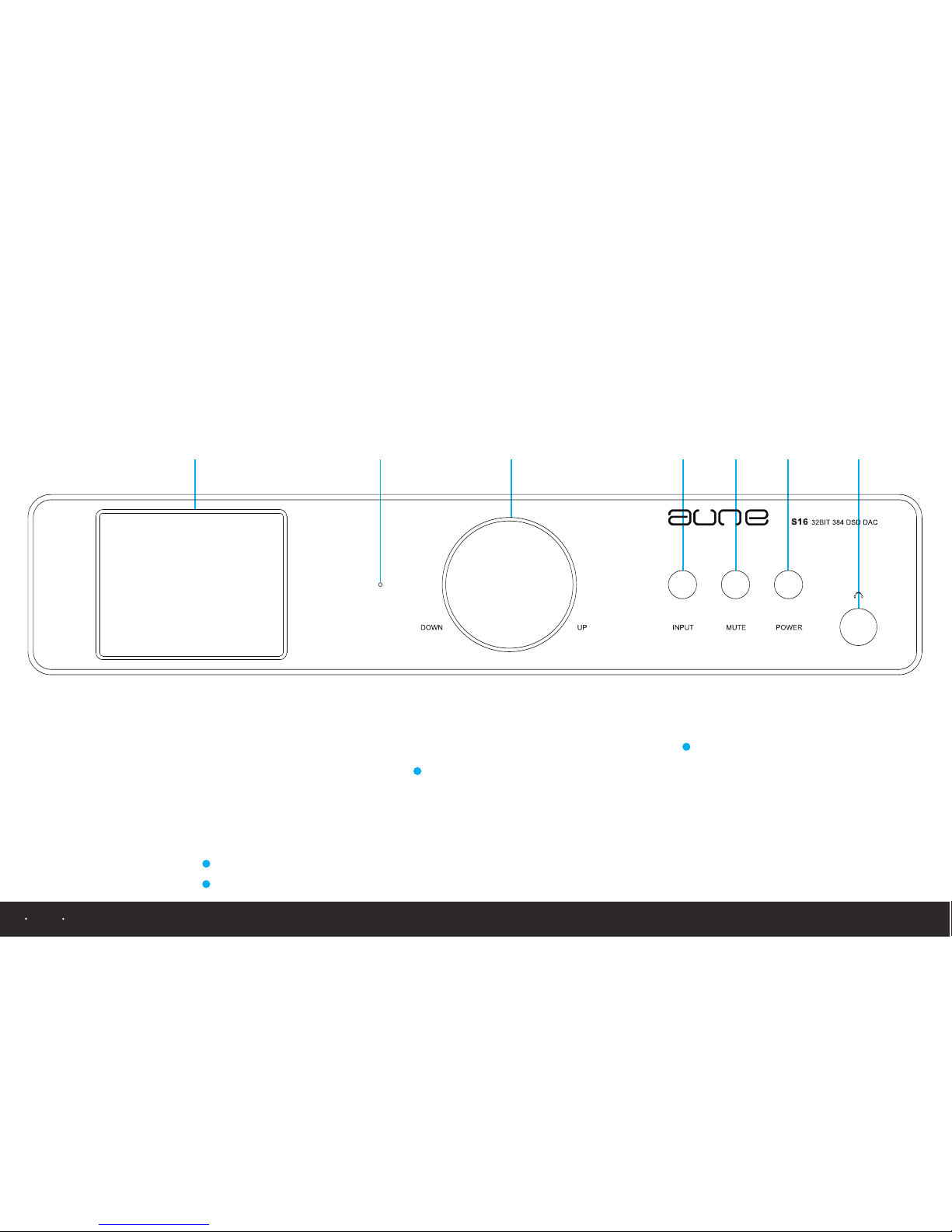
View of front panel and name of each part
1.2
1. 1
1.2
1.3
1.4
TFT displa y scree n
Power s upply i ndicator
Digit al volu me knob
Selec tion of s ignal inpu t
1.5
1.6
1.7
Mute pr ess but ton
Power s upply p ress butto n
Outpu t conne ction of hea dphone
1
2
1
Tur n the kn ob clo ckwi se or co unte rclo ckwi se to con trol vo lume; p ress th e knob fo r one sec ond to se lect 8 mo des of wa ve filte ring.
2
Pre ss powe r suppl y butto n for two s econd s to turn o n power a nd use th e same wa y to shut o ff powe r.
Note
2
Page 4
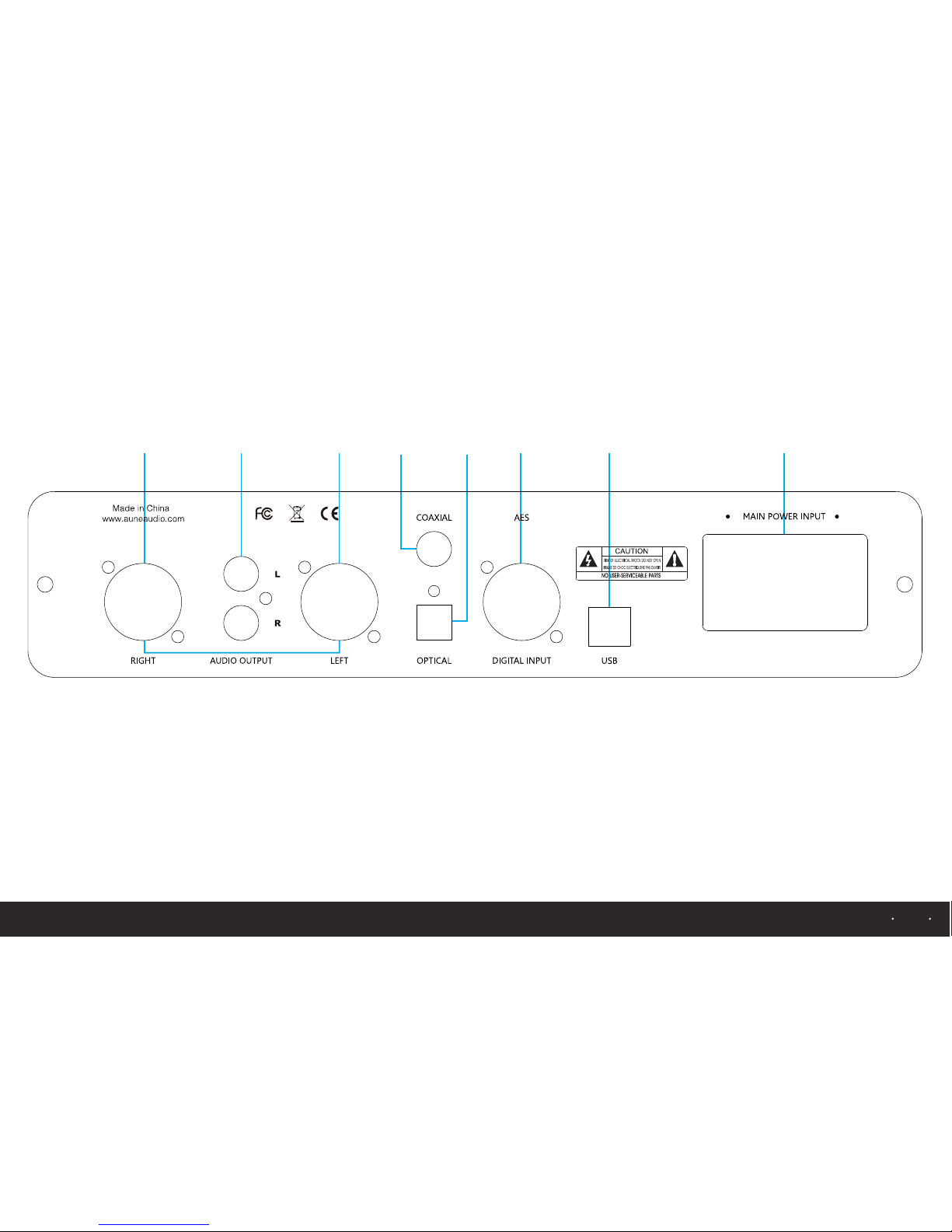
View of rear panel and name of each part
2.72.62.52.42.32.12.22.1
2. 1
2.2
2.3
2.4
Balan ce outp ut
Analo g L/R out put
Coaxi al inpu t
Optic al inpu t
2.5
2.6
2.7
AES dig ital in put
USB out put
110V/220V i nput
3
Page 5

Introduction Specifications
Input c onnec tion:AES/C oaxial/Optica l/USB
Outpu t conne ction:Anal og L/R,analog balan ce
Headp hone ou tput conne ction:6.5mm headp hone hole
Outpu t imped ance of head phone amplifier:32 -600 Ω
Power o f headp hone ampli fier:120 Ω 1500MW
Frequ ency re sponse (fr om 20 Hz to 20 kHz ):±0.5 dB
Dynam ic rang e:118 dB
THD+N @ 1 KHz :-100 dB
IMD+N @ 1 9KHz & 20 KHz:-111 dB
Stere o cross talk:-115 dB
Size of p roduc t:255 X 211.5 X 58 (unit :m m)
Weight:3.6 KG
Compo nents:D ACx1/Pow er cablex1/User ’s manu al x1
S16 is deve loped, tested and modified in
aune audi o la boratory. USB2.0 input of
S16 suppo rts 24B IT/19 2K and DSD128
decod ing and its coax ial input su pport s
DOP mo de of DSD64 throu gh USB2.0,
and it provide s bala nce, analog L/R and
he ad ph one output. S1 6 i s o f a high
quali ty au dio-type d DAC with super-l ow
infide lity and sign al j itter. Also it is a top-
grade integ ral devic e, which is created
for rep roduc tion of musi c spot.
4
Page 6
US B MU TE HP 50
PCM
44
3.1 3.2 3.3 3.4 3.5
3. 1
3.2
3.3
3.4
3.5
3.6
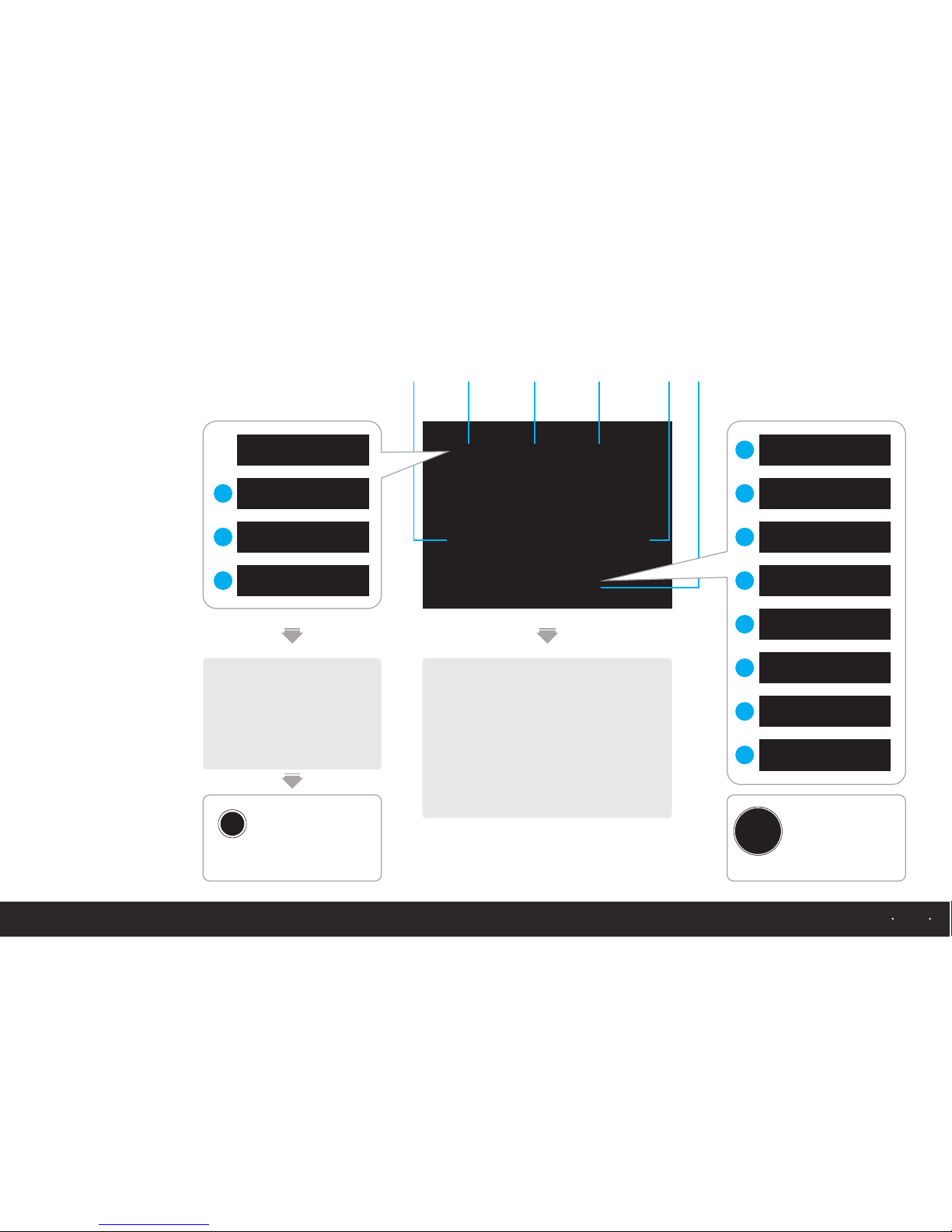
Curre nt inpu t mode
Input c hanne l
Mute in dicat ion
Headp hone vo lume
Curre nt samp ling rate
Prope rty of au dio wave filt er
SL OW SD
3.6
a USB inp ut
b AES digi tal inp ut
c Coaxi al inpu t
d Optic al inpu t
US B
OP T
CO X
AE S
b
c
d
Refer to illustration 1.4 of panel on page 15
Swi tch bet ween 4 mo des by
pre ssing i nput bu tton on t he
pan el
Refer to illustration 1.3 of panel on page 15
Pre ss digi tal vol ume kno b
for o ne seco nd and sw itch
bet ween 8 mo des of au dio
wav e filter
INP UT
DOWN UP
Operation introduction
of display interface
SL OW SD1
SL OW SD2
SL OW LD1
SL OW LD2
e
f
g
h
SH ARP SD1
SH ARP SD2
SH ARP LD1
SH ARP LD2
i
j
k
l
5
Page 7
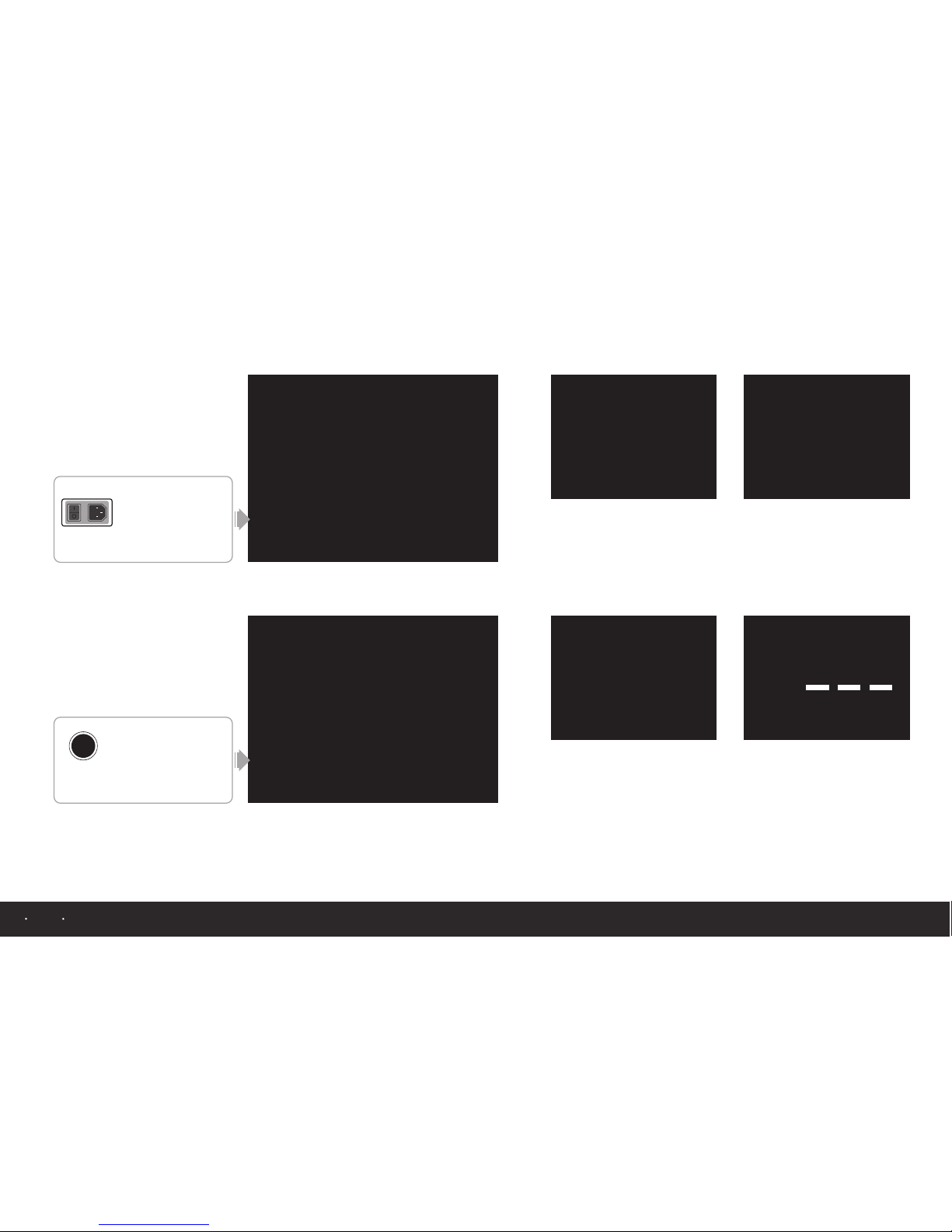
AE S HP 50
PC M
192
US B HP 50
PC M
Playi ng DS D128 could be
only su ppo rted through US B
trans mis sion
Displ ay of p laying PCM192 K When hy phe ns are
displ aye d, it means there i s
no inpu t sig nal or signal
error a nd DA C is mute at this
momen t
US B HP 50
DS D
128
SL OW LD
SL OW LD SL OW LD
US B HP 50
DS D
64
SL OW LD
AES/C OS op tical only
suppo rts D SD64
US B HP 050
PCM
44
SL OW SD
US B MU TE HP 067
DSD
128
SH ARP LD
Refer to illustration 2.7 of back panel on page 16
Pow er swit ch on bac k panel
Non -memo ry func tion
Res uming p revio us stat e
aft er turn ing off D AC and
tur ning on i t again
POW ER
Standard display after turning on DAC
Previous state before turning off DAC
Refer to illustration 1.6 of front panel on page 15
Pow er swit ch of pan el
Mem ory fun ction
Res uming p revio us stat e
aft er turn ing off D AC and
tur ning on i t again
POW ER
Operation introduction
of display interface
6
Page 8
Operation introduction
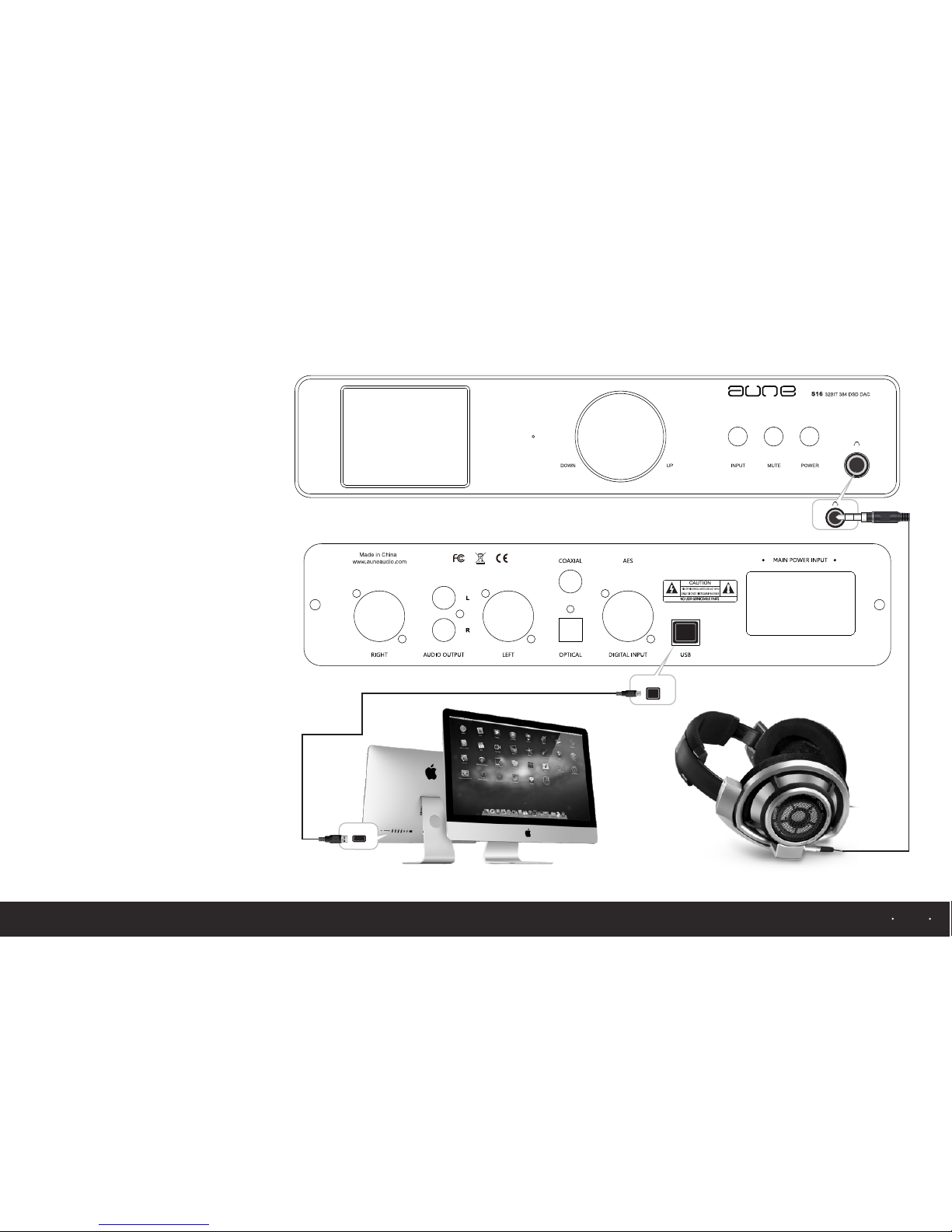
Headphone appl icati on for PC
USB
USB
Please d own loa d the lates t ver sio n of
drive so ftw are f or S16 DAC fr om
servic e and s upp ort page on w ebs ite
www.auneau dio .co m. First, U SB2 .0
must be us ed to c onn ect PC to S16
DAC. The n ins tall driv e pro gram and
use PC to pl ay mu sic . Af ter t hat,
connec t hea dph one to head pho ne
output , and u se vo lume knob t o
contro l hea dph one volum e, yo u cou ld
enjoy wo nde rfu l music fina lly.
---If ne ces sar y, plea se re fer to
servic e and s upp ort page of w ebs ite
of aune co mpa ny.
7
Page 9
Operation introduction
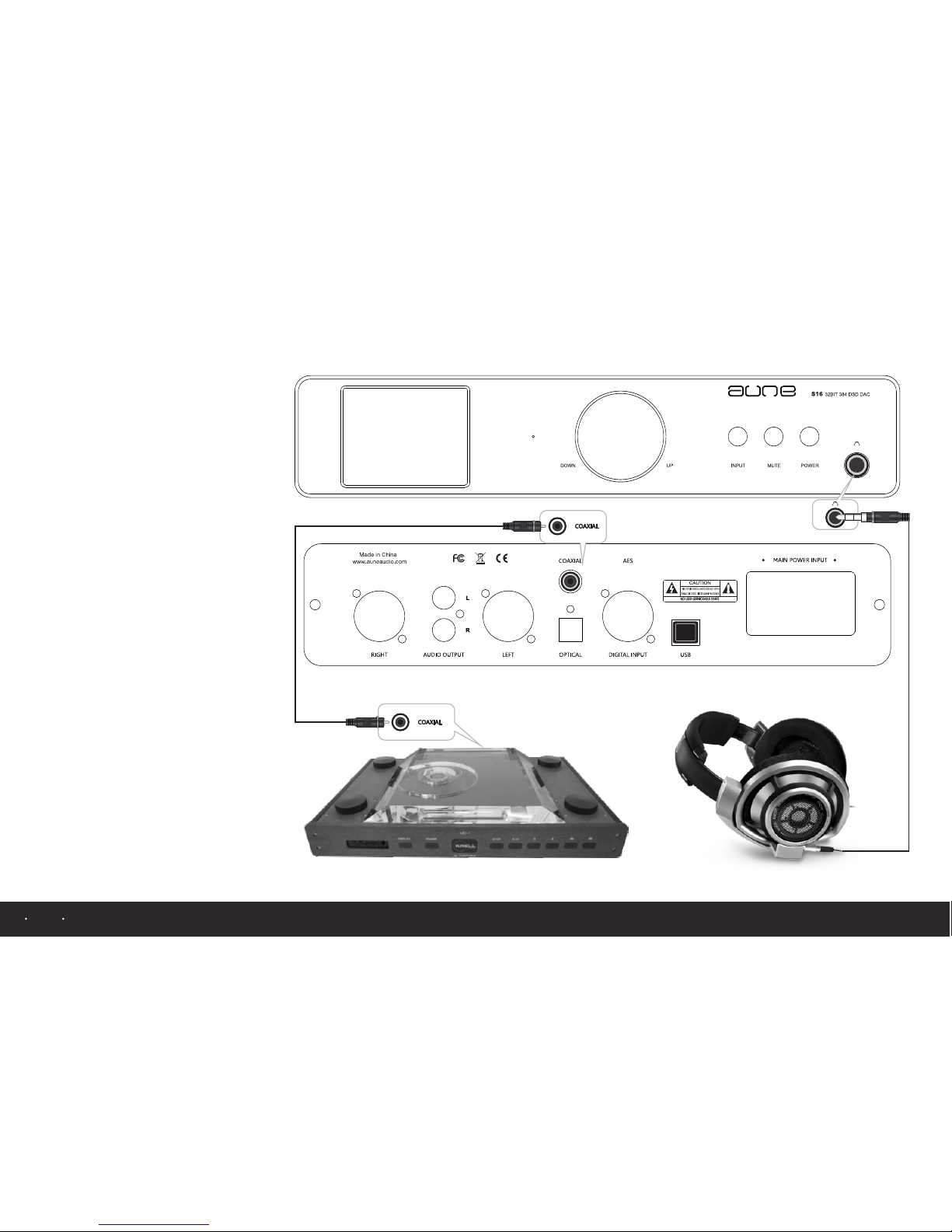
Please u se co axi al or optic al ca ble t o
connec t dig ita l turntab le to S 16 DAC
and play m usi c wit h it. Th en, c onnect
S16 head pho ne ou tput to hea dph one ,
and cont rol v olu me with vol ume k nob
on front p ane l, yo u could enj oy
wonder ful m usi c finally.
Headphone appl icati on
for turntable
8
Page 10
USB
USB
AUDIO INPUT
SPE AKER
SPE AKER
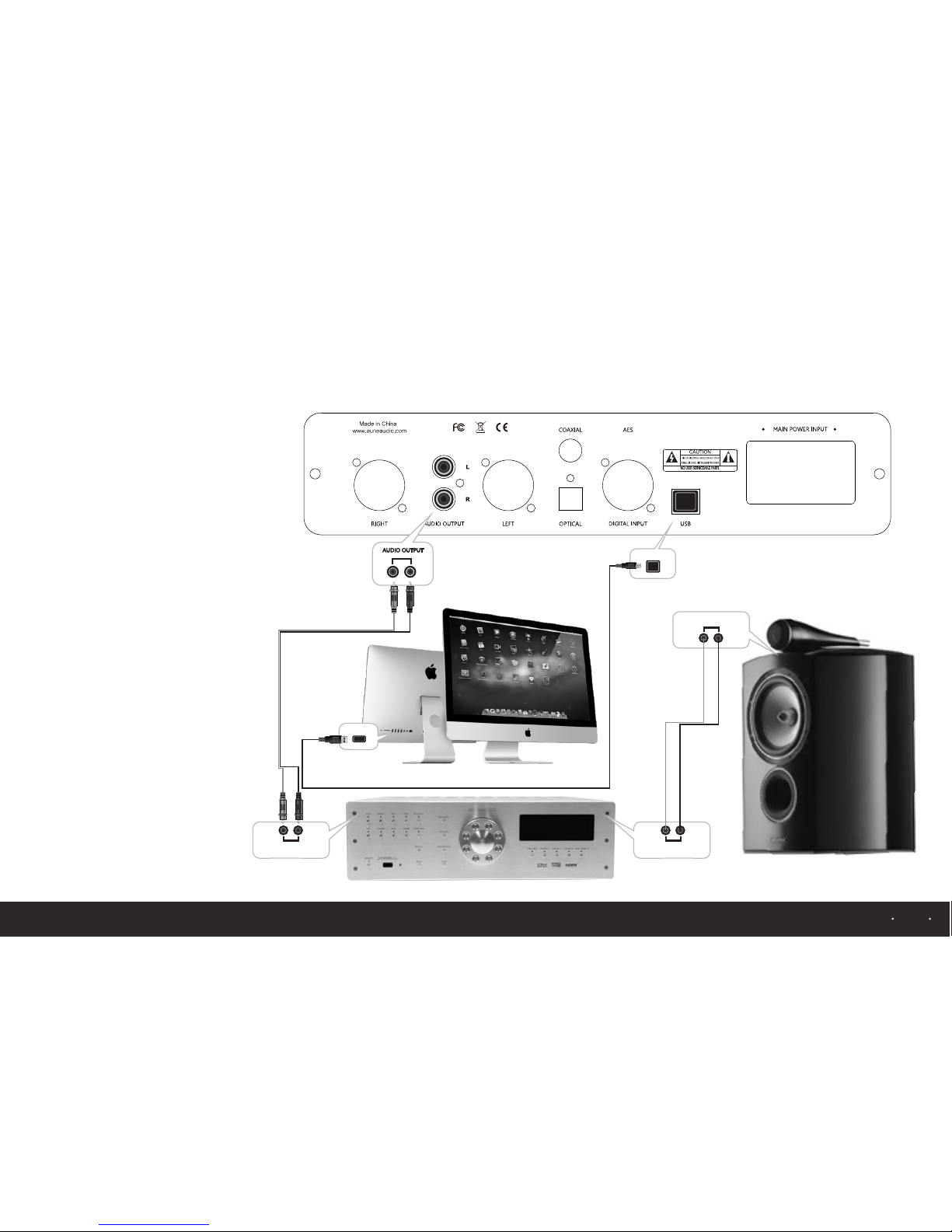
Please d own loa d the lates t ver sio n of
drive so ftw are f or S16 DAC fr om
servic e and s upp ort page on w ebs ite
www.auneau dio .co m. First, U SB2 .0
must be us ed to c onn ect PC to S16
DAC. The n ins tall driv e pro gram and
use PC to pl ay mu sic . Af ter t hat,
connec t ana log o utput of S1 6 to
analog o utp ut of a mplifier, a nd co ntr ol
volume o f amp lifi er, you coul d enj oy
wonder ful m usi c finally.
---If ne ces sar y, plea se re fer to
servic e and s upp ort page of w ebs ite
of aune co mpa ny.
Operation introduction
Application fo r PC syst em
9
Page 11
AUDIO INPUT
SPE AKER
SPE AKER
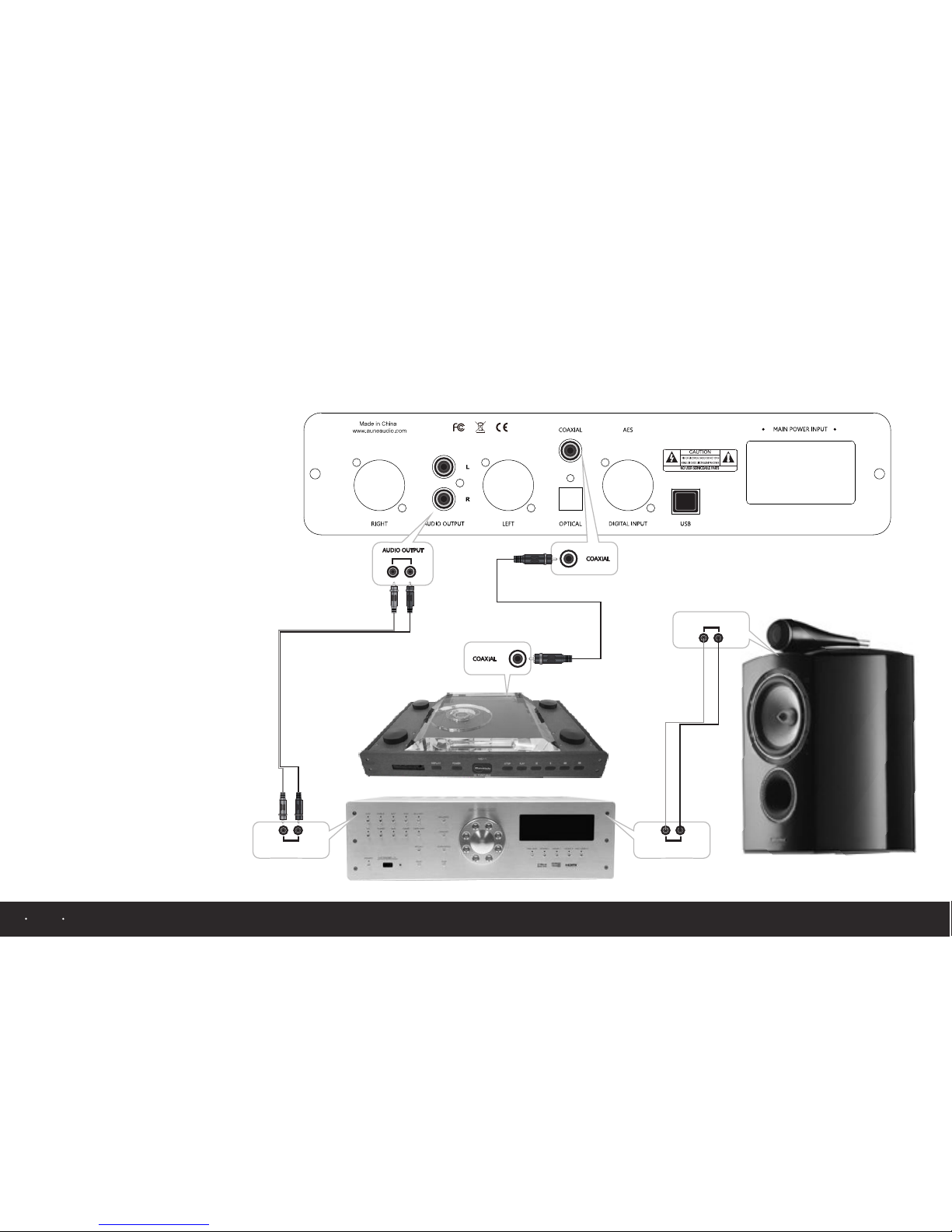
Please u se di git al coaxia l or op tic al
cable to c onn ect t urntabl e to S1 6
DAC and pl ay mu sic w ith it. The n,
connec t ana log o utput of S1 6 to
analog i npu t of am plifier, an d con tro l
volume o f amp lifi er, you coul d lis ten
to beaut ifu l mus ic finally.
Operation introduction
Application fo r
turntable audi o syste m
10
Page 12

Note
1. Ligh t noise m ay occur whe n switching betwe en PCM and DSD , which i s caused by in ternal
dsd-a sio plu g-ins. It do es not affec t the perfor mance .
2. Defa ult set tings will r esume afte r turni ng off power on bac k panel ,initial v olume i s 50 .
3. Unde r Windo ws system, s ystem soun d equip ment is unab le to dis play 32BIT and 38 4K
sampl ing rat e. Th is is caused b y syste m itself but i t could be det ected b y XMOS drive .
4. When i nstal ling USB2. 22 drive program, i t needs to set t he cert ificate man ually .Und er WIN8
syste m, cert ificate mus t be set in adva nce, sp ecific inst allat ion guidan ce of drive co uld be
found o n the man ual instal lation .
a. As for us age inf ormation f or PC, pleas e refer t o guidance o f servi ce and suppo rt page o n
websi te of aun e company.
b. Plea se use US B2.0 conne ction cable.
11
Page 13
12
Page 14
 Loading...