

Page 1
Page 2
1
INTRODUCTION 2
UNPACK
HIGHLIGHTS
NOTES 3
ICONS........................................3
CAUTION......................................3
DEVICE LAYOUT 4
FRONT PANEL..................................4
REAR PANEL...................................5
SIDE PANEL...................................6
REMOTE CONTROL..............................7
OPERATING INSTRUCTION 8
MUSIC PLAY............................................8
INPUT SETTINGS........................................8
...................................9
............................................10
.................... 11
....................................11
AFTER-SALE SERVICE 12
GENERAL............................ .........2
.......................................2
...................................2
ADVANCED SETTINGS
SHUT DOWN
DIGITAL TRANSPORT CONNECTION
DIGITAL CD PLAYER
CONTENT
1
2
3
4
5
Cop yrigh t
AUN E All Rig hts Res erved .
Aune does not assume any responsibility for errors or omissions in this document or make
any commitment to update the information contained herein.
Page 3
3
2
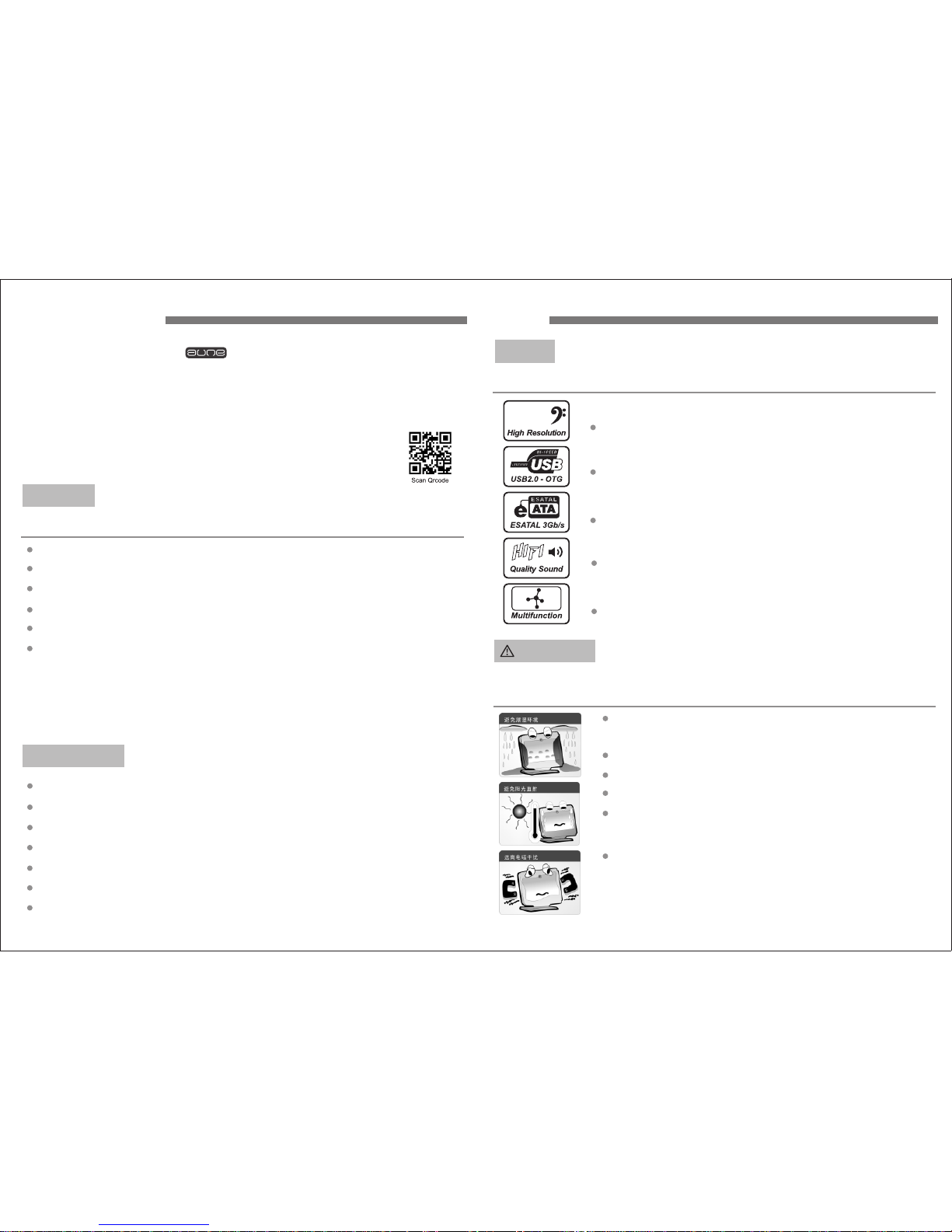
32BIT High Resolution
Capable of decoding 32BIT digital signal
USB2.0 - OTG
USB2.0 high -speed Jack.
ESATAL 3Gb/s
ESATA high-speed expansion card.
32 Bi t
HIFI Quality Sound
Designed for hifi quality sound reproduction.
Multifunction
Multifunctional used with PC audio,home audio,
and room audio devices.
Situatio ns th at te mpe rature is t oo hi gh 40℃ or
too low (- 5℃) or humidi ty.
Avoi d imp act o r place hea vy ob jec ts on i t.
Avoi d any f ore ign matte r ins ide t he de vic e.
( )
Avoid any chemicals like Benzene or Diluents.
Avoid direct sunlight or any heat sources.
Avoi d mag net ic dusty,do no t dis assembl e or
modify.
ICONS
Three main Functions:
CAUTION
Please avoid the following situations that could cause damage to
your device:
NOTEINTRODUCTION
Thank you for purchasing the S Series S1 HIFI Digital Music Player,
Please read this manual before you use this Player device.
With the high quality 32BIT DAC AKM4390 chip inside,S1 player can easily
connect to your PC and display correlative web information.
For more upgrade information please visit: www.auneaudio.com
UNPACK
Your S1 HIFI Digital Music Player has been packed safely in a special
designed container. Please keep the container for emergency usage (in
case send back for repair) .
Check your product box for the following items:
32Bit S1 HIFI Digital Music Player
Five Core Power Cable
Power Adapter(220/110V)
AC Power Core
User Manual
Remote Control
HIGHLIGHTS
SD Card,U Disk as storage medium
USB 2.0 OTG,ESATA,SD Card socket
Support 24BIT/192K and 32BIT music playback
Support APE/FLAC/TTA/MP3/WAV
Remote Control Function
Support Software Upgrade
Page 4
5
4
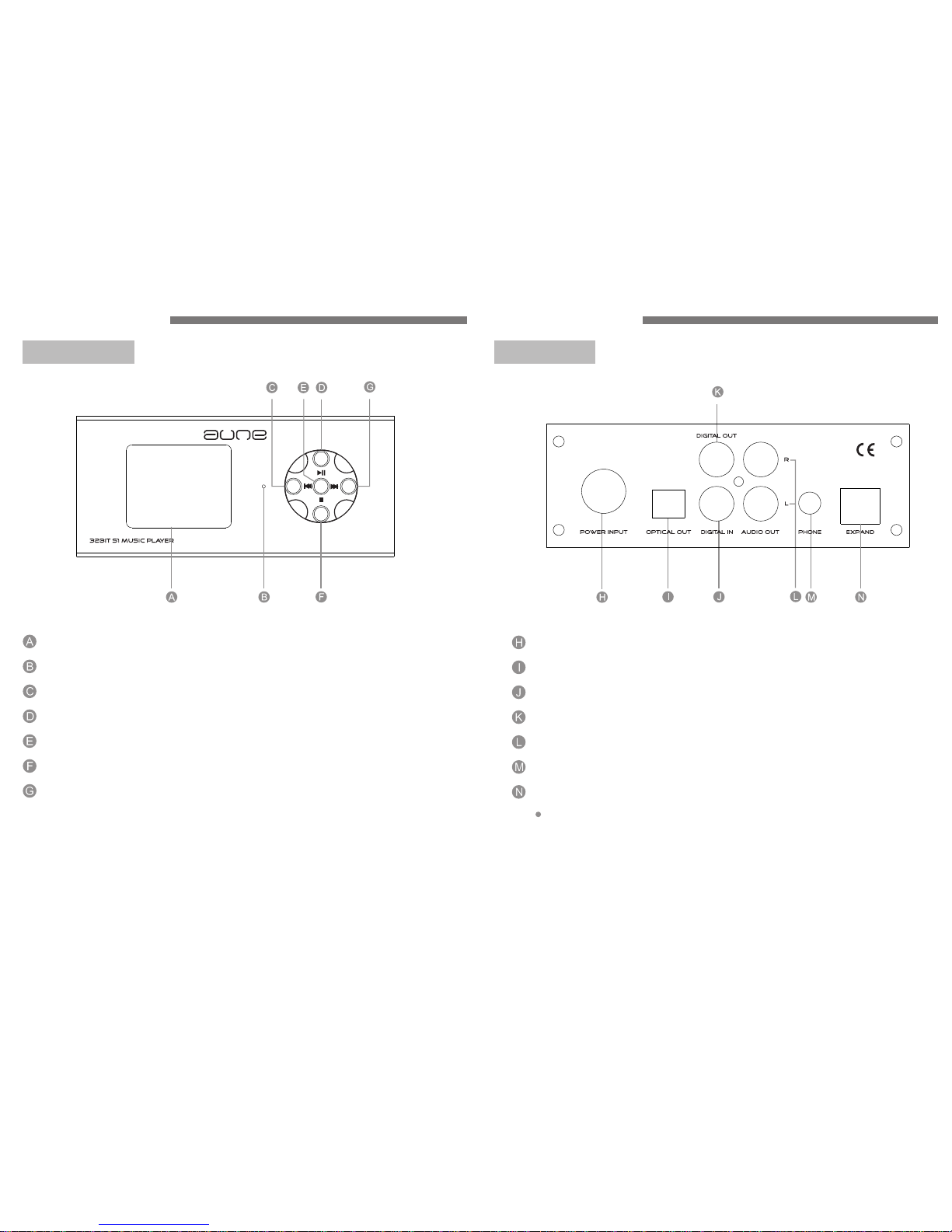
Display Screen
Remote Control Sensor
Select Previous Row When View Menu
Play / Pause
OK
Stop
Select Next Row When View Menu
Power Input
Optical Out
Audio Out
Phone
Digital In
Digital Out
Expand
USB Socket (Only used for upgrade)
DEVICE LAYOUT
FRONT PANEL
REAR PANEL
DEVICE LAYOUT
Page 5
6
7
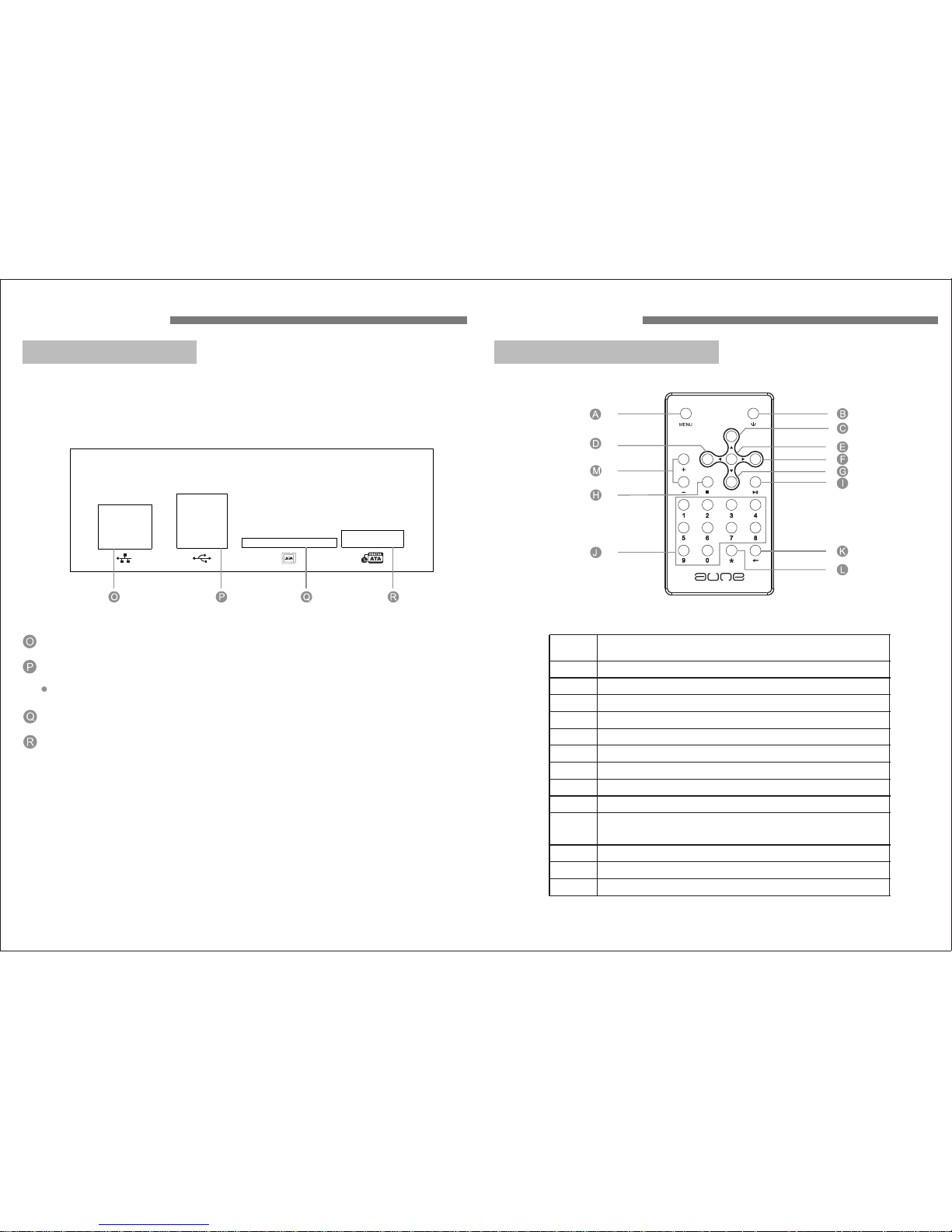
Network Socket
USB Socket
The second USB socket( ) is recommanded
SD Card Socket
ESATA Socket
more fast
Butto ns
Function
Return
Shut down
Previous song
OK
Next song
Next line when menu selection/Fast backward
Stop
Play/Pause
Digital buttons, used to enter the number of the
songs and jumping time
Repeat > Single repeat > Normal play
Extended function button
Volume control
A
B
C
D
E
F
G
H
I
J
K
L
M
Previous line when menu selection/Fast forward
DEVICE LAYOUT
SIDE PANEL FEATURES
REMOTE CONTROL FEATURES
DEVICE LAYOUT
Page 6
8
9
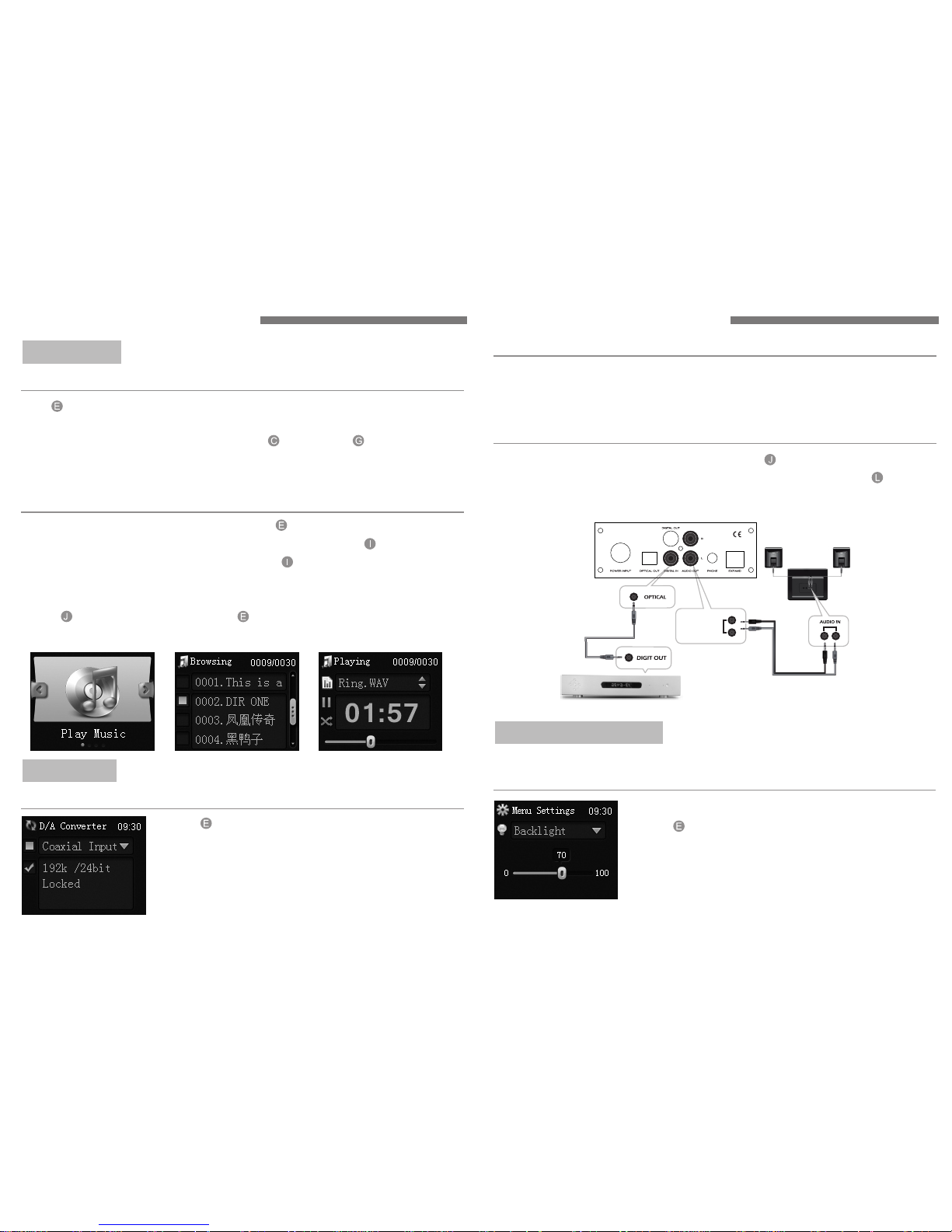
Use button to choose "Play Songs". Press again to choose "U Disk Or
SD Card".Use the same button to choose "The Songs You Want View".
After enter the directory,you can use the button and button to
choose the previous and next songs. If the file name is too long,it will
automatically scroll display.
Enter "Music Play" of the main menu.Press button to choose "Certain
Disk" and view songs on it. Choose an audio file and press button to play.
Choose an audio document or a disk,press button to play all the files in
the directory.
You can jump to another song at any time when you play the directory,
press button directly,then press button to jump to the appropriate
song.
View Songs:
Quick Playback:
Press button to choose DAC input.
Press again to choose coaxial input.
"√" will appear after chosen.
Coaxial Input:
DAC INPUT
24BIT DAC:
AUDI O OUT
Connect the coaxial cable to the DIGITAL IN at the back t will
directly reduce the high–fidelity audio signals. The "AUDIO OUT" can be
directly connected to the multimedia speakers or amplifiers.
" " ,i
Connection with other audio devices:
After Coaxial Input is selected,the internal DAC of S1 will change digital
signals to analog signals and output. Then the player can be used as a
24BIT/192K DAC.
" "
Press button to choose "Advanced Settings".
Press again to choose "Backlight Settings".
Press the same button to adjust the network
parameter of digital player.
Press again to confirm your adjustment.
Under the menu of "Advanced Settings",you can set the"Network"
"Backlight" and "Date And Time". More details will be on "About".
Backlight Settings:
ADVANCED SETTINGS
OPERATING INSTRUCTION OPERATING INSTRUCTION
MUSIC PLAY
Page 7
11
10
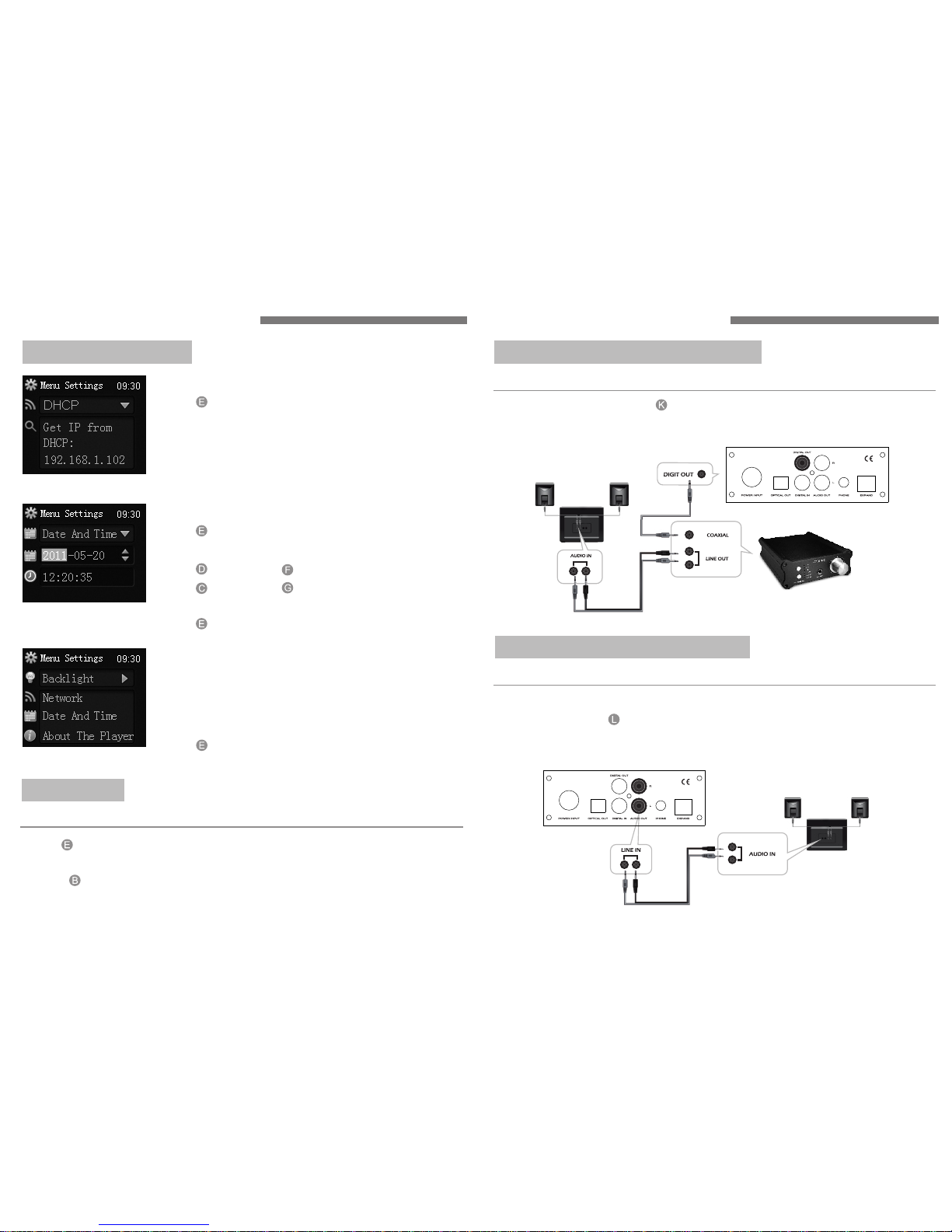
Press button to choose "Shut Down". Press again to choose "System
Standby". After the screen of digital player goes out,turn off the power
switch. button can also shut down the player.
SHUT DOWN
System Standby:
Press button to choose "Advanced Settings".
Press again to choose "Network Settings".
Press the same button to adjust the network
parameter of digital player.
Press again to confirm your adjustment.
Network Settings:
Enter the option of About The Player under
"Advanced Settings",you will see an option of
"Update System".
Select the option and you will see version information.
Press button to confirm update.
" "
Press button to choose "Advanced Settings".
Press again to choose "Date And Time Settings".
Press button and button to switch .
Press button and button to adjust the date
and time.
Press button to confirm your adjustment.
Date And Time Settings:
About The Player:
ADVANCED SETTINGS
The internal DAC decorder can change back to the high-fidelity audio signals.
The "AUDIO OUT" at the back is audio signal output port,which can be
directly connected to multimedia speakers or amplifiers.
DIGITAL CD PLAYER CONNECTION
Connect the player to amplifier with audio cable:
You can use the player to connect to
your DAC decoder.
"DIGIT OUT" output interface of
DIGITAL TRANSPORT CONNECTION
Connect the player to DAC with coaxial cable:
OPERATING INSTRUCTION OPERATING INSTRUCTION
Page 8
13
 Loading...