

Page 1

Stealth Bar 60
Soundbar
10031847
www.auna-multimedia.com
Page 2

Page 3
Sehr geehrter Kunde,
wir gratulieren Ihnen zum Erwerb Ihres Geräts. Lesen Sie die folgenden
Hinweise sorgfältig durch und befolgen Sie diese, um möglichen Schäden
vorzubeugen. Für Schäden, die durch Missachtung der Hinweise und
unsachgemäßen Gebrauch entstehen, übernehmen wir keine Haftung.
TECHNISCHE DATEN
Artikelnummer 10031847
Stromversorgung Netzteil 110-220 V ~ 50/60 Hz
Impedanz 8 Ohm
RMS-Leistung 2 x 20 W + 40 W
Abmessungen 68 x 27 x 6 cm
DE
SICHERHEITSHINWEISE
DIE NICHTBEFOLGUNG DIESER HINWEISE KANN ERNSTE
PERSONENVERLETZUNGEN ZUR FOLGE HABEN UND DAS GERÄT
BESCHÄDIGEN
Allgemein Sicherheitshinweise
• GEFAHR: NICHT ZUR NUTZUNG FÜR KINDER GEEIGNET.
• Das Gerät ist ausschließlich zur privaten Nutzung im Heimbereich
bestimmt. Jeder andere Gebrauch wird als Fehlanwendung betrachet.
• Lesen Sie die Bedienungsanleitung sorfältig und bewahren Sie sie
sicher auf.
• Beachten Sie alle Warnhinweise
3
Page 4

DE
• Elektrische Geräte dürfen nie in Regen oder feuchten Umgebungen
aufbewahrt werden.
• Ziehen Sie während eine Gewitters und bei längerem Nichtgebrauch
den Netzstecker.
• Setzen Sie das Gerät nicht der Sonneneinstrahlung aus. Stellen Sie es
nicht in der Nähe von Wärmequellen wie Radioatoren, Heizlüftern, Öfen
oder anderen Geräten auf, die Wärme abstrahlen.
• Schalten Sie das Gerät erst aus, bevor Sie erst den Netzstecker ziehen.
• Setzten Sie das Gerät nicht Wassertropfen oder Spritzwasser aus.
• Stellen Sie keine Gegenstände auf das Gerät.
Besondere Sicherheitshinweise
• Das Gerät ist nur für eine Verwendung einer Höhe von bis zu 2000
Metern oder in tropischen Klimaverhältnissen geeignet.
Kleine Objekte/Verpackungsteile (Plastikbeutel, Karton, etc.):
• Bewahren Sie kleine Objekte (z. B. Schrauben und anderes
Montagematerial, Speicherkarten) und Verpackungsteile außerhalb
der Reichweite von Kindern auf, damit sie nicht von diesen verschluckt
werden können. Lassen Sie kleine Kinder nicht mit Folie spielen. Es
besteht Erstickungsgefahr!
Transport des Gerätes:
Bitte bewahren Sie die Originalverpackung auf. Um ausreichenden Schutz
beim Transport des Gerätes zu erreichen, verpacken Sie das Gerät in der
Originalverpackung.
Reinigung der äußeren Oberäche:
• Verwenden Sie keine üchtigen Flüssigkeiten, wie Insektensprays.
Durch zu starken Druck beim Abwischen können die Oberächen
beschädigt werden. Gummi- oder Plastikteile sollten nicht über einen
längeren Zeitraum mit dem Gerät in Kontakt sein. Nutzen Sie ein
trockenes Tuch.
4
Page 5

INBETRIEBNAHME
1. Schließen Sie das Netzgerät an die Soundbar an. Verbinden Sie
anschließend das Netzgerät mit einer Steckdose.
2. Die Ein-Aus/Mode-Taste am Gerät eine Sekunde gedrückt halten, um
die Soundbar einzuschalten. Die Betriebslampe geht an.
3. Schließen Sie alle Kabel an (HDMI oder evtl. ein optisches Kabel). Über
die Taste MODE wählen Sie das Eingangssignal.
4. BT-Kopplung
• Stellen Sie die Suchfunktion auf dem BT-Gerät ein, von dem Sie Musik
wiedergeben möchten.
• Aktivieren Sie die BT-Funktion der Soundbar. Drücken Sie die Taste BT/
PAIR.
• Wählen Sie auf Ihrem BT-Gerät "Stealth Bar 60" aus und stellen Sie die
Verbindung her. Wenn ein Kennwort erforderlich ist, geben Sie "0000"
ein.
5. Anschluss eines USB-Geräts: Wenn Sie einen USB-Stick mit MP3-Titeln
anschließen, werden diese Titel automatisch wiedergegeben. Während
der Wiedergabe blinkt die rote LED.
6. AUX-Anschluss: Verwenden Sie den Audioeingang zum Anschluss von
Wiedergabegeräten (aktiver 2.1-Kanal). Die rote LED leuchtet.
DE
AUX-Eingang
opt. Eingang
237,&$/
+'0,$5&
HDMI-Eingang Anschluss
Netzgerät
$&
ᨺ
Anschlüsse
5
Page 6
DE
BEDIENUNG
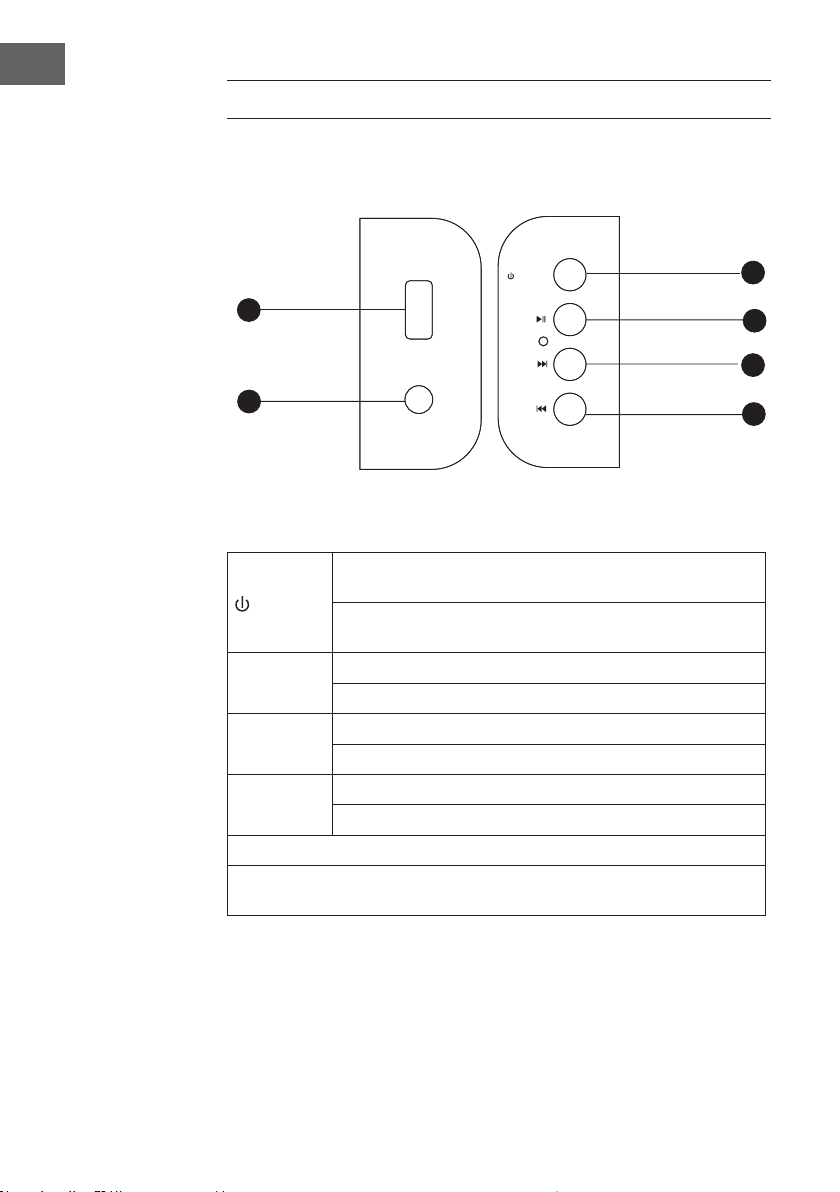
Bedienfeld
Standby/Modus
PairPlay
Lautstärke +
nächster Titel
Lautstärke voriger Titel
USB-Eingang
LINE IN
USB
LINE IN
/MODE
PAIR/
VOL+/
VOL-/
Funktionen des Bedienfelds
Einige Sekunden gedrückt halten, um das Gerät auszuschalten.
/MODE
VOL+ /
VOL- /
PAIR/
Die maximale Kapazität für angeschlossene USB-Sticks ist 32 GB.
LINE IN und AUX erhalten ihr Audiosignal durch eine externe Quelle.
(Die Eingänge sind an der Seit der Soundbar.)
Das Gerät hat einen Betriebsstatus-Speicher.
Kurz drücken, um zwischen USB/BT/HDMI/OPTIC/LINE IN und
AUX zu wechseln.
Nächster Titel (bei der Wiedergabe von USB-Medien oder BT)
Gedrückt halten, um die Lautstärke zu erhöhen.
Voriger Titel (bei der Wiedergabe von USB-Medien oder BT)
Gedrückt halten, um die Lautstärke zu senken.
Die Wiedergabe im BT- und USB-Modus anhalten bzw. fortsetzen.
In anderen Modi: Stummschaltung.
6
Page 7
Standby
Modus
Titel zurück
Lautstärke -
02'(
Stumm
Play/ Pause
Lautstärke +
Titel vor
Opt.HDMI MODE
Musikmodus
+',0
237,&
086,&
%73$,5
92,&(
029,E
BTPair
Sprachmodus
Filmmodus
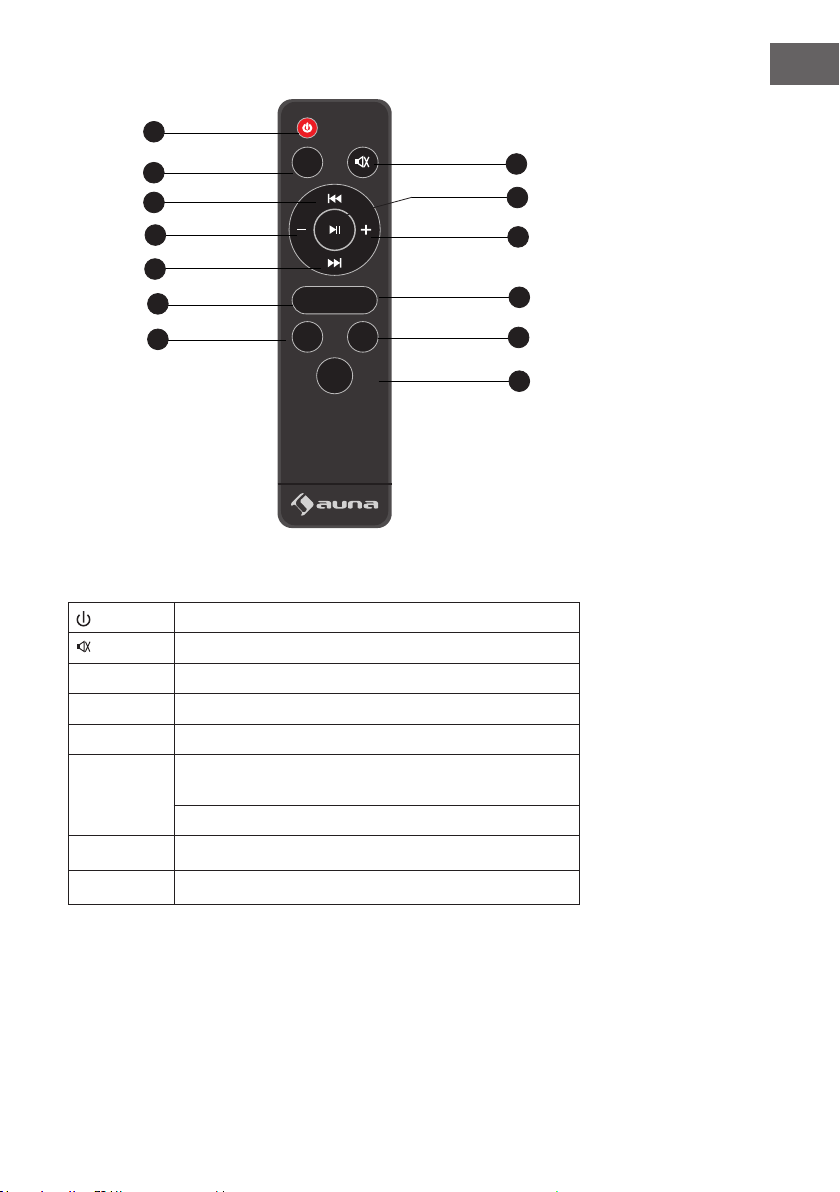
Funktionen der Fernbedienung
Ein- und Ausschalten.
Stummschalten und lautschalten
MODE Zwischen den Modi BT/USB/LINE und AUX wechseln.
+
-
Nächster Titel
Voriger Titel
Die Wiedergabe im BT- und USB-Modus anhalten bzw.
fortsetzen.
In anderen Modi: Stummschaltung.
Lautstärke erhöhen
Lautstärke verringern
DE
Fernbedienung
7
Page 8

DE
HINWEISE ZUR ENTSORGUNG
Bendet sich die linke Abbildung (durchgestrichene
Mülltonne auf Rädern) auf dem Produkt, gilt die Europäische
Richtlinie 2012/19/EU. Diese Produkte dürfen nicht mit dem
normalen Hausmüll entsorgt werden. Informieren Sie sich
über die örtlichen Regelungen zur getrennten Sammlung
elektrischer und elektronischer Gerätschaften. Richten Sie
sich nach den örtlichen Regelungen und entsorgen Sie
Altgeräte nicht über den Hausmüll. Durch die regelkonforme
Entsorgung der Altgeräte werden Umwelt und die
Gesundheit Ihrer Mitmenschen vor möglichen negativen
Konsequenzen geschützt. Materialrecycling hilft, den
Verbrauch von Rohstoen zu verringern.
Das Produkt enthält Batterien, die der Europäischen
Richtlinie 2006/66/EG unterliegen und nicht mit dem
normalen Hausmüll entsorgt werden dürfen. Bitte
informieren Sie sich über die örtlichen Bestimmungen zur
gesonderten Entsorgung von Batterien. Durch regelkonforme
Entsorgung schützen Sie die Umwelt und die Gesundheit
Ihrer Mitmenschen vor negativen Konsequenzen.
Konformitätserklärung
Hersteller: Chal-Tec GmbH, Wallstraße 16, 10179 Berlin.
Dieses Produkt entspricht den folgenden Europäischen
Richtlinien:
2011/65/EU (RoHS)
2014/53/EU (RED)
2014/35/EU (LVD)
8
Page 9
Dear Customer,
Congratulations on purchasing this equipment. Please read this manual
carefully and take care of the following hints on installation and use to
avoid technical damages. Any failure caused by ignoring the items and
cautions mentioned in the operation and installation instructions are not
covered by our warranty and any liability.
TECHNICAL DATA
Item number 10031847
Power supply adaptor 110-220 V ~ 50/60 Hz
Impedance 8 ohms
RMS 2 x 20 W + 40 W
Dimensions 68 x 27 x 6 cm
EN
SAFETY INSTRUCTIONS
FAILURE TO CAREFULLY FOLLOW THESE INSTRUCTIONS MAY LEAD TO
SERIOUS PERSONAL INJURY AND DAMAGE TO YOUR PRODUCT.
General Instructions
• DANGER. NOT FOR USE BY CHILDREN.
• For home and personal use only.
• For indoor use only. Outside usage shall be construed as a misuse as set
forth herein.
• Read, keep and follow the instructions carefully.
• Heed all warnings.
9
Page 10

EN
• Electrical equipment should never be kept or stored in rain or damp
environments. Storage of the Product under the aforementioned
conditions shall be construed as neglect as set forth herein
• Unplug the product during lightning storms or when unused for long
period of time.
• Do not expose to direct sunlight and do not install near any heat
sources such as radiators, heat registers, stoves, or other apparatus that
produces heat.
• DO NOT PLUG IN THE PRODUCT UNLESS IT IS TURNED OFF
COMPLETEY.
• Do NOT expose to dripping or splashing water. Do NOT place objects
on top of the product.
Special safety instructions
• This product is suitable for at an altitude of 2000 meters or below, the
non-tropical climate condition.
Small objects / packaging parts (plastic bags, cardboard, etc.)
Keep small objects (for example, screws and other assembly materials,
memory cards) and packaging parts out of reach of children so that they
cannot be swallowed. Do not let small children play with plastic bags. Risk
of suocation.
Transporting the device
Please keep the original packaging. To ensure adequate protection when
transporting the device, pack the device tin its original packaging.
Cleaning the outer surfaces
Do not use volatile uids, such as insect sprays. The surface can be
damaged by excessive pressure during wiping. Rubber or plastic parts
should not be left in contact with the device for an extended period of time.
Use a dry cloth.
10
Page 11
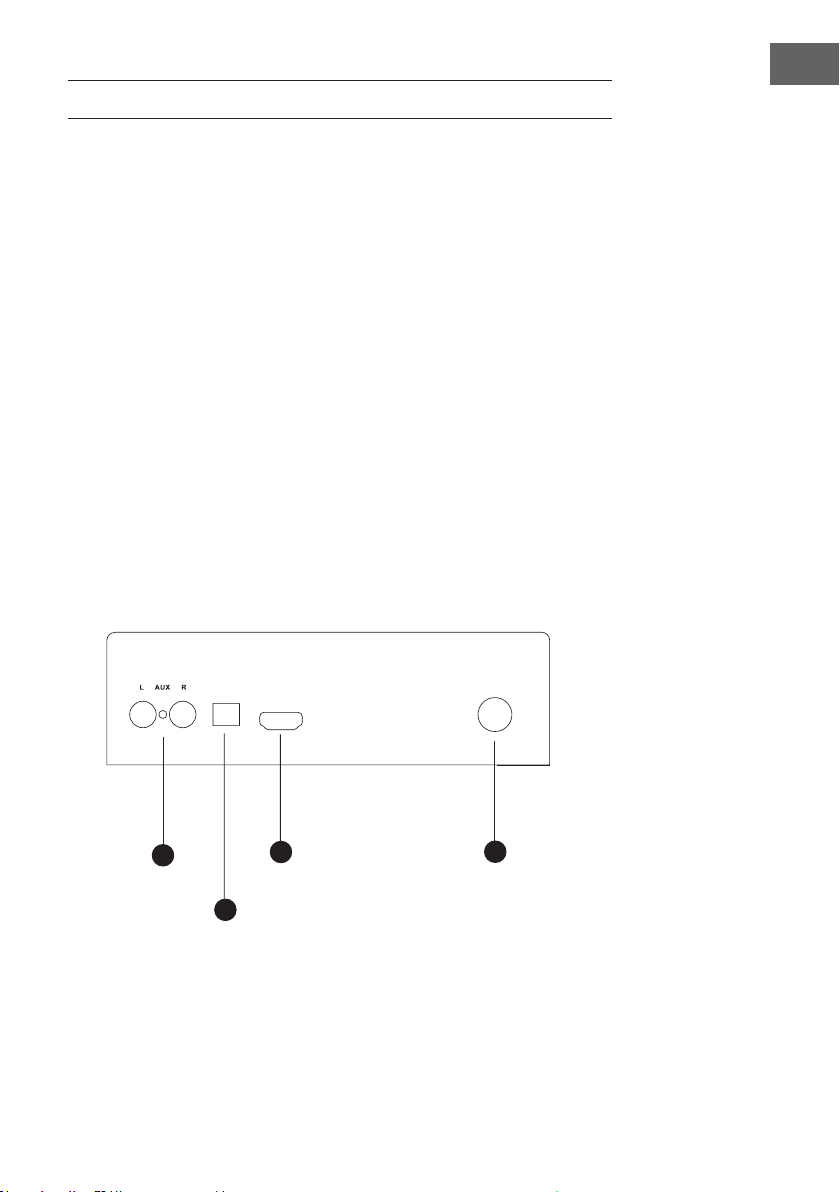
GETTING STARTED
1. Please connect the machine with AC power socket.
2. Press the button( /MODE ) for one second to enter into work status,then
the status light will be on cables
3. Connect all input , the HDMI, OPTICAL port is on the of the machine, and
then press MODE to sellect the input source.
4. BT-Kopplung
• Turn on the search function on the Bluetooth device from which you
want to play music.
• Press the BT/PAIR button.
• Activate the Bluetooth function of the media player.
• On your Bluetooth device, select "Stealth Bar 60" and make the
connection. If a password is required, enter "0000".
5. USB connection: If you insert a USB stick with MP3 documents, then
the device will play the Mp3 les automatically, the red light ash when
playing.
6. LINE IN connection: use the audio output to connect multimedia.
LINE IN jack (as Multimedia 2.1 active speaker use), the red light will be
on.
EN
AUXinput
Optical input
237,&$/
+'0,$5&
HDMI input
$&
ᨺ
Power
Connections
11
Page 12
EN
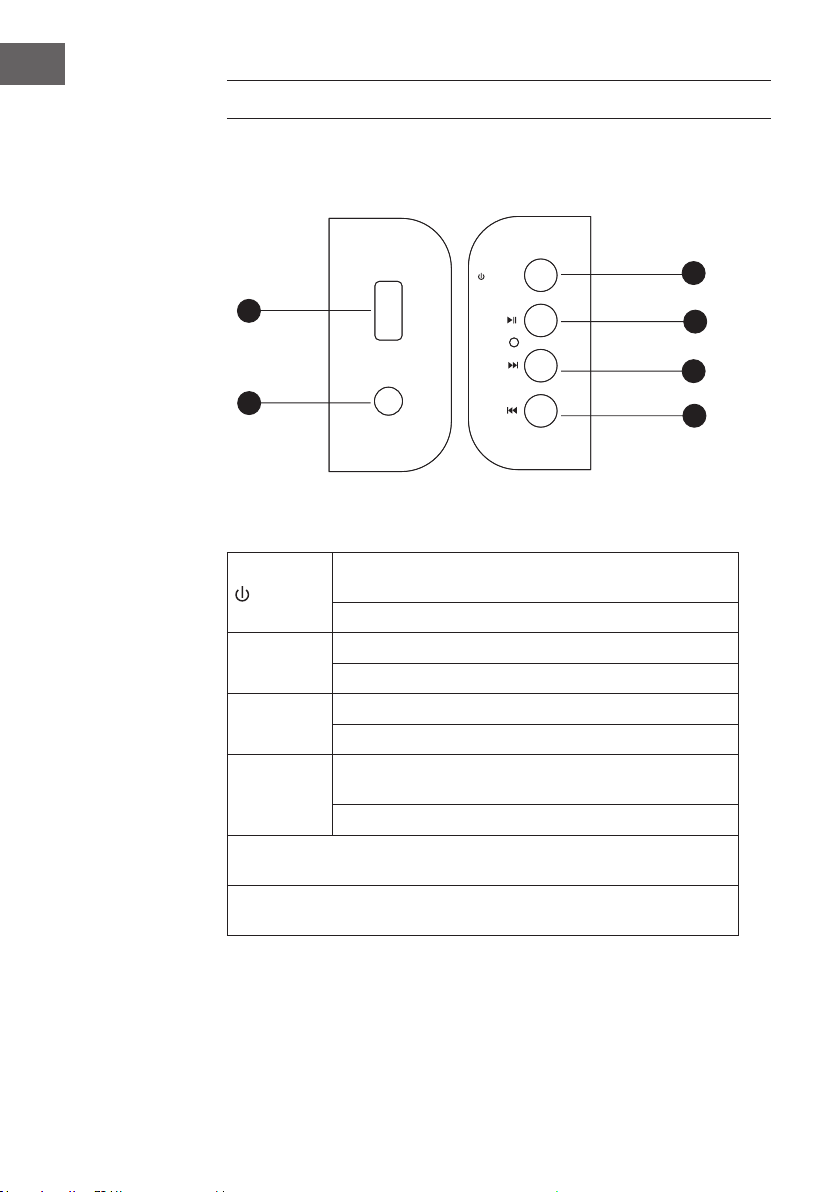
OPERATION
Control panel
STANDBYMODE
PairPlay
VolupNext section
Vold
ownPrev
section
USB input
LINE input
USB
LINE IN
/MODE
PAIR/
VOL+/
VOL-/
Panel functions
Press for seconds to trun on/o. This machine has a status
/MODE
VOL+ /
VOL- /
PAIR/
USB function for reading MP3/WMA format audio documents, max USD
memory is 32GB.
LINE and AUX port to receive audio source from other audio machine. (port
located at the side panel)
memory function status.
USB/ BT/ HDMI/ OPTIC/ LINE/ AUX mode.
Next section of USB or Bluetooth playing.
Long press for main volume up.
Prev section of USB o next section of Bluetooth playing
Long press for main volume down.
Press this button to play / pause during USB/ bluetooth
playing.
Press for mute during other mode..
12
Page 13
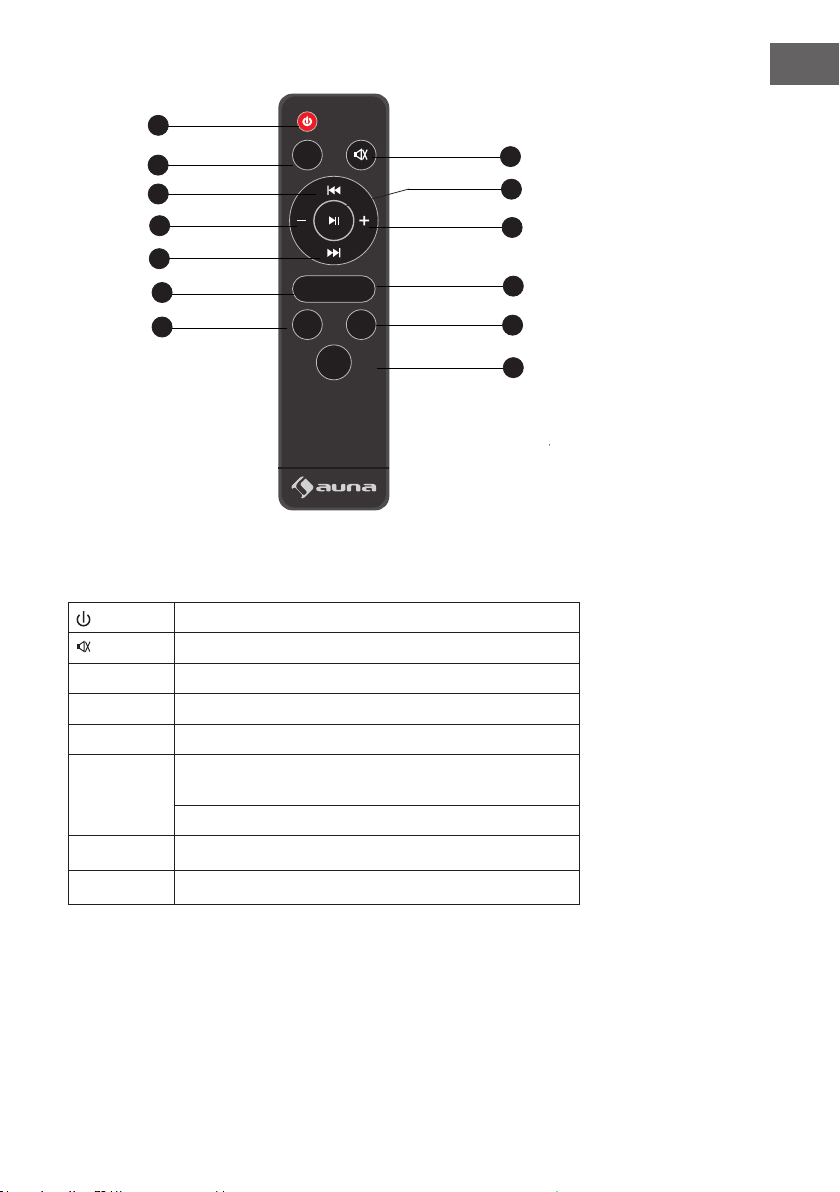
Standby
MODE
Pre section
Voldown
Nextsection
Optical HDMI MODE
02'(
+',0
237,&
086,&
%73$,5
92,&(
EN
Mute
Play/ Pause
Volup
Remote control
BTPair
VoicemodeMusicmode
029,E
Moviemode
Remote control functions
After connecting AC Power, Press this button to trun on/o
Press to switch between mute/unmute
MODE Press to switch among Bluetooth/ USB/ LINE/AUX mode
+
-
Press for prev section
Press for next section
Press this button to play / pause during USB/Bluetooth
playing.
Note! Press for mute during other mode..
Press for Volume up
Press for Volume down
13
Page 14

EN
DISPOSAL CONSIDERATIONS
According to the European waste regulation 2012/19/EU this
symbol on the product or on its packaging indicates that this
product may not be treated as household waste. Instead it
should be taken to the appropriate collection point for the
recycling of electrical and electronic equipment. By ensuring
this product is disposed of correctly, you will help prevent
potential negative consequences for the environment
and human health, which could otherwise be caused by
inappropriate waste handling of this product. For more
detailed information about recycling of this product, please
contact your local council or your household waste disposal
service.
Your product contains batteries covered by the European
Directive. 2006/66/EC, which cannot be disposed of with
normal household waste. Please check local rules on
separate collection of batteries. The correct disposal of
batteries helps prevent potentially negative consequences
on the environment and human health.
Declaration of Conformity
Producer: Chal-Tec GmbH, Wallstraße 16, 10179 Berlin.
Germany
This product is conform to the following European Directives:
2011/65/EU (RoHS)
2014/53/EU (RED)
2014/35/EU (LVD)
14
Page 15
Chère cliente, cher client,
Toutes nos félicitations pour l’acquisition de ce nouvel appareil. Veuillez
lire attentivement les instructions suivantes de branchement et d’utilisation
an d’éviter d’éventuels dommages. Le fabricant ne saurait être tenu pour
responsable des dommages dus au non-respect des consignes de sécurité
et à la mauvaise utilisation de l’appareil.
FICHE TECHNIQUE
Numéro d‘article 10031847
Alimentation de l'adaptateur secteur 110-220 V ~ 50/60 Hz
Impédance 8 Ohm
Puissance RMS 2 x 20 W + 40 W
Dimensions 68 x 27 x 6 cm
FR
CONSIGNES DE SÉCURITÉ
LE NON-RESPECT DE CES INSTRUCTIONS PEUT ENTRAÎNER DES BLESSURES
GRAVES ET ENDOMMAGER L’APPAREIL
Consignes générales de sécurité
• DANGER : INADAPTÉ POUR L’UTILISATION PAR DES ENFANTS.
• L’appareil est destiné à un usage domestique uniquement. Toute autre
utilisation est considérée comme une application non conforme.
• Lisez attentivement les instructions d’utilisation et conservez-les en lieu
sûr.
• Observez tous les avertissements.
15
Page 16

FR
• Les appareils électriques ne doivent jamais être conservés dans des
environnements pluvieux ou humides.
• Débranchez la prise en cas d’orage et si vous n’utilisez pas l’appareil
pendant une longue période.
• N’exposez pas l’appareil à l’ensoleillement direct. Ne le placez pas à
proximité de sources de chaleur telles que des radios, des radiateurs
soulants, des poêles ou d’autres appareils émettant de la chaleur.
• Éteignez l’appareil avant de débrancher la che d’alimentation.
• N’exposez pas l’appareil à la pluie ou aux éclaboussures.
• Ne posez aucun objet sur l’appareil.
Consignes de sécurité particulières
• L’appareil ne peut être utilisé qu’à une hauteur inférieure à 2000 mètres
ou dans les climats tropicaux.
• Petits éléments / éléments d’emballage (sacs en plastique, cartons,
etc.):
• Conservez les petits éléments (par exemple vis, matériel de montage)
et éléments d’emballage hors de portée des enfants pour éviter
les risques d’étouement. Ne pas laisser les enfants jouer avec les
emballages plastiques, il y a risque d’étouement !
• Transport de l’appareil :
• Veuillez conserver l’emballage d’origine. Pour garantir la meilleure
protection de l’appareil lors de son transport, veuillez le remettre dans
son emballage d’origine.
• Nettoyage des surfaces externes :
• • Ne pas utiliser de liquides volatils tels que le spray insecticide. Une
pression trop forte lors de l’essuyage peut endommager les surfaces.
Les matières en plastique ou en caoutchouc ne doivent pas rester en
contact avec l’appareil pendant une période prolongée. Utilisez un
chion sec.
16
Page 17

MISE EN SERVICE
1. Branchez l'adaptateur secteur à la barre de son. Branchez ensuite
l'adaptateur d'alimentation à une prise de courant.
2. Appuyez sur le bouton marche/arrêt/mode de l'appareil et maintenez-le
enfoncé pendant une seconde pour allumer la barre de son. Le témoin
de fonctionnement s'allume.
3. Connectez tous les câbles (HDMI ou éventuellement un câble optique).
Utilisez le bouton MODE pour sélectionner le signal d'entrée.
4. Appairage BT
• Réglez la fonction de recherche sur le périphérique BT à partir duquel
vous voulez lire de la musique.
• Activez la fonction BT de la barre de son. Appuyez sur le bouton BT/
PAIR.
• Sélectionnez "Stealth Bar 60" sur votre appareil BT et établissez la
connexion. Si un mot de passe est requis, entrez "0000".
5. Connexion d'un périphérique USB : si vous connectez une clé USB
contenant des titres MP3, ces titres sont lus automatiquement. Pendant
la lecture, la LED rouge clignote.
6. Connexion AUX : utilisez l'entrée audio pour connecter des appareils de
lecture (canal 2.1 actif). La LED rouge s'allume.
FR
Entrée AUX
AUX-Eingang
opt. Eingang
Entrée optique
237,&$/
+'0,$5&
HDMI-Eingang Anschluss
Port HDMI
Prise de l’adap-
Netzgerät
teur secteur
$&
ᨺ
Connexions
17
Page 18

FR
Panneau de
commande
FONCTIONNEMENT
MODE veille
Standby/Modus
Appairer/lire
PairPlay
Volume /
Lautstärke +
titre suivant
nächster Titel
Lautstärke -
Volume /
voriger Titel
titre précédent
Port USB
USB-Eingang
LINE IN
USB
LINE IN
/MODE
PAIR/
VOL+/
VOL-/
Fonctions du panneau de commande
Appuyez et maintenez pendant quelques secondes pour éteindre
/MODE
VOL+ /
VOL- /
PAIR/
La capacité maximale pour les clés USB connectées est de 32 Go.
LINE IN et AUX reçoivent leur signal audio via une source externe. (Les entrées sont
sur le côté de la barre de son.)
l'appareil. L'appareil a une mémoire d'état de fonctionnement.
Appuyez brièvement pour basculer entre USB/BT/HDMI/OPTIC/
LINE IN et AUX.
Titre suivant (lors de la lecture de médias USB ou BT)
Appuyez et maintenez pour augmenter le volume.
Titre précédent (lors de la lecture d'un support USB ou BT)
Appuyez et maintenez pour réduire le volume.
Mettre en pause ou reprendre la lecture en mode BT et USB.
Dans les autres modes : fonction muet.
18
Page 19

Standby
Modus
MODE
Titel zurück
Titre/ préc.
Volume - Volume +
Lautstärke -
Titre/siuvant
Titel vor
Opt.HDMI MODE
Musikmodus
Mode musique
02'(
+',0
237,&
086,&
%73$,5
92,&(
029,E
Stumm
Play/ Pause
Play pause
Lautstärke +
BTPair
BT pair
Sprachmodus
Mode voix
Filmmodus
Mode lm
Fonctions de la télécommande
Marche et arrêt.
Fonction muet activer et désactiver
MODE Basculer entre les modes BT/USB/LINE et AUX.
+
-
Titre suivant
Titre précédent
Mettre en pause ou poursuivre la lecture en mode BT et USB.
Dans les autres modes : fonction muet.
Augmenter le volume
Réduire le volume
FR
Télécommande
19
Page 20
FR
CONSEILS POUR LE RECLYCLAGE
Le pictogramme ci-contre apposé sur le produit signie que
la directive européenne 2012/19/UE s‘applique (poubelle à
roues barrée d’une croix). Ces produits ne peuvent être jetés
dans les poubelles domestiques courantes. Renseignezvous concernant les règles appliquées pour la collecte
d’appareils électriques et électroniques. Conformez-vous
aux réglementations locales et ne jetez pas vos anciens
produits avec les ordures ménagères. Le respect des règles
de recyclage des vieux produits aide à la protection de
l’environnement et de la santé de votre entourage contre
les conséquences négatives possibles. Le recyclage des
matériaux aide à réduire l’utilisation des matières premières.
Le produit contient des piles qui sont soumises à la directive
européenne 2006/66/CE et ne doivent pas être jetées dans
les poubelles à ordures ménagères. Veuillez-vous informer
sur les réglementations locales en vigueur pour le recyclage
des piles. En respectant les règles de recyclage vous
participez activement à la protection de l’environnement et à
la préservation de la santé de vos proches.
.
20
Déclaration de conformité
Fabricant : Chal-Tec GmbH, Wallstraße 16, 10179 Berlin.
Ce produit est conforme aux directives européennes
suivantes :
2011/65/UE (RoHS)
2014/53/UE (RED)
2014/35/UE (LVD)
 Loading...