

Page 1
SE50
Boombox Bluetooth avec Radio FM
Bluetooth Boombox mit FM Radio
Boombox Bluetooth con Radio FM
Boombox Bluetooth con Radio FM
Bluetooth Boombox with FM Radio
EN
FR
DE
IT
ES
Page 2
Thank you for purchasing the August SE50 Bluetooth Boombox with
FM Radio. This user manual is designed to familiarize you with all the
features of this device. Please take the time to read this user manual
carefully, even if you are already familiar with a similar product.
Safety
To ensure the safety of you and others, please read the Safety
Instructions before using this device.
Please do not disassemble the SE50, it can be unsafe and will
invalidate the manufacturer's warranty.
Disposal
Please ensure the product and accessories are disposed of in
compliance with the WEEE (Waste Electrical and Electronic
Equipment) Directive and any other regulations applicable to your
country. Always check with the environment agency and any other
relevant authorities for current disposal regulations.
Customer Service:
You can contact us by phone on: +44 (0)845 250 0586 or by email at:
[email protected] should you require further technical support
or customer service.
User Manual
1. Safety Instructions
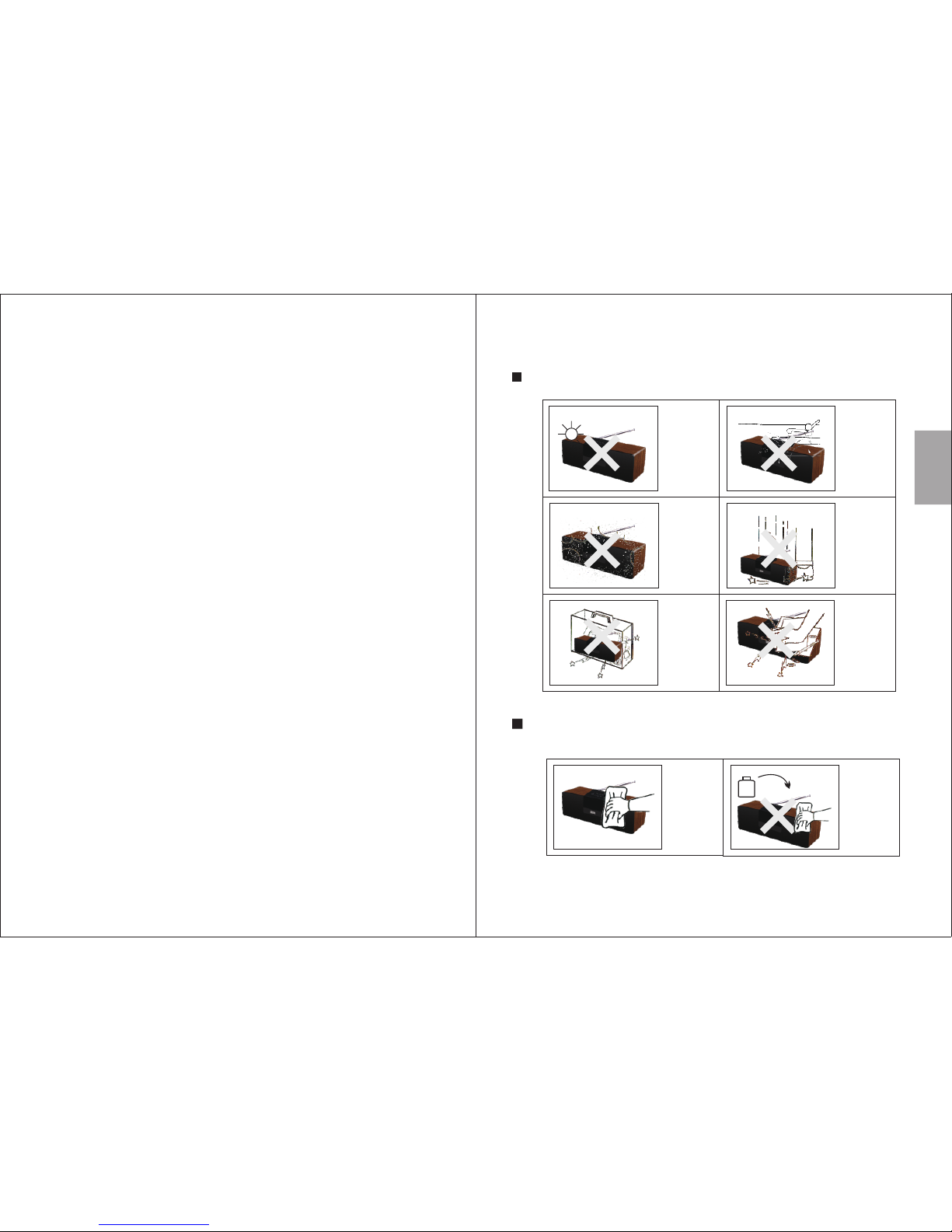
Storag e and Use
Mainte nance
Please unplug all leads before cleaning this device.
Never expose
the
to moisture,
dust, oil or
smoke.
device
When carrying
this device as
part of your
luggage please
ensure it is
securely stored
to avoid
impact damage.
Never strike
or scratch this
device with
any sharp
object.
Keep this
device away
from
extreme
temperatures.
Keep the
device away
from wet or
damp
environment .s
Avoid
dropping or
exposing to
impacts.
Wipe the
device and
buttons with
a soft cloth.
Never wipe this
device with an
abrasive cloth
or apply
detergent,
alcohol or
chemical based
cleaning
products.
Alcoho l
Englis h
-1-
Page 3
101112
Bluetooth Boombox with FM Radio
SE50
S/N: 50BYYXXXXX
Power Supply: DC15V 2A
Power Consunmption: 30W
ON OFF DC IN AUX IN
Englis h
2. Main Features
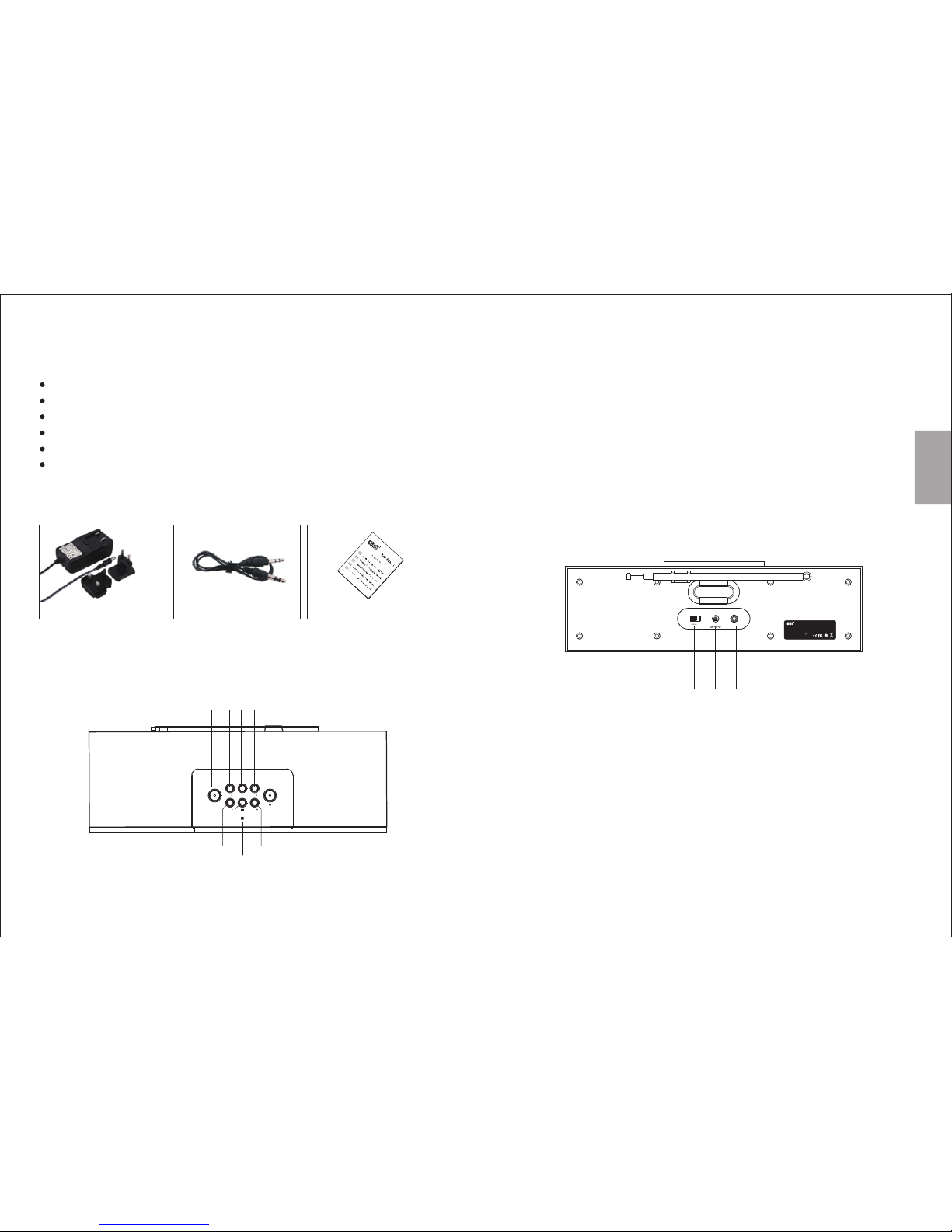
3. Accessories
AC pow er adap tor 3.5mm audi o cable User manua l
4. Part Names and Functions
Top
1. Select source (Bluetooth / FM radio / Audio-In)
2. FM- (short press) / Previous available station (press and hold)
3. Store current radio station
4. FM+ (short press) / Next available station (press and hold)
5. Bluetooth connection
6. Decrease volume
7. Play / Pause / Select stored radio channels
8. Increase volume
9. NFC
10. Power switch
11. Power socket: DC 15V
12. Audio-In socket
Play Music Wirelessly from
10 Presets
Powerful 2 x 15W
Standard
Bluetooth Devices
FM Radio with Channel
Stereo Hi-Fi Speakers
3.5mm Audio-In Socket
Bluetooth NFC Pairing
24 Hours Clock Function
Back:
-2-
-3-
2 3 4
6 7
8
5
1
SOURCE
FM FMMEM
VOL
PRESET
VOL
9
Page 4

5. Bluetooth Mode
5.1 Pair ing
5.1.1 Pa iring with a Mo bile Phone
1. o enter pairing mode ress and hold until the Bluetooth
Icon flashes on the LCD screen.
2.Scan for available Bluetooth devices on your mobile phone
(see your mobile phone user manual for instructions if needed).
3.Select “SE50” from the available devices.
4.Once successfully paired, the SE50 speaker will beep and the
Bluetooth icon will flash slowly.
T , p
Note: The SE50 will automatically reconnect to the last paired
Bluetooth device if it is in range, if this device is not available
it will enter pairing mode automatically.
6. FM Radio Mode
Use the “VOL-” or “VOL+” buttons to adjust the volume and
press to pause or resume playback.
5.2 Music Control
The SE50 is able to control the music playing on either a mobile
phone or a computer with a Bluetooth connection.
Press SOURCE to select FM radio mode. In FM radio mode,
an FM icon and the current frequency will be displayed on the
screen.
Short press the “FM-” or “FM+” buttons to adjust the frequency
in 0.1MHz steps. Press and hold either button to move to the
previous or next channel.
SE50 can store 10 channels. Press “PRESET” to cycle through
your stored channels.
When switched on, the SE50 enters Bluetooth mode
automatically. You can also use the SOURCE button to
select Bluetooth mode.
Englis h
5.1.2 Co nnect to a Windows PC
1. o enter pairing mode ress and hold until the Bluetooth
Icon flashes on the LCD screen to enter pairing mode.
2.Enable Bluetooth on your PC.
3.Select “Devices and Printers” from the Control Panel and click
“Add a Device”.
4.Select “SE50” from the available devices to install drivers.
T , p
Note:
Note:
For Windows XP and Vista, a third-party Bluetooth driver
is needed (not included).
The SE50 will automatically reconnect to the last paired
Bluetooth device if it is in range, if this device is not
available it will enter pairing mode automatically.
5.If the SE50 is not automatically set as your output device,
select “Sound” from the control panel then highlight the SE50
and select“Set Default”.
-4-
-5-
5.1.3 NF C Pairing
1. Enable NFC and Bluetooth mode on your source device.
2. Touch the NFC area of your source device against the NFC
area on the SE50.
3. Confirm the pairing on your source device if prompted.
Page 5
Englis h
7. Audio- In Mode
To use the SE50 as a wired speaker, use a 3.5mm audio cable to
connect the SE50 with your source device. Press “SOURCE” to
select AUX mode, an AUX icon will be displayed on the LCD
screen.
Press “VOL-” or “VOL+” buttons to adjust the volume.
To save a channel to the stored channel list, press “MEM” then
use “FM-” or “FM+” to select a channel number then press
“MEM” again to confirm.
Press “VOL-” or “VOL+” buttons to adjust the volume.
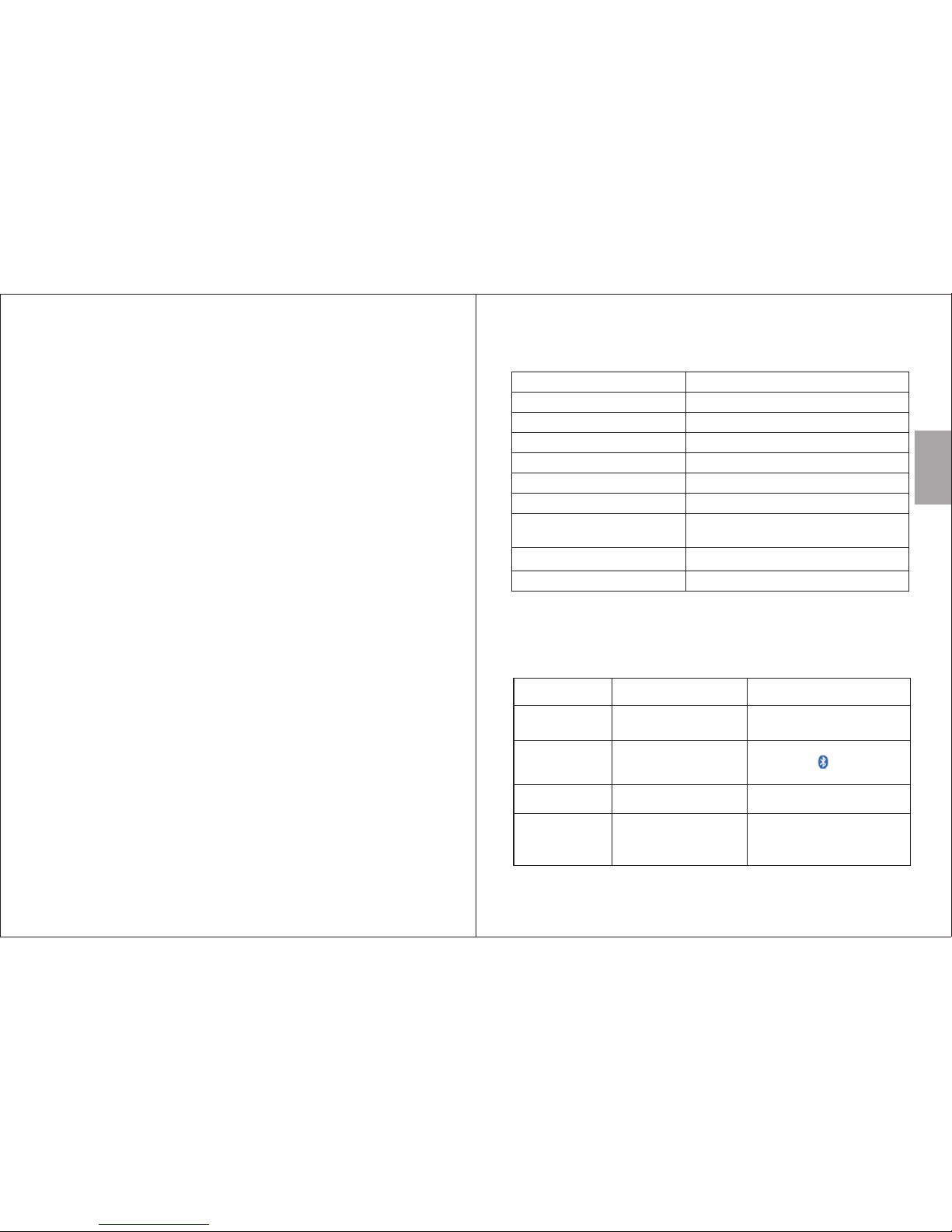
9. Specifications
LCD Dis play
Bluet ooth Specification
Speak ers
Frequ ency Response
Separ ation
S/N
FM Radi o Frequency
Power Adaptor
Dimen sions
Weight
300 x 95 x1 00mm
Input : AC 100~240 V 50/60 Hz
Outpu t: DC 15V 2A
87.5 – 10 8.0MHz
70dB
40dB( 1KHz)
80Hz – 20 KHz
2 x 15 Watts
Bluet ooth V2 .1
10. Troubleshooting
The problems listed below do not necessarily signify a fault
with the device. Please check this list before requesting a repair.
Solution
Pro bl em
Possible Caus e
No powe r
Power a daptor plug loose Check power ada ptor
plug co nnectio n.
Canno t be found
via Blu etooth
SE50 is n ot in Bluetooth
pairi ng mode
No radi o No sign al Try repositi oning the d evice
or adju sting the antenna angle.
No soun d The v olume is too low or
the pla yback is pa used
Try to incre ase the vol ume
of the SE 50 and your source
devic e or resume playback on
your so urce device.
In Blue tooth mode, press
and hol d the butto n to
enter p airing mo de.
1.4 inc h
1238g
-6-
-7-
8. Clock S etup
To set the correct time on the clock, press and hold the “MEM”
button until the hour begins to flash. Use “FM+” and “FM-” to
adjust the hour up and down. Once the correct hour is set,
press “MEM” again to adjust the minutes. Once the time is
correct, press “MEM” to finish.
 Loading...