

Page 1
August International Ltd
United Kingdom
Telephone: +44 (0)845 250 0586
www.augustint.com
MS450
EN
FR
DE
IT
ES
Bluetooth Speaker
Haut-parleur Bluetooth
Bluetooth Lautsprecher
Altoparlante Bluetooth
Altavoz Bluetooth
Page 2
User Manual
Thank you for purchasing the August MS450 Bluetooth
Speaker. This user manual is designed to familiarize you
with all the features of this device. Please take the time to
read this user manual carefully, even if you are already
familiar with a similar product.
To ensure the safety of you and others, please read the
Safety Instructions before using this device. Please do
not disassemble the MS450, it can be unsafe and will
invalidate the manufacturer's warranty.
Please ensure the product and accessories are disposed
of in compliance with the WEEE (Waste Electrical and
Electronic Equipment) Directive and any other
regulations applicable to your country. Always check
with the environment agency and any other relevant
authorities for current disposal regulations.
You can contact us by phone on: +44 (0)845 250 0586 or
by email at: [email protected] should you require
further technical support or customer service.
Safety
Disposal
Customer Service
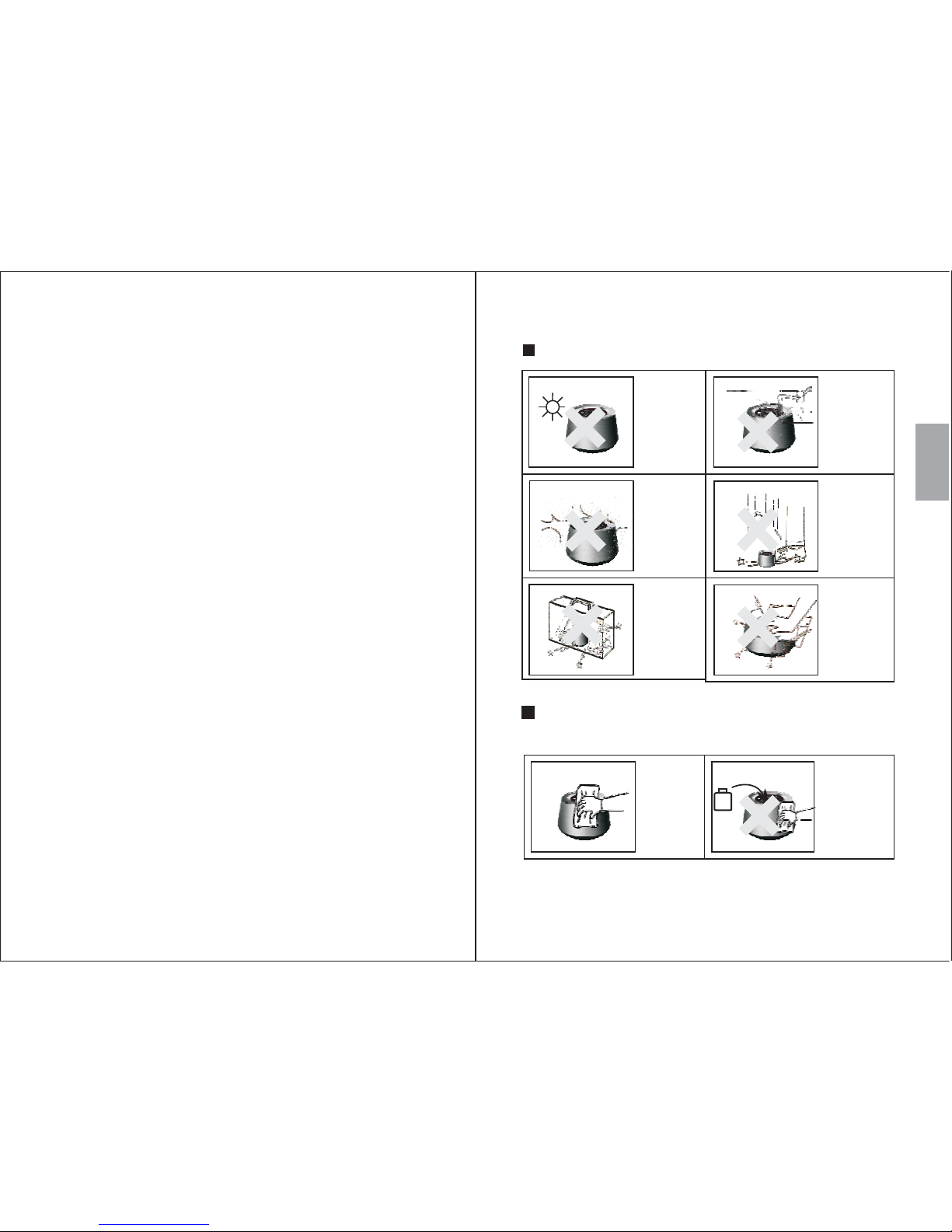
Storage and Use
Never expose
the
to moisture,
dust, oil or
smoke.
device
When carrying
this device as
part of your
luggage please
ensure it is
securely stored
to avoid
impact damage.
Keep this
device away
from
extreme
temperatures.
Keep the
device away
from wet or
damp
environment .s
Avoid
dropping or
exposing to
impacts.
Maintenance
Please unplug all leads before cleaning this device.
Wipe th e
device and
buttons with
a soft cloth.
Never wipe this
device with an
abrasive cloth
or apply
detergent,
alcohol or
chemical based
cleaning
products.
Alcohol
Never strike
or scratch this
device with
any sharp
object.
English
1. Safety Instructions
-2-
-1-
Page 3
2. Main Features
Wireless speaker for Bluetooth devices
Standard 3.5mm audio-in socket
Microphone for Hands-Free calling
Built-in rechargeable battery
Distance: up to 10m (Class II)
Version: Bluetooth V2.1
3. Accessories
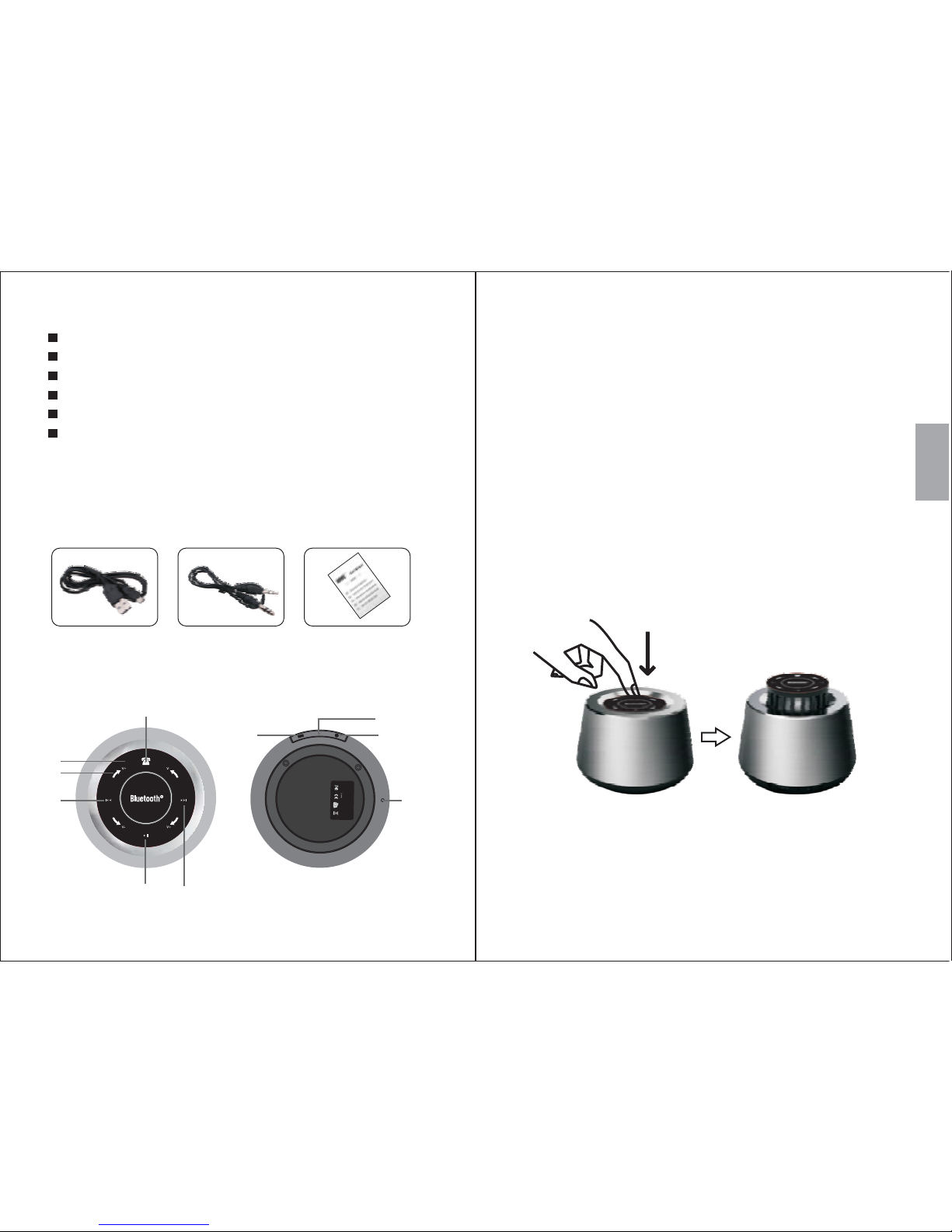
4. Part Names and Functions
1) USB charging cable
2) 3.5mm audio cable
3) User manual
Top:
5. Operations
5.1 Switch On / Off
To switch the device on, press down on the control
panel and release it, the panel will raise and the
device will beep indicating that it is now switched on.
1. Control Panel
2. Volume adjustment
3. Previous track
4. Play / Pause
5. Next track
6. Power socket
7. Charging LED
8. Audio-in Socket
9. Microphone
10. Call Status LED
*Status LED is under the Control panel.
2
3
4
5
1
6
8
7
Bluetooth
S
peaker
Model
N
o.
:
M
S450
DC:5V
1
.0A
Side:
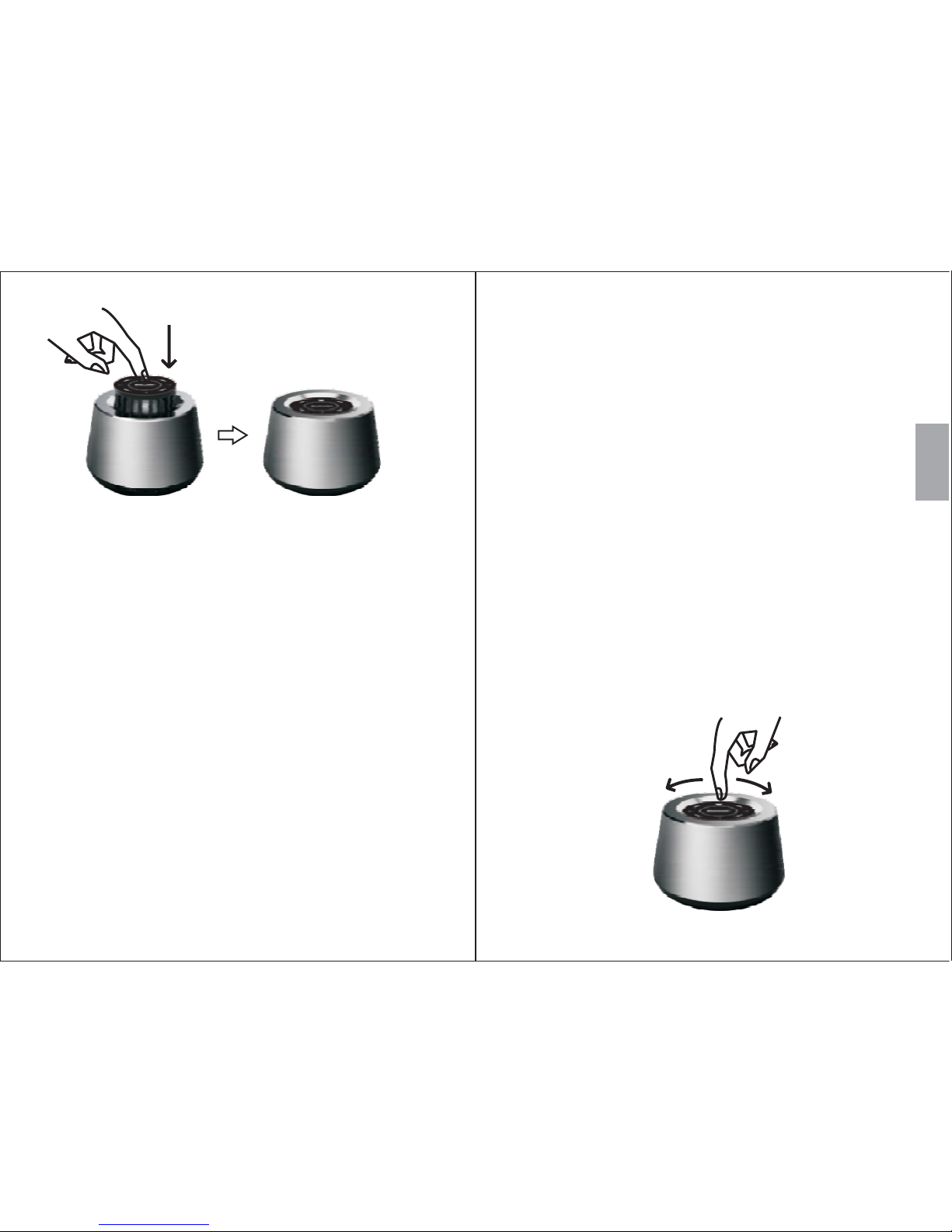
To switch the device off, press the control panel
down, it will click into place inside the device
turning the power off.
English
-4-
-3-
9
10
Page 4
--For mobile phone
For computers
1) Scan for available Bluetooth devices on your
mobile phone (see your mobile phone user manual
for instructions if needed)
2) Select “MS450” from the available devices and
confirm connection.
3) The status LED flashes blue and the device says
“Bluetooth” to indicate a successful connection.
1) Enable Bluetooth on your PC.
The MS450 will automatically reconnect to
the last paired Bluetooth device if it is in range.
To pair the MS450 with another device the active
connection must be disconnected first.
5.2 Bluetooth Connection
Note:
After switching on the MS450, the device will
enter Bluetooth mode and prepare for pairing
automatically. Whilst in pairing mode the status
LED lights blue.
2) Select “Devices and Printers” from the Control
Panel and click “Add a Device”.
3) Select “MS450” from the available devices, the
system will install the driver automatically.
For Windows XP and Vista, a third-party
Bluetooth driver is needed (not included).
4) The status LED flashes blue and the device says
“Bluetooth” to indicate a successful connection.
5) If the MS450 is not automatically set as your
output device, select “Sound” from the control
panel then highlight the MS450 and select “Set
Default”.
The MS450 is able to control the music playing on
either a mobile phone or a computer with a Bluetooth
connection.
Swiping the Operation Panel clockwise or anticlockwise
will increase or decrease the volume.
Note:
5.3 Music Control
English
-6-
-5-
Page 5
5.4 Hands-free Calling
Whilst connected to your mobile phone, the MS450
will act as a hands-free system for any calls. Press
to pick up or hang up calls.
The Call Status LED will flash blue when it is ringing
and light when hands free calling is in use. The Call
Status LED will turn off when your mobile phone
speakers and microphone are being used. To switch
between hands-free and mobile calling, use the Bluetooth
or call settings on your mobile phone
7. Specifications
Speaker
4Ohm / 3W
Frequency Response
Distortion
Power Input
Built-in Battery
Charging Time
200Hz-20KHz
3.7V 600mAh Li- Batterypolymer
About 3 hours
Working Time
Working Distance
Up to 10m (Class II)
Dimensions
Weight
Upto5hours
90x90x59mm
358g
<0.5%
5V
5.5 Audio-In
To use the MS450 as a wired speaker, use a 3.5mm
audio cable to connect the MS450 with your source
device. Once the audio cable is connected to the MS450,
the device automatically switches to Audio-in mode.
The Status LED will show red.
To charge the MS450, connect the micro USB lead to
the device’s power socket, and the other end of the
USB cable to a powered USB port. The charging LED
lights red whilst charging and turns off once the battery
is fully charged.
6. Charging
Bluetooth Version
Bluetooth V2.1
Press or to select the previous or next track
and press to play/pause/resume.
Music control is only compatible with devices
that support A2DP, please refer to your devices user
manual for its A2DP compatibility.
Note:
8. Troubleshooting
Problem Solution
Can’t find the MS450.
Won’t turn on.
Can’t install the driver
for MS450 on a computer.
Confirm the MS450 is in pairing
mode and within 10 meters from
the device.
Please charge the MS450.
Update the driver of the Bluetooth
module on your computer.
The sound quality is
intermittent in Bluetooth
mode.
Dissable the Wifi on your source
device.
Check the volume on both the
source device and the MS450.
No sound.
English
-8-
-7-
Page 6

Any faulty product must be kept and returned in the
original packaging with all the accessories and the
original copy of the purchase receipt.
The warranty is in addition to, and does not diminish, your
statutory or legal rights.
Telephone: +44 (0) 845 250 0586
Email: [email protected]
The warranty is only valid within the country where
the product is purchased.
The product must be correctly installed and operated
in accordance to the instructions given in this user
manual.
The product must be used solely for domestic purposes.
The warranty only covers the main unit, and does not
cover the accessories.
The warranty does not cover the damage caused by
misuse, negligence, accident and natural disaster.
The warranty will be rendered invalid if the product is
resold or has been damaged by inexpert repairs. The
manufactures disclaim any liability for incidental or
consequential damages.
Please consult our customer adviser before returning
any product; we are not responsible for any unexpected
product returns.
Customer Service:
9. Warranty
This product is guaranteed for twelve months from the
date of the original purchase. In the unlikely event of any
defect arising due to faulty materials or workmanship,
the unit will be either replaced or repaired free of charge
(where possible) during this period. An alternative
product will be offered in case the product is no longer
available or repairable.
This warranty is subject to the following conditions:
-9-
 Loading...