

Page 1

August International Ltd
United Kingdom
Tel: +44 (0)845 250 0586
www.a ug us ti nt .c om
Tra
n
s
met
t
e
ur Bl
u
e
toot
h
à
Do
u
bl
e
C
o
nnex
i
on
®
Tras
m
ett
it
or
e Blu
e
t
ooth
a Dop
pi
a
Co
nness
i
o
ne
®
Bl
u
e
toot
h
Trans
m
itt
e
r
an zwe
i End
g
er
ä
t
e
®
Tra
n
s
mis
o
r
de A
u
d
io B
l
u
e
toot
h
c
on
Conex
i
ó
n D
u
a
l
®
®
Dua
l Blu
e
t
ooth
T
ransm
it
ter
M
R2
70
EN
FR
DE
IT
ES
Page 2
1. Safety Instructions
1 Do not use this device near water.
2) Clean only with a dry cloth. Switch this
product off before cleaning.
3) Do not install near any heat sources such as
stoves or other apparatus that produce heat.
4) Only use the accessories supplied by the
manufacturer.
5) Do not open the device, as this will invalidate
the warranty.
2. Main Features
Transmits Audio to Two Devices Simultaneously
Optical and 3.5mm Audio Input
Built-in Long Life Rechargeable Battery
Distance: up to 10m (Class II)
Bluetooth Profiles: A2DP, AVRCP, PBAP
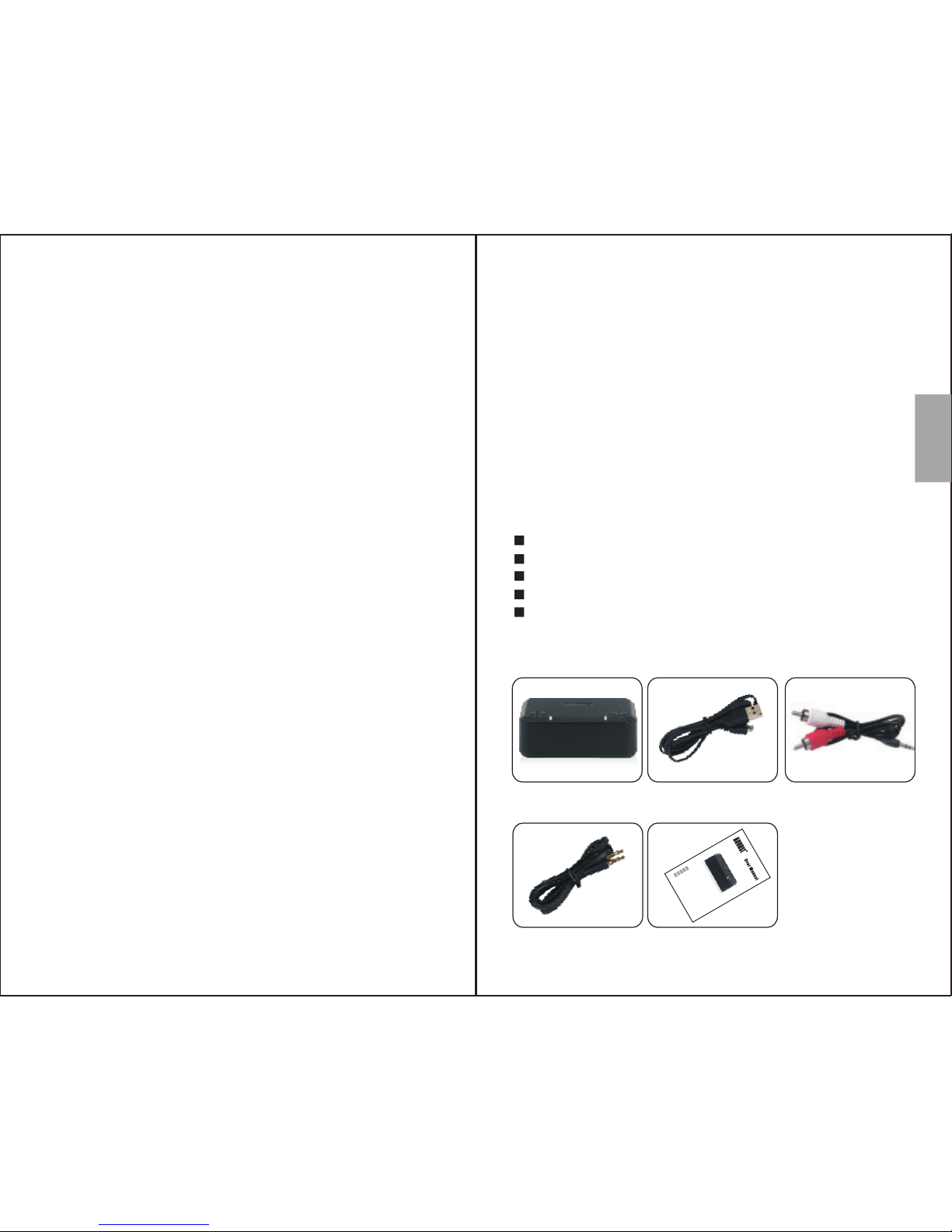
3. Box Contents
)
-1-
English
User Manual
Thank you for purchasing the August MR270 Dual
Bluetooth Transmitter. This user manual is
designed to familiarize you with all the features of
this device. Please take the time to read this user
manual carefully, even if you are already familiar
with a similar product.
Safety
To ensure the safety of you and others, please
read the Safety Instructions before using this
device. Please do not disassemble the product, it
can be unsafe and will invalidate the
manufacturer's warranty.
Disposal
Please ensure the product and accessories are
disposed of in compliance with the WEEE (Waste
Electrical and Electronic Equipment) Directive
and any other regulations applicable to your
country. Always check with the environment
agency and any other relevant authorities for
current disposal regulations.
Customer Service
You can contact us by phone on: +44 (0)845 250
0586 or by email at: [email protected]
should you require further technical support or
customer service.
MR270 USB Power Cable
3.5mm Audio Cable
User Manual
Transmetteur Bluetooth à Double Connexion
Trasmettitore Bluetooth a Doppia Connessione
Bluetooth Transmitter an zwei Endgeräte
Transmisor de Audio Bluetooth con Conexión Dual
Dual Bluetooth Transmitter
M
R
2
70
EN
FR
DE
IT
ES
3.5mm to
2xRCA Audio Cable
Page 3
-2-
-3-
English
AUX IN
OPTICAL
DC 5V
Ⅰ Ⅱ
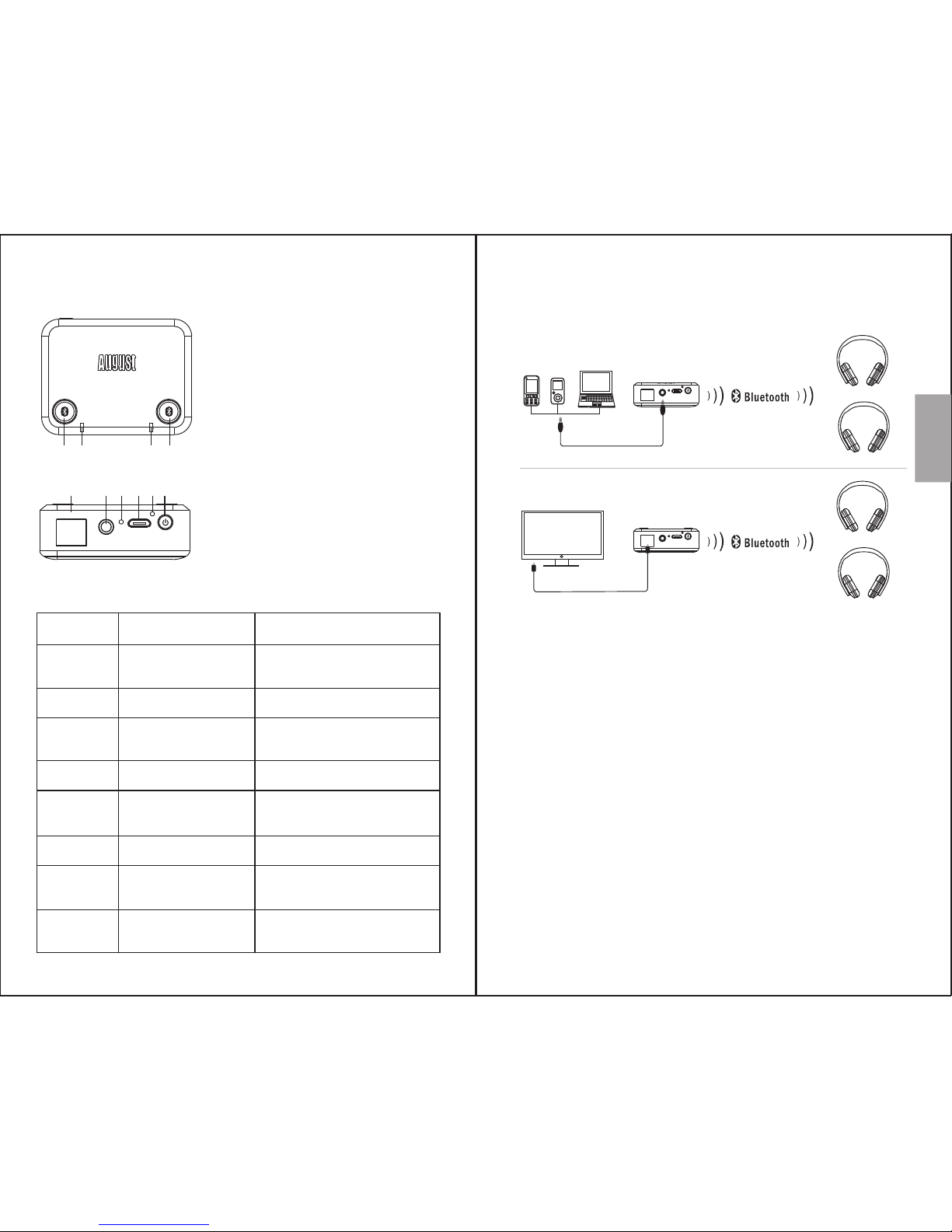
4. Part Names and Functions
1 342
5 6 7 8 9 10
1. Button I
2. Status LED I
3. Button II
4. Status LED II
5. Optical Audio In
6. Aux In
7. Charging LED
8. Charging Port
9. Reset Button
10.Power Button
Status LED
I & II
I & II
I
I
II
II
Constant White
Flashing White
Flashing White
and Blue
Constantly Blue
Flashing White
and Blue
Constantly Blue
Charging
LED
Charging
LED
Red
Green
4.1 Status LED Meaning
Indication
Searching for Paired
Devices to Connect to
Low Battery
Paring Mode for
Device 1
Connected to Device 1
Paring Mode for
Device 2
Connected to Device 2
Charging
Fully Charged
5. Operations
5.1 Setup
Note: When both optical and aux audio input are
connected, the MR270 will use the aux audio
input.
5.2 Bluetooth Connection
Press and hold the power button to switch the
MR270 on.
Both status LEDs will light white and the MR270
will search for paired devices to connect to.
AUX IN
OPTICAL
DC 5V
Optical Audio Cable
Optical connection
AUX IN
OPTICAL
DC 5V
3.5mm Audio Cable
Aux connection
Page 4
-4-
-5-
English
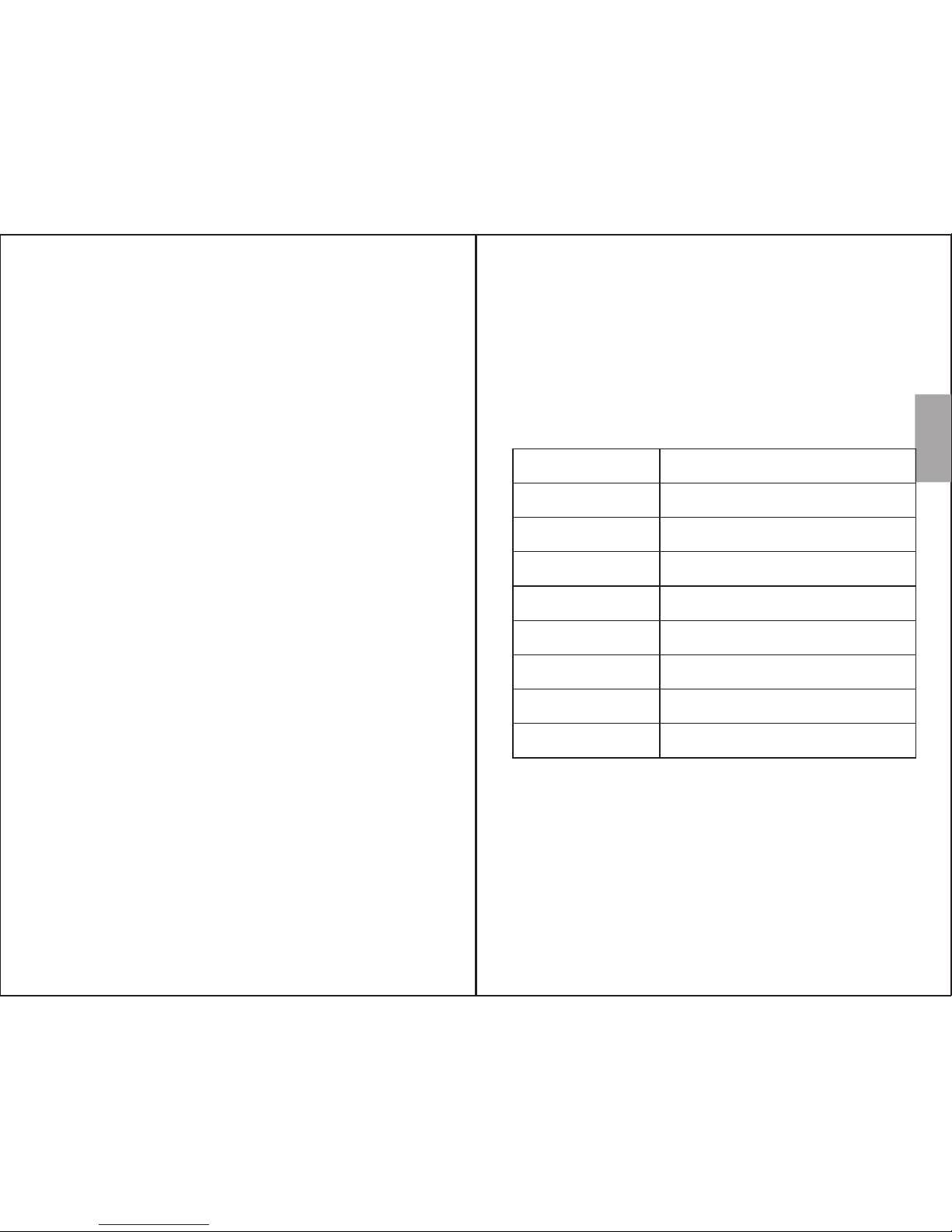
7. Specifications
Bluetooth Version v4.1 aptX Low Latency
Bluetooth Profile
Operating Range
Power Input
Internal Battery
Working Time
Charging Time
A2DP, AVRCP, PBAP
Up to 10m
DC 5V/300mA
400mAh Li-polymer Battery
Approx 15 hours
Approx 1.5 hours
Dimensions
Net Weight
52x40x18mm
30g
5.2.1 Connecting a Device
1. Press button I or II to enter pairing mode. In
pairing mode the status LED will flash white
and blue alternately.
2. Enable Bluetooth on the receiving device and
enter pairing mode (see the device's user
manual for more information).
3. The MR270 will connect automatically to the
receiving device.
Once successfully paired, status LED I or I I will
light blue constantly.
5.2.2 Clearing Bluetooth Connections
Press and hold button II for 5 seconds to clear all
paired devices from the MR270.
6. Charging and Power Saving
6.1 Charging the Device
The status LEDs will flash white when the battery
is low. To recharge, connect the MR270 to a
power USB port using the provided USB power
cable.
Whilst charging, the charging LED will light red
and turn green once the battery is fully charged.
A full charge takes approximatively 1.5 hours
depending on power input.
Note: When powered by a USB cable the MR270
will switch on automatically.
6.2 Power Saving
When the transmitter is switched on and powered
by the battery, but no Bluetooth connection is
available, or no devices are connected, the
MR270 will switch off automatically after 30
minutes.
Page 5
-6-
English
9. Warranty
This product is guaranteed for twelve months
from the date of the original purchase. In the
unlikely event of any defect arising due to faulty
materials or workmanship, the unit will be either
replaced or repaired free of charge (where
possible) during this period. An alternative
product will be offered in case the product is no
longer available or repairable.
This warranty is subject to the following
conditions:
The warranty is only valid within the country
where the product is purchased.
The product must be correctly installed and
operated in accordance to the instructions
given in this user manual.
The product must be used solely for domestic
purposes.
The warranty only covers the main unit, and
does not cover the accessories.
The warranty does not cover the damage
caused by misuse, negligence, accident and
natural disaster.
The warranty will be rendered invalid if the
product is resold or has been damaged by
inexpert repairs. The manufactures disclaim
any liability for incidental or consequential
damages.
Please consult our customer adviser before
returning any product; we are not responsible
for any unexpected product returns.
-7-
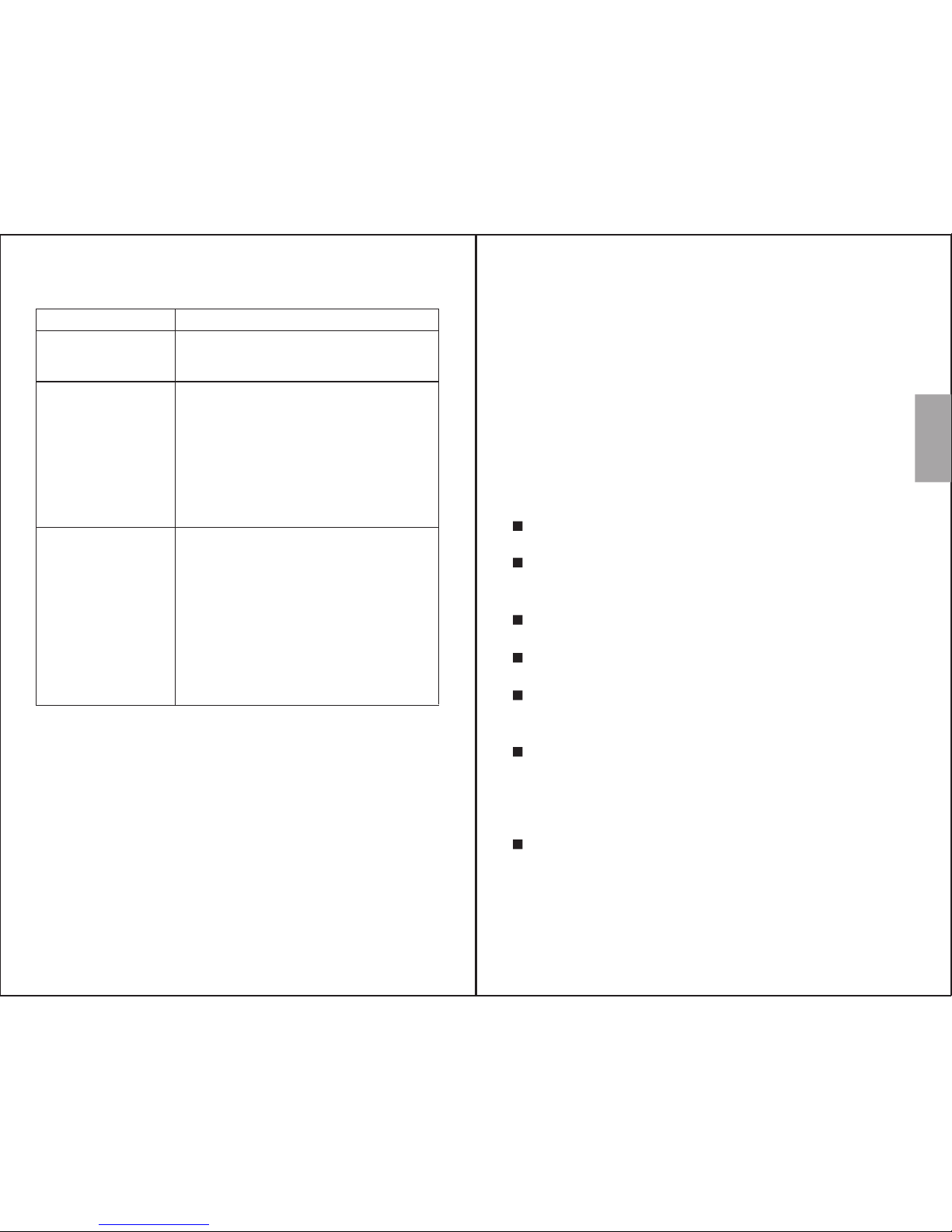
8. Troubleshooting
Unable to
switch on
•
• Turn on power switch
Fully charge the MR270
Unable to pair
Bluetooth audio
device
• Confirm that the MR270 is in
pairing mode.
• Confirm that the MR270 is
within 10m of the audio device.
• Press and hold button II for
5 seconds to reset the
Bluetooth connection
Problems Possible Causes and Solutions
There is no
sound from my
Bluetooth
audio device
•
audio device is connected to
the MR270 via Bluetooth.
• Make sure the cable is
connected between your
source device and the MR270.
• Check the volume on both
source device and your
Bluetooth audio device.
Make sure the Bluetooth
Page 6
-8-
English
-9-
Any faulty product must be kept and returned
in the original packaging with all the
accessories and the original copy of the
purchase receipt.
The warranty is in addition to, and does not
diminish, your statutory or legal rights.
Customer Service:
Telephone: +44 (0) 845 250 0586
Email: [email protected]
This product is in compliance with the essential
requirements and other relevant provisions of
Directive 1999/5/EC. The declaration of conformity
may be consulted at August International Ltd,
Rawmec Business Park, Plumpton Road, Hoddesdon,
EN11 0EE, United Kingdom.
 Loading...