

Page 1
User Manual
Wirel ess Presen ter for Comp uter
Téléc ommande de p résentat ion pour Ord inateur
Kabel loser Pres enter für Computer
Telecoman do di Presen tazioni pe r Computer
Mando i nalámbri co para pres entacion es
August International Ltd
United Kingdom
Telephone: +44 (0) 845 250 0586
Email: [email protected]
Web: www.augustint.com
LP315
Page 2
English
1. Introduc tion
Plug and Play for Comp uter Power Point Presentation
Remote Page Change r and Red Laser
Air Mouse and Vibrating Alarm.
Internal Storage for US B Signal Receiver
Operating Range: u p to 10m
Compatible with Wi ndows 8, 7, Vista, X P, 2000, 98 & Mac OS
2. Main Featu res
- 1 -
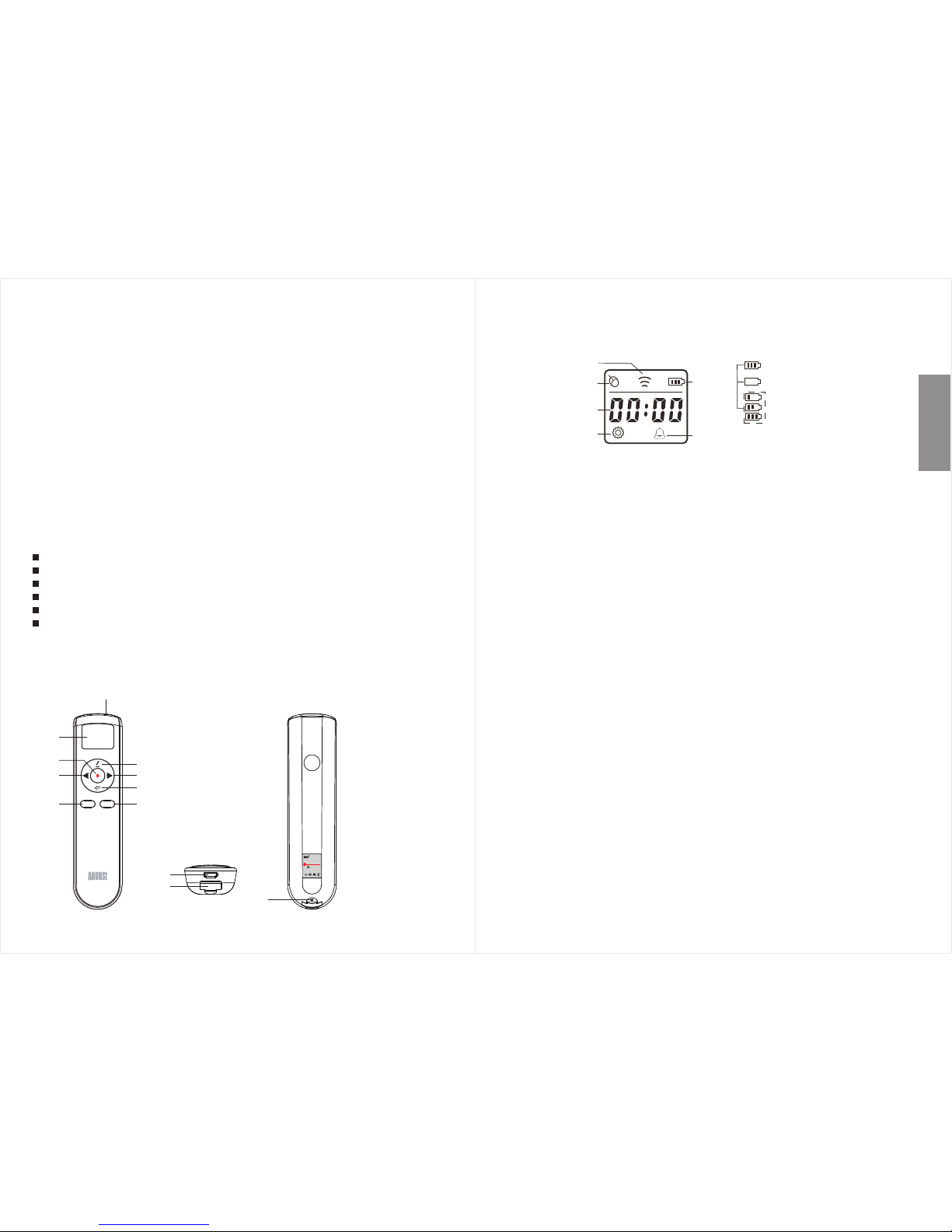
3. Device Lay out
- 2 -
User Manual
1). Las er em itter
2). LCD d isp lay
3). Las er bu tton
Press and hold to ligh t the laser.
4). Pag e up / St art slideshow
Press it to go to the previous page.
Press and hold it for 2 seconds for start or stop the slideshow.
5). Pag e dow n / Black screen
Press it to go to the next page .
Press and hold it for 2 seconds for enter or exit the black screen.
6). Not e but ton
In slideshow, press a nd hold it to make notes on the screen.
Double press it to del ete the notes.
L R
1
2
3
4 5
6
7
8
9
Wireless Presenter
for Computer
Please do not point at
people and animals.
Model:LP315
Warning:
10
11
12
Signal
Air Mous e
Time
Settin g mode
Batter y
Alarm
Battery level
Low battery
Charging
7). Ai r mou se switch
Double press it to swi tch the air mouse on or off. The mous e icon
will appear on the scr een when the air mouse mode is on.
When the air mouse mod e is on, press and hold it to control the
cursor by hand movem ent.
8). Lef t but ton
Press it for left click fun ction.
9). Rig ht bu tton
Press it for right click fu nction.
Press and hold it to enter or exit the setting mode.
10). US B cha rging port
11). USB r ece iver
12). Re set
This wireless presenter is designed to control your computer during
presentations. It gives you the freedom to speak without having to
stand by your computer or relying on an assistant. Simple to use, just
plug and play, no driver required.
The device enables you to control your computer wirelessly from up
to 10 meters away, using a Radio Frequency (RF) transmitter that
doesn't require line of sight to your PC. With its in-built laser pointer,
the LP315 is the ideal tool for presentations, teaching, meetings,
speeches, training etc.
Page 3
English
- 3 -
- 4 -
4. Installa tion
Plug the USB receive r into a USB port on your computer. The system
will automatical ly search for the new hardware and complete t he
installation.
5. Operatio n
LP315 allows you to se t clock and alarm time.
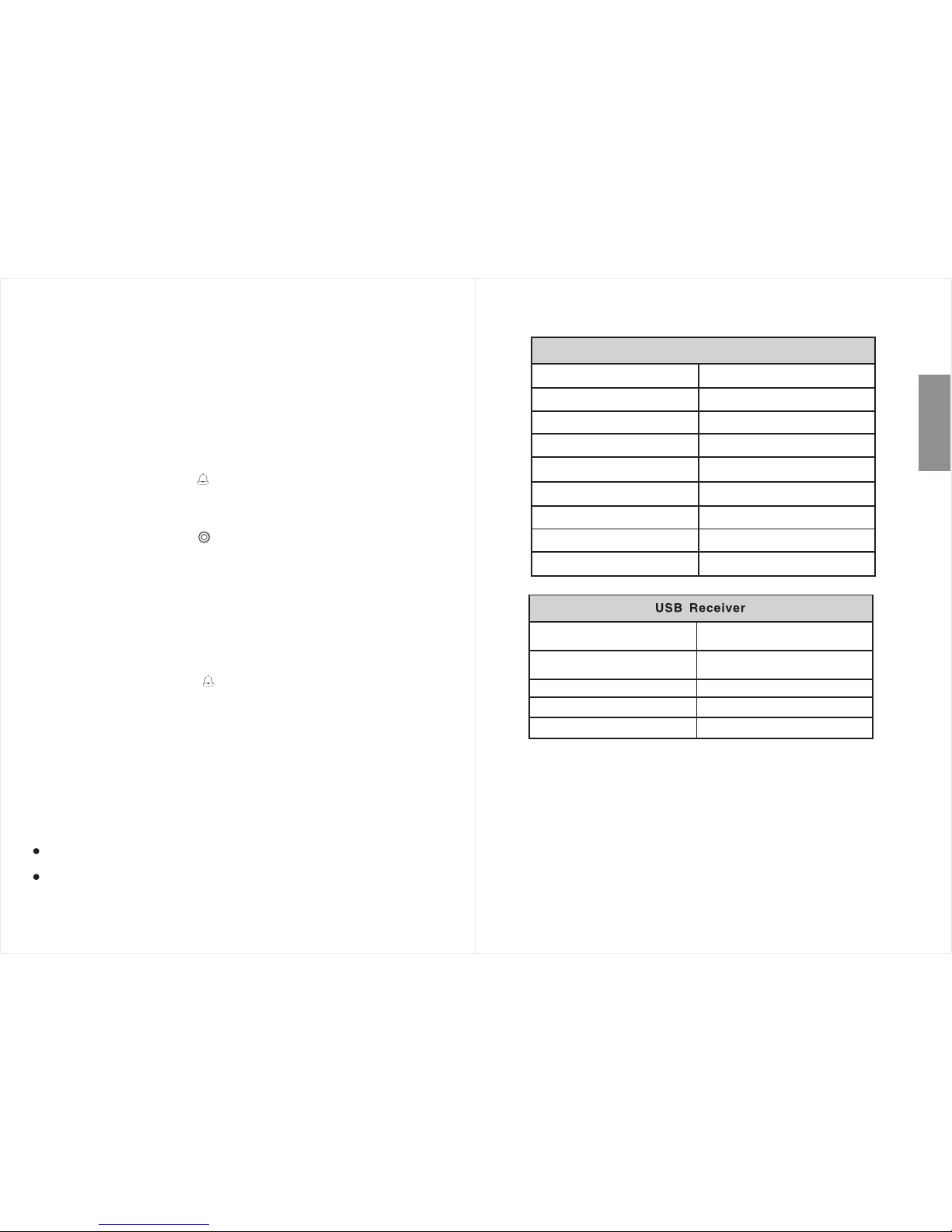
7. Specific ations
<1mW
Laser ra nge
Up to 10mOperat ing range
Freque ncy
Batter y
Up to 200m
3.7V/3 60mAh Li- ion ba ttery
Presenter
Laser wa velengt h
Laser po wer
Dimens ions
650nm
123 x 31 x 17m m
2.4GHz
Tech nology Radio Fr eque ncy
Wei ght
41g
Wei ght
Windows 98 / 2000 / XP / Vista / 7 / 8
and Mac OS
4.5 - 5.5V
22 x 12 x 5mm
Dimens ion
Wor k voltage
Operat ing sy ste ms
USB vers ion
USB1 .1, comp atible wi th USB2.0
and USB3.0
2g
5.1. Se tti ngs
5.2. Alarm
6. Charging
Note:
Warning:
Laser radiation
Class laser product
Do not view directly with optical instruments
Do not point at people a nd animals
Please keep out of rea ch of children
2
Note:
1. Press and hold “R” bu tton for 2 seconds to start adjusting the time.
The LCD will display the icon, “00:00” a ppears.
2. Press “page up” or “p age down” to select which digit to change,
press “note button” or “a ir mouse” to adjust the flashing digit.
3. Press and hold “R” fo r 2 seconds again to enter clock setting.
The LCD will display the icon.
4. Press “page up” or “p age down” to select which digit to change,
press “note button” or “a ir mouse” to adjust the flashing digit.
5. Press and hold “R” fo r 2 seconds again to confirm the settings
and exit setting mode.
Once the alarm has bee n set, the device will remind the user by
vibrating when the re are 10, 5 and 0 minutes remaining. After the
alarm time has passe d, the icon will disappear.
This device contai ns a built-in Lithium rechargeable batt ery. The
battery level show s on the LCD screen. When the power is low,
connect the micro USB lead to the device's power socket, and the
other end of the USB cable to a powered USB port. The battery icon
on the LCD flashes, ch arge time is approximate 2-3 hours, and the
battery icon will stay constant once battery fully charged.
If LCD displays battery l evel low, the control distance will
decrease, please charge the device in time.
Please only use USB chargers with genuine safety certification .
Please note, these inst ructions are only intended for referenc e.
August Internationa l Ltd reserves rights to revise the product
specifications, fea tures and design without notice.
 Loading...