

Page 1
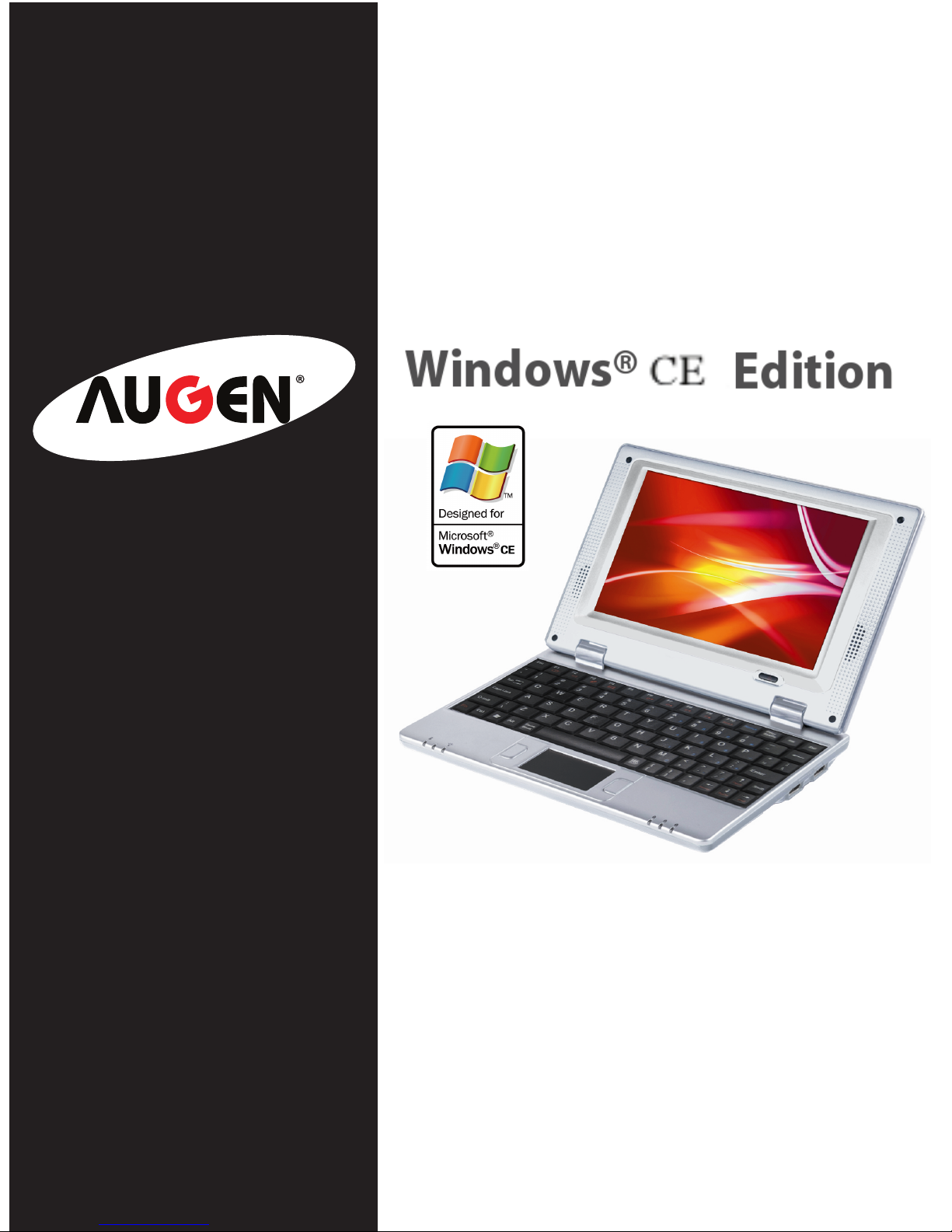
NETBOOK PC
User Guide
*Informaon provided in this manual may
vary depending on the model. Therefore,
your model may not have some of the
features described in this user guide. We
reserves the right to change any informaon
in this user guide without any prior noce.
Page 2

Call 1-866-342-8436 for ordering and customer service, or visit
www.augenus.com
Congratulations
Thank you for your purchase of an Augen product. Your business
is very appreciated.
Since 2004, Augen Electronics has shared the fun of discovering
innovative products that make life better and more enjoyable.
We strive to deliver outstanding customer service that exceeds
your expectations. Our goal is that you will be completely satised
with this product’s quality and performance.
Enjoy your purchase!
All rights reserved to:
© 2008 Augen Electronics Corporation
The information contained in this document is provided “as is” and is subject
to alteration without notice.
Augen Electronics makes no warranty of any kind with regard to this manual,
including, but not limited to, the implied warranties of merchantability and
fitness for a particular purpose.
Augen Electronics shall not be liable for any errors contained herein or for
incidental or consequential damages in connection with the furnishing,
performance, or use of this manual or the examples herein.
Copyright
Page 3

Table of Contents
Main Unit Introduction...........................................................................................................
E-Go’s Applications........................................................................................................
6
Getting Started................................................................................................................
7
Knowing your E-Go...................................................................................................................
8-12
Control Panel - Top ...................................................................................................
8
Control Panel - Bottom
Control Panel - Left & Right........................................................................................ 10
Control Panel -Rear........................................................................................................ 11
Control Panel - Touch Pad........................................................................................... 11
..............................................................................................
9
System Setting ..........................................................................................................................
16-18
.............................................................................................. 19
Warranty
....................................
21
User Guide Symbols .....................................................................................................
4-7
Statement of FCC Compliance.............................................................................................
23
Frequently Asked Questions
Augen Service & Support ......................................................................................................
22
Netbook Specication ................................................................................................
6
Safety & Handling ....................................................................................................
4-5
Control Panel - Keyboard ........................................................................................
12
Desktop Interface .......................................................................................................
13
Settings Wi-Fi ............................................................................................................
14
Setting Email ..............................................................................................................
20
4
Basic Operations ....................................................................................................................... 13-15
Troubleshooting....................................................................................................................... 20
Page 4
4
Main Unit Introduction
User Guide Symbols
A few notes and warnings symbols are used throughout this user guide. Please be aware of them in
order to complete certain tasks safely and effectively. These notes have different degrees of
importance as described below:
WARNING! Important information that must be
followed for safe operation.
IMPORTANT! Vital information that must be followed to
prevent damage to data, components, or persons.
Information for special situations.
Tips for completing tasks.
Safety & Handling
The following safety & handling precautions will increase the life of the Netbook.
Failure to comply with this safety information could result in fire, electric-shock or other
injuries and damages.
Disconnect the AC adapter and remove the battery pack before cleaning. Wipe the Netbook
using a clean cellulose sponge or chamois cloth. Use a nonabrasive detergent and a few
drops of warm water. Remove any extra moisture with a dry cloth.
DO NOT place the Netbook on an uneven or unstable work surfaces. This may cause the unit
to fall, hence, damaged.
It is not recommended to place the Netbook on your lap or any part of the body. This might
cause discomfort or injury.
DO NOT press or touch the display panel. Avoid using sharp items that may scratch the
display.
Avoid placing or dropping objects on top of the Netbook. Do Not shove any foreign objects
into the Netbook.
DO NOT expose to strong magnetic or electrical field.
DO NOT expose to dirty or dusty environment. Do NOT operate during a gas leak.
DO NOT expose to or use near liquids, rain or moisture.
Page 5
Main Unit Introduction
While the Netbook is turned on, DO NOT carry or cover it with any materials that will reduce
air circulation such as a carrying bag.
The Netbook should only be used in environments with temperatures between 41F to 104F.
Otherwise this will cause the Netbook to malfunction.
Do not use any AC adapter other then the one provided in the packaging. Using an AC
adapter with different input/output rating will damaged your Netbook. If you lost it please
contact our sales department at 1877-AugenOK and press 1 for sales.
Transportation Percussions
To prepare the Netbook for traveling, you should turn it OFF and disconnect all external
peripherals to prevent damage to the connectors. Close the display panel and check that it
is latched securely in the closed position to protect the keyboard and display panel.
If travelled by Air, contact your airline if you want to use the Netbook on the airplane. Most
airlines have restrictions for using electronic devices. Most airlines allow electronic use only
between and not during taking-offs and landings.
There are three main types of airport security devices: X-ray machines , magnetic detectors
and magnetic wands (hand-held devices). You can send your Netbook through airport X-ray
machines. Without damaging the Netbook. Please follow the Transportation Security
Administration (TSA) regulations.
Be sure to fully charge your battery pack and any optional battery packs before going on
long trips. Remember that the AC adapter charges the battery pack as long as it is plugged
into the computer and an AC power source. Be aware that it takes much longer to charge the
battery pack when the Netbook is in use.
Permanent hearing loss may occur if earphones or headphones are used at high
volume. Set the volume to a safe level. If you have experienced ringing in your ears,
or muffled speech, stop listening and have your hearing checked. The louder the
volume, the less time is required before your hearing could be affected. Hearing experts
suggest the following to protect your hearing: 1) Limit the amount of time you use ear buds
or headphones at high volume. 2) Avoid turning up the volume to block out noisy surroundings. 3) Turn the volume down if you can’t hear people speaking near you.
Use of Netbook/headphones while operating a vehicle is not recommended and is illegal in
some areas. Be careful and be attentive while driving. Stop using your Netbook if you find it
disruptive or distracting while operating any type of vehicle or performing any other activity
that may require your full attention.
Never attempt to repair the Netbook’s software/hardware yourself. Otherwise the warranty
will expire. The Netbook should be repaired only by an Augen technical service provider.
5
Page 6
6
Main Unit Introduction
The Augen E-Go is a low cost NetBook that is great for students, professional on the go & a
perfect travel companion. It provides multimedia entertainment, Web Browsing, Email, Chat,
and is equipped with Office software package (Word, excel & PowerPoint viewer only).
It is the ultimate basic computing Netbook in the market!
Netbook’s Specication
Processor: 533 MHz Magiceyes POLLUX 3520F 32-bit CPU (ARM 926EJ)
Monitor: 7” TFT LCD (800*480) True color image display.
Keyboard: Standard 80key keyboard and touch pad.
Memory: 128M DDR1.
Storage: 2GB Nand Flash on board.
Sound card: AC97 sound card
Speakers: 2 X 0.5W.
Network: 1) 10/100MB ethernet port.
2) Build in Wi-Fi (802.11 b/g).
Operating System: Embedded Windows CE 5.0
Card reader: 1 X SD/MMC
USB Port: 2 X USB 1.1
Measurements: 8.50L X 5.50W X 1.25H (inch)
Weight: 1.6 lb
●
●
●
●
●
●
●
●
●
●
●
●
●
* Windows CE OS is limited to mobile
applications and does not support adobe
flash player & Windows Media Player 9 or
higher.
* The E-Go Netbook is limited to pre installed applications. No downloaded
application can be installed.
* Limited streaming video capabilities.
1. Internet Explorer:
You can make use of Internet Explorer to obtain information from internet web, music
download, etc.
2. MSN:
Instant messaging application that lets you communicate Messenger is one of the most
popular online chatting system.
3. Text-Maker:
A Word processing application that lets you open, edit, and save any all Microsoft Word
documents files.
4. Plan-Maker:
A spreadsheet application that let you view, edit and save your spreadsheets. Compatible
with Excel formats.
5. Presentation:
Presentations lets you edit PowerPoint files right on your E-Go without file conversion and
without loss of quality.
6. PDF Viewer:
Allows you to view Adobe PDF files. In addition, it supports zoom functions.
7. Multimedia player:
There are two Multimedia Players on the E-Go, Microsoft Media Player and Video Player.
both supporting different media formats such as: mp3, wma, avi and mp4.
8. Outlook: allows you to send and receive email from your E-Go. Refer to page 15.
9.Skype: Skype is a software application that allows users to make voice calls over the
Internet. Connect a microphone (not provided) to the Mic. port on the left part of
your E-Go (see P. 10 for illustration).
E-Go’s Applications
Page 7
7
.
Main Unit Introduction
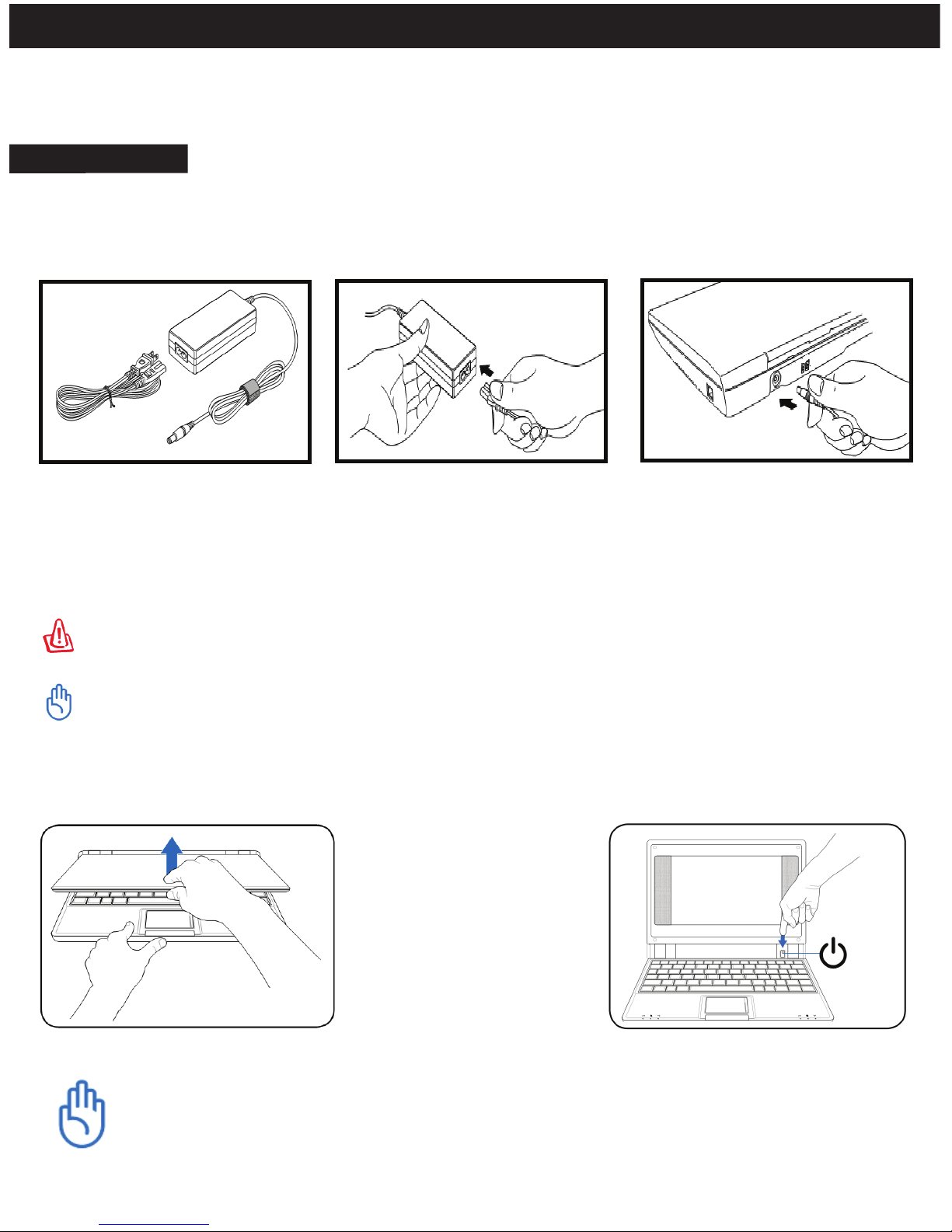
Getting Started
These are quick instructions for using your E-Go Notebook. Read the following pages for detailed
information.
1. Connect the AC power adapter. The wall outlet differs in type, depend on the country you live in.
Your E-Go ships with an adapter compliant with your national standard. The illustration below is
For reference only and may not exactly show your specific configuration.
2. Open the display panel
3. Open the display panel
When you open the display panel, do not force it down toward the table or else the
hinges may be broken! It is not recommended to lift the Notebook by the display
panel!
*The power adapter converts AC power from a wall outlet to the DC power required by the E-Go. Your E-Go
comes with a universal AC-DC adapter for connection to any 100V-120V as well as 220V-240V outlets
without setting switches or using power converters. Different countries may require an adapter to connect
the provided US-standard AC power cord to a different standard. Most hotels provide universal outlets to
support different power cords as well as voltages. It is always best to ask an experienced traveler about AC
outlet voltages before travelling.
The power adapter may become warm to hot when in use. Be sure not to cover the adapter and keep it
away from your body.
Damage may occur if you use a different adapter to power the E-Go or use the E-Go’s adapter to power
other electrical devices. If there is smoke, burning scent, or extreme heat coming from the AC-DC adapter,
seek technical service.
Page 8
8
Knowing your E-Go
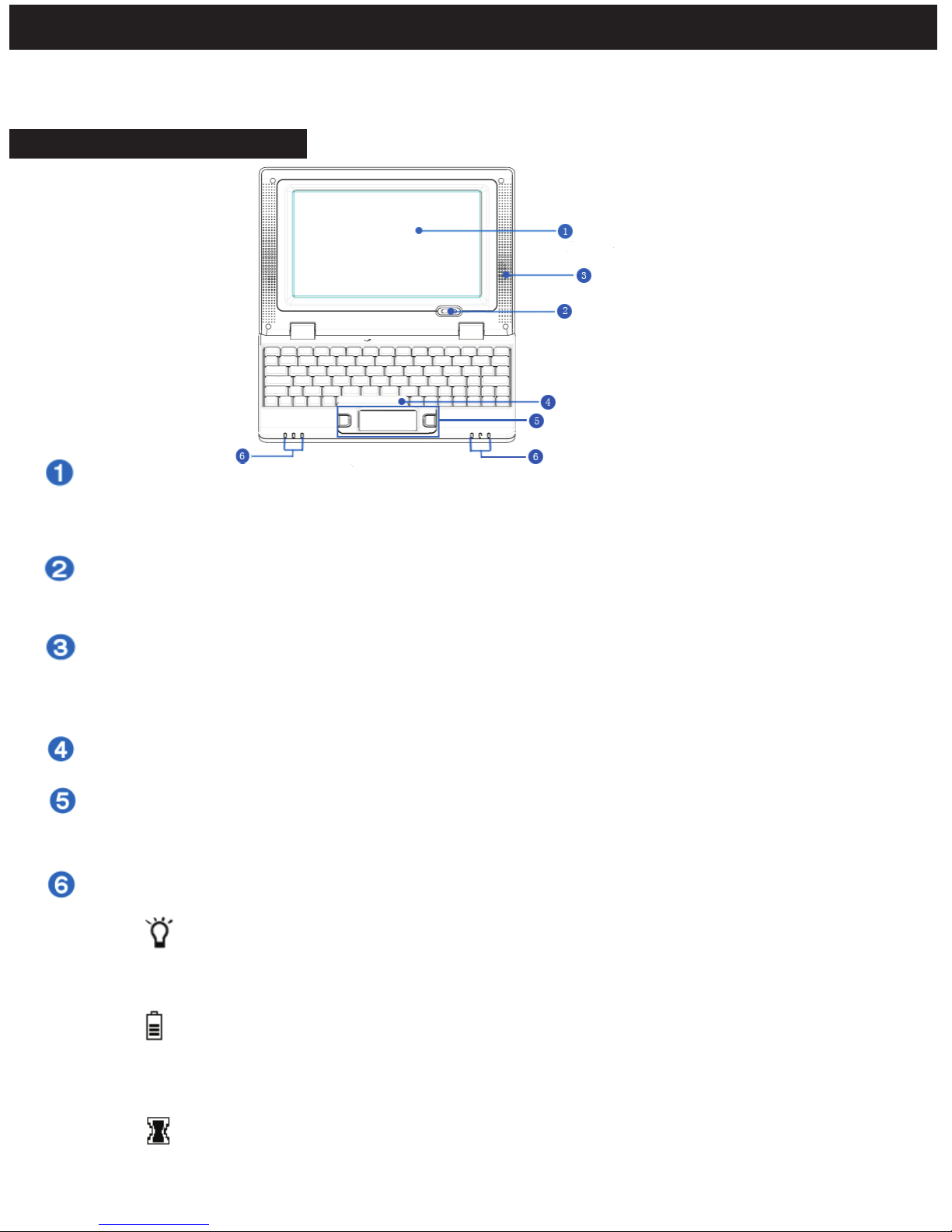
Control Panel - Top Part
This Chapter will teach you about the various parts of the E-Go Netbook.
Display Panel:
The E-Go uses an active matrix TFT LCD, which provides excellent viewing like that of desktop
computer. Use a soft cloth without chemical liquids (use plain water if necessary) to clean the display
panel.
Power Button:
The power button allows to power ON and OFF the E-Go and to recover from STR. Press the button
once to turn ON and hold it turn OFF the E-Go.
Audio Speaker System:
The multimedia sound system features an integrated digital audio controller that produces rich,
vibrant sound (it will improve external stereo headphones or speakers). Audio features are controlled
by software.
Keyboard:
The keyboard is a standard 80 keys comfortable for travelling. Please refer to page 12 for further instructions.
Touch pad and Buttons
The touch pad and its buttons offers the same functions as a desktop mouse. Scrolling is available for
allowing easy web and document navigation. Please refer to page 11-12 for further instructions.
Status Indicators: (front)
Power indicator:
The power indicator lights when the E-Go is turned ON. This indicator is OFF when the
E-Go is turned OFF.
Battery charge indicator:
The battery charge indicator (LED) shows the status of the battery’s power as follows:
ON: The E-Go battery is charging when AC power is connected.
OFF: The E-Go battery is charged or completely drained.
Wireless indicator:
This is only applicable on models with built-in wireless LAN.
When the built-in wireless LAN is enabled, this indicator will ON.
Page 9
9
Knowing your E-Go
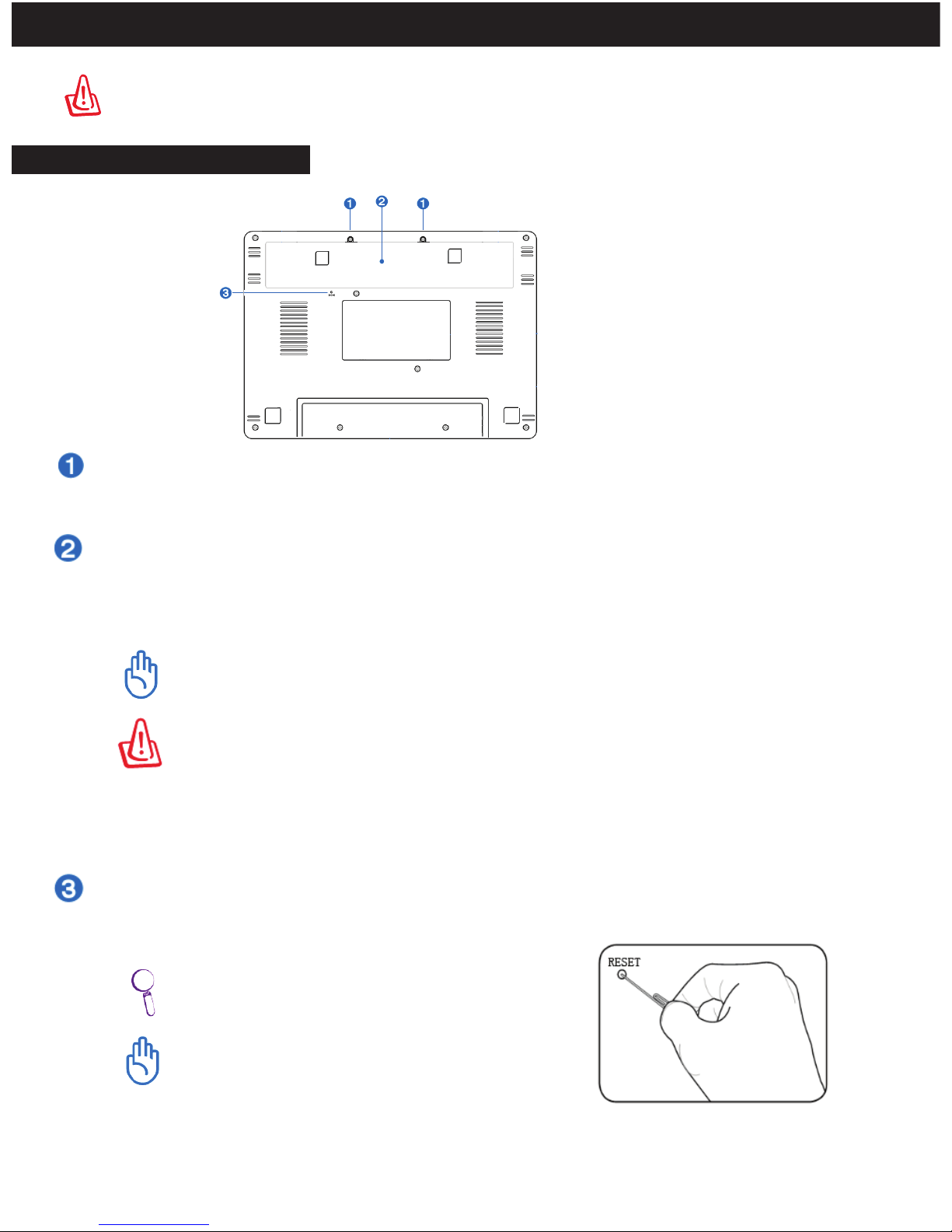
Control Panel - Bottom Part
Be careful when handling the E-Go while it is in operation as the bottom surface might
get hot. DO NOT use on soft surfaces such as beds or sofas, which may block the vents.
Battery Lock:
The manual battery lock is used to keep the battery pack secured.
RESET Reset Button (Emergency):
In case your operating system does not run properly or system cannot restart, press the
reset button.
Battery Compartment:
The battery is automatically charged when connected to an AC power source. Battery
life time (Avg. 3 hr) varies by usage and by the specifications of the Netbook’s model. The
battery pack can’t be disassembled and must be purchased as a single unit.
Only use battery packs and power adapters supplied with the E-Go or specifically
approved by the manufacturer or retailer for using with this model or else damage may
occur to the E-Go.
The E-Go battery pack, like all rechargeable batteries, has a limit on the number of times it
can be recharged. The battery pack’s useful life will depend on your environment
temperature, humidity,and how your E-Go is used. For safety reasons, DO NOT throw the
battery in fire, DO NOT short circuit the contacts, and DO NOT disassemble the battery. If
there is any abnormal operation or damage to the battery pack caused by impact, turn
OFF the E-Go and contact Augen Technical Support center.
Use a pin or a straightened paper clip to press
the power switch.
DO NOT use emergency shutdown/reset while
data is being written or read; doing so can result
in loss or loss of your data.
Page 10
10
.
Knowing your E-Go
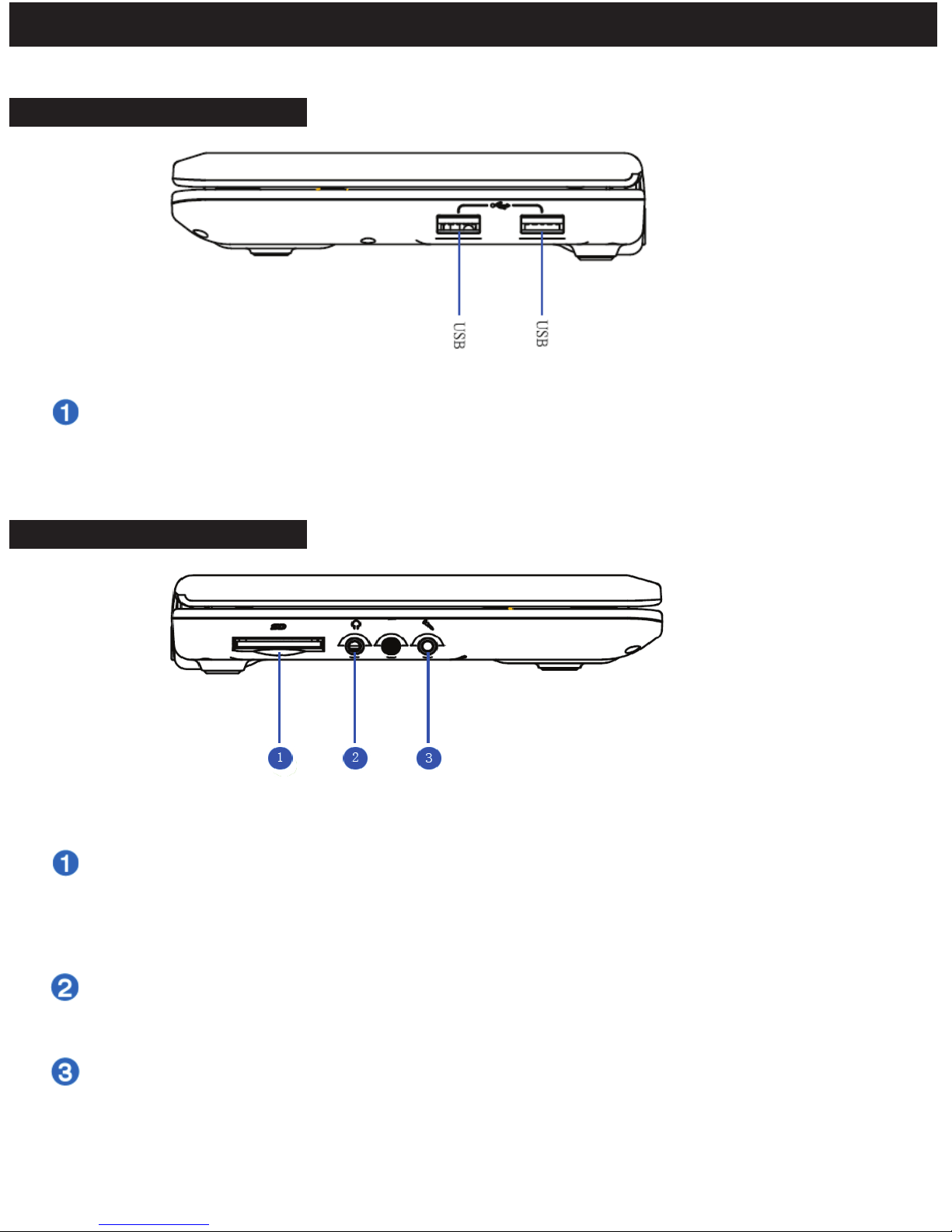
Control Panel - Right Part
USB Port (2.0/1.1):
The USB (Universal serial bus) port is compatible with USB 2.0 (480Mbits/sec) or USB 1.1
(12Mbits/sec) devices. In addition, the USB supports hot-swapping function ( Let the user to
plug and unplug the component without rebooting.
Microphone input:
The microphone port is designed to connect the microphone used for voice over IP
application or simple for audio recordings.
Headphone Output:
The stereo headphone jack (3.5mm) connects the E-GO audio out signal to amplified
speakers or headphones. Using this port automatically disables the built-in speakers.
Control Panel - Left Part
Memory Card:
The built-in memory card reader can read MMC/SD memory cards from devices such as
digital cameras, MP3 players, mobile phones, and PDAs. Please insert the SD card (brand
name side face down.) Go to “my device” and double click on “SDMMC Card” to enter.
Page 11
11
Knowing your E-Go
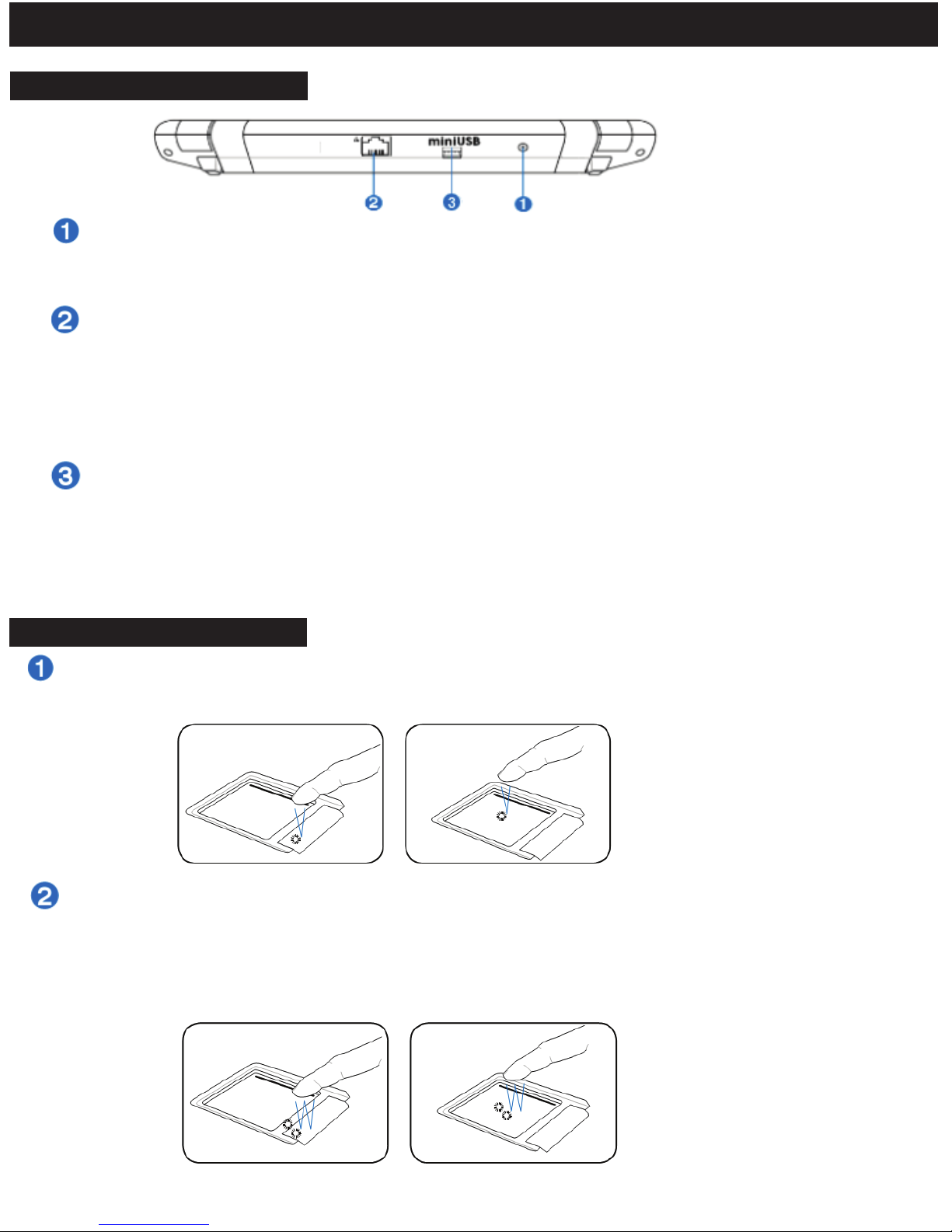
Control Panel - Rear Part
Power (DC) Input:
The supplied power adapter converts AC power to DC power. To prevent damage to the
E-Go, always use the supplied power adapter.
Mini USB Port:
The mini USB (Universal serial bus) port provide the user with the ability to transfer files
between the E-Go and any other computer. Connect your E-Go by using the USB cable
provided in the packaging. The computer will recognize the E-Go as a portable device.
Once connection established just Drag & Drop (Copy and paste) the desired files onto
the E-Go.
LAN Port :
The E-Go has a 10/100 Ethernet Port that can be used to connect to a LAN (Local Area
Network). Once a network has been connected, the network icon will change. Click the
“Start” icon and Select “Network Connections”. The Ethernet Driver Settings screen will
appear. Move the cursor to ”Obtain an IP address via DHCP” to allow the E-Go to
automatically be assigned it’s networking settings from a Router. Click Ok to Confirm.
Control Panel- TouchPad
Clicking/Tapping: With the cursor over an item, press the left button or use your fingertip to touch
the touchpad lightly. The selected item will highlight. The following 2 illustrations produce the same
results.
Double-clicking/ Double-tapping: This is a common skill for launching a program directly from the
corresponding icon you select. Move the cursor over the icon you wish to execute, press the left
button or tap the pan twice in rapid succession, and the system launches the corresponding
program. If the interval between the clicks or taps is too long, the operation will not be executed.
The following 2 illustrations produce the same results.
Page 12
VoL+
WiFi ON and OFF
F3
Fn+Others key together, with faster functions
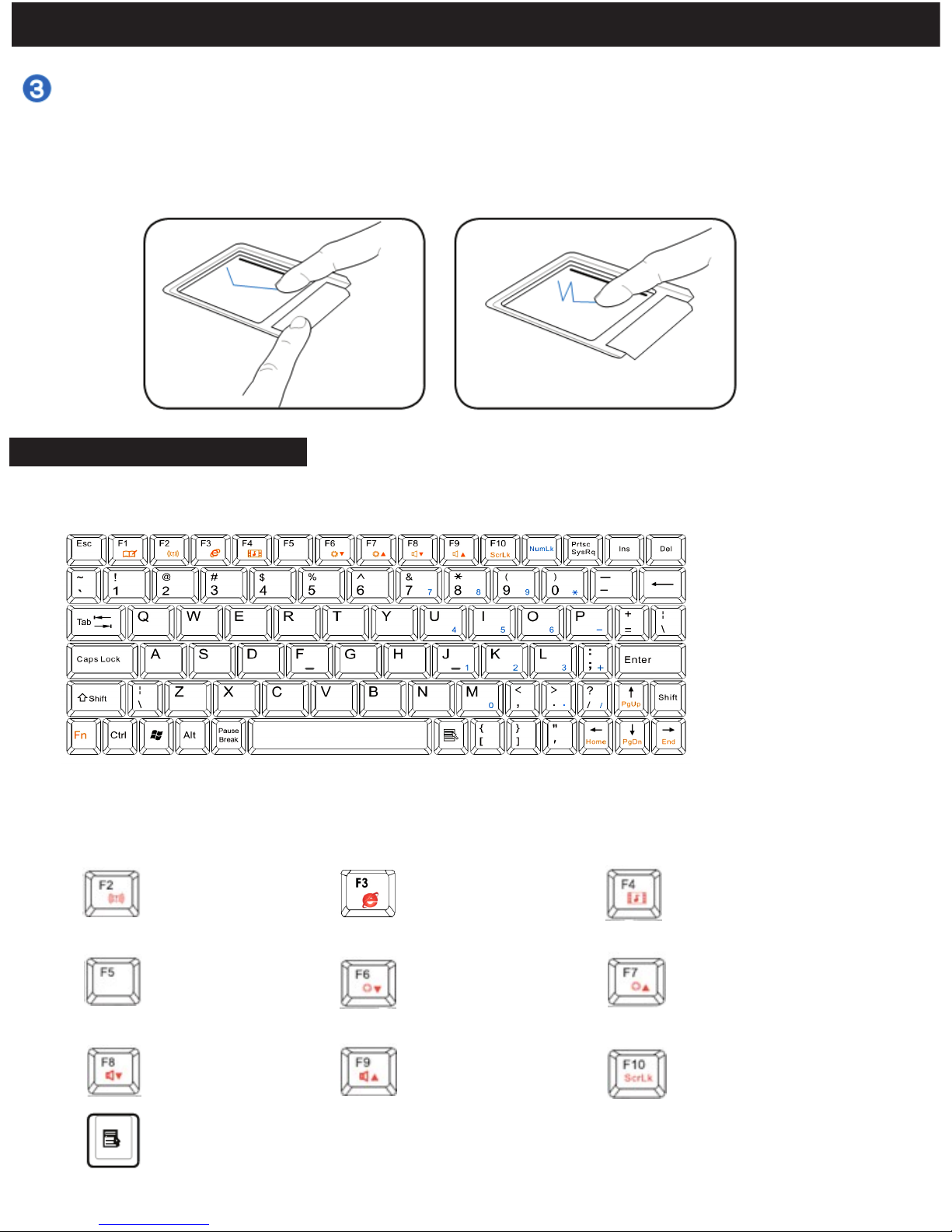
Keyboad Picture and Functions:
12
Knowing your E-Go
Dragging: Dragging means to pick up an item and place it elsewhere on the screen. You
can move the cursor over the item you select, while keeping the left button pressed, move
the cursor to the desired location, then release the left button. Or you can simply
double-tap on the item and hold while dragging the item with your fingertip. The
following illustrations produce the same results.
Control Panel- Keyboard
Menu with cursor icon:
Activates the properties menu
and is equivalent to right
-
clicking the touchpad/mouse
on an object.
Fn+F2
Internet viewer
F4
F5
F6
F7
F8
F9
Fn+F10
Play Video player
Refresh your E-GO
Decrease Screen
Brightness
Increase Screen
Brightness
VoL-
Scroll Lock
Press "Fn+Num Lk": Can open the Numerical key on the the keyboard of blue color.
Page 13
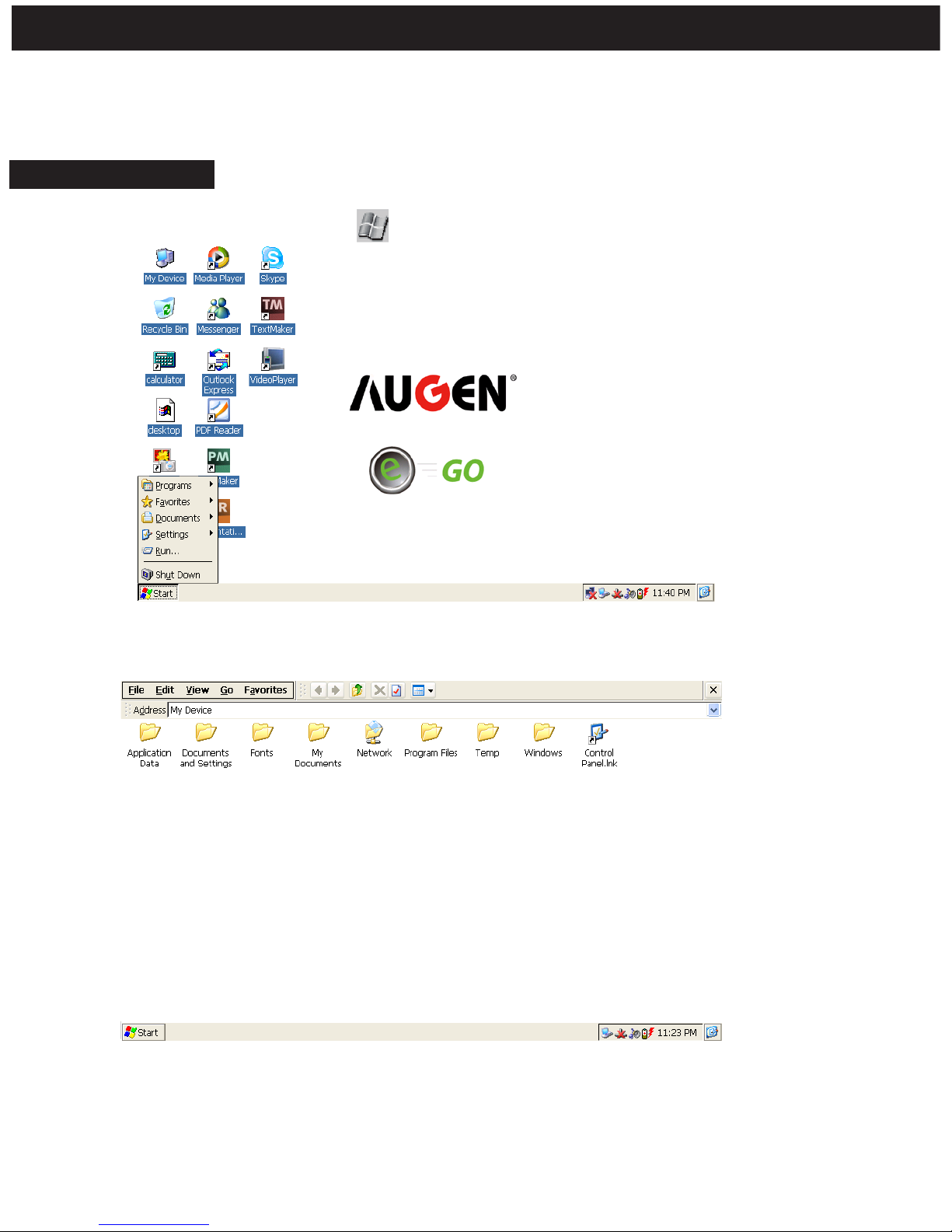
1. To Power Off the E-Go: Click on “ Start" and select "Shut down" from the list.
13
Basic Operations
After you start Windows CE, the first thing you see is the desktop, the area on the screen
where you work. Depending on how your computer is set up, your icons may be different
from those in the illustration.
Desktop Interface
2. Double click “My Device” and the following interface will appear. This function is the same as
“My Computer” . It lets you browse your storage memory.
*SDMMC Card: (Only if SD/MMC card inserted)
IDouble click “SD/MMC Card” folder, it will display
your files and folders saved in SD/MMC card.
Page 14
14
.
Basic Operations
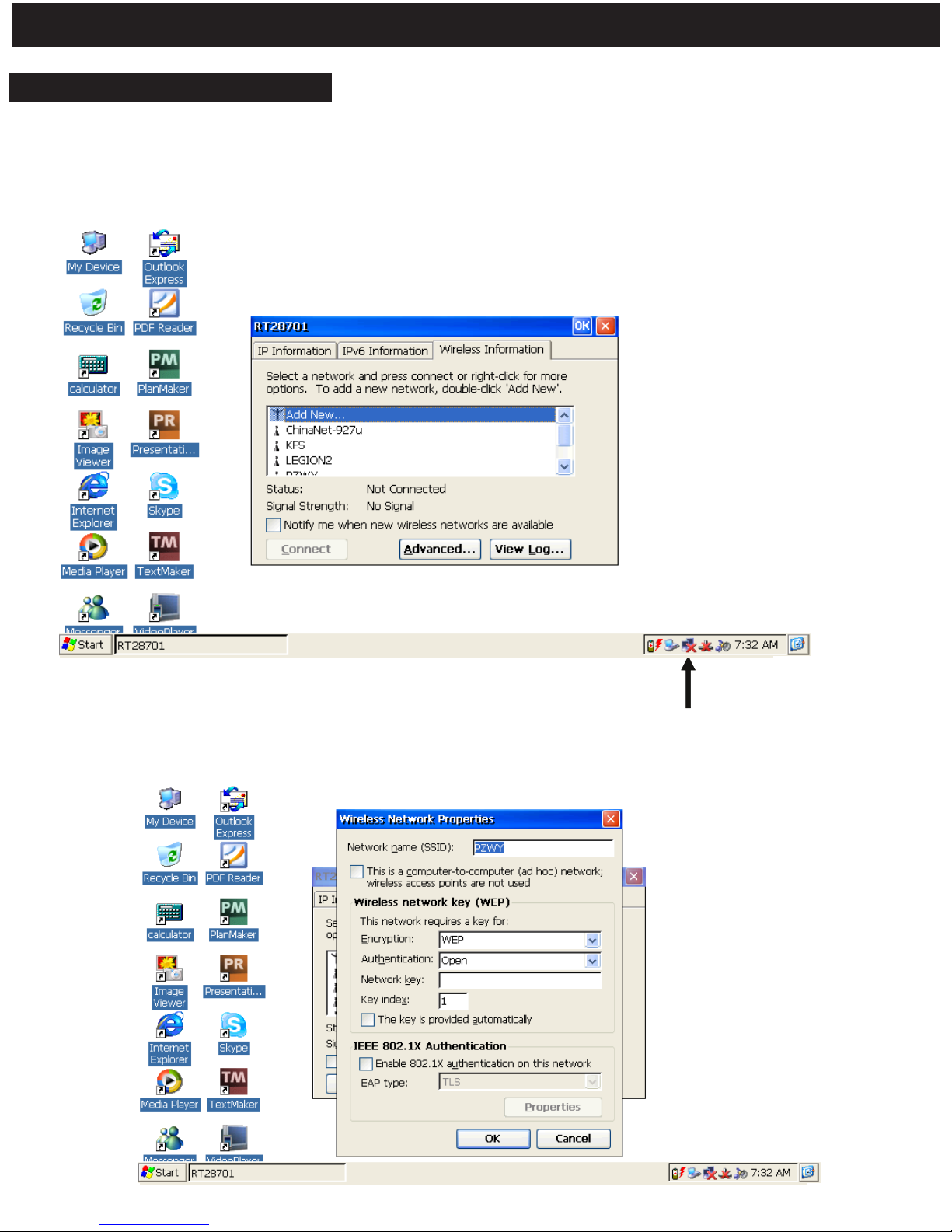
Setting the Network (Wi-Fi)
1. Press Fn+F2 key to turn on the Wi-Fi. Click on the network icon located in taskbar at
bottom right corner. Click on the “Wireless information” tab to see available networks.
The computer will automatically search and sort the available networks by signal
strength. Select your favorite network as the figure below shows and click “CONNECT”.
Network icon
2. If the Wi-Fi network is secured, please enter the appropriate information. and press OK In
different workplaces, please contact your network administrator to acquire the information.
Page 15
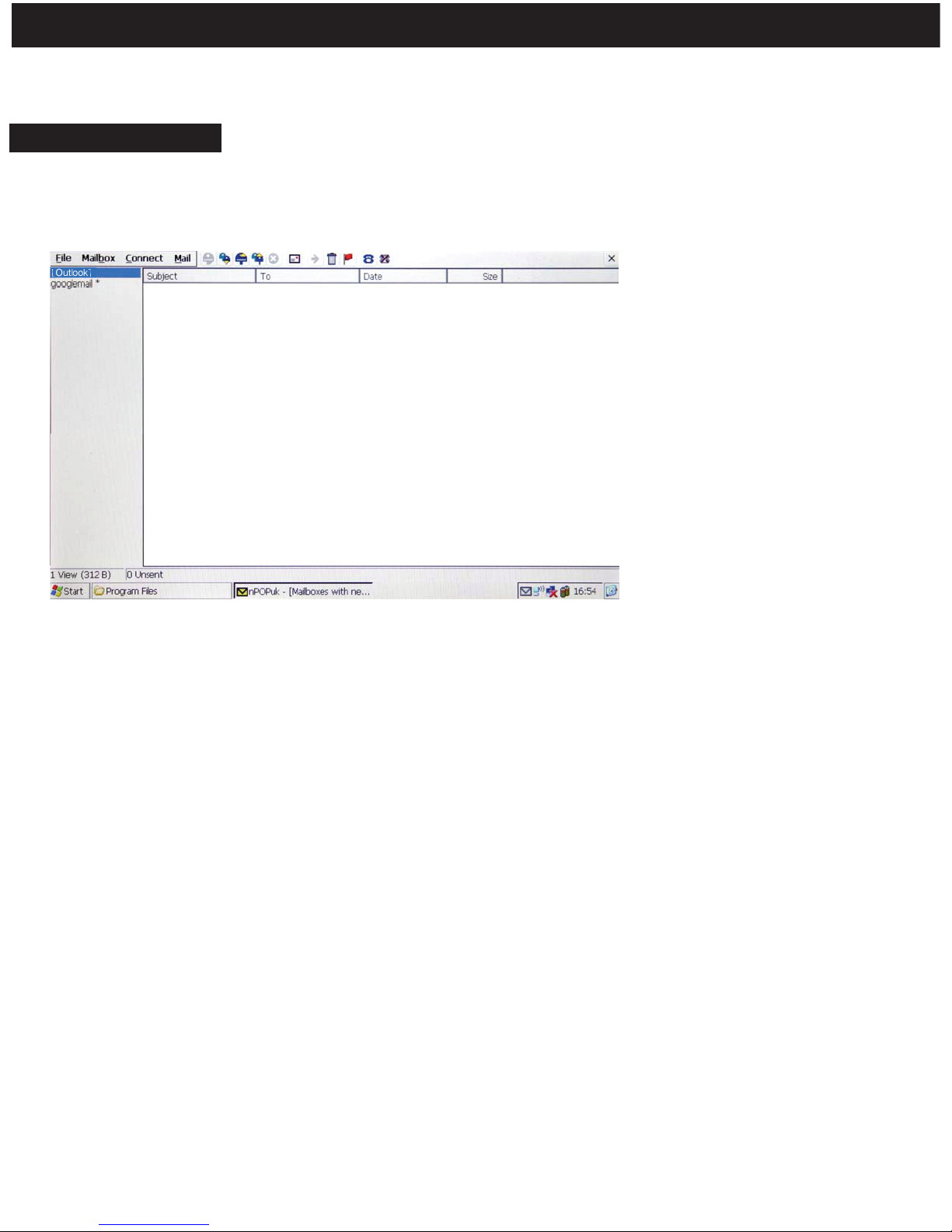
1. Double click the “Outlook” icon to open the application as shown below:
The Outlook Email application allows you to send and receive Email from your E-Go.
15
.
Basic Operations
Setting your Email
To configure your email account you will need to know your email account information
and the mail providers server information.
2. Move your cursor over “Services”, located on the top left corner and choose options
(Ctrl+T). To create a new account select “Add” under “Services” tab. Choose your service
type, mostly POP3. In the Account Settings window enter the POP3 and SMTP information on the relevant tabs, an example is showed below:
Connection: Network connection.
POP3 Host: The POP3 email server you connect to (ex. pop.emailsrvr.com) .
User ID: The username of your account.
Password: The password of your account.
SMTP host: The SMTP email server you connect to (ex. smtp.emailsrvr.com)
3. Once done you can start receiving / sending emails.
Page 16
16
.
System Setting
Certicates
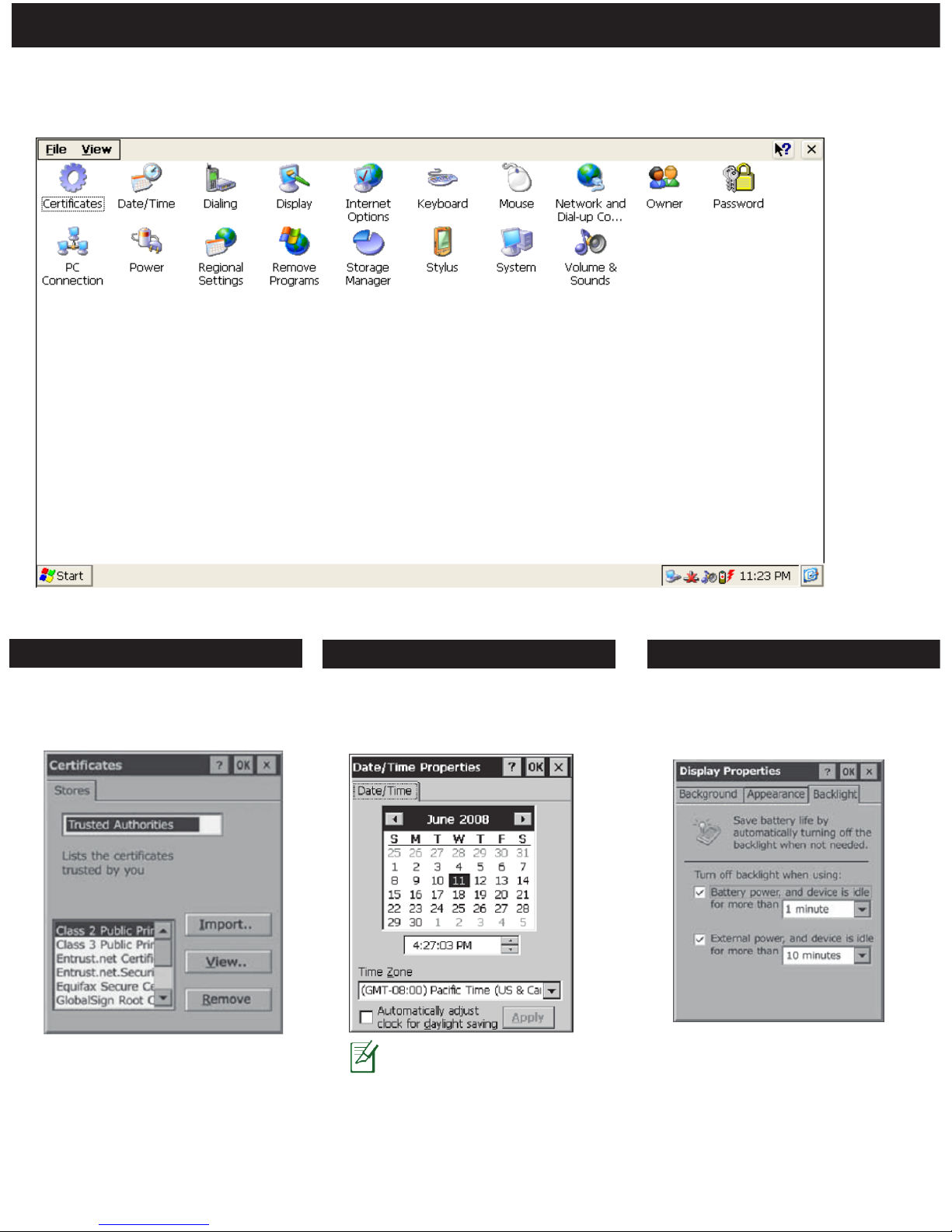
Double click on “Control Panel” folder under “My Device” and the following interface
will appear.
User can view & alter digital
certificate of legal programs.
User can set the time, date and
time zone according to actual
conditions.
Date/Time
The Time/Date setting
can also be opened by
clicking directly on the
time icon located in
taskbar.
User can set different display
settings like Background,
Appearance & Backlight.
Date/Time
Page 17
17
.
System Setting
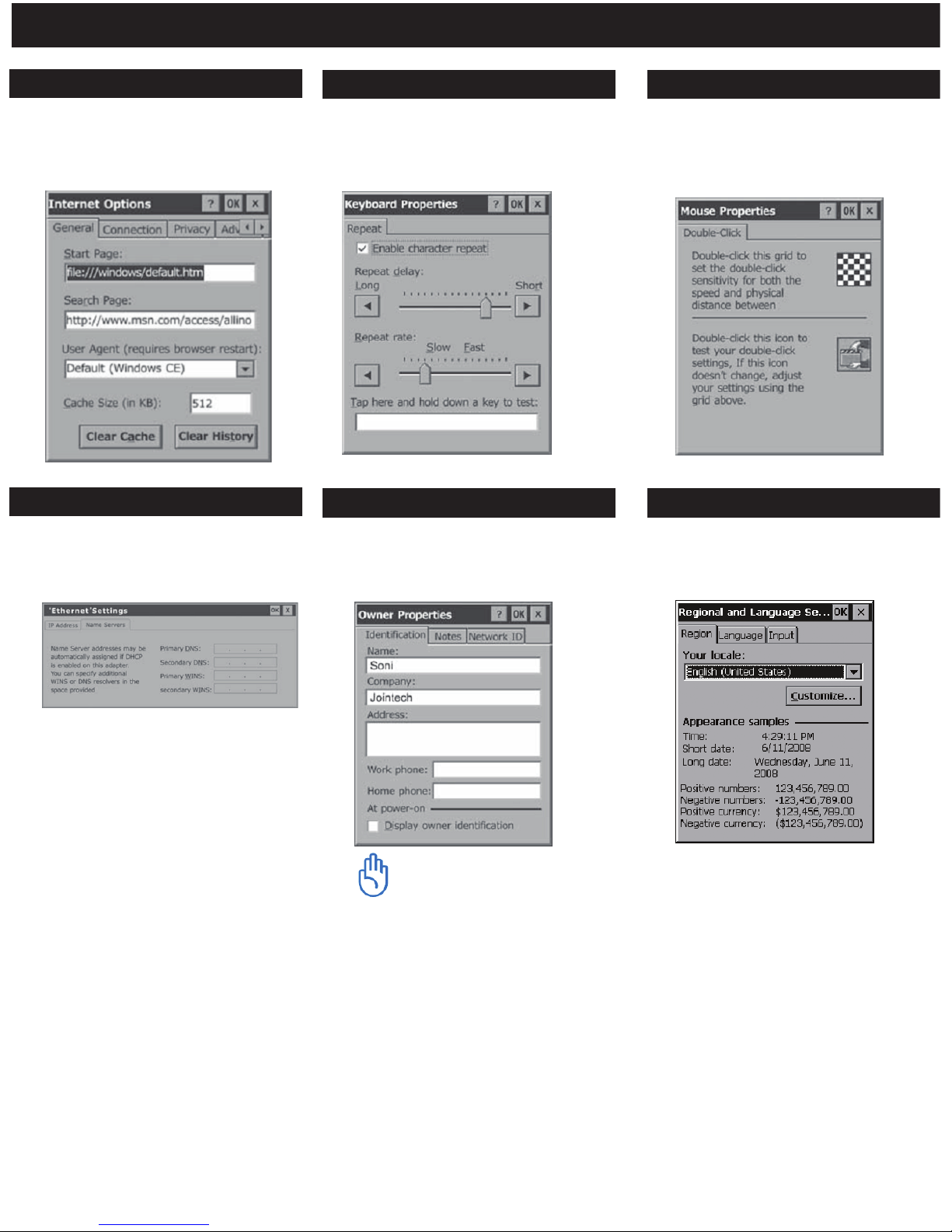
Internet Options
Users are recommended to use
the default setting and not to
alter the network setting.
User can adjust the repeat delay &
repeat rate.
Keyboard
Double click the grid icon to set
the double click speed. Then test
it using the icon below.
Mouse
Network & Dial-up conn.
These settings are provided by
your internet service provider.
User can set and display the
owner properties information of
the current system.
Owner
User can change the language,
time, currency etc...
Regional Setting
Windows CE uses this
information to gain
access to network
resources. Enter the
user name, password
and domain provided
by your network
administrator.
Page 18
18
.
System Setting
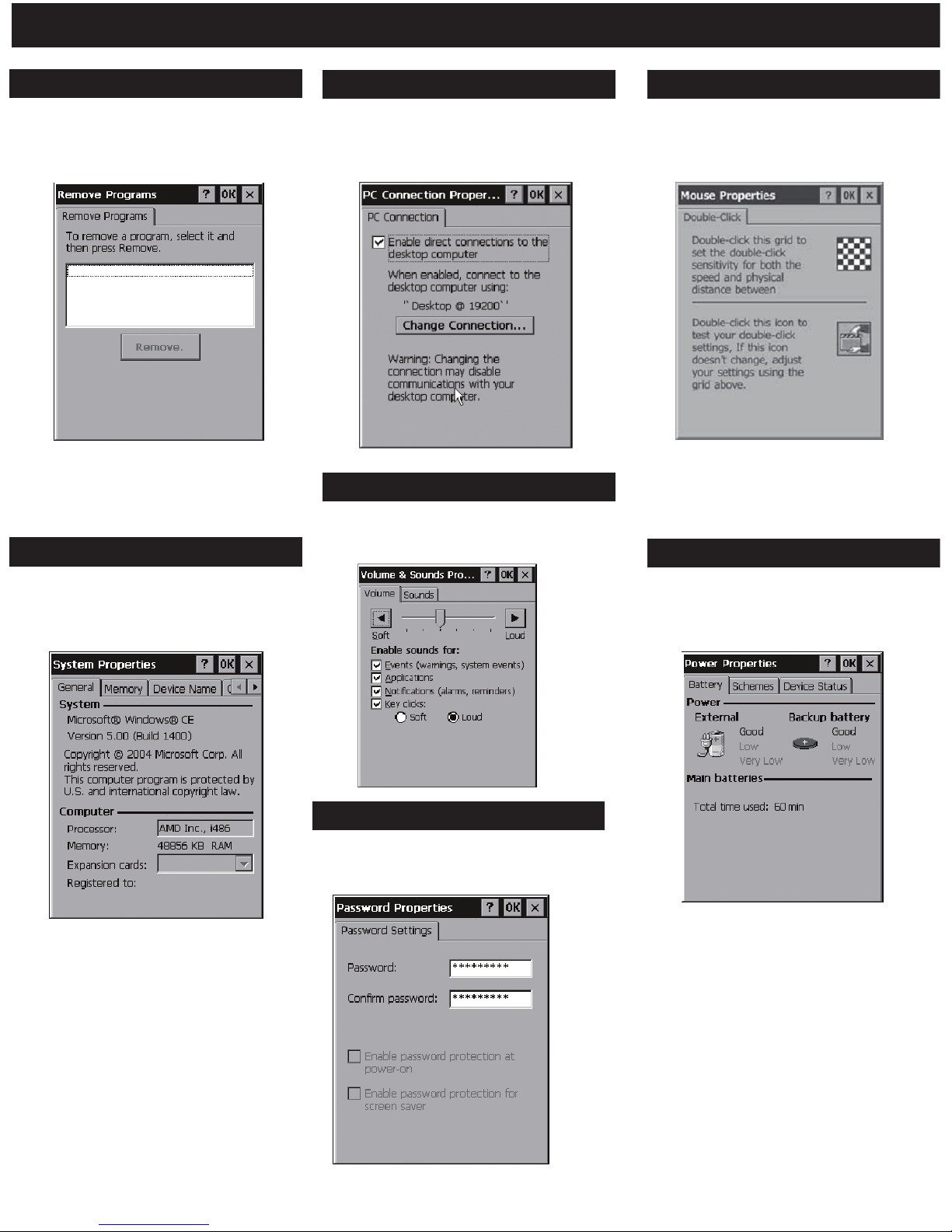
Remove Programs
Display the installed application
programs in the current system.
User can choose to uninstall.
User can Enable/Disable direct
connection to the desktop
computer.
PC Connection
Set double-tap speed of touch
pen and the accuracy of
interface touch point.
Stylus (Optional)
System
Display the properties of the
system, process type, memory
size, etc.
User can set and display the
volume and sound scheme.
Volume & Sound
Displays the percentage of
power left in main batteries.
Power
*None of the system’s
default application
software appears in the list.
*The “Calibration”
function is used to set the
accuracy of touch pen for
touching the screen.
*Memory size can be
altered here. User can
perform the
operations following
the prompts.
*Let you choose
between power
sources, AC or
batteries.
This is use to protect personal
privacy and data security.
Password
Page 19

.
19
Q: Can the E-Go support Java?
Answer- The E-Go is able to support Java.
Q: Can you install any other applications on the E-Go?
Answer- The E-Go does not support downloaded apps.
Q: is the E-Go able to play dvds?
Answer- No, this product does not support DVD.
Q: Can these computers connect to a wireless network (Wi-Fi)?
Answer- Yes the product has a built in wireless card.
Q: Can I plug in digital cameras and download the pictures onto the E-Go?
Answer- The E-Go does not support this kind of hardware. However, one can insert the
SD/MMC card from the camera into the card reader port.
Q: Is it possible to use wireless Air-Card with E-Go Netbook?
Answer- No, the E-go is not compatible with Air-Card.
Q: Does the E-GO have a built in webcam?
Answer- No, this product does not come with a webcam.
Q: Can you connect a printer to the E-Go?
Answer- currently the E-Go is not compatible with printer support. However,
documents can be transferred to your main PC.
Frequently Asked Questions
Page 20
.
20
TroubleShooting
Problem Solution
The E-Go does not turn on
when connected to AC power.
The E-Go is freeze up. Connect the E-Go to external
power, and perform a reset.
You may be using your E-Go in ways that drain the
batteries quickly. Example, watching many videos
with high volume.
E-Go runs very slowly.
E-Go does not turn on when
not connected to AC power.
Battery power is too low. Connect the E-Go to the
AC power and turn it on.
Main battery is too low. When a critically
low-battery condition is encountered, the E-Go
initiates a safety shutdown. Connect to AC
power and charge the battery.
E-Go automatically shuts down.
E-Go freezes when running
applications.
Battery runs out of power very
quickly.
Increase “Program memory” . Refer to page 18
under System.
There is insufficient program memory or the
memory needs to be refreshed.
E-Go will not establish a
connection with a desktop PC.
Insufficient memory error
occurs when running an
application.
E-Go has run out of program memory for the
application. For detailed instructions on making
more program memory available, see page 18
under system.
E-Go does not detect an SD
Card.
The SD Card may not be inserted correctly, see
How to use SD Cards in page 10.
The USB cable is not connected properly to the
PC or the E-Go, or communications are not
configured correctly.
The USB connection is not enabled in “PC
connection” under control panel.
Page 21

Warranty
Augen Warranty Policy:
1 Year
LIMITED WARRANTY CONDITIONS
which has not been maintained in accordance with any operating or handling
instructions provided by Augen, (iii) which has been altered or damaged by
accident or natural disasters; (iv) which has been subjected to unusual physical
or electrical stress, misuse, abuse, power shortage, or negligence or (v) which
has been used other than in accordance with the product operating and handling
instructions.
LIMITED WARRANTY COVERAGE
defect in any Augen product which is covered by Augen 's warranty, Augen
shall either repair or replace the defective product, at Augen’s option. Augen
shall have no obligation to repair or replace until the customer returns the
defective product to Augen according to the Warranty Procedure below.
For software products, Augen's limited warranty applies only to a failure to
execute programming instructions. Augen does not warrant that the operation of
any product will be interrupted or error free.
For the other regions that an Augen representative isn’t present, please consult
with your local Augen retailer or authorized dealer before purchasing.
WARRANTY PROCEDURE
During the warranty period, Augen will replace or repair defective products
returned to Augen or a retail shop you purchased. A product returned for
warranty service must be shipped complete in its original packing material or
equivalent including any cables or accessories that were originally provided.
Augen accepts no liability for any loss or damage while in transit to Augen.
Augen will use new or refurbished parts at its discretion, and will own all parts
removed from repaired products. Please note that repair or replacement of an
Augen product during warranty will not extend the original warranty term.
LIMITATION OF WARRANTY
of any kind whether expressed or implied, with respect to Augens products,
and specically disclaim the implied warranties or conditions of
merchantability, satisfactory quality, and tness for a particular purpose
LIMITATION OF LIABILITY
Except for the limited
obligations specically set forth in this warranty
statement, in no event shall Augen or its third party suppliers be liable for direct,
indirect, special, incidental, or consequential damages, whether based on
contract, tort, or any other legal theory and whether advised of the possibilities
of such damages. If you have any question regarding warranty condition in your
area, please call 1-877-AUGENOK
E-Go
The limited warranty is provided to the original owner only and is not
transferable to any third party. Proof of purchase will be required for any limited
warranty on Augen products. Augen’s warranty covers only those defects which
arise as a result of normal use of the product, and do not apply to any product:
(i) which has not been repaired or altered unless done or approved by Augen, (ii)
Within a period of 90 days of the date of purchase, if Augen receives notice of
Neither Augen nor its third party suppliers make any other warranty or condition
21
Page 22

250 N.Dixie Hwy. #13
Hollywood, FL 33020
If you have questions, please feel free to contact our customer service representatives at
1-866-342-8436 or by email at [email protected]
Augen Electronics Corporation
250 N.Dixe Hwy. #13
Hollywood, FL 33020
Shop online: www.augenus.com
Augen Customer Service Team hours of operations:
MON-FRI 10:00AM – 5:00 PM (EST)
22
Augen Technical Support Team
Augen Service & Support
Page 23

Statement of FCC Compliance
23
FCC regulations
FCC Declaration of Conformity Statement
This device complies with Part 15 of the FCC Rules. Operation is
subject to the following two conditions: (1) This device may not
cause harmful interference; and (2) this device must accept any
interference received, including interference that may cause
undesired operation. • Radio and Television Interference: This
equipment has been tested and found to comply with the limits
for a Class B digital device, pursuant to Part 15 of the FCC Rules.
These limits are designed to provide reasonable protection
against harmful interference in a residential installation. This
equipment generates, uses and can radiate radio frequency
energy and, if not installed and used in accordance with the
instructions, may cause harmful interference to radio communi
-
cations. However, there is no guarantee that interference will not
occur in a particular installation. • If this equipment does cause
interference to radio or television reception, which can be
determined by turning the equipment o and then on, the user is
encour aged to try to correct the interference by one or more of
the following measures:
• Increase the separation between the equipment and receiver.
• Connect the equipment to a dierent outlet so that the equipment
and receiver are on dierent branch circuits.
• Consult the dealer or an experienced radio/TV technician for
Changes or modications not expressly approved by Augen could
void the user’s authority to operate the equipment.
 Loading...