

Page 1
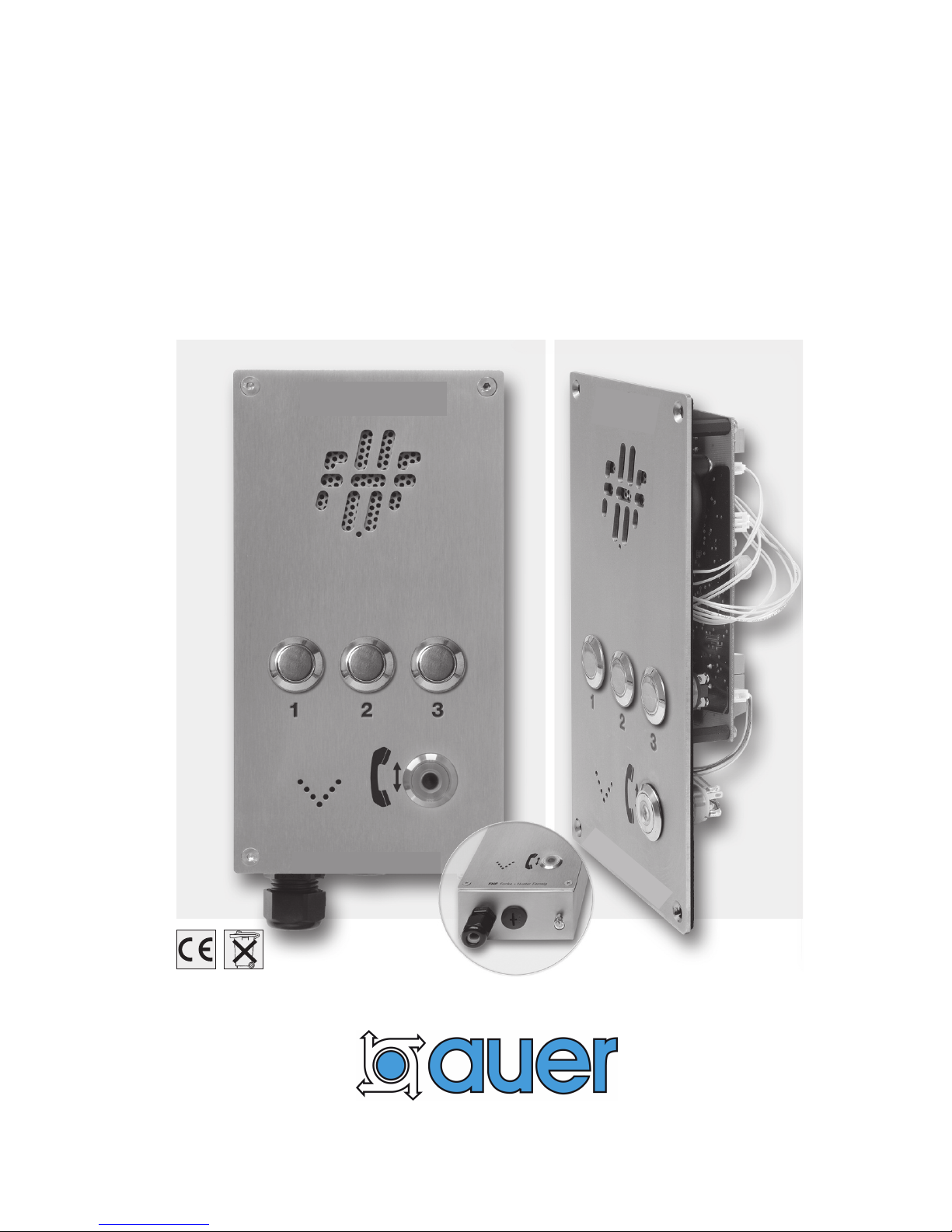
Weatherproof Intercom S tation
Operating manual
IC3P / IC3S 1.0_E
IC3P / IC3S
Page 2

2 / 16
Operating Manual - IC3P /IC3S
Notes
Please read the operating manual carefully before installing the device.
Texts and illustrations have been compiled and software created with the utmost care,
however errors cannot be completely ruled out. This documentation is therefore supplied
under exclusion of any liability or warranty of suitability for specific purposes. J.Auer
reserves the right to improve or modify this documentation without prior notice.
Before opening or dismounting the device it has to be separated from
all voltage supply
.
General Description
The IC3P / IC3S is a
weatherproof Intercom Station which can be operated in the
analogue, public telephone network or can be connected to analogue terminals of branch
exchanges.
The IC3P / IC3S is available in different designs:
With casing it is made for wall mounting or it can be fixed on pylons and joists.
Without casing it is meant as built-in unit.
This manual describes below the construction with casing. The connection of the built-in
unit is made correspondingly, but without considering the cable entries.
The IC3P / IC3S Station comprises
- a loudspeaker and
- a microphone for voice communication
- a hookswitch key as operating element
- three key buttons for direct dialing
- and a LED (part of the hookswitch key)as loop current indicating element.
Utilization and programming is identical in all devices.
Features
- Pulse / tone dialing
- Automativ cleardown
capability
- Automatic answering capability or answering after a programmable number of
rings
-
Choice of up to three programmable direct dialing numbers
-
Remote programming of
telephone number
ringer volume
ringer melody
loudspeaker volume
automatic call acceptance
dialing type
Page 3
3 / 16
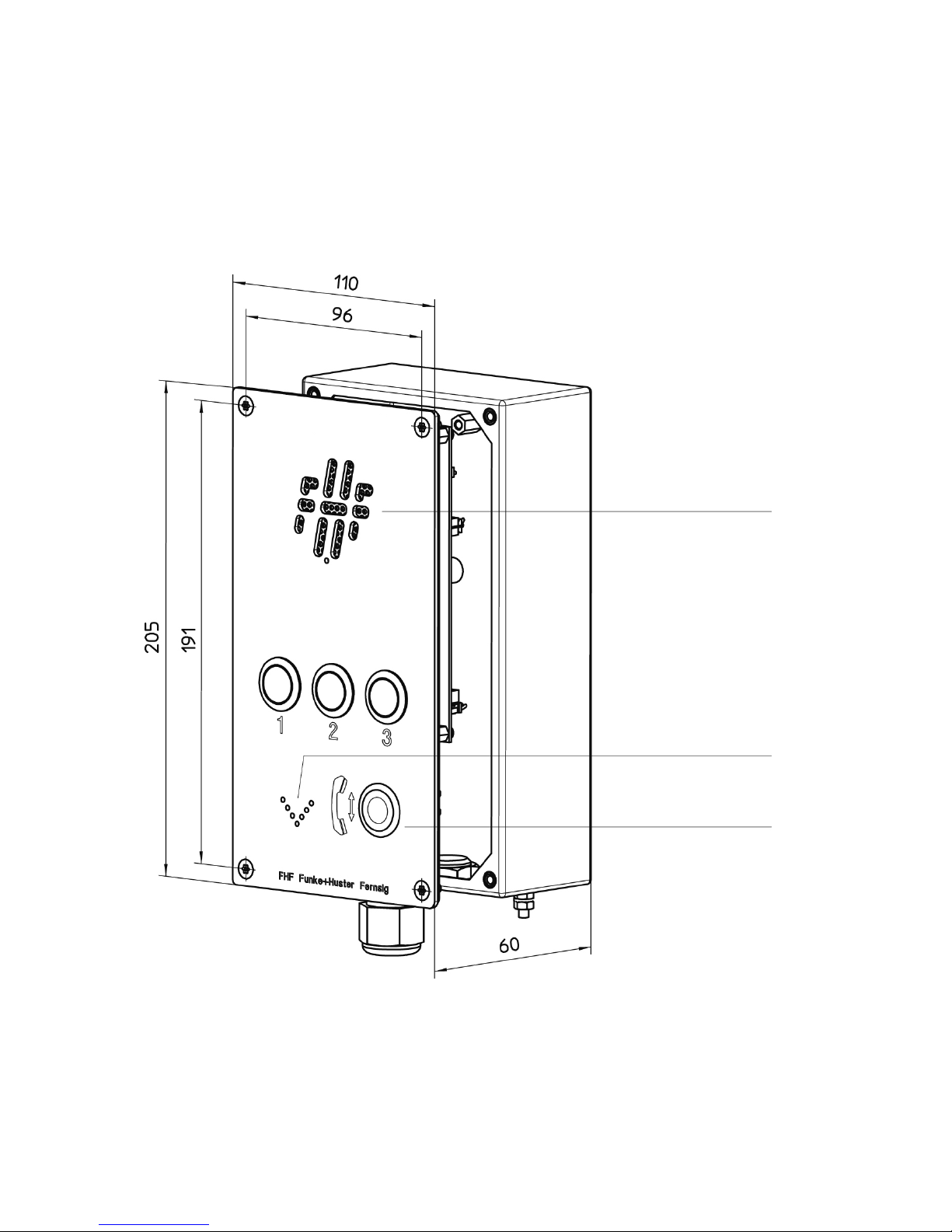
IC3S
with casing
Loudspeaker
Microphone
Loop Current
Indicator
Hook switch
key
Page 4
4 / 16
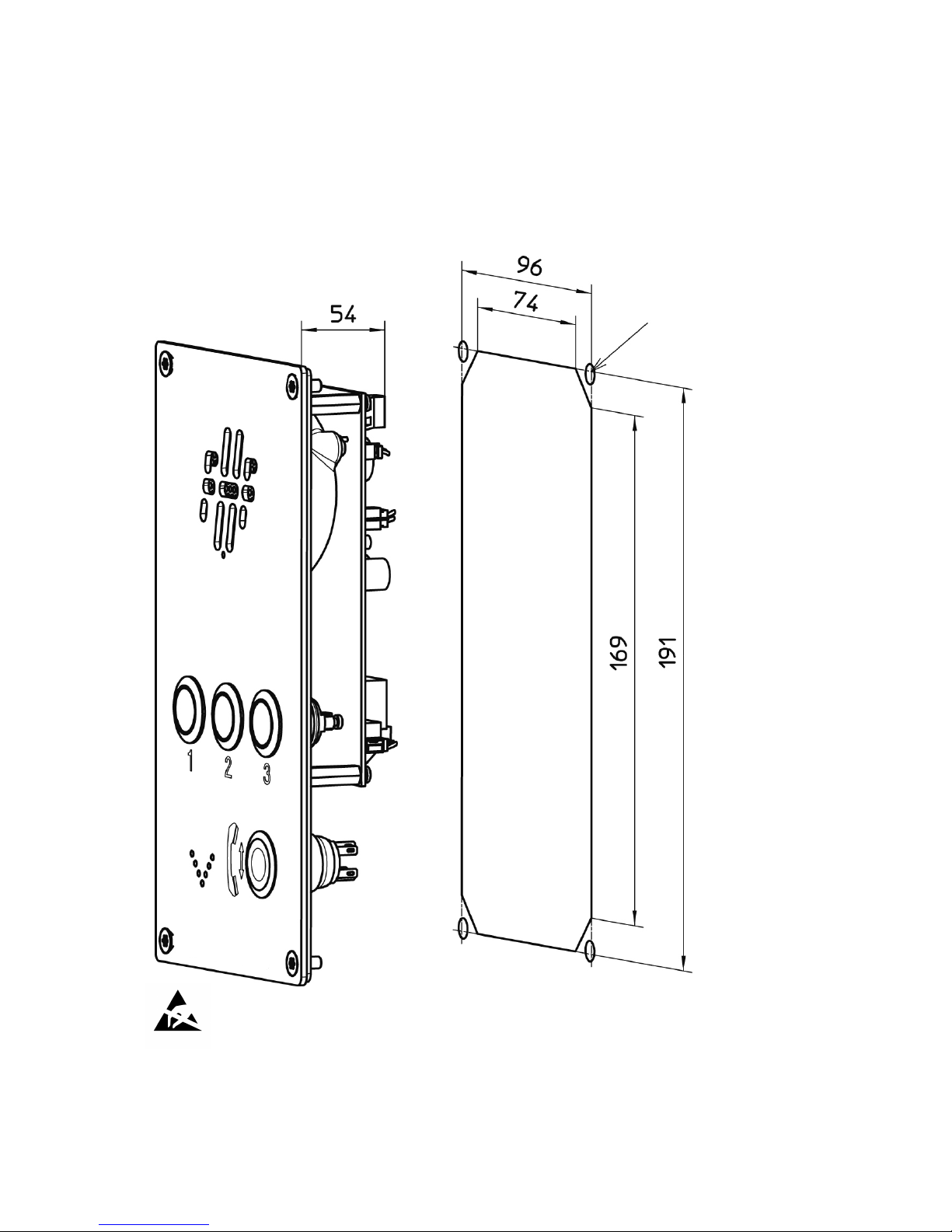
IC3P
built-in unit
assembly cut-out
thread M4 or
Ø 4.3 mm
Page 5
5 / 16
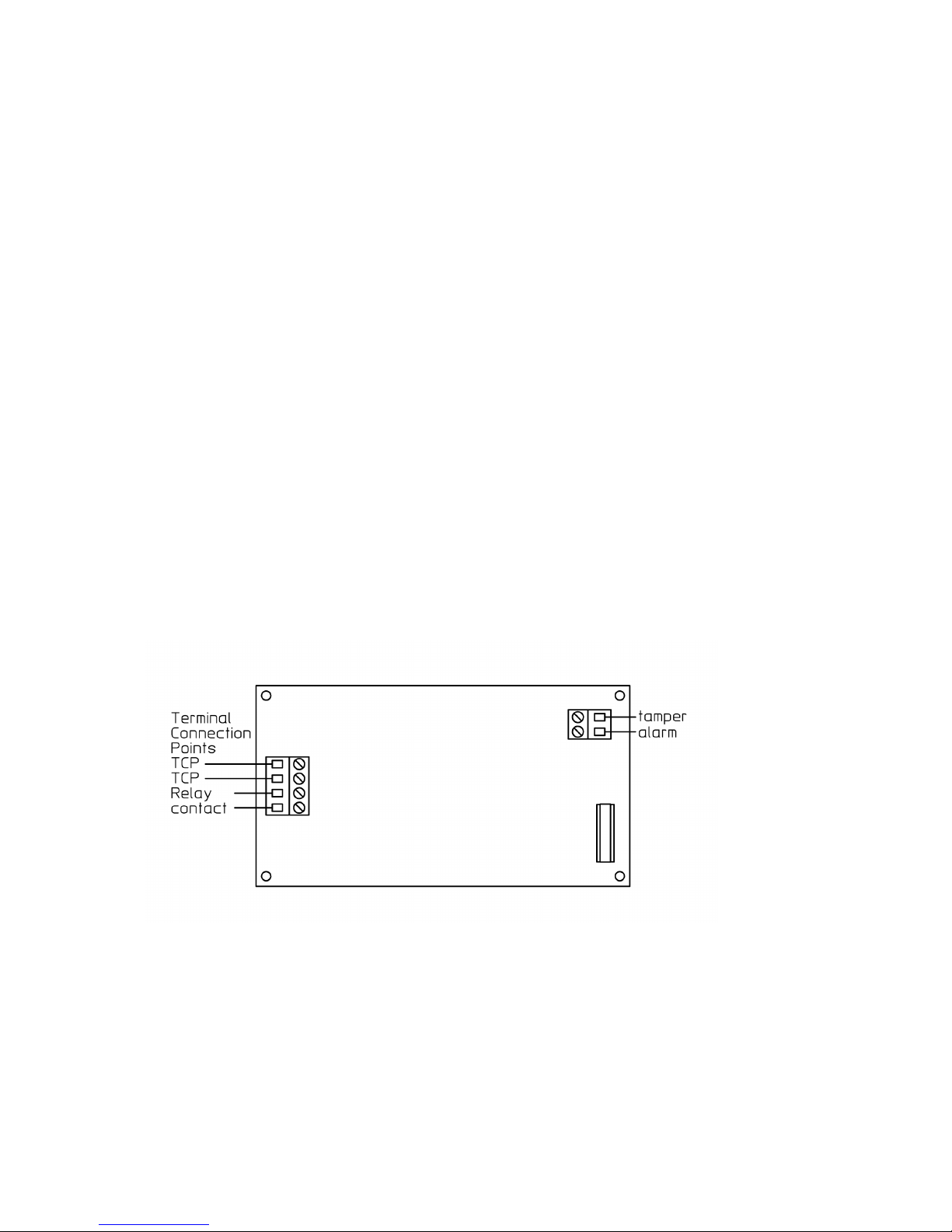
Connection
Opening the IC3P / IC3S
To gain access to the circuit board or the tamper alarm switch, unfasten the four
screws in the front panel.
Attention: Before opening or dismounting the device it has to be separated from
all voltage supply.
Concluding notes
CE (cable entry) M20 x 1.5
Protection rating CE IP66
Connection cable Ø 5 to 9 mm
Wire and connector diameter 0.14 to 2.5 mm
2
Only appropriate tools may be used for the assembly of the CE. The cable connection
is suitable for firmly secured conduits only. When locking the equipment, ensure tight
fit and cleanliness of all sealing. To retain the protection rating IP 66, cover screws
must be screwed in either side, diagonally with 1.4 Nm each.
Connection of the tamper alarm switch
Pull the control line through the cable gland of the box and connect the two wires to
the insulated screw joints of the tamper alarm switch. The voltage and the maximum
power in the tamper alarm circuit shall not exceed 60 V
DC
or 30 V
AC
respectively
30 W.
Connection of the telephone line
Pull the telephone line through the cable gland of the box and connect it to the
Terminal Connection Points TCP.
Page 6

6 / 16
Relay contact output
The IC3P / IC3S board comprises a relay contact which can be activated from a
remote telephone or telephone system. This relay can control for example electric
door entry mechanism, signaling and other electrical devices. The voltage at the relay
contact terminals shall not exceed 60 V
DC
or 30 VAC. The maximum power is
30 W. The maximum current is 1 A. Another cable gland is needed to connect a cable
to the relay contacts. Exchange it with the sealing plug.
The operating of the relay is described below. In all cases the relay will be deactivated
on hanging up.
Note:
If the switch on button an the chosen direct dialing button will be touch
successively, IntellyCom 3T dials the programmed number or sends a short
signal that the storage space of the touched button is empty. In the last case the
Intercom communication terminal remains occupied and waits for a new touch
of a direct dialing button.
The IC3P / IC3S disconnects automatically when you and your speaking
partner pause for longer than the programmed pause limit (*13xx*), when your
speaking partner hangs up and IntellyCom 3T detects the telephone’s busy
signal, or when the programmed conversation duration limit (*12xx*) has
expired.
The IC3P / IC3S mutes the microphone or undoes a previous muting if the
on/off button is pressed briefly during the conversation. IC3P / IC3S loop
current indicator light displays a blinking light to indicate that the microphone
is switched to mute, or a continuous light to indicate the active state.
Attention!
To guarantee the protection against contact a voltage equalizing cable has to be
connected to the voltage equalizing screw of the casing or in case of the built-in
unit to the corresponding mounting tab on the inside of the built-in unit.
The IC3P / IC3S complies with the casing design of the casing kind of
protection IP66. For the built-in version the installer has to take care that the
desired protection against water and dust will be achieved by appropriate seals.
In case of deficient built-ins the installer assumes the entire responsibility.
For the casing construction the distance to other live components has to be
constructed safely in built-in condition, see EN 60950-1!
Page 7

7 / 16
Operation
Making a Call
Touch the switch on button and successively one of the direct dialing buttons to
release a connection to the chosen partner.
The loop current indicator light blinks to indicate that a connection is being made, and
changes to the continuous “on” state, when the receiving party answers the call.
To converse with your respondent, speak in the direction of the Intercom station from
a distance of about 30 cm.
To disconnect, press the on/off button and release when a signal tone announces the
expiration of the programmed minimum press duration (*32xx* (2 s)). The loop current
indicator light will go out and the intercom station will go back to standby.
Receiving a Call
When the IC3P /IC3S station rings, press the on/off button.
The loop current indicator light goes on, glowing continuously.
Conduct your conversation.
To disconnect, press the on/off button as above under “Making a Call”. The loop
current indicator light will go out and the intercom station will go back to standby.
Page 8

8 / 16
Programming
The Intercom Station IntellyCom 3T is designed to be programmed remotely over the
telephone line. Programming is carried out using sequences keyed from a telephone,
when connected to the IntellyCom 3T to be programmed.
Remote programming codes are split into two classes Class 0 and Class 1 which are
distinguished by different enclosing characters; “#” for Class 0 and “*” for Class 1.
The IntellyCom 3T accepts Class 1 programming codes only if the user has the right
to program. This is achieved by sending the Class 0 programming code
#AccessCode#. The factory setting is AccessCode=1234.
Class 0 programming codes are always accepted.
Programming Codes
For each programming sequence below the telephone responds with an acknowledge
or an error tone. In case of an error tone the programming sequence has to be
repeated.
Class 0 Programming Codes
Code
Function
#accesscode#
Request the programming rights
Factory setting: accesscode=1234
The corresponding programming function refuses the values 0600 and 0990 and
responds with an error tone.
#relaycode#
Activate relay
Factory setting: relaycode=1
The corresponding programming function refuses the values 0600 and 0990 and
responds with an error tone.
#0600#
Request phone_ID
#0990#
Cleardown
##
Deactivate relay
Class 1 Programming Codes
Code
Function
*100dialmode*
Select dial mode
dialmode=1 Tone dialing (DTMF)
dialmode=2 Pulse dialing 1.5:1
dialmode=3 Pulse dialing 2:1
Factory setting:
dialmode=1 Tone dialing (DTMF)
Page 9

9 / 16
*101disablebusy*
Set up option "Disable in case of busy tone"
disablebusy=0 Disable in case of busy tone activated
disablebusy=1 Disable in case of busy tone deactivated
Delivery condition:
disablebusy=0 Disable in case of busy tone activated
*102ringback*
Set up option "Ring back schema"
ringback=0 Ring back schema 2
ringback=1 Ring back schema 24
ringback=2 Ring back schema 246
Delivery condition:
ringback=1 Ring back schema 24
*11number_of_rings*
Number of rings before automatic answer
number_of_rings=00 Automatic answer without ringing
Microphone and Speaker muted
number_of_rings=01-98 Automatic answer with ringing
number_of_rings=99 No automatic answer
Factory setting:
number_of_rings=03
*12t_max_call_duration*
Maximum call duration
Length of conversation before automatic clear down
t_max_call_duration=00 No limit
t_max_call_duration=01-99 minutes
Factory setting:
t_max_call_duration=00
*13t_duration_of_silence_
before_cleardown*
Duration of silence before automatic cleardown
t_duration_of_silence_before_cleardown=00
Does not clear down on duration of silence
t_duration_of_silence_before_cleardown=01-99 seconds
Factory setting:
t_duration_of_silence_before_cleardown=28 seconds
*140speaker_volume*
Loudspeaker volume
speaker_volume=0-7 0 = mute
Factory setting:
speaker_volume=7
Page 10

10 / 16
*142duplex_profile*
Set up duplex profile of voice communication
duplex_profile=0-4 (full duplex -semi-duplex)
Delivery condition:
duplex_profile=0 full - duplex
Remark: In case of inappropriate electrical and/or acoustic
installation conditions co-coupling effects (whistler) may
occur. In those cases modify the regulation of the profile in
to the higher values (semi-duplex).
*150ringer_melody*
Ringer melody
ringer_melody=0-8
Factory setting:
ringer_melody=7
*160ringer_volume*
Ringer volume
ringer_volume=0-7 0 = mute
Factory setting:
ringer_volume=6
*17t_button_pressed_
before_offhook*
Duration for which button must be pressed
continuously before the Intercom Station goes offhook
t_button_pressed_before_offhook=00 Immediate
t_button_pressed_before_offhook=01-99 *0.1 seconds
Factory setting:
t_button_pressed_before_offhook=00
*20t_wait_user_action*
Time limit for the user actions touch of direct dialing
buttons and call answering
t_wait_user_action=00 unlimited
t_wait_user_action =01-99 seconds
Factory setting:
t_wait_user_action =15 seconds
*25t_relay_on_duration*
Relay activation time
t_relay_on_duration=00 unlimited
t_relay_on_duration=01-99 seconds
Factory setting:
t_relay_on_duration=02 seconds
*2600*relaycode*
Relay activation code
relaycode=0-9999
except: 0600, 0990 and actual accesscode
Factory setting:
relaycode=1
Page 11

11 / 16
3000accesscode
Access Code
accesscode=0000-9999
except: 0600, 0990 and actual relaycode
Factory setting:
accesscode=1234
32t_button_pressed_
before_onhook
Duration for which button must be pressed
continuously for clear down to take place
t_button_pressed_ before_onhook=05-99 *0.1 seconds
Factory setting:
t_button_pressed_ before_onhook=20 = 2 seconds
5000phone_id
Program Intercom Station ID
phone_id=0-9999
Factory setting:
empty
5001 telephone number
Program memory M1 for direct dialing button 1
Factory setting:
empty
Note: This memory must be programmed as empty memory
if automatic dialing is not required.
M1 is cleared with 5001*
5002 telephone number
Program memory M2 for direct dialing button 2
Factory setting:
empty
Note: Only M1 is dialled if this memory is empty.
M2 is cleared with 5002*
5003 telephone number
Program memory M3 for direct dialing button 3
Factory setting:
empty
Note: Number chaining ends with memory M2 if memory
M3 is empty.
M3 is cleared with 5003*
980factory_settings_
option
Return to factory settings / Erase Memories
factory_settings_option=0 Factory Settings
factory_settings_option=1 Factory Settings,accesscode
and relaycode unchanged
factory_settings_option=2 Erase memories M1-M3 & M100
Page 12

12 / 16
*5100* pstn_prefix*
Program memory M100 PSTN_PREFIX
Factory setting:
empty
The deletion of M100 is done by *5100**
*9900*
Disconnect
*9901*
Reactivate loudspeaker
Defining Call Procedures
Determine the call chosen from the storage places.
Determine the call chosen from the storage places.
You determine this setting by programming at least one of the three direct dialing
storage places M1-M3.
After touching the switch on button and the direct dialing button the communication
terminal immediately tries to build-up a connection to the partner. The action is
terminated by the successful realization of the connection or the deactivation of the
communication terminal, if the programmed time limit *20xx* (15 s) runs out.
Example:
#1234# Getting the permission to program
*5001*101* Direct dialing button 1 programm the linked storage button and
determine the partner number e.g. 101.
*5002*102* Direct dialing button 2 programm the linked storage button and
determine the partner number e.g. 102.
*5003*103* Direct dialing button 3 programm the linked storage button and
determine the partner number e.g. 103.
*2015* set time limit e.g. 15 s, to determine, how long IC3P / IC3S shall
wait, if the user touches a direct dialing button and that the called
partner accepts the call.
If the no direct dialing or call acceptance is realised, the
IC3P / IC3S
deactivates itself after the expiry of the chosen time limit.
Defining Call Acceptance Procedures
To Define Automatic, Mute Call Acceptance with the First Ring/Signal
You can define this call acceptance scenario by setting the programmed ring/signal
counter *11xx* (3) at the value “00”. Incoming calls to the station will then be signaled
optically and accepted automatically with the first signal. In contrast to the other call
acceptance scenarios, the speaker and the microphone are muted.
Page 13

13 / 16
Example:
#1234# Receive programming authorization.
*1100* Set ring/signal counter to the value “00”, to define automatic call
acceptance after the first signal.
To Define Automatic Call Acceptance after “n” Rings
You can define this call acceptance scenario by setting the programmed ring/signal
counter *11xx* (3) to the desired value within a range of 1 - 98. Incoming calls will
then be acoustically1) and optically signaled by the station and automatically accepted,
when the set number of rings/signals has been reached.
Example:
#1234# Receive programming authorization.
*1103* Set ring/signal counter to the value “3”, to set the automatic call
acceptance at 3 rings.
1)
With a programmed ring volume of *1600*, the speaker is muted when the call is
being signaled.
To Define Manual Call Acceptance
You can define this call acceptance scenario by setting the programmed ring/signal
counter *11xx* (3) to the value “99”. Incoming calls will then be acoustically1) and
optically signaled, and only accepted when the on/off button is pressed.
Example:
#1234# Receive programming authorization.
*1199* Set call counter to the value “99”, to shut off automatic call
acceptance.
1)
With a programmed ring volume of *1600*, the speaker is muted when the call is
being signaled.
Page 14

14 / 16
Problem handling:
Unexpected disabling of any communications (call/call reception)
You start a call or receive a call and the communication is more or less immediately
disabled.
This problem may occur, if the IC3P / IC3S or set of your interlocutor is installed in a
noisy environment. If those ambient noises hit the busy tone schema of the
IC3P / IC3S, it considers the connection as disabled by the interlocutor and switches
off.
You can switch off the operation mode „disable in case of busy tone“ by setting the
option *101x* (0) to the value 1. Please note, that in a noisy environment the
operation mode "Disable in case of continuous silence *13xx* (28 s)" will also be
affected. To guarantee an automatic disabling of the IntellyCom, the maximum call
duration, which in the delivery condition is adjusted to infinite *12xx* (0 infinite), should
be limited to a convenient value.
Example:
#1234# Obtain the programming authorization.
*1011* Set option "disable in case of busy tone" to the value 1, to deactivate
the disabling in case of identified busy tone.
*1205* Determine the maximum call duration to e.g. 5 min., to guarantee that
the IntellyCom switches off automatically.
Unexpected muting at the beginning of outgoing communications (call)
You start a call; your interlocutor answers the call and does not hear you at the
beginning.
This problem may occur, of the IC3P / IC3S does not understand the message of your
interlocutor and continues the supervision of the calling phase with muted microphone
and flashing loop current display.
You can manually stop the muting function by a short activation of the activation
button and/or by selecting that IC3P / IC3S ring back schema, which is able to
distinguish earliest language and ring back tones. A reliable identification of the call
begin cannot be guaranteed with none of the ring back schemas, schema 2 offers the
lowest error rate.
Example:
#1234# Obtain the programming authorization.
*1020* Set option "Ring back schema" to the value 0, to select schema 2.
Page 15
15 / 16
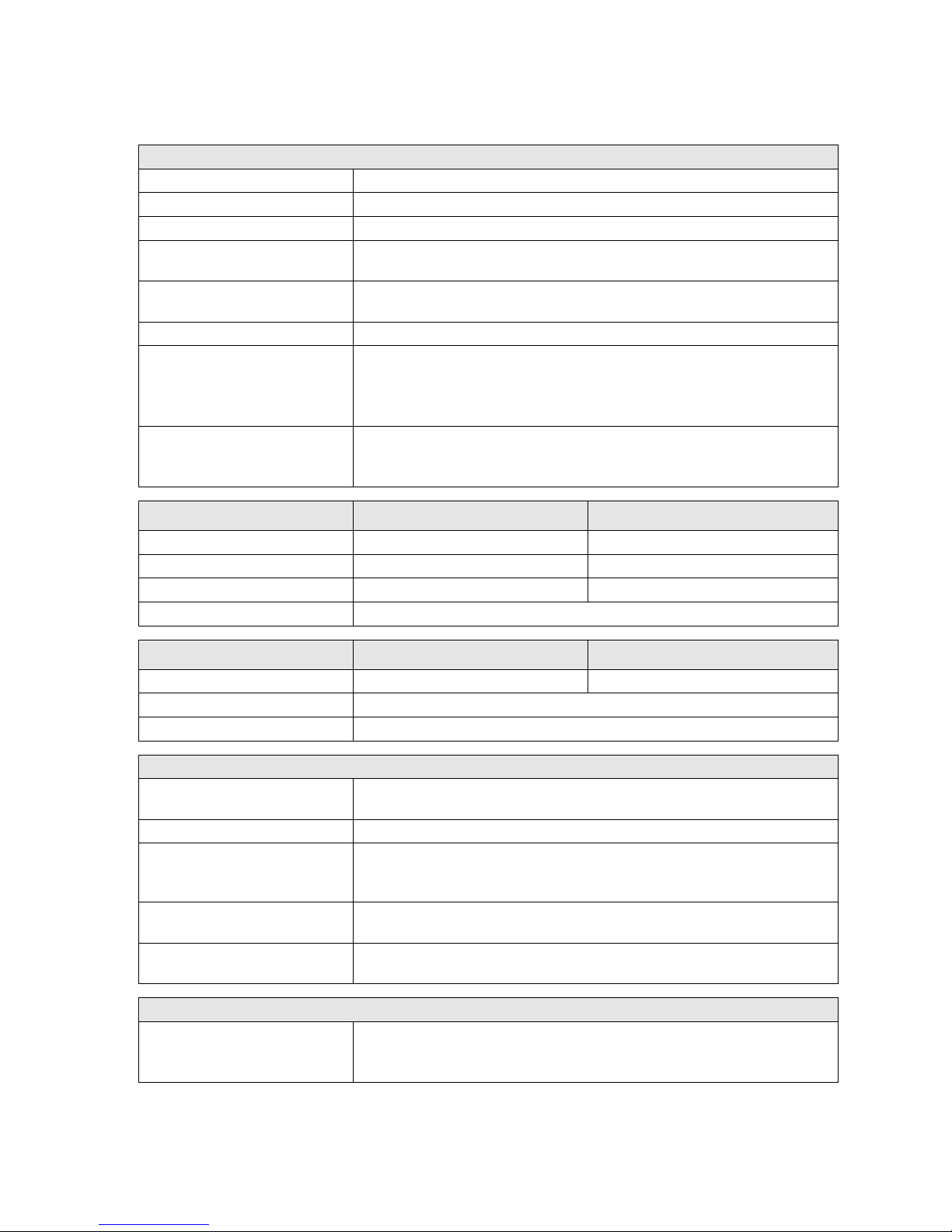
Connection information
Input terminal voltage
24 VDC to 66 VDC from the telephone connection
Power supply current
28 mADC to 100 mA
DC
Call signal voltage
35 VAC to 90 VAC (23…54 Hz)
Call signal impedance
Larger 5.5 kW at 25 Hz and 30…90 VAC
Larger 4.0 kW at 50 Hz and 30…90 V
AC
Dialling method
Dual-tone multi-frequency signalling (DTMF)
Pip-tone dialling; pip-tone interval ratio 1.5:1 or 2:1.
Connecting terminals
Max. 2.5 mm2
Relay contact points
Max. 30V
AC
Max. 60V
DC
Max. 1 A
eff
Max. 30 W
Tamper contact
Max. 30V
AC
Max. 60V
DC
Max. 30 W
Dimensions
With casing
Built-in unit
Material
VA
Front Panel VA
Height x Breadth x Depth
Approx. 205 x 110 x 60 mm
Approx. 205 x 110 x 55 mm
Weight
Approx. 1.2 kg
Approx. 0,65 kg
Scanner
Metal scanner made of VA with integrated red LED
Environmental conditions
With casing
Built-in unit
Protection type:
IP 66 as per EN60529
IP 66 (frontal)
Operating temperature:
-40°C to +60°C
Storage temperature:
-40°C to +70°C
Other features
Call volume
- 7 levels and silent
- Maximum approx. 80 dB(A) at a distance of 1 m at 50 VAC / 50Hz
Call melodies
9 melodies
Minimum call duration
until automatically
engaged
≥ 800 ms without interruption (call diversion not permitted)
Call pause duration for
call pause bypass
2 … 6 s
Speaker
- Maximum volume approx. 68 dB(A) at a distance of 1 m
- Volume 7 levels
Directives and regulations
Conformity with the
following directives and
regulations:
- R&TTE directive 1999/5 EC
- Low voltage directive 73/23/EEC
- EMC directive 89/336/EEC for residential and industrial zones
Page 16

S ubject to alterations
or errors
Perfektastr. 102 · A-1230 Wien
Telefon 0043 1 813 82 20 · Telefax 0043 1 815 99 54
http://www.auer-signal.com · e-mail: o[email protected]
 Loading...