

Page 1
User Manual
2-Source 4-Zone
Speaker Selector Switch
with Volume Controls
Model: TS-4VC
Page 2

The Audtek Electronics™ 2-Source 4-Zone Speaker Selector Switch (TS-4VC)
has been designed to play four pairs of speakers throughout your home or office.
It gives you the freedom to play one pair or any combinations of speakers at the
same time. Music for each location is selected by turning the volume control
clockwise (turning the volume control counter-clockwise all the way will turn off
the speakers). The TS-4VC also features an A/B switch for amplifier selection.
This allows you to have two different sources playing at the same time.
Features:
• Add up to four pairs of speakers to your amplifier
• Impedance matching to protect your amplifier from different speaker loads
• Left and Right ground paths are isolated for compatibility with all amps
• Screw terminals to provide a solid secure connection
• Power handling 100 watts RMS/channel
• May be used with 4,6 or 8 ohm speakers
Installation Tips:
• It is recommended to use 16 gauge speaker wire, and to use
14 gauge wire for runs longer than 50 ft.
• You can use any combination of 4,6 or 8 ohm speakers
• Remember to use approved cables for in-wall use
• Keep speaker wires away from AC power wire, being too close could
cause unwanted noise and interference
• When turning on for the first time make sure all volume controls are
turned to the off position
Installation:
Make sure all power is turned off before installing
• Select a convenient location for the speaker selector
• Run all necessary wires from the rooms to the speaker selector, be
sure to correctly label the wires for each room
• Strip 3/8" of insulation from the end of each wire
• Tightly twist the end of each wire until there are no frayed ends
• Insert the wires and tighten the set screws on the connecting blocks; connect
the outputs from your receiver or amplifier to the terminals labeled “From AMP A”
• Be sure to keep all wires in phase (positive to positive and negative to negative)
If you are connecting a second audio source attach it to “AMP B”
• Connect the wires from each speaker location to the corresponding terminal
Technical Specs:
Input: 100 watts MAX per channel
Output: 4 speaker pairs (4,6 or 8 ohm)
Protection: Impedance matching
Wire size: 14 to 22 gauge
Size: 11-3/4" W x 6-1/2" D x 2" H
Weight: 3 lbs.
Page 3
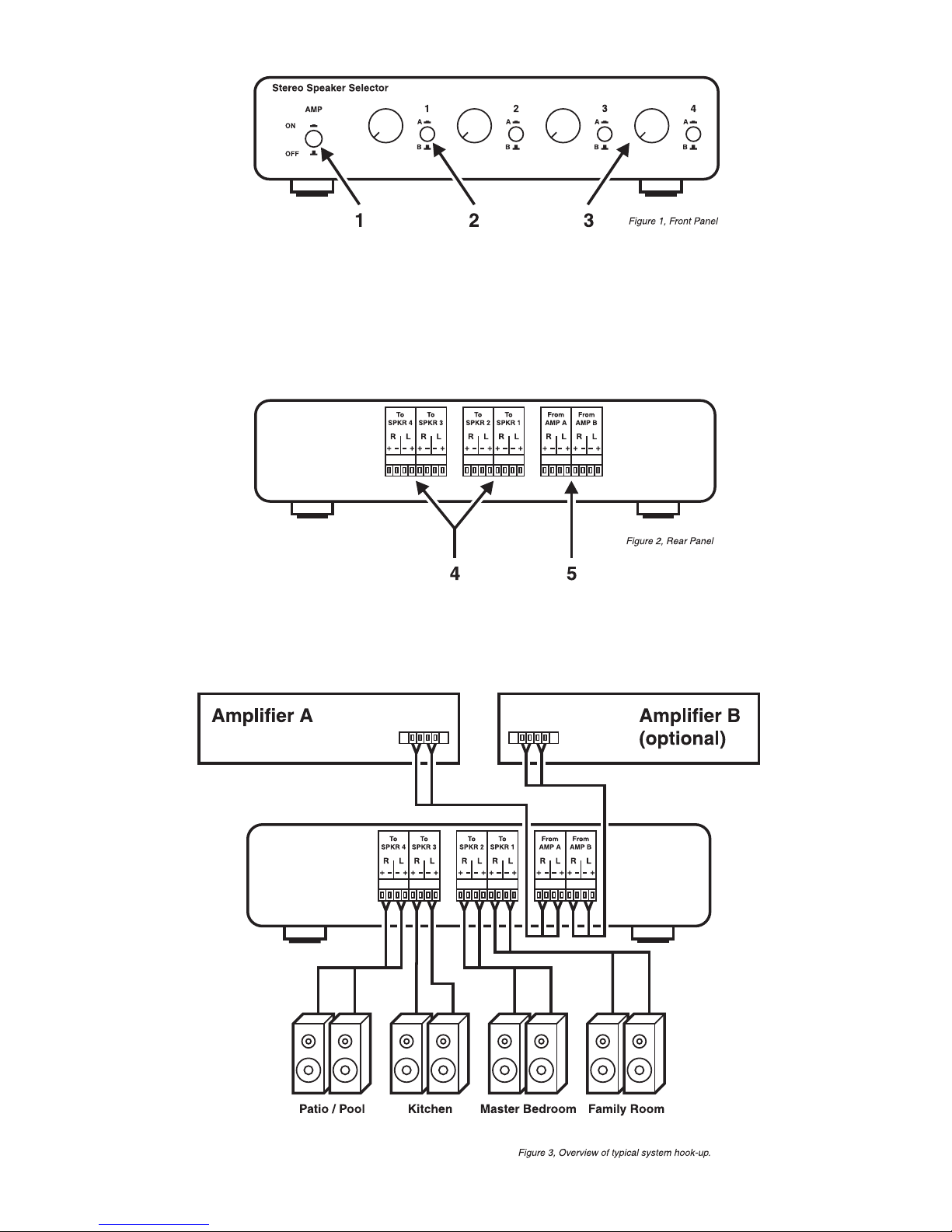
Controls
1. Speakers On/Off: Press button in to turn on all speaker pairs.
Press again (button out) to turn off.
2. Amplifier Selector: Press button in to select amp A.
Press again (button out) to select amp B.
3. Volume Control: An 11-step volume control for each speaker pair.
4. Speaker Connections: Connect your speakers to these terminals.
5. Amplifier Connections: Connect the speaker output of your receiver or
amplifier (100 watts max). Amplifier B optional.
Page 4
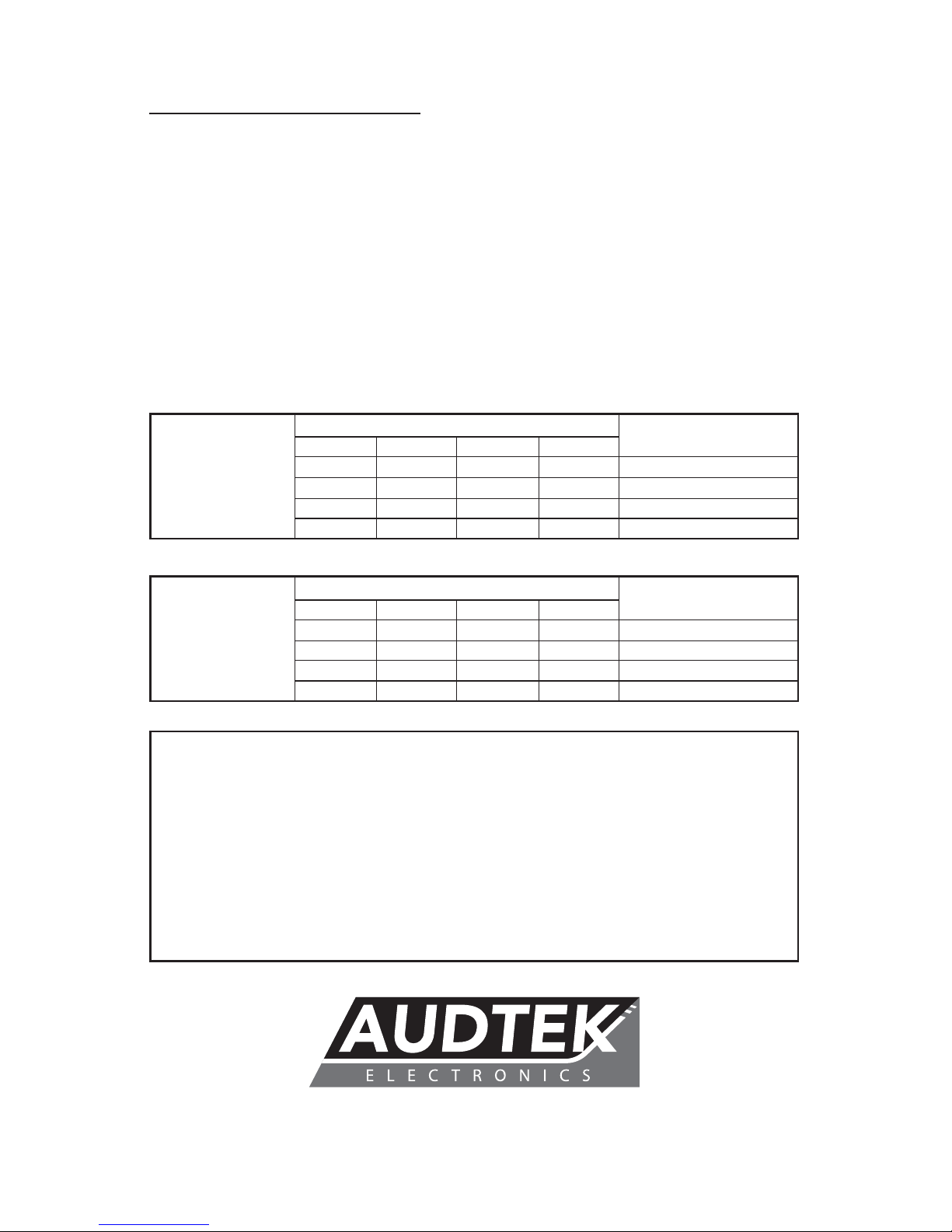
Trouble Shooting:
Problem Solution
No Sound Check all connections
Make sure the volume controls are on
Make sure no wires are touching each other
Make sure the receiver/amp is turned on
Make sure the receiver/amp correct speaker source is on
Noise in Speakers Make sure all speaker wires are away from AC power lines
Check all connections for a tight fit
Turn down receiver/amp output
Unit is hot Turn down receiver/amp output
Turn off unused speakers
Do not stack items on top of unit
Number of Speaker Pairs Playing Impedance Correction
1 2 3 4
(protection at “on” pos.)
4 ȍ X X X 7.0 ȍ
4 ȍ 4 ȍ X X 5.0 ȍ
4 ȍ 4 ȍ 4 ȍ X 4.3 ȍ
4 ȍ 4 ȍ 4 ȍ 4 ȍ 4.0 ȍ
4 ȍSpeakers
Number of Speaker Pairs Playing Impedance Correction
1 2 3 4
(protection at “on” pos.)
8 ȍ X X X 11.0 ȍ
8 ȍ 8 ȍ X X 7.0 ȍ
8 ȍ 8 ȍ 8 ȍ X 5.7 ȍ
8 ȍ 8 ȍ 8 ȍ 8 ȍ 5.0 ȍ
8 ȍSpeakers
Warranty
This Audtek Electronics product is warranted free from defects in material and
workmanship for a period of One Year from the date of purchase. Audtek will
at their discretion, repair, replace or credit the faulty unit unless otherwise
specied by contractual agreement. Any faulty unit that is no longer in
production will be replaced with a similar or equivalent unit. Warranty
registration is not required, but purchasers are asked to retain their receipt
as proof of purchase. Warranty does not apply to misuse, abuse, neglect,
accident, improper use, etc.
audtekelectronics.com
©Audtek Electronics Last Revised: 2/7/2017
 Loading...