

Page 1
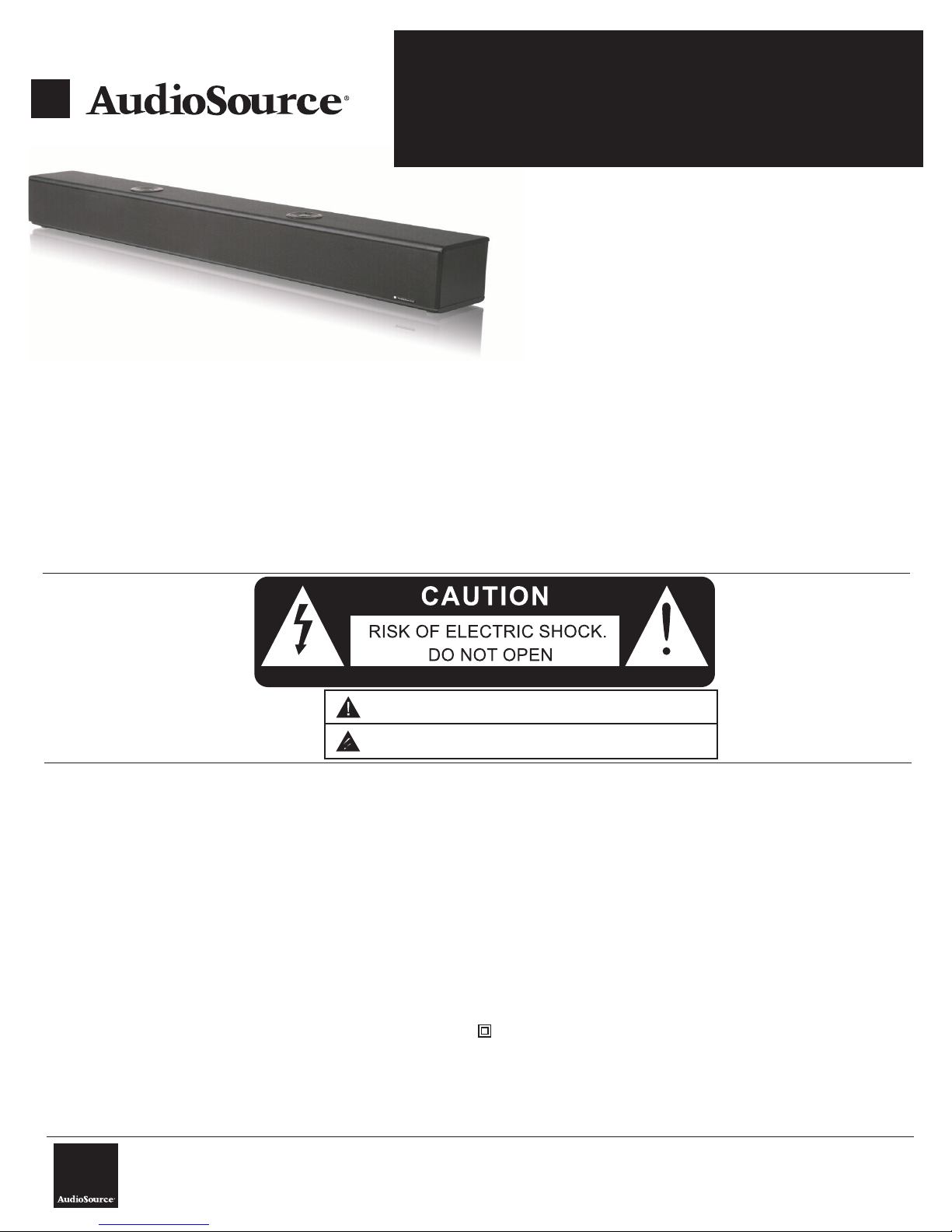
FEATURES:
• 80 Watt Soundbar speaker system
• Wireless Bluetooth® Music Streaming
• Powerful dual 3” woofers and full range 2.5” drivers for incredible home theater effects
• Efficient Ported subwoofer design delivers realistic bass impact
• Compatible with your TV, DVD, Cable/Satellite Box, MP3 player, game console or computer
• Enjoy movies, music, and games
• Excellent choice for full range audio entertainment
• 1 Analog RCA input, 1 digital coaxial input and 1 digital optical input (PCM 2-Channel)
• Includes wall mounting brackets for convenient placement options
High Definition Soundbar
S350
OWNER’S MANUAL
Congratulations on your purchase of the AudioSource® S350 Soundbarthe latest in high resolution Home Theater technology.
Please take a few moments to read this entire manual, and be sure to
retain this document for future reference. Please read and observe all
safety instructions detailed below.
NOTE: if any part of this product is damaged or missing, please call your
dealer or AudioSource® directly at 1.877.715.5439.
Please read your warranty and retain your receipt and original carton for
possible future use.
For more information about AudioSource® electronics, speakers and
accessories please visit www.audiosource.net
ATTENTION:RISQUE DE CHOC ELECTRIQUE-NE PAS OUVRIR
The exclamation point within an equilateral triangle is intended to alert the user of the presence of important
EXPLANATION OF
SAFETY SYMBOLS
IMPORTANT SAFETY INSTRUCTIONS
1. Read these instructions.
2. Keep these instructions.
3. Heed all warnings.
4. Follow all instructions.
5. Do not use this apparatus near water.
6. Clean only with dry cloth.
7. Do not block any ventilation openings. Install in accordance with the
manufacturer’s instructions.
8. Do not install near heat sources such as radiators, heat registers, stoves,
or other apparatus (including amplifiers) that produce heat.
9. Do not defeat the safety purpose of the polarized or grounding type
plug. A polarized plug has two blades with one wider than the other. A
grounding type plug has two blades and a third grounding prong. The
wide blade or third prong are provided for your safety. If the provided plug
does not fit into your outlet, consult an electrician for replacement of the
obsolete outlet.
10. Protect the power cord from being walked on or pinched particularly at
the plugs, convenience receptacles, and at the point where they exit from
the appliance.
11. Only use attachments or accessories specified by the manufacturer.
12. Unplug the apparatus during lightning storms
periods of time.
or when unused for long
operating and maintenance (servicing) instructions in the literature accompanying the appliance.
The lightning flash with the arrowhead symbol within an equilateral triangle is intended to alert the user to the
presence of uninsulated “dangerous voltage” within the products’ enclosure that may be of sufficient magnitude
to constitute a risk of electric shock to persons.
13. Refer all servicing to qualified personnel. Servicing is required when the
apparatus has been damaged in any way, such as power supply cord or
plug is damaged, liquid has been spilled or objects have fallen into the
apparatus, the apparatus has been exposed to rain or moisture, does not
operate normally, or has been dropped.
14. WARNING: To reduce the risk of fire or electric shock, do not expose this
apparatus to rain or moisture. The apparatus shall not be exposed to dripping or
splashing and that objects filled with liquids, such as vases, shall not be placed on
apparatus.
15. CAUTION: Danger of explosion if battery is incorrectly replaced. Replace only with the
same or equivalent type.
16. WARNING: To prevent injury, this apparatus must be securely attached to the
floor/wall in accordance with the installation instruction.
17. WARNING: The batteries (battery pack or batteries installed) shall not be exposed to
excessive heat such as sunshine, fire or the like.
18. WARNING: The mains plug is used as disconnect device, the disconnect device shall
remain readily operable.
19. This equipment is a Class II or double insulated electrical appliance. It has been
designed in such a way that it does not require a safety connection to electrical earth.
• TO PREVENT FIRE OF SHOCK HAZARD, DO NOT USE THIS PLUG WITH AN EXTENSION CORD,
RECEPTICLE OR OTHER OUTLET UNLESS THE BLADES CAN BE FULLY INSERTED TO PREVENT
BLADE EXPOSURE
• TO PREVENT FIRE OR SHOCK HAZARD, DO NOT EXPOSE THIS APPLIANCE TO RAIN OR MOISTURE
• TO PREVENT ELECTRICAL SHOCK, MATCH WIDE BLADE PLUG TO WIDE SLOT, FULLY INSERT.
AudioSource®
13970 SW 72nd Ave.
Portland, OR 97223
877.715.5439
www.audiosource.net
S350 Owner’s Manual 8100.350A
Page 2
Functions
AC IN
FUSE
T800mAL250V
1
2
4
5
High Definition Soundbar
S350
OWNER’S MANUAL
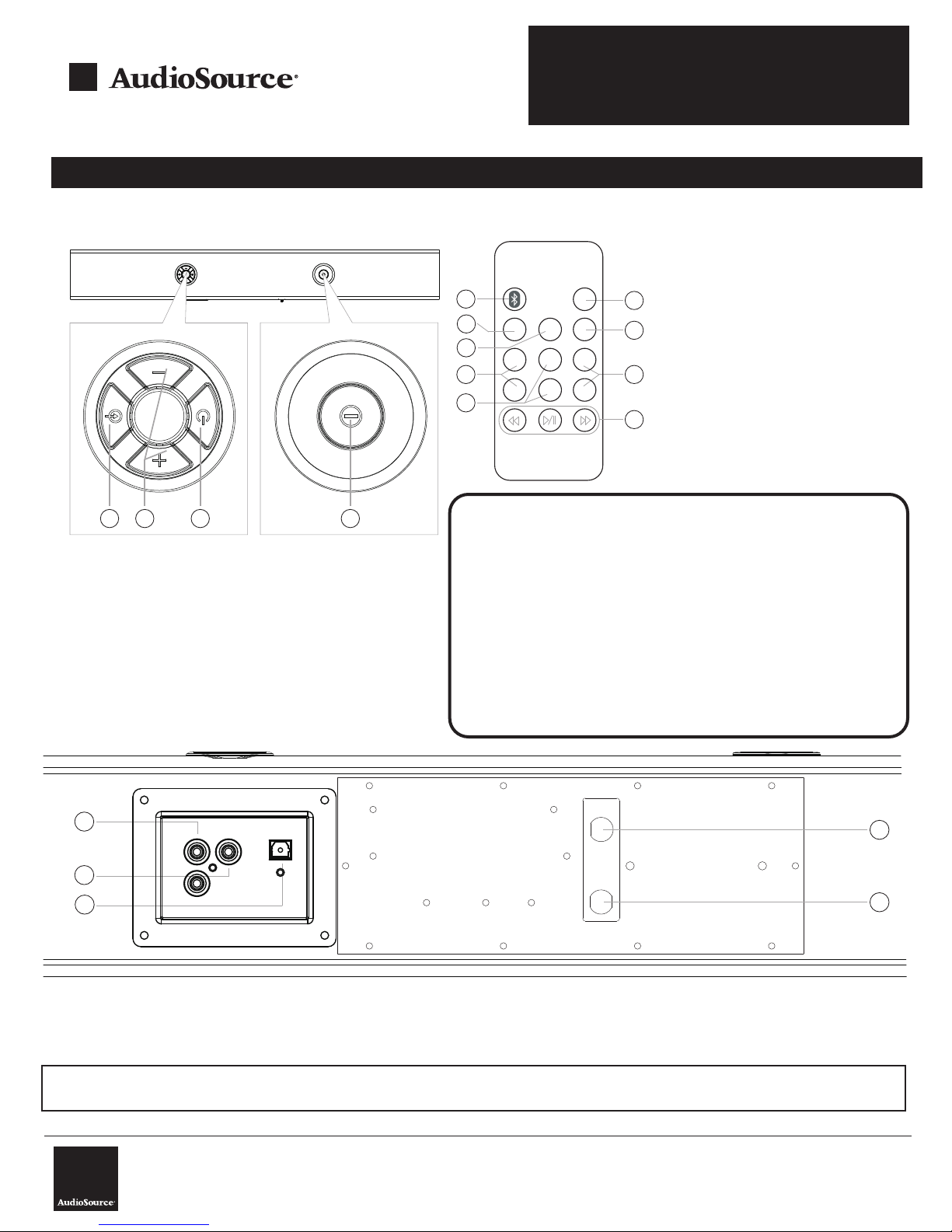
S350 Top View
1 2 3 4
1. Input Mode: Select Input mode (RCA, Digital
Coax, Optical, or Bluetooth®
2. Volume +/-: Adjust the Soundbar’s
volume to the desired level
3. Mute/Standby: Press to activate/deactivate
system audio
4. Main Power Switch: Press to turn unit on or off
S350 Back View
S350 Remote Control
1. Bluetooth® Input: Push to activate Bluetooth
feature and pair
2. MUTE: Press the key to mute the system
3. AUX Input: Push to activate analog RCA input
4. OPTICAL Input: Push to activate Digital
2
Optical input
5. DIGITAL COAX Input: Push to activate Digital
5
Coaxial input
6. TREB +/-: Adjusts the systems
treble frequencies
8
7. BASS +/-: Adjusts the systems
bass frequencies
8. VOL +/-: Adjusts the overall
9
system volume level
9. TRACK CONTROLS: Controls Track Back,
Play/Pause, and Track Forward On Bluetooth
device
OPTICAL
BASS+
BASS-
MUTE
D.COAX
VOL+
VOL-
1
3
4
6
AUX
TREB
TREB-
+
7
Bluetooth® Pairing S350
1. Ensure S350 power is “On”
2. Push Bluetooth button on Remote until Blue front panel
LED flashes.
3. Turn on the Bluetooth feature on your mobile device or
Computer. Enable device discovery if not automatically
enabled.
4. Search and select “S350” in the list on your device. Note:
Some devices may require a pass code. Please use 0000
if prompted.
5. Status Indicator LED will stop flashing once paired.
6. Play music from your mobile device, adjust volume to taste.
3
1. Input 1: Analog RCA- Connect to audio source 1 (TV, etc.)
2. Input 2: Digital Coaxial- Connect to audio source 2 (DVD,
4. Fuse
5. Power cord
etc.). Please be sure to set the source to PCM 2-Channel
3. Input 3: Optical Input: Connect to PCM 2-Channel digital outputs.
IMPORTANT!
Please refer to your TV or other source manual to configure the digital out to PCM 2-Channel and for compatibility.
AudioSource®
13970 SW 72nd Ave.
Portland, OR 97223
877.715.5439
www.audiosource.net
S350 Owner’s Manual 8100.350A
Page 3

System Connections
Diagram 1- Standard Audio Connections
Optional: Connect Digital Optical cable to audio source (TV, DVD, Game
Console, etc.)
NOTE: audio source must be set to PCM 2-Channel Audio. Please consult the devices owners manual or
technical support to configure.
High Definition Soundbar
OWNER’S MANUAL
Connect RCA cables to audio source (TV, Cablebox, Sattelite
Box)
Soundbar
FUSE
T800mAL250V
AC IN
AC
S350
Optional: Connect to 2nd audio source (DVD, Game Console, Computer, etc.) digital coaxial output to
S350 digital coaxial input. Remember to configure audio source unit for PCM 2-channel audio output
Diagram 2- Wall Mounting
Wall mounting bracket
FUSE
T800mAL250V
AC IN
D: 23 m m
715 mm
6.5 mm
1
2
3
5mm
4 5
Wall mounting bracket
S350 BT soundbar
TO Wall Mount S350
1. Drill two holes in the drywall (see figure 1)
2. Push the two drywall anchors into the wall (see figure 2)
3. Install 2 screws into the each drywall anchor. Note: please use anchors rated for a minimum of 20 Ibs each.
4. Carefully hang the S350 on the screws mounted to the drywall anchors (see figure 5).
AudioSource®
13970 SW 72nd Ave.
Portland, OR 97223
877.715.5439
w.audiosource.net
ww
S350 Owner’s Manual 8100.350A
Page 4

Specifications
• Audio Power: 2 x 20 Watts, 2 x 20 Watts (Bass Drivers)
• Speakers: 2 x 2.5” High Efficiency Full Range Drivers, 2 x 3” Subwoofers
• S/N: > 80dB
• Distortion: < 1%
• Power Supply: 120VAC, 60Hz
• Product Dimensions: 34”W x 4”H x 6.5”D
• Net Weight 14.5 lbs
• Gross Weight 16 lbs
Trouble Shooting
If you experience problems with your S350 Soundbar, the following trouble shooting guide may help
High Definition Soundbar
S350
OWNER’S MANUAL
Trouble
Verify both Power and Mute buttons are “ON” (both located on the top of the S350)
Power LED won't light up
Verify unit power cord is connected to wall outlet, and wall outlet is functional
Verify the audio source is playing audio
No Sound
One or more speakers no sound
Bluetooth will not pair
Optical or Digital Coax Input not Functioning
Remote control not working
If the problem still exists, please contact AudioSource for Technical Support
Check if the audio cables are connected correctly to the audio source
Check if the volume is at the right level
Check if both right and left RCA cables are connected correctly to the audio source
Ensure mobile device Bluetooth is on and paired, Ensure another device is not paired to S350
Verify audio source digital output is set to “PCM 2-Channel”. Consult audio source’s manual
Check if the battery is in the remote control, Verify battery is charged
Limited Warranty
AudioSource® warrants its electronics products against defects in materials
and workmanship for a limited period of time. For a period of two years from
date of original purchase, we will repair or replace the product, at our option,
without charge for parts and labor. Customer must pay all parts and labor
charges after the limited warranty period expires. The limited warranty period
for factory refurbished products expires after ninety (90) days from date of
original purchase.
This limited warranty applies only to purchases from authorized AudioSource®
electronics retailers. This limited warranty is extended only to the original
purchaser and is valid only to consumers in the United States.
Consumers are required to provide a copy of the original sales invoice from
an authorized AudioSource® dealer when making a claim against this limited
warranty. This limited warranty only covers failures due to defects in materials
or workmanship that occur during normal use. It does not cover failures
resulting from accident, misuse, abuse, neglect, mishandling,
alteration, faulty installation, modification, service by anyone other than
AudioSource®, or damage that is attributable to Acts of God. It does not
misapplication,
Solution
cover costs of transportation to AudioSource® or damage in transit. The
customer should return his defective product, freight prepaid and insured, to
AudioSource® only after receiving a Return Authorization.
This warranty will become void if the serial number identification has been
wholly or partially removed, altered or erased. Repair or replacement under
the terms of this warranty does not extend the terms of this warranty. Should
a product prove to be defective in workmanship or material, the consumer’s
sole remedies will be repair or replacement as provided under the terms
of this warranty. Under no circumstances shall AudioSource® be liable for
loss or damage, direct, consequential or incidental, arising out of the use of
or inability to use the product. There are no express warranties other than
described above.
Technical Support
If any part of this product is damaged or missing, please call your
dealer or AudioSource® directly at toll free 1.877.715.5439 or
locally 503.914.4688.
AudioSource®
13970 SW 72nd Ave.
Portland, OR 97223
877.715.5439
www.audiosource.net
S350 Owner’s Manual 8100.350A
Page 5

High Definition Soundbar
S350
OWNER’S MANUAL
FCC WARNING
Warning: Changes or modifications to this unit not expressly approved by the party responsible for
compliance could void the user’s authority to operate the equipment.
FCC STATEMENT
NOTE: This equipment has been tested and found to comply with the limits for a Class B digital device,
pursuant to Part 15 of the FCC Rules. These limits are designed to provide reasonable protection against
harmful interference in a residential installation. This equipment generates, uses and can radiate radio
frequency energy and, if not installed and used in accordance with the instructions, may cause harmful
interference to radio communications.
However, there is no guarantee that interference will not occur in a particular installation. If this equipment
does cause harmful interference to radio or television reception, which can be determined by turning the
equipment off and on, the user is encouraged to try to correct the interference by one or more of the
following measures:
Reorient or relocate the receiving antenna.
Increase the separation between the equipment and receiver.
Connect the equipment into an outlet on a circuit different from that to which the receiver is connected.
Consult the dealer or an experienced radio/TV technician for help.
Shielded cables must be used with this unit to ensure compliance with the Class B FCC limits.
WARNING
DO NOT INGEST BATTERY, CHEMICAL BURN HAZARD
The remote control supplied with This product contains a coin/button cell battery, if the coin/button cell
battery is swallowed it can cause severe internal burns in just 2 hours and can lead to death.
Keep new and used batteries away from children. If the battery compartment does not close securely, stop
using the product and keep it away from children.
If you think batteries might have been swallowed or placed inside any part of the body, seek immediate
medical attention.
AudioSource®
13970 SW 72nd Ave.
Portland, OR 97223
877.715.5439
www.audiosource.net
S350 Owner’s Manual 8100.350A
 Loading...