

Page 1
EN
Instruction Manual
Super Beatblaster
Bluetooth - 2 x 25 Watt RD-1549
PARTS DESCRIPTION / ONDERDELENBESCHRIJVING / DESCRIPTION DES
PIÈCES / TEILEBESCHREIBUNG / DESCRIPCIÓN DE LAS PIEZAS /
DESCRIÇÃO DOS COMPONENTES / OPIS CZĘŚCI / DESCRIZIONE DELLE PARTI /
BESKRIVNING AV DELAR / POPIS SOUČÁSTÍ / POPIS SÚČASTÍ
1
2
3 4 5 6 7
8 10
9
12 13 14
16
15
17
11
18
242322212019
service.tristar.eu
Tristar Europe B.V. | Jules Verneweg 87
5015 BH Tilburg | The Netherlands
Page 2

EN Instruction manual FR Mode d'emploi ES Manual de usuario
SAFETY INSTRUCTIONS
• By ignoring the safety instructions the manufacturer can not be hold
responsible for the damage.
• EXCLAMATION POINT - within an equilateral triangle, is used to indicate
that a specic component shall be replaced only by the component
specied in that documentation for safety reason.
• LIGHTNING FLASH WITH ARROWHEAD SYMBOL - within an equilateral
triangle, is intended to alert the user to the presence of uninsulated
dangerous voltage within the products enclosure that may be of
sucient magnitude to constitute a risk of electric shock to persons.
• The AC/DC adaptor and main unit shall not be exposed to dripping or
splashing; no objects lled with liquids, such as vases, shall be placed
on the apparatus.
• The AC/DC adaptor of the apparatus should not be obstructed or
should be easily accessed during the intended use.
• To completely disconnect the power input, the AC/DC adaptor of the
apparatus should be disconnected from the mains, as the disconnected
device is the AC/DC adaptor of apparatus.
• If the supply cord is damaged, it must be replaced by the manufacturer,
its service agent or similarly qualied persons in order to avoid a hazard.
Warning:
To reduce the risk of electric shock, do not remove cover (or back). No user-serviceable parts
inside. Refer servicing to qualied service personnel.
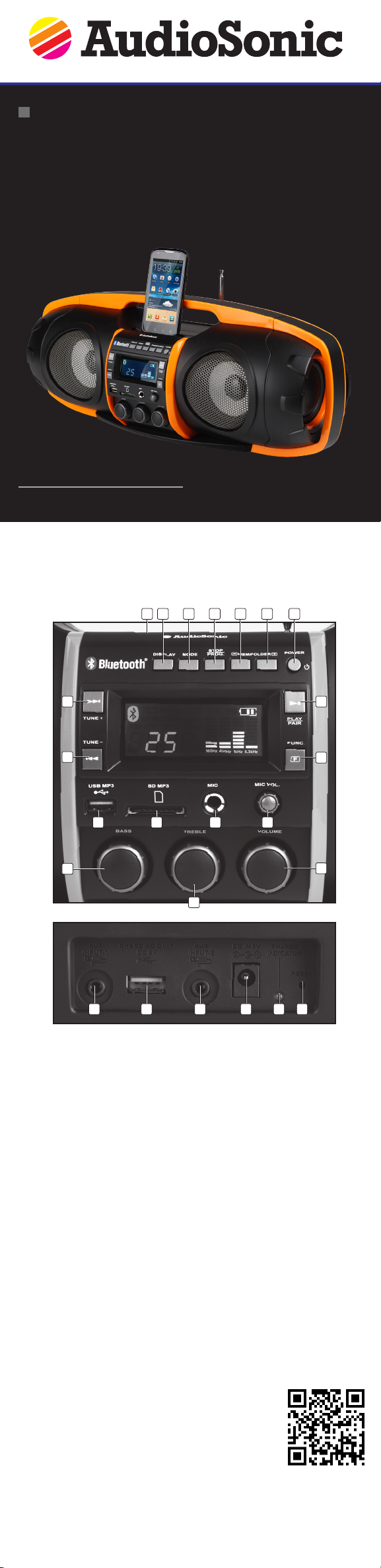
PARTS DESCRIPTION
1. Slot for placing your Smartphone/ Tablet
2. Display key
3. Mode key
4. Stop/ Prog. key
5. MEM - / Folder - key
6. MEM + / Folder + key
7. Power Key (On/ Standby)
8. Next/ Tune + key
9. Back/ Tune - key
10. Play/ Pair key
11. Function key
12. USB MP3 Socket
13. SD-Card Socket
14. Microphone Input Socket
15. Microphone Volume Knob
16. Bass Knob
17. Treble Knob
18. Volume Control Knob
19. Aux input-1 socket
20. USB Charging Port
21. Aux-Input 2 socket
22. DC Power Socket
23. Charge LED Indicator
24. Reset hole
BEFORE THE FIRST USE
• This unit runs via an internal rechargeable Lithium-ion battery.
• It can be recharged from any standard USB port (eg. PC USB port.)
• It can also recharge with the provided Micro-USB AC charger.
• Please ensure your country’s AC-voltage is within the charger’s voltage range.
• Insert the Micro USB plug of the AC charger into the Micro USB Socket at the back of the unit.
• Plug the AC charger into a wall outlet with AC power.
• The unit is charging if the charging LED indicator is on (Front of unit).
• Total play time when fully charged is upto 7 hours, depending on the type of music played and the
loudness level.
• When the unit is not being used, we suggest to keep it plugged in and charging.
• IMPORTANT: Please fully charge the unit before rst use! For best results, fully charge the unit before
use each time. If the battery is fully drained, please allow it to recharge for a few hours before use.
USE
Function key
Pressing the FUNCTION Key repeatedly will allow you to select one of the dierent source modes, as
follows: Bluetooth®, Radio, MP3 player, SD-memory card MP3 Player, input jack1, input jack2.
Bluetooth®
• This unit can wirelessly playback audio from any device with Bluetooth® A2DP function.
• The wireless range is approximately within 10m (30Ft.)
• Simply pair your device (eg. Smartphone) to this unit to enjoy wireless audio Streaming.
How to pair
• Press the “FUNC” key repeatedly until the display shows “BT”.
• Switch on the Bluetooth® function on your extern device, search for “RD -1549” and connect. Once
paired you can start playback on your extern device.
• NOTE: if asked for a pass code, enter “0000”.
Radio
• Press “FUNCTION” key repeatedly until display shows FM.
• To improve radio reception, extend the telescopic antenna found at the rear of the unit.
• After tuning into a desired station, use “FM MODE” key to select (MONO/STEREO) mode.
• In some case, when the reception is poor, we recommend to use “MONO” mode for better clarity.
• Short Press “PROG.” key to go to memory tuning mode. Display will show “P-01” (FLASHING). Press
“MEM+” key to choose the desired position. Short press “PROG.” key again to conrm selection.
AUX
• Press the "FUNC" key repeatedly until the display shows "AUX".
• Connect your external device to the unit by using a standard stereo headphone cable.
Microphone input
This unit comes with a microphone input function. To utilize this function, simply connect your
microphone to the 6.3mm (1/4”) input socket at the front of this unit. You can adjust the Mic volume by
rotating the microphone volume knob. This function works perfectly during playback of all input sources
including Bluetooth®, FM radio & Aux-Input, so you can sing along with any source or device.
GUARANTEE
• This product is guaranteed for 24 months granted. Your warranty is valid if the product is used in
accordance to the instructions and for the purpose for which it was created. In addition, the original
purchase (invoice, sales slip or receipt) is to be submitted with the date of purchase, the name of the
retailer and the item number of the product.
• For the detailed warranty conditions, please refer to our service website: www.service.tristar.eu
GUIDELINES FOR PROTECTION OF THE ENVIRONMENT
This appliance should not be put into the domestic garbage at the end of its durability, but must
be oered at a central point for the recycling of electric and electronic domestic appliances.
This symbol on the appliance, instruction manual and packaging puts your attention to this important
issue. The materials used in this appliance can be recycled. By recycling of used domestic appliances
you contribute an important push to the protection of our environment. Ask your local authorities for
information regarding the point of recollection.
SUPPORT
You can nd all available information and spare parts at service.tristar.eu!
 Loading...