

Page 1
USER MANUAL (2 – 13)
MOBILE CONNECT SET
MANUEL DE L‘UTILISATEUR (14 – 25)
« KIT DE CONNEXION MOBILE »
MANUAL DE USUARIO (26 – 37)
SET DE CONEXIÓN MÓVIL
MANUALE D’USO (38 – 49)
MOBILE CONNECT SET
GEBRUIKSAANWIJZING (50 – 61)
MOBILE PACKAGE
www.audioservice.com
Page 2
This guide gives you an overview of the basic functions of
English
the Mobile Connect Set.
In situations where you are dependent on acoustic signals
(e. g. road traffic, operating machines etc.), the hearing
systems must not be set exclusively to wireless audio
streaming (=Bluetooth mode), i.e. they must not be used
as a wireless headset.
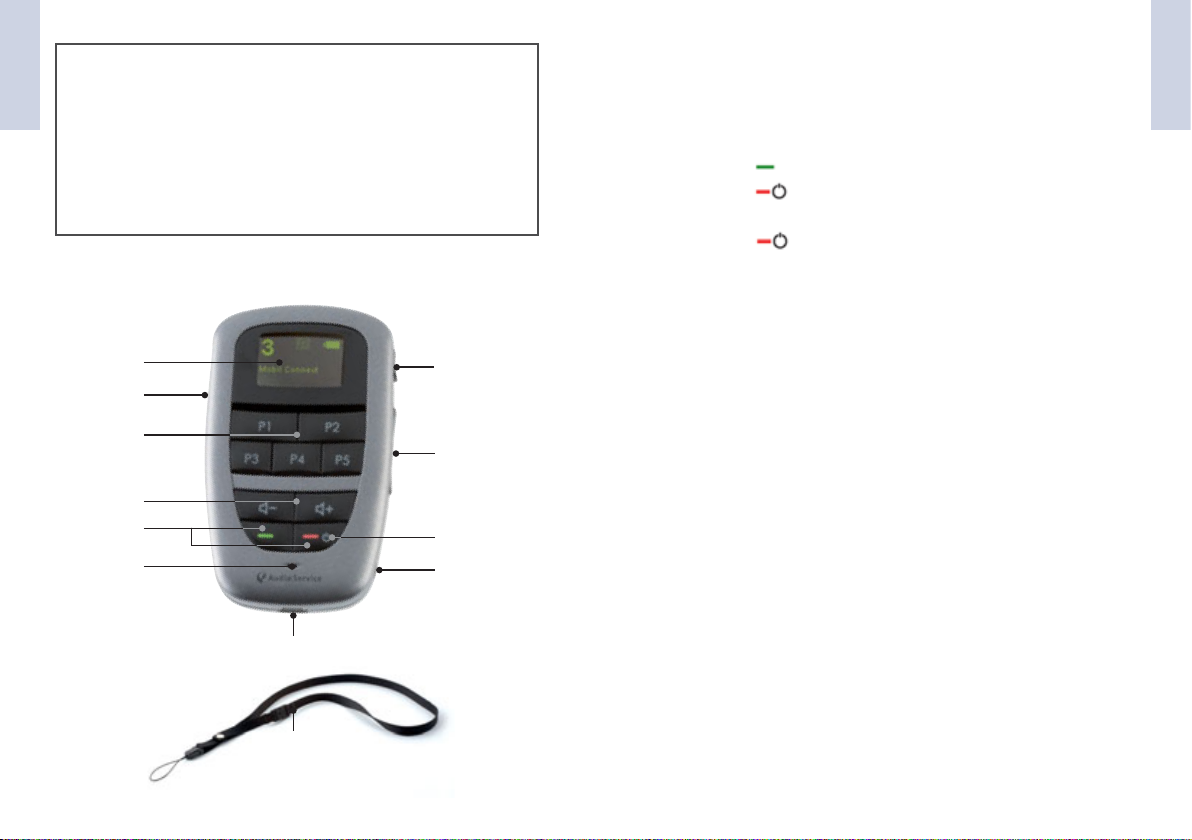
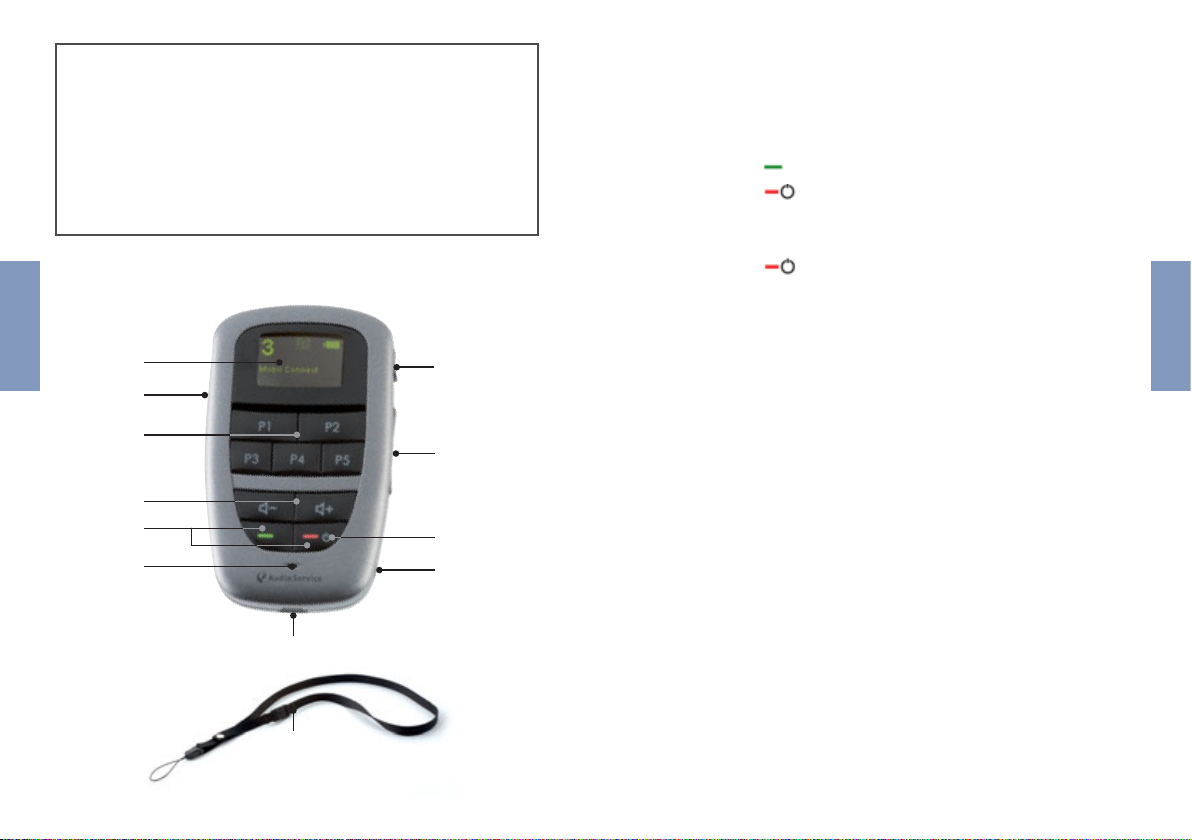
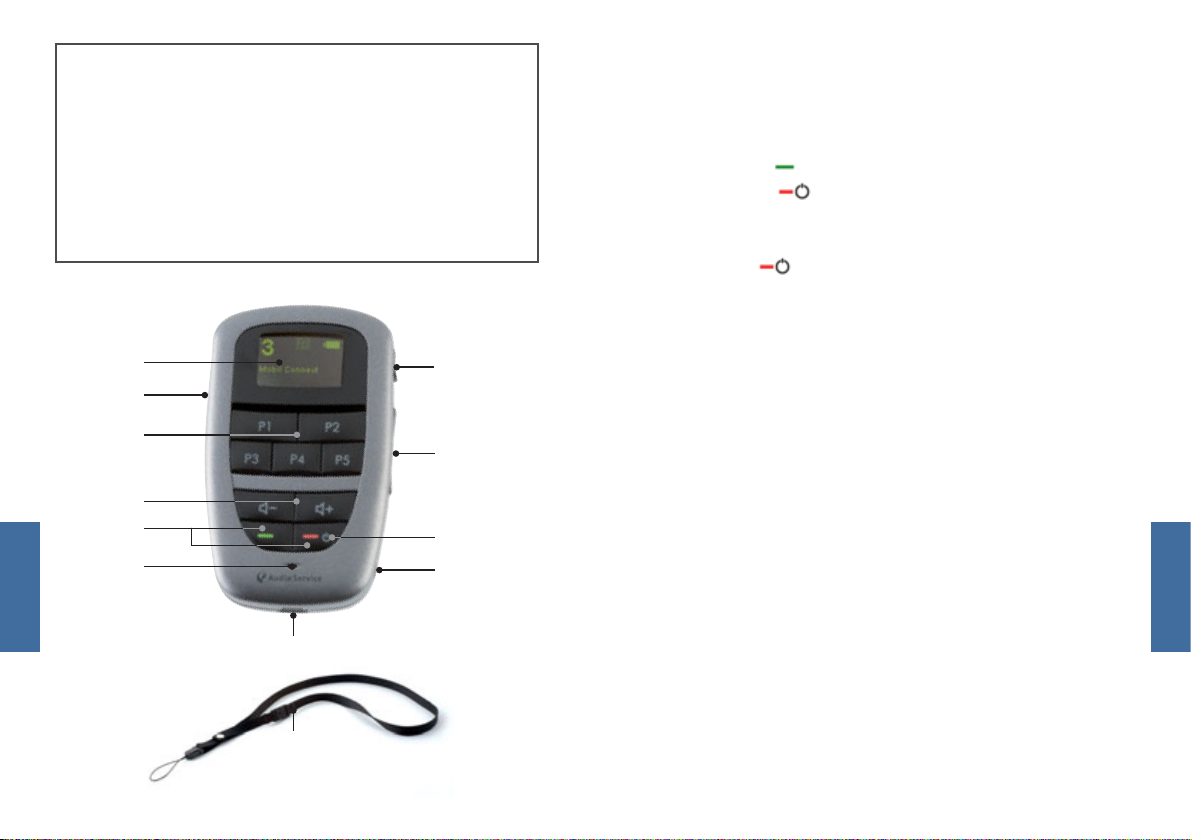
OPERATING ELEMENTS
1
7
2
3
4
6
11
12
8
9
5
10
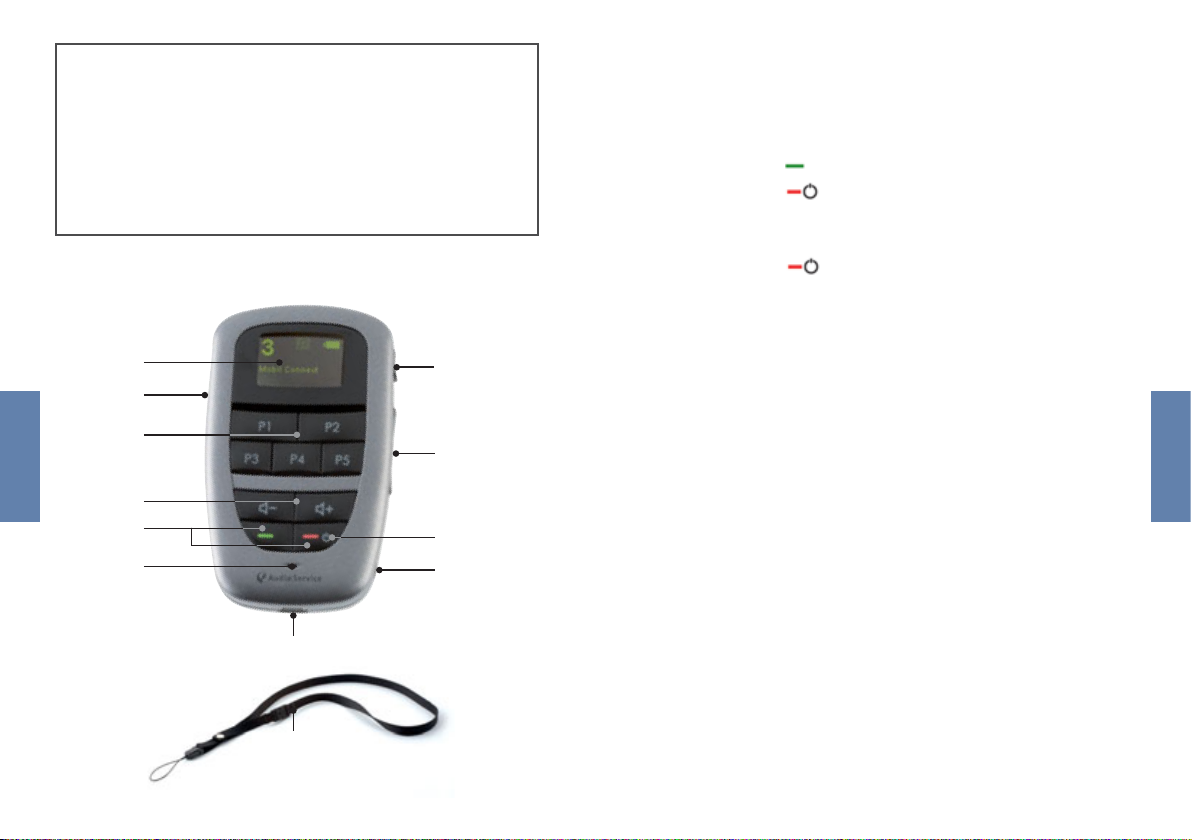
1) Display
2) Programme buttons
3) Volume buttons
4) Buttons for phone operation
• Press to accept a phone call.
• Press to end or reject a phone call.
5) On/off switch
• Press for around 5 seconds to switch the
Mobile-Connect remote control on/off.
6) Microphone opening
7) Keylock
8) a) Readout mode
• Shortly press the button
b) Hearing systems on/off
• Hold down the readout button for longer than
5 seconds to switch your hearing systems off.
• Press a programme button to switch the hearing
systems on again.
9) Buttons for treble control
• It is not possible to activate the treble control for
Bizz 1 hearing systems.
10) 2.5 mm stereo socket
11) Socket for charger lead
• Connect the remote control to a socket with the
mains plug.
12) Strap with safety catch
English
32
Page 3
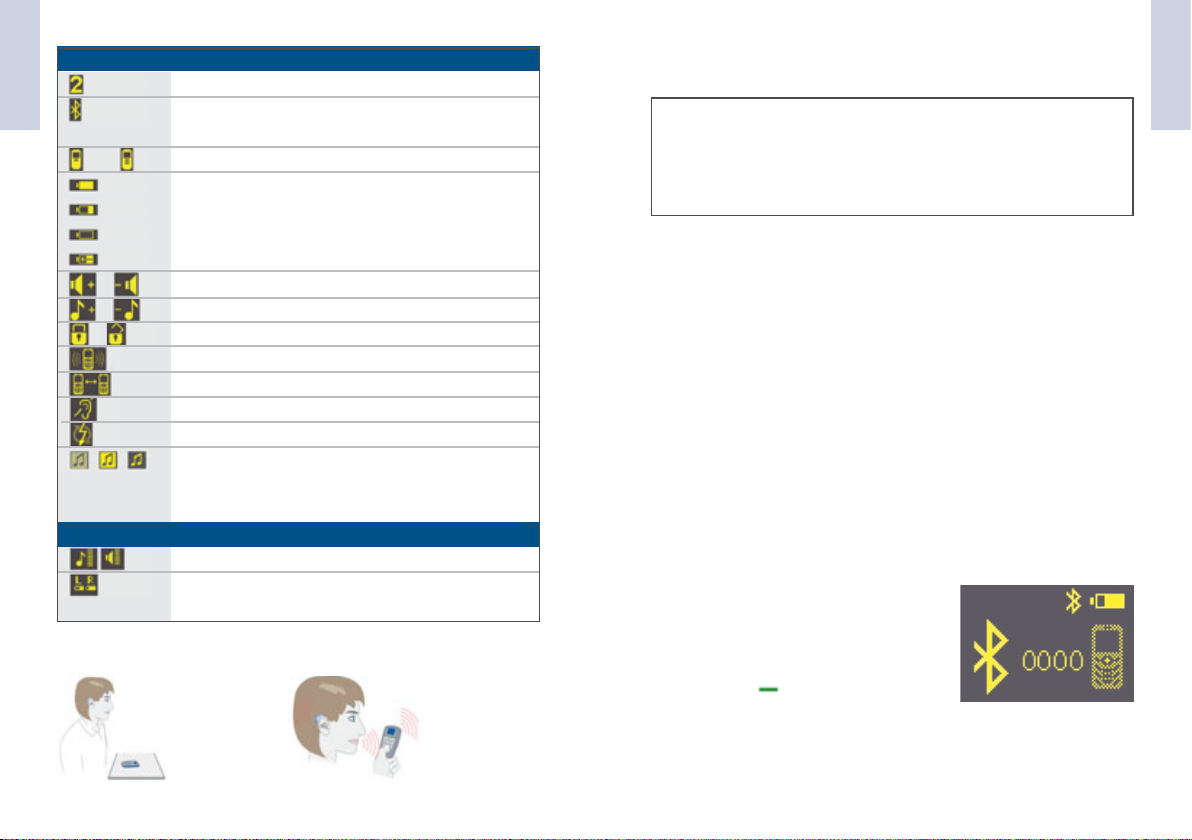
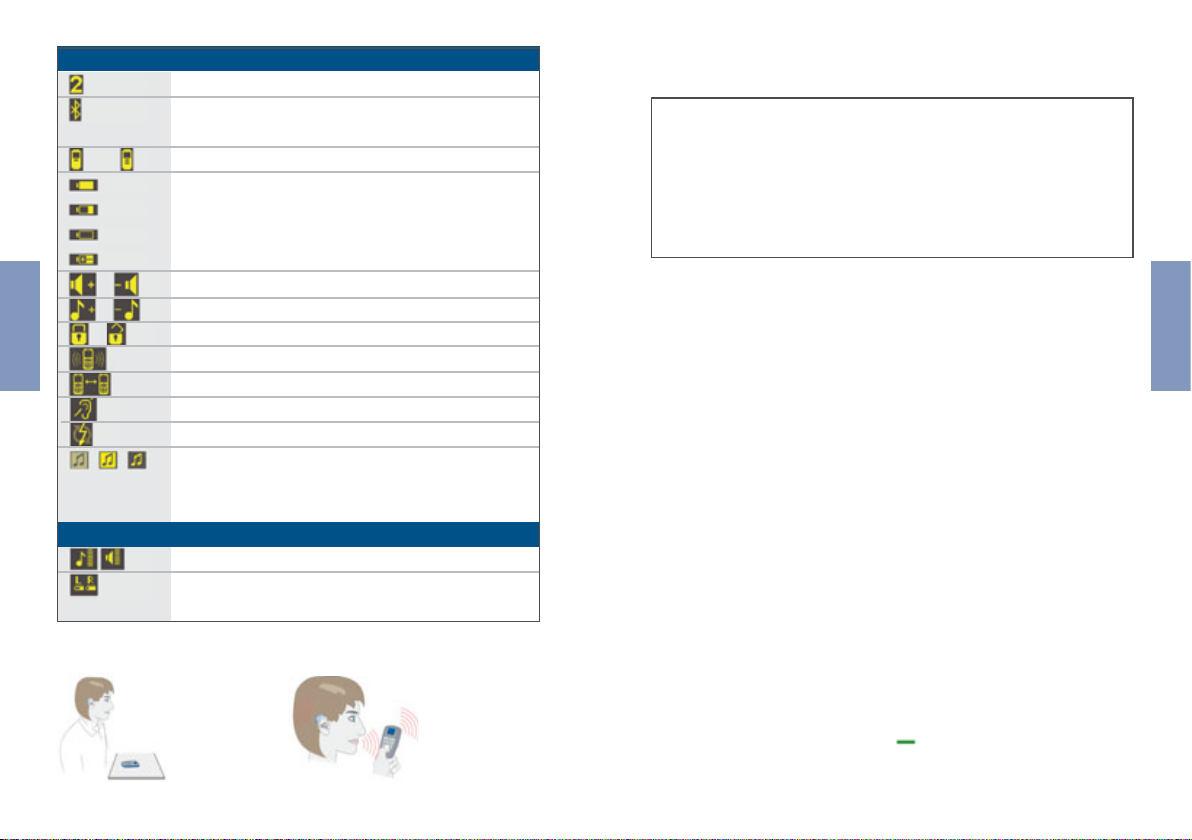
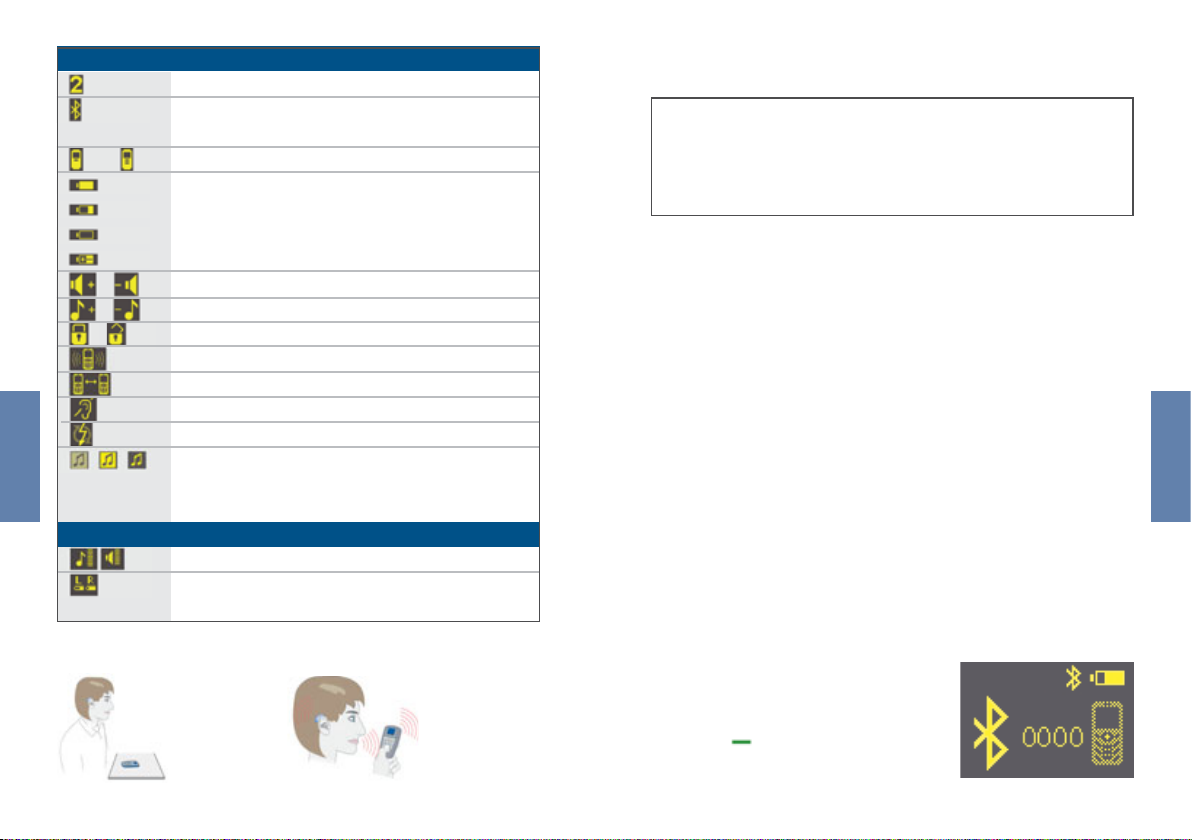
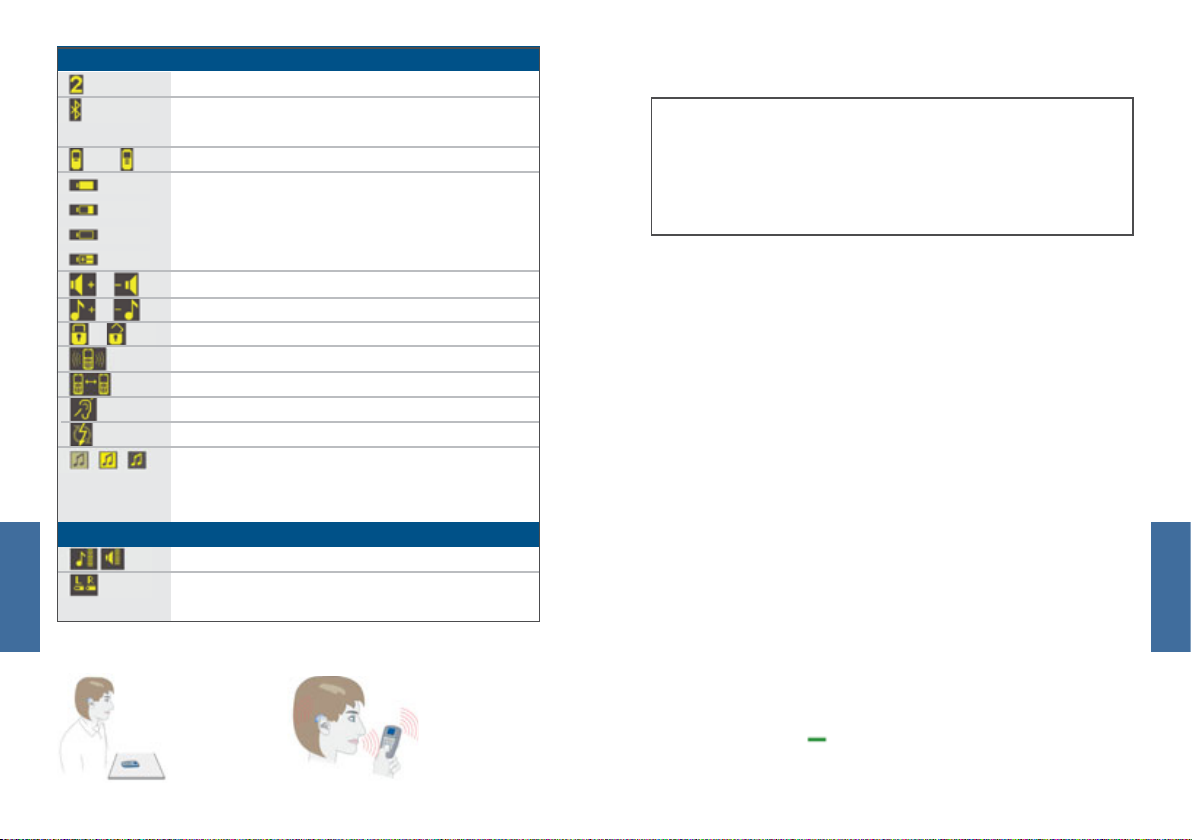
SYMBOLS
English
full
Number of active programme
Remote control is connected to phone,
but is not activated
Bluetooth connection to phone is active
Remote control battery status full
PHONE CALLS
English
Before you use the remote control for the first time for
making a phone call, you must:
• Activate the Bluetooth function on your phone.
• Link phone and remote control (“pairing”).
empty
charging
/
/
/
//
READOUT SYMBOLS
HOW TO HOLD/POSITION OF THE REMOTE CONTROL
Volume up/down
Treble up/down
Keylock is activated/deactivated
Incoming call
Active call
Hearing systems are switched off
Error
Search for Bluetooth audio signal/
Bluetooth audio signal active/
direct audio signal active
Sound and volume control for the hearing systems
Rechargeable battery/normal battery status of
left and right hearing system
When watching
television:
When telephoning:
PAIRING
FIND AND ACTIVATE BLUETOOTH SETTINGS ON THE PHONE.
1 )
Activate the Bluetooth function on your phone (please consult your phone‘s user manual to find out where to locate
this function). A Bluetooth symbol should then be visible on
your phone‘s display when this function is activated.
2 ) SEARCH FOR “DEVICE DETECTION” ON THE PHONE.
Search for the “Device detection” menu item on your phone.
On some phones the menu name may differ slightly. Please
read point 3) first before you activate device detection on
your phone.
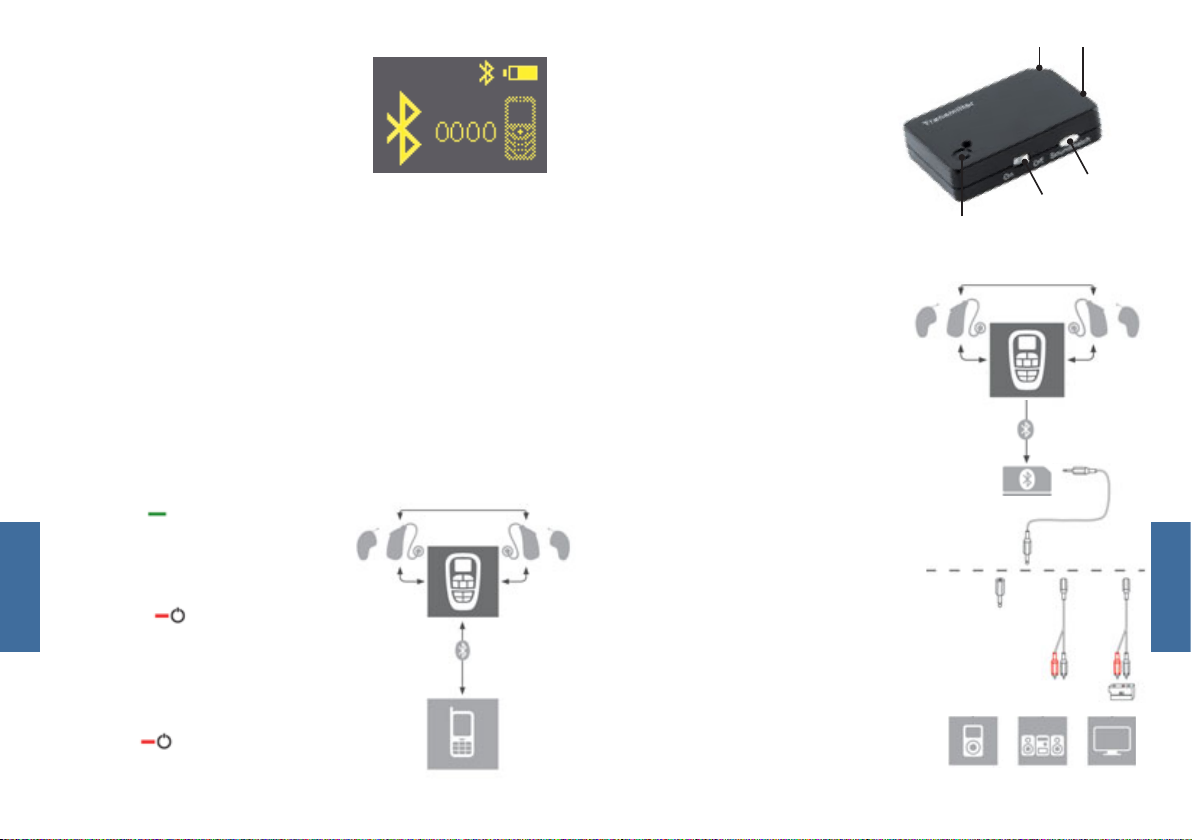
3 ) ACTIVATE THE MOBILE-CONNECT
CONNECTION MODE.
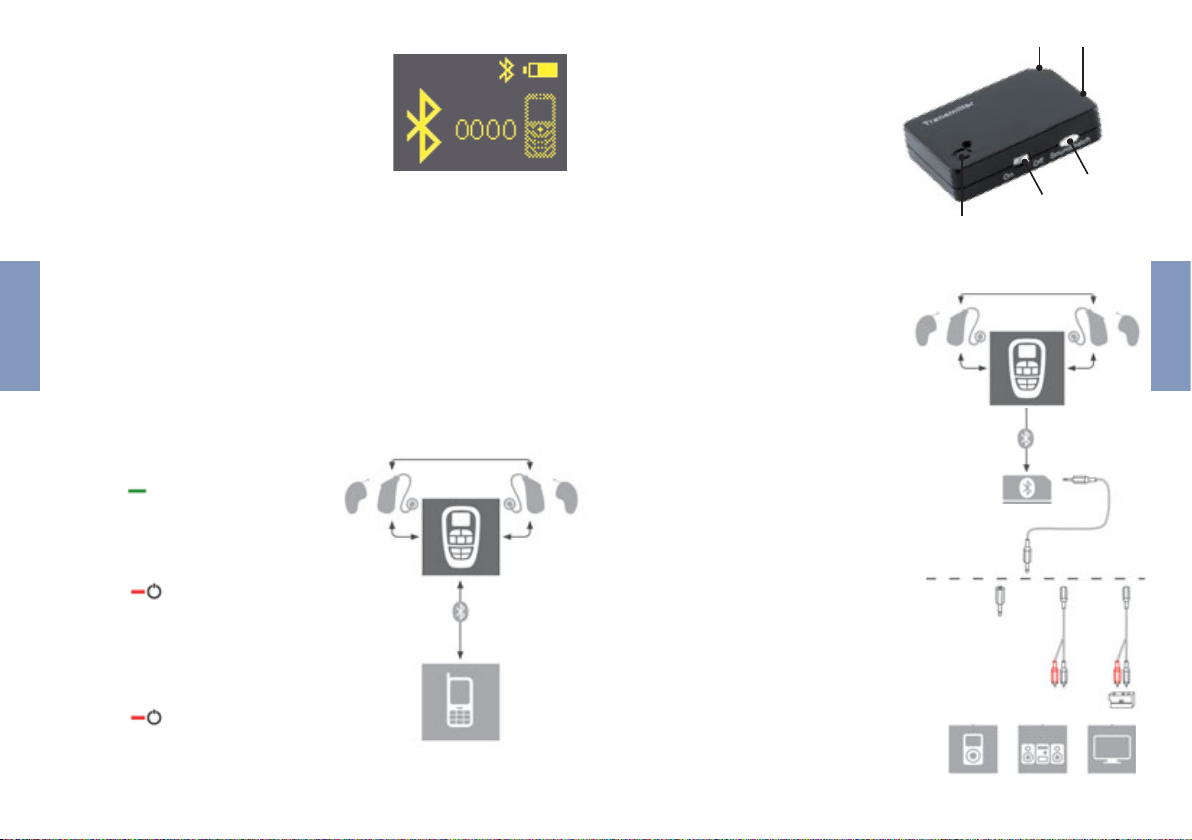
To activate the connection mode
of Mobile-Connect, press and hold
the button on your remote control for around 7 seconds.
The remote control changes to pairing mode. You now have
2 minutes to complete the pairing process on your phone.
54
Page 4
4 ) ACTIVATE THE SEARCH FUNCTION ON YOUR PHONE.
English
Your phone should find a device with the name “RCU Connect”.
This is your remote control.
Select “RCU Connect” to pair the phone and the remote
control. Your phone now asks you for a PIN.
Enter “0000” as the PIN.
(If your phone requires it, confirm the connection as “secure”
+ “always connect automatically” on the phone.)
If the pairing fails, please repeat the previous steps again
from point 3.
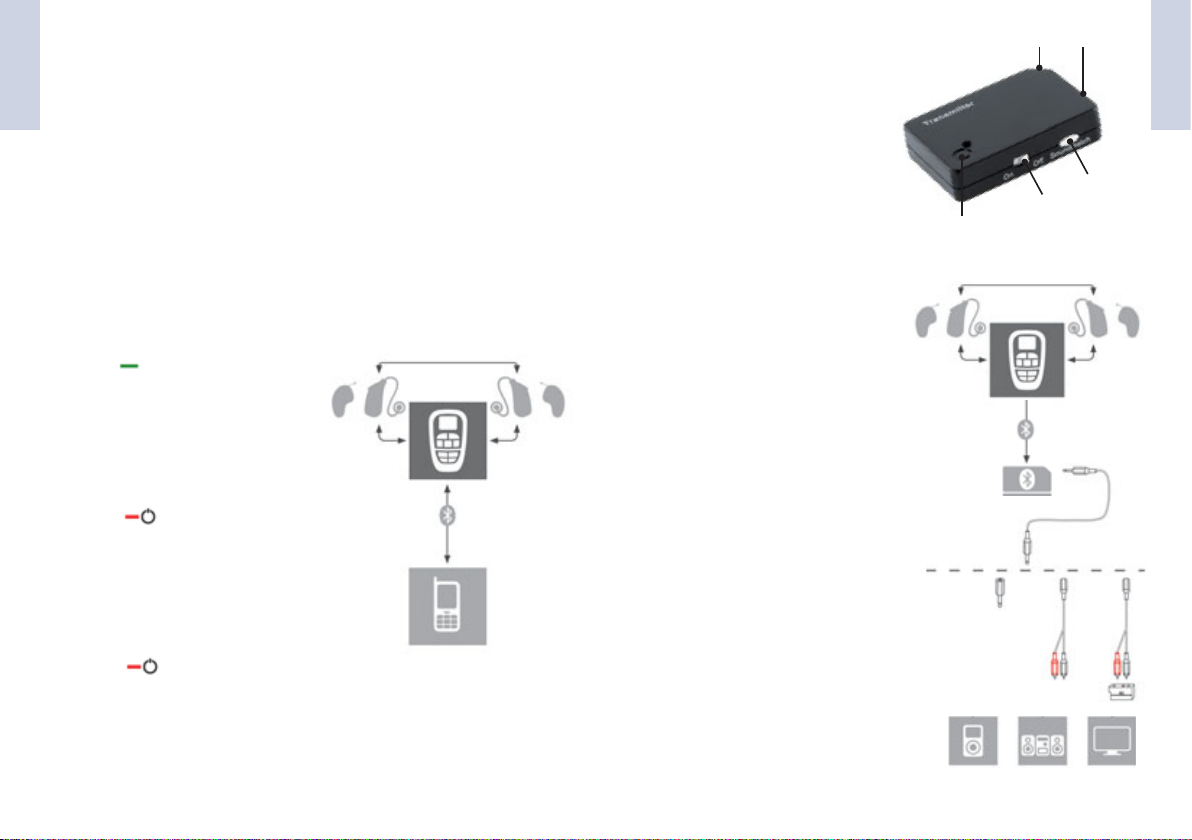
PHONE CALLS
• Press on the remote control
to accept a phone call.
• Speak into the microphone on
the remote control.
43
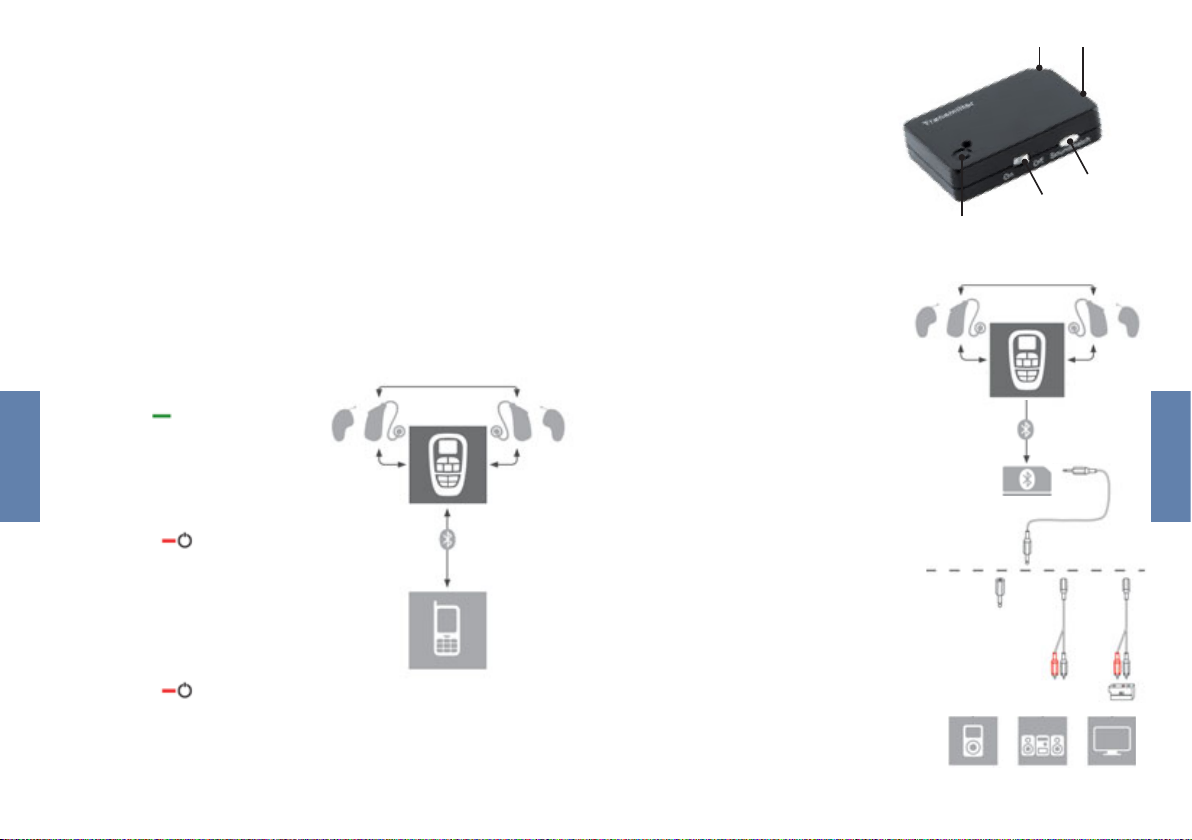
MOBILE-STATION
(TRANSMITTER)
1) On/off switch
2) Volume control
3) Socket for power supply
4) 2.5 mm stereo socket
5) LED
RECEIVING AN AUDIO SIGNAL
FROM AN EXTERNAL DEVICE
• Connect the Mobile-Station
to the required device e. g.
your television.
To do this, use the cables and
adapters supplied.
(See diagram)
2
1
5
English
• Press on the remote con trol to end a phone call.
Your hearing systems change
automatically to the hearing
programme previously used.
• Press on the remote con trol to reject a phone call.
• Change to the Mobile nect programme with the
remote control. A perma nently lit blue LED confirms
that the Bluetooth audio
connection is established.
You can now receive the
sound from your external
device with your hearing
systems.
Con-
76
Page 5
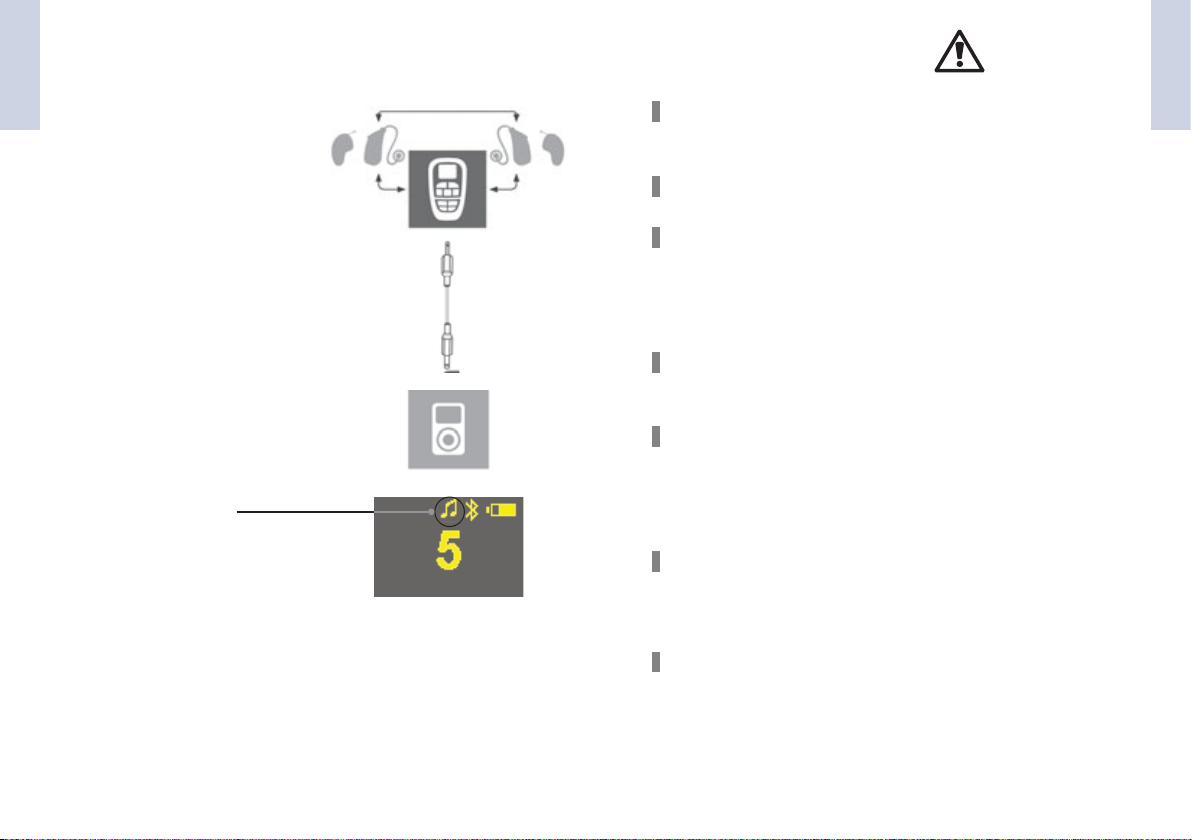
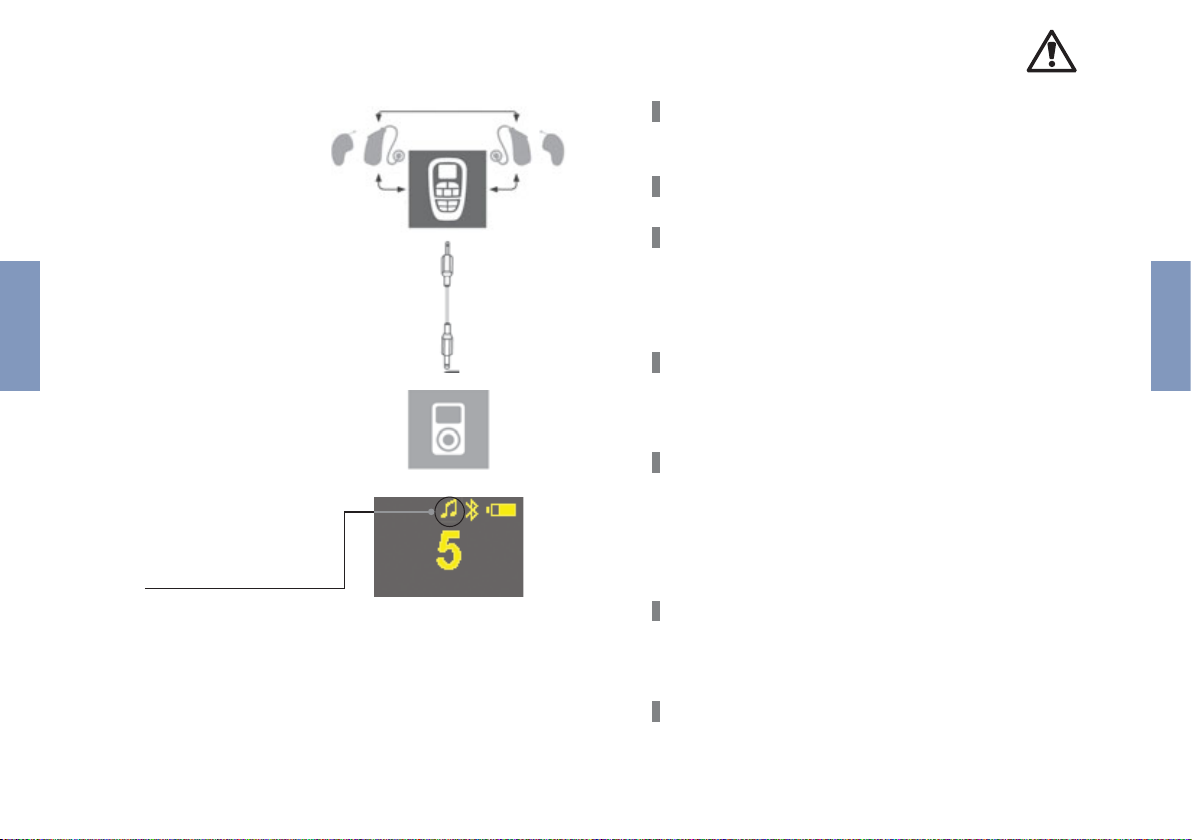
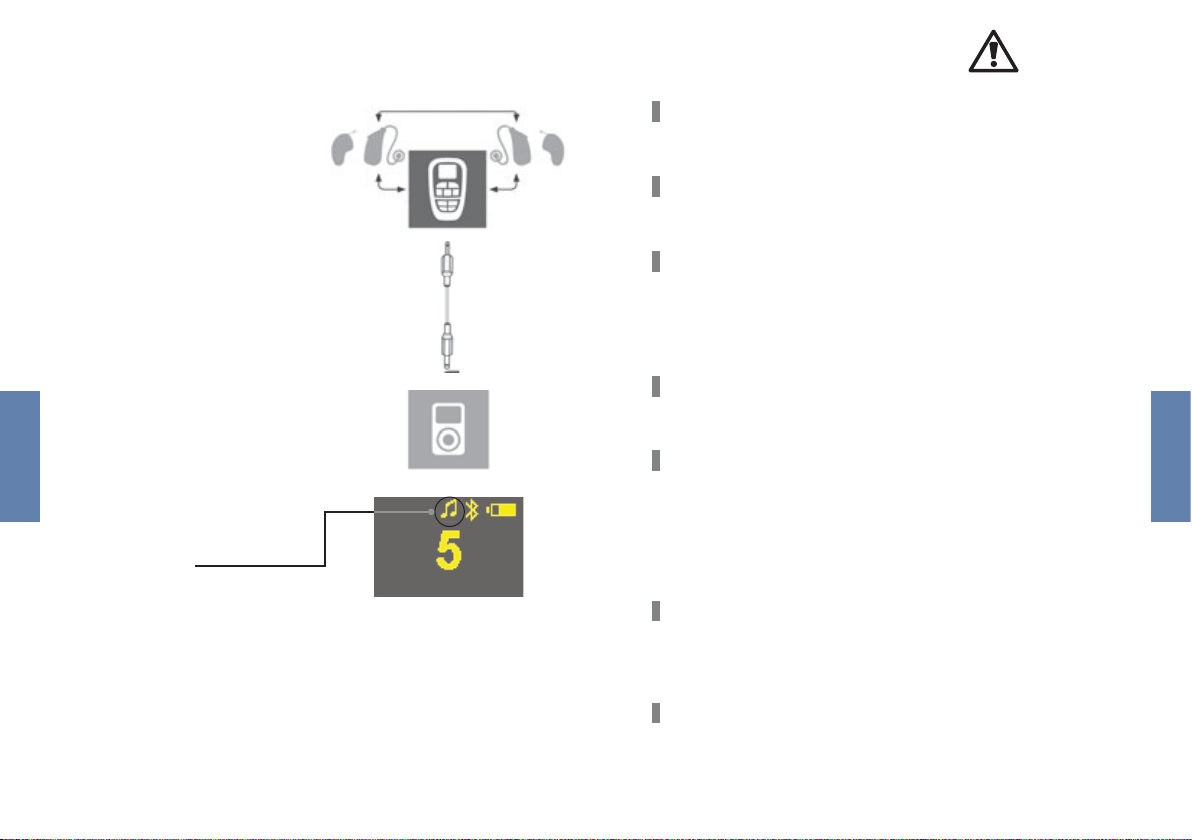
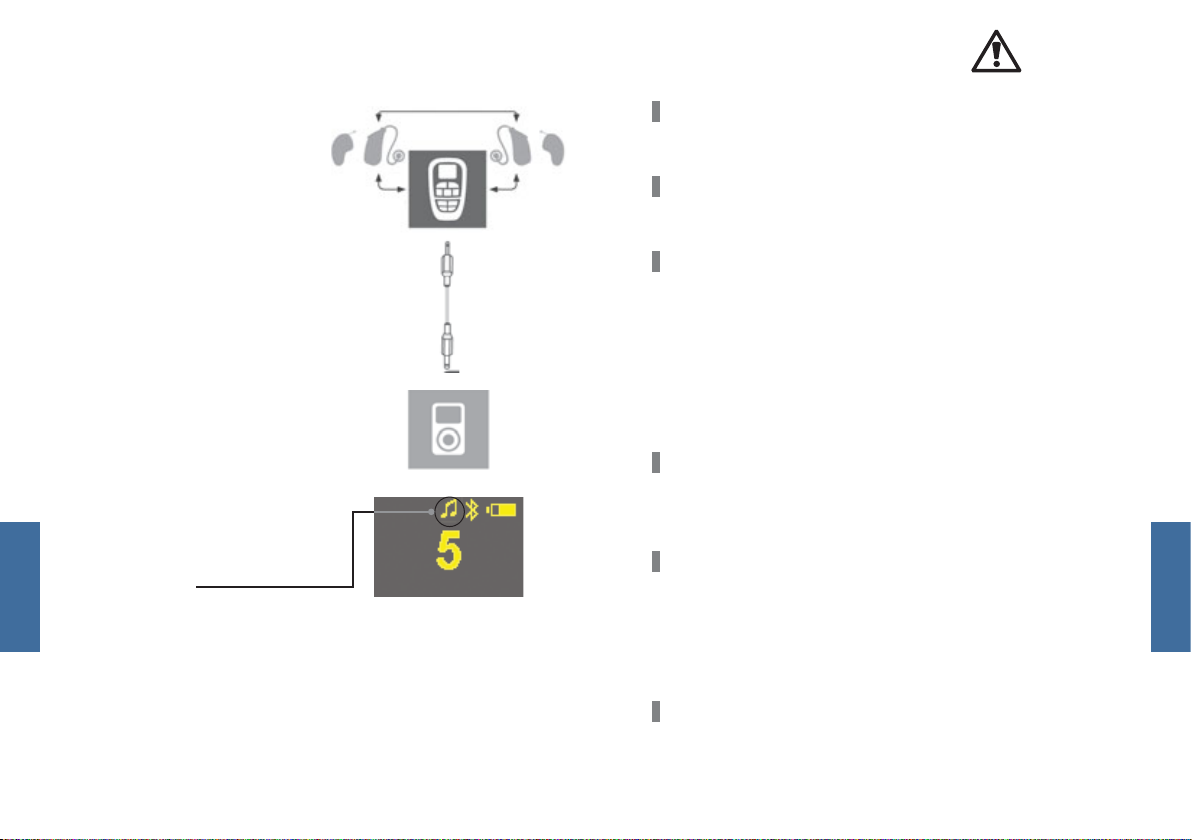
USING THE DIRECT AUDIO INPUT
English
If you want to listen to music
with an MP3 player or other
external device, you can use
your hearing systems as a
wireless headset.
• Connect the remote con trol to an external device
e. g. your MP3 player. To do
this, use the cables and
adapters supplied.
• Change to the audio pro gramme with the remote
control. The remote control
displays the symbol for a
direct audio signal.
You can now receive the
sound from your MP3
player with your hearing
systems.
GENERAL SAFETY INSTRUCTIONS
English
Wireless devices can cause disruptions to measuring
instruments and electronic devices.
Switch off the remote control in hospitals or on planes.
Before using the remote control with an electronic implant
or life-support system, have the electromagnetic compatibility tested. Do not use the remote control if you have a
pacemaker.
Your remote control is sensitive to extreme heat, high humidity, strong magnetic fields, X-rays and mechanical stress.
Store hearing systems, rechargeable batteries and other
accessories well out of reach of babies and small children
as there is a danger of swallowing and suffocation. Consult
a doctor or hospital immediately if something is swallowed.
Do not expose your remote control to extreme temperatures or high humidity, do not leave it lying in strong sunlight and do not immerse it in water.
The wireless functionality may be impaired by an electromagnetic source (e. g. computer monitor) in the near vicinity.
Remain a suitable distance away from such sources of
interference.
98
Page 6

If your hearing system can be controlled by another person‘s
English
remote control, please take your remote control to your
hearing system specialist.
Do not use the remote control in places where there is a risk
of explosion (e. g. mines).
Danger of strangulation if the strap gets caught e. g. in
moving parts of machines. Therefore, please use the remote
control exclusively with the safety strap (the safety catch
should release if the strap gets caught).
Some countries impose restrictions on the use of radio
transmission devices. More information can be obtained
from the responsible local authorities.
SAFETY INSTRUCTIONS FOR
RECHARGEABLE BATTERIES
Danger of explosion if the rechargeable battery is not handled
correctly:
Do not short-circuit the rechargeable battery.
Do not immerse the rechargeable battery in water.
English
Charge the rechargeable battery at an ambient temperature of 0 °C to 45 °C.
Remove the rechargeable battery from the device if you are
not going to use it for a long time.
CLEANING AND CARE
• Clean the remote control with a soft cloth.
• Do not use any abrasive cleaning fluids with aggressive
additives such as citric acid or ammonia.
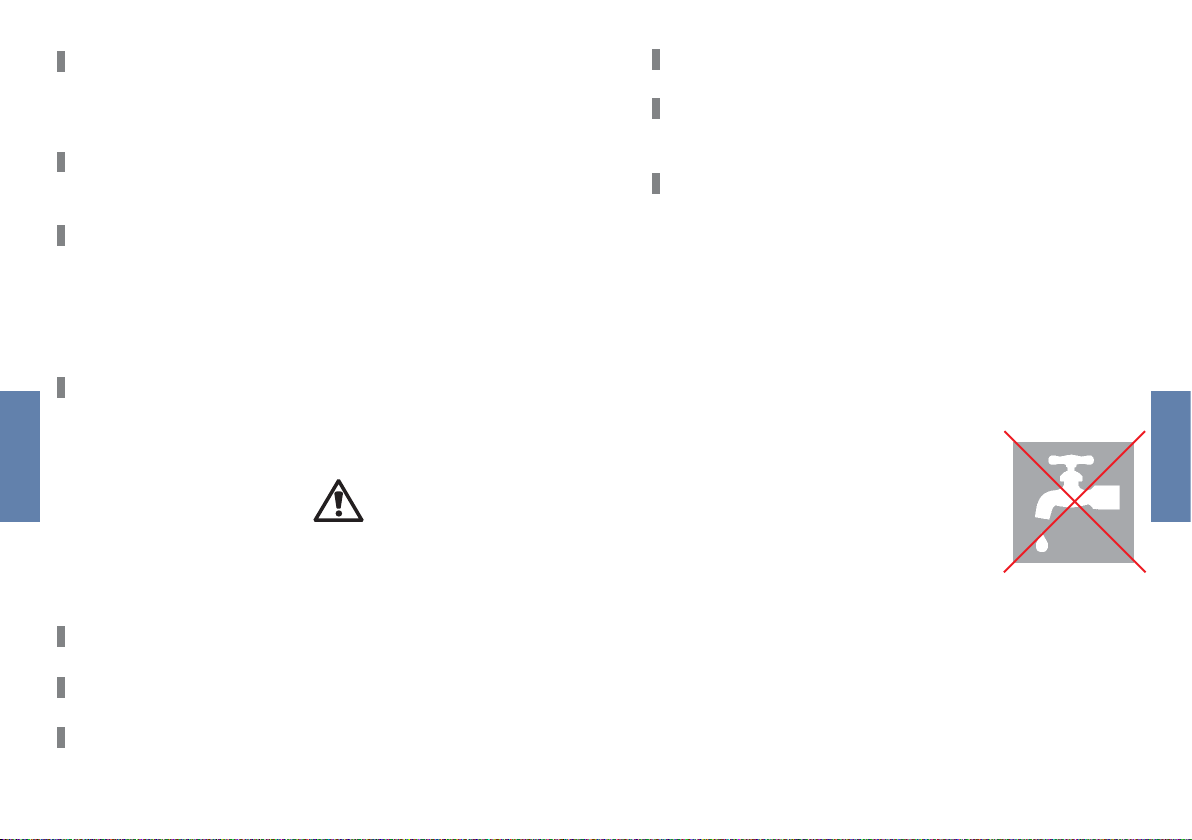
NB
Do not immerse the remote control in
water. Do not clean your remote control
with alcohol or benzine.
Do not pierce, deform or open the rechargeable battery.
Do not place the rechargeable battery in the oven or on an
open fire.
1110
Page 7
TECHNICAL DATA
1. OPERATING CONDITIONS
Ambient temperature for charging: 0°C…+45°C
Ambient temperature for operation: -10°C…+50°C
2. POWER PACK; MODEL UE 10W-050080 SPC
Input voltage 100 – 240 VAC
Input frequency 50 – 60 Hz
Power consumption 150 mA
Output voltage 5.0 VDC
Charge current 800 mA
3. MOBILE-CONNECT
Input voltage 5 V
Charge current 500 mA
Charging time 4 h
Transmitting power 5 mW
Transmission frequency 3.28 MHz and Bluetooth
Operation period 6 h
RECHARGEABLE BATTERY – LI-ION RECHARGEABLE BATTERY
Operating voltage 3.7 V
Capacity 1000 mAh
DISPOSAL INSTRUCTIONS
Within the European Union, the accessories listed correspond
to the European Parliament and Council Directive 2002/96/EC
of 27 January 2003 on waste electrical and electronic equip-
ment.
Later modified by Directive 2003/108/EC (WEEE.)
Do not dispose of rechargeable batteries in
household waste! When they wear out, please return your rechargeable batteries to your hearing
system specialist for disposal. Please send the
Mobile Connect Set back to the manufacturer for
disposal (address see back page).
With the CE mark, Audio Service confirms compliance with European Directive 93/42/EEC on medical
devices.
4. MOBILE-STATION
Input voltage 5.0 V
Bluetooth transmission Bluetooth
Operation period 5 h
1312
Page 8
Dans ce guide, vous trouverez une présentation des
fonctions de base du kit de connexion mobile.
Dans les cas où vous dépendez des signaux sonores (par
exemple, circulation routière, machines en fonctionnement, etc.), les systèmes d’écoute ne doivent pas être
réglés exclusivement sur la transmission audio sur réseau
(=mode Bluetooth), c’est à dire qu’ils ne doivent pas être
Français
utilisés en tant que casque sans fil.
ÉLÉMENTS DE FONCTIONNEMENT
1
7
2
3
4
6
11
12
8
9
5
10
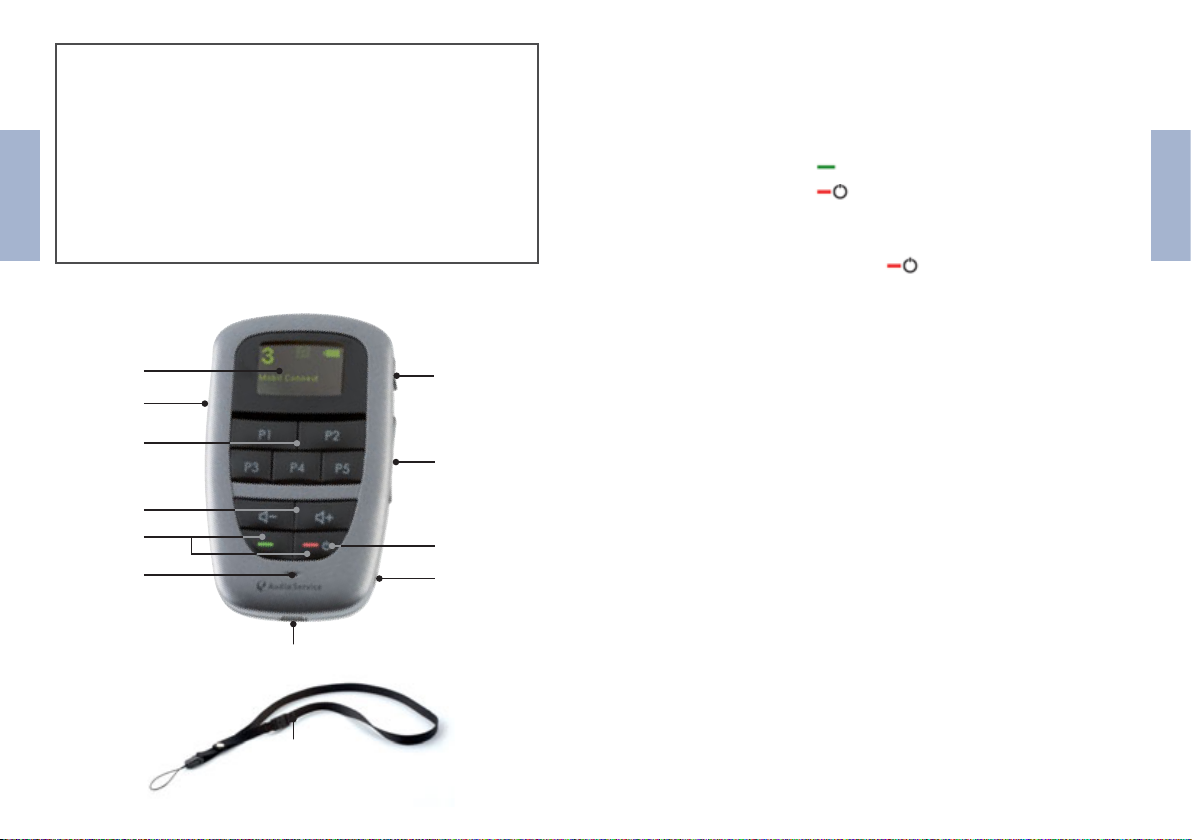
1) Écran
2) Boutons des programmes
3) Boutons de réglage du volume
4) Boutons de fonctionnement du téléphone
• Appuyez sur < > pour prendre un appel.
• Appuyez sur < > pour mettre fin à un appel ou
le rejeter.
5) Commutateur On/Off
• Maintenez le bouton < > pendant environ 5
secondes pour activer/désactiver la commande à
distance de connexion mobile.
6) Orifice du microphone
7) Verrou
8) a) Mode d’affichage
• Appuyez brièvement sur le bouton
b) Systèmes d’écoute on/off
• Maintenez le bouton d’affichage pendant plus de
5 secondes pour désactiver votre système d’écoute.
• Appuyez sur un bouton de programme pour
réactiver la commande à distance.
9) Boutons de contrôle des aigus.
• Il est impossible d’activer le contrôle des aigus pour les
systèmes d’écoute Bizz 1.
10) Prise stéréo 2,5 mm
11) Emplacement du fil du chargeur
• Connectez la commande à distance à une prise avec
connecteur secteur.
12) Dragonne avec fermeture de sécurité
Français
1514
Page 9
SYMBOLES
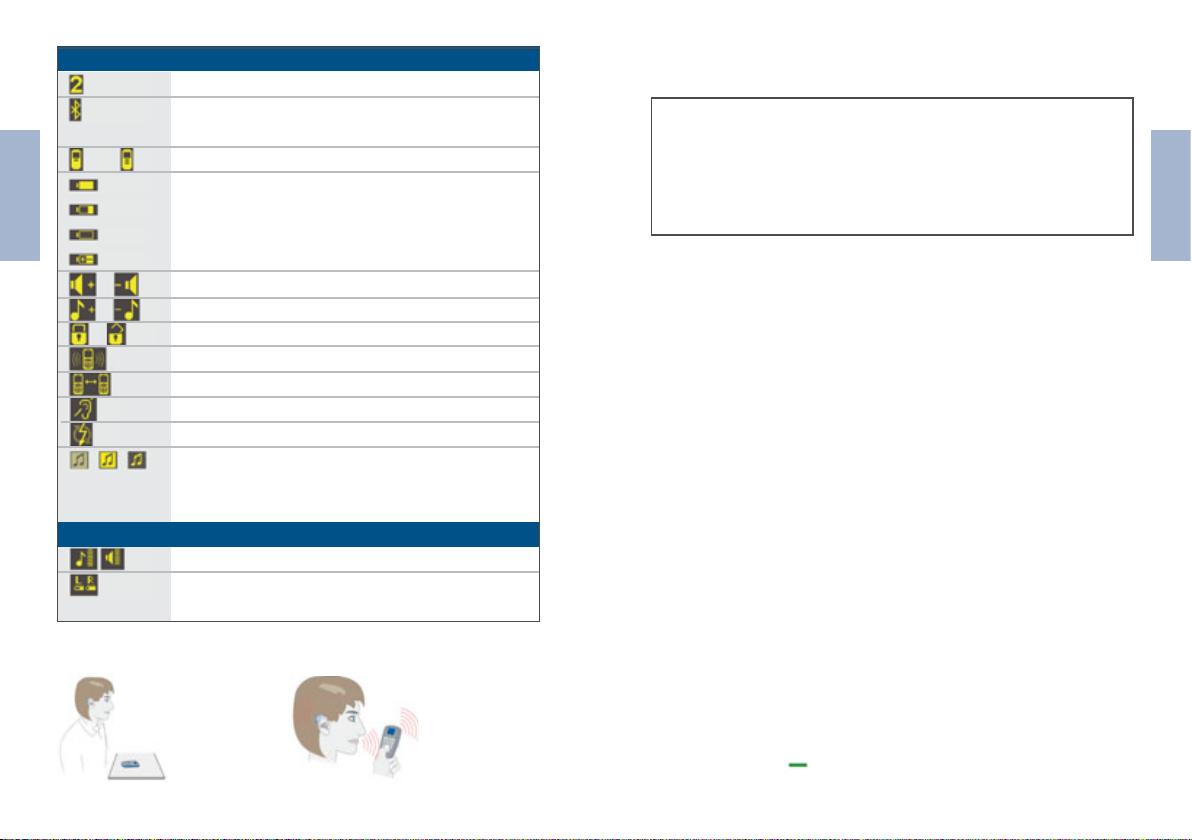
Numéro du programme actif
La commande à distance est connectée
au téléphone, mais n’est pas activée
La connexion Bluetooth au téléphone est active
Pleine
Français
Vide
En charge
/
/
/
//
SYMBOLES D’AFFICHAGE
COMMENT TENIR/POSITIONNER LA COMMANDE À DISTANCE
Pile de la commande à distance pleine
Augmentation/réduction du volume
Augmentation/réduction des aigus
Le verrou est activé/désactivé
Appel entrant
Appel actif
Les systèmes d’écoute sont désactivés
Erreur
Recherche du signal audio Bluetooth/
Signal audio Bluetooth actif/
Signal audio direct actif
Commande du son et du volume des systèmes d’écoute
État de la pile rechargeable/standard des
systèmes d’écoute gauche et droit
Lorsque vous regardez la télévision :
Lorsque vous
téléphonez :
APPELS TÉLÉPHONIQUES
Avant d’utiliser pour la première fois la commande à
distance pour passer un appel, vous devez :
• Activer la fonction Bluetooth de votre téléphone.
• Raccorder le téléphone et la commande à distance
(« appariement »).
APPARIEMENT
1 ) REPÉREZ ET ACTIVEZ LES PARAMÈTRES BLUETOOTH DU
TÉLÉPHONE.
Activez la fonction Bluetooth de votre téléphone (veuillez
consulter le manuel de l’utilisateur du téléphone pour savoir
comment localiser cette fonction). Un symbole Bluetooth
doit apparaître sur l’écran de votre téléphone lorsque cette
fonction est activée.
2 ) RECHERCHEZ LA FONCTION DEVICE DETECTION
(DÉTECTION DU PÉRIPHÉRIQUE) SUR LE TÉLÉPHONE.
Recherchez l’option Device detection (Détection du périphérique) sur votre téléphone. Sur certains téléphones, le nom
du menu peut varier légèrement. Veuillez commencer par
lire le point 3) avant d’activer la détection de périphérique
sur votre téléphone.
3 ) ACTIVEZ LE MODE DE CONNEXION MOBILE-CONNECT
(CONNEXION MOBILE).
Pour activer le mode de connexion Mobile-Connect, appuyez
sur le bouton de votre commande à distance et maintenez-le enfoncé pendant environ 7 secondes.
Français
1716
Page 10
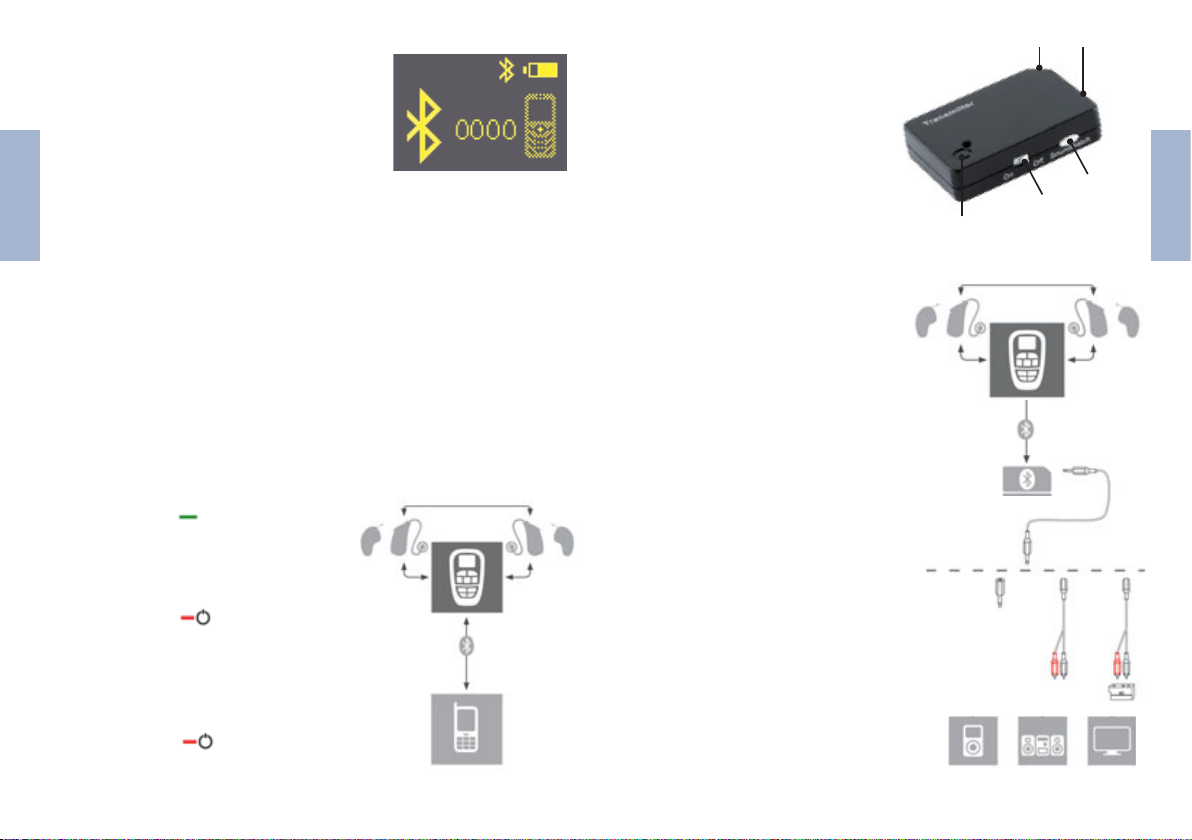
La commande à distance passe en mode
d’appariement. Vous disposez maintenant de 2 minutes pour terminer le
processus d’appariement de votre téléphone.
ACTIVEZ LA FONCTION DE RECHERCHE DE VOTRE TÉLÉPHONE.
4)
Français
Votre téléphone doit repérer un périphérique portant le nom
RCK Connect. Il s’agit de votre commande à distance.
Sélectionnez RCK Connect pour associer le téléphone et la
commande à distance. Votre téléphone vous demande maintenant un code PIN.
(Le cas échéant, confirmez la connexion comme étant « secure »
(sûre) + « always connect automatically » (toujours connecter
automatiquement) sur le téléphone.) En cas d’échec de l’appariement, répétez les étapes précédentes à partir du point 3.
APPELS TÉLÉPHONIQUES
• Appuyez sur < > sur la commande à
distance pour prendre un appel.
• Parlez dans le microphone dela com mande à distance.
• Appuyez sur < > sur la commande
à distance pour mettre fin aux appels.
Vos systèmes d’écoute passent
matiquement au programme
précédemment.
• Appuyez sur < > sur la commande
à distance pour rejeter un appel.
Saisissez 0000 en tant que code PIN.
auto-
utilisé
43
STATION MOBILE
(TRANSMETTEUR)
1) Commutateur On/Off
2) Commande du volume
3) Connecteur d’alimentation
électrique
4) Prise stéréo 2,5 mm
5) Voyant
RÉCEPTION D’UN SIGNAL
AUDIO À PARTIR D’UN
PÉRIPHÉRIQUE EXTERNE
• Connectez la station mobile
au périphérique voulu, par
exemple votre télévision.
Pour ce faire, utilisez les
câbles et adaptateurs fournis
(Voir le diagramme).
Activez le programme Mobile-
•
Connect à l’aide de la com-
mande à distance. Un voyant
bleu allumé en continu con firme que la connexion audio
Bluetooth est établie. Vous
pouvez maintenant profiter
du son de votre périphérique
externe sur vos systèmes
d’écoute.
5
2
1
Français
1918
Page 11
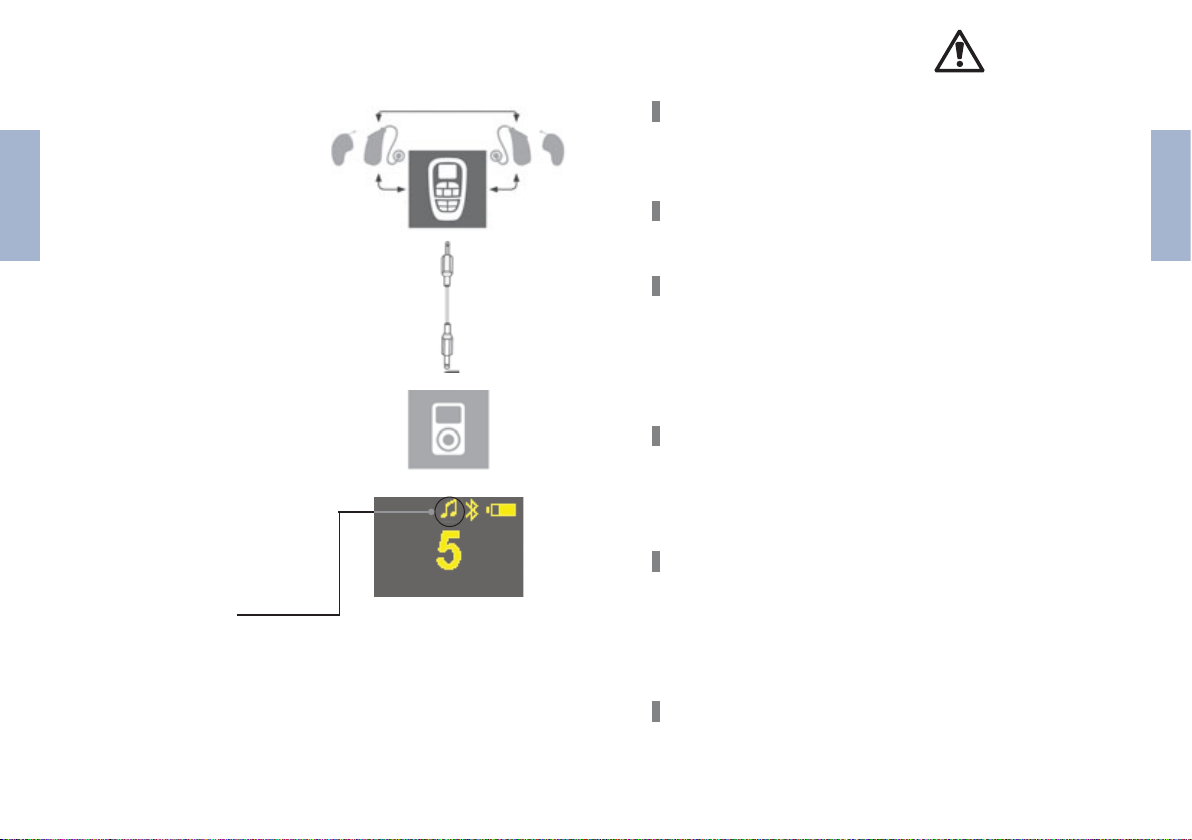
UTILISATION DE L’ENTRÉE AUDIO DIRECTE
GENERAL SAFETY INSTRUCTIONS
Si vous souhaitez écouter de
la musique avec un lecteur
MP3 ou un autre périphérique
externe, vous pouvez utiliser
vos systèmes d’écoute en tant
Français
que casque sans fil.
• Connectez la commande à
distance à un périphérique
externe, par exemple à
votre lecteur MP3.
Pour ce faire, utilisez les
câbles et adaptateurs four nis.
• Activez le programme
audio à l’aide de la com mande à distance. La com mande à distance affiche
le symbole indiquant un
signal audio direct.
Vous pouvez maintenant
profiter du son de votre
lecteur MP3 sur vos sys tèmes d’écoute.
Les périphériques sans fil peuvent causer des interférences
au niveau des instruments de mesure et des périphériques
électroniques.
Arrêtez la commande à distance dans les hôpitaux ou à
bord des avions.
Avant d’utiliser la commande à distance avec un implant
électronique ou tout dispositif de maintien artificiel des fonctions vitales, faites tester la compatibilité électromagnétique.
N’utilisez pas la commande à distance si vous portez un
pacemaker.
Votre commande à distance est sensible aux températures
extrêmes, aux taux d’humidité élevés, aux champs magnétiques puissants, aux rayons X et aux contraintes mécaniques.
En raison du risque d’ingestion et de suffocation, rangez les
systèmes d’écoute, les piles rechargeables et les autres
accessoires hors de portée des nourrissons et enfants en
bas âge. En cas d’absorption, consultez immédiatement un
médecin ou un hôpital.
N’exposez pas votre commande à distance à des températures extrêmes ou à un fort taux d’humidité. Ne la laissez
pas en plein soleil et ne l’immergez pas.
Français
2120
Page 12
La fonction sans fil peut être gênée par la présence proche
d’une source électromagnétique (par exemple, un écran
d’ordinateur). Maintenez une distance suffisante par rapport à ce type de sources d’interférences.
Ne court-circuitez pas la pile rechargeable.
Vous ne devez ni percer, ni déformer, ni ouvrir la pile
rechargeable.
Si votre système d’écoute répond à la commande à distance
d’une tierce personne, apportez votre commande à distance
Français
à votre spécialiste des systèmes d’écoute.
N’utilisez pas la commande à distance dans des lieux soumis à un risque d’explosion (par exemple, mines).
Danger de strangulation si la dragonne se coince, par exemple dans les pièces mobiles des machines. Par conséquent, utilisez exclusivement la commande à distance avec
la dragonne de sécurité (le dispositif de sécurité doit se libérer si la dragonne se coince).
Certains pays imposent des restrictions sur l’utilisation de
périphériques de transmission radio.
Pour plus d’informations, adressez-vous aux autorités locales
compétentes.
INSTRUCTIONS DE SÉCURITÉ RELATIVES
AUX PILES RECHARGEABLES
Danger d’explosion si la pile rechargeable n’est pas manipulée
correctement :
Ne placez pas la pile rechargeable au four ou sur une flamme
nue.
N’immergez pas la pile rechargeable.
Chargez la pile rechargeable à une température ambiante
0 °C à 45 °C.
Retirez la pile rechargeable du périphérique si vous
comptez ne pas l’utiliser pendant une période prolongée.
NETTOYAGE ET ENTRETIEN
• Nettoyez la commande à distance à l’aide d’un chiffon
doux.
• N’utilisez pas de liquides de nettoyage abrasifs contenant
des adjuvants agressifs tels que de l’acide citrique ou de
l’ammoniaque.
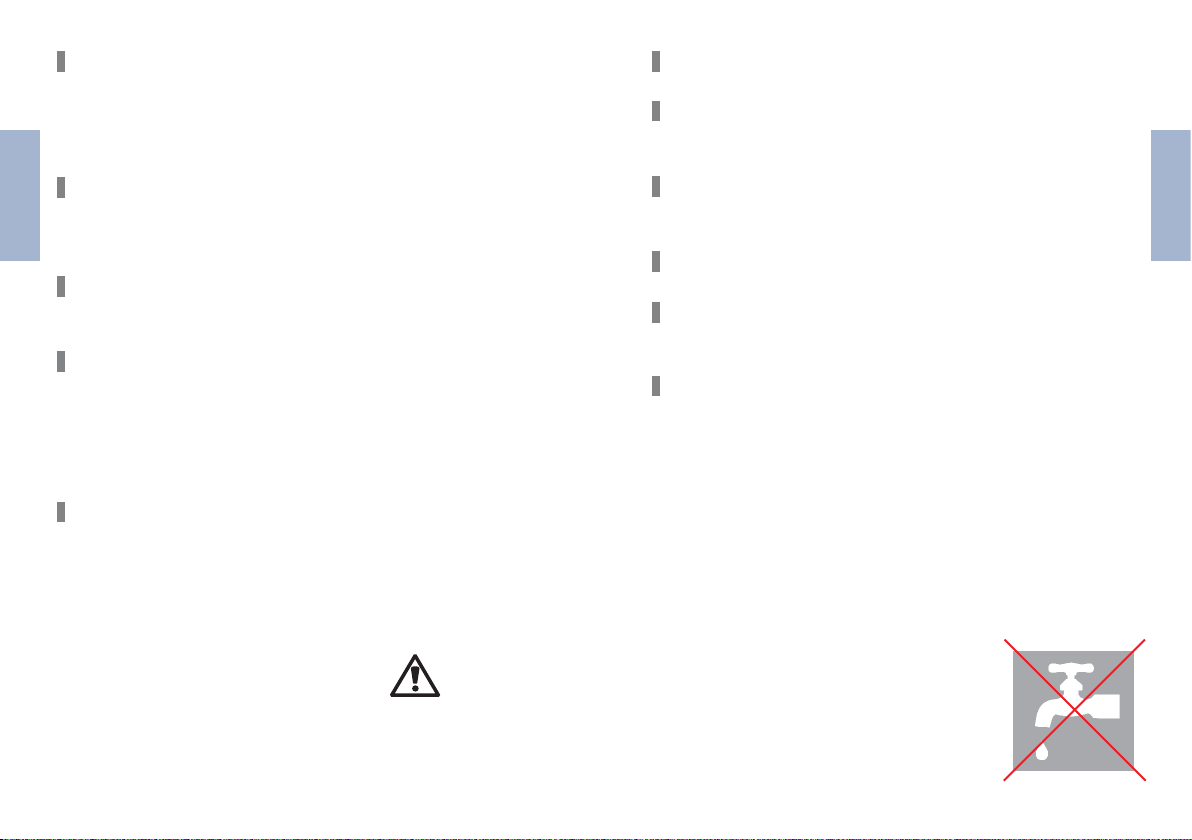
N.B.
N’immergez pas la commande à distance. N’utilisez pas d’alcool ou de benzine pour nettoyer votre commande à
distance.
Français
2322
Page 13
DONNÉES TECHNIQUES
1. CONDITIONS DE FONCTIONNEMENT
Température ambiante de charge : 0°C… +45°C
Température ambiante de fonctionnement : -10°C… +50°C
2. PACK D’ALIMENTATION ; MODÈLE UE 10W-050080 SPC
Français
Tension en entrée 100 – 240 VAC
Fréquence en entrée 50 – 60 Hz
Consommation électrique 150 mA
Tension en sortie 5,0 VDC
Courant de charge 800 mA
3. MOBILE-CONNECT
Tension en entrée 5 V
Courant de charge 500 mA
Temps de charge 4 h
Puissance de transmission 5 mW
Fréquence de transmission 3,28 MHz et Bluetooth
Autonomie 6 h
PILE RECHARGEABLE – PILE AU LITHIUM-ION RECHARGEABLE
Tension de fonctionnement 3,7 V
Capacité 1000 mAh
INSTRUCTIONS POUR L’ÉLIMINATION
Au sein de l’Union européenne, les accessoires répertoriés sont
conformes à la directive du Parlement européen et du conseil
2002/96/CE du 27 janvier 2003 sur les équipements électriques
et électroniques en fin de vie.
Dernière modification par la directive 2003/108/CE (WEEE.)
Ne jetez pas les piles rechargeables dans les ordures
ménagères ! Lorsqu’elles sont usées, retournez vos
piles rechargeables à votre spécialiste des systèmes
d’écoute qui se chargera de leur élimination. Renvoyez le kit de connexion mobile au fabricant en
vue de son élimination (pour connaître l’adresse,
voir au verso).
Par la certification CE, Audio Service confirme la
conformité à la Directive européenne 93/42/CEE
relative aux dispositifs médicaux.
Français
4. STATION MOBILE
Tension en entrée 5,0 V
Transmission Bluetooth Bluetooth
Autonomie 5 h
2524
Page 14
Esta guía ofrece información general sobre las funciones
básicas del set de conexión móvil.
En situaciones en las que se depende de señales acústicas
(por ejemplo, tráfico, al manejar maquinaria, etcétera), los
audífonos no deben ajustarse exclusivamente al flujo de
audio inalámbrico (= modo bluetooth), es decir, no deben
utilizarse como auricular inalámbrico.
ELEMENTOS DE FUNCIONAMIENTO
Español
1
7
2
3
4
6
11
12
8
9
5
10
1) Pantalla
2) Teclas de programas
3) Teclas de volumen
4) Teclas para utilizar con teléfono
• Pulse < > para aceptar una llamada de teléfono.
• Pulse < > para finalizar o rechazar una llamada de
teléfono.
5) Tecla de encendido y apagado
• Pulse < > unos cinco segundos para encender o
apagar el mando a distancia de conexión móvil.
6) Apertura de micrófono
7) Bloqueo de teclas
8) a) Modo de lectura
• Pulse brevemente la tecla
b) Encendido y apagado de los audífonos
• Para apagar los audífonos, pulse la tecla de lectura
durante más de cinco segundos.
• Para volver a encender el mando a distancia, pulse
una tecla de programa.
9) Teclas de control de agudos.
• No es posible activar el control de agudos en los
audífonos Bizz 1.
10) Conector estéreo de 2,5 mm
11) Conector del cargador
• Conecte el mando a distancia a una toma de corriente
con el enchufe de conexión a la red.
12) Correa con seguro
Español
2726
Page 15
SÍMBOLOS
llena
vacía
cargando
/
/
/
Español
//
SÍMBOLOS DE LECTURA
Número del programa activo
El mando a distancia está conectado al
teléfono, pero no está activado
La conexión bluetooth del teléfono está activa
Estado de la batería del mando a distancia: llena
Subir/bajar el volumen
Subir/bajar los agudos
El bloqueo de teclas está activado/desactivado
Llamada entrante
Llamada activa
Los audífonos están apagados
Error
Buscando señal de audio para bluetooth/
Señal de audio para bluetooth activa/
señal de audio directa activa
Control del sonido y del volumen de los audífonos
Estado de la batería recargable/batería normal
del audífono derecho e izquierdo
LLAMADAS DE TELÉFONO
Antes de utilizar el mando a distancia por primera vez y
siempre que desee hacer una llamada de teléfono proceda
del modo siguiente:
• Active la función bluetooth de su teléfono.
• Conecte el teléfono con el mando a distancia
(«emparejamiento»).
EMPAREJAMIENTO
1 ) CÓMO BUSCAR Y ACTIVAR LOS AJUSTES BLUETOOTH DEL
TELÉFONO.
Active la función bluetooth del teléfono (para saber dónde
encontrar esta función, consulte el manual de usuario del
teléfono). Una vez activada esta función, deberá aparecer el
símbolo de bluetooth en la pantalla del teléfono.
2 ) CÓMO BUSCAR «DETECCIÓN DE DISPOSITIVO» EN EL
TELÉFONO.
Busque en el teléfono la opción de menú «Detección de
dispositivo». En algunos teléfonos, el nombre de este menú
puede variar ligeramente. Antes de activar la detección del
dispositivo del teléfono, lea el punto 3).
Español
CÓMO SOSTENER/COLOCAR EL MANDO A DISTANCIA
Cuando ve la
televisión:
Cuando habla
por teléfono:
3 ) CÓMO ACTIVAR EL MODO CONEXIÓN DE LA CONEXIÓN
MÓVIL.
Para activar el modo de conexión móvil, pulse y mantenga
apretada la tecla del mando a distancia durante aproximadamente 7 segundos.
2928
Page 16
El mando a distancia cambiará a
modo emparejamiento. A partir de
ahora, dispone de dos minutos para
completar el proceso de emparejamiento en su teléfono.
CÓMO ACTIVAR LA FUNCIÓN DE BÚSQUEDA EN EL TELÉFONO.
4)
Su teléfono deberá encontrar un dispositivo llamado «RCK
Connect». Se trata de su mando a distancia. Seleccione «RCK
Connect» para emparejar el teléfono y el mando a distancia.
El teléfono le pedirá un PIN.
(Si su teléfono así se lo requiere, confirme en él la conexión
Español
como «segura» + «conectar siempre automáticamente».) Si
el emparejamiento no se realiza correctamente, repita los
pasos anteriores desde el punto 3.
LLAMADAS DE TELÉFONO
• Pulse < > en el mando a distancia
para aceptar una llamada de teléfono.
• Hable al micrófono del mando a
distancia.
• Pulse < > en el mando a distan-
cia para finalizar una llamada de
teléfono. Sus audífonos cambiarán
automática
audición
• Pulse < > en el mando a distan-
cia para rechazar una llamada de
teléfono.
mente al programa de
utilizado previamente.
Introduzca como PIN «0000».
ESTACIÓN MÓVIL
(TRANSMISOR)
1) Tecla de encendido y
apagado
2) Control de volumen
3) Conector para fuente de
alimentación
4) Conector estéreo de 2,5 mm
5) LED
RECEPCIÓN DE UNA SEÑAL
DE AUDIO DESDE UN
DISPOSITIVO EXTERNO
• Conecte la estación móvil al
dispositivo correspondiente,
por ejemplo, la televisión.
Para ello, utilice los cables y
los adaptadores que se entre gan con el producto (véase
diagrama).
• Cambie al programa de con exión móvil con el mando a
distancia. Un LED de color
azul iluminado permanente mente confirma que se ha
establecido la conexión de
audio bluetooth.
Ahora ya puede recibir el
sonido desde el dispositivo
externo con los audífonos.
43
2
1
5
Español
3130
Page 17
CÓMO UTILIZAR LA ENTRADA DE AUDIO DIRECTA
INSTRUCCIONES GENERALES DE SEGURIDAD
Si desea escuchar música con
un reproductor MP3 o con
otro dispositivo externo, puede
utilizar los audífonos como
auriculares inalámbricos.
• Conecte el mando a distan-
cia a un dispositivo externo,
por ejemplo, un reproductor
MP3.
Español
Para ello, utilice los cables
y los adaptadores que se
entregan con el producto.
• Cambie al programa de
audio con el mando a
distancia. En el mando a
distancia, aparece el sím bolo de una señal de audio
directa.
Ahora ya puede recibir el
sonido desde el reproductor
MP3 con los audífonos.
Los dispositivos inalámbricos pueden causar interferencias
en instrumentos de medición y en dispositivos electrónicos
Apague el mando a distancia en hospitales y en aviones.
Antes de utilizar el mando a distancia con un implante
electrónico o con un sistema de soporte vital, compruebe la
compatibilidad electromagnética. No utilice el mando a
distancia si lleva marcapasos.
El mando a distancia es sensible a temperaturas extremas,
humedad elevada, fuertes campos magnéticos, rayos X y
tensión mecánica.
Mantenga los audífonos, las baterías recargables y los otros
accesorios fuera del alcance de los niños, ya que existe el
riesgo de asfixia por ingestión. Consulte a un médico o acuda
a un hospital inmediatamente si se ingiere alguna de las
piezas.
No exponga el mando a distancia a temperaturas extremas
o a humedad elevada, no lo exponga a los rayos solares ni lo
sumerja en agua.
La funcionalidad inalámbrica puede verse afectada por una
fuente electromagnética próxima (por ejemplo, la pantalla
de un ordenador). Guarde una distancia adecuada de estas
fuentes de interferencias.
.
Español
3332
Page 18
Si su audífono puede controlarse con el mando a distancia
de otra persona, lleve su mando a distancia al audioprotesista.
No utilice el mando a distancia en lugares donde haya riesgo
de explosión (por ejemplo, minas).
Riesgo de estrangulación si la correa queda atrapada, por
ejemplo, en piezas móviles de máquinas. Utilice por ello el
mando a distancia únicamente con la correa de seguridad
(el seguro liberará la correa si esta queda atrapada).
Algunos países imponen restricciones sobre el uso de apa-
Español
ratos de radiotransmisión. Para más información, consulte
a las autoridades locales competentes.
INSTRUCCIONES DE SEGURIDAD
PARA BATERÍAS RECARGABLES
Peligro de explosión si la batería recargable no se manipula
correctamente:
No provoque cortocircuitos en la batería recargable.
No sumerja la batería recargable en agua.
Cargue la batería a una temperatura ambiente de entre
0 °C y 45 °C.
Retire la batería recargable del dispositivo si no va a utilizarlo durante un período de tiempo prolongado.
LIMPIEZA Y MANTENIMIENTO
• Limpie el mando a distancia con un paño suave.
• No utilice líquidos de limpieza abrasivos que contengan
aditivos agresivos como ácido cítrico o amoníaco.
NB
No sumerja el mando a distancia en
agua. No limpie el mando a distancia
con alcohol ni gasolina.
Español
No perfore, deforme ni abra la batería recargable.
No coloque la batería recargable en el horno ni la arroje al
fuego.
3534
Page 19
DATOS TÉCNICOS
1. CONDICIONES DE USO
Temperatura ambiente durante la carga: 0°C…+45°C
Temperatura ambiente durante el uso: -10°C…+50°C
2. POWER PACK, MODELO UE 10W-050080 SPC
Voltaje de entrada 100 – 240 VAC
Frecuencia de entrada 50 – 60 Hz
Consumo de energía 150 mA
Voltaje de salida 5,0 VDC
Corriente de carga 800 mA
Español
3. CONEXIÓN MÓVIL
Voltaje de entrada 5 V
Corriente de carga 500 mA
Tiempo de carga 4 h
Potencia de transmisión 5 mW
Frecuencia de transmisión 3,28 MHz and Bluetooth
Tiempo de funcionamiento 6 h
BATERÍA RECARGABLE: BATERÍA RECARGABLE DE IÓN-LITIO
Voltaje de funcionamiento 3,7 V
Capacidad 1000 mAh
INSTRUCCIONES PARA LA ELIMINACIÓN DE RESIDUOS
En la Unión Europea, los accesorios listados corresponden a la
directiva 2002/96/CE del Parlamento Europeo y del Consejo de
27 de enero de 2003 sobre residuos de aparatos eléctricos y
electrónicos. Modificada posteriormente por la directiva
2003/108/CE (RAEE).
¡No arroje las baterías recargables a la basura doméstica! Cuando ya no pueda volver a utilizarse,
entregue la batería recargable a su audioprotresista
para su reciclaje. Devuelva el set de conexión mçovil
al fabricante para su reciclaje (la dirección consta en
la contraportada).
Con la marca CE, Audio Service confirma el cumplimiento de la directiva europea 93/42/CEE sobre
productos sanitarios.
Español
4. ESTACIÓN MÓVIL
Voltaje de entrada 5.0 V
Transmisión bluetooth Bluetooth
Tiempo de funcionamiento 5 h
3736
Page 20
Questa guida presenta una panoramica delle funzioni di
base del Mobile Connect Set.
In situazioni nelle quali si ha bisogno di udire dei segnali
acustici (ad es. nel traffico, in presenza di macchine operatrici, ecc.) i sistemi retroauricolari non devono essere utilizzati esclusivamente in modalità streaming audio wireless
(= in modalità Bluetooth), ovvero come una cuffia wireless.
ELEMENTI OPERATIVI
1
7
2
Italiano
3
4
6
11
12
8
9
5
10
1) Display
2) Pulsanti di programmazione
3) Pulsanti per il volume
4) Pulsanti per operazioni telefoniche
• Premere < > per accettare una chiamata telefonica.
• Premere < > per terminare o rifiutare una chiamata
telefonica.
5) Interruttore On/Off
• Premere < > per circa 5 secondi per accendere/
spegnere il telecomando del Mobile-Connect.
6) Apertura microfono
7) Blocco tastiera
8) a) Modalità di lettura
• Premere brevemente il pulsante
b) Accensione/spegnimento dei sistemi retroauricolari
• Tenere premuto il pulsante di lettura per più di
5 secondi per spegnere i sistemi auricolari.
• Premere un pulsante di programmazione per
accendere nuovamente il telecomando.
9) Pulsanti per il controllo degli acuti.
• Non è possibile attivare il controllo degli acuti per i
sistemi retroauricolari Bizz1.
10) Presa stereo da 2.5 mm
11) Presa per cavo di ricarica
• Collegare il telecomando a una presa con la spina
principale.
12) Fascetta con gancio di sicurezza
Italiano
3938
Page 21
SIMBOLI
carica
Numero dei programmi attivi
Il telecomando è collegato con il telefono,
ma non è attivo
La connessione Blutetooth al telefono è attiva
Batteria del telecomando completamente carica
TELEFONATE
Prima di utilizzare per la prima volta il telecomando per
eseguire una telefonata, è necessario:
• attivare la funzione Bluetooth sul telefono.
• collegare telefono e telecomando (“pairing”).
scarica
in ricarica
/
/
/
//
Italiano
SIMBOLI DI LETTURA
COME TENERE/POSIZIONARE IL TELECOMANDO
Aumento/riduzione volume
Aumento/riduzione acuti
Blocco tastiera attivo/non attivo
Chiamata in entrata
Chiamata attiva
Sistemi retroauricolari spenti
Errore
Ricerca segnale audio Bluetooth/
Segnale audio Bluetooth attivo/
segnale audio diretto attivo
Controllo acustico e volume per i sistemi retroauricolari
Stato batteria ricaricabile/batteria normale del
sistema retroauricolare sinistro e destro
Mentre si guarda
la televisione:
Mentre si telefona:
PAIRING
1 ) INDIVIDUARE E ATTIVARE LE IMPOSTAZIONI BLUETOOTH
SUL TELEFONO.
Attivare la funzione Bluetooth sul telefono (consultare il
manuale d uso del telefono per individuare dove è collocata
questa funzione). Dopo l‘attivazione, il simbolo del Bluetooth
dovrebbe essere ben visibile sul display del telefono.
2 ) RICERCA DELLA “INDIVIDUAZIONE DISPOSITIVO” SUL
TELEFONO.
Ricerca della voce di menu „Individuazione dispositivo“ sul
telefono. Su alcuni telefoni il nome del menu potrebbe essere leggermente diverso. Si prega di leggere il punto rosso 3)
prima di attivare l‘identificazione del dispositivo sul telefono.
ATTIVARE LA MODALITA‘ DI CONNESSIONE MOBILE-CONNECT.
3 )
Per attivare la modalità di connessione di Mobile-Connect, tenere
premuto il pulsante sul telecomando per circa 7 secondi.
4140
Italiano
Page 22
Il telecomando passa alla modalità ‚pairing‘. Ora si hanno a
disposizione 2 minuti per completare il processo di pairing
sul telefono.
4) ATTIVARE LA FUNZIONE DI RICERCA SUL TELEFONO.
Il telefono dovrebbe trovare un dispositivo con il nome „RCK
Connect“. Questo è il telecomando. Selezionare „RCK Connect“
per abbinare il telefono e il telecomando.
Inserire “0000”
mare la connessione
maticamente” sul telefono.) Se il „pairing“ fallisce, ripetere le
fasi precedenti dal punto 3.
CHIAMATE TELEFONICHE
• Premere < > sul telecomando
per accettare una chiamata
telefonica.
Italiano
• Parlare nel microfono sul tele-
comando.
• Premere < > sul telecom-
ando per terminare una chia mata telefonica. I sistemi retro-
auricolari passano automaticamente al programma di ascolto
usato in precedenza.
• Premere < > sul telecom-
ando per rifiutare una chia mata telefonica.
come PIN. (Se il telefono lo richiede, confer-
come “sicura” + “connettere sempre auto-
MOBILE-STATION
(TRASMETTITORE)
1) Interruttore On/Off
2) Controllo volume
3) Presa di alimentazione
4) Presa stereo da 2,5 mm
5) LED
RICEZIONE DI UN SEGNALE
AUDIO DA UN DISPOSITIVO
ESTERNO
• Collegare la Mobile-Station
al dispositivo desiderato, ad
esempio alla televisione. Per
eseguire questa operazione,
utilizzare i cavi e gli adattatori
forniti in dotazione (ved.
schema).
Passare al programma Mobile-
•
Connect con il telecomando.
Un LED blu costantemente
acceso conferma che la con nessione audio Bluetooth è
stata stabilita. Ora è possibile
ricevere il suono proveniente
dal dispositivo esterno con i
sistemi retroauricolari.
43
2
1
5
Italiano
4342
Page 23
USO DELL‘INGRESSO AUDIO DIRETTO
ISTRUZIONI GENERALI DI SICUREZZA
Se si vuole ascoltare musica
con un MP3 o con altro dispositivo esterno, è possibile utilizzare i sistemi retroauricolari
come cuffia wireless.
• Connettere il telecomando
ad un dispositivo esterno,
ad esempio il lettore MP3 .
Per eseguire questa opera zione, utilizzare i cavi e gli
adattatori forniti in dota zione.
• Passare al programma au-
Italiano
dio con il telecomando. Il
telecomando visualizza il
simbolo per un segnale
audio diretto.
Ora è possibile ricevere il
suono dal lettore MP3, con i
sistemi retroauricolari.
I dispositivi wireless possono disturbare gli strumenti di
misurazione e altri dispositivi elettronici.
Non utilizzare il telecomando all‘interno degli ospedali o in
aereo.
Se si è subito un impianto di un apparecchio elettronico o si
utilizza un sistema di supporto vitale, prima di utilizzare il
telecomando testare la compatibilità elettromagnetica. I
portatori di pacemaker non devono utilizzare il telecomando.
Il telecomando è sensibile al calore estremo, alla forte umidità, ai campi magnetici, ai raggi X e agli urti meccanici.
Conservare i sistemi retroauricolari, le batterie ricaricabili e
gli altri accessori al di fuori della portata dei bambini e dei
neonati. Pericolo di ingestione e soffocamento. In caso di
ingestione, consultare immediatamente un dottore o un
ospedale.
Non esporre il telecomando a temperature o ad umidità
estreme, non lasciarlo sotto i raggi diretti del sole e non
immergerlo in acqua.
Italiano
La funzione wireless può essere bloccata da una fonte
elettromagnetica (es. monitor di un computer) in diretta
vicinanza. Restare ad una distanza idonea da questi fonti di
interferenza.
4544
Page 24
Se il sistema retroauricolare può essere controllato dal telecomando di un altra persona, portare il proprio telecomando
ad un tecnico di sistemi retroauricolari di fiducia.
Non utilizzare il telecomando in ambienti a rischio di esplosione (es. in presenza di mine).
Pericolo di strangolamento se la fascetta resta impigliata
ad esempio nelle parti in movimento di una macchina.
Utilizzare quindi il telecomando solo con la fascetta di
sicurezza (il gancio di sicurezza dovrebbe aprirsi nel caso in
cui la fascetta restasse impigliata).
Alcuni paesi impongono delle restrizioni per l‘utilizzo di
dispositivi di trasmissione radio. Per ulteriori informazioni
rivolgersi al responsabile delle autorità locali.
Italiano
ISTRUZIONI DI SICUREZZA PER
LE BATTERIE RICARICABILI
Pericolo di esplosione se le batterie ricaricabili non vengono
gestite correttamente:
Non mandare in cortocircuito le batterie ricaricabili.
Non immergere le batterie ricaricabili in acqua.
Ricaricare le batterie ricaricabili ad una temperatura compresa tra gli 0 °C to 45 °C.
Se il dispositivo non viene utilizzato per un periodo prolungato, togliere le batterie ricaricabili.
PULIZIA E CURA
• Pulire il telecomando con un panno morbido.
• Non usare detergenti liquidi abrasivi con additivi aggressivi,
quali acido citrico o ammoniaca.
NB
Non immergere il telecomando in acqua.
Non pulire il telecomando con alcol o
benzina.
Italiano
Non forare, deformare o aprire le batterie ricaricabili.
Non inserire le batterie ricaricabili nel forno o sulla fiamma.
4746
Page 25
DATI TECNICI
1. CONDIZIONI D‘ESERCIZIO
Temperatura ambientale per la ricarica: 0°C…+45°C
Temperatura ambientale di esercizio: -10°C…+50°C
2. ALIMENTATORE, MODELLO UE 10W-050080 SPC
Tensione di ingresso 100 – 240 VAC
Frequenza di ingresso 50 – 60 Hz
Energia consumata 150 mA
Tensione di uscita 5,0 VDC
Corrente di ricarica 800 mA
3. MOBILE-CONNECT
Tensione di ingresso 5 V
Corrente di ricarica 500 mA
Tempo di ricarica 4 h
Italiano
Energia di trasmissione 5 mW
Frequenza di trasmissione 3,28 MHz e Bluetooth
Durata di esercizio 6 h
BATTERIA RICARICABILE –
BATTERIA RICARICABILE AGLI IONI DI LITIO
Tensione di esercizio 3,7 V
Capacità 1000 mAh
ISTRUZIONI PER LO SMALTIMENTO
All‘interno dell‘Unione Europea, gli accessori elencati sono
conformi alla direttiva del Parlamento Europeo e del Consiglio
2002/96/CE del 27 gennaio 2003 sui rifiuti di apparecchiature
elettriche ed elettroniche.
Successivamente modificata dalla direttiva 2003/108/CE (RAEE.)
Non smaltire le batterie ricaricabili con i rifiuti domestici! Quando si esauriscono, si prega di restituire
le batterie ricaricabili agli specialisti di sistemi retroauricolari per lo smaltimento. Per lo smaltimento
del Mobile Connect Set, restituirlo al produttore
(vedere l‘indirizzo in fondo alla pagina).
Con il marchio CE, Audio Service conferma la conformità con la direttiva europea 93/42/CEE sui disposi-
tivi medici.
Italiano
4. MOBILE-STATION
Tensione di ingresso 5,0 V
Bluetooth Trasmissione Bluetooth
Durata di esercizio 5 h
4948
Page 26
In deze handleiding wordt een overzicht gegeven van de
basisfuncties van het Mobile Package.
In situaties waarin u op akoestische signalen aangewezen
bent (zoals in het verkeer, bij het bedienen van machines,
enzovoort), mag u de hoorsystemen niet uitsluitend instellen op Wireless Audio Streaming (= Bluetooth-functie).
Dat wil zeggen dat u de hoorsystemen niet als draadloze
hoofdtelefoon mag gebruiken.
BEDIENINGSELEMENTEN
1
7
2
3
4
6
Nederlands
11
12
8
9
5
10
1) Display
2) Programmakeuzetoetsen
3) Geluidsvolumetoetsen
4) Toetsen voor telefoonbediening
• Druk op om een oproep te accepteren.
• Druk op om een oproep te beëindigen of
te weigeren.
5) Aan/Uit-knop
• Houd gedurende 5 seconden ingedrukt om de
Mobile-Connect afstandsbediening in of uit te schakelen.
6) Microfoonopening
7) Toetsenvergrendeling
8) a) Weergavemodus
• Kort de knop indrukken
b) Aan/Uit-knop voor afleesmodus hoorsystemen
• Houd de afleesknop langer dan 5 seconden ingedrukt
om uw hoorsystemen uit te schakelen.
• Druk op een van de programmatoetsen om de
afstandsbediening weer in te schakelen.
9) Knoppen voor hoge/lage tonen
• Activering van de hoge tonenregeling is bij Bizz 1
hoorsystemen niet mogelijk
10) 2,5 mm stereobus
11) Bus voor oplaadsnoer
• Sluit de afstandsbediening met het netsnoer op een
stopcontact aan.
12) Draagkoord met veiligheidssluiting
Nederlands
5150
Page 27
SYMBOOL
Programma
De afstandsbediening is op de telefoon
aangesloten, maar niet geactiveerd
of
vol
leeg
laden
/
/
/
Bluetooth-verbinding is actief
Accustatus van afstandsbediening
Volume verhogen / verlagen
Hoge tonen versterken / dempen
Toetsenvergrendeling is geactiveerd / gedeactiveerd
Inkomende oproep
Actieve oproep
Hoorsystemen zijn uitgeschakeld
Fout
//
Bluetooth-audiosignaal zoeken/
Bluetooth-audiosignaal actief/
direct audiosignaal actief
AFLEESSYMBOOL
Klank en volume van hoorsystemen
Accu- of batterijstatus van linker- en rechter-
hoorsysteem
Nederlands
DRAGEN/POSITIE VAN AFSTANDSBEDIENING
Bij televisie
kijken:
Bij telefoneren:
TELEFONEREN
Wanneer u de afstandsbediening voor het eerst gebruikt
om te telefoneren, moet u:
• de Bluetooth-functie van de telefoon activeren;
• een verbinding tussen de telefoon en de afstandsbedie-
ning tot stand brengen.
EEN VERBINDING TOT STAND BRENGEN
ZOEK EN ACTIVEER DE BLUETOOTH-INSTELLINGEN VAN DE
1 )
TELEFOON.
Zoek en activeer de Bluetooth-instellingen van de telefoon.
Activeer de Bluetooth-functie van uw telefoon. (Raadpleeg
de gebruiksaanwijzing bij uw telefoon om na te gaan waar
deze functie zich bevindt.) Nadat u deze functie hebt geactiveerd, wordt op het display van de telefoon een Bluetoothsymbool weergegeven.
2 ) ZOEK DE FUNCTIE „APPARATEN IDENTIFICEREN“ VAN DE
TELEFOON.
Zoek op de telefoon de menuoptie „Apparaten identificeren“.
De naam van de optie kan per telefoonmerk enigszins verschillen. Lees eerst de informatie onder punt 3) voordat u de
functie „Apparaten identificeren“ van de telefoon activeert.
3 ) ACTIVEER DE VERBINDUNGSMODUS VAN MOBILE-CONNECT.
Als u de verbindingsmodus van Mobile-Connect wilt activeren,
moet u de toets van uw afstandsbediening gedurende
ongveer 7 seconden ingedrukt houden.
Nederlands
5352
Page 28
De verbindingsmodus van de afstandsbediening wordt ingeschakeld. U hebt vervolgens 2 minuten
de tijd om het verbindingsproces
op de telefoon af te sluiten.
4) ACTIVEER DE ZOEKFUNCTIE VAN UW TELEFOON.
Als het goed is, vindt de telefoon een apparaat met de naam
„HI Remote“. Dat is de afstandsbediening. Kies „HI Remote“
om een verbinding tussen de telefoon en de afstandsbediening tot stand te brengen. U wordt gevraagd om op de telefoon uw PIN-code in te voeren. Voer de PIN-code „0000“ in.
(Als dit bij uw telefoon vereist is, bevestigt u voor de verbinding
de instellingen „beveiligd“ en „altijd automatisch tot stand
brengen“.) Wanneer het tot stand brengen van de verbinding
mislukt, herhaalt u de voorgaande stappen vanaf punt 3.
TELEFONEREN
• Druk op op de afstandsbedie ning om een oproep te accepteren.
• Spreek in de microfoon van de
afstandsbediening.
• Druk op op de afstandsbe-
Nederlands
diening om een oproep te beëin digen. De hoorsystemen schakelen
automatisch over naar het juiste
hoorprogramma.
• Druk op op de afstandbedien ing om een oproep te weigeren.
MOBILE-STATION
(ZENDER)
1) Aan/Uit-knop
2) Volumeregeling
3) Bus voor voedingskabel
4) 2,5 mm stereobus
5) LED
AUDIOSIGNAAL VAN EXTERN
APPARAAT ONTVANGEN
• Verbind het Mobile-Station
met het gewenste apparaat,
bijvoorbeeld een televisie.
Gebruik daarvoor de bijgel verde voedingskabel en
adapter. (Zie afbeelding.)
• Schakel met de afstandsbe diening over naar het audio programma.
Als de blauwe led continu
brandt, is de Bluetooth-ver binding tot stand gebracht.
U kunt nu met de hoorsys temen naar het audiosignaal
van het externe apparaat
luisteren.
43
2
1
5
Nederlands
5554
Page 29
DIRECTE AUDIO-INGANG GEBRUIKEN
ALGEMENE VEILIGHEIDSINSTRUCTIES
Wanneer u muziek afspeelt
op een MP3-speler of op een
ander extern apparaat, kunt u
uw hoorsystemen als draadloze hoofdtelefoon gebruiken.
• Breng een verbinding tot
stand tussen de afstands bediening en een extern
apparaat, bijvoorbeeld uw
MP3-speler. Gebruik daar voor de bijgeleverde voe dingskabel en adapter.
• Schakel met de afstands bediening over naar het
audioprogramma. De af standsbediening toont het
symbool voor een direct
audiosignaal.
U kunt nu met de hoor-
Nederlands
systemen het audiosignaal
van de MP3-speler ont vangen.
Draadloze apparaten kunnen storingen in meetinstrumenten en elektronische apparaten veroorzaken.
Schakel de afstandsbediening uit wanneer u zich in een
ziekenhuis of het vliegtuig bevindt.
Mocht u de afstandsbediening willen gebruiken in combinatie met een elektronisch implantaat of in de buurt van
een levensinstandhoudingssysteem (bijvoorbeeld voor
hartbewaking), laat dan eerst nagaan of deze apparaten
door de afstandsbediening kunnen worden gestoord.
bruik de afstandsbediening niet als u een pacemaker
draagt.
De afstandsbediening is gevoelig voor extreme hitte, hoge
luchtvochtigheid, sterke magnetische velden, röntgenstraling en mechanische belasting.
Houd de hoorsystemen, accu‘s en overige accessoires buiten
het bereik van zuigelingen en kleine kinderen om te voorkomen dat zij zich erin verslikken en stikken. Ga direct naar
uw huisarts of het ziekenhuis wanneer een kind iets heeft
ingeslikt.
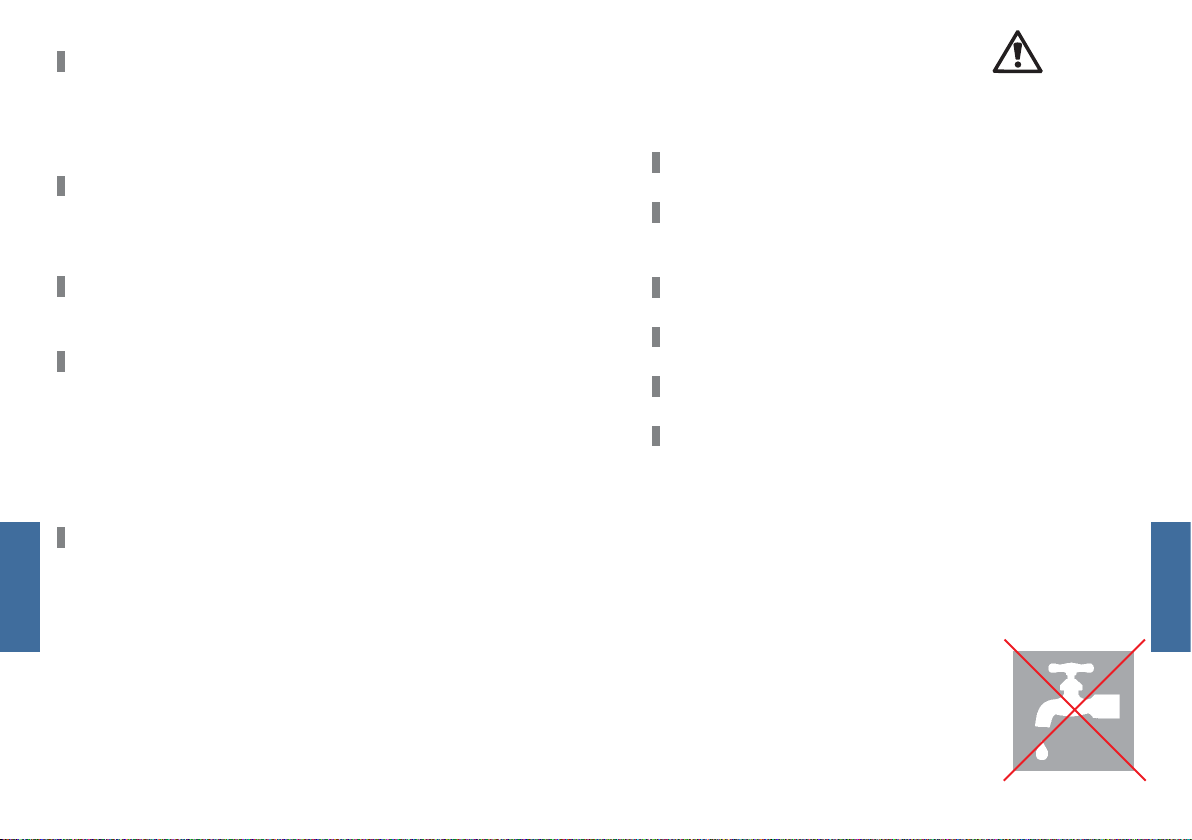
Stel de afstandsbediening niet bloot aan extreme tempe-
raturen, fel zonlicht of een hoge luchtvochtigheid en bescherm deze tegen vocht.
Ge-
Nederlands
5756
Page 30
De nabijheid van elektromagnetische stralingsbronnen
(zoals een computermonitor) kan een negatieve invloed
hebben op de wireless functie. Bewaar daarom voldoende
afstand tot dergelijke storingsbronnen.
Wanneer uw hoorsysteem kan worden bediend met de afstandsbediening van een andere persoon, neemt u contact
op met uw audicien.
VEILIGHEIDSINSTRUCTIES VOOR ACCU‘S
Explosiegevaar bij onjuist gebruik van accu‘s:
Vermijd kortsluiting van de accu‘s.
Zorg dat de accu‘s niet geperforeerd of vervormd raken en
open deze niet.
Gebruik de afstandsbediening niet in omgevingen met explosiegevaar (bijvoorbeeld mijnbouw).
Draag de afstandsbediening niet in een industriële omgeving om letsel en wurging te voorkomen bij het verstrikt
raken van het draagkoord in een machine. Gebruik de afstandsbediening daarom alleen met het veiligheidsdraagkoord. (De veiligheidssluiting moet losgaan wanneer het
draagkoord verstrikt raakt.)
In bepaalde landen gelden beperkingen voor het gebruik
van apparatuur met overdracht via radiogolven. Raadpleeg
voor nadere informatie de verantwoordelijke lokale instanties.
Nederlands
Leg de accu‘s niet in de oven of in open vuur.
Dompel accu‘s niet onder.
Laad accu‘s op bij een omgevingstemperatuur van 0 °C tot 45 °C.
Haal de accu‘s uit het apparaat wanneer u dit gedurende
langere tijd niet gebruikt.
REINIGING EN ONDERHOUD
• Reinig de afstandsbediening met een zachte doek.
• Gebruik geen vloeibare schuurmiddelen met agressieve
bestanddelen zoals citroenzuur of ammoniak.
OPMERKING
Houd de afstandsbediening niet onder
water. Reinig de afstandsbediening niet
met alcohol of benzine.
Nederlands
5958
Page 31
TECHNISCHE GEGEVENS
1. VOORSCHRIFTEN VOOR GEBRUIK
Omgevingstemperatuur bij opladen: 0°C…+45°C
Omgevingstemperatuur bij gebruik: -10°C…+50°C
2. ADAPTER: TYPE UE 10W-050080 SPC
Ingangsspanning 100 – 240 VAC
Ingangsfrequentie 50 – 60 Hz
Stroomverbruik 150 mA
Uitgangsspanning 5,0 VDC
Laadstroom 800 mA
3. MOBILE-CONNECT
Ingangsspanning 5 V
Laadstroom 500 mA
Oplaadduur 4 uur
Zendvermogen 5 mW
Zendfrequentie 3,28 MHz en Bluetooth
Werkingsperiode 6 uur
ACCU – LI-ION ACCU
Bedrijfsspanning 3,7 V
Nederlands
Capaciteit 1000 mAh
INSTRUCTIES VOOR WEGWERPEN
In de Europese Unie voldoen de beschreven accessoires aan
richtlijn 2002/96/EG voor oude elektrische en elektronische
apparatuur van het Europees Parlement en de Europese Raad
van 27 januari 2003.
Deze is onlangs gewijzigd door richtlijn 2003/108/EG (WEEE).
Gooi accu‘s nooit bij het huisvuil! Lever verbruikte
accu‘s in bij uw audicien, zodat deze op verantwoorde wijze kunnen worden verwerkt. Zend het
Mobile Package terug naar de fabrikant (zie achterzijde voor adres), zodat dit op verantwoorde wijze
kan worden verwerkt.
Met de CE-aanduiding bevestigt Audio Service dat
apparatuur voldoet aan de Europese richtlijn 93/42/
EWG voor medische producten.
Nederlands
4. MOBILE-STATION
Ingangsspanning 5,0 V
Overdracht Bluetooth
Werkingsperiode 5 h
6160
Page 32

NOTES:
6362
Page 33
Audio Service GmbH • Zeppelinstraße 9 • D-32051 Herford
www.audioservice.com
Art. No. / N° d´art. / No. de art. / Art. Nr. / Art.nr. 105 97 070 · 12.2009 · KD 27854
 Loading...