

Page 1
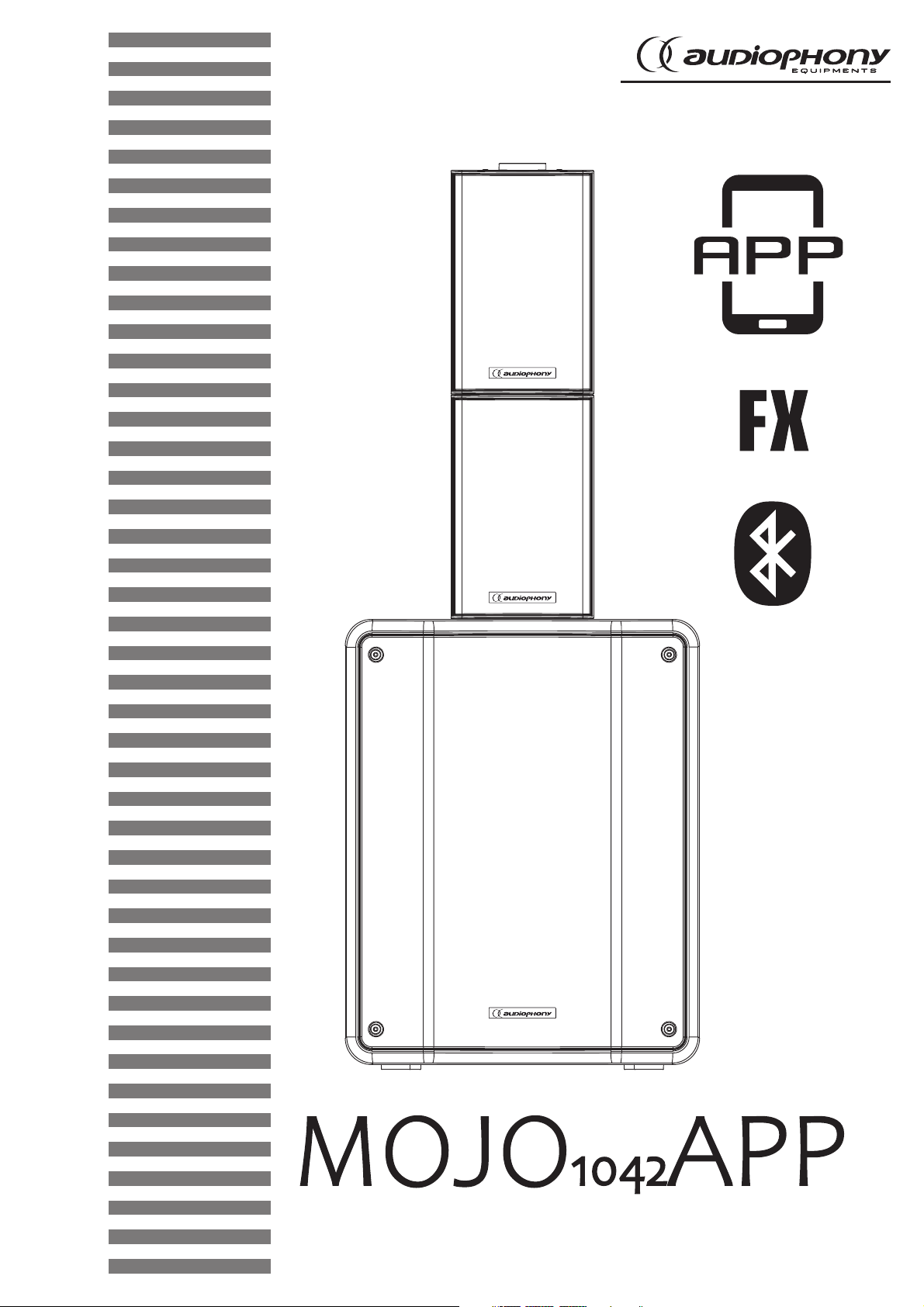
1020W Amplified system with subwoofer and satellites + DSP and Application
USER GUIDE
H10982 - Version 1 / 07-2019
Page 2
English
MOJO1042App - 1020W Amplified system with subwoofer and satellites + DSP and Application
1 - Safety information
Important safety information
This unit is intended for indoor use only. Do not use it in a wet,
or extremely cold/hot locations. Failure to follow these safety instructions could result in fire, electric shock, injury, or damage to
this product or other property.
Any maintenance procedure must be performed by a CONTEST
authorised technical service. Basic cleaning operations must thoroughly follow our safety instructions.
WARNING :
any maintenance by yourself. In the unlikely even your unit may require service, please contact your
nearest dealer.
In order to avoid any electrical malfunction, please do not use any multi-socket, power cord extension
or connecting system without making sure they are
This unit contains no user-serviceable parts. Do not open the housing or attempt
perfectly isolated and present no defect.
This product contains non-isolated electrical components. Do not
undertake any maintenance operation when it is switched on as
it may result in electric shock.
Symbols used
IMPORTANT
WARNING
CAUTION
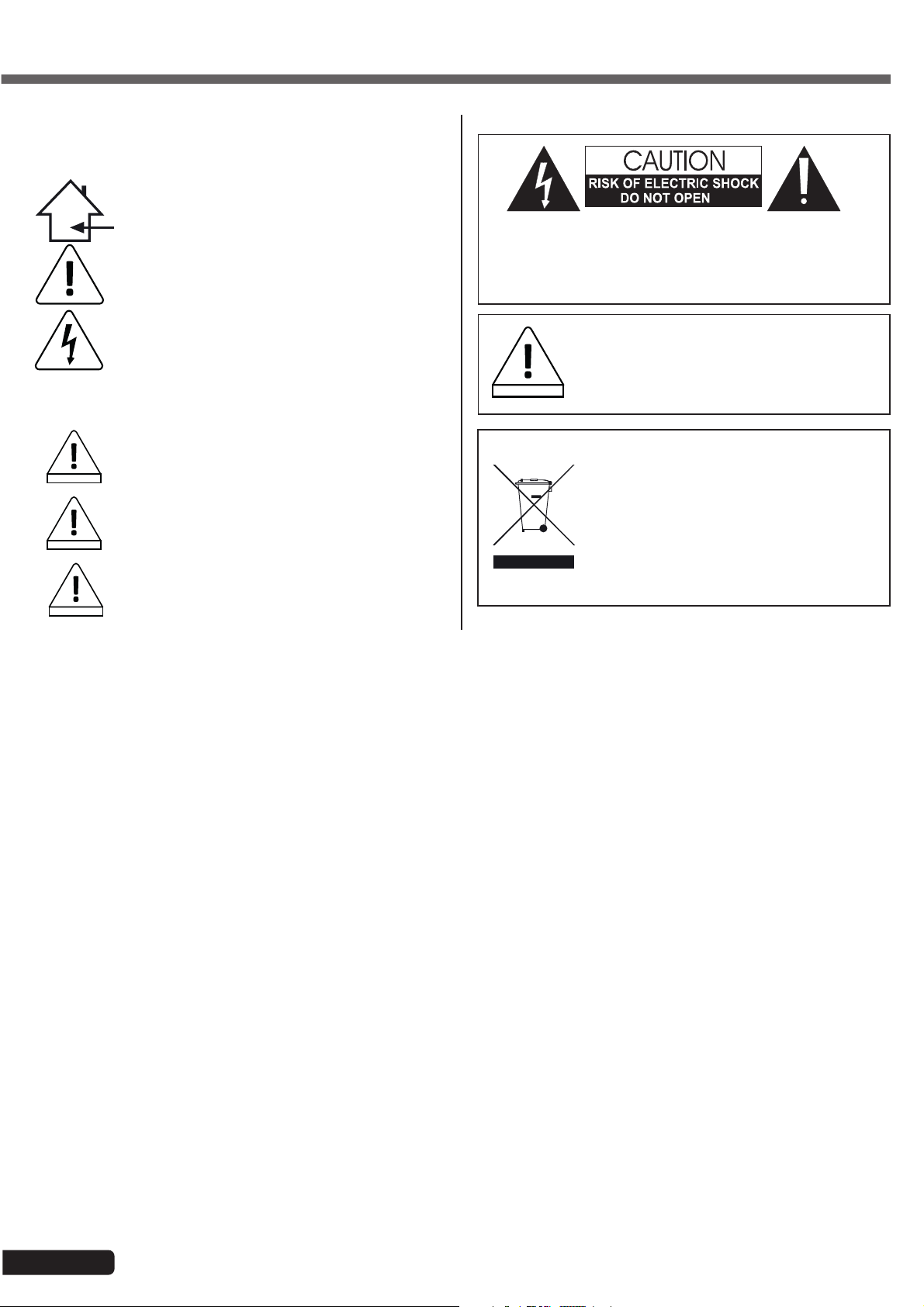
This symbol signals an important safety precaution.
The WARNING symbol signals a risk to the user’s physical integrity.
The product may also be damaged.
The CAUTION symbol signals a risk of product deterioration.
Instructions and recommendations
1 - Please read carefully :
We strongly recommend to read carefully and understand the safety instructions before
attempting to operate this unit.
2 - Please keep this manual :
We strongly recommend to keep this manual with the unit for future reference.
3 - Operate carefully this product :
We strongly recommend to take into consideration every safety instruction.
4 - Follow the instructions:
Please carefully follow each safety instruction to avoid any physical harm or property
damage.
5 - Avoid water and wet locations :
Do not use this product in rain, or near washbasins or other wet locations.
6 - Installation :
We strongly encourage you to only use a fixation system or support recommended
by the manufacturer or supplied with this product. Carefully follow the installation
instructions and use the adequate tools.
Always ensure this unit is firmly fixed to avoid vibration and slipping while operating
as it may result in physical injury.
7 - Ceiling or wall installation :
Please contact your local dealer before attempting any ceiling or wall installation.
8 - Ventilation :
The cooling vents ensure a safe use of this product, and avoid any overheating risk.
Do not obstruct or cover these vents as it may result in overheating and potential
physical injury or product damage. This product should never been operated in a
closed non-ventilated area such as a flight case or a rack, unless cooling vents are
provided for the purpose .
9 - Heat exposure :
Sustained contact or proximity with warm surfaces may cause overheating and product
damages. Please keep this product away from any heat source such as a heaters,
amplifiers, hot plates, etc...
Sound levels
Our audio solutions deliver important sound pressure levels
(SPL) that can be harmful to human health when exposed
WARNING
during long periods. Please do not stay in close proximity of
operating speakers.
Recycling your device
• As HITMUSIC is really involved in the environmental
cause, we only commercialise clean, ROHS compliant
products.
• When this product reaches its end of life, take it to
a collection point designated by local authorities. The
separate collection and recycling of your product at the
time of disposal will help conserve natural resources
and ensure that it is recycled in a manner that protects
human health and the environment.
10 - Electric power supply :
This product can only be operated according to a very specific voltage. These
information are specified on the label located at the rear of the product.
11 - Power cords protection:
Power-supply cords should be routed so that they are not likely to be walked on or
pinched by items placed upon or against them, paying particular attention to cords at
lugs, convenience receptacles and the point where they exit from the fixture.
12 - Cleaning precautions :
Unplug the product before attempting any cleaning operation. This product should be
cleaned only with accessories recommended by the manufacturer. Use a damp cloth
to clean the surface. Do not wash this product.
13 - Long periods of non use :
Disconnect the unit’s main power during long periods of non use.
14 - Liquids or objects penetration :
Do not let any object penetrate this product as it may result in electric shock or fire.
Never spill any liquid on this product as it may infiltrate the electronic components
and result in electric shock or fire.
15 - This product should be serviced when :
Please contact the qualified service personnel if :
- The power cord or the plug has been damaged.
- Objects have fallen or liquid has been spilled into the appliance.
- The appliance has been exposed to rain or water.
- The product does not appear to operate normally.
- The product has been damaged.
16 - Inspection/maintenance :
Please do not attempt any inspection or maintenance by yourself. Refer all servicing
to qualified personnel.
17 - Operating environment :
Ambient temperature and humidity: +5 - +35°C, relative humidity must be less than
85% (when cooling vents are not obstructed).
Do not operate this product in a non-ventilated, very humid or warm place.
Page 2
Page 3
MOJO1042App - 1020W Amplified system with subwoofer and satellites + DSP and Application
2 - Technical specifications
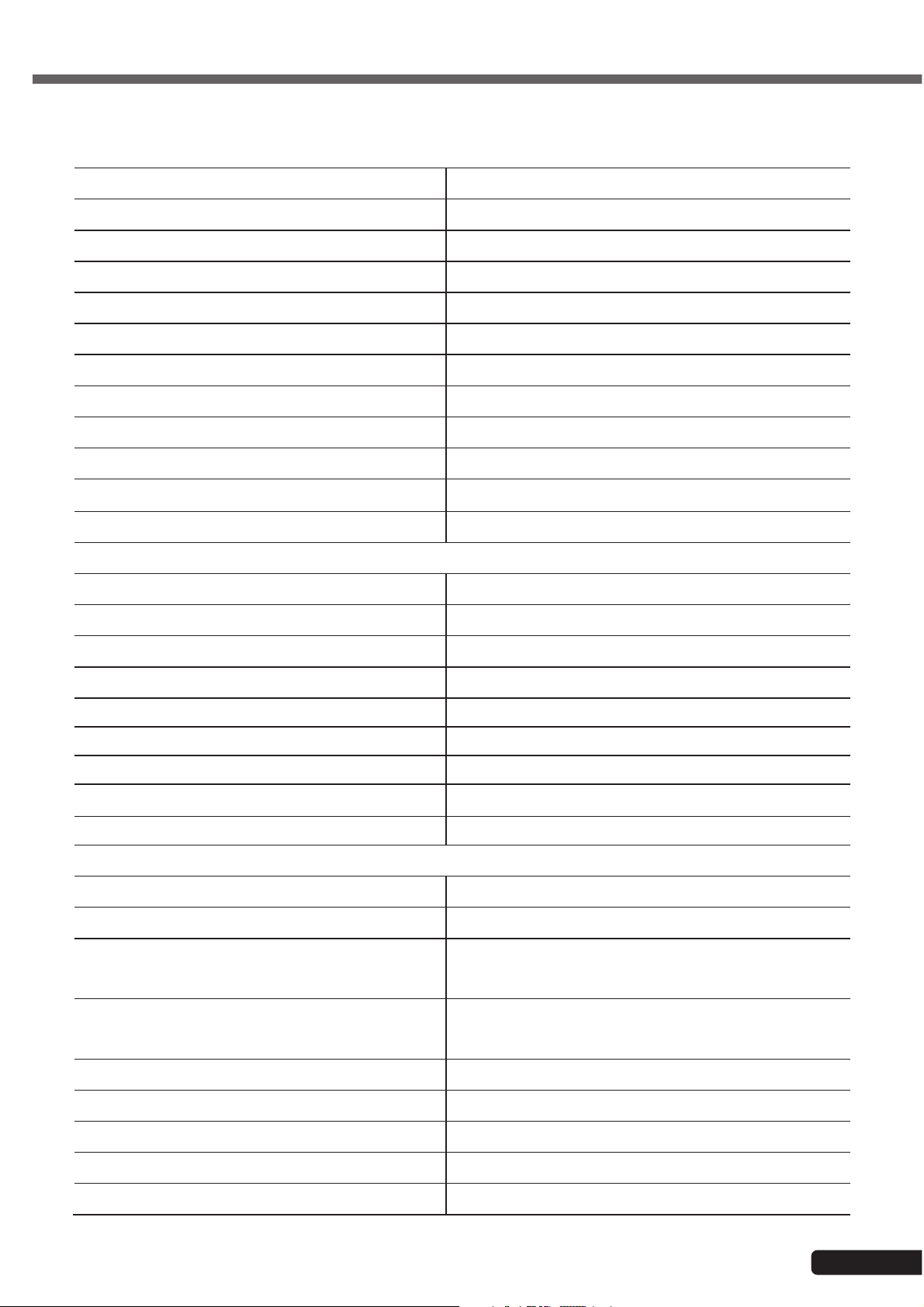
SATELLITE
Power 80W RMS - 160W max
Frequency response 155Hz -22KHz
Sensitivity(1W@1m) 93 dB
Max. SPL (@1m) 120 dB
Nominal impedance 8 Ohms
Boomer 4.75''
Tweeter 1" compression
Dispersion 90° x 45° (HxV)
Connector 1 x Jack
Fixation system 1 x M6 insert and 18 mm mounting plate
Dimensions 225 x 140 x 110 mm
English
Net weight 1.9 kg
SUBWOOFER
Power 350W RMS - 700W max
Frequency response 50 - 160Hz
Sensitivity(1W@1m) 90 dB
Max. SPL (@1m) 120 dB
Boomer 10"
Fixation system 1 x 25 mm mounting plate (on top)
Dimensions 345 x 450 x 400 mm
Net weight 14.5 kg
AMPLIFICATION
Low frequencies 1 x 350W RMS / Class D - 4 Ohms
Mid/High frequencies 2 x 80W RMS / class D - 8 Ohms
CH1/4 : Combo XLR/Jack Micro/Guitar/Line
Inputs
Outputs
CH5/6 :Jack L/R + RCA line
CH7/8 : Jack 3.5 stereo AUX + Bluetooth
2 x Jack L/R monitor out line output for external
amp
2 x Jack for satellites
®
DSP 8 effects, contour
Bluetooth
APP MOJO control LEVEL/BAL/REV/EQ/COMP
Sub Subwoofer volume settings
®
Balance
Audio streaming
Left / right balance adjustement
Page 3
Page 4
English
MOJO1042App - 1020W Amplified system with subwoofer and satellites + DSP and Application
3 - Presentation
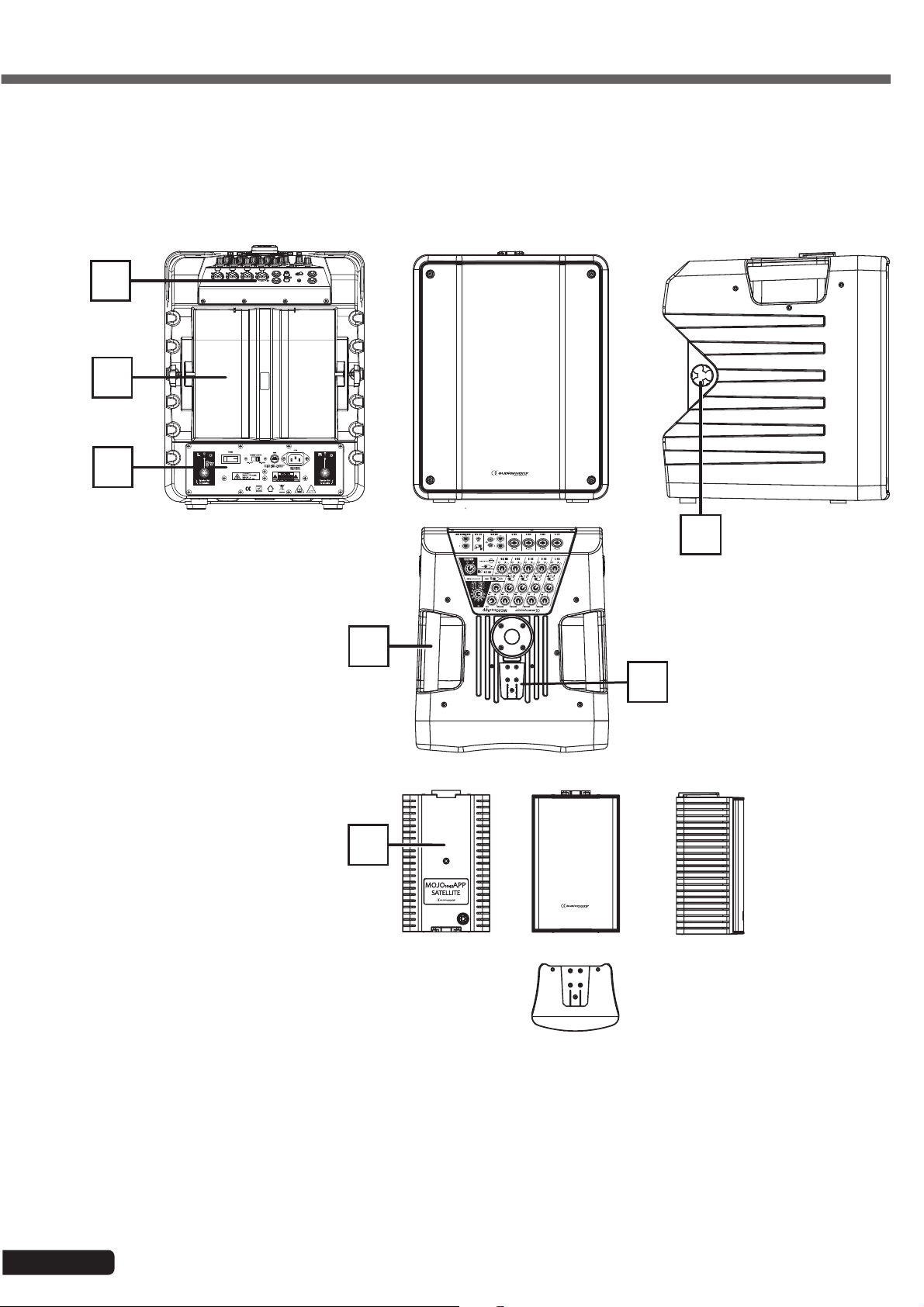
3-1 Overview
A
B
C
A - Command panel
B - Satellites compartment
F
D
E
G
C - Power supply and sattelites connectors zone
D - Transport handle
E - Male audio contact slot
F - Satellites clamping knob
G - Satellite
Page 4
Page 5
MOJO1042App - 1020W Amplified system with subwoofer and satellites + DSP and Application
English
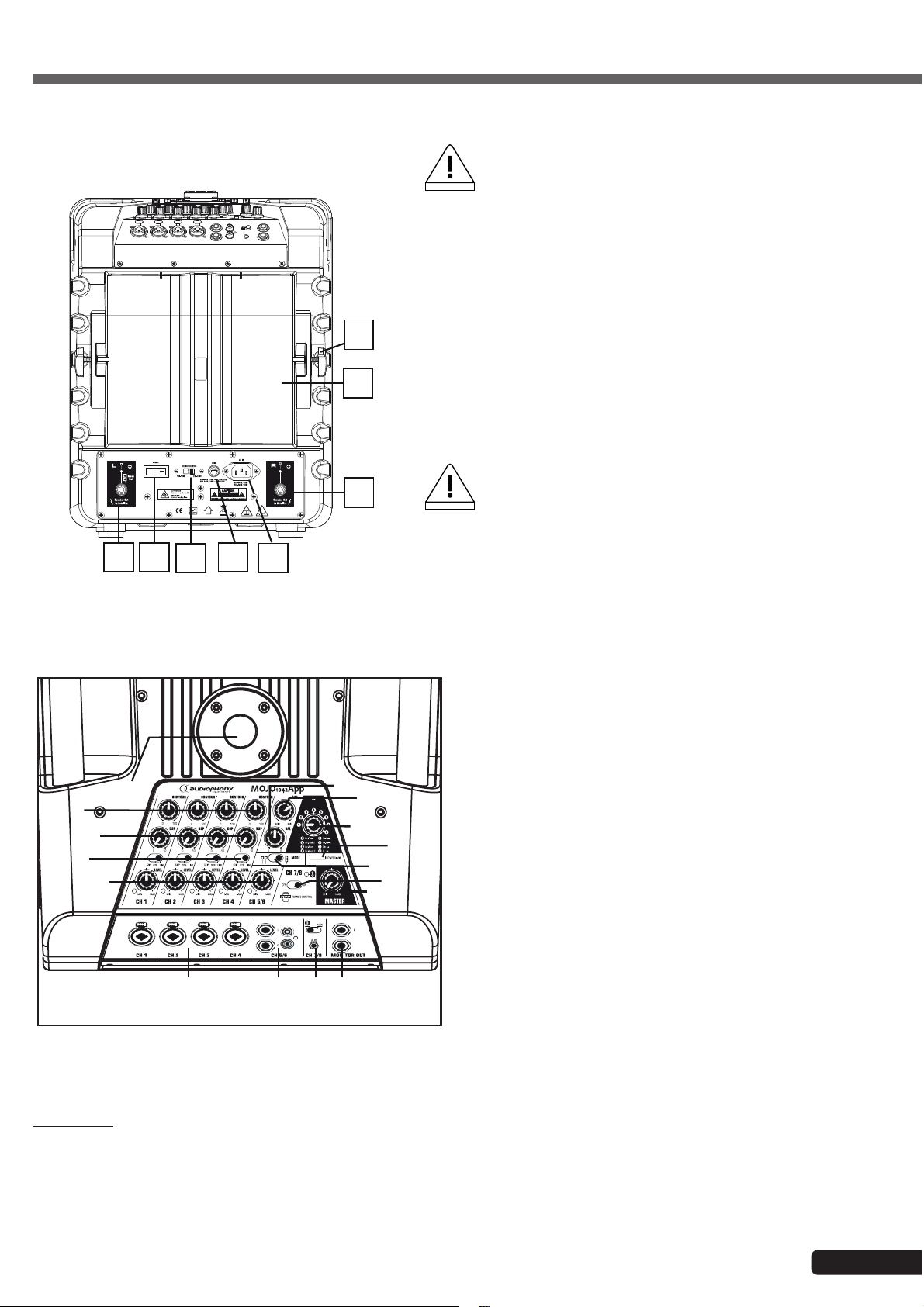
A- Rear view
1
2
3
4
5
8
7
6
1 - Sattelite output for either a stereo left satellite or two mono
satellites.
CAUTION: only the MOJO10402APP satellites can be
CAUTION
2- Power switch
3 - Voltage selector: Allows you to adapt the voltage of the ampli-
fier to the voltage of the electrical outlet.
4 - Fuse: Protects the power supply module and the built-in
amplifier.
If need to replace the fuse, please make sure the new fuse has
exactly the same characteristics.
5- Power input socket: Allows you to connect the speaker to
an electrical outlet. Use the supplied IEC cord, and make sure
the voltage delivered by the outlet is in adequation with the
value indicated by the voltage selector before turning on the
built-in amplifier.
6- Output for stereo right satellite.
CAUTION
7- Satellites storage compartment
8- Clamping knob to secure the satellite once in its compart-
ment. Use the insert at the rear of the satellite to tighten it
safely.
connected via this output.
CAUTION: only a MOJO1042APP satellite can be
connected via this output.
3.2 - More details about the command panel of the subwoofer:
1 - CH1/CH4 input via balanced COMBO
Connect here an XLR or JACK plug from a line level music
instrument or a microphone. The signal of this mono input
is spread across the right and left output of the system.
13
12
14
15
16
10
9
8
7
6
5
4
3
11
1
On your smartphone or computer select the "MOJO1042APP" in the list of the Bluetooth
The "Pair" LED must remain ON in blue and a sound signal indicate that your device is connected.
2
2 - CH5/6 inputs via balanced Jack and RCA
Connect here JACK plugs from a line level music
instrument or a computer.
3- CH7/8 inputs via balanced stereo 3,5 Jack
and Bluetooth
The AUX input allows you to connect via stereo Jack
3.5 any extra line level source as external player. The
Bluetooth
type of input with the selector switch.
Note about Bluetooth
Put the selector on Bluetooth
blinking in blue to indicate that its searching a Bluetooth
connexion.
®
®
receiver is also on this channel. Select the
®
pairing for the channel 7/8:
®
position. The "Pair" LED is
®
devices to connect it.
®
Important : You can only connect one Bluetooth
the devices that you don't want to use. The last device get priority connexion.
®
device on the MOJO1042APP in the same time. You must disconnect
Page 5
Page 6
English
MOJO1042App - 1020W Amplified system with subwoofer and satellites + DSP and Application
4-Monitor outputs
The signal is the mix out in line level. These outputs allow you to plug an external amplified system or power amp.
5- Master sound level
Use this knob to adjust the main output as desired.
(PLEASE MAKE SURE TO CONFIGURE IT IN ORDER TO PREVENT THE LIMIT FROM BEING LIT)
6 - APP switch
Allow to switch On or Off the Application connexion with your tablet. When it switch ON you just have to start your
Application on the tablet and the connexion is done.
7- Satellites output configuration
Left selector: Stereo mode if both outputs are active and the two satellites separated to be used as a 2.1 sound
system.
Right selector: Mono mode, the left output only is active and the two satellites are linked together to focus their power
on one single side.
8- ON/LIMIT signal indicator
Allows you to check on the volumes
(PLEASE MAKE SURE EACH CHANNEL IS CONFIGURED IN ORDER TO PREVENT THIS INDICATOR FROM BEING
LIT)
9 - Effects selector
Allows to select the effect from 1 to 8 :
Reverb Plate/ Plate2/ Room/ Room2/ Hall/ Hall2/ Chorus/ Flange
10 - Subwoofer sound level
The subwoofer volume can be adjusted separately. Use this knob to adjust it as desired. By default, the system is
balanced when this knob is in middle position.
(PLEASE MAKE SURE TO CONFIGURE IT IN ORDER TO PREVENT THE LIMIT FROM BEING LIT)
11 - Balance level
Use this knob to adjust the balance between the left and right output as desired. By default, the system is balanced
when this knob is in middle position.
12 - Mounting plate
Allows you to insert a 25 mm tube to pole-mount satellites. One of the tubes of the supplied speaker stand can be
used to mount your satellites.
13 - Channels 1 to 4 Tone level
This setting allows you to adjust the tone of each channel. From 0 which is like the original sound to 100 which is with
more sub and high frequencies adn with treble reduced
14 - Channels 1 to 4 effect level
This setting allows you to adjust the level of effect of each channel to meet your needs.
15 - Channels 1 to 4 input selector
Allows you to choose the type of source connected to each channel.
16- Channels 1 to 6 sound level
Allows you to adjust the sound level of each channel.
This setting also affects the main volume level of the amplification system.
(PLEASE MAKE SURE TO CONFIGURE IT IN ORDER TO PREVENT THE LIMIT FROM BEING LIT)
Please make sure to properly configure the sound levels of your system. In addition to being unpleasant for the audience,
improper settings can damage your whole sound system.
The "LIMIT" indicators will light on when the maximum level is reached and must never be permanently lit.
CAUTION
Page 6
Beyond this maximul level, the volume will not increase but will be distorted.
Moreover, your system can be destroyed by an excessive sound level despite of the internal electronic protections.
Page 7
MOJO1042App - 1020W Amplified system with subwoofer and satellites + DSP and Application
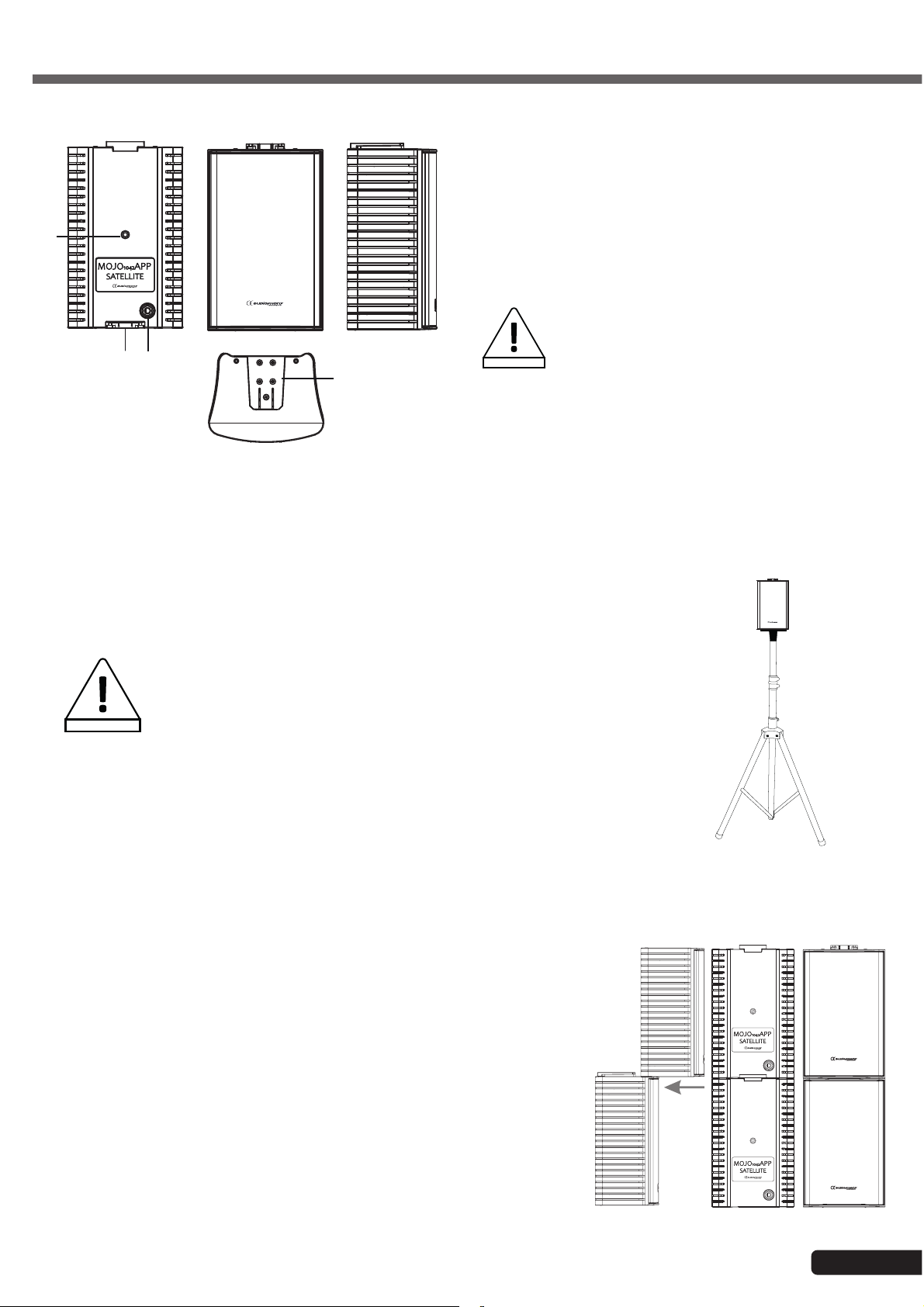
3.3 - Satellites:
Satellite of the COMPACT system:
1 - Female audio contact slot
2 - Jack 6.35 In
3 - Male audio contact slot
4
4 - M6 insert
The satellites were designed to be
operated with this subwoofer.
Please do not use any other type of
1
2
CAUTION
3
satellites as it may damage the whole
sound system.
English
4 - Setting up the sattelites
4.1 - Using a speaker stand
The MOJO1042APP satellites can be equipped with an accessory featuring a 18mm
baseplate to mount them on a compatible speaker stand, as described on the drawing
opposite.
Please respect the following safety precautions when using
speaker stands:
- When using speakers stands outdoors, please make sure the stands are
WARNING
4.2 - Setting up two satellites together
The MOJO1042APP satellites are equipped with male and female contact
slots allowing them to be daisy-chained.
This slot guarantees the transmission of the audio signal between the two
satellites and the mechanical connection.
The opposite drawing describes how to connect two satellites.
secured, even perhaps guyed, in order to prevent any risk of fall.
- If the speaker stands are in a crowded area, make sure to prevent the
audience from accessing them.
- When mounting the stands, make sure to spread the tripod as much as
possible to stabilise the stand.
- Please make sure to install your stands on a flat, even surface.
- Tighten the clamping knobs properly before turning the speakers on.
Page 7
Page 8
English
MOJO1042App - 1020W Amplified system with subwoofer and satellites + DSP and Application
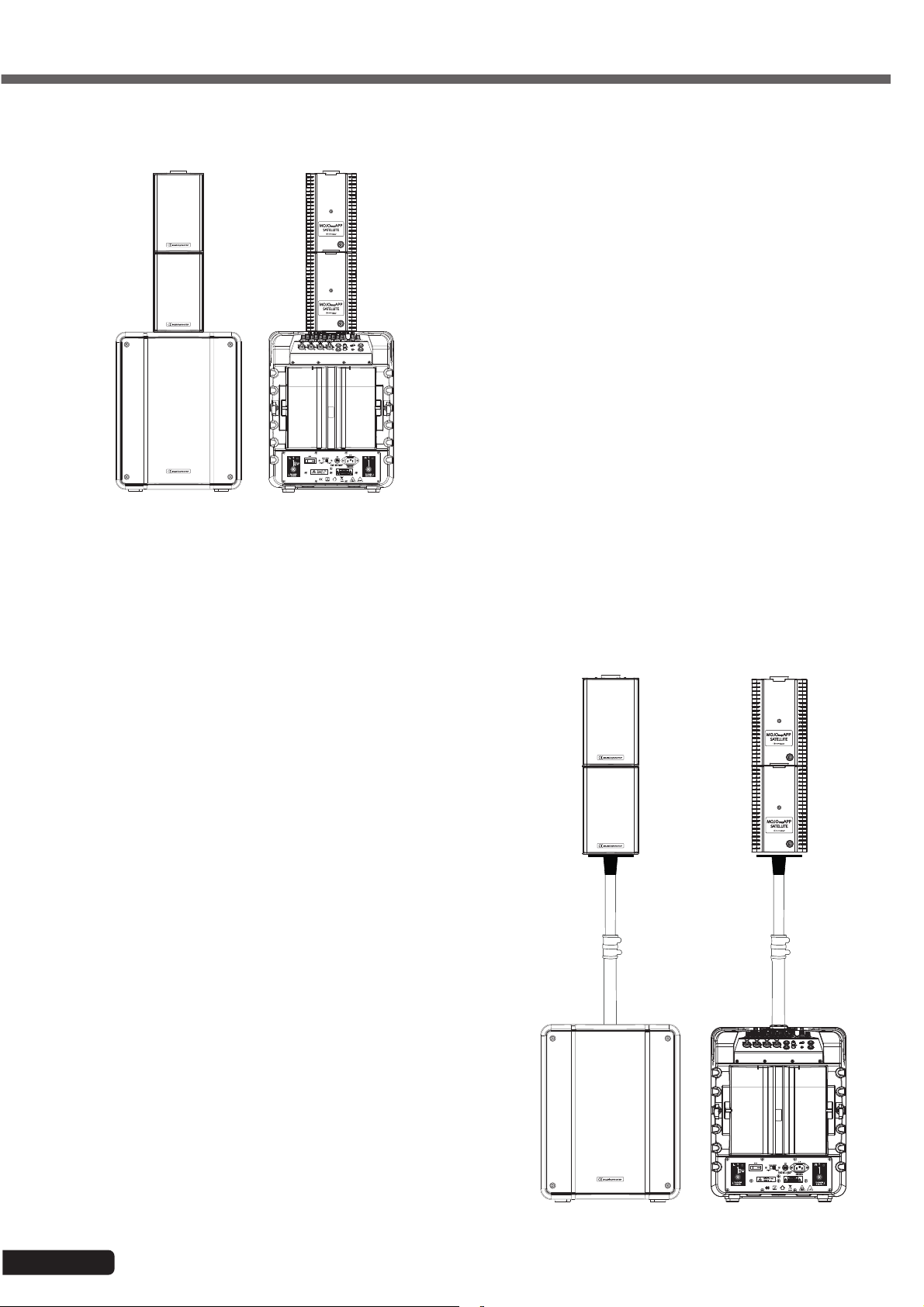
4.3 - Setting up the satellites above the subwoofer
The MOJO1042APP satellites can be directly
mounted above the subwoofer thanks to its
contact slot.
This slot guarantees the transmission of the
audio signal between the two satellites and the
subwoofer. Cables are not required in this case.
The drawing opposite describes speakers
mounted above the subwoofer.
The MOJO1042APP satellites can also be polemounted above the subwoofer thanks to the upper
part of one of the supplied speaker stands.
The bar must be inserted into the 25 mm mounting
plate of the subwoofer and into the 18 mm
mounting plate of the lower satellite. The contact
slot will guarantee the communication between the
two satellites.
The drowing oposite describes this installation.
Page 8
Page 9
MOJO1042App - 1020W Amplified system with subwoofer and satellites + DSP and Application
5 - Basical wiring
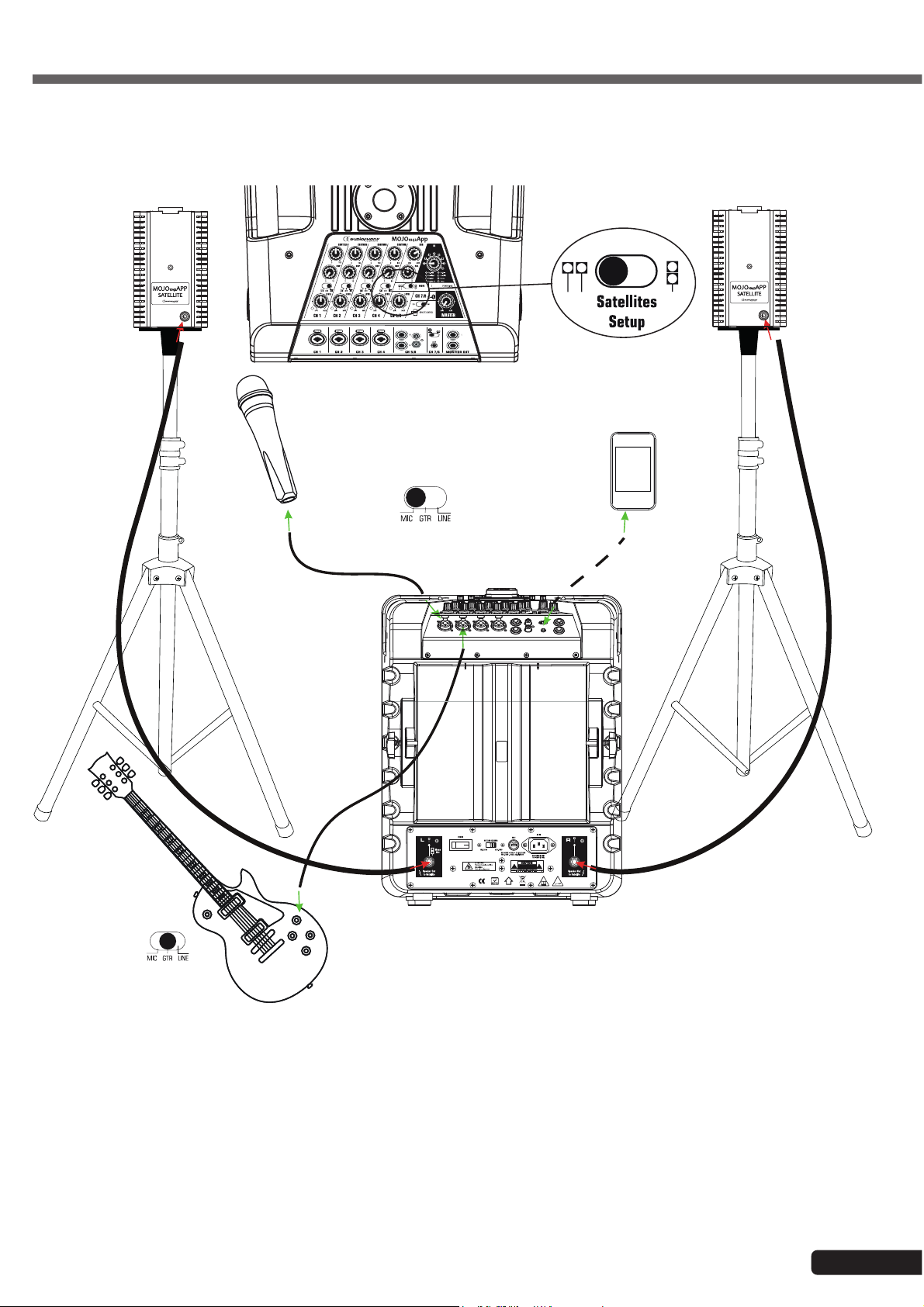
5.1 - Using the MOJO1042APP as 2.1 system:
English
CH2 :
GUITARE
CH1 :
MICRO
CH7/8 :
Bluetooth
®
®
The MOJO1042APP system can be used, for instance, for a guitar player-singer with soundtrack.
To do so, proceed as follows:
- The microphone will be plugged to the CH1 combo input via XLR socket, the selector will be in MIC position.
- The guitar will be connected to the left CH2 balanced jack socket, the selector will be in LINE position.
- The MP3 player will be connected to the CH7/8 by the Bluetooth
®
.
- The satellites are in stereo mode and will be plugged to the SPEAKER OUT L and R Jack sockets.
Page 9
Page 10
English
MOJO1042App - 1020W Amplified system with subwoofer and satellites + DSP and Application
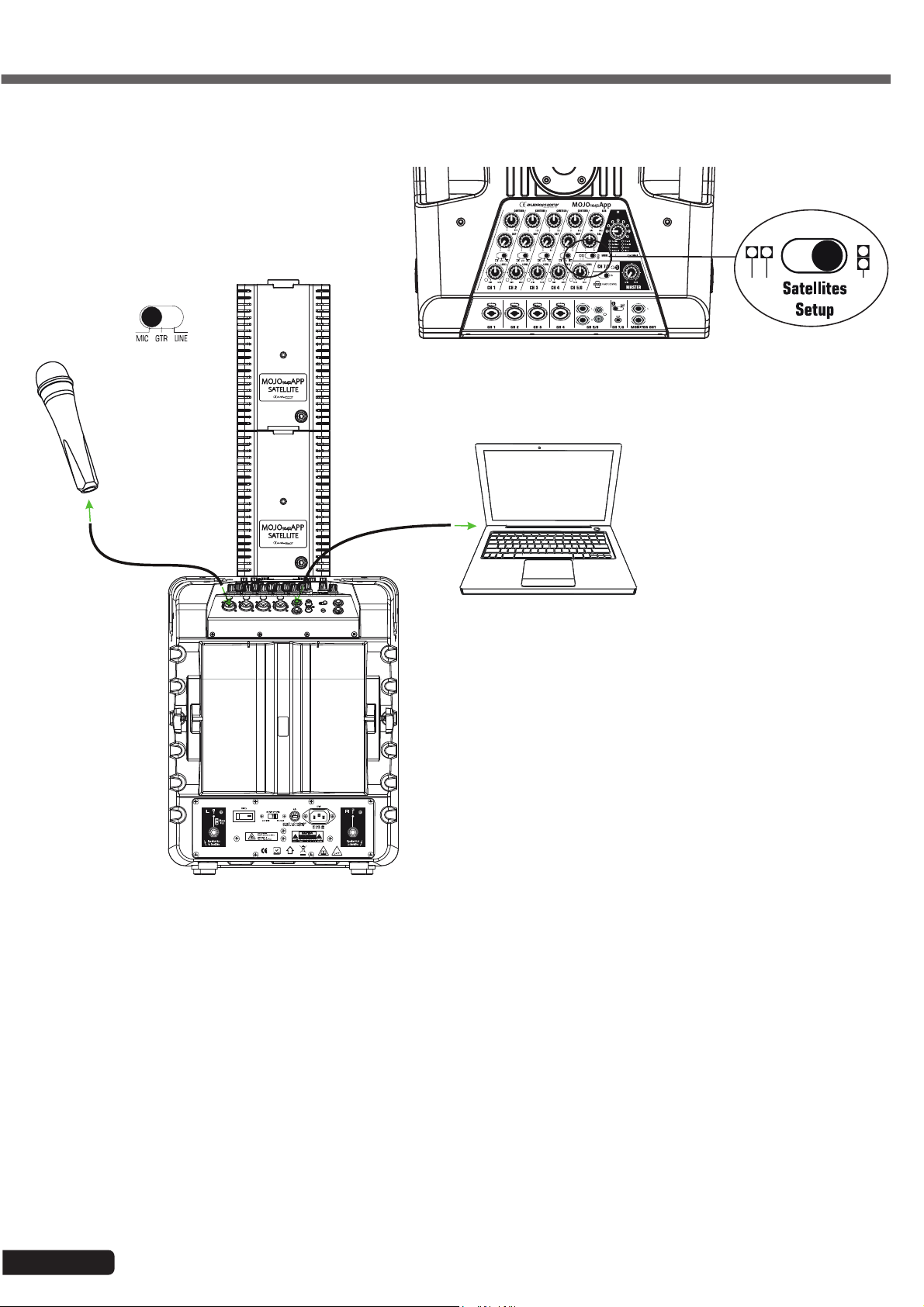
5.2 - Using the MOJO1042APP as a mono 1.1 system:
CH1 :
MICRO
CH5/6
The MOJO1042APP system can be used, for instance, to give voice to a conference via a speaker and computer.
To do so, proceed as follows:
- The microphone will be connected to the CH1 combo input via XLR socket, the selector in MIC position.
- The computer will be connected to the CH5/6 input via Jack or RCA connectors.
- The satellites are in mono mode, directly set up onto the subwoofer via the connection slot, which will transmit the
signal between the two satellites.
Page 10
Page 11
MOJO1042App - 1020W Amplified system with subwoofer and satellites + DSP and Application
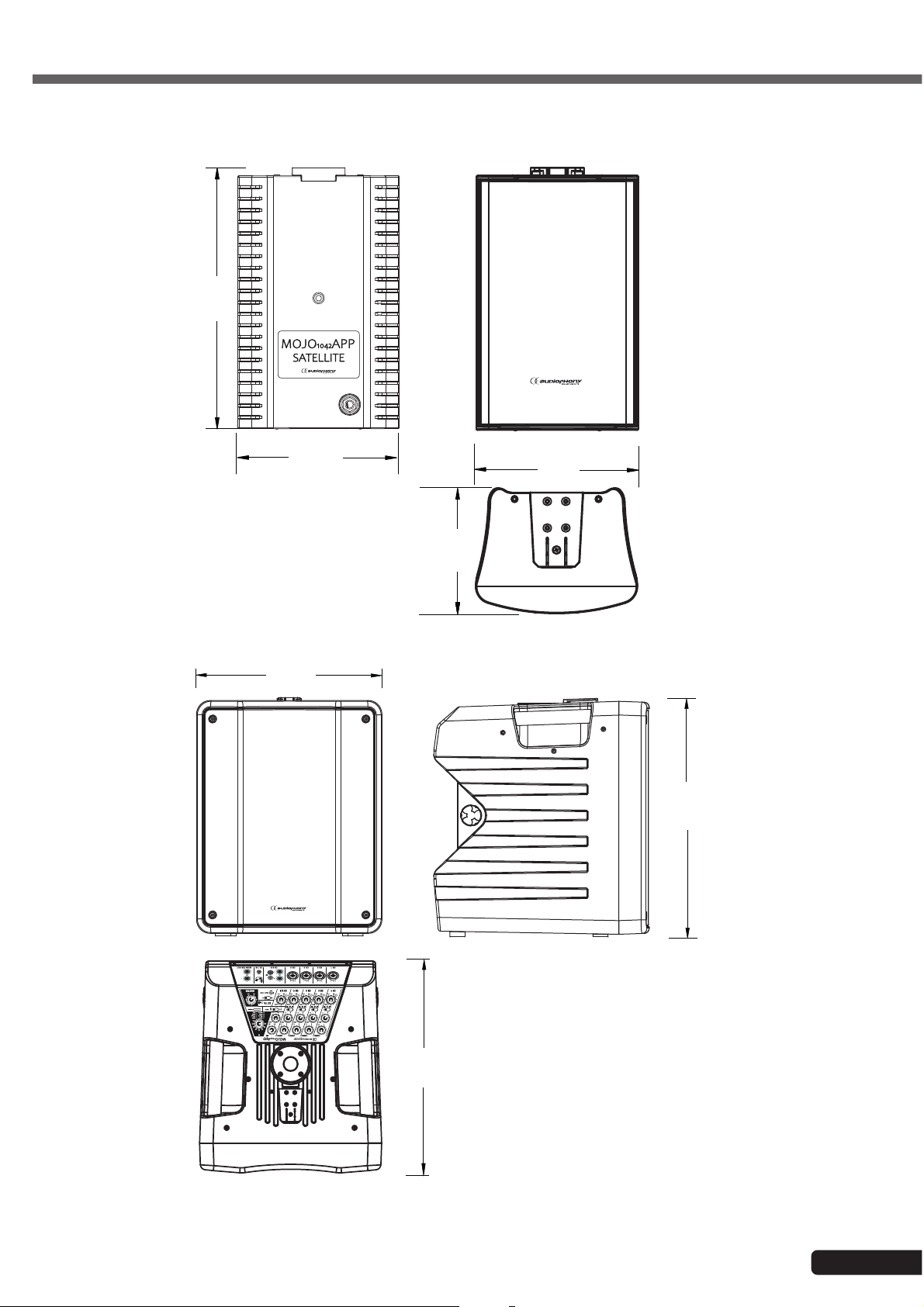
6 - Dimensions
225
English
345
140
115
110
450
400
Page 11
Page 12
English
MOJO1042App - 1020W Amplified system with subwoofer and satellites + DSP and Application
7 - Application :
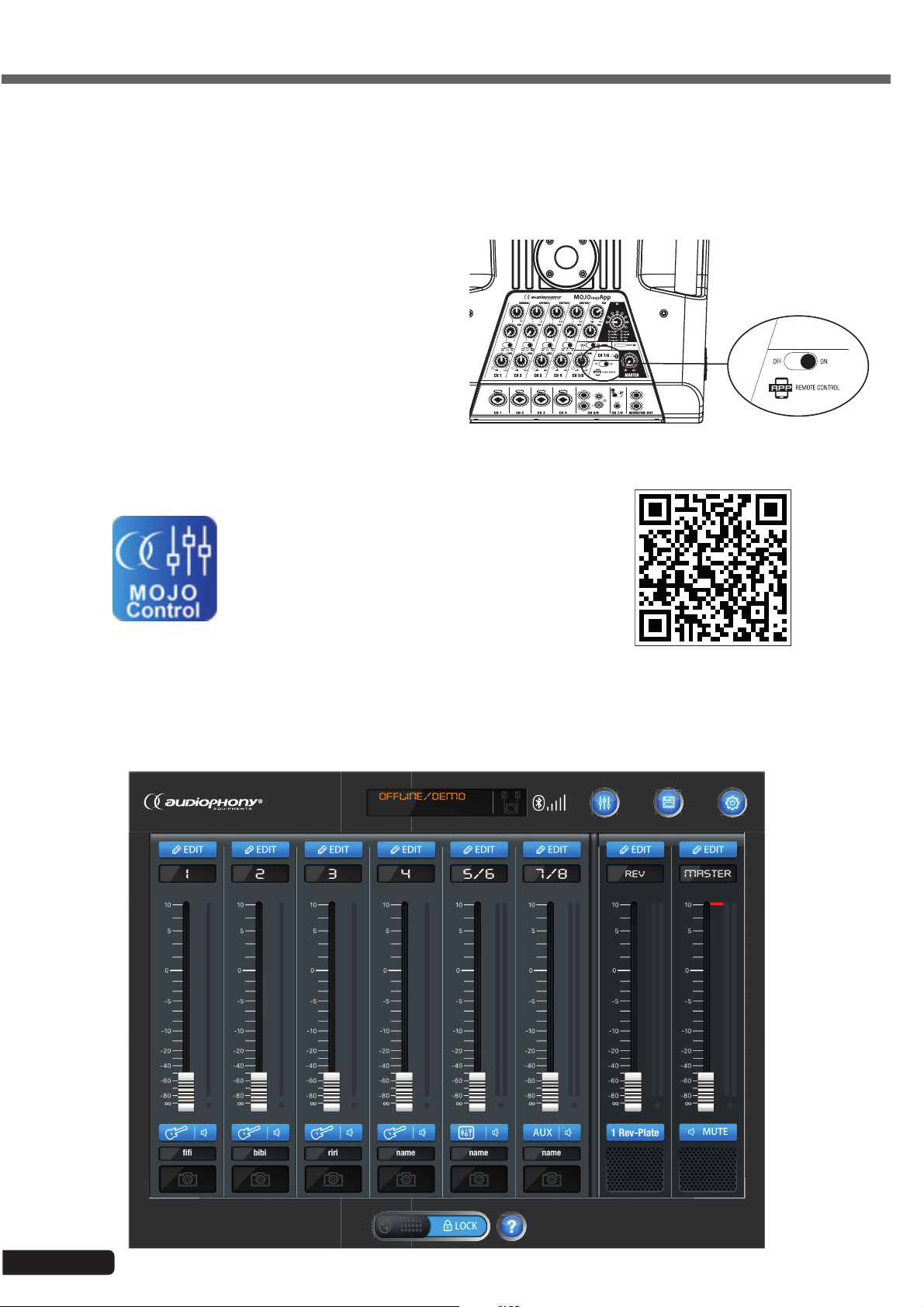
7.1 - MOJOcontrol application connexion
The application MOJO Control allow to connect your
MOJO1042APP system in Bluetooth® and to get a
virtual mixer on your tablet.
To connect your MOJO1042APP to your tablet put
the APP switch to ON position like shown on the
drawing :
Then start your App MOJOcontrol on your tablet and
the system is connected.
The QR code opposite allows you to access
the archive that contains the application.
This application is only available for iOS
systems.
7.2 - View on the mixer of MOJOcontrol Application
DEVICE
SCENES
SCENESHOME
SETUP
Page 12
Page 13
MOJO1042App - 1020W Amplified system with subwoofer and satellites + DSP and Application
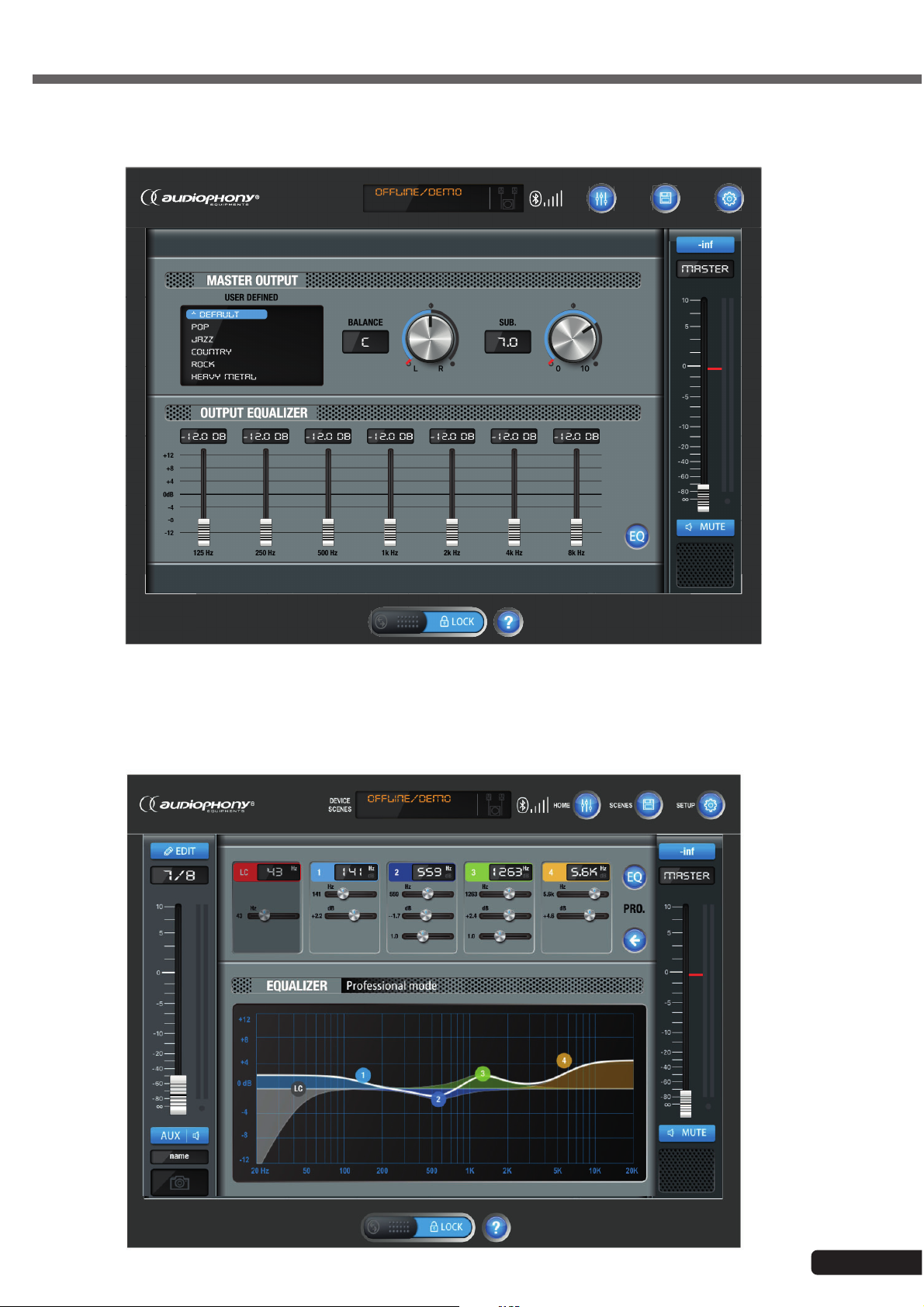
7.3 - View on the graphic equalizer of the Master section on the App MOJOcontrol
English
DEVICE
SCENES
SCENESHOME
SETUP
7.4 - View on the parametric equalizer of the CH7/8 of the App MOJOcontrol
Page 13
Page 14

Because AUDIOPHONY® takes the utmost care in its products to make sure you only get the best possible quality,
our products are subjects to modifications without prior notice. That is why technical specifications and the products
physical configuration might differ from the illustrations.
Make sure you get the latest news and updates about the AUDIOPHONY
AUDIOPHONY
®
is a trademark of HITMUSIC S.A.S - Zone Cahors sud - 46230 FONTANES - FRANCE
®
products on www.audiophony.com
 Loading...