

Page 1
!
AUDIOFOCUS
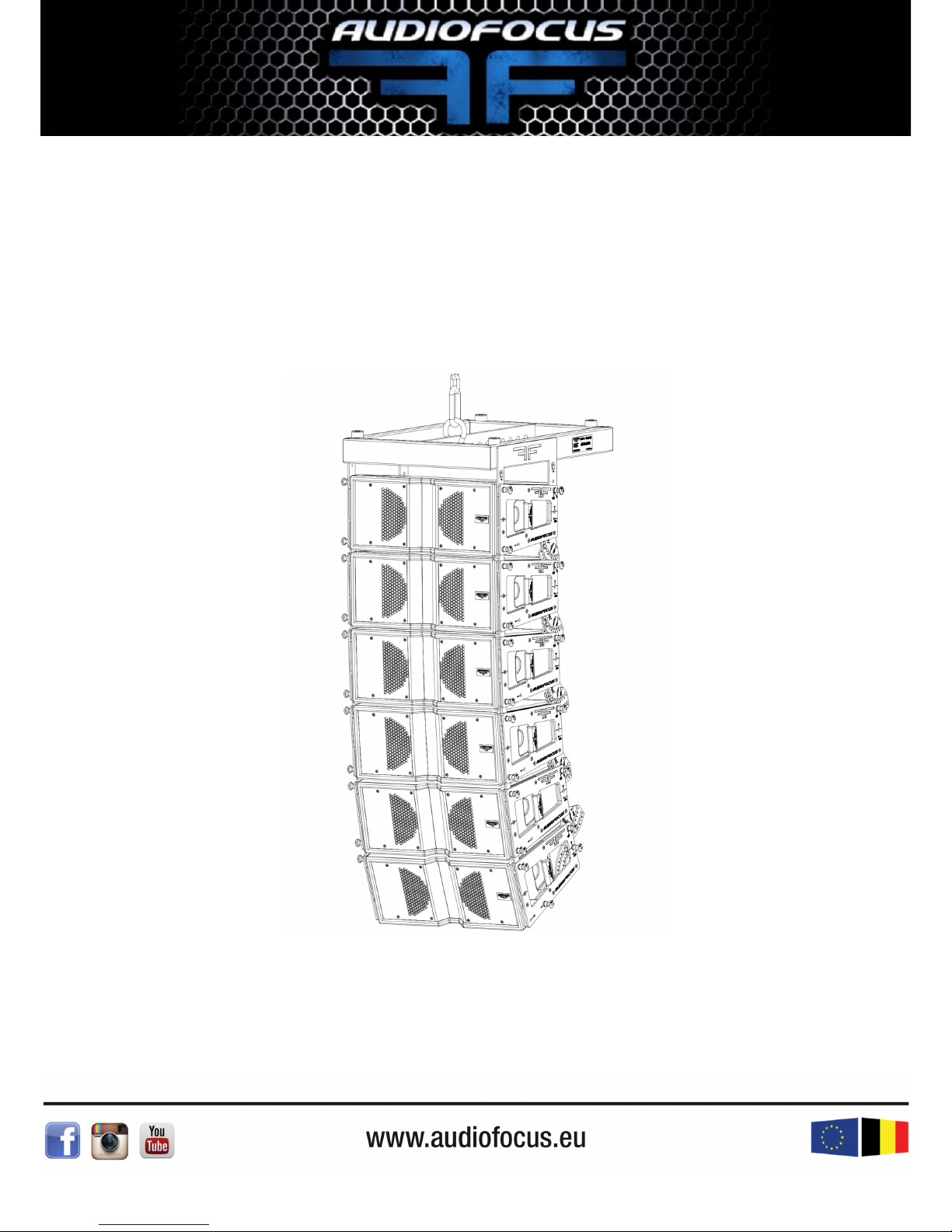
ARES8
USER’S MANUAL V2.0
!
Page sur 1 17
AUDIOFOCUS ARES8
USER’S MANUAL
Page 2

1 SUMMURY
2 SECURITY STATEMENT
2.1 NORMS
2.2 HANDLING!
2.3 SOUND LEVEL!
3 SYSTEM COMPONENT
3.1 INTRODUCTION!
3.2 ARES8!
3.3 LOW END!
3.4 HARDWARE AND COVER
4 SETUP
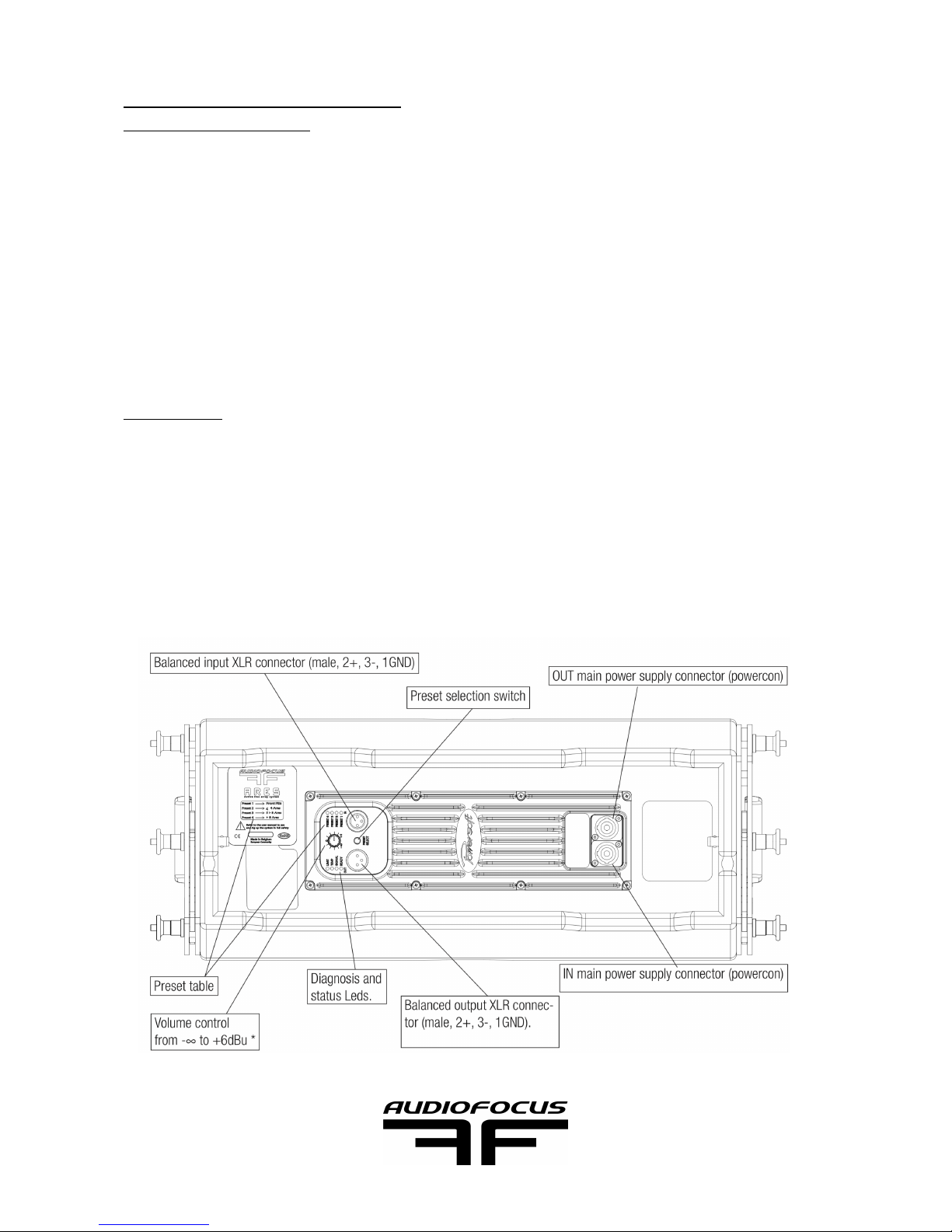
4.1 PRESET SELECTION!
4.2 EASE PREDICTION!
4.3 FLOOR AND RIGGING!
4.4 WIRING!
4.5 SET DOWN!
4.7MAINTENANCE!
5 TECHNICAL SPECIFICATIONS
6 CONTACT AND LINK
Page sur 2 17
AUDIOFOCUS ARES8
USER’S MANUAL
Page 3

2 SECURITY STATEMENT
2.1 NORMS
LDC,EMC,RoHS and CE guidelines
Audiofocus s.a.!
rue du Polissou 17!
B-5590 Achêne!
Belgium!
Tel: +32 (0) 83 21 80 54!
Fax: +32 (0) 83 21 80 57 !
declare that the Ares8 and Ares8 hardware are conform to the CE registration.!
Tests standard:!
IEC60065:2001+A1 and EN60065:2002+A1:2006!
EN55013:2001+A1/2003+A2:2006!
EN55020:2002=A1:2003+A2:2005!
EN61000-3-2:2000+A2:2005!
EN61000-3-2:2295+A1:2001+A2:2005!
Ing. Xavier Marchal!
Audiofocus R&D Director!
Maximum load have been tested and approved by Vinçotte, s.a.-CERTEST Products!
2.2 HANDLING!
Keep the device away from moisture!!
AF is not responsible for third party material use, for example foot lift. !
2.3 SOUND LEVEL!
Ares8 can deliver high sound pressure level that could damage ear permanently. The
system has to be used with care for the user and public exposed to sound. !
Page sur 3 17
AUDIOFOCUS ARES8
USER’S MANUAL
Page 4
3 SYSTEM COMPONENT
3.1 INTRODUCTION!
Thank you for choosing the AUDIOFOCUS ARES 8 line array. !
This user manual contains essential information for rigging and deploying ARES 8
elements to their full capability. Carefully read this document in order to become familiar
with the system. "
Whether you’re using 4 elements or 24, laid, pole mounted or lifted, we’re sure you will
find the ARES 8 to be highly versatile units in your professional sound reinforcement
inventory. !
3.2 ARES8!
ARES 8 is a two way speaker-dual 8’’ with 1,4’' driver- line array system is suitable for a
wide range of sound reinforcement applications from small to medium scale concerts or
theaters where sound quality is crucial. "
Ares8 is a real line source respecting all WST criterias. ARES 8 is available in 2 versions to
ensure versatility of choice: !
Plug & Play version with manufacturer preset:!
!
Page sur 4 17
AUDIOFOCUS ARES8
USER’S MANUAL
Page 5
!
The Bi-amplifed version is driven with the recommended Powersoft amplifier with custom
presets especially developed for AUDIOFOCUS ARES 8, manage by Armonia. !
Armonia constitutes series of new and unique tools for system designers and sound
engineers who want to significantly boost sonic performance and system reliability. !
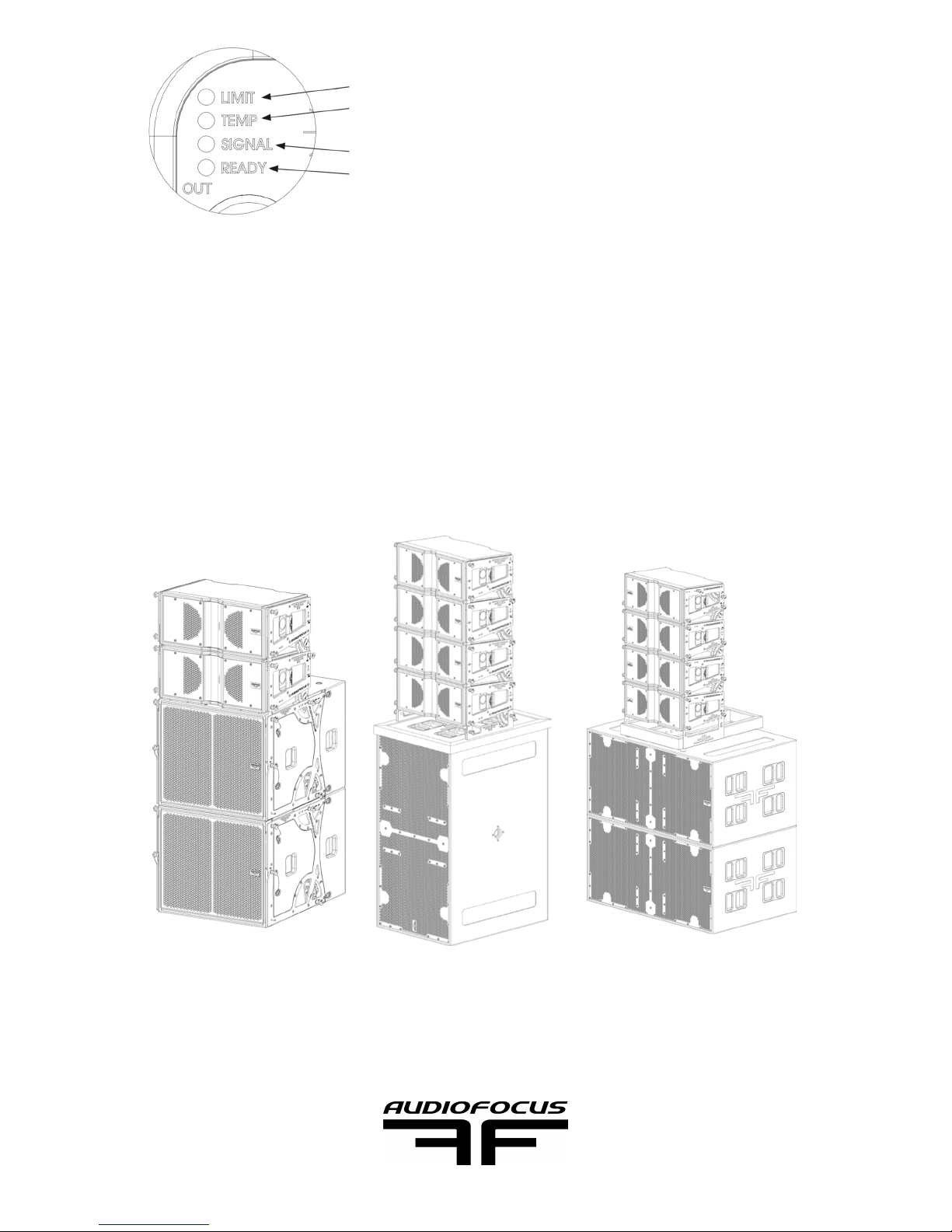
ARES8 can be used directly on top of B18 and MTsub218 MKII, creating an high
performances plug and play FOH system.!
!
!
Page sur 5 17
AUDIOFOCUS ARES8
USER’S MANUAL
Input signal detected!
Module in ON and ready to play
Output signal reach -3dB of peak limiter!
Working temperature is too high. Protection will reduce signal than
cut it out if temperature increase further!
Page 6
3.3 LOW END
3.3.1 B18!
Ares8 can be used with the B18a, self-powered flying bass,
lowering the combined system operating range down to 40Hz.
The B18a is also suitable to sub array application and short
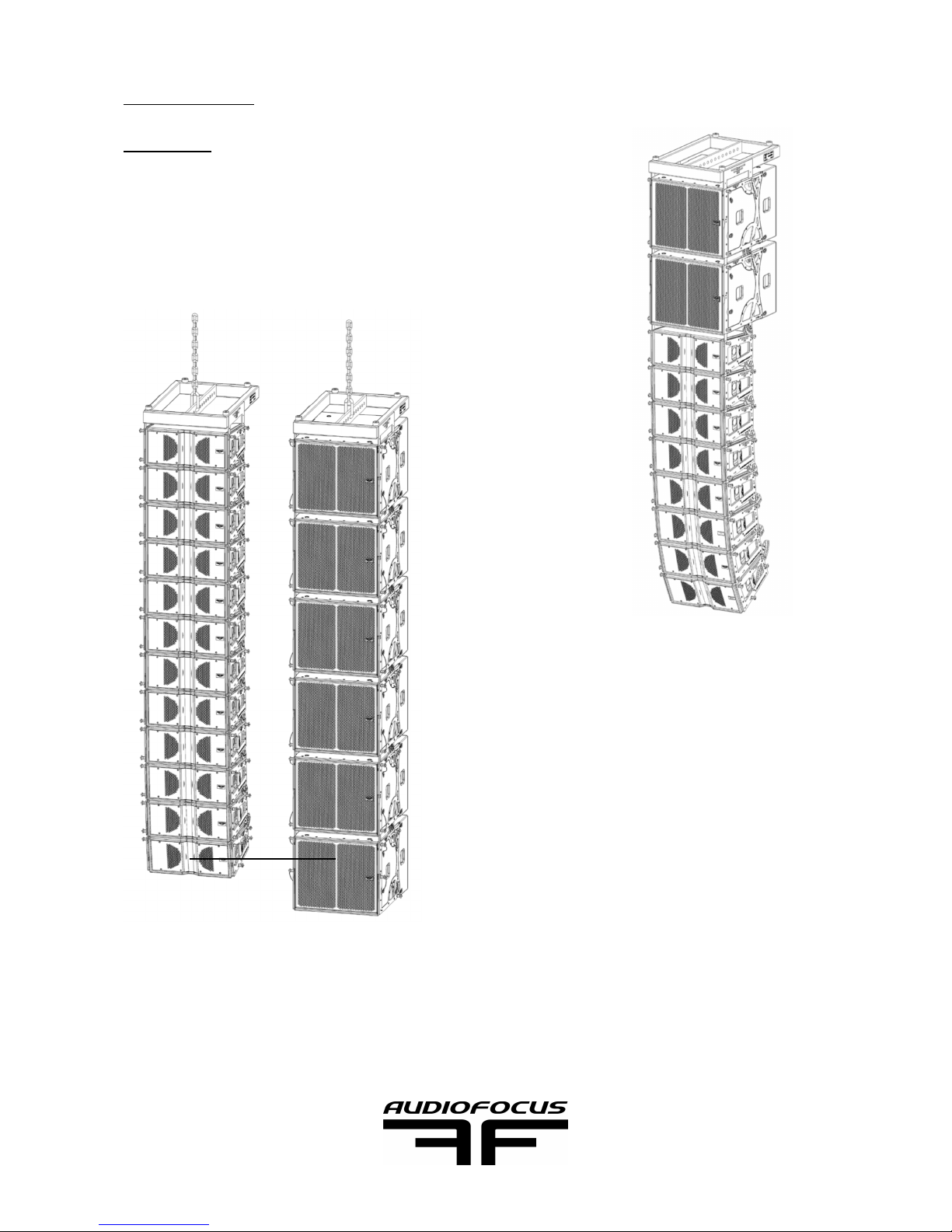
distance sub application. !
!
A minimum of four B18 column is needed to
control directivity in sub array application.!
!
Distance between Ares8 array and B18 array is
maximum 1.6m between both acoustic center.!
Page sur 6 17
AUDIOFOCUS ARES8
USER’S MANUAL
160 cm
Page 7
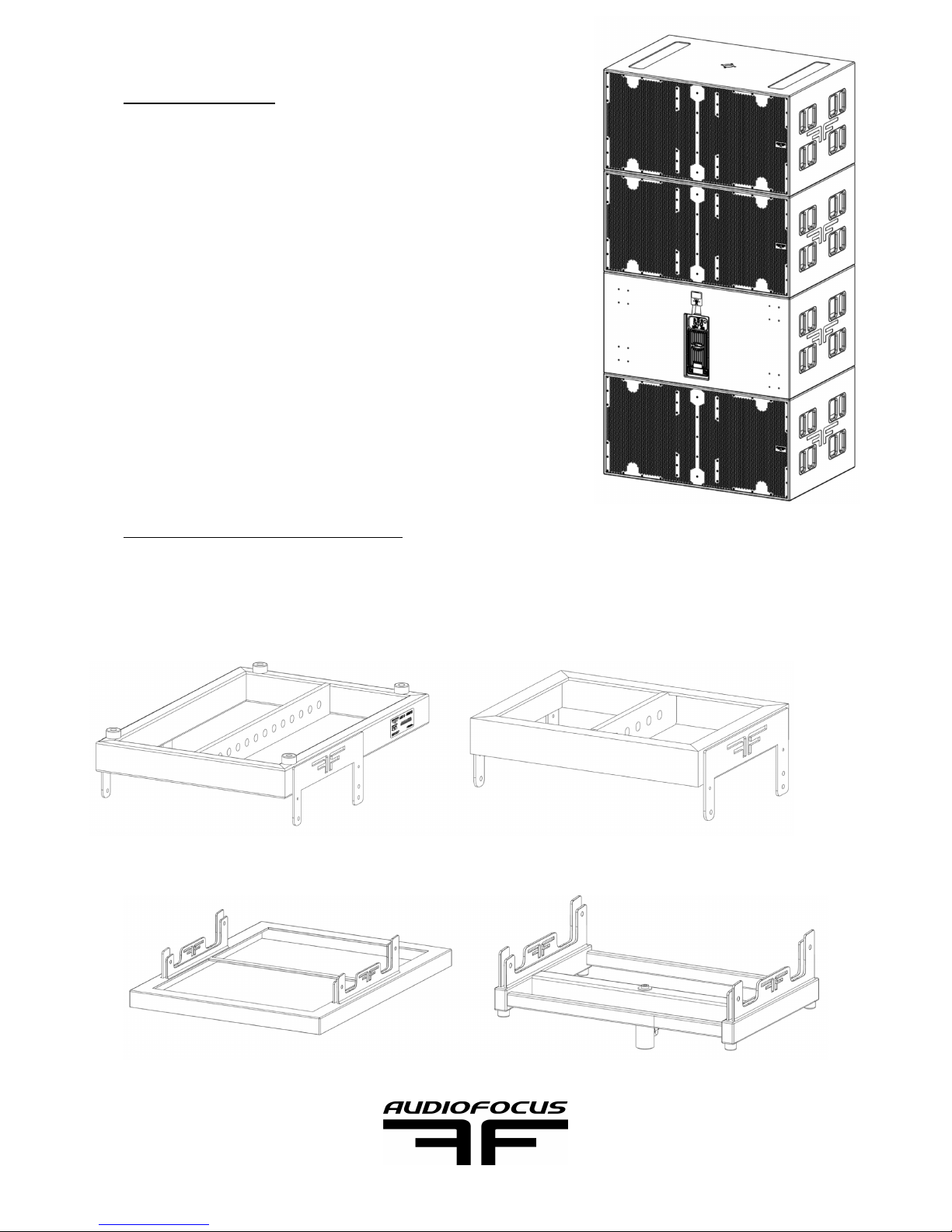
3.3.2 MTsub 218 !
The MTsub218 mkII is the recommended subwoofer for
the Ares8 line array. Use one MTsub218 mkII for two
Ares8 for the best result. !
3.4 HARDWARE AND COVER
!
!
Page sur 7 17
AUDIOFOCUS ARES8
USER’S MANUAL
Ares8 bumper is suitable for !
a limit of 24 Ares8
Ares8 mini bump is suitable for
a limit of 12 Ares8!
The over-hat is suitable for a limit of 6 Ares8
on top of MTsub218mkII, depending on tilt
angle!
The T-Yoke is suitable for 1 Ares8!
Page 8
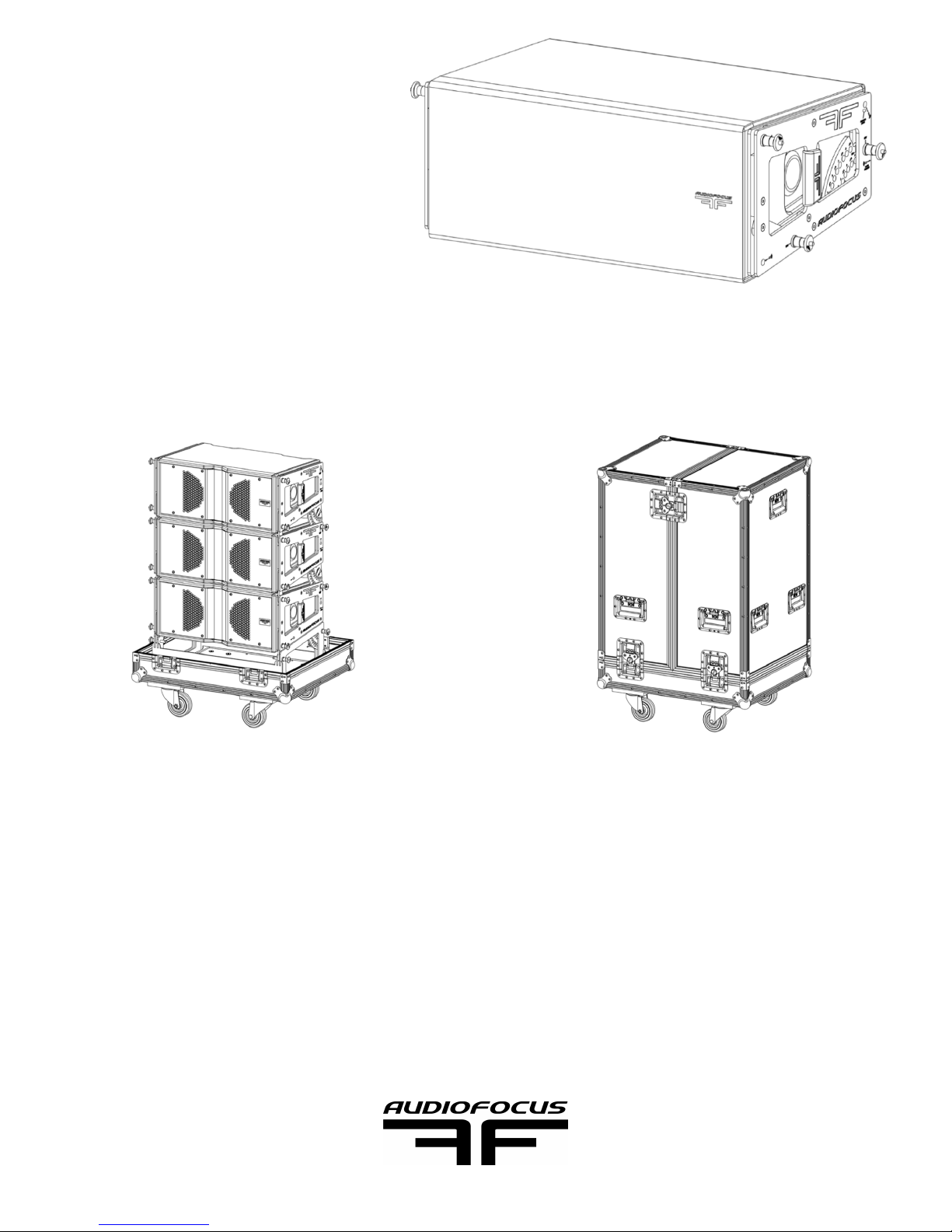
The Ares8 cover protect the
system from direct rain an direct
sunlight. Ambient temperature
and amplifier temperature are
related but not the same!
(amplifier start limiting at 75°c)!
Flightcase for 3 and 4 Ares8+bumper are recommended to ensure a long life to the
system!
!
Page sur 8 17
AUDIOFOCUS ARES8
USER’S MANUAL
Page 9
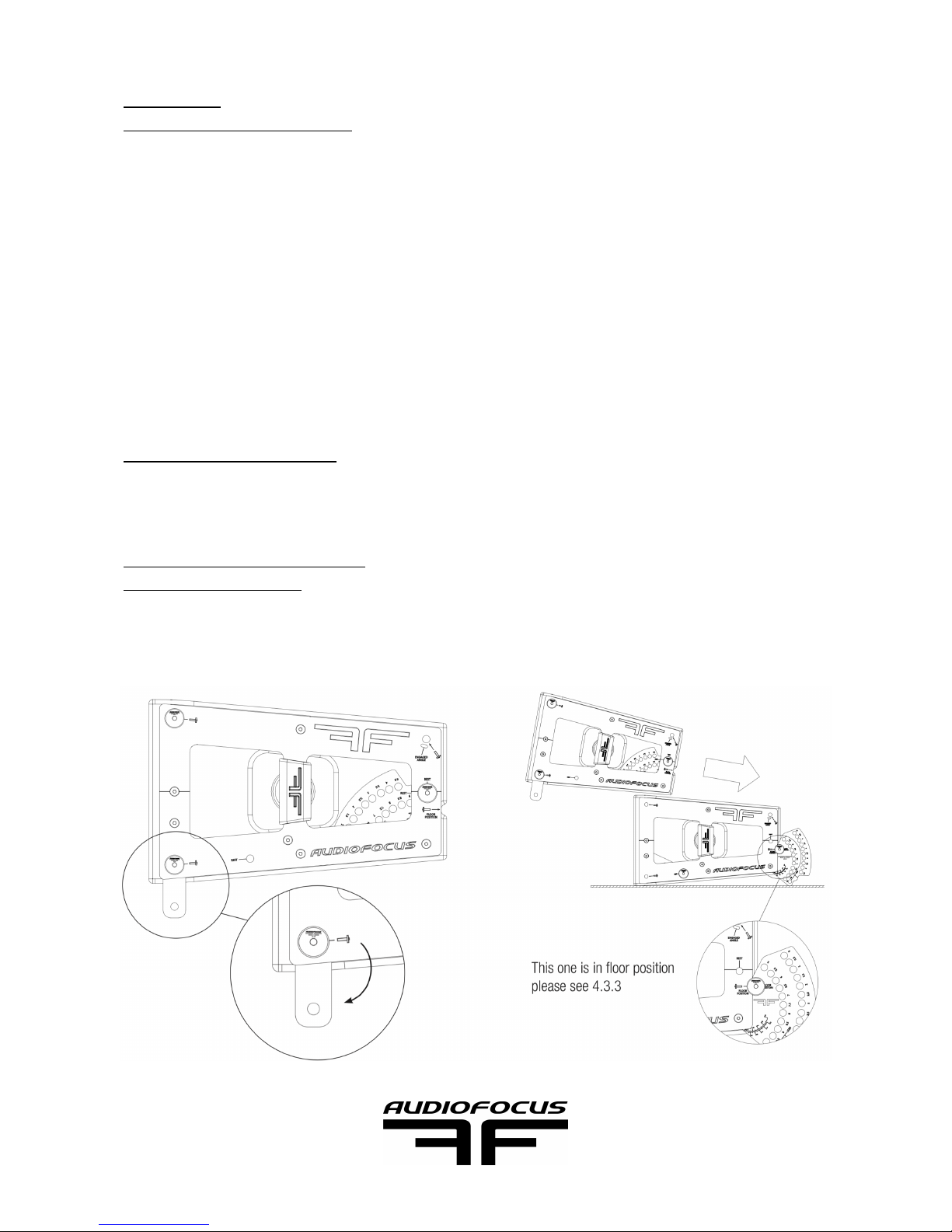
4 SETUP
4.1 PRESET SELECTION!
the Ares8 amplifier come with 4 presets choice corresponding to the number of speaker
in use. !
Preset1:# 1 cabinet alone!
Preset2:# 2=>4 cabinets!
Preset3:# 4=>8 cabinets!
Preset4: # 8=> 24 cabinets!
Bigger configuration would need an external processor to take care of the different
distance and coupling compensations.!
4.2 EASE PREDICTION!
Please refer to the Easefocus quick start guide for further prediction and angles selection.!
4.3 FLOOR AND RIGGING!
4.3.1 FIRST SETUP!
The first out of the packaging box setup will go through two simple steps, open the front
lug to connect to the next ARES8 and then connect the angle plate.!
Page sur 9 17
AUDIOFOCUS ARES8
USER’S MANUAL
Page 10
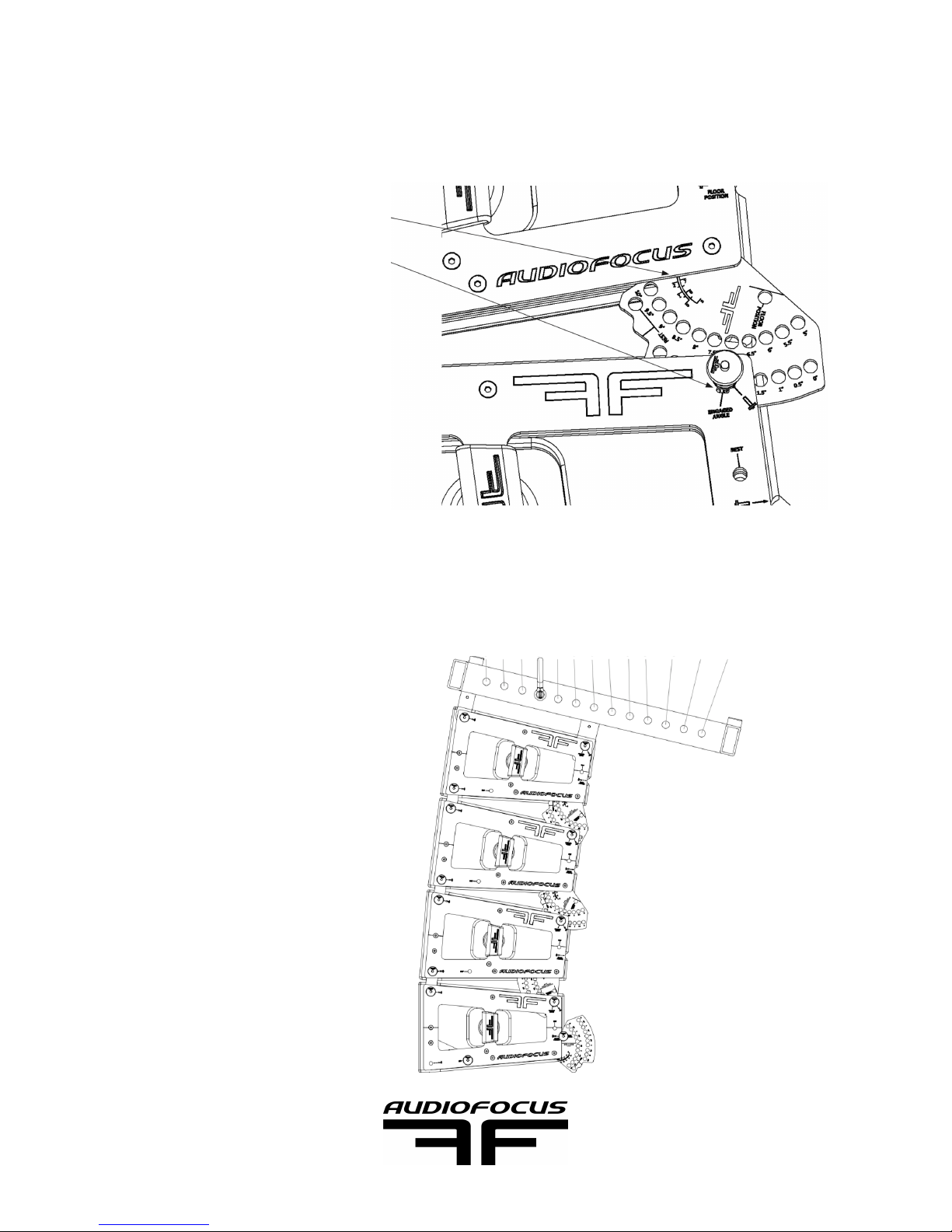
All the angle can be set at 0° for storage or follow an Easefocus prediction in case of
immediate use.!
The engaged angle can be seen two way: !
!
Easefocus will also calculate the right pin point :!
Page sur 10 17
AUDIOFOCUS ARES8
USER’S MANUAL
Looking at the line on top of the plate
Looking through the angle windows
1 2 3 4 5 6 7 8 9 10 11 12 13
Page 11
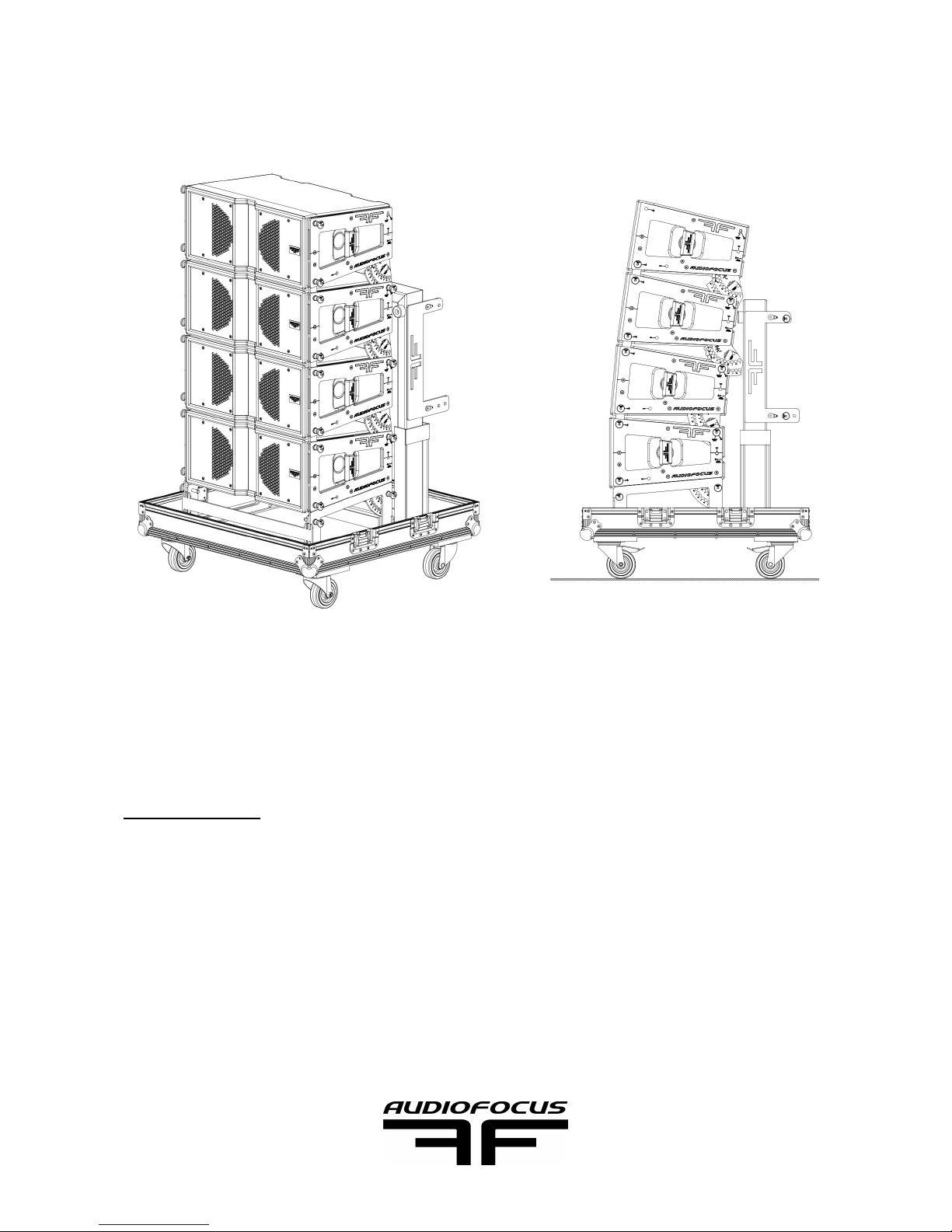
In order to do the first setup in the AUDIOFOCUS ARES8 flight case, the first ARES8 must
be connected to it as to another ARES8. !
One of the benefits on an AUDIOFOCUS supplied ARES8 flight case is the ability to pre
configure your cabinets angle before leaving the warehouse, further minimising on-site
rigging time. !
4.3.2 RIGGING!
The hoist’s hook will connect to the right pin point of the bumper as predict by Easefocus.!
The bumper can be store in the AUDIOFOCUS ARES8 flight case. The bumper can be
placed manually on top of ARES8 stack or by using the hoist to minimise man power. !
Page sur 11 17
AUDIOFOCUS ARES8
USER’S MANUAL
Page 12
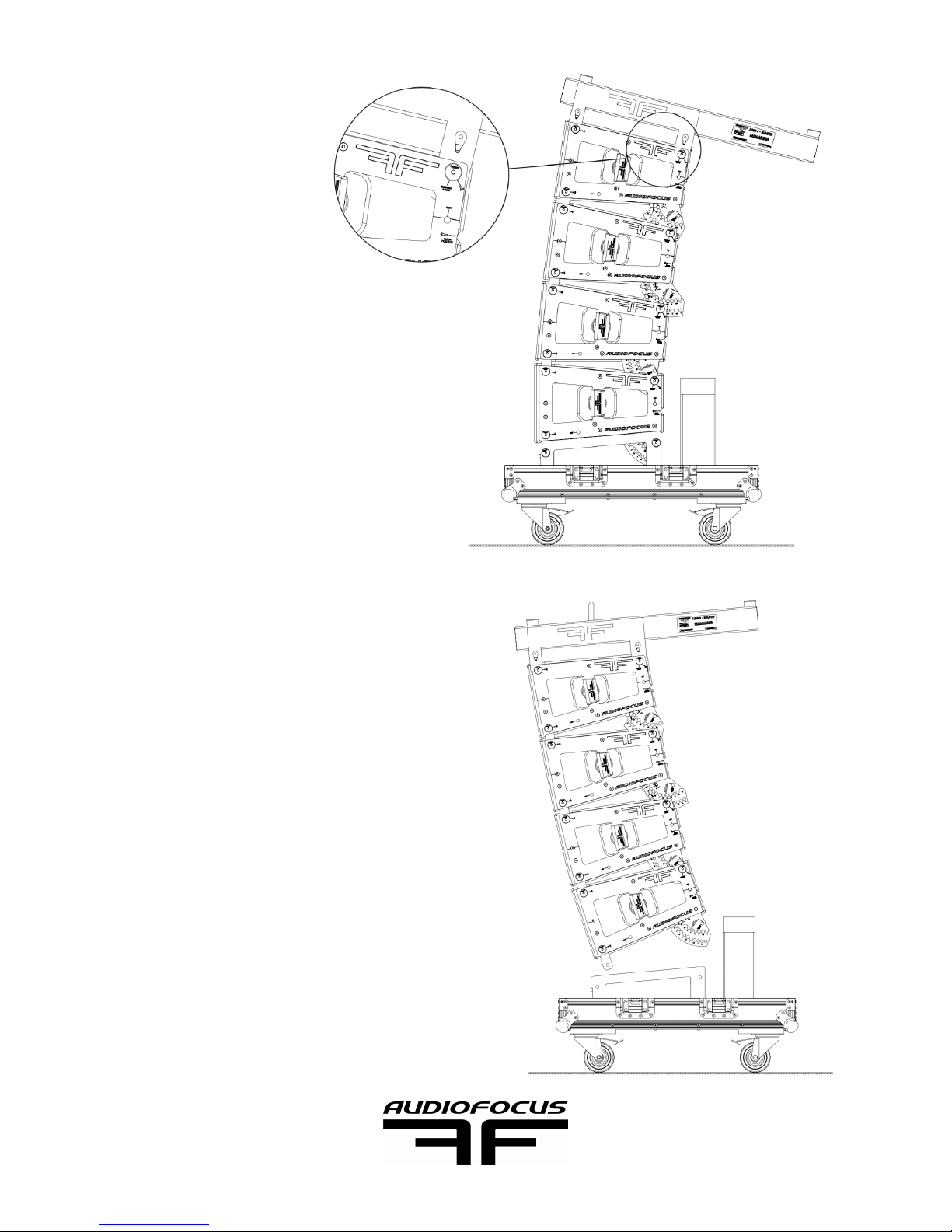
The bumper link to
ARES8 as another
ARES8:!
-Lay the bumper on
top of ARES8. It
secure.!
-Pin front lug.!
-Pin rear according to
Easefocus prediction
(0° or 5°).!
!
Bottom ARES8 pin has to be remove with a
minimal hoist tension. !
Page sur 12 17
AUDIOFOCUS ARES8
USER’S MANUAL
Page 13
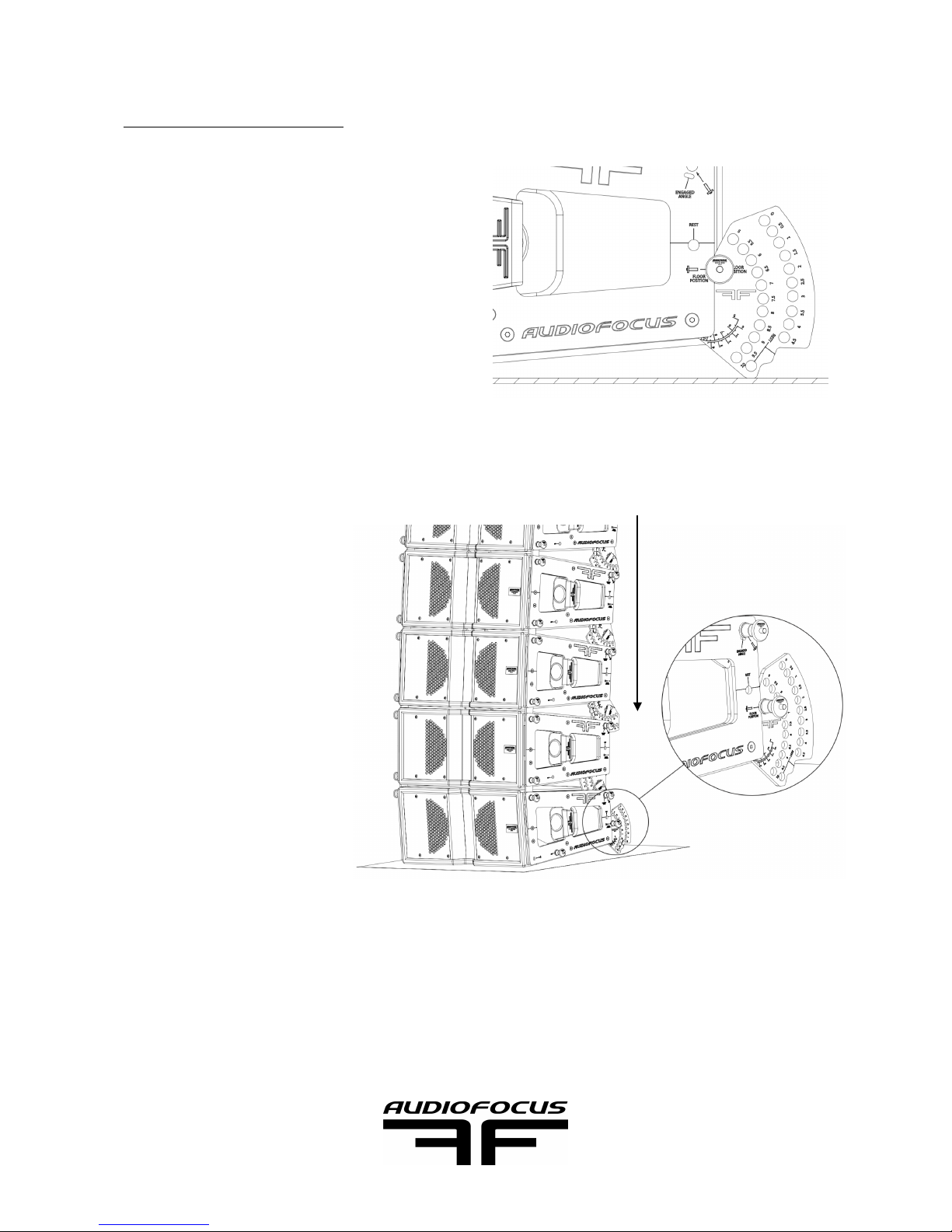
4.3.3 FLOOR POSITION!
Either for a stand alone ARES8 (frontfill…)
application or for a complete stack (FOH),!
ARES8 can be set in floor position with its
angle plate. The front grill is then 90° with
floor. !
Also, easiest way to trigger the angle is compression method by using bottom ARES8 in
floor position.!
!
-Let the stack down on
floor. !
-Remove one angle pin at
one time on each side. !
-Let the hoist go down and
simply let the weight move
the ARES8 down till the
right angle is reach. !
Last step is to lift the ARES8 line source to the proper height as calculated by Easefocus. !
The preset and level can be adjust easily while the cabinets are at human height. Each
cabinet sound and connection can also be check at this time. !
Page sur 13 17
AUDIOFOCUS ARES8
USER’S MANUAL
Hoist compression
Page 14
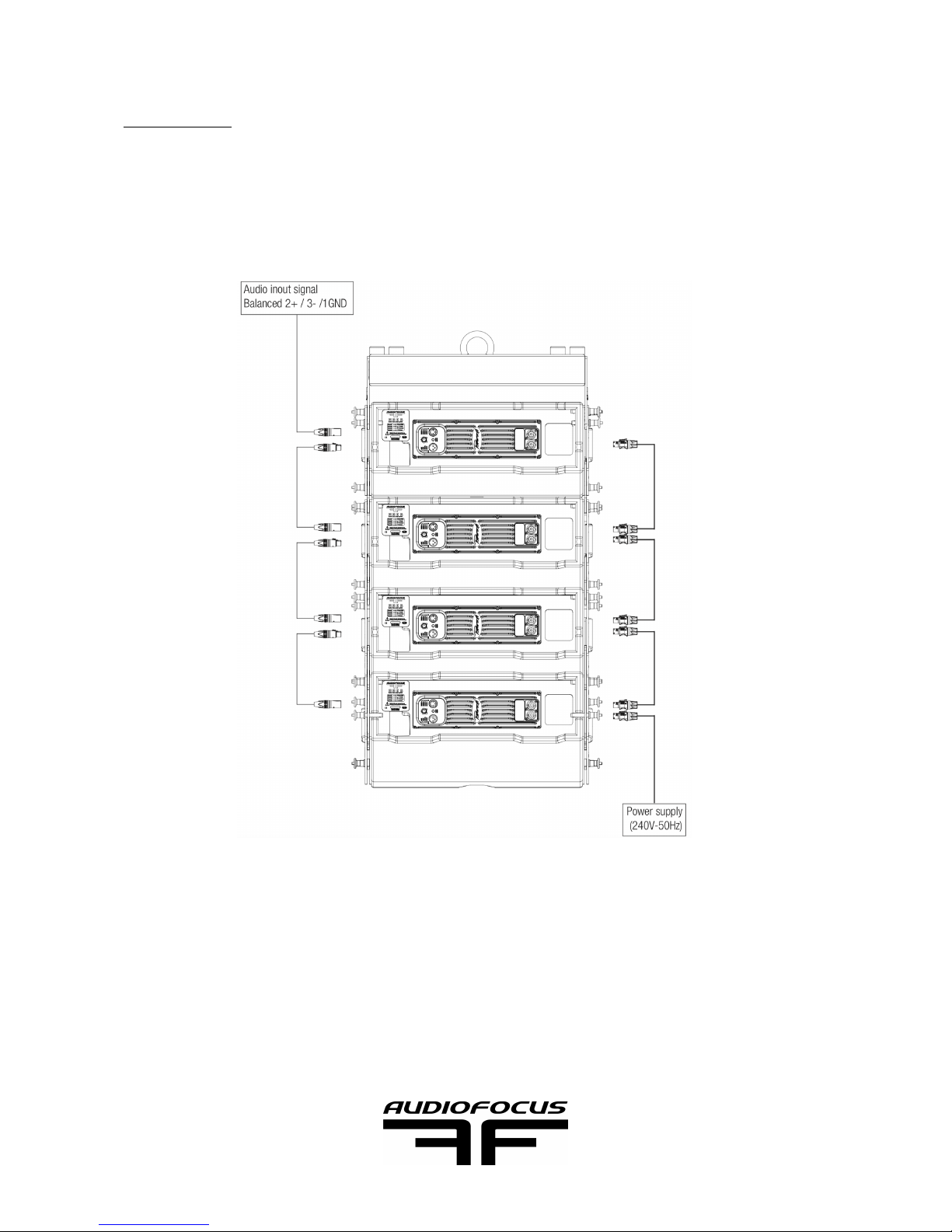
4.4 WIRING!
Audiofocus power and signal cables with the appropriate section, length and connectors
for passive and active speaker are recommended!
Connect power and signal cables as describe on the technical drawing. Make sure the
preset, volume are right. Check the signal output before application and lifting. !
Passive version only have the speakon connector on the back. As it is a two voice
speaker, a 4P speakon connector is needed (1+/1- low; 2+/2-high). Powersoft Armonia
hold all ARES8 presets as in Powersoft X series or Canalli amplifier. One output can drive
up to heigh Serial version of ARES8p and two Parallels version of ARES8p. Use 2.5mm2
speaker cable.!
!
Page sur 14 17
AUDIOFOCUS ARES8
USER’S MANUAL
Page 15
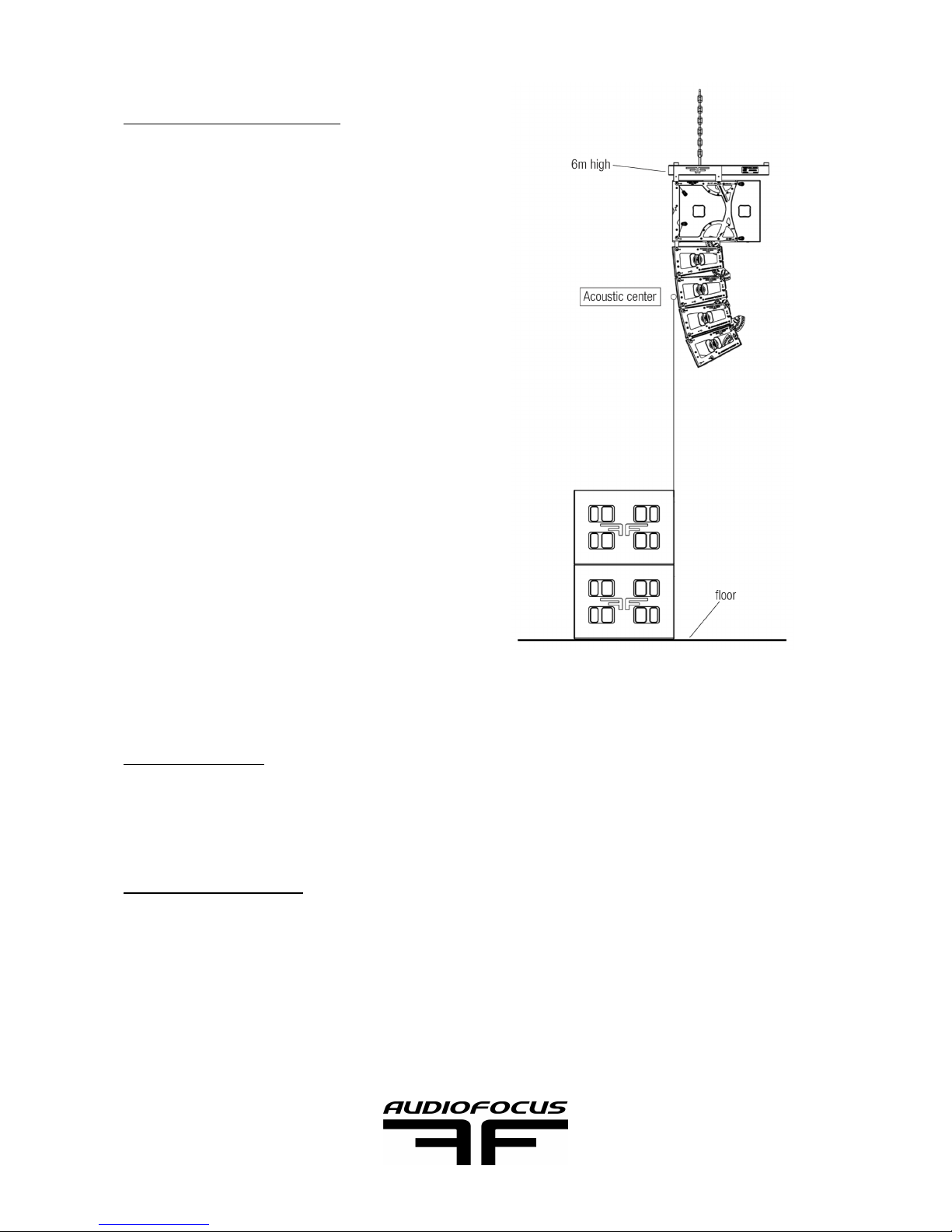
4.5 TIME ALIGNEMENT!
A plug and play way to time align Ares8 with
the mkII218a subwoofer is to physically align
the back of the subwoofer with the front center
of the Ares8 array at 6m pin point from the
ground. It gives a basic fast solution for this
setup. However we highly recommend to
measure the phase alignement at the crossover region at 100Hz with FFT software like
Smaart or Systuning. !
4.6 SET DOWN!
Follow the step of lifting the PA in reverse. !
4.7 MAINTENANCE!
Remove the cover if any liquid hit it, let it dry. If you need to clean it, use no agressive
product for synthetic material. !
You want to have regular check of the general aspect of the cabinet. Wood paint part can
be clean with maintenance furniture product, metal part with a microfiber. !
!
Page sur 15 17
AUDIOFOCUS ARES8
USER’S MANUAL
Page 16

5 TECHNICAL SPECIFICATIONS
!
ARES8a (active)!
Type
Vented & AF design!
Drivers
2 x 8’’ woofer LF/MF & 1x1,4’’ Neo driver -1x3’’ HF voice coil & Titanium diaphragm !
Frequency range (1)
70Hz-19,5kHz!
Power handling (2)
420W LF / 100W HF!
Maximum power handling (3)
540W LF / 200W HF!
Nominal Impedance
10kΩ!
Dispertion (h x v)
110°x7,5° -6dB!
SPL Program @ 1m (4)
133dB!
SPL Peak @1m (4)
139dB!
Crossover frequency!
900Hz!
Presets/Angles
4 presets regarding coupling/20x0,5° angle steps!
Line Connectors
1IN, 1OUT XLR!
Power Connectors!
2X Powercon linked!
Dimensions (h x w x d)!
250 x 645 x 400 mm (including rigging and pins)!
Weight
30kg!
Finish
Highly resistant polyurea coating!
Material!
First grade birch plywood 15 & 24 mm!
Mounting accessories
M20 + 35 mm standard flange!
Compatibility
Powersoft & Easefocus!
Accessories
Over-hat, T-yoke, protective cover, transport flight-cases. !
Page sur 16 17
AUDIOFOCUS ARES8
USER’S MANUAL
Page 17

(1) Two hours test nominal program power using a 60Hz-20kHz band pink noise test
signal.!
(2) Two hours according to our standard close to AES standard. Program power rating is
measured globally using a 60Hz-20kHz band pink noise test signal with 50% duty cycle
(applied for 2 hours).!
(3) The peak power rating represents the maximum permitted instantaneous peak level
over a maximum period of 10 ms which will be withstood by the bass section without
damage and 2 ms which will be withstood by the high section without damage.!
(4) Average maximum axial spl @full power, before PPS© is activated. !
6 CONTACT AND LINK
www.audiofocus.eu!
www.facebook.com/AudiofocusPage/!
www.facebook.com/groups/AUDIOFOCUS/
Page sur 17 17
AUDIOFOCUS ARES8
USER’S MANUAL
 Loading...