

Page 1

S4
USER MANUAL
Revision 0, October 2018
Page 2

Page 3

This manual comprises introducing information on use and performance of this device. For more
information please refer to the Audial web site, or send your questions to [email protected].
IMPORTANT!
1. This manual is a guide only.
2. Do not expose this device to rain or moisture, excessive heat or mechanical force.
3. Use this device exclusively with specified voltages.
4. Unplug the device from the wall outlet during a lighting storm.
Copyright © 2018, Audial d.o.o.
www.audialonline.com
Page 4

!
The lightning flash with arrowhead symbol within an equilateral triangle is intended to alert the
user to the presence of uninsulated “dangerous voltage” within the product’s enclosure that may
be of sufficient magnitude to constitute a risk of electric shock to persons.
The exclamation point within an equilateral triangle is intended to alert the user to the presence of
important operating and maintenance (servicing) instructions in the literature accompanying the
product.
Page 5

THIS DEVICE
Audial S4 is a reference quality, TDA1541A based nonoversampling D/A converter, with USB and S/PDIF
inputs.
The S4 USB input stage operates as asynchronous
(master) USB device, so it also generates the clock
signal for D/A conversion.
Two low jitter clocks are included, one that works with
44.1/88.2/176.4/352.8 kHz, and the other that works
with 48/96/192/384 kHz audio sampling frequencies.
This way the unit achieves clean clocking scheme, and
all the audio clock signals in the system are generated
only by frequency dividing, and not by using PLL
synthesizers.
The units with 11.2896/12.288 MHz master clocks can
accept up to 192 kHz, and units with 22.5792/24.576
MHZ master clocks can accept up to 384 kHz audio
sampling rates.
The USB stage also provides galvanic decoupling
between the USB and D/A stage, thus also separating
PC from audio circuits.
The S/PDIF stage operates up to 96 kHz, and provides
real 75 Ohm BNC, transformer coupled input, with
differential input termination. The ground of S/PDIF
line can be left floating, or capacitively coupled to the
DAC ground, by use of the switch at the back plate.
EVERYDAY USE
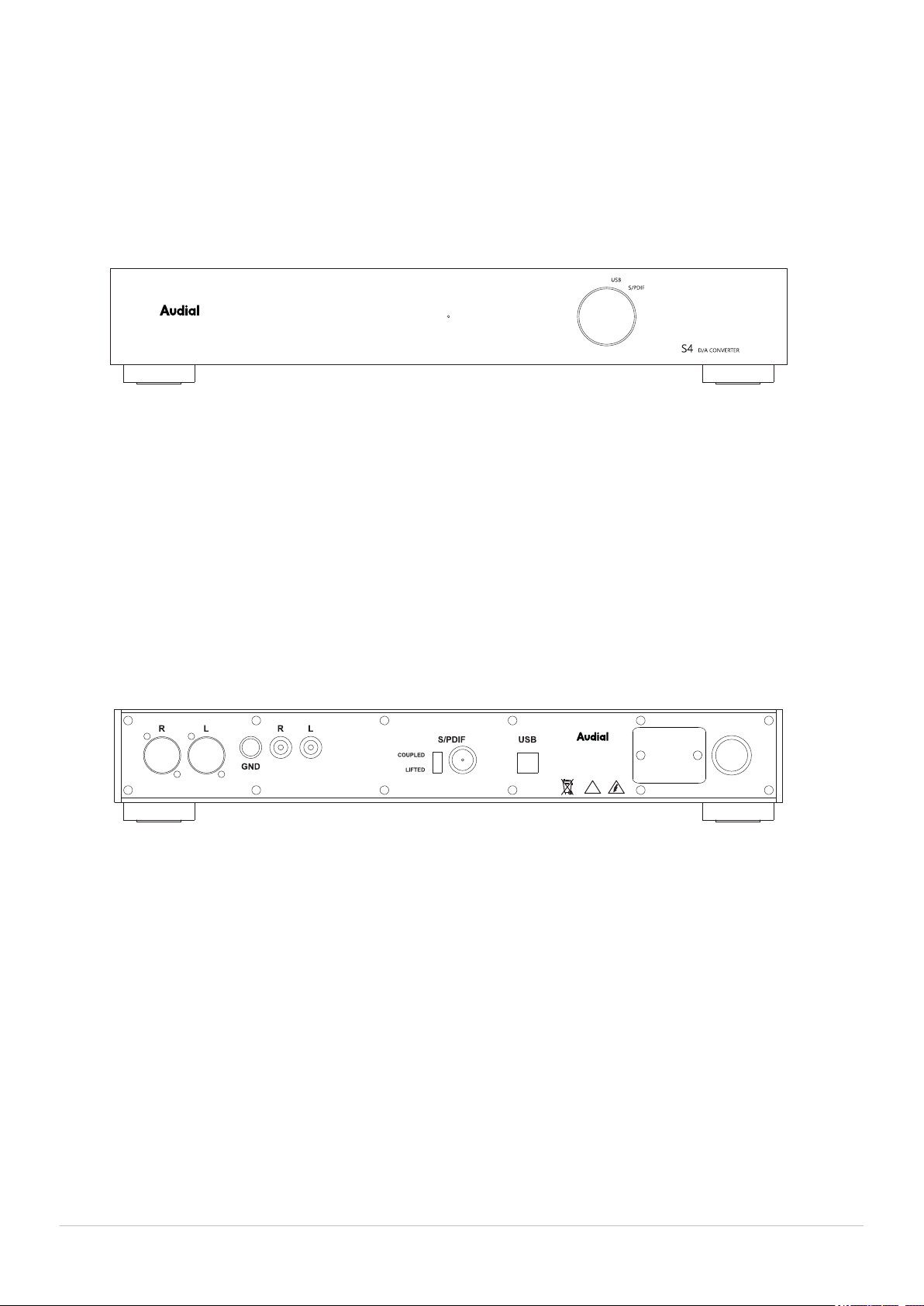
The S4 mains connector and switch are located on the
back plate, while the USB / SPDIF input selector is
located on front plate, along with the LED indicator,
which lights green for USB, and orange for S/PDIF
input.
S4 DAC is easy to use device, and it requires no special
maintenance or care. It achieves claimed technical
performance (distortion, frequency response etc.)
right from the start, however it needs a couple of
weeks of burning in to perform its best in subjective
sonic terms.
Please note that the D/A converter chip used in this
device (TDA1541A) is a classic TTL chip architecture,
which dissipates somewhat more power than it is usual
for devices of this kind these days. Hence it is it is not
recommended to leave the S4 permanently powered
up. Normally, once the S4 passes its initial burning in, it
is generally enough to have it powered up for about
half an hour before critical listening.
Mains cable shipped with S4 is the industry standard
grade. It is however generally recommended to use
high quality, preferably solid core cables, everywhere
in the audio system, and this suggestion applies to the
mains cable too.
An RCA to BNC adapter is shipped too, for customers
convenience, but it is highly recommend to use real 75
Ohm BNC plugs. Regardless of what you might be told
from time to time, the RCA can not meet this
requirement.
Audial S4
5
Page 6
S4 front plate
GND
D/A CONVERTER S4
#A01-2345
Made in Serbia
!
110-120VAC
~50-60Hz
FUSE T4A
POWER
S4 back plate
From left to right: XLR and RCA output connectors, with GND terminal in between,
S/PDIF input connector with ground switch,
USB input connector, mains connector, mains switch.
6
Audial S4
Page 7
USB AUDIO CLASS 2.0
DEDICATED WINDOWS DRIVER
Audial S4 USB stage employs USB Audio Class 2.0
definitions.
Mac OS X and Linux are natively USB Audio Class 2.0
compliant for several years now, and this device hence
does not require special driver when used with Mac OS
X or Linux.
Since September 2017, Windows 10 (1703) also
supports USB Audio Class 2.0 definitions, so the S4 will
act as a plug and play device with recent Windows 10
versions. Once it is connected to PC running Windows
10, a small window will pop up in the bottom right
corner of the screen, reporting about the initial
connection routine. Once this process is finished, the
DAC can be found as playback audio device, available
in the system.
In addition, Audial provides dedicated Windows driver
for this device, which is still necessary with earlier
Windows versions. This driver also provides additional
functionality such as ASIO interface, buffer length
control, or firmware update, and it can be generally
preferred soundwise
Audial S4 users can download this driver at Audial web
site, https://www.audialonline.com/s4. Driver version
1.26 can be installed to Windows XP, Vista, 7, 8, 8.1 and
10. Later driver version 2.10 however improves on
compatibility with later PC systems, and can be
installed to Windows 7, 8, 8.1 and 10. All driver versions
are compatible with both 32 and 64-bit Windows.
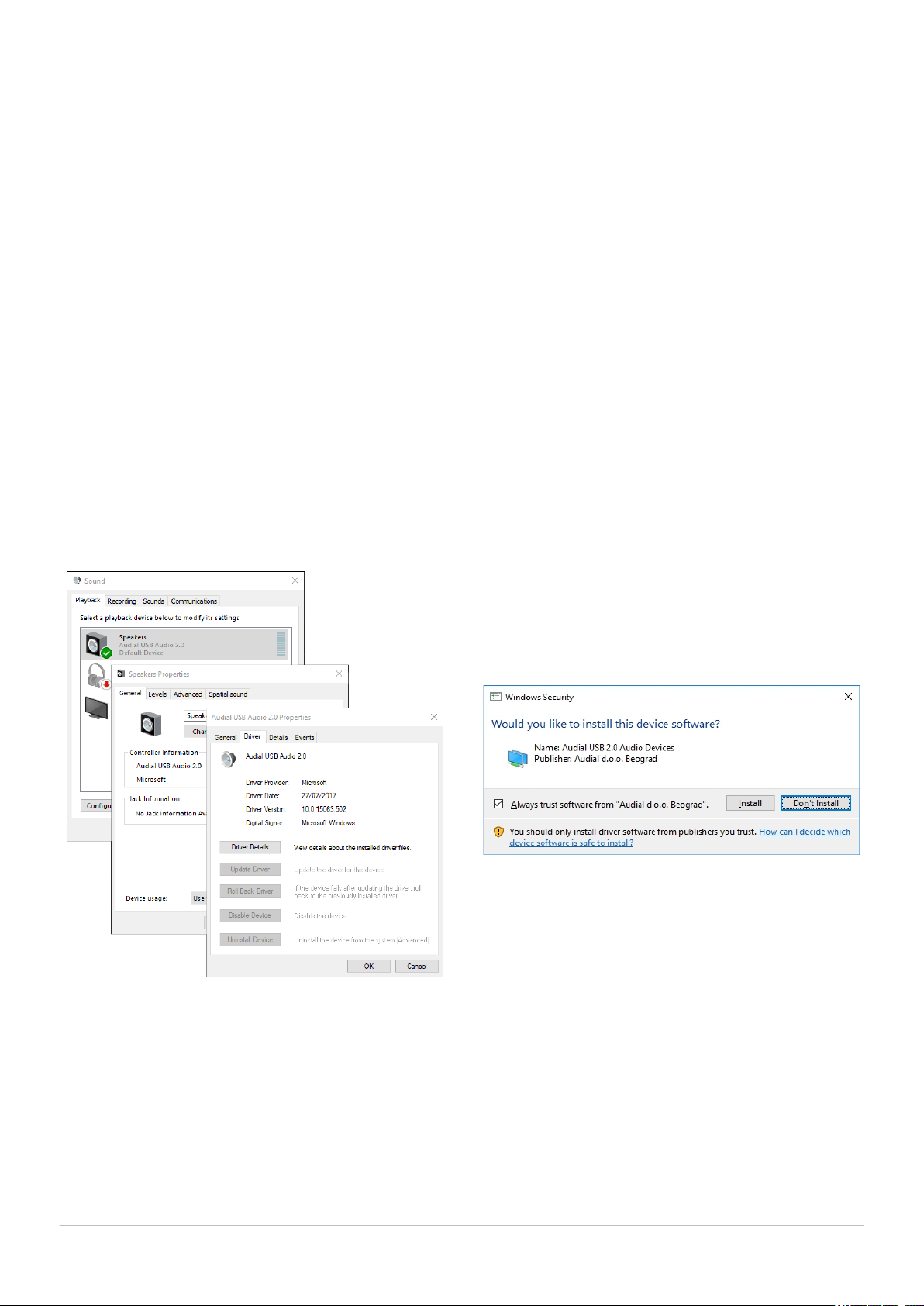
To install the driver, please unzip provided file, and run
setup.exe. Installation window will pop up, and at one
stage you will be asked to connect the device. Also,
during this process, and according to your Windows
security settings, you might be asked a couple of times
to allow the installation, and please do so. These
windows will look like this.
Audial S4
Once the installation is complete, you can configure
your settings by using the control panel, available in
Windows Start Menu -> Audial.
7
Page 8

OUTPUTS
Audial S4 DAC has two sets of the outputs, which can
be either RCA and XLR, or two RCA. RCA outputs can
be capacitors or transformers coupled RCA, while XLR
is always transformers coupled.
Please note that the capacitive coupling, which implies
the grounds of two devices tied together, and
transformer coupling, which keeps two grounds
separate, require different approaches to the system
earth grounding. Typically, transformers need the
grounds connected to the earth at both its sides,
whereas more than one earth in the system that uses
capacitive coupling may cause ground loops, and
increase the noise.
At its back plate, S4 also includes the connection to its
chassis/earth ground. This connector can help proper
system grounding and/or earthing, or it can be used to
connect the shield of the interconnect cable (similarly
to XLR pin 1).
WARRANTY
Audial claims proper working of this product for two
years. Audial is obliged to correct any malfunction
within this period, at no charge, either by competent
repair service, or by swapping the sold unit by the new
one.
For the units sold directly by Audial, invoice is also
guarantee certificate. Since Audial maintains own data
base of directly sold units, the original buyers in most
cases won’t need it. Warranty is still fully transferrable
from original to subsequent owner(s), however in this
case we will probably ask for the invoice.
8
Audial S4
Page 9

SPECIFICATIONS
INPUTS:
- USB 2.0, supports 2.0 Class Definitions for Audio Devices, asynchronous operation;
Fs max 192 kHz or 384 kHz, depending on master clock frequencies
- S/PDIF, 75 Ohm BNC; Fs max 96 kHz
OUTPUTS:
Unbalanced RCA, transformers or capacitors coupled;
Balanced XLR, transformers coupled;
2.1 V RMS both
OUTPUT IMPEDANCE:
Capacitors coupled outputs: 3.5 Ohm @ 20 kHz, 10 Ohm @ 1 kHz (23.5 uF)
Transformers coupled outputs: 30 Ohm, 20Hz-20kHz
FREQUENCY RESPONSE:
Sin(x)/x equivalent:
@ fS=44.1kHz: -3.2dB @ 20kHz
@ fS=88.2kHz: -0.8dB @ 20kHz
@ fS=192kHz: -0.2dB @ 20kHz
TRANSIENT RESPONSE:
Clean with no overshoot or ringing
ABSOLUTE PHASE:
Correct
HARMONIC DISTORTION (@ 1kHz):
0.003% @ -6dBFS (I/V dominated)
0.9% @ -60dBFS(D/A dominated)
INTERMODULATION DISTORTION (CCIR):
0.006%
MAINS VOLTAGE:
220-240VAC/50-60Hz or 110-120VAC/50-60Hz
DIMENSIONS (W x D x H):
428 x 275 x 76 mm, including feet, but excluding knob and connectors
WEIGHT:
Approx. 7Kg
For performance graphs, please visit https://www.audialonline.com/s4.
Audial S4
9
Page 10

Copyright 2018 Printed in Serbia© •
 Loading...