

Page 1

Audi TT Coupé
Quick reference guide
Page 2
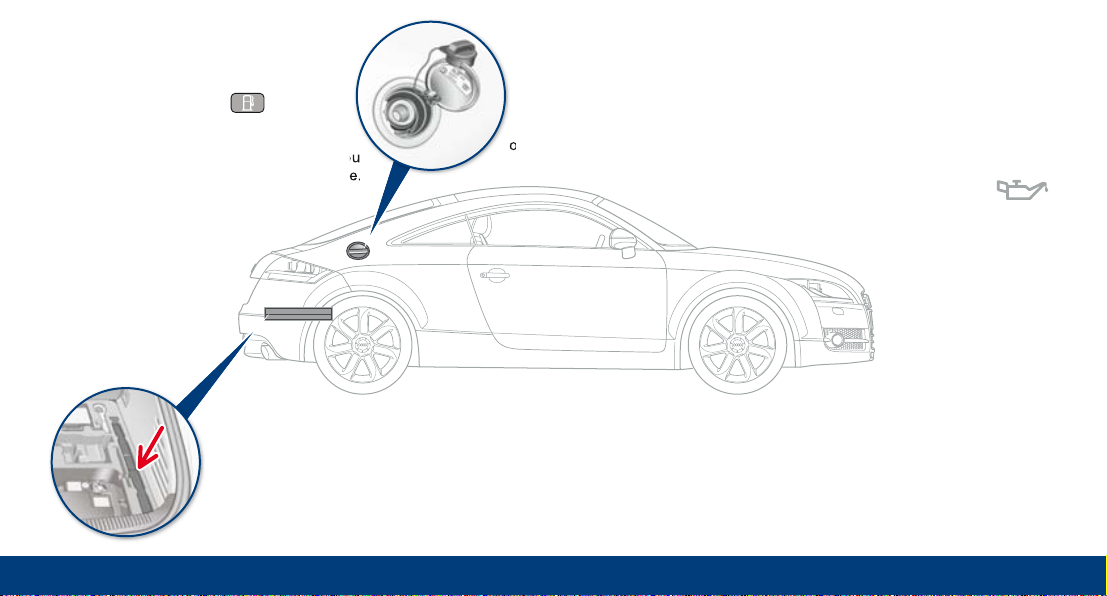
Fuel
(see sticker)
Tyre pressures
(see sticker on door pillar
on driver side)
Fuel tank flap
To open:
Press the switch on
the driver’s door.
To close:
Press the tank flap until you
hear it click into place.
Engine oil
The correct oil
specifications and
engine oil capacity are
listed in the
Performance, weights
and dimensions
section of the
Owner’s Manual.
Warning triangle
The compartment for the
warning triangle is located in
the luggage compartment.
Page 3
Welcome
Dear Audi Driver,
This quick reference guide gives you an
overview of the main features and
contr
ols of your vehicle. However, it
cannot replace the detailed Owner’s
Manual which contains important
information and safety warnings.
Please refer to your Owner's Manual for
detailed information on your vehicle.
You will find everything you need to
know about the radio, CD, navigation,
TV and telephone functions in the
Operating Manual for your sound system
or navigation system.
We wish you safe and enjoyable
motoring with your new Audi.
AUDI AG
Page 4
Controls and
displays
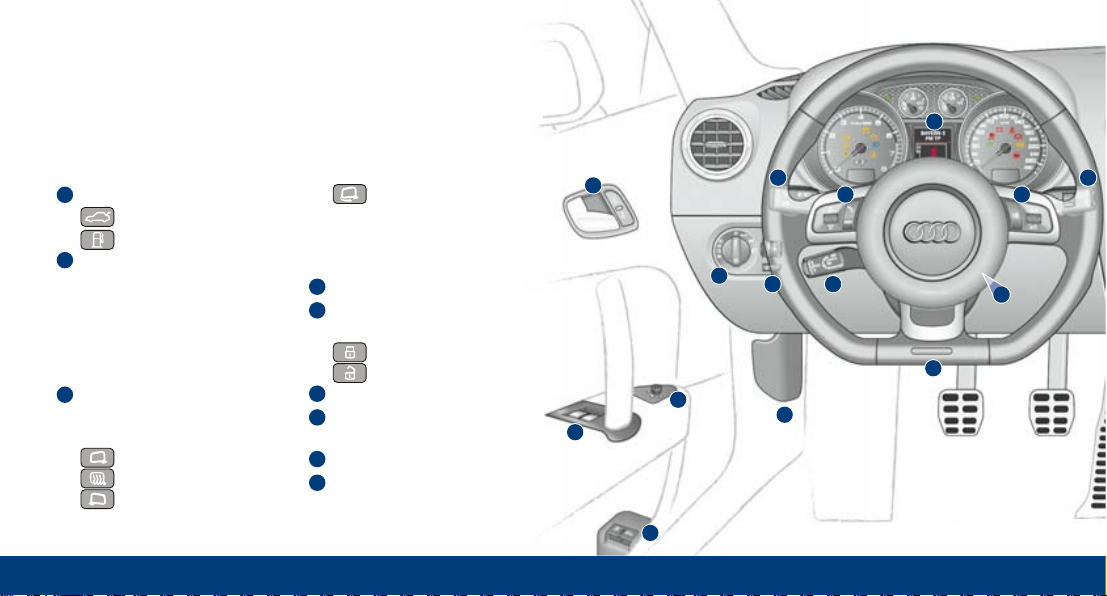
Unlock switches for:
Tailgate
Tank flap
Electric windows
To set the desired position:
Press/pull to the first stop
and hold.
"One-touch" function:
Press/pull briefly to the
second stop.
Adjuster for exterior
mirrors
Turn the adjuster for:
Left exterior mirror
Exterior mirror heating
Right exterior mirror
3
2
1
7
10 12
9 9
8
11
14
3
2
4
5
6
1
13
Exterior mirror
retraction
Press the adjuster to move
the mirror glass in the desired direction
Bonnet lock release
Door handle and central
locking switch
Lock
Unlock
Light switch
Headlight range control
and daytime running lights
Cruise control system
Controls on multi-function
steering wheel
9
8
7
6
5
4
Page 5
Overview
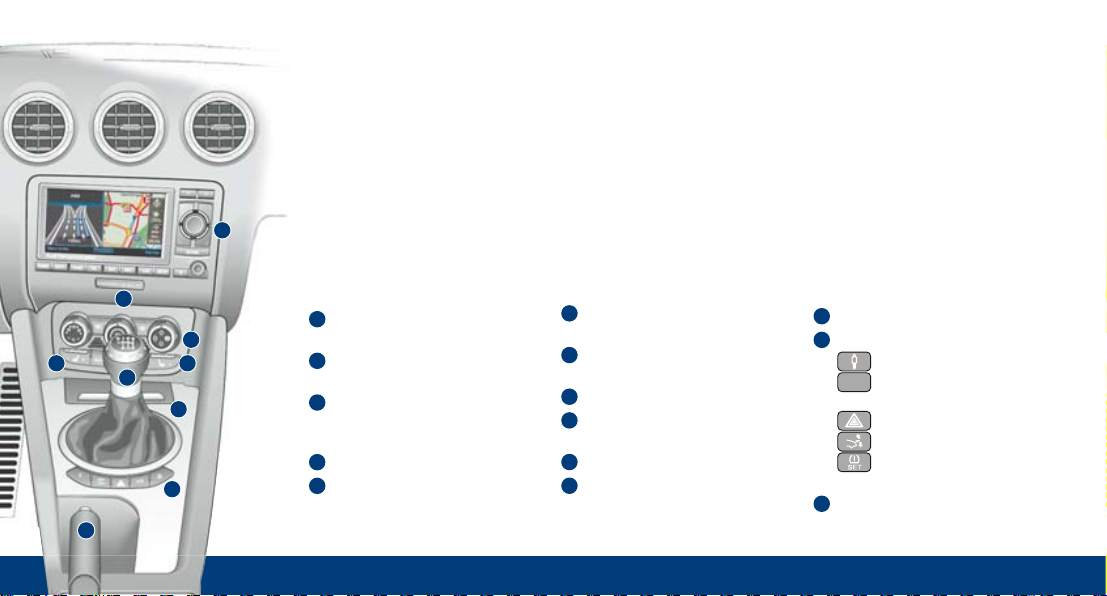
Ashtray
Buttons for:
Audi magnetic ride
Electronic stabilisation
program
Hazard warning lights
Rear spoiler
Activating tyre
pressure monitoring
Handbrake
21
22
ESP
OFF
23
15
16
17
19 18
20
21
22
23
Turn signal and main beam
lever
Instruments and
warning/indicator lamps
Windscreen wipers/washer
and buttons for on-board
computer
Ignition lock
Steering wheel position
adjuster
14
13
12
11
10
Navigation system or
sound system
Warning lamp for front
passenger's airbag
Air conditioner
Front passenger’s
seat heating
Driver’s seat heating
Gear lever or selector lever
for automatic gearbox
20
15
18
16
17
19
Page 6

Manual seat adjustment
To move seat backwards
or forwards:
Lift the lever and move the seat.
Then relea
se the lever and move the
seat further until the catch engages.
To adjust lumbar support:
Press the appropriate part of
the switch.
To
adjust seat height:
Pull up or press down the
lever repeatedly
.
To adjust backrest:
Take your weight off the backrest
and turn the knob.
Easy entry function:
Pull the lever upwards and fold the
backrest f
orwards.
5
8
7
6
4
Adjusting head restraints
Take hold of the sides of the head
restraint with both hands and move
it up as required. The top of the
head restraint should be at eye level
or higher.
Seat adjustment
Electric seat adjustment
To adjust lumbar support:
Press the appropriate part of the switch.
To adjust seat height and move seat
backwards or
forwards:
Front of seat cushion up/down
Rear of seat cushion up/down
Seat up/down
Seat forwards/bac
kwards
To adjust backrest:
Backrest further
upright/further
r
eclined
1
3
2
Sitting position
Sit in a normal upright position and
do not sit too close to the steering
wheel. If necessary, also adjust the
position of the steering wheel.
1
4
2
3
min.
25 cm
5
8
6
7
Page 7

Automatic gearbox
Selector lever positions
P Parking lock
R Reverse gear
N Neutral
D Drive (forwards)
S Sport position
To release the selector lever and engage a gear:
Switch on the ignition, press the brake pedal, and
press the interlock button on the selector lever.
Move the selector lever to D or S to start
driving forwards.
tiptronic: To switch to manual gear
selection mode, push the selector
lever from position D to the right.
The gears are shown on the driver
information system.
To shift up or down a gear: Briefly push
the selector lever forwards or backwards.
First steps
Starting the engine
Switching on the ignition/starting the engine
Insert the key into the ignition lock.
To switch on the ignition: Turn the key
to position .
To start the engine (on vehicles with
manual gearbox): Press the clutch and turn
the key to position until the engine
starts.
To start the engine (on vehicles with
automatic gearbox): Move the selector lever
to position P or N, press the brake pedal,
and turn the key to position until the
engine starts.
To switch off the engine: Turn the key to position .
1
0
2
2
Page 8

Switches for air conditioner
Control on left: Temperature selection
Control in middle: Switching air conditioner on/off
and regulating blower speed
Control on right: Air distribution
Automatic mode
Set the desired temperature and
press the button.
Air recirculation
Circulates and filters the air in the interior
of the vehicle
Switching air cooling system on/off
Defrosting windscreen and side windows
Rear window heating
AC
AUTO
Air conditioner
Audi magnetic ride
Two suspension systems in one vehicle
Normal driving mode: Comfort-oriented suspension
Sport driving mode: Performance-oriented suspension
Press the switch to activate/deactivate.
Page 9

Technology
When the system is switched on, the indicator
lamp appears in the instrument cluster.
To switch on/off: Pull/press lever .
To set speed: Press button .
To adjust stored speed: Press lever up (faster)
or down (slower).
1
2
Cruise control system
2
1
Rear spoiler
To increase stability
The down force of the rear axle
increases when the rear
spoiler is extended.
Automatic mode:
The rear spoiler extends at
speeds above 120 km/h and
retracts at speeds below
80 km/h.
Manual mode:
Briefly press the button to extend the rear spoiler.
Briefly press the button again (while driving between
20 km/h and 120 km/h) to retract the rear spoiler again.
Press and hold the button (while driving below
20 km/h) to retract the rear spoiler.
Page 10

1
2
2
Audi Navigation System plus
Components
Driver information system
Multi-function steering wheel
Scroll the left thumbwheel to select a menu item in the
driver information system. Press the thumbwheel to
confirm the selection.
Press the MODE button to switch between the active audio
source and the navigation and telephone functions.
Briefly press the button to switch on the speech
dialogue system.
Speak after the <beep>, e.g. say <Help> to call up the possible operating commands.
Press and hold the talk button to switch off the speech
dialogue system.
Scroll the right thumbwheel to adjust the volume.
If you press the right thumbwheel, the last navigation
cue will be repeated.
2
1
Page 11

3
Infotainment
Display
Function selector buttons
Press one of the buttons (e.g. RADIO)
to activate the desired mode.
ON/OFF button
To switch on: Press briefly.
To adjust volume: Turn.
To mute: Press briefly.
To switch off: Press and hold.
Control buttons
To activate one of the functions shown in the four
corners of the display, press the control button for
that corner of the display.
Rotary pushbutton
To select a menu item on display :
Turn the rotary pushbutton.
To confirm selection:
Press the rotary pushbutton.
3
7
5
6
4
3
5
7
6
6
4
Operating logic
The operating logic for
accessing the functions
is always the same.
To call up the menu in a
corner of the display: Press
the corresponding button.
To select: Turn the rotary
pushbutton.
To confirm: Press the rotary
pushbutton.
A
C
B
C
A
B
Page 12

2
4
Press the control button for “Memory”.
The control button corresponds to the
top left-hand corner of the display.
4
1
Press the RADIO function selector
button.
1
Press the rotary pushbutton to confirm.
3
Press the rotary pushbutton to confirm.
6
Turn the rotary pushbutton and
select the desired station.
2
Storing a radio station
Turn the rotary pushbutton and select
the desired memory position.
5
3
6
5
Page 13

MÜNCHEN/MÜNCHEN (…
Centre
Germany
M
MÜNCH-LEU…
MÜNCHAUR…
MÜNCHBERG
MÜNCHEBERG
DEL
LIST
N
MÜNCHEN
MÜNCH-LEU…
MÜNCHAUR…
MÜNCHBERG
MÜNCHEBERG
DEL
Germany
MÜNCH-LEU…
MÜNCHAUR…
MÜNCHBERG
MÜNCHEBERG
DEL
LIST
N
MÜN
Press the NAV function selector button.
1
Turn the rotary pushbutton and select the
first letter of the destination town.
Press the rotary pushbutton to confirm.
5
4
Select “Start route guidance” from
the menu.
Press the rotary pushbutton to confirm.
The route will be calculated.
10
9
Turn the rotary pushbutton and select
“Town/ZIP”.
Press the rotary pushbutton to confirm.
3
2
Repeat the above step to enter the
remaining letters of the destination
town until the name of the desired
town appears on the display.
6
When you have entered the town, turn
the rotary pushbutton and select “OK”.
Press the rotary pushbutton to confirm.
8
7
1
Starting the navigation system
3
5
8
Infotainment
6
10
7
2
4
9
Page 14

Functions
Establishing a BluetoothTMconnection
for a mobile phone
You can quickly connect a Bluetooth
mobile phone to the onboard phone
system on your navigation system:
p Switch on the ignition, navigation
system and mobile phone.
p On your mobile phone, select the menu
that looks for
Bluetooth devices
(e.g. “Hands-free”).
p On the mobile phone, select “Audi UHV”
and confirm.
p Enter the PIN “1234” on your
mobile phone.
Bluetooth
©
Infotainment
Memory cards
Loading:
p Press the button to open the
display.
p Insert the memory
card into the reader
slot as shown in the illustration and
pr
ess in the memory card until you feel
it click into place.
Removing:
p Press the button to open the
display.
p Pr
ess in the memory card. The card will
be released and c
an then be removed
from the reader slot.
Page 15

Warning and indicator lamps
Door/s open
Tailgate open
Brake pads worn
1)
Light sensor/rain sensor
defective
adaptive light defective
Headlight range control
defective
1)
Check engine oil level
(lights up permanently)
Engine oil sensor
defective
1)
(flashes)
Press clutch pedal
Washer fluid level low
Cruise control system
Airbag system
1)
Alternator
Seat belt warning lamp
Handbrake is applied
Anti-lock brake system
1)
Electro-mechanical
power steering
Audi magnetic ride
Tyre pressure too low
(check without delay)
Engine management
1)
Electronic stabilisation
program (ESP)
Emission control system
Main beam headlights
Rear spoiler
Turn signals/hazard
warning lights
Fuel level low
Bonnet open
Warning and indicator lamps
© 2007 AUDI AG
AUDI AG reserves the right to alter any part of the vehicle, its equipment and technical specifications.
No legal commitment can be implied by the information, illustrations or descriptions in this publication.
No part of this publication may be reprinted, reproduced or translated without the written permission
of AUDI AG. All rights under the laws of copyright are expressly reserved by AUDI AG. Subject to alteration and amendment. Concept and layout: Pfriemer GmbH. Printed in Germany.
Warning symbols
1)
If this warning lamp lights up when driving, please contact a qualified workshop without delay.
If one of these red symbols lights up in the
display while you are driving, stop the car
immediately, switch off the engine and refer
to the Owner’s Manual.
Electro-mechanical
power steering
Fault in the brake system
Fault in the cooling
system
Engine oil pressure
too low
Page 16

Audi TT Coupé
Kurzanleitung
englisch 11.07
282.562.812.20
www.audi.com
 Loading...