

Page 1
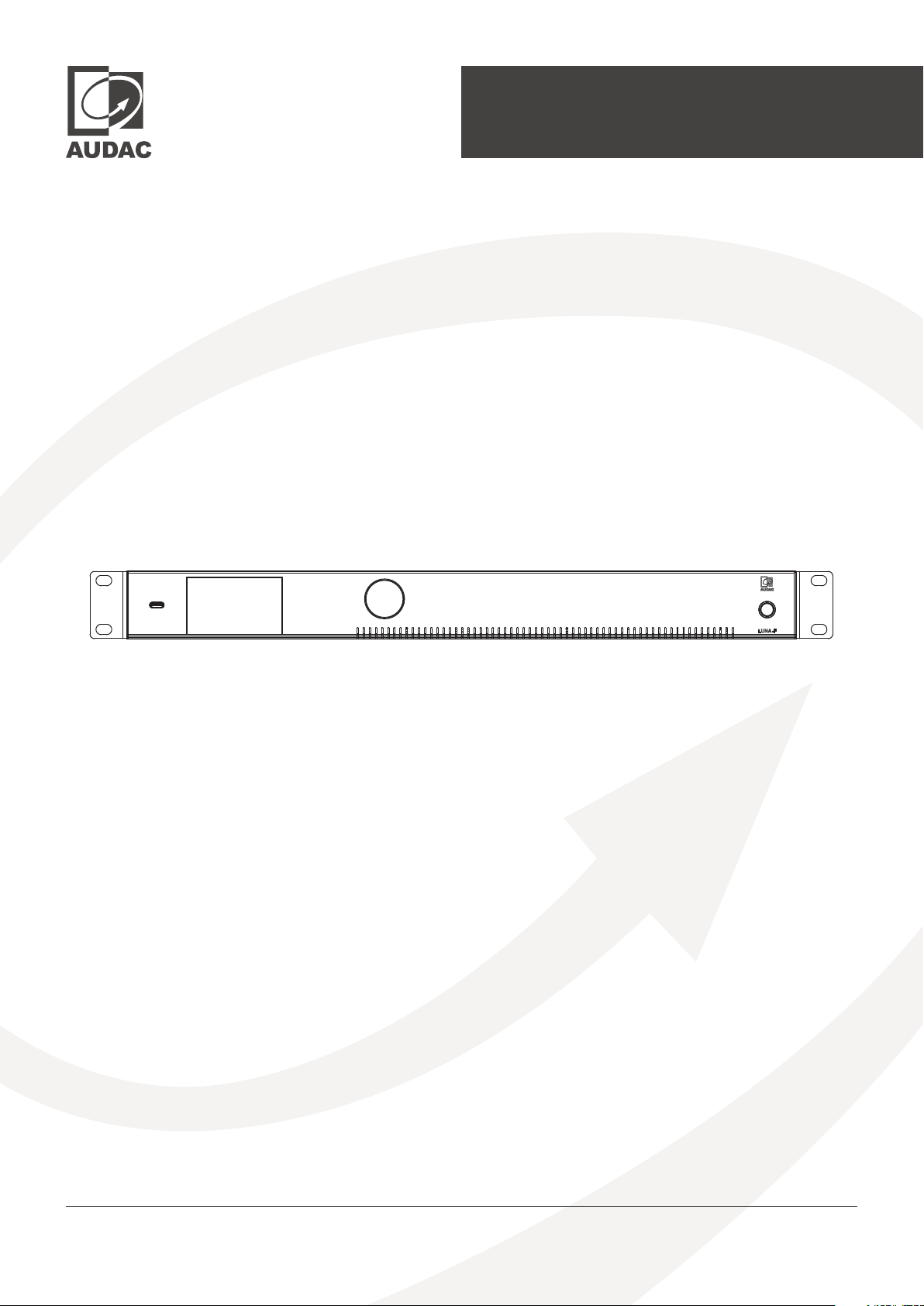
Hardware Manual
LUNA-F & LUNA-U
audac.eu
Page 2
ADDITIONAL INFORMATION
This manual is put together with much care, and is as complete as could be on the publication date.
However, updates on the specifications, functionality or software may have occurred since publication.
To obtain the latest version of both manual and software, please visit the Audac website @ audac.eu.
LUNA-F & LUNA-U - Hardware Manual
Page 3

Table of contents
Introduction 05
Networked sound & control audio processor . . . . . . . . . . . . . . . . . . . . . . . . . . . . . . . . . . . . . . . . . . . . . . . . . . 05
Precautions 06
Chapter 1 08
Connections and connectors . . . . . . . . . . . . . . . . . . . . . . . . . . . . . . . . . . . . . . . . . . . . . . . . . . . . . . . . . . . . . . . . . 08
Network settings . . . . . . . . . . . . . . . . . . . . . . . . . . . . . . . . . . . . . . . . . . . . . . . . . . . . . . . . . . . . . . . . . . . . . . . . . . . . . 09
Chapter 2 10
Overview front panel . . . . . . . . . . . . . . . . . . . . . . . . . . . . . . . . . . . . . . . . . . . . . . . . . . . . . . . . . . . . . . . . . . . . . . . . . . . 10
Front panel description . . . . . . . . . . . . . . . . . . . . . . . . . . . . . . . . . . . . . . . . . . . . . . . . . . . . . . . . . . . . . . . . . . . . . . . . 10
Overview rear panel . . . . . . . . . . . . . . . . . . . . . . . . . . . . . . . . . . . . . . . . . . . . . . . . . . . . . . . . . . . . . . . . . . . . . . . . . . . . . 11
Rear panel description . . . . . . . . . . . . . . . . . . . . . . . . . . . . . . . . . . . . . . . . . . . . . . . . . . . . . . . . . . . . . . . . . . . . . . . . . . 11
Chapter 3 13
User interface and configuration . . . . . . . . . . . . . . . . . . . . . . . . . . . . . . . . . . . . . . . . . . . . . . . . . . . . . . . . . . . . . . . 13
TM
Audac Touch
Updating the system . . . . . . . . . . . . . . . . . . . . . . . . . . . . . . . . . . . . . . . . . . . . . . . . . . . . . . . . . . . . . . . . . . . . . . . . . . . 17
. . . . . . . . . . . . . . . . . . . . . . . . . . . . . . . . . . . . . . . . . . . . . . . . . . . . . . . . . . . . . . . . . . . . . . . . . . . . . . . . . . 14
Technical specifications 18
Audio characteristics 19
LUNA-F & LUNA-U - Hardware Manual 03
Page 4

LUNA-F & LUNA-U - Hardware Manual
Page 5
Introduction
Networked sound & control audio processor
The LUNA series is the next-generation audio matrix processor, offering highly flexible and scalable
system solutions for audio distribution from medium-sized to the largest enterprise solutions. The
internal structure provides unseen flexibility and a vast number of possibilities for an audio distribution
system. The powerful DSPs (dual SHARC) combined with 32-bit ADC and DAC converters allow the
most extensive signal processing with superb audio quality.
LUNA-F includes 8 Mic/Line Inputs, 8 flex channels that can be switched between 8 Mic/Line Inputs or
Line level output, and 8 Line level outputs. Additionally, up to 64x64 Dante™/AES67 I/O Channels are
available with primary and secondary ethernet ports, allowing the integration of the system with any
Dante™/AES67 compatible audio over IP I/O units with redundancy.
LUNA-U includes 12 Mic/Line Inputs and 8 Line level outputs. Optionally, up to 32 Dante™/AES67 I/O
Channels are available with a single ethernet port, allowing the integration of the system with any
Dante™/AES67 compatible audio over IP I/O unit.
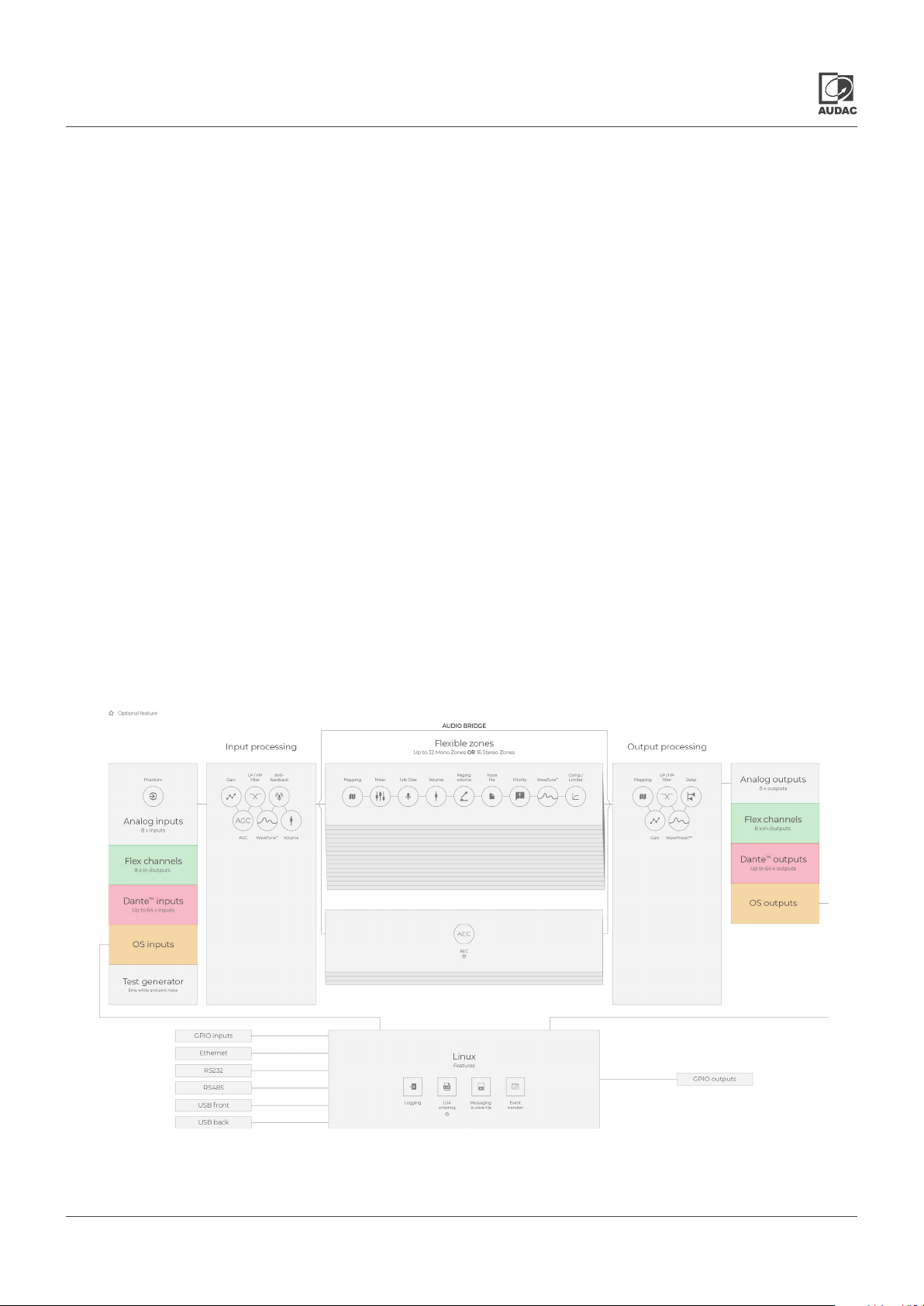
The flexible architecture allows fully flexible mapping of the signal path to any of the 32 mono or 16 stereo
zones, while the powerful DSP resources provide unique processing features on all input channels,
output channels, and zones. Dante-enabled paging microphones and smart wall panels make the
complete system solution even more flexible and unique.
The internal Linux core brings the entire control of this system and family members together, while
also accommodating messaging, event scheduling, and implementation possibilities for further
Linux-based functions. Besides the full network control, other options like RS-232 and RS-485 are also
implemented for third-party control. For your system solution, you can easily incorporate the control of
the entire system and compatible devices into your user interface by using our simplified design and
system control platform, AUDAC Touch™.
It is highly reccomended to take online or in class Atellio Level-1 training and request Atellio Level-2
training from your distributor or reseller.
* Please note that this block diagram represents the functionality of LUNA-F, The LUNA-U is a
variant of this block diagram
LUNA-F & LUNA-U - Hardware Manual 05
Page 6
Precautions
READ FOLLOWING INSTRUCTIONS FOR YOUR OWN SAFETY
ALWAYS KEEP THESE INSTRUCTIONS. NEVER THROW THEM AWAY
ALWAYS HANDLE THIS UNIT WITH CARE
HEED ALL WARNINGS
FOLLOW ALL INSTRUCTIONS
NEVER EXPOSE THIS EQUIPMENT TO RAIN, MOISTURE, ANY DRIPPING OR SPL ASHING LIQUID. AND NEVER PLACE AN
OBJECT FILLED WITH LIQUID ON TOP OF THIS DEVICE
NO NAKED FLAME SOURCES, SUCH AS LIGHTED CANDLES, SHOULD BE PLACED ON THE APPARATUS
DO NOT PLACE THIS UNIT IN AN ENCLOSED ENVIRONMENT SUCH AS A BOOKSHELF OR CLOSET. ENSURE THERE IS
ADEQUATE VENTILATION TO COOL THE UNIT. DO NOT BLOCK THE VENTILATION OPENINGS.
DO NOT STICK ANY OBJECTS THROUGH THE VENTIL ATION OPENINGS.
DO NOT INSTALL THIS UNIT NEAR ANY HEAT SOURCES SUCH AS RADIATORS OR OTHER APPARATUS THAT PRODUCE
HE AT
DO NOT PLACE THIS UNIT IN ENVIRONMENTS WHICH CONTAIN HIGH LEVELS OF DUST, HEAT, MOISTURE OR VIBRATION
THIS UNIT IS DEVELOPED FOR INDOOR USE ONLY. DO NOT USE IT OUTDOORS
PLACE THE UNIT ON A STABLE BASE OR MOUNT IT IN A STABLE RACK
ONLY USE ATTACHMENTS & ACCESSORIES SPECIFIED BY THE MANUFACTURER
UNPLUG THIS APPARATUS DURING LIGHTNING STORMS OR WHEN UNUSED FOR LONG PERIODS OF TIME
ONLY CONNECT THIS UNIT TO A MAINS SOCKET OUTLET WITH PROTECTIVE EARTHING CONNECTION
THE MAINS PLUG OR APPLIANCE COUPLER IS USED AS THE DISCONNECT DEVICE, SO THE DISCONNECT DEVICE SHALL
BE READILY OPERABLE
USE THE APPARATUS ONLY IN MODERATE CLIMATES
CAUTION SERVICING
This product contains no user serviceable parts. Refer all servicing to qualified service
personnel. Do not perform any servicing (unless you are qualified to)
EC DECLARATION OF CONFORMITY
This product conforms to all the essential requirements and further relevant
specifications described in following directives: 2014/30/EU (EMC), 2014/35/EU (LVD)
& 2014/53/EU (RED).
WASTE ELECTRICAL AND ELECTRONIC EQUIPMENT WEEE
The WEEE marking indicates that this product should not be disposed with regular
household waste at the end of its life cycle. This regulation is created to prevent any
possible harm to the environment or human health.
This product is developed and manufactured with high quality materials and
components which can be recycled and/or reused. Please dispose this product at
your local collection point or recycling centre for electrical and electronic waste. This
will make sure that it will be recycled in an environmentally friendly manner, and will
help to protect the environment in which we all live.
LUNA-F & LUNA-U - Hardware Manual
Page 7

POWER SUPPLY AND POWER CORD REQUIREMENTS
Power supply class I grounding requirements:
For protection from fault currents, the equipment shall be connected to a
grounding terminal. Plug the system power cord into an AC outlet that provides
a ground connection. Substitute cords may not provide adequate fault protection.
Only use the power cord supplied with this product or an authorized/equivalent
replacement.
Safety notices:
Denmark:
Apparatets stikprop skal tilsluttes en stikkontakt med jord, som giver forbindelse
til stikproppens jord.
Finland:
Laite on liitettävä suojakoskettimilla varustettuun pistorasiaan.
Norway:
Apparatet må tilkoples jordet stikkontakt.
Sweden:
Apparaten skall anslutas till jordat uttag.
ATTENTION
The fuse (T1AL/250V) provides a safeguard function to the device. When replacing
the fuse, make sure that the value of the replacement matches the value of the
original fuse. Identification of a suitable replacement component or substitute
shall be done by qualified technicians.
LUNA-F & LUNA-U - Hardware Manual 07
Page 8
Chapter 1
Connections
CONNECTION STANDARDS
The in- and output connections for AUDAC audio equipment are performed according to
international wiring standards for professional audio equipment.
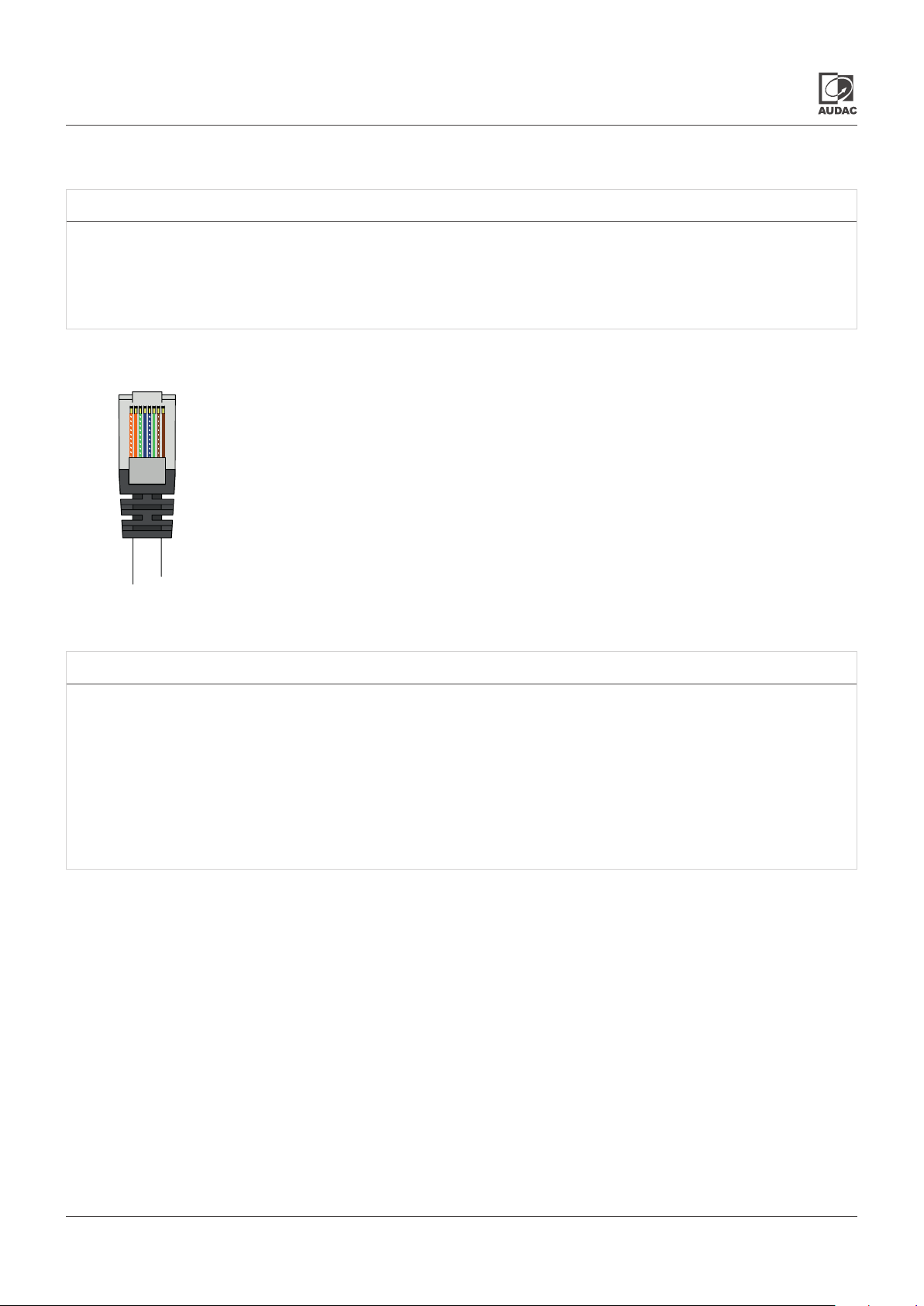
RJ45 (Network, PoE)
Network connections
Pin 1 White-Orange
Pin 2 Orange
Pin 3 White-Green
Pin 4 Blue
Pin 5 White-Blue
Pin 6 Green
Pin 7 White-Brown
Pin 8 Brown
Network settings
STANDARD NETWORK SETTINGS
DHCP:
IP Address: Depending on DHCP
Subnet Mask: 255.255.255.0 (Depending on DHCP)
Gateway: 192.168.0.253 (Depending on DHCP)
DNS 1: 8.8.4.4 (Depending on DHCP)
DNS 2:
ON
8.8.8.8 (Depending on DHCP)
LUNA-F & LUNA-U - Hardware Manual
Page 9
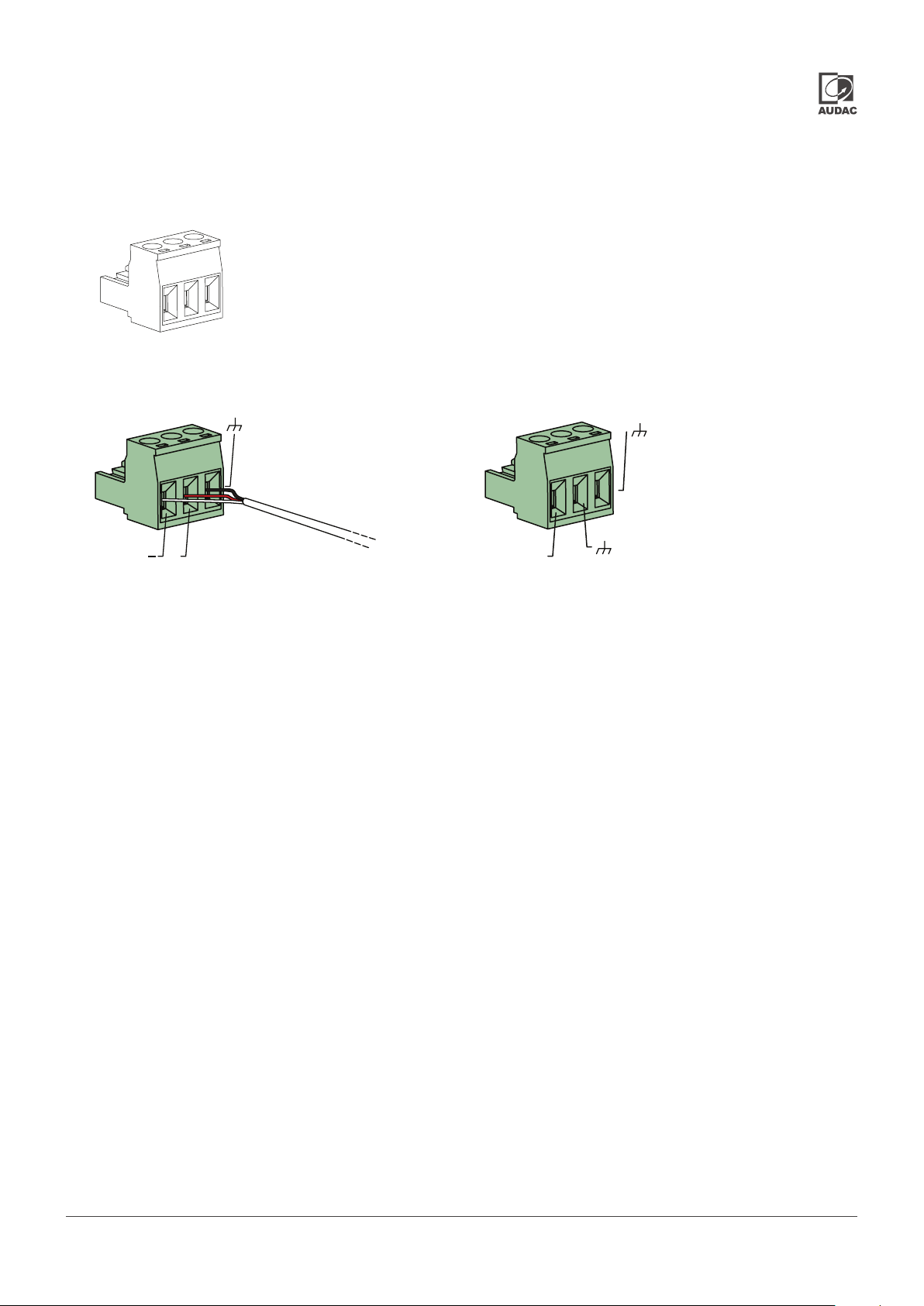
3-Pin Terminal block:
For balanced line output connections.
For balanced line output connections.
+
Left:
Right:
Center:
Signal -
Signal +
Ground
For unbalanced line input connections.
L
LUNA-F & LUNA-U - Hardware Manual 0909
Page 10
Chapter 2
Overview front panel
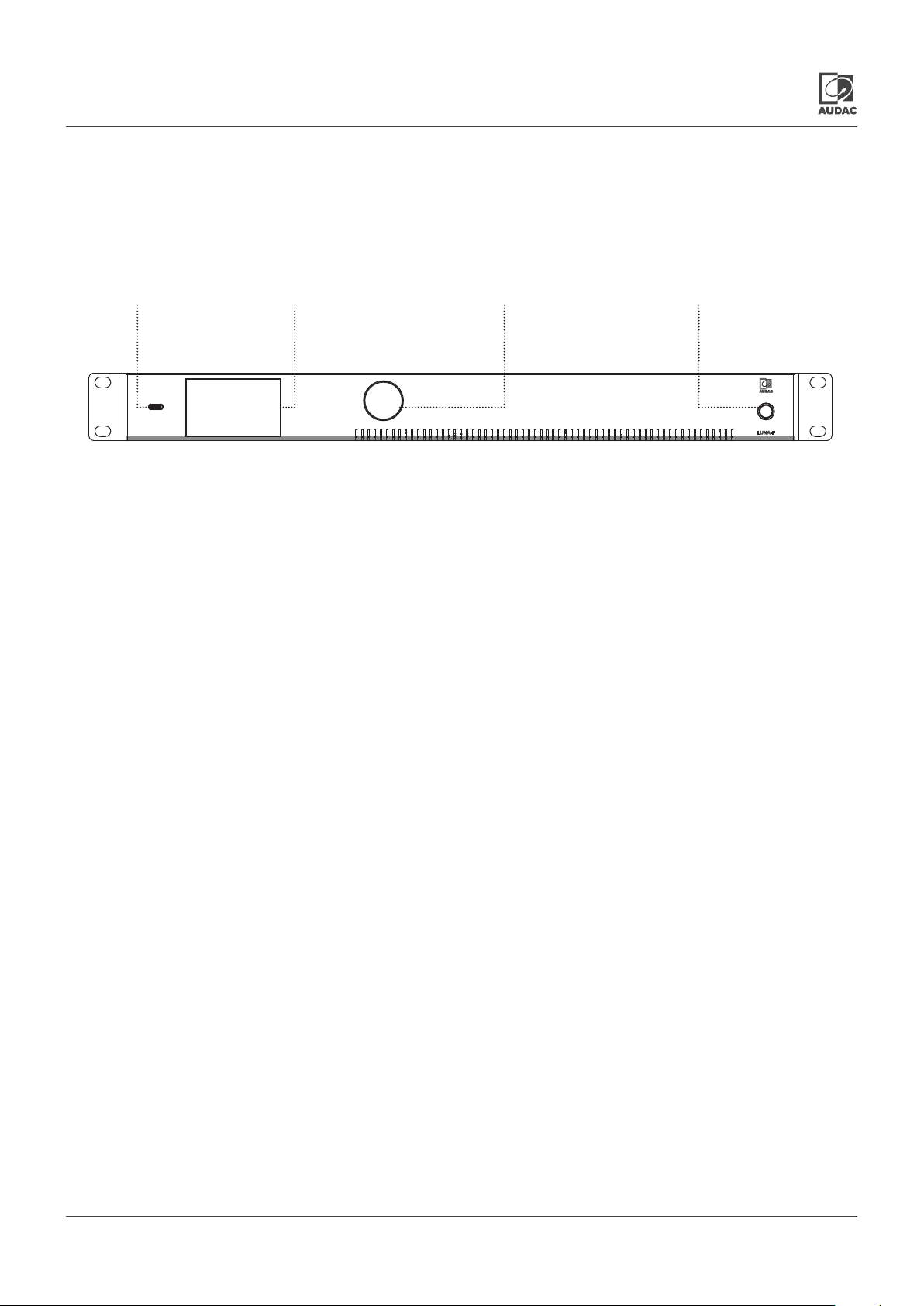
The LUNA series have an elegant design. On the front panel has power button, 2.8” LCD display, a rotary
function dial and a USB host.
USB Host
2.8” LCD Display
Rotary function dial
Power button
Front panel description
Power Button
This button is used for powering the LUNA device. In Standby mode the RGB LED indicator around the
button has an orange color. After pressing the button, the RGB LED will blink in orange until the device
while the device is booting or starting up. The RGB LED will turn blue when the device is fully operational.
Press and hold the button for 3 seconds for safe shutdown. Press and hold the button for 10 seconds for
force shutdown.
2.8” LCD Display and Rotary Function Dial
The 2.8” LCD panel and the rotary function dial provide an overview and basic configuration of the system.
Navigation through the menus can be done by turning the rotary dial, and pressing it.
USB Host
The LUNA series has two USB Type-C connections, one on the front and one on the rear. These ports
can be used for uploading files (e.g. voice messages) or to use a connected device as external storage.
LUNA-F & LUNA-U - Hardware Manual
Page 11
Overview rear panel
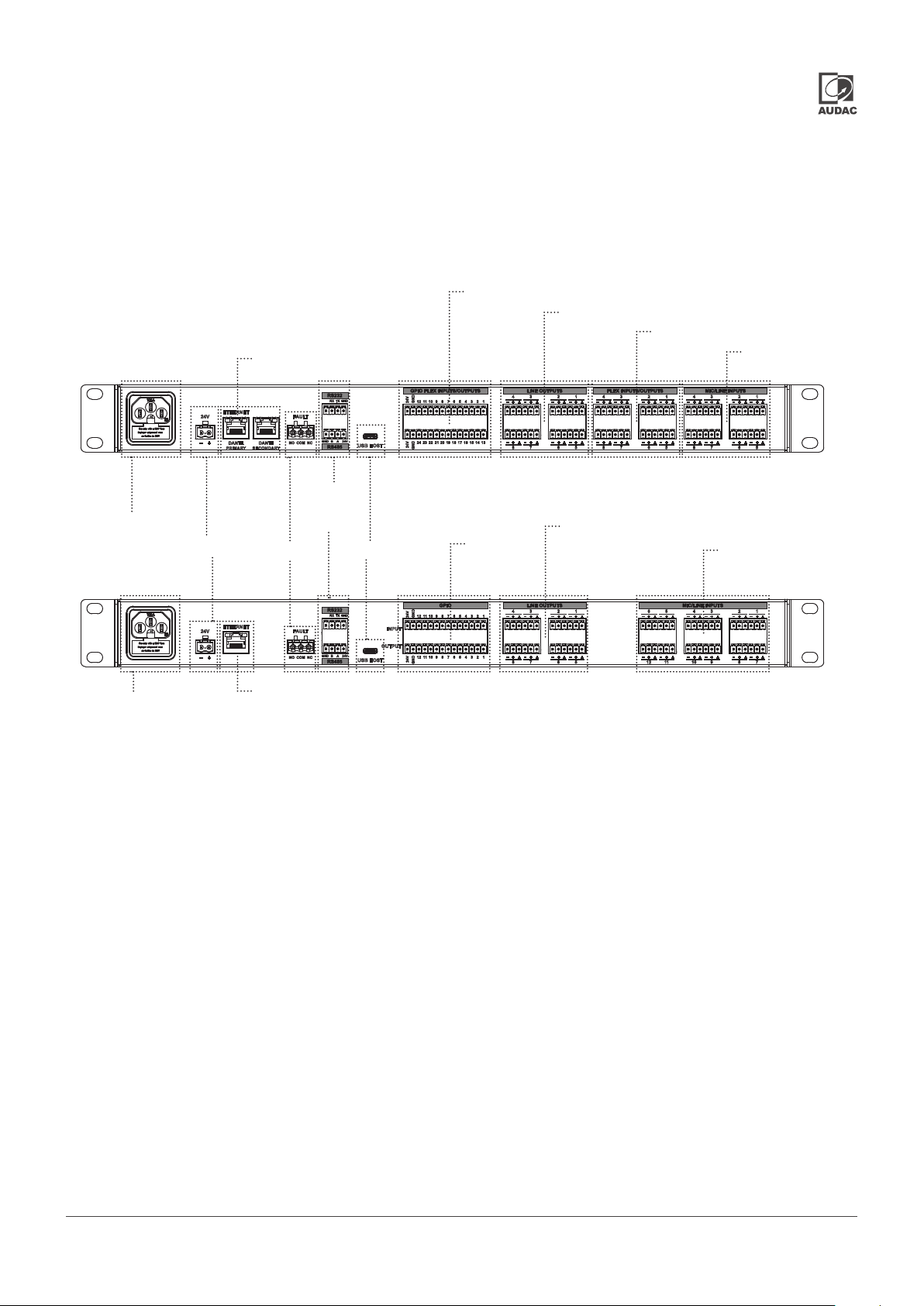
The rear of the LUNA series offers various options which are necessary to provide audio I/O and overall
control in the desired scenario.
GPIO Flex Input/Outputs
Line Outputs
LUNA-F
AC Power Inlet
24V DC Connection
LUNA-U
Primary and Secondary
Dante Ports
RS232 and RS485
Fault
USB Host
Line Outputs
GPIO
Flex Inputs/outputs
Mic/Line Inputs
Mic/Line Inputs
AC Power Inlet
Ethernet Port
Rear panel description
Mic/Line Inputs
LUNA-F contains eight balanced microphone / line inputs with phantom power possibility with input
filter, WaveTuneTM, and anti-feedback signal processing functions whereas LUNA-U contains twelve
balanced microphone and line inputs with the same features.
Flex Inputs/Outputs
LUNA-F has eight flex inputs/outputs which can be either used as mic/line level balanced input with
phantom power possibility or balanced output. Flex inputs and outputs have the same signal processing
functions as normal inputs and outputs.
Line Outputs
LNA series both contain eight balanced line outputs with output filter, WavePresetTM, delay, and
antiphase signal processing functions.
GPIO
LUNA-F has 24 flex inputs/outputs which can be configured in all possible ways. On the other hand,
LUNA-U has fixed 12 GPI and 12 GPO ports. LUNA series GPIO ports are not only edge but also configurable
threshold level triggered. Input possibilities are active low/high, positive/negative edge, and analogue
input 0-33V. Output is open drain.
LUNA-F & LUNA-U - Hardware Manual 011
Page 12

USB Host
The LUNA series has two USB Type-C, one on the front and one on the rear. These ports can be used
for uploading files (e.g. voice messages) as a source for OS Inputs or to use the connected device as
external storage.
RS232 and RS485
RS232 and RS485 ports can be used for 3rd party integration communication protocol using commands.
Fault
This relay is triggered when the power supply fails. Fault relay can be used as an indicator for 3rd party
devices that the LUNA is integrated into.
Primary and Secondary Dante Ports (only LUNA-F)
The LUNA-F can establish a redundant Dante™/AES67 system through its primary and secondary Dante™
ports. In a non-redundant system, in split mode, the primary Dante™ port is used for Dante data flow,
while the secondary Dante port can be used to control the system. In switched mode, multiple devices
can be connected together as daisy chain. The LUNA-F comes with 16x16 Dante™/AES67 channels and
can be expanded with additional software extension SL-NAC8 for additional networked audio channels.
The LUNA-F is limited to a maximum of 64x64 channels.
Ethernet Port (only LUNA-U)
Out of the box, the LUNA-U has an Ethernet port that can only be used for control and configuration.
The ANM88 is a hardware extension card that makes a LUNA-U audio matrix processor a Dante™/AES67
enabled device. It comes with 8x8 Dante™/AES67 channels and can be expanded with additional software
extension SL-NAC8 for additional networked audio channels. The LUNA-U is limited to a maximum of
32x32 channels. The ANM88 can be integrated into the LUNA-U by simply disassembling the top cover
of the audio processor.
24V DC Connection
A 24 Volts DC emergency power supply can be connected to this 2-pin terminal block connector for
keeping the LUNA series running on emergency power when the mains power is shut down.
Switch Mode Power Supply
The main power supply (110~240V AC / 50~60 Hz) has to be applied to this AC power inlet. The connection
is made by an IEC power connector and is fitted with a fuse. When replacing the fuse, make sure that
the value of the replacement fuse matches the value of the original fuse. (T1AL/250V)
LUNA-F & LUNA-U - Hardware Manual
Page 13
Chapter 3
User interface and configuration
This chapter guides you through the user interface and the configuration process of the LUNA series. The
2.8” LCD panel and the rotary function dial provide an overview and basic configuration of the system.
For overall design, management, and control of the system, we offer Audac TouchTM.
Input and output overview on front panel
Home screen
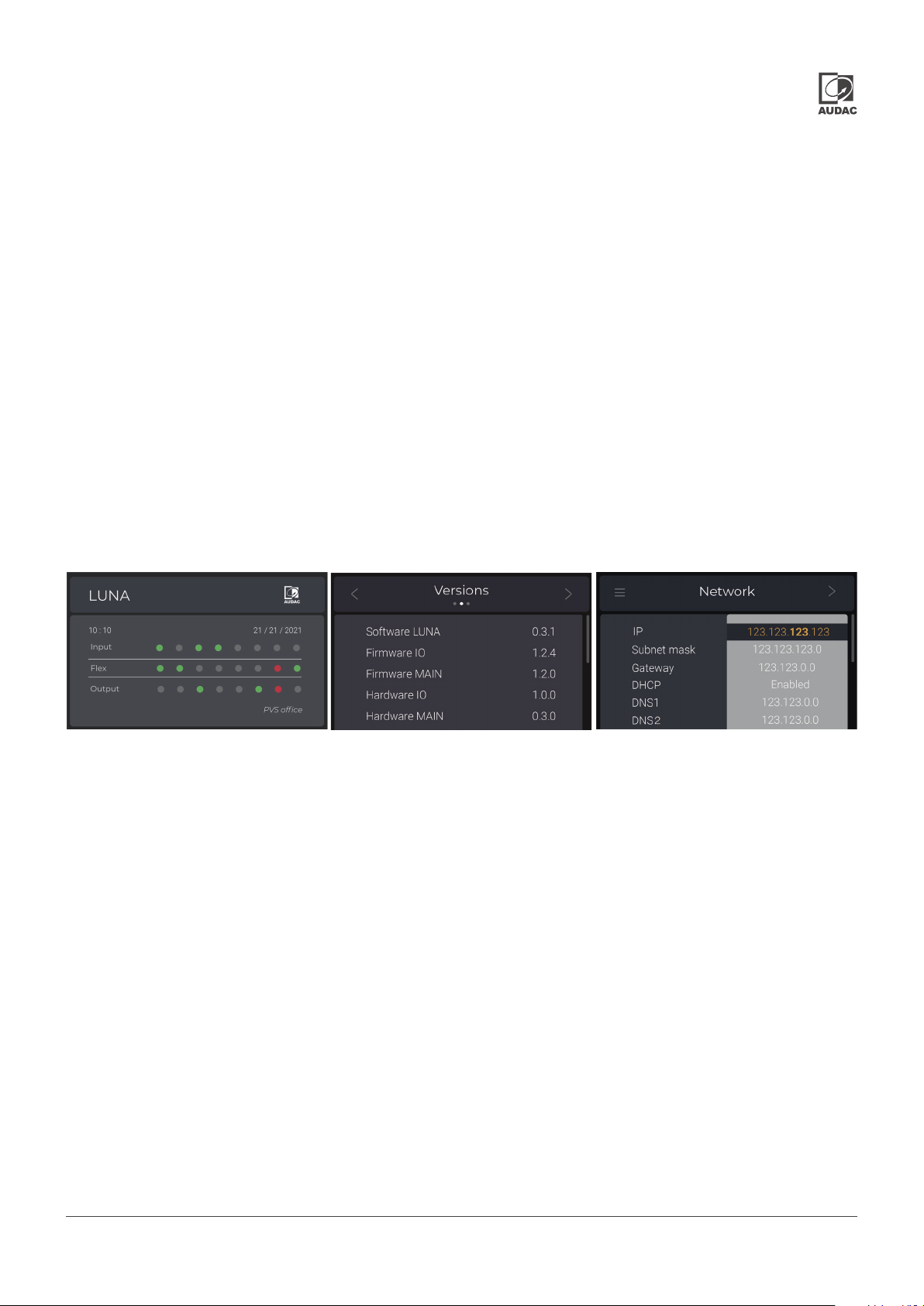
The home screen of the LUNA series indicates if there is a signal or clipping on analogue inputs or outputs
(or on flex input and outputs of LUNA-F). This screen also shows the time, date, and installed project
name. Clicking on the rotary function dial shows the menu for connections, devices, and settings. The
device returns to the home screen if there is no activity for 10 seconds.
Connections
You can scroll to the right for inputs, flex (LUNA-F only), outputs, and GPIO status screen and return to
the main menu. In addition to signal and clipping information, it is also possible to see if any of the inputs
are microphone or line level, if the phantom power is enabled, if the flex channel is selected as input or
output, or if GPIO is used as analogue or digital IO.
Home Screen
Device Screen
Settings Screen
Device
Versions
This section gives version information of software, firmware and hardware of the device. Scrolling right,
Update screen shows the running version and availability of new updates.
Update
The update section shows the running version of the device and the updates which are available. Thanks
to the OTA feature of the LUNA series, the device automatically checks the latest version whenever the
device is on the network. On this screen, the device can be updated to the available software by holding
the rotary function dial for 5 seconds.
Settings
Network
IP, DNS, time zone, and time server settings can be changed by clicking the rotary function dial and
scrolling down the section. Selection and changing of each parameter can be done by using the rotary
dial function intuitively. Scroll down and click Back in order to exit the configuration.
Default settings
Holding the rotary function dial for 5 seconds while in this section will take your device to default settings.
LUNA-F & LUNA-U - Hardware Manual 013
Page 14
Audac TouchTM 2
Audac TouchTM is our simplified design, management, and system control platform which is on continuous
expansion. With this single OS platform, we offer the most intuitive way of designing and managing your
installation. From audio processing to sequenced third-party integration. You can also create custom
user dashboards without even needing to write a single line of code to offer full system control. AUDAC
Touch™ is available for freely downloadable for all major OS.
Login screen
When launching the AUDAC Touch™ 2 application, you have to log-in with your Audac Touch™ credentials.
If you don’t have an account yet, press the ‘Register’ button to create a new account.
Device list
Click on the menu icon in the top left corner to have the menu appear. From the menu select “device list”.
The device list is an overview of all devices which have been discovered (Discovery) and saved (Saved).
Every time you start up the AUDAC Touch™, it automatically scans your network for new devices.
Click on one of the devices in the list to open the device’s page. The first time a device has opened a
password will be prompted. In the case of the LUNA series, the factory default administrator password
is ‘LUNA’. After entering the correct password the device overview page will be shown with all available
I/O channels and zones.
Settings
By clicking the settings button in the top right corner of the devices page the device settings can be
changed. The settings for the LUNA series are divided into the following categories: Overview and
Device Settings.
Settings >> Overview
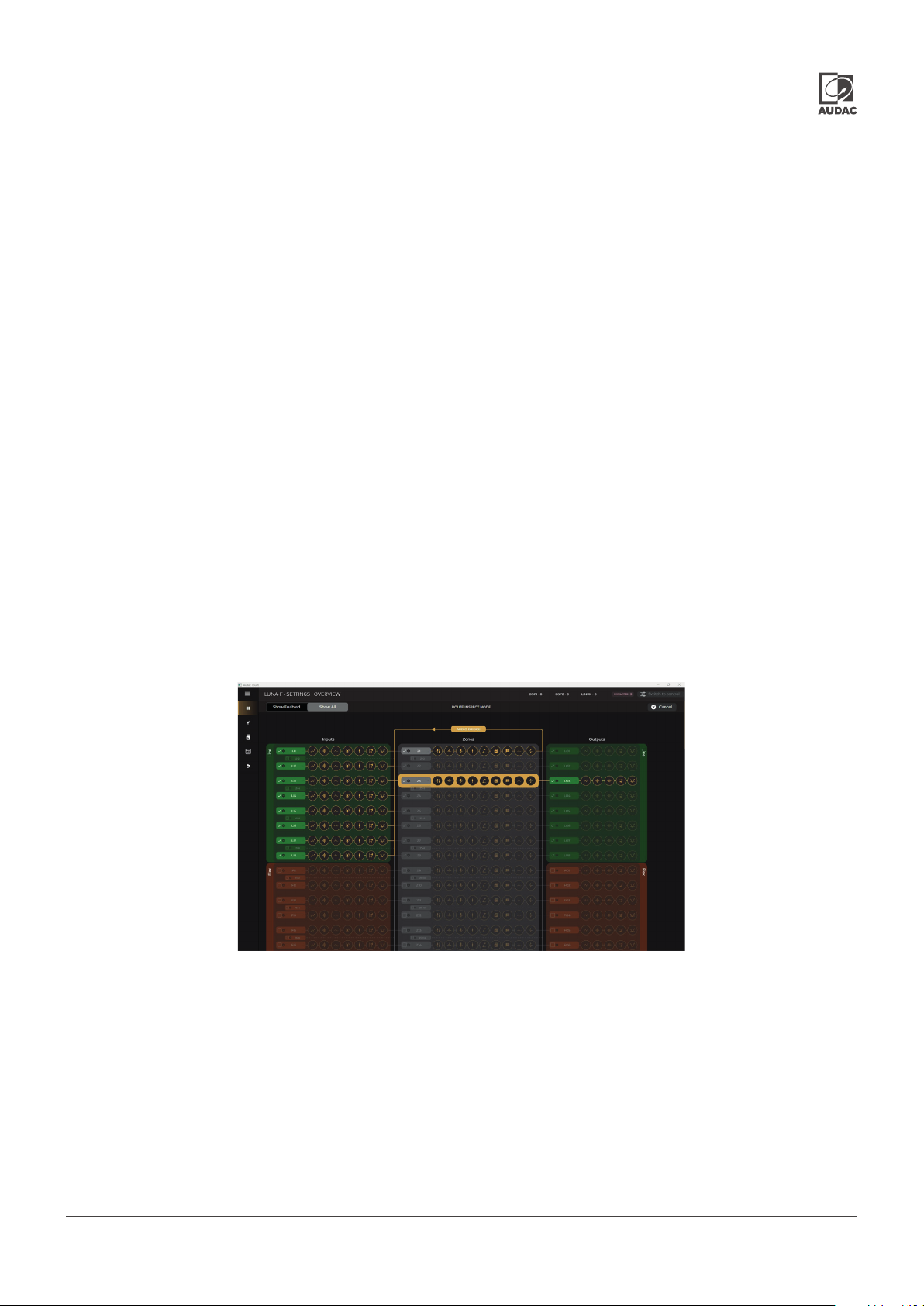
The overview page is divided into three blocks: inputs, zones, and outputs. Any of them or the enabled
signal processing function of the input, zone, or output channel can be selected for configuration
from the overview page. Audio bridge gives a visual understanding of signal mapping with yellow lines
by selecting any input, zone, or output on the overview page.
LUNA-F & LUNA-U - Hardware Manual
Page 15

Inputs
The inputs block is the inputs section of the overview page. Available inputs are direct, flex (only
LUNA-F), Dante (optional for LUNA-U), OS, and generator.
Gain
Manually adjustable pre-gain for microphone/line level adjustment is available for physical inputs
(-6/0/34/40 dB) and gain is available for all input channels with a range of -35 and 35 dB. It is also possible
to adjust the input gain automatically.
AGC (Automatic Gain Control)
All inputs contain the possibility to enable Automatic Gain Control (AGC). This continuously adjusts the
input gain, ensuring a constant output level while the input level varies. The gain adjustments are made
in extremely small step adjustable sizes ensuring high quality audio, even during gain changes.
LP/HP filter
2 band of semi-parametric 2nd order high pass and low pass filters are available on each input channel
and can be individually enabled and disabled. Frequency and Q-factor can be adjusted and channels
can be enabled individually.
WaveTune
WaveTuneTM is a seven-band full parametric equalizer with dedicated EQ gain that each band can enable
individually. This unique function allows fine-tuning of the source signal with different various types of
filtering (Peaking, LP, HP. Linkwitz, All Pass, High Shelf, Low Shelf, 1st Order Low Pass, and 1st Order High
Pass). This gives the possibility of tailoring the source for optimal performance.
Antifeedback
Antifeedback enables automatic detection of feedbacking frequencies and applies a notch filter to
prevent feedbacking.
Volume
Sets the volume of the input source.
TM
LUNA-F & LUNA-U - Hardware Manual 015
Page 16

Zones
The zones block is the zones section of the overview page. 32 mono or 16 stereo or any configuration in
between can be configured here or through the overview page.
Mapping
Maximum 16 channels can be selected from any inputs or zones. That is to say, an already mixed zone
can be part of another mix as well. A zone can be mapped into all output channels.
Mixer
The mixer function makes it possible to create a mix of all mapped audio inputs in the selected zone.
Talk over
The talk-over function sets the talk-over source level, and zone level during the talk-over, hold, and fade
speed for recovery of the source level.
Volume
Volume has the identical functionallity as the master volume of the mixer.
Paging Volume
Sets the volume of the paging announcement in the zone. In addition, the paging console can give an
offset to the default paging level. For example, EVAC can be at a higher volume.
Voice file
MP3 and WAV format support from internal and external storage. Voice files can be triggered either by
GPIO or Event Handler.
Priority
The priority settings menu makes it possible to configure the priority channels. The LUNA series offers
four levels of priority that can be triggered by stereo or mono analog inputs, Flex inputs, Dante inputs
and OS inputs.
WaveTune
WaveTuneTM is a seven-band full parametric equalizer with dedicated EQ gain that each band can enable
individually. This unique function allows fine-tuning the zone signal with different various types of filtering
(Peaking, LP, HP. Linkwitz, All Pass, High Shelf, Low Shelf, 1st Order Low Pass, and 1st Order High Pass).
This gives the possibility of tailoring the source for optimal performance.
Compressor/Limiter
A compressor/limiter is an automated volume control tool with the setting of maximum volume to avoid
any clipping caused by the signal dynamics or peaks. Threshold and ratio indicate how much the signal
is going to be attenuated.
TM
LUNA-F & LUNA-U - Hardware Manual
Page 17

Outputs
The output block is the output section of the overview page. 32 mono or 16 stereo or any configuration
can be configured here or through the overview page.
Mapping
Only one of the available zones can be mapped to an available physical or Dante output or OS output.
Gain
The output signal gain can be adjusted manually within a range of -35 dB and +35 dB.
LP/HP filter
2 band of semi-parametric 2nd order high pass and low pass filter are available on each input channel
and can be individually enabled and disabled. Frequency and Q-factor can be adjusted and channels
can be enabled individually.
WavePreset
WavePresetTM is a twelve-band full parametric equalizer with dedicated EQ gain that each band can
enable individually. This unique function allows fine-tuning the source signal with different various types
of filtering (Peaking, LP, HP. Linkwitz, All Pass, High Shelf, Low Shelf, 1st Order Low Pass, and 1st Order
High Pass).
Delay
The delay which can be adjusted in steps of 1ms in a range between 0ms to 2000ms (2s) can be enabled
on all outputs of the LUNA series. It can be adjusted by moving the corresponding fader up and down.
The delay time is indicated in milliseconds on top of the fader and the audio transmission distance in
meters is shown accordingly with the delay time. Please note that the meter indication is in average
conditions at an air temperature of 21C.
TM
Settings >> Device Setting
Device/Zone name
The device name can be configured here. The device name can be any kind of freely selectable name.
It is also the name that is visible in the Dante controller.
Antiphase
Using the Antiphase option, the output signal rotates over 180° for applications where a contrary phase
is desirable.
Updating the system
The update section on the front overview screen shows the running version of the device and the updates
which are available. Thanks to OTA feature of the LUNA series, the device automatically checks the latest
version whenever the device is on the network. On this screen, the device can be updated to available
software by holding the rotary function dial for 5 seconds.
LUNA-F & LUNA-U - Hardware Manual 017
Page 18

Technical specifications
LUNA-F LUNA-U
Input Mic/Line inputs 8 12
Flex inputs/outputs 8 No
GPIO inputs 24 (flex) 12(in)
USB inputs (Type-C) Front (file transfer)
Rear (file transfer)
External storage for messages
Outputs Line outputs 8
GPIO Outputs 24 (flex) 12(out)
Fault NO & NC relay contact
16x16 Dante™/AES67 I/O Channels
Network audio I/O
Zones 32 Mono
Configurable settings ALC (Automatic Gain control) Yes
AEC (Acoustic Echo cancellation) Yes (optional) No
Integrated event scheduler Yes
Phantom power on inputs +48 V DC
WaveTune (input & zone) 7-band EQ
WavePreset (output) 12xBiquad +LP+HP
Delay (output) 2000 ms
Mono / stereo zones
(configurable)
Mixing Yes
Talkover Yes
Paging Yes
Priorities 4 each zone
Integrated generator Sine or Pink noise or White noise
Output Volume offset Yes
(Up to 64x64 Channels with
SL-NAC8)
16 Stereo
Yes
Optional Dante™/AES67
(Up to 32x32 Channels with
ANM88 and SL-NAC8)
Others Antiphase, bass & treble, input volume, …
DSP Processor Dual core SHARC
ARM Linux core
2 Dedicated co-DSP No
Configuration Audac Touch™
Controls &
indicators
Power supply 100 ~ 240 V AC / 50 ~ 60 Hz
Dimensions (W x H x D) 482 x 44 x 335 mm
Mounting 19”
Unit height 1 HE
Construction Steel
Colours Black (RAL9005)
Front panel 2.8” LCD Display with rotary encoder
Interface ports RS-232
RS-485
2 x Gigabit Ethernet (RJ45 primary & secon-
dary)
24 V DC
Gigabit Ethernet (RJ45 primary)
LUNA-F & LUNA-U - Hardware Manual
Page 19

Audio characteristics
LUNA-F LUNA-U
Phantom power +48VDC, on analo g inputs and flex channels
Frequency response Analog input to analog output 20Hz to 22KHz with +13dBV (15,2dBu) input signal: -0,8/+0,2dB
THD+N Analog input to analog output @ 1KHz < 0,01% @ +22dBV (+24,2dBu)
< 0,01% @ +12dBV (+14,2dBu)
< 0,005% @ +0dBV (+2,2dBu)
< 0,01% @ -12dBV (-9,8dBu)
< 0,01% @ -36dBV (-33,8dBu)
Crosstalk on analog
channels
Input dynamic range 103dB @ +22dBV (+24,2dBu) sensitivity
Input common mode
rejection ratio
Input sensitivity +22dBV (+24,2dBu), adjustable with 0,5dB steps
Impedance Balanced input 8k
A/D - D/A converters 32-bit
Sample rate 48kHz
Input to input > 105dB typical, 95dB max
Output to output > 120dB
Flex out to Flex in > 110dB
103dB @ +13dBV (+15,2dBu) sensitivity
@ +22dBV (+24,2dBu) sensitivity: 60dB
@ +13dBV (+15,2dBu) sensitivity: 60dB
Balanced output 50
LUNA-F & LUNA-U - Hardware Manual 019
Page 20

Discover more on audac.eu
 Loading...