

Page 1
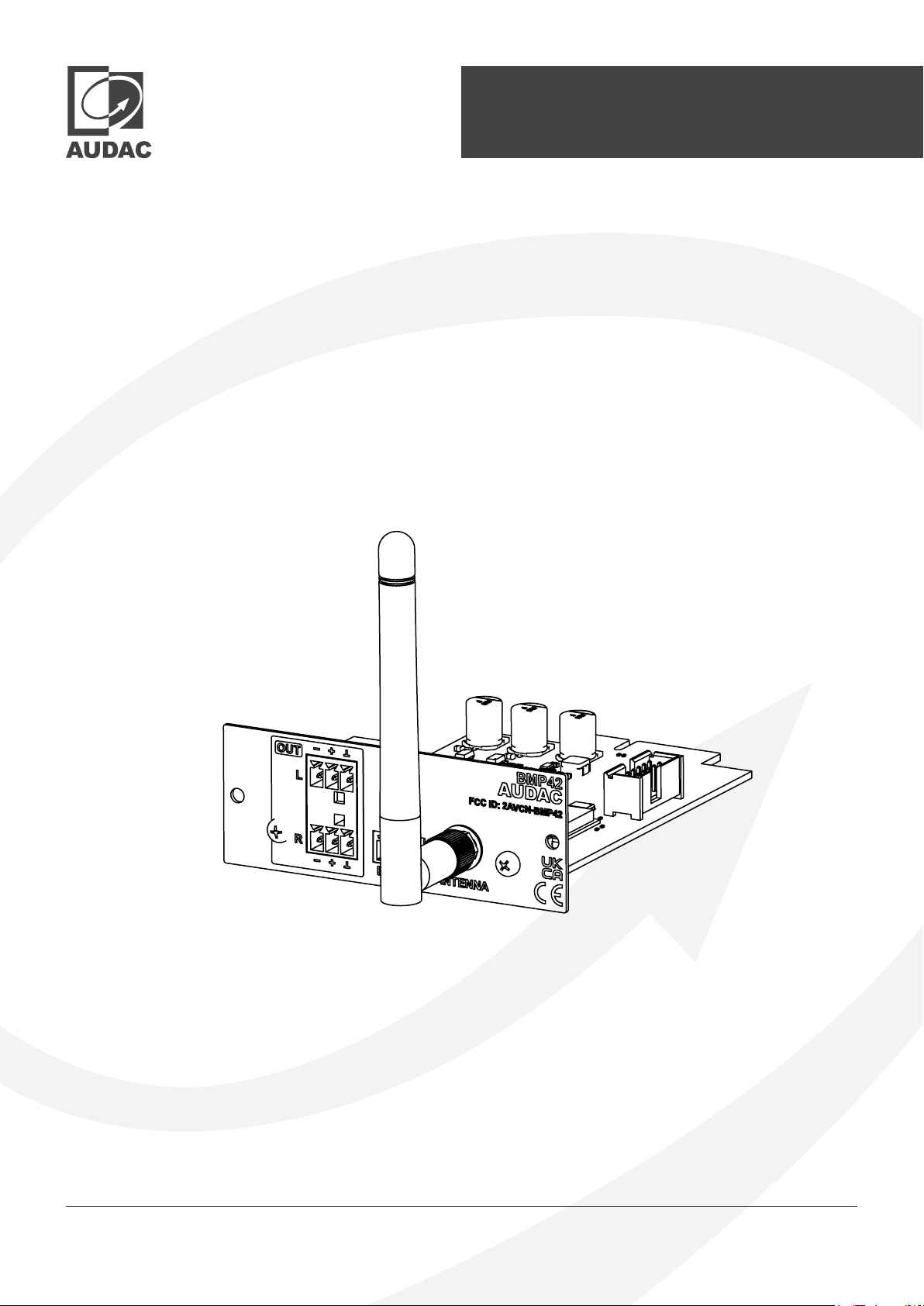
User manual
BMP42
audac.eu
Page 2
ADDITIONAL INFORMATION
This manual is put together with much care, and is as complete as could be on the publication date. However,
updates on the specications, functionality or software may have occurred since publication. To obtain the latest
version of both manual and software, please visit the Audac website @ www.audac.eu.
BMP42 - User manual02
Page 3

Table of contents
Introduction 04
SourceCon™ Bluetooth receiver module � � � � � � � � � � � � � � � � � � � � � � � � � � � � � � � � � � � � � � � � � � � � � 04
Precautions 05
Chapter 1 07
Connections and connectors � � � � � � � � � � � � � � � � � � � � � � � � � � � � � � � � � � � � � � � � � � � � � � � � � � � � � � 07
Chapter 2 08
Overview BMP42 � � � � � � � � � � � � � � � � � � � � � � � � � � � � � � � � � � � � � � � � � � � � � � � � � � � � � � � � � � � � � � � � � 08
Chapter 3 09
Using the BMP42 � � � � � � � � � � � � � � � � � � � � � � � � � � � � � � � � � � � � � � � � � � � � � � � � � � � � � � � � � � � � � � � � � 09
Module screen � � � � � � � � � � � � � � � � � � � � � � � � � � � � � � � � � � � � � � � � � � � � � � � � � � � � � � � � � � � � � � � � � � � 09
Player mode � � � � � � � � � � � � � � � � � � � � � � � � � � � � � � � � � � � � � � � � � � � � � � � � � � � � � � � � � � � � � � � � � � � � 010
Chapter 4 011
Audac Touch™ � � � � � � � � � � � � � � � � � � � � � � � � � � � � � � � � � � � � � � � � � � � � � � � � � � � � � � � � � � � � � � � � � � � 011
Devive settings screen � � � � � � � � � � � � � � � � � � � � � � � � � � � � � � � � � � � � � � � � � � � � � � � � � � � � � � � � � � � � 011
Device � � � � � � � � � � � � � � � � � � � � � � � � � � � � � � � � � � � � � � � � � � � � � � � � � � � � � � � � � � � � � � � � � � � � � � � � � � 011
Bluetooth � � � � � � � � � � � � � � � � � � � � � � � � � � � � � � � � � � � � � � � � � � � � � � � � � � � � � � � � � � � � � � � � � � � � � � 012
Chapter 5 013
Installing the BMP42 � � � � � � � � � � � � � � � � � � � � � � � � � � � � � � � � � � � � � � � � � � � � � � � � � � � � � � � � � � � � � 013
Technical specications 015
BMP42 - User manual 03
Page 4

Introduction
SourceCon™ Bluetooth receiver module
The BMP42 is a professional Bluetooth receiver module featuring SourceCon™ modular technology. This unique technology
guarantees true plug & play implementation to any compatible device. When inserted to a supporting slot, the module is instantly
installed, discovered and ready for operation without requiring any additional internal wiring or complex conguration.
The BMP42 receiver offers wireless connection possibilities for audio playback from any Bluetooth compatible por table device
including laptops, smartphones, tablets or any other. Long-range transmission distance (up to 30 meters in an unobstructed open
area) is possible depending on the installed environment. Device discovery and pairing protection with a storage up to 8 authorized
devices shall prevent playback from unauthorized users in public area’s.
All media information such as track and artist information can be retrieved from the BMP42 (if supported by the connected device,
more info on P15: technical specications), while playback control is possible from the connected device or remote control.
The antenna input is implemented by an SMA-type (50 Ω) connector on its panel, allowing connection of the included (2 dBi)
antenna while extension is possible in situations where its installed in a closed / shielded cabinet. The balanced stereo line output
is connected through two 3-pin terminal block connections.
BMP42 - User manual04
Page 5
Precautions
READ FOLLOWING INSTRUCTIONS FOR YOUR OWN SAFETY
ALWAYS KEEP THESE INSTRUCTIONS FOR FUTURE REFERENCE. NEVER THROW THEM AWAY
ALWAYS HANDLE THIS UNIT WITH CARE
HEED ALL WARNINGS AND FOLLOW ALL INSTRUCTIONS
AVOID ELECTROSTATIC DISCHARGE BY TOUCHING GROUNDED POINT BEFORE REMOVING THE MODULES
FROM THEIR PROTECTIVE BAG
AVOID TOUCHING OF THE COMPONENTS ON THE CIRCUIT BOARD DIRECTLY
NEVER EXPOSE THIS EQUIPMENT TO RAIN, MOISTURE, ANY DRIPPING OR SPLASHING LIQUID. NEVER
PLACE AN OBJECT FILLED WITH LIQUID ON TOP OF THIS DEVICE
DO NOT INSTALL THIS UNIT NEAR ANY HEAT SOURCES SUCH AS RADIATORS OR OTHER APPARATUS THAT
PRODUCE HEAT
DO NOT PLACE THIS UNIT IN ENVIRONMENTS WITH A HIGH LEVEL OF DUST, HEAT, MOISTURE OR VIBRATION
THIS UNIT IS DEVELOPED FOR INDOOR USE ONLY. DO NOT USE IT OUTDOORS
ONLY USE ATTACHMENTS & ACCESSORIES SPECIFIED BY THE MANUFACTURER.
UNPLUG THIS APPARATUS DURING LIGHTNING STORMS OR WHEN UNUSED FOR LONG PERIODS OF TIME
CAREFULLY CHECK THE UNIT’S CONDITION AFTER UNPACKING.
IF THERE IS ANY DAMAGE TO THE CARTON BOX OR THE UNIT ITSELF, INFORM YOUR VENDOR IMMEDIATELY.
THE INSTALLATION, CONNECTION AND CONFIGURATION OF THE DEVICE SHOULD BE DONE BY QUALIFIED
TECHNICIANS
FCC
This device complies with part 15 of the FCC Rules. Operation is subject to the following two conditions: (1)
This device may not cause harmful interference, and (2) this device must accept any interference received,
including interference that may cause undesired operation.
Note: This equipment has been tested and found to comply with the limits for a Class B digital device,
pursuant to part 15 of the FCC Rules. These limits are designed to provide reasonable protection against
harmful interference in a residential installation. This equipment generates, uses and can radiate radio
frequency energy and, if not installed and used in accordance with the instructions, may cause harmful
interference to radio communications. However, there is no guarantee that interference will not occur in
a particular installation. If this equipment does cause harmful interference to radio or television reception,
which can be determined by turning the equipment off and on, the user is encouraged to try to correct the
interference by one or more of the following measures:
—Reorient or relocate the receiving antenna.
—Increase the separation between the equipment and receiver.
—Connect the equipment into an outlet on a circuit different from that to which the receiver is connected.
—Consult the dealer or an experienced radio/TV technician for help.
BMP42 - User manual 05
Page 6
FCC - NOTE
Note: The Grantee is not responsible for any changes or modications not expressly approved by the party responsible for
compliance. Such modications could void the user’s authority to operate the equipment. The OEM integrator is still responsible
for testing their end-product for any additional compliance requirements required with this module installed.
IMPORTANT NOTE: In the event that these conditions cannot be met (for example co-location with another transmitter),
then the FCC authorization is no longer considered valid and the FCC ID can not be used on the nal product. In these
circumstances, the OEM integrator will be responsible for re-evaluating the end product (including the transmitter) and
obtaining a separate FCC authorization.
The OEM integrator has to be aware not to provide information to the end user regarding how to install or remove this RF module
in the user’s manual of the end product which integrates this module. The BMP42 module is designed to comply with the FCC
statement. FCC ID is 2AVCN-BMP42. The host system using BMP42, should have label indicated it contain modular’s FCC ID:
2AVCN-BMP42. The device has been evaluated to meet general RF exposure requirement. To maintain compliance with FCC’s
RF exposure guidelines, the distance must be at least 20 cm between the radiator and your body, and fully supported by the
operating and installation congurations of transmitter and its antenna(s).
CAUTION - SERVICING
This product contains no user serviceable parts. Refer all servicing to qualied service personnel. Do
not perform any servicing (unless you are qualied to).
EC DECLARATION OF CONFORMITY
This product conforms to all the essential requirements and further relevant specications described
in following directives: 2014/30/EU (EMC), 2014/35/EU (LVD) and 2014/53/EU (RED).
WASTE ELECTRICAL AND ELECTRONIC EQUIPMENT (WEEE)
The WEEE marking indicates that this product should not be disposed with regular household waste
at the end of its life cycle. This regulation is created to prevent any possible harm to the environment
or human health.
This product is developed and manufactured with high quality materials and components which can be
recycled and/or reused. Please dispose this product at your local collection point or recycling centre for
electrical and electronic waste. This will make sure that it will be recycled in an environmentally friendly
manner, and will help to protect the environment in which we all live.
CAUTION
The symbols shown are internationally recognized symbols that warn about potential hazards of electrical products.
The lightning ash with arrow point in an equilateral triangle means that the unit contains dangerous voltages. The
exclamation point in an equilateral triangle indicates that it is necessary for the user to refer to the users manual.
These symbols warn that there are no user serviceable parts inside the unit. Do not open the unit. Do not attempt to service
the unit yourself. Refer all servicing to qualied personnel. Opening the chassis for any reason will void the manufacturer’s
warranty. Do not get the unit wet. If liquid is spilled on the unit, shut it off immediately and take it to a dealer for service.
Disconnect the unit during storms to prevent damage.
BMP42 - User manual06
Page 7
Chapter 1
Connections and connectors
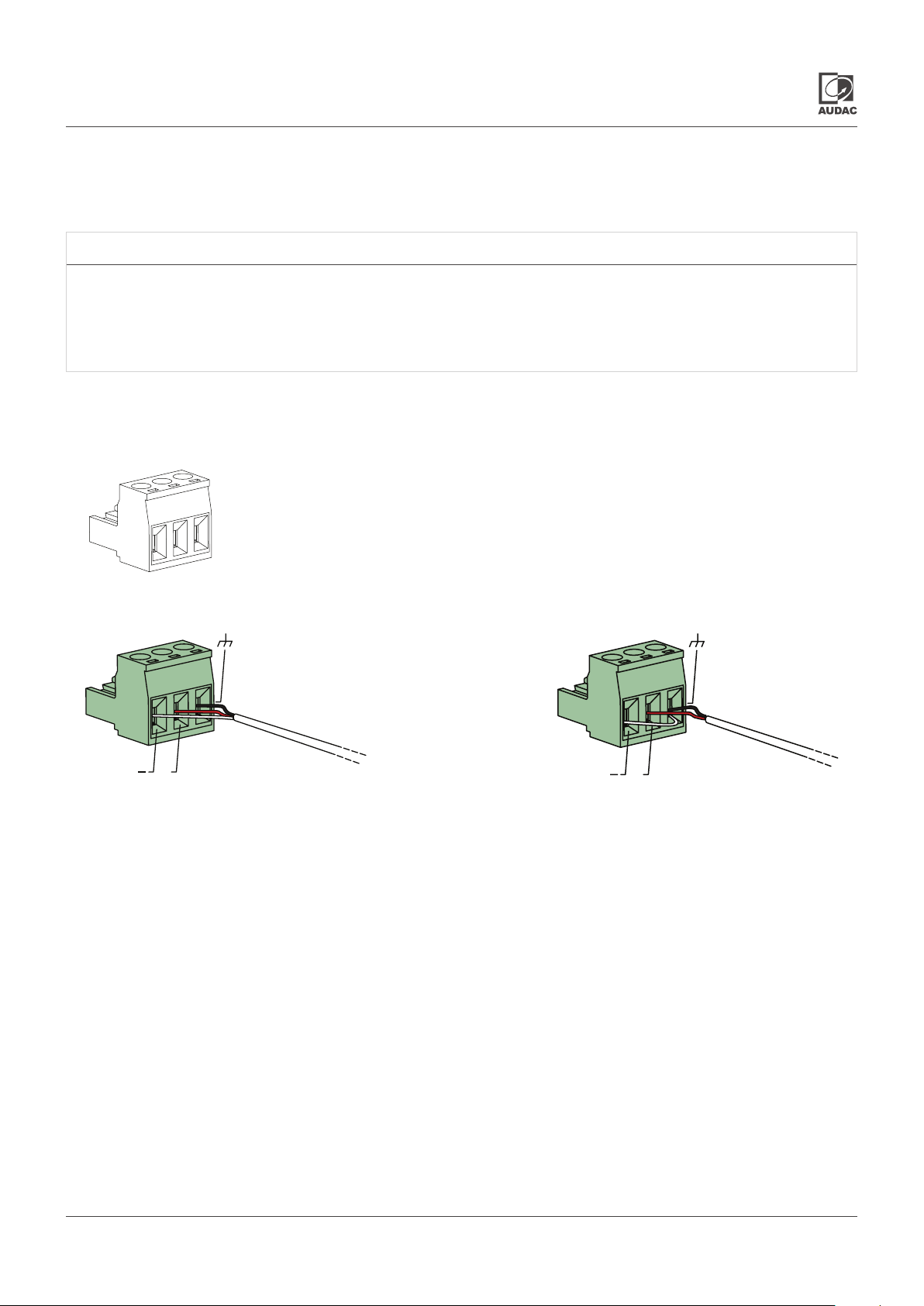
CONNECTION STANDARDS
The in- and output connections for AUDAC audio equipment are performed according to international wiring
standards for professional audio equipment
3-Pin Terminal block:
For unbalanced line output connections
Left:
Center:
Right:
For balanced signal output connections For unbalanced signal output connections
+
Signal -
Signal +
Ground
(XLR Pin 3)
(XLR Pin 2)
(XLR Pin 1)
+
BMP42 - User manual 07
Page 8
Chapter 2
Overview BMP42
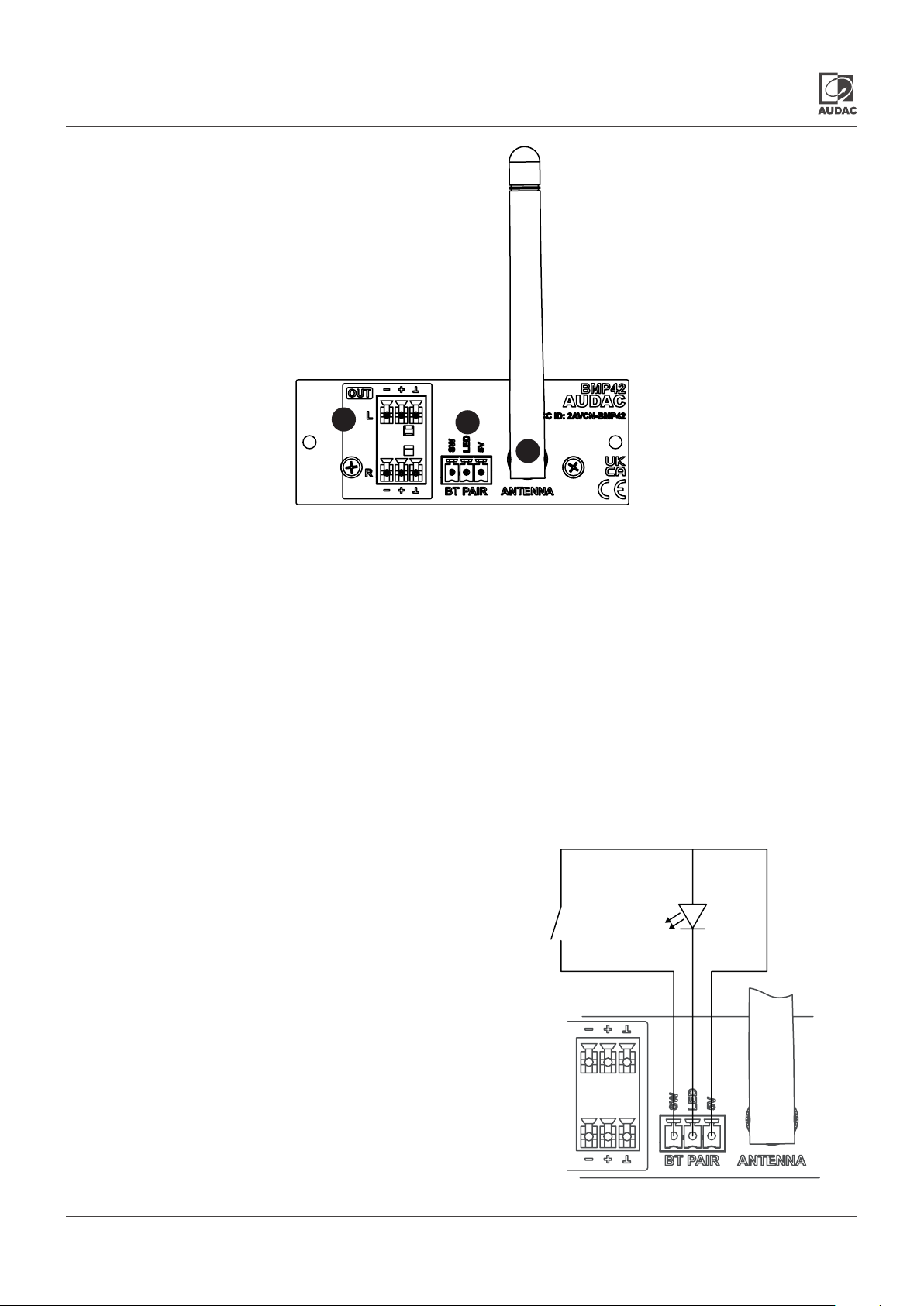
1
2
3
The BMP42 is a SourceCon™ compatible module featuring an (internal) board-edge connector which carries all signals for
getting it connected to any supporting main unit.
All external in & output connections shall be made using the available connectors on the panel.
1) Balanced stereo line output:
The balanced stereo line output is implemented using two 3-pin terminal block connectors. The audio output available on
this connector allows it to be fed to any amplier or pre-amplier.
2) SMA-type antenna connection:
The antenna (input) connection is implemented using an SMA-type (male) connector whereto the supplied antenna should
get connected. Depending of the installation conditions (e.g. when installed in a closed / shielded cabinet), it can be extended
using optional available accessories for optimal reception conditions.
3) Connection external pairing contacts:
When the BMP42 is installed in a device located in something
like a locked rack, it may be difcult to enable Bluetooth pairing
for new devices. For this purpose, an external pairing connector
can be connected that contains the combination LED and button.
When the button is pressed, Bluetooth pairing is enabled. This is
conrmed by the ashing of the LED.
Button
5V
If a device was connected, the connection is broken. The LED will
icker for 60 seconds and the BMP42 is visible to make a (new)
connection. If a device connects, the LED will remain lit. After 60
seconds without connection, the BMP42 is no longer visible to
new devices but old devices can still connect. After 60 seconds
the LED will be off.
The connection can be made according to this wiring diagram:
BMP42 - User manual08
Page 9
Chapter 3
Using the BMP42
Since the BMP42 is a SourceCon™ module, it can be combined with a variation of supporting main units. The operating and
conguration interface may differ depending on the device it is installed on, but the functionality offered is the same. Some
devices will support control and conguration through a front panel graphical control interface on a display, while others are
also supporting web-control.
This manual describes the control and conguration possibilities via a front-panel graphical control interface display. For
applications with more control possibilities, refer to the user manual of the main device used for further instructions.
Module screen
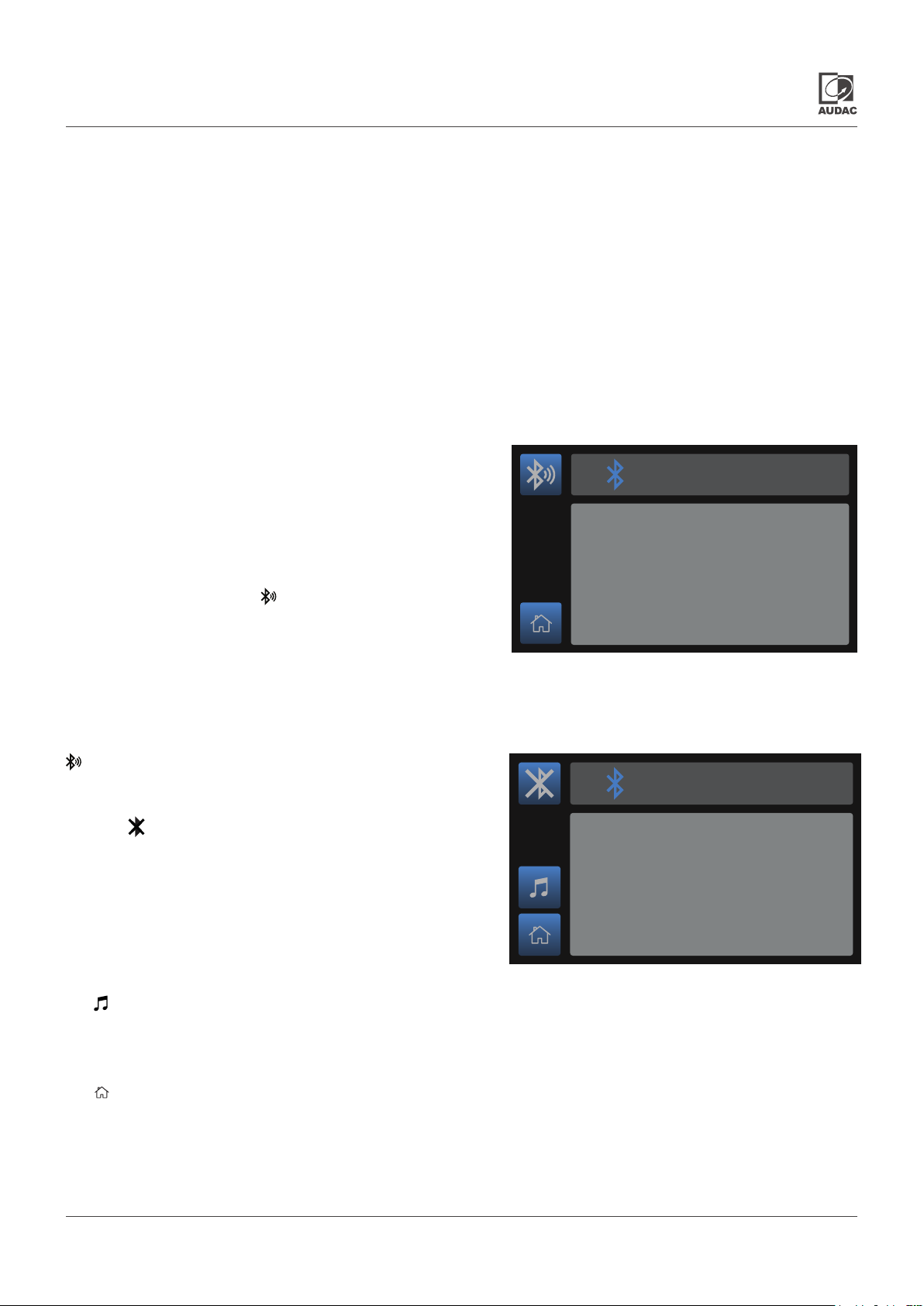
Connecting:
The main module screen of the BMP42 indicates the connection
status of the receiver. To avoid audio playback by unauthorized users
in public installations, transmitter and receiver pairing is required when
connecting for the rst time.
Bluetooth receiver
Bluetooth receiver
The receiver cannot be discovered from the transmitting device
unless the receiving and transmitting devices have been previously
paired. In this case, press the button to make it discoverable.
Once connected, the main module screen displays the name of
the connected device and it will become undiscoverable for other
devices.
Once both transmitter and receiver have been paired, the receiver
will remain connectable for that particular transmitter, even when the
connection button hasn’t been pressed. The BMP42 memory
stores up to 8 authorized device ID’s.
When the button is pushed, the connection with the current device
is broken and the BMP42 becomes discoverable again.
Player:
The (player) button gets you to the player mode screen where track information is displayed (if supported by the connected
transmitter) and previous or next audio track selection can be done.
Discoverable for 60s
Discoverable for 60s
Bluetooth receiver
Bluetooth receiver
Connected to ‘DeviceName’
Connected to ‘DeviceName’
Home:
The (home) button gets you back to the main screen of the device where the BMP42 is installed to.
BMP42 - User manual 09
Page 10
Player mode
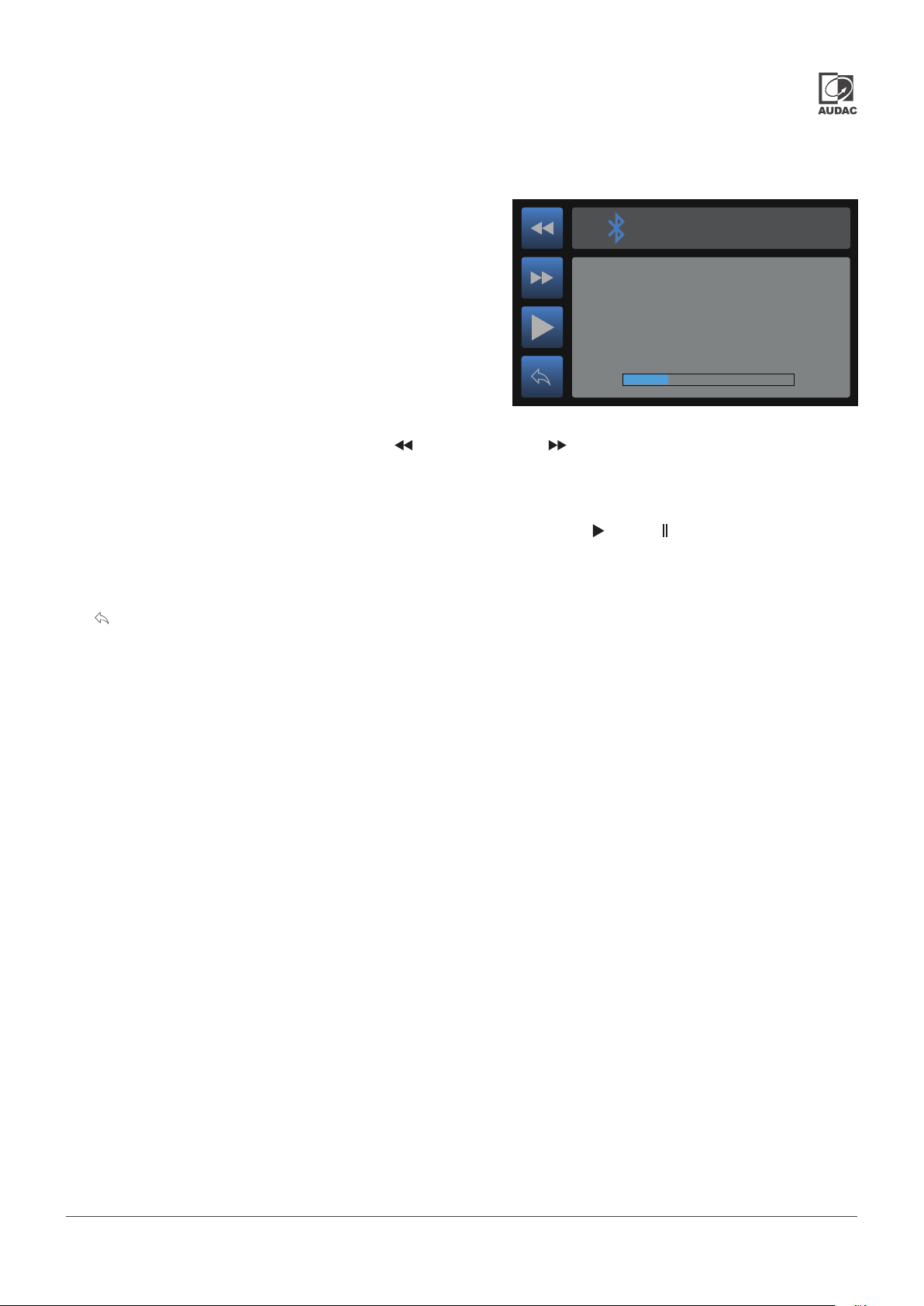
In this screen, all available media information about the currently
playing les is shown including track, artist or any other information,
while previous and next audio track selection can be done.
Note that the displayed information in this screen depends on the
supported functions of the connected transmitter.
Bluetooth receiver
Bluetooth receiver
Track name
Track name
Track info
Track info
0:30
0:30
Track selection:
The playing track can be selected by pressing the (previous track) and (next track) buttons. When selected, the rst
next supported track will be selected and start playing.
Play / pause:
Toggling between play and pause is done by pressing the play/pause button with (play) or (pause) symbols. Depending
on the current mode, the displayed symbol on the icon will toggle.
Return:
The (return) button gets you back to the main module screen of the BMP42.
1:59
1:59
BMP42 - User manual010
Page 11
Chapter 4
Audac Touch™
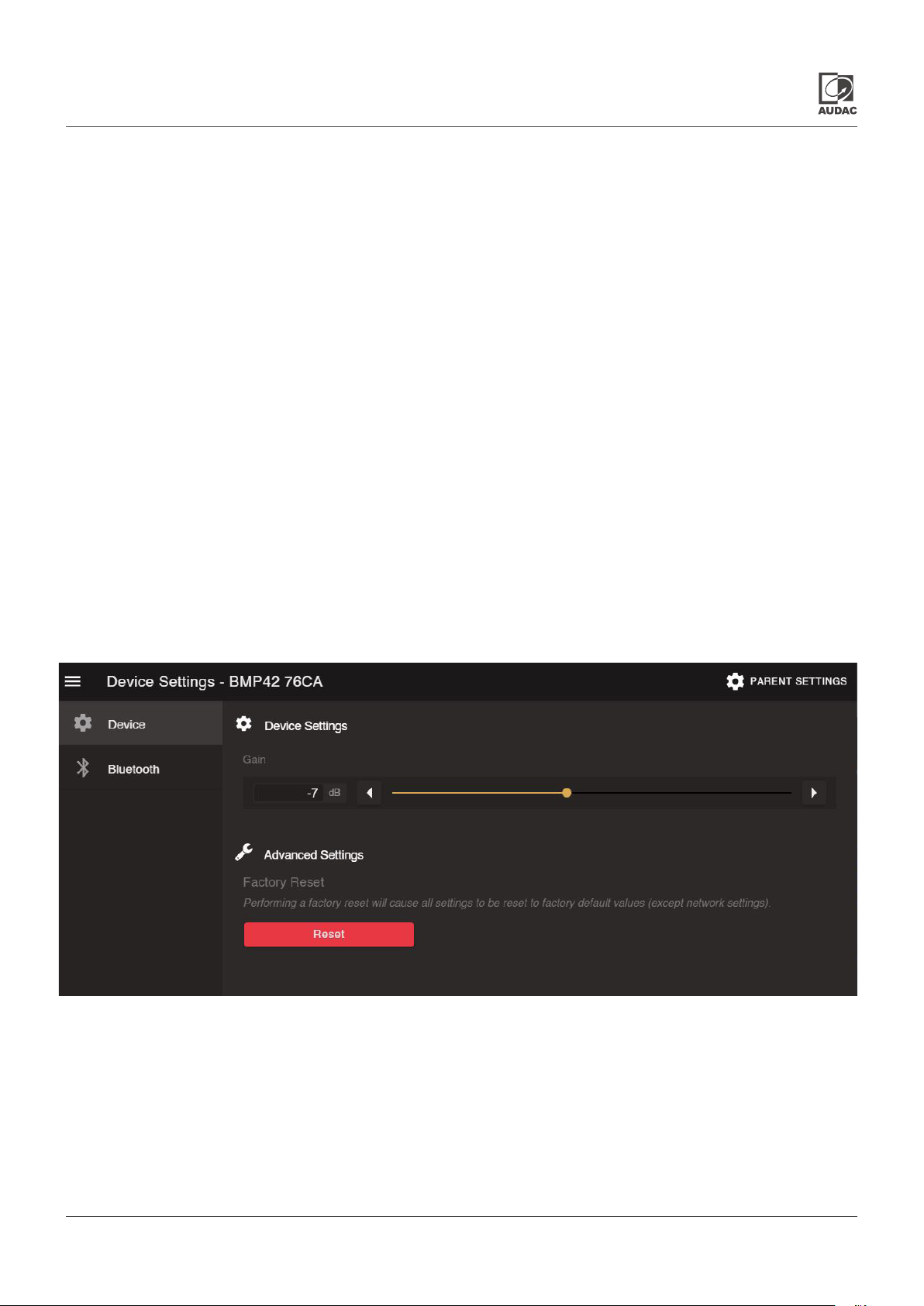
Device settings screen
Various adjustments can be made on the BMP42 using our simplied design and control platform - AUDAC Touch™.
AUDAC Touch™ is available for free on the Apple App store,Touch™ app can be downloaded from the Apple App store,
Google play store or audac.eu/eu/software/ audac-touch.
The BMP42 is visible on the overview page of the parent device in the Audac Touch™ platform.
Select the BMP42 to make adjustments.
Device
Gain:
The gain is synchronized from the device connected to the BMP42. If it is not to the desired level, it can be adjusted on the
BMP42. The gain can be adjusted within a range of 0 dB and -82 dB, allowing optimization of the output level according to
the input sensitivity of the connected amplier or pre-amplier.
Advanced settings - Factory reset:
Factory reset will recall all settings to factory defaults and all previously made settings and congurations will be lost. After
selecting factory reset, a conrmation will be asked whether all settings denitely need to be reset to factory defaults. When
conrmed, all settings will be lost.
BMP42 - User manual 011
Page 12
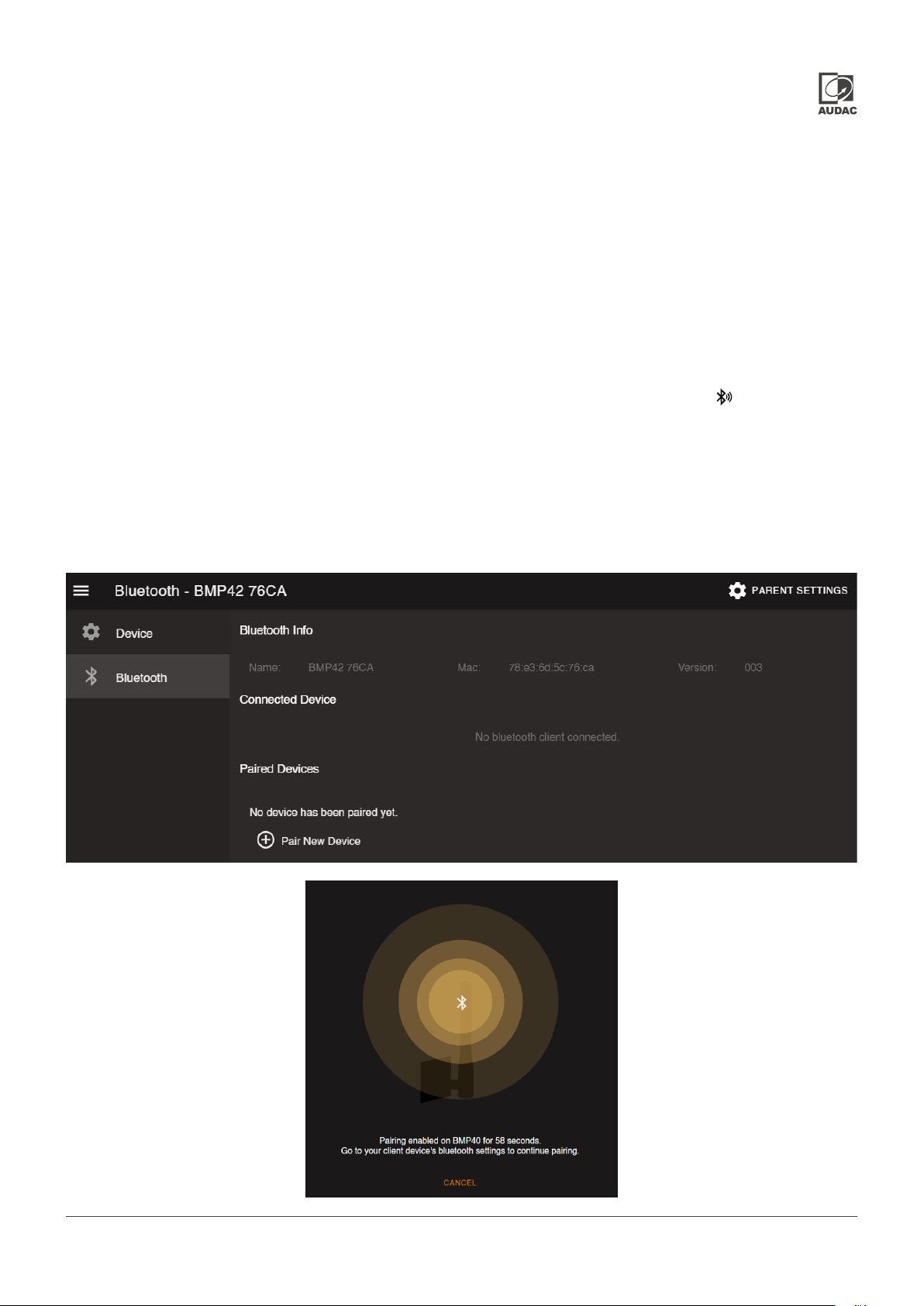
Bluetooth
Bluetooth info:
Gives an overview of the BMP42 Mac address and running software versions.
Connected:
Information about the connected transmitting device is shown.
Paired:
8 device ID’s of recently paired transmitters are stored as authorized devices and shown in this list. These authorized devices
are allowed for direct pairing with the BMP42 without making it discoverable. (without pressing the button in the main
module screen)
Devices can be removed from this list by pressing the delete icon.
When the ‘Pair new device’ button is used, the receiver is discoverable and allows connection for about 60 seconds from
any transmitting device.
BMP42 - User manual012
Page 13
Chapter 5
Installing the BMP42
CAUTION
Before installing the BMP42 to any SourceCon™ compatible device, make sure the power is switched off.
Malfunctions or electrical shocks may occur otherwise.
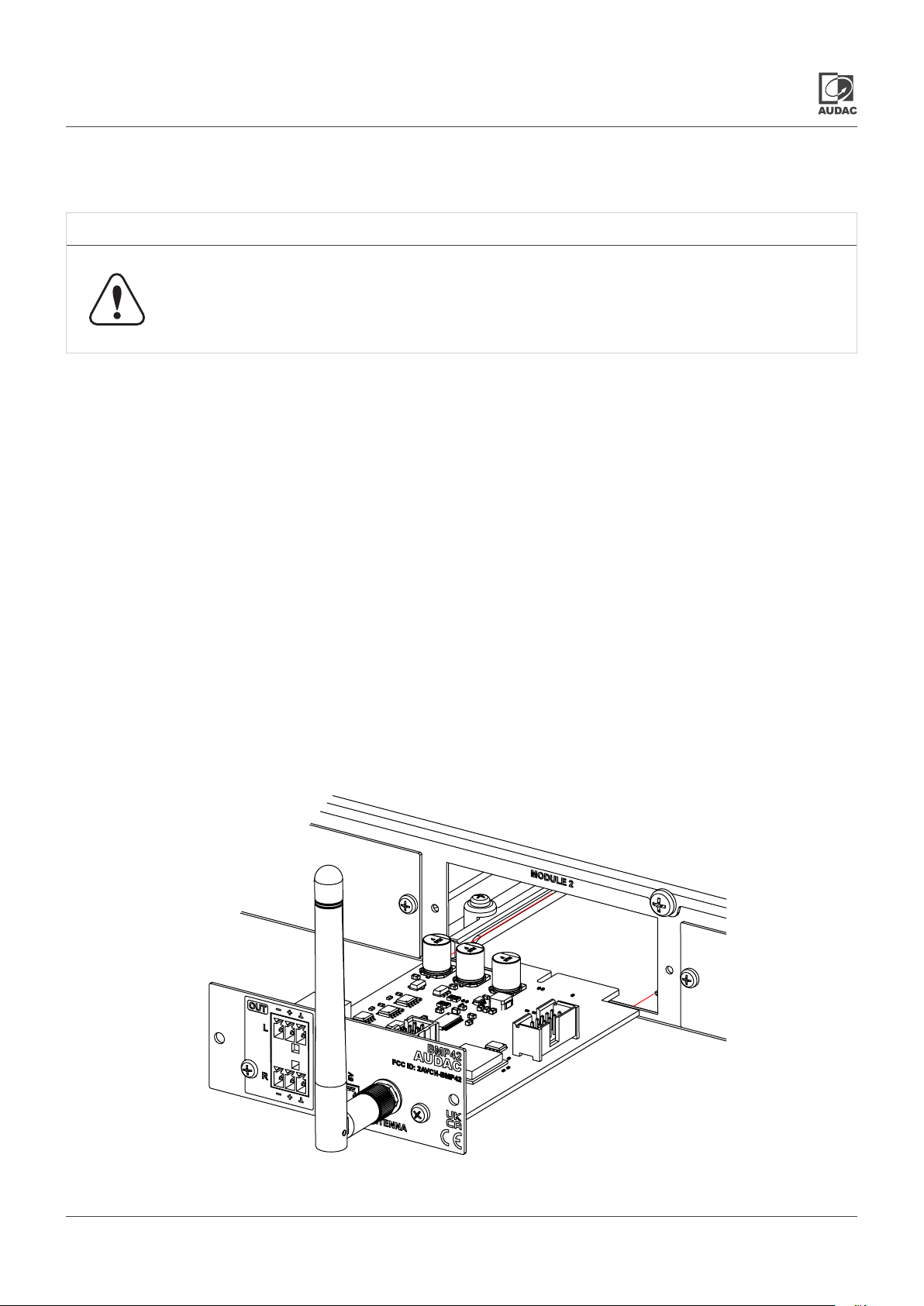
Step 1:
Make sure that the slot whereto the module should be installed is open and ready for installation. Depending of the main unit,
some module slots will be covered by blind panels when delivered. The corresponding blind panels should be removed by
releasing the screws on both ends.
Step 2:
Before removing the modules from their protective bag, we recommend touching a grounded metal chassis (or any other
grounded point) to prevent electrostatic discharges affecting the sensitive electronic components. It is recommended to always
hold the module card by the metal connection panel and avoid touching of the components on the circuit board directly.
Step 3:
Align both edges of the module with the guide rails inside the slot and carefully insert the module into the slot. It should slide
into the slot without any considerable resistance when well positioned into the guide rail.
BMP42 - User manual 013
Page 14
Step 4:
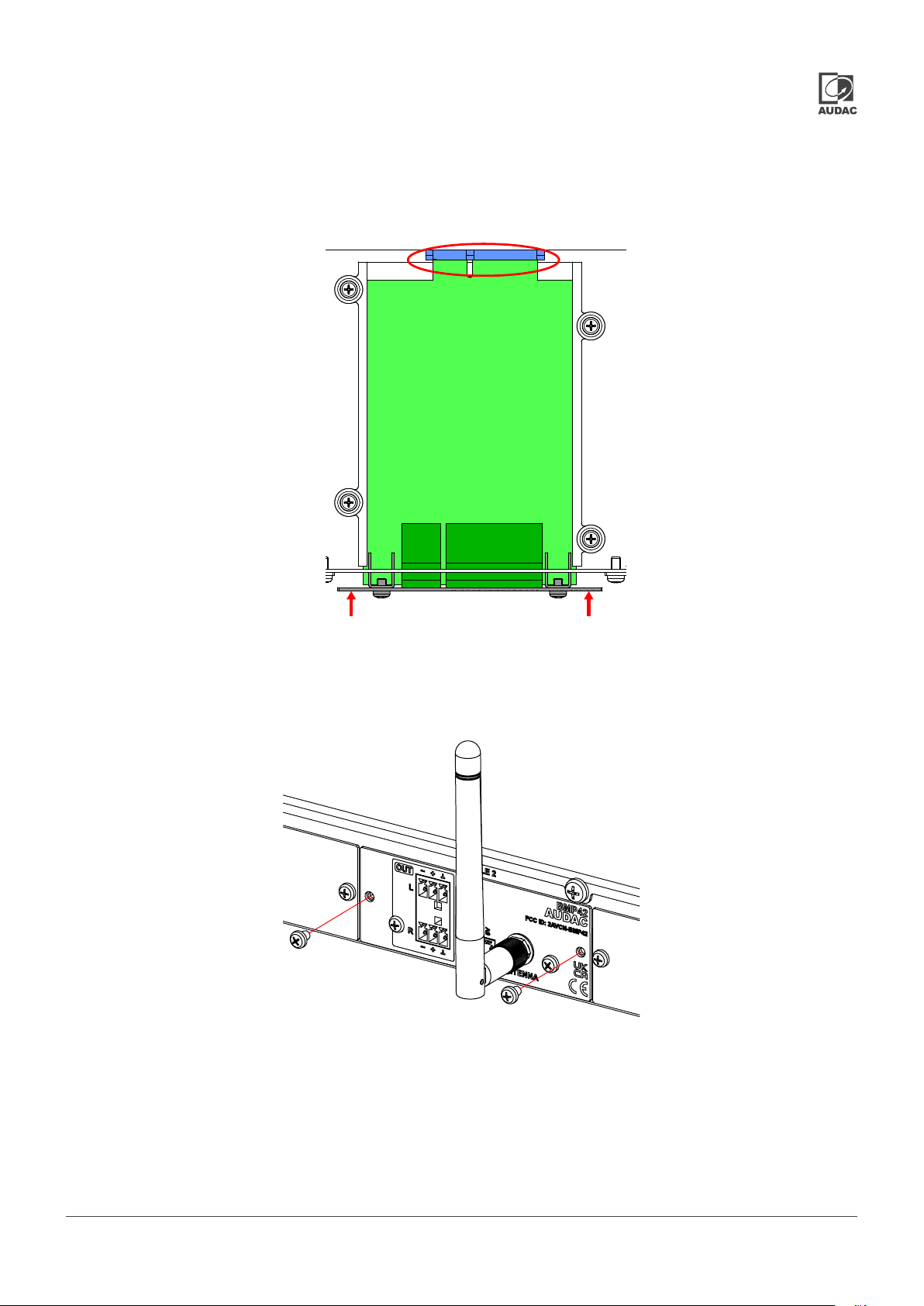
Some resistance might occur when the module’s board edge connector reaches the connection counterpart on the main
board. Gently push the module all the way into the slot to ensure that the contacts are correctly inserted. The module is well
inserted when its connection panel touches the metal chassis of the main device where inserted to.
Step 5:
Fasten the module into the slot using the included screws. Be aware that damage or malfunctions may occur if the module
is not correctly fastened.
Step 6:
Once the module correctly installed, the system can be powered-on and the module functionality will be automatically
discovered.
BMP42 - User manual014
Page 15
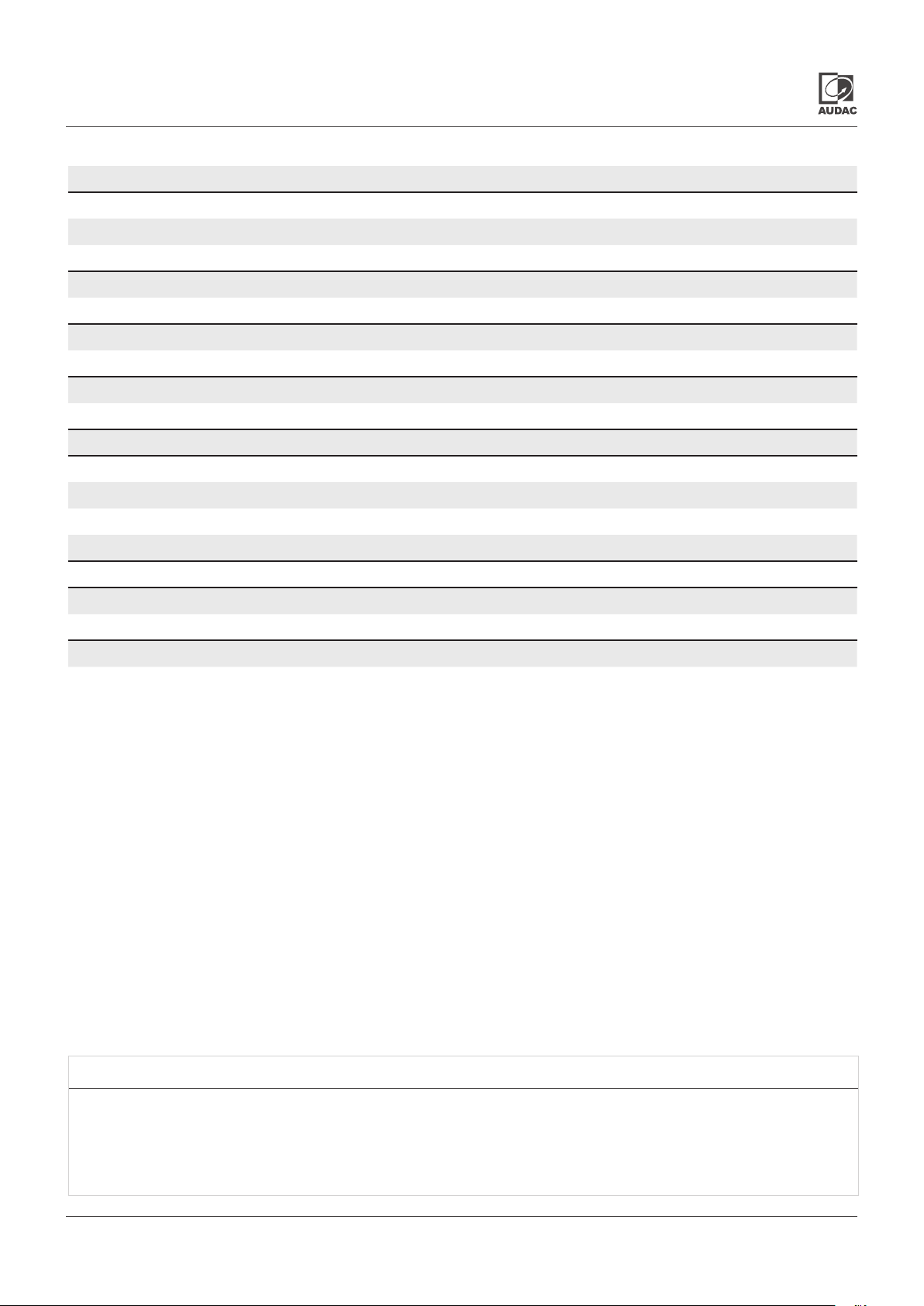
Technical specications
Connection SourceCon™ interface card slot
Input SMA-type male antenna connection (50 Ω)
Bluetooth pair contact with LED connection
(3-pin Euro Terminal Block ~ 3.81 mm)
Output Balanced stereo line output
(2 x 3-pin Euro Terminal Block ~ 3.81 mm)
Output level +8 dB ~ -82 dB
(Software congurable)
Bluetooth receiver Bluetooth spec V4.1
Class 2 output power
Power consumption 0.5 Wat t
Dimensions (W x H x D) 87 x 34.5 x 114 mm
Weight 0.075 Kg
Packaging Carton box
Shipping weight & Volume 1.08 Kg - 0.028 Cbm
Accessoried included 2.4Ghz antenna (2 dBi)
Compatible devices XMP44
MFA 2 X X
Optional Accessories BAE100 Antenna extender kit
NOTE
The BMP42 supports media information retrieval (track, artist, album, ... information) from the transmitter. This function is
only supported with AVRCP V1.3 (or higher) compatible transmitters.
BMP42 - User manual 015
Page 16

Discover more on audac.eu
 Loading...