Atten ST-7500, ST-7800 User guide

Page 1
SHENZHEN ATTEN TECHNOLOGY CO., LTD.
Soldering Iron Soldering Station Hot Air Rework Station Multifunctional Maintenance System DC Regulated Power Supply DC Switching Power Supply Programmable Power Supply Fume Extractor
SHENZHEN ATTEN TECHNOLOGY CO., L TD.
Add: Floor 7 & 8 , Building B, Konka Guangming Technology Center, No.228 Xingxin Road, Guangming District, Shenzhen 518100, China
Tel: +86 0755-8602 1389 400-998-6633 Web: www.atten.com Email: [email protected]
MADE IN CHINA
ST-7500/ST-7800
Preheating & Reflow Platform User Manual
SHENZHEN ATTEN TECHNOLOGY CO ., LTD
Page 2

Page 3

08/
Product warranty
Warranty regulations:
① The warranty period for this product starts from the date of purchase. During the warranty period, any malfunctions occurring due to the product's own quality issues can be serviced free of charge at our designated authorized repair center (or ATTEN) by presenting the original warranty card in accordance with the terms of this warranty card. Please keep your purchase receipt and this warranty card and present them together during repairs.
② During the warranty period, the following situations will incur paid repair services:
a. Inability to present a valid warranty card or valid proof of purchase. b. The warranty card has incomplete or altered information, such as the purchase date or
seller's name. c. Damage caused by improper operation or failure to follow the instructions and precautions
in the user manual. d. Damage resulting fr om na tur al disa st ers or f orc e ma jeure. e. Damage caused by disassembly, repair, or modification of the product without manufacturer
authorization. f. Replacement o f consumable or w e ar - and-tear part s.
③ The warranty card must be completed in full by the distributor or user to qualify for the 24-month warranty period.
④ Please keep this warranty card safe. Lost cards will not be reissued.
⑤ Special cases will be subject to mutual agreement.
⑥ The final interpretation rights belong to ATTEN.
User Notice
This product is covered by a 24-month warranty from the date of purchase. In cases of product-related quality issues, ATTEN is responsible for free repairs when presenting this card and the purchase receipt.
Note: When returning the product for repairs, the warranty card must be included, or else free repairs will not be provided. Thank you for your cooperation (please read the warranty policy for more information on warranty-related details).
This product test result is qualified and met the technical standard.



󾗜
Product Warranty Card
Content
 
  󽗉              
   󽗉  󽗈        
















19
Page 4
01/
Safety and Usage Precautions
This product (including internal software) and its accessories are protected by relevant national laws. Any infringement on our rights will be subject to legal penalties. Users should voluntarily adhere to the relevant national laws while using this product.
Thank you for using our product. Before using this product, please carefully read this manual and take note of the warnings and precautions mentioned. Keep it in a safe place for future reference.
warning Caution
We require users to have a basic understanding of everyday life and basic knowledge of electrical operations before using this product. For underage users, please use this product under the guidance of a professional or a guardian.
Caution
When using this machine, the following basic points must be adhered to in order to prevent electrical shocks, injuries to individuals, or potential hazards such as fires.
To ensure personal safety, only use genuine or recommended parts and accessories; otherwise, serious consequences may occur.
Improper use may result in death or serious injury. Improper use may result in personal injury or substantial damage to objects involved.
To prevent injury, maintain a safe operating environment.
Warning
READ ALL INFORMATION BEFORE USE. Power off when not in use or unattended. Place the soldering iron handle the iron stand,This tool must be
placed on its stand when not in use. Keep this product away from flammable materials. When using, please inform other people in the area near
the machine. Please do not touch the machine because of high temperature Do not apply to the same place for a long time.
Be aware that heat may be conducted to combustible materials that are out of sight. Do not leave the appliance unattended when it is switched on. This appliance is not intended for use by persons (including children) with reduced physical, sensory or mental capabilities, or lack of experience and knowledge, unless they have been given supervision or instruction concerning use of the appliance by a person responsible for their safety. Children should be supervised to ensure that they do not play with the appliance.
Cleaning and user maintenance shall not be made by children without supervision. If the supply cord is damaged, it must be replaced by the manufacturer, its service agent or similarly qualified
persons in order to avoid a hazard.
Caution
Before connecting the power, please ensure that the voltage used by this product complies with the applicable voltage in your local area to prevent permanent damage to the machine.Before connecting the power, please ensure that the voltage used by this product complies with the applicable voltage in your local area to prevent permanent damage to the machine. Please use this product in a well-ventilated environment. When using this product for operation, the temperature in the preheating area can reach 80°C to 500°C (176°F to 932°F). Misuse may result in burns or fires.
The machine generates very high temperatures in its vicinity during operation, so be cautious to avoid burns. This product should be used away from places with magnetic field interference, and it should not be installed
on vibrating surfaces or areas susceptible to impact, as this could damage the product. Please place this product on a table with a fire-resistant and heat-resistant mat to avoid causing fires. Users without relevant guidance, experience, or adequate knowledge preparation should refrain from using this product. Do not wet this product. Avoid operating this product with wet hands or in a damp environment to prevent electrical shock. When replacing parts , turn off the power and allow this product to cool to room temperature.
Use original ATTEN parts when replacing product components. Do not engage in play or any dangerous activities while using the equipment, as this may lead to harm to yourself or others. Please do not use this product for purposes other than its intended function, as it may lead to damage to the
machine or personal injury. Do not modify this product or its accessories, as this may void the manufacturer's warranty and damage the product. When plugging or unplugging the power cord, grip the plug body and avoid pulling or tugging the cord.
Do not strike this product and its accessories with force during use, as it may damage the product.
07/
Troubleshooting Guide
Warning
 󽗊 
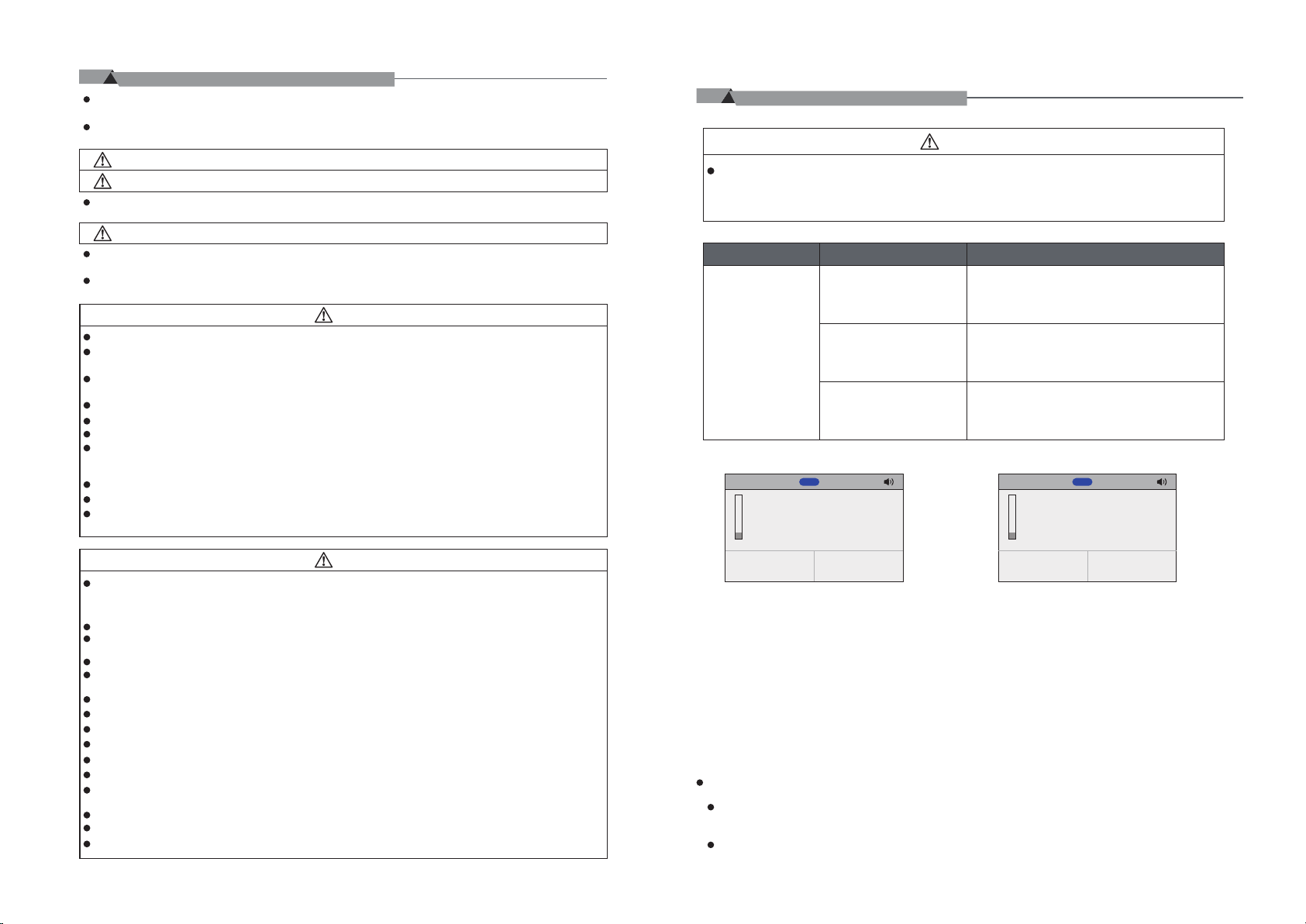
Issue Possible Causes Steps to Resolve
Fuse is not installed or burnt out.
Cannot power on
Poor contact of the power cord.
Mainboard is damaged.
Tool:HR-400
M1
Sensor malfunction
8%


E-2: Sensor malfunction. Steps to Resolve:

E-2


Check if the wiring is correct, confirm if the fuse is installed or shorted, and replace it with an original fuse as needed.
Check if the power cord is damaged or deformed. If there is an issue, please contact your local dealer.
Please contact your local dealer.
Tool:HR-400
M1
Please contact your
local dealer.
8%


E-3: Please contact your local dealer. Steps to Resolve:
  
E-3


After-sales contact
 

01 18
Page 5
06/
Optional Accessories
Accessories Features Instructions

  
󽗉 󽗉
󽗊 󽗊


󽘙
󽗊
󽘘









Disclaimer
     
02/
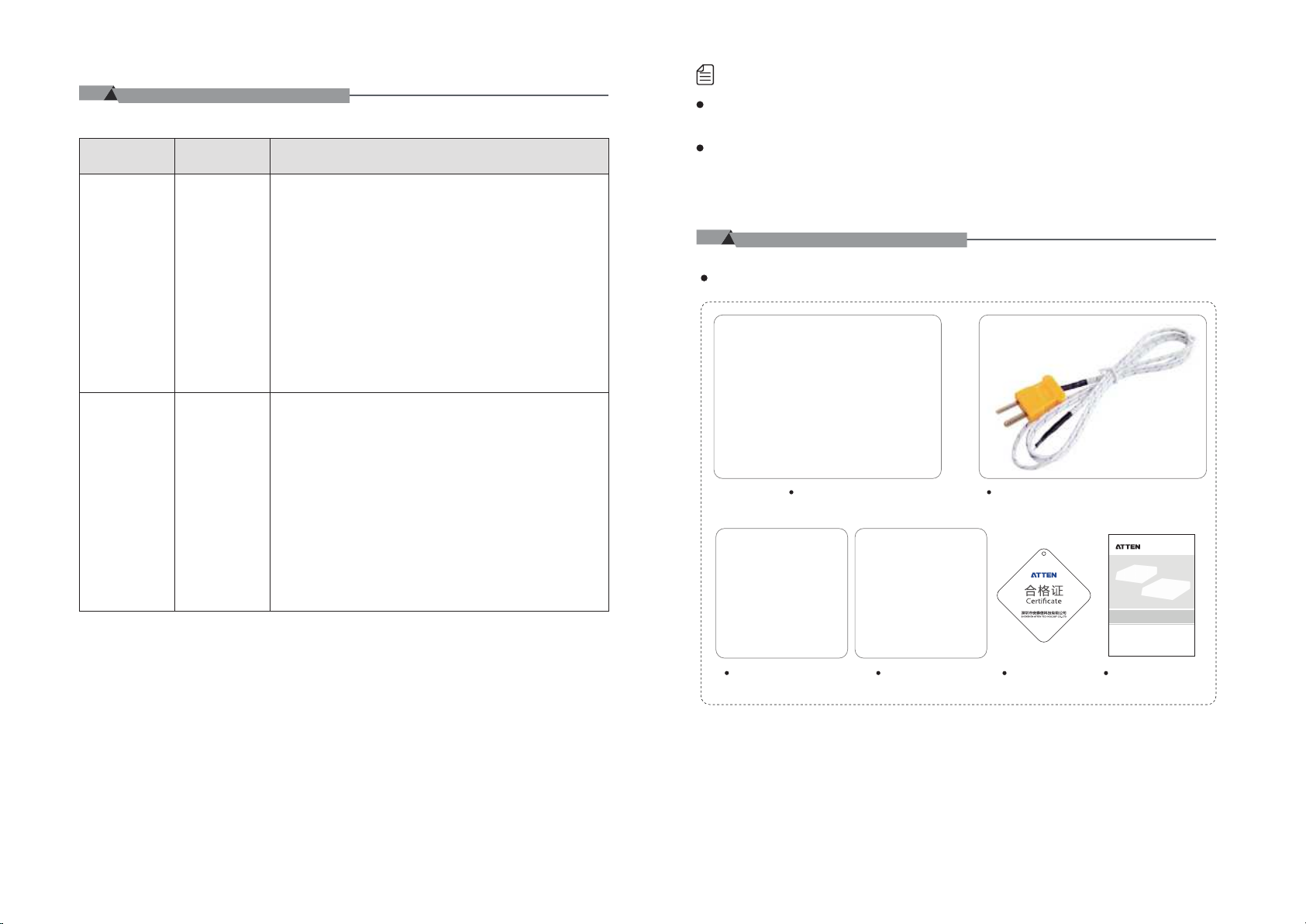
Packaging List and Diagrams
Packaging List
 
17
02
ST-7500/ST-7800
预热、回流平台使用说明书
深圳市安泰信科技有限公司
SHENZHEN ATTEN TECHNOLOGY CO ., LTD
󽗉  
Page 6
03/
Specifications
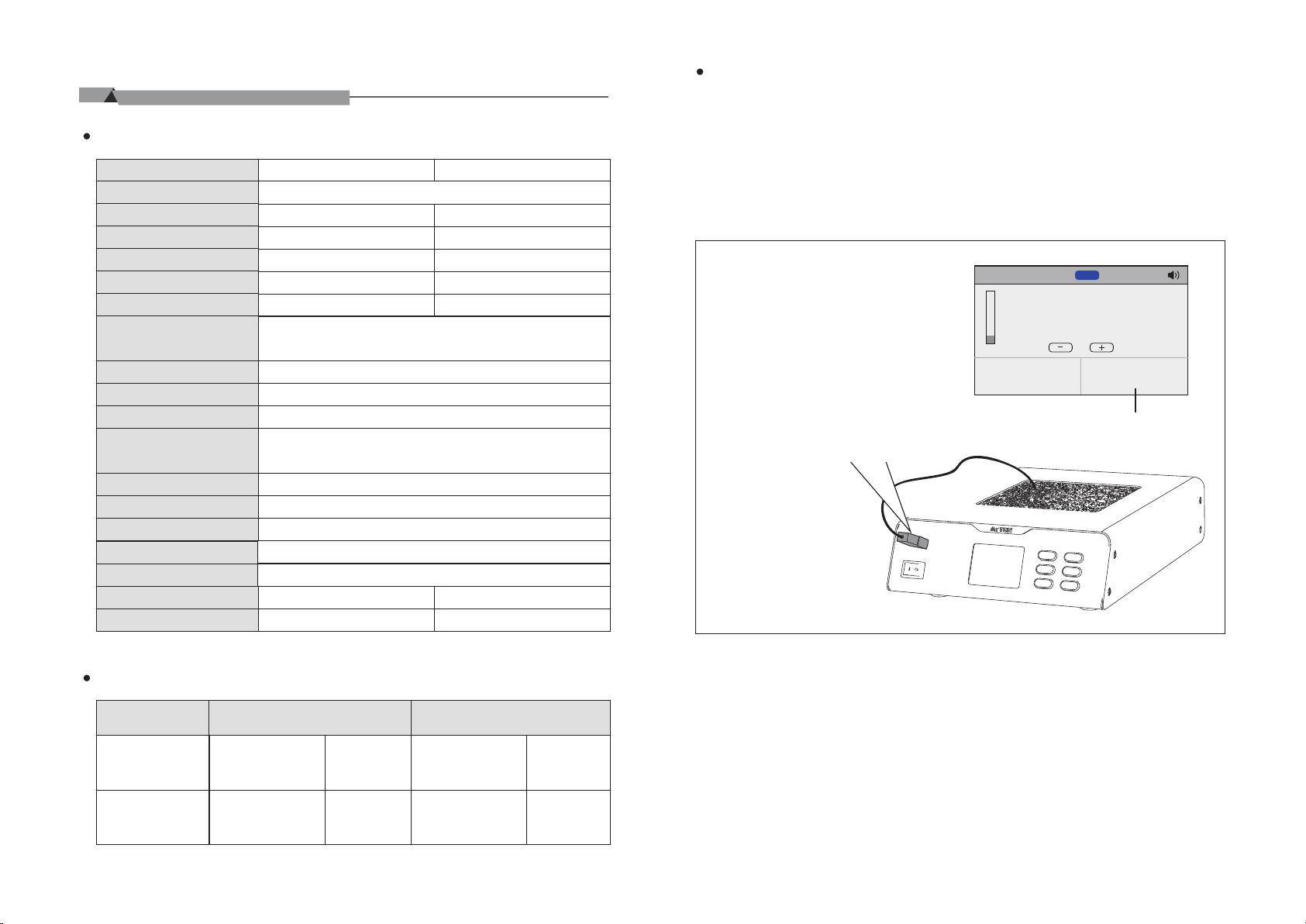
Technical Parameters
Product Model
Input Voltage Power
Temperature Range
Heating element
Heating area
Heating material
External K-type thermocouple
Communication function
Linkage function
Temperature Unit
Temperature Adjustment Increment
Quick Parameters
Temperature Lock
Language
Display
Operating Environment
Dimensions
Weight (Main Unit)
 
󽘘󽘙
󽘙 󽘙
 










󽗉





≈2.4kg ≈5.1kg



Instructions for K-Type Thermocouple:
   
  
Tool:HR-400
M1
125
8%


       


   
Packaging Parameters
Product Model Inner Box Packaging




 
 
03
Outer Box Packaging

󽘘󽘙

󽘘󽘙
 
 
16
Page 7
Quick Parameter Groups Reset:
 
Quickly parameters
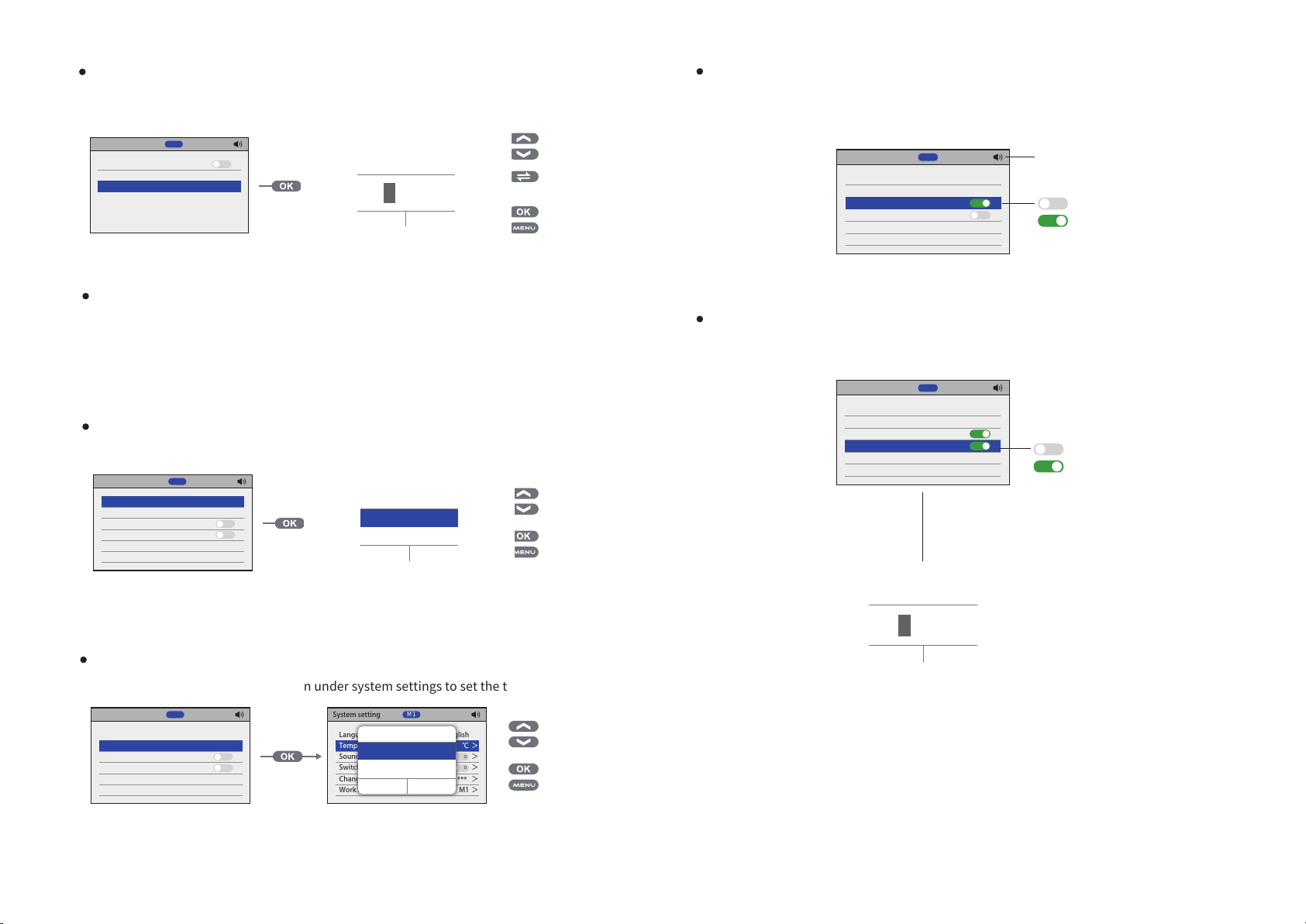
Quick Tempearture Quick Temperature 1 80℃ > Quick Temperature 2 200℃ > Quick Temperature 3 350℃ >
Reseting >
M1
Quickly parameters
I
Quick Tempearture Quick Temperature 1 80℃ > Quick Temperature 2 200℃ > Quick Temperature 3 350℃ >
Reseting >
M1


 
I

 
󽗉 
Exterior Component Diagram
①
②
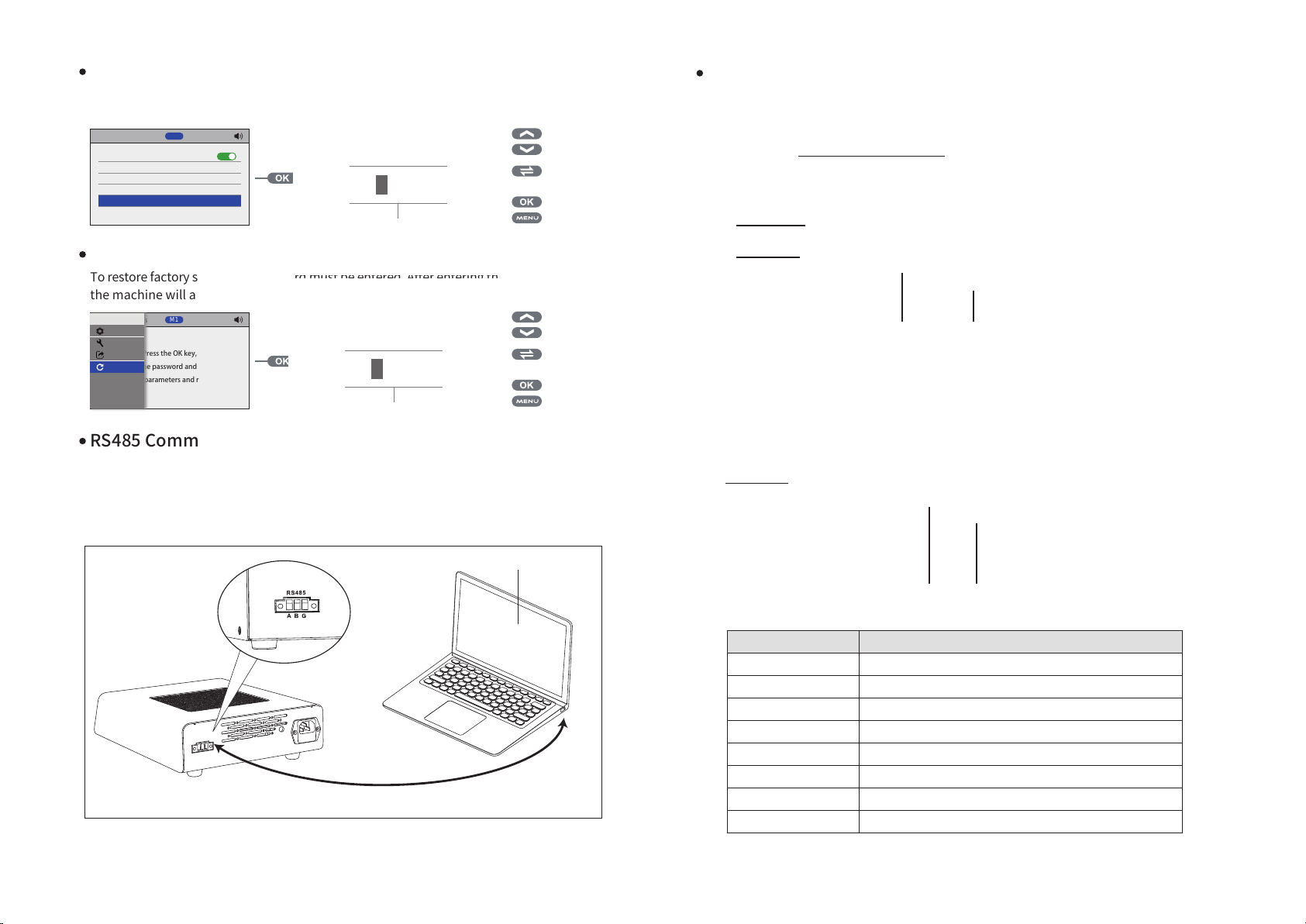
Factory Reset:
 
Menu
Factory Settings
Station
System
Press the OK key,
Quick
enter the password and verify,
Factory
factory parameters and reboot.
M1
Factory Settings
enter the password and verify,
factory parameters and reboot.
 
M1

Press the OK key,


 
󽗉 
RS485 Communication (Slave Mode):
 ② 
 


RS485
A B G
Connect the RS485 communication interface to the computer's USB interface
󽗋 
(Requires the use of an RS485 to USB converter)
③
⑥
Serial number
①
⑤④
⑧⑦
Component description

②
③
④
⑤
⑥
⑦
⑧
15
04
Page 8
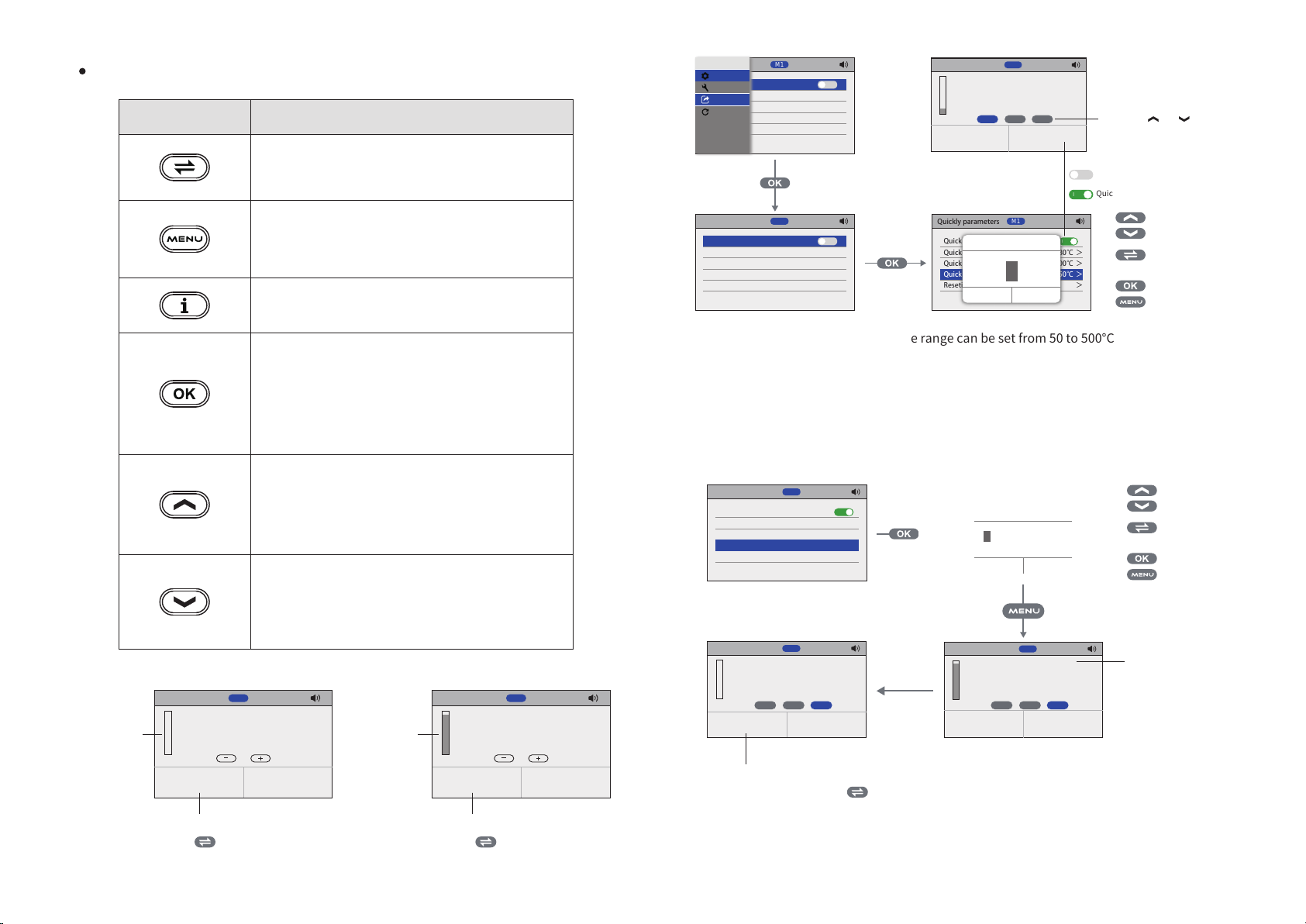
Keypad Function Descriptions
󽗈 󽗈 
 
 


Menu
快捷参数
Station
快捷参数组
System
快捷温度1 80℃ >
Quick
快捷温度2 200℃ >
Factory
Function DescriptionKey
快捷温度3 350℃ >
重置 >
Quickly parameters
Quick Tempearture
Quick Temperature 1 80℃ > Quick Temperature 2 200℃ > Quick Temperature 3 350℃ >
Reseting >
M1
O
Tool:HR-400
M1
125
8%
1 2 3


M1
O
Quickly parameters
Quick Tempearture Quick Temperature 1 80℃ > Quick Temperature 2 200℃ >
Quick Temperature 3 350℃ >
Reseting >


M1



 
       
O


I
I

 
󽗉 




 
 
 
󽗉 
 
 
 
 
 
 
(Figure 1-1) (Figure 1-2)
Tool:HR-400
M1
300
0%


 󽗈 󽗊 





Tool:HR-400
90%


  󽗊󽗈 
05
M1
300


Quick Parameter [1]:  Quick Parameter [2]:

Quick Parameter [3]:
 
 
Quickly parameters
Quick Tempearture Quick Temperature 1 80℃ > Quick Temperature 2 200℃ >
Quick Temperature 3 350℃ >
Reseting >
Tool:HR-400
0%

M1
M1

400
1 2 3

I

 󽗈 
Quickly parameters
Quickly parameters
Quick Tempearture
Quick Tempearture Quick Temperature 1 80℃ >
Quick Temperature 1 80℃ > Quick Temperature 2 200℃ >
Quick Temperature 2 200℃ >
Quick Temperature 3 350℃ >
Reseting >
Reseting >
Tool:HR-400
80%


   
   
M1
M1


󶋓
󶋓
 
M1

400
1 2 3


I
I

 
󽗉 
 
14
Page 9
Address:
 
System setting
Work mode
Delay power-on 0S Delay power-off >
Address >
Information > Reseting >
M2
M2>>
0S
1
System setting
Work mode
Delay power-on 0S Delay power-off >
Address >
Information > Reseting >
M2


 
M2>>
0S
1

 
󽗉 
Baud Rate:
  
Information:
 
System setting
Work mode
Delay power-on 0S Delay power-off > Address >
Information >
Reseting >
M2
M2>>
0S
1
Product information
Name Temperature Range 50~500℃ Power
Main version
Subversion
M2
ST-7500
200W
V1.00
V1.00
 

04/
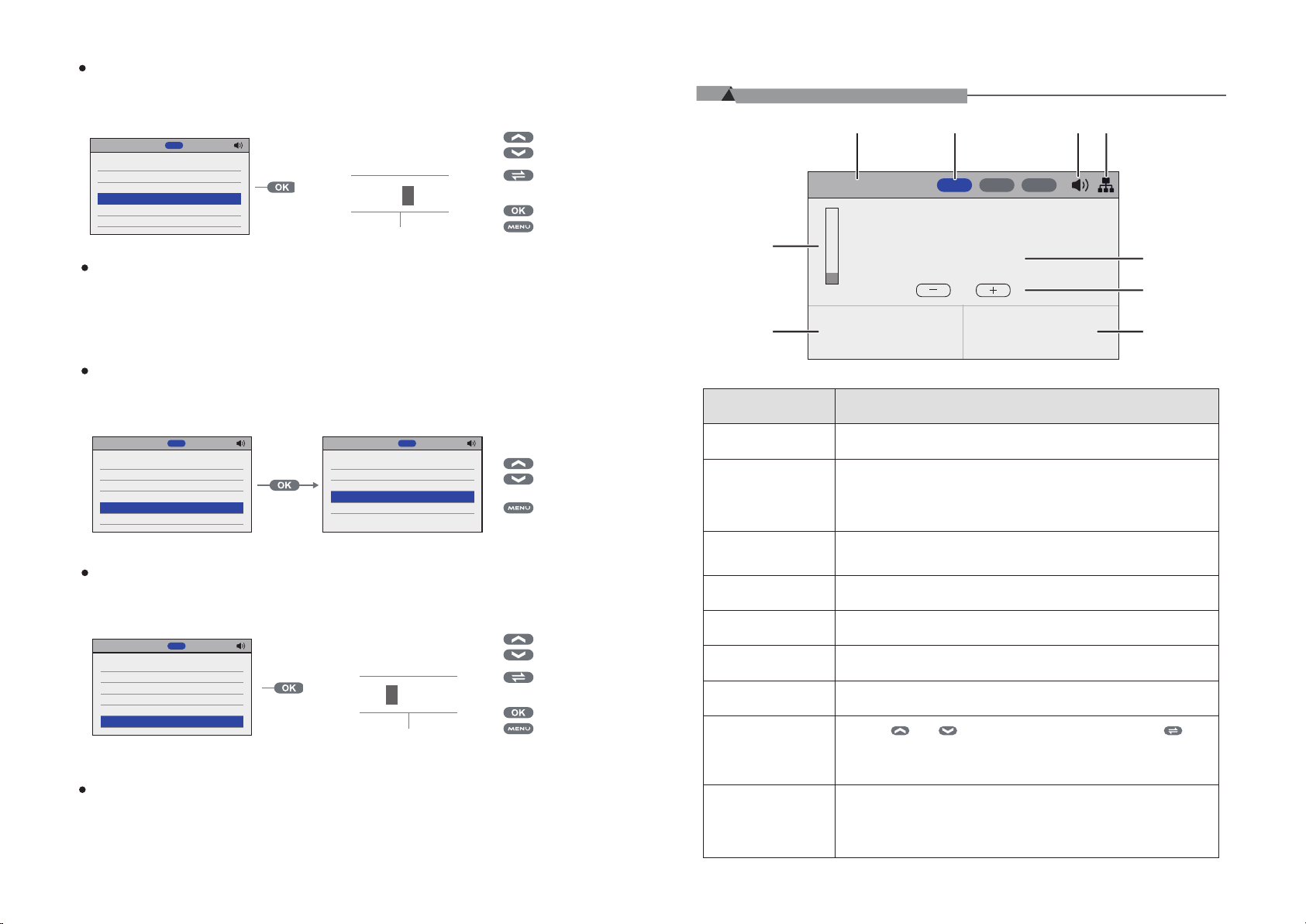
Main Interface Introduction
Tool:HR-400
125
8%
Serial number
①
②



   
M1 M2 M3


Heating Module Model
Reset:
 
System setting
Work mode
Delay power-on 0S Delay power-off > Address > Information >
Reseting >
M2
M2>>
0S
1
System setting
Work mode
Delay power-on 0S Delay power-off > Address > Information >
Reseting >
M2

󺀪󸚧󲸺󵿇


 
󱾬󴴫 󶁢󲷢
M2>>
0S
1

 
󽗉 
Quick Temperature Groups:
 [1]:  [2]: [3]:
13
③
④
 󽗈

⑤
⑥
⑦
 

⑧
󽗈󽗈 

⑨
  
06
Page 10
Operating Instructions:
①
②

③  
④
⑤󽗈

Peripheral Power On/Off Delay:
󽗈 󽗈 
System setting
Work mode
Delay power-on 0S
Delay power-off >
Address >
Information > Reseting >
M2
M2>>
0S
1
System setting
Work mode
Delay power-on 0S
Delay power-off >
Address >
Information > Reseting >
M2



 
M2>>
0S
1

 
󽗉 
05/
Function Introduction
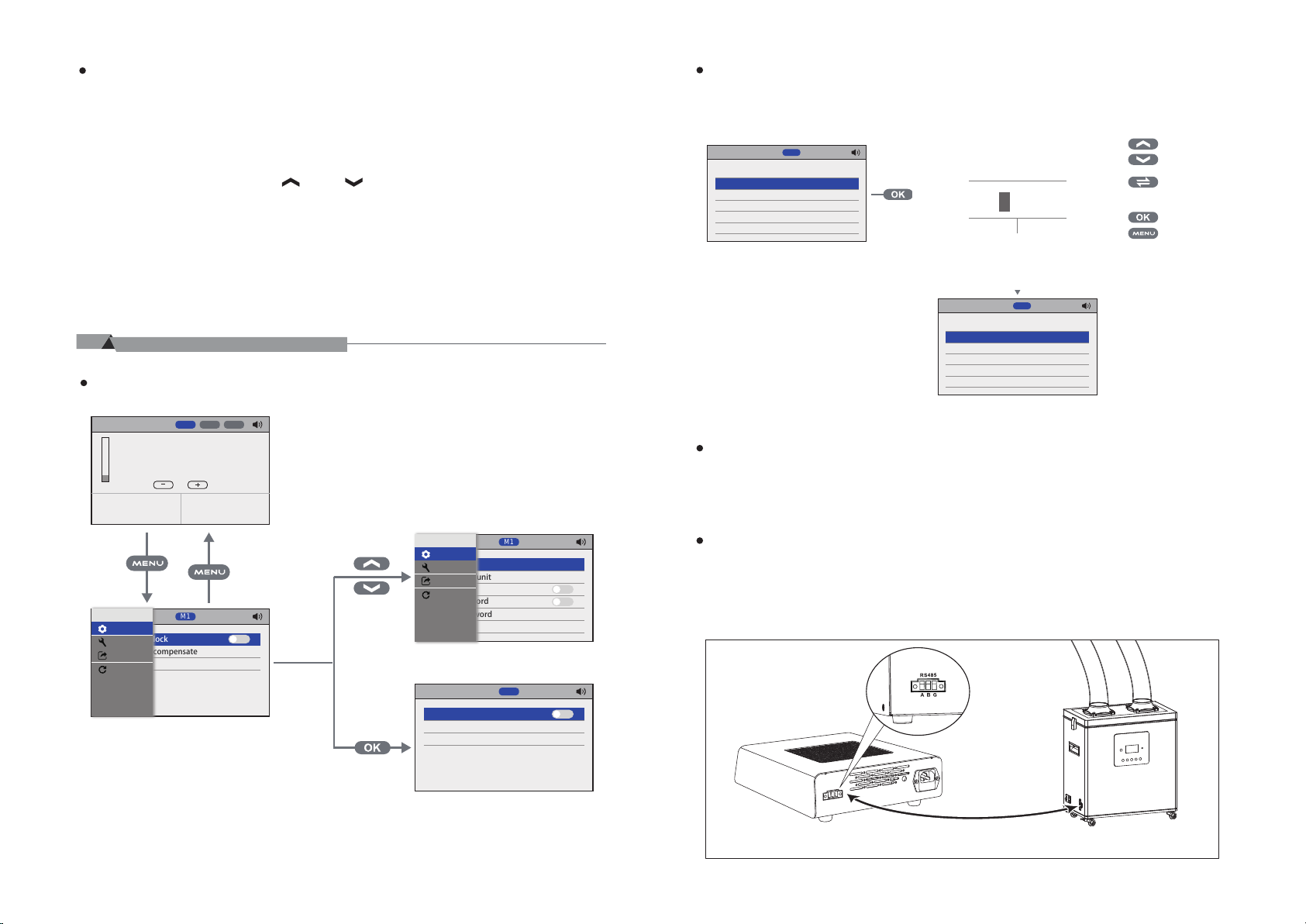
Menu Settings:
Tool:HR-400
M1 M2 M3
125
8%


Menu
Iron setting
Station
Temperature lock
System
Temperature compensate 0℃ >
Quick
Factory


M1
The machine is configured with peripheral power-on delay, and the controlled devices will start 15 seconds after the host is powered on, following the set delay time.(as shown)
System setting
Work mode
Delay power-on 15S
Delay power-off >
Address >
Information > Reseting >
M2
M2>>
15S
1
   
Menu
System setting
Station
Language
System
Temperature unit ℃
Quick
Sound >
Factory
Switch password Change password >
O
>Reseting
Work mode >
Iron setting
Temperature lock
Temperature compensate 0℃ >
M1
English
>
O
O
>
***
M1
M1
O
>Reseting
Peripheral Power Off Delay:
󽗈 
RS485 Communication (Master Mode):
(Note: Peripheral power on delay is only effective when the preheating platform linkage mode is set to M2 (master mode), and both machines have the same address code. It is used in conjunction with ATTEN Fume Extractor, Ion Fan, Hot Air Station, and other equipment.) The connection method is as shown in the diagram:
07
RS485
A B G
 


12
Page 11
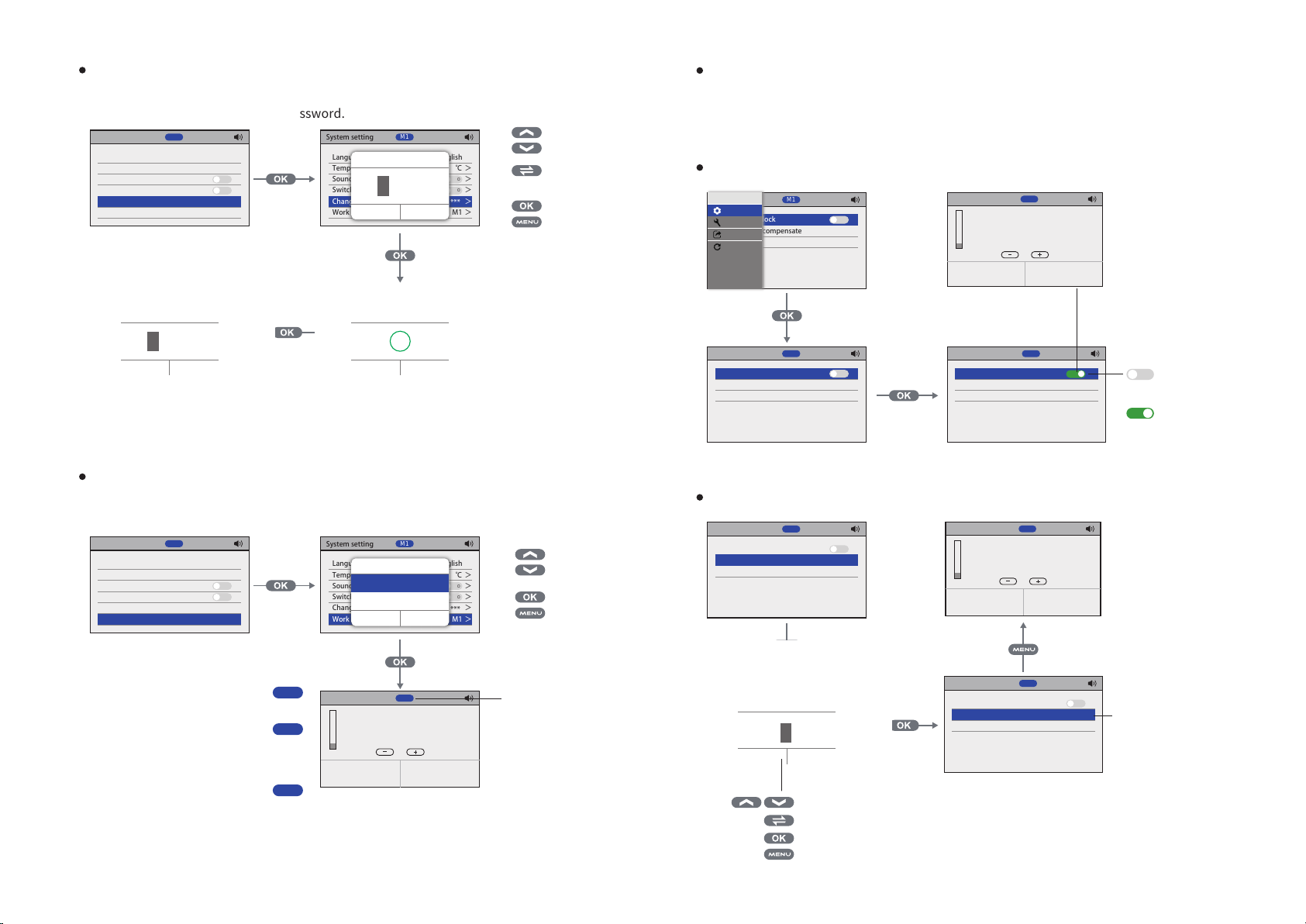
Password Modification:
󽗉 
System setting
Language Temperature unit ℃ Sound > Switch password
Change password >
Work mode >
System setting
Language Temperature unit ℃ Sound > Switch password
Change password >
Work mode >
M1
M1


 
English
English

System setting
>
O
O
>
***
M1
>
O
O
>
***
M1
Language Temperature unit ℃ Sound > Switch password
Change password >
Work mode >
System setting
Language Temperature unit ℃ Sound > Switch password
Change password >
Work mode >

M1


 
M1

√
 
English
***
English
***

>
O
O
>
M1
>
O
O
>
M1
 
󽗉 
Linkage Mode:
 
System setting
Language Temperature unit ℃ Sound > Switch password Change password >
Work mode >
M1
English
System setting
>
O
O
>
***
M1
Language Temperature unit ℃ Sound > Switch password Change password >
Work mode >
M1



 
English
***

>
O
O
>
M1

󽗉 
Preheating Platform Settings:
 
Temperature Lock:
Menu
Iron setting
Station
Temperature lock
System
Temperature compensate 0℃ >
Quick
Factory
Iron setting
Temperature lock
Temperature compensate 0℃ >
M1
M1
Tool:HR-400
O
>Reseting
O
>Reseting
8%


Iron setting
Temperature lock
Temperature compensate 0℃ >
M1
Temperature locked!
125

M1

     
I
>Reseting
O
 
I
 
Temperature Compensation:
Iron setting
Temperature lock
Temperature compensate 0℃ >
M1
Tool:HR-400
O
>Reseting
8%


M1
125









M1
M2
M3
Tool:HR-400
8%


11
M1
125


   
Iron setting
Temperature lock
Temperature compensate 0℃ >
M1


 
  󽗉 
Iron setting
O
>Reseting
Temperature lock
Temperature compensate 10℃ >
M1
O

>Reseting
 
08
Page 12
Reset:
 
Iron setting
Temperature lock Temperature compensate 0℃ >
M1
Iron setting
O
>Reseting
Temperature lock Temperature compensate 0℃ >
M1


 

O
>Reseting
 
󽗉 
System Settings:
 󽗈 
Language:

System setting
Language
Temperature unit ℃ Sound > Switch password Change password > Work mode >
M1
English
System setting
>
O
O
>
***
M1
Language
Temperature unit ℃ Sound > Switch password Change password > Work mode >
M1

󱙆󳽳

 
English
***

>
O
O
>
M1

󽗉 
Temperature Unit:

System setting
Language
Temperature unit ℃
Sound > Switch password Change password > Work mode >
M1
English
System setting
>
O
O
>
***
M1
Language
Temperature unit ℃
Sound > Switch password Change password > Work mode >
M1

 
English

>
O
O
>
***
M1

󽗉 
Sound:
 󽗈
System setting
Language Temperature unit ℃
Sound >
Switch password Change password > Work mode >
M1
English
I
O
***
M1
 
>
>
I
O
󽗈 
Password Switch:
 󽗈
System setting
Language Temperature unit ℃ Sound >
Switch password
Change password > Work mode >
Tool:HR-400
M1
M1
Temperature locked!

English
I
I
***
>
>
M1
O
󽗈
I

125
8%

   󽗉

 



09
10
Loading...