

Page 1

E915 (Smart Plus)
User Manual
Page 2

List
1. Safety Precautions
2. Initial Installation
3. Touch POS Appearance
4. Product Description
1) 15”inch LED screen &Touch Screen Parameter
2) I/O port description
Page 3

1. Safety Precautions
1. Please place the machine on a flat vibration free surface.
2. Please make sure to avoid direct sunlight, water and other
elements from entering the machine.
3. Please keep away from any strong electronic interference.
4. Do not cover the machine.
5. In areas with unstable power supply, please connect an external
UPS or power source to ensure electronic stability.
6.The product comes standard with a power connector with earth
leakage. Please do not change the connector unless certain of the
power requirements.
7. Make sure that the ground wire of the wall socket is connected. If
the ground is not connected it may cause electronic shock and
even cause a fire.
8. The machine should not share the same power socket with any
high powered electronic appliances. Please ensure that all the
machine has a dedicated wall socket for operation.
9. The machine will be connected to various other peripherals.
Page 4

Ensure that the cable and connectors are well insulated and that all
screws are tightened well.
10. To clean the machine, use a damp cloth and refrain from using
corrosive chemicals that might damage the machine.
11. Should operation fail on the machine, remove the machine from
live power. Refrain from opening or repairing the machine. Contact
an authorized repair center or person to assist with repairs.
"WARNING": For the non-compliance with the above issues, as
well as non-qualified service personnel or the use of
non-designated by the Company to provide and repair parts for
maintenance of all the consequences, the Company does not
assume any responsibility.
Page 5

2. Initial Installation
1. Unpacking
Immediately after receiving the machine, unpack and check for any
damage. In case of damage, the shipping company shall be
informed immediately report the claim to the manufacturer. After
unpacking also check the that the spare parts are complete.
2. Preparing for Installation
Examine the case for cleanliness, Logos, marks and insure labeling
is correct.
Check the working environment: Because the POS is a precision
instrument, the working environment should be checked and make
sure it is suitable for the cash register. If the work environment is not
sufficient, please do not make use of the POS.
3, The main technical specifications
Power supply voltage: 220VAC~ ± 15%
Power: 80W ± 15%
Frequency: 50—60Hz
Operating Temperature: 0 ℃ ~ 40 ℃
Page 6

Storage: -20 ℃ ~ +55 ℃
Relative humidity 20% ~ 93% (40 ℃)
4, Preparing for use
1) Place the machine on a flat surface and ensure that the cabling is
neat and sufficient. Insert the power connector in the appropriate
socket.
2) Power on the machine (note: stable power source and ground is
important).
3) Install Operating System (Note: The POS is not pre-loaded with
OS. Customer to use a legal copy of the Windows OS to install onto
the POS).
4) After successful OS installation, ensure that all relevant drivers
are installed:
Chipset, LAN, Display, Touch, and Sound where needed. Also,
ensure that the drivers for relevant peripherals are also installed and
working.
Page 7
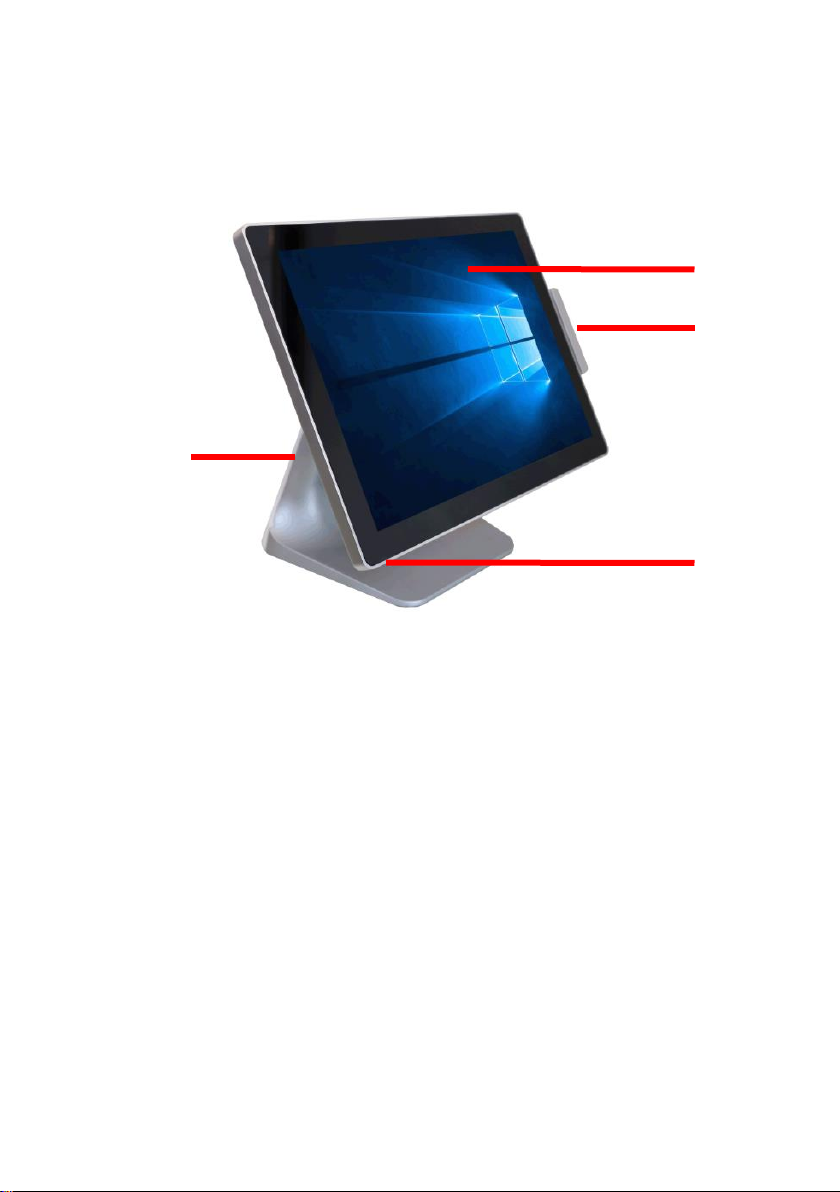
3. Touch POS Appearance
15-inch touch POS
1、Aluminum alloy base
2、15 inch touch screen
3、MSR
4、Power button
1
2
3
4
Page 8
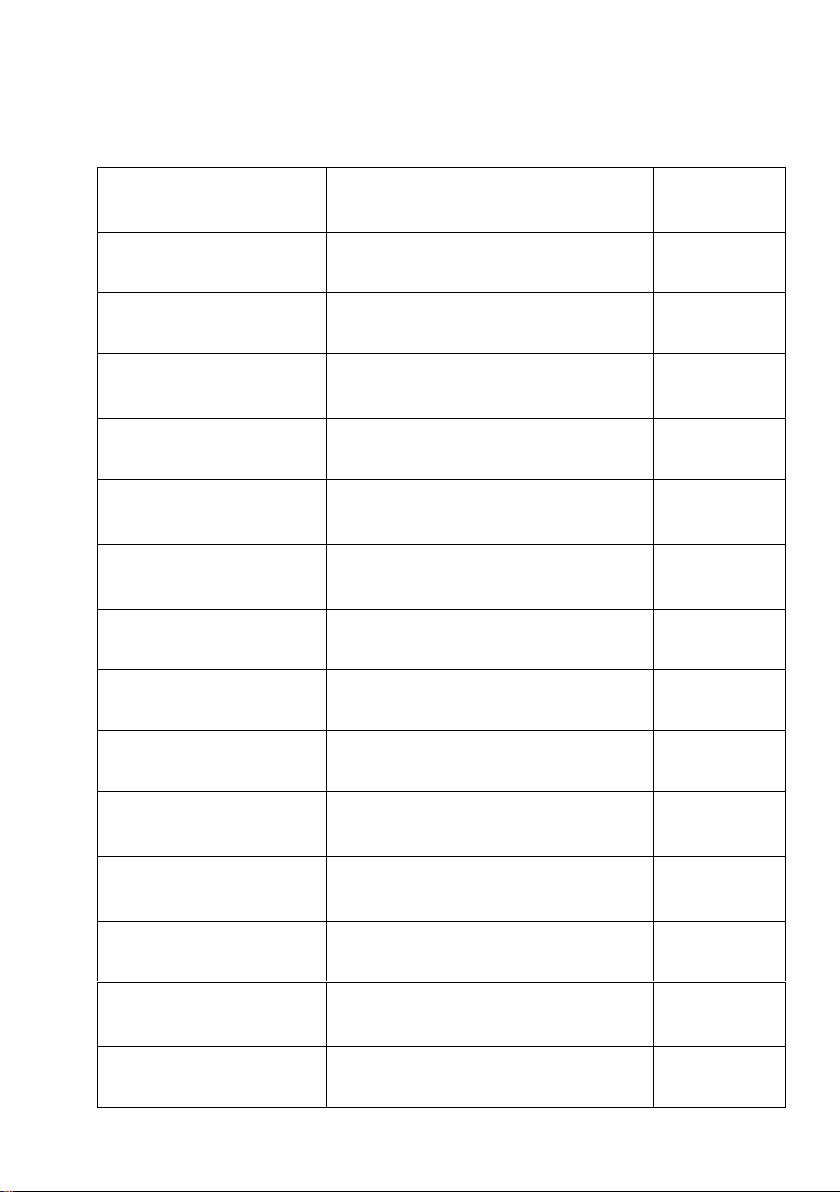
4. Product Description
15” LED display parameter
Item
Specification
Unit
Screen Diagonal
15.0
Inch
Active Area
304.128(H)×228.096(V)
mm
Pixel Pitch
0.297(V)×0.297(H)
mm
Resolution
1024×768
-
Pixel Arrangement
R.G.B. Vertical stripe
-
Display Mode
Normally White
-
White Luminance
350 (Typ)
cd/m2
Contrast Ratio
800:1 (Typ), 450:1 (Min)
-
Response Time
16
m/c
Operating Voltage
3.3V
V
Weight
930(Typ.)960(Max)
g
Outline Dimension
326.5(H)×253.5(V)×12(D)Typ.
Mm
Input signal
LVDS
-
Support Color
16.2M
-
Page 9
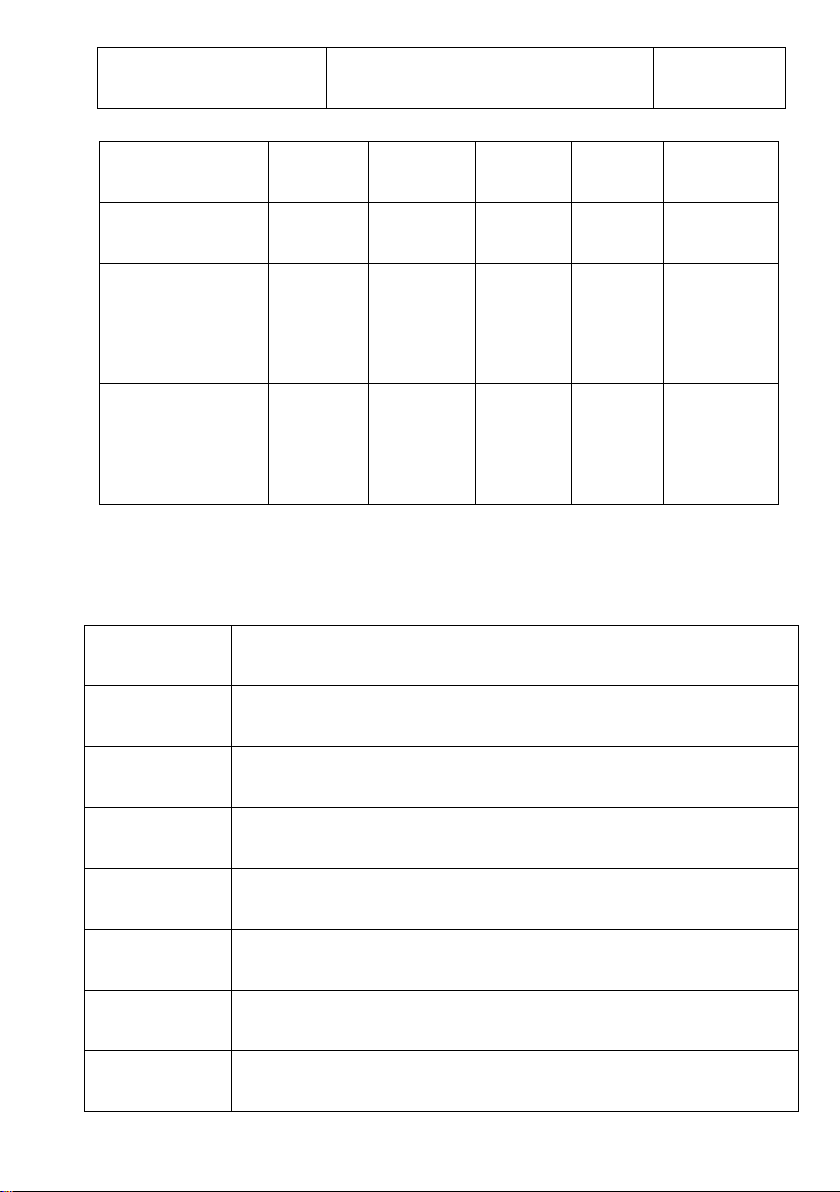
Surface Treatment
Anti-glare,Hard-Coating(3H)
-
15”touch screen parameter
Size
326mm x 252mm
Visual Area
304mm x 228mm(4:3)
Resolution
1024 x 768
Refresh rate
60Hz
Dot pitch
0.297mm x 0.297mm
Resolution
4096 x 4096
color
16M
Response time
16ms
Items
Symbol
Min.
Max.
Unit
Conditions
Supply Voltage
VDD
-0.5 5 V
-
Operating
Temperature
TOP
-20
70 ℃ Note
Storage
Temperature
TST
-30
80 ℃ Note
Page 10
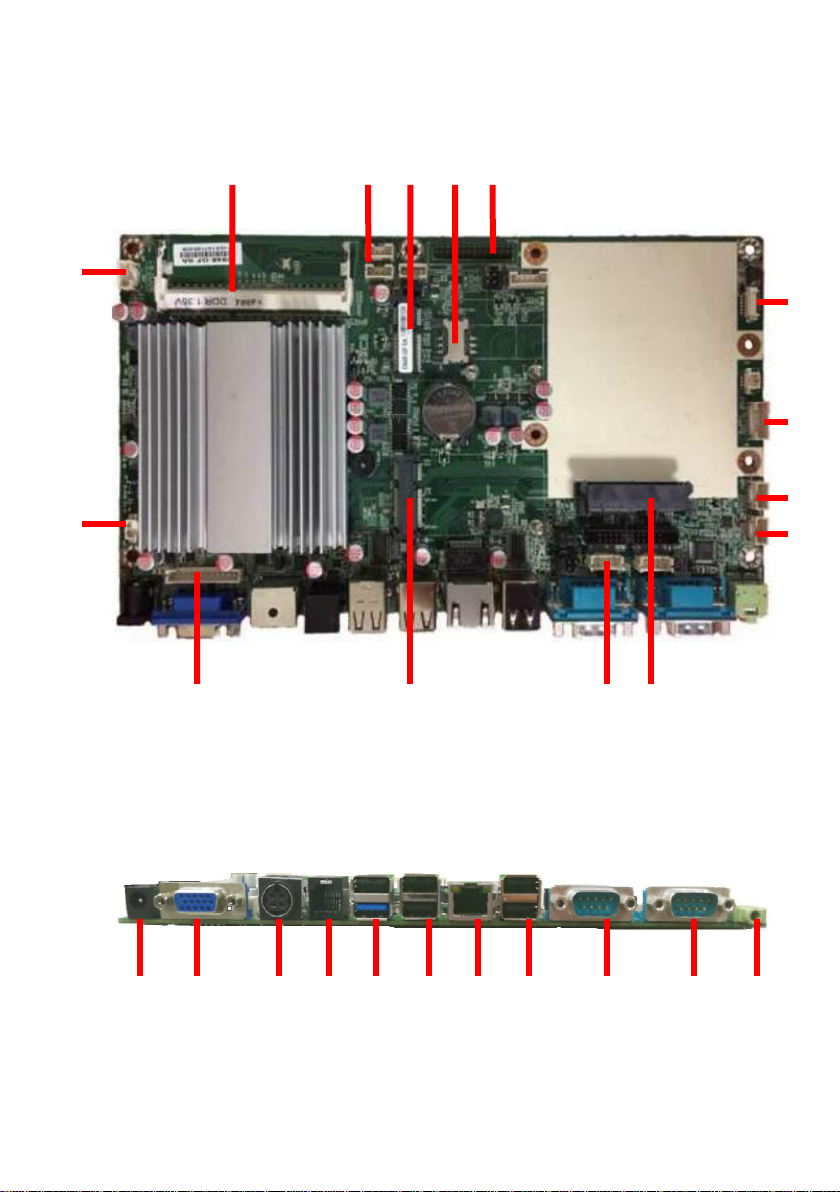
Main board Port
1
2 3 4 5 6
7 8 9 1011
12
13
14
15
16
17
18
19
20
21
22
23
24
25
26
Page 11
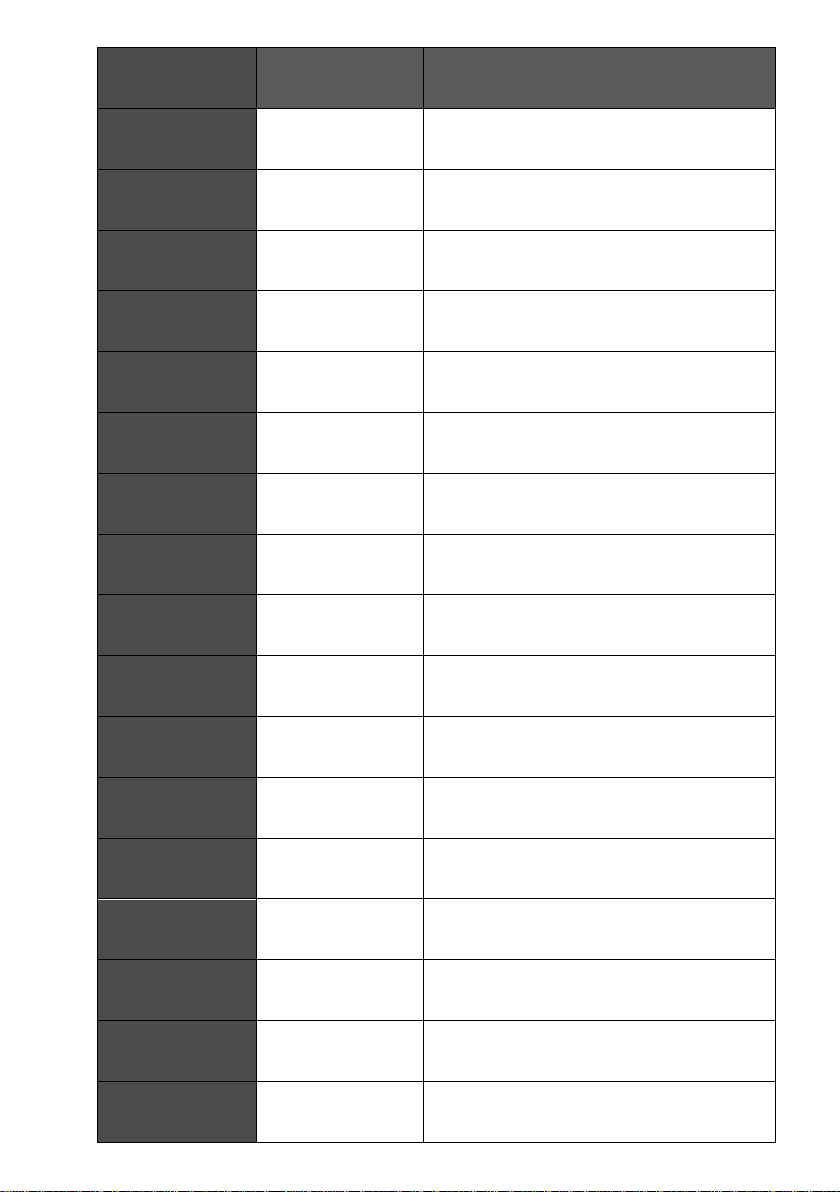
NUM
LABEL
COMPONENTS
1
USB
USB 2.0 Port
2
SO-DIMM
RAM interface
3
USB
USB 2.0 port
4
MINI PCI-E
3G/WIFI port
5
SIM slot
SIM card slot
6
LVDS
Main display port
7
Power
PW Switch /HDD LED/PW LED
8
Backlight PW
Main display backlight port
9
Audio out
Speaker (inside)
10
Audio in
MIC
11
FAN
System FAN port
12
VGA
Display port (inside)
13
M-STAT
MINI SSD Port
14
COM
RS232 port (inside)
15
SATA
HDD port
16
DC-OUT
DC 12V output
17
VGA
Display port
Page 12
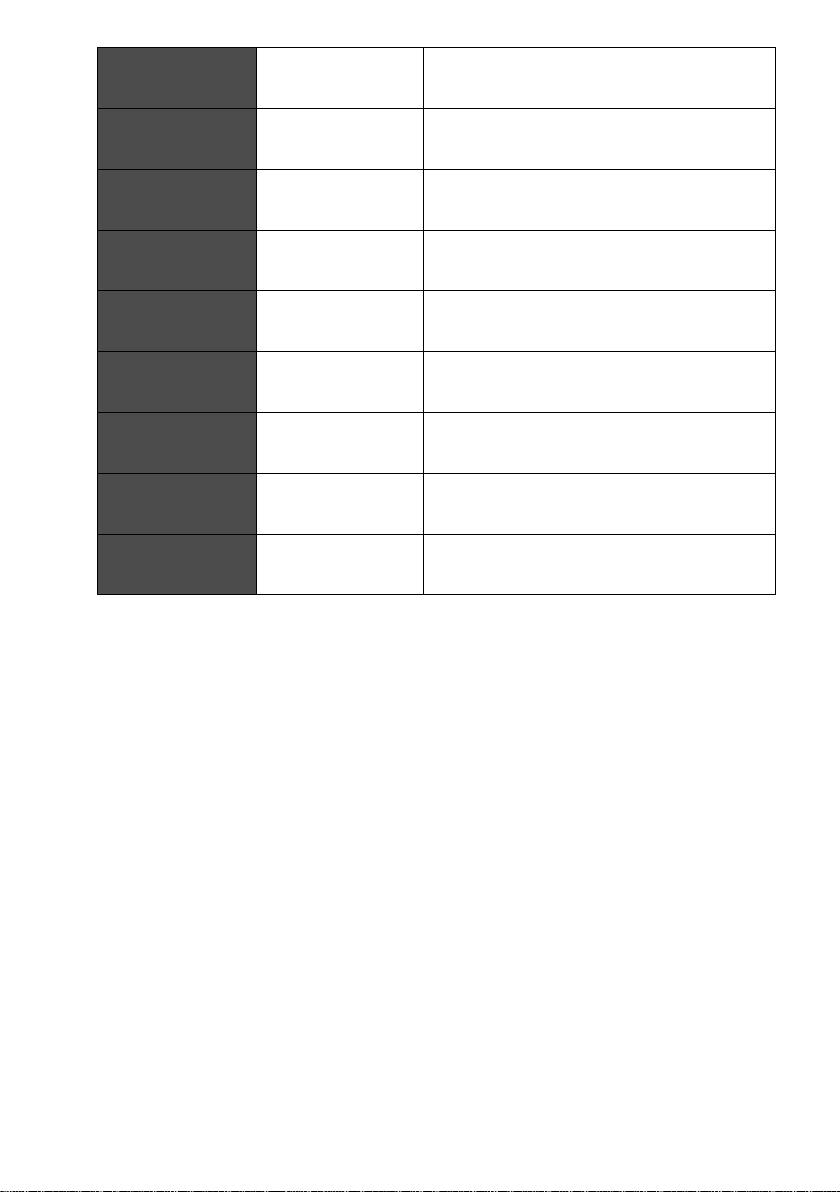
18
DC-IN
12V DC input
19
RJ11
Cash drawer port
20
USB
USB2.0*1+USB3.0*1
21
USB
USB2.0
22
LAN
Network port
23
USB
USB2.0
24
COM1
RS232 port
25
COM2
RS232 port
26
Audio out
Audio out port
 Loading...