

Page 1
Atel
AWP
-L Series
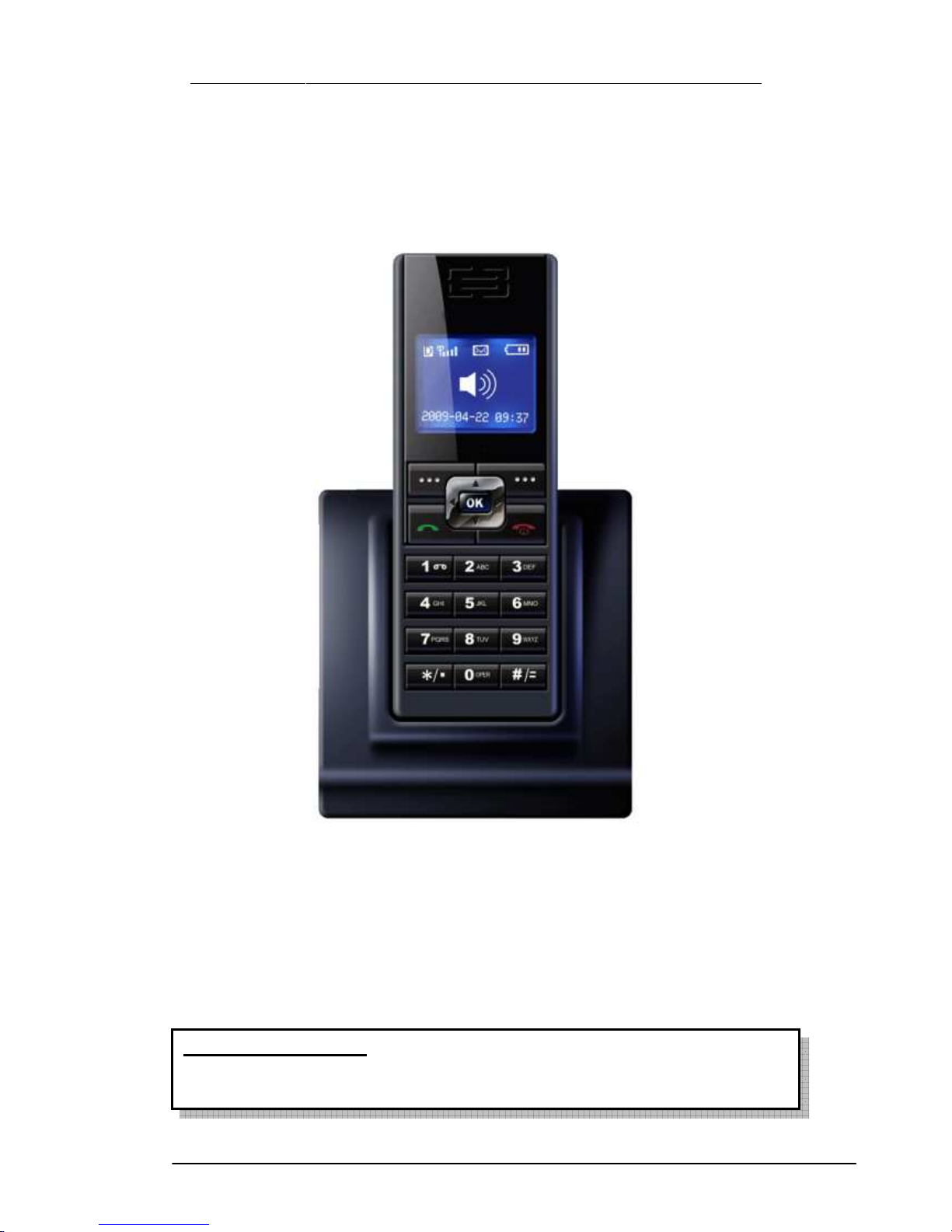
CDMA Wireless Phone
User Manual
3F, Building-8,#289 Bisheng Road,
Zhangjiang Hi-Tech Park, Pudong, Shanghai, China, 201204
http://www.asiatelco.com
1
CDMA Wireless Phone
User Manual
Confidential Material:
This document contains information that is proprietary and
confidential, copying this document is prohibited without
permission from AsiaTelco Technologies Co.
Page 2

Atel
AWP
-L Series
CDMA Wireless Phone
User Manual
3F, Building-8,#289 Bisheng Road,
Zhangjiang Hi-Tech Park, Pudong, Shanghai, China, 201204
http://www.asiatelco.com
2
Table of Contents
1 PHONE OVERVIEW............................................................................................5
2 BASIC FUNCTIONS.............................................................................................6
3 BASIC OPERATIONS..........................................................................................7
3.1 P
OWER ON/OFF
...........................................................................................................................7
3.1.1 Power On..........................................................................................................................7
3.1.2 Power Off..........................................................................................................................7
3.2 M
AKE A CALL
.............................................................................................................................7
3.3 R
ECEIVE A CALL
.........................................................................................................................7
3.4 E
ND A CALL
................................................................................................................................7
3.5 S
PEED DIAL
................................................................................................................................7
3.6 B
ATTERY USING NOTES
..............................................................................................................7
4 IDLE SCREEN.......................................................................................................7
5 PHONE MENU......................................................................................................8
5.1 M
AIN MENU
................................................................................................................................8
5.2 C
ONTACTS (PHONEBOOK
)...........................................................................................................9
5.3 M
ESSAGES
................................................................................................................................11
5.4 R
ECENT CALLS
.........................................................................................................................12
5.5 T
OOLS
.......................................................................................................................................13
5.6 S
ETTINGS
..................................................................................................................................14
6 KEYPAD LOCKING ..........................................................................................17
6.1 L
OCK KEYPAD
..........................................................................................................................17
6.2 M
ODIFY KEYPAD LOCKING CODE
.............................................................................................17
7 TECHNICAL SPECIFICATIONS ....................................................................18
8 QUICK TROUBLESHOOTING GUIDE..........................................................18
Page 3
Atel
AWP
-L Series
CDMA Wireless Phone
User Manual
3F, Building-8,#289 Bisheng Road,
Zhangjiang Hi-Tech Park, Pudong, Shanghai, China, 201204
http://www.asiatelco.com
3
Introduction
Congratulations on your purchase of the CDMA Cordless Phone (Hereinafter referred to as Phone).
The Phone has been designed to operate with the latest digital communication technology - Code
Division Multiple Access (CDMA). The CDMA technology has many advanced features and provides
excellent voice quality.
The Phone has advanced features as follows:
Large, easy to read, backlight LCD with status icons
Choice of 13 ring tones and power On/Off music
Two-way SMS, voice mail and caller ID
User friendly Keypad
Long battery stand-by and talk time
Menu driven interface for easy operation and configuration
Last number redial
Adjustable ring and voice volume
AC power supply
Built-in antenna
Handsfree
Call privacy is also supported by CDMA technology
USB data cable is provided for AWP-L600
Easy service and repair
Subscriber call charge meter
Do’s & Don’ts
Do not clean the Phone while in operation. Before attempting to clean the Phone, turn the
Phone off, disconnect the external power adapter and take out the battery. Use a Damp cloth
for cleaning. Do not use liquid or aerosol cleaners.
Only use the battery and the power adapter provided with the Phone. The Phone might get
damaged if other accessories are used. This will also void the warranty.
It is highly recommended to fully charge the battery before initial use. The battery might
have been discharged during storage and delivery.
Do not use car to charger battery. It may lead to electric shock or damage to Phone.
Do not throw away battery. Batteries are not to be disposed to fire. It may explode or catch
fire.
Do not attempt to change the security codes or components. User is responsible for any
consequences arising from such attempt.
Avoid shock or impact. Rough handling can cause damage to the Phone cabinet and internal
This user guide provides information on the use and
operation of your Phone. Kindly read all the information
contained in this user guide carefully prior to using the
Phone. This will help you get the best performance and
shall prevent any unintended damage to the Phone.
Check the contents of the box as per the packing list and
report any discrepancies immediately to the store from
where Phone has
been purchased.
Page 4

Atel
AWP
-L Series
CDMA Wireless Phone
User Manual
3F, Building-8,#289 Bisheng Road,
Zhangjiang Hi-Tech Park, Pudong, Shanghai, China, 201204
http://www.asiatelco.com
4
circuits.
Do not paint.
During lightening do not touch power plug or Phone line. This can cause Electric shock,
even death.
Your Phone is to work with 100-265V AC. Check the voltage before connecting.
Do not plug many power cords in the outlet.
Do not touch the plug with wet hands. Always grasp and pull the plug, not the cord. Do not
put heavy things on the power cord or bend it too much.
Do not take out the backup battery while Phone is on.
If the Phone is not working for any reason, do not attempt to repair it. The Phone should be
serviced by qualified service personnel only.
Place the Phone and the power supply in a properly ventilated place.
Do not place the Phone near high temperature objects, under direct sunlight, near source of
water, near fire or near inflammable and explosive materials.
Do not place any articles over the Phone.
Place the Phone in a dry place and do not expose to moisture.
Place the Phone away from other electronic devices like TV and Radio to avoid interference.
For a better reception, do not place the Instrument in a building with iron or metal roof.
Hospitals or health care facilities may use equipment which is sensitive to Radio
Frequencies. Please ensure that your Phone is turned “OFF” while in the vicinity of such
facilities.
Page 5
Atel
AWP
-L Series
CDMA Wireless Phone
User Manual
3F, Building-8,#289 Bisheng Road,
Zhangjiang Hi-Tech Park, Pudong, Shanghai, China, 201204
http://www.asiatelco.com
5
1 Phone Overview
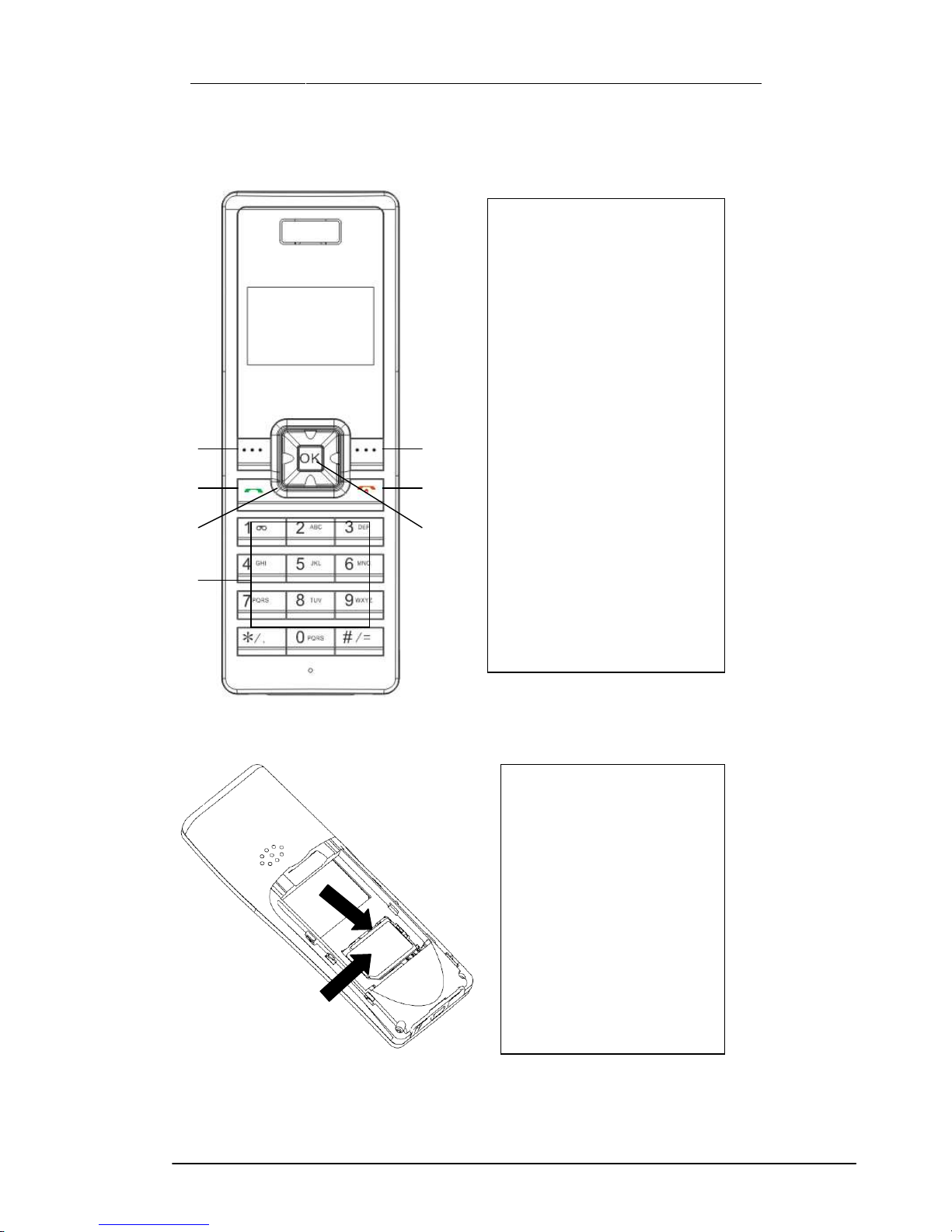
Figure 1 depicts the keypad of the phone.
Figure 1 Phone
Figure 2 Phone
1. Left Soft Key
2. Right Soft Key
3. SEND key
4. POWER ON/OFF &
END key
5. Direction Key
6. OK Key
7. Number Keys
1
2
3 4
5 6
7
1
2
1. Insert the R-UIM
card
2. Plug in the battery
Page 6
Atel
AWP
-L Series
CDMA Wireless Phone
User Manual
3F, Building-8,#289 Bisheng Road,
Zhangjiang Hi-Tech Park, Pudong, Shanghai, China, 201204
http://www.asiatelco.com
6
2 Basic Functions
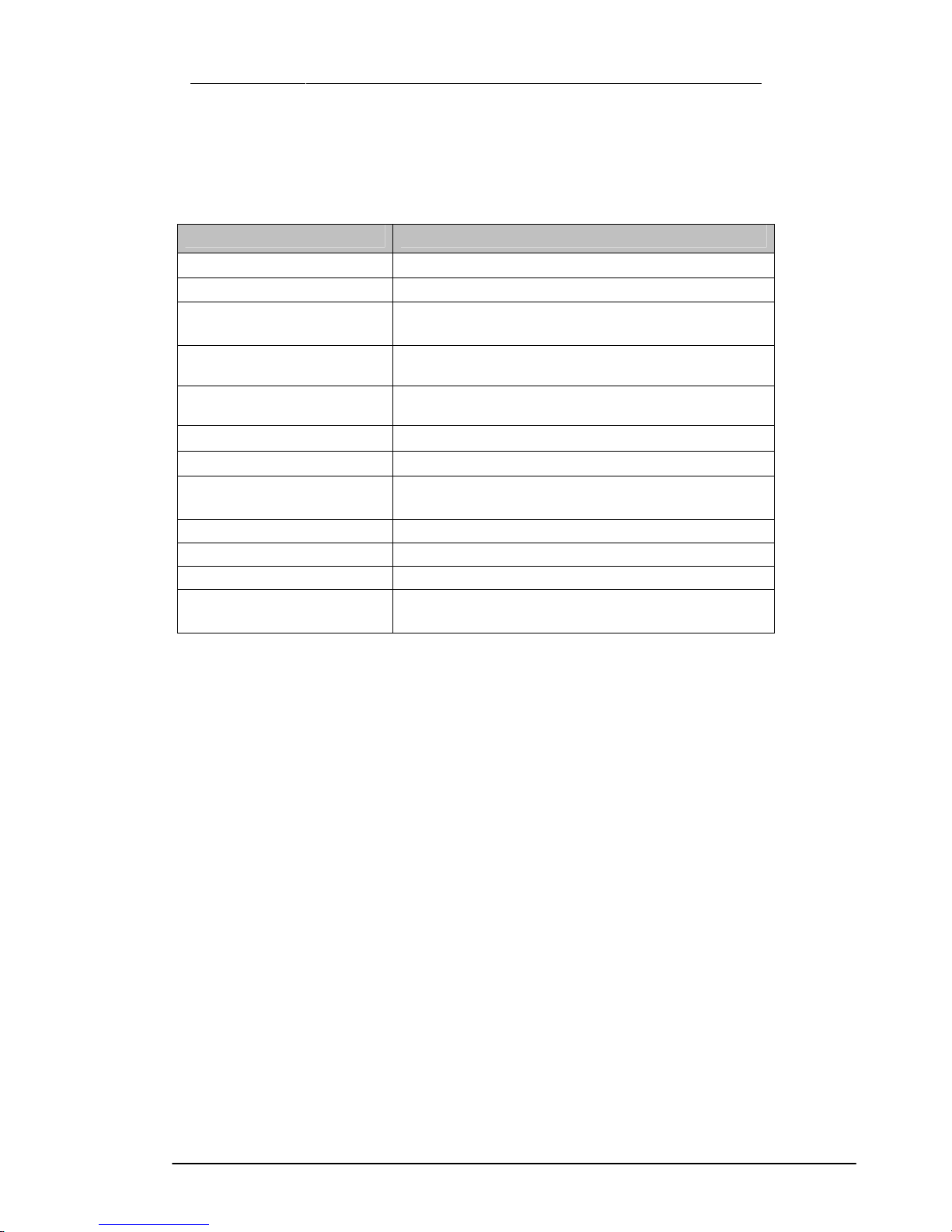
The following table lists the basic functions of the Phone.
Table 1 List of Basic Functions
Functions Remark
Voice Calls Support caller ID for incoming calls
Call Barring Outgoing calls/Incoming calls
Contact Store up to 200 entries in Phone memory
And up to 200 entries in R-UIM card (if used)
Recent Calls Records for incoming calls, outgoing calls, and missed
calls (total 30 entries)
Phone Setting Sounds, Display, Security, Network, Language (English
only), Call Forward, Call Waiting
Tools Schedule, Alarm Clock, Calculator
Phone Status Software and Hardware Versions and etc
Message Sending/Receiving SMS 200 entries in the Phone
and 200 in R-UIM card (if used)
Battery Management Battery Charging, Battery Capacity Indication
AT Commands Standard
CDMA 1X Data Service Up to 153.6kbps (only for AWP-L600 Phone)
FM Support
Page 7

Atel
AWP
-L Series
CDMA Wireless Phone
User Manual
3F, Building-8,#289 Bisheng Road,
Zhangjiang Hi-Tech Park, Pudong, Shanghai, China, 201204
http://www.asiatelco.com
7
3 Basic Operations
3.1 Power On/Off
3.1.1 Power On
Press the Power On/Off Key for 3 seconds to power on the Phone, your
Phone should go to idle screen and is ready to use.
3.1.2 Power Off
you can press the Power On/Off Key for 3 seconds to power off the Phone.
3.2 Make a Call
Enter a destination number you wish to call, then press “SEND” Key.
(Note: To modify digits you enter, you can press “Right Soft” Key to delete
wrong digits first and then enter new digits).
Once the call is connected, the Phone’s screen will display the number you
have dialed, and the time duration of the call.
3.3 Receive a Call
When there is an incoming call, the Phone will ring and display the
number of the incoming call (if the number is available). You can press “SEND”
Key to answer the incoming call. The ring tone and ring-tone volume can be
changed in the setting menu.
3.4 End a Call
You can always end a call by pressing “END” Key.
3.5 Speed Dial
User can set up speed dial numbers.
Save the Phone number in the contacts of Phone ;
Set up the speed dial number (any number from 2 to 9) through menu
“Main menu/contacts/speed dial”;
Choose the Phone number from contacts ,and Press “SELECT” ,then save;
When use speed dial function, press speed dial number (any number from 2
to 9) then #, and “SEND” Key .
3.6 Battery Using Notes
Li+ rechargeable batteries should be used in the Phone.
4 Idle Screen
Page 8
Atel
AWP
-L Series
CDMA Wireless Phone
User Manual
3F, Building-8,#289 Bisheng Road,
Zhangjiang Hi-Tech Park, Pudong, Shanghai, China, 201204
http://www.asiatelco.com
8
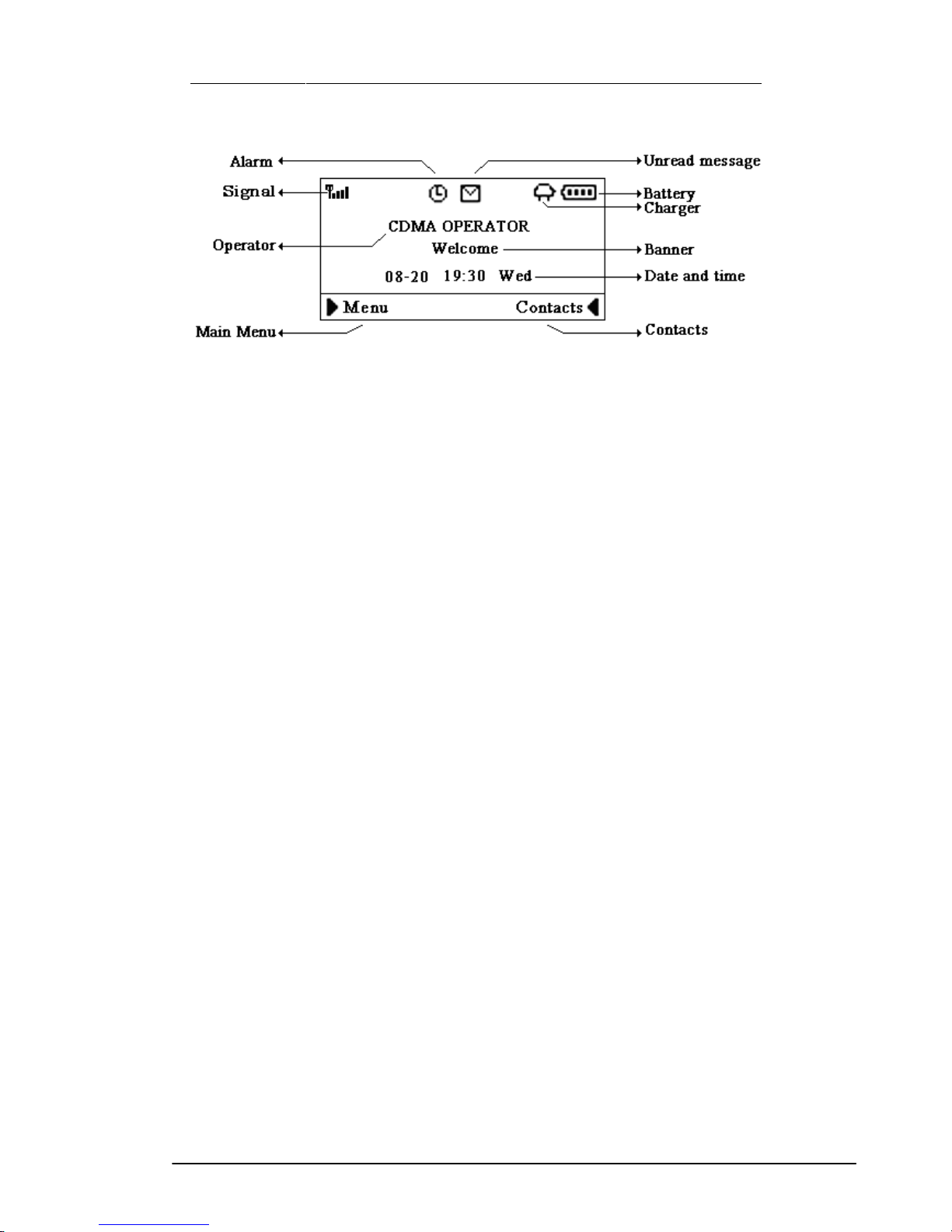
Powered on the phone and the phone acquired the network signal, the
Phone will display the following idle screen:
Figure 2 Idle Screen
5 Phone Menu
The idle screen displays: CDMA signal strength, battery level, Local date
and time from CDMA network, your CDMA operator name, programmable
banner, and some other useful information: for example, if you have unread
SMS, the message icon will appear.
5.1 Main Menu
At the bottom of the screen (see Figure 4), there is an area called soft Key
area. You will see two soft Keys: Menu and Contact. Press Left Soft Key to
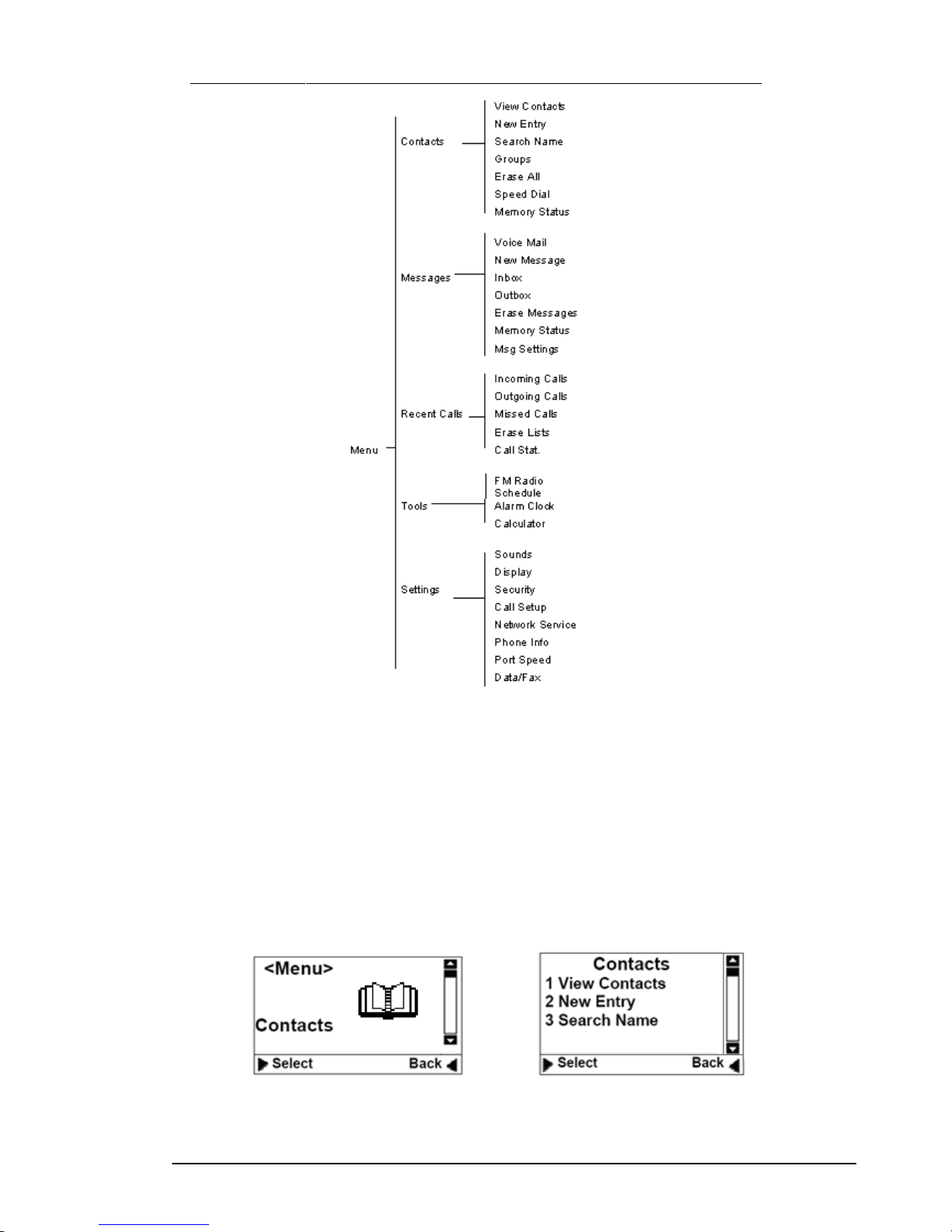
open main menu. Main menu contains the following sub-menu items:
1) Contacts (Phonebook)
2) Messages
3) Recent Calls
4) Tools
5) Settings
The following diagram depicts menu tree:
Page 9
Atel
AWP
-L Series
CDMA Wireless Phone
User Manual
3F, Building-8,#289 Bisheng Road,
Zhangjiang Hi-Tech Park, Pudong, Shanghai, China, 201204
http://www.asiatelco.com
9
Figure 3 Menu Tree
5.2 Contacts (Phonebook)
Phonebook can be used to store contact’s name , phone numbers, address,
email address and internet address. You can store up to 200 Phonebook entries
to Phone memory. If your Phone supports R-UIM card, you can also store
contact data in R-UIM card.
Phonebook menu is depicted in the following diagrams:
Figure 4 Phonebook: Menu –1 Figure 5 Phonebook: Menu –2
Page 10
Atel
AWP
-L Series
CDMA Wireless Phone
User Manual
3F, Building-8,#289 Bisheng Road,
Zhangjiang Hi-Tech Park, Pudong, Shanghai, China, 201204
http://www.asiatelco.com
10
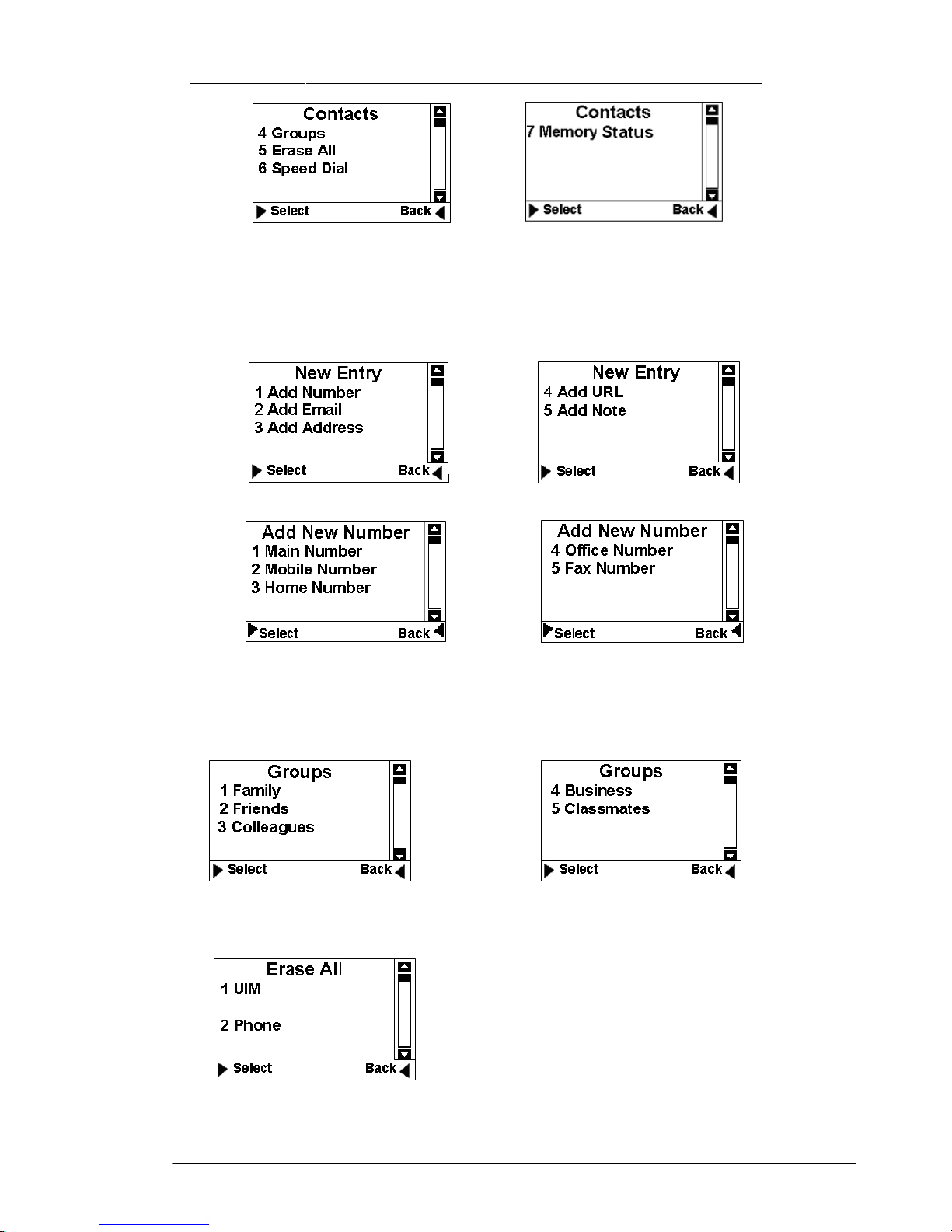
Figure 6 Phonebook: Menu –3 Figure 7 Phonebook: Menu –4
1) View Contacts: You can use this menu item to browse all Phonebook entries
stored. For each selected Phonebook entries, you can edit, erase the contact,
send message and make phone calls to it.
2) New Entry: You can use this menu item to add a new entry to the
Phonebook:
Figure 8 Phonebook: New Entry -1 Figure 9 Phonebook: New Entry -2
Figure 10 Phonebook: New Entry -3 Figure 11 Phonebook: New Entry –4
3) Search Name: Using this menu item, you can search a Phonebook entry by
entering the name of the contact you want to find.
4) Groups: You can use this menu item to categorize Phonebook entries into
five different groups: family, friends, colleagues, business and classmates:
Figure 12 Phonebook: Group - 1 Figure 13 Phonebook: Group - 2
5) Erase All: Using this menu item, you can delete all Phonebook entries from
Phone memory. or R-UIM card memory:
Figure 14 Phonebook: Erase All
Page 11
Atel
AWP
-L Series
CDMA Wireless Phone
User Manual
3F, Building-8,#289 Bisheng Road,
Zhangjiang Hi-Tech Park, Pudong, Shanghai, China, 201204
http://www.asiatelco.com
11
6) Speed Dial: This feature is used to set up speed dial. You can add speed dial
number, remove one or all speed dial numbers.
7) Memory Status: This menu can display the memory usage of the Phone and
R-UIM card.
5.3 Messages
The Message menu can be used to create SMS messages, send messages,
view received messages, delete stored messages, extract and store Phone
numbers from messages, reply and forward messages. You can store up to 200
messages to Phone memory and 200 messages to R-UIM card.
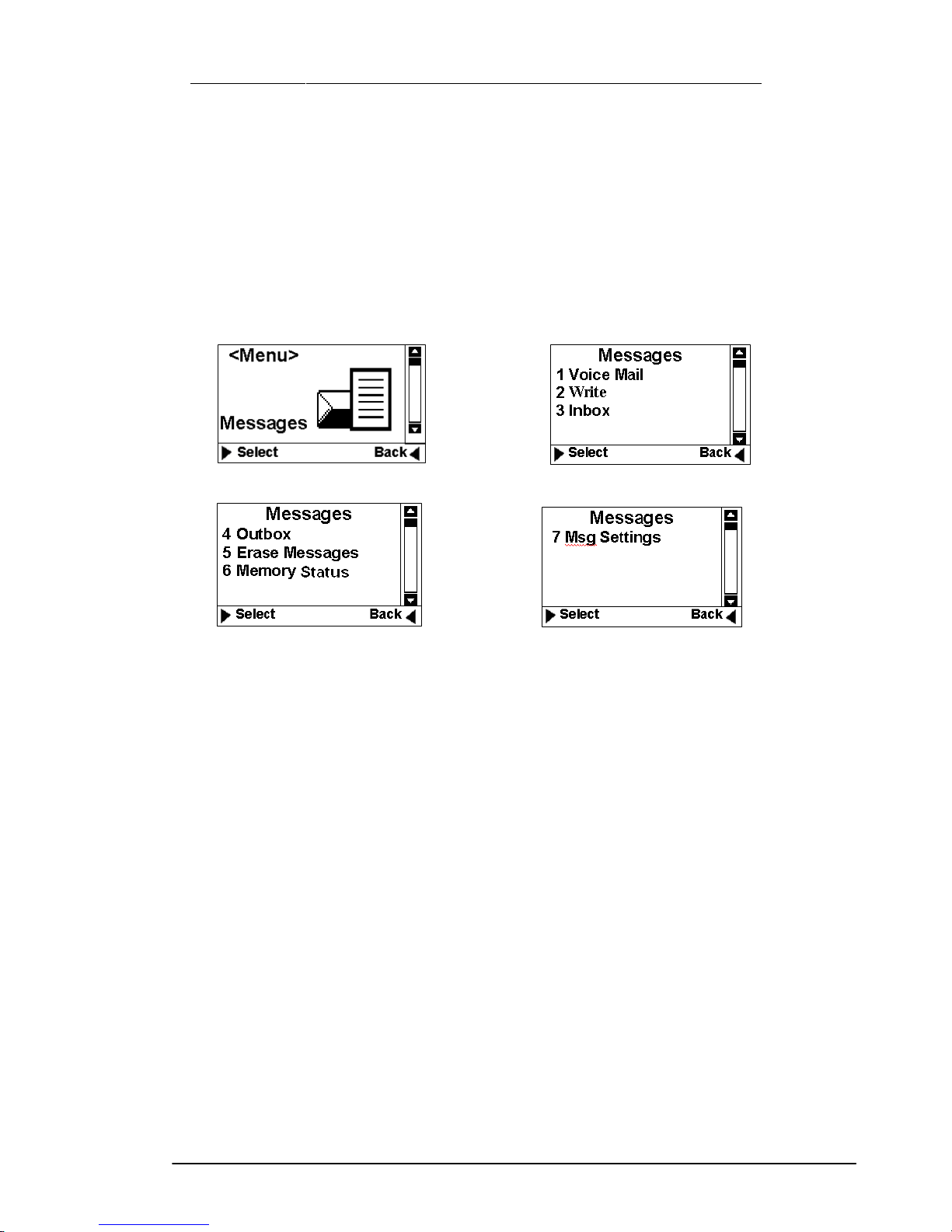
Messages’ main menu and menu tree Message are shown as below:
Figure 16 Message: Menu-1 Figure 17 Message: Menu-2
Figure 18 Message: Menu-3 Figure 19 Message: Menu-4
1) Voice Mail:You can use this menu item to access to your voice mail box
(Note: please contact your service provider for voice mail services).
2) New Message: You can use this menu item to create new messages and send
out messages. The sent message will be stored to message outbox. You can
also send a message to multiple contacts (up to 10 contacts)
3) Inbox: You can use this menu item to view all of the messages you have
received. For each message, you can delete, reply and forward the messages.
You can also store the sender’s Phone number and make a call to the sender.
4) Outbox: Outbox stores all of the messages you have sent out so far. Each
message inside the outbox, you can erase and forward.
5) Erase Messages: You can erase messages from Inbox, Outbox or erase All.
6) Memory State: This menu can display the memory state of Phone for SMS
storage.
7) Msg Settings: User can edit the setting of message.
Callback: when active the function and set the Callback number, the
recipient can view your callback number in the message sent.
Deliver Ack:After recipient receives the message, then CDMA network
will send SMS to inform sender the successful delivery of the message.
Preferred Storage (only when R-UIM is used): this menu item is used to
select storage device, Phone memory or R-UIM card.
Page 12
Atel
AWP
-L Series
CDMA Wireless Phone
User Manual
3F, Building-8,#289 Bisheng Road,
Zhangjiang Hi-Tech Park, Pudong, Shanghai, China, 201204
http://www.asiatelco.com
12
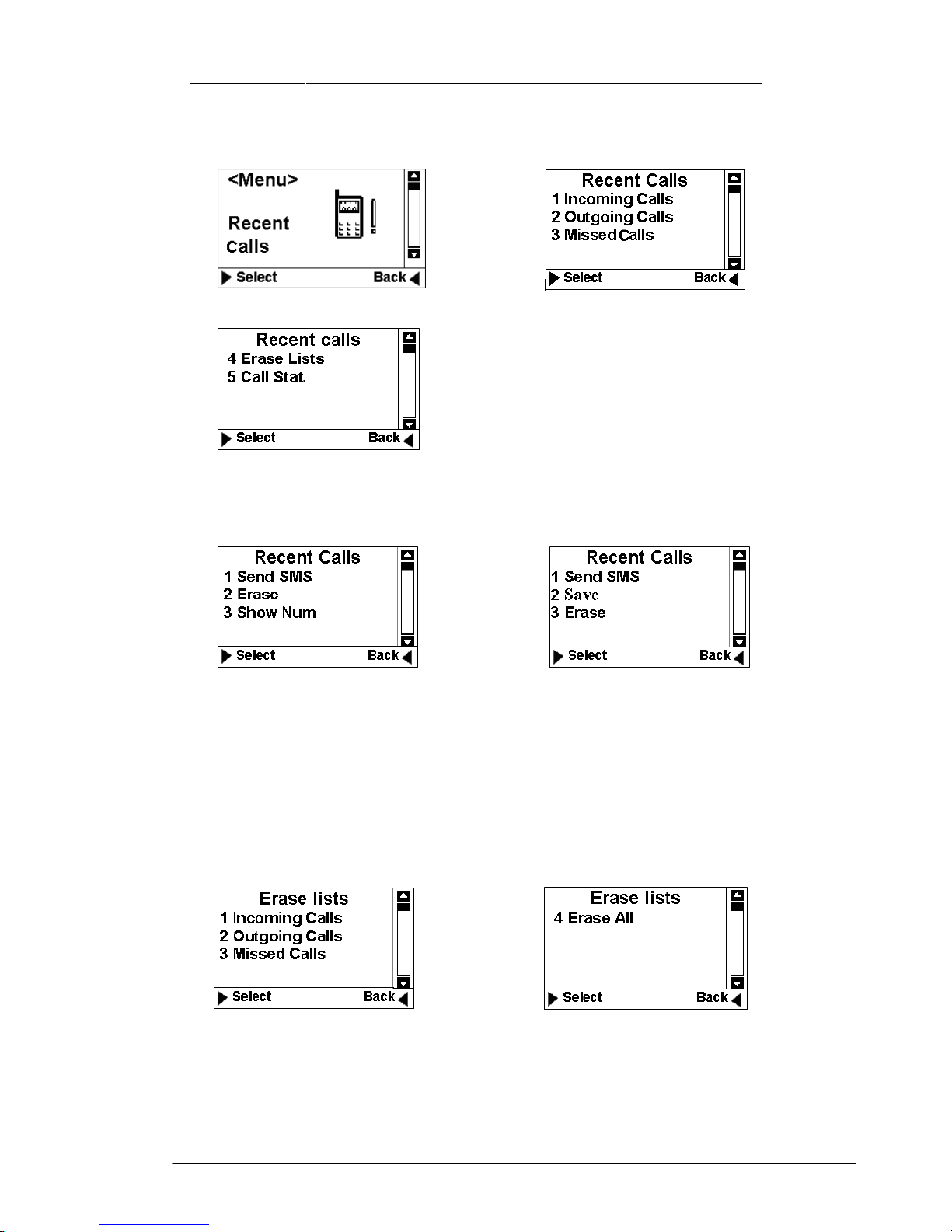
5.4 Recent Calls
The “Recent Calls” records information of all calls including incoming
calls, outgoing calls, and missed calls.
Figure 20 Recent calls: Menu-1 Figure 21 Recent calls: Menu-2
Figure 22 Recent calls: Menu-3
1) Incoming Calls: All received calls can be viewed through this menu. For
each incoming call entry, you can perform the following operations: save
phone number, erase the record, or send SMS to the phone number.
Figure 23 Recent calls: Menu-4 Figure 24 Recent calls: Menu-5
2) Outgoing Calls: The information of the calls you have made can be viewed
through this menu. For each outgoing call, you can perform the following
operations: store receiver’s phone number, erase the record, or send SMS to
the receiver.
3) Missed Calls: This menu records all of the incoming calls you missed. For
each missed call, the following information gets saved: the Phone number of
the missed call, the time of the call.
4) Erase Lists: You can erase incoming calls, outgoing calls, missed calls or
erase all by using this menu:
Figure 25 Recent calls: Menu-6 Figure 26 Recent calls: Menu-7
5) Call Stat.: This menu stores statistic data for all incoming calls and
outgoing calls. The statistic data includes the total number of calls and
calling time.
Page 13
Atel
AWP
-L Series
CDMA Wireless Phone
User Manual
3F, Building-8,#289 Bisheng Road,
Zhangjiang Hi-Tech Park, Pudong, Shanghai, China, 201204
http://www.asiatelco.com
13
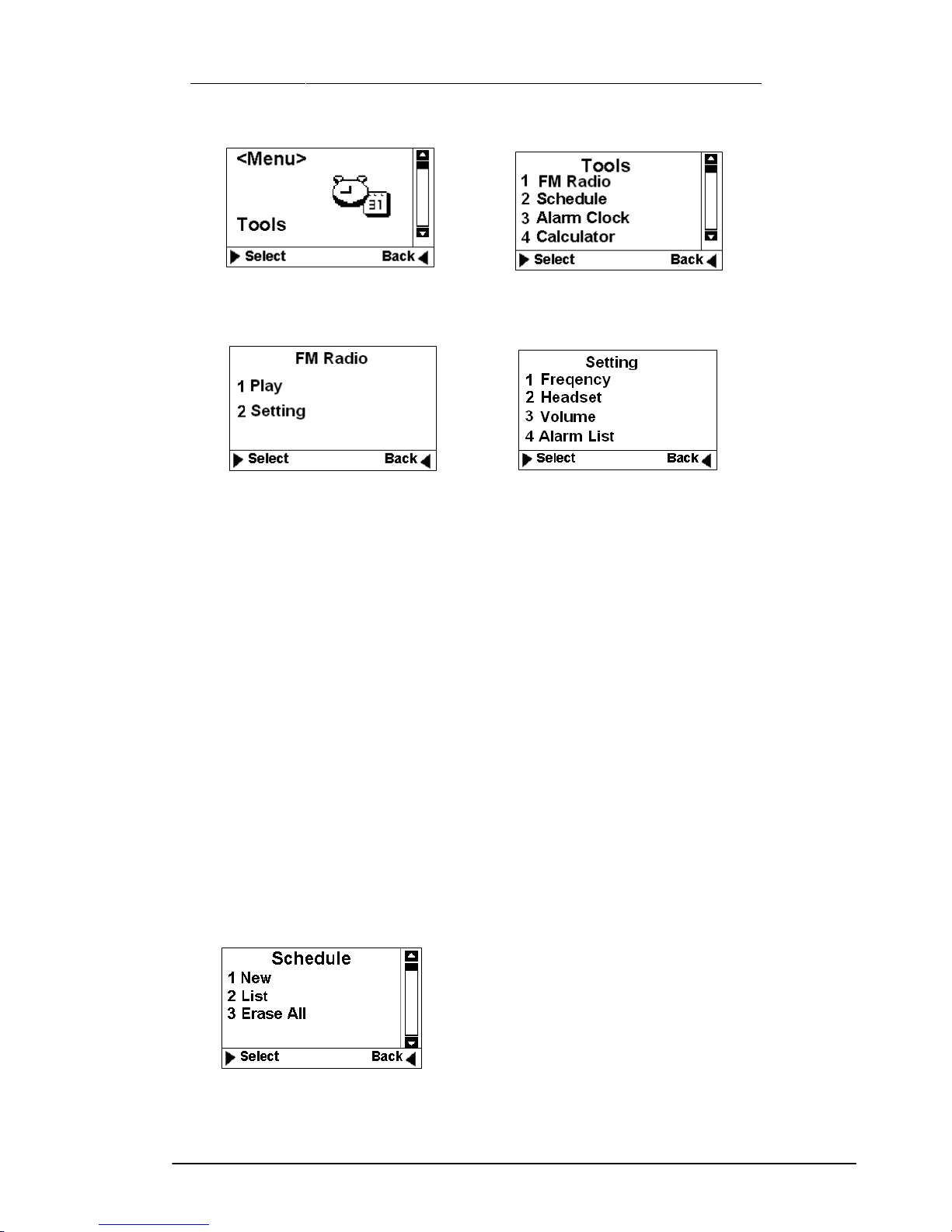
5.5 Tools
The Phone provides you with the following tools:
Figure 27 Tools: Menu-1 Figure 28 Tools: Menu-2
1) FM Radio :
Insert the headset for FM , and enter FM radio menu
Figure 29 Tools: Menu-3 Figure 30 Tools: Menu-4
Play key/Stop key: user can switch the FM radio function on and off;
Setting
Frequency :
Channel list : Totally 20 channels can be saved in the list;
Auto Scan : The phone support auto scanning function to find FM
frequency. When it searched one, it will show
“frequency *** Mhz save it Now?”, press left softkey
then save in the channel list, press the right key will
keep searching the next frequency.
Set Manually :input the digits of the radio frequency in the menu.
Press Left Key to save it in the channel list
Loudspeaker/Headset:user can choose the headset or handsfree mode;
Volume:
Volume Up
Volume Down
Alarm list: this function is used to reminder user to open FM radio
automatically when time is reach to setup alarm time.
2)Schedule: The schedule can be used as an event reminder. Once a schedule
has been set up for an event, the Phone will ring to remind you when it is the
time. Up to ten schedules can be set at one time. You can view, edit and erase
one or all schedules.
Figure 31 Tools: Menu-3
2) Alarm: The function is the same as regular alarm clock.
Page 14
Atel
AWP
-L Series
CDMA Wireless Phone
User Manual
3F, Building-8,#289 Bisheng Road,
Zhangjiang Hi-Tech Park, Pudong, Shanghai, China, 201204
http://www.asiatelco.com
14
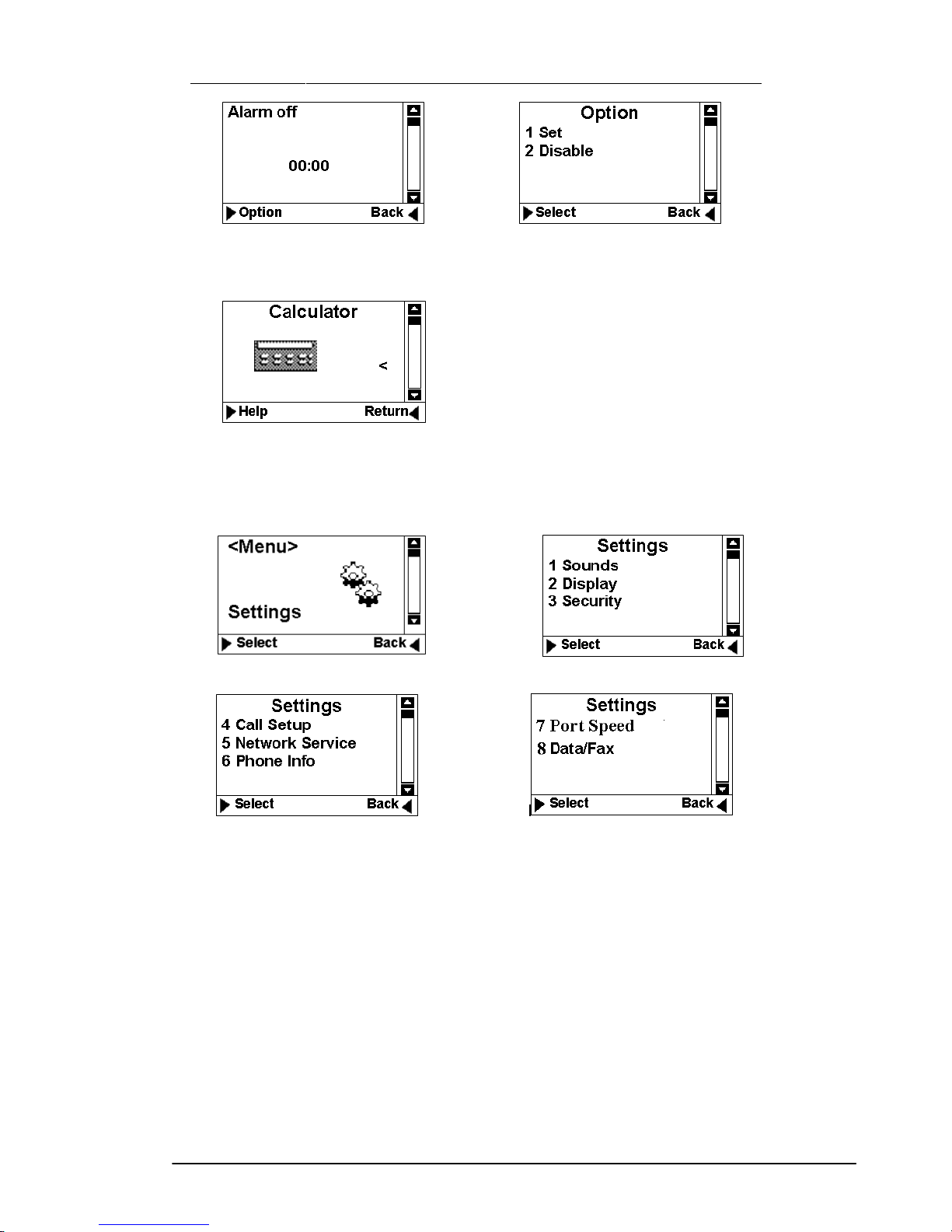
Figure 32 Tools: Menu-4 Figure 33 Tools: Menu-5
3) Calculator:“*” Key to enter a decimal point and the “#”Key for a negative
sign. Then select plus, minus, multiply, divide by pressing direction keys.
Figure 34 Tools: Menu-6
5.6 Settings
You can use Setting menu to customize your Phone’s setup. The Setting
menu is shown below:
Figure 35 Setting: Menu-1 Figure 36 Setting: Menu-2
Figure 37 Setting: Menu-3 Figure 38 Setting: Menu-4
1. Sounds:
Ringer: You can select your preferred ring tone.
Volume: You can change the volume of ring tone, Key press beep tone,
handset and hand-free .
You can change the volume of ring tone, Key press beep tone, handset
receiver, hand-free speaker, handset microphone and hand-free
microphone.
Alert: You can set up alert tones for call connect, call disconnect or
minute reminder (Alert every single minute during a call). Qa1
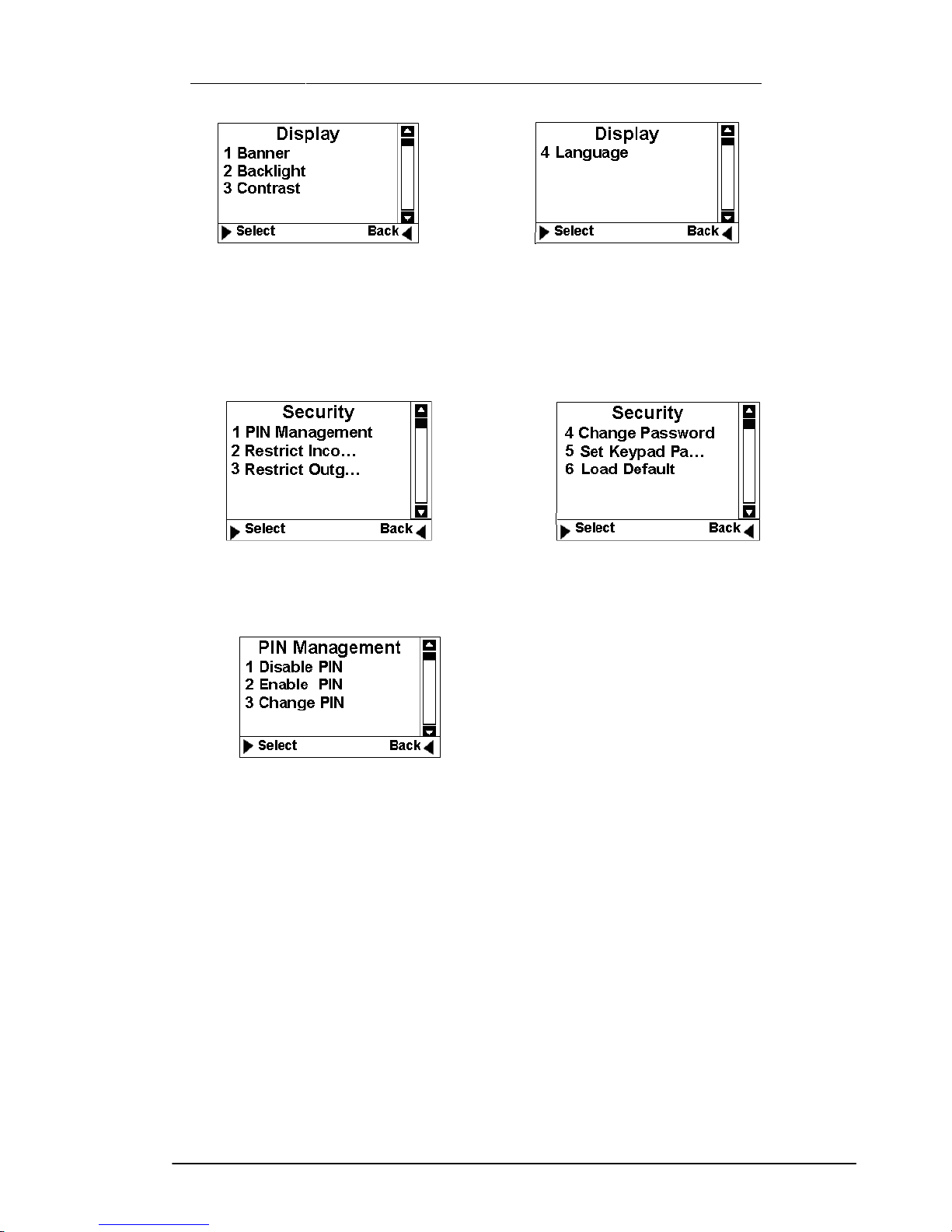
2. Display
Banner: editing the banner for display on idle screen.
Backlight: setting up duration and brightness of backlight.
Contrast: setting LCD contrast.
Page 15
Atel
AWP
-L Series
CDMA Wireless Phone
User Manual
3F, Building-8,#289 Bisheng Road,
Zhangjiang Hi-Tech Park, Pudong, Shanghai, China, 201204
http://www.asiatelco.com
15
Language: setting up Phone language (English only).
Figure 39 Setting: Menu-5 Figure 40 Setting: Menu-6
3. Security
Before entering security menu, you will be requested to input a valid
password. The default password is 0000. You can change this password once
you enter the security menu successfully. Please remember the new
password. You may need to contact the service provider if you happen to
Forget the new password . .
Figure 41 Security-1 Figure 42 Security-2
a) PIN Management: This menu allows you to enable/disable PIN and
change PIN. This is ONLY used when R-UIM is used.
Figure 43 Pin Management
b) Restrict Incoming Call: You can store up to 10 phone numbers for
restricted incoming calls.
c) Restrict Outgoing Call: You can store up to 10 phone numbers for
restricted outgoing calls.
d) Change Password: You can change the security password through this
menu. The user must remember the new password.
e) Set Keypad Password: You can change the Keypad locking code. The
default number is 0000. Once this is set and Keypad is locked, each time
before using the phone, the Keypad password must be entered.
f) Load Default: The menu allows you to reset thePhone. This is very
important feature. In case your Phone is not working in the way you
expected, you can always use “Load Default” to reset your Phone to its
default setting.
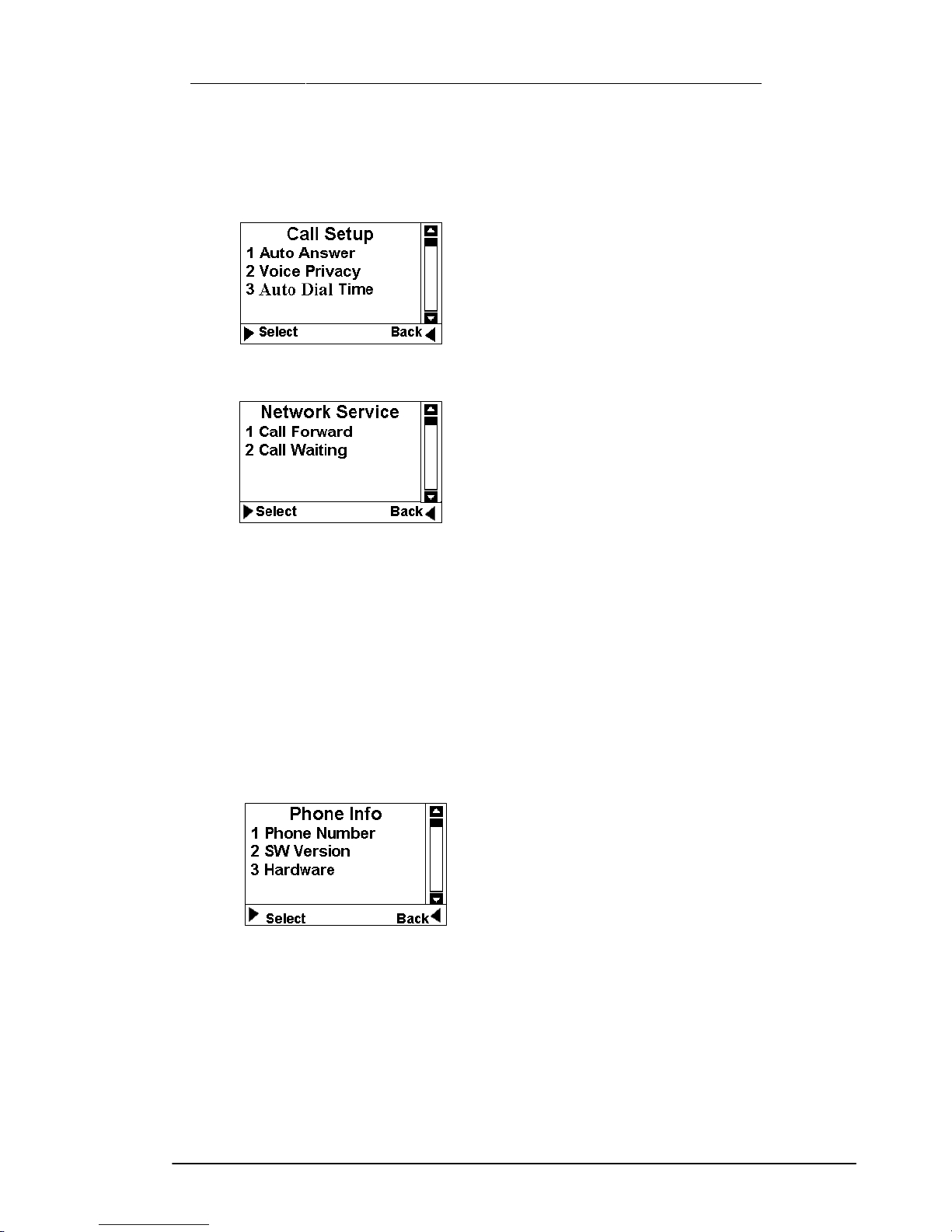
4. Call Setup: The menu allows you to set up call answer mode, which
includes:
a) Auto Answer: Allows the phone to answer incoming calls automatically.
Page 16
Atel
AWP
-L Series
CDMA Wireless Phone
User Manual
3F, Building-8,#289 Bisheng Road,
Zhangjiang Hi-Tech Park, Pudong, Shanghai, China, 201204
http://www.asiatelco.com
16
b) Voice Privacy: Turning on “Voice Privacy” to enhance the security of
the call by voice encryption.
c) Auto Dial Time: delay timer for autodialing.When entered a phone
number for making call, once the timer is expired the call would be
automatically made even without pressing SEND Key.
Figure 44 Call setup
5. Network Service :
Figure 45 Network Service
a) Call Forward: You can forward incoming calls to a designated phone
number. You can forward incoming call under the following situations:
Busy forwarding
No answer forwarding
All calls
b) Call Waiting: You can enable/disable call waiting function through this
menu.
6. Phone Info
a) Phone Number: Your phone number can be entered and stored by using
this menu.
b) SW Version: This menu can display the software version of the Phone.
c) Hardware: This menu is used to list hardware version.
Figure 46 Phone Info
7. Port Speed
Customer can choose the port rate from 9600,19200,57600,115200,230400,
8. Data/Fax: Use to set the default incoming call mode, for fax/Data mode or
voice mode. Suggest NOT to change this option without consulting your
service provider. Improper setting may cause failure to receive incoming
calls.
Page 17
Atel
AWP
-L Series
CDMA Wireless Phone
User Manual
3F, Building-8,#289 Bisheng Road,
Zhangjiang Hi-Tech Park, Pudong, Shanghai, China, 201204
http://www.asiatelco.com
17
6 Keypad Locking
For better protection, the Phone provides you with Keypad locking feature.
You can lock your Phone’s Keypad if you do not want someone else to access
your Phone while you are away from your Phone.
Once Phone’s Keypad is locked, Phone will not allow to make outgoing
calls or access other features, such as Contact, Recent Calls. But a locked Phone
will allow to accept incoming calls and notify you for any incoming short
messages. Unlock the Keypad before using the Phone.
6.1 Lock Keypad
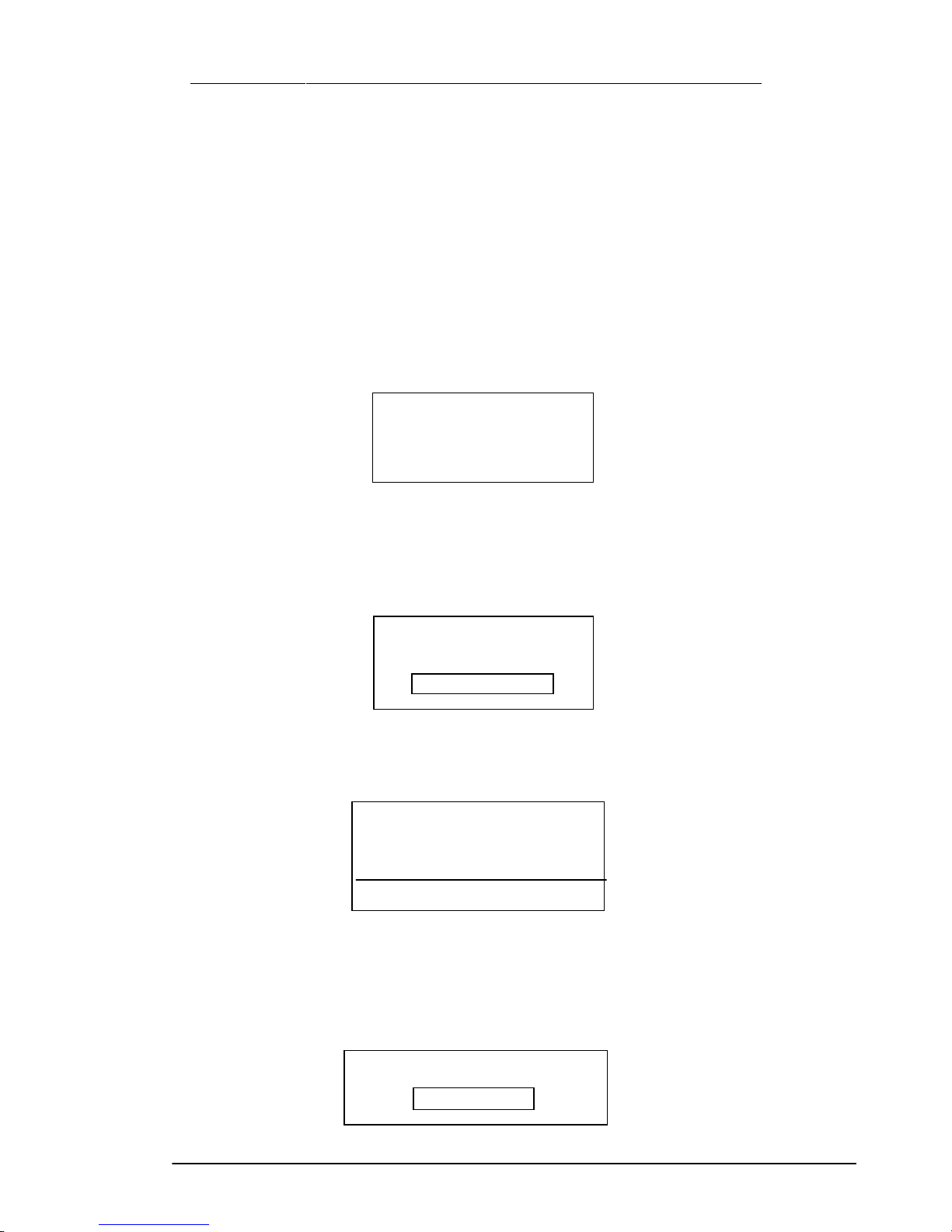
When the Phone is at idle state (Phone must be at idle state), firmly press “#”
Key for over 2 seconds, the Keypad will be locked, and a pop-up window
will be displayed as following:
Figure 47 Lock Keypad-1
When any Key is pressed while Keypad is locked, Phone will show a
password dialog box. The default password for unlocking Keypad is: 0000.
(Note: In case you forget the Keypad locking code, you will have to ask
your service provide to unlock the phone).
Figure 48 Lock Keypad-2
Once Keypad is locked, at idle state, “Key Guard Mode” message will be
displayed on LCD to indicate that the Keypad is locked:
Figure 49 Lock Keypad-3
6.2 Modify Keypad Locking Code
Go to Settings menu, then choose “Security” sub-menu, from there, you will
find “Set Keypad Password” sub-menu, once this menu is selected, LCD
will show a password dialog box. Enter a new password for keypad locking:
Key Locked.
Input Password to
unlock
Enter Password
Key Guard Mode
Menu Contacts
Enter Password
Page 18
Atel
AWP
-L Series
CDMA Wireless Phone
User Manual
3F, Building-8,#289 Bisheng Road,
Zhangjiang Hi-Tech Park, Pudong, Shanghai, China, 201204
http://www.asiatelco.com
18
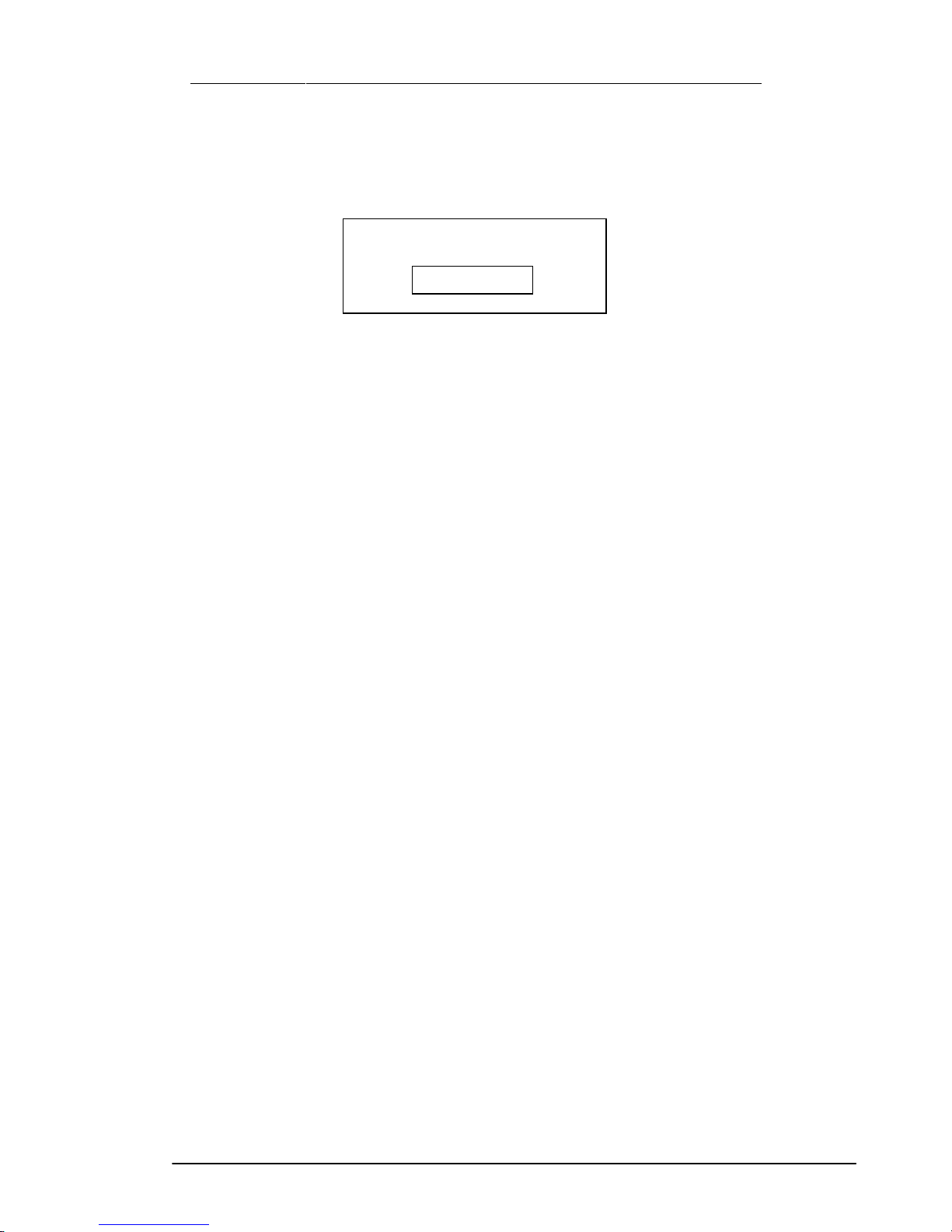
Figure 50 Set Keypad Password-1
After a new password is entered, a password confirmation dialog box will be
displayed. Re-enter the new password you just input:
Figure 51 Set Keypad Password-2
If above two passwords are entered properly, you will have a new password.
7 Technical Specifications
Frequency: CDMA 800MHZ
Maximum Transmitting Power: > 23 dBm @ 50 ohm
Receiving Sensibility: < -105dBm/1.23MHz;
External DC Voltage: DC 6.6 V
Operation Temperature: -10℃ ~ +45℃
Ambient Humidity: 0~95%
Storage Temperature: -30oC~+60oC
Pressure: 86-106Kpa
8 Quick Troubleshooting Guide
Unable to send/receive data/fax calls: Check the connections to computer
and verify that necessary software has been properly installed and
configured.
Moisture or ventilation problems: Visually inspect the Phone body, moisture
can damage the Phone. Ventilation is also very important. Move the Phone
to improve the ventilation as necessary.
No power: Verify that AC power source and its corresponding circuit
breaker are functioning properly.
If Phone can’t make data connection:
1. Make sure to follow Modem installation procedures
2. Make sure that you have purchased CDMA1x service from your CDMA
service provider
3. Make sure that both PC’s modem driver and proper software are
installed correctly
Unable to receive incoming calls:
1. Make sure that the incoming call is not restricted;
2. Make sure the FAX/DATA mode setting is OFF
3. Make sure that your Phone is having good signal reception
Unable to make outgoing calls:
1. Make sure that the numbers you dialed are not restricted;
2. Make sure that your Phone is having good signal reception
Confirm Password
****
Page 19

Atel
AWP
-L Series
CDMA Wireless Phone
User Manual
3F, Building-8,#289 Bisheng Road,
Zhangjiang Hi-Tech Park, Pudong, Shanghai, China, 201204
http://www.asiatelco.com
19
Unable to receive SMS: Make sure that your Phone’s memory is not full for
storing SMS. If the memory is full, please empty inbox.
REMEMBER: you can always use “Load Default” sub-menu in “Security”
menu to reset your Phone to its default settings.
While charging the battery, DON’T disconnect the charger before the battery
is fully charged.
 Loading...