

Page 1

AG-198 Quick Start Guide
ATCOM TECHNOLOGY CO.,L TD
AG-198 Quick Start Guide
V1.0
2011/7/28
2011/7/28
2011/7/28
2011/7/28
Page 2

AG-198 Quick Start Guide
ATCOM TECHNOLOGY CO.,L TD
AG-198
AG-198
AG-198
AG-198 Quick
Quick
Quick
Quick Start
Start
Start
Start Guide
Guide
Guide
Guide
Installation and access: ...................................................................................................................... 2
Configure AG-198 to make
VoIP
calls .............................................................................................. 3
WAN Config ...................................................................................................................................... 3
SIP Config ......................................................................................................................................... 4
IAXConfig ......................................................................................................................................... 4
Page 3
AG-198 Quick Start Guide
ATCOM TECHNOLOGY CO.,L TD
Installation
Installation
Installation
Installation and
and
and
and access:
access:
access:
access:
Installation:
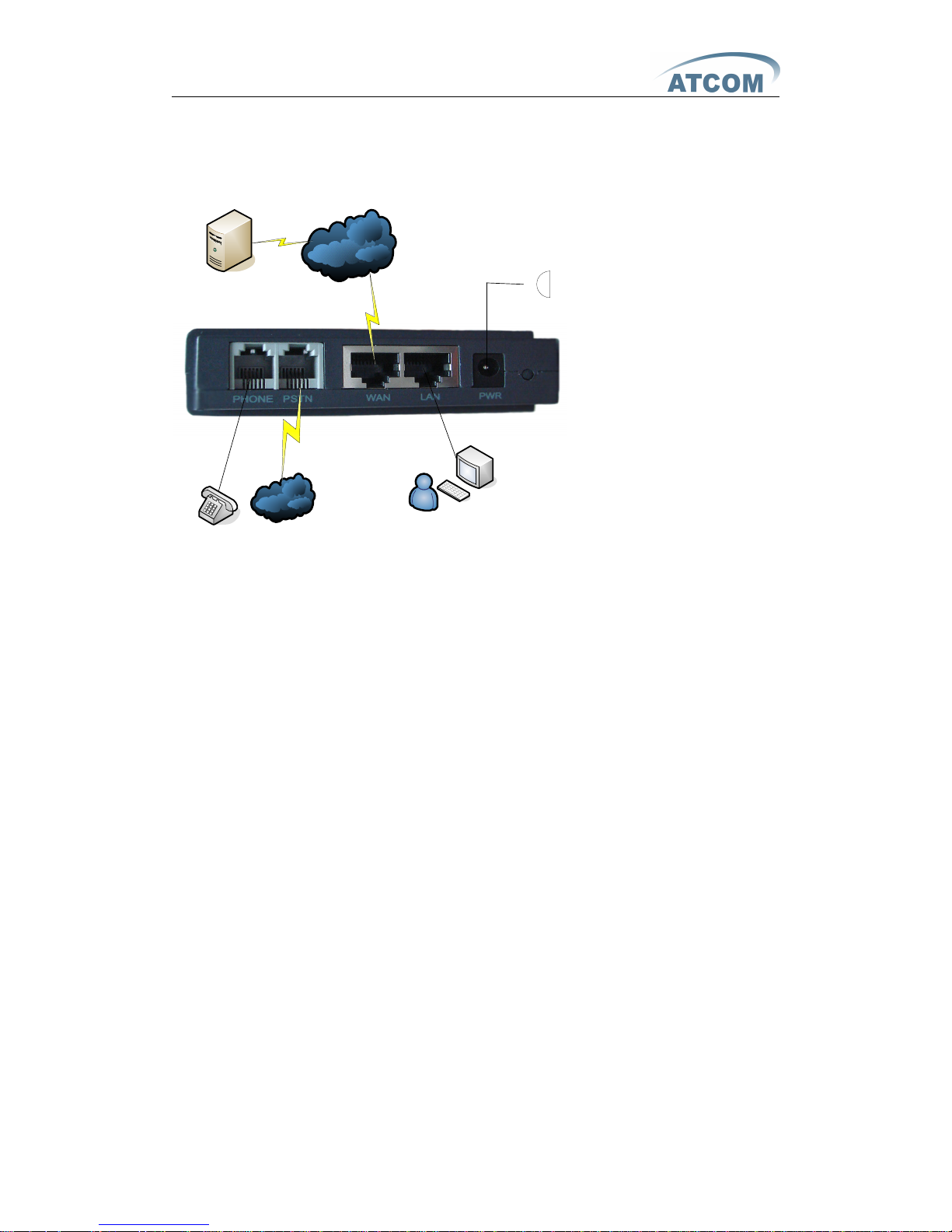
Connected AG-198 as below:
PSTN
PSTN
PSTN
PSTN
Internet
Internet
Internet
Internet
普通电话机
电源
PBX
PBX
PBX
PBX
用户
L isten AG-198 IP from the handset :
---- pick up the handset ;
---- enter #*111#;
T hen the handset will prompt AG-198’s IP address 。
Modify your computer’s IP address to the same network as AG-198.
K ey in AG-198’s IP address in the web browser and press enter, then you can access AG-198’s
web manage interface. R emember the account is
admin/admin
for administrator and
guest/guest
for user .
Page 4
AG-198 Quick Start Guide
ATCOM TECHNOLOGY CO.,L TD
Configure
Configure
Configure
Configure AG-198
AG-198
AG-198
AG-198 to
to
to
to make
make
make
make VoIP
VoIP
VoIP
VoIP calls
calls
calls
calls
WAN
WAN
WAN
WAN Config
Config
Config
Config
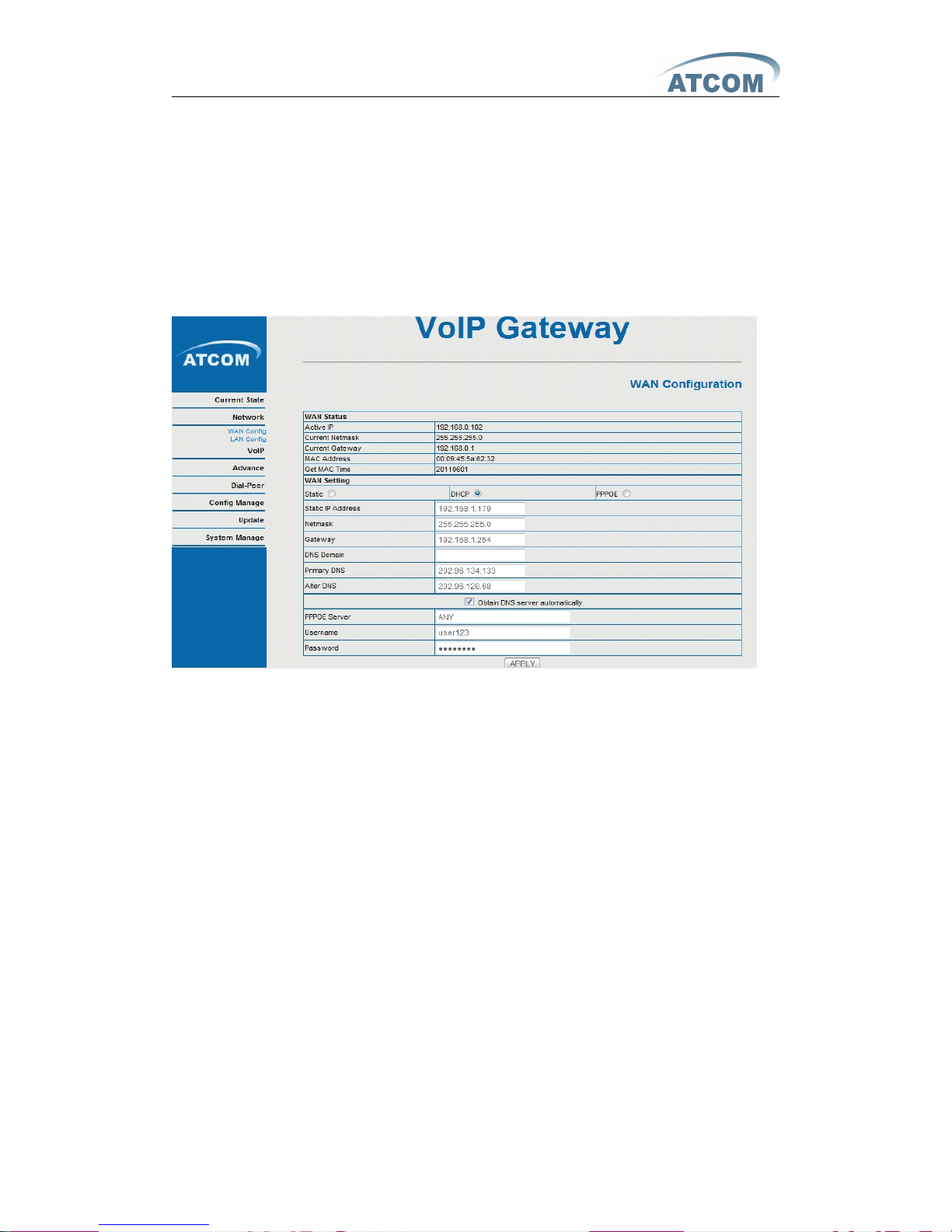
E nter
Network
Network
Network
Network �
�
�
� WAN
WAN
WAN
WAN Config
Config
Config
Config
to set the WAN setting :
AG-198 supports three different IP types: Static
IP,
Dynamic obtain IP (DHCP) and PPPoE.You
can use either of these IP types to connect the internet.
Use
Use
Use
Use Static
Static
Static
Static IP:
IP:
IP:
IP:
---- Select “ S tatic ” ;
---- Enter the AG-198’s IP address in the “ IP address ” field.
---- Set the “ Netmask ” , default 255.255.255.0
---- Enter the AG-198’s upper gateway IP address(for example:Router) in the “ Gateway ” field
---- Key in the DNS information in the “ Primary DNS ” and “ Alter DNS ” fields.
Use
Use
Use
Use DHCP:
DHCP:
DHCP:
DHCP:
---- Select DHCP
If you have a DHCP server in your network , AG-198 will automatically obtain the network
information from your DHCP server.
Use
Use
Use
Use PPPoE:
PPPoE:
PPPoE:
PPPoE:
---- Select PPPoE
---- Type your PPPoE dialup information in the PPPoE setting fields:PPPoE server(option),
Username and password.
T hen the AG-198 will connect to the internet through PPPoE , and automatically obtain the 则 IP
address , Netmask, Gateway, Primary DNS and Alter DNS information.
Page 5
AG-198 Quick Start Guide
ATCOM TECHNOLOGY CO.,L TD
SIP
SIP
SIP
SIP Config
Config
Config
Config
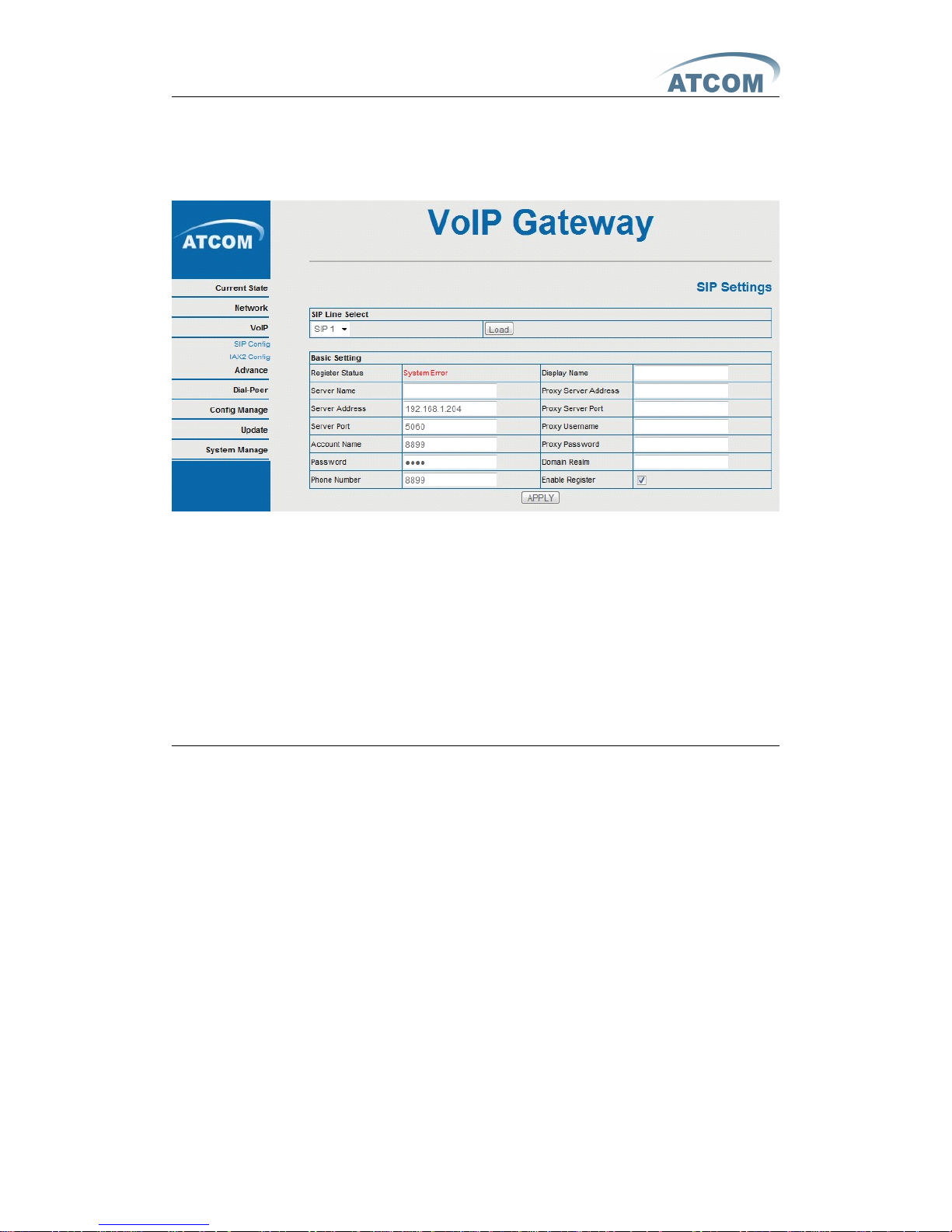
E nter
VoIP
VoIP
VoIP
VoIP
�
�
�
� SIP
SIP
SIP
SIP Config
Config
Config
Config
setting page and set the sip information
----Register Server Addr : sip server address;
----Register Server Port : sip server re register port;
----Register Username : username of your sip account;
----Register Password : password of your sip account;
----Register Number : Phone number of your sip account; the same as username if none
---- check Enable Register ;
T hen you can make
VoIP
calls if the WAN and SIP config is correct.
Notice: Please go to the “ Config Manage ” and save the config, otherwise you will lose the setting
after device reboot.
IAXConfig
IAXConfig
IAXConfig
IAXConfig
Page 6
AG-198 Quick Start Guide
ATCOM TECHNOLOGY CO.,L TD
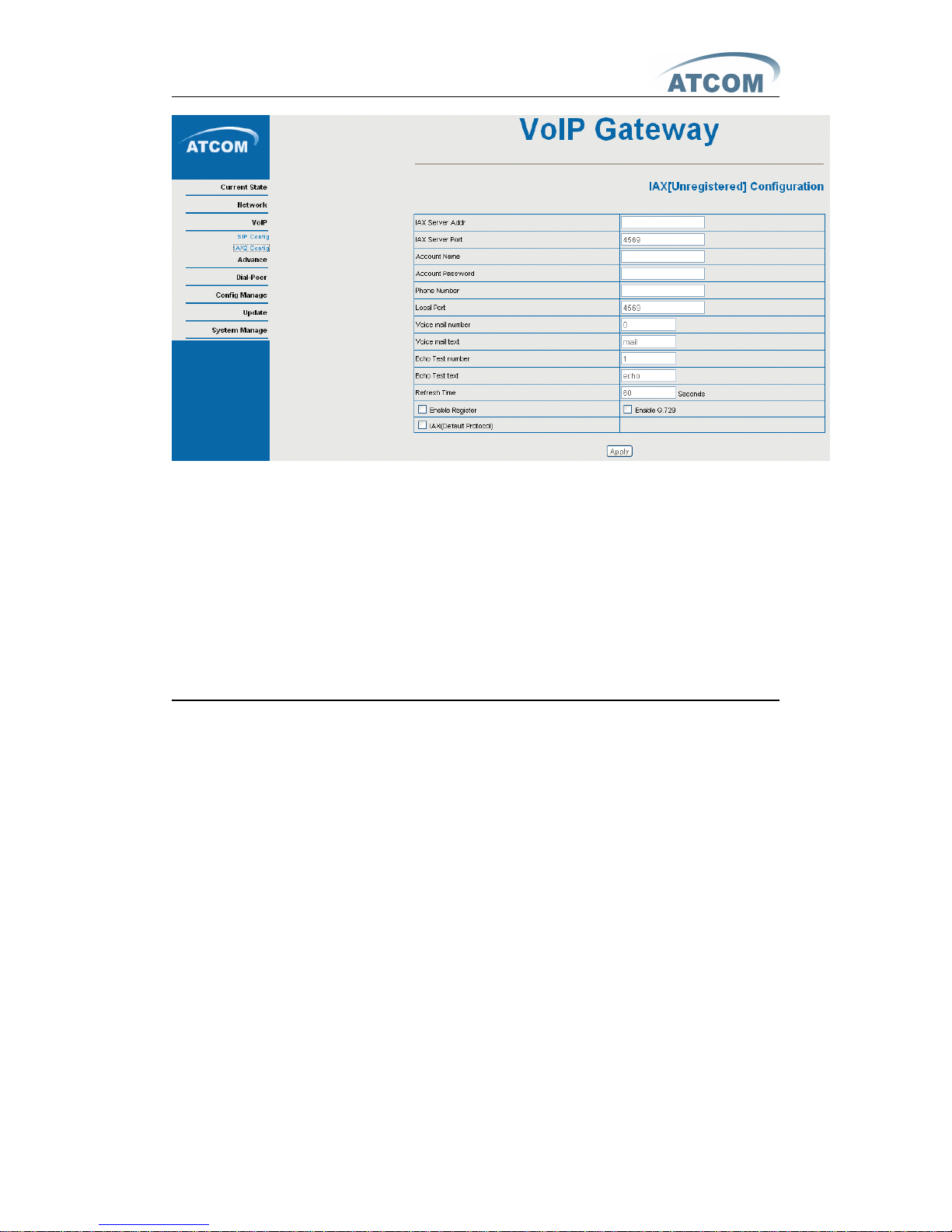
-----IAX Server Addr: IAX server address;
-----IAX Server Port: IAX server register port;
-----Account Name: username of your IAX account;
-----Account Password: Password of your IAX account.
-----Local port: Signal port of local,default port is 4569
-----Phone Number: Phone number of your IAX account; the same as username if none
-----Enable Register: enable or disable register
-----IAX(Default Protocol): If you want to use IAX account to call ,please select
IAX(Default Protocol), if not the system will choose SIP as default
T hen you can make
VoIP
calls if the WAN and IAX config is correct.
Notice: Please go to the “ Config Manage ” and save the config, otherwise you will lose the setting
after device reboot.
 Loading...